
CS 3220 Web and Internet Programming Web Application
CS 3220 Web and Internet Programming Web Application Hosting and Deployment Chengyu Sun California State University, Los Angeles
Common Types of Hosting Shared Hosting Dedicated Server, including Virtual Private Server (VPS) Various cloud hosting options (Iaa. S, Paa. S, Saa. S …)
About Shared Hosting Search "shared hosting" on Google Many websites on the same server Cheap and easy to use – many do not even require knowledge of HTML/CSS Limitations on what you can use and what you can do Suitable for static websites and sites with limited dynamic content
About Dedicated Server and VPS Full control of the OS, software, and applications on the server More expensive than shared hosting Require more knowledge of web development and system administration
Use Dedicated Server/VPC Hosting 1. Find a server 2. Configure networking 3. Install the necessary software 4. Package and deploy the web application 5. Additional configuration
Find a Server Option A: use a home computer Option B: use a virtual server in the cloud
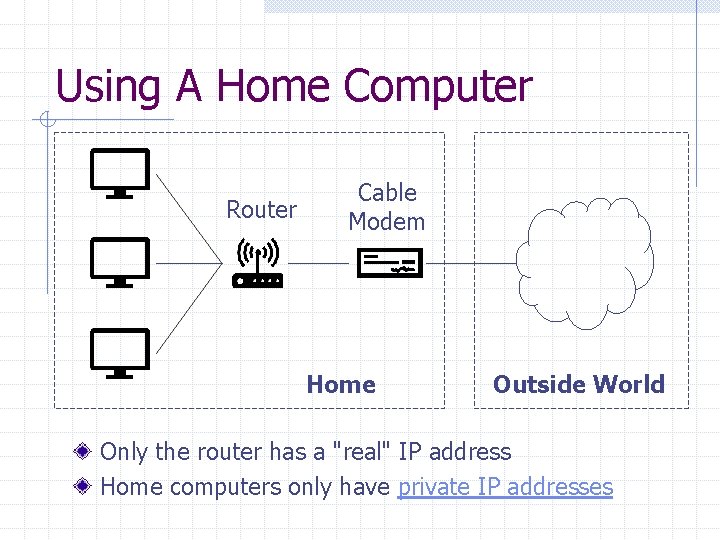
Using A Home Computer Router Cable Modem Home Outside World Only the router has a "real" IP address Home computers only have private IP addresses
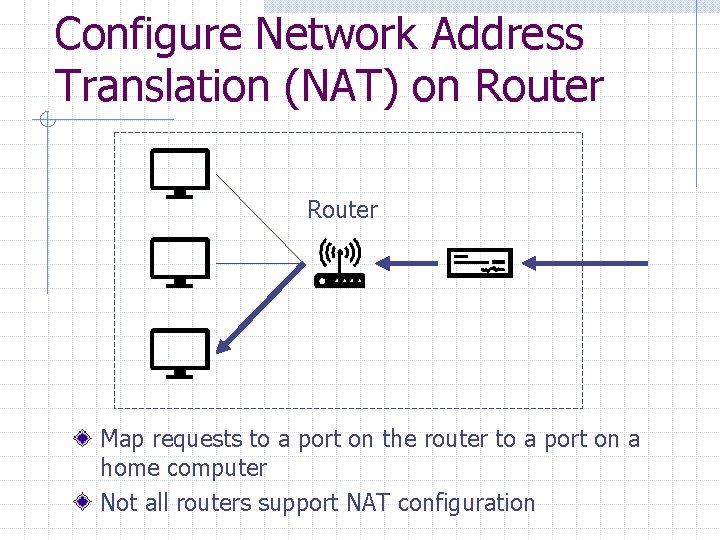
Configure Network Address Translation (NAT) on Router Map requests to a port on the router to a port on a home computer Not all routers support NAT configuration
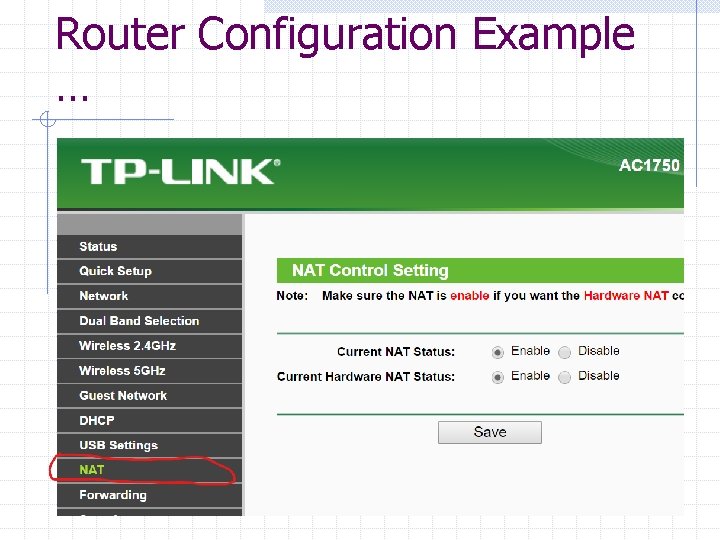
Router Configuration Example …
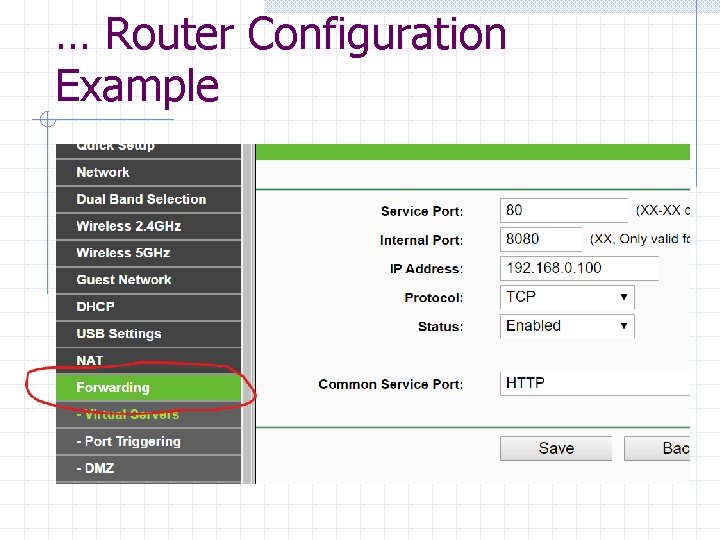
… Router Configuration Example
Configure Dynamic DNS Domain Name System (DNS) maps host names to IP addresses The IP address your ISP assigns to your router may change, so you'll need dynamic DNS Some dynamic DNS services: n n Dyn. com Noip. com
About Using a Home Computer As a Server Cheap Easy access and control Heat and noise Unreliable (e. g. power outage, hardware failure etc. )
Using a Virtual Server in Cloud Digital. Ocean Amazon Lightsail n Ligthsail is a simplified offering of Amazon EC 2
Using Digital. Ocean See video at https: //www. youtube. com/watch? v=fily n 4 i. Kk. UA
Droplet A "droplet" is a virtual server, a. k. a. virtual machine (VM) Operating System: Linux or Free. BSD Prices from $5 per month Google "digitalocean promotion" for some free credits (does require a credit card to sign up)
Access Droplet Use browser-based droplet console – username and password Use SSH – public/private key authentication
Using Linux and Command Line Free OS and free software Easy software management n https: //csns. calstatela. edu/wiki/content/cys un/notes/set_up_ubuntu Efficient for server environments n n No unnecessary software No GUI to take up resources
WAR File Web application ARchive A JAR file for packaging, distributing, and deploying Java web applications Create WAR files n n Eclipse Export -> Web -> WAR file Or use the command line tool jar or the build tool Maven
Deploy WAR Files to a Tomcat Server Use the Manager App n Need a user with the manager-gui role Or simply copy the WAR file to the webapps folder More options at http: //tomcat. apache. org/tomcat-8. 5 doc/deployer-howto. html
Additional Configuration – Domain Name and DNS Buy a domain name at Google Domains or other domain registrars n $12 per year for a. org domain Configure DNS to map the domain and host names to your servers
Addition Configuration – HTTPS Buy an SSL/TLS certificate or get a free one at Let's Encrypt Configure the server to use HTTPS n n Tomcat 8. 5 Nginx – a high-performance, easy-to-use web server
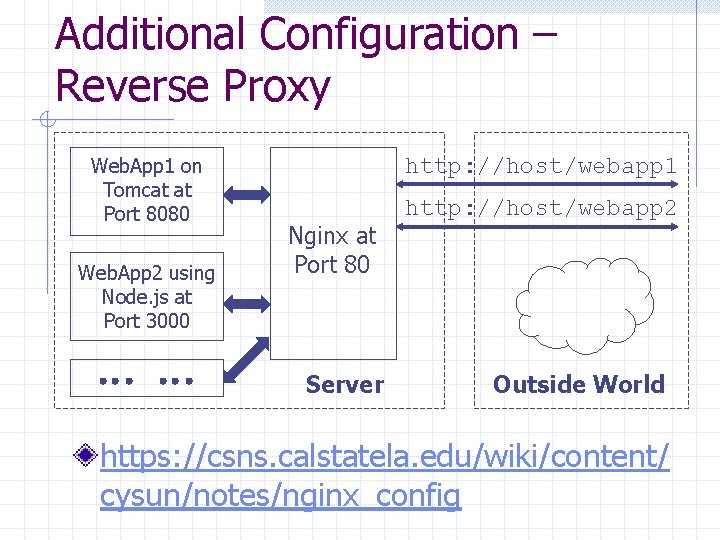
Additional Configuration – Reverse Proxy Web. App 1 on Tomcat at Port 8080 Web. App 2 using Node. js at Port 3000 http: //host/webapp 1 Nginx at Port 80 Server http: //host/webapp 2 Outside World https: //csns. calstatela. edu/wiki/content/ cysun/notes/nginx_config
About Reverse Proxy Expose only one port to the outside world Configure HTTPS only once in Nginx Use Nginx for serving static resources, request logging, and so on
Final Words The most important thing about running a website is SECURITY n n Use long, random password Reduce attack surface w Expose minimum ports to the outside world w Enable minimum services (e. g. do not use Tomcat Manager) n Pay attention to application security (e. g. SQL injection) And Have Fun!
- Slides: 24