
CS 3204 Operating Systems Lecture 2 Godmar Back
CS 3204 Operating Systems Lecture 2 Godmar Back CS 3204 Fall 2006
Announcements • Submit prerequisite forms by Tuesday if you haven’t already • Reading assignment is Chapter 1 • Project 0 due Sep 3, 11: 50 pm CS 3204 Fall 2006 10/24/2020 2
Grading • Tentative breakdown (subject to change): – 15% Midterm – 30% Final – 55% Projects • Not grading on a standard scale; grade will be based on a curve: – Median will divide B- and B – Grading on a curve means every assignment is important • Additional stipulations to pass the class (aka “Auto-Fail Rules”) – Must pass all tests of Project 2 by end of semester – Must show “reasonable effort” in both Project 3 & 4 – Necessary, not sufficient conditions CS 3204 Fall 2006 10/24/2020 3
Honor Code • Will be strictly enforced in this class • Do not cheat – Observe collaboration policy outlined in syllabus • Will use MOSS for software cheating detection – Do not borrow code from other offerings – Follow collaboration policy • Read all policies posted on the website – “I was not aware…” is no excuse • If in doubt, ask! CS 3204 Fall 2006 10/24/2020 4
Acknowledgements • Will draw in lectures from – Silberschatz et al’s book (“Dinosaur book”) – And other texts, in particular Stalling’s book and Tannenbaum’s Modern Operating Systems – Course material created in other courses using Pintos • E. g. , CS 140 @ Stanford, CS 326 @ U San Francisco – Course material created by Mc. Quain & other VT instructors – And other sources CS 3204 Fall 2006 10/24/2020 5
Outline for today • • Motivation for teaching OS Brief history A survey of core issues OS address What you should get out of this class CS 3204 Fall 2006 10/24/2020 6
Why are OS interesting? • OS are “magic” – Most people don’t understand them – including sysadmins and computer scientists! • OS are incredibly complex systems – “Hello, World” – program really 1 million lines of code • Studying OS is learning how to deal with complexity – Abstractions (+interfaces) – Modularity (+structure) – Iteration (+learning from experience) CS 3204 Fall 2006 10/24/2020 7
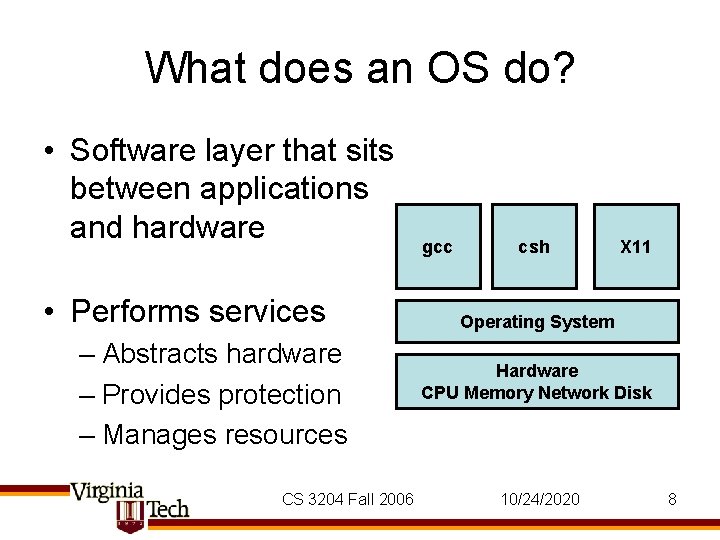
What does an OS do? • Software layer that sits between applications and hardware • Performs services – Abstracts hardware – Provides protection – Manages resources CS 3204 Fall 2006 gcc csh X 11 Operating System Hardware CPU Memory Network Disk 10/24/2020 8
Core OS Functions • Hardware abstraction through interfaces • Protection: – Preemption – Interposition – Privilege (user/kernel mode) • Resource Management – Virtualizing of resources – Scheduling of resources CS 3204 Fall 2006 10/24/2020 9
OS vs Kernel • Can take a wider view or a narrower definition what an OS is • Wide view: Windows, Linux, Mac OSX are operating systems – Includes system programs, system libraries, servers, shells, GUI etc. • Narrow definition: – OS often equated with the kernel. – The Linux kernel; the Windows executive – the special piece of software that runs with special privileges and actually controls the machine. • In this class, usually mean the narrow definition. • For most people, though, the wide view is what counts. CS 3204 Fall 2006 10/24/2020 10
Evolution of OS • OSs as a library – Abstracts away hardware, provide neat interfaces • Makes software portable; allows software evolution – Single user, single program computers • No need for protection: no malicious users, no interactions between programs – Disadvantages of uniprogramming model • Expensive • Poor utilization CS 3204 Fall 2006 10/24/2020 11
Evolution of OS (II) • Invent multiprogramming – First multi-programmed batch systems, then timesharing systems • Idea: – Load multiple programs in memory – Do something else while one program is waiting, don’t sit idle (see next slide) • Complexity increases: – What if programs interfere with each other (wild writes) – What if programs don’t relinquish control (infinite loop) CS 3204 Fall 2006 10/24/2020 12
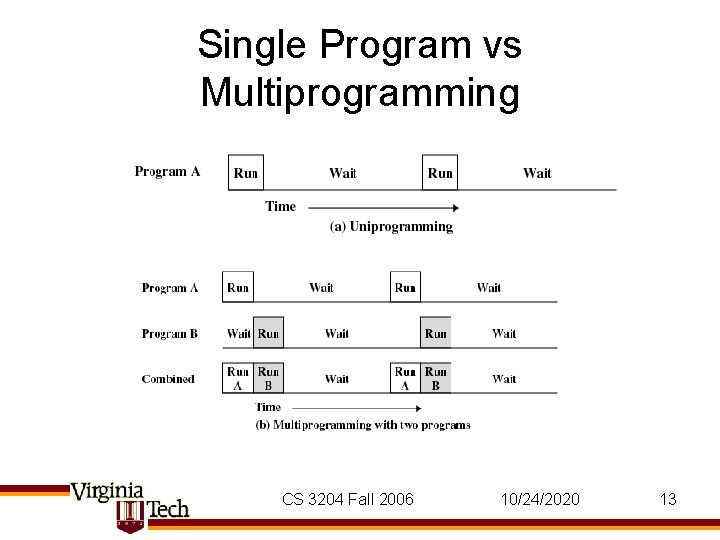
Single Program vs Multiprogramming CS 3204 Fall 2006 10/24/2020 13
Protection • Multiprogramming requires isolation • OS must protect/isolate applications from each other, and OS from applications • This requirement is absolute – In Pintos also: if one application crashes, kernel should not! Bulletproof. • Three techniques – Preemption – Interposition – Privilege CS 3204 Fall 2006 10/24/2020 14
Protection #1: Preemption • Resource can be given to program and access can be revoked – Example: CPU, Memory, Printer, “abstract” resources: files, sockets • Example: CPU Preemption using interrupts – Hardware timer interrupt invokes OS, OS checks if current program should be preempted, done every 1 ms in Linux – Solves infinite loop problem! • Q. : Does it work with all resources equally? CS 3204 Fall 2006 10/24/2020 15
Protection #2: Interposition • OS hides the hardware • Application have to go through OS to access resources • OS can interpose checks: – Validity (Address Translation) – Permission (Security Policy) – Resource Constraints (Quotas) CS 3204 Fall 2006 10/24/2020 16
Protection #3: Privilege • Two fundamental modes: – “kernel mode” – privileged • aka system, supervisor or monitor mode • Intel calls its PL 0, Privilege Level 0 on x 86 – “user mode” – non-privileged • PL 3 on x 86 • Bit in CPU – controls operation of CPU – Protection operations can only be performed in kernel mode. Example: hlt – Carefully control transitions between user & kernel mode CS 3204 Fall 2006 10/24/2020 17
OS as a Resource Manager • OS provides illusions, examples: – every program is run on its own CPU – every program has all the memory of the machine (and more) – every program has its own I/O terminal • “Stretches” resources – Possible because resource usage is bursty, typically • Increases utilization CS 3204 Fall 2006 10/24/2020 18
Resource Management (2) • Multiplexing increases complexity • Car Analogy (by Rosenblum): – Dedicated road per car would be incredibly inefficient, so cars share freeway. Must manage this. – (abstraction) different lanes per direction – (synchronization) traffic lights – (increase capacity) build more roads • More utilization creates contention – – (decrease demand) slow down (backoff/retry) use highway during off-peak hours (refuse service, quotas) force people into public transportation (system collapse) traffic jams CS 3204 Fall 2006 10/24/2020 19
Resource Management (3) • OS must decide who gets to use what resource • Approach 1: have admin (boss) tell it • Approach 2: have user tell it – What if user lies? What if user doesn’t know? • Approach 3: figure it out through feedback – Problem: how to tell power users from resource hogs? CS 3204 Fall 2006 10/24/2020 20
Goals for Resource Management • Fairness – Assign resources equitably • Differential Responsiveness – Cater to individual applications’ needs • Efficiency – Maximize throughput, minimize response time, support as many apps as you can • These goals are often conflicting. – All about trade-offs CS 3204 Fall 2006 10/24/2020 21
Evolution of OS (III) • Recent (last 15 years or so) trends • Multiprocessing – SMP: symmetric multiprocessors – OS now must manage multiple CPUs with equal access to shared memory • Network Operating Systems – Most current OS are NOS. – Users are using systems that span multiple machines; OS must provide services necessary to achieve that • Distributed Operating Systems – Multiple machines appear to user as single image. – Maybe future? Difficult to do. CS 3204 Fall 2006 10/24/2020 22
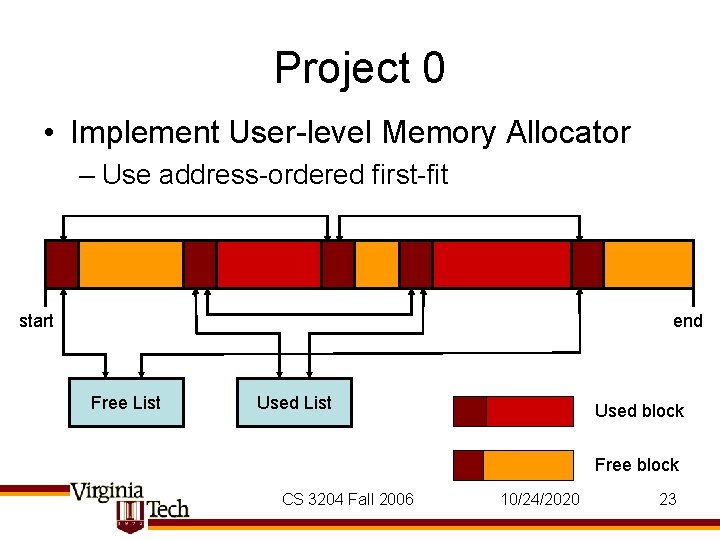
Project 0 • Implement User-level Memory Allocator – Use address-ordered first-fit start end Free List Used block Free block CS 3204 Fall 2006 10/24/2020 23
- Slides: 23