
CS 2422 Assembly Language System Programming November 21
CS 2422 Assembly Language & System Programming November 21, 2006
Today’s Topics (1/2) • Assignment 3 – Windows (graphics mode) programming. – Linking to an assembly procedure. – Setting up Visual C++ 2005 Express.
References • Setting up Platform SDK: see the course webpage. • Setting up Visual C++ 6. 0 to compile and link assembly code with C or C++ code: included in the download file • the. Forger’s Win 32 API Tutorial http: //winprog. org/tutorial. (Read at least the first two articles. )
Demo • The program creates a “mosaic” effect on your windows desktop. • You need to set your display to use 24 -bit or 32 -bit colors. • Using ML. exe /Zi option to enable debugging directly within your assembly code at Visual C++. (Already done for you if you use VC++ 2005 Express. )
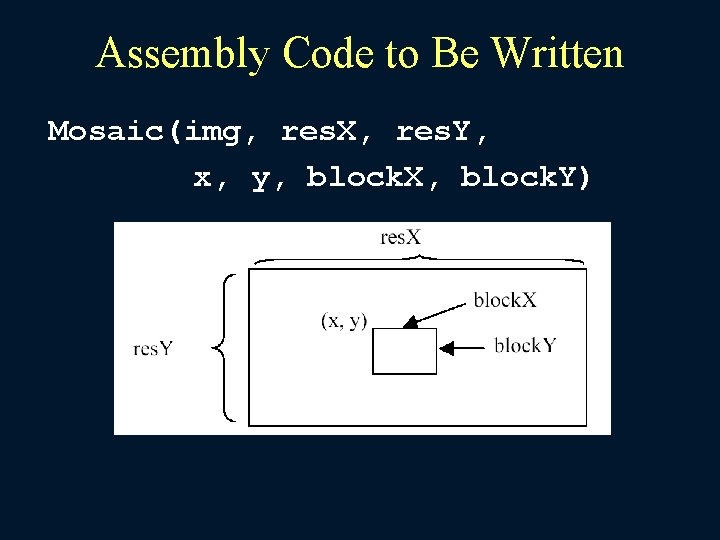
Assembly Code to Be Written Mosaic(img, res. X, res. Y, x, y, block. X, block. Y)
Example Code • Mosaic_C_version() in main. c shows the algorithm. • To run the assembly code, remember to comment out: #define MOSAIC_C_VERSION • The Mosaic procedure in mosaic. asm gives an example of accessing parameters and local variables.
![Img: a 2 D Array • The img[] is conceptually 2 D, but stored](http://slidetodoc.com/presentation_image_h/0aaaaa225880e920667225873980406f/image-7.jpg "Img: a 2 D Array • The img[] is conceptually 2 D, but stored")
Img: a 2 D Array • The img[] is conceptually 2 D, but stored as if it is a 1 D array. • A pixel at location (x, y) is stored at img[x + y * x. Res] • Each pixel stores the Red, Green, Blue components of a color in 4 bytes: struct { BYTE } RGBQUAD; rgb. Blue; rgb. Green; rgb. Red; rgb. Reserved;
Basic Structure of a Windows Program • Win. Main procedure. • Win. Proc procedure. • Section 11. 2 explains the above in assembly. The C version in main. c might be easier to read. • An excellent introductory material can be found at: http: //winprog. org/tutorial. (Read at least the first two articles. )
Win. Main Procedure Every Windows application needs a startup procedure, usually named Win. Main, which is responsible for the following tasks: • Get a handle to the current program • Load the program’s icon and mouse cursor • Register the program’s main window class and identify the procedure that will process event messages for the window • Create the main window • Show and update the main window • Begin a loop that receives and dispatches messages
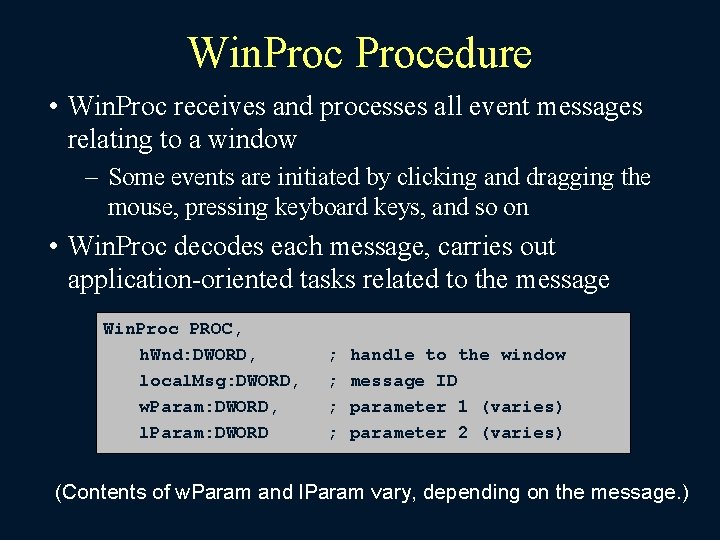
Win. Procedure • Win. Proc receives and processes all event messages relating to a window – Some events are initiated by clicking and dragging the mouse, pressing keyboard keys, and so on • Win. Proc decodes each message, carries out application-oriented tasks related to the message Win. Proc PROC, h. Wnd: DWORD, local. Msg: DWORD, w. Param: DWORD, l. Param: DWORD ; ; handle to the window message ID parameter 1 (varies) parameter 2 (varies) (Contents of w. Param and l. Param vary, depending on the message. )
What Will You Learn from This Assignment? • • Linking C and Assembly. The first step in Windows programming. Array processing. Implementation of nontrivial loops.
Today’s Topic (2/2) • Chapter 1 of Beck’s “System Software” book.
Study Guide • 1. 1 Introduction • 1. 2 System Software and Machine Architecture • 1. 3 The Simplified Instructional Computer (SIC) – SIC Machine Architecture – SIC/XE Machine Architecture – SIC Programming Examples
Introduction • Definition of System software – System software consists of a variety of programs that support the operation of a computer • E. g. of system software – Text editor, compiler, loader or linker, debugger, macro processors, operating system, database management systems, software engineering tools, ….
System Software and Machine Architecture (1/2) • One characteristic in which most system software differs from application software is machine dependency • System programs are intended to support the operation and use of the computer itself, rather than any particular application.
System Software and Machine Architecture (2/2) • Because most system software is machinedependent, we must include real machines and real pieces of software in our study. • Simplified Instructional Computer (SIC) – SIC is a hypothetical computer that has been carefully designed to include the hardware features most often found on real machines, while avoiding unusual or irrelevant complexities
The Simplified Instructional Computer (SIC) • Like many other products, SIC comes in two versions – The standard model – An XE version • “extra equipments”, “extra expensive” • The two versions has been designed to be upward compatible
SIC Machine Architecture (1/7) • Memory – Memory consists of 8 -bit bytes – Any 3 consecutive bytes form a word (24 bits) – Total of 32768 (215) bytes in the computer memory
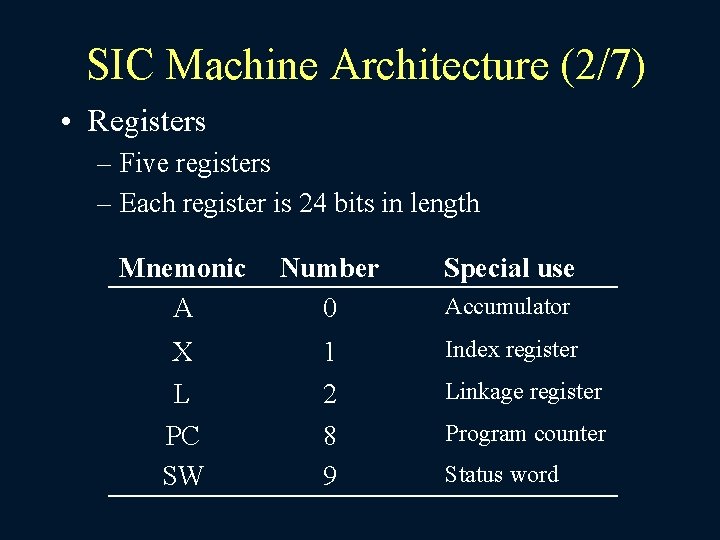
SIC Machine Architecture (2/7) • Registers – Five registers – Each register is 24 bits in length Mnemonic A Number 0 Special use X L PC SW 1 2 8 9 Index register Accumulator Linkage register Program counter Status word
SIC Machine Architecture (3/7) • Data Formats – Integers are stored as 24 -bit binary number – 2’s complement representation for negative values – Characters are stored using 8 -bit ASCII codes – No floating-point hardware on the standard version of SIC
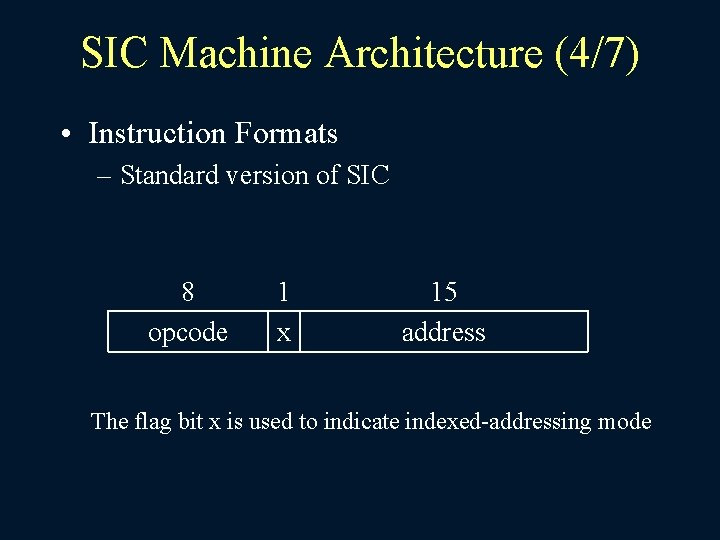
SIC Machine Architecture (4/7) • Instruction Formats – Standard version of SIC 8 opcode 1 x 15 address The flag bit x is used to indicate indexed-addressing mode
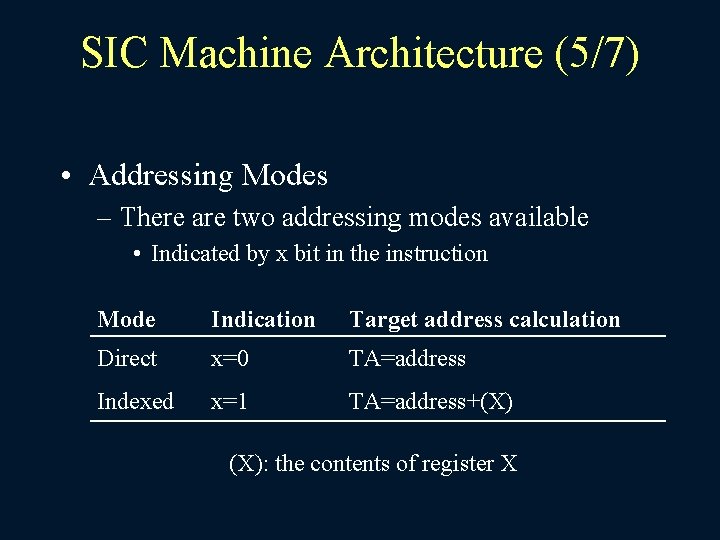
SIC Machine Architecture (5/7) • Addressing Modes – There are two addressing modes available • Indicated by x bit in the instruction Mode Indication Target address calculation Direct x=0 TA=address Indexed x=1 TA=address+(X) (X): the contents of register X
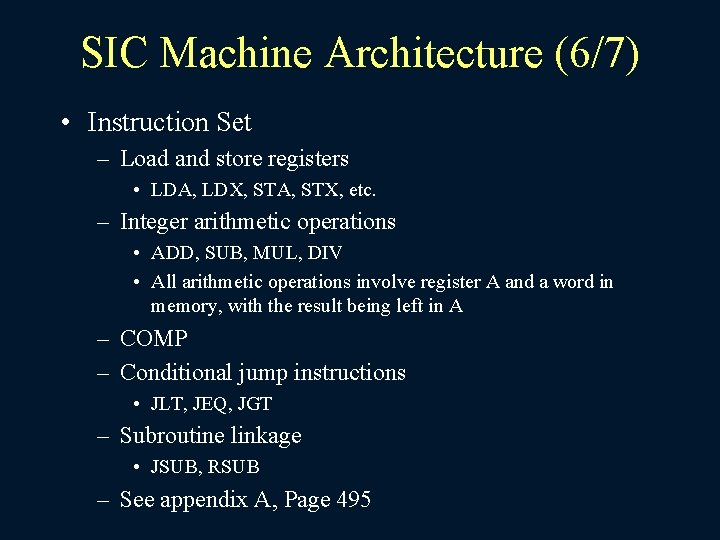
SIC Machine Architecture (6/7) • Instruction Set – Load and store registers • LDA, LDX, STA, STX, etc. – Integer arithmetic operations • ADD, SUB, MUL, DIV • All arithmetic operations involve register A and a word in memory, with the result being left in A – COMP – Conditional jump instructions • JLT, JEQ, JGT – Subroutine linkage • JSUB, RSUB – See appendix A, Page 495
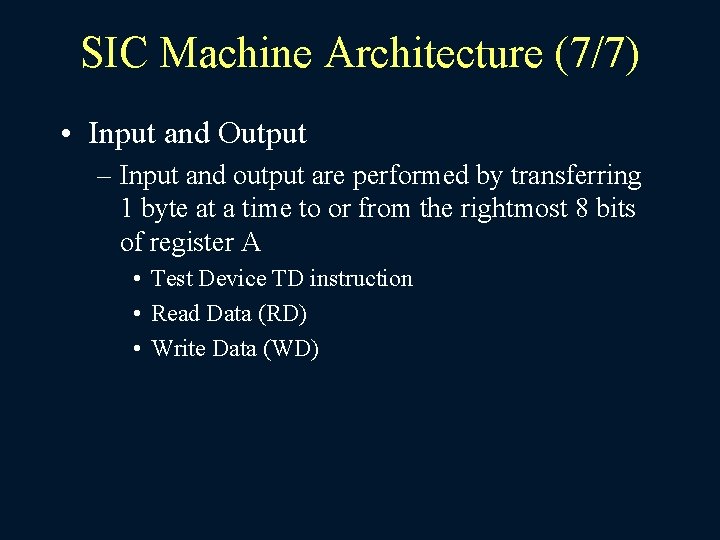
SIC Machine Architecture (7/7) • Input and Output – Input and output are performed by transferring 1 byte at a time to or from the rightmost 8 bits of register A • Test Device TD instruction • Read Data (RD) • Write Data (WD)
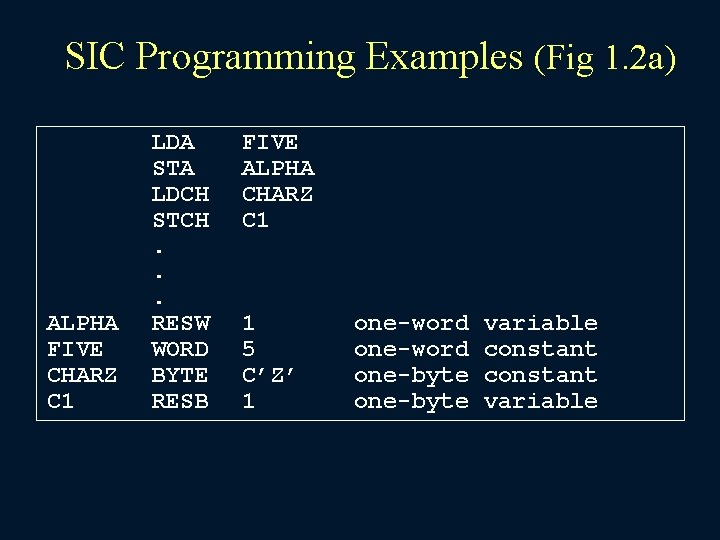
SIC Programming Examples (Fig 1. 2 a) ALPHA FIVE CHARZ C 1 LDA STA LDCH STCH. . . RESW WORD BYTE RESB FIVE ALPHA CHARZ C 1 1 5 C’Z’ 1 one-word one-byte variable constant variable
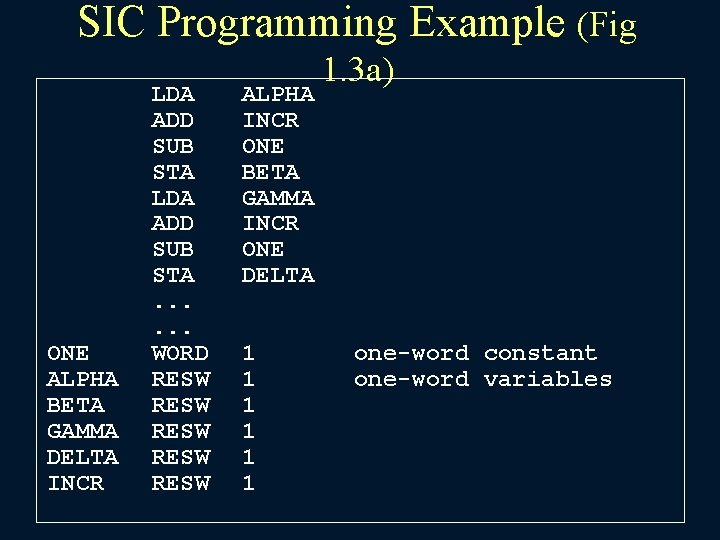
SIC Programming Example (Fig ONE ALPHA BETA GAMMA DELTA INCR LDA ADD SUB STA. . . WORD RESW RESW ALPHA INCR ONE BETA GAMMA INCR ONE DELTA 1 1 1 1. 3 a) one-word constant one-word variables
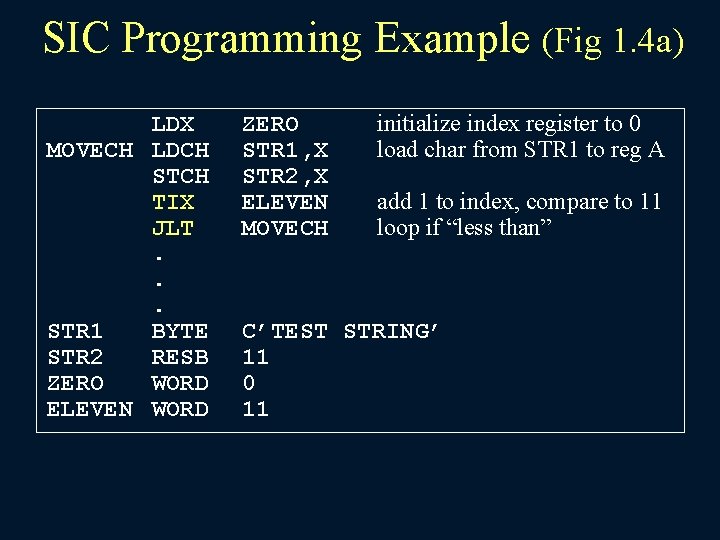
SIC Programming Example (Fig 1. 4 a) LDX MOVECH LDCH STCH TIX JLT. . . STR 1 BYTE STR 2 RESB ZERO WORD ELEVEN WORD ZERO STR 1, X STR 2, X ELEVEN MOVECH initialize index register to 0 load char from STR 1 to reg A add 1 to index, compare to 11 loop if “less than” C’TEST STRING’ 11 0 11
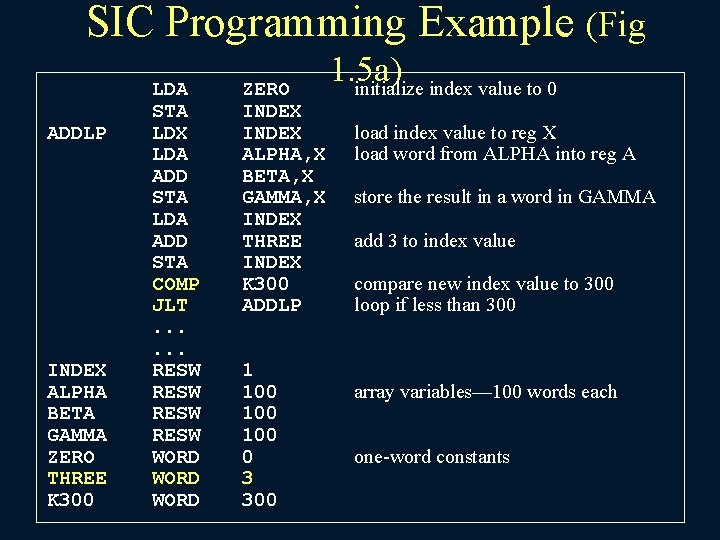
SIC Programming Example (Fig ADDLP INDEX ALPHA BETA GAMMA ZERO THREE K 300 LDA STA LDX LDA ADD STA COMP JLT. . . RESW WORD ZERO INDEX ALPHA, X BETA, X GAMMA, X INDEX THREE INDEX K 300 ADDLP 1 100 100 0 3 300 1. 5 a) initialize index value to 0 load index value to reg X load word from ALPHA into reg A store the result in a word in GAMMA add 3 to index value compare new index value to 300 loop if less than 300 array variables— 100 words each one-word constants
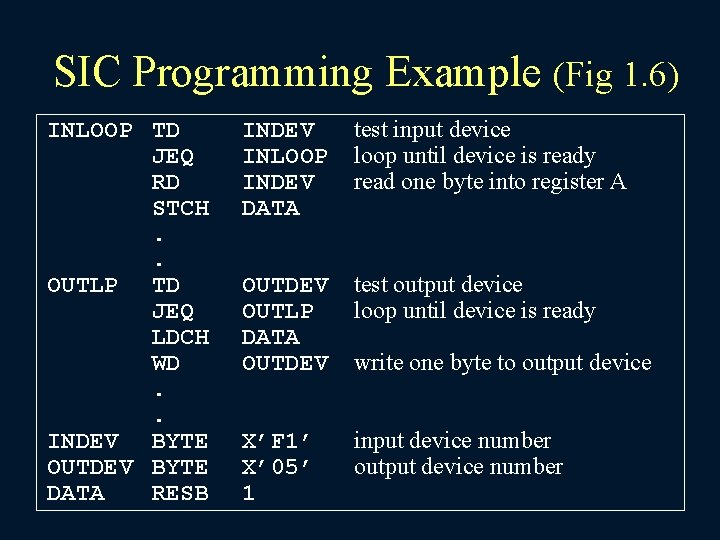
SIC Programming Example (Fig 1. 6) INLOOP TD JEQ RD STCH. . OUTLP TD JEQ LDCH WD. . INDEV BYTE OUTDEV BYTE DATA RESB INDEV INLOOP INDEV DATA test input device loop until device is ready read one byte into register A OUTDEV OUTLP DATA OUTDEV test output device loop until device is ready X’F 1’ X’ 05’ 1 input device number output device number write one byte to output device
SIC/XE Machine Architecture (1/13) • Memory – Maximum memory available on a SIC/XE system is 1 megabyte (220 bytes)
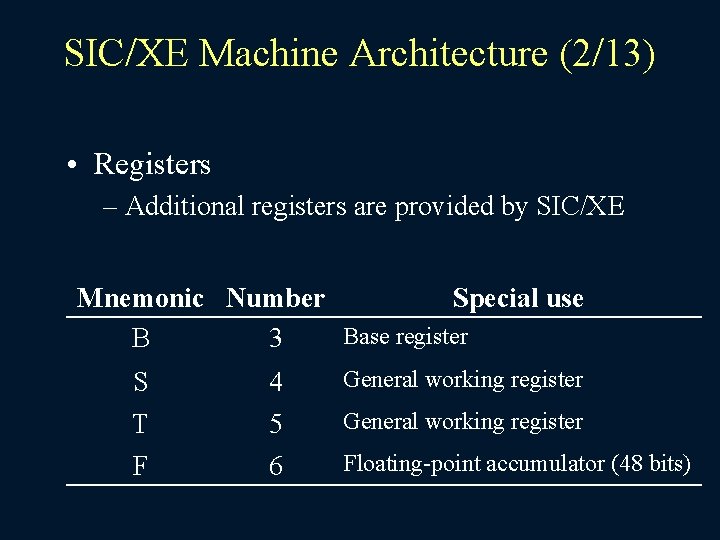
SIC/XE Machine Architecture (2/13) • Registers – Additional registers are provided by SIC/XE Mnemonic Number Special use Base register B 3 S T F 4 5 6 General working register Floating-point accumulator (48 bits)
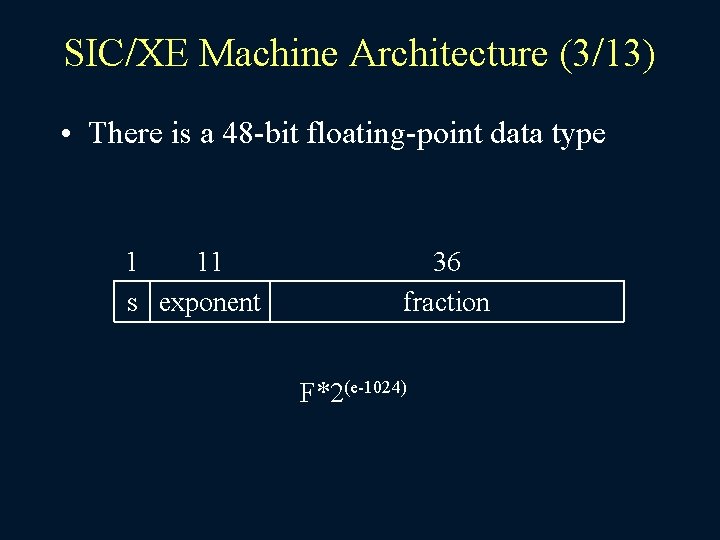
SIC/XE Machine Architecture (3/13) • There is a 48 -bit floating-point data type 1 11 s exponent 36 fraction F*2(e-1024)
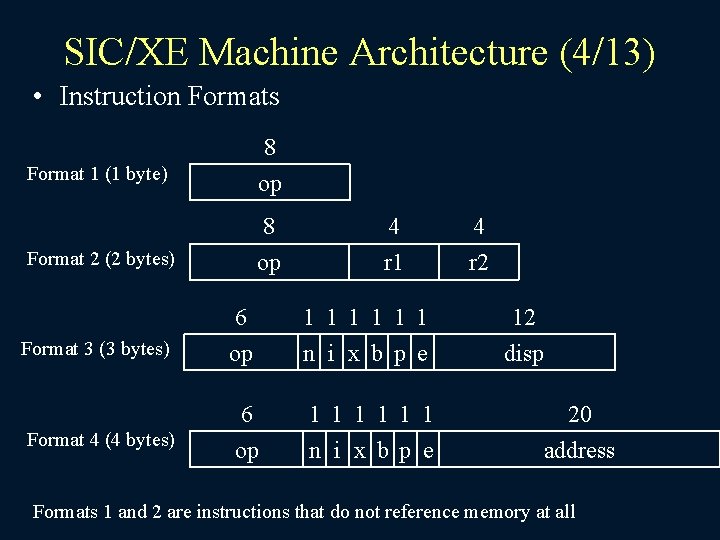
SIC/XE Machine Architecture (4/13) • Instruction Formats 8 op Format 1 (1 byte) 8 op Format 2 (2 bytes) Format 3 (3 bytes) Format 4 (4 bytes) 4 r 1 6 op 1 1 1 n i x b p e 4 r 2 12 disp 20 address Formats 1 and 2 are instructions that do not reference memory at all
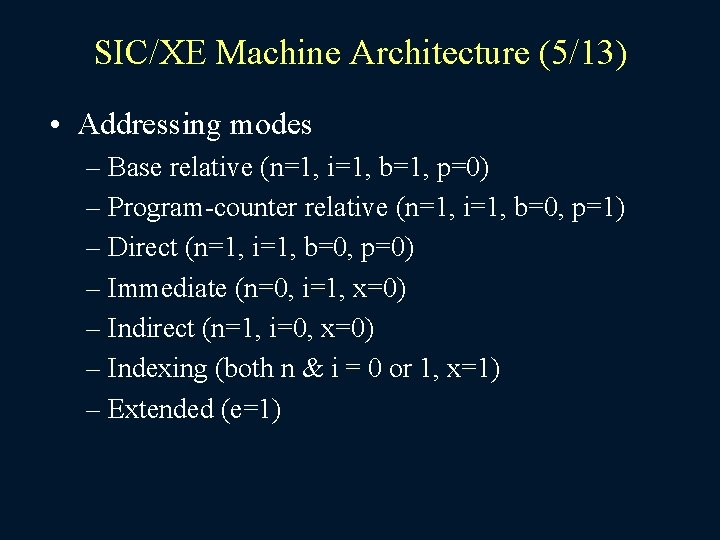
SIC/XE Machine Architecture (5/13) • Addressing modes – Base relative (n=1, i=1, b=1, p=0) – Program-counter relative (n=1, i=1, b=0, p=1) – Direct (n=1, i=1, b=0, p=0) – Immediate (n=0, i=1, x=0) – Indirect (n=1, i=0, x=0) – Indexing (both n & i = 0 or 1, x=1) – Extended (e=1)
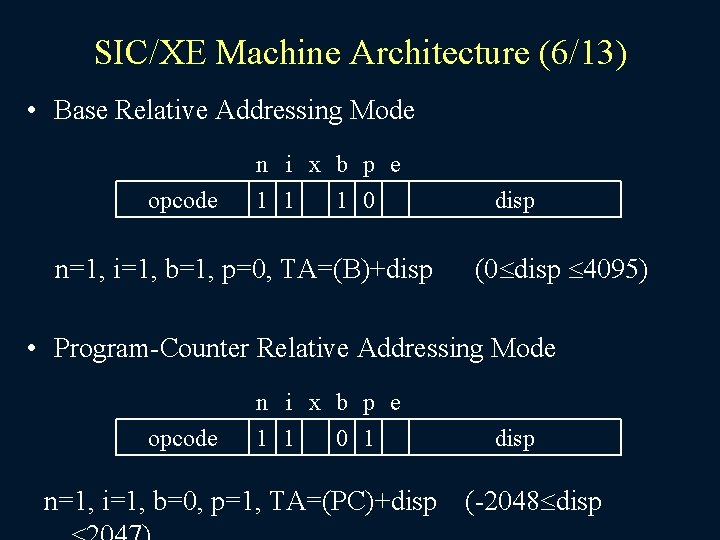
SIC/XE Machine Architecture (6/13) • Base Relative Addressing Mode opcode n i x b p e 1 1 1 0 n=1, i=1, b=1, p=0, TA=(B)+disp (0 disp 4095) • Program-Counter Relative Addressing Mode opcode n i x b p e 1 1 0 1 n=1, i=1, b=0, p=1, TA=(PC)+disp (-2048 disp
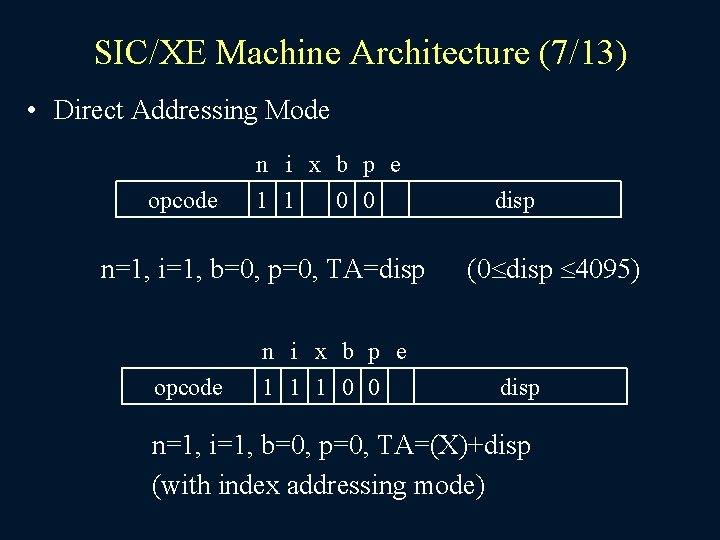
SIC/XE Machine Architecture (7/13) • Direct Addressing Mode opcode n i x b p e 1 1 0 0 n=1, i=1, b=0, p=0, TA=disp opcode n i x b p e 1 1 1 0 0 disp (0 disp 4095) disp n=1, i=1, b=0, p=0, TA=(X)+disp (with index addressing mode)
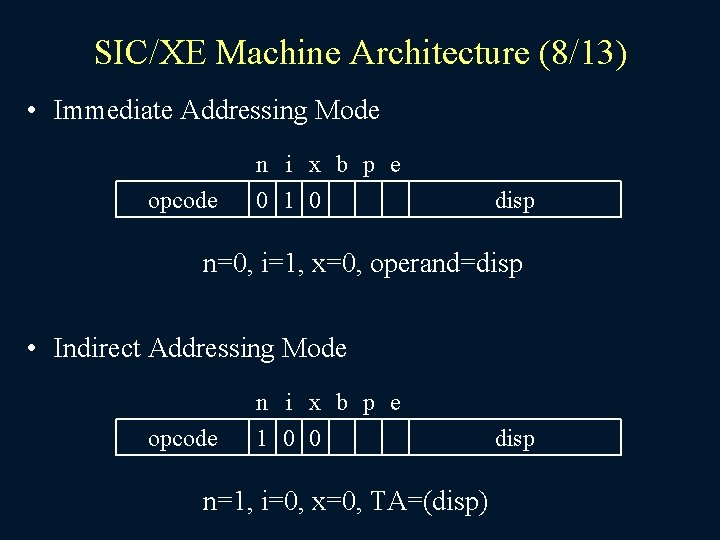
SIC/XE Machine Architecture (8/13) • Immediate Addressing Mode opcode n i x b p e 0 1 0 disp n=0, i=1, x=0, operand=disp • Indirect Addressing Mode opcode n i x b p e 1 0 0 n=1, i=0, x=0, TA=(disp) disp
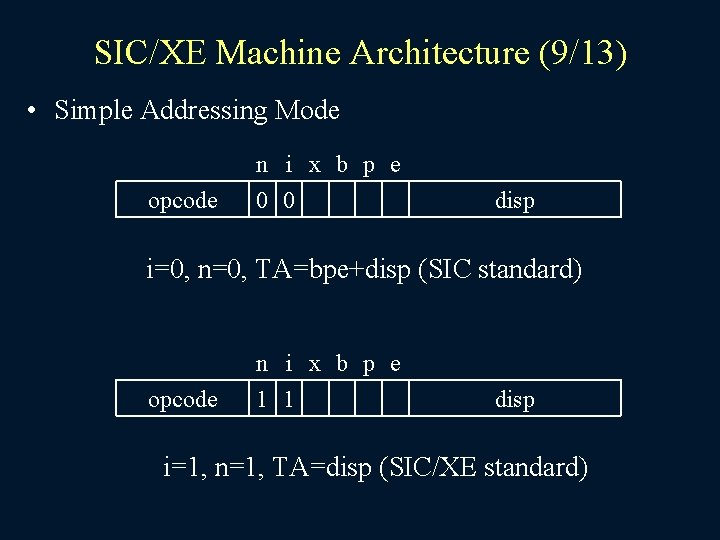
SIC/XE Machine Architecture (9/13) • Simple Addressing Mode opcode n i x b p e 0 0 disp i=0, n=0, TA=bpe+disp (SIC standard) opcode n i x b p e 1 1 disp i=1, n=1, TA=disp (SIC/XE standard)
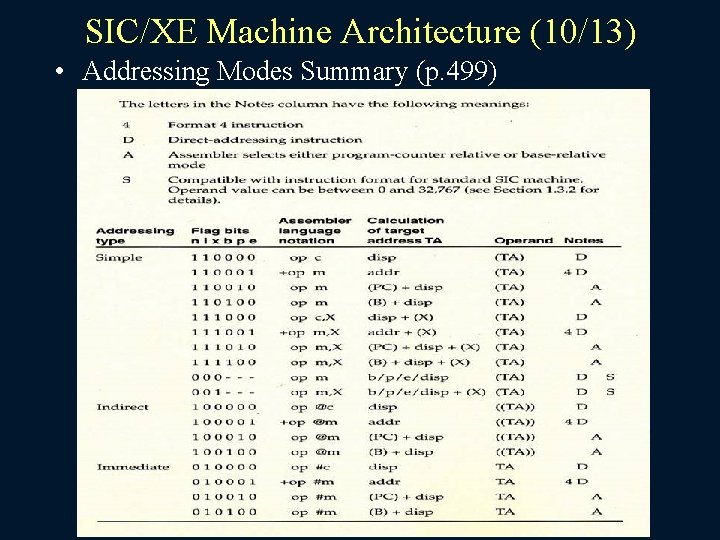
SIC/XE Machine Architecture (10/13) • Addressing Modes Summary (p. 499)
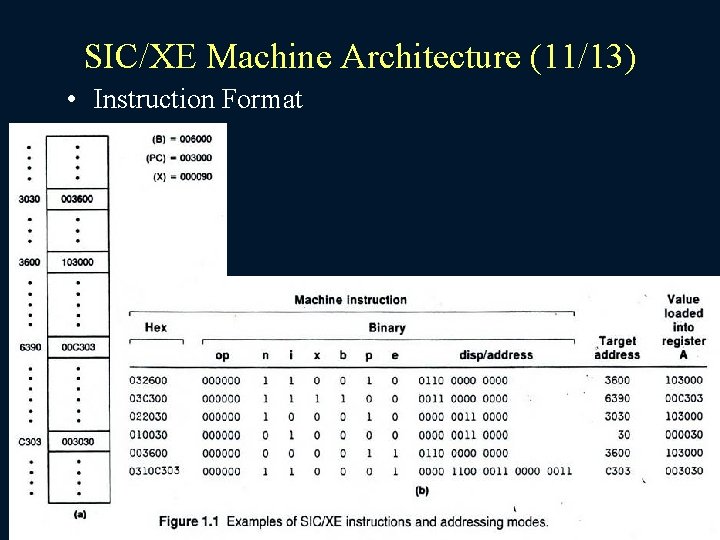
SIC/XE Machine Architecture (11/13) • Instruction Format
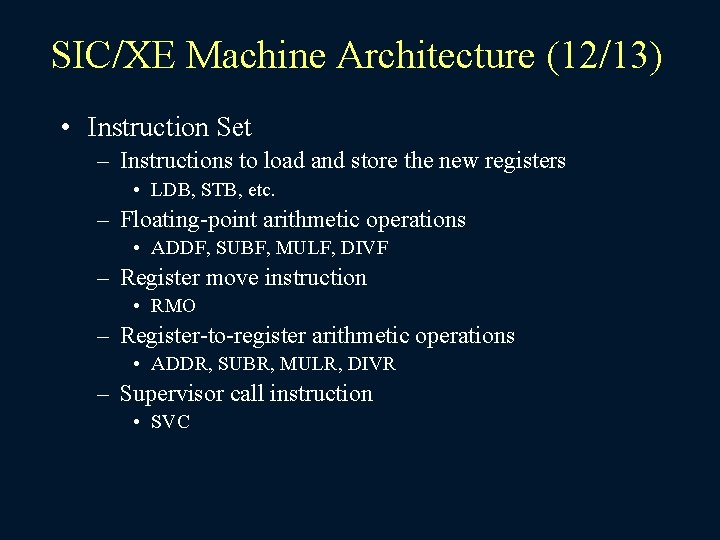
SIC/XE Machine Architecture (12/13) • Instruction Set – Instructions to load and store the new registers • LDB, STB, etc. – Floating-point arithmetic operations • ADDF, SUBF, MULF, DIVF – Register move instruction • RMO – Register-to-register arithmetic operations • ADDR, SUBR, MULR, DIVR – Supervisor call instruction • SVC
SIC/XE Machine Architecture (13/13) • Input and Output – There are I/O channels that can be used to perform input and output while the CPU is executing other instructions
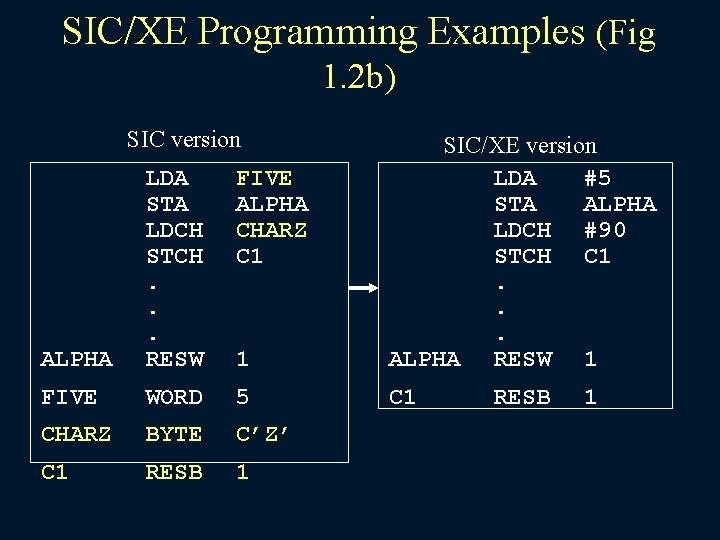
SIC/XE Programming Examples (Fig 1. 2 b) SIC version FIVE ALPHA CHARZ C 1 ALPHA LDA STA LDCH STCH. . . RESW 1 SIC/XE version LDA #5 STA ALPHA LDCH #90 STCH C 1. . . ALPHA RESW 1 FIVE WORD 5 C 1 CHARZ BYTE C’Z’ C 1 RESB 1
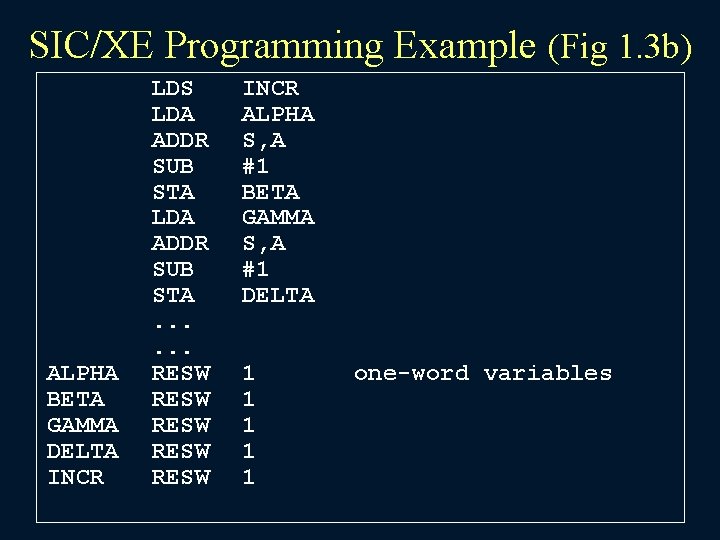
SIC/XE Programming Example (Fig 1. 3 b) ALPHA BETA GAMMA DELTA INCR LDS LDA ADDR SUB STA. . . RESW RESW INCR ALPHA S, A #1 BETA GAMMA S, A #1 DELTA 1 1 1 one-word variables
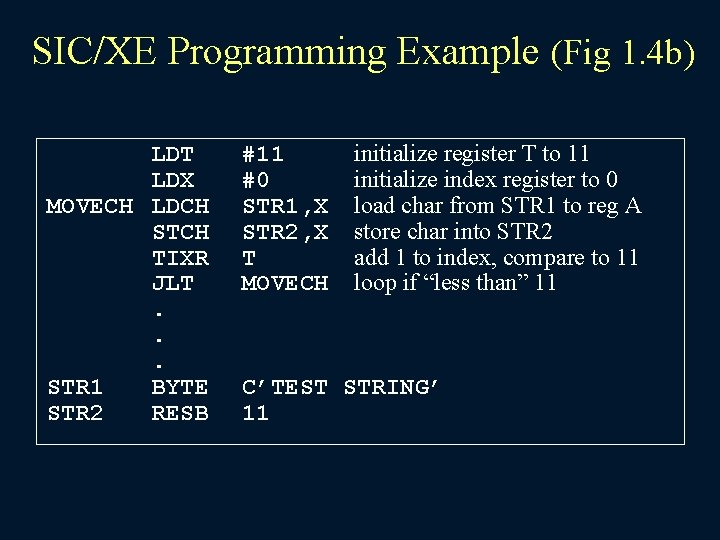
SIC/XE Programming Example (Fig 1. 4 b) LDT LDX MOVECH LDCH STCH TIXR JLT. . . STR 1 BYTE STR 2 RESB #11 #0 STR 1, X STR 2, X T MOVECH initialize register T to 11 initialize index register to 0 load char from STR 1 to reg A store char into STR 2 add 1 to index, compare to 11 loop if “less than” 11 C’TEST STRING’ 11
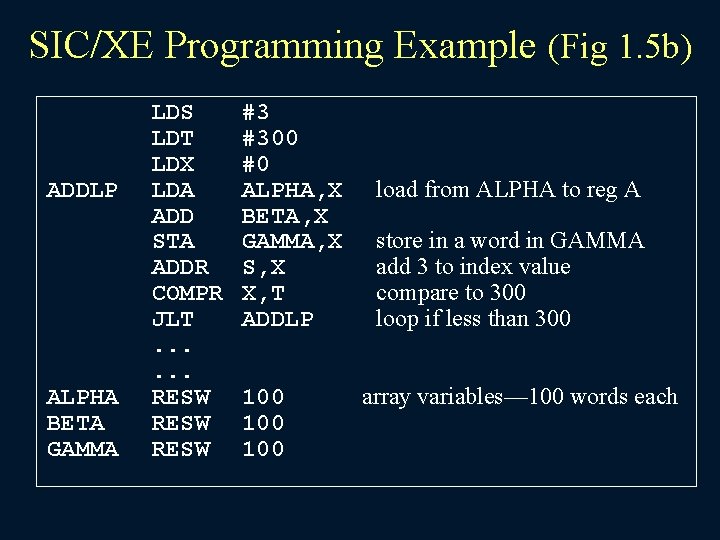
SIC/XE Programming Example (Fig 1. 5 b) ADDLP ALPHA BETA GAMMA LDS LDT LDX LDA ADD STA ADDR COMPR JLT. . . RESW #3 #300 #0 ALPHA, X BETA, X GAMMA, X S, X X, T ADDLP 100 100 load from ALPHA to reg A store in a word in GAMMA add 3 to index value compare to 300 loop if less than 300 array variables— 100 words each
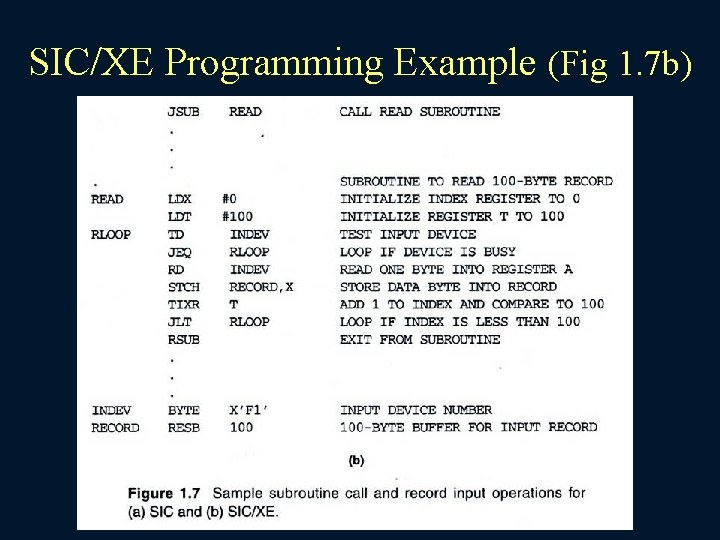
SIC/XE Programming Example (Fig 1. 7 b)
- Slides: 47