
CS 235 User Interface Design April 16 Class


- Slides: 47
CS 235: User Interface Design April 16 Class Meeting Department of Computer Science San Jose State University Spring 2015 Instructor: Ron Mak www. cs. sjsu. edu/~mak
Mobile Application Demo Schedule o Tuesday, April 21 n o Unknown, UXability, X Factor Thursday, April 23 n Innovative Designers, Team Four, Thundercats Computer Science Dept. Spring 2015: April 16 CS 235: User Interface Design © R. Mak 2
Mobile Application Prototype Reports o A short report: n n What is your application. What UI design patterns did you use and why. o n Describe up to 5 patterns. Screen shots that illustrate your design patterns. o Your Power. Point slides, if any. o Your prototype code, if runnable by anyone. n o Include installation and how to run instructions. Due one week after your demo. Computer Science Dept. Spring 2015: April 16 CS 235: User Interface Design © R. Mak 3
Overcoming the Limits of Memory o Long term memory ≈ computer’s hard drive o Working memory ≈ RAM n n o Different memory storage for different types of information Verbal, visual, etc. Visual memory can handle only about three chunks (units of information) at a time. Computer Science Dept. Spring 2015: April 16 CS 235: User Interface Design © R. Mak 4
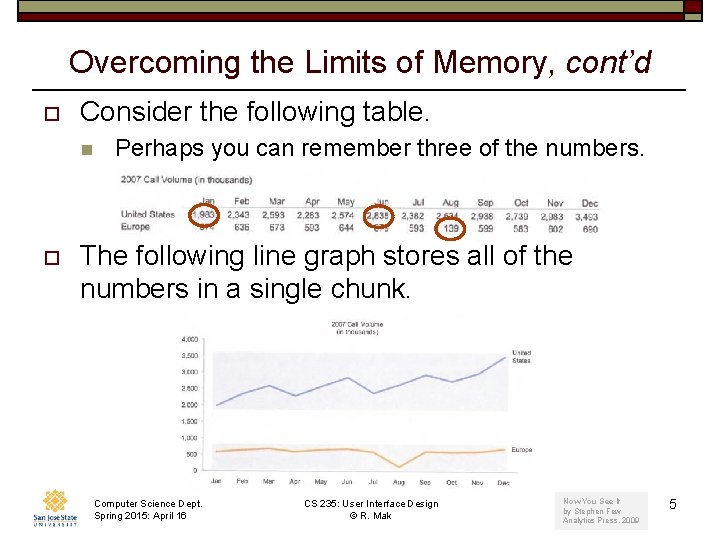
Overcoming the Limits of Memory, cont’d o Consider the following table. n o Perhaps you can remember three of the numbers. The following line graph stores all of the numbers in a single chunk. Computer Science Dept. Spring 2015: April 16 CS 235: User Interface Design © R. Mak Now You See It by Stephen Few Analytics Press, 2009 5
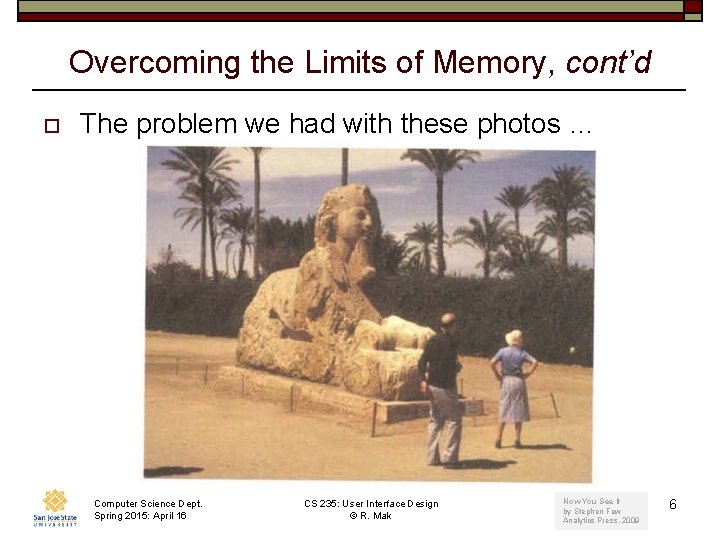
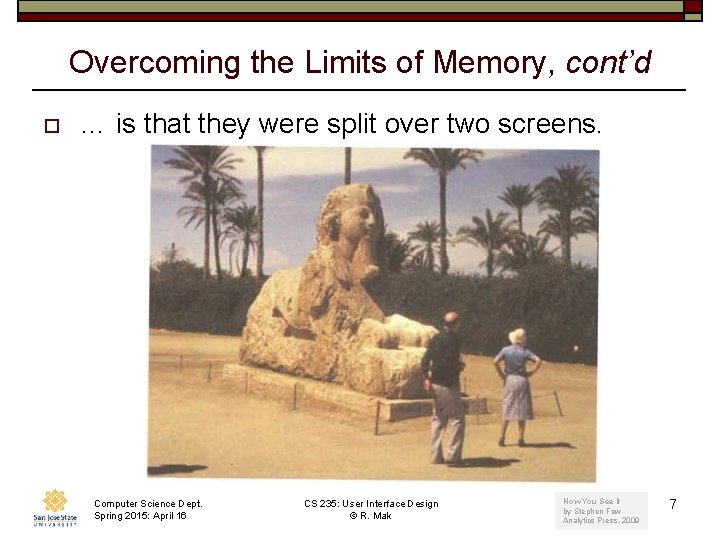
Overcoming the Limits of Memory, cont’d o The problem we had with these photos … Computer Science Dept. Spring 2015: April 16 CS 235: User Interface Design © R. Mak Now You See It by Stephen Few Analytics Press, 2009 6
Overcoming the Limits of Memory, cont’d o … is that they were split over two screens. Computer Science Dept. Spring 2015: April 16 CS 235: User Interface Design © R. Mak Now You See It by Stephen Few Analytics Press, 2009 7
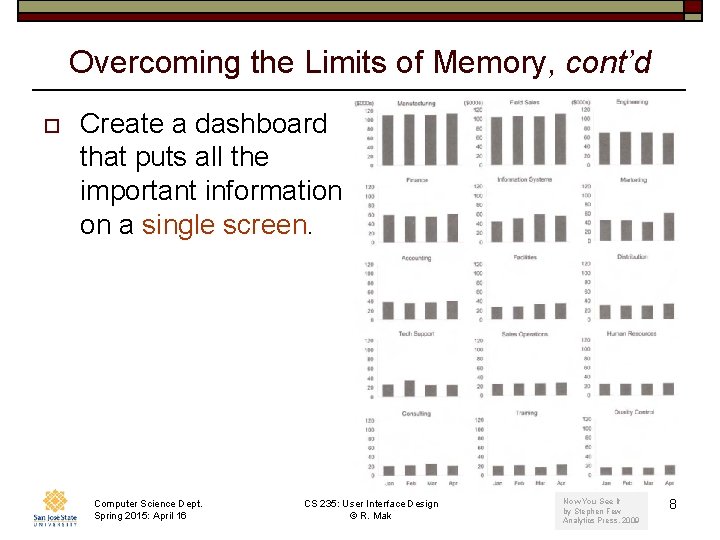
Overcoming the Limits of Memory, cont’d o Create a dashboard that puts all the important information on a single screen. Computer Science Dept. Spring 2015: April 16 CS 235: User Interface Design © R. Mak Now You See It by Stephen Few Analytics Press, 2009 8
Building Blocks of Information Visualization o Visual perception n n o Quantitative reasoning n n o Visual objects Visual properties Quantitative relationships Quantitative comparisons Information visualization n n Visual patterns, trends, and exceptions Understanding good decisions Computer Science Dept. Spring 2015: April 16 CS 235: User Interface Design © R. Mak 9
Analytical Interactions with data o o o o Comparing Sorting Adding variables Filtering Highlighting Aggregating Re-expressing Re-visualizing Computer Science Dept. Spring 2015: April 16 o o o Zooming and panning Re-scaling Accessing details on demand Annotating Bookmarking CS 235: User Interface Design © R. Mak 10
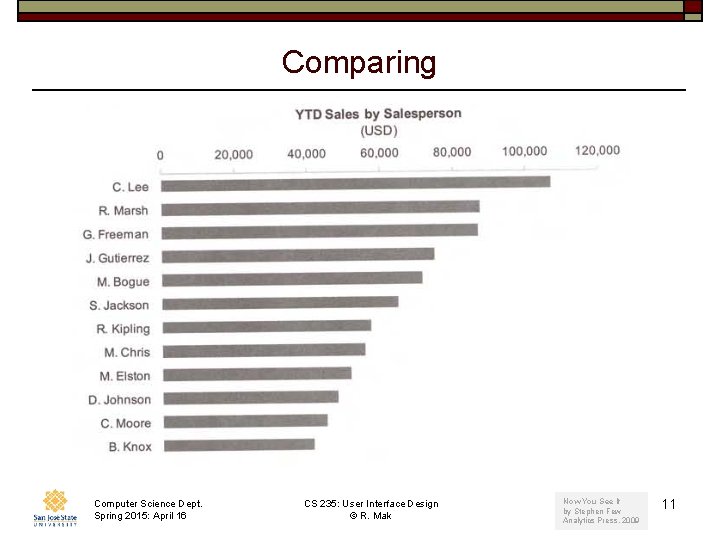
Comparing Computer Science Dept. Spring 2015: April 16 CS 235: User Interface Design © R. Mak Now You See It by Stephen Few Analytics Press, 2009 11
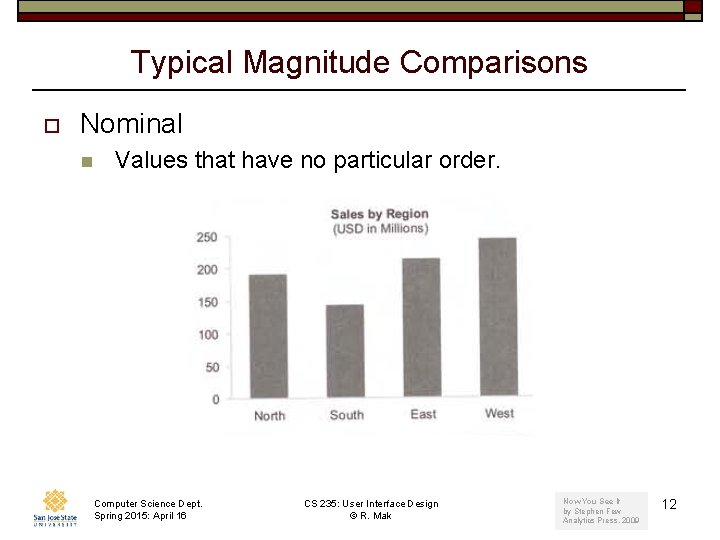
Typical Magnitude Comparisons o Nominal n Values that have no particular order. Computer Science Dept. Spring 2015: April 16 CS 235: User Interface Design © R. Mak Now You See It by Stephen Few Analytics Press, 2009 12
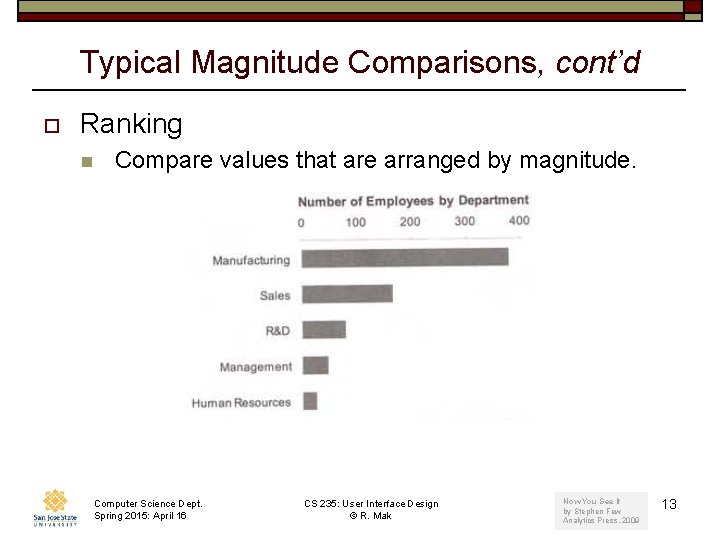
Typical Magnitude Comparisons, cont’d o Ranking n Compare values that are arranged by magnitude. Computer Science Dept. Spring 2015: April 16 CS 235: User Interface Design © R. Mak Now You See It by Stephen Few Analytics Press, 2009 13
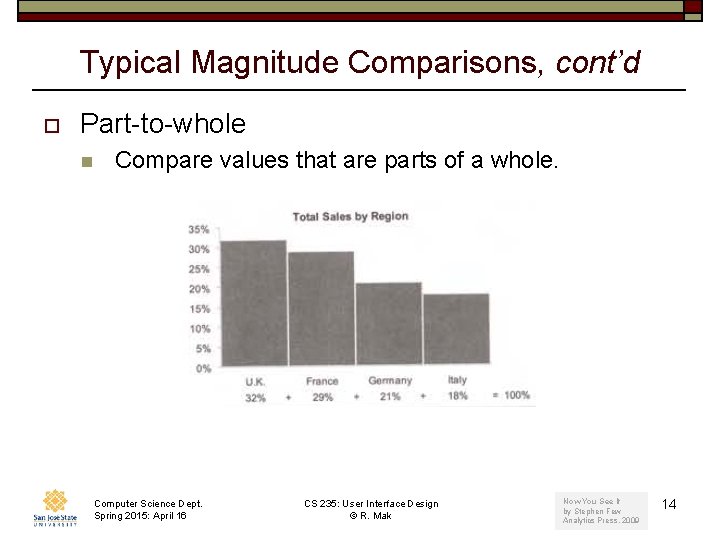
Typical Magnitude Comparisons, cont’d o Part-to-whole n Compare values that are parts of a whole. Computer Science Dept. Spring 2015: April 16 CS 235: User Interface Design © R. Mak Now You See It by Stephen Few Analytics Press, 2009 14
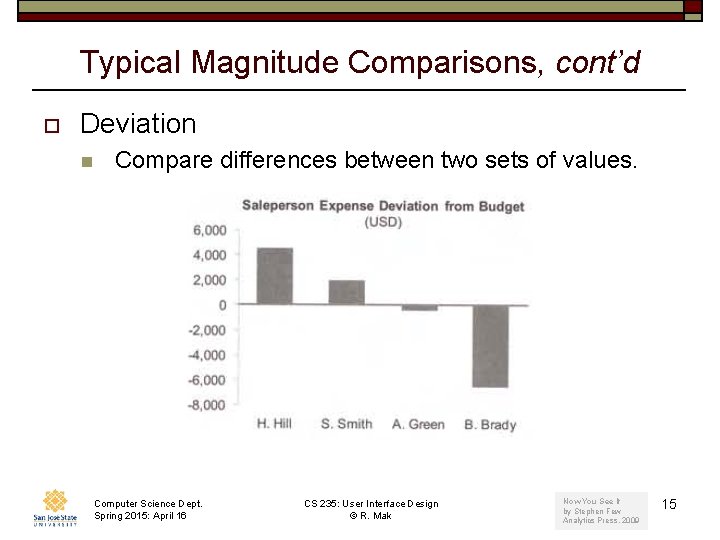
Typical Magnitude Comparisons, cont’d o Deviation n Compare differences between two sets of values. Computer Science Dept. Spring 2015: April 16 CS 235: User Interface Design © R. Mak Now You See It by Stephen Few Analytics Press, 2009 15
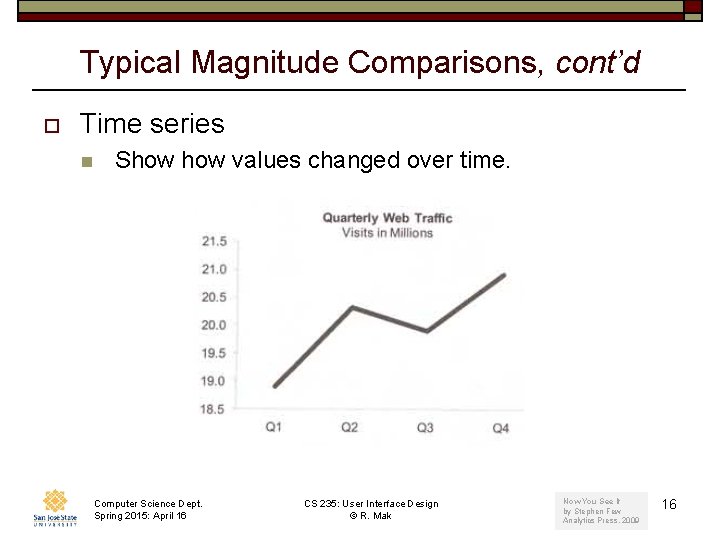
Typical Magnitude Comparisons, cont’d o Time series n Show values changed over time. Computer Science Dept. Spring 2015: April 16 CS 235: User Interface Design © R. Mak Now You See It by Stephen Few Analytics Press, 2009 16
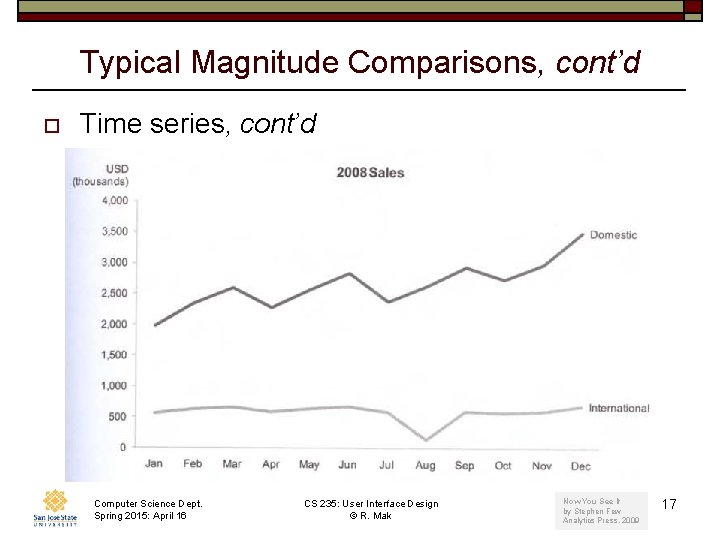
Typical Magnitude Comparisons, cont’d o Time series, cont’d Computer Science Dept. Spring 2015: April 16 CS 235: User Interface Design © R. Mak Now You See It by Stephen Few Analytics Press, 2009 17
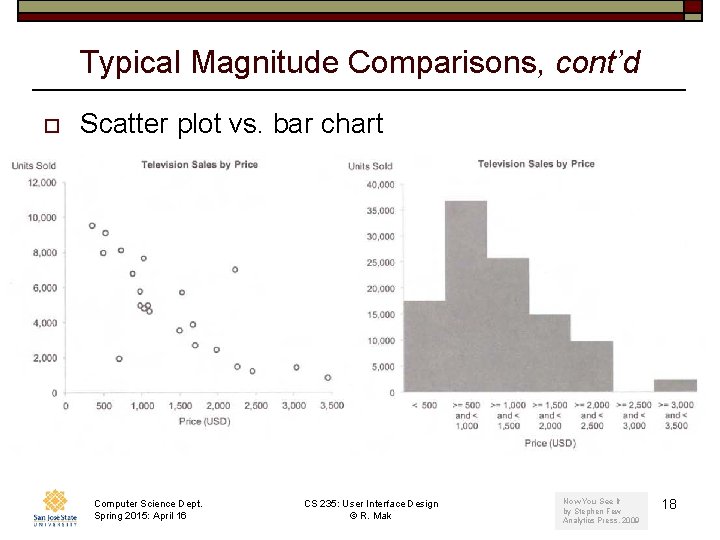
Typical Magnitude Comparisons, cont’d o Scatter plot vs. bar chart Computer Science Dept. Spring 2015: April 16 CS 235: User Interface Design © R. Mak Now You See It by Stephen Few Analytics Press, 2009 18
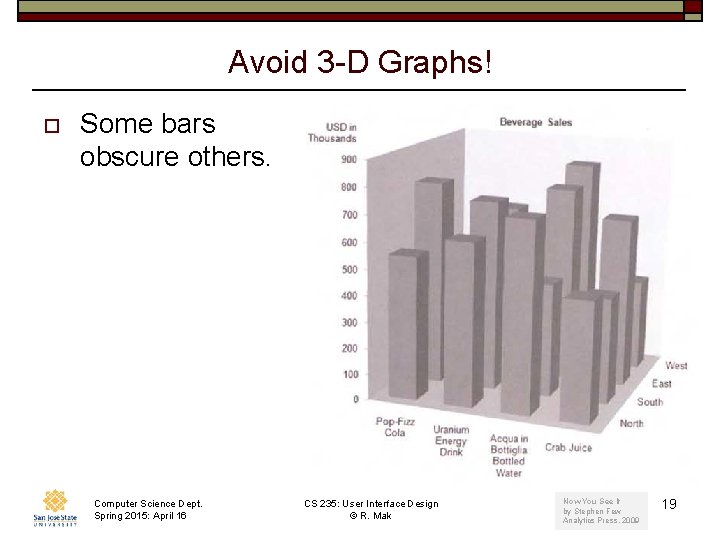
Avoid 3 -D Graphs! o Some bars obscure others. Computer Science Dept. Spring 2015: April 16 CS 235: User Interface Design © R. Mak Now You See It by Stephen Few Analytics Press, 2009 19
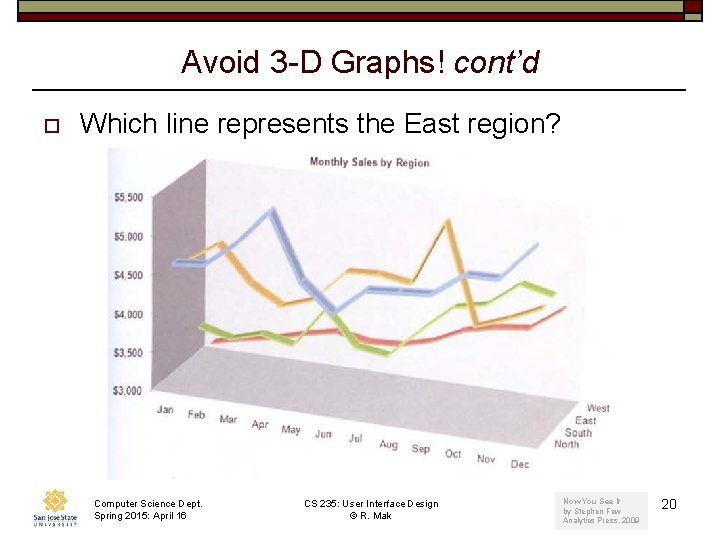
Avoid 3 -D Graphs! cont’d o Which line represents the East region? Computer Science Dept. Spring 2015: April 16 CS 235: User Interface Design © R. Mak Now You See It by Stephen Few Analytics Press, 2009 20
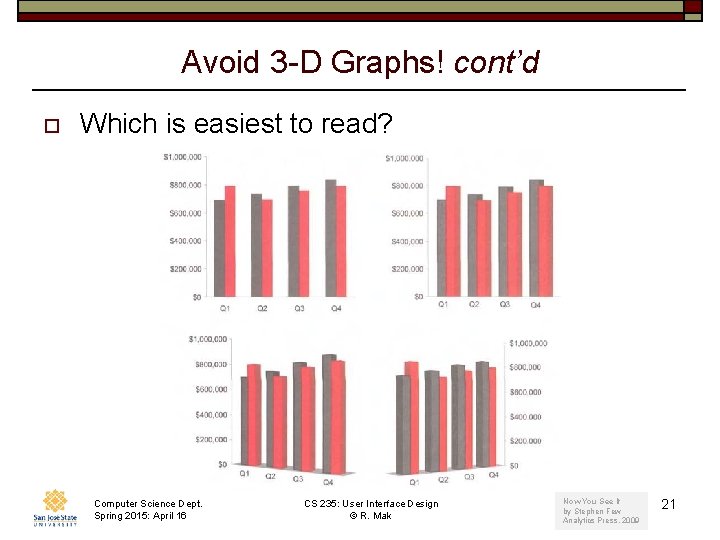
Avoid 3 -D Graphs! cont’d o Which is easiest to read? Computer Science Dept. Spring 2015: April 16 CS 235: User Interface Design © R. Mak Now You See It by Stephen Few Analytics Press, 2009 21
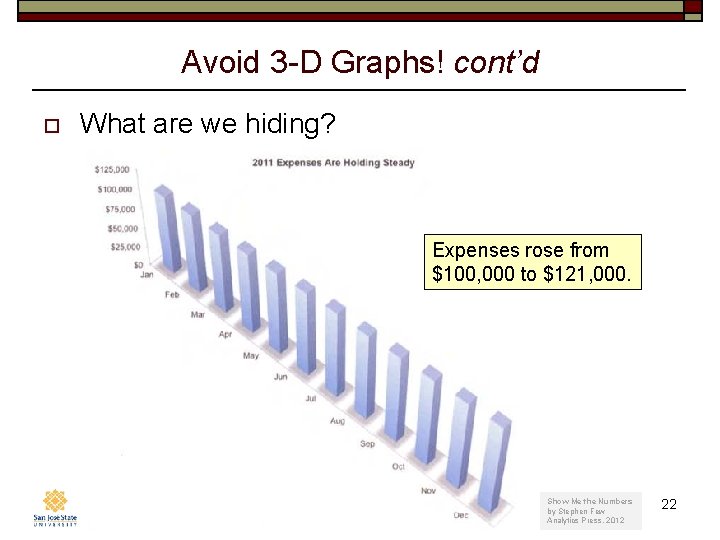
Avoid 3 -D Graphs! cont’d o What are we hiding? Expenses rose from $100, 000 to $121, 000. Computer Science Dept. Spring 2015: April 16 CS 235: User Interface Design © R. Mak Show Me the Numbers by Stephen Few Analytics Press, 2012 22
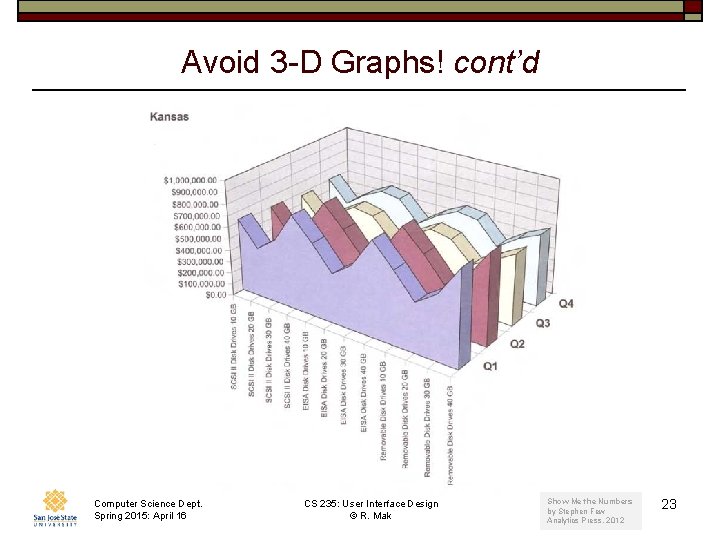
Avoid 3 -D Graphs! cont’d Computer Science Dept. Spring 2015: April 16 CS 235: User Interface Design © R. Mak Show Me the Numbers by Stephen Few Analytics Press, 2012 23
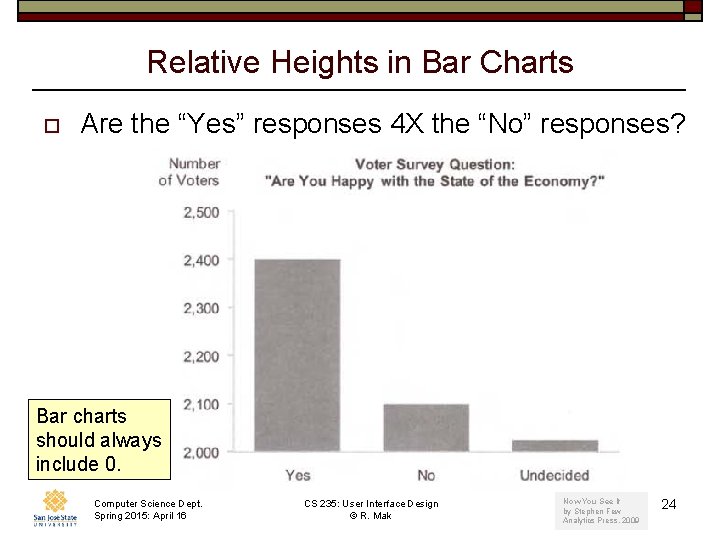
Relative Heights in Bar Charts o Are the “Yes” responses 4 X the “No” responses? Bar charts should always include 0. Computer Science Dept. Spring 2015: April 16 CS 235: User Interface Design © R. Mak Now You See It by Stephen Few Analytics Press, 2009 24
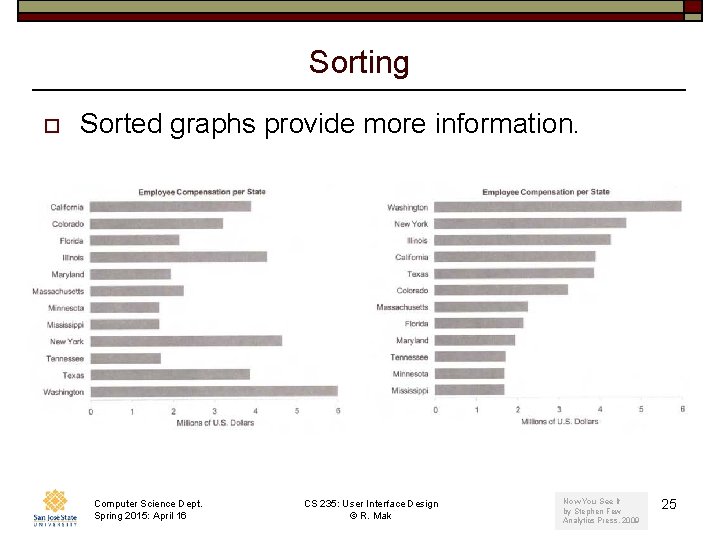
Sorting o Sorted graphs provide more information. Computer Science Dept. Spring 2015: April 16 CS 235: User Interface Design © R. Mak Now You See It by Stephen Few Analytics Press, 2009 25
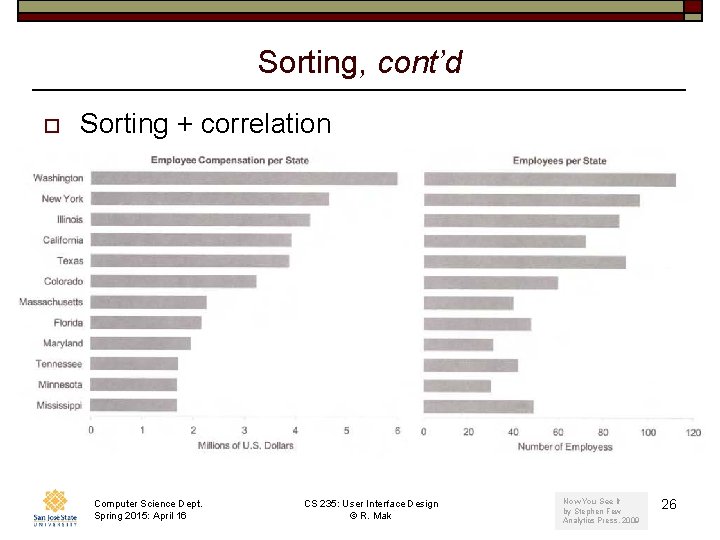
Sorting, cont’d o Sorting + correlation Computer Science Dept. Spring 2015: April 16 CS 235: User Interface Design © R. Mak Now You See It by Stephen Few Analytics Press, 2009 26
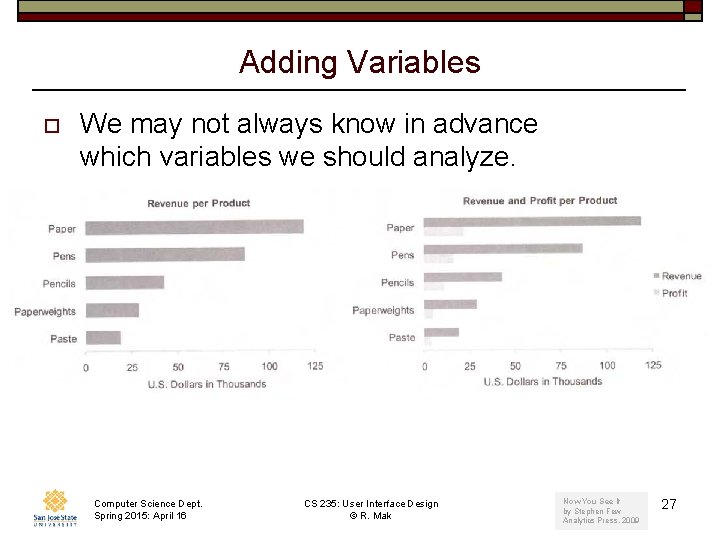
Adding Variables o We may not always know in advance which variables we should analyze. Computer Science Dept. Spring 2015: April 16 CS 235: User Interface Design © R. Mak Now You See It by Stephen Few Analytics Press, 2009 27
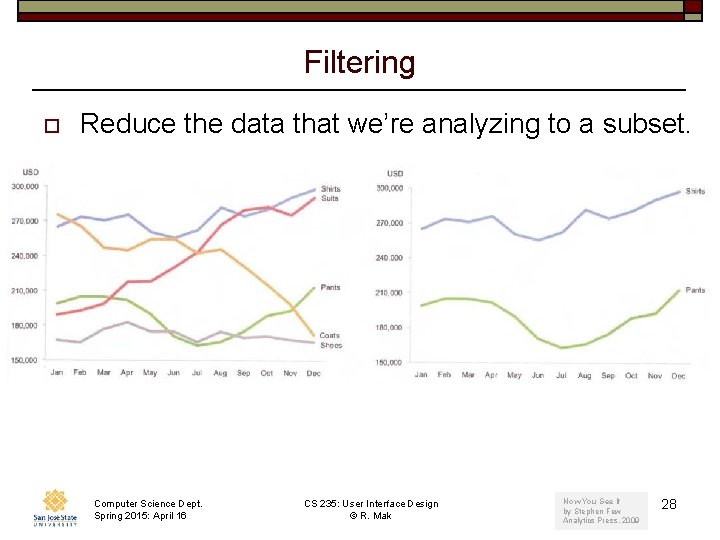
Filtering o Reduce the data that we’re analyzing to a subset. Computer Science Dept. Spring 2015: April 16 CS 235: User Interface Design © R. Mak Now You See It by Stephen Few Analytics Press, 2009 28
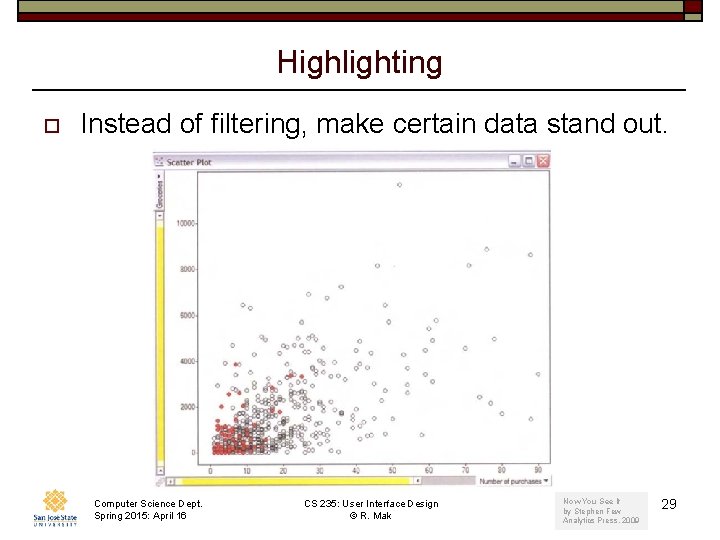
Highlighting o Instead of filtering, make certain data stand out. Computer Science Dept. Spring 2015: April 16 CS 235: User Interface Design © R. Mak Now You See It by Stephen Few Analytics Press, 2009 29
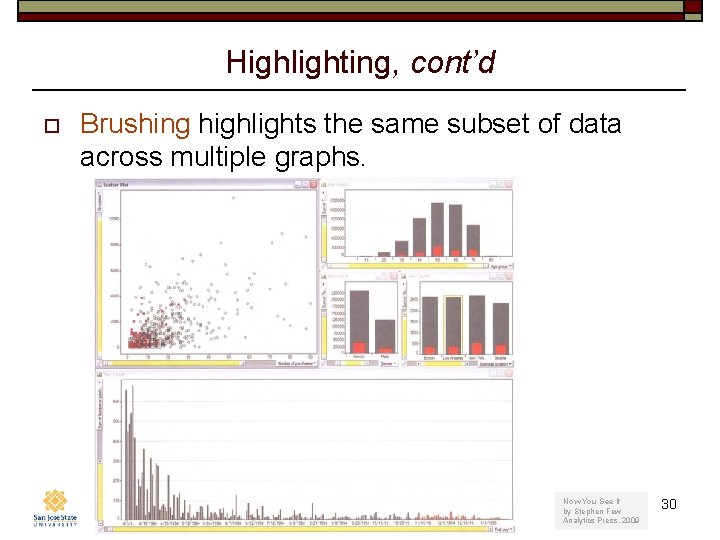
Highlighting, cont’d o Brushing highlights the same subset of data across multiple graphs. Computer Science Dept. Spring 2015: April 16 CS 235: User Interface Design © R. Mak Now You See It by Stephen Few Analytics Press, 2009 30
Aggregating o With hierarchical data, we can aggregate at multiple levels. o Examples: n n o Aggregate daily data weekly totals Aggregate store data regional totals Aggregating / de-aggregating are associated with drill up / drill down operations with the data. Computer Science Dept. Spring 2015: April 16 CS 235: User Interface Design © R. Mak 31
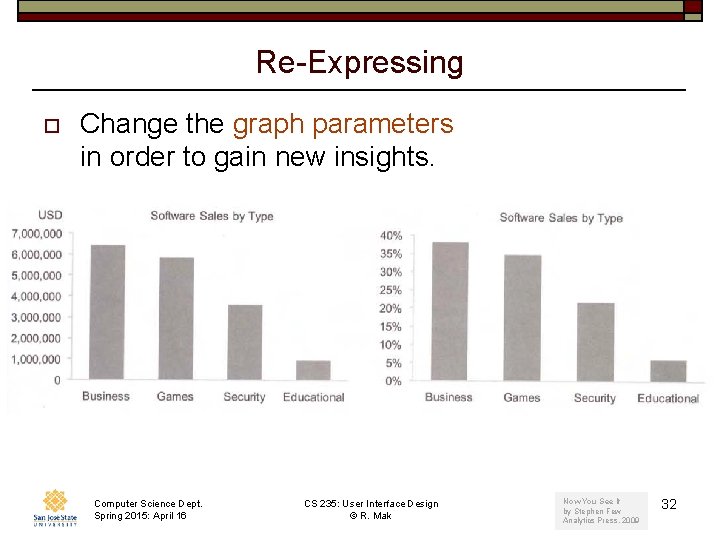
Re-Expressing o Change the graph parameters in order to gain new insights. Computer Science Dept. Spring 2015: April 16 CS 235: User Interface Design © R. Mak Now You See It by Stephen Few Analytics Press, 2009 32
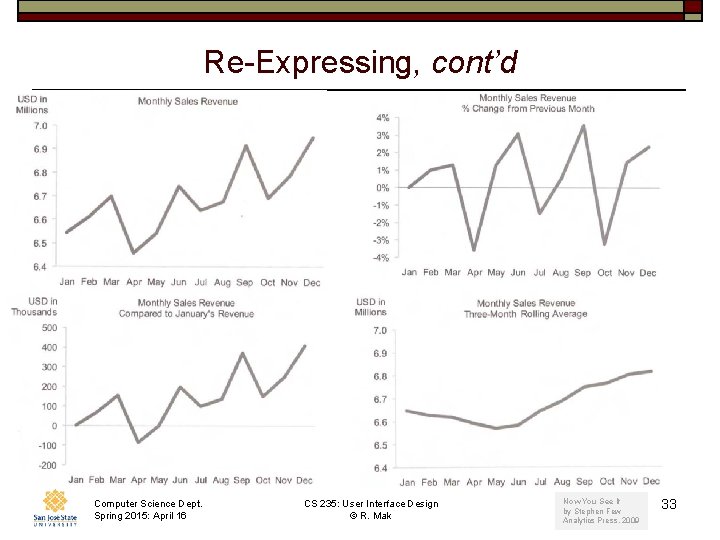
Re-Expressing, cont’d Computer Science Dept. Spring 2015: April 16 CS 235: User Interface Design © R. Mak Now You See It by Stephen Few Analytics Press, 2009 33
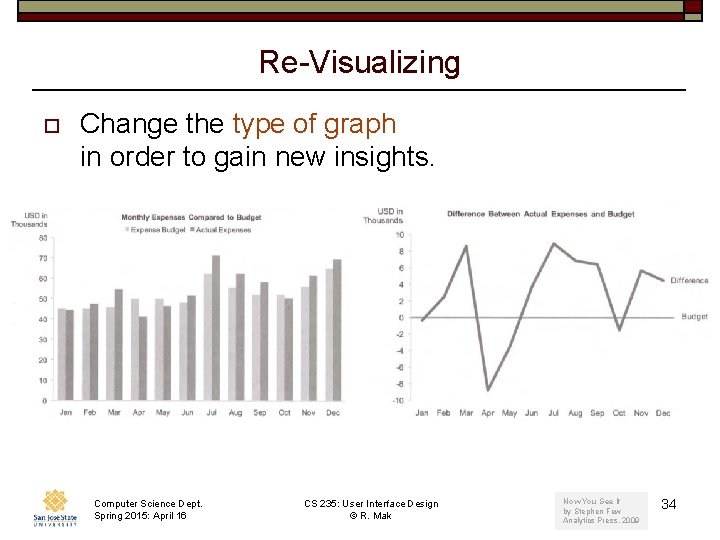
Re-Visualizing o Change the type of graph in order to gain new insights. Computer Science Dept. Spring 2015: April 16 CS 235: User Interface Design © R. Mak Now You See It by Stephen Few Analytics Press, 2009 34
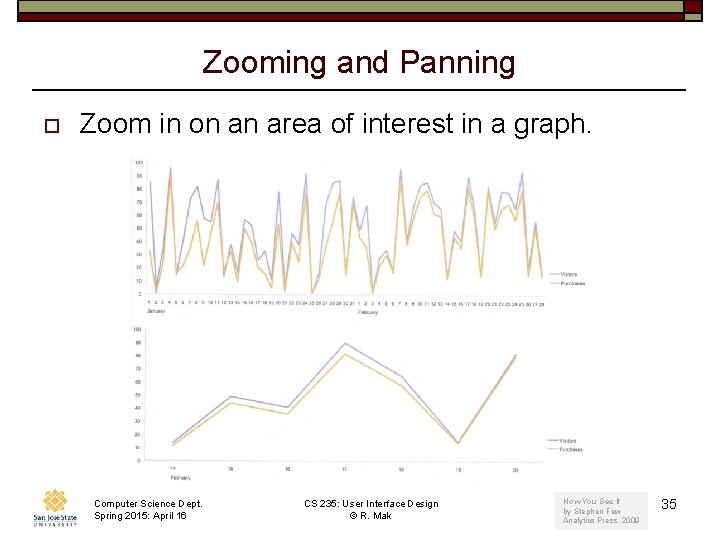
Zooming and Panning o Zoom in on an area of interest in a graph. Computer Science Dept. Spring 2015: April 16 CS 235: User Interface Design © R. Mak Now You See It by Stephen Few Analytics Press, 2009 35
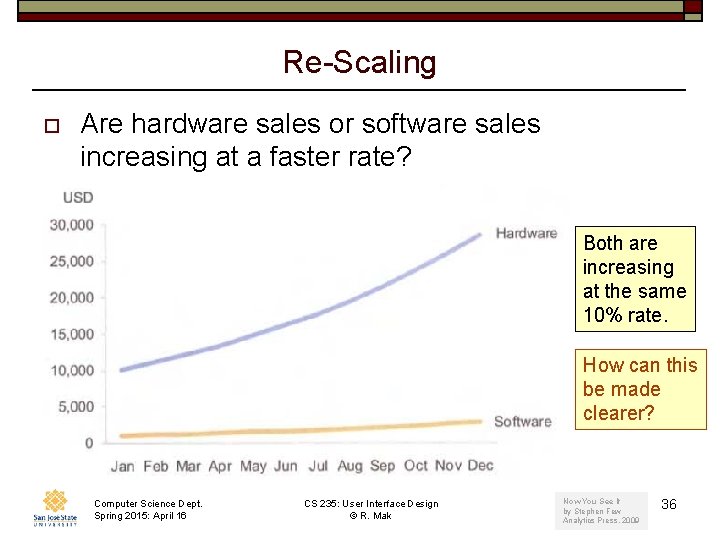
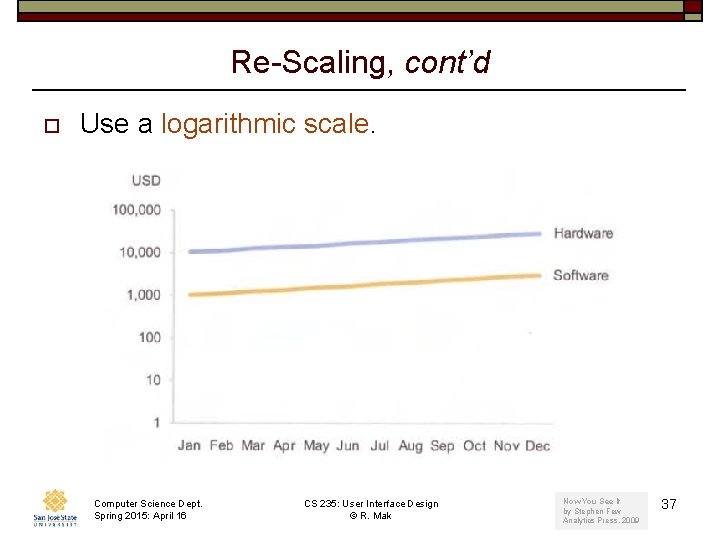
Re-Scaling o Are hardware sales or software sales increasing at a faster rate? Both are increasing at the same 10% rate. How can this be made clearer? Computer Science Dept. Spring 2015: April 16 CS 235: User Interface Design © R. Mak Now You See It by Stephen Few Analytics Press, 2009 36
Re-Scaling, cont’d o Use a logarithmic scale. Computer Science Dept. Spring 2015: April 16 CS 235: User Interface Design © R. Mak Now You See It by Stephen Few Analytics Press, 2009 37
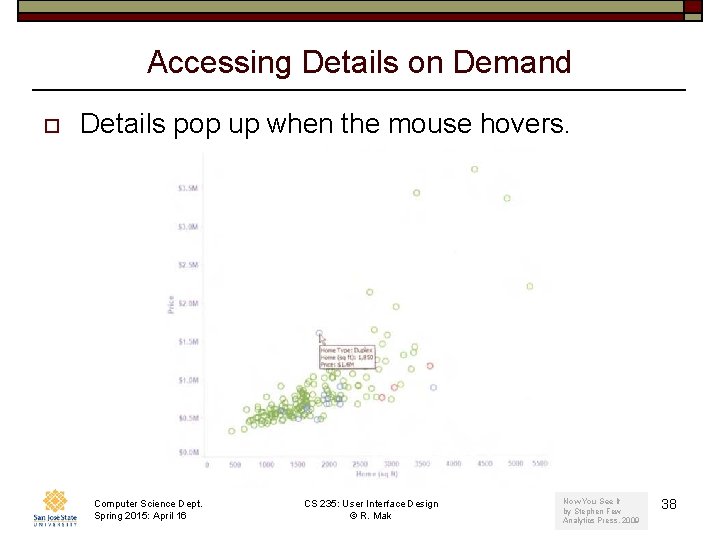
Accessing Details on Demand o Details pop up when the mouse hovers. Computer Science Dept. Spring 2015: April 16 CS 235: User Interface Design © R. Mak Now You See It by Stephen Few Analytics Press, 2009 38
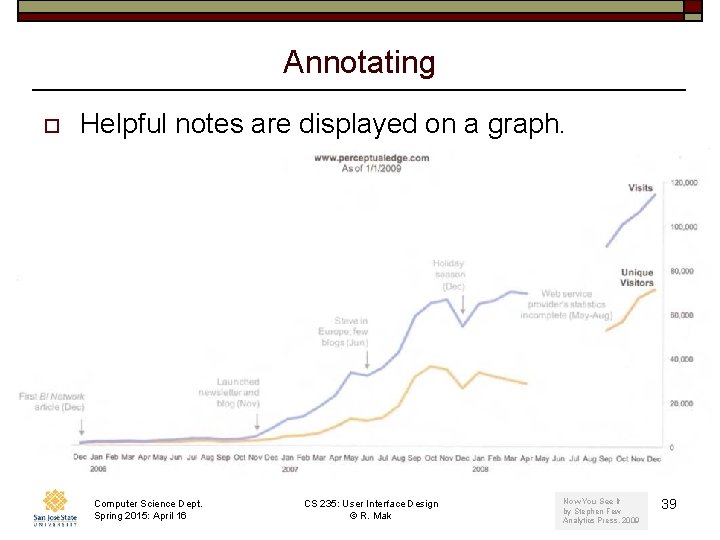
Annotating o Helpful notes are displayed on a graph. Computer Science Dept. Spring 2015: April 16 CS 235: User Interface Design © R. Mak Now You See It by Stephen Few Analytics Press, 2009 39
Bookmarking o o o Be able to return to a previous view of the data. Save a snapshot of a view. “Back” and “undo” capabilities. Computer Science Dept. Spring 2015: April 16 CS 235: User Interface Design © R. Mak 40
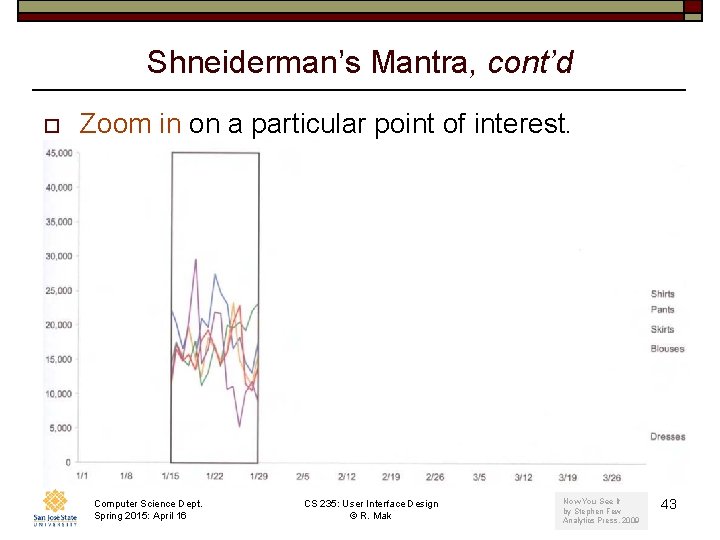
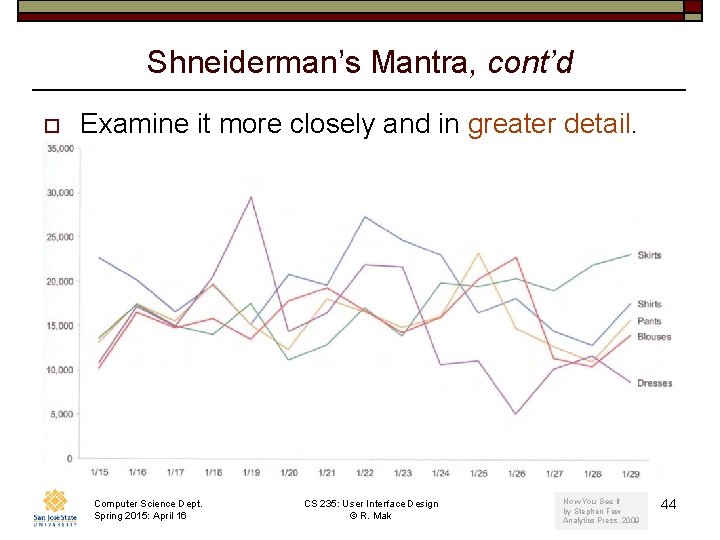
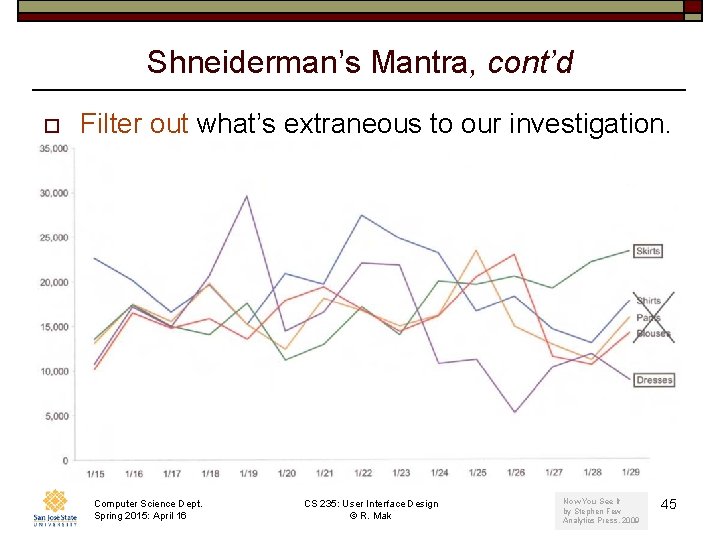
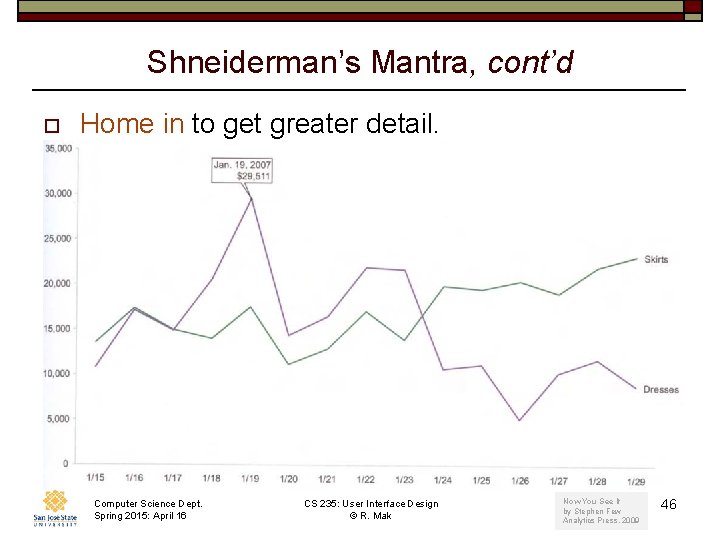
Shneiderman’s Mantra o “Overview first, zoom and filter, then details-on-demand. ” o Get an overview of an entire scene and then home in on whatever appears abnormal. Computer Science Dept. Spring 2015: April 16 CS 235: User Interface Design © R. Mak 41
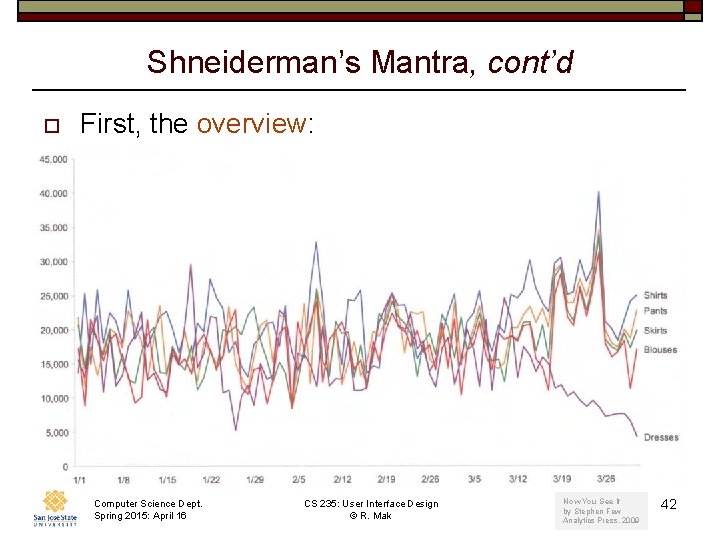
Shneiderman’s Mantra, cont’d o First, the overview: Computer Science Dept. Spring 2015: April 16 CS 235: User Interface Design © R. Mak Now You See It by Stephen Few Analytics Press, 2009 42
Shneiderman’s Mantra, cont’d o Zoom in on a particular point of interest. Computer Science Dept. Spring 2015: April 16 CS 235: User Interface Design © R. Mak Now You See It by Stephen Few Analytics Press, 2009 43
Shneiderman’s Mantra, cont’d o Examine it more closely and in greater detail. Computer Science Dept. Spring 2015: April 16 CS 235: User Interface Design © R. Mak Now You See It by Stephen Few Analytics Press, 2009 44
Shneiderman’s Mantra, cont’d o Filter out what’s extraneous to our investigation. Computer Science Dept. Spring 2015: April 16 CS 235: User Interface Design © R. Mak Now You See It by Stephen Few Analytics Press, 2009 45
Shneiderman’s Mantra, cont’d o Home in to get greater detail. Computer Science Dept. Spring 2015: April 16 CS 235: User Interface Design © R. Mak Now You See It by Stephen Few Analytics Press, 2009 46
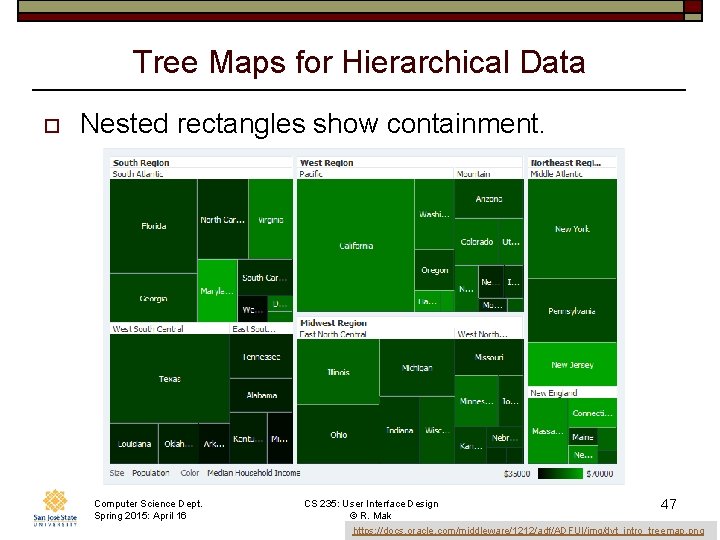
Tree Maps for Hierarchical Data o Nested rectangles show containment. Computer Science Dept. Spring 2015: April 16 CS 235: User Interface Design © R. Mak 47 https: //docs. oracle. com/middleware/1212/adf/ADFUI/img/dvt_intro_treemap. png