
CS 162 Operating Systems and Systems Programming Lecture
- Slides: 29
CS 162 Operating Systems and Systems Programming Lecture 24 Distributed File Systems April 30, 2008 Prof. Anthony D. Joseph http: //inst. eecs. berkeley. edu/~cs 162
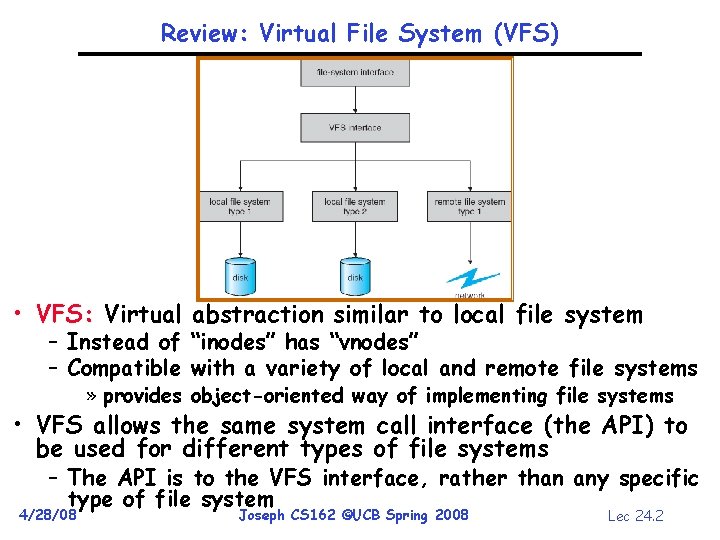
Review: Virtual File System (VFS) • VFS: Virtual abstraction similar to local file system – Instead of “inodes” has “vnodes” – Compatible with a variety of local and remote file systems » provides object-oriented way of implementing file systems • VFS allows the same system call interface (the API) to be used for different types of file systems – The API is to the VFS interface, rather than any specific type of file system 4/28/08 Joseph CS 162 ©UCB Spring 2008 Lec 24. 2
Goals for Today • Examples of Distributed File Systems • Cache Coherence Protocols • Worms and Viruses Note: Some slides and/or pictures in the following are adapted from slides © 2005 Silberschatz, Galvin, and Gagne. Many slides generated from my lecture notes by Kubiatowicz. 4/28/08 Joseph CS 162 ©UCB Spring 2008 Lec 24. 3
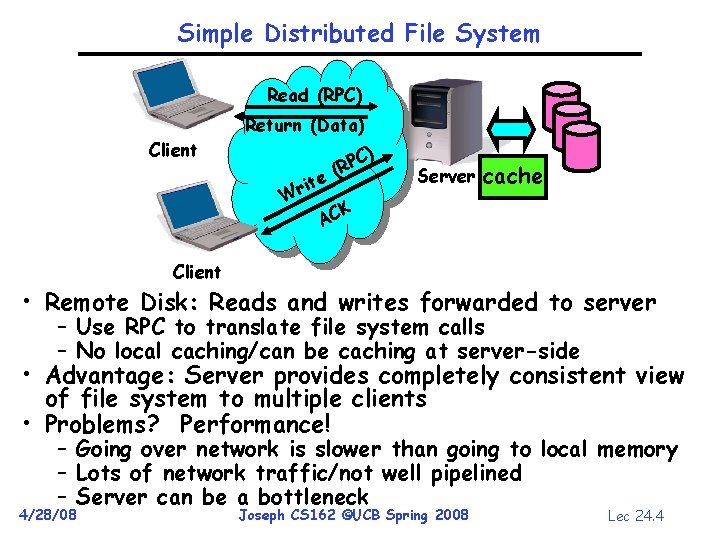
Simple Distributed File System Read (RPC) Return (Data) Client ) e it Wr C (RP Server cache K AC Client • Remote Disk: Reads and writes forwarded to server – Use RPC to translate file system calls – No local caching/can be caching at server-side • Advantage: Server provides completely consistent view of file system to multiple clients • Problems? Performance! – Going over network is slower than going to local memory – Lots of network traffic/not well pipelined – Server can be a bottleneck 4/28/08 Joseph CS 162 ©UCB Spring 2008 Lec 24. 4
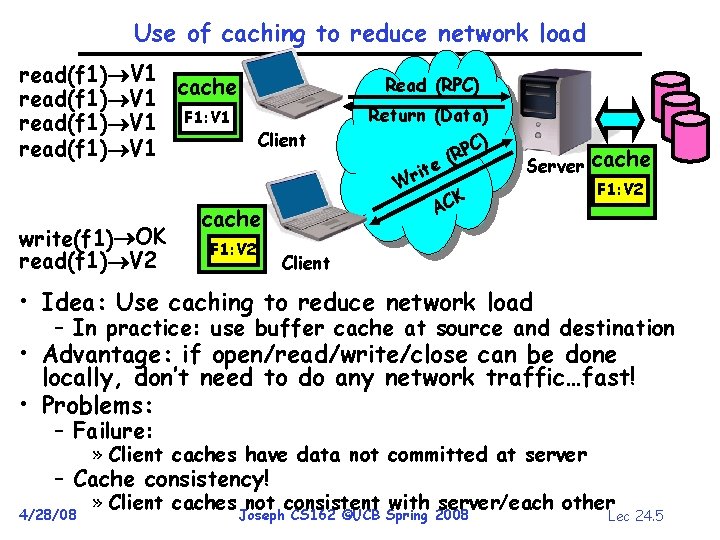
Use of caching to reduce network load read(f 1) V 1 cache read(f 1) V 1 F 1: V 1 Client read(f 1) V 1 write(f 1) OK read(f 1) V 2 cache F 1: V 2 Read (RPC) Return (Data) C) P (R e t i Wr K AC Server cache F 1: V 2 F 1: V 1 Client • Idea: Use caching to reduce network load – In practice: use buffer cache at source and destination • Advantage: if open/read/write/close can be done locally, don’t need to do any network traffic…fast! • Problems: – Failure: » Client caches have data not committed at server – Cache consistency! 4/28/08 » Client caches not consistent with server/each other Joseph CS 162 ©UCB Spring 2008 Lec 24. 5
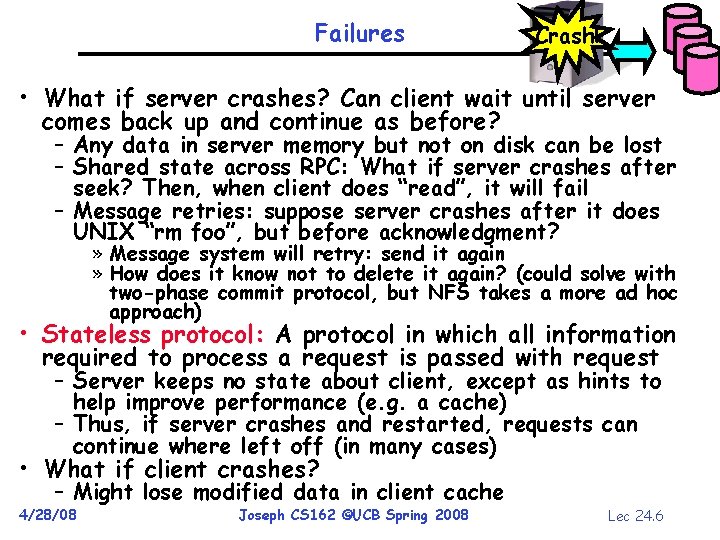
Failures Crash! • What if server crashes? Can client wait until server comes back up and continue as before? – Any data in server memory but not on disk can be lost – Shared state across RPC: What if server crashes after seek? Then, when client does “read”, it will fail – Message retries: suppose server crashes after it does UNIX “rm foo”, but before acknowledgment? » Message system will retry: send it again » How does it know not to delete it again? (could solve with two-phase commit protocol, but NFS takes a more ad hoc approach) • Stateless protocol: A protocol in which all information required to process a request is passed with request – Server keeps no state about client, except as hints to help improve performance (e. g. a cache) – Thus, if server crashes and restarted, requests can continue where left off (in many cases) • What if client crashes? – Might lose modified data in client cache 4/28/08 Joseph CS 162 ©UCB Spring 2008 Lec 24. 6
World Wide Web • Key idea: graphical front-end to RPC protocol • What happens when a web server fails? – System breaks! – Solution: Transport or network-layer redirection » Invisible to applications » Can also help with scalability (load balancers) » Must handle “sessions” (e. g. , banking/e-commerce) • Initial version: no caching – Didn’t scale well – easy to overload servers 4/28/08 Joseph CS 162 ©UCB Spring 2008 Lec 24. 7
WWW Caching • Use client-side caching to reduce number of interactions between clients and servers and/or reduce the size of the interactions: – Time-to-Live (TTL) fields – HTTP “Expires” header from server – Client polling – HTTP “If-Modified-Since” request headers from clients – Server refresh – HTML “META Refresh tag” causes periodic client poll • What is the polling frequency for clients and servers? – Could be adaptive based upon a page’s age and its rate of change • Server load is still significant! 4/28/08 Joseph CS 162 ©UCB Spring 2008 Lec 24. 8
WWW Proxy Caches • Place caches in the network to reduce server load – But, increases latency in lightly loaded case – Caches near servers called “reverse proxy caches” » Offloads busy server machines – Caches at the “edges” of the network called “content distribution networks” » Offloads servers and reduce client latency • Challenges: – Caching static traffic easy, but only ~40% of traffic – Dynamic and multimedia is harder » Multimedia is a big win: Megabytes versus Kilobytes – Same cache consistency problems as before • Caching is changing the Internet architecture – Places functionality at higher levels of comm. protocols 4/28/08 Joseph CS 162 ©UCB Spring 2008 Lec 24. 9
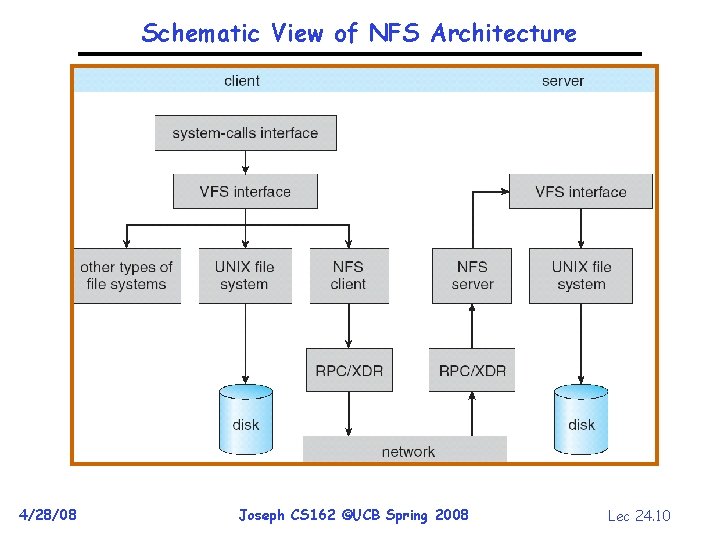
Schematic View of NFS Architecture 4/28/08 Joseph CS 162 ©UCB Spring 2008 Lec 24. 10
Administrivia • Project #4 design deadline is Thu 5/1 at 11: 59 pm – See newsgroup for design doc details – Code deadline is Wed 5/14 • Final Exam – May 21 st, 12: 30 -3: 30 pm • Final Topics: Any suggestions? – Please send them to me… 4/28/08 Joseph CS 162 ©UCB Spring 2008 Lec 24. 11
Network File System (NFS) • Three Layers for NFS system – UNIX file-system interface: open, read, write, close calls + file descriptors – VFS layer: distinguishes local from remote files » Calls the NFS protocol procedures for remote requests – NFS service layer: bottom layer of the architecture » Implements the NFS protocol • NFS Protocol: RPC for file operations on server – Reading/searching a directory – manipulating links and directories – accessing file attributes/reading and writing files • Write-through caching: Modified data committed to server’s disk before results are returned to the client – lose some of the advantages of caching – time to perform write() can be long – Need some mechanism for readers to eventually notice changes! (more on this later) 4/28/08 Joseph CS 162 ©UCB Spring 2008 Lec 24. 12
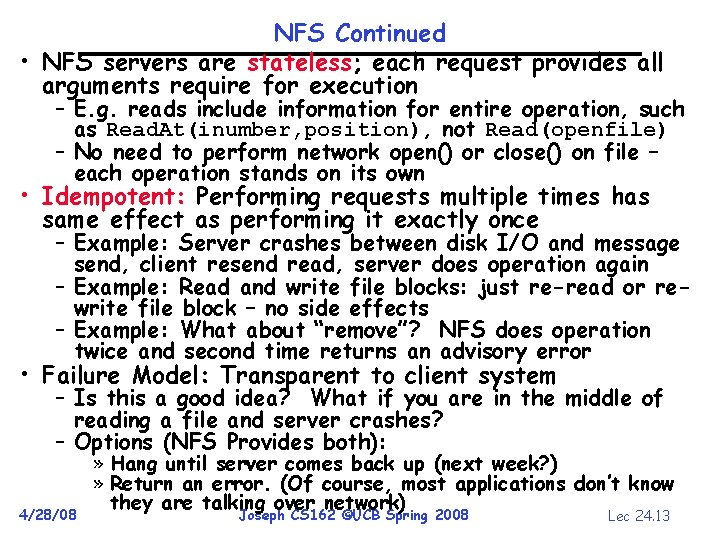
NFS Continued • NFS servers are stateless; each request provides all arguments require for execution – E. g. reads include information for entire operation, such as Read. At(inumber, position), not Read(openfile) – No need to perform network open() or close() on file – each operation stands on its own • Idempotent: Performing requests multiple times has same effect as performing it exactly once – Example: Server crashes between disk I/O and message send, client resend read, server does operation again – Example: Read and write file blocks: just re-read or rewrite file block – no side effects – Example: What about “remove”? NFS does operation twice and second time returns an advisory error • Failure Model: Transparent to client system – Is this a good idea? What if you are in the middle of reading a file and server crashes? – Options (NFS Provides both): 4/28/08 » Hang until server comes back up (next week? ) » Return an error. (Of course, most applications don’t know they are talking over network) Joseph CS 162 ©UCB Spring 2008 Lec 24. 13
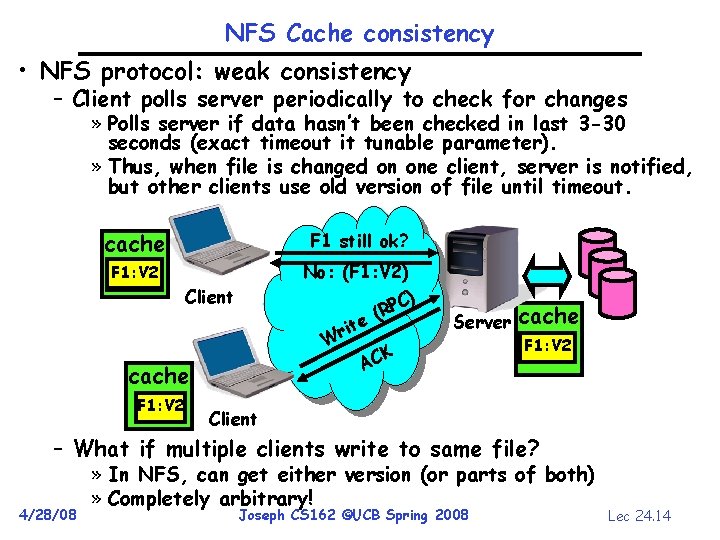
NFS Cache consistency • NFS protocol: weak consistency – Client polls server periodically to check for changes » Polls server if data hasn’t been checked in last 3 -30 seconds (exact timeout it tunable parameter). » Thus, when file is changed on one client, server is notified, but other clients use old version of file until timeout. cache F 1 still ok? F 1: V 2 F 1: V 1 No: (F 1: V 2) C) P (R Client e rit W cache F 1: V 2 Server CK A cache F 1: V 2 Client – What if multiple clients write to same file? 4/28/08 » In NFS, can get either version (or parts of both) » Completely arbitrary! Joseph CS 162 ©UCB Spring 2008 Lec 24. 14
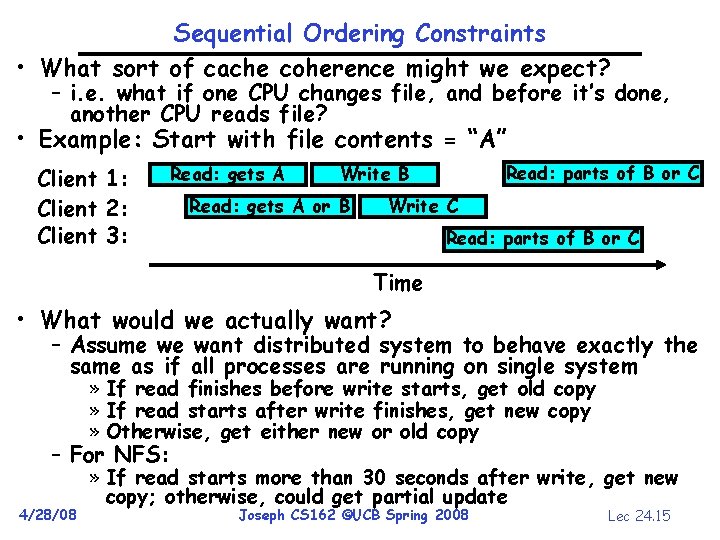
Sequential Ordering Constraints • What sort of cache coherence might we expect? – i. e. what if one CPU changes file, and before it’s done, another CPU reads file? • Example: Start with file contents = “A” Client 1: Client 2: Client 3: Read: gets A Read: parts of B or C Write B Read: gets A or B Write C Read: parts of B or C Time • What would we actually want? – Assume we want distributed system to behave exactly the same as if all processes are running on single system » If read finishes before write starts, get old copy » If read starts after write finishes, get new copy » Otherwise, get either new or old copy – For NFS: 4/28/08 » If read starts more than 30 seconds after write, get new copy; otherwise, could get partial update Joseph CS 162 ©UCB Spring 2008 Lec 24. 15
NFS Pros and Cons • NFS Pros: – Simple, Highly portable • NFS Cons: – Sometimes inconsistent! – Doesn’t scale to large # clients » Must keep checking to see if caches out of date » Server becomes bottleneck due to polling traffic 4/28/08 Joseph CS 162 ©UCB Spring 2008 Lec 24. 16
Andrew File System • Andrew File System (AFS, late 80’s) DCE DFS (commercial product) • Callbacks: Server records who has copy of file – On changes, server immediately tells all with old copy – No polling bandwidth (continuous checking) needed • Write through on close – Changes not propagated to server until close() – Session semantics: updates visible to other clients only after the file is closed » As a result, do not get partial writes: all or nothing! » Although, for processes on local machine, updates visible immediately to other programs who have file open • In AFS, everyone who has file open sees old version – Don’t get newer versions until reopen file 4/28/08 Joseph CS 162 ©UCB Spring 2008 Lec 24. 17
Andrew File System (con’t) • Data cached on local disk of client as well as memory – On open with a cache miss (file not on local disk): » Get file from server, set up callback with server – On write followed by close: » Send copy to server; tells all clients with copies to fetch new version from server on next open (using callbacks) • What if server crashes? Lose all callback state! – Reconstruct callback information from client: go ask everyone “who has which files cached? ” • AFS Pro: Relative to NFS, less server load: – Disk as cache more files can be cached locally – Callbacks server not involved if file is read-only • For both AFS and NFS: central server is bottleneck! – Performance: all writes server, cache misses server – Availability: Server is single point of failure – Cost: server machine’s high cost relative to workstation 4/28/08 Joseph CS 162 ©UCB Spring 2008 Lec 24. 18
Summary • VFS: Virtual File System layer – Provides mechanism which gives same system call interface for different types of file systems • Distributed File System: – Transparent access to files stored on a remote disk » NFS: Network File System » AFS: Andrew File System – Caching for performance • Cache Consistency: Keeping contents of client caches consistent with one another – If multiple clients, some reading and some writing, how do stale cached copies get updated? – NFS: check periodically for changes – AFS: clients register callbacks so can be notified by server of changes 4/28/08 Joseph CS 162 ©UCB Spring 2008 Lec 24. 19
BREAK
Internet Worms • Self-replicating, self-propagating code and data • Use network to find potential victims • Typically exploit vulnerabilities in an application running on a machine or the machine’s operating system to gain a foothold • Then search the network for new victims 4/28/08 Joseph CS 162 ©UCB Spring 2008 Lec 24. 21
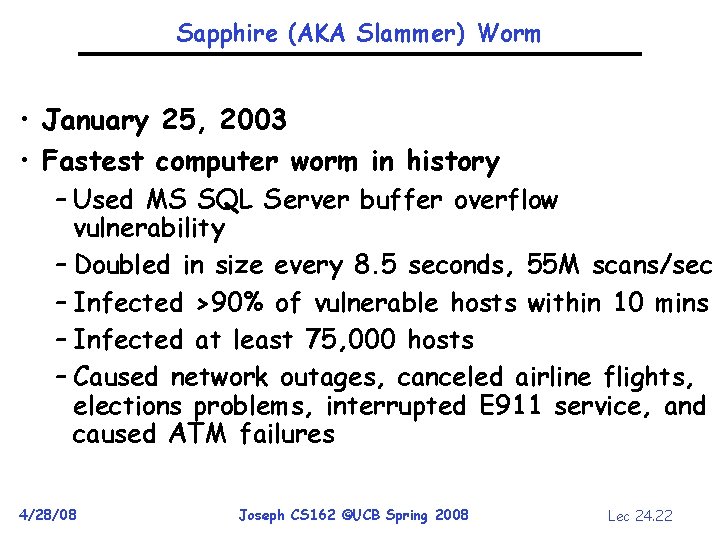
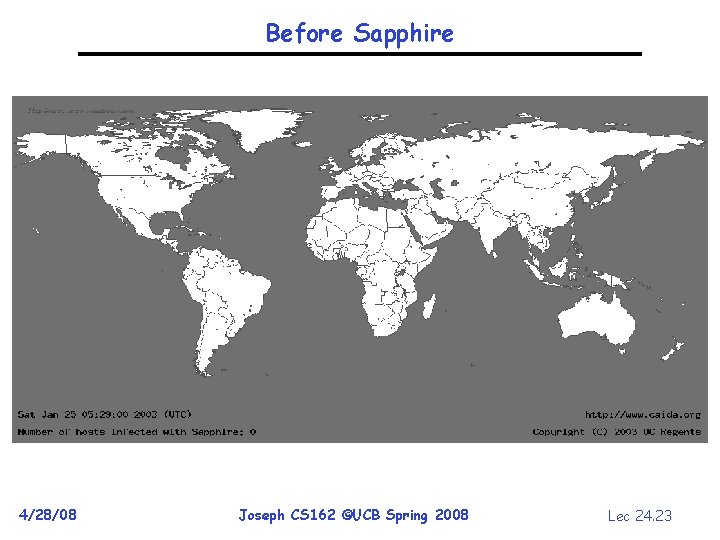
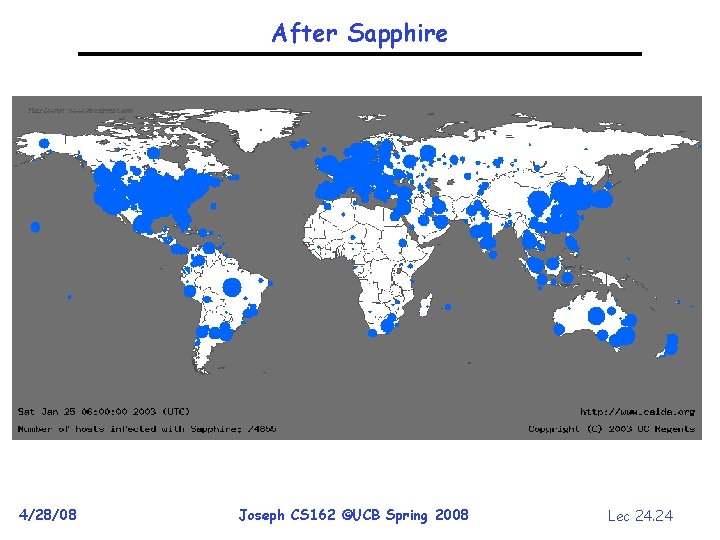
Sapphire (AKA Slammer) Worm • January 25, 2003 • Fastest computer worm in history – Used MS SQL Server buffer overflow vulnerability – Doubled in size every 8. 5 seconds, 55 M scans/sec – Infected >90% of vulnerable hosts within 10 mins – Infected at least 75, 000 hosts – Caused network outages, canceled airline flights, elections problems, interrupted E 911 service, and caused ATM failures 4/28/08 Joseph CS 162 ©UCB Spring 2008 Lec 24. 22
Before Sapphire 4/28/08 Joseph CS 162 ©UCB Spring 2008 Lec 24. 23
After Sapphire 4/28/08 Joseph CS 162 ©UCB Spring 2008 Lec 24. 24
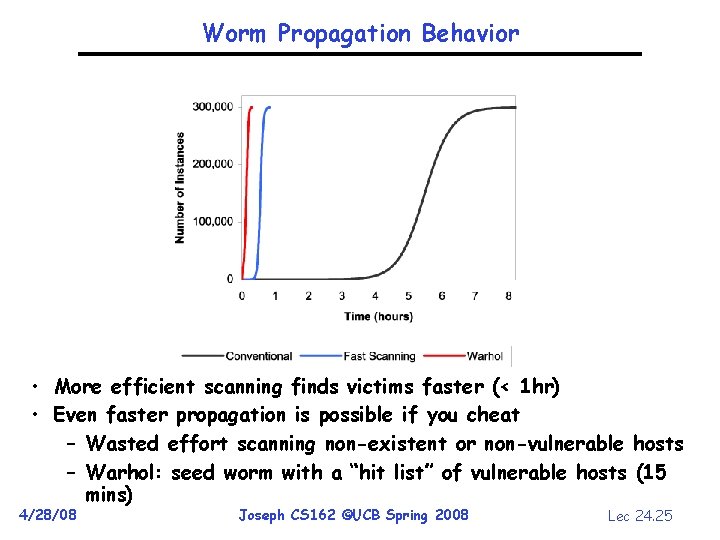
Worm Propagation Behavior • More efficient scanning finds victims faster (< 1 hr) • Even faster propagation is possible if you cheat – Wasted effort scanning non-existent or non-vulnerable hosts – Warhol: seed worm with a “hit list” of vulnerable hosts (15 mins) 4/28/08 Joseph CS 162 ©UCB Spring 2008 Lec 24. 25
Internet Viruses • Self-replicating code and data • Typically requires human interaction before exploiting an application vulnerability – Running an e-mail attachment – Clicking on a link in an e-mail – Inserting/connecting “infected” media to a PC • Then search for files to infect or sends out e-mail with an infected file 4/28/08 Joseph CS 162 ©UCB Spring 2008 Lec 24. 26
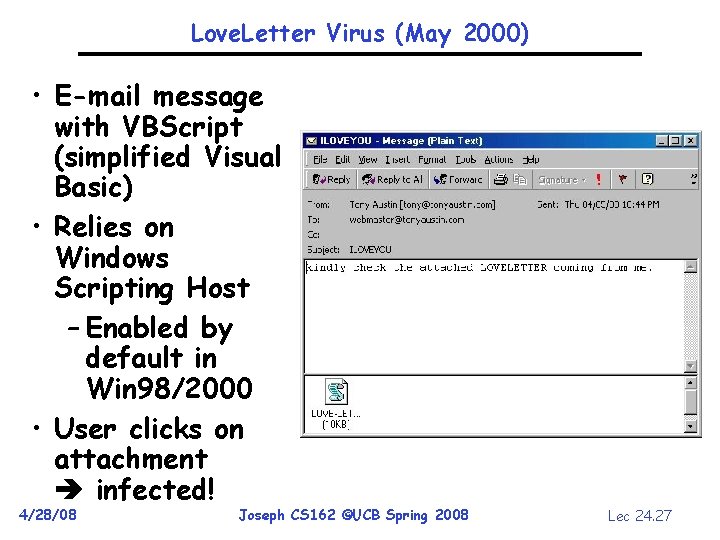
Love. Letter Virus (May 2000) • E-mail message with VBScript (simplified Visual Basic) • Relies on Windows Scripting Host – Enabled by default in Win 98/2000 • User clicks on attachment infected! 4/28/08 Joseph CS 162 ©UCB Spring 2008 Lec 24. 27
Love. Letter’s Impact • Approx 60 – 80% of US companies infected by the "ILOVEYOU" virus • Several US gov. agencies and the Senate were hit • > 100, 000 servers in Europe • Substantial lost data from replacement of files with virus code – Backups anyone? • Could have been worse – not all viruses require opening of attachments… 4/28/08 Joseph CS 162 ©UCB Spring 2008 Lec 24. 28
Worm/Virus Summary • Worms are a critical threat – More than 100 companies, including Financial Times, ABCNews and CNN, were hit by the Zotob Windows 2000 worm in August 2005 • Viruses are a critical threat – FBI survey of 269 companies in 2004 found that viruses caused ~$55 million in damages – DIY toolkits proliferate on Internet • How can we protect against worms and viruses? – Scanners – Firewalls – … 4/28/08 Joseph CS 162 ©UCB Spring 2008 Lec 24. 29