
CS 15 447 Computer Architecture Lecture 23 Virtual
- Slides: 31
CS 15 -447: Computer Architecture Lecture 23 Virtual Memory (2) November 21, 2007 Karem A. Sakallah 15 -447 Computer Architecture Fall 2007 ©
Last Lecture • Virtual memory lets the programmer “see” a memory array larger than the DRAM available on a particular computer system. • Virtual memory enables multiple programs to share the physical memory without: – Knowing other programs exist (transparency). – Worrying about one program modifying the data contents of another (protection). 2 15 -447 Computer Architecture Fall 2007 ©
Other VM Functions • Page data location – Physical memory, disk, uninitialized data • Access permissions – Read only pages for instructions • Gathering access information – Identifying dirty pages by tracking stores – Identifying accesses to help determine LRU candidate 3 15 -447 Computer Architecture Fall 2007 ©
Page Replacement Strategies • Page table indirection enables a fully associative mapping between virtual and physical pages. • How do we implement LRU? – True LRU is expensive, but LRU is a heuristic anyway, so approximating LRU is fine – Reference bit on page, cleared occasionally by operating system. Then pick any “unreferenced” page to evict. 4 15 -447 Computer Architecture Fall 2007 ©
Performance of Virtual Memory • We must access physical memory to access the page table to make the translation from a virtual address to a physical one • Then we access physical memory again to get (or store) the data • A load instruction performs at least 2 memory reads • A store instruction performs at least 1 read and then a write. 5 15 -447 Computer Architecture Fall 2007 ©
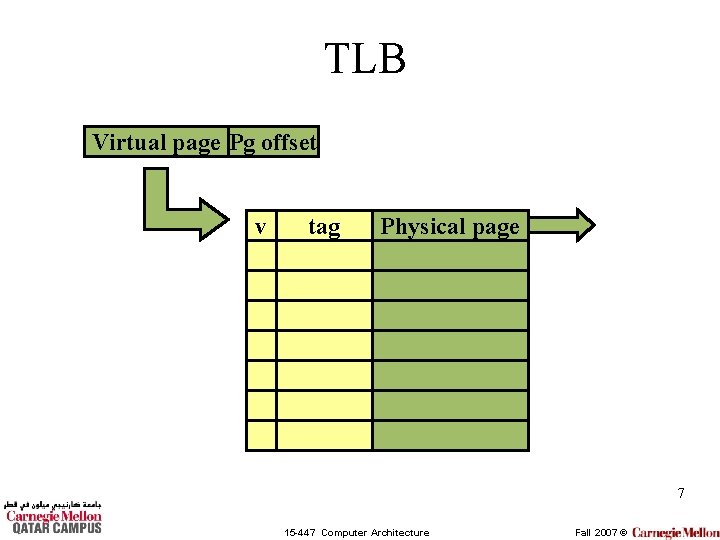
Translation Lookaside Buffer • We fix this performance problem by avoiding memory in the translation from virtual to physical pages. • We buffer the common translations in a translation lookaside buffer (TLB) 6 15 -447 Computer Architecture Fall 2007 ©
TLB Virtual page Pg offset v tag Physical page 7 15 -447 Computer Architecture Fall 2007 ©
Where is the TLB Lookup? • We put the TLB lookup in the pipeline after the virtual address is calculated and before the memory reference is performed. – This may be before or during the data cache access. – Without a TLB we need to perform the translation during the memory stage of the pipeline. 8 15 -447 Computer Architecture Fall 2007 ©
Placing Caches in a VM System • VM systems give us two different addresses: virtual and physical • Which address should we use to access the data cache? – Virtual address (before VM translation) • Faster access? More complex? – Physical address (after VM translations) • Delayed access? 9 15 -447 Computer Architecture Fall 2007 ©
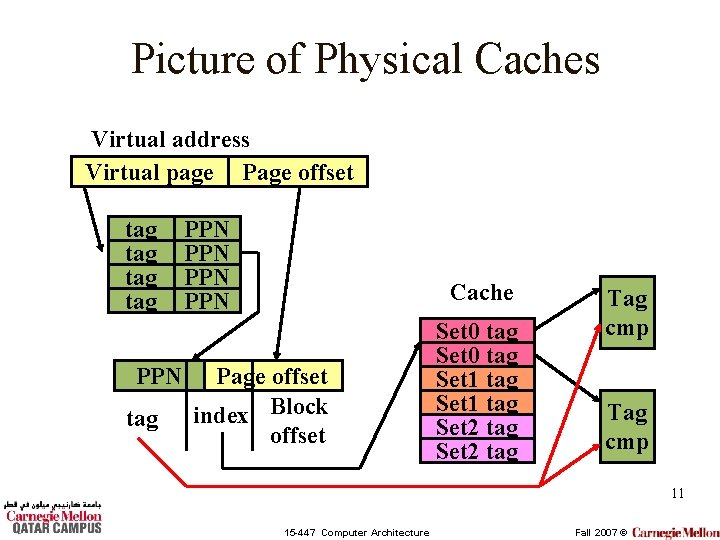
Physically-Addressed Caches • Perform TLB lookup before cache tag comparison. – Use bits from physical address to index set – Use bits from physical address to compare tag • Slower access? – Tag lookup takes place after the TLB lookup. • Simplifies some VM management – When switching processes, TLB must be invalidated, but cache OK to stay as is. 10 15 -447 Computer Architecture Fall 2007 ©
Picture of Physical Caches Virtual address Virtual page Page offset tag tag PPN PPN Cache Page offset index Block offset Set 0 tag Set 1 tag Set 2 tag Tag cmp 11 15 -447 Computer Architecture Fall 2007 ©
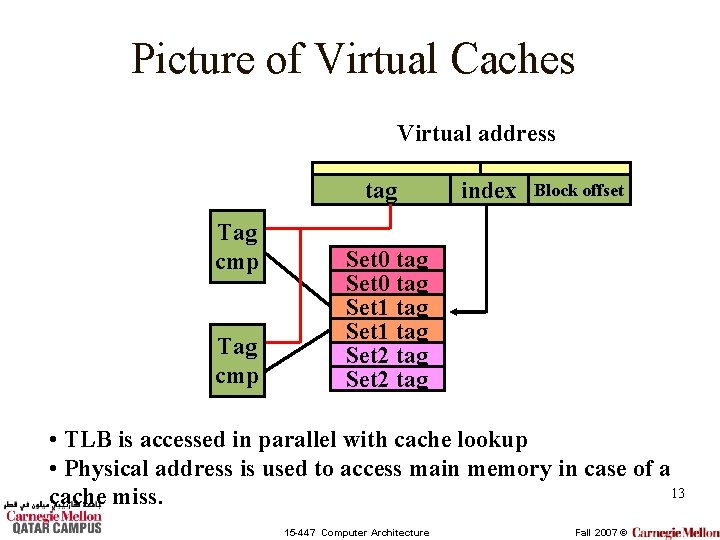
Virtually-Addressed Caches • Perform the TLB lookup at the same time as the cache tag compare. – Uses bits from the virtual address to index the cache set – Uses bits from the virtual address for tag match. • Problems: – Aliasing: Two processes may refer to the same physical location with different virtual addresses. – When switching processes, TLB must be invalidated, and dirty cache blocks must be written back to memory. 12 15 -447 Computer Architecture Fall 2007 ©
Picture of Virtual Caches Virtual address tag Tag cmp index Block offset Set 0 tag Set 1 tag Set 2 tag • TLB is accessed in parallel with cache lookup • Physical address is used to access main memory in case of a 13 cache miss. 15 -447 Computer Architecture Fall 2007 ©
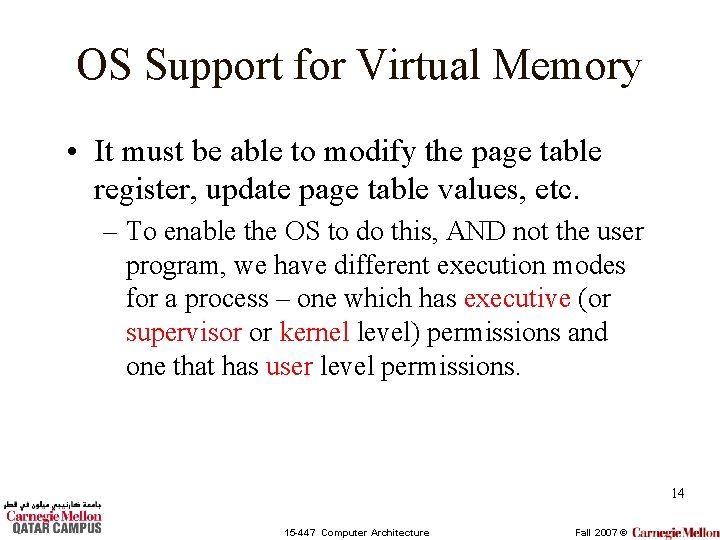
OS Support for Virtual Memory • It must be able to modify the page table register, update page table values, etc. – To enable the OS to do this, AND not the user program, we have different execution modes for a process – one which has executive (or supervisor or kernel level) permissions and one that has user level permissions. 14 15 -447 Computer Architecture Fall 2007 ©
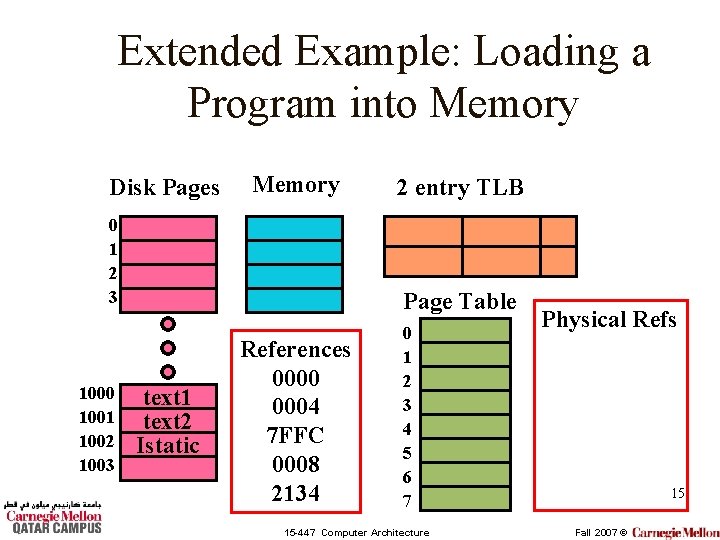
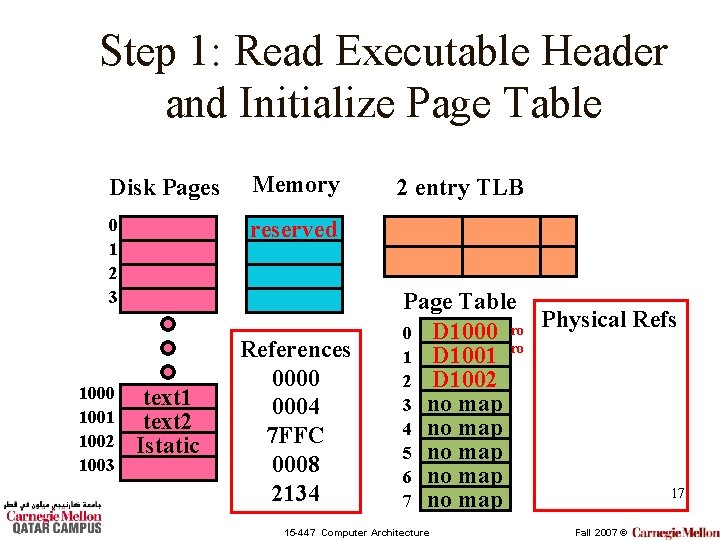
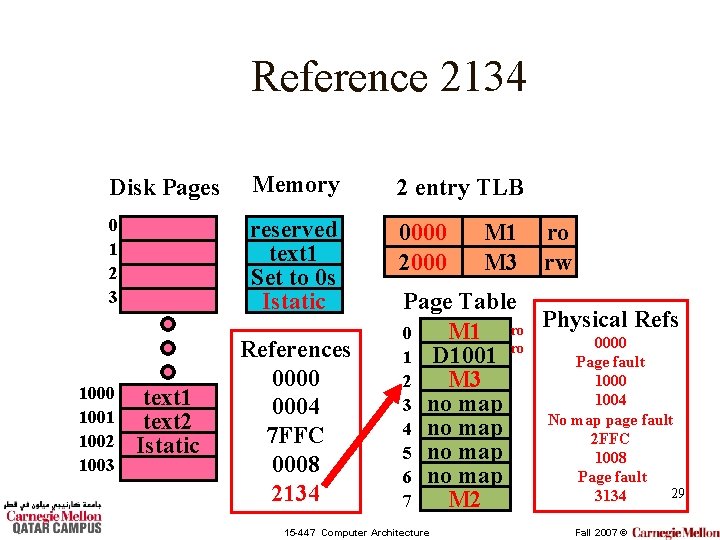
Extended Example: Loading a Program into Memory Disk Pages Memory 0 1 2 3 1000 1001 1002 1003 2 entry TLB Page Table text 1 text 2 Istatic References 0000 0004 7 FFC 0008 2134 0 1 2 3 4 5 6 7 15 -447 Computer Architecture Physical Refs 15 Fall 2007 ©
Additional Information • Page size = 4 KB • Page table entry size = 4 B • Page table register points to physical address 0000 16 15 -447 Computer Architecture Fall 2007 ©
Step 1: Read Executable Header and Initialize Page Table Disk Pages Memory 0 1 2 3 reserved 1000 1001 1002 1003 text 1 text 2 Istatic References 0000 0004 7 FFC 0008 2134 2 entry TLB Page Table Physical Refs 0 D 1000 ro ro 1 D 1001 2 D 1002 3 no map 4 no map 5 no map 6 no map 17 7 no map 15 -447 Computer Architecture Fall 2007 ©
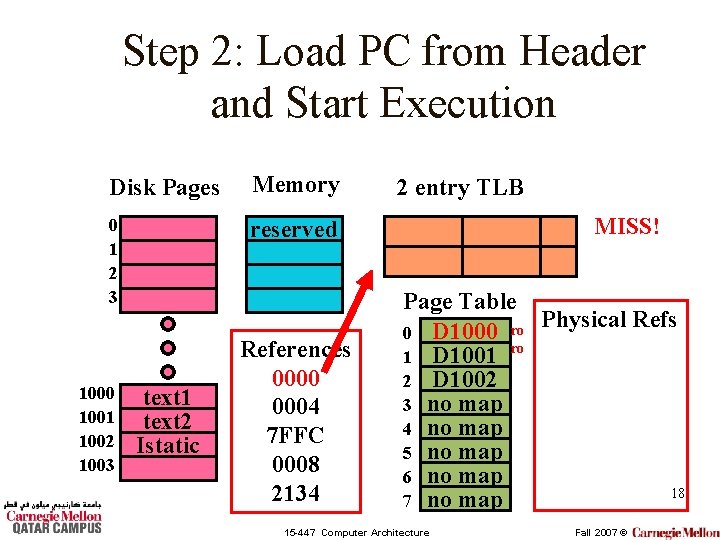
Step 2: Load PC from Header and Start Execution Disk Pages Memory 0 1 2 3 reserved 1000 1001 1002 1003 text 1 text 2 Istatic References 0000 0004 7 FFC 0008 2134 2 entry TLB MISS! Page Table Physical Refs 0 D 1000 ro ro 1 D 1001 2 D 1002 3 no map 4 no map 5 no map 6 no map 18 7 no map 15 -447 Computer Architecture Fall 2007 ©
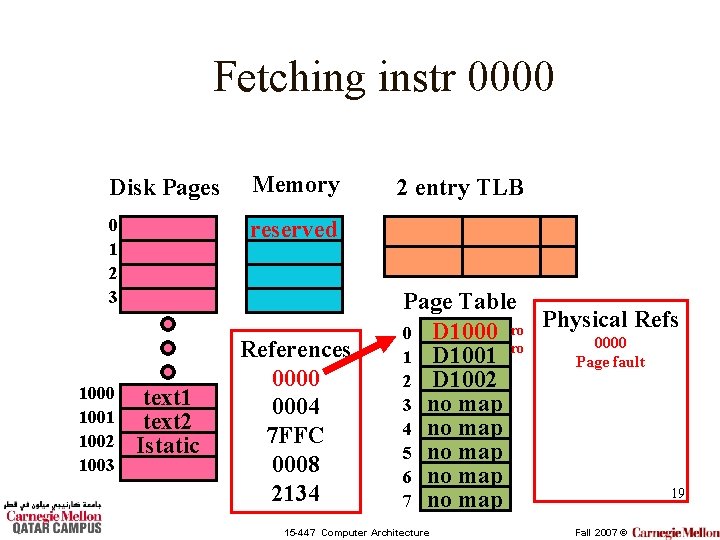
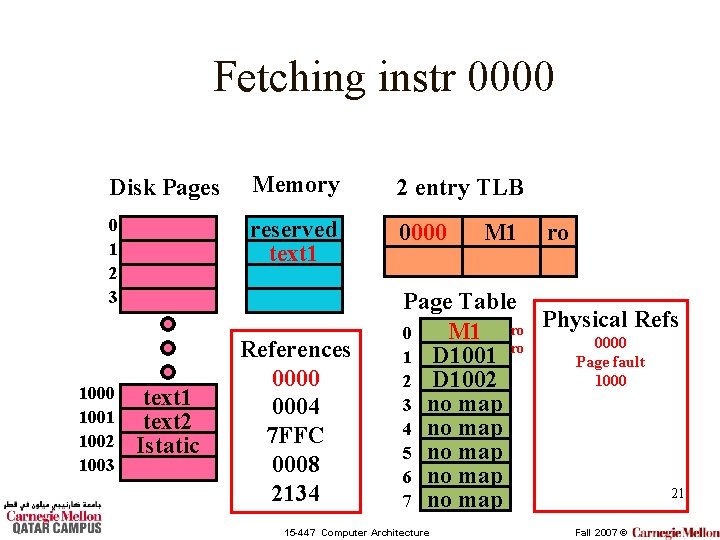
Fetching instr 0000 Disk Pages Memory 0 1 2 3 reserved 1000 1001 1002 1003 text 1 text 2 Istatic References 0000 0004 7 FFC 0008 2134 2 entry TLB Page Table Physical Refs 0 D 1000 ro 0000 ro 1 D 1001 Page fault 2 D 1002 3 no map 4 no map 5 no map 6 no map 19 7 no map 15 -447 Computer Architecture Fall 2007 ©
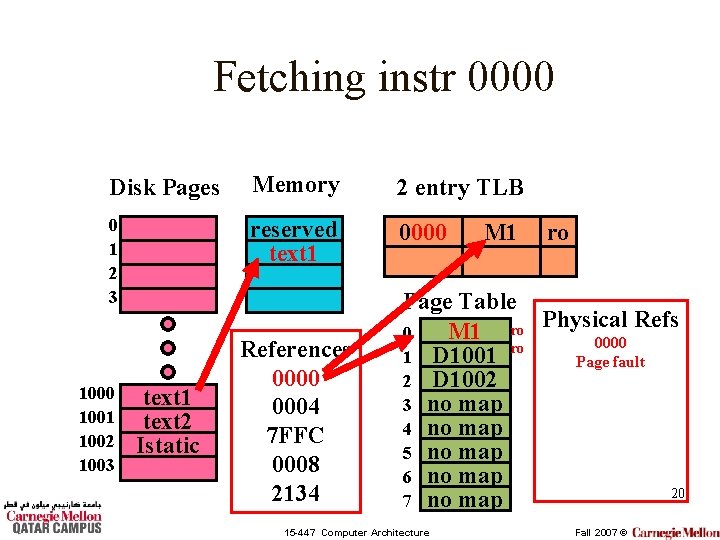
Fetching instr 0000 Disk Pages Memory 2 entry TLB 0 1 2 3 reserved text 1 0000 1001 1002 1003 text 1 text 2 Istatic References 0000 0004 7 FFC 0008 2134 M 1 ro Page Table Refs M 1 ro Physical 0 0000 ro 1 D 1001 Page fault 2 D 1002 3 no map 4 no map 5 no map 6 no map 20 7 no map 15 -447 Computer Architecture Fall 2007 ©
Fetching instr 0000 Disk Pages Memory 2 entry TLB 0 1 2 3 reserved text 1 0000 1001 1002 1003 text 1 text 2 Istatic References 0000 0004 7 FFC 0008 2134 M 1 ro Page Table Refs M 1 ro Physical 0 0000 ro 1 D 1001 Page fault 1000 2 D 1002 3 no map 4 no map 5 no map 6 no map 21 7 no map 15 -447 Computer Architecture Fall 2007 ©
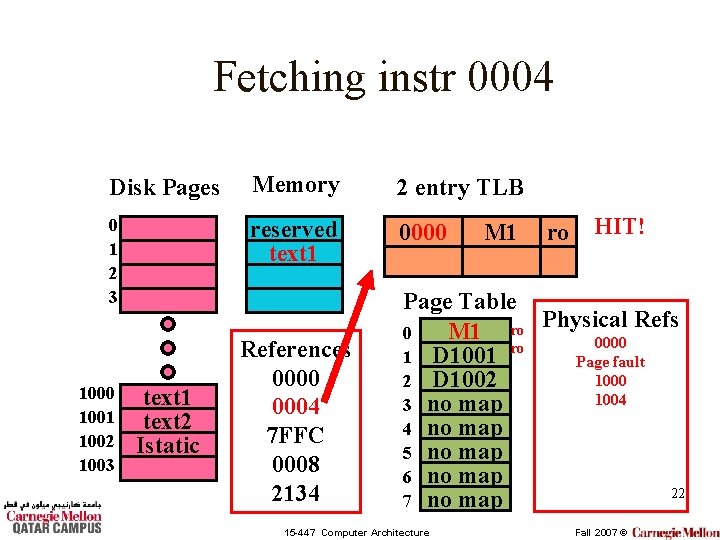
Fetching instr 0004 Disk Pages Memory 2 entry TLB 0 1 2 3 reserved text 1 0000 1001 1002 1003 text 1 text 2 Istatic References 0000 0004 7 FFC 0008 2134 M 1 ro HIT! Page Table Refs M 1 ro Physical 0 0000 ro 1 D 1001 Page fault 1000 2 D 1002 1004 3 no map 4 no map 5 no map 6 no map 22 7 no map 15 -447 Computer Architecture Fall 2007 ©
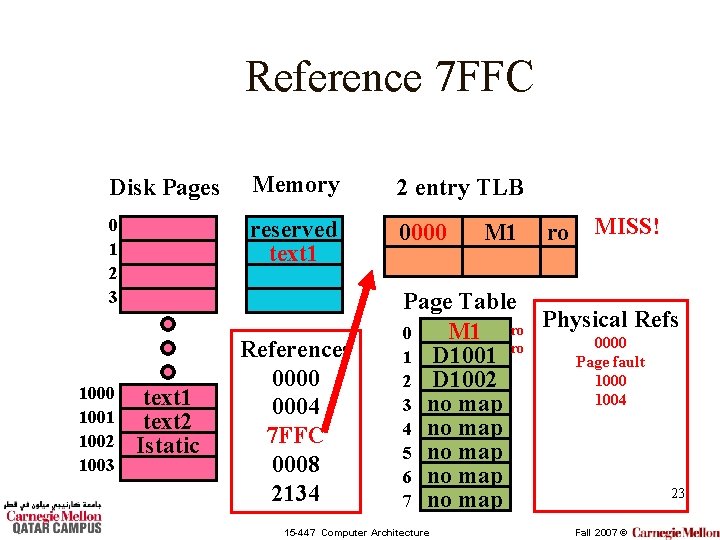
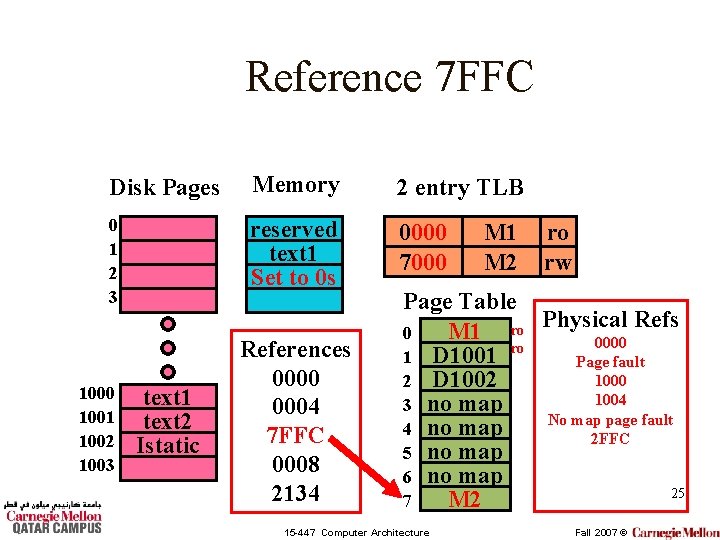
Reference 7 FFC Disk Pages Memory 2 entry TLB 0 1 2 3 reserved text 1 0000 1001 1002 1003 text 1 text 2 Istatic References 0000 0004 7 FFC 0008 2134 M 1 ro MISS! Page Table Refs M 1 ro Physical 0 0000 ro 1 D 1001 Page fault 1000 2 D 1002 1004 3 no map 4 no map 5 no map 6 no map 23 7 no map 15 -447 Computer Architecture Fall 2007 ©
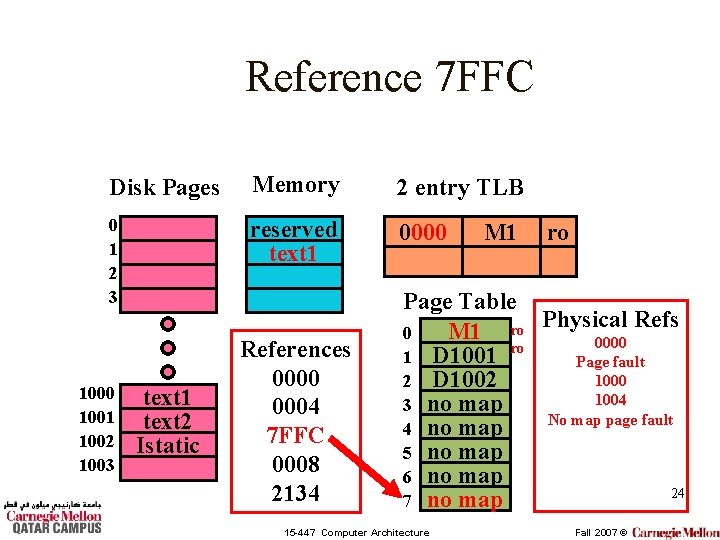
Reference 7 FFC Disk Pages Memory 2 entry TLB 0 1 2 3 reserved text 1 0000 1001 1002 1003 text 1 text 2 Istatic References 0000 0004 7 FFC 0008 2134 M 1 ro Page Table Refs M 1 ro Physical 0 0000 ro 1 D 1001 Page fault 1000 2 D 1002 1004 3 no map No map page fault 4 no map 5 no map 6 no map 24 7 no map 15 -447 Computer Architecture Fall 2007 ©
Reference 7 FFC Disk Pages Memory 2 entry TLB 0 1 2 3 reserved text 1 Set to 0 s 0000 7000 1001 1002 1003 text 1 text 2 Istatic References 0000 0004 7 FFC 0008 2134 M 1 M 2 ro rw Page Table Refs M 1 ro Physical 0 0000 ro 1 D 1001 Page fault 1000 2 D 1002 1004 3 no map No map page fault 4 no map 2 FFC 5 no map 6 no map 25 M 2 7 15 -447 Computer Architecture Fall 2007 ©
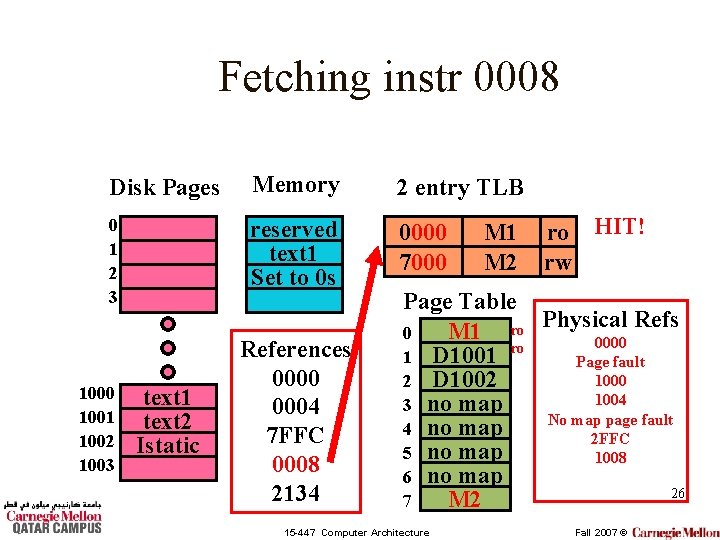
Fetching instr 0008 Disk Pages Memory 2 entry TLB 0 1 2 3 reserved text 1 Set to 0 s 0000 7000 1001 1002 1003 text 1 text 2 Istatic References 0000 0004 7 FFC 0008 2134 M 1 M 2 ro HIT! rw Page Table Refs M 1 ro Physical 0 0000 ro 1 D 1001 Page fault 1000 2 D 1002 1004 3 no map No map page fault 4 no map 2 FFC 5 no map 1008 6 no map 26 M 2 7 15 -447 Computer Architecture Fall 2007 ©
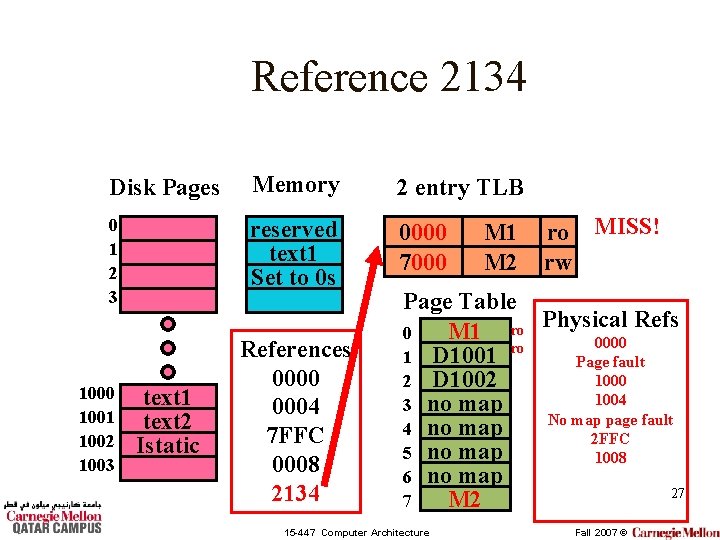
Reference 2134 Disk Pages Memory 2 entry TLB 0 1 2 3 reserved text 1 Set to 0 s 0000 7000 1001 1002 1003 text 1 text 2 Istatic References 0000 0004 7 FFC 0008 2134 M 1 M 2 ro MISS! rw Page Table Refs M 1 ro Physical 0 0000 ro 1 D 1001 Page fault 1000 2 D 1002 1004 3 no map No map page fault 4 no map 2 FFC 5 no map 1008 6 no map 27 M 2 7 15 -447 Computer Architecture Fall 2007 ©
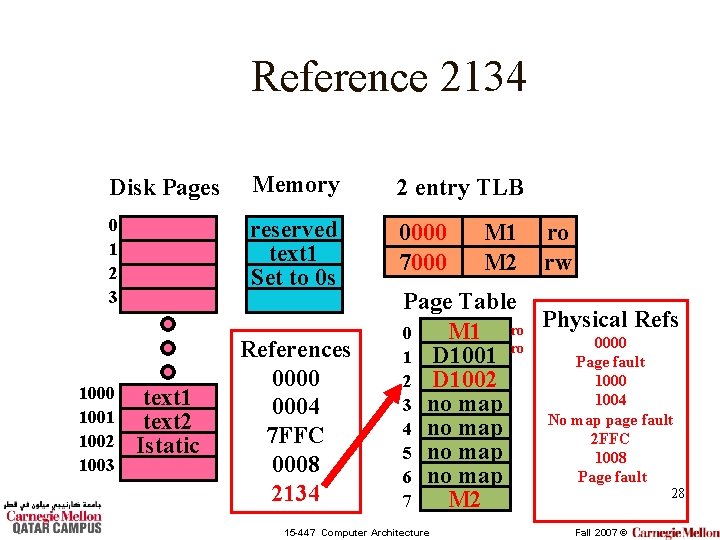
Reference 2134 Disk Pages Memory 2 entry TLB 0 1 2 3 reserved text 1 Set to 0 s 0000 7000 1001 1002 1003 text 1 text 2 Istatic References 0000 0004 7 FFC 0008 2134 M 1 M 2 ro rw Page Table Refs M 1 ro Physical 0 0000 ro 1 D 1001 Page fault 1000 2 D 1002 1004 3 no map No map page fault 4 no map 2 FFC 5 no map 1008 Page fault 6 no map 28 M 2 7 15 -447 Computer Architecture Fall 2007 ©
Reference 2134 Disk Pages Memory 2 entry TLB 0 1 2 3 reserved text 1 Set to 0 s Istatic 0000 2000 1001 1002 1003 text 1 text 2 Istatic References 0000 0004 7 FFC 0008 2134 M 1 M 3 ro rw Page Table Refs M 1 ro Physical 0 0000 ro 1 D 1001 Page fault 1000 M 3 2 1004 3 no map No map page fault 4 no map 2 FFC 5 no map 1008 Page fault 6 no map 29 3134 M 2 7 15 -447 Computer Architecture Fall 2007 ©
Multiple Processes • Virtual cache support for multiple processes: – Flush the cache between each context switch. – Use process. ID (a unique number for each processes given by the operating system) as part of the tag 30 15 -447 Computer Architecture Fall 2007 ©
Multiple Processors • Can run two programs at the same time – Each processor has its own cache. Why? • May or may not share data – Sharing code is not a problem (read only) • Example: shared libraries, DDLs – Sharing data (read/write) is a problem • What if it is in one processors cache? – Solution: Snoopy caches 31 15 -447 Computer Architecture Fall 2007 ©