
CS 123 INTRODUCTION TO COMPUTER GRAPHICS Introduction to




- Slides: 51
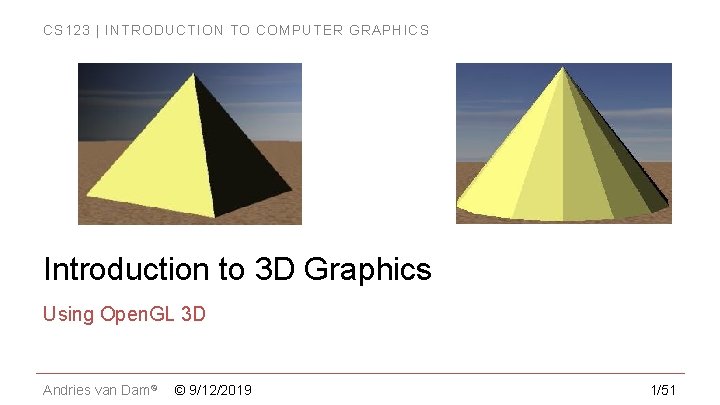
CS 123 | INTRODUCTION TO COMPUTER GRAPHICS Introduction to 3 D Graphics Using Open. GL 3 D Andries van Dam© © 9/12/2019 1/51
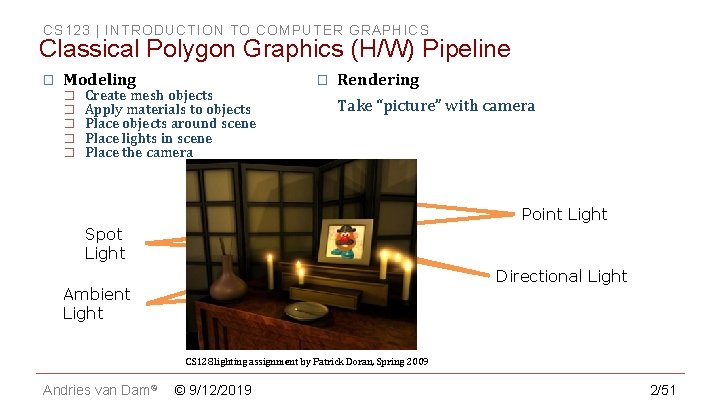
CS 123 | INTRODUCTION TO COMPUTER GRAPHICS Classical Polygon Graphics (H/W) Pipeline � Modeling � � � Create mesh objects Apply materials to objects Place objects around scene Place lights in scene Place the camera � Rendering Take “picture” with camera Point Light Spot Light Directional Light Ambient Light CS 128 lighting assignment by Patrick Doran, Spring 2009 Andries van Dam© © 9/12/2019 2/51
CS 123 | INTRODUCTION TO COMPUTER GRAPHICS Why Open. GL for 3 D? � Widely used in industry and academia for interactive or real-time 3 D graphics � Old fixed-function API (Open. GL 1. x) assisted rapid prototyping of simple 3 D scenes with “classical” lighting effects � Experiment with simple ideas quickly � Modern programmable API allows for more flexibility and control � TAs will initially provide shaders for projects/labs; you'll write your own first, simple, shader in Lab 2 Andries van Dam© © 9/12/2019 3/51
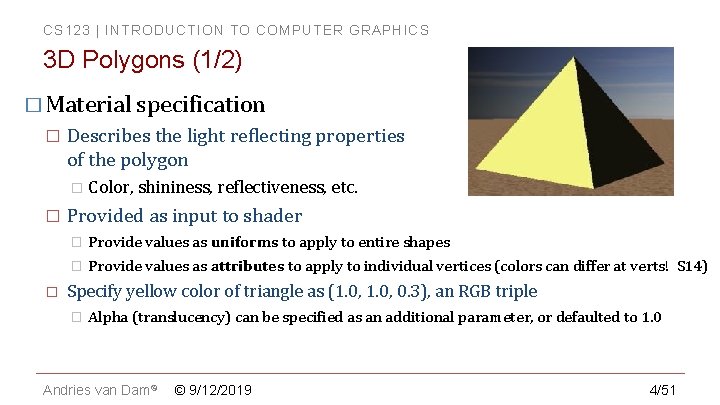
CS 123 | INTRODUCTION TO COMPUTER GRAPHICS 3 D Polygons (1/2) � Material specification � Describes the light reflecting properties of the polygon � Color, shininess, reflectiveness, etc. � � Provided as input to shader � Provide values as uniforms to apply to entire shapes � Provide values as attributes to apply to individual vertices (colors can differ at verts! S 14) Specify yellow color of triangle as (1. 0, 0. 3), an RGB triple � Alpha (translucency) can be specified as an additional parameter, or defaulted to 1. 0 Andries van Dam© © 9/12/2019 4/51
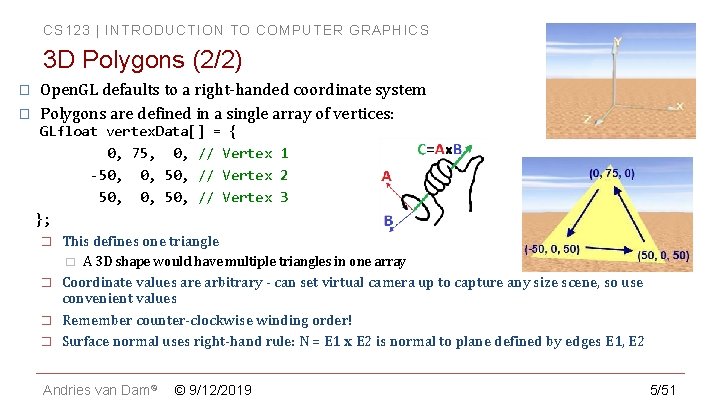
CS 123 | INTRODUCTION TO COMPUTER GRAPHICS 3 D Polygons (2/2) � � Open. GL defaults to a right-handed coordinate system Polygons are defined in a single array of vertices: GLfloat vertex. Data[] = { 0, 75, 0, // Vertex 1 -50, 0, 50, // Vertex 2 50, 0, 50, // Vertex 3 }; � This defines one triangle � � A 3 D shape would have multiple triangles in one array Coordinate values are arbitrary - can set virtual camera up to capture any size scene, so use convenient values Remember counter-clockwise winding order! Surface normal uses right-hand rule: N = E 1 x E 2 is normal to plane defined by edges E 1, E 2 Andries van Dam© © 9/12/2019 5/51
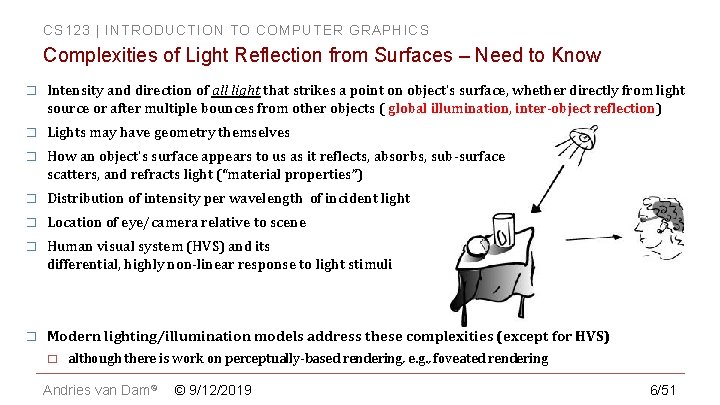
CS 123 | INTRODUCTION TO COMPUTER GRAPHICS Complexities of Light Reflection from Surfaces – Need to Know � Intensity and direction of all light that strikes a point on object's surface, whether directly from light source or after multiple bounces from other objects ( global illumination, inter-object reflection) � Lights may have geometry themselves � How an object's surface appears to us as it reflects, absorbs, sub-surface scatters, and refracts light (“material properties”) � Distribution of intensity per wavelength of incident light � Location of eye/camera relative to scene � Human visual system (HVS) and its differential, highly non-linear response to light stimuli � Modern lighting/illumination models address these complexities (except for HVS) � although there is work on perceptually-based rendering, e. g. , foveated rendering Andries van Dam© © 9/12/2019 6/51
CS 123 | INTRODUCTION TO COMPUTER GRAPHICS 73, 000 Year-old Red Ochre Markings – early art? Andries van Dam© © 9/12/2019 Image source 7/51
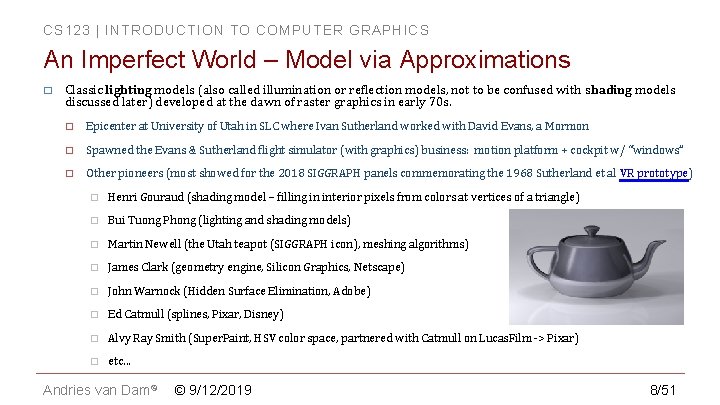
CS 123 | INTRODUCTION TO COMPUTER GRAPHICS An Imperfect World – Model via Approximations � Classic lighting models (also called illumination or reflection models, not to be confused with shading models discussed later) developed at the dawn of raster graphics in early 70 s. � Epicenter at University of Utah in SLC where Ivan Sutherland worked with David Evans, a Mormon � Spawned the Evans & Sutherland flight simulator (with graphics) business: motion platform + cockpit w/ “windows” � Other pioneers (most showed for the 2018 SIGGRAPH panels commemorating the 1968 Sutherland et al VR prototype) � Henri Gouraud (shading model – filling in interior pixels from colors at vertices of a triangle) � Bui Tuong Phong (lighting and shading models) � Martin Newell (the Utah teapot (SIGGRAPH icon), meshing algorithms) � James Clark (geometry engine, Silicon Graphics, Netscape) � John Warnock (Hidden Surface Elimination, Adobe) � Ed Catmull (splines, Pixar, Disney) � Alvy Ray Smith (Super. Paint, HSV color space, partnered with Catmull on Lucas. Film -> Pixar) � etc. . . Andries van Dam© © 9/12/2019 8/51
CS 123 | INTRODUCTION TO COMPUTER GRAPHICS Limitations of Computer Power � � Back then: � CPUs > 6 orders of magnitude less powerful, no GPU to speak of, just plot pixels � memory limited (measured in KB!) Even on today's machines, a physically accurate light simulation requires computational power beyond the capabilities of supercomputers! � but with today’s incredible GPU boards (e. g. , NVIDIA’s RTX/Turing) can fool the eye with excellent approximations!!! Andries van Dam© © 9/12/2019 9/51
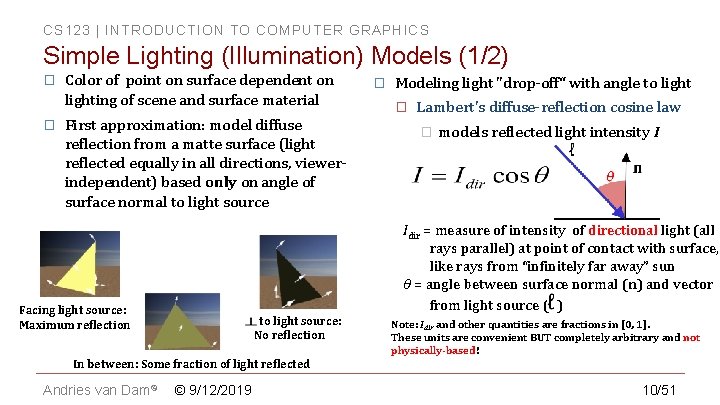
CS 123 | INTRODUCTION TO COMPUTER GRAPHICS Simple Lighting (Illumination) Models (1/2) � � Color of point on surface dependent on lighting of scene and surface material First approximation: model diffuse reflection from a matte surface (light reflected equally in all directions, viewerindependent) based only on angle of surface normal to light source � Modeling light "drop-off“ with angle to light � Lambert's diffuse-reflection cosine law � models reflected light intensity I Idir = measure of intensity of directional light (all rays parallel) at point of contact with surface, like rays from “infinitely far away” sun θ = angle between surface normal (n) and vector from light source ( ) Facing light source: Maximum reflection to light source: No reflection Note: Idir and other quantities are fractions in [0, 1]. These units are convenient BUT completely arbitrary and not physically-based! In between: Some fraction of light reflected Andries van Dam© © 9/12/2019 10/51
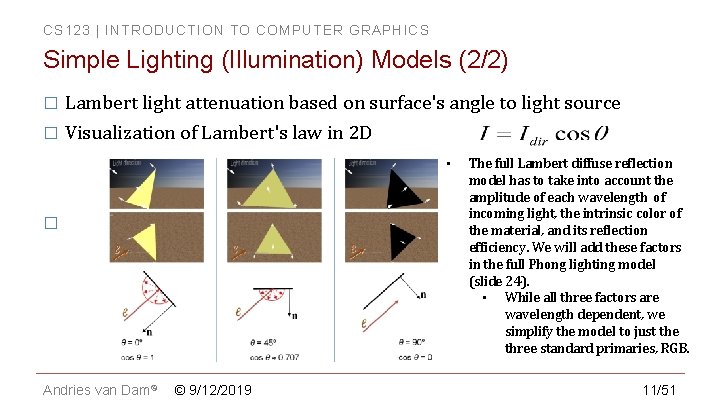
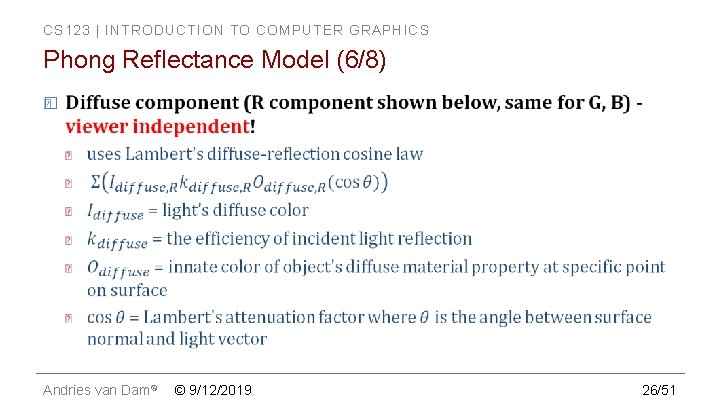
CS 123 | INTRODUCTION TO COMPUTER GRAPHICS Simple Lighting (Illumination) Models (2/2) � Lambert light attenuation based on surface's angle to light source � Visualization of Lambert's law in 2 D • � Andries van Dam© © 9/12/2019 The full Lambert diffuse reflection model has to take into account the amplitude of each wavelength of incoming light, the intrinsic color of the material, and its reflection efficiency. We will add these factors in the full Phong lighting model (slide 24). • While all three factors are wavelength dependent, we simplify the model to just the three standard primaries, RGB. 11/51
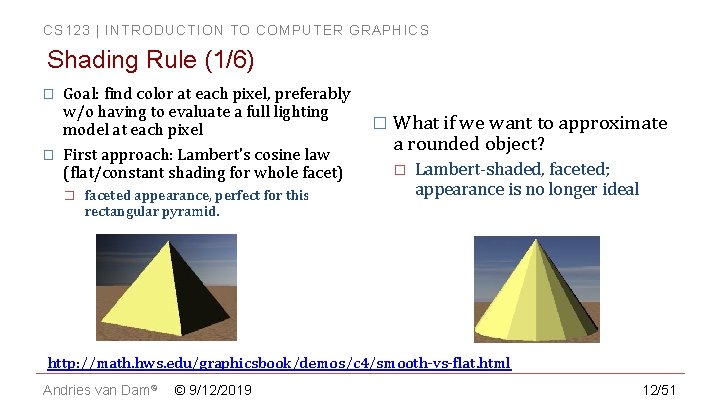
CS 123 | INTRODUCTION TO COMPUTER GRAPHICS Shading Rule (1/6) � � Goal: find color at each pixel, preferably w/o having to evaluate a full lighting model at each pixel First approach: Lambert's cosine law (flat/constant shading for whole facet) � faceted appearance, perfect for this rectangular pyramid. � What if we want to approximate a rounded object? � Lambert-shaded, faceted; appearance is no longer ideal http: //math. hws. edu/graphicsbook/demos/c 4/smooth-vs-flat. html Andries van Dam© © 9/12/2019 12/51
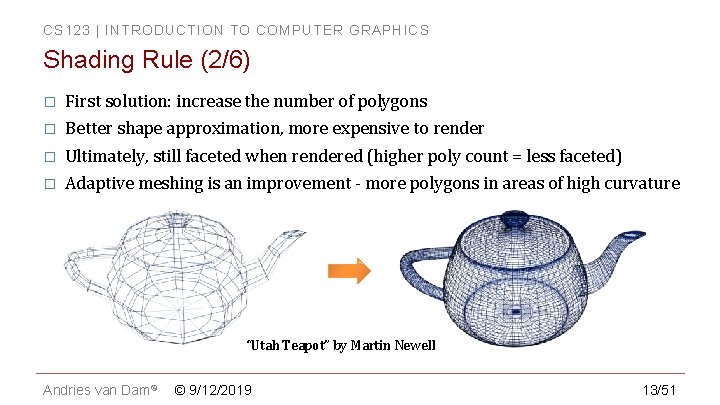
CS 123 | INTRODUCTION TO COMPUTER GRAPHICS Shading Rule (2/6) � First solution: increase the number of polygons � Better shape approximation, more expensive to render � Ultimately, still faceted when rendered (higher poly count = less faceted) � Adaptive meshing is an improvement - more polygons in areas of high curvature “Utah Teapot” by Martin Newell Andries van Dam© © 9/12/2019 13/51
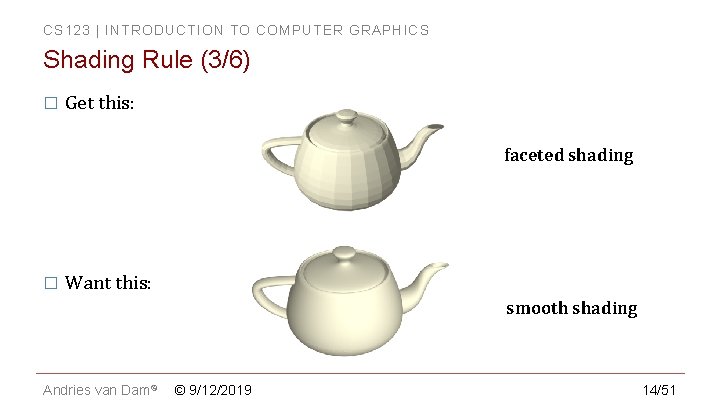
CS 123 | INTRODUCTION TO COMPUTER GRAPHICS Shading Rule (3/6) � Get this: faceted shading � Want this: smooth shading Andries van Dam© © 9/12/2019 14/51
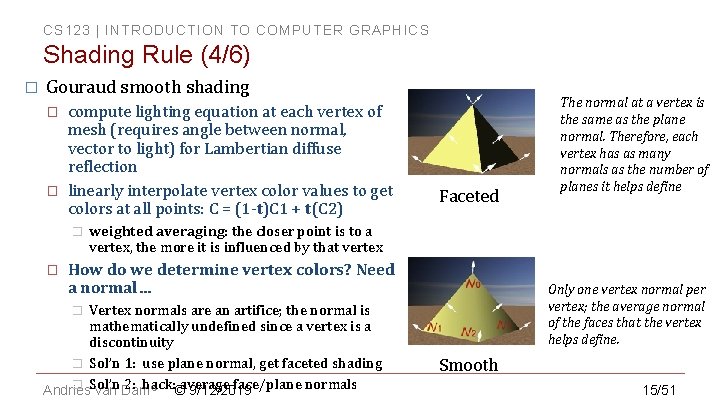
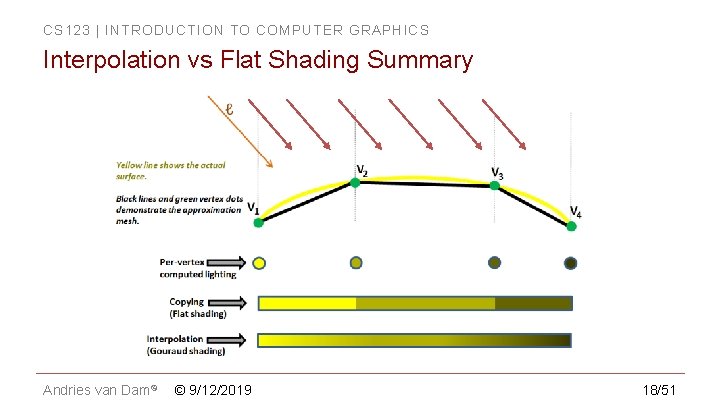
CS 123 | INTRODUCTION TO COMPUTER GRAPHICS Shading Rule (4/6) � Gouraud smooth shading � � compute lighting equation at each vertex of mesh (requires angle between normal, vector to light) for Lambertian diffuse reflection linearly interpolate vertex color values to get colors at all points: C = (1 -t)C 1 + t(C 2) � � Faceted The normal at a vertex is the same as the plane normal. Therefore, each vertex has as many normals as the number of planes it helps define weighted averaging: the closer point is to a vertex, the more it is influenced by that vertex How do we determine vertex colors? Need a normal… Vertex normals are an artifice; the normal is mathematically undefined since a vertex is a discontinuity � Sol’n 1: use plane normal, get faceted shading � Sol’n 2: hack: average face/plane normals Andries van Dam© © 9/12/2019 Only one vertex normal per vertex; the average normal of the faces that the vertex helps define. � Smooth 15/51
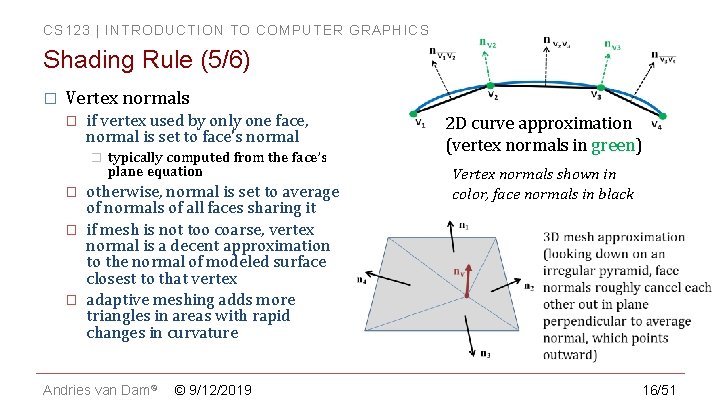
CS 123 | INTRODUCTION TO COMPUTER GRAPHICS Shading Rule (5/6) � Vertex normals � if vertex used by only one face, normal is set to face's normal � � typically computed from the face’s plane equation otherwise, normal is set to average of normals of all faces sharing it if mesh is not too coarse, vertex normal is a decent approximation to the normal of modeled surface closest to that vertex adaptive meshing adds more triangles in areas with rapid changes in curvature Andries van Dam© © 9/12/2019 2 D curve approximation (vertex normals in green) Vertex normals shown in color, face normals in black 16/51
CS 123 | INTRODUCTION TO COMPUTER GRAPHICS Shading Rule (6/6) � Programmable Open. GL API doesn’t provide any lighting or shading. Use shaders to implement lighting model and shading rule of your choice � � to get flat shading, specify the same surface normal for vertices of the same facet (each vertex gets n normals, where n is the number of facets it is a part of) to get smooth shading, specify a single shared normal computed by averaging face normal for each (shared) vertex in the object Andries van Dam© Faceted © 9/12/2019 Smooth 17/51
CS 123 | INTRODUCTION TO COMPUTER GRAPHICS Interpolation vs Flat Shading Summary Andries van Dam© © 9/12/2019 18/51
CS 123 | INTRODUCTION TO COMPUTER GRAPHICS In Class Question 1 Andries van Dam© © 9/12/2019 19/51
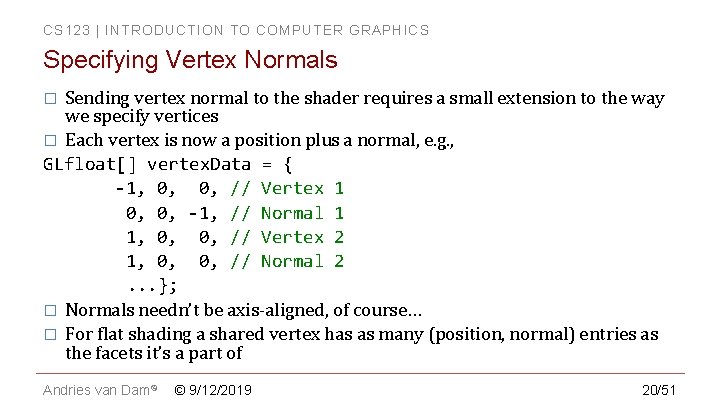
CS 123 | INTRODUCTION TO COMPUTER GRAPHICS Specifying Vertex Normals Sending vertex normal to the shader requires a small extension to the way we specify vertices � Each vertex is now a position plus a normal, e. g. , GLfloat[] vertex. Data = { -1, 0, 0, // Vertex 1 0, 0, -1, // Normal 1 1, 0, 0, // Vertex 2 1, 0, 0, // Normal 2. . . }; � Normals needn’t be axis-aligned, of course… � For flat shading a shared vertex has as many (position, normal) entries as the facets it’s a part of � Andries van Dam© © 9/12/2019 20/51
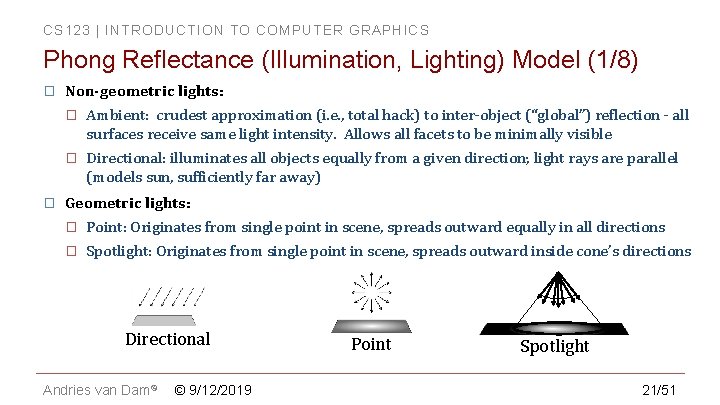
CS 123 | INTRODUCTION TO COMPUTER GRAPHICS Phong Reflectance (Illumination, Lighting) Model (1/8) � � Non-geometric lights: � Ambient: crudest approximation (i. e. , total hack) to inter-object (“global”) reflection - all surfaces receive same light intensity. Allows all facets to be minimally visible � Directional: illuminates all objects equally from a given direction; light rays are parallel (models sun, sufficiently far away) Geometric lights: � Point: Originates from single point in scene, spreads outward equally in all directions � Spotlight: Originates from single point in scene, spreads outward inside cone’s directions Directional Andries van Dam© © 9/12/2019 Point Spotlight 21/51
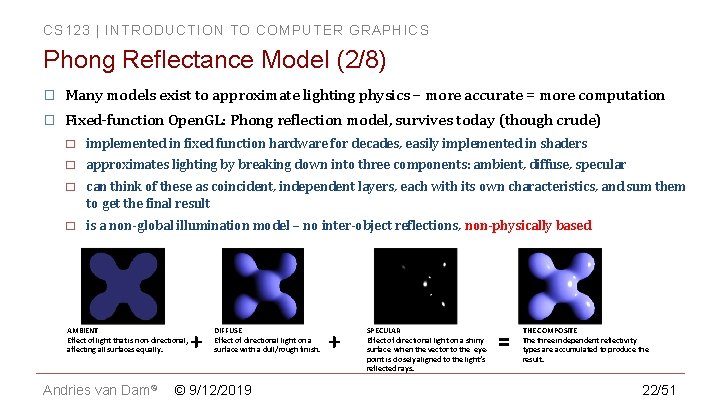
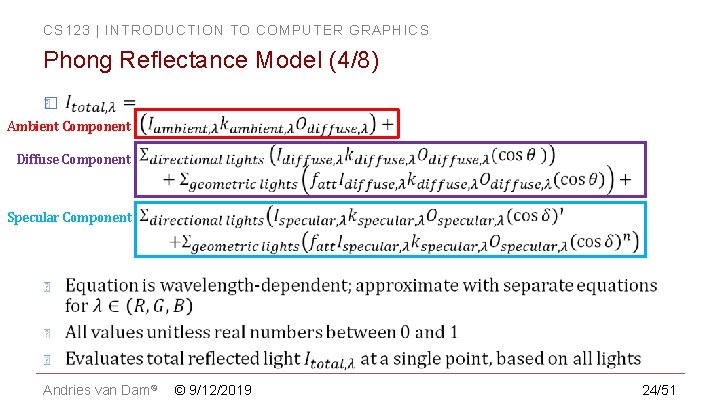
CS 123 | INTRODUCTION TO COMPUTER GRAPHICS Phong Reflectance Model (2/8) � Many models exist to approximate lighting physics – more accurate = more computation � Fixed-function Open. GL: Phong reflection model, survives today (though crude) � implemented in fixed function hardware for decades, easily implemented in shaders � approximates lighting by breaking down into three components: ambient, diffuse, specular � can think of these as coincident, independent layers, each with its own characteristics, and sum them to get the final result � is a non-global illumination model – no inter-object reflections, non-physically based AMBIENT Effect of light that is non-directional, affecting all surfaces equally. Andries van Dam© + DIFFUSE Effect of directional light on a surface with a dull/rough finish. © 9/12/2019 + SPECULAR Effect of directional light on a shiny surface when the vector to the eyepoint is closely aligned to the light’s reflected rays. = THE COMPOSITE The three independent reflectivity types are accumulated to produce the result. 22/51
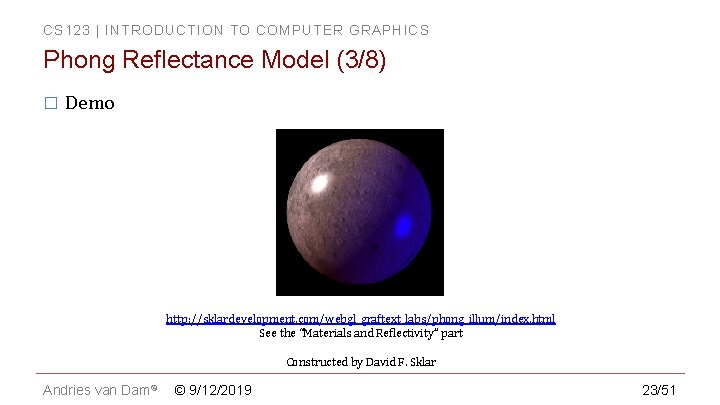
CS 123 | INTRODUCTION TO COMPUTER GRAPHICS Phong Reflectance Model (3/8) � Demo http: //sklardevelopment. com/webgl_graftext_labs/phong_illum/index. html See the “Materials and Reflectivity” part Constructed by David F. Sklar Andries van Dam© © 9/12/2019 23/51
CS 123 | INTRODUCTION TO COMPUTER GRAPHICS Phong Reflectance Model (4/8) � Ambient Component Diffuse Component Specular Component Andries van Dam© © 9/12/2019 24/51
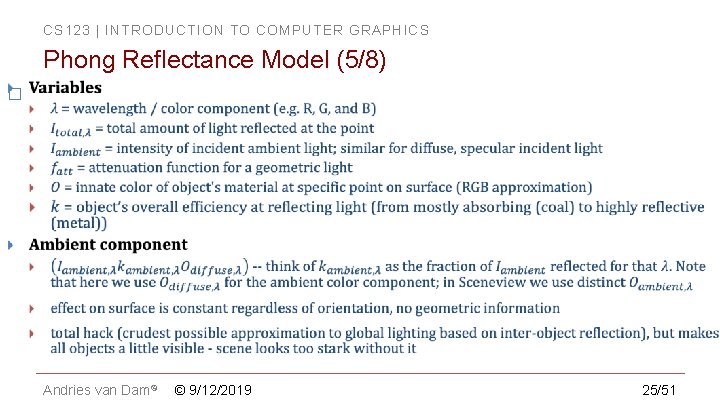
CS 123 | INTRODUCTION TO COMPUTER GRAPHICS Phong Reflectance Model (5/8) � Andries van Dam© © 9/12/2019 25/51
CS 123 | INTRODUCTION TO COMPUTER GRAPHICS Phong Reflectance Model (6/8) � Andries van Dam© © 9/12/2019 26/51
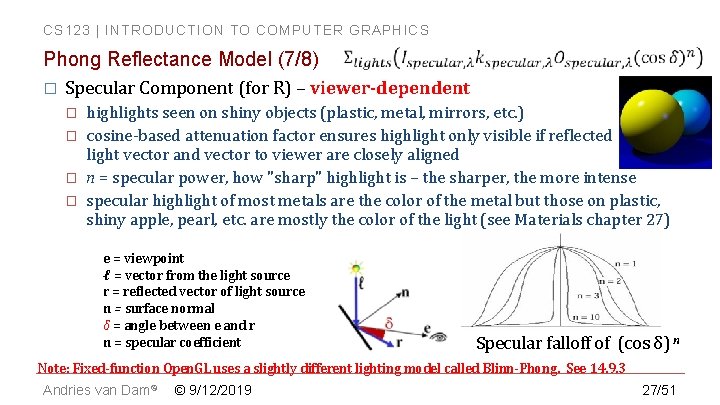
CS 123 | INTRODUCTION TO COMPUTER GRAPHICS Phong Reflectance Model (7/8) � Specular Component (for R) – viewer-dependent � � highlights seen on shiny objects (plastic, metal, mirrors, etc. ) cosine-based attenuation factor ensures highlight only visible if reflected light vector and vector to viewer are closely aligned n = specular power, how "sharp" highlight is – the sharper, the more intense specular highlight of most metals are the color of the metal but those on plastic, shiny apple, pearl, etc. are mostly the color of the light (see Materials chapter 27) e = viewpoint ℓ = vector from the light source r = reflected vector of light source n = surface normal δ = angle between e and r n = specular coefficient Specular falloff of (cos δ) n Note: Fixed-function Open. GL uses a slightly different lighting model called Blinn-Phong. See 14. 9. 3 Andries van Dam© © 9/12/2019 27/51
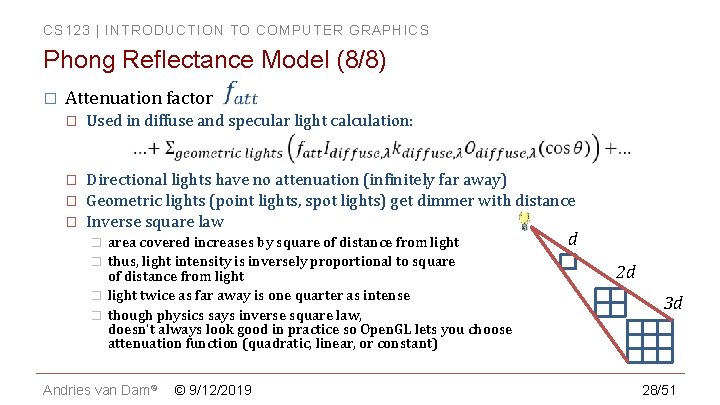
CS 123 | INTRODUCTION TO COMPUTER GRAPHICS Phong Reflectance Model (8/8) � Attenuation factor � Used in diffuse and specular light calculation: � Directional lights have no attenuation (infinitely far away) Geometric lights (point lights, spot lights) get dimmer with distance Inverse square law � � � area covered increases by square of distance from light thus, light intensity is inversely proportional to square of distance from light twice as far away is one quarter as intense though physics says inverse square law, doesn't always look good in practice so Open. GL lets you choose attenuation function (quadratic, linear, or constant) Andries van Dam© © 9/12/2019 d 2 d 3 d 28/51
CS 123 | INTRODUCTION TO COMPUTER GRAPHICS In Class Question 2 Andries van Dam© © 9/12/2019 29/51
CS 123 | INTRODUCTION TO COMPUTER GRAPHICS In Class Question 3 Andries van Dam© © 9/12/2019 30/51
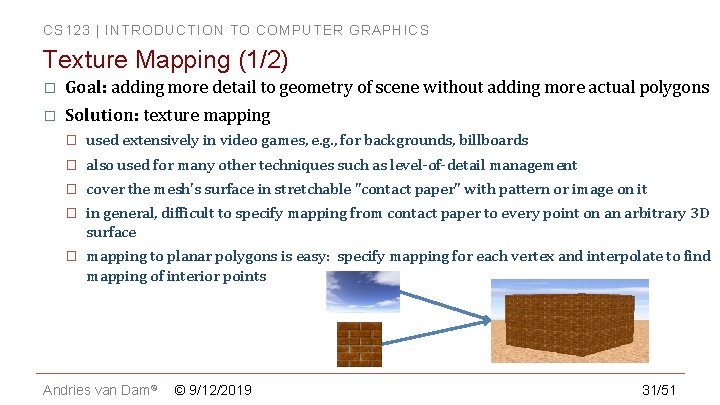
CS 123 | INTRODUCTION TO COMPUTER GRAPHICS Texture Mapping (1/2) � Goal: adding more detail to geometry of scene without adding more actual polygons � Solution: texture mapping � used extensively in video games, e. g. , for backgrounds, billboards � also used for many other techniques such as level-of-detail management � cover the mesh's surface in stretchable "contact paper" with pattern or image on it � in general, difficult to specify mapping from contact paper to every point on an arbitrary 3 D surface � mapping to planar polygons is easy: specify mapping for each vertex and interpolate to find mapping of interior points Andries van Dam© © 9/12/2019 31/51
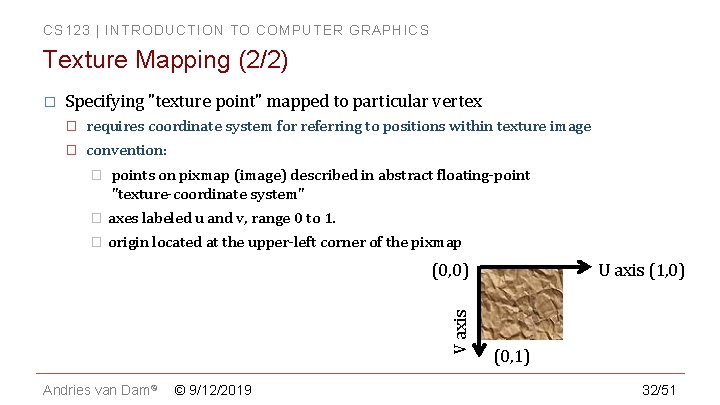
CS 123 | INTRODUCTION TO COMPUTER GRAPHICS Texture Mapping (2/2) � Specifying "texture point" mapped to particular vertex � requires coordinate system for referring to positions within texture image � convention: � points on pixmap (image) described in abstract floating-point "texture-coordinate system" � axes labeled u and v, range 0 to 1. � origin located at the upper-left corner of the pixmap V axis (0, 0) Andries van Dam© © 9/12/2019 U axis (1, 0) (0, 1) 32/51
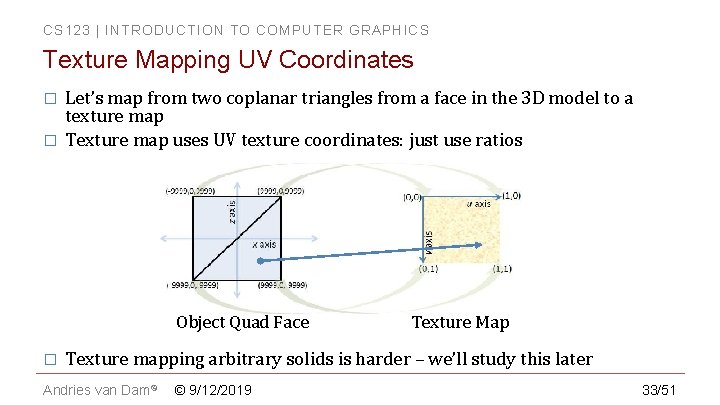
CS 123 | INTRODUCTION TO COMPUTER GRAPHICS Texture Mapping UV Coordinates � � Let’s map from two coplanar triangles from a face in the 3 D model to a texture map Texture map uses UV texture coordinates: just use ratios Object Quad Face � Texture Map Texture mapping arbitrary solids is harder – we’ll study this later Andries van Dam© © 9/12/2019 33/51
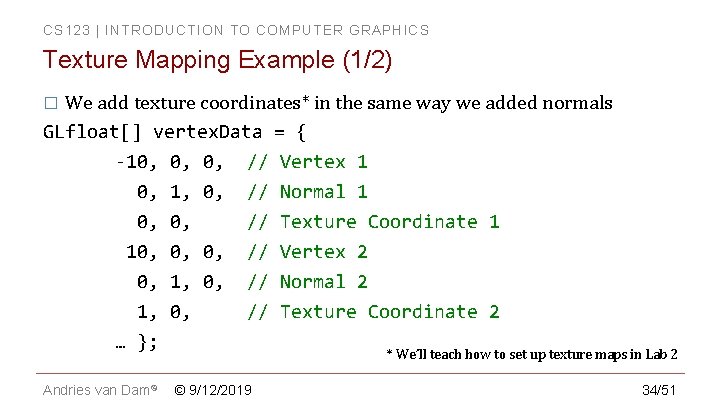
CS 123 | INTRODUCTION TO COMPUTER GRAPHICS Texture Mapping Example (1/2) We add texture coordinates* in the same way we added normals GLfloat[] vertex. Data = { -10, 0, 0, // Vertex 1 0, 1, 0, // Normal 1 0, 0, // Texture Coordinate 1 10, 0, 0, // Vertex 2 0, 1, 0, // Normal 2 1, 0, // Texture Coordinate 2 … }; � * We’ll teach how to set up texture maps in Lab 2 Andries van Dam© © 9/12/2019 34/51
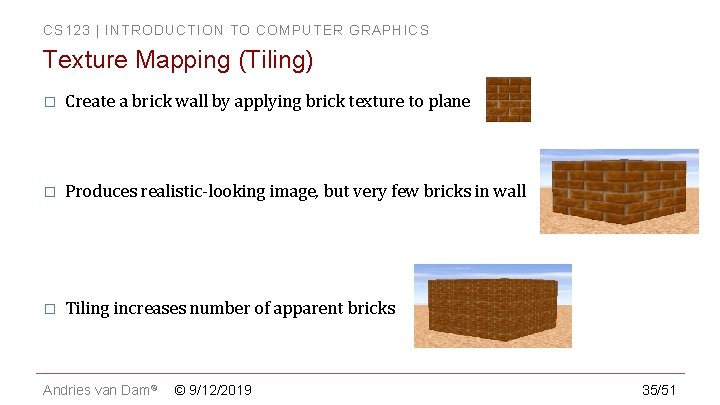
CS 123 | INTRODUCTION TO COMPUTER GRAPHICS Texture Mapping (Tiling) � Create a brick wall by applying brick texture to plane � Produces realistic-looking image, but very few bricks in wall � Tiling increases number of apparent bricks Andries van Dam© © 9/12/2019 35/51
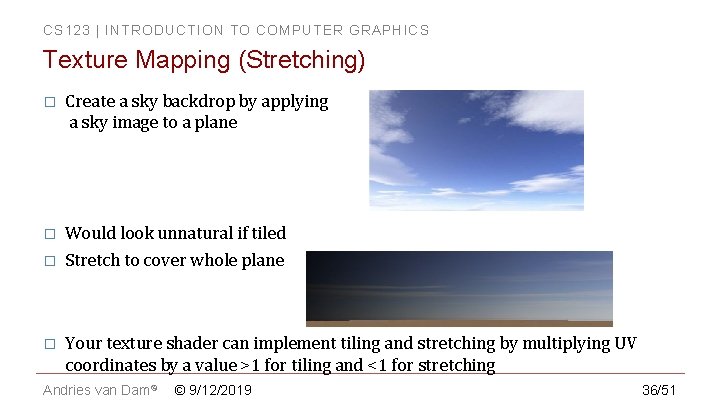
CS 123 | INTRODUCTION TO COMPUTER GRAPHICS Texture Mapping (Stretching) � Create a sky backdrop by applying a sky image to a plane � Would look unnatural if tiled � Stretch to cover whole plane � Your texture shader can implement tiling and stretching by multiplying UV coordinates by a value >1 for tiling and <1 for stretching Andries van Dam© © 9/12/2019 36/51
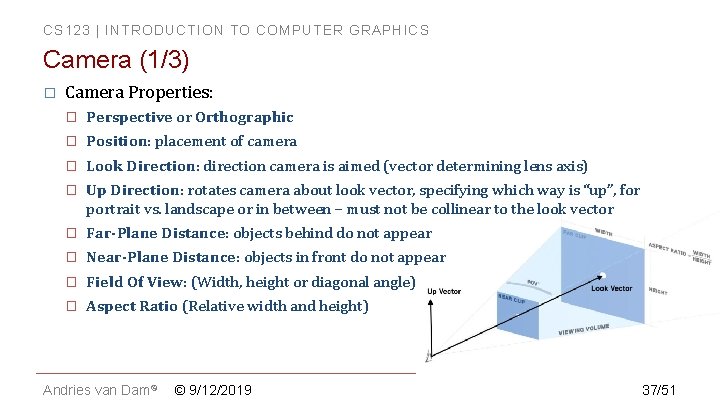
CS 123 | INTRODUCTION TO COMPUTER GRAPHICS Camera (1/3) � Camera Properties: � Perspective or Orthographic � Position: placement of camera � Look Direction: direction camera is aimed (vector determining lens axis) � Up Direction: rotates camera about look vector, specifying which way is “up”, for portrait vs. landscape or in between – must not be collinear to the look vector � Far-Plane Distance: objects behind do not appear � Near-Plane Distance: objects in front do not appear � Field Of View: (Width, height or diagonal angle) � Aspect Ratio (Relative width and height) Andries van Dam© © 9/12/2019 37/51
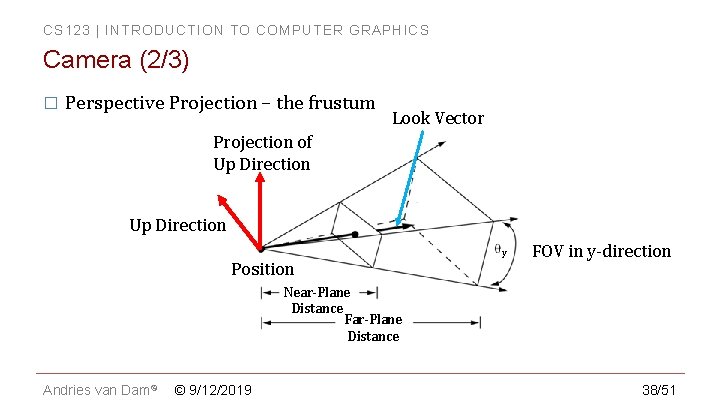
CS 123 | INTRODUCTION TO COMPUTER GRAPHICS Camera (2/3) � Perspective Projection – the frustum Look Vector Projection of Up Direction Position y FOV in y-direction Near-Plane Distance Far-Plane Distance Andries van Dam© © 9/12/2019 38/51
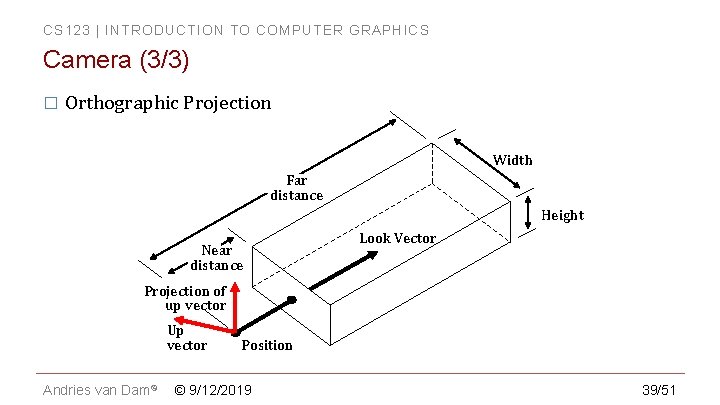
CS 123 | INTRODUCTION TO COMPUTER GRAPHICS Camera (3/3) � Orthographic Projection Width Far distance Height Near distance Look Vector Projection of up vector Up vector Andries van Dam© Position © 9/12/2019 39/51
CS 123 | INTRODUCTION TO COMPUTER GRAPHICS Open. GL Camera � Fixed-function API has support for perspective and orthographic cameras � With the Programmable API you must construct and supply all model, view, and projection matrices, and then use them in your shaders In the Viewing lectures you will learn how to construct these matrices yourselves, to use in the Camtrans lab (We will take care of the camera until then) � In the shader labs you will learn how the matrices are used in shaders � Andries van Dam© © 9/12/2019 40/51
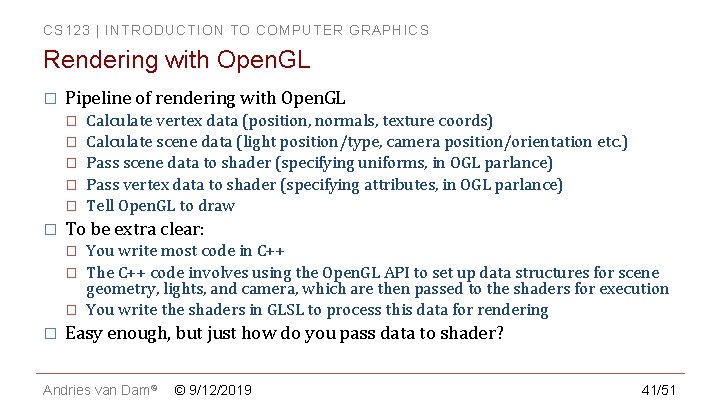
CS 123 | INTRODUCTION TO COMPUTER GRAPHICS Rendering with Open. GL � Pipeline of rendering with Open. GL � � � To be extra clear: � � Calculate vertex data (position, normals, texture coords) Calculate scene data (light position/type, camera position/orientation etc. ) Pass scene data to shader (specifying uniforms, in OGL parlance) Pass vertex data to shader (specifying attributes, in OGL parlance) Tell Open. GL to draw You write most code in C++ The C++ code involves using the Open. GL API to set up data structures for scene geometry, lights, and camera, which are then passed to the shaders for execution You write the shaders in GLSL to process this data for rendering Easy enough, but just how do you pass data to shader? Andries van Dam© © 9/12/2019 41/51
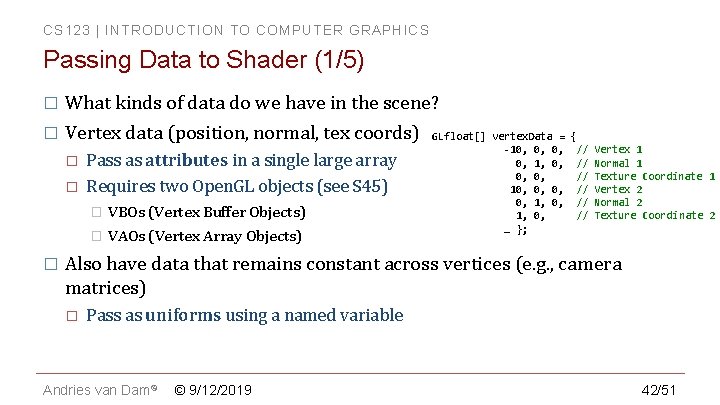
CS 123 | INTRODUCTION TO COMPUTER GRAPHICS Passing Data to Shader (1/5) � What kinds of data do we have in the scene? � Vertex data (position, normal, tex coords) � � � Pass as attributes in a single large array Requires two Open. GL objects (see S 45) � VBOs (Vertex Buffer Objects) � VAOs (Vertex Array Objects) GLfloat[] vertex. Data = { -10, 0, 0, // 0, 1, 0, // 0, 0, // 10, 0, 0, // 0, 1, 0, // … }; Vertex 1 Normal 1 Texture Coordinate 1 Vertex 2 Normal 2 Texture Coordinate 2 Also have data that remains constant across vertices (e. g. , camera matrices) � Pass as uniforms using a named variable Andries van Dam© © 9/12/2019 42/51
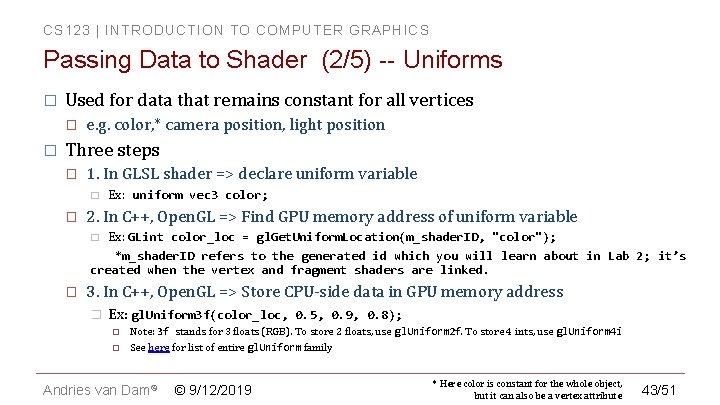
CS 123 | INTRODUCTION TO COMPUTER GRAPHICS Passing Data to Shader (2/5) -- Uniforms � Used for data that remains constant for all vertices � � e. g. color, * camera position, light position Three steps � 1. In GLSL shader => declare uniform variable � � Ex: uniform vec 3 color; 2. In C++, Open. GL => Find GPU memory address of uniform variable Ex: GLint color_loc = gl. Get. Uniform. Location(m_shader. ID, "color"); *m_shader. ID refers to the generated id which you will learn about in Lab 2; it’s created when the vertex and fragment shaders are linked. � � 3. In C++, Open. GL => Store CPU-side data in GPU memory address � Ex: gl. Uniform 3 f(color_loc, 0. 5, 0. 9, 0. 8); Note: 3 f stands for 3 floats (RGB). To store 2 floats, use gl. Uniform 2 f. To store 4 ints, use gl. Uniform 4 i See here for list of entire gl. Uniform family Andries van Dam© © 9/12/2019 * Here color is constant for the whole object, but it can also be a vertex attribute 43/51
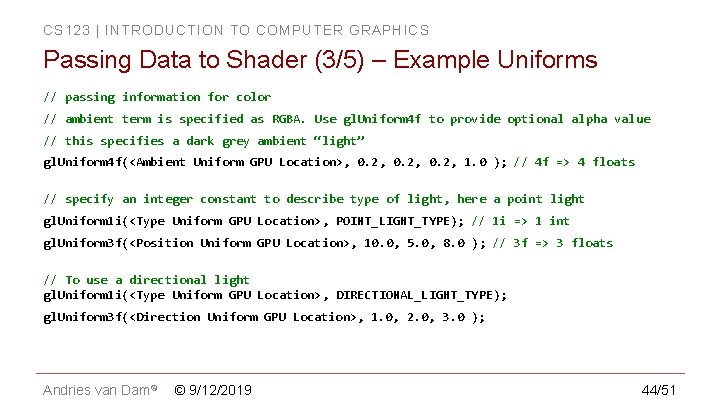
CS 123 | INTRODUCTION TO COMPUTER GRAPHICS Passing Data to Shader (3/5) – Example Uniforms // passing information for color // ambient term is specified as RGBA. Use gl. Uniform 4 f to provide optional alpha value // this specifies a dark grey ambient “light” gl. Uniform 4 f(<Ambient Uniform GPU Location>, 0. 2, 1. 0 ); // 4 f => 4 floats // specify an integer constant to describe type of light, here a point light gl. Uniform 1 i(<Type Uniform GPU Location>, POINT_LIGHT_TYPE); // 1 i => 1 int gl. Uniform 3 f(<Position Uniform GPU Location>, 10. 0, 5. 0, 8. 0 ); // 3 f => 3 floats // To use a directional light gl. Uniform 1 i(<Type Uniform GPU Location>, DIRECTIONAL_LIGHT_TYPE); gl. Uniform 3 f(<Direction Uniform GPU Location>, 1. 0, 2. 0, 3. 0 ); Andries van Dam© © 9/12/2019 44/51
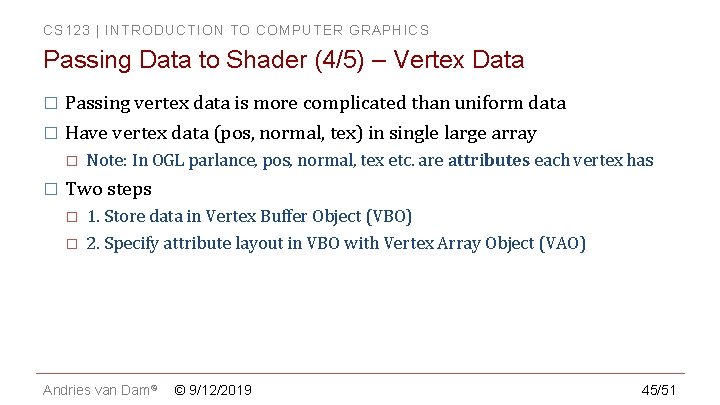
CS 123 | INTRODUCTION TO COMPUTER GRAPHICS Passing Data to Shader (4/5) – Vertex Data � Passing vertex data is more complicated than uniform data � Have vertex data (pos, normal, tex) in single large array � � Note: In OGL parlance, pos, normal, tex etc. are attributes each vertex has Two steps � � 1. Store data in Vertex Buffer Object (VBO) 2. Specify attribute layout in VBO with Vertex Array Object (VAO) Andries van Dam© © 9/12/2019 45/51
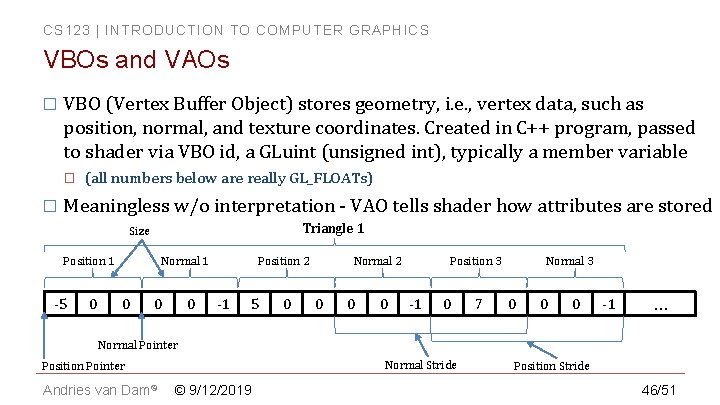
CS 123 | INTRODUCTION TO COMPUTER GRAPHICS VBOs and VAOs � VBO (Vertex Buffer Object) stores geometry, i. e. , vertex data, such as position, normal, and texture coordinates. Created in C++ program, passed to shader via VBO id, a GLuint (unsigned int), typically a member variable � � (all numbers below are really GL_FLOATs) Meaningless w/o interpretation - VAO tells shader how attributes are stored Triangle 1 Size Position 1 -5 0 Position 2 Normal 1 0 0 0 -1 5 0 Position 3 Normal 2 0 0 0 -1 0 7 Normal 3 0 0 0 -1 … Normal Pointer Normal Stride Position Pointer Andries van Dam© © 9/12/2019 Position Stride 46/51
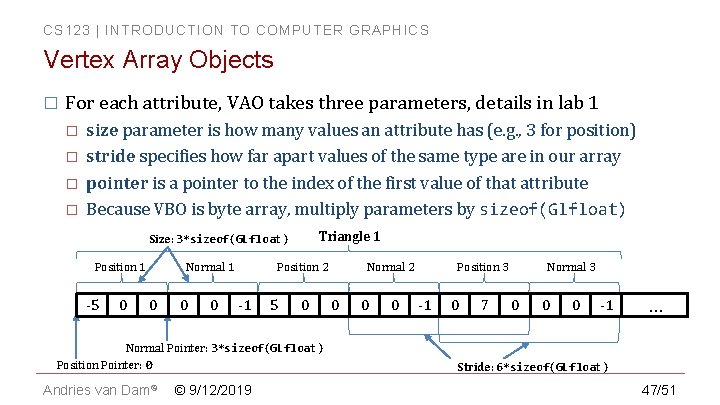
CS 123 | INTRODUCTION TO COMPUTER GRAPHICS Vertex Array Objects � For each attribute, VAO takes three parameters, details in lab 1 � � size parameter is how many values an attribute has (e. g. , 3 for position) stride specifies how far apart values of the same type are in our array pointer is a pointer to the index of the first value of that attribute Because VBO is byte array, multiply parameters by sizeof(Glfloat) Triangle 1 Size: 3*sizeof(GLfloat) Position 1 -5 0 Position 2 Normal 1 0 0 0 -1 5 0 Normal Pointer: 3*sizeof(GLfloat) Position Pointer: 0 Andries van Dam© © 9/12/2019 Position 3 Normal 2 0 0 0 -1 0 7 Normal 3 0 0 0 -1 … Stride: 6*sizeof(GLfloat) 47/51
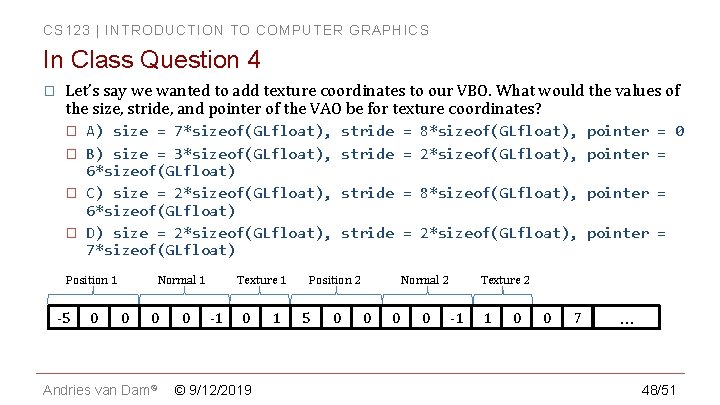
CS 123 | INTRODUCTION TO COMPUTER GRAPHICS In Class Question 4 � Let’s say we wanted to add texture coordinates to our VBO. What would the values of the size, stride, and pointer of the VAO be for texture coordinates? � � A) size = 7*sizeof(GLfloat), B) size = 3*sizeof(GLfloat), 6*sizeof(GLfloat) C) size = 2*sizeof(GLfloat), 6*sizeof(GLfloat) D) size = 2*sizeof(GLfloat), 7*sizeof(GLfloat) Position 1 -5 0 Normal 1 0 0 Andries van Dam© 0 Texture 1 -1 0 © 9/12/2019 1 stride = 8*sizeof(GLfloat), pointer = 0 stride = 2*sizeof(GLfloat), pointer = stride = 8*sizeof(GLfloat), pointer = stride = 2*sizeof(GLfloat), pointer = Position 2 5 0 Normal 2 0 0 0 Texture 2 -1 1 0 0 7 … 48/51
CS 123 | INTRODUCTION TO COMPUTER GRAPHICS The CS 123 Guide to Open. GL � The TAs have written a guide to Open. GL � Goes over all Open. GL implementation details � � Especially VBOs and VAOs Find it here: https: //github. com/cs 123 tas/docs/blob/master/Open. GLGuide. md Andries van Dam© © 9/12/2019 49/51
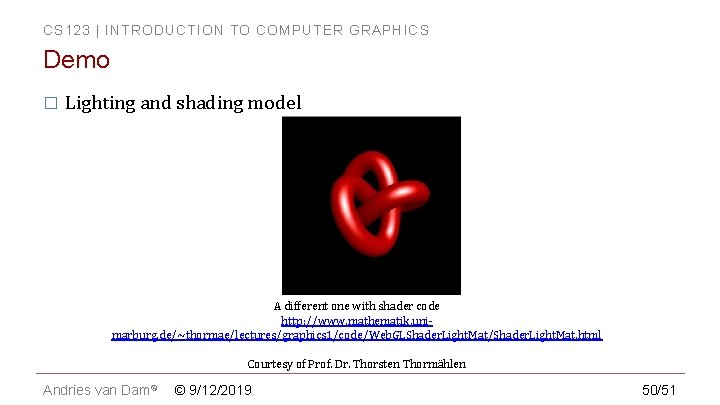
CS 123 | INTRODUCTION TO COMPUTER GRAPHICS Demo � Lighting and shading model A different one with shader code http: //www. mathematik. unimarburg. de/~thormae/lectures/graphics 1/code/Web. GLShader. Light. Mat/Shader. Light. Mat. html Courtesy of Prof. Dr. Thorsten Thormählen Andries van Dam© © 9/12/2019 50/51
CS 123 | INTRODUCTION TO COMPUTER GRAPHICS Book Sections � Intro � Chapter 6 Andries van Dam© © 9/12/2019 51/51