
CS 123 INTRODUCTION TO COMPUTER GRAPHICS Image Processing
- Slides: 64
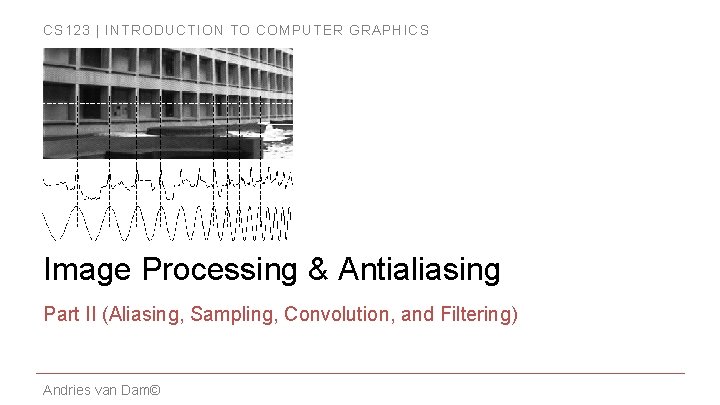
CS 123 | INTRODUCTION TO COMPUTER GRAPHICS Image Processing & Antialiasing Part II (Aliasing, Sampling, Convolution, and Filtering) Andries van Dam©
CS 123 | INTRODUCTION TO COMPUTER GRAPHICS Outline � Overview � Filtering � Example Applications � Scaling Jaggies & Aliasing � Sampling & Duals � Convolution � Andries van Dam© 9/24/19 Reconstruction � Scaling, continued � Implementation � 2/64
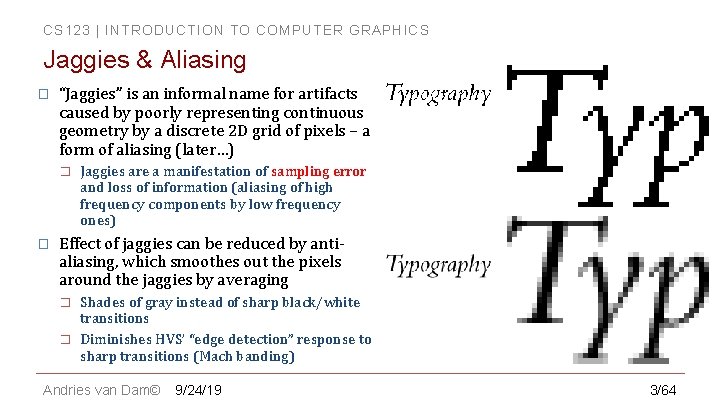
CS 123 | INTRODUCTION TO COMPUTER GRAPHICS Jaggies & Aliasing � “Jaggies” is an informal name for artifacts caused by poorly representing continuous geometry by a discrete 2 D grid of pixels – a form of aliasing (later…) � � Jaggies are a manifestation of sampling error and loss of information (aliasing of high frequency components by low frequency ones) Effect of jaggies can be reduced by antialiasing, which smoothes out the pixels around the jaggies by averaging � � Shades of gray instead of sharp black/white transitions Diminishes HVS’ “edge detection” response to sharp transitions (Mach banding) Andries van Dam© 9/24/19 3/64
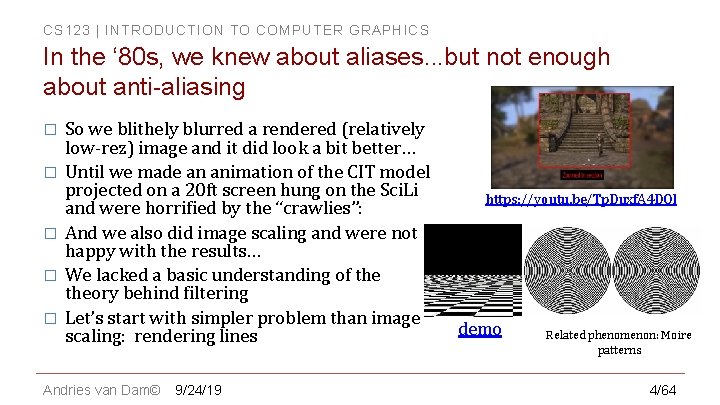
CS 123 | INTRODUCTION TO COMPUTER GRAPHICS In the ‘ 80 s, we knew about aliases. . . but not enough about anti-aliasing � � � So we blithely blurred a rendered (relatively low-rez) image and it did look a bit better… Until we made an animation of the CIT model projected on a 20 ft screen hung on the Sci. Li and were horrified by the “crawlies”: And we also did image scaling and were not happy with the results… We lacked a basic understanding of theory behind filtering Let’s start with simpler problem than image scaling: rendering lines Andries van Dam© 9/24/19 https: //youtu. be/Tp. Duxf. A 4 DOI demo Related phenomenon: Moire patterns 4/64
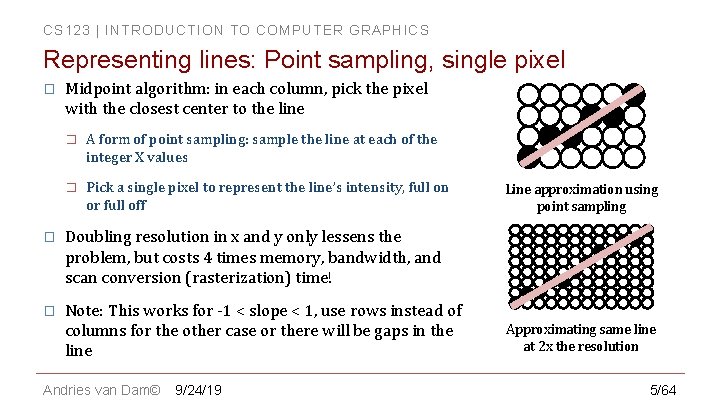
CS 123 | INTRODUCTION TO COMPUTER GRAPHICS Representing lines: Point sampling, single pixel � Midpoint algorithm: in each column, pick the pixel with the closest center to the line � A form of point sampling: sample the line at each of the integer X values � Pick a single pixel to represent the line’s intensity, full on or full off � Doubling resolution in x and y only lessens the problem, but costs 4 times memory, bandwidth, and scan conversion (rasterization) time! � Note: This works for -1 < slope < 1, use rows instead of columns for the other case or there will be gaps in the line Andries van Dam© 9/24/19 Line approximation using point sampling Approximating same line at 2 x the resolution 5/64
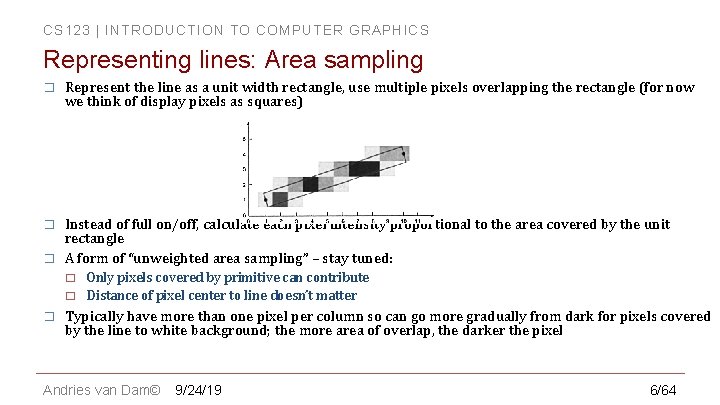
CS 123 | INTRODUCTION TO COMPUTER GRAPHICS Representing lines: Area sampling � Represent the line as a unit width rectangle, use multiple pixels overlapping the rectangle (for now we think of display pixels as squares) � Instead of full on/off, calculate each pixel intensity proportional to the area covered by the unit rectangle A form of “unweighted area sampling” – stay tuned: � � Only pixels covered by primitive can contribute Distance of pixel center to line doesn’t matter Typically have more than one pixel per column so can go more gradually from dark for pixels covered by the line to white background; the more area of overlap, the darker the pixel Andries van Dam© 9/24/19 6/64
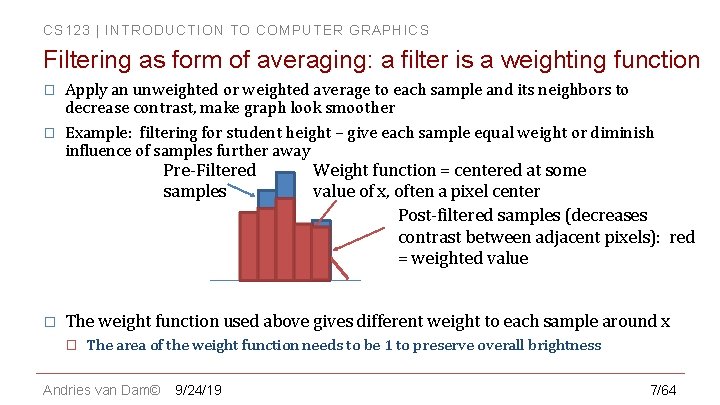
CS 123 | INTRODUCTION TO COMPUTER GRAPHICS Filtering as form of averaging: a filter is a weighting function � � Apply an unweighted or weighted average to each sample and its neighbors to decrease contrast, make graph look smoother Example: filtering for student height – give each sample equal weight or diminish influence of samples further away Pre-Filtered samples � Weight function = centered at some value of x, often a pixel center Post-filtered samples (decreases contrast between adjacent pixels): red = weighted value The weight function used above gives different weight to each sample around x � The area of the weight function needs to be 1 to preserve overall brightness Andries van Dam© 9/24/19 7/64
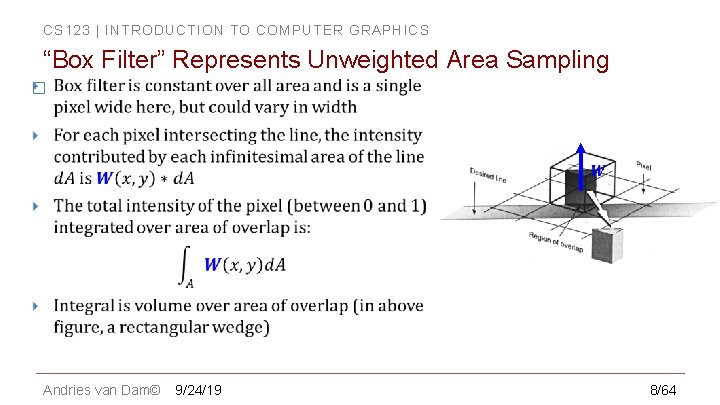
CS 123 | INTRODUCTION TO COMPUTER GRAPHICS “Box Filter” Represents Unweighted Area Sampling � Andries van Dam© 9/24/19 8/64
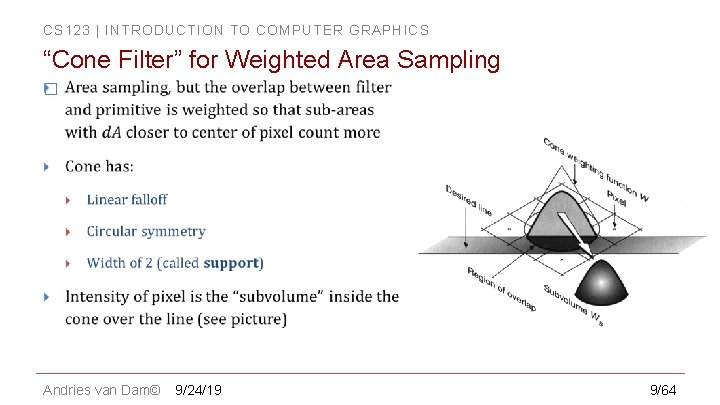
CS 123 | INTRODUCTION TO COMPUTER GRAPHICS “Cone Filter” for Weighted Area Sampling � Andries van Dam© 9/24/19 9/64
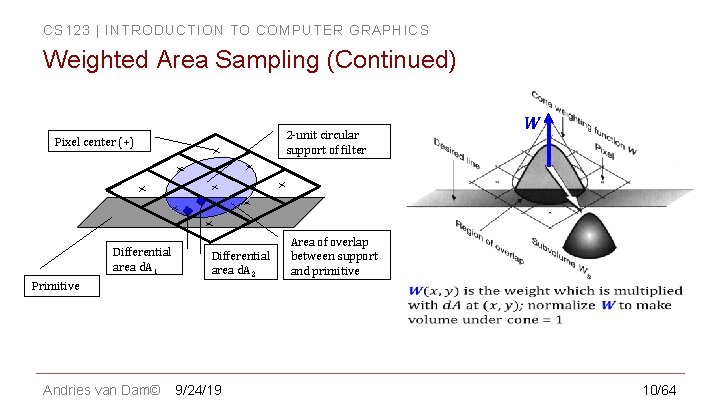
CS 123 | INTRODUCTION TO COMPUTER GRAPHICS Weighted Area Sampling (Continued) 2 -unit circular support of filter Pixel center (+) Differential area d. A 1 Primitive Andries van Dam© Differential area d. A 2 9/24/19 W Area of overlap between support and primitive 10/64
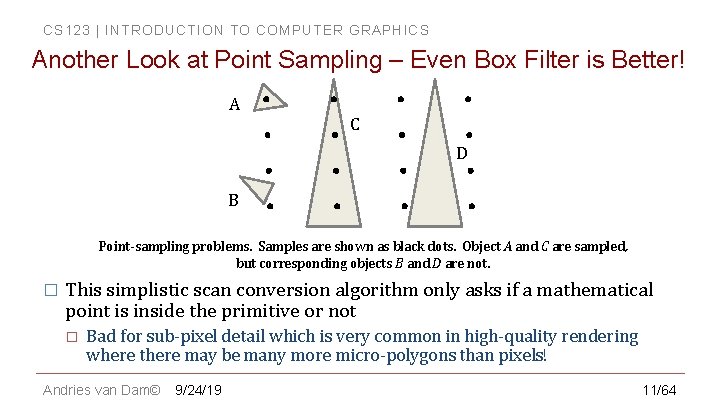
CS 123 | INTRODUCTION TO COMPUTER GRAPHICS Another Look at Point Sampling – Even Box Filter is Better! A C D B Point-sampling problems. Samples are shown as black dots. Object A and C are sampled, but corresponding objects B and D are not. � This simplistic scan conversion algorithm only asks if a mathematical point is inside the primitive or not � Bad for sub-pixel detail which is very common in high-quality rendering where there may be many more micro-polygons than pixels! Andries van Dam© 9/24/19 11/64
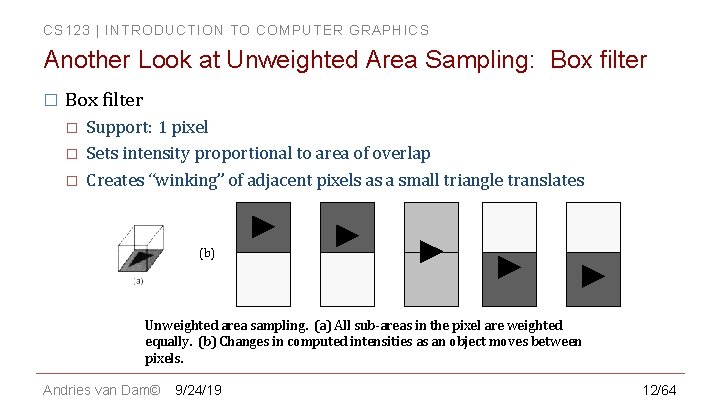
CS 123 | INTRODUCTION TO COMPUTER GRAPHICS Another Look at Unweighted Area Sampling: Box filter � � � Support: 1 pixel Sets intensity proportional to area of overlap Creates “winking” of adjacent pixels as a small triangle translates (b) Unweighted area sampling. (a) All sub-areas in the pixel are weighted equally. (b) Changes in computed intensities as an object moves between pixels. Andries van Dam© 9/24/19 12/64
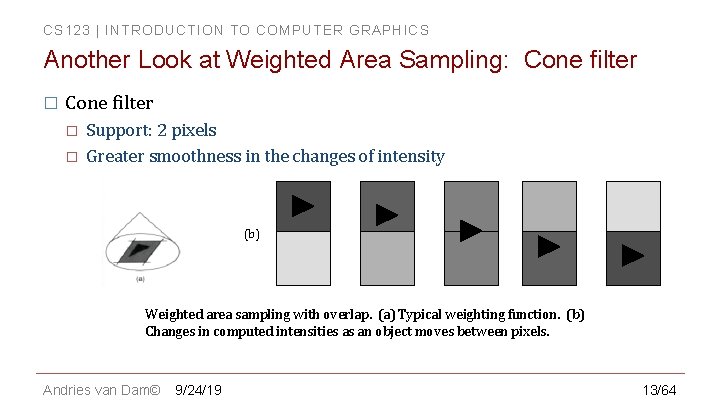
CS 123 | INTRODUCTION TO COMPUTER GRAPHICS Another Look at Weighted Area Sampling: Cone filter � � Support: 2 pixels Greater smoothness in the changes of intensity (b) Weighted area sampling with overlap. (a) Typical weighting function. (b) Changes in computed intensities as an object moves between pixels. Andries van Dam© 9/24/19 13/64
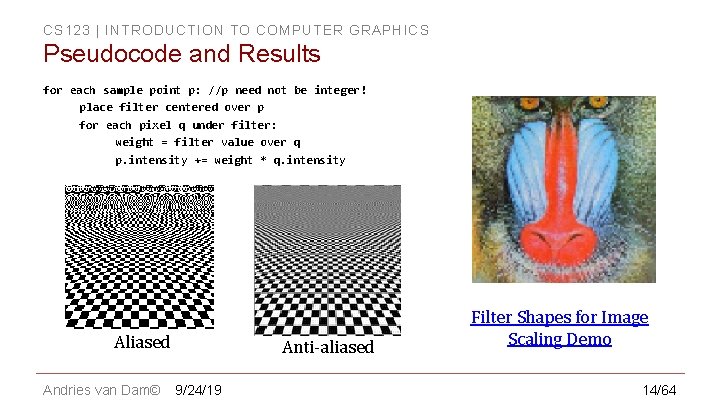
CS 123 | INTRODUCTION TO COMPUTER GRAPHICS Pseudocode and Results for each sample point p: //p need not be integer! place filter centered over p for each pixel q under filter: weight = filter value over q p. intensity += weight * q. intensity Aliased Andries van Dam© Anti-aliased 9/24/19 Filter Shapes for Image Scaling Demo 14/64
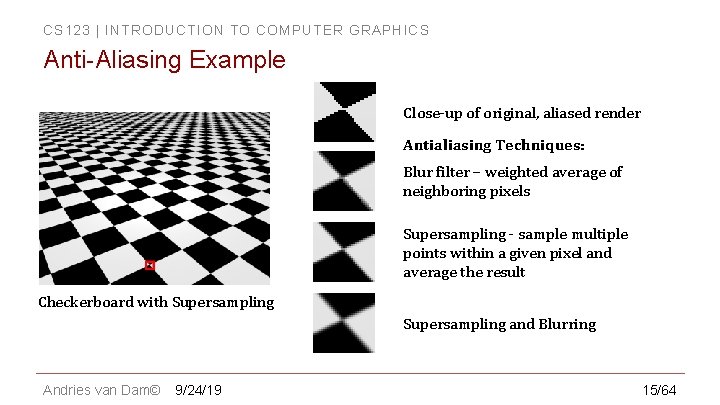
CS 123 | INTRODUCTION TO COMPUTER GRAPHICS Anti-Aliasing Example Close-up of original, aliased render Antialiasing Techniques: Blur filter – weighted average of neighboring pixels Supersampling - sample multiple points within a given pixel and average the result Checkerboard with Supersampling and Blurring Andries van Dam© 9/24/19 15/64
CS 123 | INTRODUCTION TO COMPUTER GRAPHICS In – Class Question 1 Andries van Dam© 9/24/19 16/64
CS 123 | INTRODUCTION TO COMPUTER GRAPHICS Outline � Overview � Filtering � Example Applications � Scaling Jaggies & Aliasing � Sampling & Duals � Convolution � Andries van Dam© 9/24/19 Reconstruction � Scaling, continued � Implementation � 17/64
CS 123 | INTRODUCTION TO COMPUTER GRAPHICS Aliasing and Anti-Aliasing: Intro to Signal Processing � � Easier to discuss aliasing and anti-aliasing of images and image scaling than of rendering anti-aliased geometric primitives - return to rendering primitives at end of this unit A signal is a time- or spatially varying function (sound wave, brightness of an image, electromagnetic wave…): � � � “A signal is a physical quantity that varies with time, space, or any other independent variable by which information can be conveyed“ – from Wiki. Books entry on signals (think turn signal, umpire’s signal, body language…) Need to do a brief intro to signal processing, since an image can be thought of as a sequence of scan lines, each displaying an intensity signal Core concept: signals are often complex-looking functions but they can be decomposed into combinations of simpler functions (sines and cosines) of varying frequency, amplitude and phase – compare to decomposing vectors � Fourier Analysis/Synthesis Andries van Dam© 9/24/19 18/64
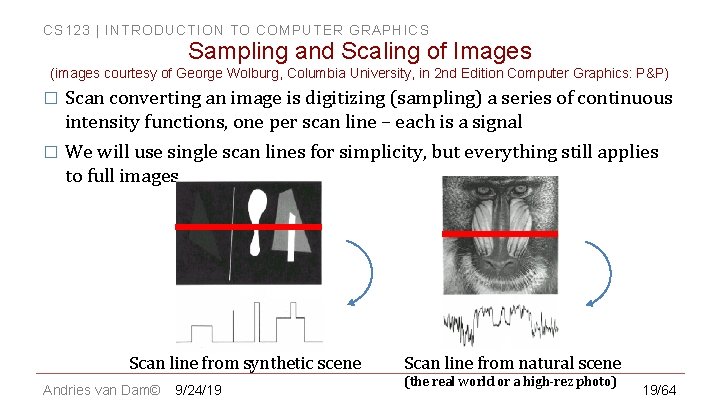
CS 123 | INTRODUCTION TO COMPUTER GRAPHICS Sampling and Scaling of Images (images courtesy of George Wolburg, Columbia University, in 2 nd Edition Computer Graphics: P&P) � Scan converting an image is digitizing (sampling) a series of continuous intensity functions, one per scan line – each is a signal � We will use single scan lines for simplicity, but everything still applies to full images Scan line from synthetic scene Andries van Dam© 9/24/19 Scan line from natural scene (the real world or a high-rez photo) 19/64
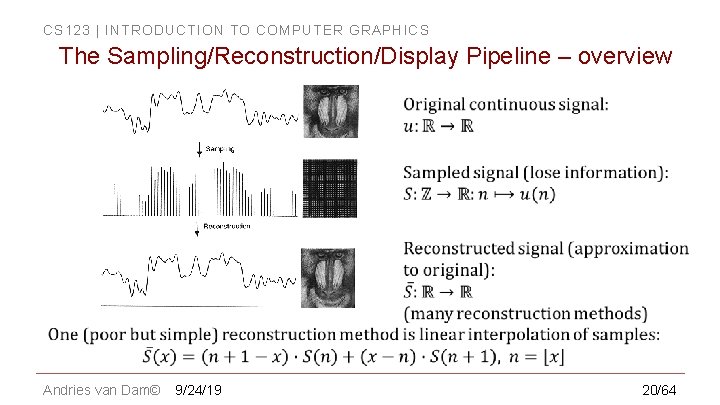
CS 123 | INTRODUCTION TO COMPUTER GRAPHICS The Sampling/Reconstruction/Display Pipeline – overview Andries van Dam© 9/24/19 20/64
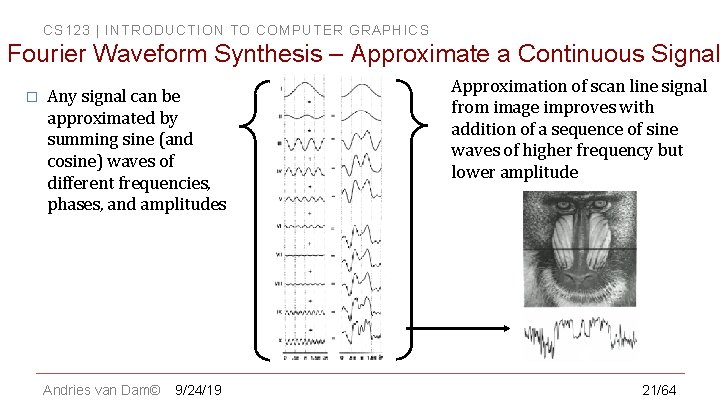
CS 123 | INTRODUCTION TO COMPUTER GRAPHICS Fourier Waveform Synthesis – Approximate a Continuous Signal � Any signal can be approximated by summing sine (and cosine) waves of different frequencies, phases, and amplitudes Andries van Dam© 9/24/19 Approximation of scan line signal from image improves with addition of a sequence of sine waves of higher frequency but lower amplitude 21/64
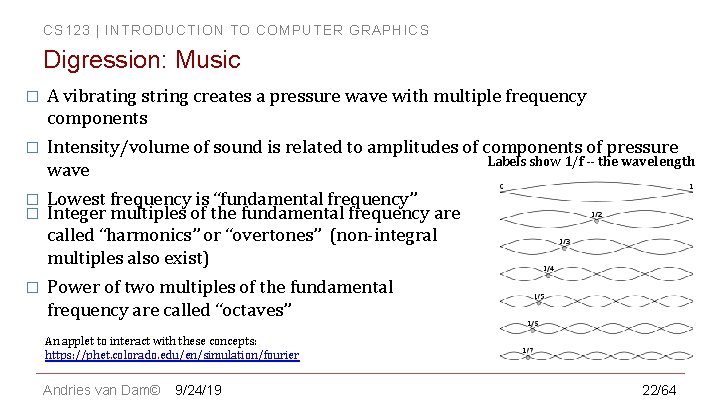
CS 123 | INTRODUCTION TO COMPUTER GRAPHICS Digression: Music � A vibrating string creates a pressure wave with multiple frequency components � Intensity/volume of sound is related to amplitudes of components of pressure Labels show 1/f -- the wavelength wave � � Lowest frequency is “fundamental frequency” Integer multiples of the fundamental frequency are called “harmonics” or “overtones” (non-integral multiples also exist) � Power of two multiples of the fundamental frequency are called “octaves” An applet to interact with these concepts: https: //phet. colorado. edu/en/simulation/fourier Andries van Dam© 9/24/19 22/64
CS 123 | INTRODUCTION TO COMPUTER GRAPHICS Analogous Operations, Duals (1/2) � A signal has 2 representations. We’re familiar with the spatial domain, but every signal also can be represented in the frequency domain � Spatial and frequency domains are duals and represent identical information, as we shall see � Easier to visualize signals and filtering/averaging in the frequency domain (see S 25) � � Characterize a signal by its frequency spectrum showing amplitudes of component sin (and/or cos) waveforms � Easier to understand filtering in frequency domain than in signal domain, as we shall see shortly Many problems are easier solved by transforming to another, related, problem Andries van Dam© 9/24/19 23/64
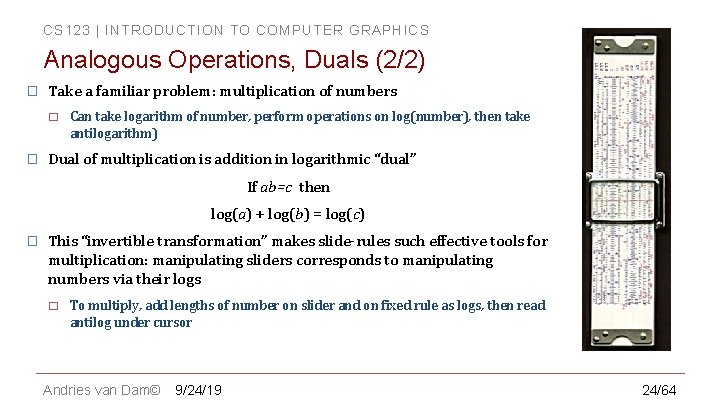
CS 123 | INTRODUCTION TO COMPUTER GRAPHICS Analogous Operations, Duals (2/2) � Take a familiar problem: multiplication of numbers � � Can take logarithm of number, perform operations on log(number), then take antilogarithm) Dual of multiplication is addition in logarithmic “dual” If ab=c then log(a) + log(b) = log(c) � This “invertible transformation” makes slide-rules such effective tools for multiplication: manipulating sliders corresponds to manipulating numbers via their logs � To multiply, add lengths of number on slider and on fixed rule as logs, then read antilog under cursor Andries van Dam© 9/24/19 24/64
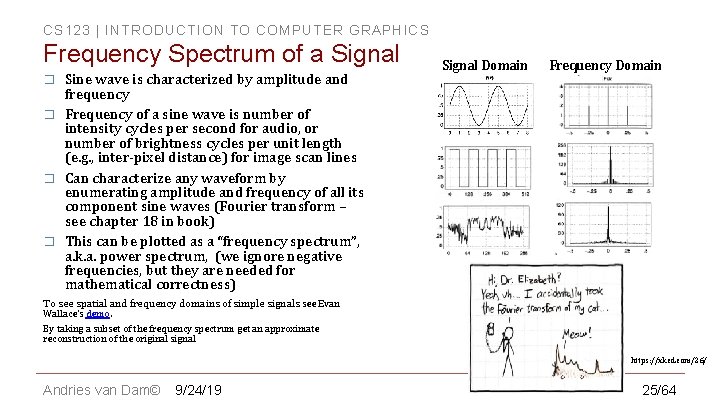
CS 123 | INTRODUCTION TO COMPUTER GRAPHICS Frequency Spectrum of a Signal � � Sine wave is characterized by amplitude and frequency Frequency of a sine wave is number of intensity cycles per second for audio, or number of brightness cycles per unit length (e. g. , inter-pixel distance) for image scan lines Can characterize any waveform by enumerating amplitude and frequency of all its component sine waves (Fourier transform – see chapter 18 in book) This can be plotted as a “frequency spectrum”, a. k. a. power spectrum, (we ignore negative frequencies, but they are needed for mathematical correctness) Signal Domain Frequency Domain To see spatial and frequency domains of simple signals see Evan Wallace’s demo. By taking a subset of the frequency spectrum get an approximate reconstruction of the original signal https: //xkcd. com/26/ Andries van Dam© 9/24/19 25/64
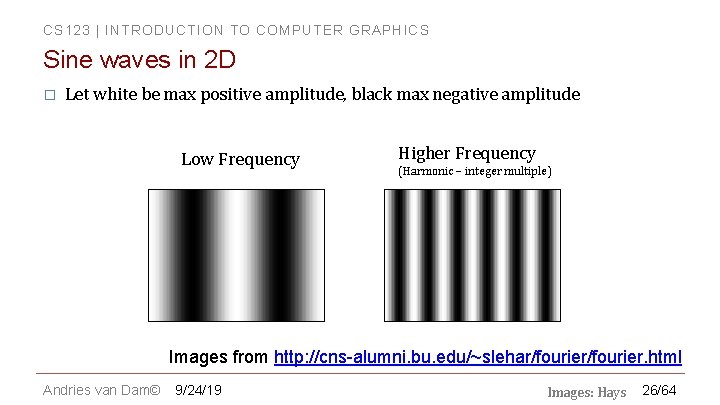
CS 123 | INTRODUCTION TO COMPUTER GRAPHICS Sine waves in 2 D � Let white be max positive amplitude, black max negative amplitude Low Frequency Higher Frequency (Harmonic – integer multiple) Images from http: //cns-alumni. bu. edu/~slehar/fourier. html Andries van Dam© 9/24/19 Images: Hays 26/64
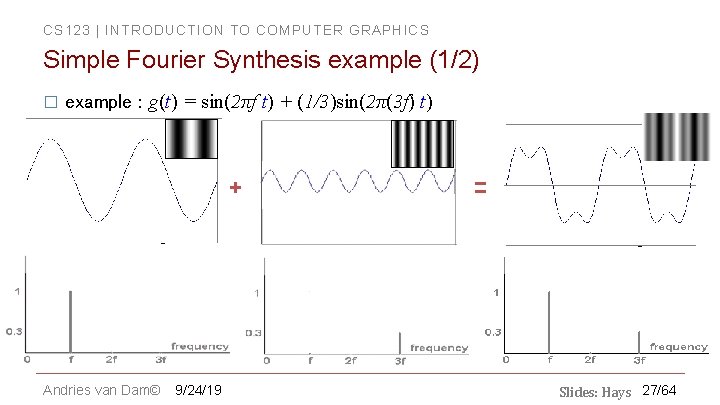
CS 123 | INTRODUCTION TO COMPUTER GRAPHICS Simple Fourier Synthesis example (1/2) � example : g(t) = sin(2πf t) + (1/3)sin(2π(3 f) t) + Andries van Dam© 9/24/19 = Slides: Hays 27/64
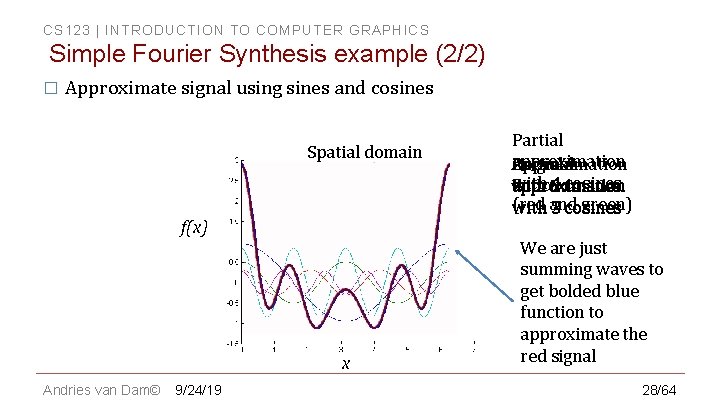
CS 123 | INTRODUCTION TO COMPUTER GRAPHICS Simple Fourier Synthesis example (2/2) � Approximate signal using sines and cosines Spatial domain f(x) x Andries van Dam© 9/24/19 Partial approximation Original Partial Approximation with 4 cosines Function approximation 5 (red green) 2 cosines with and 3 We are just summing waves to get bolded blue function to approximate the red signal 28/64
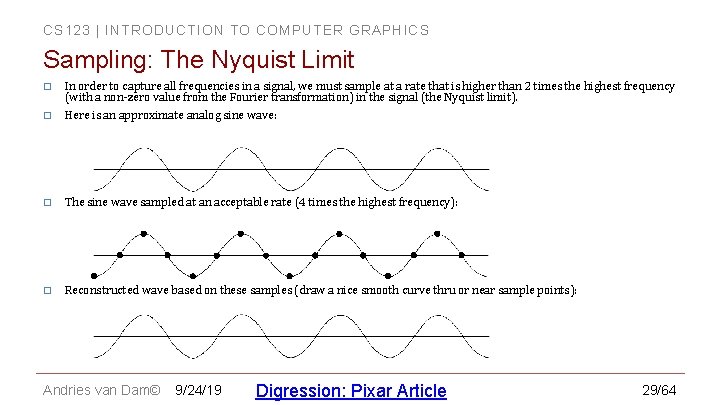
CS 123 | INTRODUCTION TO COMPUTER GRAPHICS Sampling: The Nyquist Limit In order to capture all frequencies in a signal, we must sample at a rate that is higher than 2 times the highest frequency (with a non-zero value from the Fourier transformation) in the signal (the Nyquist limit). � Here is an approximate analog sine wave: � � The sine wave sampled at an acceptable rate (4 times the highest frequency): � Reconstructed wave based on these samples (draw a nice smooth curve thru or near sample points): Andries van Dam© 9/24/19 Digression: Pixar Article 29/64
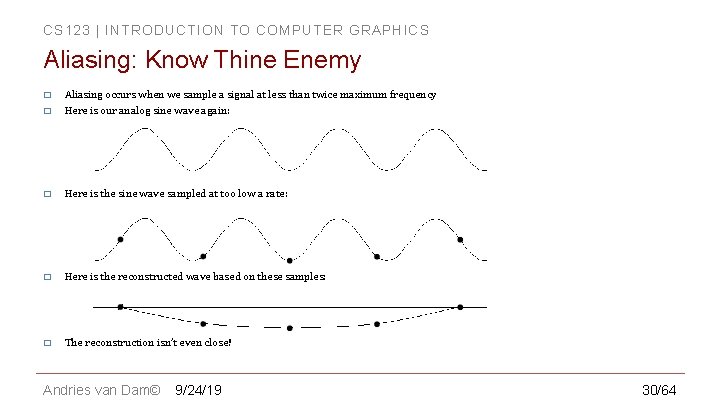
CS 123 | INTRODUCTION TO COMPUTER GRAPHICS Aliasing: Know Thine Enemy � Aliasing occurs when we sample a signal at less than twice maximum frequency � Here is our analog sine wave again: � Here is the sine wave sampled at too low a rate: � Here is the reconstructed wave based on these samples: � The reconstruction isn’t even close! Andries van Dam© 9/24/19 30/64
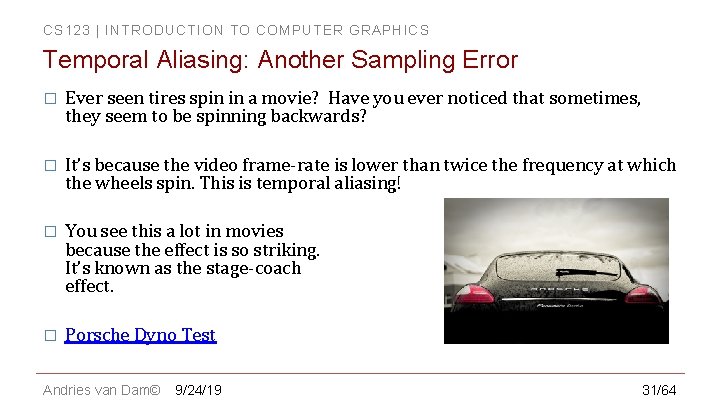
CS 123 | INTRODUCTION TO COMPUTER GRAPHICS Temporal Aliasing: Another Sampling Error � Ever seen tires spin in a movie? Have you ever noticed that sometimes, they seem to be spinning backwards? � It’s because the video frame-rate is lower than twice the frequency at which the wheels spin. This is temporal aliasing! � You see this a lot in movies because the effect is so striking. It’s known as the stage-coach effect. � Porsche Dyno Test Andries van Dam© 9/24/19 31/64
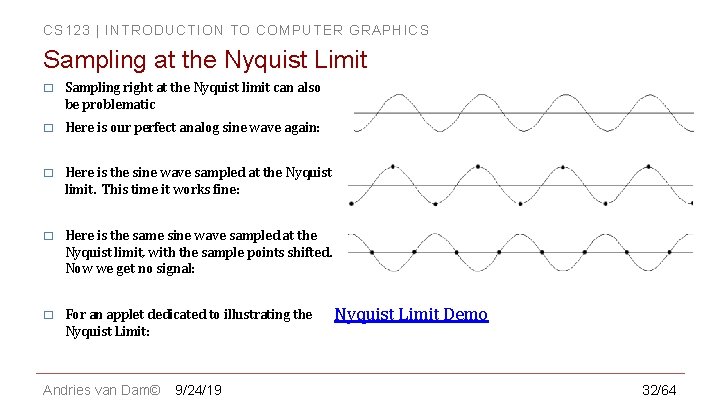
CS 123 | INTRODUCTION TO COMPUTER GRAPHICS Sampling at the Nyquist Limit � Sampling right at the Nyquist limit can also be problematic � Here is our perfect analog sine wave again: � Here is the sine wave sampled at the Nyquist limit. This time it works fine: � Here is the same sine wave sampled at the Nyquist limit, with the sample points shifted. Now we get no signal: � For an applet dedicated to illustrating the Nyquist Limit: Andries van Dam© 9/24/19 Nyquist Limit Demo 32/64
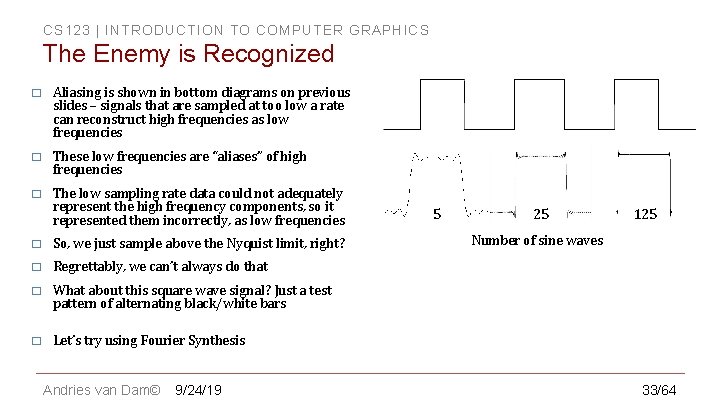
CS 123 | INTRODUCTION TO COMPUTER GRAPHICS The Enemy is Recognized � Aliasing is shown in bottom diagrams on previous slides – signals that are sampled at too low a rate can reconstruct high frequencies as low frequencies � These low frequencies are “aliases” of high frequencies � The low sampling rate data could not adequately represent the high frequency components, so it represented them incorrectly, as low frequencies � So, we just sample above the Nyquist limit, right? � Regrettably, we can’t always do that � What about this square wave signal? Just a test pattern of alternating black/white bars � Let’s try using Fourier Synthesis Andries van Dam© 9/24/19 5 25 125 Number of sine waves 33/64
CS 123 | INTRODUCTION TO COMPUTER GRAPHICS Infinite Frequencies � Andries van Dam© 9/24/19 34/64
CS 123 | INTRODUCTION TO COMPUTER GRAPHICS In-Class Question 2 Andries van Dam© 9/24/19 35/64
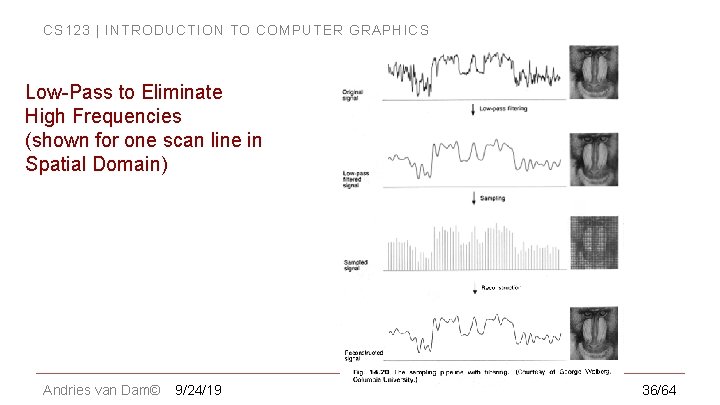
CS 123 | INTRODUCTION TO COMPUTER GRAPHICS Low-Pass to Eliminate High Frequencies (shown for one scan line in Spatial Domain) Andries van Dam© 9/24/19 36/64
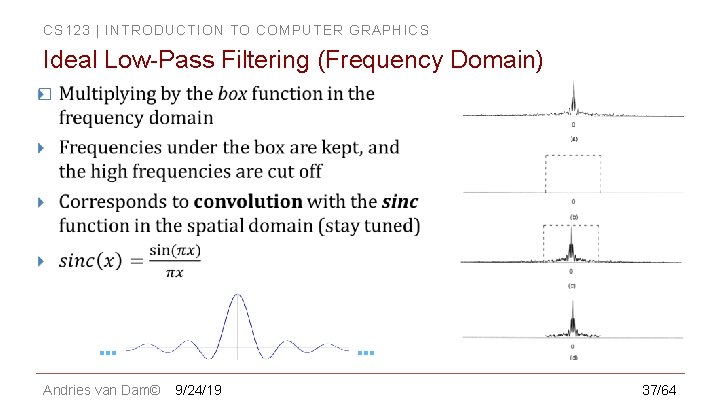
CS 123 | INTRODUCTION TO COMPUTER GRAPHICS Ideal Low-Pass Filtering (Frequency Domain) � … Andries van Dam© … 9/24/19 37/64
CS 123 | INTRODUCTION TO COMPUTER GRAPHICS Infinite Frequencies � The more high frequencies we pre-filter out, the lower the sampling frequency needed but the less the filtered signal resembles original. � Note: pre-filtering is often just abbreviated as filtering, but the prefix “pre” helps remind us that post-filtering (i. e. , another stage of filtering after image computation or transformation) is also practiced. If postfiltering is done on reconstruction of samples of original signal, it will blur in the aliases present in the corrupted reconstruction! Andries van Dam© 9/24/19 38/64
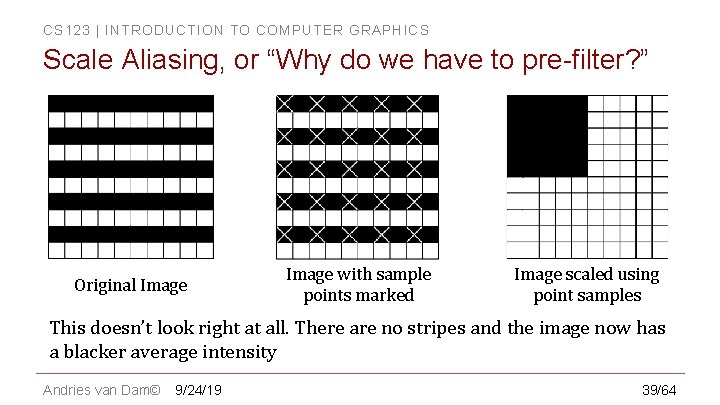
CS 123 | INTRODUCTION TO COMPUTER GRAPHICS Scale Aliasing, or “Why do we have to pre-filter? ” Original Image with sample points marked Image scaled using point samples This doesn’t look right at all. There are no stripes and the image now has a blacker average intensity Andries van Dam© 9/24/19 39/64
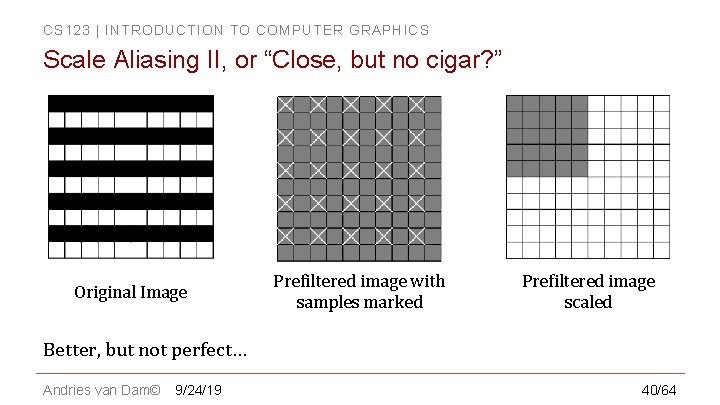
CS 123 | INTRODUCTION TO COMPUTER GRAPHICS Scale Aliasing II, or “Close, but no cigar? ” Original Image Prefiltered image with samples marked Prefiltered image scaled Better, but not perfect… Andries van Dam© 9/24/19 40/64
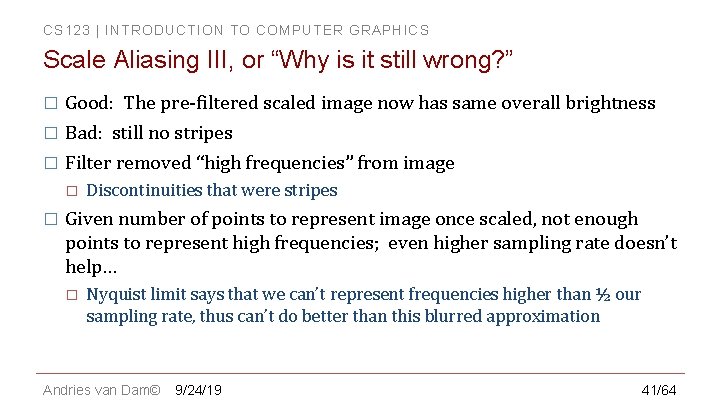
CS 123 | INTRODUCTION TO COMPUTER GRAPHICS Scale Aliasing III, or “Why is it still wrong? ” � Good: The pre-filtered scaled image now has same overall brightness � Bad: still no stripes � Filter removed “high frequencies” from image � � Discontinuities that were stripes Given number of points to represent image once scaled, not enough points to represent high frequencies; even higher sampling rate doesn’t help… � Nyquist limit says that we can’t represent frequencies higher than ½ our sampling rate, thus can’t do better than this blurred approximation Andries van Dam© 9/24/19 41/64
CS 123 | INTRODUCTION TO COMPUTER GRAPHICS Outline � Overview � Filtering � Example Applications � Scaling Jaggies & Aliasing � Sampling & Duals � Convolution � Andries van Dam© 9/24/19 Reconstruction � Scaling, continued � Implementation � 42/64
CS 123 | INTRODUCTION TO COMPUTER GRAPHICS Filtering as an Application of the Convolution Integral � Remember filtering is just (weighted) averaging of samples in a neighborhood � How is it done in practice? Just a nested for loop through all the sample points � � � Either sample at integer pixel locations or in between (e. g. , for image up-scaling) Based on theory of signal convolution – the convolution integral We’ll use a finite approximation to that integral Andries van Dam© 9/24/19 43/64
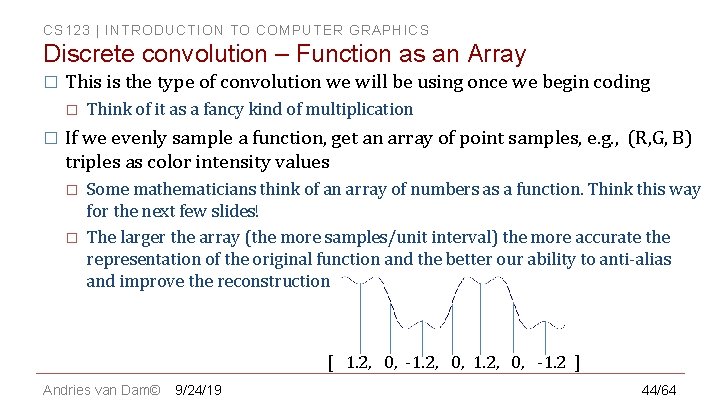
CS 123 | INTRODUCTION TO COMPUTER GRAPHICS Discrete convolution – Function as an Array � This is the type of convolution we will be using once we begin coding � � Think of it as a fancy kind of multiplication If we evenly sample a function, get an array of point samples, e. g. , (R, G, B) triples as color intensity values � � Some mathematicians think of an array of numbers as a function. Think this way for the next few slides! The larger the array (the more samples/unit interval) the more accurate the representation of the original function and the better our ability to anti-alias and improve the reconstruction [ 1. 2, 0, -1. 2 ] Andries van Dam© 9/24/19 44/64
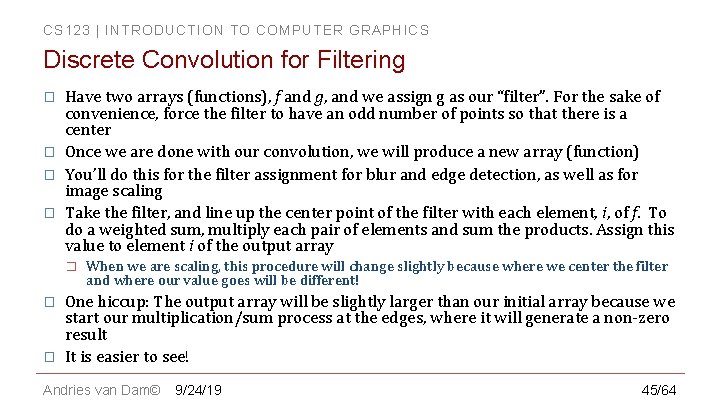
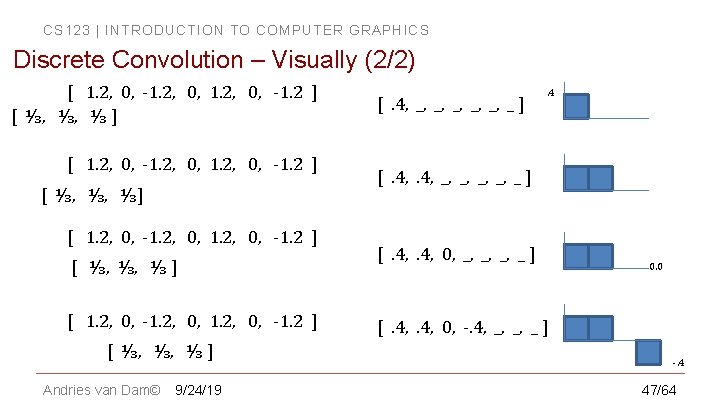
CS 123 | INTRODUCTION TO COMPUTER GRAPHICS Discrete Convolution for Filtering � � Have two arrays (functions), f and g, and we assign g as our “filter”. For the sake of convenience, force the filter to have an odd number of points so that there is a center Once we are done with our convolution, we will produce a new array (function) You’ll do this for the filter assignment for blur and edge detection, as well as for image scaling Take the filter, and line up the center point of the filter with each element, i, of f. To do a weighted sum, multiply each pair of elements and sum the products. Assign this value to element i of the output array � � � When we are scaling, this procedure will change slightly because where we center the filter and where our value goes will be different! One hiccup: The output array will be slightly larger than our initial array because we start our multiplication/sum process at the edges, where it will generate a non-zero result It is easier to see! Andries van Dam© 9/24/19 45/64
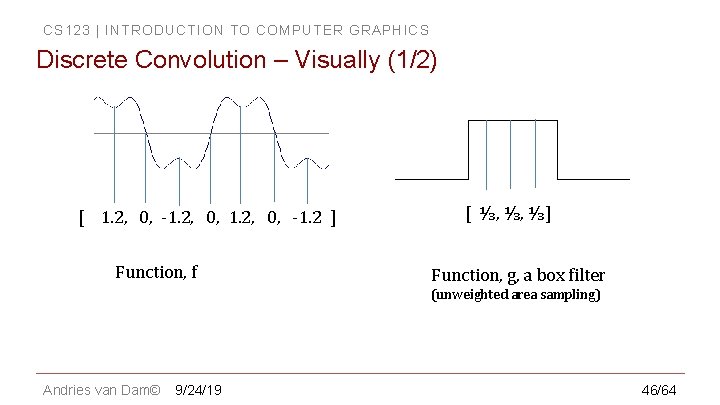
CS 123 | INTRODUCTION TO COMPUTER GRAPHICS Discrete Convolution – Visually (1/2) [ 1. 2, 0, -1. 2 ] Function, f [ ⅓, ⅓, ⅓] Function, g, a box filter (unweighted area sampling) Andries van Dam© 9/24/19 46/64
CS 123 | INTRODUCTION TO COMPUTER GRAPHICS Discrete Convolution – Visually (2/2) [ 1. 2, 0, -1. 2 ] [ ⅓, ⅓, ⅓ ] [ 1. 2, 0, -1. 2 ] [ ⅓, ⅓, ⅓ ] Andries van Dam© 9/24/19 [. 4, _, _, _ ] . 4 [. 4, _, _, _ ] [. 4, 0, _, _ ] 0. 0 [. 4, 0, -. 4, _, _, _ ] -. 4 47/64
CS 123 | INTRODUCTION TO COMPUTER GRAPHICS Discrete Convolution – Demo � Our demo shows this in practice Andries van Dam© 9/24/19 48/64
CS 123 | INTRODUCTION TO COMPUTER GRAPHICS In-Class Question 3 Andries van Dam© 9/24/19 49/64
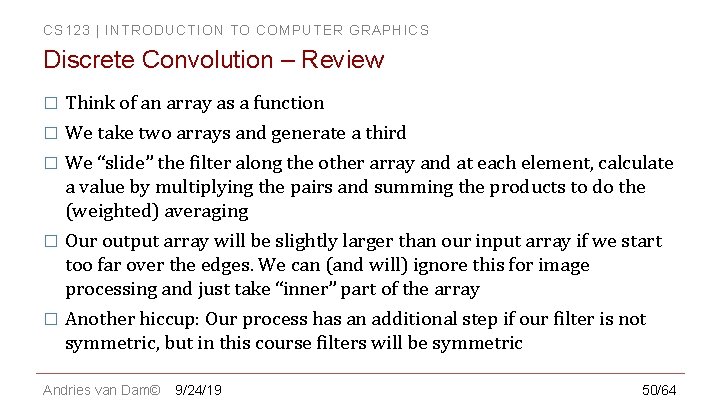
CS 123 | INTRODUCTION TO COMPUTER GRAPHICS Discrete Convolution – Review � Think of an array as a function � We take two arrays and generate a third We “slide” the filter along the other array and at each element, calculate a value by multiplying the pairs and summing the products to do the (weighted) averaging � Our output array will be slightly larger than our input array if we start too far over the edges. We can (and will) ignore this for image processing and just take “inner” part of the array � Another hiccup: Our process has an additional step if our filter is not symmetric, but in this course filters will be symmetric � Andries van Dam© 9/24/19 50/64
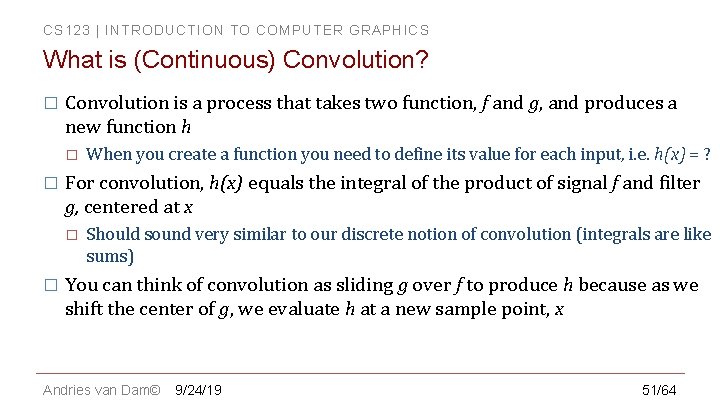
CS 123 | INTRODUCTION TO COMPUTER GRAPHICS What is (Continuous) Convolution? � Convolution is a process that takes two function, f and g, and produces a new function h � � For convolution, h(x) equals the integral of the product of signal f and filter g, centered at x � � When you create a function you need to define its value for each input, i. e. h(x) = ? Should sound very similar to our discrete notion of convolution (integrals are like sums) You can think of convolution as sliding g over f to produce h because as we shift the center of g, we evaluate h at a new sample point, x Andries van Dam© 9/24/19 51/64
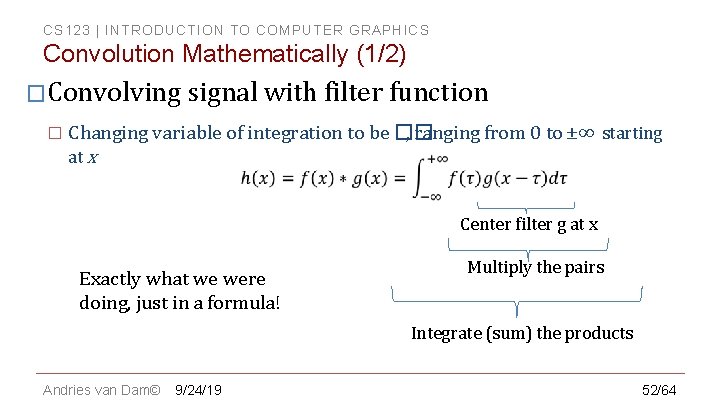
CS 123 | INTRODUCTION TO COMPUTER GRAPHICS Convolution Mathematically (1/2) �Convolving signal with filter function � Changing variable of integration to be �� , ranging from 0 to ±∞ starting at x Center filter g at x Exactly what we were doing, just in a formula! Multiply the pairs Integrate (sum) the products Andries van Dam© 9/24/19 52/64
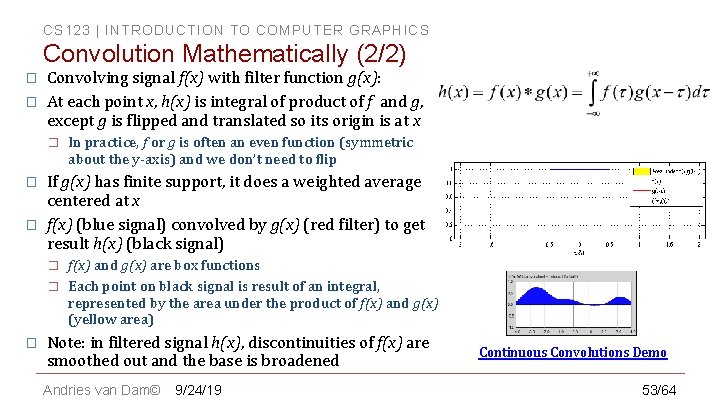
CS 123 | INTRODUCTION TO COMPUTER GRAPHICS Convolution Mathematically (2/2) � � Convolving signal f(x) with filter function g(x): At each point x, h(x) is integral of product of f and g, except g is flipped and translated so its origin is at x � � � If g(x) has finite support, it does a weighted average centered at x f(x) (blue signal) convolved by g(x) (red filter) to get result h(x) (black signal) � � � In practice, f or g is often an even function (symmetric about the y-axis) and we don’t need to flip f(x) and g(x) are box functions Each point on black signal is result of an integral, represented by the area under the product of f(x) and g(x) (yellow area) Note: in filtered signal h(x), discontinuities of f(x) are smoothed out and the base is broadened Andries van Dam© 9/24/19 Continuous Convolutions Demo 53/64
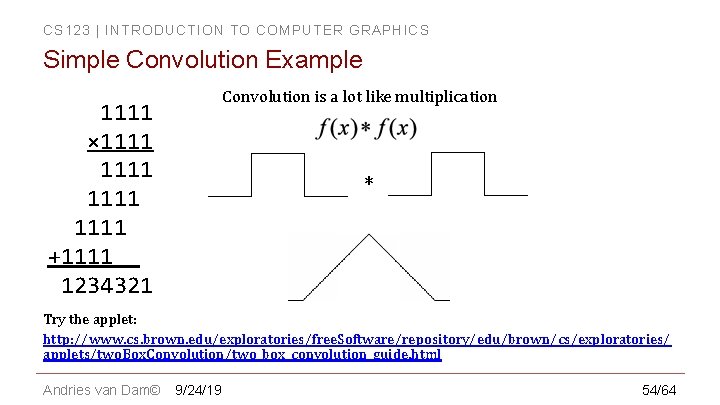
CS 123 | INTRODUCTION TO COMPUTER GRAPHICS Simple Convolution Example Convolution is a lot like multiplication 1111 × 1111 +1111 1234321 * Try the applet: http: //www. cs. brown. edu/exploratories/free. Software/repository/edu/brown/cs/exploratories/ applets/two. Box. Convolution/two_box_convolution_guide. html Andries van Dam© 9/24/19 54/64
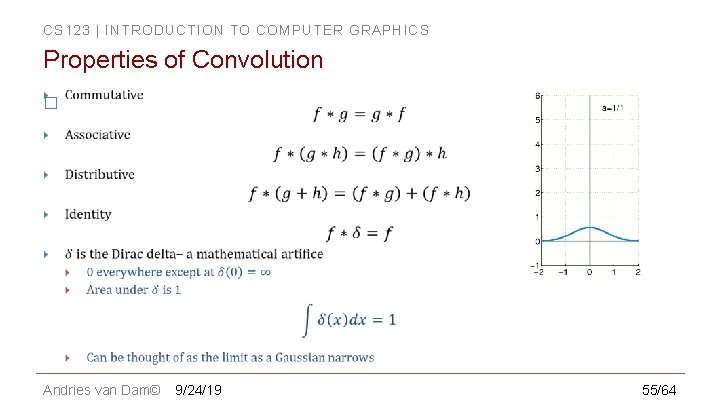
CS 123 | INTRODUCTION TO COMPUTER GRAPHICS Properties of Convolution � Andries van Dam© 9/24/19 55/64
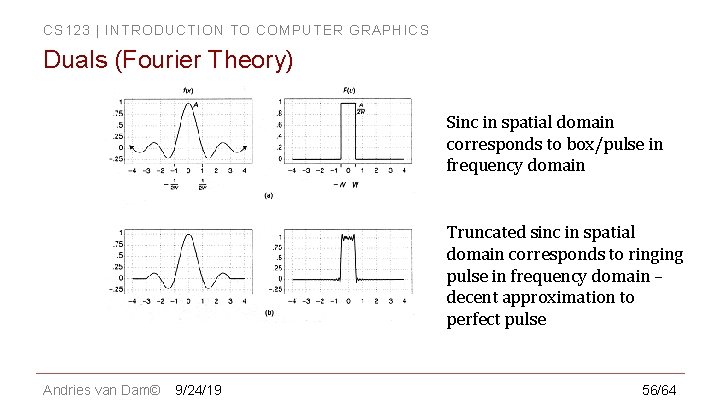
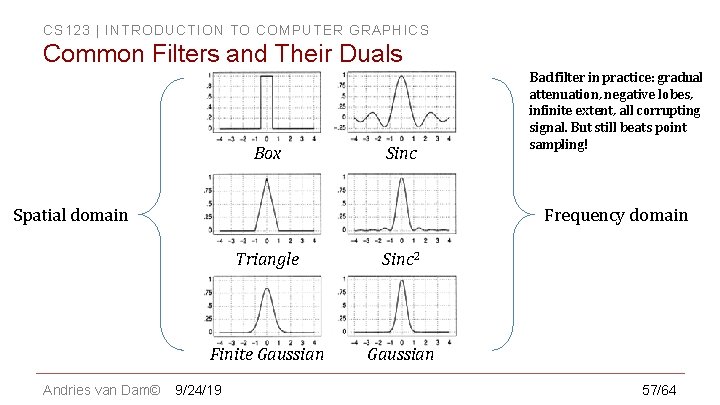
CS 123 | INTRODUCTION TO COMPUTER GRAPHICS Duals (Fourier Theory) Sinc in spatial domain corresponds to box/pulse in frequency domain Truncated sinc in spatial domain corresponds to ringing pulse in frequency domain – decent approximation to perfect pulse Andries van Dam© 9/24/19 56/64
CS 123 | INTRODUCTION TO COMPUTER GRAPHICS Common Filters and Their Duals Box Sinc Spatial domain Andries van Dam© Bad filter in practice: gradual attenuation, negative lobes, infinite extent, all corrupting signal. But still beats point sampling! Frequency domain Triangle Sinc 2 Finite Gaussian 9/24/19 57/64
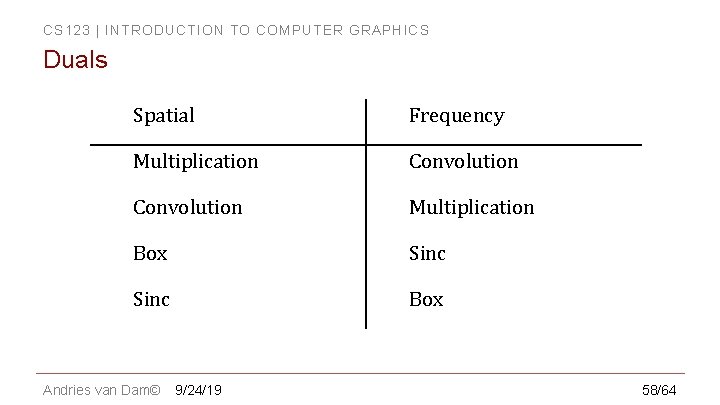
CS 123 | INTRODUCTION TO COMPUTER GRAPHICS Duals Spatial Frequency Multiplication Convolution Multiplication Box Sinc Box Andries van Dam© 9/24/19 58/64
CS 123 | INTRODUCTION TO COMPUTER GRAPHICS Outline � Overview � Filtering � Example Applications � Scaling Jaggies & Aliasing � Sampling & Duals � Convolution � Andries van Dam© 9/24/19 Reconstruction � Scaling, continued � Implementation � 59/64
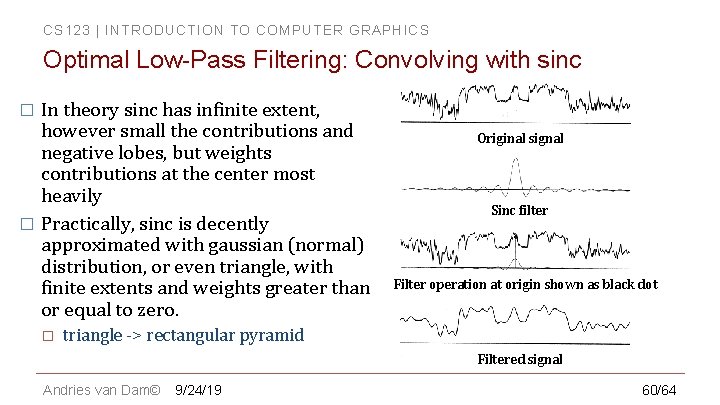
CS 123 | INTRODUCTION TO COMPUTER GRAPHICS Optimal Low-Pass Filtering: Convolving with sinc In theory sinc has infinite extent, however small the contributions and negative lobes, but weights contributions at the center most heavily � Practically, sinc is decently approximated with gaussian (normal) distribution, or even triangle, with finite extents and weights greater than or equal to zero. � � Original signal Sinc filter Filter operation at origin shown as black dot triangle -> rectangular pyramid Filtered signal Andries van Dam© 9/24/19 60/64
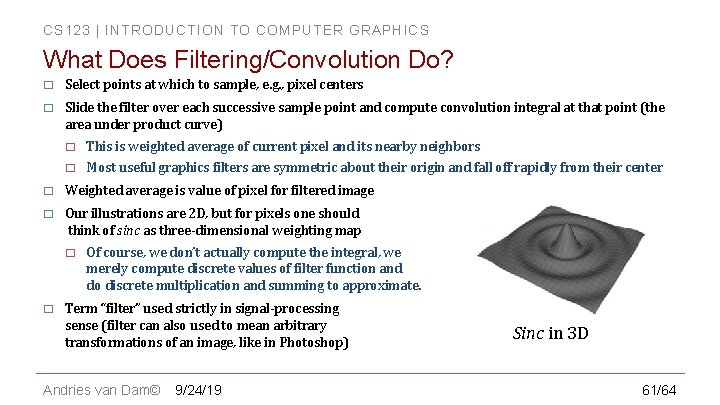
CS 123 | INTRODUCTION TO COMPUTER GRAPHICS What Does Filtering/Convolution Do? � Select points at which to sample, e. g. , pixel centers � Slide the filter over each successive sample point and compute convolution integral at that point (the area under product curve) � This is weighted average of current pixel and its nearby neighbors � Most useful graphics filters are symmetric about their origin and fall off rapidly from their center � Weighted average is value of pixel for filtered image � Our illustrations are 2 D, but for pixels one should think of sinc as three-dimensional weighting map � � Of course, we don’t actually compute the integral, we merely compute discrete values of filter function and do discrete multiplication and summing to approximate. Term “filter” used strictly in signal-processing sense (filter can also used to mean arbitrary transformations of an image, like in Photoshop) Andries van Dam© 9/24/19 Sinc in 3 D 61/64
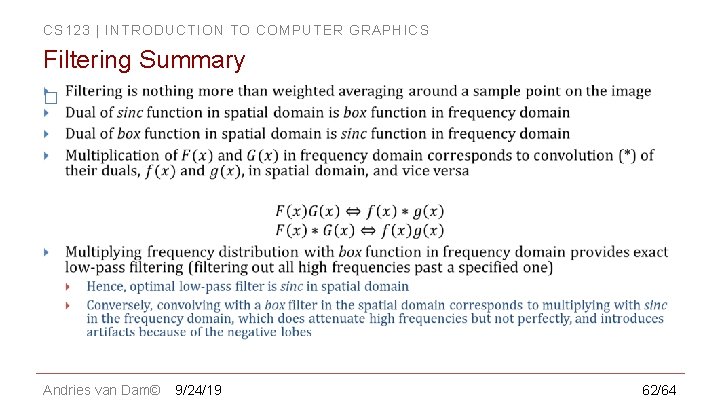
CS 123 | INTRODUCTION TO COMPUTER GRAPHICS Filtering Summary � Andries van Dam© 9/24/19 62/64
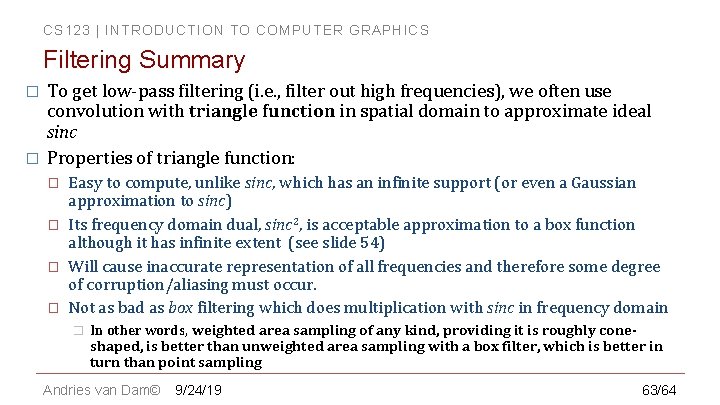
CS 123 | INTRODUCTION TO COMPUTER GRAPHICS Filtering Summary � � To get low-pass filtering (i. e. , filter out high frequencies), we often use convolution with triangle function in spatial domain to approximate ideal sinc Properties of triangle function: � � Easy to compute, unlike sinc, which has an infinite support (or even a Gaussian approximation to sinc) Its frequency domain dual, sinc 2, is acceptable approximation to a box function although it has infinite extent (see slide 54) Will cause inaccurate representation of all frequencies and therefore some degree of corruption/aliasing must occur. Not as bad as box filtering which does multiplication with sinc in frequency domain � In other words, weighted area sampling of any kind, providing it is roughly coneshaped, is better than unweighted area sampling with a box filter, which is better in turn than point sampling Andries van Dam© 9/24/19 63/64
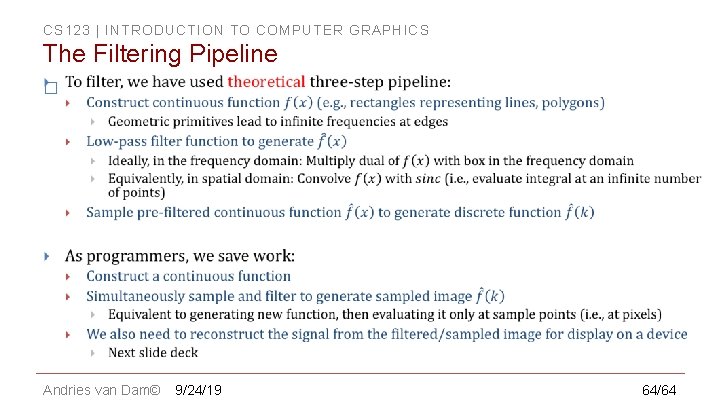
CS 123 | INTRODUCTION TO COMPUTER GRAPHICS The Filtering Pipeline � Andries van Dam© 9/24/19 64/64