
CS 123 INTRODUCTION TO COMPUTER GRAPHICS Image Processing
- Slides: 57
CS 123 | INTRODUCTION TO COMPUTER GRAPHICS Image Processing & Antialiasing Part IV (Scaling) Andries van Dam© 10/1/2019 15/6
CS 123 | INTRODUCTION TO COMPUTER GRAPHICS Outline Images & Hardware Example Applications Jaggies & Aliasing Sampling & Duals Convolution Filtering Scaling Reconstruction Scaling, continued Implementation Andries van Dam© 10/1/2019 25/6
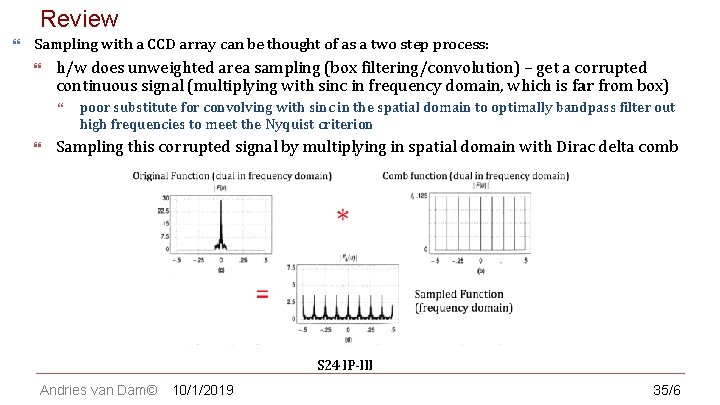
Review CS 123 | INTRODUCTION TO COMPUTER GRAPHICS Sampling with a CCD array can be thought of as a two step process: h/w does unweighted area sampling (box filtering/convolution) – get a corrupted continuous signal (multiplying with sinc in frequency domain, which is far from box) poor substitute for convolving with sinc in the spatial domain to optimally bandpass filter out high frequencies to meet the Nyquist criterion Sampling this corrupted signal by multiplying in spatial domain with Dirac delta comb S 24 IP-III Andries van Dam© 10/1/2019 35/6
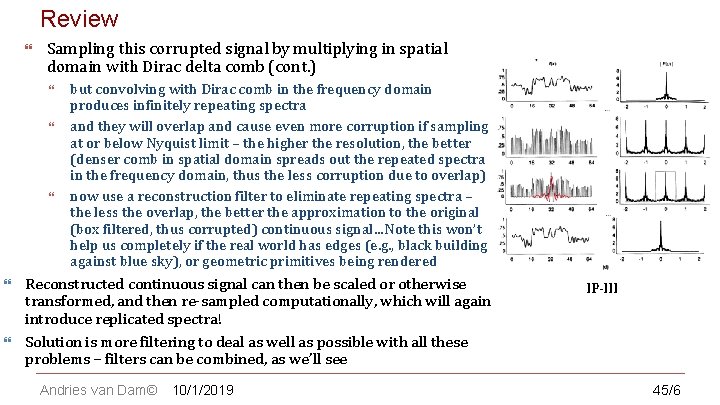
Review CS 123 | INTRODUCTION TO COMPUTER GRAPHICS Sampling this corrupted signal by multiplying in spatial domain with Dirac delta comb (cont. ) but convolving with Dirac comb in the frequency domain produces infinitely repeating spectra and they will overlap and cause even more corruption if sampling at or below Nyquist limit – the higher the resolution, the better (denser comb in spatial domain spreads out the repeated spectra in the frequency domain, thus the less corruption due to overlap) now use a reconstruction filter to eliminate repeating spectra – the less the overlap, the better the approximation to the original (box filtered, thus corrupted) continuous signal…Note this won’t help us completely if the real world has edges (e. g. , black building against blue sky), or geometric primitives being rendered Reconstructed continuous signal can then be scaled or otherwise transformed, and then re-sampled computationally, which will again introduce replicated spectra! Solution is more filtering to deal as well as possible with all these problems – filters can be combined, as we’ll see Andries van Dam© 10/1/2019 IP-III 45/6
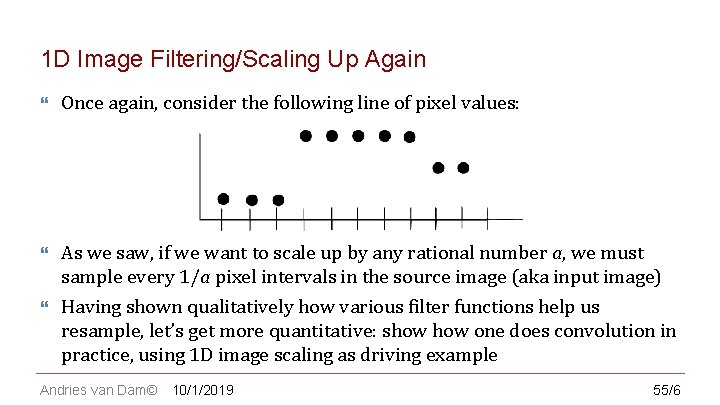
CS 123 | INTRODUCTION TO COMPUTER GRAPHICS 1 D Image Filtering/Scaling Up Again Once again, consider the following line of pixel values: As we saw, if we want to scale up by any rational number a, we must sample every 1/a pixel intervals in the source image (aka input image) Having shown qualitatively how various filter functions help us resample, let’s get more quantitative: show one does convolution in practice, using 1 D image scaling as driving example Andries van Dam© 10/1/2019 55/6
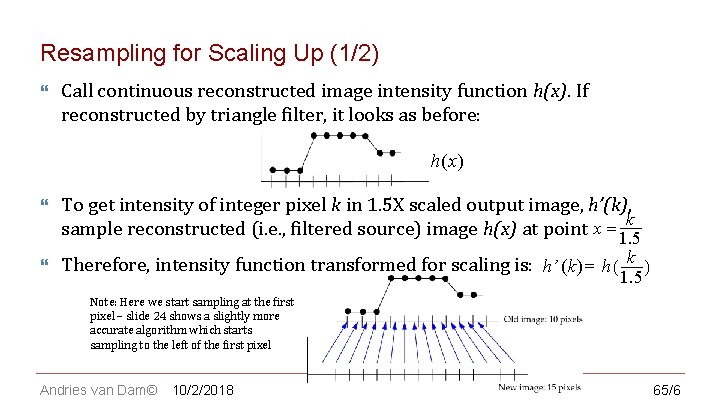
CS 123 | INTRODUCTION TO COMPUTER GRAPHICS Resampling for Scaling Up (1/2) Call continuous reconstructed image intensity function h(x). If reconstructed by triangle filter, it looks as before: h(x ) To get intensity of integer pixel k in 1. 5 X scaled output image, h’(k), sample reconstructed (i. e. , filtered source) image h(x) at point x = 1 k. 5 Therefore, intensity function transformed for scaling is: h’ (k ) = h ( k ) 1. 5 Note: Here we start sampling at the first pixel – slide 24 shows a slightly more accurate algorithm which starts sampling to the left of the first pixel Andries van Dam© 10/2/2018 65/6
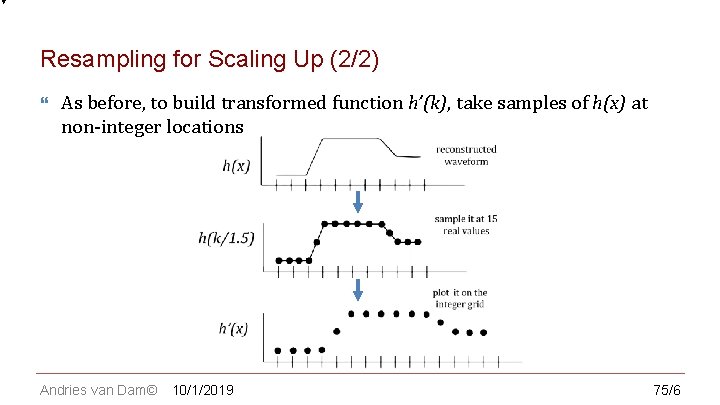
CS 123 | INTRODUCTION TO COMPUTER GRAPHICS Resampling for Scaling Up (2/2) As before, to build transformed function h’(k), take samples of h(x) at non-integer locations Andries van Dam© 10/1/2019 75/6
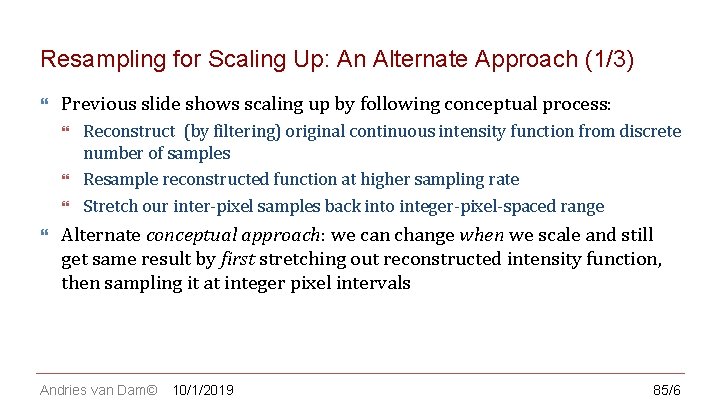
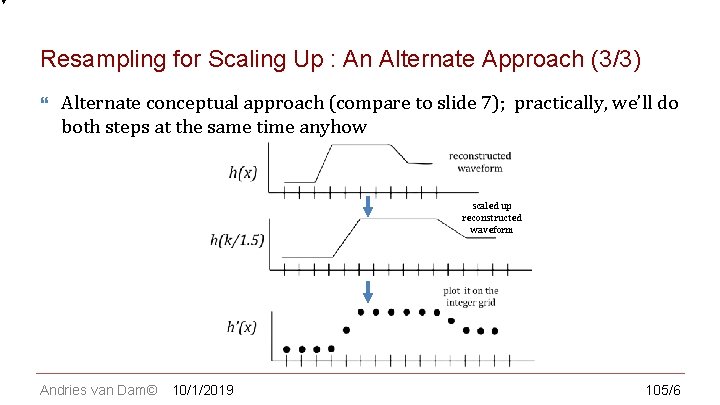
CS 123 | INTRODUCTION TO COMPUTER GRAPHICS Resampling for Scaling Up: An Alternate Approach (1/3) Previous slide shows scaling up by following conceptual process: Reconstruct (by filtering) original continuous intensity function from discrete number of samples Resample reconstructed function at higher sampling rate Stretch our inter-pixel samples back into integer-pixel-spaced range Alternate conceptual approach: we can change when we scale and still get same result by first stretching out reconstructed intensity function, then sampling it at integer pixel intervals Andries van Dam© 10/1/2019 85/6
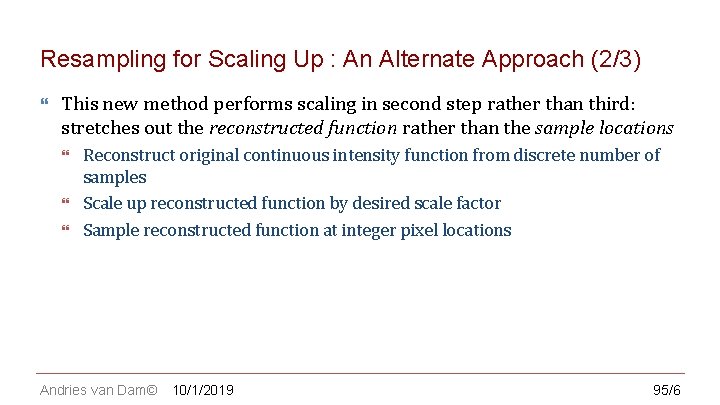
CS 123 | INTRODUCTION TO COMPUTER GRAPHICS Resampling for Scaling Up : An Alternate Approach (2/3) This new method performs scaling in second step rather than third: stretches out the reconstructed function rather than the sample locations Reconstruct original continuous intensity function from discrete number of samples Scale up reconstructed function by desired scale factor Sample reconstructed function at integer pixel locations Andries van Dam© 10/1/2019 95/6
CS 123 | INTRODUCTION TO COMPUTER GRAPHICS Resampling for Scaling Up : An Alternate Approach (3/3) Alternate conceptual approach (compare to slide 7); practically, we’ll do both steps at the same time anyhow scaled up reconstructed waveform Andries van Dam© 10/1/2019 105/6
CS 123 | INTRODUCTION TO COMPUTER GRAPHICS In Class Question 1 Andries van Dam© 115/6
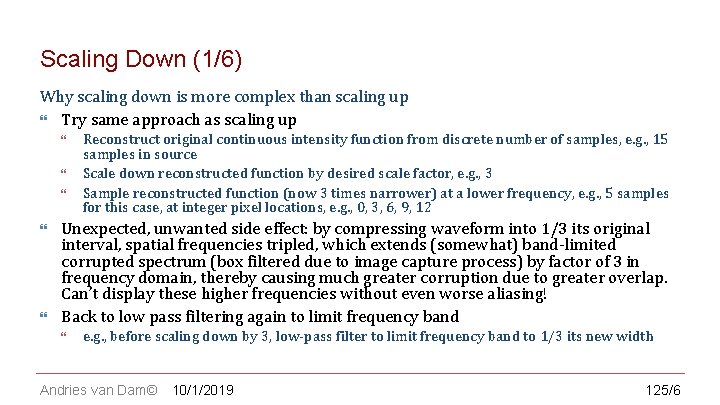
CS 123 | INTRODUCTION TO COMPUTER GRAPHICS Scaling Down (1/6) Why scaling down is more complex than scaling up Try same approach as scaling up Reconstruct original continuous intensity function from discrete number of samples, e. g. , 15 samples in source Scale down reconstructed function by desired scale factor, e. g. , 3 Sample reconstructed function (now 3 times narrower) at a lower frequency, e. g. , 5 samples for this case, at integer pixel locations, e. g. , 0, 3, 6, 9, 12 Unexpected, unwanted side effect: by compressing waveform into 1/3 its original interval, spatial frequencies tripled, which extends (somewhat) band-limited corrupted spectrum (box filtered due to image capture process) by factor of 3 in frequency domain, thereby causing much greater corruption due to greater overlap. Can’t display these higher frequencies without even worse aliasing! Back to low pass filtering again to limit frequency band e. g. , before scaling down by 3, low-pass filter to limit frequency band to 1/3 its new width Andries van Dam© 10/1/2019 125/6
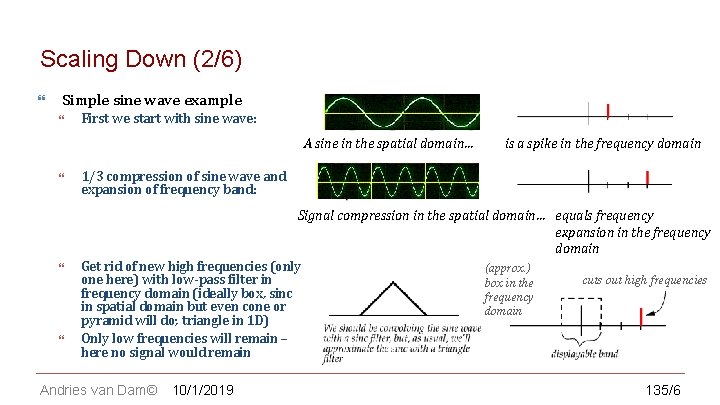
CS 123 | INTRODUCTION TO COMPUTER GRAPHICS Scaling Down (2/6) Simple sine wave example First we start with sine wave: A sine in the spatial domain… is a spike in the frequency domain 1/3 compression of sine wave and expansion of frequency band: Signal compression in the spatial domain… equals frequency expansion in the frequency domain Get rid of new high frequencies (only (approx. ) cuts out high frequencies one here) with low-pass filter in box in the frequency domain (ideally box, sinc frequency in spatial domain but even cone or domain pyramid will do; triangle in 1 D) Only low frequencies will remain – here no signal would remain Andries van Dam© 10/1/2019 135/6
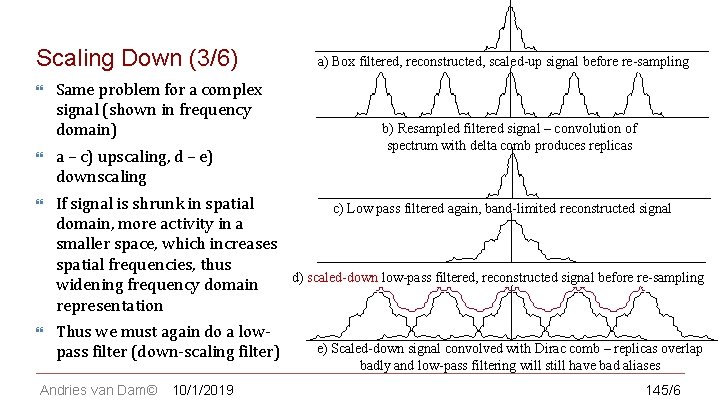
CS 123 | INTRODUCTION TO COMPUTER GRAPHICS Scaling Down (3/6) Same problem for a complex signal (shown in frequency domain) a) Box filtered, reconstructed, scaled-up signal before re-sampling b) Resampled filtered signal – convolution of spectrum with delta comb produces replicas a – c) upscaling, d – e) downscaling If signal is shrunk in spatial c) Low pass filtered again, band-limited reconstructed signal domain, more activity in a smaller space, which increases spatial frequencies, thus d) scaled-down low-pass filtered, reconstructed signal before re-sampling widening frequency domain representation Thus we must again do a lowpass filter (down-scaling filter) Andries van Dam© 10/1/2019 e) Scaled-down signal convolved with Dirac comb – replicas overlap badly and low-pass filtering will still have bad aliases 145/6
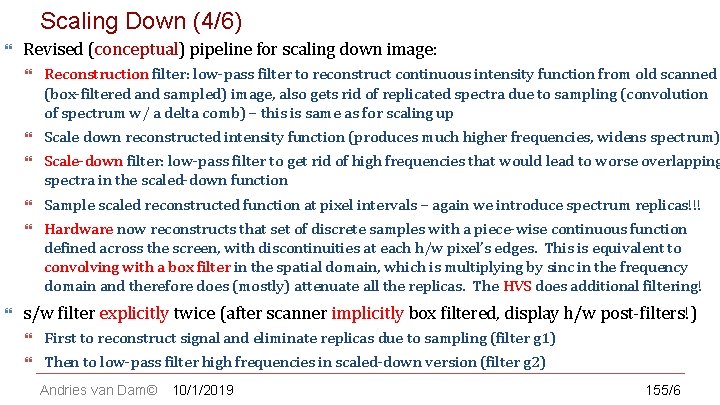
Scaling Down TO (4/6) CS 123 | INTRODUCTION COMPUTER GRAPHICS Revised (conceptual) pipeline for scaling down image: Reconstruction filter: low-pass filter to reconstruct continuous intensity function from old scanned (box-filtered and sampled) image, also gets rid of replicated spectra due to sampling (convolution of spectrum w/ a delta comb) – this is same as for scaling up Scale down reconstructed intensity function (produces much higher frequencies, widens spectrum) Scale-down filter: low-pass filter to get rid of high frequencies that would lead to worse overlapping spectra in the scaled-down function Sample scaled reconstructed function at pixel intervals – again we introduce spectrum replicas!!! Hardware now reconstructs that set of discrete samples with a piece-wise continuous function defined across the screen, with discontinuities at each h/w pixel’s edges. This is equivalent to convolving with a box filter in the spatial domain, which is multiplying by sinc in the frequency domain and therefore does (mostly) attenuate all the replicas. The HVS does additional filtering! s/w filter explicitly twice (after scanner implicitly box filtered, display h/w post-filters!) First to reconstruct signal and eliminate replicas due to sampling (filter g 1) Then to low-pass filter high frequencies in scaled-down version (filter g 2) Andries van Dam© 10/1/2019 155/6
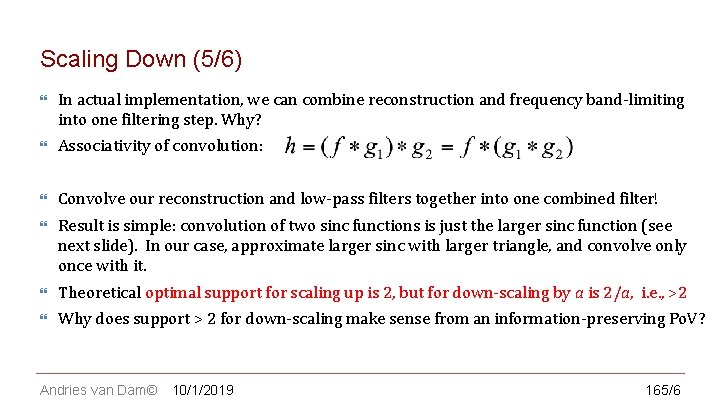
CS 123 | INTRODUCTION TO COMPUTER GRAPHICS Scaling Down (5/6) In actual implementation, we can combine reconstruction and frequency band-limiting into one filtering step. Why? Associativity of convolution: Convolve our reconstruction and low-pass filters together into one combined filter! Result is simple: convolution of two sinc functions is just the larger sinc function (see next slide). In our case, approximate larger sinc with larger triangle, and convolve only once with it. Theoretical optimal support for scaling up is 2, but for down-scaling by a is 2/a, i. e. , >2 Why does support > 2 for down-scaling make sense from an information-preserving Po. V? Andries van Dam© 10/1/2019 165/6
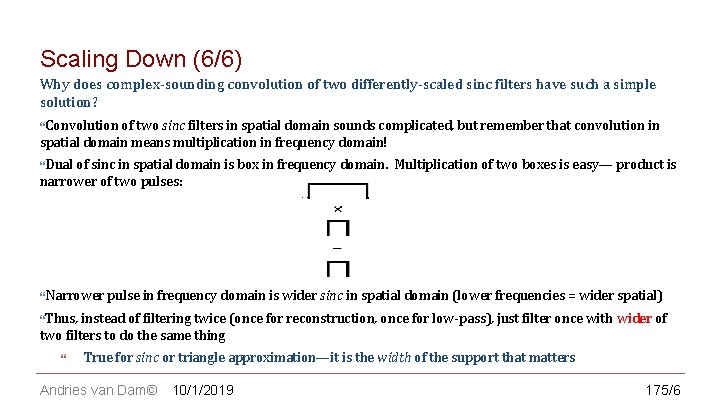
CS 123 | INTRODUCTION TO COMPUTER GRAPHICS Scaling Down (6/6) Why does complex-sounding convolution of two differently-scaled sinc filters have such a simple solution? Convolution of two sinc filters in spatial domain sounds complicated, but remember that convolution in spatial domain means multiplication in frequency domain! Dual of sinc in spatial domain is box in frequency domain. Multiplication of two boxes is easy— product is narrower of two pulses: Narrower pulse in frequency domain is wider sinc in spatial domain (lower frequencies = wider spatial) Thus, instead of filtering twice (once for reconstruction, once for low-pass), just filter once with wider of two filters to do the same thing True for sinc or triangle approximation—it is the width of the support that matters Andries van Dam© 10/1/2019 175/6
CS 123 | INTRODUCTION TO COMPUTER GRAPHICS Outline Images & Hardware Example Applications Jaggies & Aliasing Sampling & Duals Convolution Filtering Scaling Reconstruction Scaling, continued Implementation Andries van Dam© 10/1/2019 185/6
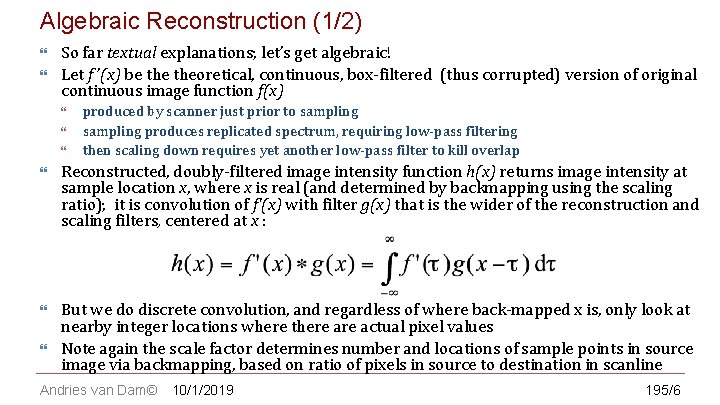
Algebraic Reconstruction (1/2) CS 123 | INTRODUCTION TO COMPUTER GRAPHICS So far textual explanations; let’s get algebraic! Let f ’(x) be theoretical, continuous, box-filtered (thus corrupted) version of original continuous image function f(x) produced by scanner just prior to sampling produces replicated spectrum, requiring low-pass filtering then scaling down requires yet another low-pass filter to kill overlap Reconstructed, doubly-filtered image intensity function h(x) returns image intensity at sample location x, where x is real (and determined by backmapping using the scaling ratio); it is convolution of f’(x) with filter g(x) that is the wider of the reconstruction and scaling filters, centered at x : But we do discrete convolution, and regardless of where back-mapped x is, only look at nearby integer locations where there actual pixel values Note again the scale factor determines number and locations of sample points in source image via backmapping, based on ratio of pixels in source to destination in scanline Andries van Dam© 10/1/2019 195/6
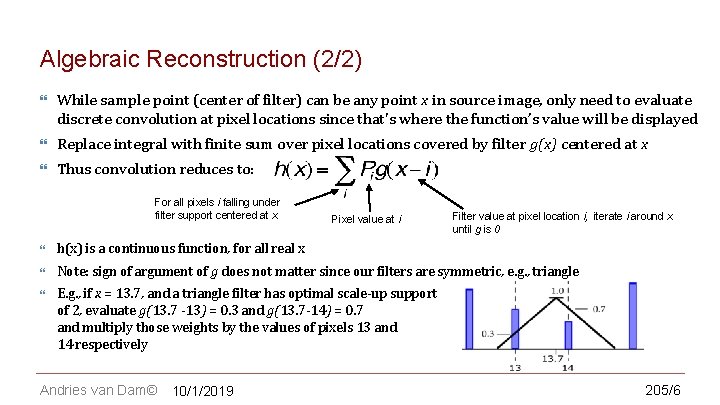
CS 123 | INTRODUCTION TO COMPUTER GRAPHICS Algebraic Reconstruction (2/2) While sample point (center of filter) can be any point x in source image, only need to evaluate discrete convolution at pixel locations since that's where the function’s value will be displayed Replace integral with finite sum over pixel locations covered by filter g(x) centered at x Thus convolution reduces to: For all pixels i falling under filter support centered at x Pixel value at i Filter value at pixel location i, iterate i around x until g is 0 h(x) is a continuous function, for all real x Note: sign of argument of g does not matter since our filters are symmetric, e. g. , triangle E. g. , if x = 13. 7, and a triangle filter has optimal scale-up support of 2, evaluate g(13. 7 -13) = 0. 3 and g(13. 7 -14) = 0. 7 and multiply those weights by the values of pixels 13 and 14 respectively Andries van Dam© 10/1/2019 205/6
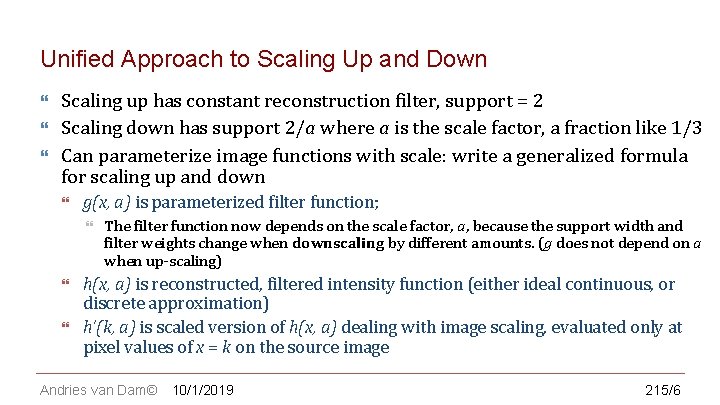
CS 123 | INTRODUCTION TO COMPUTER GRAPHICS Unified Approach to Scaling Up and Down Scaling up has constant reconstruction filter, support = 2 Scaling down has support 2/a where a is the scale factor, a fraction like 1/3 Can parameterize image functions with scale: write a generalized formula for scaling up and down g(x, a) is parameterized filter function; The filter function now depends on the scale factor, a, because the support width and filter weights change when downscaling by different amounts. (g does not depend on a when up-scaling) h(x, a) is reconstructed, filtered intensity function (either ideal continuous, or discrete approximation) h’(k, a) is scaled version of h(x, a) dealing with image scaling, evaluated only at pixel values of x = k on the source image Andries van Dam© 10/1/2019 215/6
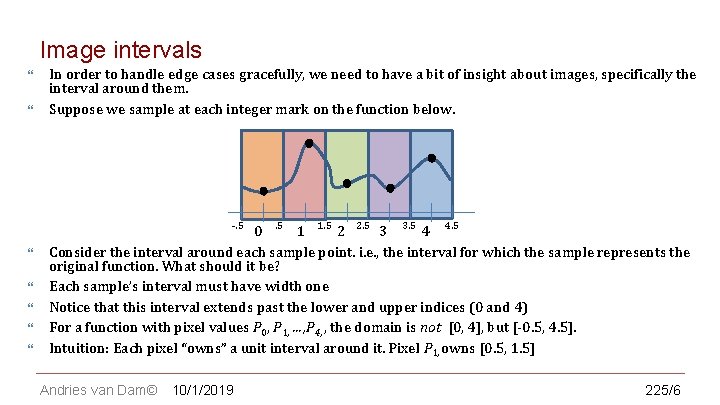
CS 123 | INTRODUCTION TO COMPUTER GRAPHICS Image intervals In order to handle edge cases gracefully, we need to have a bit of insight about images, specifically the interval around them. Suppose we sample at each integer mark on the function below. -. 5 0 . 5 1 1. 5 2 2. 5 3 3. 5 4 4. 5 Consider the interval around each sample point. i. e. , the interval for which the sample represents the original function. What should it be? Each sample’s interval must have width one Notice that this interval extends past the lower and upper indices (0 and 4) For a function with pixel values P 0, P 1, …, P 4, , the domain is not [0, 4], but [-0. 5, 4. 5]. Intuition: Each pixel “owns” a unit interval around it. Pixel P 1, owns [0. 5, 1. 5] Andries van Dam© 10/1/2019 225/6
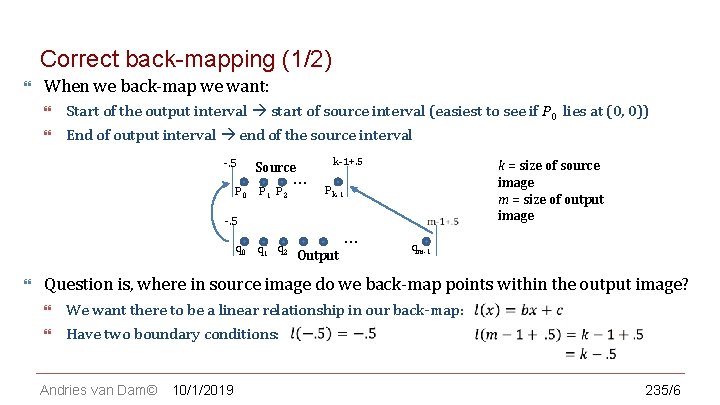
CS 123 | INTRODUCTION TO COMPUTER GRAPHICS Correct back-mapping (1/2) When we back-map we want: Start of the output interval start of source interval (easiest to see if P 0 lies at (0, 0)) End of output interval end of the source interval -. 5 P 0 Source P 1 P 2 … k-1+. 5 Pk-1 -. 5 q 0 q 1 q 2 k = size of source image m = size of output image … Output qm-1 Question is, where in source image do we back-map points within the output image? We want there to be a linear relationship in our back-map: Have two boundary conditions: Andries van Dam© 10/1/2019 235/6
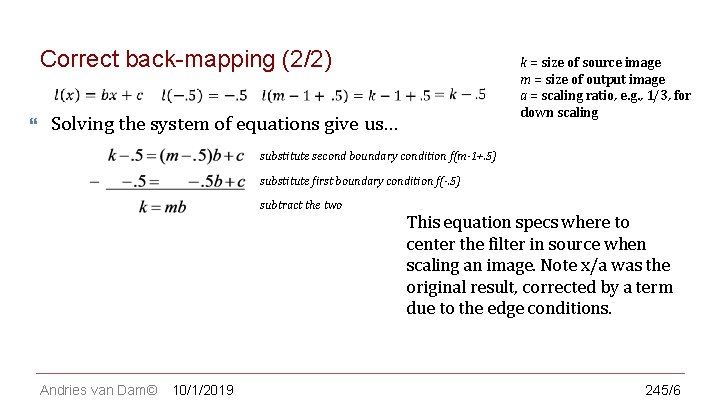
CS 123 | INTRODUCTION TO COMPUTER GRAPHICS Correct back-mapping (2/2) k = size of source image m = size of output image a = scaling ratio, e. g. , 1/3, for down scaling Solving the system of equations give us… substitute second boundary condition f(m-1+. 5) substitute first boundary condition f(-. 5) subtract the two substitute first boundary condition f(-. 5) Andries van Dam© 10/1/2019 This equation specs where to center the filter in source when scaling an image. Note x/a was the original result, corrected by a term due to the edge conditions. 245/6
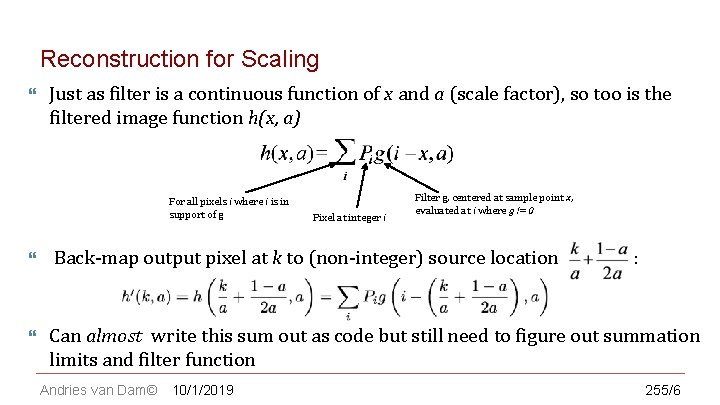
CS 123 | INTRODUCTION TO COMPUTER GRAPHICS Reconstruction for Scaling Just as filter is a continuous function of x and a (scale factor), so too is the filtered image function h(x, a) For all pixels i where i is in support of g Pixel at integer i Filter g, centered at sample point x, evaluated at i where g != 0 Back-map output pixel at k to (non-integer) source location Can almost write this sum out as code but still need to figure out summation limits and filter function Andries van Dam© 10/1/2019 : 255/6
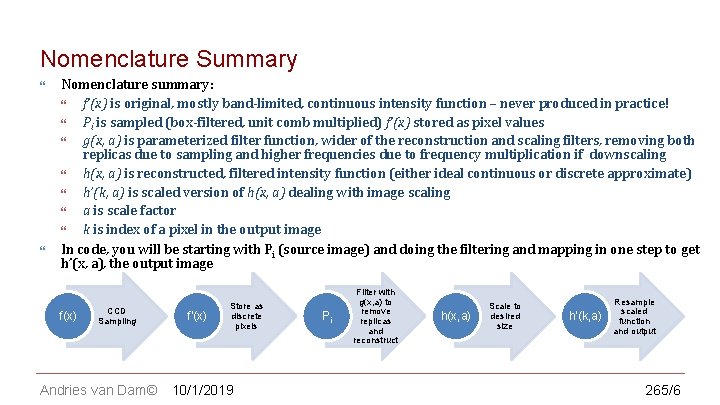
CS 123 | INTRODUCTION TO COMPUTER GRAPHICS Nomenclature Summary Nomenclature summary: f’(x) is original, mostly band-limited, continuous intensity function – never produced in practice! Pi is sampled (box-filtered, unit comb multiplied) f’(x) stored as pixel values g(x, a) is parameterized filter function, wider of the reconstruction and scaling filters, removing both replicas due to sampling and higher frequencies due to frequency multiplication if downscaling h(x, a) is reconstructed, filtered intensity function (either ideal continuous or discrete approximate) h’(k, a) is scaled version of h(x, a) dealing with image scaling a is scale factor k is index of a pixel in the output image In code, you will be starting with Pi (source image) and doing the filtering and mapping in one step to get h’(x, a), the output image f(x) CCD Sampling Andries van Dam© f’(x) Store as discrete pixels 10/1/2019 Pi Filter with g(x, a) to remove replicas and reconstruct h(x, a) Scale to desired size h’(k, a) Resample scaled function and output 265/6
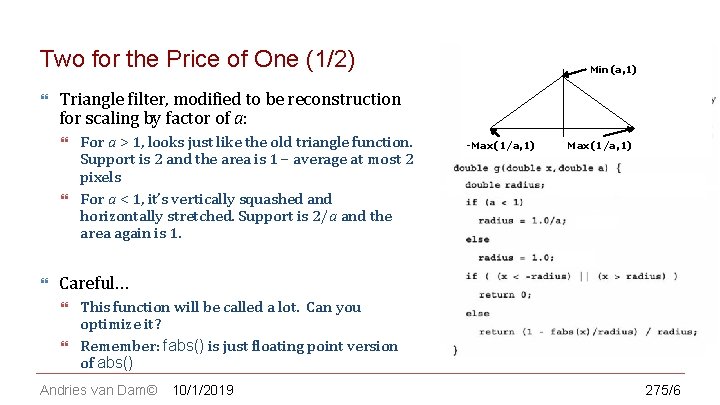
CS 123 | INTRODUCTION TO COMPUTER GRAPHICS Two for the Price of One (1/2) Triangle filter, modified to be reconstruction for scaling by factor of a: Min(a, 1) For a > 1, looks just like the old triangle function. Support is 2 and the area is 1 – average at most 2 pixels For a < 1, it’s vertically squashed and horizontally stretched. Support is 2/a and the area again is 1. -Max(1/a, 1) Careful… This function will be called a lot. Can you optimize it? Remember: fabs() is just floating point version of abs() Andries van Dam© 10/1/2019 275/6
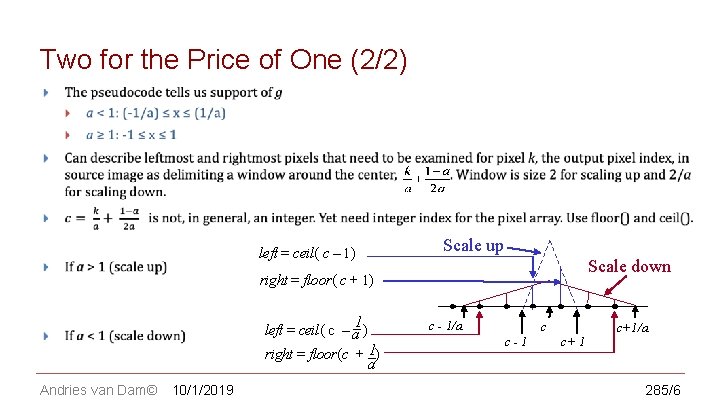
CS 123 | INTRODUCTION TO COMPUTER GRAPHICS Two for the Price of One (2/2) Scale up left = ceil( c – 1) Scale down right = floor( c + 1) _1 left = ceil( c – a ) right = floor(c + _1) c - 1/a c-1 c c+ 1 c+1/a a Andries van Dam© 10/1/2019 285/6
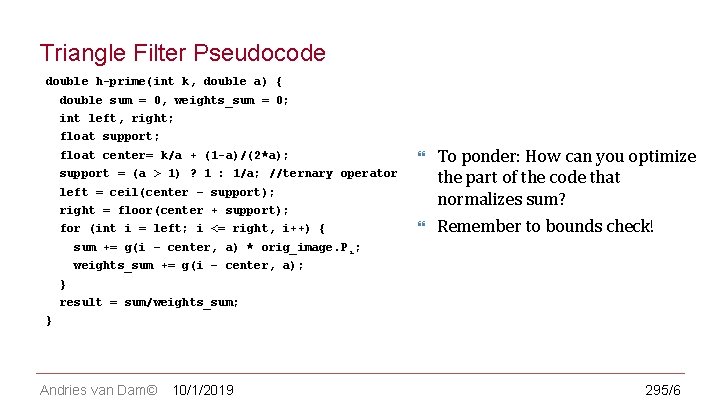
CS 123 | INTRODUCTION TO COMPUTER GRAPHICS Triangle Filter Pseudocode double h-prime(int k, double a) { double sum = 0, weights_sum = 0; int left, right; float support; float center= k/a + (1 -a)/(2*a); To ponder: How can you optimize the part of the code that normalizes sum? Remember to bounds check! support = (a > 1) ? 1 : 1/a; //ternary operator left = ceil(center – support); right = floor(center + support); for (int i = left; i <= right, i++) { sum += g(i – center, a) * orig_image. P i; weights_sum += g(i – center, a); } result = sum/weights_sum; } Andries van Dam© 10/1/2019 295/6
CS 123 | INTRODUCTION TO COMPUTER GRAPHICS The Big Picture, Algorithmically Speaking For each pixel in output image: Determine which pixels in source image are relevant By applying techniques described above, use filterweighted values of source image pixels to generate value of current pixel in output image Andries van Dam© 10/1/2019 305/6
CS 123 | INTRODUCTION TO COMPUTER GRAPHICS Normalizing Sum of Filter Weights (1/5) Notice in pseudocode that we sum filter weights, then normalize sum of weighted pixel contributions by dividing by filter weight sum. Why? Because non-integer width filters produce sums of weights which vary as a function of sampling position. Why is this a problem? “Venetian blinds” – sums of weights increase and decrease away from 1. 0 regularly across image. These “bands” scale image with regularly spaced lighter and darker regions. First we will show example of why filters with integer radii do sum to 1 and then why filters with real radii may not Andries van Dam© 10/1/2019 315/6
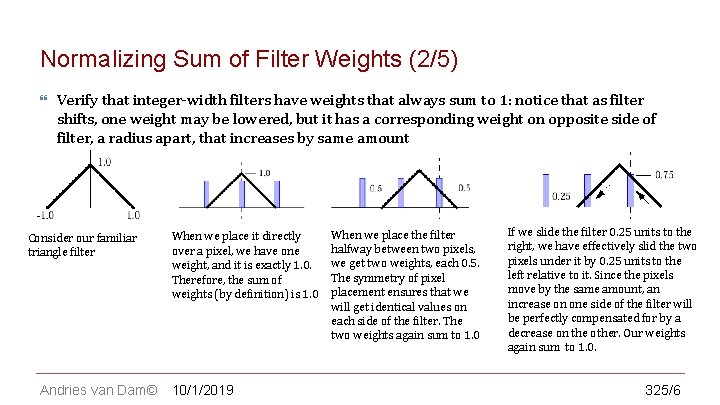
CS 123 | INTRODUCTION TO COMPUTER GRAPHICS Normalizing Sum of Filter Weights (2/5) Verify that integer-width filters have weights that always sum to 1: notice that as filter shifts, one weight may be lowered, but it has a corresponding weight on opposite side of filter, a radius apart, that increases by same amount Consider our familiar triangle filter Andries van Dam© When we place it directly over a pixel, we have one weight, and it is exactly 1. 0. Therefore, the sum of weights (by definition) is 1. 0 10/1/2019 When we place the filter halfway between two pixels, we get two weights, each 0. 5. The symmetry of pixel placement ensures that we will get identical values on each side of the filter. The two weights again sum to 1. 0 If we slide the filter 0. 25 units to the right, we have effectively slid the two pixels under it by 0. 25 units to the left relative to it. Since the pixels move by the same amount, an increase on one side of the filter will be perfectly compensated for by a decrease on the other. Our weights again sum to 1. 0. 325/6
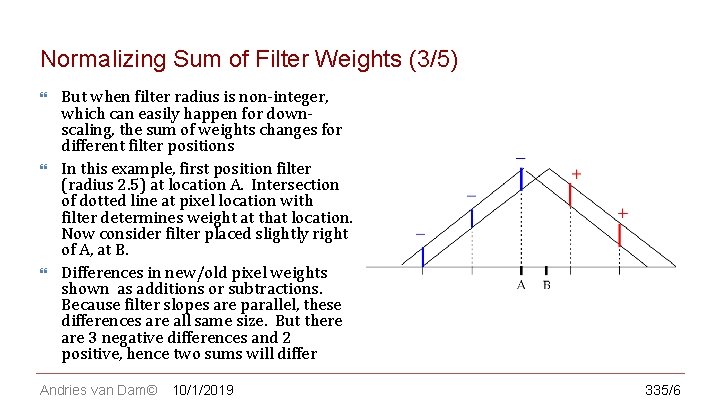
CS 123 | INTRODUCTION TO COMPUTER GRAPHICS Normalizing Sum of Filter Weights (3/5) But when filter radius is non-integer, which can easily happen for downscaling, the sum of weights changes for different filter positions In this example, first position filter (radius 2. 5) at location A. Intersection of dotted line at pixel location with filter determines weight at that location. Now consider filter placed slightly right of A, at B. Differences in new/old pixel weights shown as additions or subtractions. Because filter slopes are parallel, these differences are all same size. But there are 3 negative differences and 2 positive, hence two sums will differ Andries van Dam© 10/1/2019 335/6
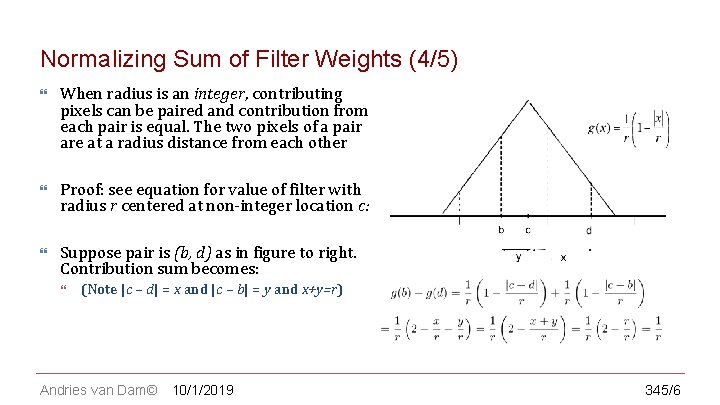
CS 123 | INTRODUCTION TO COMPUTER GRAPHICS Normalizing Sum of Filter Weights (4/5) When radius is an integer, contributing pixels can be paired and contribution from each pair is equal. The two pixels of a pair are at a radius distance from each other Proof: see equation for value of filter with radius r centered at non-integer location c: Suppose pair is (b, d) as in figure to right. Contribution sum becomes: (Note |c – d| = x and |c – b| = y and x+y=r) Andries van Dam© 10/1/2019 345/6
CS 123 | INTRODUCTION TO COMPUTER GRAPHICS Normalizing Sum of Filter Weights (5/5) Sum of filter weights at two pixels in a pair does not depend on d (location of filter center), since they are at a radius distance from each other For integer width filters, we do not need to normalize When scaling up, we always have integer-width filter, so we don’t need to normalize! When scaling down, our filter width is generally non-integer, and we do need to normalize. Can you rewrite the pseudocode to take advantage of this knowledge? Andries van Dam© 10/1/2019 355/6
CS 123 | INTRODUCTION TO COMPUTER GRAPHICS In class Question 2 Andries van Dam© 365/6
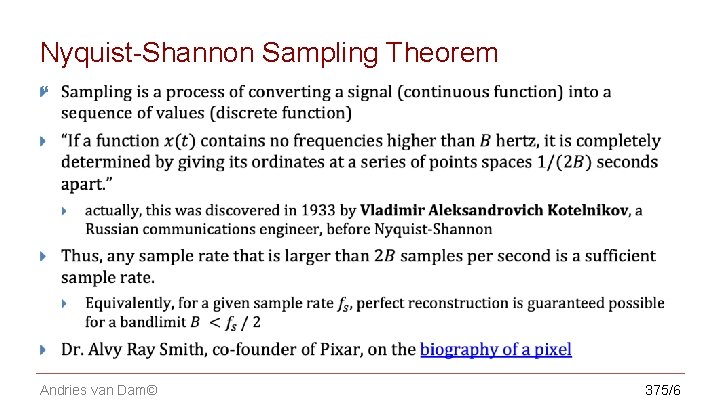
CS 123 | INTRODUCTION TO COMPUTER GRAPHICS Nyquist-Shannon Sampling Theorem Andries van Dam© 375/6
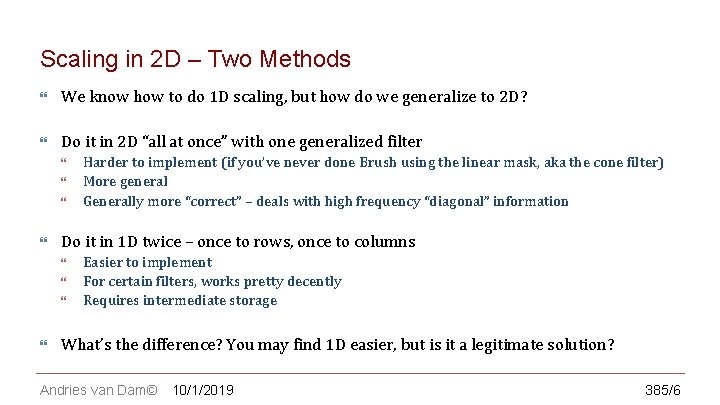
CS 123 | INTRODUCTION TO COMPUTER GRAPHICS Scaling in 2 D – Two Methods We know how to do 1 D scaling, but how do we generalize to 2 D? Do it in 2 D “all at once” with one generalized filter Do it in 1 D twice – once to rows, once to columns Harder to implement (if you’ve never done Brush using the linear mask, aka the cone filter) More general Generally more “correct” – deals with high frequency “diagonal” information Easier to implement For certain filters, works pretty decently Requires intermediate storage What’s the difference? You may find 1 D easier, but is it a legitimate solution? Andries van Dam© 10/1/2019 385/6
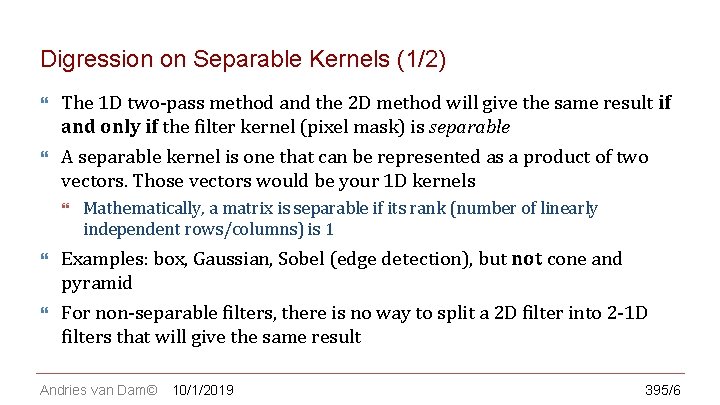
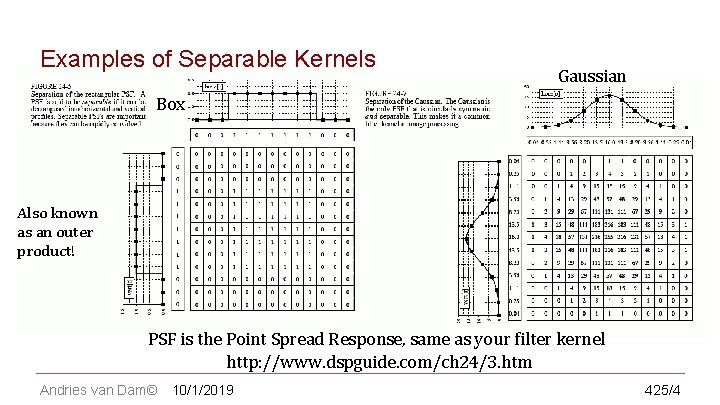
CS 123 | INTRODUCTION TO COMPUTER GRAPHICS Digression on Separable Kernels (1/2) The 1 D two-pass method and the 2 D method will give the same result if and only if the filter kernel (pixel mask) is separable A separable kernel is one that can be represented as a product of two vectors. Those vectors would be your 1 D kernels Mathematically, a matrix is separable if its rank (number of linearly independent rows/columns) is 1 Examples: box, Gaussian, Sobel (edge detection), but not cone and pyramid For non-separable filters, there is no way to split a 2 D filter into 2 -1 D filters that will give the same result Andries van Dam© 10/1/2019 395/6
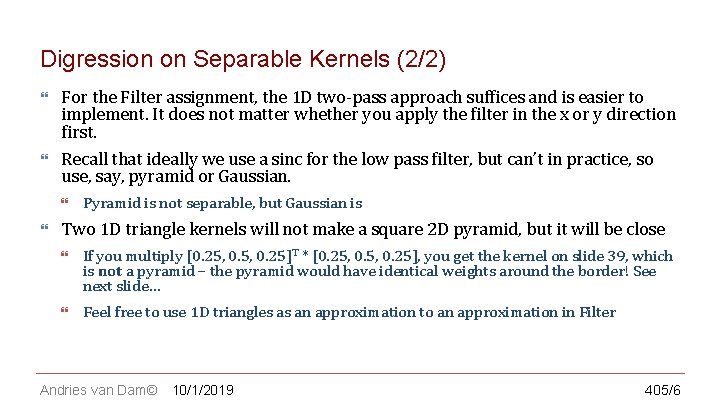
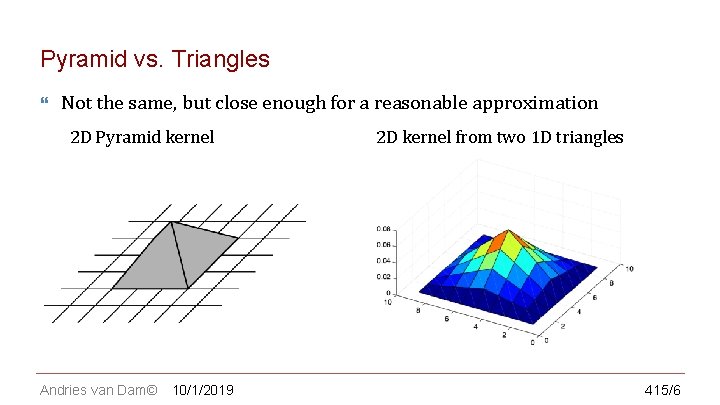
CS 123 | INTRODUCTION TO COMPUTER GRAPHICS Digression on Separable Kernels (2/2) For the Filter assignment, the 1 D two-pass approach suffices and is easier to implement. It does not matter whether you apply the filter in the x or y direction first. Recall that ideally we use a sinc for the low pass filter, but can’t in practice, so use, say, pyramid or Gaussian. Pyramid is not separable, but Gaussian is Two 1 D triangle kernels will not make a square 2 D pyramid, but it will be close If you multiply [0. 25, 0. 25]T * [0. 25, 0. 25], you get the kernel on slide 39, which is not a pyramid – the pyramid would have identical weights around the border! See next slide… Feel free to use 1 D triangles as an approximation to an approximation in Filter Andries van Dam© 10/1/2019 405/6
CS 123 | INTRODUCTION TO COMPUTER GRAPHICS Pyramid vs. Triangles Not the same, but close enough for a reasonable approximation 2 D Pyramid kernel Andries van Dam© 10/1/2019 2 D kernel from two 1 D triangles 415/6
CS 123 | INTRODUCTION TO COMPUTER GRAPHICS Examples of Separable Kernels Gaussian Box Also known as an outer product! PSF is the Point Spread Response, same as your filter kernel http: //www. dspguide. com/ch 24/3. htm Andries van Dam© 10/1/2019 425/4
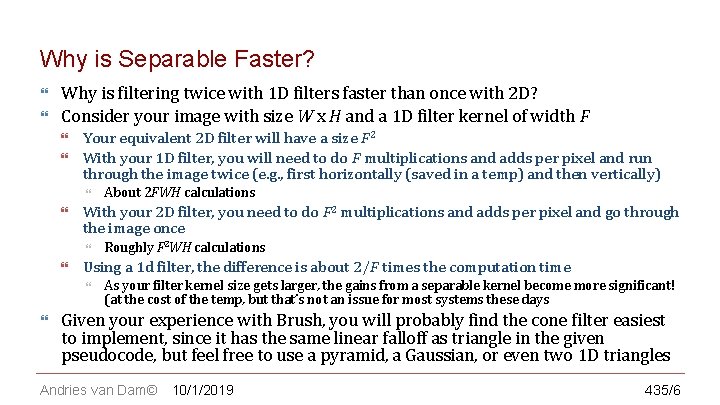
CS 123 | INTRODUCTION TO COMPUTER GRAPHICS Why is Separable Faster? Why is filtering twice with 1 D filters faster than once with 2 D? Consider your image with size W x H and a 1 D filter kernel of width F Your equivalent 2 D filter will have a size F 2 With your 1 D filter, you will need to do F multiplications and adds per pixel and run through the image twice (e. g. , first horizontally (saved in a temp) and then vertically) With your 2 D filter, you need to do F 2 multiplications and adds per pixel and go through the image once Roughly F 2 WH calculations Using a 1 d filter, the difference is about 2/F times the computation time About 2 FWH calculations As your filter kernel size gets larger, the gains from a separable kernel become more significant! (at the cost of the temp, but that’s not an issue for most systems these days Given your experience with Brush, you will probably find the cone filter easiest to implement, since it has the same linear falloff as triangle in the given pseudocode, but feel free to use a pyramid, a Gaussian, or even two 1 D triangles Andries van Dam© 10/1/2019 435/6
CS 123 | INTRODUCTION TO COMPUTER GRAPHICS Digression on Precomputed Kernels Certain mapping operations (such as image blurring, sharpening, edge detection, etc. ) change values of output pixels, but don’t remap pixel locations, i. e. , don’t sample between pixel locations. Their filters can be precomputed as a “kernel” (or “pixel mask”) Other mappings, such as image scaling, generally require sampling between pixel locations and therefore calculating actual filter values at those arbitrary non-integer locations, possibly requiring renormalization of weights. For these operations, often easier to approximate pyramid filter by applying triangle filters twice, once along x-axis of source, once along y-axis Andries van Dam© 10/1/2019 445/6
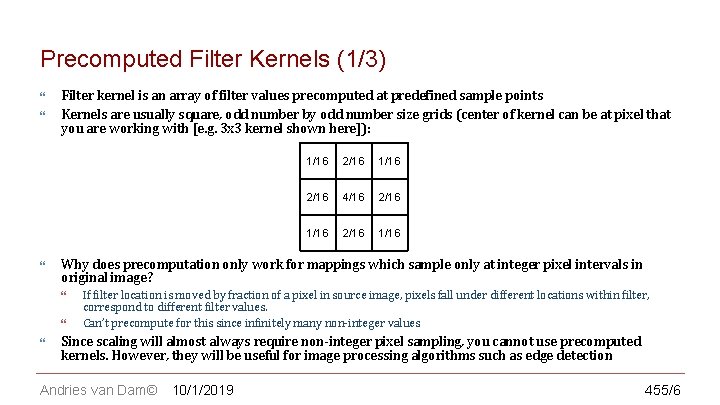
CS 123 | INTRODUCTION TO COMPUTER GRAPHICS Precomputed Filter Kernels (1/3) Filter kernel is an array of filter values precomputed at predefined sample points Kernels are usually square, odd number by odd number size grids (center of kernel can be at pixel that you are working with [e. g. 3 x 3 kernel shown here]): 2/16 1/16 2/16 4/16 2/16 1/16 Why does precomputation only work for mappings which sample only at integer pixel intervals in original image? 1/16 If filter location is moved by fraction of a pixel in source image, pixels fall under different locations within filter, correspond to different filter values. Can’t precompute for this since infinitely many non-integer values Since scaling will almost always require non-integer pixel sampling, you cannot use precomputed kernels. However, they will be useful for image processing algorithms such as edge detection Andries van Dam© 10/1/2019 455/6
CS 123 | INTRODUCTION TO COMPUTER GRAPHICS Precomputed Filter Kernels (2/3) Evaluating the kernel To evaluate, place kernel’s center over integer pixel location to be sampled. Each pixel covered by kernel is multiplied by corresponding kernel value; results are summed Note: have not dealt with boundary conditions. One common tactic is to act as if there is a buffer zone where the edge values are repeated Andries van Dam© 10/1/2019 465/6
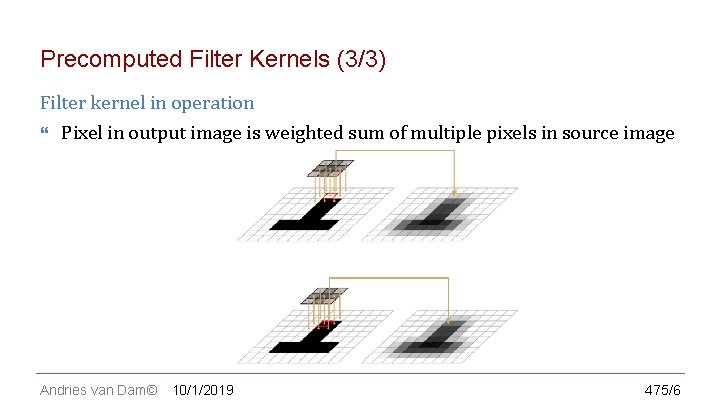
CS 123 | INTRODUCTION TO COMPUTER GRAPHICS Precomputed Filter Kernels (3/3) Filter kernel in operation Pixel in output image is weighted sum of multiple pixels in source image Andries van Dam© 10/1/2019 475/6
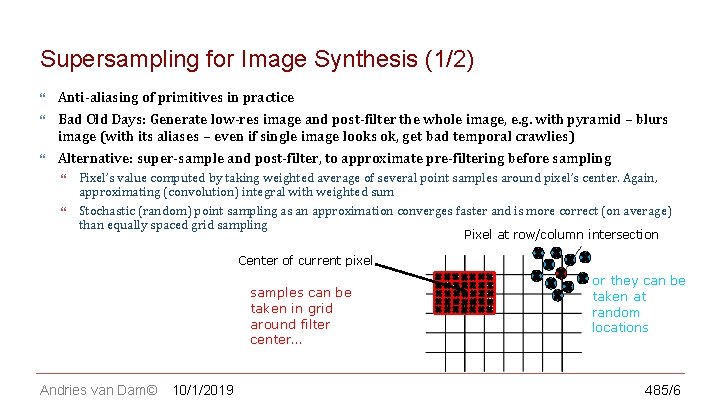
CS 123 | INTRODUCTION TO COMPUTER GRAPHICS Supersampling for Image Synthesis (1/2) Anti-aliasing of primitives in practice Bad Old Days: Generate low-res image and post-filter the whole image, e. g. with pyramid – blurs image (with its aliases – even if single image looks ok, get bad temporal crawlies) Alternative: super-sample and post-filter, to approximate pre-filtering before sampling Pixel’s value computed by taking weighted average of several point samples around pixel’s center. Again, approximating (convolution) integral with weighted sum Stochastic (random) point sampling as an approximation converges faster and is more correct (on average) than equally spaced grid sampling Pixel at row/column intersection Center of current pixel samples can be taken in grid around filter center… Andries van Dam© 10/1/2019 or they can be taken at random locations 485/6
CS 123 | INTRODUCTION TO COMPUTER GRAPHICS Supersampling for Image Synthesis (2/2) Why does supersampling work? Sampling a higher frequency pushes the replicas apart, and since amplitude of spectra fall off at approximately 1/f p for (1 < p < 2) (i. e. somewhere between linearly and quadratically), the tails overlap much less, causing much less corruption before the lowpass filtering With fewer than 128 distinguishable levels of intensity, being off by one step is hardly noticeable Stochastic sampling may introduce some random noise, but making multiple passes and averaging, it will eventually converge on correct answer Since need to take multiple samples and filter them, this process is computationally expensive (but worth it, especially to avoid temporal crawlies) Andries van Dam© 10/1/2019 495/6
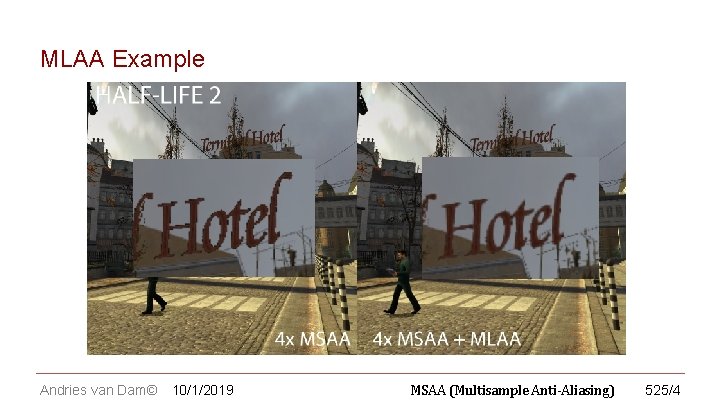
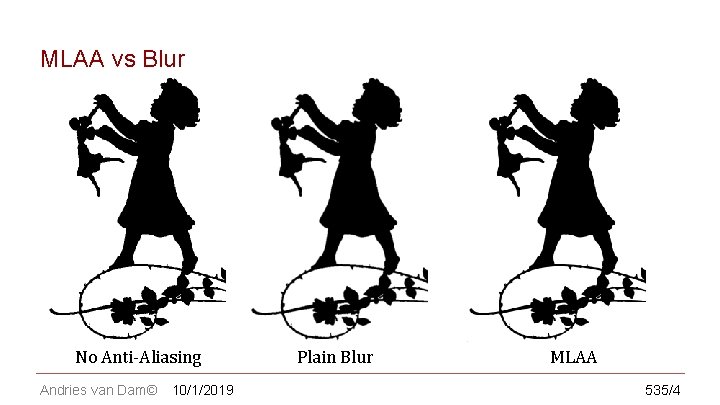
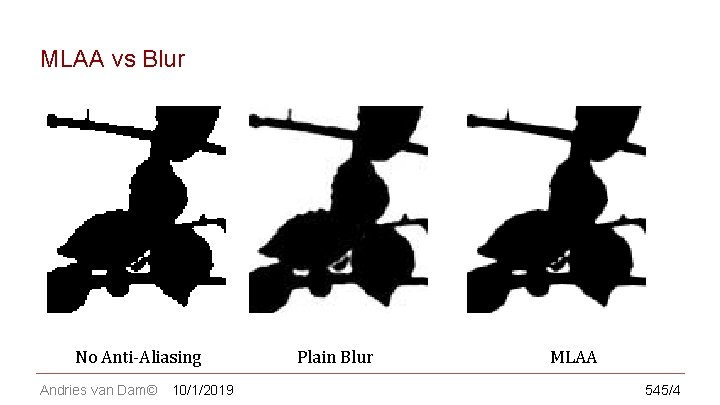
CS 123 | INTRODUCTION TO COMPUTER GRAPHICS Modern Anti-Aliasing Techniques – Postprocessing Ironically, current trends in graphics are moving back toward anti-aliasing as a post processing step, but adaptively AMD’s MLAA (Morphological Anti-Aliasing) and NVIDIA’s FXAA (Fast Approximate Anti-Aliasing) plus many more General idea: find edges/silhouettes in the image, slightly blur those areas Faster and lower memory requirements compared to supersampling Scales better with larger resolutions Compared to just plain blur filtering with any approximation to sinc, looks better due to intelligently filtering along contours in the image. There is more filtering in areas of bad aliasing while still preserving crispness Andries van Dam© 10/1/2019 505/6
CS 123 | INTRODUCTION TO COMPUTER GRAPHICS Modern Anti-Aliasing Techniques – FXAA How do we find edges to blur? Fast Approximate Anti-Aliasing (FXAA) works through multiple screen-space passes Every pixel runs through a contrast test to see if it is aliased If pixel passes, it’s assigned an edge direction based off of direction of highest contrast Looking at neighboring pixels orthogonal to this direction, select the pixel with highest absolute contrast (i. e. , contrast with average of neighbors) Along this edge direction, if the highest contrast pair has a large change in luminance (beyond a threshold), end of edge is reached Using the orthogonal direction at end of edge, shift the image to reduce subpixel aliasing Finally, blur neighbors Andries van Dam© 10/1/2019 515/6
CS 123 | INTRODUCTION TO COMPUTER GRAPHICS MLAA Example Andries van Dam© 10/1/2019 MSAA (Multisample Anti-Aliasing) 525/4
CS 123 | INTRODUCTION TO COMPUTER GRAPHICS MLAA vs Blur No Anti-Aliasing Andries van Dam© 10/1/2019 Plain Blur MLAA 535/4
CS 123 | INTRODUCTION TO COMPUTER GRAPHICS MLAA vs Blur No Anti-Aliasing Andries van Dam© 10/1/2019 Plain Blur MLAA 545/4
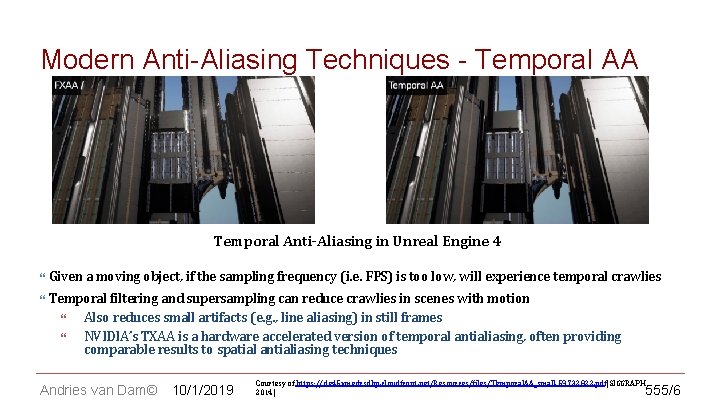
CS 123 | INTRODUCTION TO COMPUTER GRAPHICS Modern Anti-Aliasing Techniques - Temporal AA Temporal Anti-Aliasing in Unreal Engine 4 Given a moving object, if the sampling frequency (i. e. FPS) is too low, will experience temporal crawlies Temporal filtering and supersampling can reduce crawlies in scenes with motion Also reduces small artifacts (e. g. , line aliasing) in still frames NVIDIA’s TXAA is a hardware accelerated version of temporal antialiasing, often providing comparable results to spatial antialiasing techniques Andries van Dam© 10/1/2019 Courtesy of https: //de 45 xmedrsdbp. cloudfront. net/Resources/files/Temporal. AA_small-59732822. pdf[SIGGRAPH 2014] 555/6
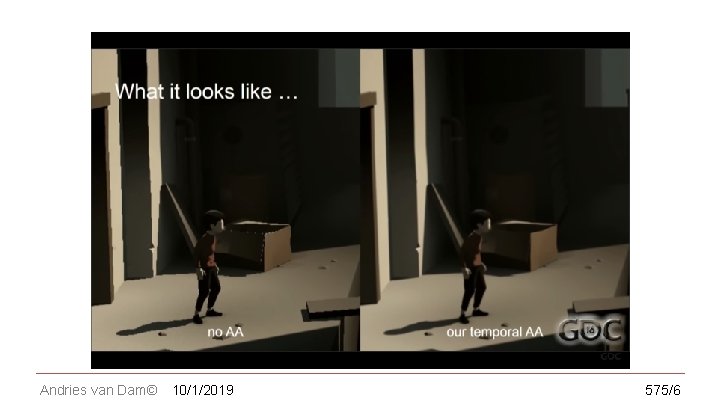
CS 123 | INTRODUCTION TO COMPUTER GRAPHICS Modern Anti-Aliasing Techniques - Temporal AA Takes fragments in a history buffer to refine the fragments in the current frame Output becomes the new history buffer Results in a more stable image rendered Mobile game Playdead’s INSIDE uses Temporal Reprojection AA https: //www. youtube. com/watch? v=2 XXS 5 Uy. Njj. U Andries van Dam© 10/1/2019 565/6
CS 123 | INTRODUCTION TO COMPUTER GRAPHICS Andries van Dam© 10/1/2019 575/6