
CS 123 INTRODUCTION TO COMPUTER GRAPHICS Geometric Transformations
- Slides: 48
CS 123 | INTRODUCTION TO COMPUTER GRAPHICS Geometric Transformations 2 D and 3 D Andries van Dam © 9/17/19 1/49
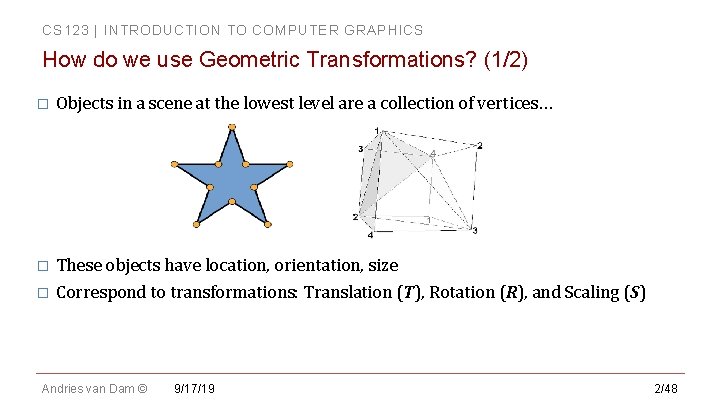
CS 123 | INTRODUCTION TO COMPUTER GRAPHICS How do we use Geometric Transformations? (1/2) � Objects in a scene at the lowest level are a collection of vertices… These objects have location, orientation, size � Correspond to transformations: Translation (T), Rotation (R), and Scaling (S) � Andries van Dam © 9/17/19 2/48
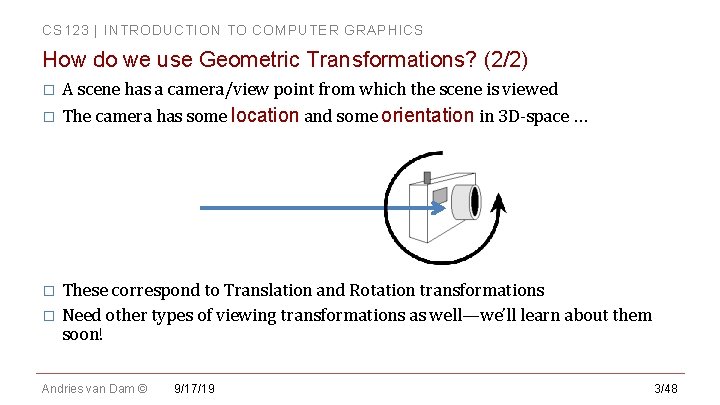
CS 123 | INTRODUCTION TO COMPUTER GRAPHICS How do we use Geometric Transformations? (2/2) A scene has a camera/view point from which the scene is viewed � The camera has some location and some orientation in 3 D-space … � These correspond to Translation and Rotation transformations � Need other types of viewing transformations as well—we’ll learn about them soon! � Andries van Dam © 9/17/19 3/48
CS 123 | INTRODUCTION TO COMPUTER GRAPHICS Some Linear Algebra Concepts. . . � � � 3 D coordinate geometry Vectors in 2 D space and 3 D space Dot product and cross product—definitions and uses Vector and matrix notation and algebra Identity matrix Multiplicative associativity for matrices � � � E. g. A(BC) = (AB)C Matrix transpose and inverse—definition, use, and calculation Homogeneous coordinates (x, y, z, w) You will need to understand these concepts! 3 Blue 1 Brown: https: //www. 3 blue 1 brown. com/essence-of-linear-algebra-page Linear algebra help session this Thursday (9: 00 pm in Motorola): http: //cs. brown. edu/courses/cs 123/docs/helpsessions/linearalgebra. pdf Andries van Dam © 9/17/19 4/48
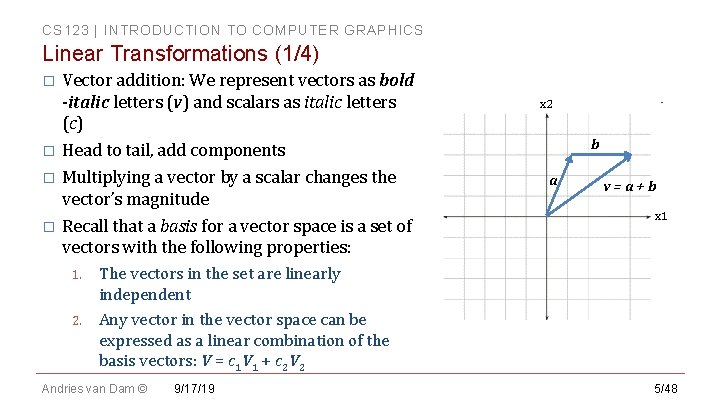
CS 123 | INTRODUCTION TO COMPUTER GRAPHICS Linear Transformations (1/4) Vector addition: We represent vectors as bold -italic letters (v) and scalars as italic letters (c) � Head to tail, add components � Multiplying a vector by a scalar changes the vector’s magnitude � Recall that a basis for a vector space is a set of vectors with the following properties: � 1. The vectors in the set are linearly independent 2. Any vector in the vector space can be expressed as a linear combination of the basis vectors: V = c 1 V 1 + c 2 V 2 Andries van Dam © 9/17/19 x 2 b a v=a+b x 1 5/48
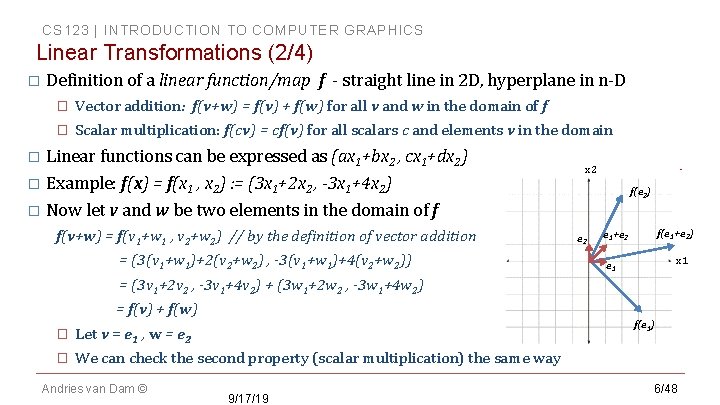
CS 123 | INTRODUCTION TO COMPUTER GRAPHICS Linear Transformations (2/4) � Definition of a linear function/map f - straight line in 2 D, hyperplane in n-D � Vector addition: f(v+w) = f(v) + f(w) for all v and w in the domain of f � Scalar multiplication: f(cv) = cf(v) for all scalars c and elements v in the domain Linear functions can be expressed as (ax 1+bx 2 , cx 1+dx 2) � Example: f(x) = f(x 1 , x 2) : = (3 x 1+2 x 2 , -3 x 1+4 x 2) � Now let v and w be two elements in the domain of f � f(v+w) = f(v 1+w 1 , v 2+w 2) // by the definition of vector addition = (3(v 1+w 1)+2(v 2+w 2) , -3(v 1+w 1)+4(v 2+w 2)) x 2 f(e 2) e 2 f(e 1+e 2) e 1+e 2 x 1 e 1 = (3 v 1+2 v 2 , -3 v 1+4 v 2) + (3 w 1+2 w 2 , -3 w 1+4 w 2) = f(v) + f(w) f(e 1) � Let v = e 1 , w = e 2 � We can check the second property (scalar multiplication) the same way Andries van Dam © 9/17/19 6/48
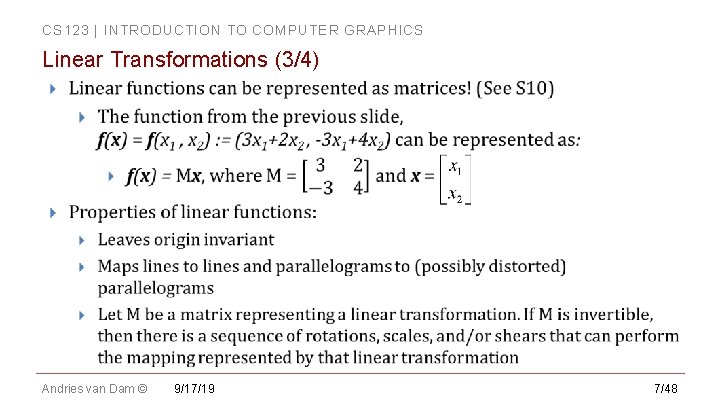
CS 123 | INTRODUCTION TO COMPUTER GRAPHICS Linear Transformations (3/4) Andries van Dam © 9/17/19 7/48
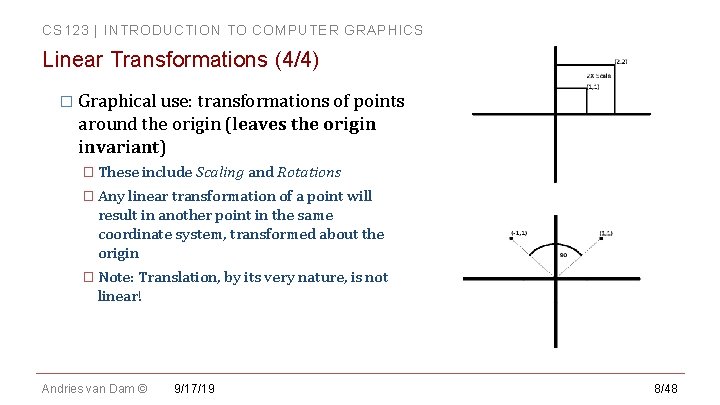
CS 123 | INTRODUCTION TO COMPUTER GRAPHICS Linear Transformations (4/4) � Graphical use: transformations of points around the origin (leaves the origin invariant) � These include Scaling and Rotations � Any linear transformation of a point will result in another point in the same coordinate system, transformed about the origin � Note: Translation, by its very nature, is not linear! Andries van Dam © 9/17/19 8/48
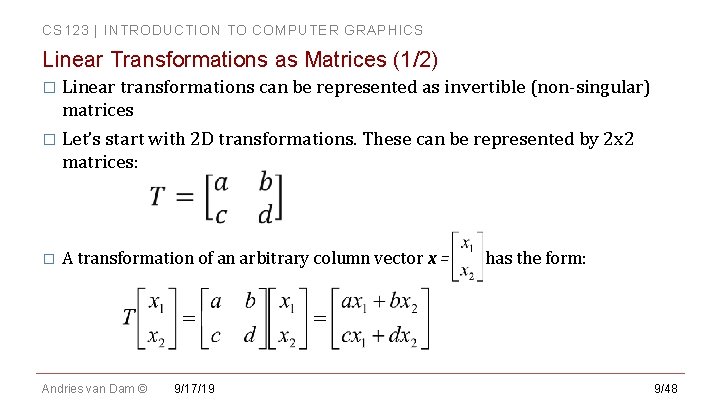
CS 123 | INTRODUCTION TO COMPUTER GRAPHICS Linear Transformations as Matrices (1/2) � Linear transformations can be represented as invertible (non-singular) matrices � Let’s start with 2 D transformations. These can be represented by 2 x 2 matrices: � A transformation of an arbitrary column vector x = has the form: Andries van Dam © 9/17/19 9/48
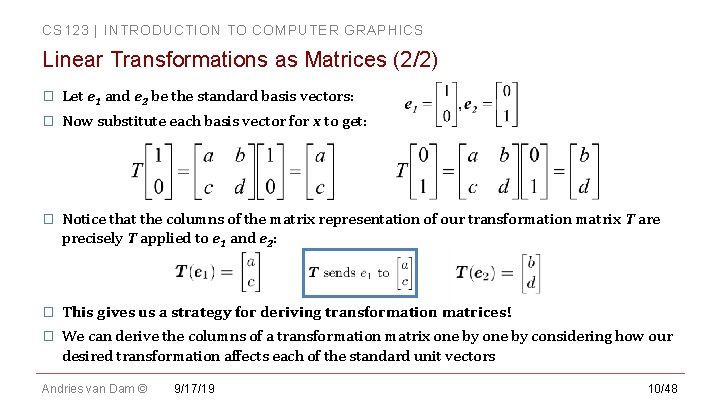
CS 123 | INTRODUCTION TO COMPUTER GRAPHICS Linear Transformations as Matrices (2/2) � Let e 1 and e 2 be the standard basis vectors: � Now substitute each basis vector for x to get: � Notice that the columns of the matrix representation of our transformation matrix T are precisely T applied to e 1 and e 2: � This gives us a strategy for deriving transformation matrices! � We can derive the columns of a transformation matrix one by considering how our desired transformation affects each of the standard unit vectors Andries van Dam © 9/17/19 10/48
CS 123 | INTRODUCTION TO COMPUTER GRAPHICS Clicker Question #1 Andries van Dam © 9/17/19 11/48
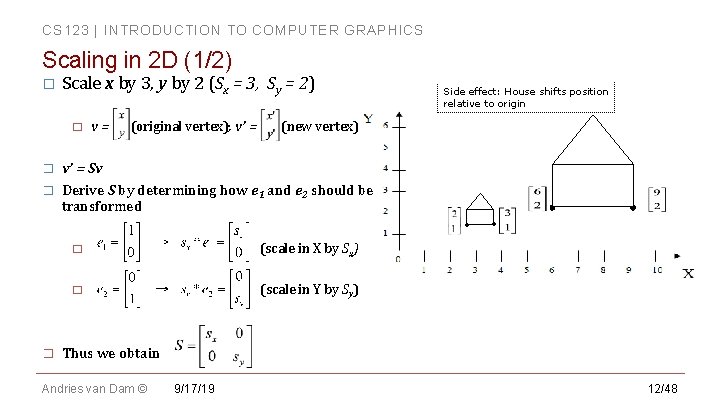
CS 123 | INTRODUCTION TO COMPUTER GRAPHICS Scaling in 2 D (1/2) � Scale x by 3, y by 2 (Sx = 3, Sy = 2) � � � Side effect: House shifts position relative to origin v = (original vertex); v’ = (new vertex) v’ = Sv Derive S by determining how e 1 and e 2 should be transformed • � � (scale in X by Sx) � (scale in Y by Sy) • Thus we obtain Andries van Dam © 9/17/19 12/48
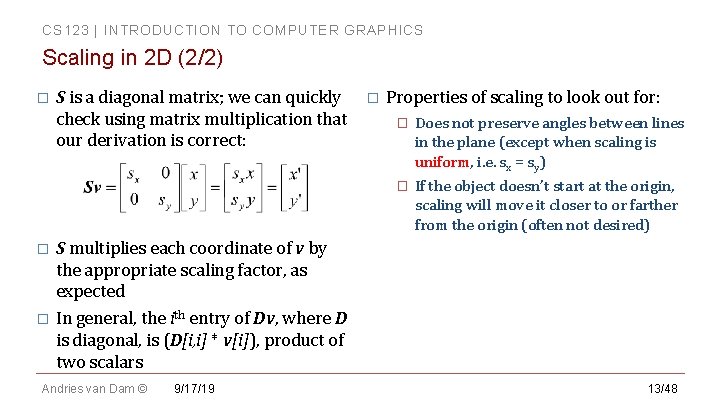
CS 123 | INTRODUCTION TO COMPUTER GRAPHICS Scaling in 2 D (2/2) � S is a diagonal matrix; we can quickly check using matrix multiplication that our derivation is correct: � Properties of scaling to look out for: � Does not preserve angles between lines in the plane (except when scaling is uniform, i. e. sx = sy) � If the object doesn’t start at the origin, scaling will move it closer to or farther from the origin (often not desired) S multiplies each coordinate of v by the appropriate scaling factor, as expected � In general, the ith entry of Dv, where D is diagonal, is (D[i, i] * v[i]), product of two scalars � Andries van Dam © 9/17/19 13/48
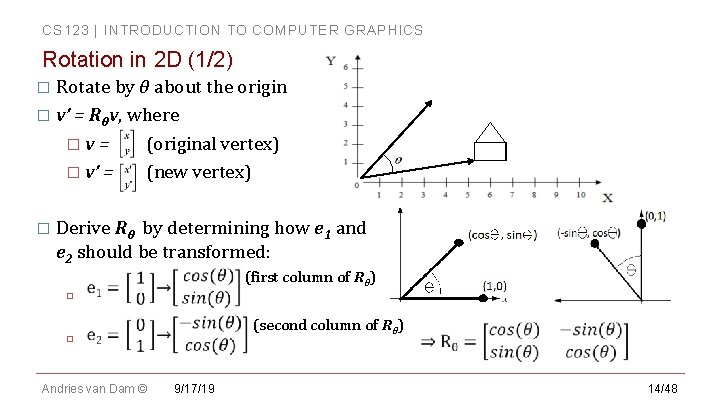
CS 123 | INTRODUCTION TO COMPUTER GRAPHICS Rotation in 2 D (1/2) � Rotate by θ about the origin � v’ = Rθv, where �v= (original vertex) � v’ = (new vertex) � Derive Rθ by determining how e 1 and e 2 should be transformed: � (first column of Rθ) � Andries van Dam © 9/17/19 (second column of Rθ) 14/48
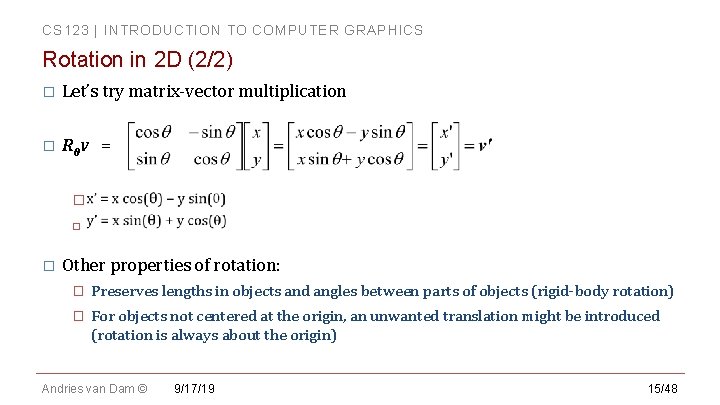
CS 123 | INTRODUCTION TO COMPUTER GRAPHICS Rotation in 2 D (2/2) � Let’s try matrix-vector multiplication � Rθv = � � � Other properties of rotation: � Preserves lengths in objects and angles between parts of objects (rigid-body rotation) � For objects not centered at the origin, an unwanted translation might be introduced (rotation is always about the origin) Andries van Dam © 9/17/19 15/48
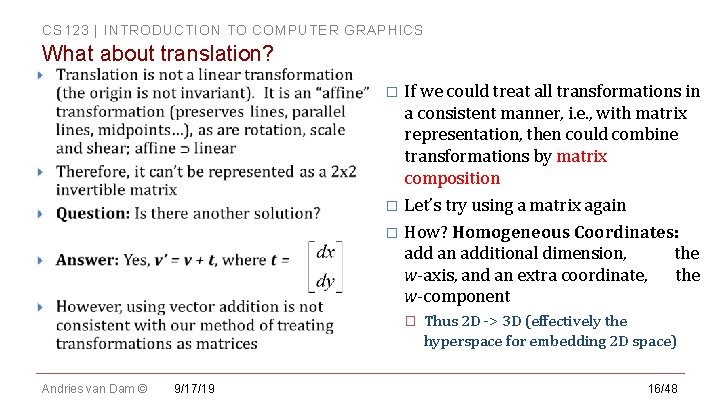
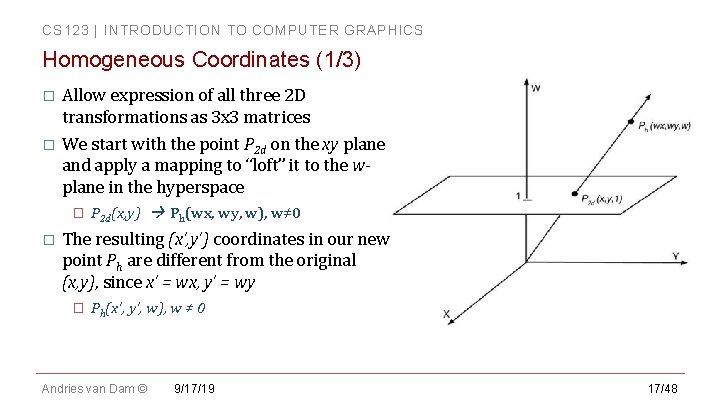
CS 123 | INTRODUCTION TO COMPUTER GRAPHICS What about translation? If we could treat all transformations in a consistent manner, i. e. , with matrix representation, then could combine transformations by matrix composition � Let’s try using a matrix again � How? Homogeneous Coordinates: add an additional dimension, the w-axis, and an extra coordinate, the w-component � � Andries van Dam © 9/17/19 Thus 2 D -> 3 D (effectively the hyperspace for embedding 2 D space) 16/48
CS 123 | INTRODUCTION TO COMPUTER GRAPHICS Homogeneous Coordinates (1/3) Allow expression of all three 2 D transformations as 3 x 3 matrices � We start with the point P 2 d on the xy plane and apply a mapping to “loft” it to the wplane in the hyperspace � � � P 2 d(x, y) Ph(wx, wy, w), w≠ 0 The resulting (x’, y’) coordinates in our new point Ph are different from the original (x, y), since x’ = wx, y’ = wy � Ph(x’, y’, w), w ≠ 0 Andries van Dam © 9/17/19 17/48
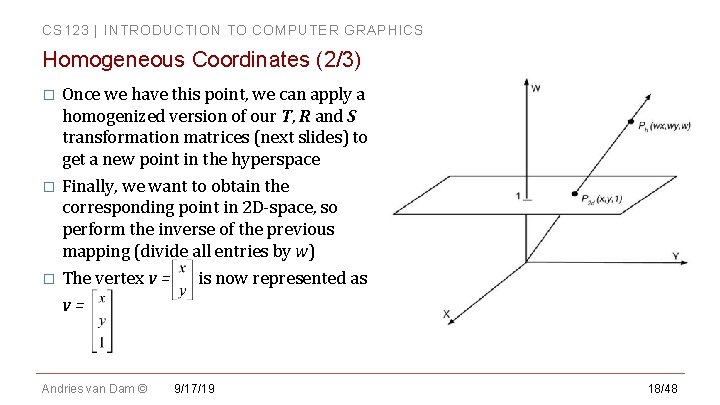
CS 123 | INTRODUCTION TO COMPUTER GRAPHICS Homogeneous Coordinates (2/3) Once we have this point, we can apply a homogenized version of our T, R and S transformation matrices (next slides) to get a new point in the hyperspace � Finally, we want to obtain the corresponding point in 2 D-space, so perform the inverse of the previous mapping (divide all entries by w) � The vertex v = is now represented as v= � Andries van Dam © 9/17/19 18/48
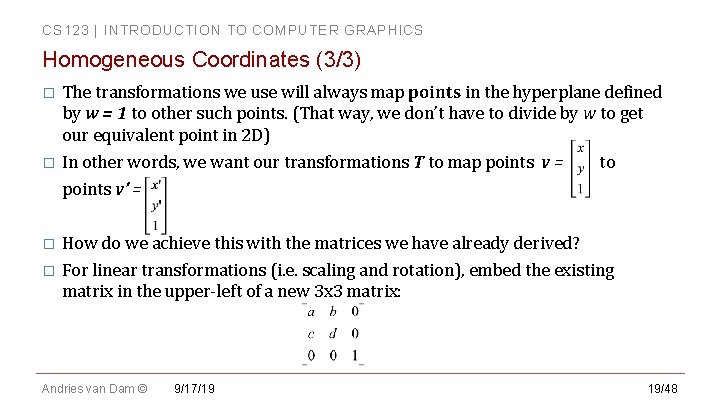
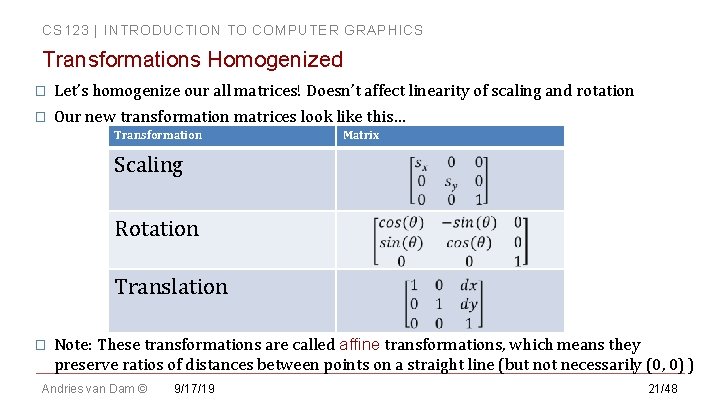
CS 123 | INTRODUCTION TO COMPUTER GRAPHICS Homogeneous Coordinates (3/3) The transformations we use will always map points in the hyperplane defined by w = 1 to other such points. (That way, we don’t have to divide by w to get our equivalent point in 2 D) � In other words, we want our transformations T to map points v = to points v’ = � How do we achieve this with the matrices we have already derived? � For linear transformations (i. e. scaling and rotation), embed the existing matrix in the upper-left of a new 3 x 3 matrix: � Andries van Dam © 9/17/19 19/48
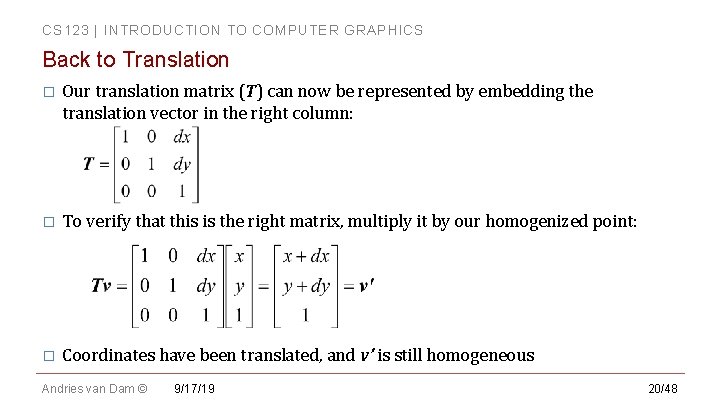
CS 123 | INTRODUCTION TO COMPUTER GRAPHICS Back to Translation � Our translation matrix (T) can now be represented by embedding the translation vector in the right column: � To verify that this is the right matrix, multiply it by our homogenized point: � Coordinates have been translated, and v’ is still homogeneous Andries van Dam © 9/17/19 20/48
CS 123 | INTRODUCTION TO COMPUTER GRAPHICS Transformations Homogenized � Let’s homogenize our all matrices! Doesn’t affect linearity of scaling and rotation � Our new transformation matrices look like this… Transformation Matrix Scaling Rotation Translation � Note: These transformations are called affine transformations, which means they preserve ratios of distances between points on a straight line (but not necessarily (0, 0) ) Andries van Dam © 9/17/19 21/48
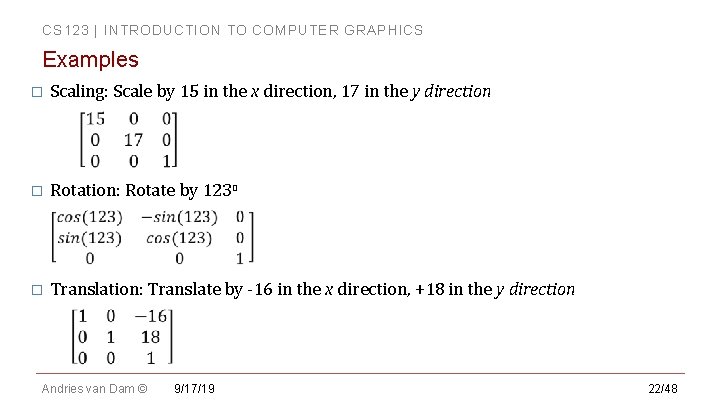
CS 123 | INTRODUCTION TO COMPUTER GRAPHICS Examples � Scaling: Scale by 15 in the x direction, 17 in the y direction � Rotation: Rotate by 123 o � Translation: Translate by -16 in the x direction, +18 in the y direction Andries van Dam © 9/17/19 22/48
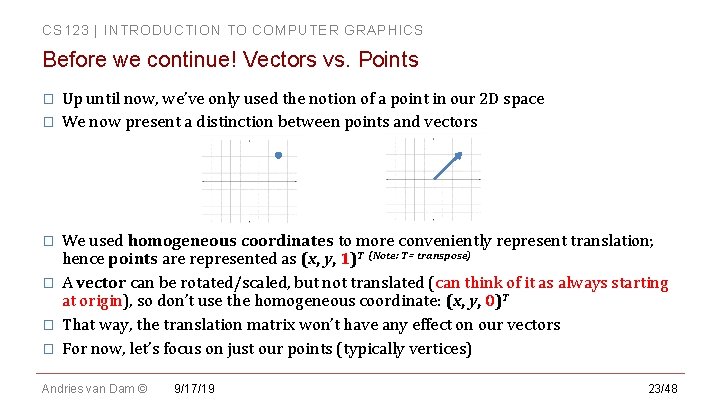
CS 123 | INTRODUCTION TO COMPUTER GRAPHICS Before we continue! Vectors vs. Points � � � Up until now, we’ve only used the notion of a point in our 2 D space We now present a distinction between points and vectors We used homogeneous coordinates to more conveniently represent translation; hence points are represented as (x, y, 1)T (Note: T= transpose) A vector can be rotated/scaled, but not translated (can think of it as always starting at origin), so don’t use the homogeneous coordinate: (x, y, 0)T That way, the translation matrix won’t have any effect on our vectors For now, let’s focus on just our points (typically vertices) Andries van Dam © 9/17/19 23/48
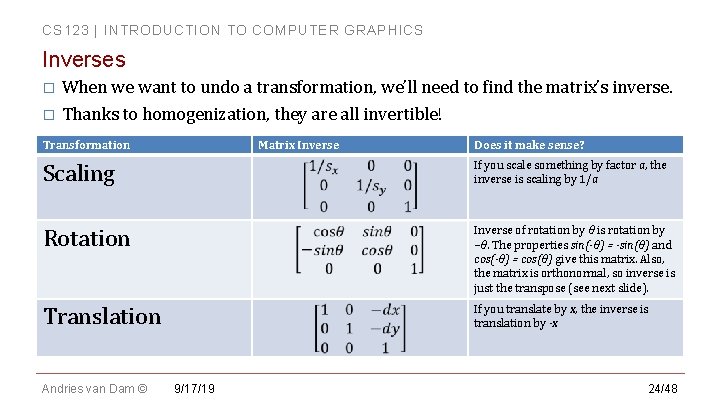
CS 123 | INTRODUCTION TO COMPUTER GRAPHICS Inverses When we want to undo a transformation, we’ll need to find the matrix’s inverse. � Thanks to homogenization, they are all invertible! � Transformation Matrix Inverse Does it make sense? Scaling If you scale something by factor a, the inverse is scaling by 1/a Rotation Inverse of rotation by θ is rotation by –θ. The properties sin(-θ) = -sin(θ) and cos(-θ) = cos(θ) give this matrix. Also, the matrix is orthonormal, so inverse is just the transpose (see next slide). Translation If you translate by x, the inverse is translation by -x Andries van Dam © 9/17/19 24/48
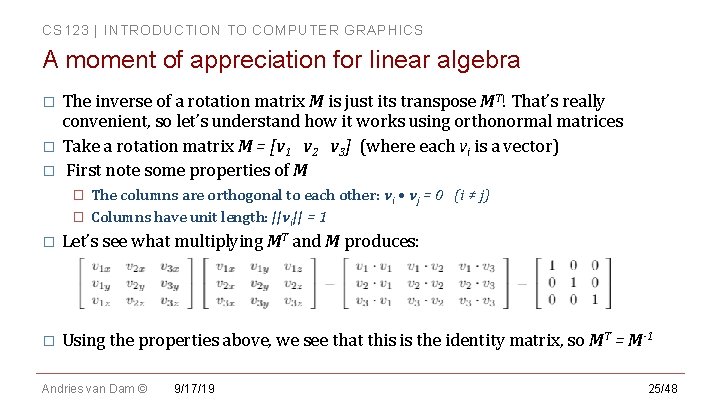
CS 123 | INTRODUCTION TO COMPUTER GRAPHICS A moment of appreciation for linear algebra The inverse of a rotation matrix M is just its transpose MT! That’s really convenient, so let’s understand how it works using orthonormal matrices � Take a rotation matrix M = [v 1 v 2 v 3] (where each vi is a vector) � First note some properties of M � � � The columns are orthogonal to each other: vi • vj = 0 (i ≠ j) Columns have unit length: ||vi|| = 1 � Let’s see what multiplying MT and M produces: � Using the properties above, we see that this is the identity matrix, so MT = M-1 Andries van Dam © 9/17/19 25/48
CS 123 | INTRODUCTION TO COMPUTER GRAPHICS More with Homogeneous Coordinates Some uses we’ll see later: � Placing sub-objects in parent’s coordinate system to construct hierarchical scene graph � � Transforming primitives in their own coordinate systems View volume normalization � Mapping arbitrary view volume into canonical view volume along z-axis Parallel (orthographic, oblique) and perspective projections � Perspective transformation (turn viewing pyramid into a cuboid to turn perspective projection into parallel projection) after perspective foreshortening � Andries van Dam © 9/17/19 26/48
CS 123 | INTRODUCTION TO COMPUTER GRAPHICS Composition of Transformations (2 D) (1/2) We now have a number of tools at our disposal; we can combine them! � An object in a scene uses many transformations in sequence. How do we represent this in terms of functions? � Transformation is a function; by associativity, we can compose functions: � (f o g)( i ) � This is the same as first applying g, then applying f: � f( g( i ) ) � Consider our functions f and g as matrices (M 1 and M 2) and our input as a vector v � Our composition is equivalent to M 1 M 2 v � Andries van Dam © 9/17/19 27/48
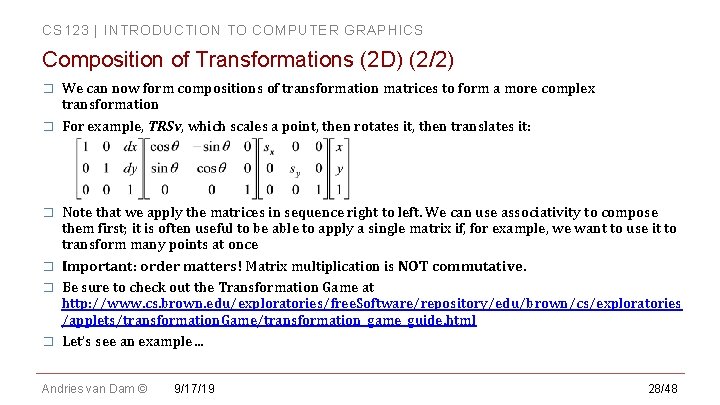
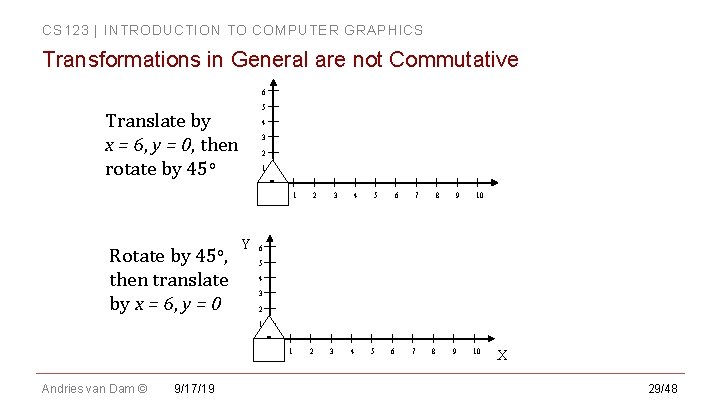
CS 123 | INTRODUCTION TO COMPUTER GRAPHICS Composition of Transformations (2 D) (2/2) � � � We can now form compositions of transformation matrices to form a more complex transformation For example, TRSv, which scales a point, then rotates it, then translates it: Note that we apply the matrices in sequence right to left. We can use associativity to compose them first; it is often useful to be able to apply a single matrix if, for example, we want to use it to transform many points at once Important: order matters! Matrix multiplication is NOT commutative. Be sure to check out the Transformation Game at http: //www. cs. brown. edu/exploratories/free. Software/repository/edu/brown/cs/exploratories /applets/transformation. Game/transformation_game_guide. html Let’s see an example… Andries van Dam © 9/17/19 28/48
CS 123 | INTRODUCTION TO COMPUTER GRAPHICS Transformations in General are not Commutative 6 5 Translate by x = 6, y = 0, then rotate by 45 o 4 3 2 1 0 Rotate by 45 o, then translate by x = 6, y = 0 Y 1 2 3 4 5 6 7 8 9 10 6 5 4 3 2 1 0 Andries van Dam © 9/17/19 1 2 3 4 5 6 7 8 9 10 X 29/48
CS 123 | INTRODUCTION TO COMPUTER GRAPHICS Clicker Question #2 Andries van Dam © 9/17/19 30/48
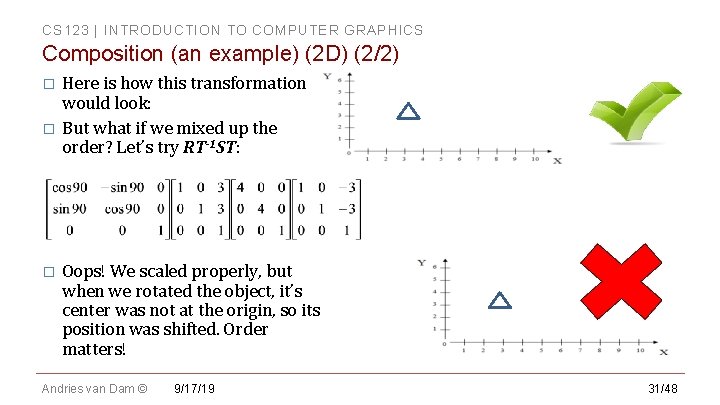
CS 123 | INTRODUCTION TO COMPUTER GRAPHICS Composition (an example) (2 D) (2/2) Here is how this transformation would look: � But what if we mixed up the order? Let’s try RT-1 ST: � � Oops! We scaled properly, but when we rotated the object, it’s center was not at the origin, so its position was shifted. Order matters! Andries van Dam © 9/17/19 31/48
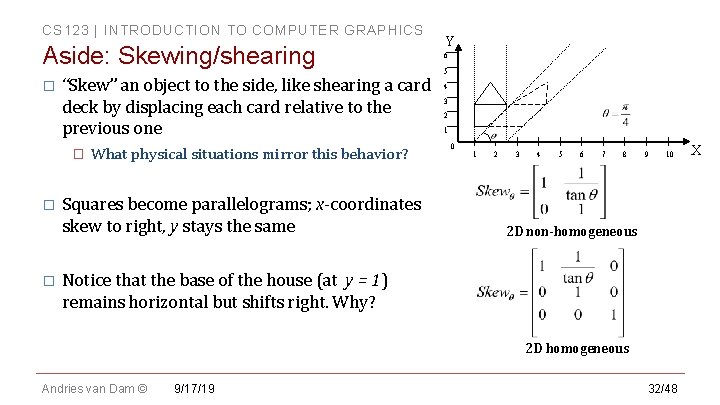
CS 123 | INTRODUCTION TO COMPUTER GRAPHICS Aside: Skewing/shearing � “Skew” an object to the side, like shearing a card deck by displacing each card relative to the previous one � � � What physical situations mirror this behavior? Squares become parallelograms; x-coordinates skew to right, y stays the same Y 6 5 4 3 2 1 0 1 2 3 4 5 6 7 8 9 10 2 D non-homogeneous Notice that the base of the house (at y = 1) remains horizontal but shifts right. Why? 2 D homogeneous Andries van Dam © 9/17/19 32/48 X
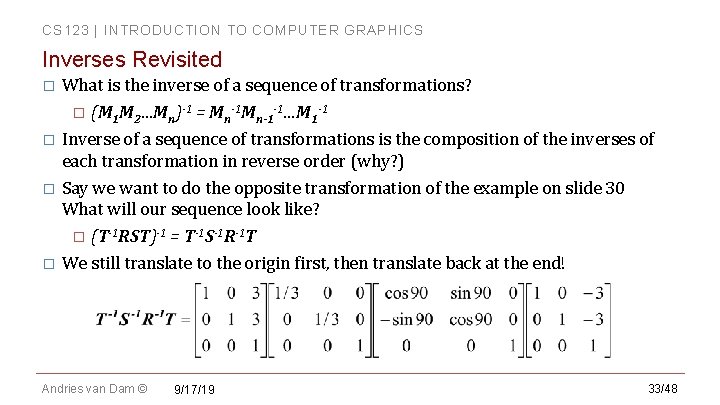
CS 123 | INTRODUCTION TO COMPUTER GRAPHICS Inverses Revisited What is the inverse of a sequence of transformations? � (M 1 M 2…Mn)-1 = Mn-1 -1…M 1 -1 � Inverse of a sequence of transformations is the composition of the inverses of each transformation in reverse order (why? ) � Say we want to do the opposite transformation of the example on slide 30 What will our sequence look like? � (T-1 RST)-1 = T-1 S-1 R-1 T � We still translate to the origin first, then translate back at the end! � Andries van Dam © 9/17/19 33/48
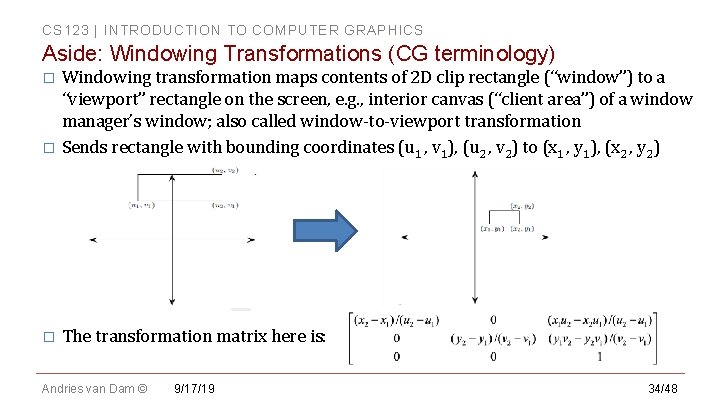
CS 123 | INTRODUCTION TO COMPUTER GRAPHICS Aside: Windowing Transformations (CG terminology) Windowing transformation maps contents of 2 D clip rectangle (“window”) to a “viewport” rectangle on the screen, e. g. , interior canvas (“client area”) of a window manager’s window; also called window-to-viewport transformation � Sends rectangle with bounding coordinates (u 1 , v 1), (u 2 , v 2) to (x 1 , y 1), (x 2 , y 2) � � The transformation matrix here is: Andries van Dam © 9/17/19 34/48
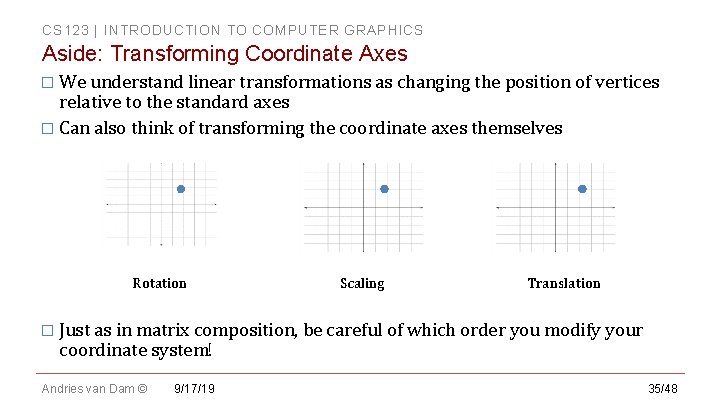
CS 123 | INTRODUCTION TO COMPUTER GRAPHICS Aside: Transforming Coordinate Axes � We understand linear transformations as changing the position of vertices relative to the standard axes � Can also think of transforming the coordinate axes themselves Rotation Scaling Translation � Just as in matrix composition, be careful of which order you modify your coordinate system! Andries van Dam © 9/17/19 35/48
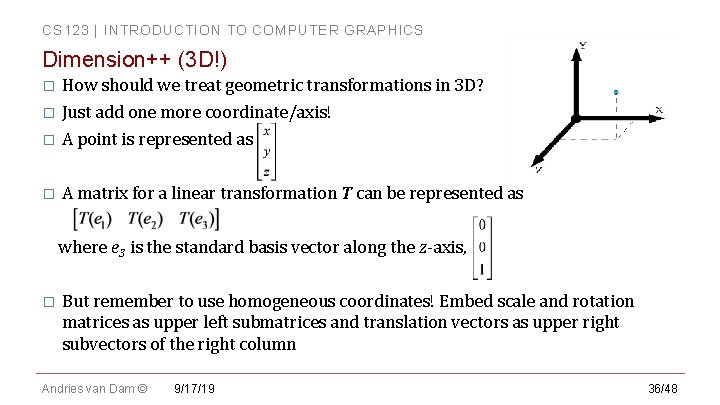
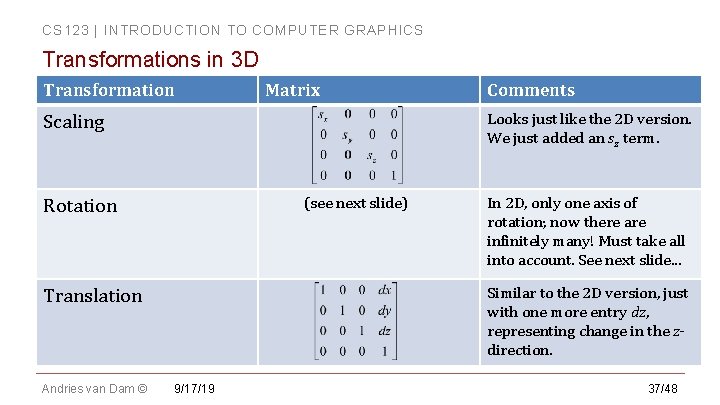
CS 123 | INTRODUCTION TO COMPUTER GRAPHICS Dimension++ (3 D!) How should we treat geometric transformations in 3 D? � Just add one more coordinate/axis! � A point is represented as � A matrix for a linear transformation T can be represented as where e 3 is the standard basis vector along the z-axis, � � But remember to use homogeneous coordinates! Embed scale and rotation matrices as upper left submatrices and translation vectors as upper right subvectors of the right column Andries van Dam © 9/17/19 36/48
CS 123 | INTRODUCTION TO COMPUTER GRAPHICS Transformations in 3 D Transformation Matrix Looks just like the 2 D version. We just added an sz term. Scaling (see next slide) Rotation In 2 D, only one axis of rotation; now there are infinitely many! Must take all into account. See next slide. . . Similar to the 2 D version, just with one more entry dz, representing change in the zdirection. Translation Andries van Dam © Comments 9/17/19 37/48
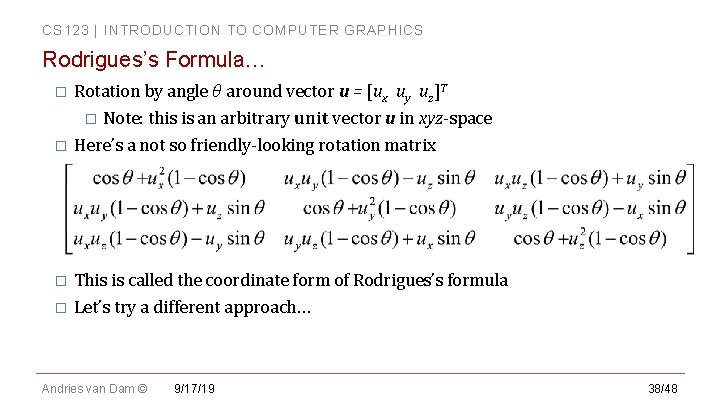
CS 123 | INTRODUCTION TO COMPUTER GRAPHICS Rodrigues’s Formula… Rotation by angle θ around vector u = [ux uy uz]T � Note: this is an arbitrary unit vector u in xyz-space � Here’s a not so friendly-looking rotation matrix � This is called the coordinate form of Rodrigues’s formula � Let’s try a different approach… � Andries van Dam © 9/17/19 38/48
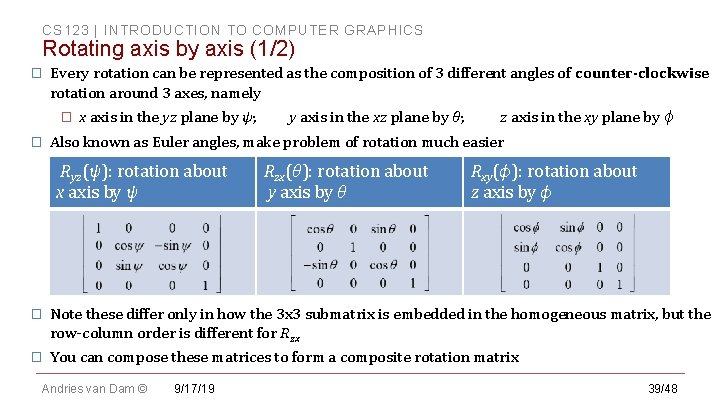
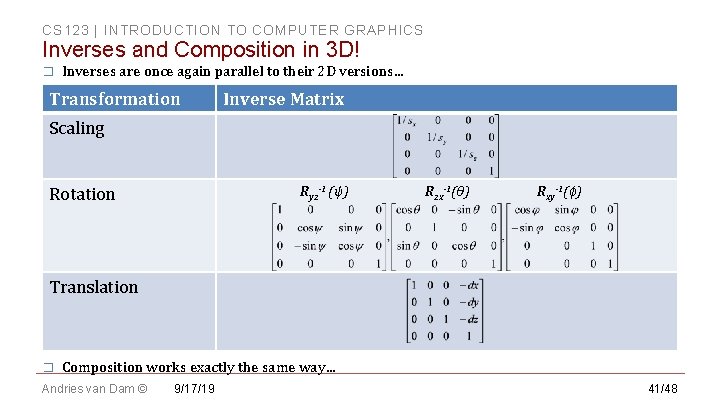
CS 123 | INTRODUCTION TO COMPUTER GRAPHICS Rotating axis by axis (1/2) � Every rotation can be represented as the composition of 3 different angles of counter-clockwise rotation around 3 axes, namely � � x axis in the yz plane by ψ; y axis in the xz plane by θ; z axis in the xy plane by ϕ Also known as Euler angles, make problem of rotation much easier Ryz(ψ): rotation about x axis by ψ Rzx(θ): rotation about y axis by θ Rxy(ϕ): rotation about z axis by ϕ � Note these differ only in how the 3 x 3 submatrix is embedded in the homogeneous matrix, but the row-column order is different for Rzx � You can compose these matrices to form a composite rotation matrix Andries van Dam © 9/17/19 39/48
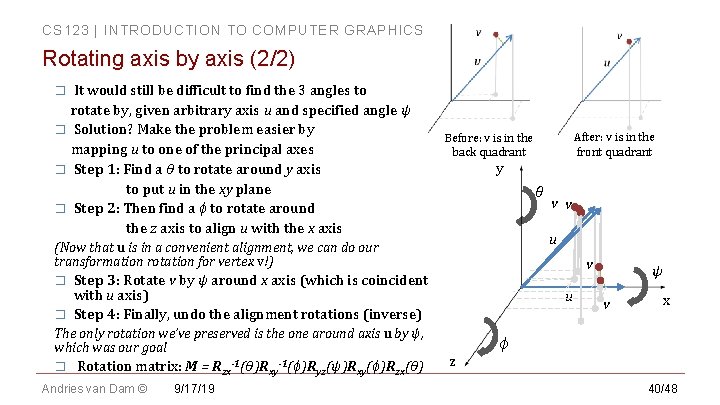
CS 123 | INTRODUCTION TO COMPUTER GRAPHICS Rotating axis by axis (2/2) It would still be difficult to find the 3 angles to rotate by, given arbitrary axis u and specified angle ψ � Solution? Make the problem easier by mapping u to one of the principal axes � Step 1: Find a θ to rotate around y axis to put u in the xy plane � Step 2: Then find a ϕ to rotate around the z axis to align u with the x axis � y θ � � v Step 3: Rotate v by ψ around x axis (which is coincident with u axis) Step 4: Finally, undo the alignment rotations (inverse) The only rotation we’ve preserved is the one around axis u by ψ, which was our goal Rotation matrix: M = Rzx-1(θ)Rxy-1(ϕ)Ryz(ψ)Rxy(ϕ)Rzx(θ) Andries van Dam © 9/17/19 v v u (Now that u is in a convenient alignment, we can do our transformation rotation for vertex v!) � After: v is in the front quadrant Before: v is in the back quadrant u z ψ v x ϕ 40/48
CS 123 | INTRODUCTION TO COMPUTER GRAPHICS Inverses and Composition in 3 D! � Inverses are once again parallel to their 2 D versions… Transformation Inverse Matrix Scaling Ryz-1 (ψ) Rotation Rzx-1(θ) Rxy-1(ϕ) Translation � Composition works exactly the same way… Andries van Dam © 9/17/19 41/48
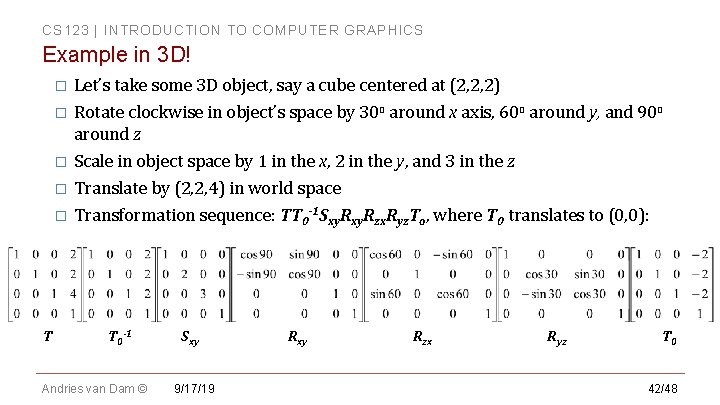
CS 123 | INTRODUCTION TO COMPUTER GRAPHICS Example in 3 D! Let’s take some 3 D object, say a cube centered at (2, 2, 2) � Rotate clockwise in object’s space by 30 o around x axis, 60 o around y, and 90 o around z � Scale in object space by 1 in the x, 2 in the y, and 3 in the z � Translate by (2, 2, 4) in world space � Transformation sequence: TT 0 -1 Sxy. Rzx. Ryz. To, where T 0 translates to (0, 0): � T T 0 -1 Andries van Dam © Sxy 9/17/19 Rxy Rzx Ryz T 0 42/48
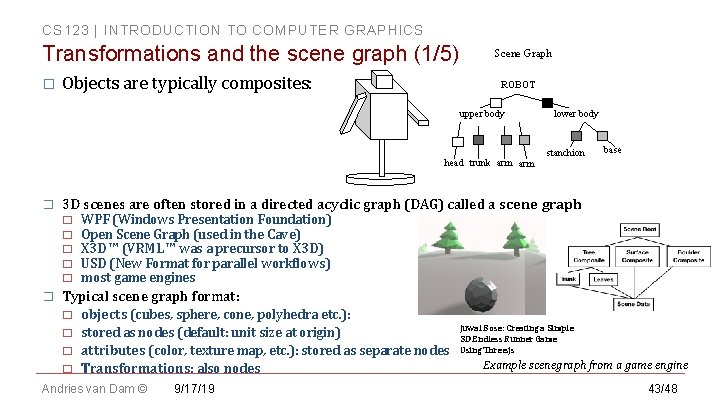
CS 123 | INTRODUCTION TO COMPUTER GRAPHICS Transformations and the scene graph (1/5) � Objects are typically composites: Scene Graph ROBOT upper body head trunk arm � stanchion base 3 D scenes are often stored in a directed acyclic graph (DAG) called a scene graph � � � lower body WPF (Windows Presentation Foundation) Open Scene Graph (used in the Cave) X 3 D ™ (VRML ™ was a precursor to X 3 D) USD (New Format for parallel workflows) most game engines Typical scene graph format: � � objects (cubes, sphere, cone, polyhedra etc. ): stored as nodes (default: unit size at origin) attributes (color, texture map, etc. ): stored as separate nodes Transformations: also nodes Andries van Dam © 9/17/19 Juwal Bose: Creating a Simple 3 D Endless Runner Game Using Three. js Example scenegraph from a game engine 43/48
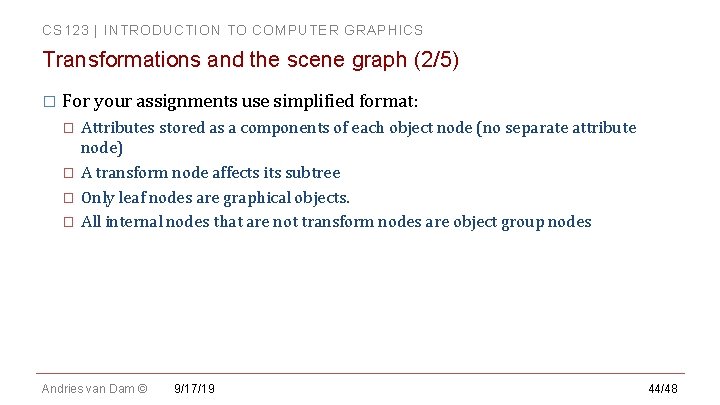
CS 123 | INTRODUCTION TO COMPUTER GRAPHICS Transformations and the scene graph (2/5) � For your assignments use simplified format: � � Attributes stored as a components of each object node (no separate attribute node) A transform node affects its subtree Only leaf nodes are graphical objects. All internal nodes that are not transform nodes are object group nodes Andries van Dam © 9/17/19 44/48
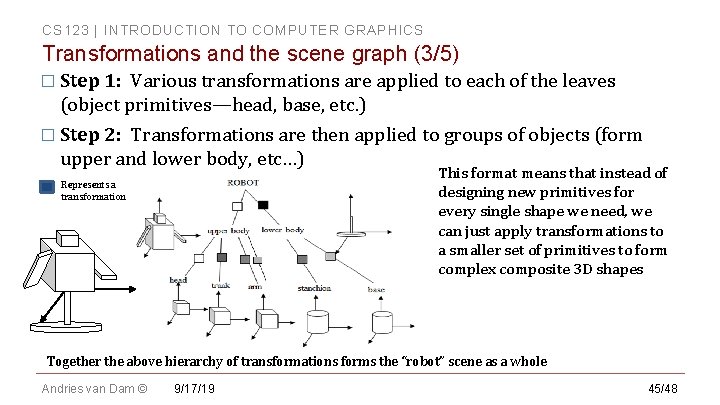
CS 123 | INTRODUCTION TO COMPUTER GRAPHICS Transformations and the scene graph (3/5) � Step 1: Various transformations are applied to each of the leaves (object primitives—head, base, etc. ) � Step 2: Transformations are then applied to groups of objects (form upper and lower body, etc…) This format means that instead of designing new primitives for every single shape we need, we can just apply transformations to a smaller set of primitives to form complex composite 3 D shapes Represents a transformation Together the above hierarchy of transformations forms the “robot” scene as a whole Andries van Dam © 9/17/19 45/48
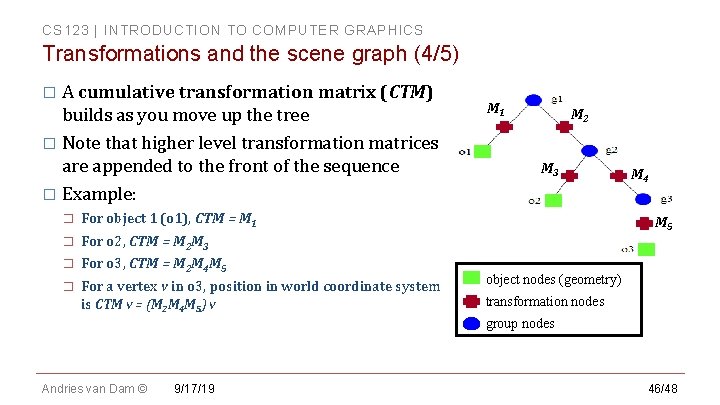
CS 123 | INTRODUCTION TO COMPUTER GRAPHICS Transformations and the scene graph (4/5) � A cumulative transformation matrix (CTM) builds as you move up the tree � Note that higher level transformation matrices are appended to the front of the sequence � Example: � � For object 1 (o 1), CTM = M 1 For o 2, CTM = M 2 M 3 For o 3, CTM = M 2 M 4 M 5 For a vertex v in o 3, position in world coordinate system is CTM v = (M 2 M 4 M 5) v M 1 M 2 M 3 M 4 M 5 object nodes (geometry) transformation nodes group nodes Andries van Dam © 9/17/19 46/48
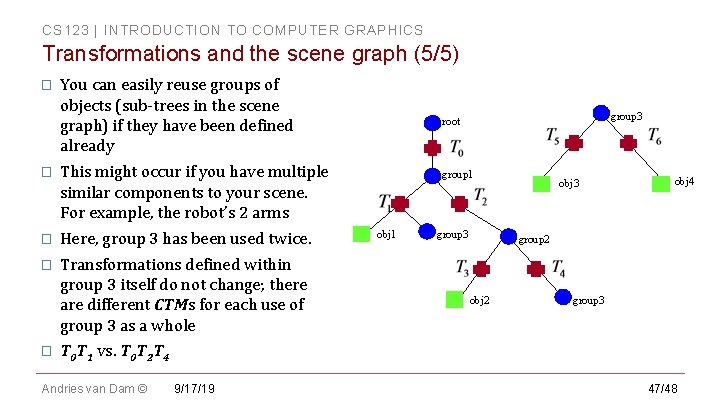
CS 123 | INTRODUCTION TO COMPUTER GRAPHICS Transformations and the scene graph (5/5) � You can easily reuse groups of objects (sub-trees in the scene graph) if they have been defined already � This might occur if you have multiple similar components to your scene. For example, the robot’s 2 arms � Here, group 3 has been used twice. � Transformations defined within group 3 itself do not change; there are different CTMs for each use of group 3 as a whole � group 3 root group 1 obj 1 group 3 obj 4 group 2 obj 2 group 3 T 0 T 1 vs. T 0 T 2 T 4 Andries van Dam © 9/17/19 47/48
CS 123 | INTRODUCTION TO COMPUTER GRAPHICS Further Reading � More information can be found in the textbook � Read Chapters 10 and 11 for more detail and advanced topics on transformations � Chapter 7 discusses the 2 D/3 D coordinate space geometry � Chapter 12 goes into more detail about some of the linear algebra involved in graphics Andries van Dam © 9/17/19 48/48