
cs 123 Compositions INTRODUCTION TO COMPUTER GRAPHICS Andries
- Slides: 59
cs 123 Compositions INTRODUCTION TO COMPUTER GRAPHICS Andries van Dam© Color II - 11/21/19 1
cs 123 INTRODUCTION TO COMPUTER GRAPHICS Introduction to Color Part II Andries van Dam© Color II - 11/21/19 2 of 57
cs 123 INTRODUCTION TO COMPUTER GRAPHICS Lecture Roadmap � Chromaticity diagrams and color gamuts � Color spaces – their rationales, and pros and cons (RGB, HSV, CIE, etc. ) How color spaces influence color picking � How to use color: some Dos and Don’ts � Andries van Dam© Color II - 11/21/19 3 of 57
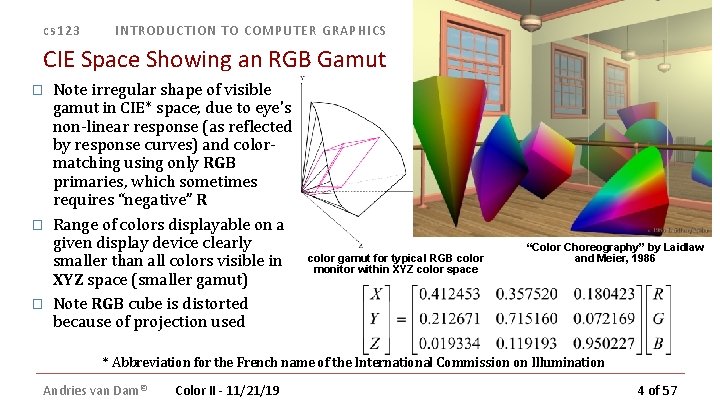
cs 123 INTRODUCTION TO COMPUTER GRAPHICS CIE Space Showing an RGB Gamut � � � Note irregular shape of visible gamut in CIE* space; due to eye's non-linear response (as reflected by response curves) and colormatching using only RGB primaries, which sometimes requires “negative” R Range of colors displayable on a given display device clearly smaller than all colors visible in XYZ space (smaller gamut) Note RGB cube is distorted because of projection used color gamut for typical RGB color monitor within XYZ color space “Color Choreography” by Laidlaw and Meier, 1986 * Abbreviation for the French name of the International Commission on Illumination Andries van Dam© Color II - 11/21/19 4 of 57
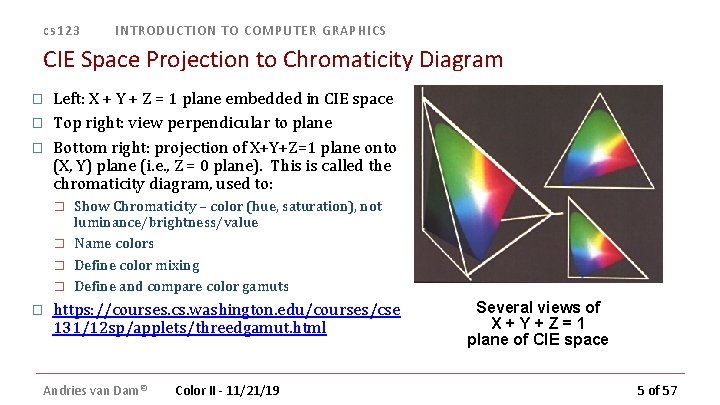
cs 123 INTRODUCTION TO COMPUTER GRAPHICS CIE Space Projection to Chromaticity Diagram � � � Left: X + Y + Z = 1 plane embedded in CIE space Top right: view perpendicular to plane Bottom right: projection of X+Y+Z=1 plane onto (X, Y) plane (i. e. , Z = 0 plane). This is called the chromaticity diagram, used to: � � � Show Chromaticity – color (hue, saturation), not luminance/brightness/value Name colors Define color mixing Define and compare color gamuts https: //courses. cs. washington. edu/courses/cse 131/12 sp/applets/threedgamut. html Andries van Dam© Color II - 11/21/19 Several views of X+Y+Z=1 plane of CIE space 5 of 57
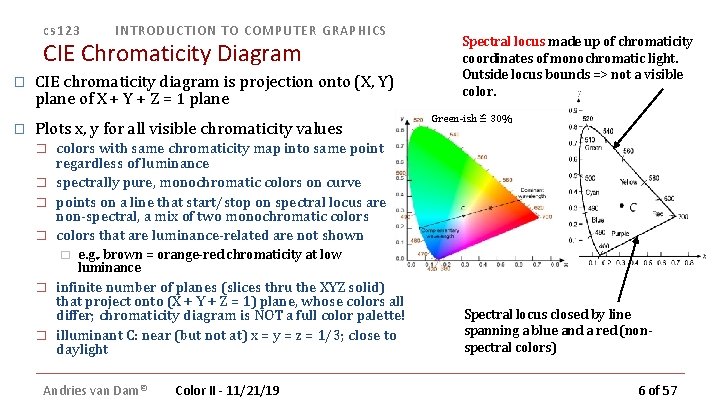
cs 123 INTRODUCTION TO COMPUTER GRAPHICS CIE Chromaticity Diagram � CIE chromaticity diagram is projection onto (X, Y) plane of X + Y + Z = 1 plane � Plots x, y for all visible chromaticity values � � � Green-ish ≌ 30% colors with same chromaticity map into same point regardless of luminance spectrally pure, monochromatic colors on curve points on a line that start/stop on spectral locus are non-spectral, a mix of two monochromatic colors that are luminance-related are not shown � � Spectral locus made up of chromaticity coordinates of monochromatic light. Outside locus bounds => not a visible color. e. g. , brown = orange-red chromaticity at low luminance infinite number of planes (slices thru the XYZ solid) that project onto (X + Y + Z = 1) plane, whose colors all differ; chromaticity diagram is NOT a full color palette! illuminant C: near (but not at) x = y = z = 1/3; close to daylight Andries van Dam© Color II - 11/21/19 Spectral locus closed by line spanning a blue and a red (nonspectral colors) 6 of 57
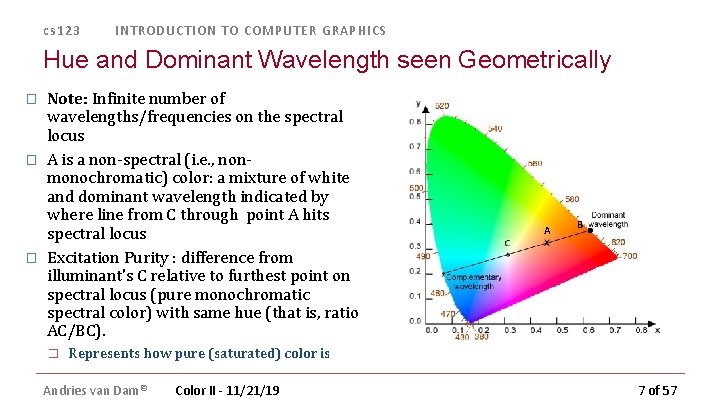
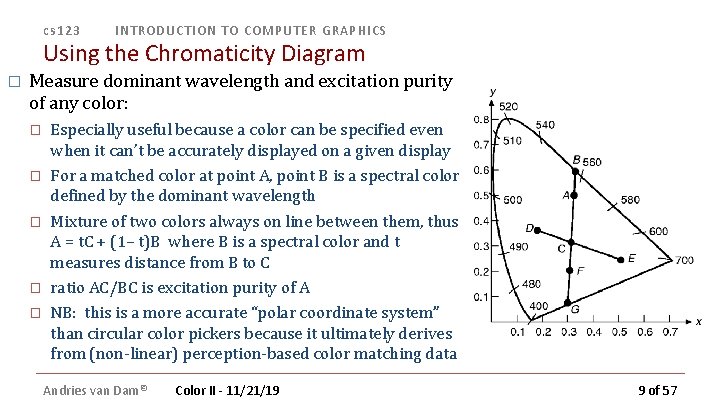
cs 123 INTRODUCTION TO COMPUTER GRAPHICS Hue and Dominant Wavelength seen Geometrically � � � Note: Infinite number of wavelengths/frequencies on the spectral locus A is a non-spectral (i. e. , nonmonochromatic) color: a mixture of white and dominant wavelength indicated by where line from C through point A hits spectral locus Excitation Purity : difference from illuminant's C relative to furthest point on spectral locus (pure monochromatic spectral color) with same hue (that is, ratio AC/BC). � A B Represents how pure (saturated) color is Andries van Dam© Color II - 11/21/19 7 of 57
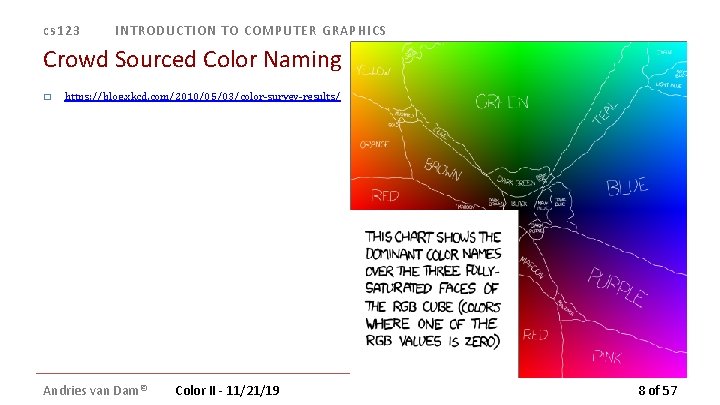
cs 123 INTRODUCTION TO COMPUTER GRAPHICS Crowd Sourced Color Naming � https: //blog. xkcd. com/2010/05/03/color-survey-results/ Andries van Dam© Color II - 11/21/19 8 of 57
cs 123 INTRODUCTION TO COMPUTER GRAPHICS Using the Chromaticity Diagram � Measure dominant wavelength and excitation purity of any color: � � � Especially useful because a color can be specified even when it can’t be accurately displayed on a given display For a matched color at point A, point B is a spectral color defined by the dominant wavelength Mixture of two colors always on line between them, thus A = t. C + (1– t)B where B is a spectral color and t measures distance from B to C ratio AC/BC is excitation purity of A NB: this is a more accurate “polar coordinate system” than circular color pickers because it ultimately derives from (non-linear) perception-based color matching data Andries van Dam© Color II - 11/21/19 9 of 57
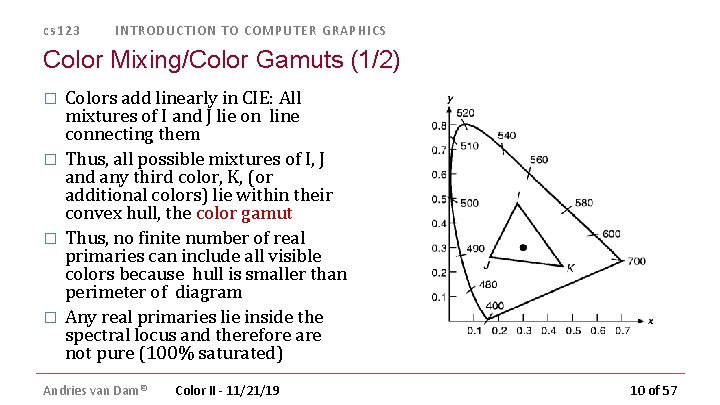
cs 123 INTRODUCTION TO COMPUTER GRAPHICS Color Mixing/Color Gamuts (1/2) � � Colors add linearly in CIE: All mixtures of I and J lie on line connecting them Thus, all possible mixtures of I, J and any third color, K, (or additional colors) lie within their convex hull, the color gamut Thus, no finite number of real primaries can include all visible colors because hull is smaller than perimeter of diagram Any real primaries lie inside the spectral locus and therefore are not pure (100% saturated) Andries van Dam© Color II - 11/21/19 10 of 57
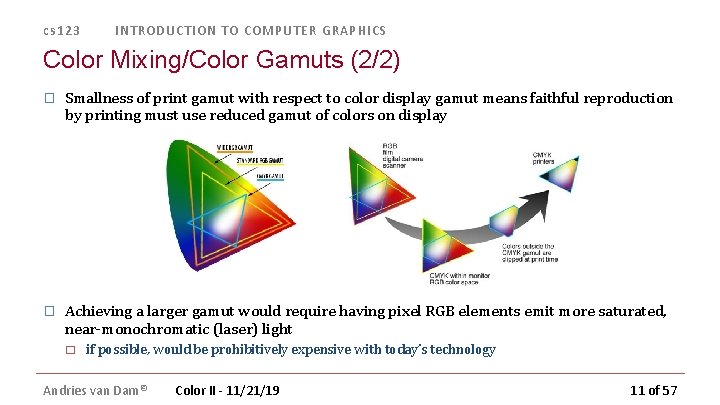
cs 123 INTRODUCTION TO COMPUTER GRAPHICS Color Mixing/Color Gamuts (2/2) � Smallness of print gamut with respect to color display gamut means faithful reproduction by printing must use reduced gamut of colors on display � Achieving a larger gamut would require having pixel RGB elements emit more saturated, near-monochromatic (laser) light � if possible, would be prohibitively expensive with today’s technology Andries van Dam© Color II - 11/21/19 11 of 57
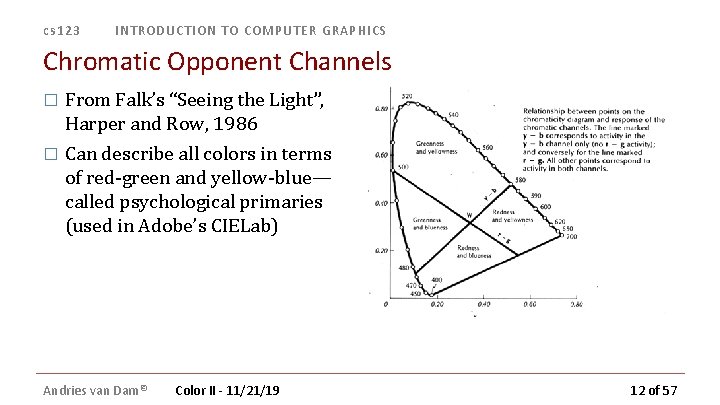
cs 123 INTRODUCTION TO COMPUTER GRAPHICS Chromatic Opponent Channels � From Falk’s “Seeing the Light”, Harper and Row, 1986 � Can describe all colors in terms of red-green and yellow-blue— called psychological primaries (used in Adobe’s CIELab) Andries van Dam© Color II - 11/21/19 12 of 57
cs 123 INTRODUCTION TO COMPUTER GRAPHICS Lecture Roadmap � Chromaticity diagrams and color gamuts � Color spaces – their rationales, and pros and cons (RGB, HSV, CIE, etc. ) How color spaces influence color picking � How to use color: some Dos and Don’ts � Andries van Dam© Color II - 11/21/19 13 of 57
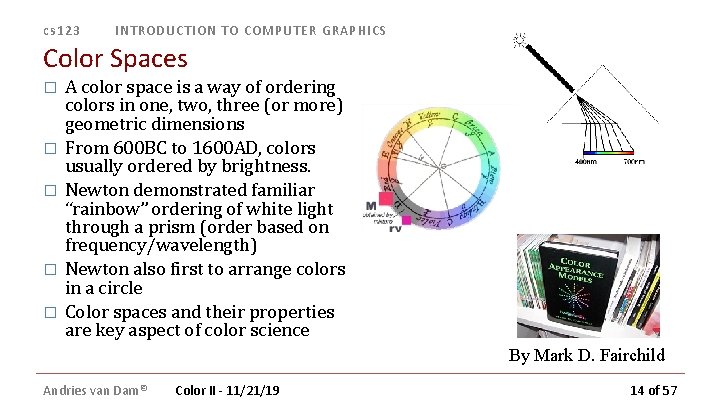
cs 123 INTRODUCTION TO COMPUTER GRAPHICS Color Spaces � � � A color space is a way of ordering colors in one, two, three (or more) geometric dimensions From 600 BC to 1600 AD, colors usually ordered by brightness. Newton demonstrated familiar “rainbow” ordering of white light through a prism (order based on frequency/wavelength) Newton also first to arrange colors in a circle Color spaces and their properties are key aspect of color science By Mark D. Fairchild Andries van Dam© Color II - 11/21/19 14 of 57
cs 123 INTRODUCTION TO COMPUTER GRAPHICS Color Models for Raster Graphics � Different situations suggest different ways of talking about colors � � � � Unambiguous industry standards—requires something like CIE space. Programming for displays easier in space defined by display : RGB space (RGB pixels for both CRTs and flat panels like LCDs) Printers use CMY (cyan, magenta, yellow) for color printing: CMY(K) space Six-primary-color projection system: 6 -color IRODORI space User-friendliness: Hue, Saturation, Value (HSV) is easier than RGB Need perceptual uniformity in the space? Munsell or CIELab Etc. You can make up your own color spaces too… Andries van Dam© Color II - 11/21/19 15 of 57
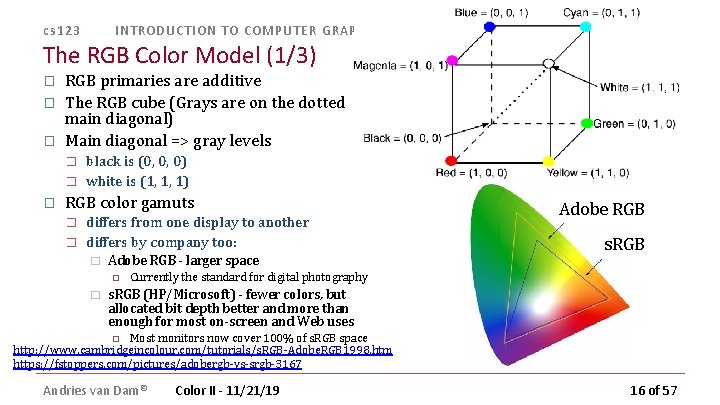
cs 123 INTRODUCTION TO COMPUTER GRAPHICS The RGB Color Model (1/3) � � � RGB primaries are additive The RGB cube (Grays are on the dotted main diagonal) Main diagonal => gray levels � � � black is (0, 0, 0) white is (1, 1, 1) RGB color gamuts � � differs from one display to another differs by company too: � Adobe RGB - larger space � Adobe RGB s. RGB Currently the standard for digital photography s. RGB (HP/Microsoft) - fewer colors, but allocated bit depth better and more than enough for most on-screen and Web uses Most monitors now cover 100% of s. RGB space http: //www. cambridgeincolour. com/tutorials/s. RGB-Adobe. RGB 1998. htm https: //fstoppers. com/pictures/adobergb-vs-srgb-3167 Andries van Dam© Color II - 11/21/19 16 of 57
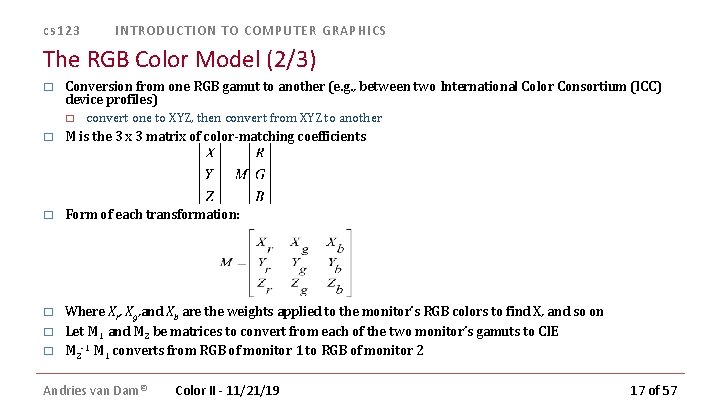
cs 123 INTRODUCTION TO COMPUTER GRAPHICS The RGB Color Model (2/3) � Conversion from one RGB gamut to another (e. g. , between two International Color Consortium (ICC) device profiles) � convert one to XYZ, then convert from XYZ to another � M is the 3 x 3 matrix of color-matching coefficients � Form of each transformation: � Where Xr, Xg, and Xb are the weights applied to the monitor’s RGB colors to find X, and so on Let M 1 and M 2 be matrices to convert from each of the two monitor’s gamuts to CIE M 2 -1 M 1 converts from RGB of monitor 1 to RGB of monitor 2 � � Andries van Dam© Color II - 11/21/19 17 of 57
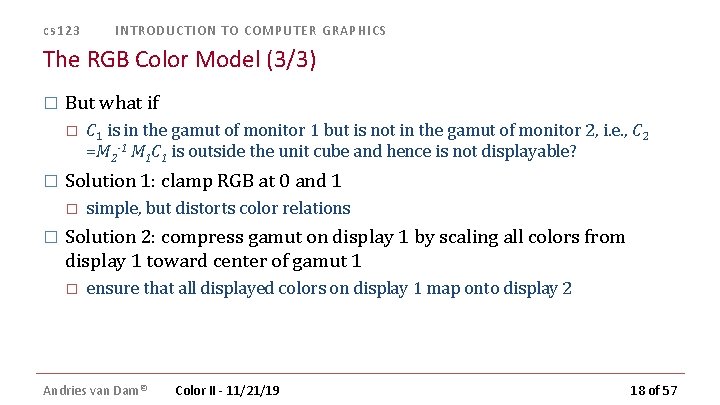
cs 123 INTRODUCTION TO COMPUTER GRAPHICS The RGB Color Model (3/3) � But what if � � Solution 1: clamp RGB at 0 and 1 � � C 1 is in the gamut of monitor 1 but is not in the gamut of monitor 2, i. e. , C 2 =M 2 -1 M 1 C 1 is outside the unit cube and hence is not displayable? simple, but distorts color relations Solution 2: compress gamut on display 1 by scaling all colors from display 1 toward center of gamut 1 � ensure that all displayed colors on display 1 map onto display 2 Andries van Dam© Color II - 11/21/19 18 of 57
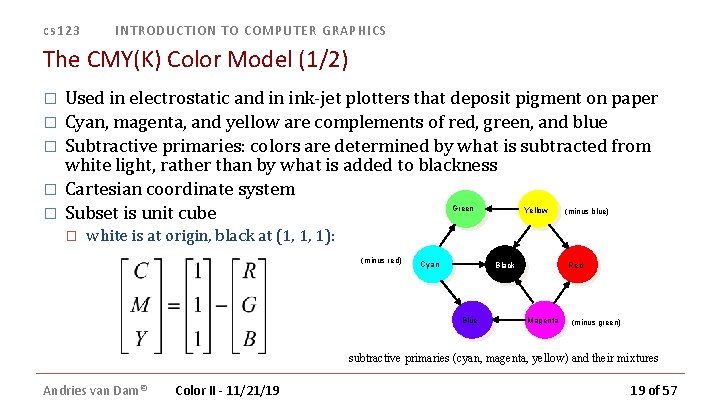
cs 123 INTRODUCTION TO COMPUTER GRAPHICS The CMY(K) Color Model (1/2) � � � Used in electrostatic and in ink-jet plotters that deposit pigment on paper Cyan, magenta, and yellow are complements of red, green, and blue Subtractive primaries: colors are determined by what is subtracted from white light, rather than by what is added to blackness Cartesian coordinate system Green Yellow (minus blue) Subset is unit cube � white is at origin, black at (1, 1, 1): (minus red) Cyan Black Blue Andries van Dam© Red Magenta (minus green) subtractive primaries (cyan, magenta, yellow) and their mixtures Color II - 11/21/19 19 of 57
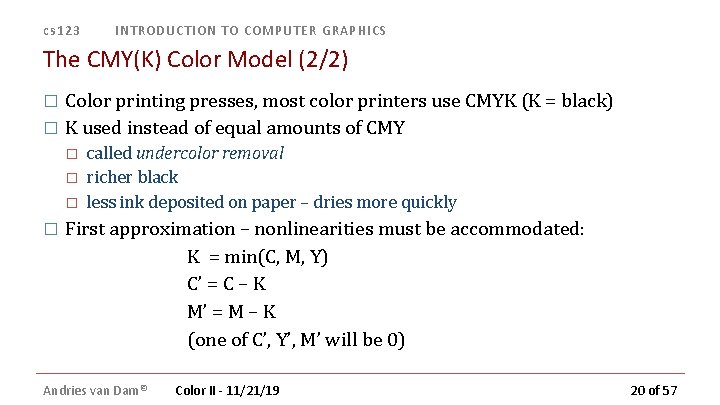
cs 123 INTRODUCTION TO COMPUTER GRAPHICS The CMY(K) Color Model (2/2) Color printing presses, most color printers use CMYK (K = black) � K used instead of equal amounts of CMY � � � called undercolor removal richer black less ink deposited on paper – dries more quickly First approximation – nonlinearities must be accommodated: K = min(C, M, Y) C’ = C – K M’ = M – K (one of C’, Y’, M’ will be 0) Andries van Dam© Color II - 11/21/19 20 of 57
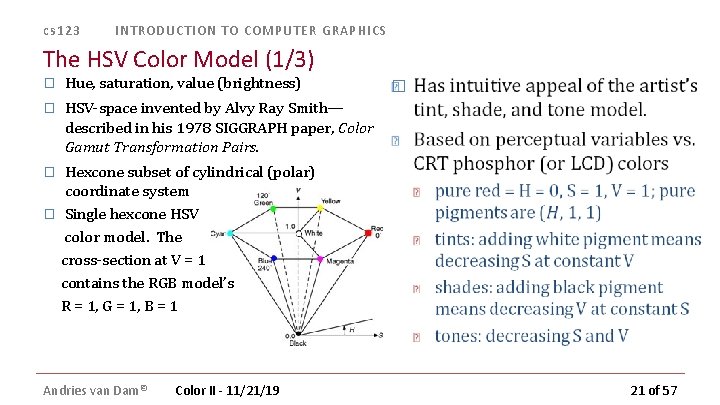
cs 123 INTRODUCTION TO COMPUTER GRAPHICS The HSV Color Model (1/3) � Hue, saturation, value (brightness) � HSV-space invented by Alvy Ray Smith— described in his 1978 SIGGRAPH paper, Color Gamut Transformation Pairs. � Hexcone subset of cylindrical (polar) coordinate system � Single hexcone HSV color model. The cross-section at V = 1 contains the RGB model’s R = 1, G = 1, B = 1 � Andries van Dam© Color II - 11/21/19 21 of 57
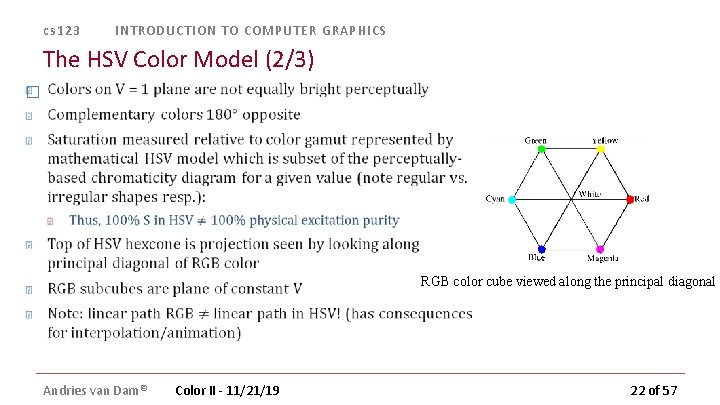
cs 123 INTRODUCTION TO COMPUTER GRAPHICS The HSV Color Model (2/3) � RGB color cube viewed along the principal diagonal Andries van Dam© Color II - 11/21/19 22 of 57
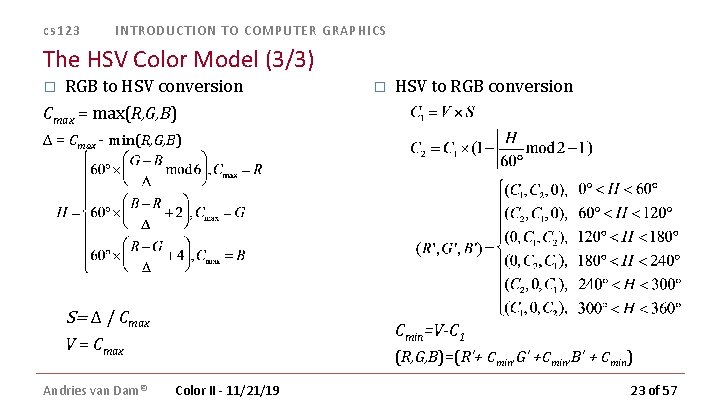
cs 123 INTRODUCTION TO COMPUTER GRAPHICS The HSV Color Model (3/3) � RGB to HSV conversion � HSV to RGB conversion Cmax = max(R, G, B) Δ = Cmax - min(R, G, B) S= Δ / Cmax Cmin=V-C 1 V = Cmax Andries van Dam© (R, G, B)=(R’+ Cmin, G’ +Cmin, B’ + Cmin) Color II - 11/21/19 23 of 57
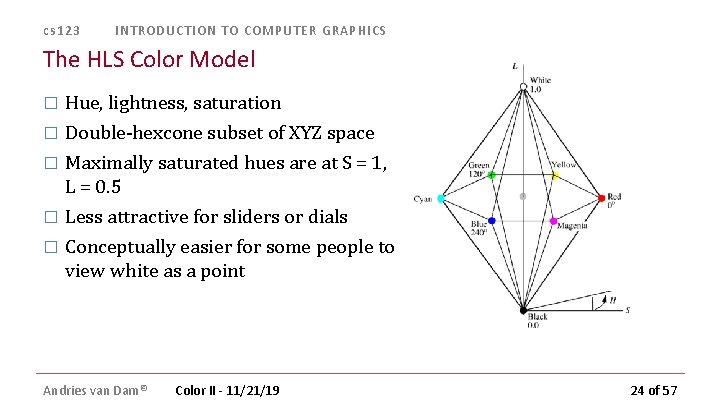
cs 123 INTRODUCTION TO COMPUTER GRAPHICS The HLS Color Model � Hue, lightness, saturation � Double-hexcone subset of XYZ space � Maximally saturated hues are at S = 1, L = 0. 5 Less attractive for sliders or dials � Conceptually easier for some people to view white as a point � Andries van Dam© Color II - 11/21/19 24 of 57
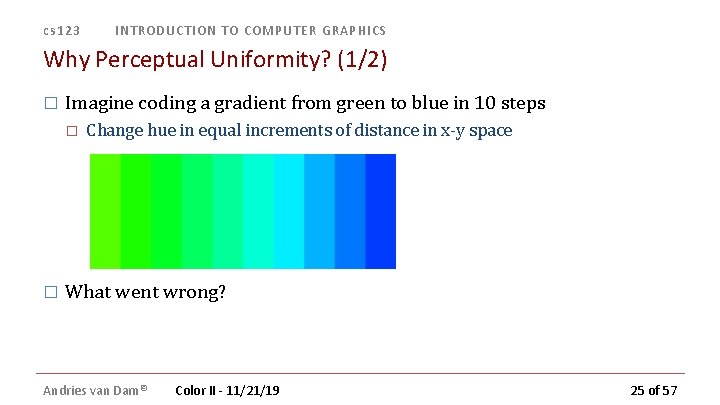
cs 123 INTRODUCTION TO COMPUTER GRAPHICS Why Perceptual Uniformity? (1/2) � Imagine coding a gradient from green to blue in 10 steps � � Change hue in equal increments of distance in x-y space What went wrong? Andries van Dam© Color II - 11/21/19 25 of 57
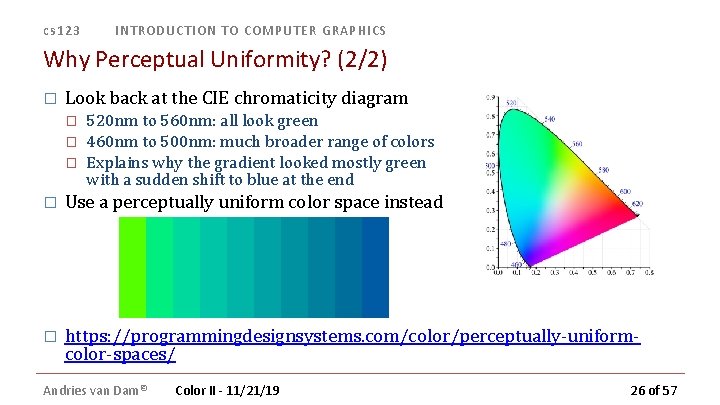
cs 123 INTRODUCTION TO COMPUTER GRAPHICS Why Perceptual Uniformity? (2/2) � Look back at the CIE chromaticity diagram � � � 520 nm to 560 nm: all look green 460 nm to 500 nm: much broader range of colors Explains why the gradient looked mostly green with a sudden shift to blue at the end � Use a perceptually uniform color space instead � https: //programmingdesignsystems. com/color/perceptually-uniformcolor-spaces/ Andries van Dam© Color II - 11/21/19 26 of 57
cs 123 INTRODUCTION TO COMPUTER GRAPHICS Perceptual Uniformity (or lack thereof) � RGB, HSV, HSL all perceptually non-uniform � � Moving a slider in a color picker almost always causes a perceptual change in the other parameters, which is not reflected by changes in those sliders � � changing hue frequently affects saturation and value Want a perceptually uniform space � � � move through color space from color C 1 to a new color C 1’ through a distance ΔC � C 1΄ = C 1+ ΔC move through the same distance ΔC, starting from a different color C 2. � C 2΄ = C 2 + ΔC the change in color in both cases is mathematically equal, but is not perceived as equal two colors that are equally distant geometrically are perceived as equally distant changing one parameter does not perceptually alter the other two Historically, the first perceptually-uniform color space was the Munsell system (early 1900 s) Andries van Dam© Color II - 11/21/19 27 of 57
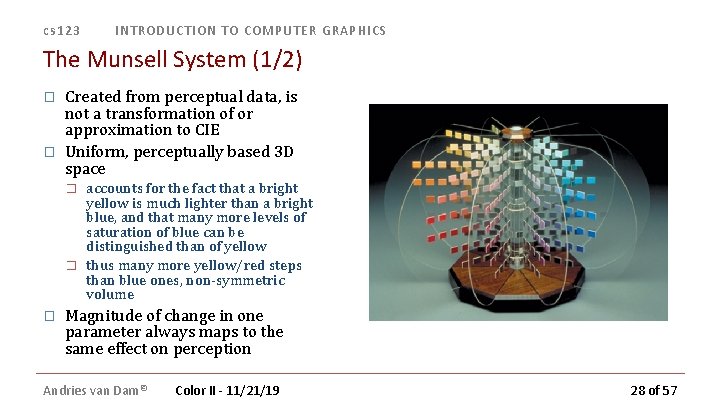
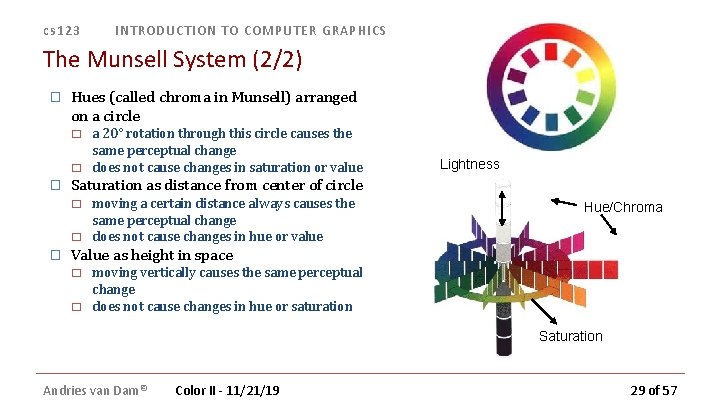
cs 123 INTRODUCTION TO COMPUTER GRAPHICS The Munsell System (1/2) � � Created from perceptual data, is not a transformation of or approximation to CIE Uniform, perceptually based 3 D space � � � accounts for the fact that a bright yellow is much lighter than a bright blue, and that many more levels of saturation of blue can be distinguished than of yellow thus many more yellow/red steps than blue ones, non-symmetric volume Magnitude of change in one parameter always maps to the same effect on perception Andries van Dam© Color II - 11/21/19 28 of 57
cs 123 INTRODUCTION TO COMPUTER GRAPHICS The Munsell System (2/2) � Hues (called chroma in Munsell) arranged on a circle � � � Lightness Saturation as distance from center of circle � � � a 20° rotation through this circle causes the same perceptual change does not cause changes in saturation or value moving a certain distance always causes the same perceptual change does not cause changes in hue or value Hue/Chroma Value as height in space � � moving vertically causes the same perceptual change does not cause changes in hue or saturation Saturation Andries van Dam© Color II - 11/21/19 29 of 57
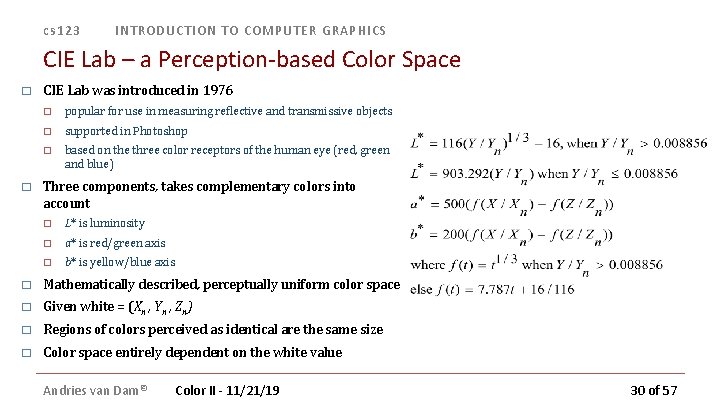
cs 123 INTRODUCTION TO COMPUTER GRAPHICS CIE Lab – a Perception-based Color Space � � CIE Lab was introduced in 1976 � popular for use in measuring reflective and transmissive objects � supported in Photoshop � based on the three color receptors of the human eye (red, green and blue) Three components, takes complementary colors into account � L* is luminosity � a* is red/green axis � b* is yellow/blue axis � Mathematically described, perceptually uniform color space � Given white = (Xn , Yn , Zn) � Regions of colors perceived as identical are the same size � Color space entirely dependent on the white value Andries van Dam© Color II - 11/21/19 30 of 57
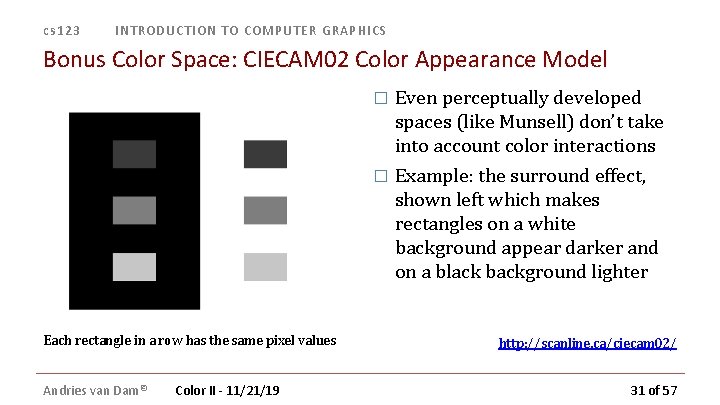
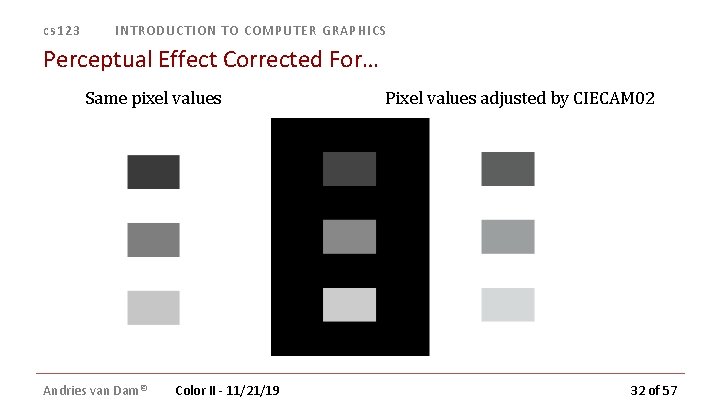
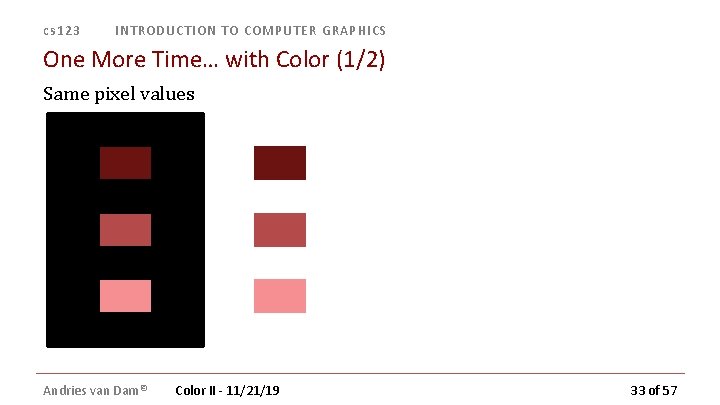
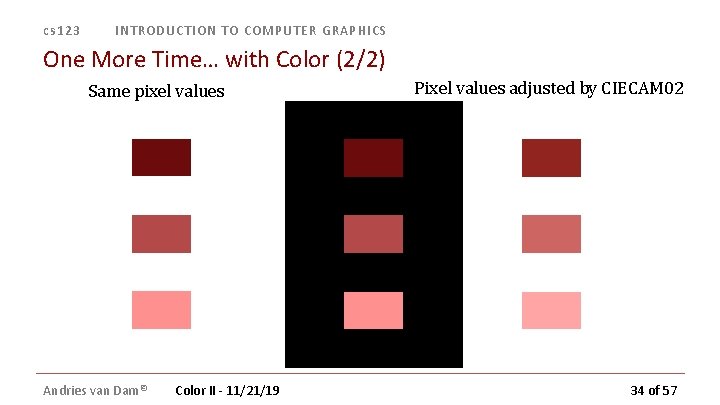
cs 123 INTRODUCTION TO COMPUTER GRAPHICS Bonus Color Space: CIECAM 02 Color Appearance Model Even perceptually developed spaces (like Munsell) don’t take into account color interactions � Example: the surround effect, shown left which makes rectangles on a white background appear darker and on a black background lighter � Each rectangle in a row has the same pixel values Andries van Dam© Color II - 11/21/19 http: //scanline. ca/ciecam 02/ 31 of 57
cs 123 INTRODUCTION TO COMPUTER GRAPHICS Perceptual Effect Corrected For… Same pixel values Andries van Dam© Color II - 11/21/19 Pixel values adjusted by CIECAM 02 32 of 57
cs 123 INTRODUCTION TO COMPUTER GRAPHICS One More Time… with Color (1/2) Same pixel values Andries van Dam© Color II - 11/21/19 33 of 57
cs 123 INTRODUCTION TO COMPUTER GRAPHICS One More Time… with Color (2/2) Same pixel values Andries van Dam© Color II - 11/21/19 Pixel values adjusted by CIECAM 02 34 of 57
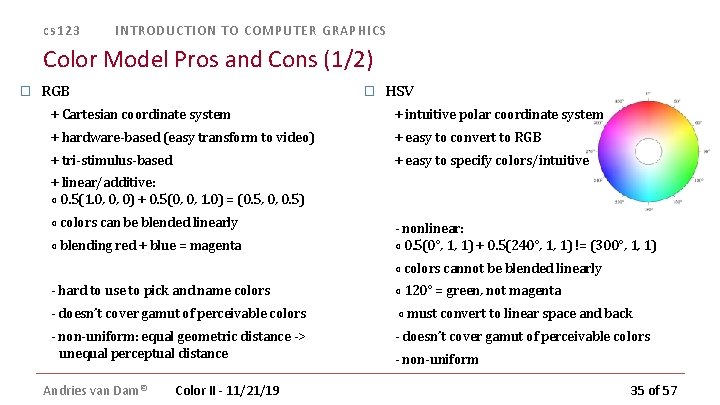
cs 123 INTRODUCTION TO COMPUTER GRAPHICS Color Model Pros and Cons (1/2) � RGB � HSV + Cartesian coordinate system + intuitive polar coordinate system + hardware-based (easy transform to video) + easy to convert to RGB + tri-stimulus-based + easy to specify colors/intuitive + linear/additive: ∘ 0. 5(1. 0, 0, 0) + 0. 5(0, 0, 1. 0) = (0. 5, 0, 0. 5) ∘ colors can be blended linearly ∘ blending red + blue = magenta - nonlinear: ∘ 0. 5(0°, 1, 1) + 0. 5(240°, 1, 1) != (300°, 1, 1) ∘ colors cannot be blended linearly - hard to use to pick and name colors ∘ 120° = green, not magenta - doesn’t cover gamut of perceivable colors ∘ must convert to linear space and back - non-uniform: equal geometric distance -> unequal perceptual distance Andries van Dam© Color II - 11/21/19 - doesn’t cover gamut of perceivable colors - non-uniform 35 of 57
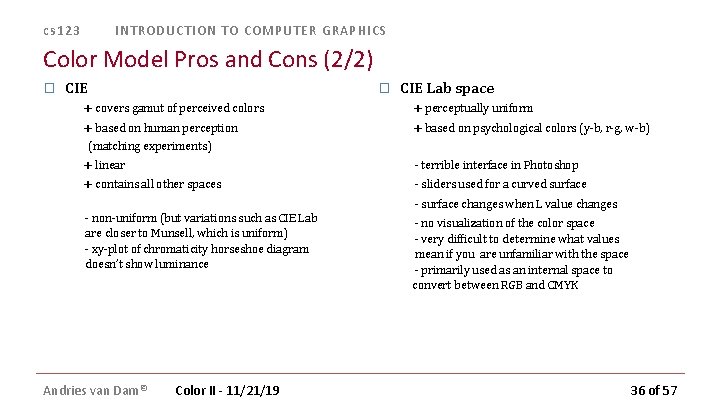
cs 123 INTRODUCTION TO COMPUTER GRAPHICS Color Model Pros and Cons (2/2) � CIE � + covers gamut of perceived colors + based on human perception (matching experiments) + linear + contains all other spaces - non-uniform (but variations such as CIE Lab are closer to Munsell, which is uniform) - xy-plot of chromaticity horseshoe diagram doesn’t show luminance Andries van Dam© Color II - 11/21/19 CIE Lab space + perceptually uniform + based on psychological colors (y-b, r-g, w-b) - terrible interface in Photoshop - sliders used for a curved surface - surface changes when L value changes - no visualization of the color space - very difficult to determine what values mean if you are unfamiliar with the space - primarily used as an internal space to convert between RGB and CMYK 36 of 57
cs 123 INTRODUCTION TO COMPUTER GRAPHICS Lecture Roadmap � Chromaticity diagrams and color gamuts � Color spaces – their rationales, and pros and cons (RGB, HSV, CIE etc. ) How color spaces influence color picking � How to use color: some Dos and Don’ts � Andries van Dam© Color II - 11/21/19 37 of 57
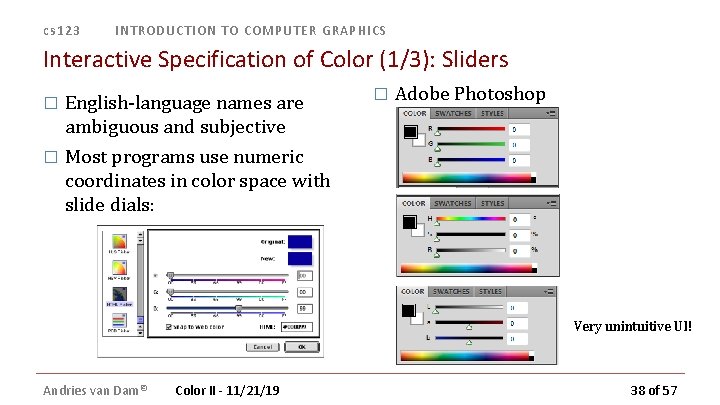
cs 123 INTRODUCTION TO COMPUTER GRAPHICS Interactive Specification of Color (1/3): Sliders � English-language names are ambiguous and subjective � Most programs use numeric coordinates in color space with slide dials: � Adobe Photoshop Very unintuitive UI! Andries van Dam© Color II - 11/21/19 38 of 57
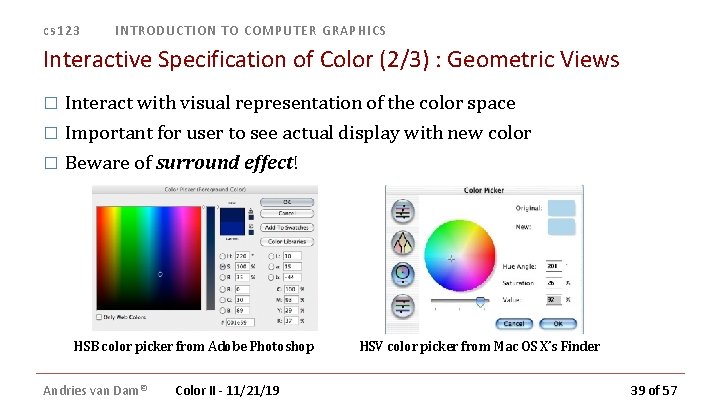
cs 123 INTRODUCTION TO COMPUTER GRAPHICS Interactive Specification of Color (2/3) : Geometric Views � Interact with visual representation of the color space � Important for user to see actual display with new color � Beware of surround effect! HSB color picker from Adobe Photoshop Andries van Dam© Color II - 11/21/19 HSV color picker from Mac OS X’s Finder 39 of 57
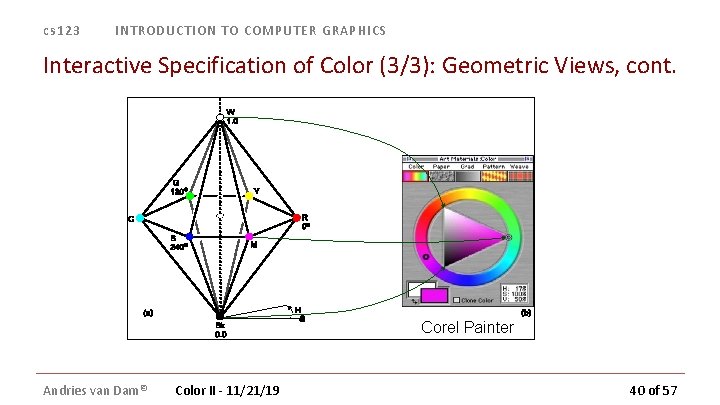
cs 123 INTRODUCTION TO COMPUTER GRAPHICS Interactive Specification of Color (3/3): Geometric Views, cont. Corel Painter Andries van Dam© Color II - 11/21/19 40 of 57
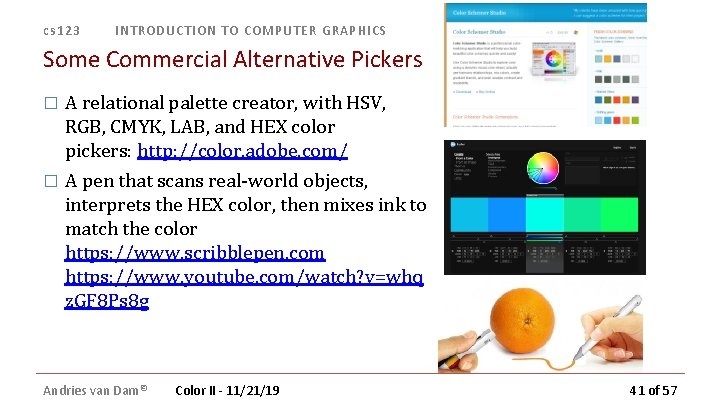
cs 123 INTRODUCTION TO COMPUTER GRAPHICS Some Commercial Alternative Pickers A relational palette creator, with HSV, RGB, CMYK, LAB, and HEX color pickers: http: //color. adobe. com/ � A pen that scans real-world objects, interprets the HEX color, then mixes ink to match the color https: //www. scribblepen. com https: //www. youtube. com/watch? v=whq z. GF 8 Ps 8 g � Andries van Dam© Color II - 11/21/19 41 of 57
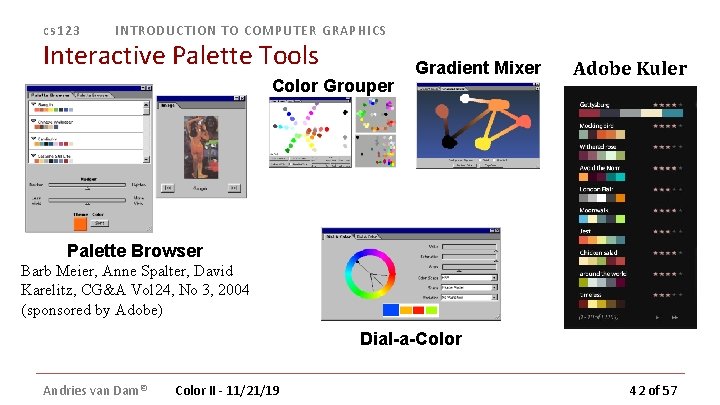
cs 123 INTRODUCTION TO COMPUTER GRAPHICS Interactive Palette Tools Color Grouper Gradient Mixer Adobe Kuler Palette Browser Barb Meier, Anne Spalter, David Karelitz, CG&A Vol 24, No 3, 2004 (sponsored by Adobe) Dial-a-Color Andries van Dam© Color II - 11/21/19 42 of 57
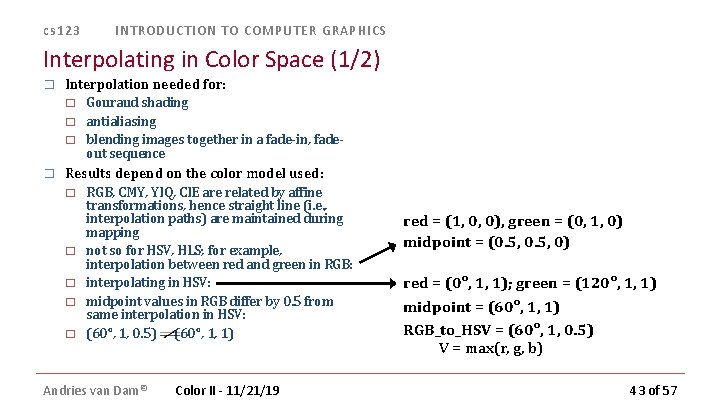
cs 123 INTRODUCTION TO COMPUTER GRAPHICS Interpolating in Color Space (1/2) � Interpolation needed for: � � Gouraud shading antialiasing blending images together in a fade-in, fadeout sequence Results depend on the color model used: � � � RGB, CMY, YIQ, CIE are related by affine transformations, hence straight line (i. e. , interpolation paths) are maintained during mapping not so for HSV, HLS; for example, interpolation between red and green in RGB: interpolating in HSV: midpoint values in RGB differ by 0. 5 from same interpolation in HSV: (60°, 1, 0. 5) (60°, 1, 1) Andries van Dam© Color II - 11/21/19 red = (1, 0, 0), green = (0, 1, 0) midpoint = (0. 5, 0) red = (0°, 1, 1); green = (120°, 1, 1) midpoint = (60°, 1, 1) RGB_to_HSV = (60°, 1, 0. 5) V = max(r, g, b) 43 of 57
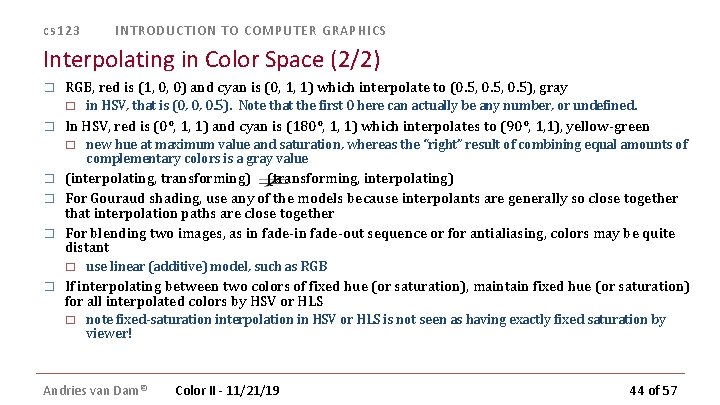
cs 123 INTRODUCTION TO COMPUTER GRAPHICS Interpolating in Color Space (2/2) � RGB, red is (1, 0, 0) and cyan is (0, 1, 1) which interpolate to (0. 5, 0. 5), gray � � In HSV, red is (0°, 1, 1) and cyan is (180°, 1, 1) which interpolates to (90°, 1, 1), yellow-green � � new hue at maximum value and saturation, whereas the “right” result of combining equal amounts of complementary colors is a gray value (interpolating, transforming) (transforming, interpolating) For Gouraud shading, use any of the models because interpolants are generally so close together that interpolation paths are close together For blending two images, as in fade-out sequence or for antialiasing, colors may be quite distant � � in HSV, that is (0, 0, 0. 5). Note that the first 0 here can actually be any number, or undefined. use linear (additive) model, such as RGB If interpolating between two colors of fixed hue (or saturation), maintain fixed hue (or saturation) for all interpolated colors by HSV or HLS � note fixed-saturation interpolation in HSV or HLS is not seen as having exactly fixed saturation by viewer! Andries van Dam© Color II - 11/21/19 44 of 57
cs 123 INTRODUCTION TO COMPUTER GRAPHICS Lecture Roadmap � Chromaticity diagrams and color gamuts � Color spaces – their rationales, and pros and cons (RGB, HSV, CIEetc. ) How color spaces influence color picking � How to use color: some Dos and Don’ts � Andries van Dam© Color II - 11/21/19 45 of 57
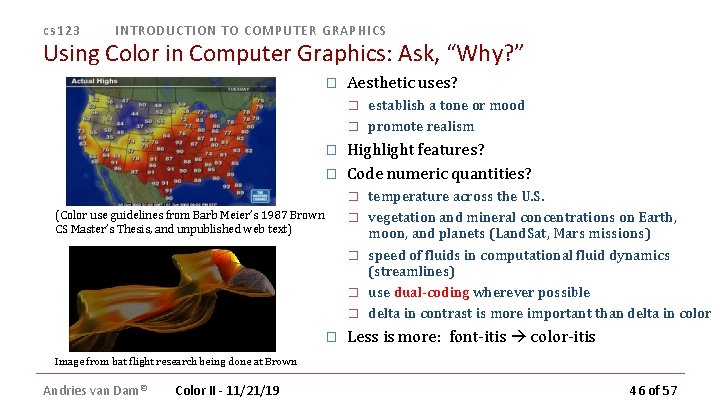
cs 123 INTRODUCTION TO COMPUTER GRAPHICS Using Color in Computer Graphics: Ask, “Why? ” � Aesthetic uses? � � Highlight features? Code numeric quantities? � (Color use guidelines from Barb Meier’s 1987 Brown CS Master’s Thesis, and unpublished web text) � � � establish a tone or mood promote realism temperature across the U. S. vegetation and mineral concentrations on Earth, moon, and planets (Land. Sat, Mars missions) speed of fluids in computational fluid dynamics (streamlines) use dual-coding wherever possible delta in contrast is more important than delta in color Less is more: font-itis color-itis Image from bat flight research being done at Brown Andries van Dam© Color II - 11/21/19 46 of 57
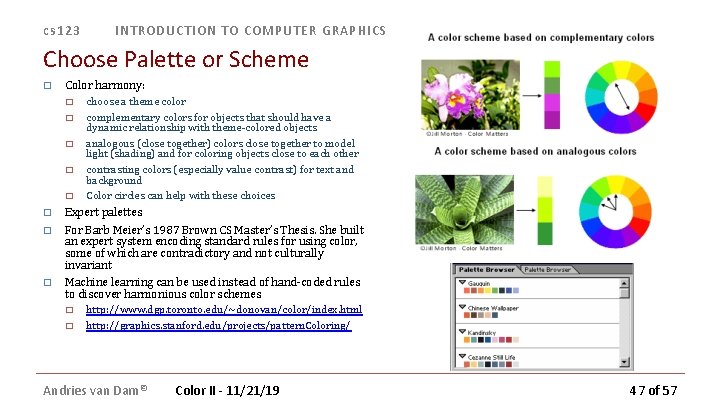
cs 123 INTRODUCTION TO COMPUTER GRAPHICS Choose Palette or Scheme � Color harmony: � � � choose a theme color complementary colors for objects that should have a dynamic relationship with theme-colored objects analogous (close together) colors close together to model light (shading) and for coloring objects close to each other contrasting colors (especially value contrast) for text and background Color circles can help with these choices Expert palettes � For Barb Meier’s 1987 Brown CS Master’s Thesis. She built an expert system encoding standard rules for using color, some of which are contradictory and not culturally invariant � Machine learning can be used instead of hand-coded rules to discover harmonious color schemes � � � http: //www. dgp. toronto. edu/~donovan/color/index. html http: //graphics. stanford. edu/projects/pattern. Coloring/ Andries van Dam© Color II - 11/21/19 47 of 57
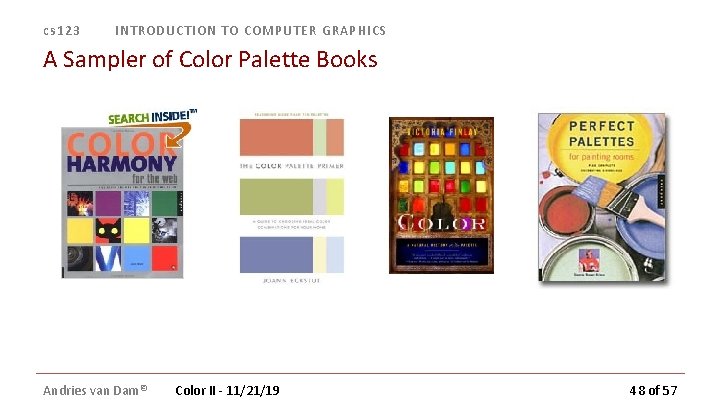
cs 123 INTRODUCTION TO COMPUTER GRAPHICS A Sampler of Color Palette Books Andries van Dam© Color II - 11/21/19 48 of 57
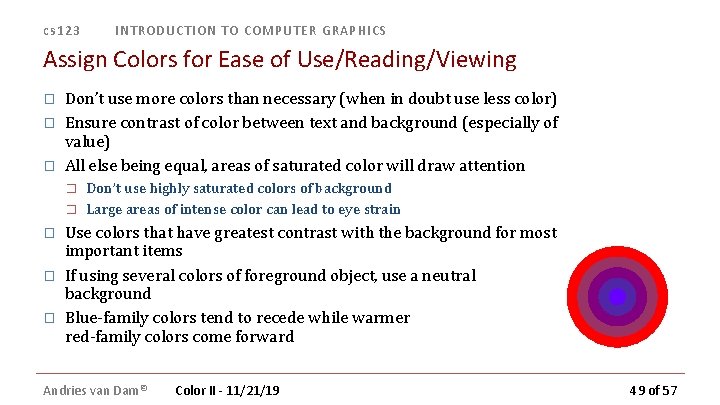
cs 123 INTRODUCTION TO COMPUTER GRAPHICS Assign Colors for Ease of Use/Reading/Viewing � � � Don’t use more colors than necessary (when in doubt use less color) Ensure contrast of color between text and background (especially of value) All else being equal, areas of saturated color will draw attention � � � Don’t use highly saturated colors of background Large areas of intense color can lead to eye strain Use colors that have greatest contrast with the background for most important items If using several colors of foreground object, use a neutral background Blue-family colors tend to recede while warmer red-family colors come forward Andries van Dam© Color II - 11/21/19 49 of 57
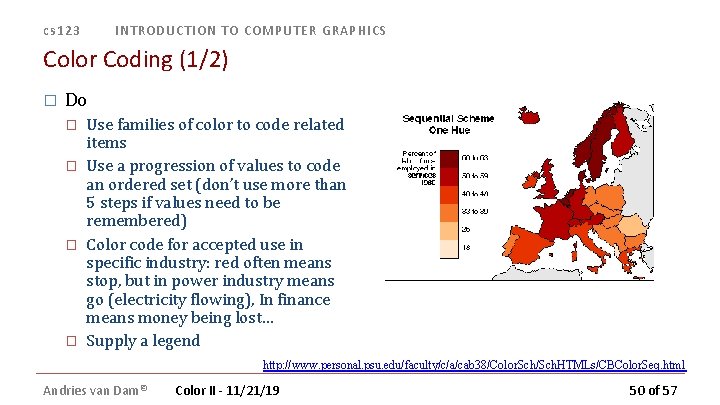
cs 123 INTRODUCTION TO COMPUTER GRAPHICS Color Coding (1/2) � Do � � Use families of color to code related items Use a progression of values to code an ordered set (don’t use more than 5 steps if values need to be remembered) Color code for accepted use in specific industry: red often means stop, but in power industry means go (electricity flowing), In finance means money being lost… Supply a legend http: //www. personal. psu. edu/faculty/c/a/cab 38/Color. Sch/Sch. HTMLs/CBColor. Seq. html Andries van Dam© Color II - 11/21/19 50 of 57
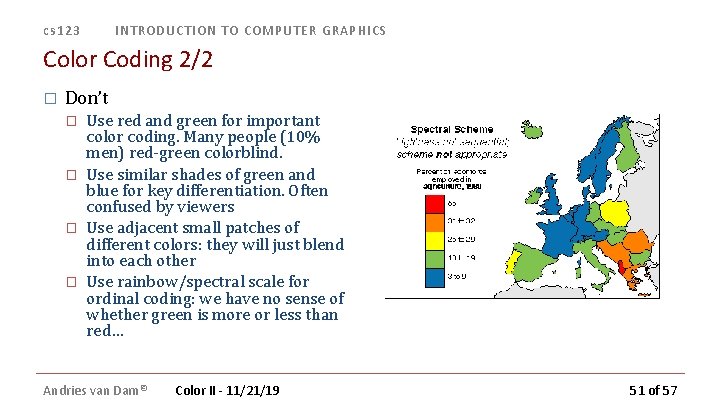
cs 123 INTRODUCTION TO COMPUTER GRAPHICS Color Coding 2/2 � Don’t � � Use red and green for important color coding. Many people (10% men) red-green colorblind. Use similar shades of green and blue for key differentiation. Often confused by viewers Use adjacent small patches of different colors: they will just blend into each other Use rainbow/spectral scale for ordinal coding: we have no sense of whether green is more or less than red… Andries van Dam© Color II - 11/21/19 51 of 57
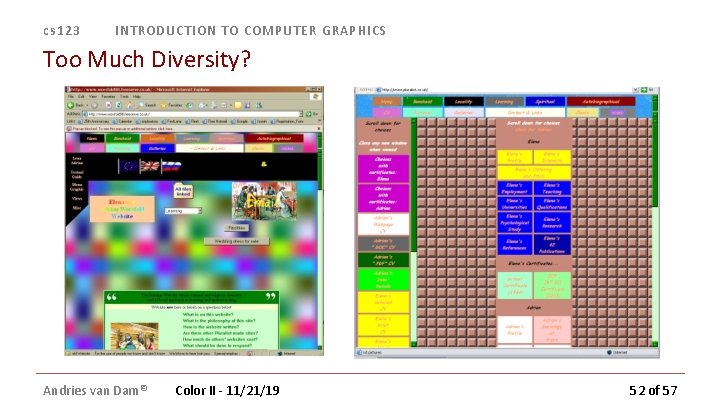
cs 123 INTRODUCTION TO COMPUTER GRAPHICS Too Much Diversity? Andries van Dam© Color II - 11/21/19 52 of 57
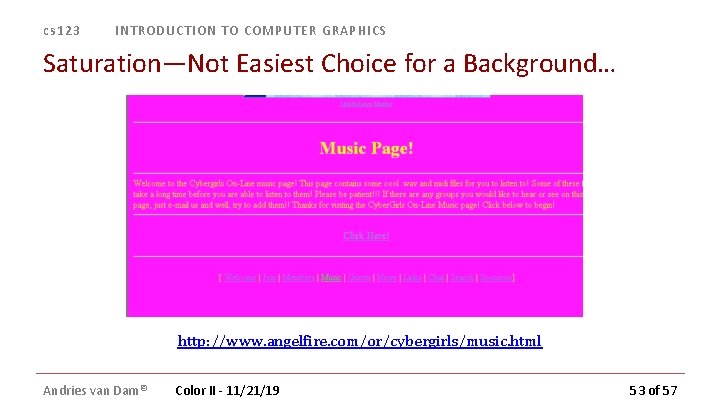
cs 123 INTRODUCTION TO COMPUTER GRAPHICS Saturation—Not Easiest Choice for a Background… http: //www. angelfire. com/or/cybergirls/music. html Andries van Dam© Color II - 11/21/19 53 of 57
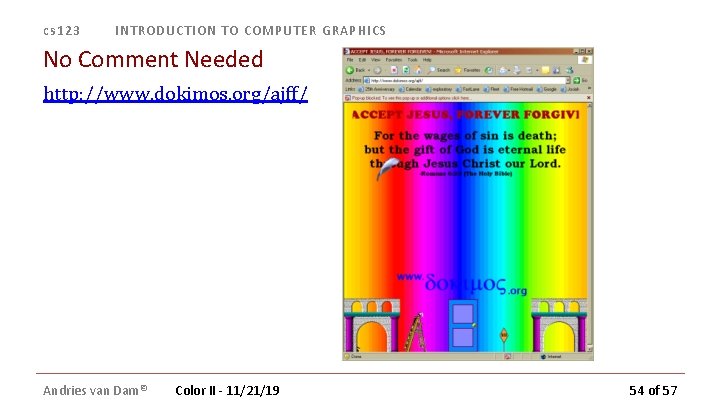
cs 123 INTRODUCTION TO COMPUTER GRAPHICS No Comment Needed http: //www. dokimos. org/ajff/ Andries van Dam© Color II - 11/21/19 54 of 57
cs 123 INTRODUCTION TO COMPUTER GRAPHICS Take Away Ideas � Eyes are sensitive to an infinite variety of spectral hues in a light distribution, but colors are described with < infinite number of parameters � � � for CG we chose an appropriate space formed by 3 primaries as a good approximation, many simple rendering algorithms compute those 3 channels independently to be physically-based, would have to account for all wavelengths, deal with distributions of incoming, reflected, absorbed, sub-surface scattered, refracted and atmospherically attenuated light The physics of energy interacting with environments, as interpreted by the human visual system (retina, brain) with its many levels of processing, plus mathematical representations allows us to name, generate/render and manipulate colors Still many things not understood in color perception Color gamuts are different on all devices No fixed rules for color use, but � � respect perceptual effects think about role of color aesthetic � coding data � culturally accepted function � � When in doubt, use less color, not more Andries van Dam© Color II - 11/21/19 To learn more about color use, check out Anne Morgan Spalter’s book, The Computer in the Visual Arts 55 of 57
cs 123 INTRODUCTION TO COMPUTER GRAPHICS For More (Fun) Information � For more on color, check out the following web sites: � Color Matters � � Online book on color � � http: //www. colorvoodoo. com/cvoodoo 4. html Map Coloring � � http: //www. colormatters. com http: //www. personal. psu. edu/faculty/c/a/cab 38/ Get your own color cube!!! � http: //www. colorcube. com/intro. htm Andries van Dam© Color II - 11/21/19 56 of 57
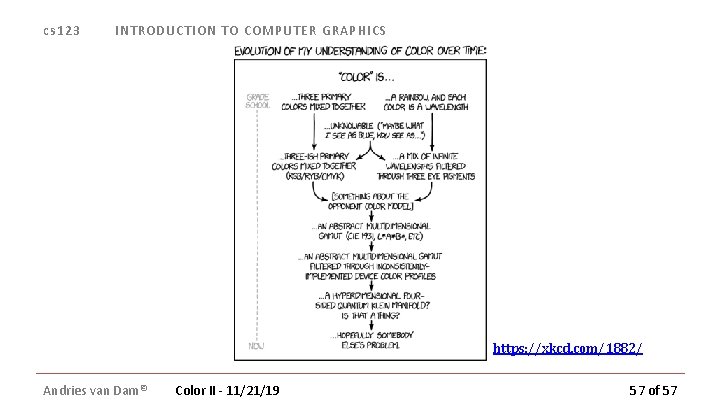
cs 123 INTRODUCTION TO COMPUTER GRAPHICS https: //xkcd. com/1882/ Andries van Dam© Color II - 11/21/19 57 of 57
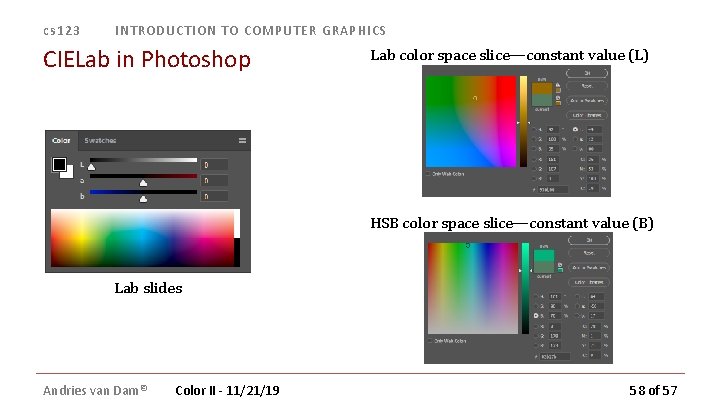
cs 123 INTRODUCTION TO COMPUTER GRAPHICS CIELab in Photoshop Lab color space slice—constant value (L) HSB color space slice—constant value (B) Lab slides Andries van Dam© Color II - 11/21/19 58 of 57
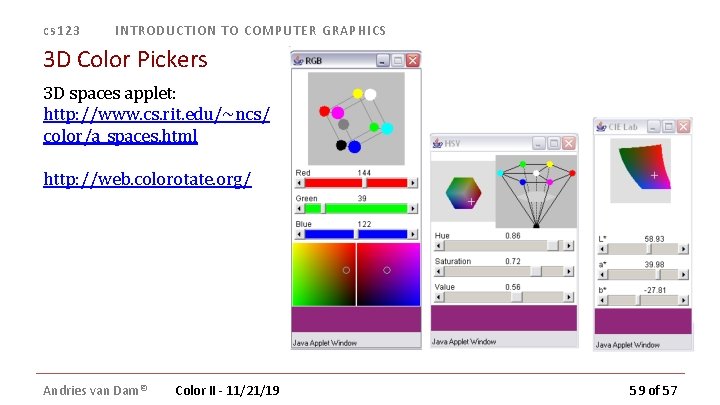
cs 123 INTRODUCTION TO COMPUTER GRAPHICS 3 D Color Pickers 3 D spaces applet: http: //www. cs. rit. edu/~ncs/ color/a_spaces. html http: //web. colorotate. org/ Andries van Dam© Color II - 11/21/19 59 of 57