
CS 110 Computer Architecture Lecture 14 Caches Part

- Slides: 41
CS 110 Computer Architecture Lecture 14: Caches Part 1 Instructor: Sören Schwertfeger http: //shtech. org/courses/ca/ School of Information Science and Technology SIST Shanghai. Tech University Slides based on UC Berkley's CS 61 C 1
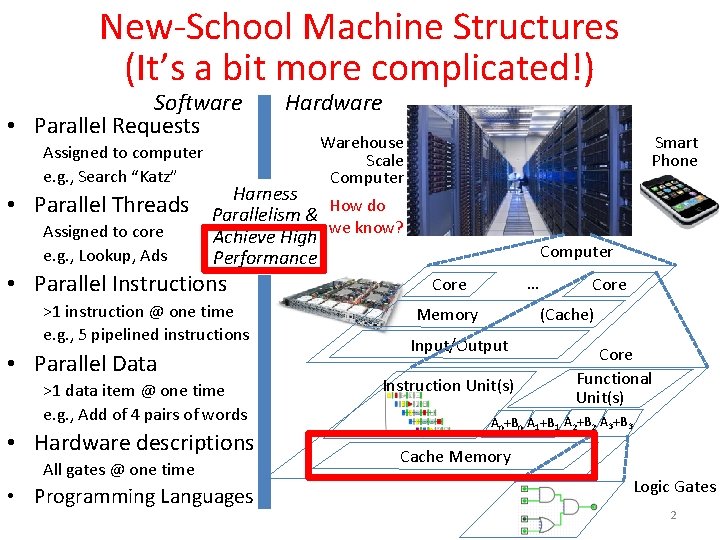
New-School Machine Structures (It’s a bit more complicated!) Software • Parallel Requests Assigned to computer e. g. , Search “Katz” • Parallel Threads Assigned to core e. g. , Lookup, Ads Hardware Smart Phone Warehouse Scale Computer Harness Parallelism & How do Achieve High we know? Performance • Parallel Instructions >1 instruction @ one time e. g. , 5 pipelined instructions • Parallel Data >1 data item @ one time e. g. , Add of 4 pairs of words • Hardware descriptions All gates @ one time • Programming Languages Computer … Core Memory Core (Cache) Input/Output Instruction Unit(s) Core Functional Unit(s) A 0+B 0 A 1+B 1 A 2+B 2 A 3+B 3 Cache Memory Logic Gates 2
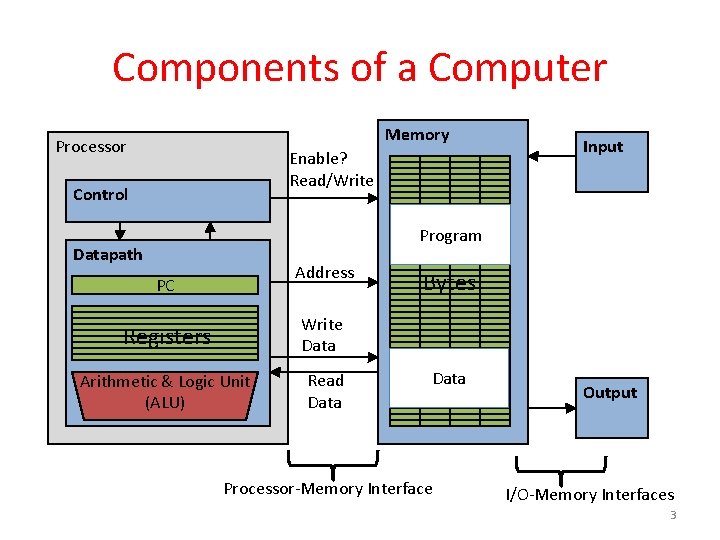
Components of a Computer Memory Processor Enable? Read/Write Control Input Program Datapath Address PC Registers Write Data Arithmetic & Logic Unit (ALU) Read Data Bytes Data Processor-Memory Interface Output I/O-Memory Interfaces 3
Problem: Large memories slow? Library Analogy • Finding a book in a large library takes time – Takes time to search a large card catalog – (mapping title/author to index number) – Round-trip time to walk to the stacks and retrieve the desired book. • Larger libraries makes both delays worse • Electronic memories have the same issue, plus the technologies that we use to store an individual bit get slower as we increase density (SRAM versus DRAM versus Magnetic Disk) However what we want is a large yet fast memory! 4
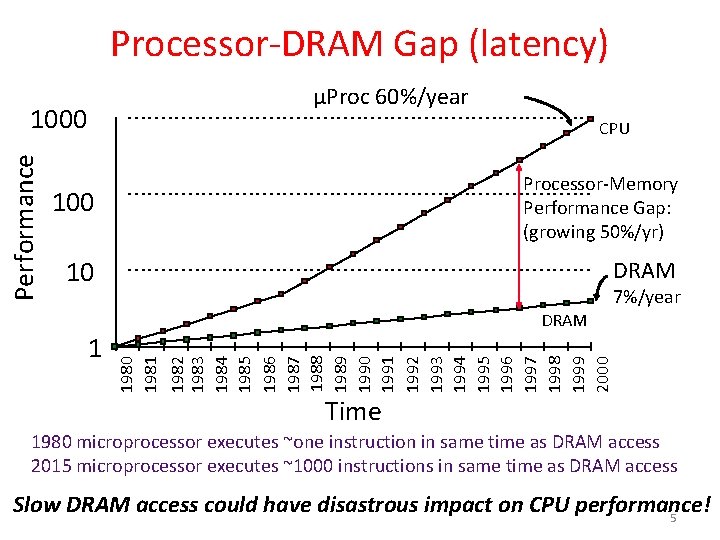
Processor-DRAM Gap (latency) µProc 60%/year CPU 100 Processor-Memory Performance Gap: (growing 50%/yr) 10 DRAM 1982 1983 1984 1985 1986 1987 1988 1989 1990 1991 1992 1993 1994 1995 1996 1997 1998 1999 2000 1 7%/year 1980 1981 Performance 1000 Time 1980 microprocessor executes ~one instruction in same time as DRAM access 2015 microprocessor executes ~1000 instructions in same time as DRAM access Slow DRAM access could have disastrous impact on CPU performance! 5
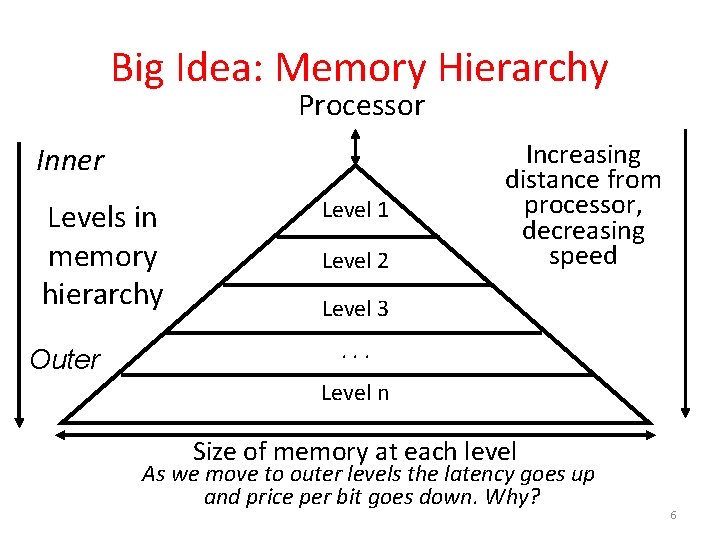
Big Idea: Memory Hierarchy Processor Inner Levels in memory hierarchy Outer Level 1 Level 2 Increasing distance from processor, decreasing speed Level 3. . . Level n Size of memory at each level As we move to outer levels the latency goes up and price per bit goes down. Why? 6
What to do: Library Analogy • Want to write a report using library books • Go to library, look up relevant books, fetch from stacks, and place on desk in library • If need more, check them out and keep on desk – But don’t return earlier books since might need them • You hope this collection of ~10 books on desk enough to write report, despite 10 being only a tiny fraction of books available 7
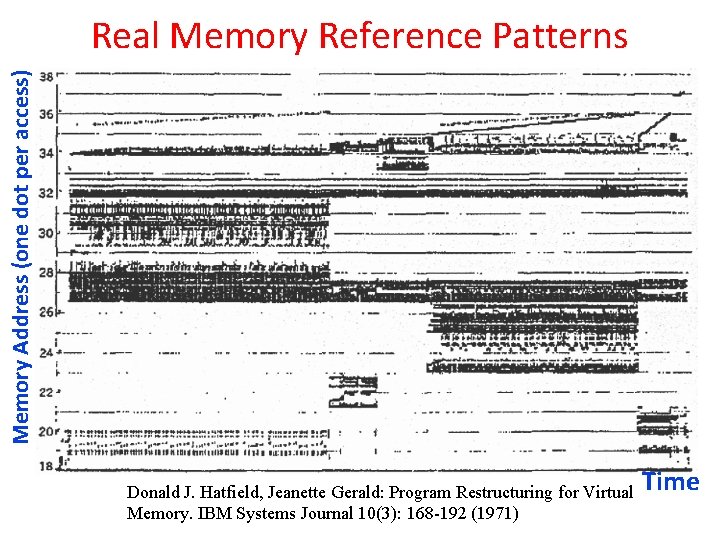
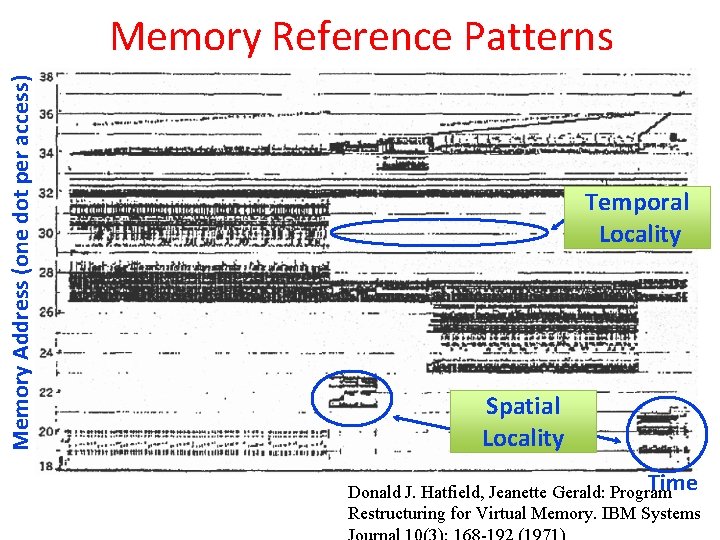
Memory Address (one dot per access) Real Memory Reference Patterns Donald J. Hatfield, Jeanette Gerald: Program Restructuring for Virtual Memory. IBM Systems Journal 10(3): 168 -192 (1971) Time
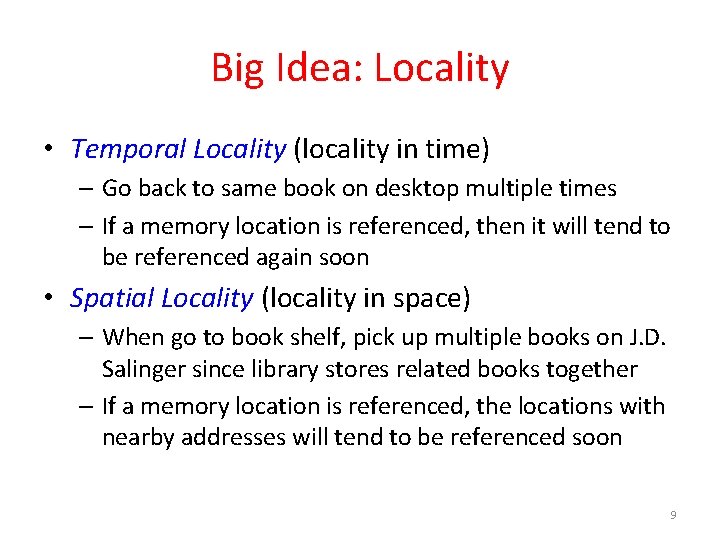
Big Idea: Locality • Temporal Locality (locality in time) – Go back to same book on desktop multiple times – If a memory location is referenced, then it will tend to be referenced again soon • Spatial Locality (locality in space) – When go to book shelf, pick up multiple books on J. D. Salinger since library stores related books together – If a memory location is referenced, the locations with nearby addresses will tend to be referenced soon 9
Memory Address (one dot per access) Memory Reference Patterns Temporal Locality Spatial Locality Time Donald J. Hatfield, Jeanette Gerald: Program Restructuring for Virtual Memory. IBM Systems
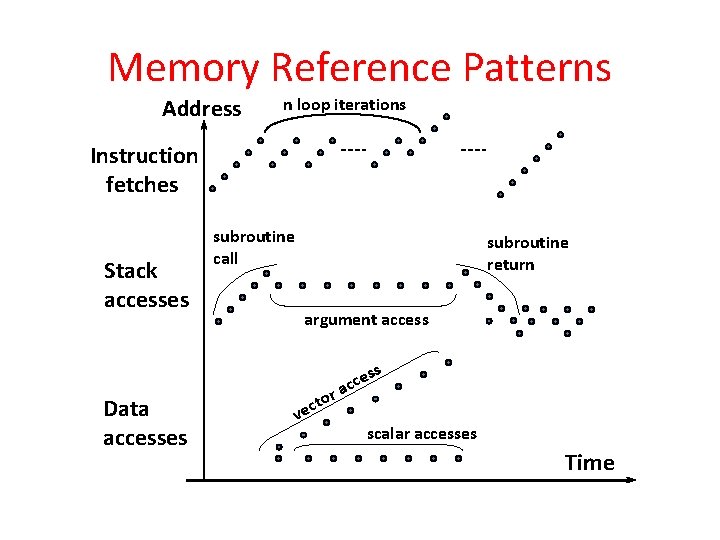
Principle of Locality • Principle of Locality: Programs access small portion of address space at any instant of time (spatial locality) and repeatedly access that portion (temporal locality) • What program structures lead to temporal and spatial locality in instruction accesses? • In data accesses? 11
Memory Reference Patterns Address n loop iterations Instruction fetches Stack accesses subroutine call subroutine return argument access s Data accesses r to c e v es c c a scalar accesses Time
Cache Philosophy • Programmer-invisible hardware mechanism to give illusion of speed of fastest memory with size of largest memory – Works fine even if programmer has no idea what a cache is – However, performance-oriented programmers today sometimes “reverse engineer” cache design to design data structures to match cache 13
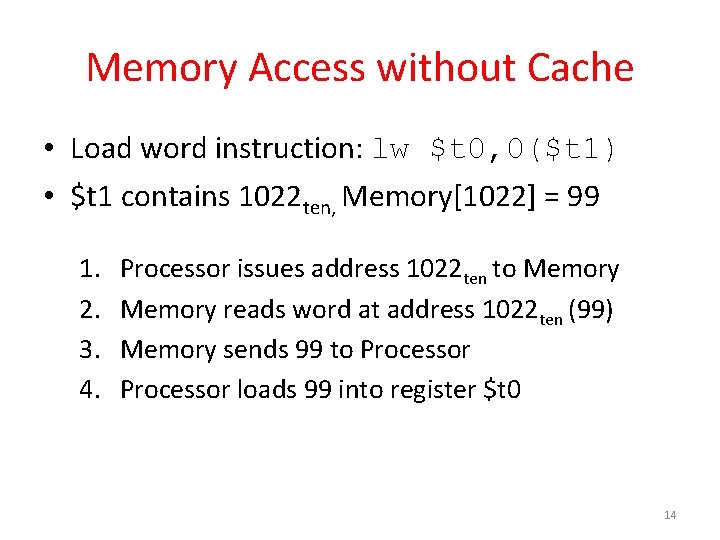
Memory Access without Cache • Load word instruction: lw $t 0, 0($t 1) • $t 1 contains 1022 ten, Memory[1022] = 99 1. 2. 3. 4. Processor issues address 1022 ten to Memory reads word at address 1022 ten (99) Memory sends 99 to Processor loads 99 into register $t 0 14
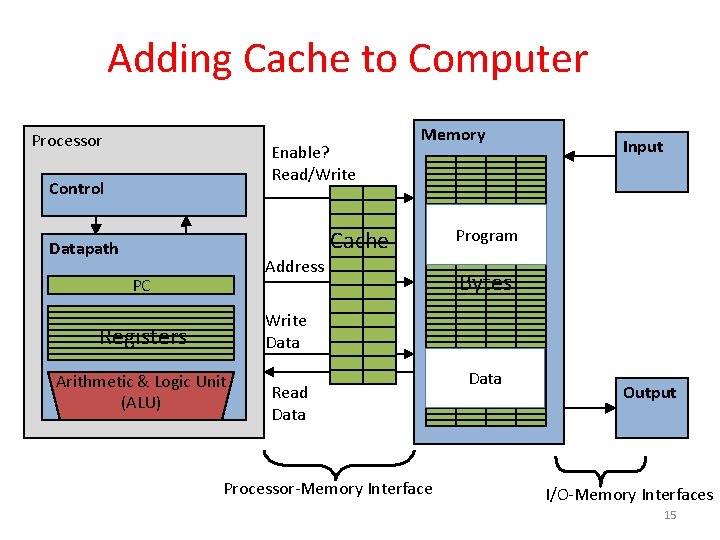
Adding Cache to Computer Processor Enable? Read/Write Control Memory Cache Datapath Address PC Input Program Bytes Write Data Registers Arithmetic & Logic Unit (ALU) Read Data Processor-Memory Interface Data Output I/O-Memory Interfaces 15
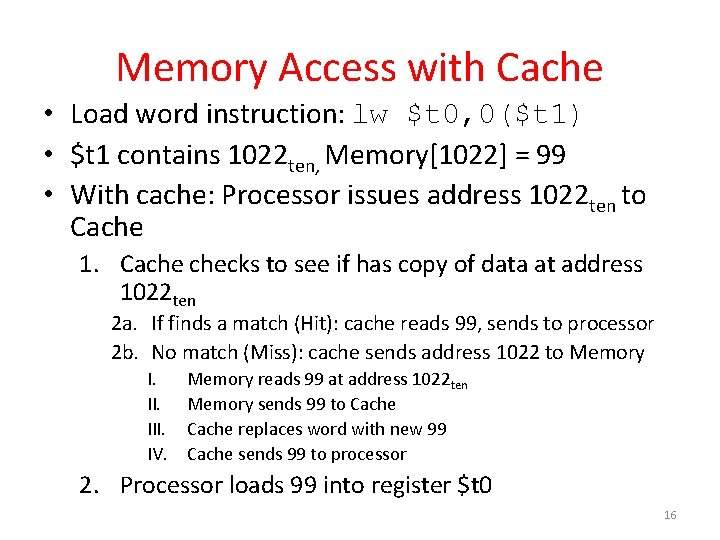
Memory Access with Cache • Load word instruction: lw $t 0, 0($t 1) • $t 1 contains 1022 ten, Memory[1022] = 99 • With cache: Processor issues address 1022 ten to Cache 1. Cache checks to see if has copy of data at address 1022 ten 2 a. If finds a match (Hit): cache reads 99, sends to processor 2 b. No match (Miss): cache sends address 1022 to Memory I. III. IV. Memory reads 99 at address 1022 ten Memory sends 99 to Cache replaces word with new 99 Cache sends 99 to processor 2. Processor loads 99 into register $t 0 16
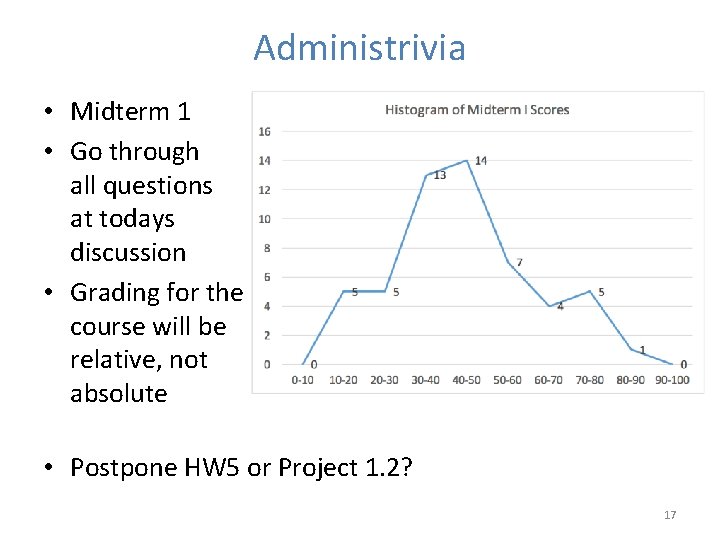
Administrivia • Midterm 1 • Go through all questions at todays discussion • Grading for the course will be relative, not absolute • Postpone HW 5 or Project 1. 2? 17
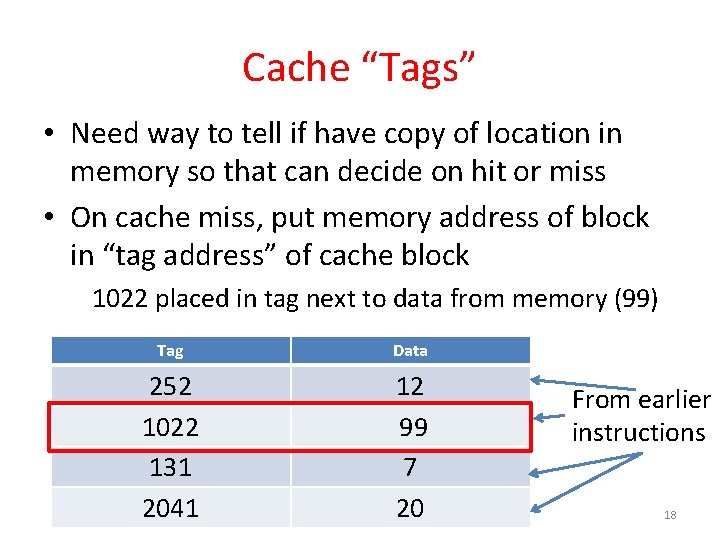
Cache “Tags” • Need way to tell if have copy of location in memory so that can decide on hit or miss • On cache miss, put memory address of block in “tag address” of cache block 1022 placed in tag next to data from memory (99) Tag Data 252 1022 131 2041 12 99 7 20 From earlier instructions 18
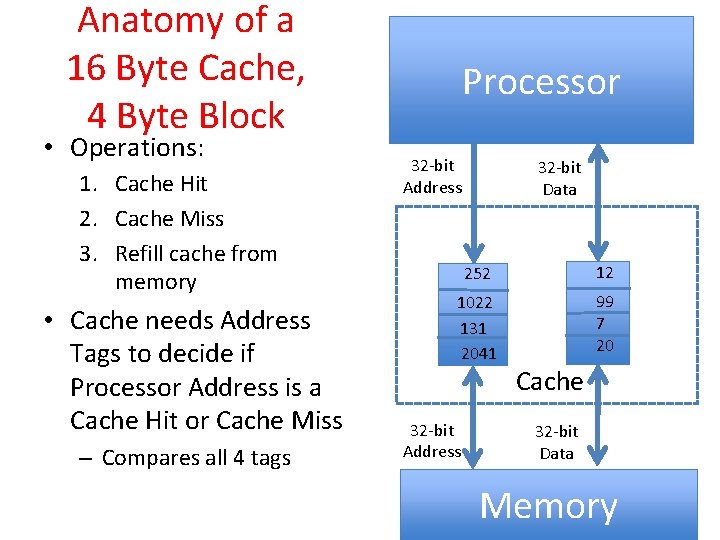
Anatomy of a 16 Byte Cache, 4 Byte Block • Operations: 1. Cache Hit 2. Cache Miss 3. Refill cache from memory • Cache needs Address Tags to decide if Processor Address is a Cache Hit or Cache Miss – Compares all 4 tags Processor 32 -bit Address 32 -bit Data 252 12 1022 131 2041 99 7 20 32 -bit Address Cache 32 -bit Data Memory 19
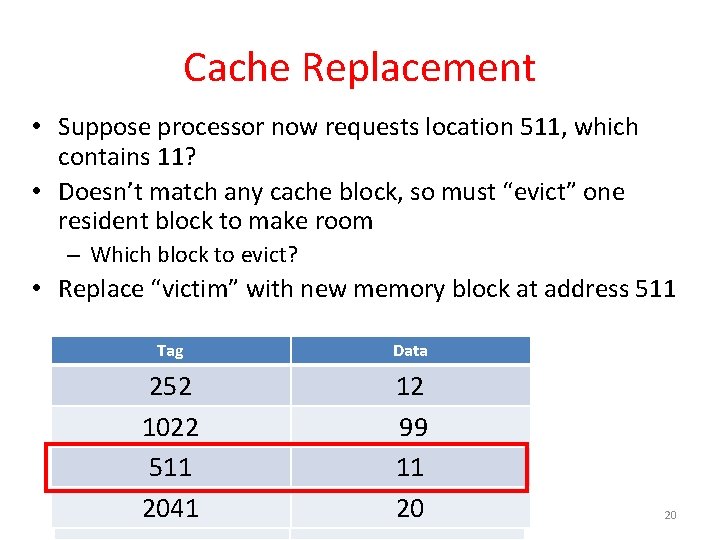
Cache Replacement • Suppose processor now requests location 511, which contains 11? • Doesn’t match any cache block, so must “evict” one resident block to make room – Which block to evict? • Replace “victim” with new memory block at address 511 Tag Data 252 1022 511 131 2041 12 12 99 99 11 7 20 20 20
Block Must be Aligned in Memory • Word blocks are aligned, so binary address of all words in cache always ends in 00 two • How to take advantage of this to save hardware and energy? • Don’t need to compare last 2 bits of 32 -bit byte address (comparator can be narrower) => Don’t need to store last 2 bits of 32 -bit byte address in Cache Tag (Tag can be narrower) 21
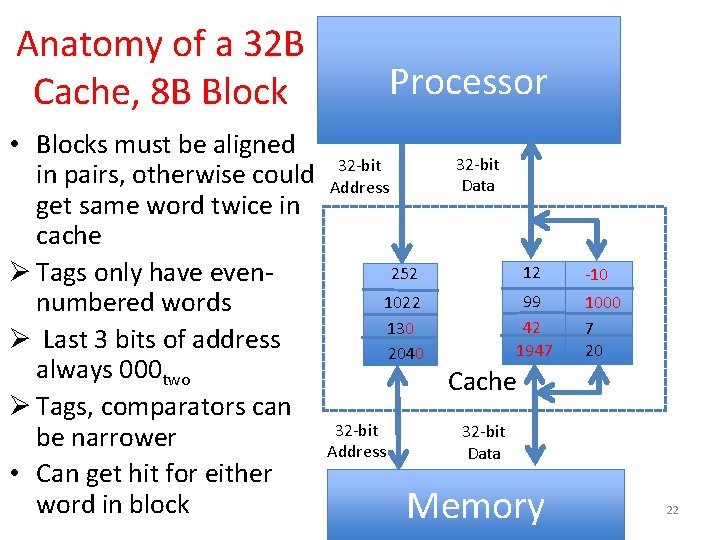
Anatomy of a 32 B Cache, 8 B Block • Blocks must be aligned in pairs, otherwise could get same word twice in cache Ø Tags only have evennumbered words Ø Last 3 bits of address always 000 two Ø Tags, comparators can be narrower • Can get hit for either word in block Processor 32 -bit Data 32 -bit Address 252 12 1022 130 2040 99 42 1947 32 -bit Address -10 1000 7 20 Cache 32 -bit Data Memory 22
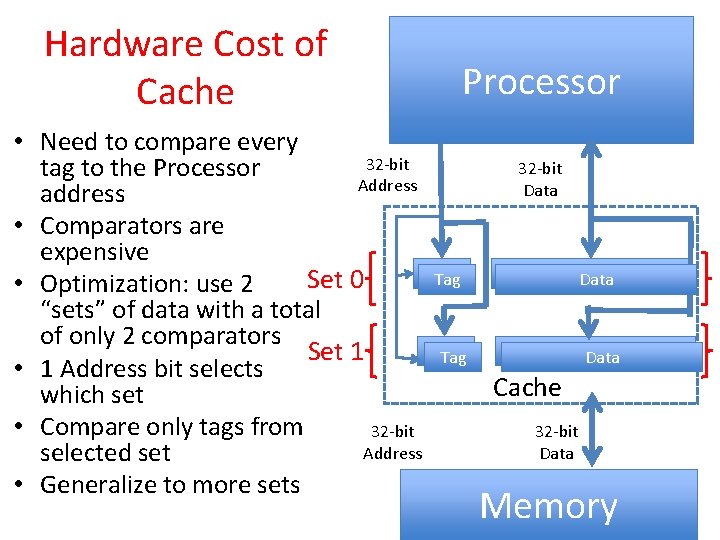
Hardware Cost of Cache Processor • Need to compare every 32 -bit tag to the Processor Address Data address • Comparators are expensive Tag Data Set 0 • Optimization: use 2 “sets” of data with a total of only 2 comparators Tag Data Set 1 Tag Data • 1 Address bit selects Cache which set • Compare only tags from 32 -bit Address Data selected set • Generalize to more sets Memory 2323
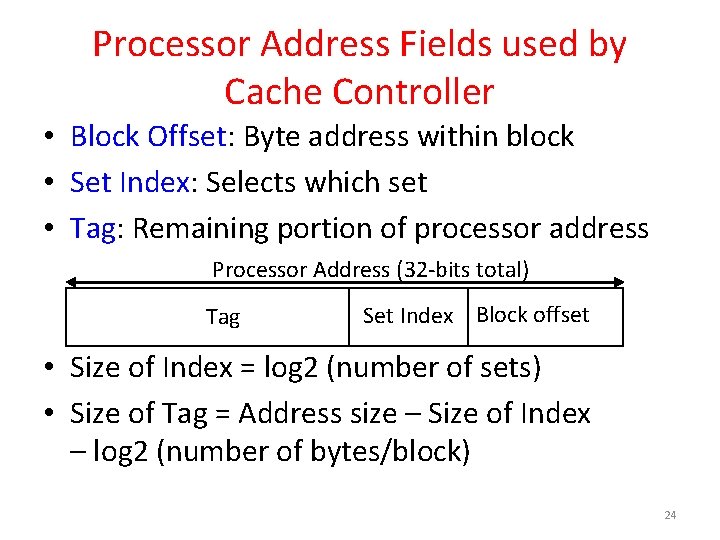
Processor Address Fields used by Cache Controller • Block Offset: Byte address within block • Set Index: Selects which set • Tag: Remaining portion of processor address Processor Address (32 -bits total) Tag Set Index Block offset • Size of Index = log 2 (number of sets) • Size of Tag = Address size – Size of Index – log 2 (number of bytes/block) 24
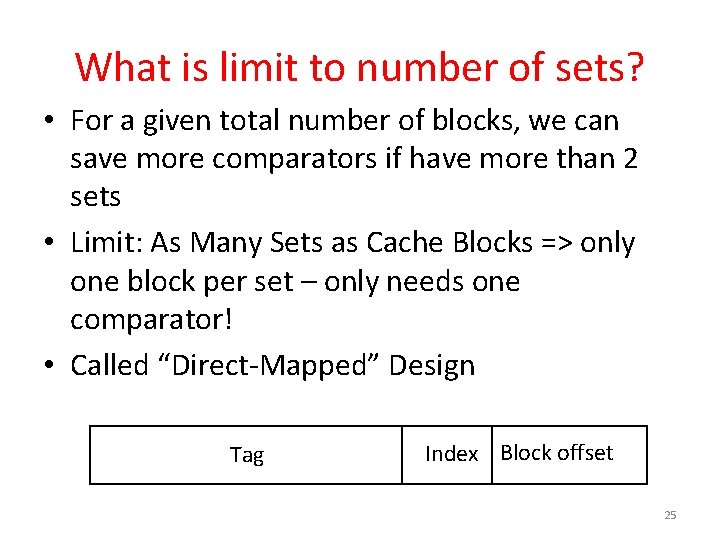
What is limit to number of sets? • For a given total number of blocks, we can save more comparators if have more than 2 sets • Limit: As Many Sets as Cache Blocks => only one block per set – only needs one comparator! • Called “Direct-Mapped” Design Tag Index Block offset 25
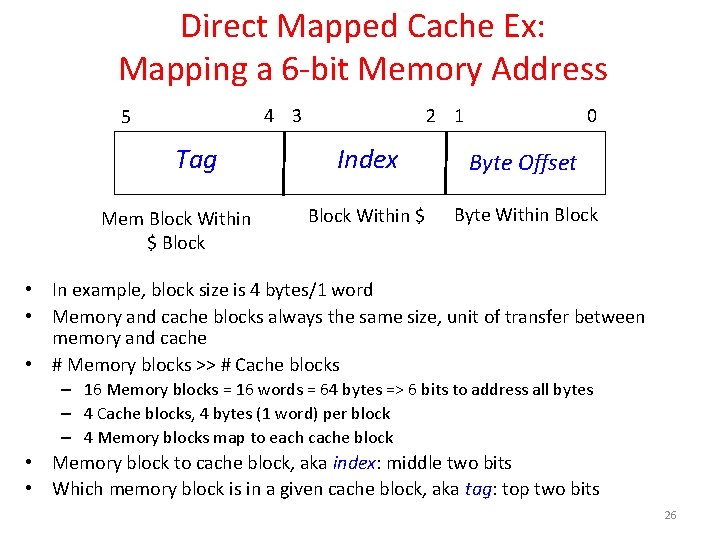
Direct Mapped Cache Ex: Mapping a 6 -bit Memory Address 4 3 5 Tag Mem Block Within $ Block 2 1 0 Index Byte Offset Block Within $ Byte Within Block • In example, block size is 4 bytes/1 word • Memory and cache blocks always the same size, unit of transfer between memory and cache • # Memory blocks >> # Cache blocks – 16 Memory blocks = 16 words = 64 bytes => 6 bits to address all bytes – 4 Cache blocks, 4 bytes (1 word) per block – 4 Memory blocks map to each cache block • Memory block to cache block, aka index: middle two bits • Which memory block is in a given cache block, aka tag: top two bits 26
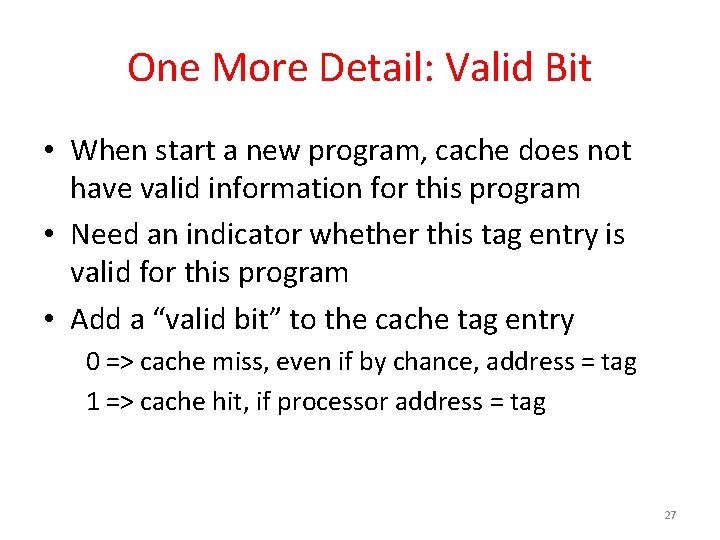
One More Detail: Valid Bit • When start a new program, cache does not have valid information for this program • Need an indicator whether this tag entry is valid for this program • Add a “valid bit” to the cache tag entry 0 => cache miss, even if by chance, address = tag 1 => cache hit, if processor address = tag 27
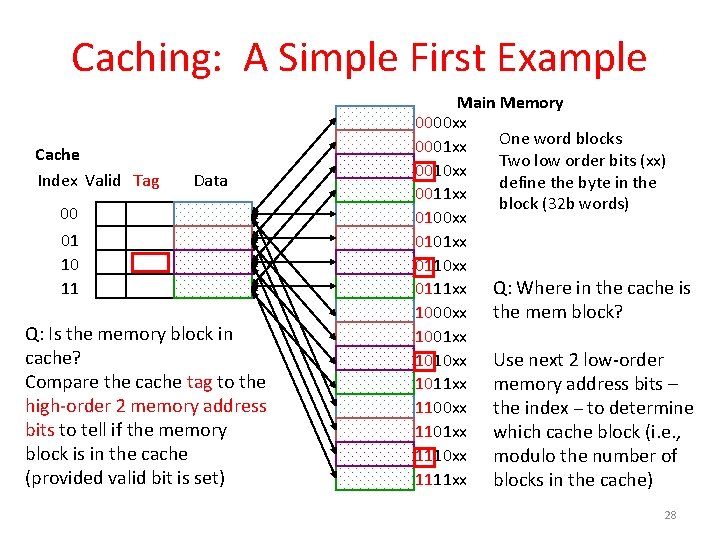
Caching: A Simple First Example Cache Index Valid Tag Data 00 01 10 11 Q: Is the memory block in cache? Compare the cache tag to the high-order 2 memory address bits to tell if the memory block is in the cache (provided valid bit is set) Main Memory 0000 xx One word blocks 0001 xx Two low order bits (xx) 0010 xx define the byte in the 0011 xx block (32 b words) 0100 xx 0101 xx 0110 xx 0111 xx Q: Where in the cache is 1000 xx the mem block? 1001 xx 1010 xx Use next 2 low-order 1011 xx memory address bits – 1100 xx the index – to determine 1101 xx which cache block (i. e. , 1110 xx modulo the number of 1111 xx blocks in the cache) 28
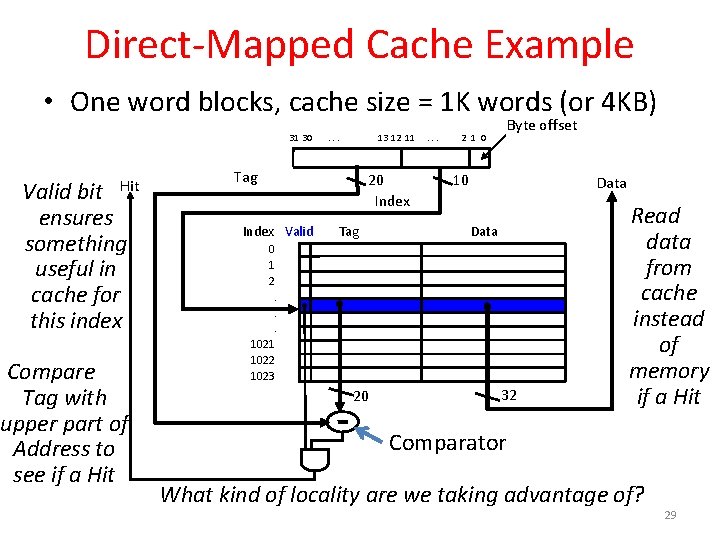
Direct-Mapped Cache Example • One word blocks, cache size = 1 K words (or 4 KB) 31 30 Hit Valid bit ensures something useful in cache for this index Compare Tag with upper part of Address to see if a Hit . . . 13 12 11 Tag 20 Index Valid Tag . . . Byte offset 2 1 0 10 Data 0 1 2. . . 1021 1022 1023 20 32 Read data from cache instead of memory if a Hit Comparator What kind of locality are we taking advantage of? 29
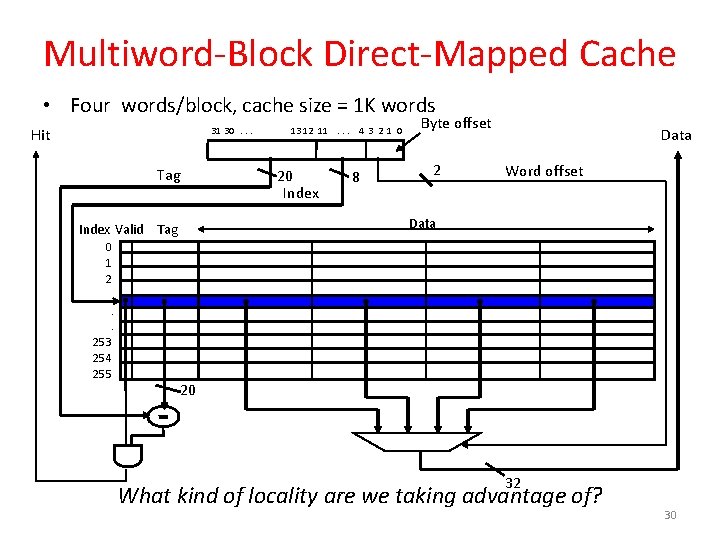
Multiword-Block Direct-Mapped Cache • Four words/block, cache size = 1 K words Hit 31 30. . . Tag 13 12 11. . . 4 3 2 1 0 20 Index 8 Byte offset 2 Data Word offset Data Index Valid Tag 0 1 2. . . 253 254 255 20 32 What kind of locality are we taking advantage of? 30
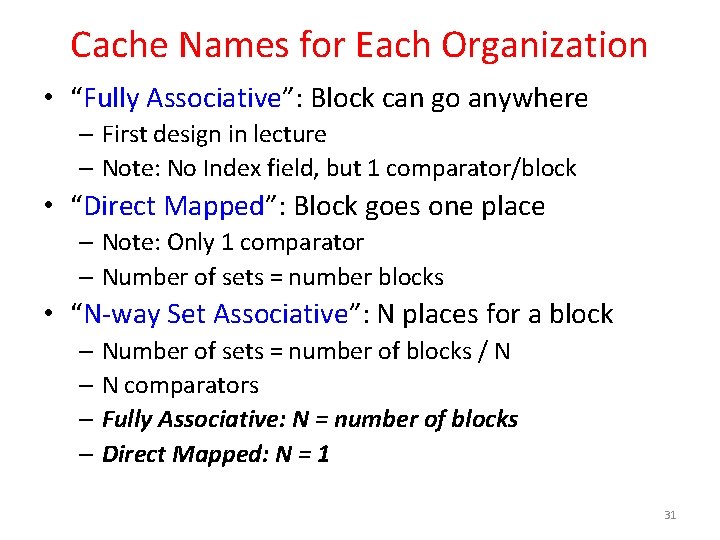
Cache Names for Each Organization • “Fully Associative”: Block can go anywhere – First design in lecture – Note: No Index field, but 1 comparator/block • “Direct Mapped”: Block goes one place – Note: Only 1 comparator – Number of sets = number blocks • “N-way Set Associative”: N places for a block – Number of sets = number of blocks / N – N comparators – Fully Associative: N = number of blocks – Direct Mapped: N = 1 31
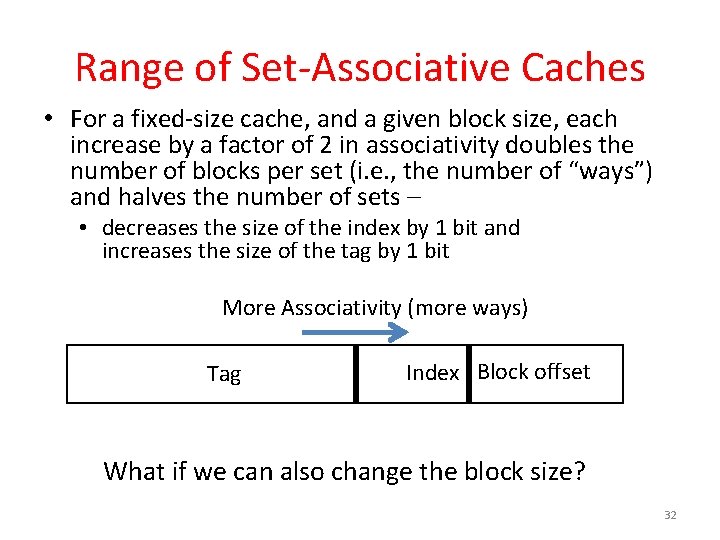
Range of Set-Associative Caches • For a fixed-size cache, and a given block size, each increase by a factor of 2 in associativity doubles the number of blocks per set (i. e. , the number of “ways”) and halves the number of sets – • decreases the size of the index by 1 bit and increases the size of the tag by 1 bit More Associativity (more ways) Tag Index Block offset What if we can also change the block size? 32
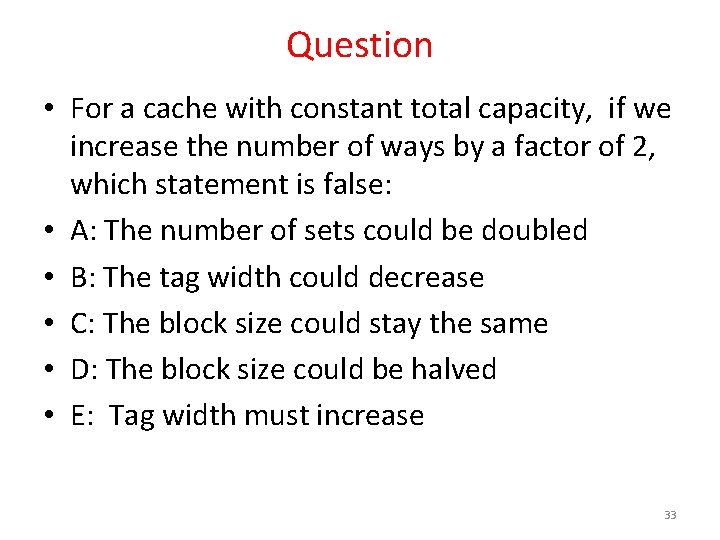
Question • For a cache with constant total capacity, if we increase the number of ways by a factor of 2, which statement is false: • A: The number of sets could be doubled • B: The tag width could decrease • C: The block size could stay the same • D: The block size could be halved • E: Tag width must increase 33
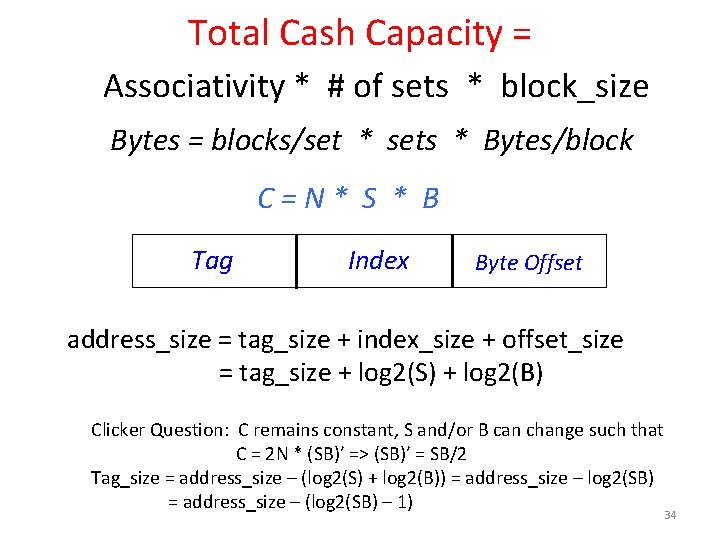
Total Cash Capacity = Associativity * # of sets * block_size Bytes = blocks/set * sets * Bytes/block C=N* S * B Tag Index Byte Offset address_size = tag_size + index_size + offset_size = tag_size + log 2(S) + log 2(B) Clicker Question: C remains constant, S and/or B can change such that C = 2 N * (SB)’ => (SB)’ = SB/2 Tag_size = address_size – (log 2(S) + log 2(B)) = address_size – log 2(SB) = address_size – (log 2(SB) – 1) 34
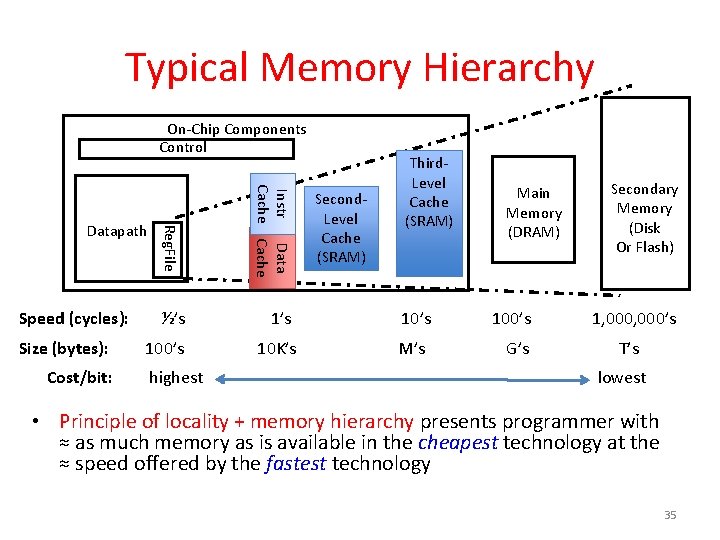
Typical Memory Hierarchy On-Chip Components Control Reg. File Instr Data Cache ½’s 10’s 10 K’s M’s Datapath Speed (cycles): Size (bytes): Cost/bit: Third. Level Cache (SRAM) highest Second. Level Cache (SRAM) Main Memory (DRAM) 100’s G’s Secondary Memory (Disk Or Flash) 1, 000’s T’s lowest • Principle of locality + memory hierarchy presents programmer with ≈ as much memory as is available in the cheapest technology at the ≈ speed offered by the fastest technology 35
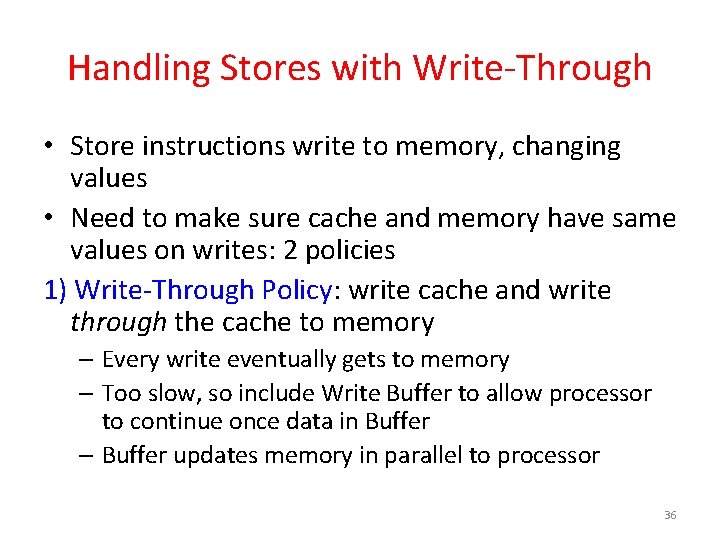
Handling Stores with Write-Through • Store instructions write to memory, changing values • Need to make sure cache and memory have same values on writes: 2 policies 1) Write-Through Policy: write cache and write through the cache to memory – Every write eventually gets to memory – Too slow, so include Write Buffer to allow processor to continue once data in Buffer – Buffer updates memory in parallel to processor 36
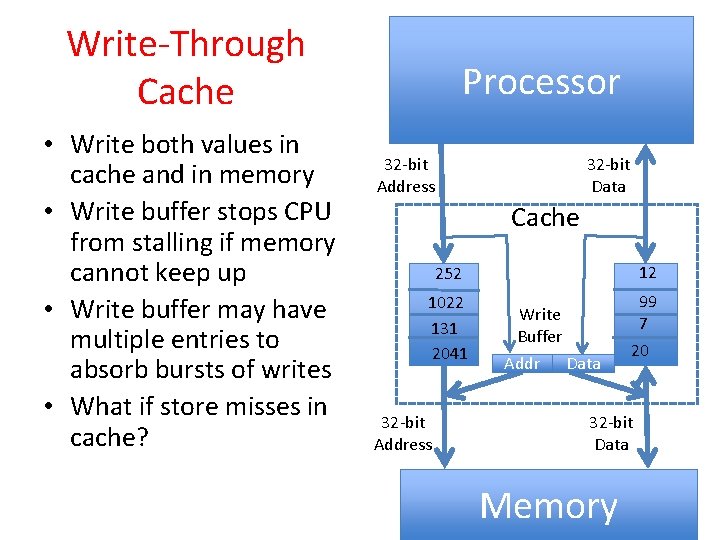
Write-Through Cache • Write both values in cache and in memory • Write buffer stops CPU from stalling if memory cannot keep up • Write buffer may have multiple entries to absorb bursts of writes • What if store misses in cache? Processor 32 -bit Address 32 -bit Data Cache 252 12 1022 131 2041 99 7 32 -bit Address Write Buffer Addr Data 20 32 -bit Data Memory 37
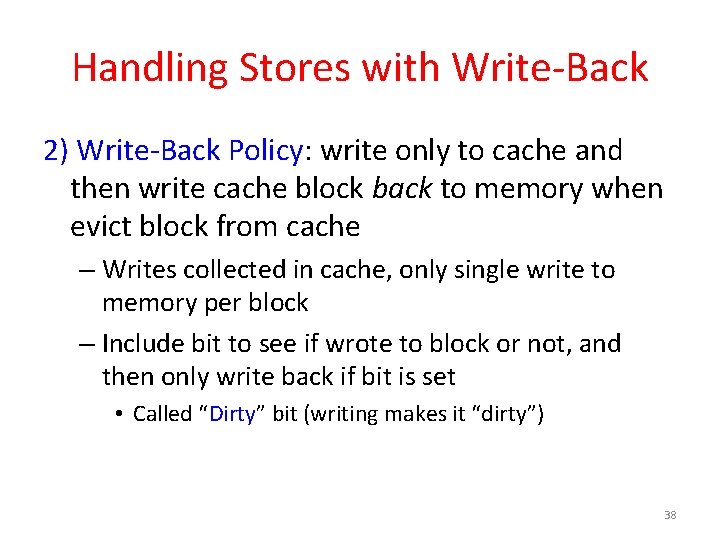
Handling Stores with Write-Back 2) Write-Back Policy: write only to cache and then write cache block back to memory when evict block from cache – Writes collected in cache, only single write to memory per block – Include bit to see if wrote to block or not, and then only write back if bit is set • Called “Dirty” bit (writing makes it “dirty”) 38
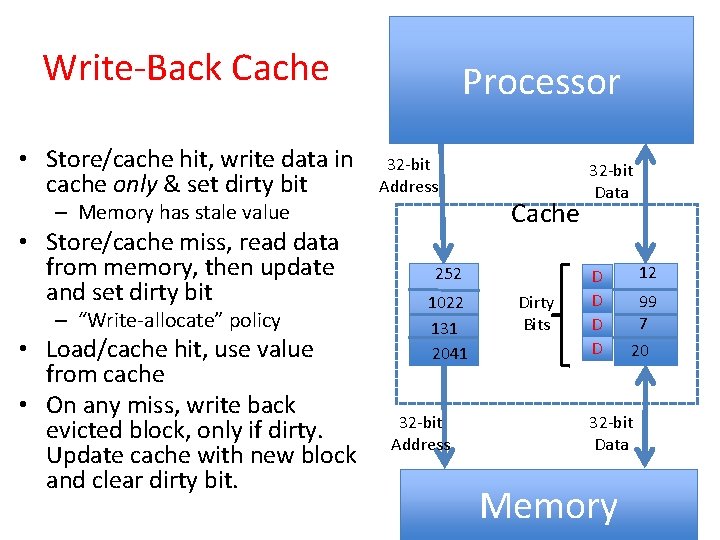
Write-Back Cache • Store/cache hit, write data in cache only & set dirty bit Processor 32 -bit Address – Memory has stale value • Store/cache miss, read data from memory, then update and set dirty bit – “Write-allocate” policy • Load/cache hit, use value from cache • On any miss, write back evicted block, only if dirty. Update cache with new block and clear dirty bit. Cache 252 1022 131 2041 32 -bit Address Dirty Bits 32 -bit Data D D 12 99 7 20 32 -bit Data Memory 39
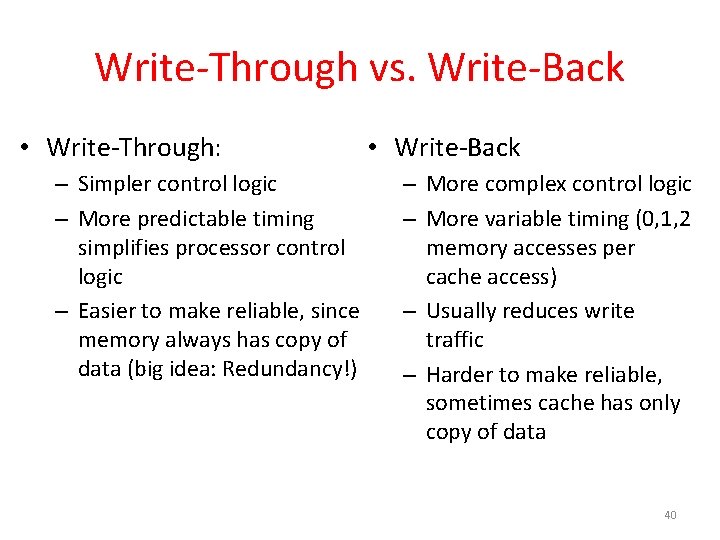
Write-Through vs. Write-Back • Write-Through: – Simpler control logic – More predictable timing simplifies processor control logic – Easier to make reliable, since memory always has copy of data (big idea: Redundancy!) • Write-Back – More complex control logic – More variable timing (0, 1, 2 memory accesses per cache access) – Usually reduces write traffic – Harder to make reliable, sometimes cache has only copy of data 40
And In Conclusion, … • Principle of Locality for Libraries /Computer Memory • Hierarchy of Memories (speed/size/cost per bit) to Exploit Locality • Cache – copy of data lower level in memory hierarchy • Direct Mapped to find block in cache using Tag field and Valid bit for Hit • Cache design choice: • Write-Through vs. Write-Back 41