
CROUZET TOUCH QUICK START SUMMARY Crouzet Automation Crouzet



- Slides: 37
CROUZET TOUCH QUICK START
SUMMARY • • Crouzet Automation - Crouzet Touch Quickstart Hardware and software required Crouzet Touch software installation Connecting the hardware for program transfer How to open a Crouzet Touch program Program transfer Connecting the hardware for use Program example 2
HARDWARE AND SOFTWARE REQUIRED Crouzet Automation - Crouzet Touch Quickstart 3
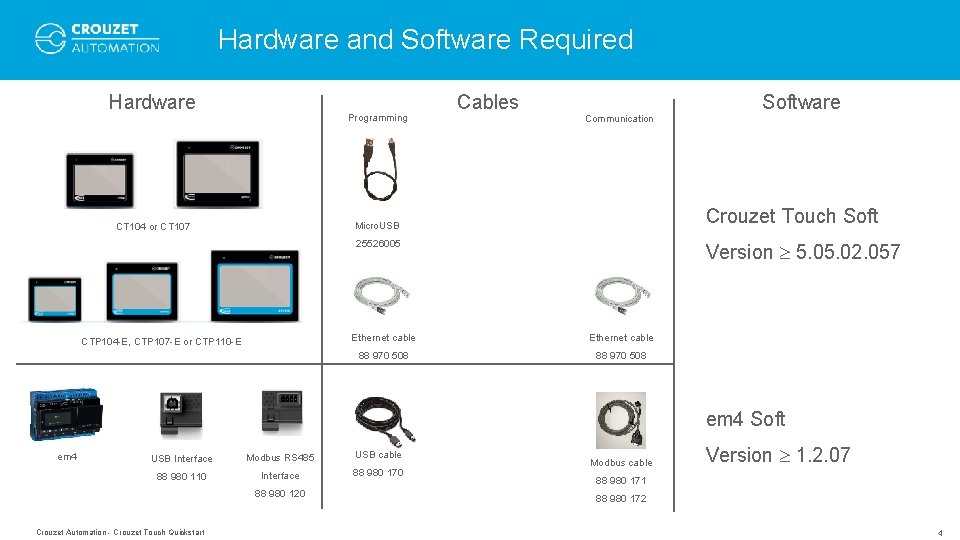
Hardware and Software Required Hardware Programming Cables Communication Crouzet Touch Soft Micro. USB CT 104 or CT 107 25526005 CTP 104 -E, CTP 107 -E or CTP 110 -E Software Version 5. 02. 057 Ethernet cable 88 970 508 em 4 Soft em 4 USB Interface 88 980 110 Modbus RS 485 USB cable Interface 88 980 170 88 980 120 Crouzet Automation - Crouzet Touch Quickstart Modbus cable Version 1. 2. 07 88 980 171 88 980 172 4
CROUZET TOUCH SOFTWARE INSTALLATION Crouzet Automation - Crouzet Touch Quickstart 5
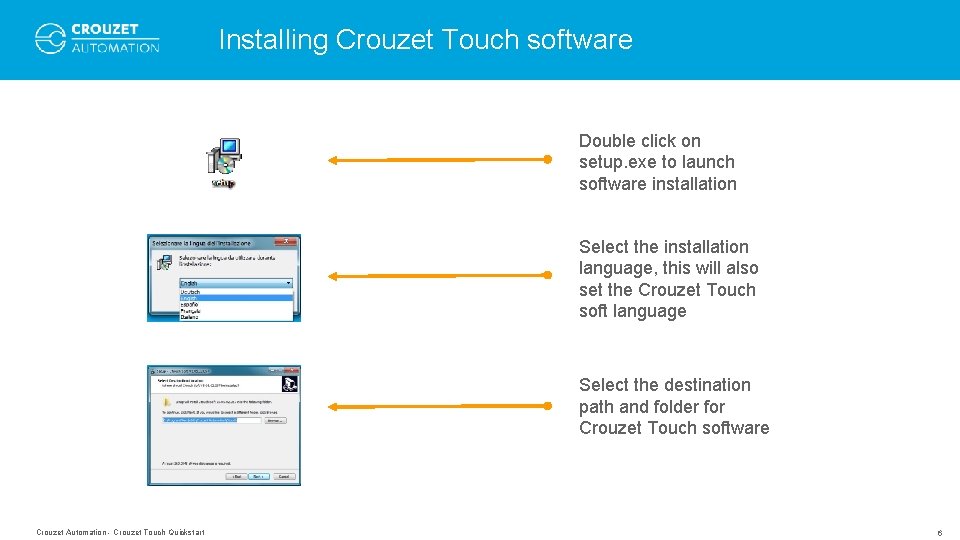
Installing Crouzet Touch software Double click on setup. exe to launch software installation Select the installation language, this will also set the Crouzet Touch soft language Select the destination path and folder for Crouzet Touch software Crouzet Automation - Crouzet Touch Quickstart 6
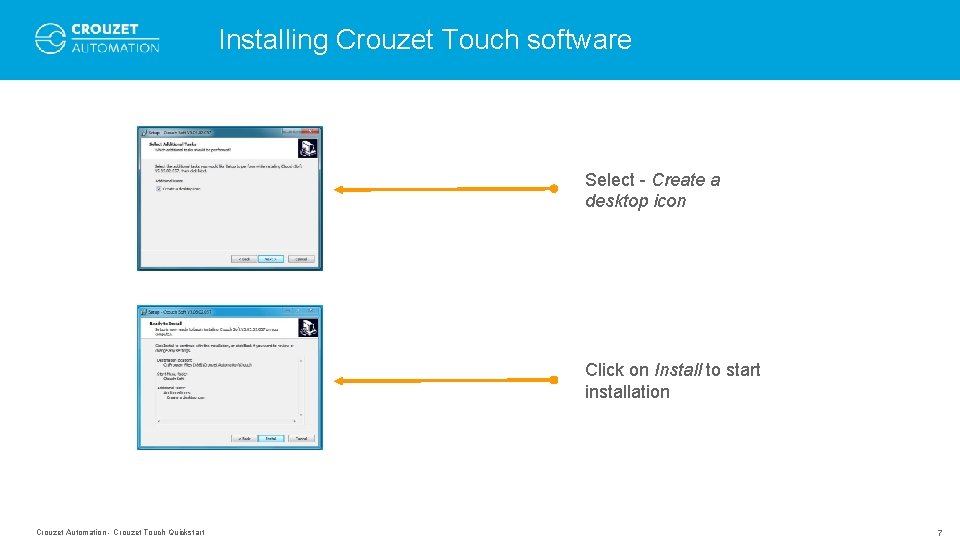
Installing Crouzet Touch software Select - Create a desktop icon Click on Install to start installation Crouzet Automation - Crouzet Touch Quickstart 7
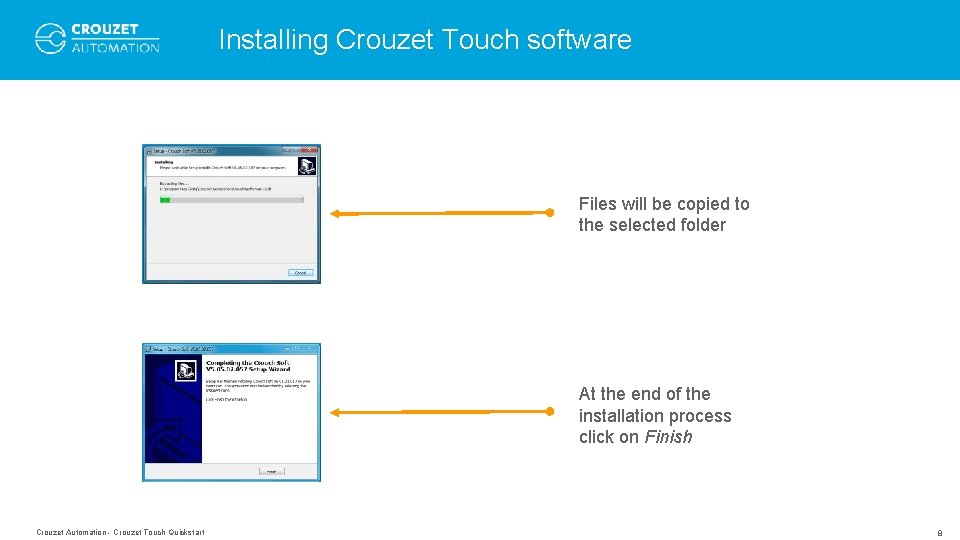
Installing Crouzet Touch software Files will be copied to the selected folder At the end of the installation process click on Finish Crouzet Automation - Crouzet Touch Quickstart 8
CONNECTING THE HARDWARE FOR PROGRAM TRANSFER Crouzet Automation - Crouzet Touch Quickstart 9
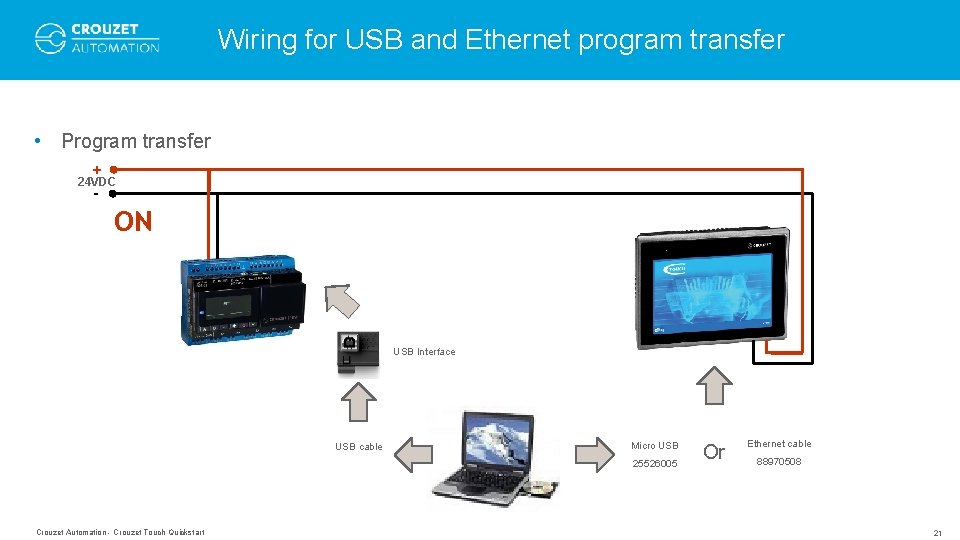
Connecting the hardware for program transfer • Program can be transferred to the Crouzet Touch using a USB-micro. USB cable (Crouzet Touch Essential) or an ethernet cable (Crouzet Touch Performance). • Program transfer with USB does not require any further settings as the USB driver is installed during the Crouzet Touch soft installation. • Program transfer with ethernet requires the configuration of the IP addresses of the PC and Crouzet Touch. The following pages show to set the IP addresses of both devices for Windows 7. Crouzet Automation - Crouzet Touch Quickstart 10
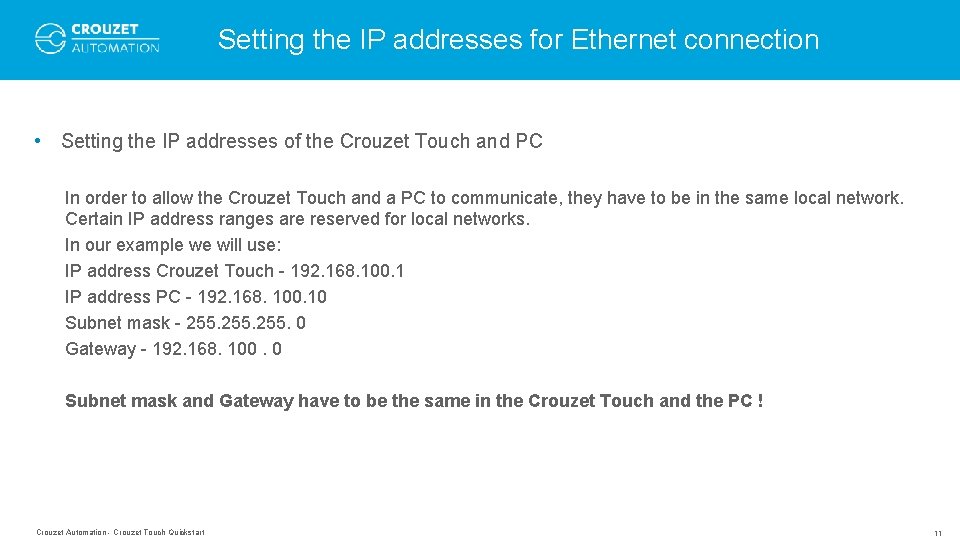
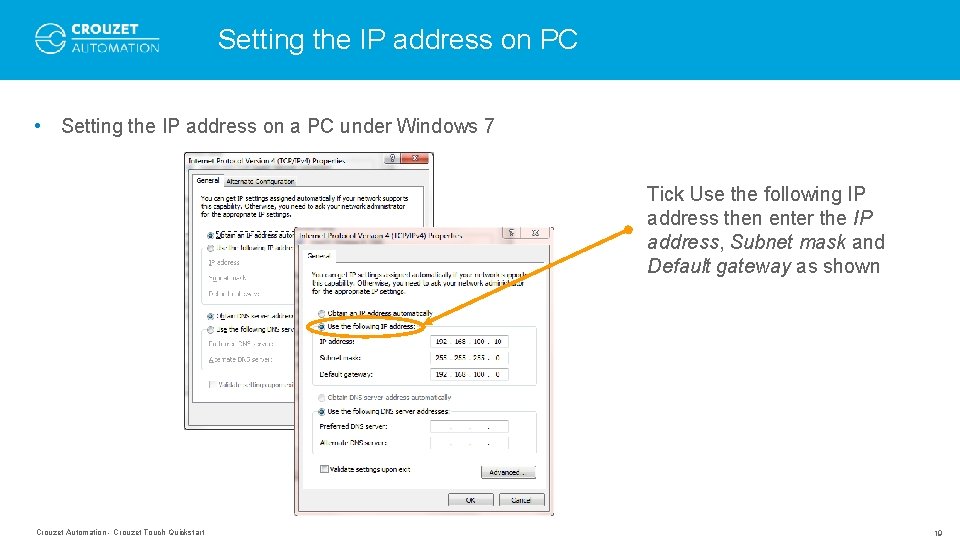
Setting the IP addresses for Ethernet connection • Setting the IP addresses of the Crouzet Touch and PC In order to allow the Crouzet Touch and a PC to communicate, they have to be in the same local network. Certain IP address ranges are reserved for local networks. In our example we will use: IP address Crouzet Touch - 192. 168. 100. 1 IP address PC - 192. 168. 100. 10 Subnet mask - 255. 0 Gateway - 192. 168. 100. 0 Subnet mask and Gateway have to be the same in the Crouzet Touch and the PC ! Crouzet Automation - Crouzet Touch Quickstart 11
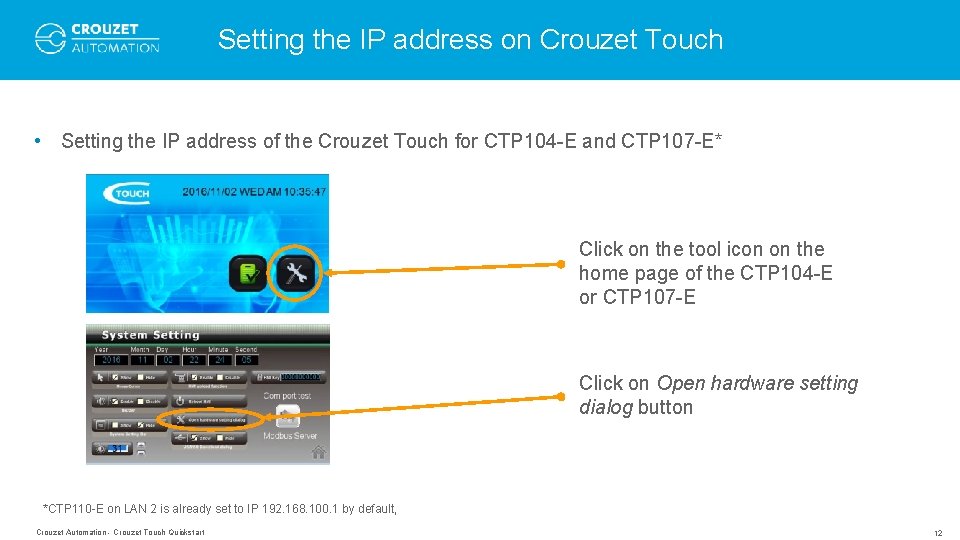
Setting the IP address on Crouzet Touch • Setting the IP address of the Crouzet Touch for CTP 104 -E and CTP 107 -E* Click on the tool icon on the home page of the CTP 104 -E or CTP 107 -E Click on Open hardware setting dialog button *CTP 110 -E on LAN 2 is already set to IP 192. 168. 100. 1 by default, Crouzet Automation - Crouzet Touch Quickstart 12
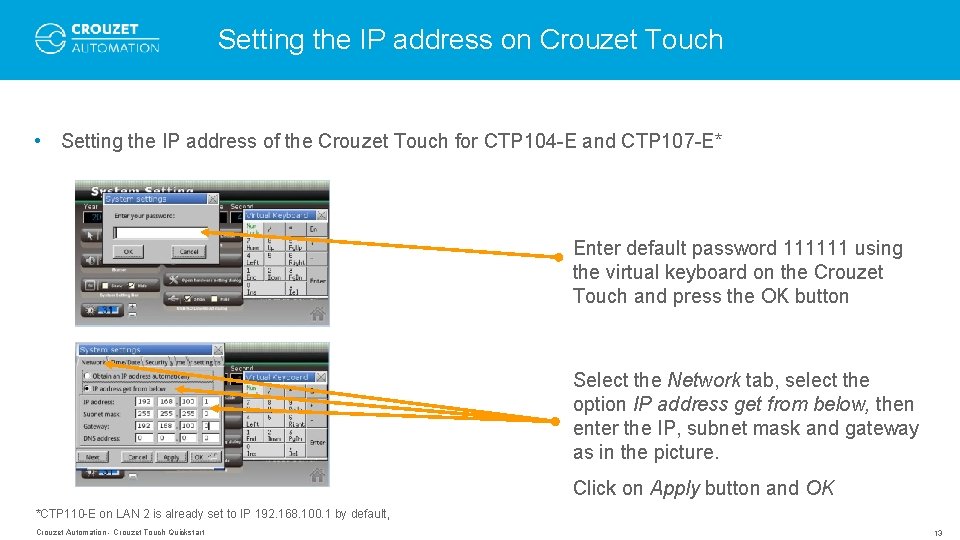
Setting the IP address on Crouzet Touch • Setting the IP address of the Crouzet Touch for CTP 104 -E and CTP 107 -E* Enter default password 111111 using the virtual keyboard on the Crouzet Touch and press the OK button Select the Network tab, select the option IP address get from below, then enter the IP, subnet mask and gateway as in the picture. Click on Apply button and OK *CTP 110 -E on LAN 2 is already set to IP 192. 168. 100. 1 by default, Crouzet Automation - Crouzet Touch Quickstart 13
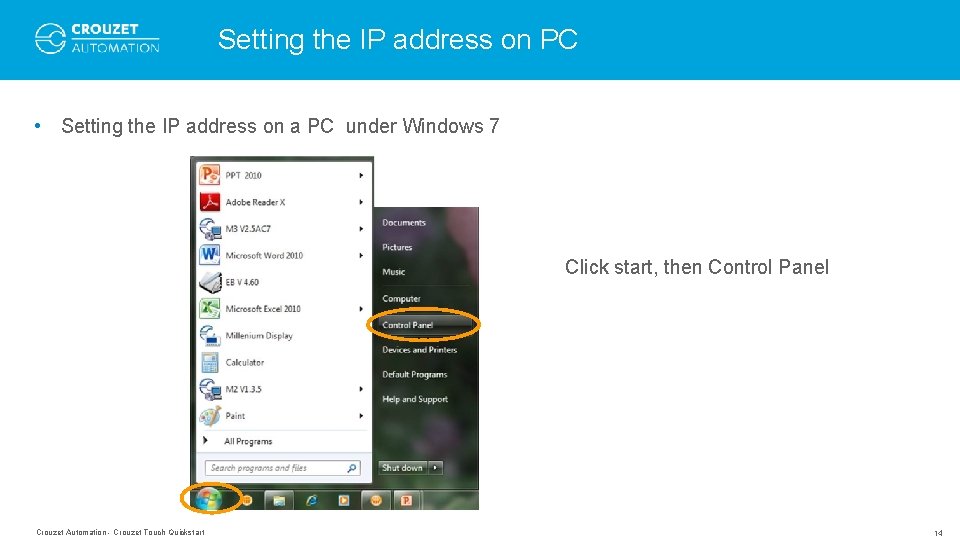
Setting the IP address on PC • Setting the IP address on a PC under Windows 7 Click start, then Control Panel Crouzet Automation - Crouzet Touch Quickstart 14
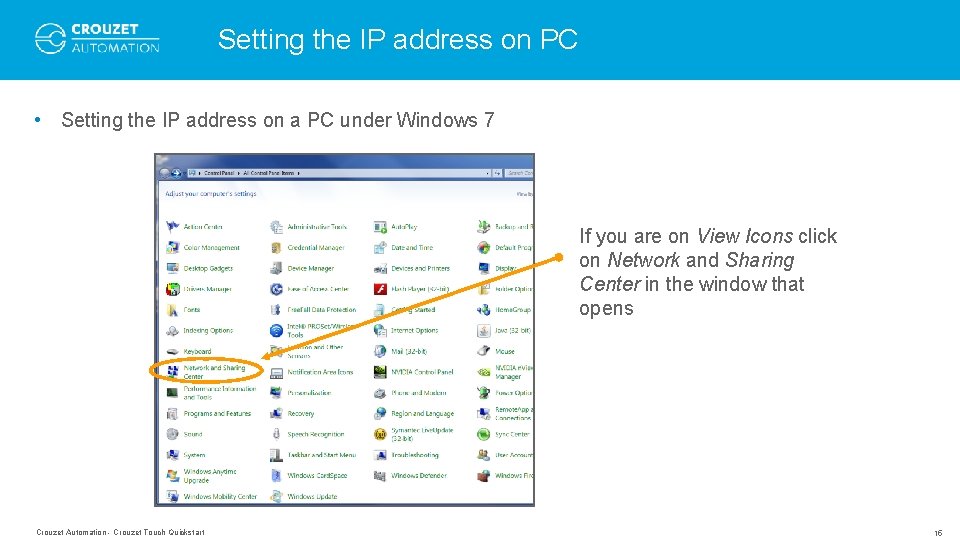
Setting the IP address on PC • Setting the IP address on a PC under Windows 7 If you are on View Icons click on Network and Sharing Center in the window that opens Crouzet Automation - Crouzet Touch Quickstart 15
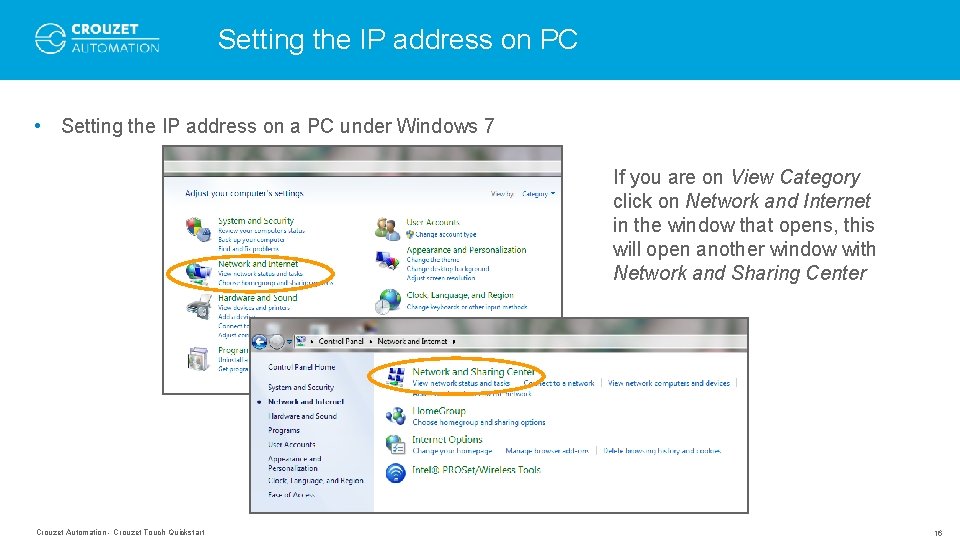
Setting the IP address on PC • Setting the IP address on a PC under Windows 7 If you are on View Category click on Network and Internet in the window that opens, this will open another window with Network and Sharing Center Crouzet Automation - Crouzet Touch Quickstart 16
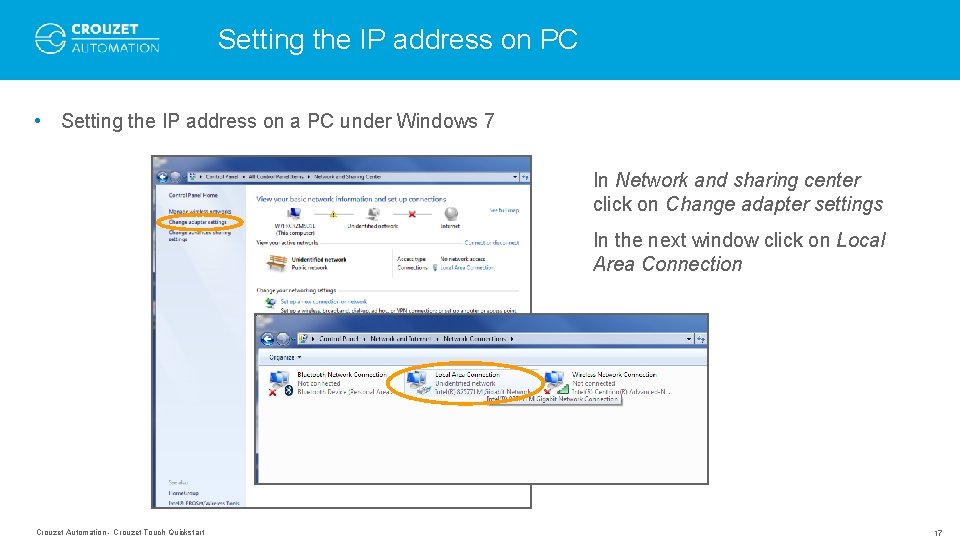
Setting the IP address on PC • Setting the IP address on a PC under Windows 7 In Network and sharing center click on Change adapter settings In the next window click on Local Area Connection Crouzet Automation - Crouzet Touch Quickstart 17
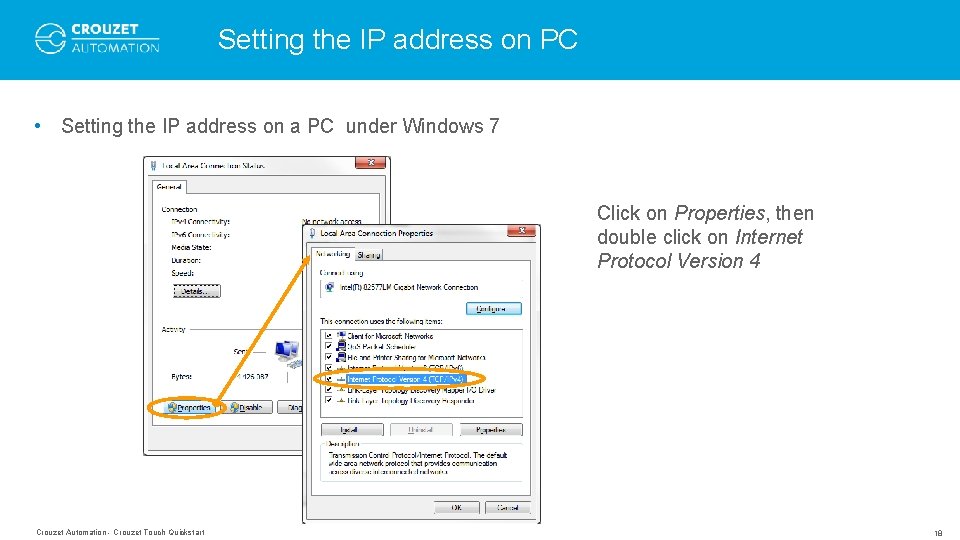
Setting the IP address on PC • Setting the IP address on a PC under Windows 7 Click on Properties, then double click on Internet Protocol Version 4 Crouzet Automation - Crouzet Touch Quickstart 18
Setting the IP address on PC • Setting the IP address on a PC under Windows 7 Tick Use the following IP address then enter the IP address, Subnet mask and Default gateway as shown Crouzet Automation - Crouzet Touch Quickstart 19
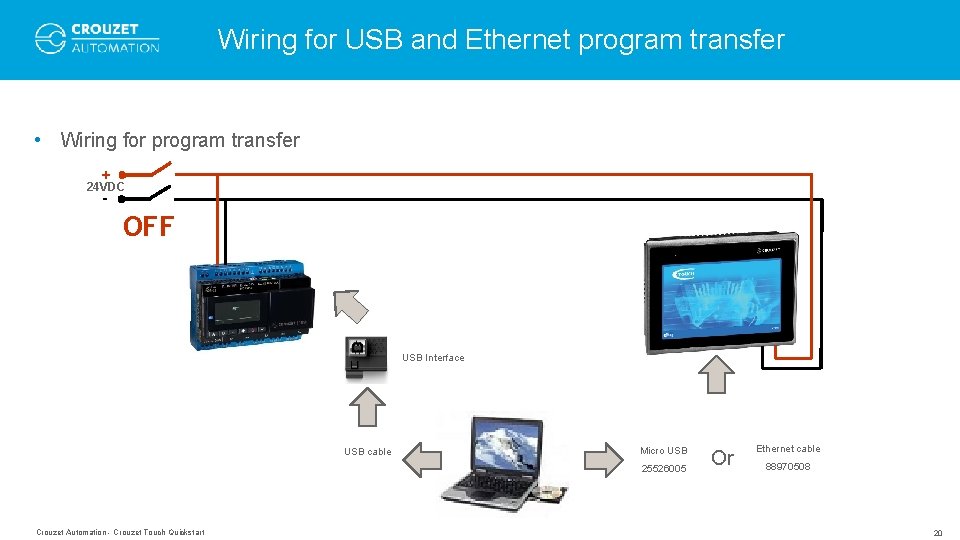
Wiring for USB and Ethernet program transfer • Wiring for program transfer + 24 VDC - OFF USB Interface USB cable Micro USB 25526005 Crouzet Automation - Crouzet Touch Quickstart Or Ethernet cable 88970508 20
Wiring for USB and Ethernet program transfer • Program transfer + 24 VDC - ON USB Interface USB cable Micro USB 25526005 Crouzet Automation - Crouzet Touch Quickstart Or Ethernet cable 88970508 21
HOW TO OPEN A CTOUCH PROGRAM Crouzet Automation - Crouzet Touch Quickstart 22
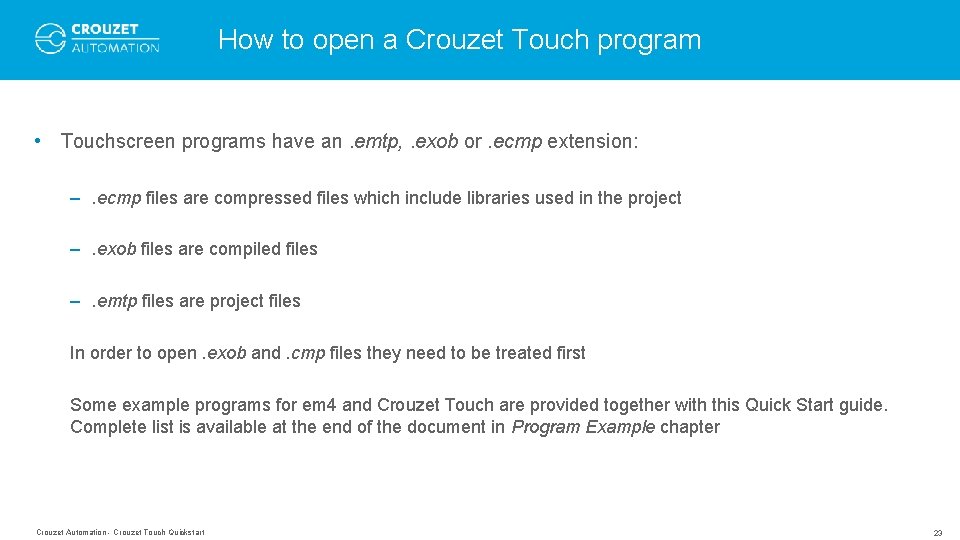
How to open a Crouzet Touch program • Touchscreen programs have an. emtp, . exob or. ecmp extension: –. ecmp files are compressed files which include libraries used in the project –. exob files are compiled files –. emtp files are project files In order to open. exob and. cmp files they need to be treated first Some example programs for em 4 and Crouzet Touch are provided together with this Quick Start guide. Complete list is available at the end of the document in Program Example chapter Crouzet Automation - Crouzet Touch Quickstart 23
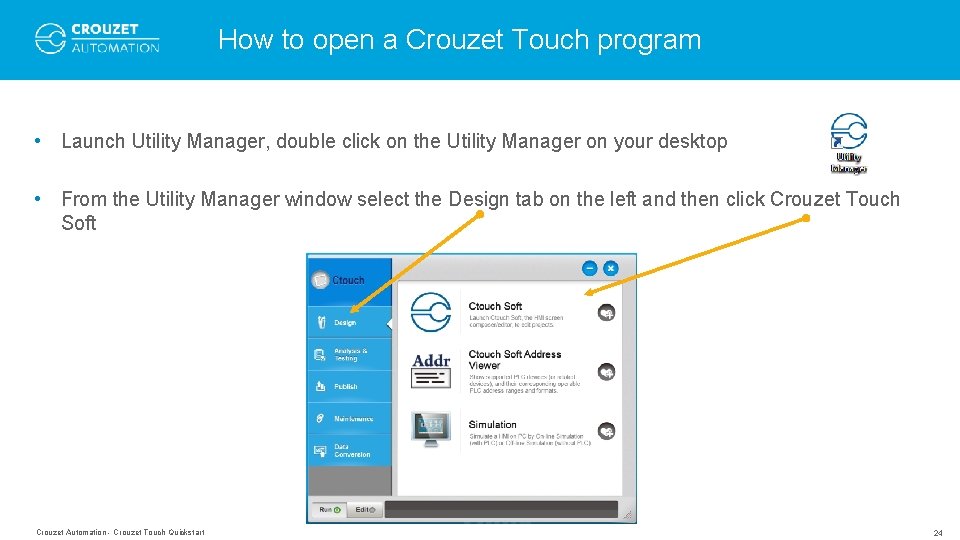
How to open a Crouzet Touch program • Launch Utility Manager, double click on the Utility Manager on your desktop • From the Utility Manager window select the Design tab on the left and then click Crouzet Touch Soft Crouzet Automation - Crouzet Touch Quickstart 24
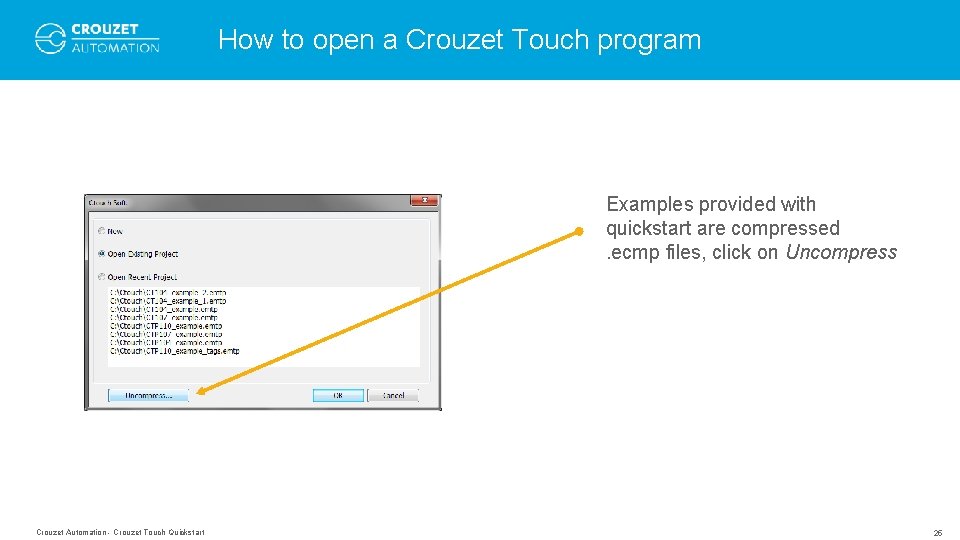
How to open a Crouzet Touch program Examples provided with quickstart are compressed. ecmp files, click on Uncompress Crouzet Automation - Crouzet Touch Quickstart 25
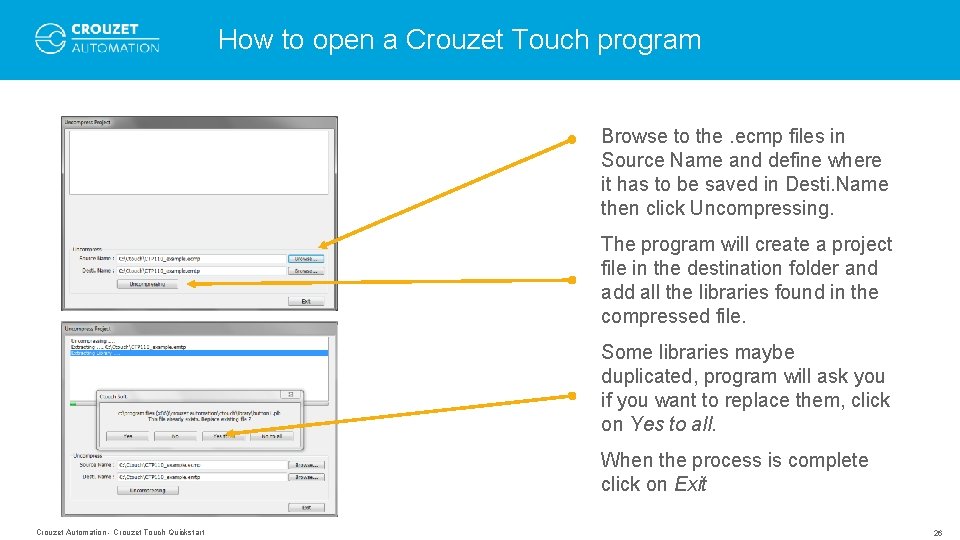
How to open a Crouzet Touch program Browse to the. ecmp files in Source Name and define where it has to be saved in Desti. Name then click Uncompressing. The program will create a project file in the destination folder and add all the libraries found in the compressed file. Some libraries maybe duplicated, program will ask you if you want to replace them, click on Yes to all. When the process is complete click on Exit Crouzet Automation - Crouzet Touch Quickstart 26
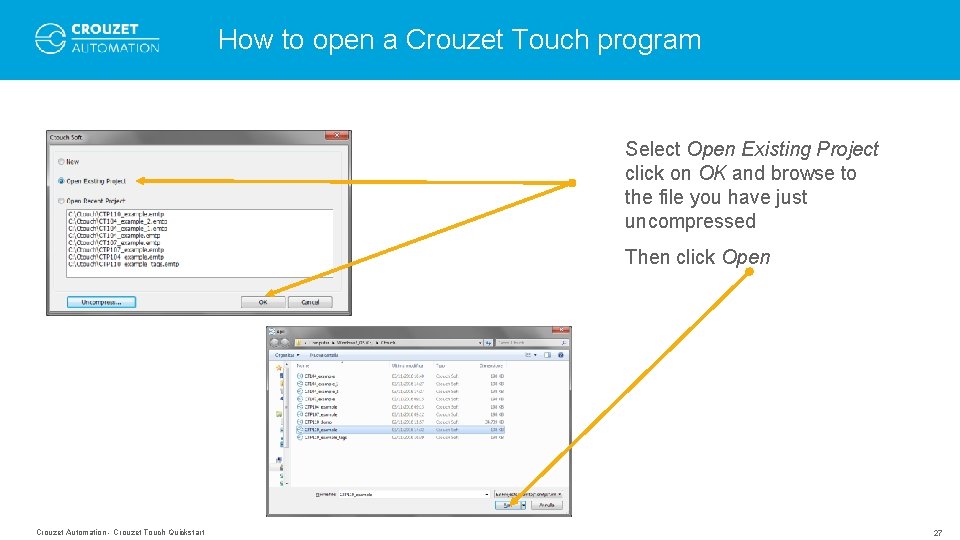
How to open a Crouzet Touch program Select Open Existing Project click on OK and browse to the file you have just uncompressed Then click Open Crouzet Automation - Crouzet Touch Quickstart 27
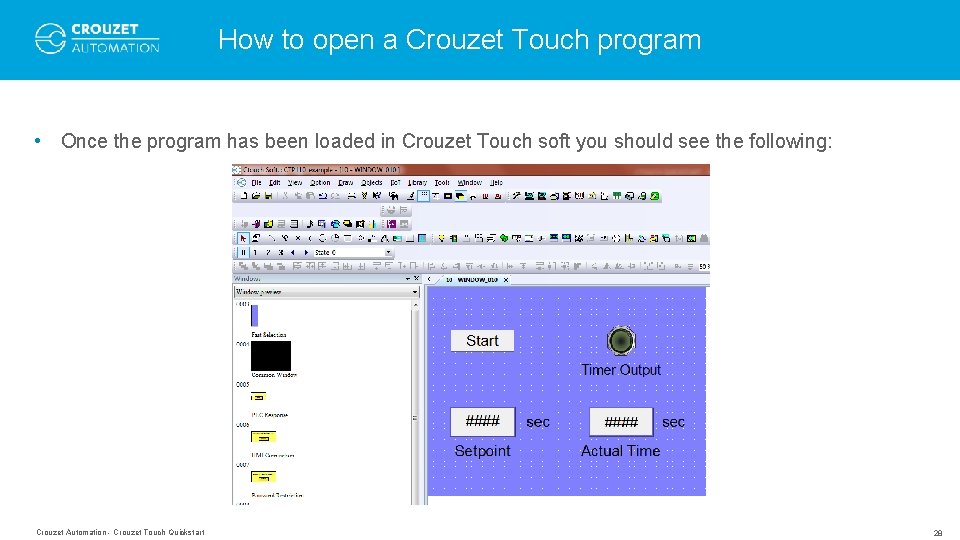
How to open a Crouzet Touch program • Once the program has been loaded in Crouzet Touch soft you should see the following: Crouzet Automation - Crouzet Touch Quickstart 28
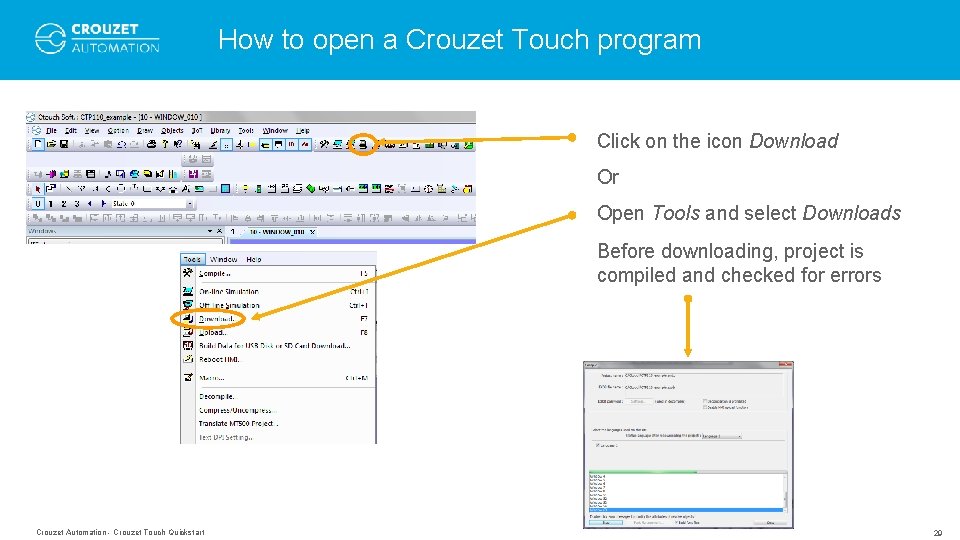
How to open a Crouzet Touch program Click on the icon Download Or Open Tools and select Downloads Before downloading, project is compiled and checked for errors Crouzet Automation - Crouzet Touch Quickstart 29
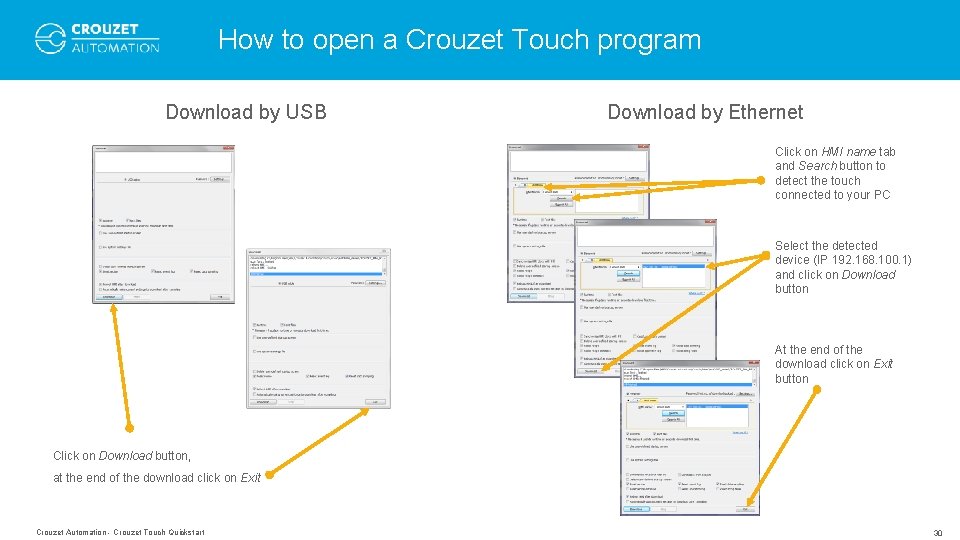
How to open a Crouzet Touch program Download by USB Download by Ethernet Click on HMI name tab and Search button to detect the touch connected to your PC Select the detected device (IP 192. 168. 100. 1) and click on Download button At the end of the download click on Exit button Click on Download button, at the end of the download click on Exit Crouzet Automation - Crouzet Touch Quickstart 30
CONNECTING HARDWARE FOR USE Crouzet Automation - Crouzet Touch Quickstart 31
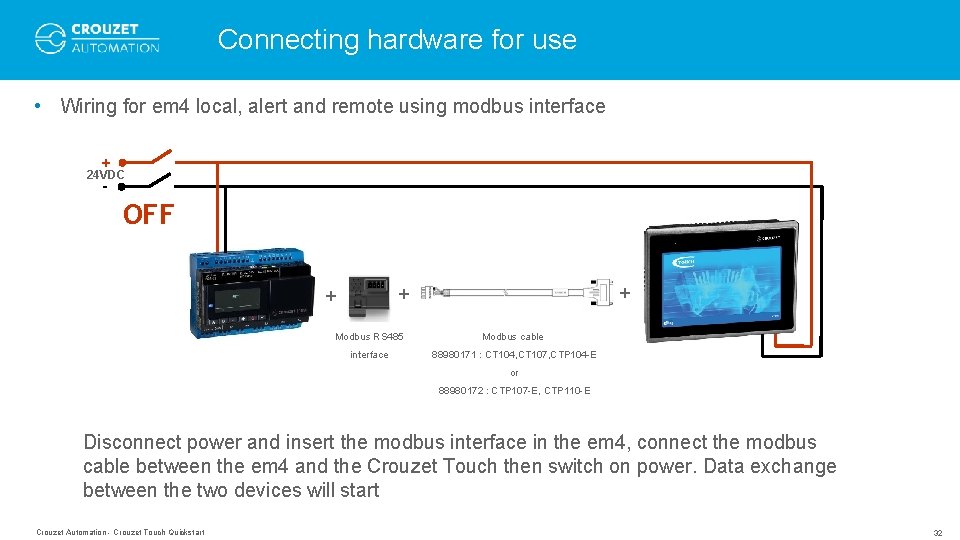
Connecting hardware for use • Wiring for em 4 local, alert and remote using modbus interface + 24 VDC - OFF + + + Modbus RS 485 Modbus cable interface 88980171 : CT 104, CT 107, CTP 104 -E or 88980172 : CTP 107 -E, CTP 110 -E Disconnect power and insert the modbus interface in the em 4, connect the modbus cable between the em 4 and the Crouzet Touch then switch on power. Data exchange between the two devices will start Crouzet Automation - Crouzet Touch Quickstart 32
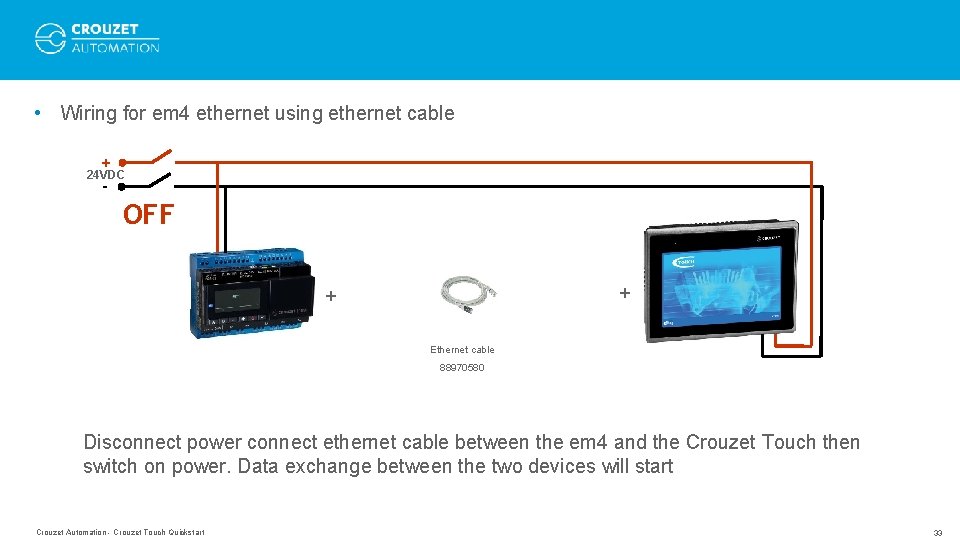
• Wiring for em 4 ethernet using ethernet cable + 24 VDC - OFF + + Ethernet cable 88970580 Disconnect power connect ethernet cable between the em 4 and the Crouzet Touch then switch on power. Data exchange between the two devices will start Crouzet Automation - Crouzet Touch Quickstart 33
PROGRAM EXAMPLE Crouzet Automation - Crouzet Touch Quickstart 34
Program example • Sample programs for different type of Crouzet Touch and em 4 are available together with this Quickstart guide – em 4 programs: • • em 4 local_example. pm 4 em 4 alert 3 G_example. pm 4 em 4 remote_example. pm 4 em 4 ethernet_example. pm 4 – Crouzet Touch programs (compressed file): • • • CT 104_example. ecmp CT 107_example. ecmp CTP 104_example. ecmp CTP 107_example. ecmp CTP 110_example. ecmp Crouzet Automation - Crouzet Touch Quickstart 35
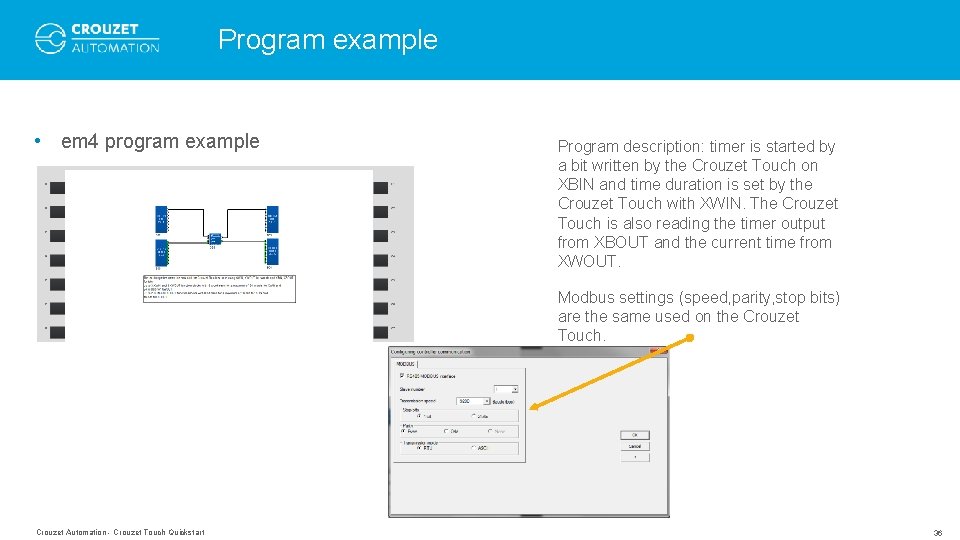
Program example • em 4 program example Program description: timer is started by a bit written by the Crouzet Touch on XBIN and time duration is set by the Crouzet Touch with XWIN. The Crouzet Touch is also reading the timer output from XBOUT and the current time from XWOUT. Modbus settings (speed, parity, stop bits) are the same used on the Crouzet Touch. Crouzet Automation - Crouzet Touch Quickstart 36
WWW. CROUZET-AUTOMATION. COM Photo credit: Gonko, i. Stock, Lattard, all rights reserved THANK YOU FOR YOUR ATTENTION