
Creating Table Contents Database Transactions Query Flashbacks Summary
Creating Table Contents �Database Transactions �Query Flashbacks �Summary 1/2/2022 Course: Data base Technologies, Instructor: Dr Ali Daud 1
Creating Table Contents �Transaction Isolation Levels �The transaction isolation level is the degree to which the changes made by one transaction are separated from other transactions running concurrently �Before you see the details of the various transaction isolation levels, you need to understand the types of problems that may occur when current transactions attempt to access the same rows in a table � In 1/2/2022 the following bullets, you’ll see examples of two concurrent transactions that are accessing the same rows to illustrate � the three types of potential transaction processing problems Course: Data base Technologies, Instructor: Dr Ali Daud 2
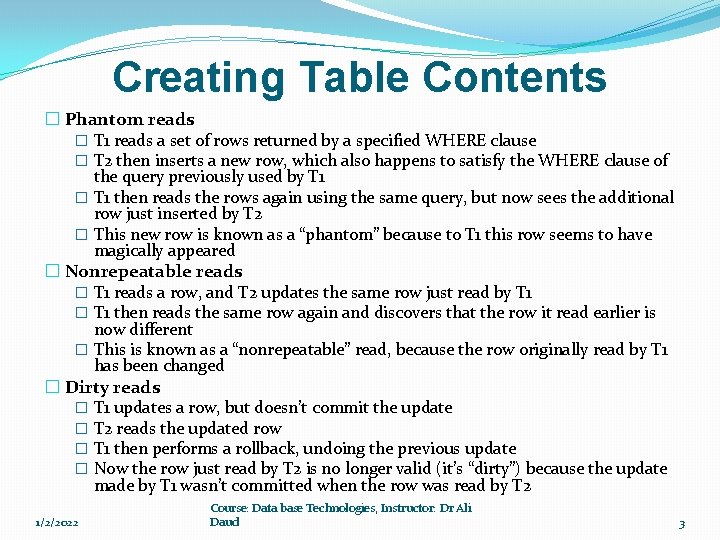
Creating Table Contents � Phantom reads � T 1 reads a set of rows returned by a specified WHERE clause � T 2 then inserts a new row, which also happens to satisfy the WHERE clause of the query previously used by T 1 � T 1 then reads the rows again using the same query, but now sees the additional row just inserted by T 2 � This new row is known as a “phantom” because to T 1 this row seems to have magically appeared � Nonrepeatable reads � T 1 reads a row, and T 2 updates the same row just read by T 1 � T 1 then reads the same row again and discovers that the row it read earlier is now different � This is known as a “nonrepeatable” read, because the row originally read by T 1 has been changed � Dirty reads � T 1 updates a row, but doesn’t commit the update � T 2 reads the updated row � T 1 then performs a rollback, undoing the previous update � Now the row just read by T 2 is no longer valid (it’s “dirty”) because the update made by T 1 wasn’t committed when the row was read by T 2 1/2/2022 Course: Data base Technologies, Instructor: Dr Ali Daud 3
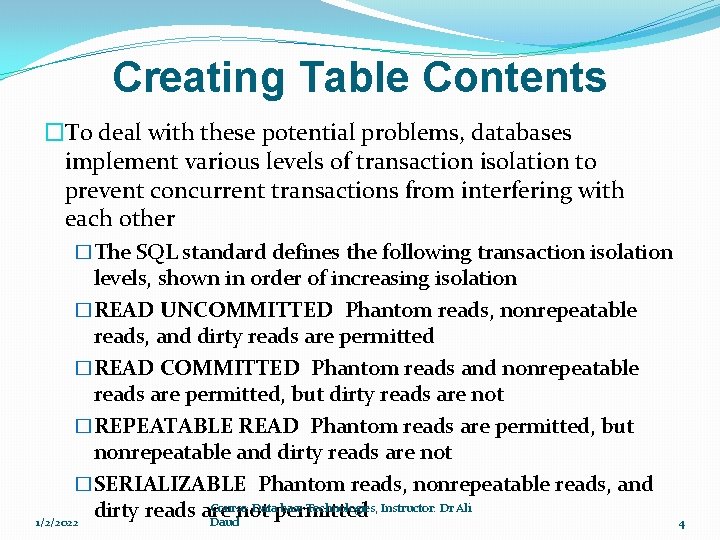
Creating Table Contents �To deal with these potential problems, databases implement various levels of transaction isolation to prevent concurrent transactions from interfering with each other �The SQL standard defines the following transaction isolation levels, shown in order of increasing isolation �READ UNCOMMITTED Phantom reads, nonrepeatable reads, and dirty reads are permitted �READ COMMITTED Phantom reads and nonrepeatable reads are permitted, but dirty reads are not �REPEATABLE READ Phantom reads are permitted, but nonrepeatable and dirty reads are not �SERIALIZABLE Phantom reads, nonrepeatable reads, and Course: Datapermitted base Technologies, Instructor: Dr Ali dirty reads are not 1/2/2022 Daud 4

Creating Table Contents �The Oracle database supports the READ COMMITTED and SERIALIZABLE transaction isolation levels �It doesn’t support READ UNCOMMITTED or REPEATABLE READ levels �The default transaction isolation level defined by the SQL standard is SERIALIZABLE �but the default used by the Oracle database is READ COMMITTED �which is usually acceptable for nearly all applications 1/2/2022 Course: Data base Technologies, Instructor: Dr Ali Daud 5
Creating Table Contents �Caution Although you can use SERIALIZABLE with the Oracle database �it may increase the time your SQL statements take to complete �so you should only use SERILIZABLE if you absolutely have to �You set the transaction isolation level using the SET TRANSACTION statement �For example, the following statement sets the transaction isolation level to SERIALIZABLE �SET TRANSACTION ISOLATION LEVEL SERIALIZABLE; �You’ll see an example of a transaction that uses the isolation level Course: of SERIALIZABLE next Data base Technologies, Instructor: Dr Ali 1/2/2022 Daud 6
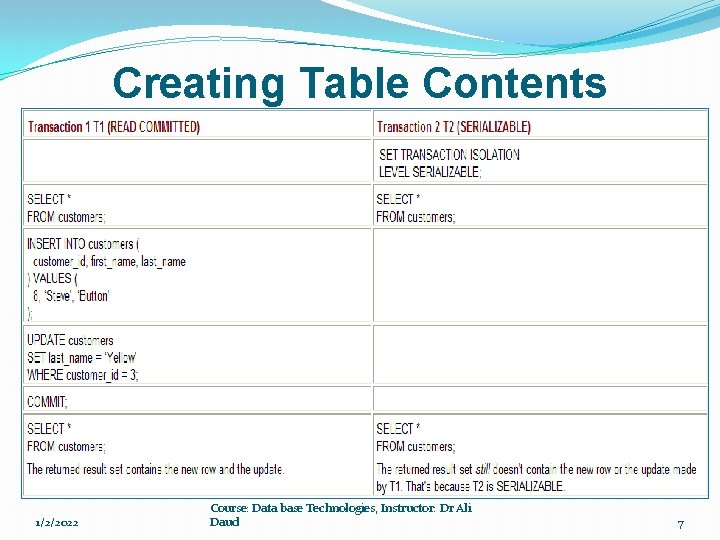
Creating Table Contents A SERIALIZABLE Transaction Example � An example that shows the effect of setting the � transaction isolation level to SERIALIZABLE � The example uses two transactions named T 1 and T 2 � T 1 has the default isolation level of READ COMMITTED � T 2 has a transaction isolation level of SERIALIZABLE � T 1 and T 2 will read the rows in the customers table, and then � T 1 will insert a new row and update an existing row in the customers table � Because T 2 is SERIALIZABLE, it doesn’t “see” the inserted row or the update made � to the existing row by T 1, even after T 1 commits changes � That’s because reading the inserted row would be a phantom read � and reading the update would be a nonrepeatable read � which is not permitted by SERIALIZABLE transactions � Table shows the SQL statements that make up T 1 and T 2 in the interleaved order in which the statements are to be performed 1/2/2022 Course: Data base Technologies, Instructor: Dr Ali Daud 7
Creating Table Contents �Query Flashbacks �If you mistakenly commit changes and you want to view rows as they originally were �you can use a query flashback �You can then use the results of a query flashback to manually change rows back to their original values if you need to �In addition, flashbacks can be based on a datetime or system change number (SCN) �The database uses SCNs to track changes made to data, �and you can use them to flash back to a particular SCN in the database 1/2/2022 Course: Data base Technologies, Instructor: Dr Ali Daud 8
Creating Table Contents �Granting the Privilege for Using Flashbacks �Flashbacks use the PL/SQL DBMS_FLASHBACK package � for which you must have the EXECUTE privilege � The following example connects as the sys user and grants the EXECUTE privilege on DBMS_FLASHBACK to the store user �CONNECT sys/change_on_install AS sysdba �GRANT EXECUTE ON SYS. DBMS_FLASHBACK TO store; � Note 1/2/2022 Speak with your DBA if you get errors when performing these statements � You’ll learn more about PL/SQL packages in Chapter 11 Course: Data base Technologies, Instructor: Dr Ali Daud 9
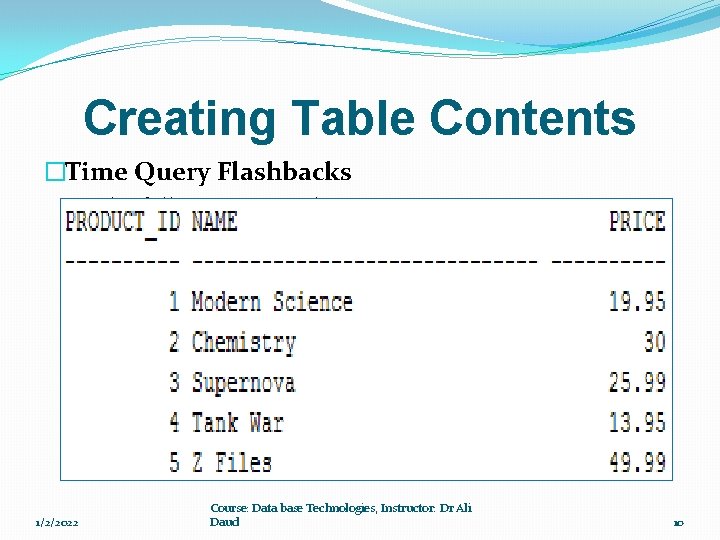
Creating Table Contents �Time Query Flashbacks �The following example connects as store and retrieves the product_id, name, and price columns for the first five rows from the products table: �CONNECT store/store_password SELECT product_id, name, price FROM products WHERE product_id <= 5; 1/2/2022 Course: Data base Technologies, Instructor: Dr Ali Daud 10
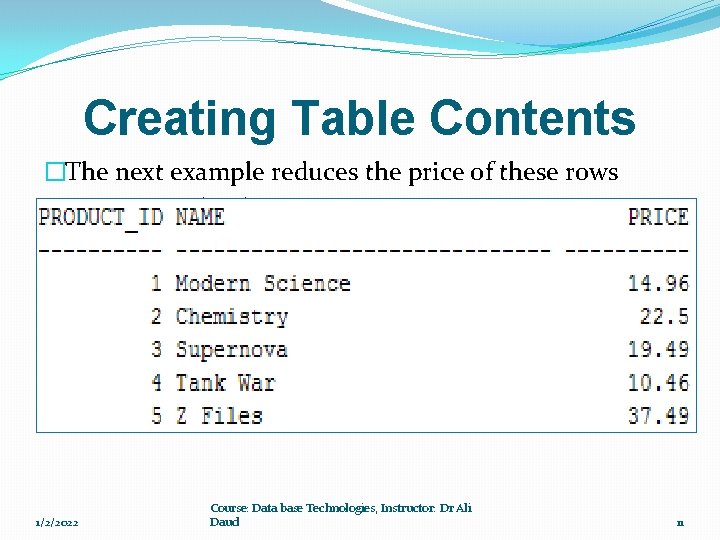
Creating Table Contents �The next example reduces the price of these rows �commits the change and �retrieves the rows again so you can see the new prices � UPDATE products SET price = price * 0. 75 WHERE product_id <= 5; COMMIT; SELECT product_id, name, price FROM products WHERE product_id <= 5; 1/2/2022 Course: Data base Technologies, Instructor: Dr Ali Daud 11
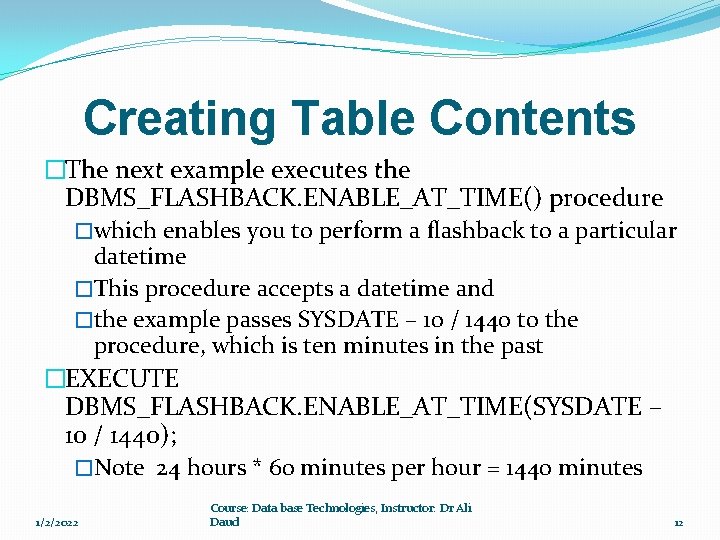
Creating Table Contents �The next example executes the DBMS_FLASHBACK. ENABLE_AT_TIME() procedure �which enables you to perform a flashback to a particular datetime �This procedure accepts a datetime and �the example passes SYSDATE – 10 / 1440 to the procedure, which is ten minutes in the past �EXECUTE DBMS_FLASHBACK. ENABLE_AT_TIME(SYSDATE – 10 / 1440); �Note 24 hours * 60 minutes per hour = 1440 minutes 1/2/2022 Course: Data base Technologies, Instructor: Dr Ali Daud 12
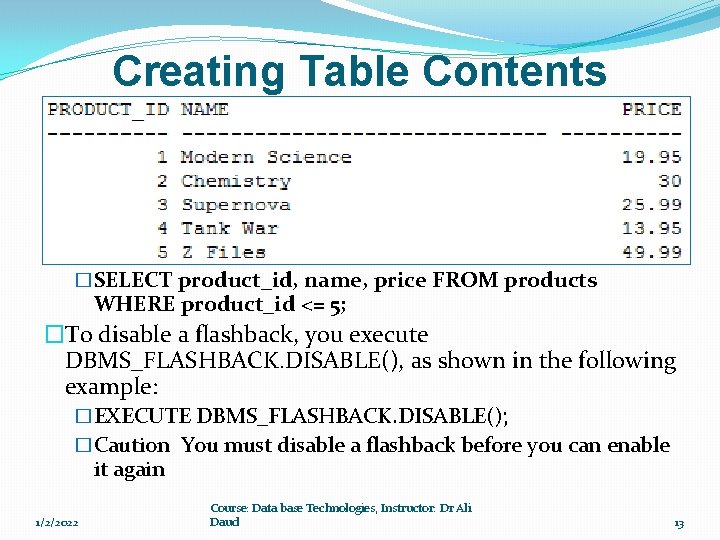
Creating Table Contents �Any queries you execute now will display the rows as they were ten minutes ago �Assuming you performed the earlier UPDATE less than ten minutes ago �the following query will display the prices as they were before you updated them �SELECT product_id, name, price FROM products WHERE product_id <= 5; �To disable a flashback, you execute DBMS_FLASHBACK. DISABLE(), as shown in the following example: �EXECUTE DBMS_FLASHBACK. DISABLE(); �Caution You must disable a flashback before you can enable it again 1/2/2022 Course: Data base Technologies, Instructor: Dr Ali Daud 13
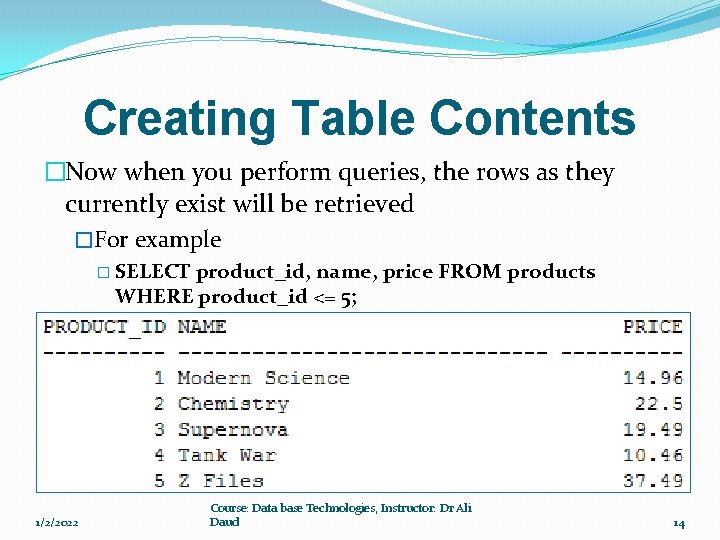
Creating Table Contents �Now when you perform queries, the rows as they currently exist will be retrieved �For example � SELECT product_id, name, price FROM products WHERE product_id <= 5; 1/2/2022 Course: Data base Technologies, Instructor: Dr Ali Daud 14
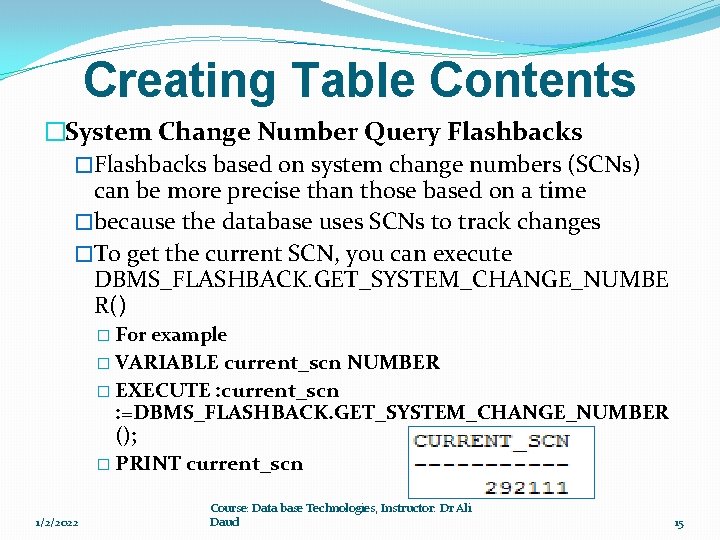
Creating Table Contents �System Change Number Query Flashbacks �Flashbacks based on system change numbers (SCNs) can be more precise than those based on a time �because the database uses SCNs to track changes �To get the current SCN, you can execute DBMS_FLASHBACK. GET_SYSTEM_CHANGE_NUMBE R() � For example � VARIABLE current_scn NUMBER � EXECUTE : current_scn : =DBMS_FLASHBACK. GET_SYSTEM_CHANGE_NUMBER (); � PRINT current_scn 1/2/2022 Course: Data base Technologies, Instructor: Dr Ali Daud 15
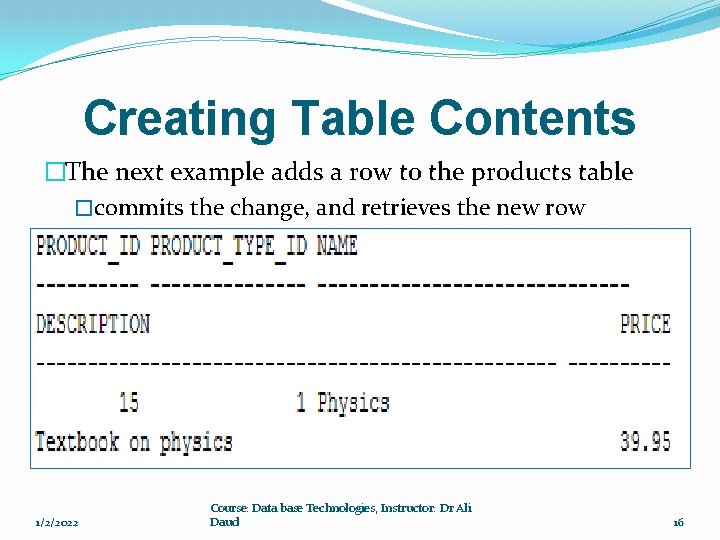
Creating Table Contents �The next example adds a row to the products table �commits the change, and retrieves the new row � INSERT INTO products ( product_id, product_type_id, name, description, price ) VALUES ( 15, 1, 'Physics', 'Textbook on physics', 39. 95 ); COMMIT; SELECT * FROM products WHERE product_id = 15; 1/2/2022 Course: Data base Technologies, Instructor: Dr Ali Daud 16
Creating Table Contents �The next example executes the DBMS_FLASHBACK. ENABLE_AT_SYSTEM_CHANGE_NUMBE R() procedure � which enables you to perform a flashback to an SCN � This procedure accepts an SCN and the example passes the current_scn variable to the procedure � EXECUTE DBMS_FLASHBACK. ENABLE_AT_SYSTEM_CHANGE_NUMBER(: current_scn); � Any queries you execute now will display the rows as they were at the SCN stored in current_scn before you performed the INSERT � The following query attempts to get the row with a product_id of 15 and fails because that new row was added after the SCN stored in current_scn: � � 1/2/2022 SELECT product_id FROM products WHERE product_id = 15; no rows selected Course: Data base Technologies, Instructor: Dr Ali Daud 17
Creating Table Contents �To disable a flashback, you execute � DBMS_FLASHBACK. DISABLE() as shown in the following example � EXECUTE DBMS_FLASHBACK. DISABLE(); � If you perform the previous query again, you’ll see the new row that was added by the INSERT � �Note � If you followed along with the examples go ahead and rerun the store_schema. sql script to re-create everything � That way, the results of your SQL statements will match mine as you progress through the rest of this book 1/2/2022 Course: Data base Technologies, Instructor: Dr Ali Daud 18
Creating Table Contents �Summary �How to add rows using the INSERT statement �How to modify rows using the UPDATE statement �How to remove rows using the DELETE statement �How the database maintains referential integrity through the enforcement of constraints �How to use the DEFAULT keyword to specify default values for columns �How to merge rows using the MERGE statement �That a database transaction is a group of SQL statements that comprise a logical unit of work �That an Oracle database can handle multiple transactions that are performed concurrently 1/2/2022 Course: Data base Technologies, Instructor: Dr Ali Daud 19
Remaining Chapters �Chapter 7 �Advanced Queries �Chapter 10 �Creating Tables , sequences , indexes and views �Chapter 11 �Introducing PL/SQL 1/2/2022 Course: Data base Technologies, Instructor: Dr Ali Daud 20
- Slides: 20