
Creating Geographic Rating Area Maps How to Combine
Creating Geographic Rating Area Maps: How to Combine Counties, Split Counties, & use Zip Code Boundaries Rick Andrews Robert Allison Research and Development Office of the Actuary SAS Institute Centers for Medicare and Medicaid Services

Disclaimer • The opinions of the speaker(s) are their own and may not reflect those of the Centers for Medicare and Medicaid Services. • This lecture is presented "as is" without warranty of any kind, either expressed or implied. Recipients acknowledge and agree that the creator shall not be liable for any damages whatsoever arising out of the use of this material. 2
Geographic Rating Areas • Affordable Care Act – Rate Review Final Rule (45 CFR Part 147) • Qualified Health Plans – Permitted to impose higher rates in areas where medical costs are higher • Three possible scenarios – Metropolitan Statistical Areas (MSAs) plus 1 – By County – By first 3 digits of zip code 3
® SAS PROCS & DATA • Procedures – GMAP – GPLOT – GREMOVE – GPROJECT – MAPIMPORT 4 • Data Sets – MAPS. USCITY – MAPS. COUNTY – MAPS. USCOUNTY – MAPS. CNTYNAME – SASHELP. ZIPCODE
Obtain Rating Area Data • Center for Consumer Information & Insurance Oversight (CCIIO) – https: //www. cms. gov/CCIIO 5 Maryland Geographic Rating Areas Rating Area ID County Name 1 Baltimore City 1 Baltimore County 1 Harford County … some data not shown … 4 Washington County 4 Carroll County 4 Frederick County

Obtain FIPS Codes • Federal Information Processing Standard (FIPS) • MAPS. CNTYNAME contains county names proc sql; create table work. Rating_Area_FIPS as select T 1. *, T 2. state, T 2. county from work. Rating_Areas as T 1 left join MAPS. CNTYNAME as T 2 on upcase(T 1. County_Name)= T 2. COUNTYNM where state = stfips('MD'); quit; 6
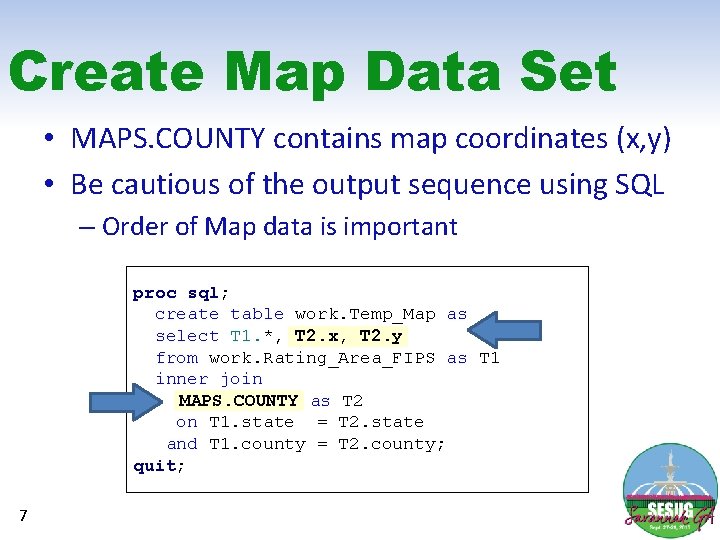
Create Map Data Set • MAPS. COUNTY contains map coordinates (x, y) • Be cautious of the output sequence using SQL – Order of Map data is important proc sql; create table work. Temp_Map as select T 1. *, T 2. x, T 2. y from work. Rating_Area_FIPS as T 1 inner join MAPS. COUNTY as T 2 on T 1. state = T 2. state and T 1. county = T 2. county; quit; 7
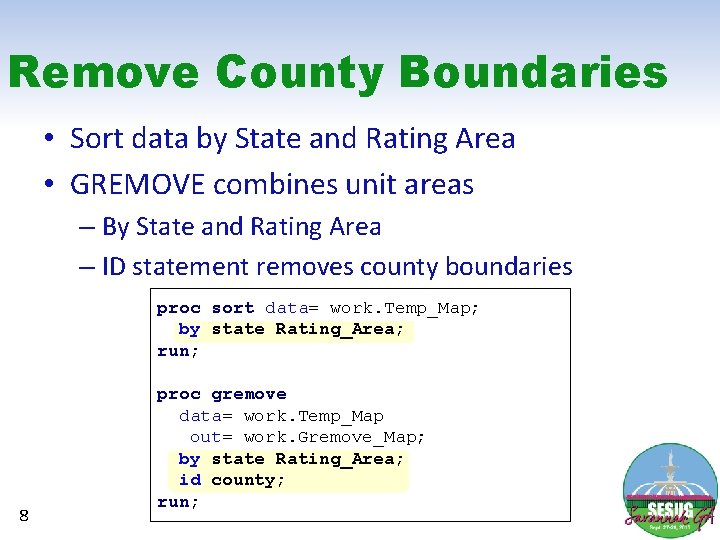
Remove County Boundaries • Sort data by State and Rating Area • GREMOVE combines unit areas – By State and Rating Area – ID statement removes county boundaries proc sort data= work. Temp_Map; by state Rating_Area; run; 8 proc gremove data= work. Temp_Map out= work. Gremove_Map; by state Rating_Area; id county; run;
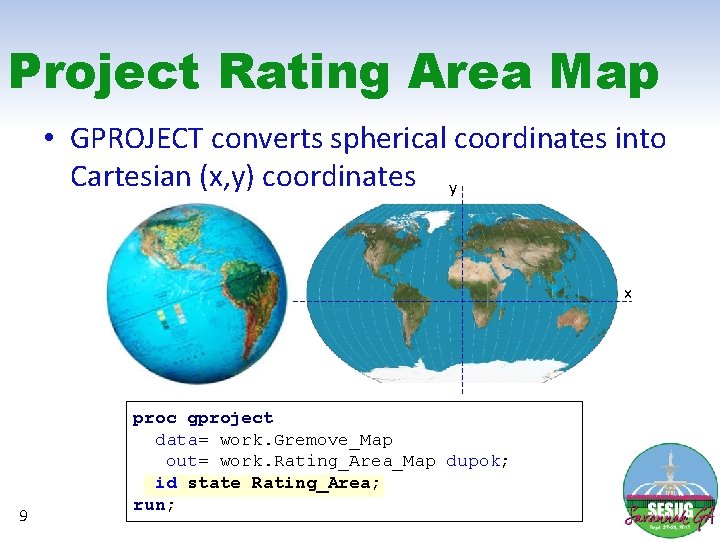
Project Rating Area Map • GPROJECT converts spherical coordinates into Cartesian (x, y) coordinates y x 9 proc gproject data= work. Gremove_Map out= work. Rating_Area_Map dupok; id state Rating_Area; run;
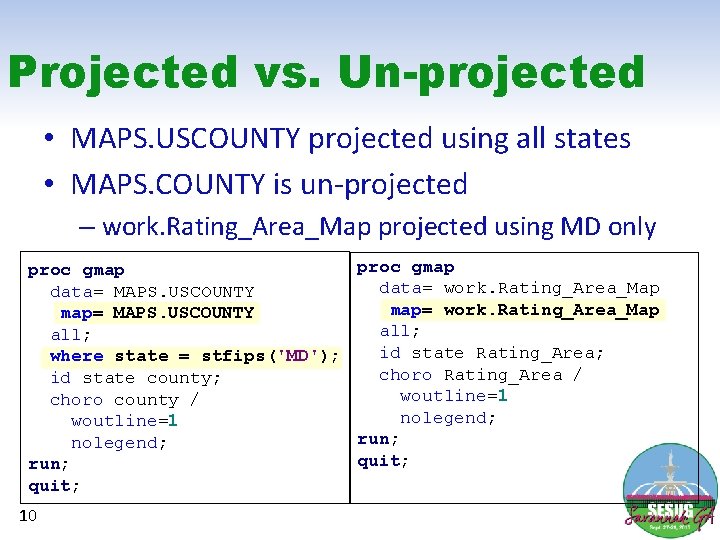
Projected vs. Un-projected • MAPS. USCOUNTY projected using all states • MAPS. COUNTY is un-projected – work. Rating_Area_Map projected using MD only proc gmap data= work. Rating_Area_Map data= MAPS. USCOUNTY map= work. Rating_Area_Map map= MAPS. USCOUNTY all; id state Rating_Area; where state = stfips('MD'); choro Rating_Area / id state county; woutline=1 choro county / nolegend; woutline=1 run; nolegend; quit; run; quit; 10
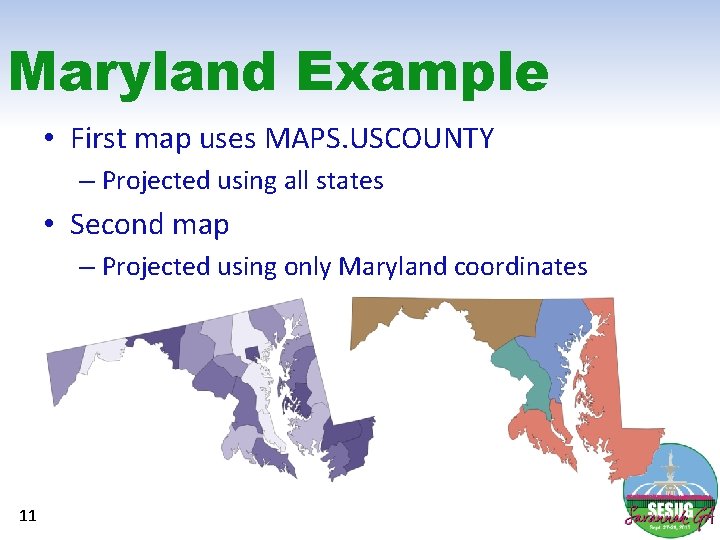
Maryland Example • First map uses MAPS. USCOUNTY – Projected using all states • Second map – Projected using only Maryland coordinates 11
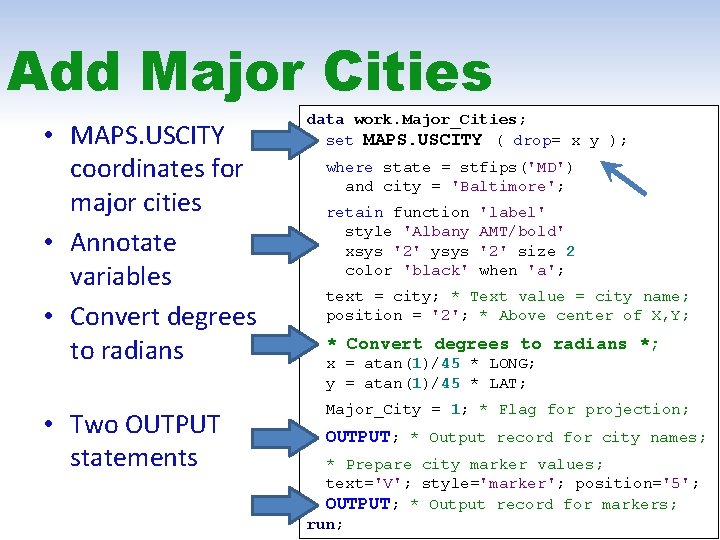
Add Major Cities • MAPS. USCITY coordinates for major cities • Annotate variables • Convert degrees to radians • Two OUTPUT statements data work. Major_Cities; set MAPS. USCITY ( drop= x y ); where state = stfips('MD') and city = 'Baltimore'; retain function style 'Albany xsys '2' ysys color 'black' 'label' AMT/bold' '2' size 2 when 'a'; text = city; * Text value = city name; position = '2'; * Above center of X, Y; * Convert degrees to radians *; x = atan(1)/45 * LONG; y = atan(1)/45 * LAT; Major_City = 1; * Flag for projection; OUTPUT; * Output record for city names; * Prepare city marker values; text='V'; style='marker'; position='5'; OUTPUT; * Output record for markers; run;
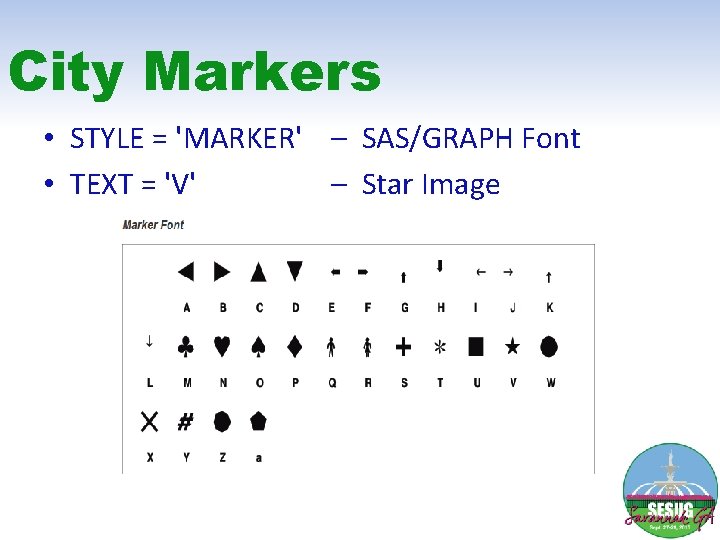
City Markers • STYLE = 'MARKER' – SAS/GRAPH Font • TEXT = 'V' – Star Image
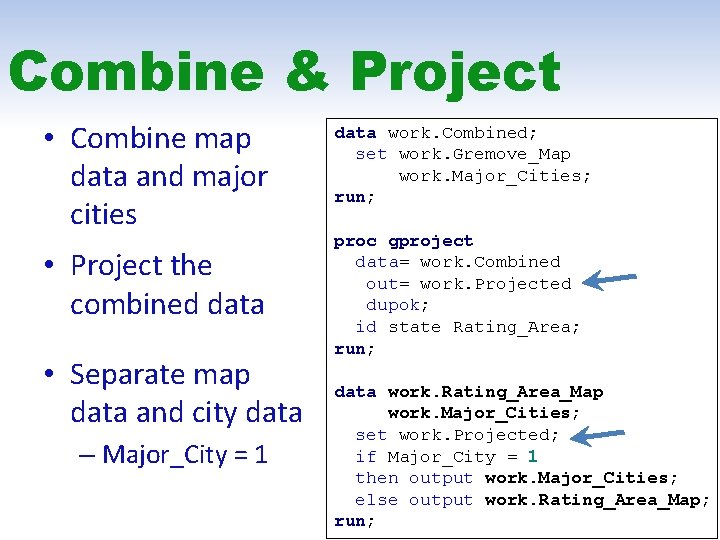
Combine & Project • Combine map data and major cities • Project the combined data • Separate map data and city data – Major_City = 1 data work. Combined; set work. Gremove_Map work. Major_Cities; run; proc gproject data= work. Combined out= work. Projected dupok; id state Rating_Area; run; data work. Rating_Area_Map work. Major_Cities; set work. Projected; if Major_City = 1 then output work. Major_Cities; else output work. Rating_Area_Map; run;
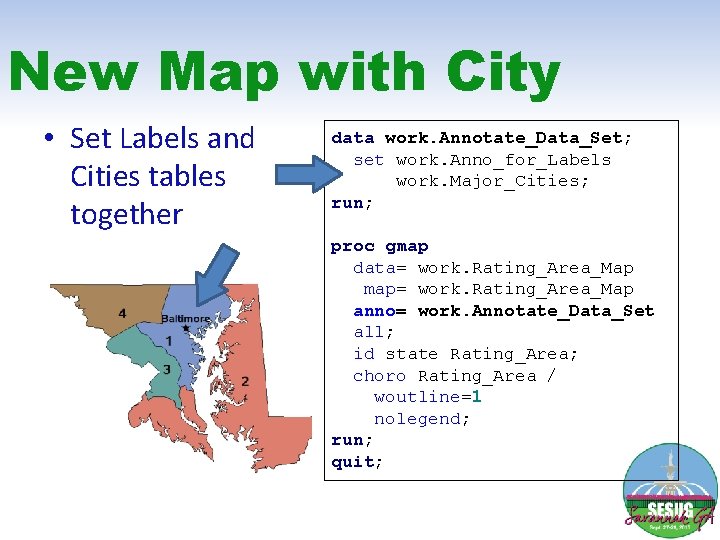
New Map with City • Set Labels and Cities tables together data work. Annotate_Data_Set; set work. Anno_for_Labels work. Major_Cities; run; proc gmap data= work. Rating_Area_Map map= work. Rating_Area_Map anno= work. Annotate_Data_Set all; id state Rating_Area; choro Rating_Area / woutline=1 nolegend; run; quit;
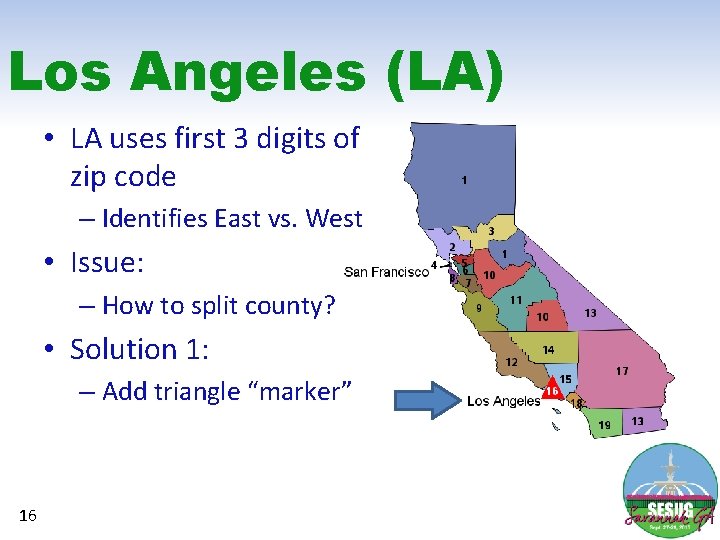
Los Angeles (LA) • LA uses first 3 digits of zip code – Identifies East vs. West • Issue: – How to split county? • Solution 1: – Add triangle “marker” 16
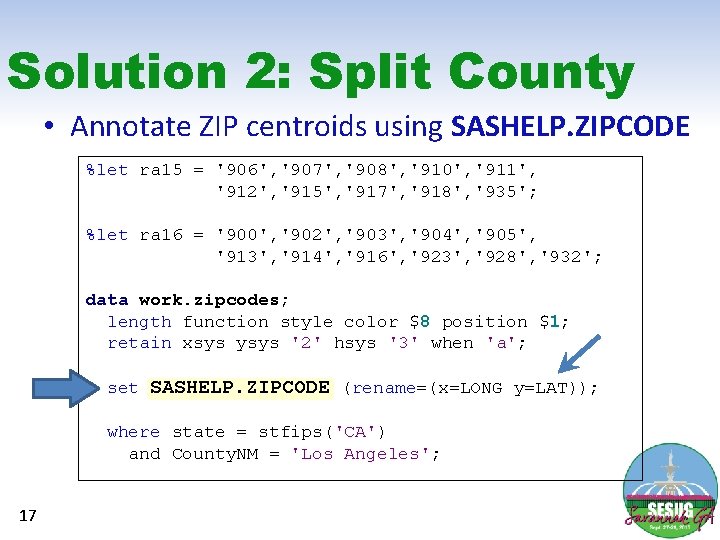
Solution 2: Split County • Annotate ZIP centroids using SASHELP. ZIPCODE %let ra 15 = '906', '907', '908', '910', '911', '912', '915', '917', '918', '935'; %let ra 16 = '900', '902', '903', '904', '905', '913', '914', '916', '923', '928', '932'; data work. zipcodes; length function style color $8 position $1; retain xsys ysys '2' hsys '3' when 'a'; set SASHELP. ZIPCODE (rename=(x=LONG y=LAT)); where state = stfips('CA') and County. NM = 'Los Angeles'; 17
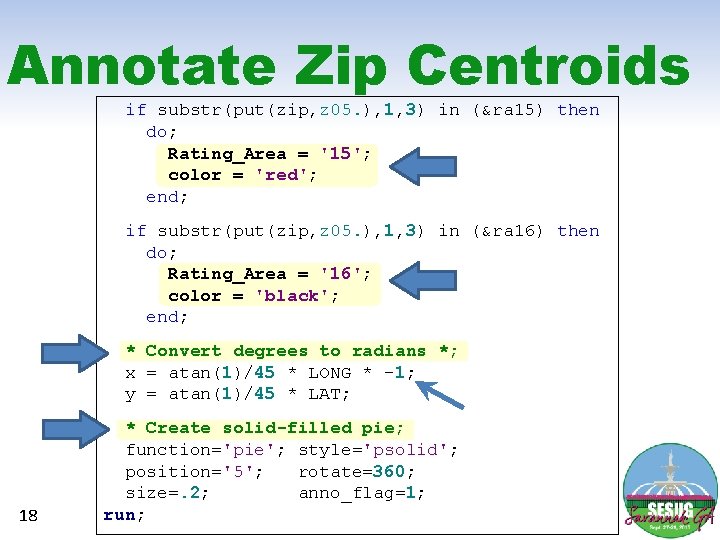
Annotate Zip Centroids if substr(put(zip, z 05. ), 1, 3) in (&ra 15) then do; Rating_Area = '15'; color = 'red'; end; if substr(put(zip, z 05. ), 1, 3) in (&ra 16) then do; Rating_Area = '16'; color = 'black'; end; * Convert degrees to radians *; x = atan(1)/45 * LONG * -1; y = atan(1)/45 * LAT; 18 * Create solid-filled pie; function='pie'; style='psolid'; position='5'; rotate=360; size=. 2; anno_flag=1; run;
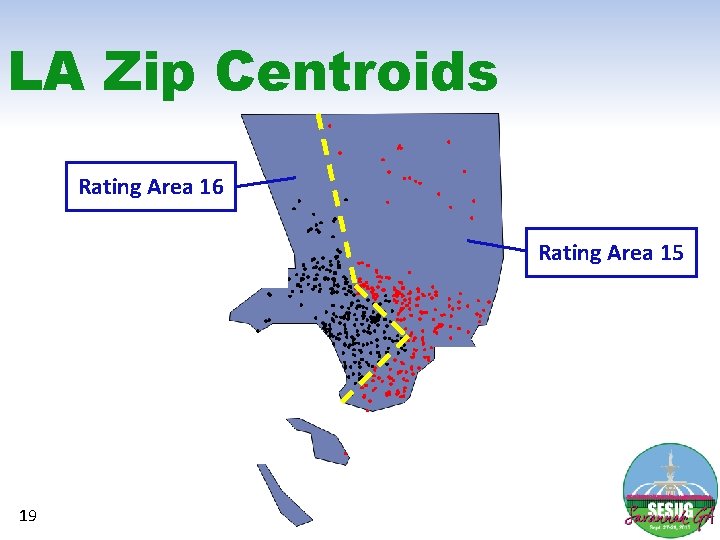
LA Zip Centroids Rating Area 16 Rating Area 15 19
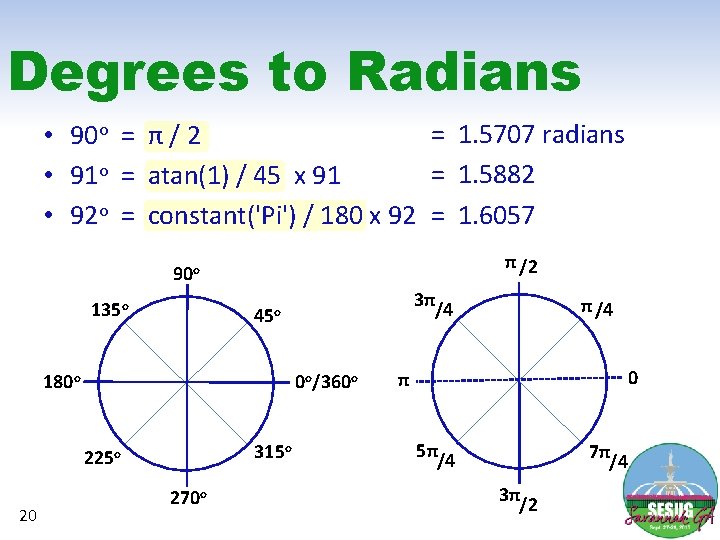
Degrees to Radians = 1. 5707 radians • 90 o = π / 2 = 1. 5882 • 91 o = atan(1) / 45 x 91 • 92 o = constant('Pi') / 180 x 92 = 1. 6057 π /2 90 o 135 o 180 o 0 o/360 o 315 o 225 o 20 3π/4 45 o 270 o π /4 0 π 5π/4 7π/4 3π/2
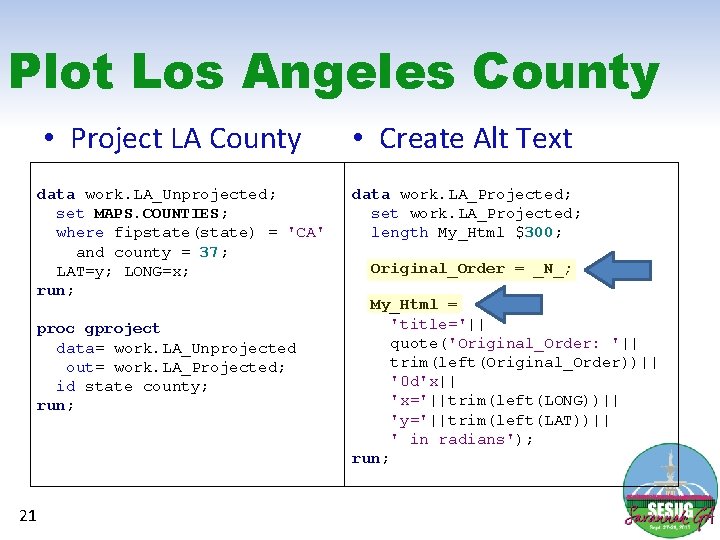
Plot Los Angeles County • Project LA County data work. LA_Unprojected; set MAPS. COUNTIES; where fipstate(state) = 'CA' and county = 37; LAT=y; LONG=x; run; proc gproject data= work. LA_Unprojected out= work. LA_Projected; id state county; run; 21 • Create Alt Text data work. LA_Projected; set work. LA_Projected; length My_Html $300; Original_Order = _N_; My_Html = 'title='|| quote('Original_Order: '|| trim(left(Original_Order))|| '0 d'x|| 'x='||trim(left(LONG))|| 'y='||trim(left(LAT))|| ' in radians'); run;
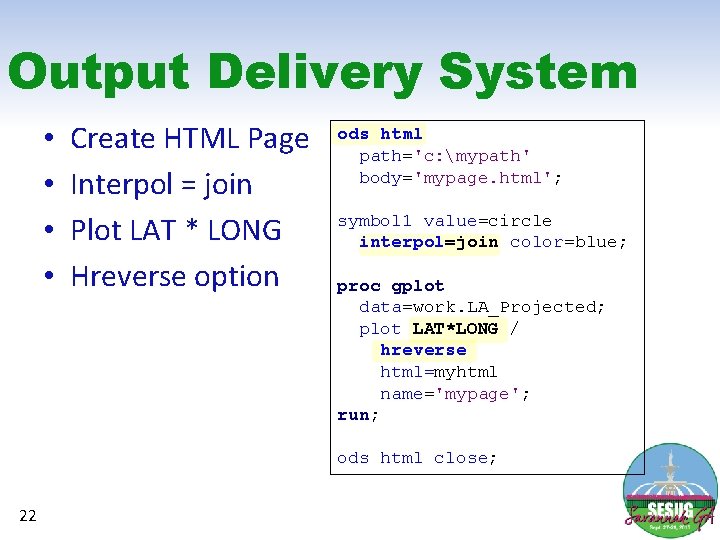
Output Delivery System • • Create HTML Page Interpol = join Plot LAT * LONG Hreverse option ods html path='c: mypath' body='mypage. html'; symbol 1 value=circle interpol=join color=blue; proc gplot data=work. LA_Projected; plot LAT*LONG / hreverse html=myhtml name='mypage'; run; ods html close; 22
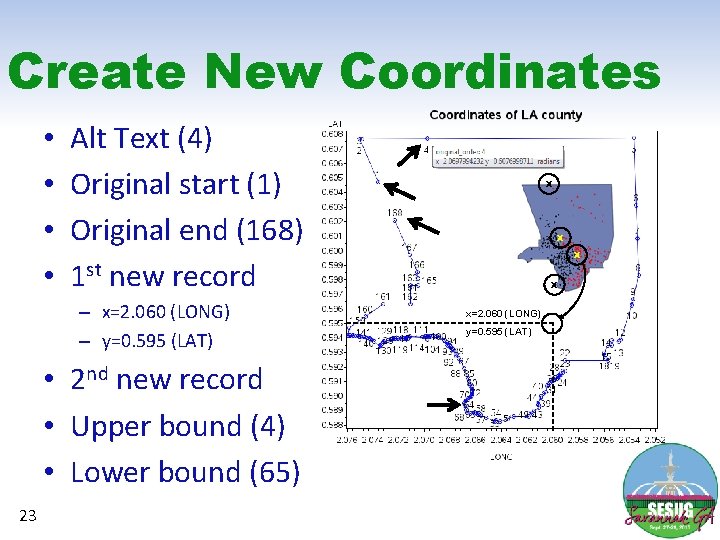
Create New Coordinates • • Alt Text (4) Original start (1) Original end (168) 1 st new record – x=2. 060 (LONG) – y=0. 595 (LAT) • 2 nd new record • Upper bound (4) • Lower bound (65) 23 X X x=2. 060 (LONG) y=0. 595 (LAT)
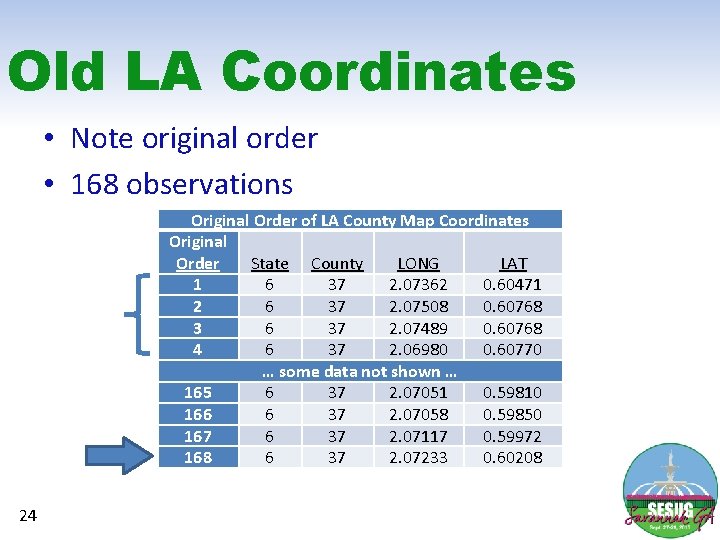
Old LA Coordinates • Note original order • 168 observations Original Order of LA County Map Coordinates Original Order State County LONG LAT 1 6 37 2. 07362 0. 60471 2 6 37 2. 07508 0. 60768 3 6 37 2. 07489 0. 60768 4 6 37 2. 06980 0. 60770 … some data not shown … 165 6 37 2. 07051 0. 59810 166 6 37 2. 07058 0. 59850 167 6 37 2. 07117 0. 59972 168 6 37 2. 07233 0. 60208 24
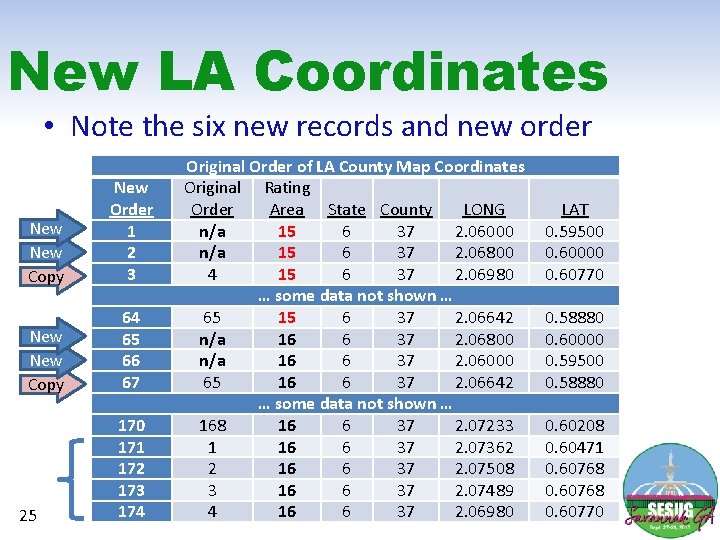
New LA Coordinates • Note the six new records and new order New Copy New Order 1 2 3 New Copy 64 65 66 67 25 170 171 172 173 174 Original Order of LA County Map Coordinates Original Rating Order Area State County LONG n/a 15 6 37 2. 06000 n/a 15 6 37 2. 06800 4 15 6 37 2. 06980 … some data not shown … 65 15 6 37 2. 06642 n/a 16 6 37 2. 06800 n/a 16 6 37 2. 06000 65 16 6 37 2. 06642 … some data not shown … 168 16 6 37 2. 07233 1 16 6 37 2. 07362 2 16 6 37 2. 07508 3 16 6 37 2. 07489 4 16 6 37 2. 06980 LAT 0. 59500 0. 60000 0. 60770 0. 58880 0. 60000 0. 59500 0. 58880 0. 60208 0. 60471 0. 60768 0. 60770
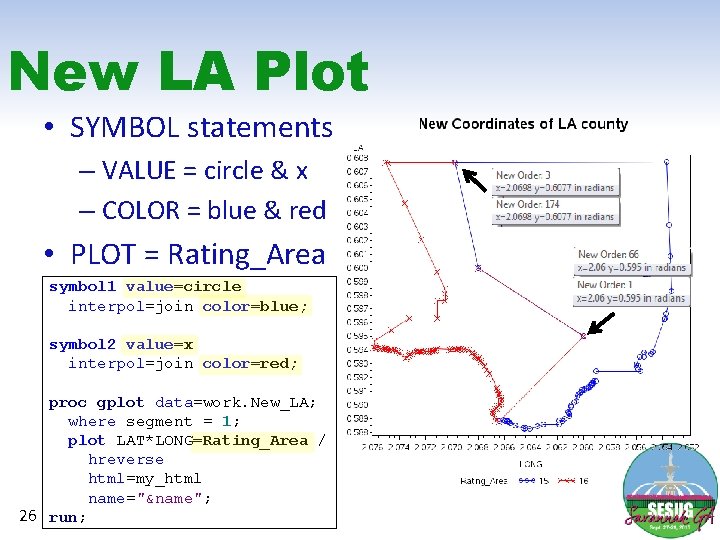
New LA Plot • SYMBOL statements – VALUE = circle & x – COLOR = blue & red • PLOT = Rating_Area symbol 1 value=circle interpol=join color=blue; symbol 2 value=x interpol=join color=red; proc gplot data=work. New_LA; where segment = 1; plot LAT*LONG=Rating_Area / hreverse html=my_html name="&name"; 26 run;
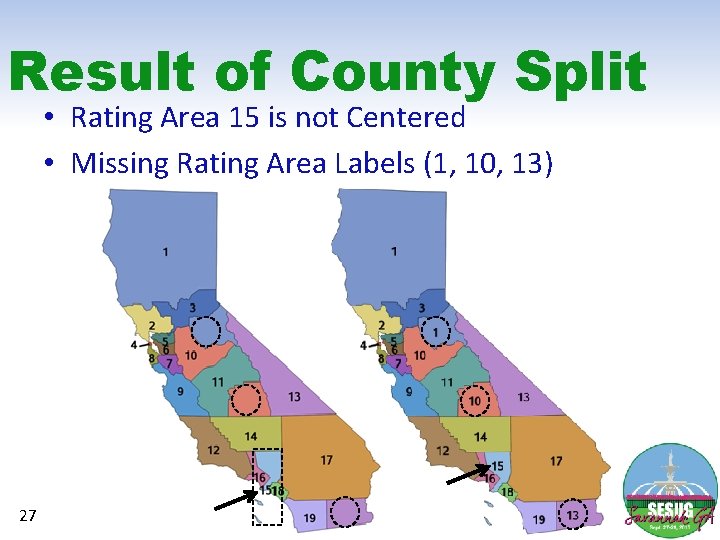
Result of County Split • Rating Area 15 is not Centered • Missing Rating Area Labels (1, 10, 13) 27
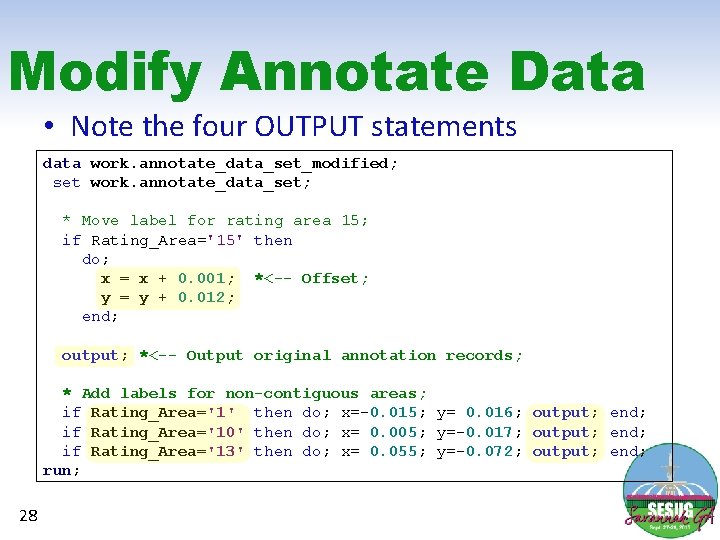
Modify Annotate Data • Note the four OUTPUT statements data work. annotate_data_set_modified; set work. annotate_data_set; * Move label for rating area 15; if Rating_Area='15' then do; x = x + 0. 001; *<-- Offset; y = y + 0. 012; end; output; *<-- Output original annotation records; * Add labels for non-contiguous areas; if Rating_Area='1' then do; x=-0. 015; y= 0. 016; output; end; if Rating_Area='10' then do; x= 0. 005; y=-0. 017; output; end; if Rating_Area='13' then do; x= 0. 055; y=-0. 072; output; end; run; 28
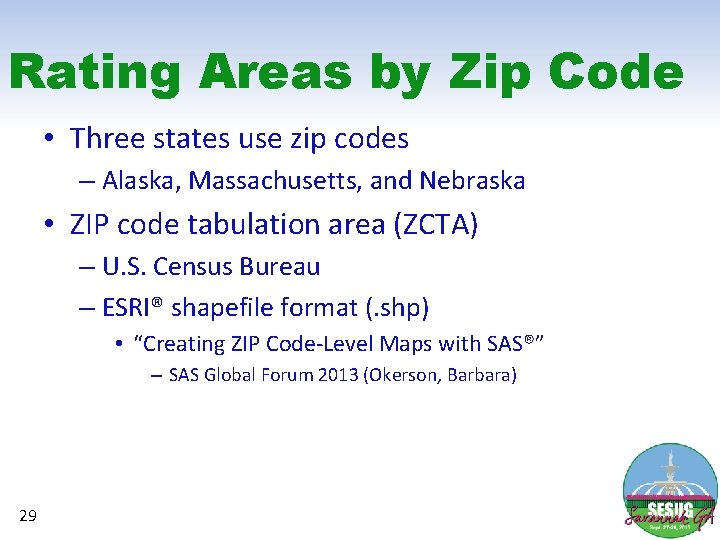
Rating Areas by Zip Code • Three states use zip codes – Alaska, Massachusetts, and Nebraska • ZIP code tabulation area (ZCTA) – U. S. Census Bureau – ESRI® shapefile format (. shp) • “Creating ZIP Code-Level Maps with SAS®” – SAS Global Forum 2013 (Okerson, Barbara) 29
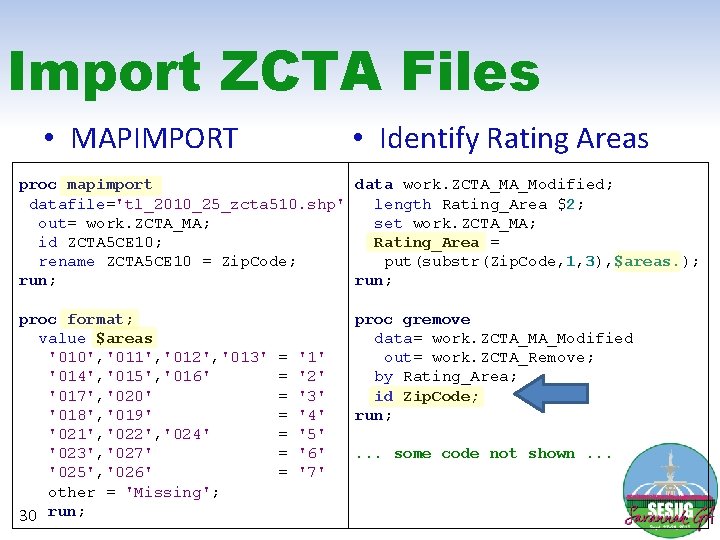
Import ZCTA Files • Identify Rating Areas • MAPIMPORT proc mapimport data work. ZCTA_MA_Modified; datafile='tl_2010_25_zcta 510. shp' length Rating_Area $2; out= work. ZCTA_MA; set work. ZCTA_MA; id ZCTA 5 CE 10; Rating_Area = rename ZCTA 5 CE 10 = Zip. Code; put(substr(Zip. Code, 1, 3), $areas. ); run; proc format; value $areas '010', '011', '012', '013' '014', '015', '016' '017', '020' '018', '019' '021', '022', '024' '023', '027' '025', '026' other = 'Missing'; 30 run; = = = = '1' '2' '3' '4' '5' '6' '7' proc gremove data= work. ZCTA_MA_Modified out= work. ZCTA_Remove; by Rating_Area; id Zip. Code; run; . . . some code not shown. . .
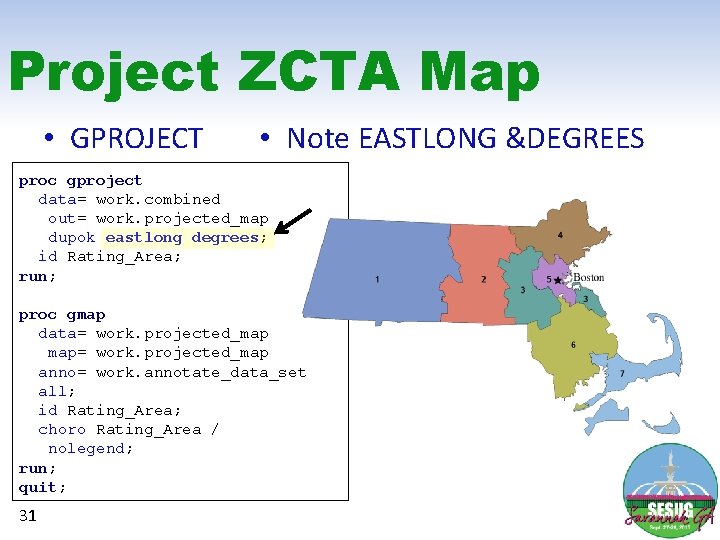
Project ZCTA Map • GPROJECT • Note EASTLONG &DEGREES proc gproject data= work. combined out= work. projected_map dupok eastlong degrees; id Rating_Area; run; proc gmap data= work. projected_map map= work. projected_map anno= work. annotate_data_set all; id Rating_Area; choro Rating_Area / nolegend; run; quit; 31
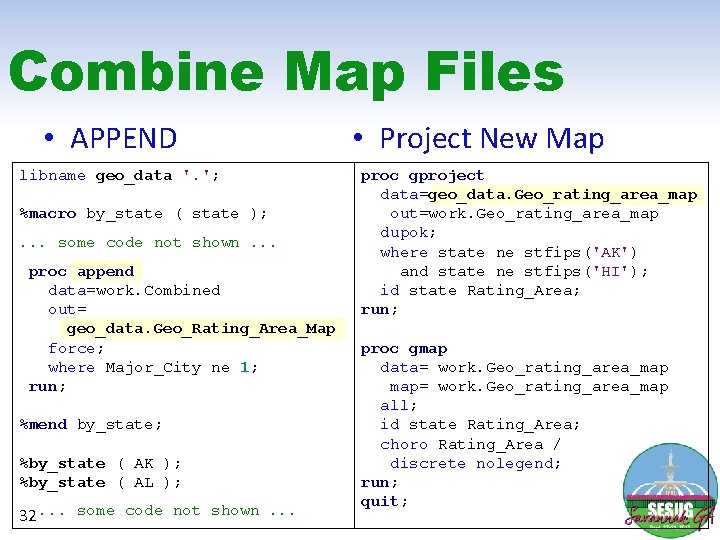
Combine Map Files • APPEND libname geo_data '. '; %macro by_state ( state ); . . . some code not shown. . . proc append data=work. Combined out= geo_data. Geo_Rating_Area_Map force; where Major_City ne 1; run; %mend by_state; %by_state ( AK ); %by_state ( AL ); 32. . . some code not shown. . . • Project New Map proc gproject data=geo_data. Geo_rating_area_map out=work. Geo_rating_area_map dupok; where state ne stfips('AK') and state ne stfips('HI'); id state Rating_Area; run; proc gmap data= work. Geo_rating_area_map map= work. Geo_rating_area_map all; id state Rating_Area; choro Rating_Area / discrete nolegend; run; quit;
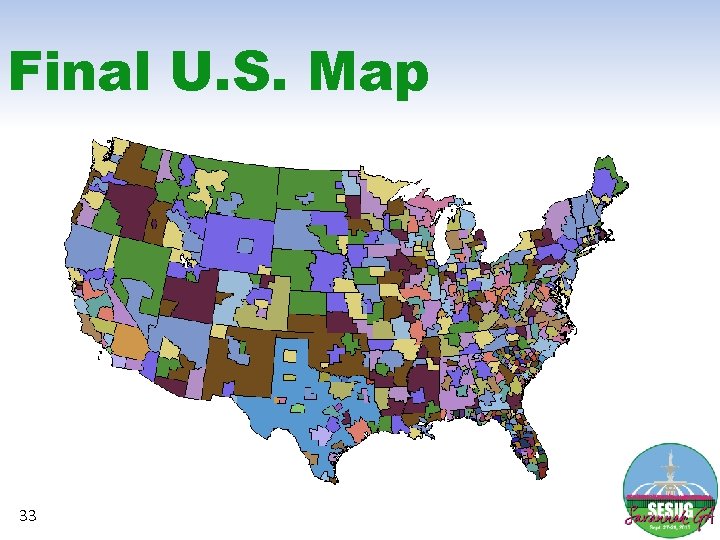
Final U. S. Map 33

Contact Information Rick Andrews Office of the Actuary Centers for Medicare and Medicaid Services 7500 Security Boulevard Baltimore, MD 21244 Phone: (410) 786 -6395 E-mail: Richard. Andrews@cms. hhs. gov 34 Robert Allison Research and Development SAS Institute Incorporated 100 SAS Campus Drive Cary, NC 27513 Phone: (919) 677 -8000 E-mail: Robert. Allison@sas. com
- Slides: 34