
Creating Better User Groups with ACM and Grouper
Creating Better User Groups with ACM and Grouper Julie Parmenter, Manager of Enterprise Decision Support HEDW Virtual Edition April 28, 2020 1

Indiana University 2 Enrollment Total Undergrad Grad 111, 000+ 72, 000+ 19, 000+
We all need User Groups • In the BI space, we often have 1000 s of groups – Its easy to mismanage them • • Can contain terminated or retired employees Can contain employees who have changed jobs Can contain out-of-compliance users Can receive incorrect approvals 3
Solving the Issue at Indiana University • New IU Developed software that will create and manage groups, which can be used for a variety of purposes • Can be applied to Tableau Server • Can be used as Active Directory groups • Can be used in other integrations • Expanded scope to become the User Interface to Grouper 4

Access Control Management (ACM) – Group Creation • Simple: – Enter a group name, description is optional – Enter users by username, last name, first name • Powerful: – Enforce active status or compliance requirements – Can also add groups to groups – Groups can be used for other purposes beyond reporting 5
Grouper is used behind ACM • What is Grouper? – A tool to make group creation easier – Provided for free to Higher Ed via Internet 2 – Can create • Managed groups • Composite groups • Groups within groups – Output can be virtual groups or AD groups – https: //www. internet 2. edu/products-services/trust-identity/grouper/ 6
DEMO 7
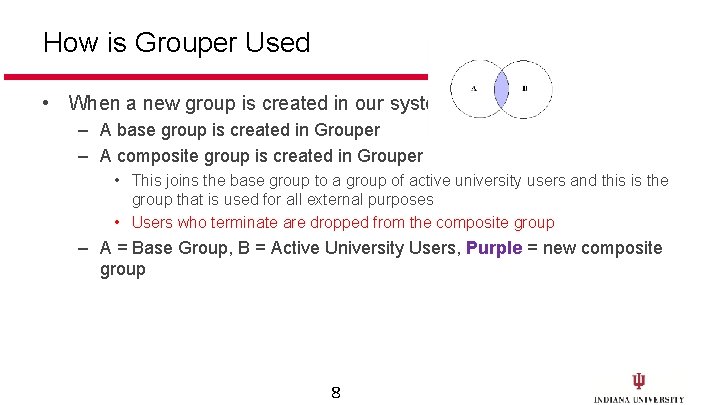
How is Grouper Used • When a new group is created in our system – A base group is created in Grouper – A composite group is created in Grouper • This joins the base group to a group of active university users and this is the group that is used for all external purposes • Users who terminate are dropped from the composite group – A = Base Group, B = Active University Users, Purple = new composite group 8
Grouper Notifications –All ACM groups are monitored and editors notified • When users in groups terminate • When users in groups change jobs 9
The ACM Group API • It is also possible to create groups using a REST API 10
Creating Managed Groups • Data-driven groups can be loaded into Grouper through result sets from SQL statements • Can be exposed in ACM 11
When do we create Managed Groups and when thru ACM? Managed groups are created when there is a SQL statement that can be used to define the group ACM-Based are when there are individual usernames Combination of both is also possible 12
How is ACM being used? Integrations to lots of systems: • Active Directory • Onbase • Google Groups • Authorization to other vended systems 13
Efficiency Benefits of using ACM with Grouper One location for group creation One group can be used for a wide variety of purposes Provides one central location for managing users across all groups 14
Security Benefits for Using ACM with Grouper Removes terminated employees Notifies editors when members of their group terminate or experience a job change Enforces compliance requirements – Removes users access when they don’t have the right compliance requirements on file – Notifies users when their compliance requirements are about to expire 15
Before we move on… • Questions about Creating Groups? 16
Adding Tableau Security in ACM • Publisher chooses the Tableau environment • A list of workbooks are returned to them – These are all of the workbooks on that server to which they have publishing privileges • Publishers can see what security groups have been requested or approved • Publishers can add or edit security • DEMO 17
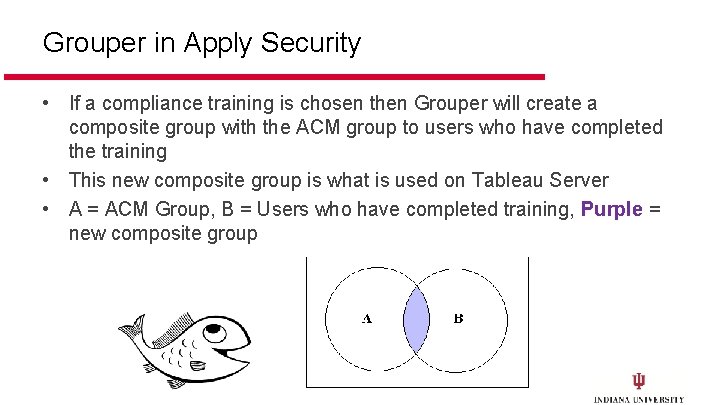
Grouper in Apply Security • If a compliance training is chosen then Grouper will create a composite group with the ACM group to users who have completed the training • This new composite group is what is used on Tableau Server • A = ACM Group, B = Users who have completed training, Purple = new composite group 18
Grouper Notifications • If a user is in a composite group that requires a training AND that user’s eligibility is about to expire, Grouper will notify them • If the user doesn’t take the training and ages out of the group, Grouper will notify them again • If the user takes the training, their access is restored 19
Efficiency and Security Benefits of ACM/Grouper with Applying Security • Applying security to Tableau is completely automated • Enforces compliance requirements • Provides tools that allow security administrators to monitor and correct invalid security assignments on Tableau 20
Technical Architecture • 8 New Microservices – Test-driven development – React/Redux for the User Interface – Spring Boot for the API layer • My. SQL database • Linux Cent. OS 7 operating system • CAS and a central authentication service was managing users 21
Process and Team • Team of 4 developers + scrum master + product owner • Agile Development Process using a scrum team with 2 -week sprints • Team also has to provide Help Desk support for our services – Tableau, Denodo and Data Warehouse so that has to be calculated into our velocity • Our team is the service owner for Tableau, Denodo, the Data Warehouse and its portals 22
Future Plans • • Surfacing all Grouper groups thru ACM More integrations Migrating Tableau workbooks from DEV to Test to Prod Submitting Security Requests for Denodo Views and Routing for approval 23
Questions? Julie Parmenter jparment@iu. edu 24
- Slides: 24