
CPU and Disk Scheduling Algorithms By Stefan Peterson
CPU and Disk Scheduling Algorithms By: Stefan Peterson
Lets Start with Windows �In the Beginning ◦ DOS and prior to 3. 1 x ◦ Windows did not multitask and thus had no need for CPU scheduling �Windows 3. 1 x ◦ Used a non-preemptive scheduler
Non Preemptive Scheduling �Programs do not get interrupted �Relies on cooperative multitasking ◦ The OS relied on the program to tell it when it was finished.
Windows 95 and After �Up until Vista Windows used a multilevel feedback queue. � 32 levels defined from 0 – 31 ◦ 0 belonging to Windows ◦ 1 – 15 are normal priorities ◦ 16 – 31 are for soft real time priorities �These require privileges to assign ◦ User can assign 5 of these priorities to a running application via the task manager application or Thread Management API
Multilevel Feedback Queue �Preferences ◦ Shortest jobs ◦ I/O bound processes ◦ Quickly establish the nature of a process and schedule the process accordingly. � In the multilevel feedback queue, a process is given just one chance to complete at a given queue level before it is forced down to a lower level queue. �A process enters the queue and processes are taken out in that same order. ◦ When a process does not complete instead of going back to the end of the same queue it just goes down one queue.

FIFO Queue A new process is positioned at the end of the top -level FIFO queue. At some stage the process reaches the head of the queue and is assigned the CPU. New process Full
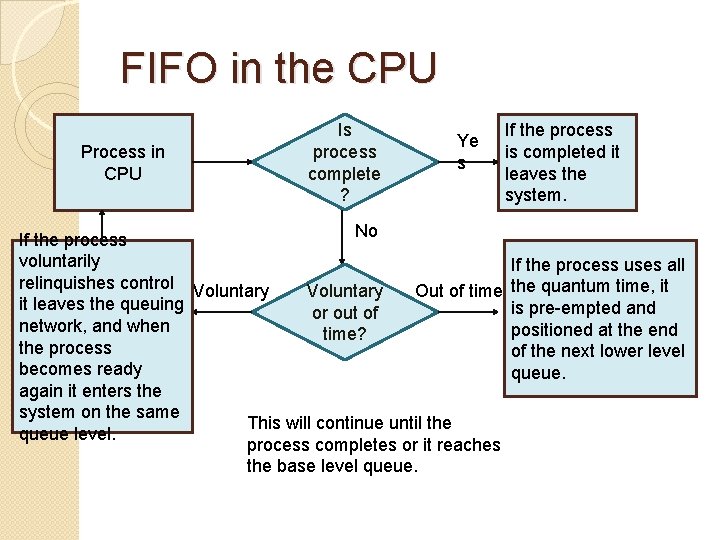
FIFO in the CPU Process in CPU Is process complete ? Ye s If the process is completed it leaves the system. No If the process voluntarily If the process uses all relinquishes control Voluntary Out of time the quantum time, it it leaves the queuing is pre-empted and or out of network, and when positioned at the end time? the process of the next lower level becomes ready queue. again it enters the system on the same This will continue until the queue level. process completes or it reaches the base level queue.
Base Level �At the base level queue the processes circulate in round robin fashion until they complete and leave the system. �Optionally, if a process blocks for I/O, it is 'promoted' one level, and placed at the end of the next-highest queue. This allows I/O bound processes to be favored by the scheduler and allows processes to 'escape' the base level queue.
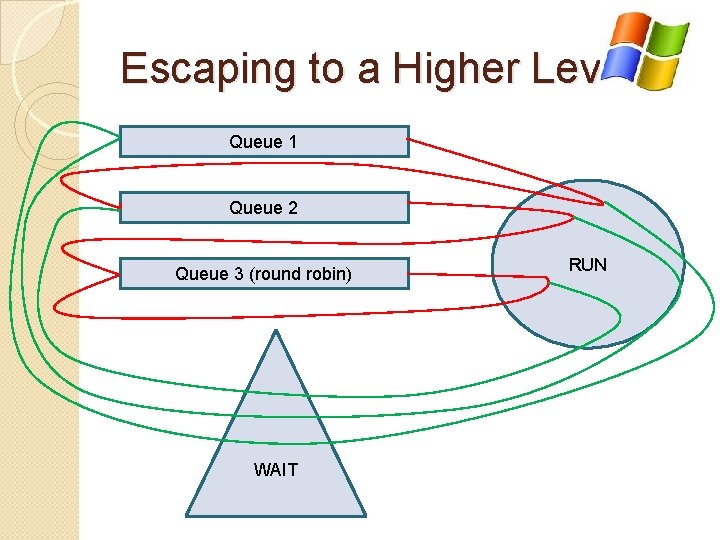
Escaping to a Higher Level Queue 1 Queue 2 Queue 3 (round robin) WAIT RUN
Vista �The scheduler was modified to keep track of how many cycles a thread has gone through. �There is also now a priority scheduler for the I/O queue. ◦ This makes sure that background tasks don’t interfere with foreground tasks.
Linux �Up to version 2. 5 Linux also used the multilevel feedback queue. �The differences however were: ◦ Priorities ranged from 0 – 140 � 0 – 99 belong to real time tasks � 100 – 140 are for “nice” task levels
Nice �Is a program that maps directly to the kernel. �Nice assigns priority from lowest being 19 to highest being -20. ◦ The usual default is 0 �Assigning priorities is done through various heuristics of the scheduler.
Linux Scheduler �The quantum time is time allowed for a process �The real time processes in Linux have a quantum time of 200 ms, nice processes have 10 ms. �The scheduler runs through the queue allowing the highest priority tasks to go first.
Linux Scheduler cont. �Once a process has used its allotted amount of time it is put into an expired queue. �When the active queue is empty then the expired queue becomes the active queue.
Linux Version 2. 6 �This version is a little different than the previous one. �This version used a O(1) Scheduler. ◦ The big “O” notations was used not because this scheduler is that fast, but to represent that no matter how many processes there are it will take the same amount of time to schedule them.
Linux version 2. 6. 23 �In this version the Completely Fair Scheduler was introduced. It runs on the idea of giving the task with the “gravest need” to the CPU �This method uses what is called a red black tree instead of queues.
The Red Black Tree This is a type of Binary Search Tree. With a few differences. • First, a node is either black or red. • Second, the root is black. • Third, all leaves are black • Fourth, both children of every node are black • Fifth, Every simple path from a given node to any of its descendant leaves contains the same number of black nodes.
So what does this all mean? �No path can have two red nodes in a row. �The shortest possible path has all black nodes, and the longest possible path alternates between red and black nodes. �Since all maximal paths have the same number of black nodes, this shows that no path is more than twice as long as any other path. �This means that even in the worst case scenario it can still be considered efficient.
More on how it works �The old method used heuristics. �This new method ignores sleep time and time slices, so instead what it does is: ◦ As a process waits for the CPU, the scheduler tracks the amount of time it would have used on the processor. ◦ This time is calculated by dividing the wait time (in nanoseconds) by the total number of processes waiting. ◦ The resulting value is the amount of CPU time the process is entitled to, and is used to rank processes for scheduling and to determine the amount of time the process is allowed to execute before being preempted.
CFS and Red Black Tree �A tasks wait_runtime value gets incremented by an amount depending on the number of processes currently in the run queue. ◦ The priority values of different tasks are also considered while doing these calculations � When a task gets scheduled to the CPU, its wait_runtime value starts decrementing and as this value falls to such a level that other tasks become the new left-most task of the red-black tree and the current one gets preempted. This way CFS tries for the ideal situation where wait_runtime is zero!
The Debt �Since only a single task can run at any one time, the other tasks wait. �During this wait period the other processes build up a debt which is (wait_runtime). �So once a task gets scheduled, it will catch up its debt by being allowed to use the CPU for that amount of time.
Disk Scheduling In Linux �The default disk scheduler is known as the Linux Elevator ◦ This algorithm is augmented by two others �Deadline I/O scheduler �Anticipatory I/O scheduler
Elevator �Linux keeps one queue that sorts the list of requests by block number. �Adding a request can be handled in one of four ways: ◦ if the new request is on the same sector or an adjacent sector then the two requests are merged ◦ If a pre-existing request is really old then the new request is placed behind the old request ◦ If there is a suitable location the request is just placed into that location �Else the request is just placed at the tail end
Deadline Scheduler �This algorithm accompanies the Elevator algorithm. �Meant to prevent starvation effect. �Uses three queues ◦ The elevator queue ◦ Read FIFO queue ◦ Write FIFO queue �When the time in one of the queues gets older than the expiration time the scheduler takes the item from the queue.
Anticipatory I/O Scheduler �This algorithm works with the Deadline algorithm. ◦ This algorithm causes a 6 m/s delay after a read request. �It does this assuming that the next read request may come from the same section on the disk. If so then the operation is processed immediately. �If not it moves on
Earliest Deadline First � Used in Real Time Operating Systems ◦ ◦ Household Appliances Industrial Robots Spacecraft Programmable Thermostats � Quite simply, when a process is finished the queue is searched for a process with the next closest deadline. � This method works only if the CPU is not at 100%. ◦ If it is then the results are unpredictable. � Each job is characterized by the following: ◦ Arrival time ◦ Execution requirements ◦ Deadline
- Slides: 26