
Cpr E 281 Digital Logic Instructor Alexander Stoytchev



![Display of numbers [ Figure 2. 34 from the textbook ]](https://slidetodoc.com/presentation_image_h/1807aed8f970d88208a8c0d8f9a925fc/image-42.jpg "Display of numbers [ Figure 2. 34 from the textbook ]")
![[ Figure 2. 35 from the textbook ]](https://slidetodoc.com/presentation_image_h/1807aed8f970d88208a8c0d8f9a925fc/image-49.jpg "[ Figure 2. 35 from the textbook ]")
![2 -1 Multiplexer [ Figure 2. 36 from the textbook ]](https://slidetodoc.com/presentation_image_h/1807aed8f970d88208a8c0d8f9a925fc/image-58.jpg "2 -1 Multiplexer [ Figure 2. 36 from the textbook ]")


![A logic circuit with two modules [ Figure 2. 44 from the textbook ]](https://slidetodoc.com/presentation_image_h/1807aed8f970d88208a8c0d8f9a925fc/image-89.jpg "A logic circuit with two modules [ Figure 2. 44 from the textbook ]")
![The adder module [ Figure 2. 12 from the textbook ]](https://slidetodoc.com/presentation_image_h/1807aed8f970d88208a8c0d8f9a925fc/image-90.jpg "The adder module [ Figure 2. 12 from the textbook ]")
![The adder module [ Figure 2. 45 from the textbook ]](https://slidetodoc.com/presentation_image_h/1807aed8f970d88208a8c0d8f9a925fc/image-91.jpg "The adder module [ Figure 2. 45 from the textbook ]")

- Slides: 97
Cpr. E 281: Digital Logic Instructor: Alexander Stoytchev http: //www. ece. iastate. edu/~alexs/classes/
Intro to Verilog Cpr. E 281: Digital Logic Iowa State University, Ames, IA Copyright © Alexander Stoytchev
Administrative Stuff • HW 3 is due on Monday Sep 7 @ 4 p
Administrative Stuff • Sample homework solutions are posted on Canvas • Look under ‘Files’
Quick Review
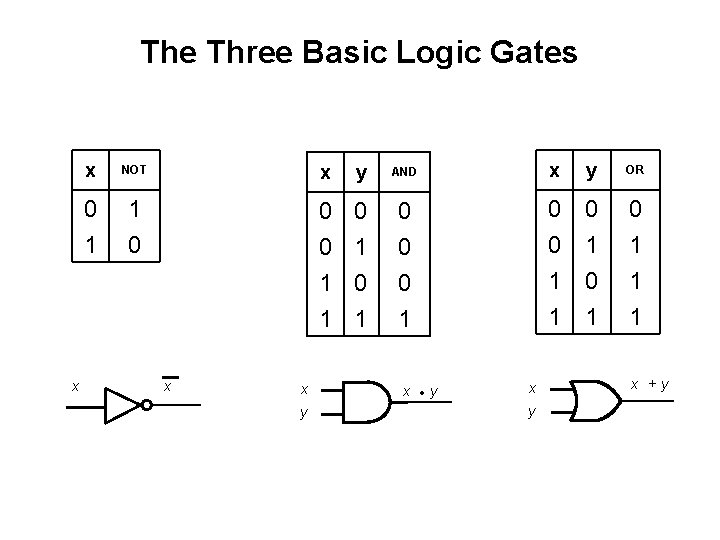
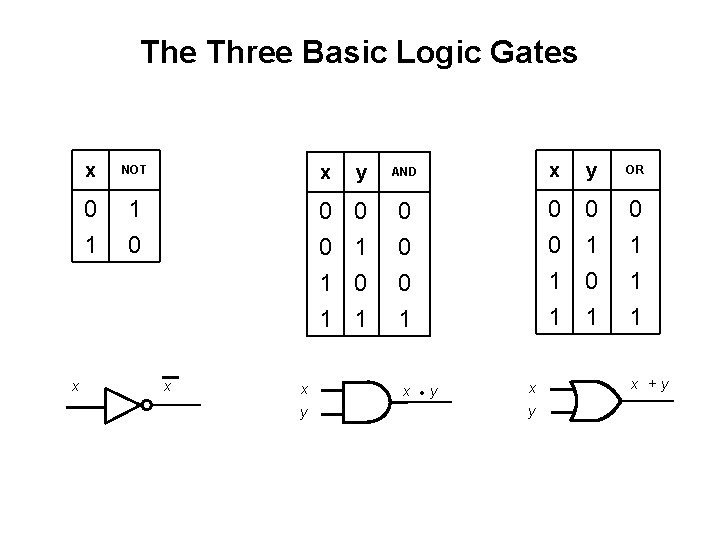
The Three Basic Logic Gates x x NOT x y AND x y OR 0 1 1 0 0 0 1 1 0 1 0 1 1 1 x x y x • y x +y
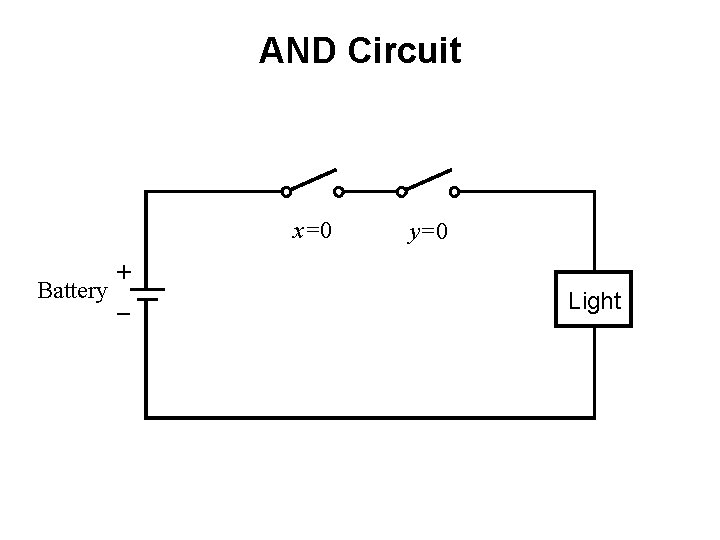
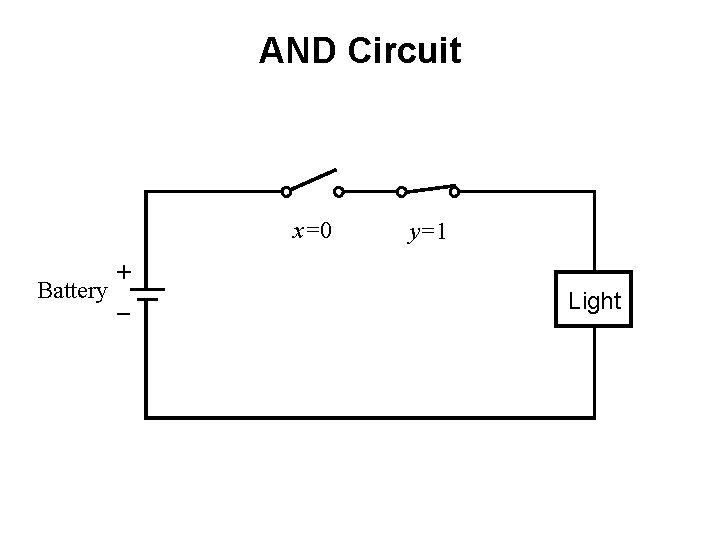
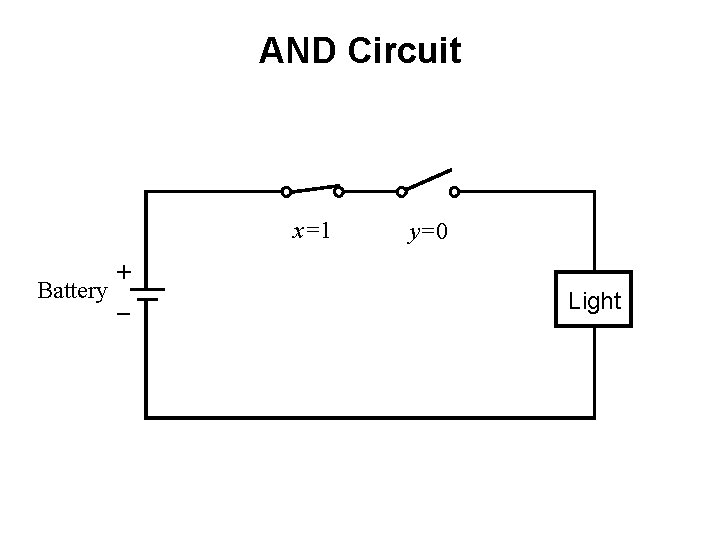
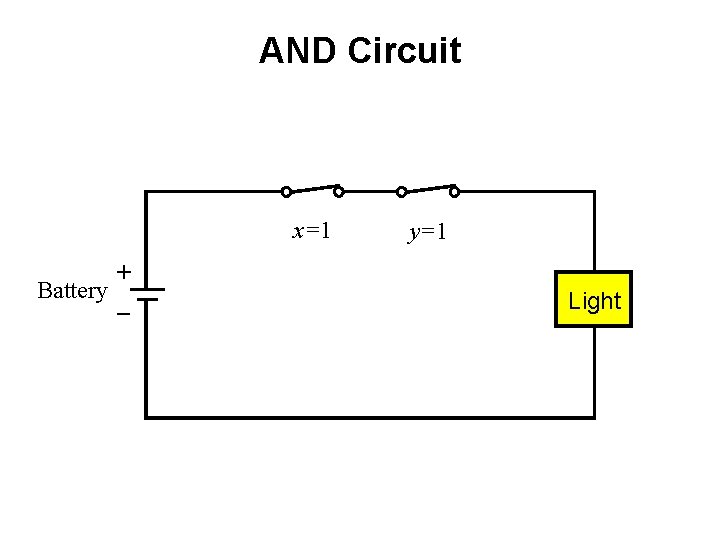
AND with Switches
AND Circuit x=0 + Battery _ y=0 Light
AND Circuit x=0 + Battery _ y=1 Light
AND Circuit x=1 + Battery _ y=0 Light
AND Circuit x=1 + Battery _ y=1 Light
NOT with Switches
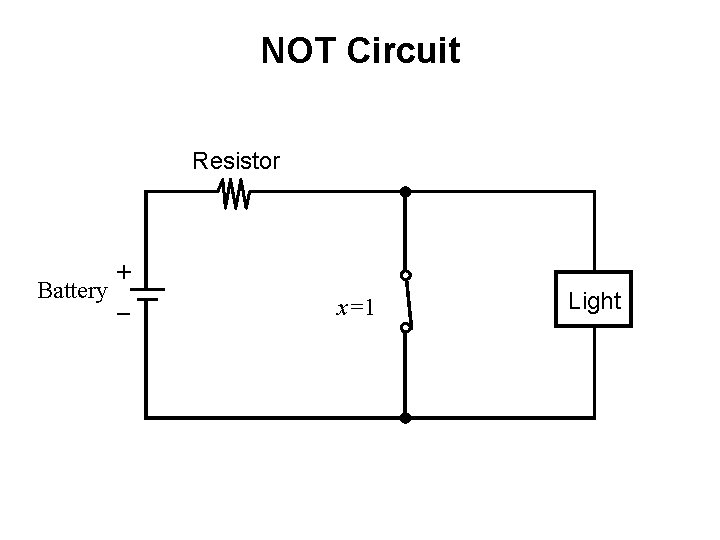
NOT Circuit Resistor + Battery _ x=1 Light
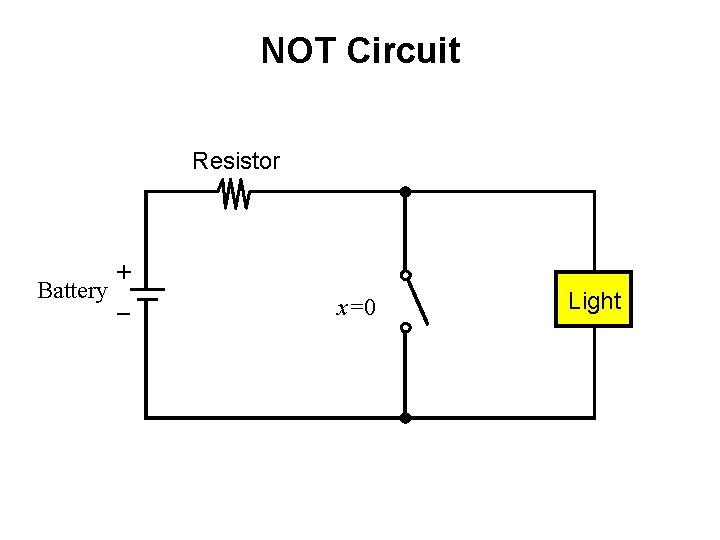
NOT Circuit Resistor + Battery _ x=0 Light
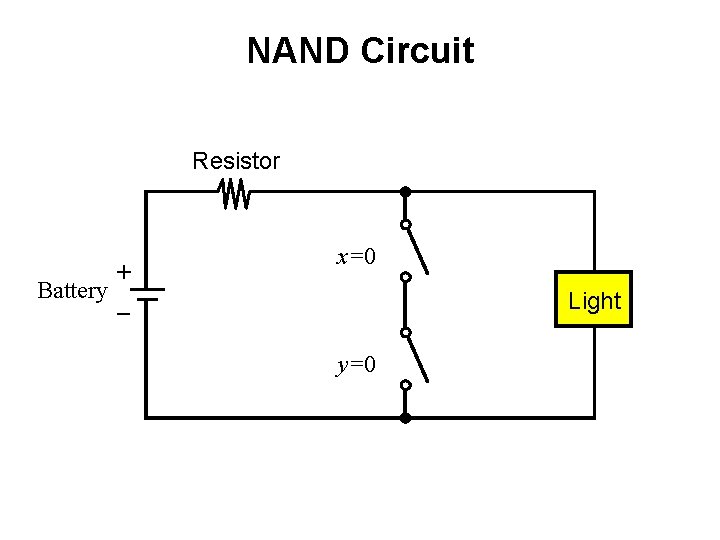
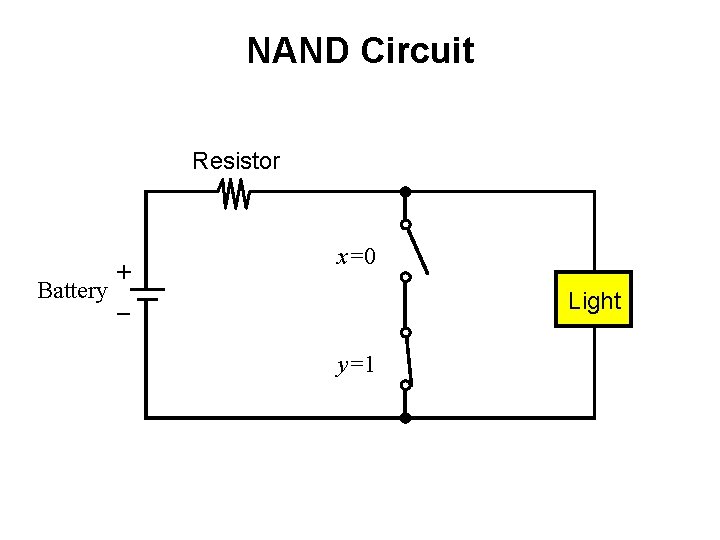
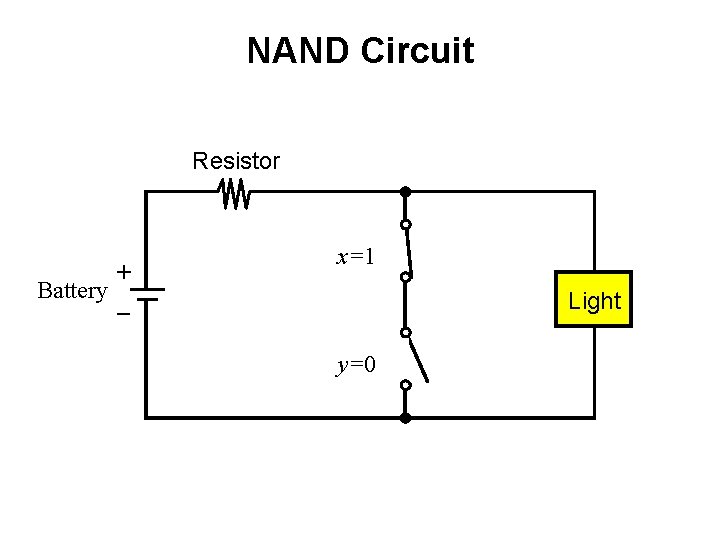
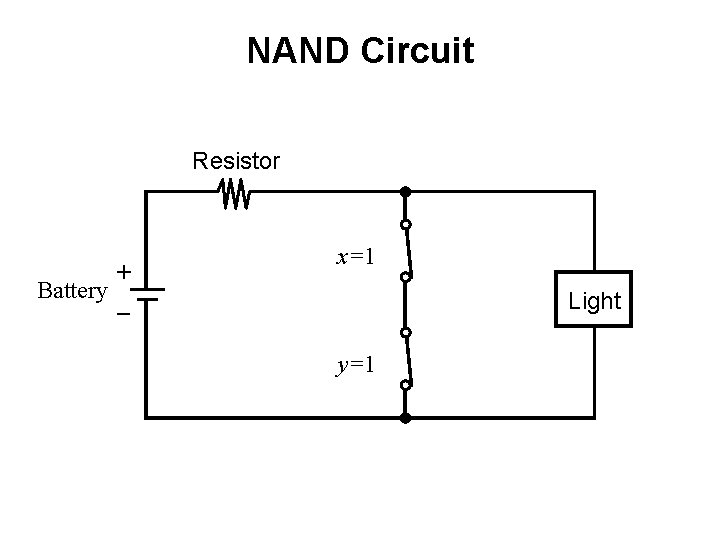
NAND with Switches
NAND Circuit Resistor + Battery _ x=0 Light y=0
NAND Circuit Resistor + Battery _ x=0 Light y=1
NAND Circuit Resistor + Battery _ x=1 Light y=0
NAND Circuit Resistor + Battery _ x=1 Light y=1
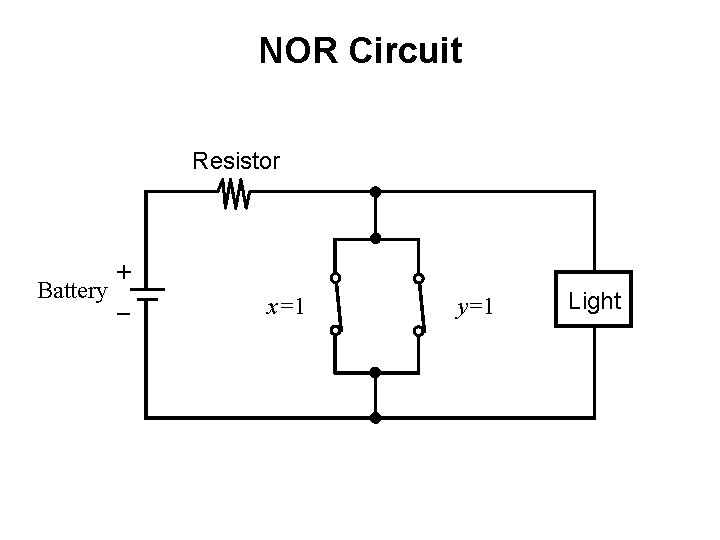
NOR with Switches
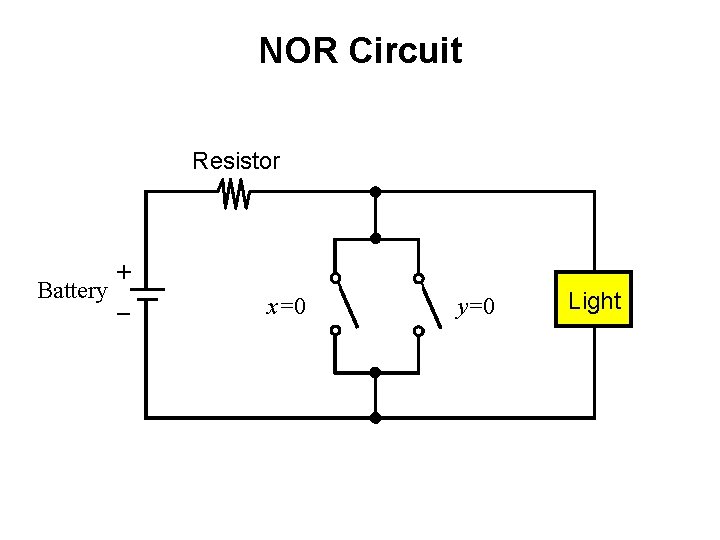
NOR Circuit Resistor + Battery _ x=0 y=0 Light
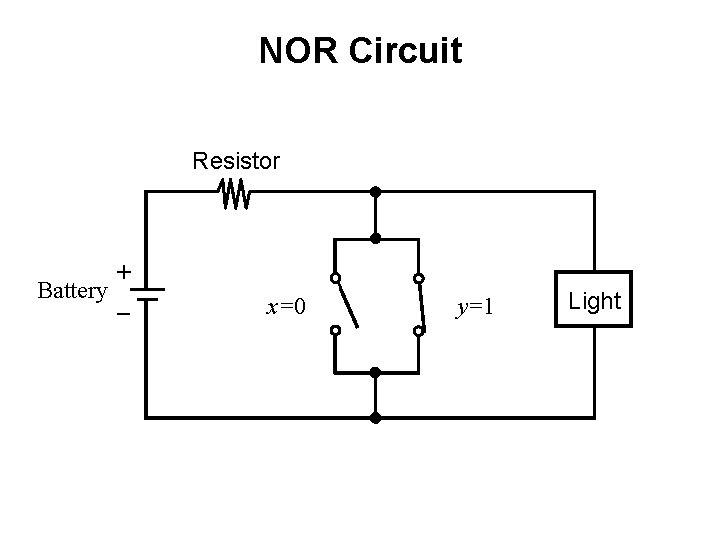
NOR Circuit Resistor + Battery _ x=0 y=1 Light
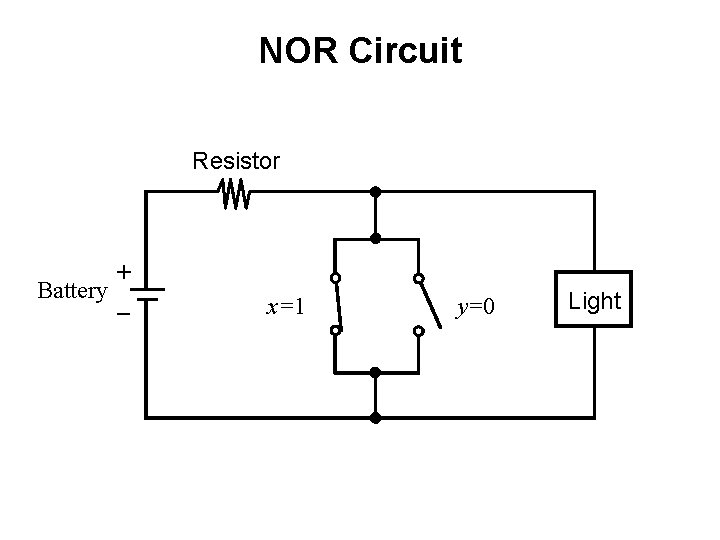
NOR Circuit Resistor + Battery _ x=1 y=0 Light
NOR Circuit Resistor + Battery _ x=1 y=1 Light
The Three Basic Logic Gates x x NOT x y AND x y OR 0 1 1 0 0 0 1 1 0 1 0 1 1 1 x x y x • y x +y
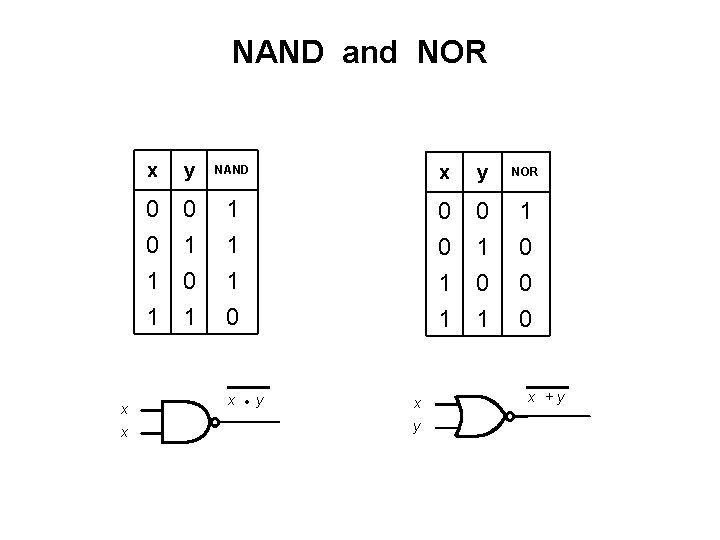
NAND and NOR x x x y NAND x y NOR 0 0 1 1 0 1 1 0 0 0 x • y x +y
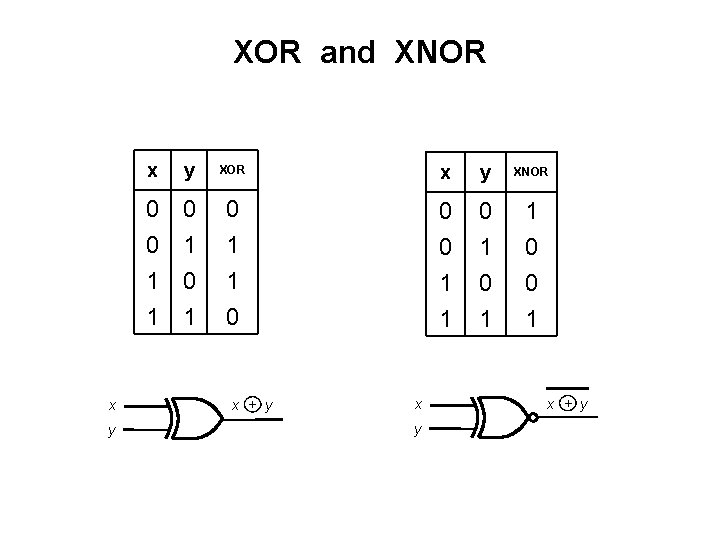
XOR and XNOR x y XOR x y XNOR 0 0 1 1 0 1 0 1 1 0 0 0 1 1 0 0 1 x + y
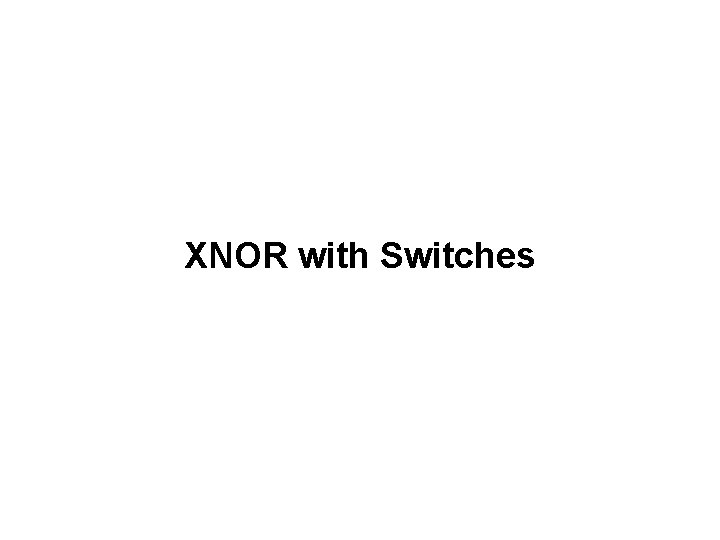
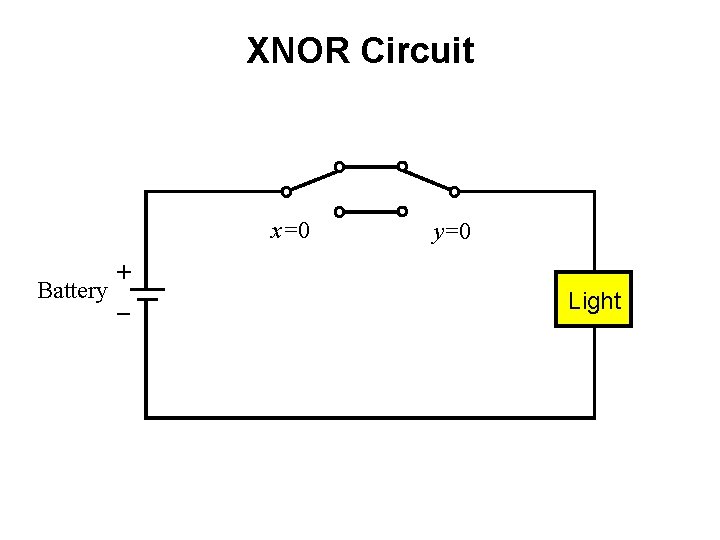
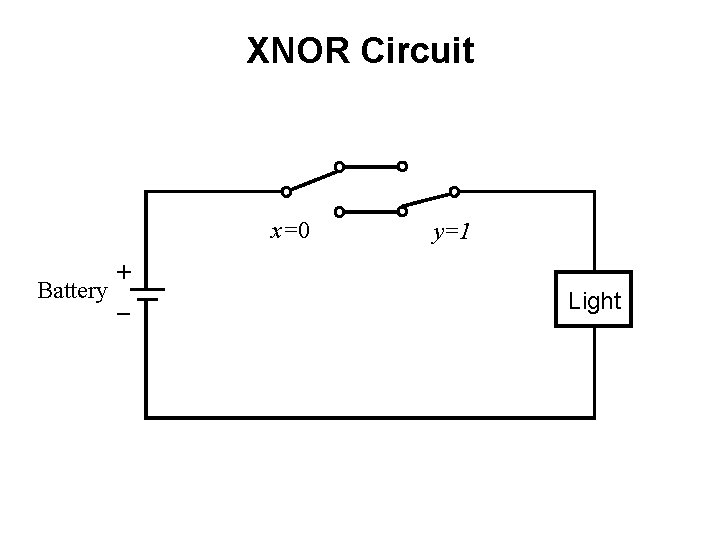
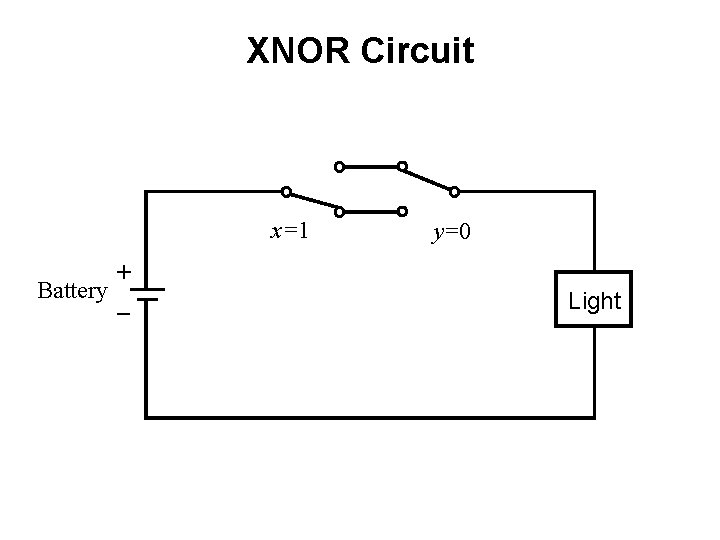
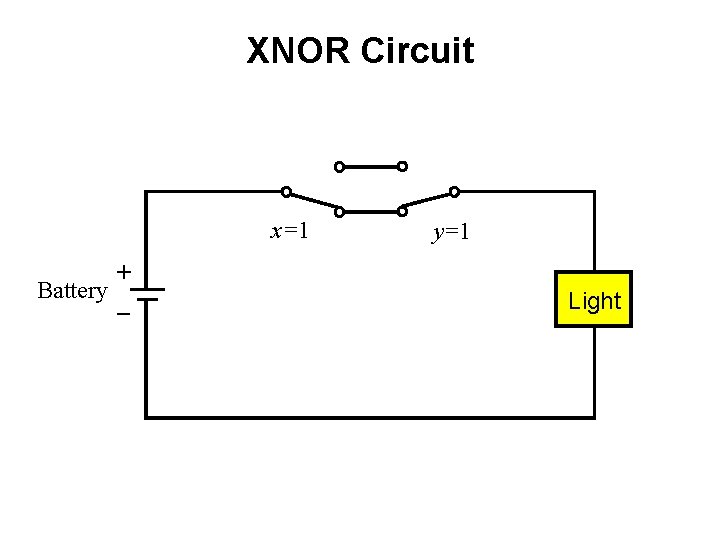
XNOR with Switches
XNOR Circuit x=0 + Battery _ y=0 Light
XNOR Circuit x=0 + Battery _ y=1 Light
XNOR Circuit x=1 + Battery _ y=0 Light
XNOR Circuit x=1 + Battery _ y=1 Light
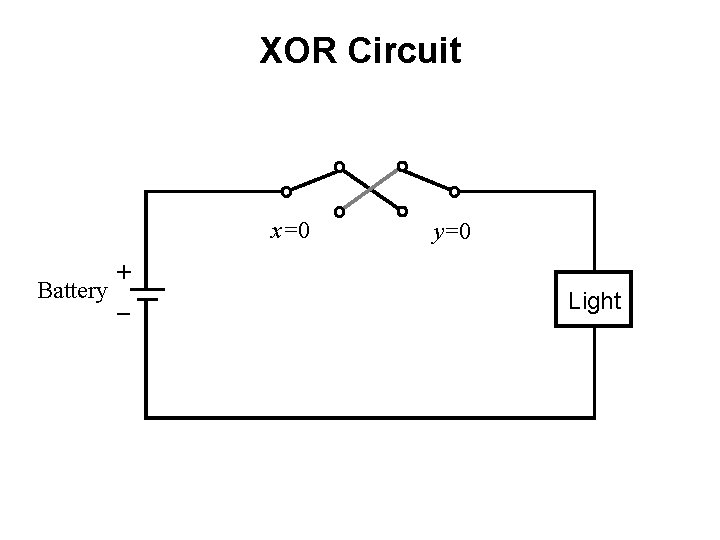
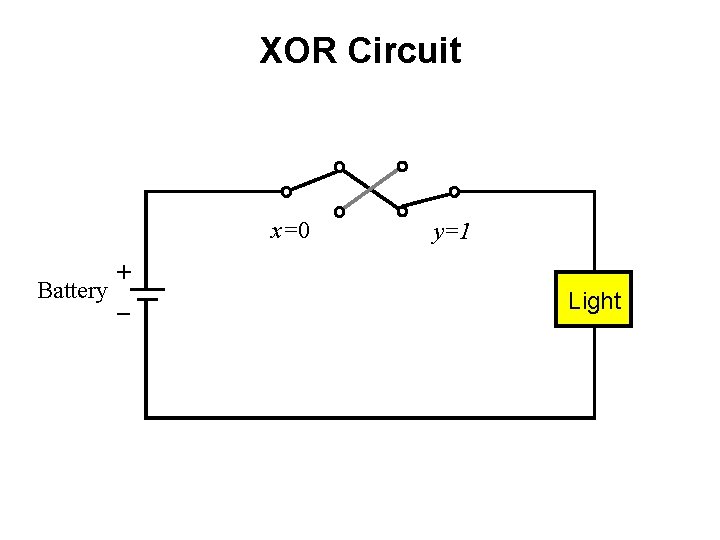
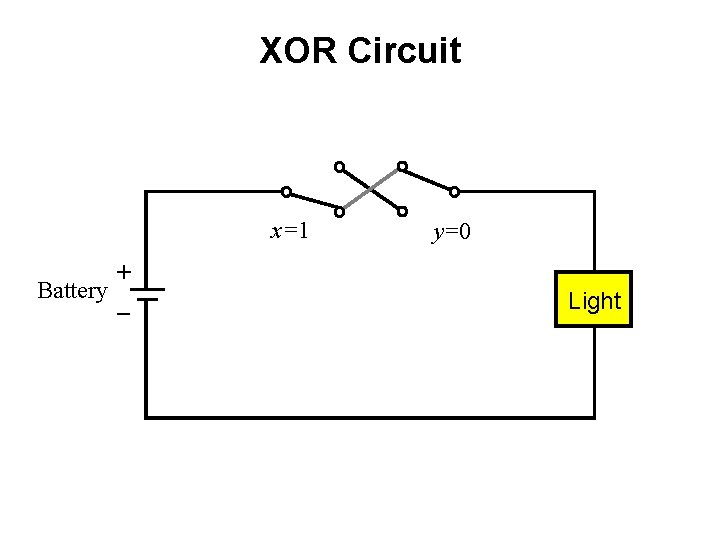
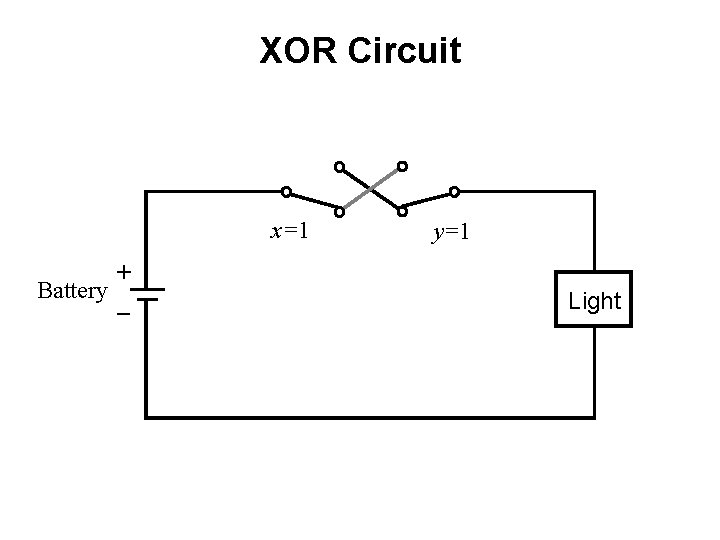
XOR with Switches
XOR Circuit x=0 + Battery _ y=0 Light
XOR Circuit x=0 + Battery _ y=1 Light
XOR Circuit x=1 + Battery _ y=0 Light
XOR Circuit x=1 + Battery _ y=1 Light
7 -Segment Display Example
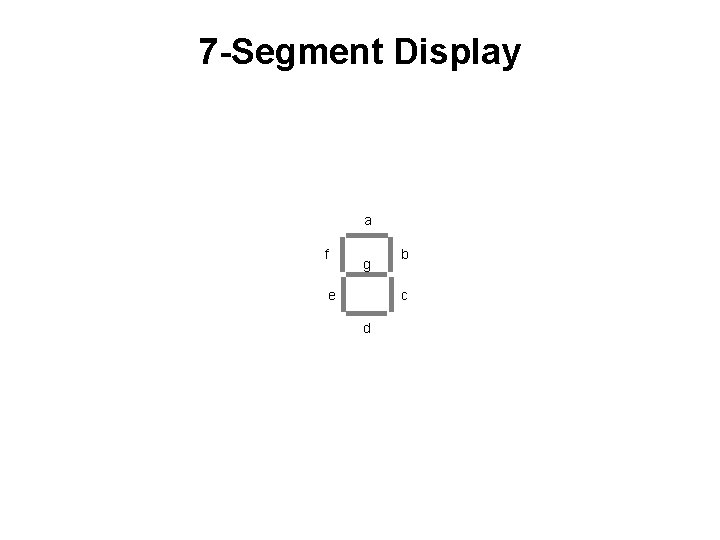
7 -Segment Display a f g b c e d
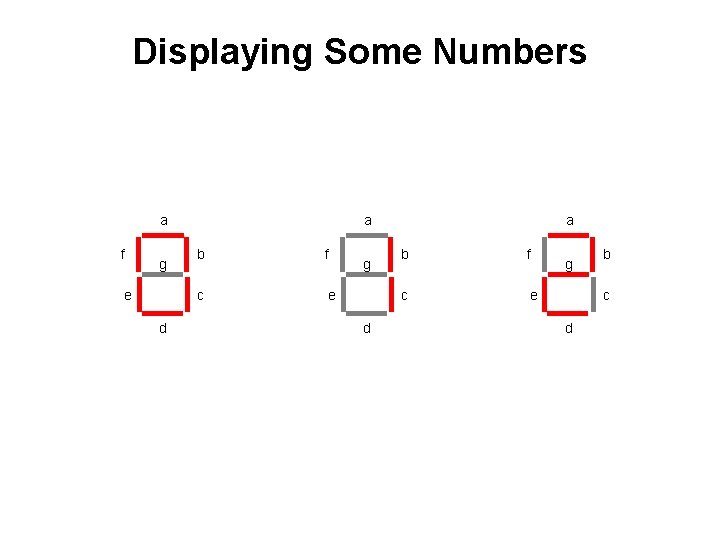
Displaying Some Numbers a f g e d a b f c e g b c d
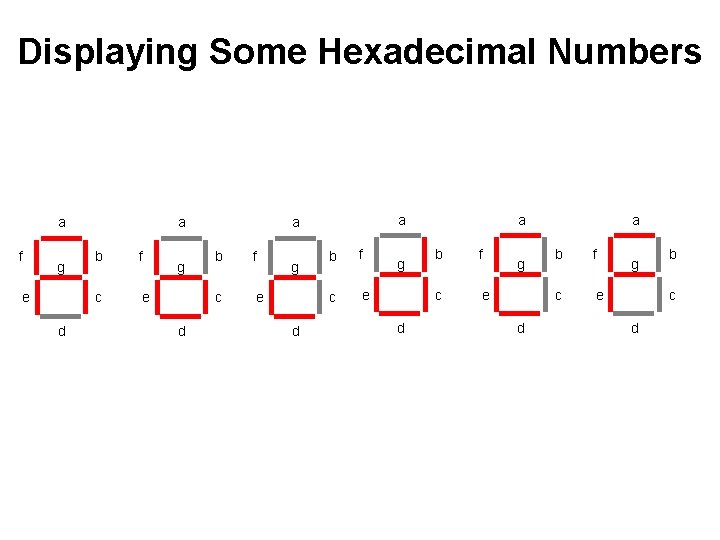
Displaying Some Hexadecimal Numbers a f g e d a b f c e g d a b f c e g d a b f c e g b c d
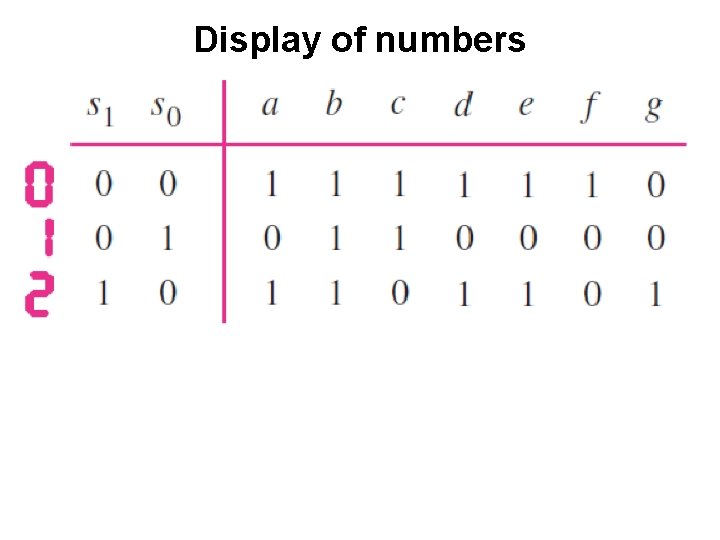
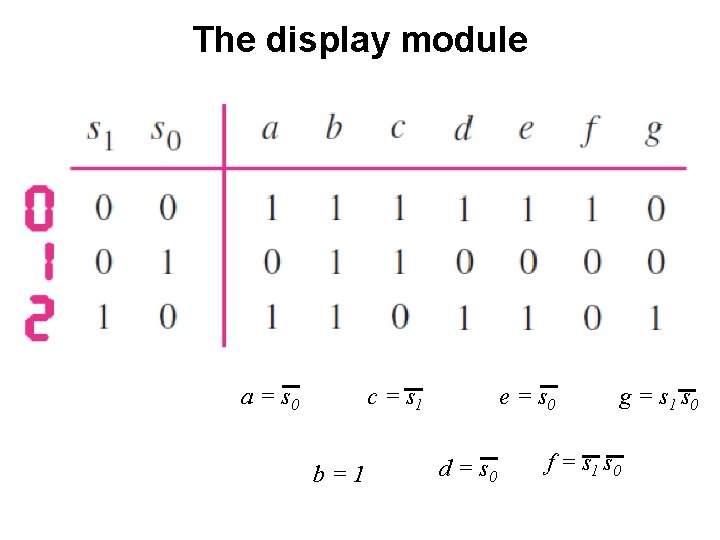
Display of numbers [ Figure 2. 34 from the textbook ]
Display of numbers
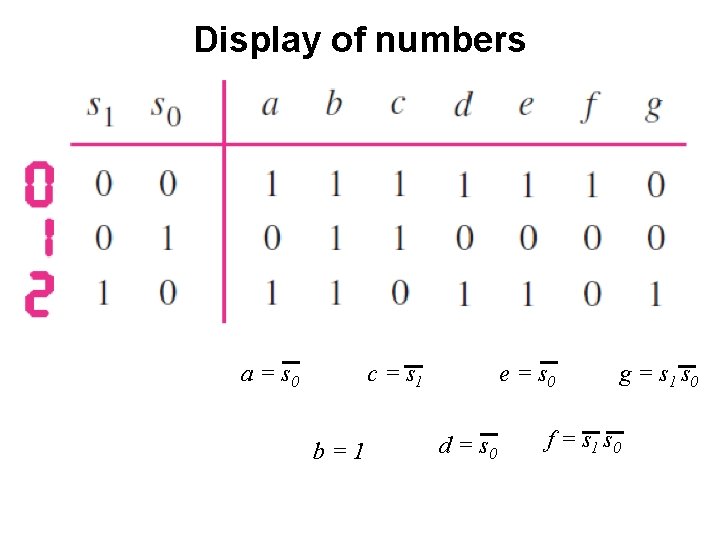
Display of numbers a = s 0 c = s 1 b=1 e = s 0 d = s 0 g = s 1 s 0 f = s 1 s 0
Intro to Verilog
History • Created in 1983/1984 • Verilog-95 (IEEE standard 1364 -1995) • Verilog 2001 (IEEE Standard 1364 -2001) • Verilog 2005 (IEEE Standard 1364 -2005) • System. Verilog 2009 (IEEE Standard 1800 -2009).
HDL • Hardware Description Language • Verilog HDL • VHDL
Verilog HDL != VHDL • These are two different Languages! • Verilog is closer to C • VHDL is closer to Ada
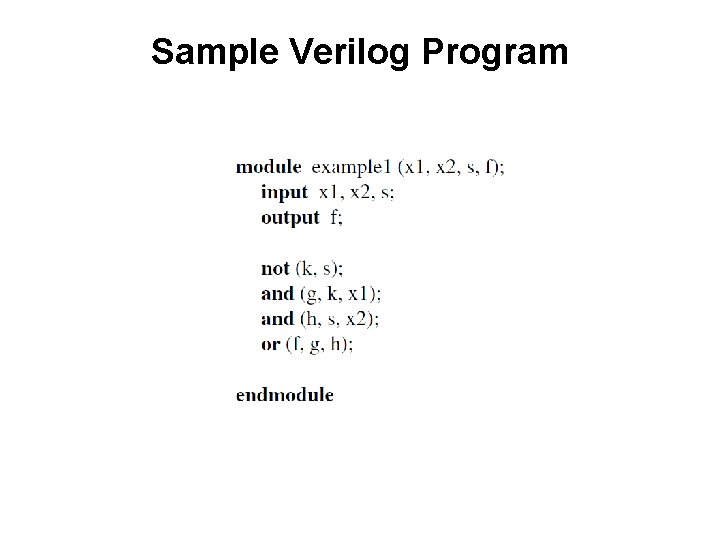
[ Figure 2. 35 from the textbook ]
Sample Verilog Program
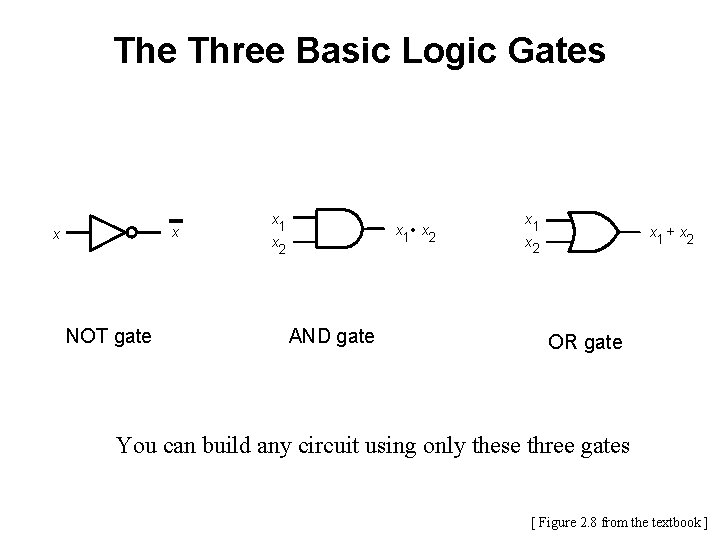
The Three Basic Logic Gates x x NOT gate x 1 x 2 x 1 • x 2 AND gate x 1 x 2 x 1 + x 2 OR gate You can build any circuit using only these three gates [ Figure 2. 8 from the textbook ]
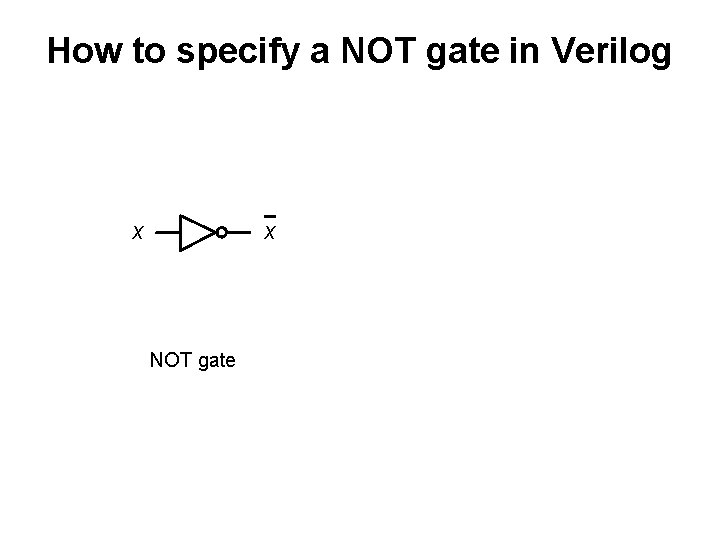
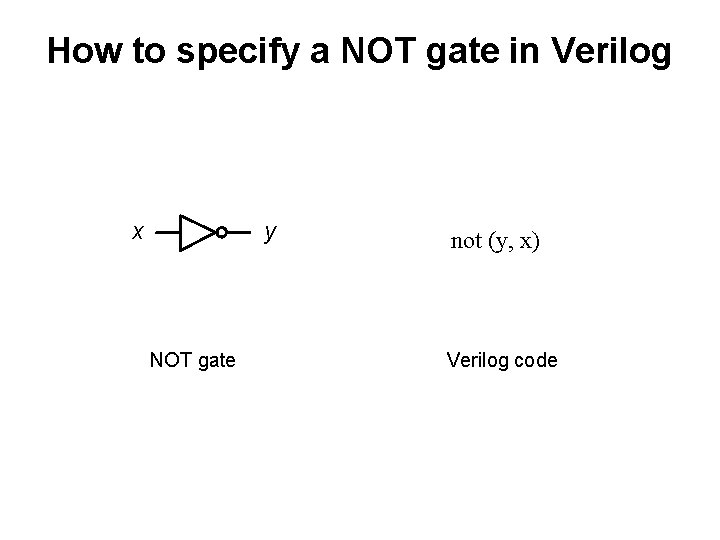
How to specify a NOT gate in Verilog x x NOT gate
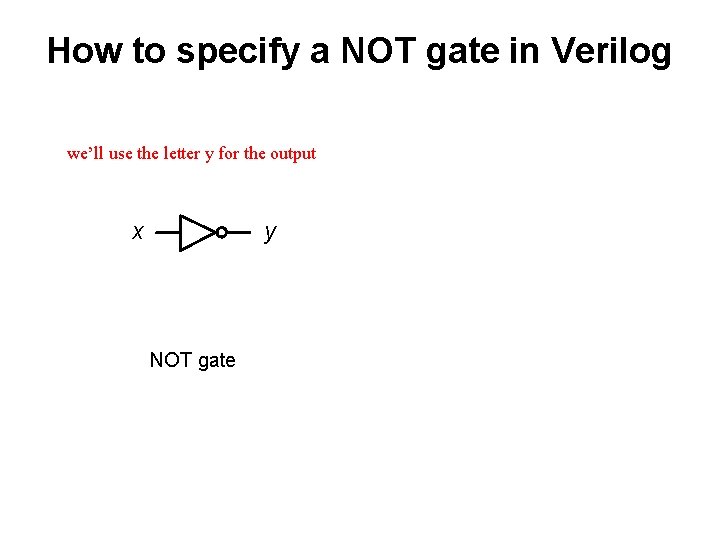
How to specify a NOT gate in Verilog we’ll use the letter y for the output x y NOT gate
How to specify a NOT gate in Verilog x y NOT gate not (y, x) Verilog code
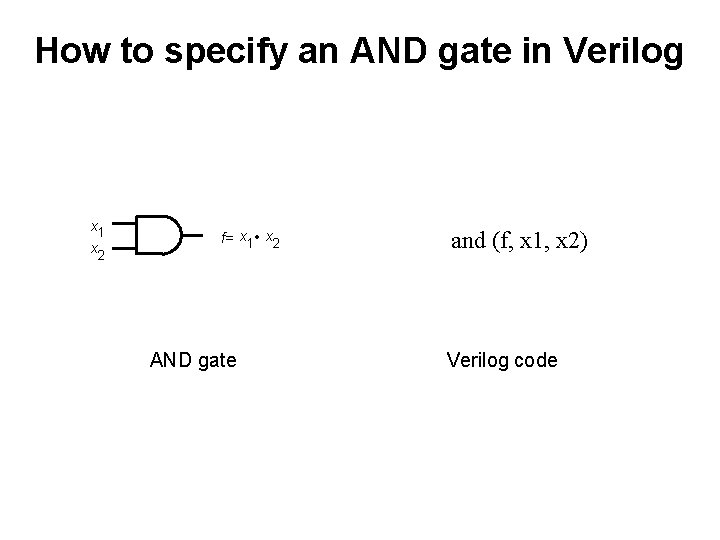
How to specify an AND gate in Verilog x 1 x 2 f= x 1 • x 2 AND gate and (f, x 1, x 2) Verilog code
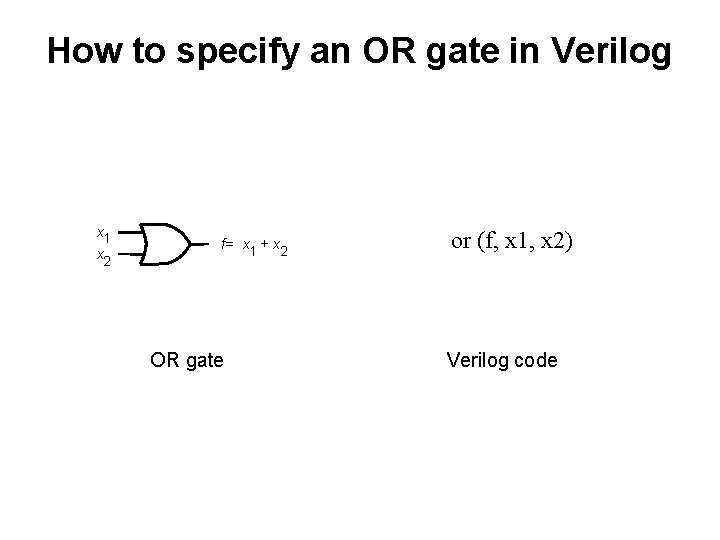
How to specify an OR gate in Verilog x 1 x 2 f= x 1 + x 2 OR gate or (f, x 1, x 2) Verilog code
Specifying a 2 -to-1 Multiplexor in Verilog
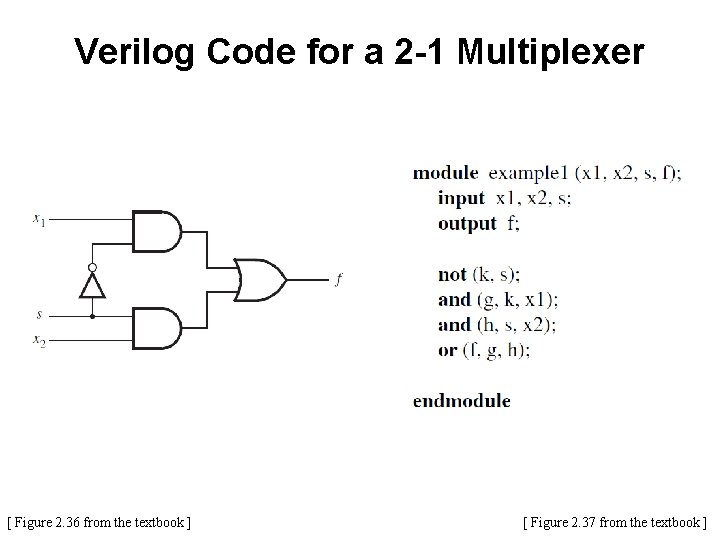
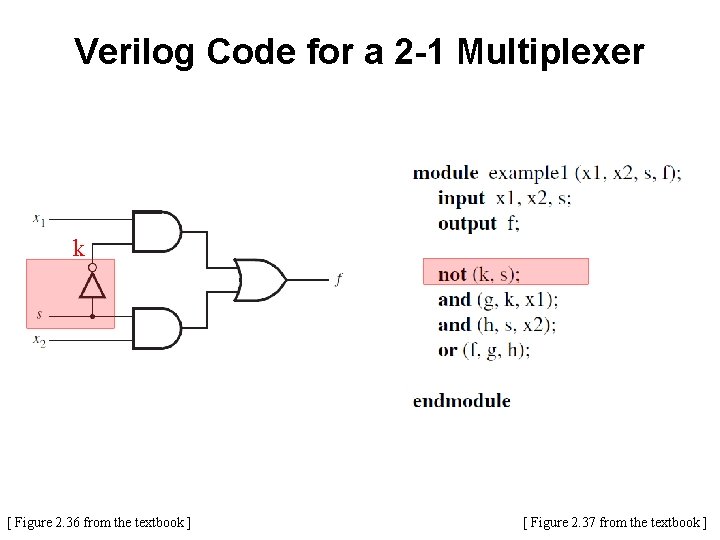
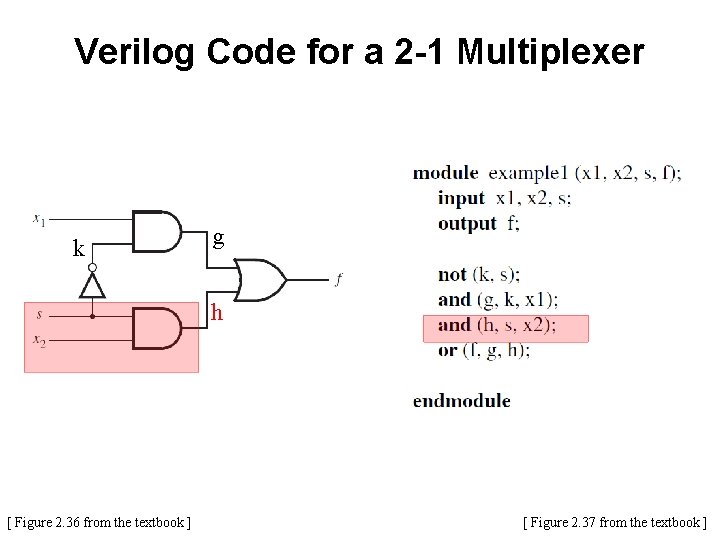
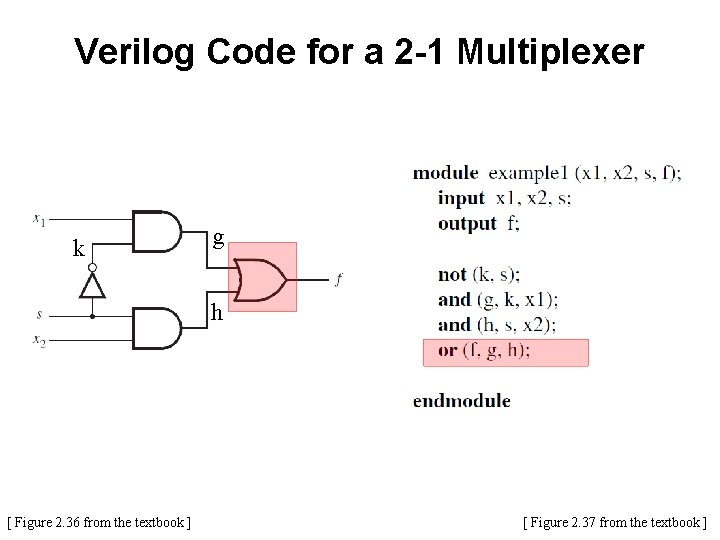
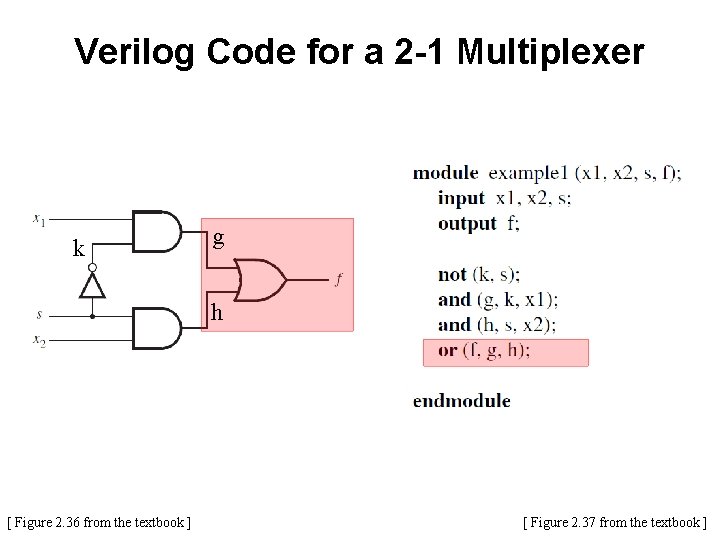
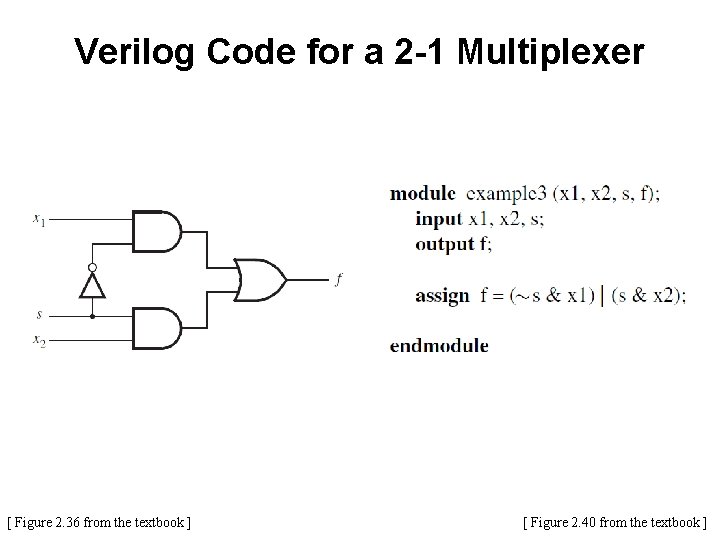
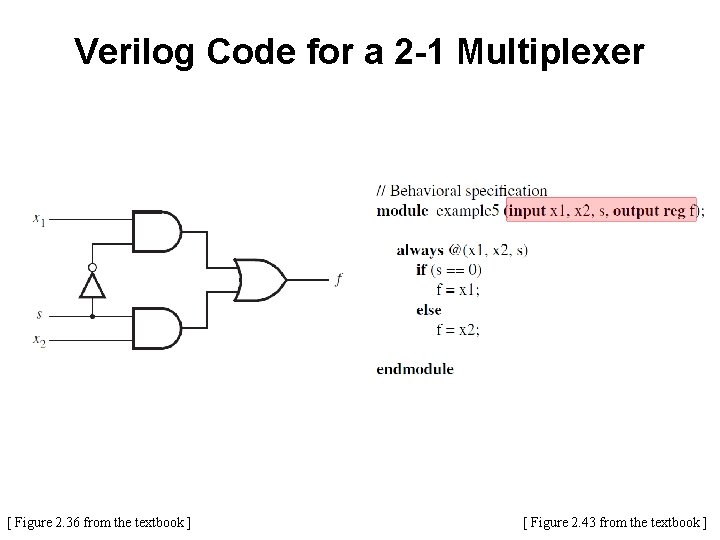
2 -1 Multiplexer [ Figure 2. 36 from the textbook ]
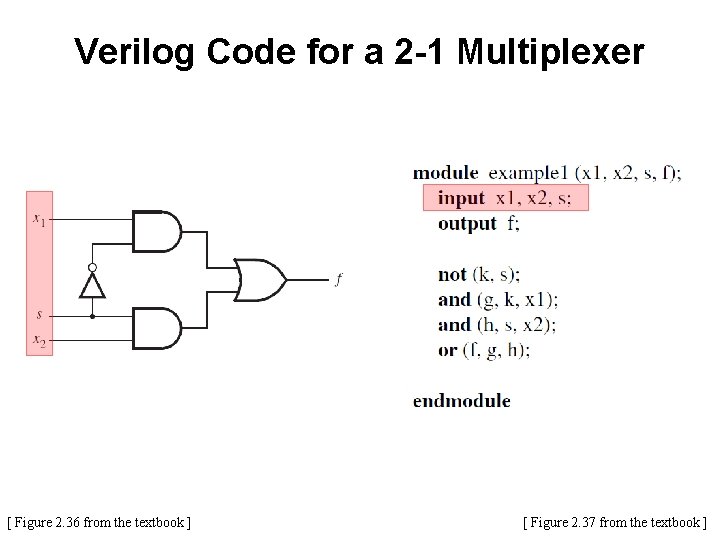
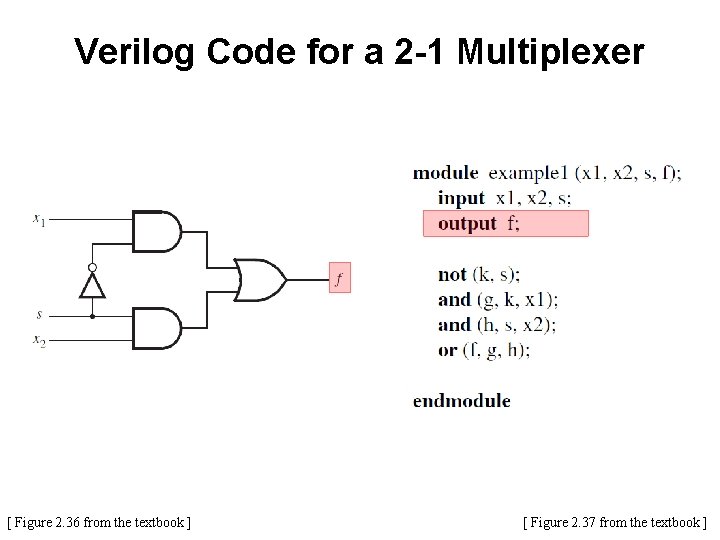
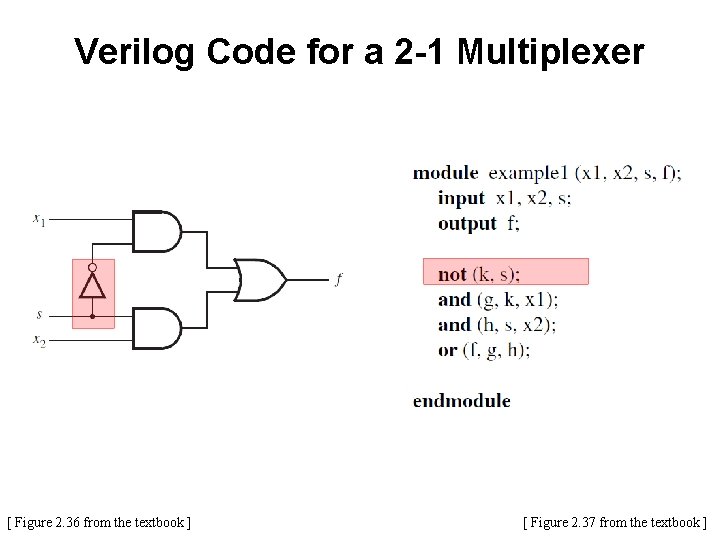
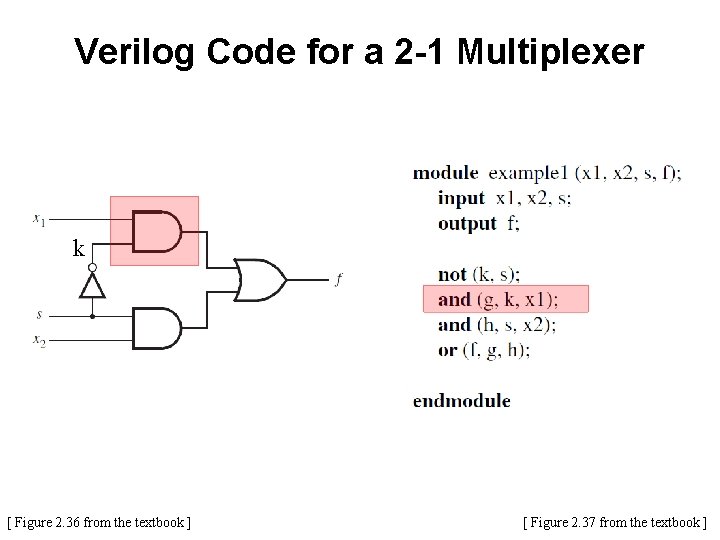
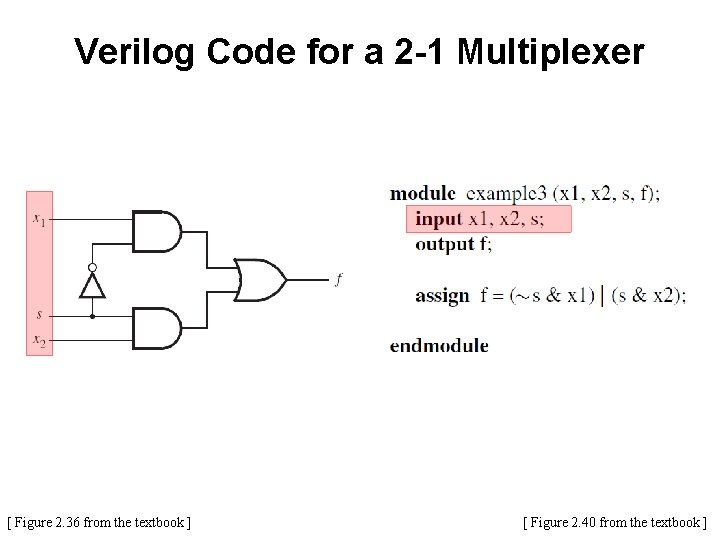
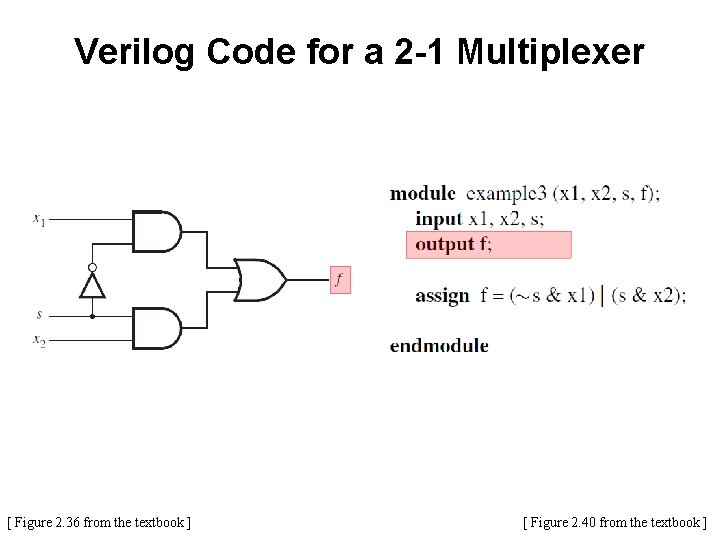
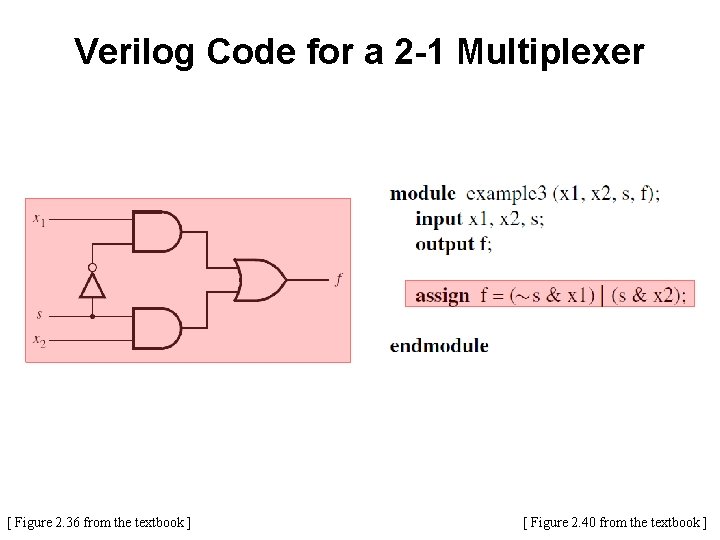
Verilog Code for a 2 -1 Multiplexer [ Figure 2. 36 from the textbook ] [ Figure 2. 37 from the textbook ]
Verilog Code for a 2 -1 Multiplexer [ Figure 2. 36 from the textbook ] [ Figure 2. 37 from the textbook ]
Verilog Code for a 2 -1 Multiplexer [ Figure 2. 36 from the textbook ] [ Figure 2. 37 from the textbook ]
Verilog Code for a 2 -1 Multiplexer [ Figure 2. 36 from the textbook ] [ Figure 2. 37 from the textbook ]
Verilog Code for a 2 -1 Multiplexer k [ Figure 2. 36 from the textbook ] [ Figure 2. 37 from the textbook ]
Verilog Code for a 2 -1 Multiplexer k [ Figure 2. 36 from the textbook ] [ Figure 2. 37 from the textbook ]
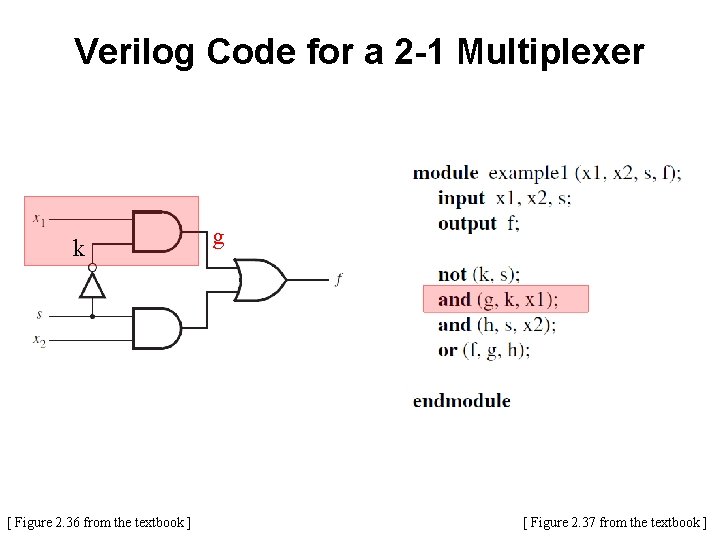
Verilog Code for a 2 -1 Multiplexer k [ Figure 2. 36 from the textbook ] g [ Figure 2. 37 from the textbook ]
Verilog Code for a 2 -1 Multiplexer k [ Figure 2. 36 from the textbook ] g [ Figure 2. 37 from the textbook ]
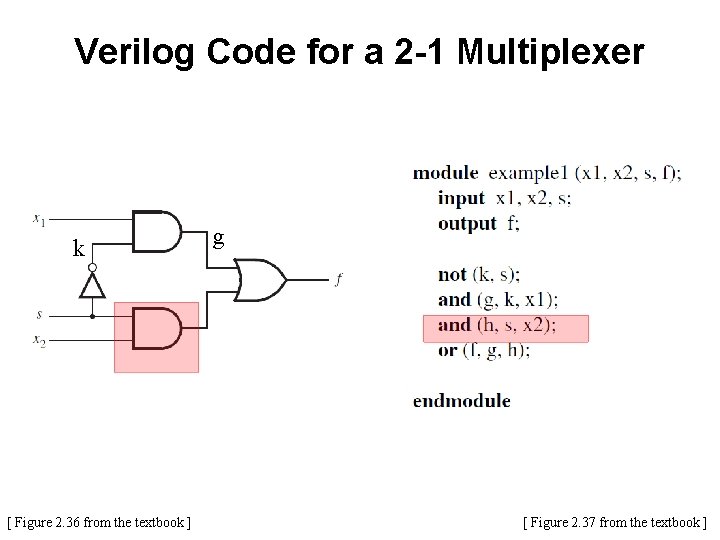
Verilog Code for a 2 -1 Multiplexer k g h [ Figure 2. 36 from the textbook ] [ Figure 2. 37 from the textbook ]
Verilog Code for a 2 -1 Multiplexer k g h [ Figure 2. 36 from the textbook ] [ Figure 2. 37 from the textbook ]
Verilog Code for a 2 -1 Multiplexer k g h [ Figure 2. 36 from the textbook ] [ Figure 2. 37 from the textbook ]
2 -to-1 Multiplexor in Verilog (with abbreviated syntax)
Verilog Code for a 2 -1 Multiplexer [ Figure 2. 36 from the textbook ] [ Figure 2. 40 from the textbook ]
Verilog Code for a 2 -1 Multiplexer [ Figure 2. 36 from the textbook ] [ Figure 2. 40 from the textbook ]
Verilog Code for a 2 -1 Multiplexer [ Figure 2. 36 from the textbook ] [ Figure 2. 40 from the textbook ]
Verilog Code for a 2 -1 Multiplexer [ Figure 2. 36 from the textbook ] [ Figure 2. 40 from the textbook ]
2 -to-1 Multiplexor in Verilog (with behavioral specification)
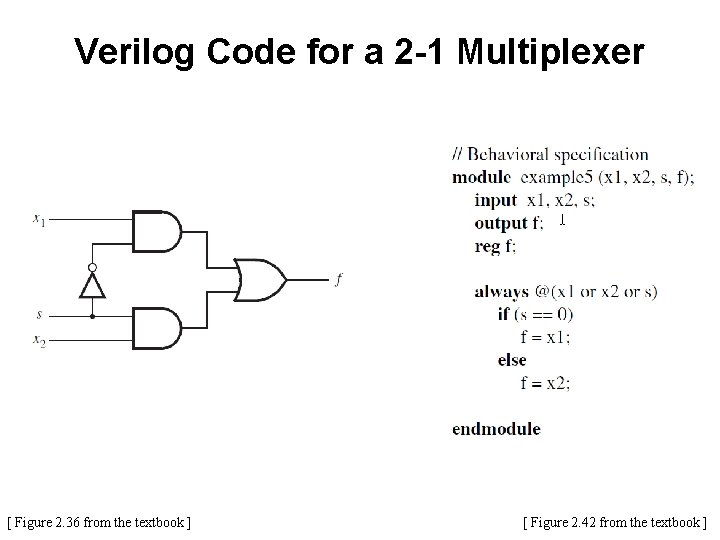
Verilog Code for a 2 -1 Multiplexer [ Figure 2. 36 from the textbook ] [ Figure 2. 42 from the textbook ]
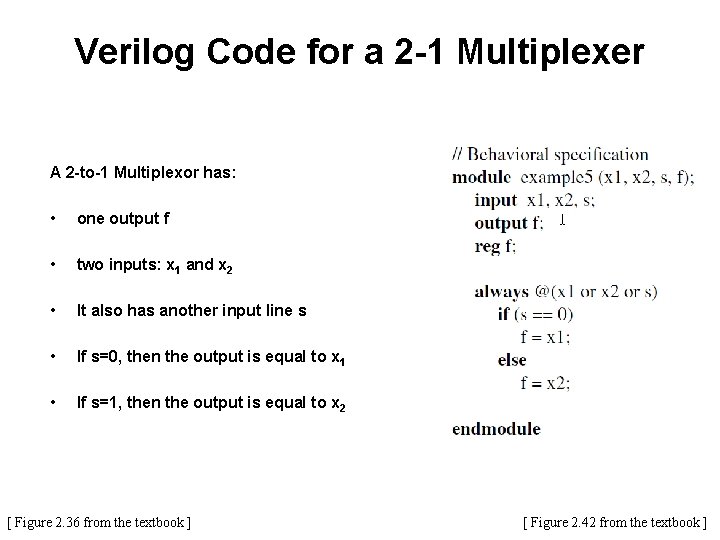
Verilog Code for a 2 -1 Multiplexer A 2 -to-1 Multiplexor has: • one output f • two inputs: x 1 and x 2 • It also has another input line s • If s=0, then the output is equal to x 1 • If s=1, then the output is equal to x 2 [ Figure 2. 36 from the textbook ] [ Figure 2. 42 from the textbook ]
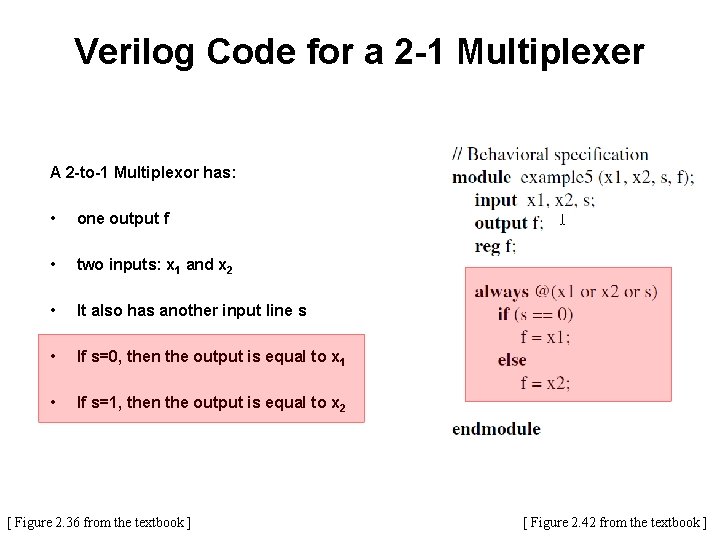
Verilog Code for a 2 -1 Multiplexer A 2 -to-1 Multiplexor has: • one output f • two inputs: x 1 and x 2 • It also has another input line s • If s=0, then the output is equal to x 1 • If s=1, then the output is equal to x 2 [ Figure 2. 36 from the textbook ] [ Figure 2. 42 from the textbook ]
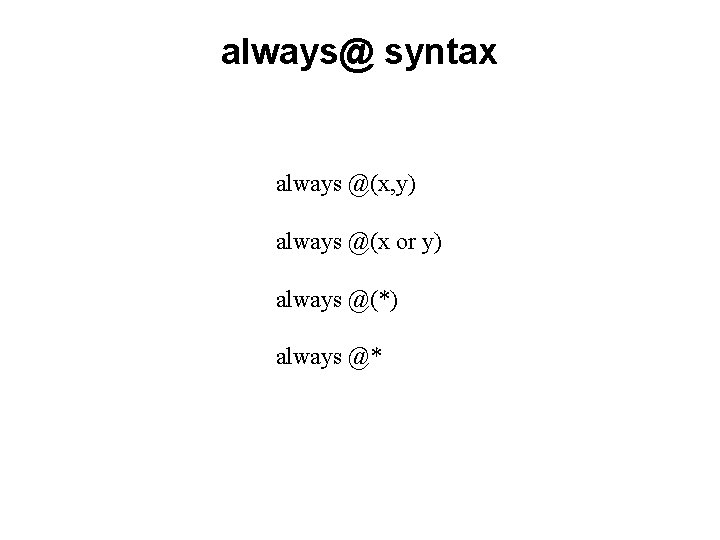
always@ syntax always @(x, y) always @(x or y) always @(*) always @*
Verilog Code for a 2 -1 Multiplexer [ Figure 2. 36 from the textbook ] [ Figure 2. 43 from the textbook ]
Another Example
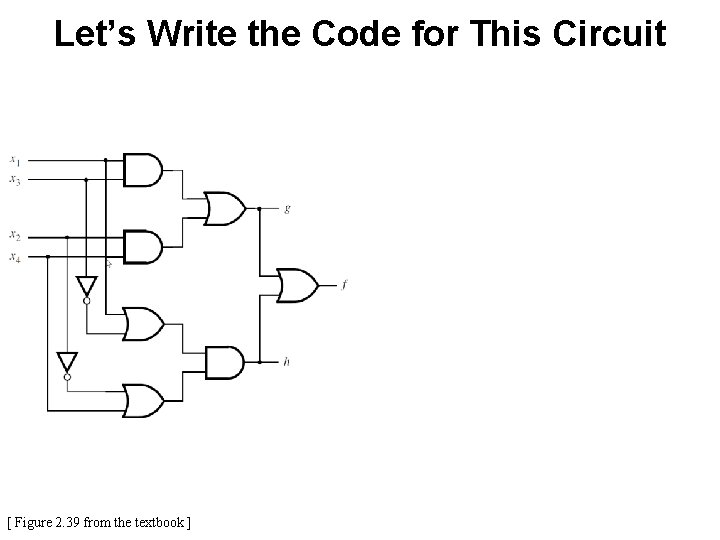
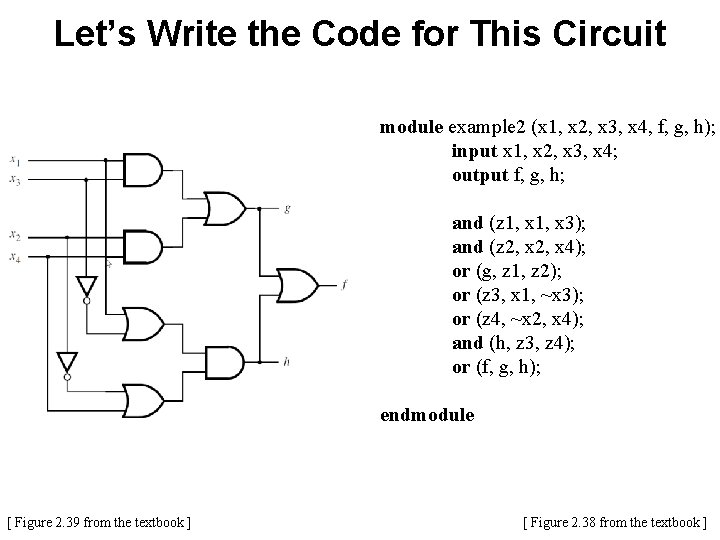
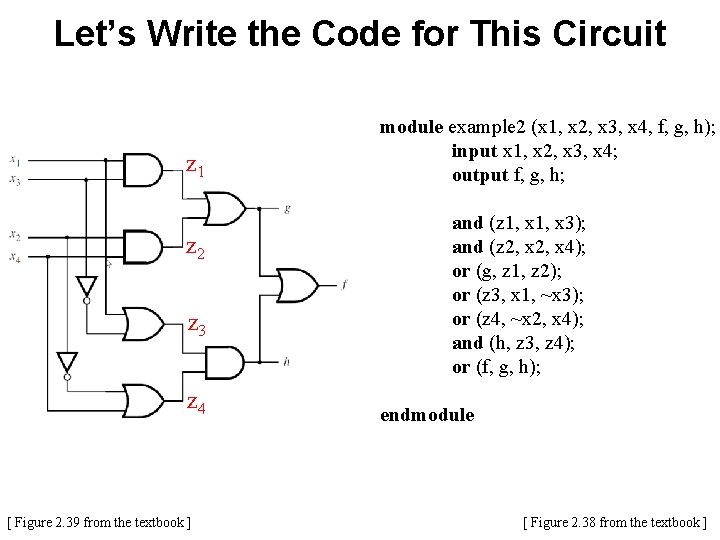
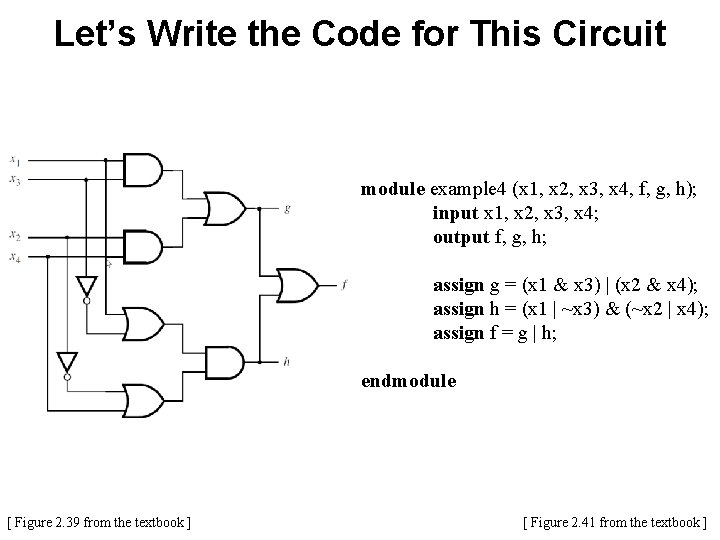
Let’s Write the Code for This Circuit [ Figure 2. 39 from the textbook ]
Let’s Write the Code for This Circuit module example 2 (x 1, x 2, x 3, x 4, f, g, h); input x 1, x 2, x 3, x 4; output f, g, h; and (z 1, x 3); and (z 2, x 4); or (g, z 1, z 2); or (z 3, x 1, ~x 3); or (z 4, ~x 2, x 4); and (h, z 3, z 4); or (f, g, h); endmodule [ Figure 2. 39 from the textbook ] [ Figure 2. 38 from the textbook ]
Let’s Write the Code for This Circuit z 1 z 2 z 3 z 4 [ Figure 2. 39 from the textbook ] module example 2 (x 1, x 2, x 3, x 4, f, g, h); input x 1, x 2, x 3, x 4; output f, g, h; and (z 1, x 3); and (z 2, x 4); or (g, z 1, z 2); or (z 3, x 1, ~x 3); or (z 4, ~x 2, x 4); and (h, z 3, z 4); or (f, g, h); endmodule [ Figure 2. 38 from the textbook ]
Let’s Write the Code for This Circuit module example 4 (x 1, x 2, x 3, x 4, f, g, h); input x 1, x 2, x 3, x 4; output f, g, h; assign g = (x 1 & x 3) | (x 2 & x 4); assign h = (x 1 | ~x 3) & (~x 2 | x 4); assign f = g | h; endmodule [ Figure 2. 39 from the textbook ] [ Figure 2. 41 from the textbook ]
Yet Another Example
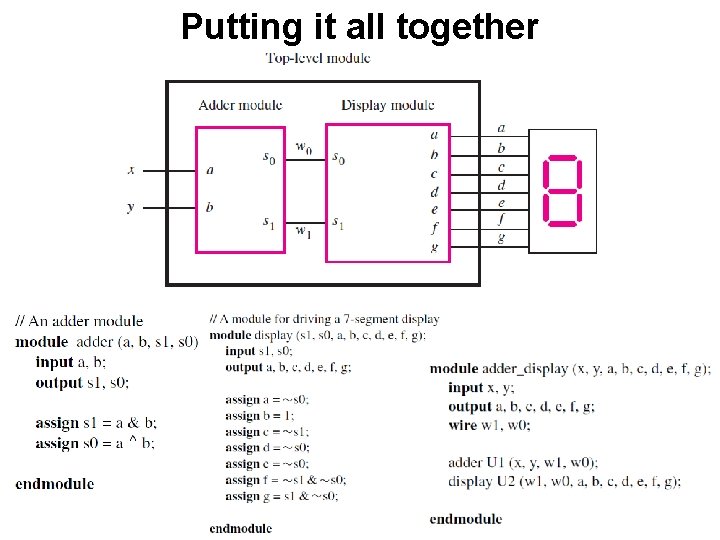
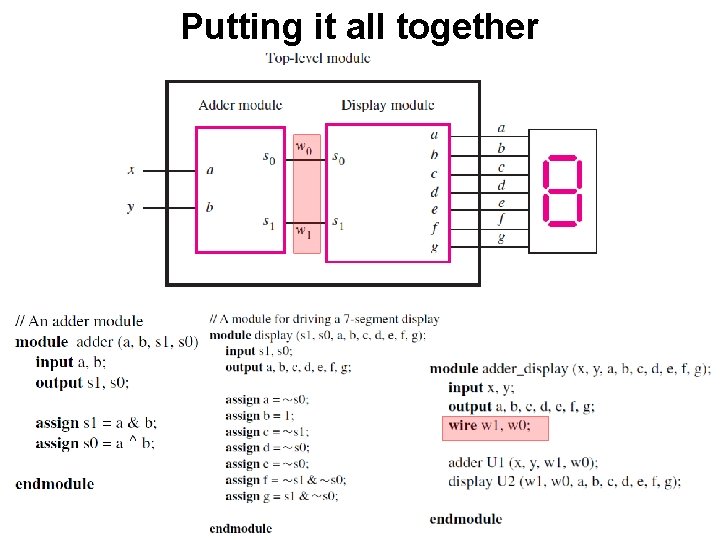
A logic circuit with two modules [ Figure 2. 44 from the textbook ]
The adder module [ Figure 2. 12 from the textbook ]
The adder module [ Figure 2. 45 from the textbook ]
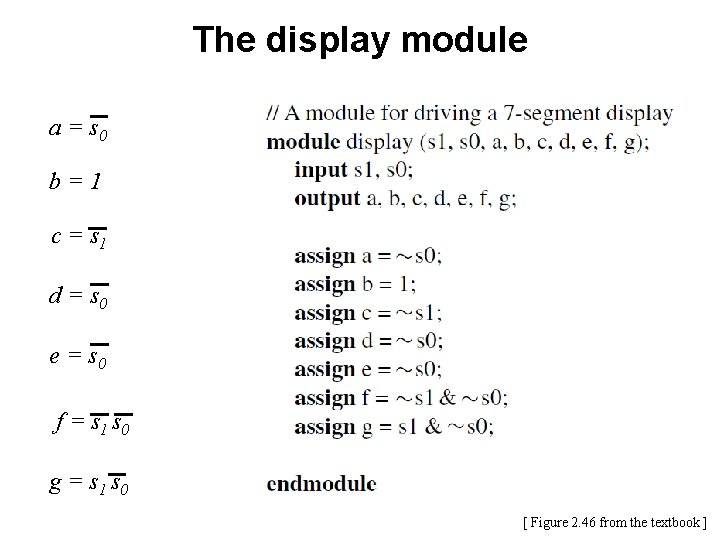
The display module a = s 0 c = s 1 b=1 e = s 0 d = s 0 g = s 1 s 0 f = s 1 s 0
The display module a = s 0 b=1 c = s 1 d = s 0 e = s 0 f = s 1 s 0 g = s 1 s 0 [ Figure 2. 46 from the textbook ]
Putting it all together
Putting it all together
Questions?
THE END