
Course Selection Step 1 Review Degree and Subject
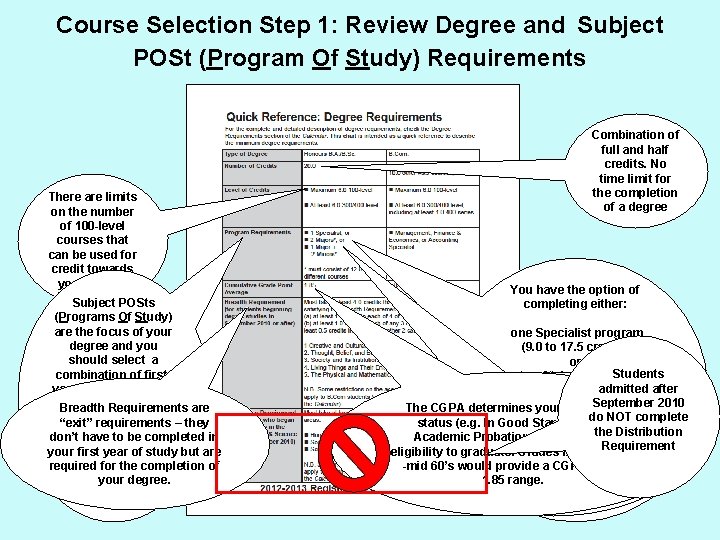
Course Selection Step 1: Review Degree and Subject POSt (Program Of Study) Requirements There are limits on the number of 100 -level courses that can be used for credit towards your degree Subject POSts (Programs Of Study) are the focus of your degree and you should select a combination of firstyear courses that will give you Requirements the option Breadth are to enter several – they “exit” requirements different Subject don’t have to be completed in POSts at the end of but are your first year of study your first yearcompletion of required for the of study your degree. Combination of full and half credits. No time limit for the completion of a degree You have the option of completing either: one Specialist program (9. 0 to 17. 5 credits) or Students two Major programs (6. 0 to 8. 0 credits each) after You can complete moreadmitted than September 2010 or the “minimum” number of The CGPA determines your academic do NOT complete one Major program Subject POSts. You can status (e. g. In Good Standing, Onselect the Distribution (6. 0 to. POSts 8. 0 credits) Academicup Probation to 3 Subject etc. ) and your with a Requirement plus eligibility to graduate. maximum Grades of 2 large in the Subject low-to two Minor programs -mid 60’s would. POSts provide ( e. g. a CGPA Majors in or the (4. 0 credits each) 1. 85 range. Specialists).
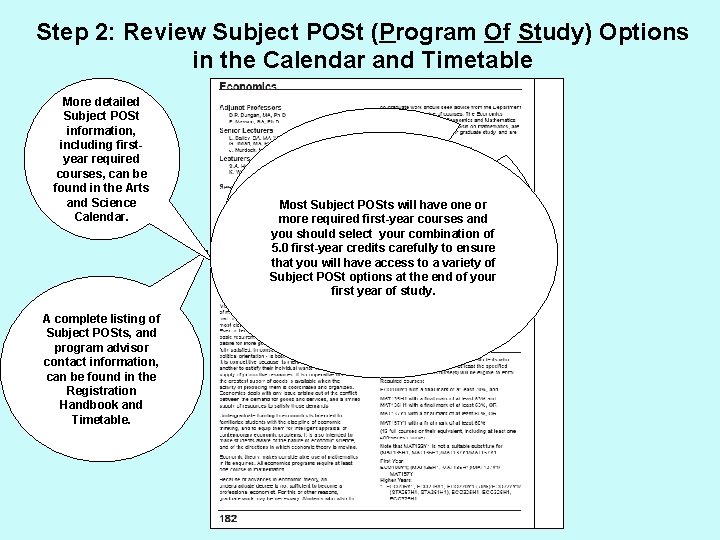
Step 2: Review Subject POSt (Program Of Study) Options in the Calendar and Timetable More detailed Subject POSt information, including firstyear required courses, can be found in the Arts and Science Calendar. A complete listing of Subject POSts, and program advisor contact information, can be found in the Registration Handbook and Timetable. You don't have to choose your Subject POSts (Programs of Study) Most Subject will have one or until end offirst-year first yearcourses but you and do morethe required have to think about Subject POSt you should select your combination of in order tocarefully make sensible 5. 0 options first-year credits to ensure course choices your first of of that you will have in access to a year variety study. Subject POSt options at the end of your first year of study.
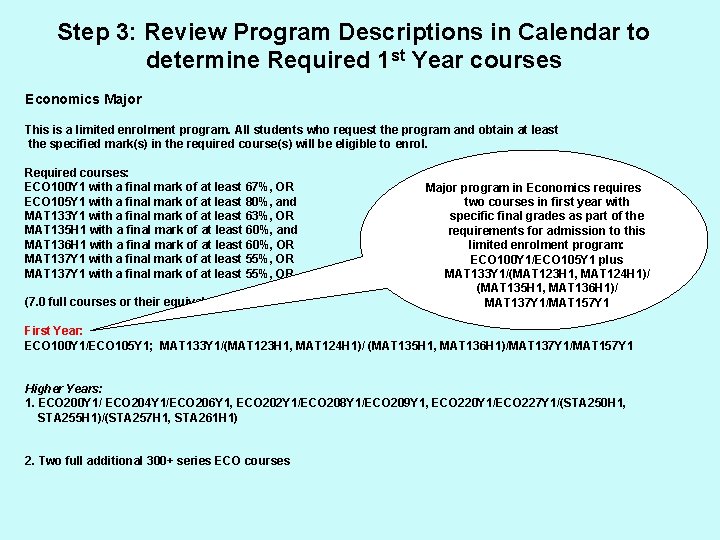
Step 3: Review Program Descriptions in Calendar to determine Required 1 st Year courses Economics Major This is a limited enrolment program. All students who request the program and obtain at least the specified mark(s) in the required course(s) will be eligible to enrol. Required courses: ECO 100 Y 1 with a final mark of at least 67%, OR ECO 105 Y 1 with a final mark of at least 80%, and MAT 133 Y 1 with a final mark of at least 63%, OR MAT 135 H 1 with a final mark of at least 60%, and MAT 136 H 1 with a final mark of at least 60%, OR MAT 137 Y 1 with a final mark of at least 55%, OR (7. 0 full courses or their equivalent) Major program in Economics requires two courses in first year with specific final grades as part of the requirements for admission to this limited enrolment program: ECO 100 Y 1/ECO 105 Y 1 plus MAT 133 Y 1/(MAT 123 H 1, MAT 124 H 1)/ (MAT 135 H 1, MAT 136 H 1)/ MAT 137 Y 1/MAT 157 Y 1 First Year: ECO 100 Y 1/ECO 105 Y 1; MAT 133 Y 1/(MAT 123 H 1, MAT 124 H 1)/ (MAT 135 H 1, MAT 136 H 1)/MAT 137 Y 1/MAT 157 Y 1 Higher Years: 1. ECO 200 Y 1/ ECO 204 Y 1/ECO 206 Y 1, ECO 202 Y 1/ECO 208 Y 1/ECO 209 Y 1, ECO 220 Y 1/ECO 227 Y 1/(STA 250 H 1, STA 255 H 1)/(STA 257 H 1, STA 261 H 1) 2. Two full additional 300+ series ECO courses

Step 4: Consider Elective Course Options 1. Courses that can help fulfill the Breadth Requirement: 4. Introductory courses that will give you additional Subject POSt options: • The required courses for your programs of interest will fulfill some of your breadth requirement. • • You don’t have to complete the Breadth requirement in 1 st year, but it can be a good opportunity to take an elective course in a category you need It is important to have several options for Subject POSts at the end of 1 st year in case your first choice is not what you expected or you do not achieve the grade needed to enter the program • Taking an additional introductory course allows you to explore other interests you may have 2. Small class experiences – 199 courses, FLCs, New One 3. • These are unique opportunities only available in your 1 st year, including a chance to get to know your professor - each class usually has no more than 25 students 199 courses are designed to help fulfill the breadth requirement and you should ideally choose one in a category that is different from your main programs of interest 3. Skills development courses – e. g. writing courses and languages: • Courses such as Effective Writing (ENG 100 H 1) or Writing Essays (INI 103 H 1) can help build skills that will be valuable for other courses you take • U. of T. offers over 40 different languages to learn 5. Explore something that wasn’t available in high school or that may help towards future goals: • The advantage of being at a university as large as U. of T. is the huge selection of courses • Professional programs (medicine, pharmacy, social work etc. ) generally focus on marks and not program choices, but may suggest some courses to take during your undergraduate years 6. Anti-Calendar - available online at www. assu. ca: • Consider what other students have thought of courses • The Anti-Calendar is published by the student union and provides student evaluations of courses and professors to help students make informed choices
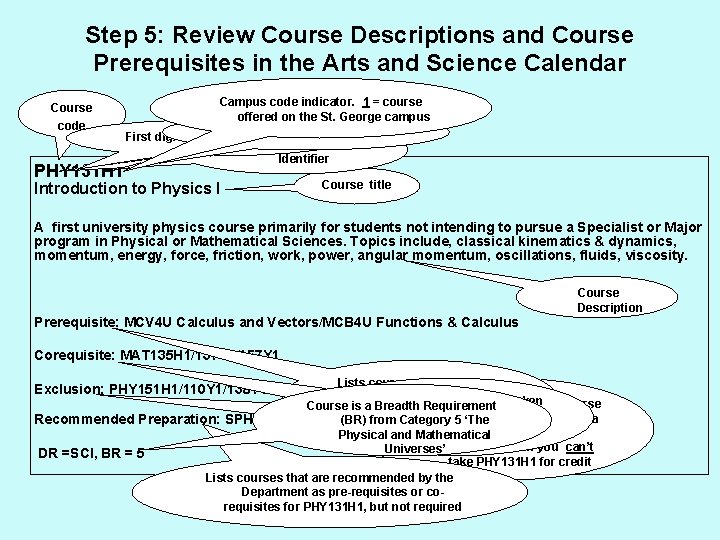
Step 5: Review Course Descriptions and Course Prerequisites in the Arts and Science Calendar Course code PHY 131 H 1 Campus code indicator. 1 = course offered on the St. George campus Y = 1. 0 credit, H = 0. 5 credit First digit indicates year level PHY = Departmental Identifier Introduction to Physics I Course title A first university physics course primarily for students not intending to pursue a Specialist or Major program in Physical or Mathematical Sciences. Topics include, classical kinematics & dynamics, momentum, energy, force, friction, work, power, angular momentum, oscillations, fluids, viscosity. Prerequisite: MCV 4 U Calculus and Vectors/MCB 4 U Functions & Calculus Course Description Corequisite: MAT 135 H 1/137 Y 1/157 Y 1 Lists courses you must have completed before you courses that mustcan be taken Lists courses with similar course Course is. Lists a Breadth Requirement take concurrently PHY 131 H 11 with content. If you have taken a Recommended Preparation: SPH 4 U Physics and Chemistry (BR)SCH 4 U from Category 5 ‘The PHY 131 H 1 course listed as an Physical and Mathematical exclusion, then you can’t Universes’ DR =SCI, BR = 5 take PHY 131 H 1 for credit Lists courses that are recommended by the Department as pre-requisites or corequisites for PHY 131 H 1, but not required Exclusion: PHY 151 H 1/110 Y 1/138 Y 1/140 Y 1
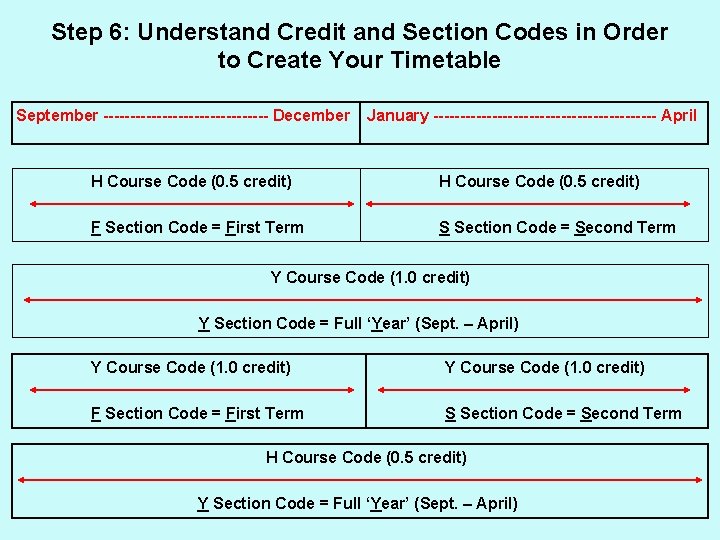
Step 6: Understand Credit and Section Codes in Order to Create Your Timetable September ---------------- December January --------------------- April H Course Code (0. 5 credit) F Section Code = First Term S Section Code = Second Term Y Course Code (1. 0 credit) Y Section Code = Full ‘Year’ (Sept. – April) Y Course Code (1. 0 credit) F Section Code = First Term S Section Code = Second Term H Course Code (0. 5 credit) Y Section Code = Full ‘Year’ (Sept. – April)
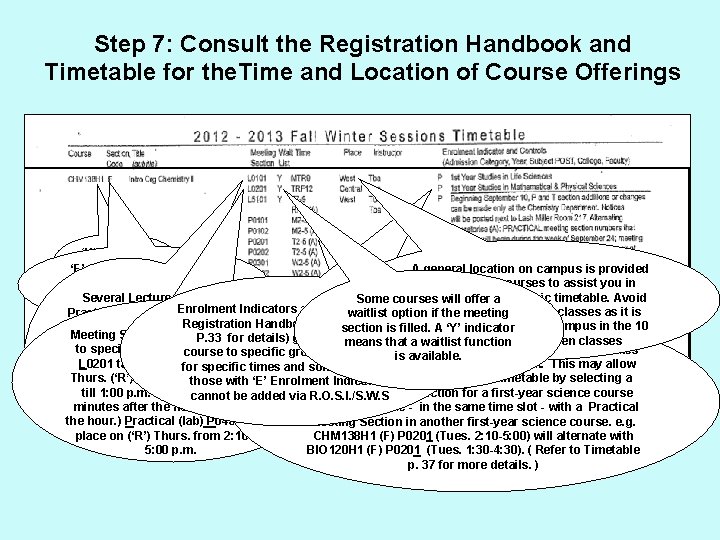
Step 7: Consult the Registration Handbook and Timetable for the. Time and Location of Course Offerings ‘H’ indicates 0. 5 credit ‘F’ section code indicates A general location on campus is provided course takes place in First for first-year courses to assist you in Term – Sept. to Dec. planning your aacademic timetable. Avoid Several Lecture, Some courses will offer Enrolment Indicators and Controls (See back-to-back East/West classes as it is Practical and Tutorial waitlist option if the meeting Timetable difficult travel across campus in the 10 Meeting Sections to. Registration Handbook and section is filled. A ‘Y’toindicator Meeting Section codes. P. 33 correspond for details) give access to a that a waitlist minute interval between classes choose from. You means function to specific time slots e. g. Lecture (A) Indicates that the Practical (lab) Meeting Section takes must choose one ofcourse to specific groups of studentsis available. L 0201 takes place for on specific Tues. (‘T’), place courses in alternate times and some – weeks, not every week. This may allow each type Thurs. (‘R’) and Fri (‘F’), from 12: 10 you to create a more “efficient” timetable by selecting a if offered (not every those with ‘E’ Enrolment Indicators till 1: 00 p. m. (Classes begin 10 Practical Meeting Section for a first-year science course will offer cannot be added via R. O. S. I. /S. W. S minutes after the hour and end on that will alternate - in the same time slot - with a Practical and Tutorial the hour. ) Practical (lab) P 0401 takes Meeting Section in another first-year science course. e. g. Meeting Sections) place on (‘R’) Thurs. from 2: 10 till CHM 138 H 1 (F) P 0201 (Tues. 2: 10 -5: 00) will alternate with 5: 00 p. m. BIO 120 H 1 (F) P 0201 (Tues. 1: 30 -4: 30). ( Refer to Timetable p. 37 for more details. )
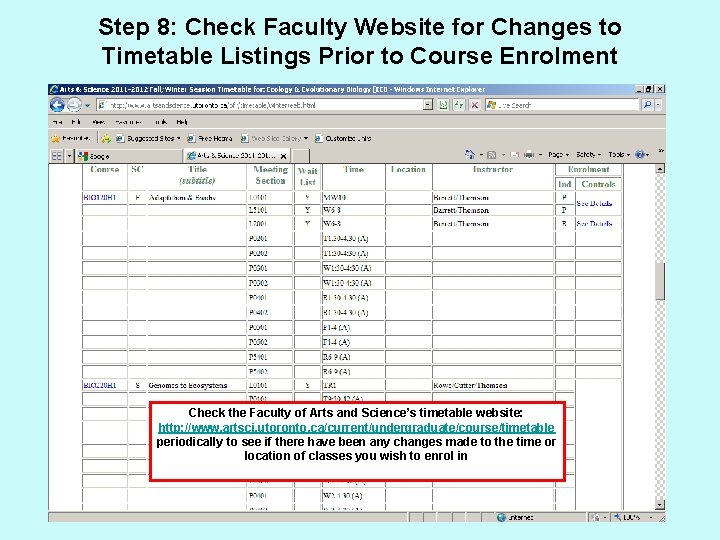
Step 8: Check Faculty Website for Changes to Timetable Listings Prior to Course Enrolment Check the Faculty of Arts and Science’s timetable website: http: //www. artsci. utoronto. ca/current/undergraduate/course/timetable periodically to see if there have been any changes made to the time or location of classes you wish to enrol in
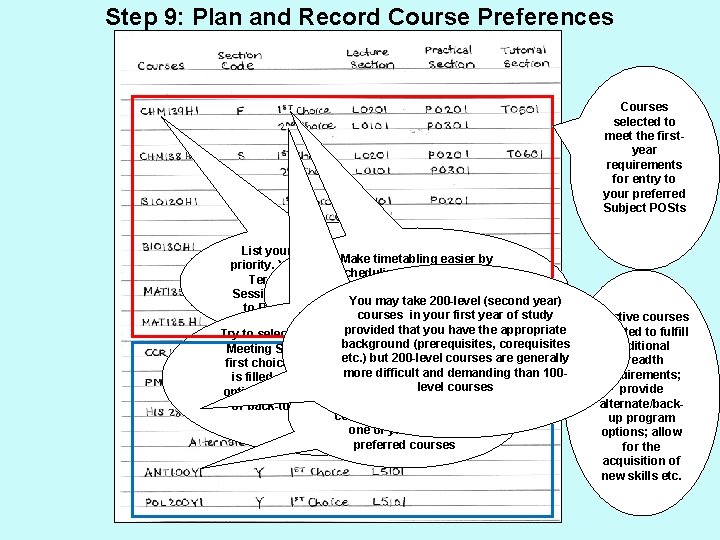
Step 9: Plan and Record Course Preferences Courses selected to meet the firstyear requirements for entry to your preferred Subject POSts List your 5. 0 credits in order of Make timetabling easier by priority. You select all of your First st scheduling the 1 choice of Term, Second Term and Full Lecture/Practical/Tutorial Meeting Session courses when you log on You may (second year) Sections for alltake 5. 0 200 -level credits before to ROSI at your assigned start nd courses in your first year attempting to schedule 2 or 3 rdof study time. that you have the appropriate rd choice “back-up” meeting sections Try to select 2 nd and 3 provided “back-up” background (prerequisites, corequisites for each Meeting Sections in the event thatcourse. your etc. ) but 200 -level courses are generally first choice of Lecture/Practical/Tutorial difficult and demanding than 100 is filled. Ensure thatmore these “back-up” Choose alternate courses level courses options do not create timetable conflicts in the event that you or back-to-back East/West difficulties cannot obtain a space in one of your first 5. 0 preferred courses Elective courses selected to fulfill additional breadth requirements; provide alternate/backup program options; allow for the acquisition of new skills etc.
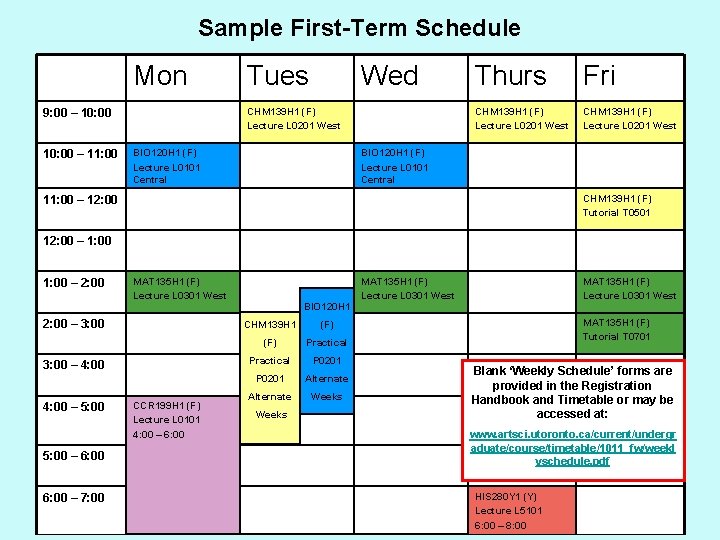
Sample First-Term Schedule Mon Wed CHM 139 H 1 (F) Lecture L 0201 West 9: 00 – 10: 00 – 11: 00 Tues BIO 120 H 1 (F) Lecture L 0101 Central Thurs Fri CHM 139 H 1 (F) Lecture L 0201 West BIO 120 H 1 (F) Lecture L 0101 Central CHM 139 H 1 (F) Tutorial T 0501 11: 00 – 12: 00 – 1: 00 – 2: 00 MAT 135 H 1 (F) Lecture L 0301 West 2: 00 – 3: 00 – 4: 00 – 5: 00 – 6: 00 – 7: 00 CCR 199 H 1 (F) Lecture L 0101 4: 00 – 6: 00 BIO 120 H 1 CHM 139 H 1 (F) Practical P 0201 Alternate Weeks MAT 135 H 1 (F) Lecture L 0301 West MAT 135 H 1 (F) Tutorial T 0701 Blank ‘Weekly Schedule’ forms are provided in the Registration Handbook and Timetable or may be accessed at: www. artsci. utoronto. ca/current/undergr aduate/course/timetable/1011_fw/weekl yschedule. pdf HIS 280 Y 1 (Y) Lecture L 5101 6: 00 – 8: 00
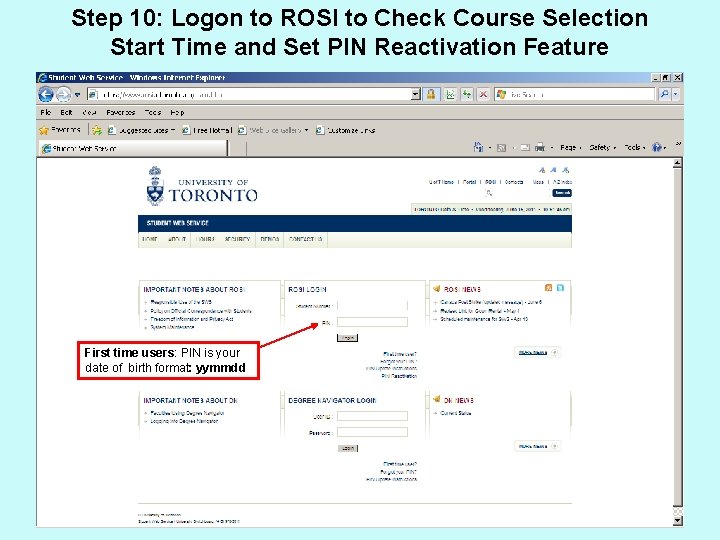
Step 10: Logon to ROSI to Check Course Selection Start Time and Set PIN Reactivation Feature First time users: PIN is your date of birth format: yymmdd
Useful Websites and Resources College Registrars’ Contact information: http: //www. artsci. utoronto. ca/newstudents/nextsteps/contact Arts and Science Calendar: http: //www. artsandscience. utoronto. ca/ofr/calendar/ Registration Handbook and Timetable: http: //www. artsci. utoronto. ca/current/undergraduate/course/timetable/1213_fw First Year Seminars: http: //www. artsci. utoronto. ca/current/undergraduate/course/fyh-1 First Year Learning Communities (FLC): http: //flc. utoronto. ca/ TCard (Student card: http: //www. utoronto. ca/tcard/ ROSI: https: //www. rosi. utoronto. ca/main. html ROSI Instructional Demos: https: //www. rosi. utoronto. ca/demos. html Anti Calendar: http: //assu. ca/ Weekly Schedule Blank Form: www. artsci. utoronto. ca/current/undergraduate/course/timetable/1011_fw/weeklyschedule. pdf
- Slides: 12