
Cost Analysis and Vendor Comparison On behalf of
Cost Analysis and Vendor Comparison On behalf of the I-Share Acquisitions and Serials Team January 11/12, 2011
Personal Introduction • My name is Andy Meyer and I’m the Acquisitions Coordinator at North Park University • I’m relatively new to the job • This project started because I was curious and wanted to use the library resources well • I’m not exactly sure how other libraries do things • I was a math major and, at one time, a math teacher • I have a tendency to talk quickly…
Introduction to the Presentation Today’s webinar can be divided into 4 sections: • Methodology and the structure of the project • The prices and some brief conclusions • A few observations about the trends within the data • Beyond prices – looking at other factors Best Practices for Webinars • Feel free to ask questions via chat, I will repeat them aloud and try to answer them • I’m also available after the webinar – in the room or via email Technical details.

Methodology and Structure
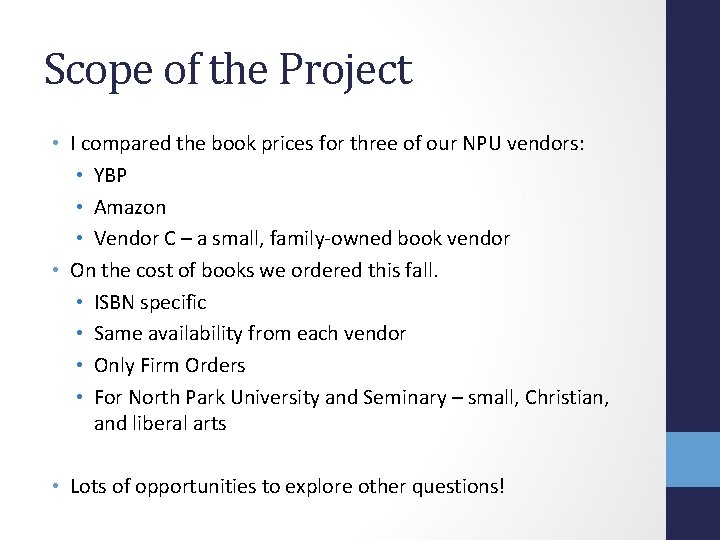
Scope of the Project • I compared the book prices for three of our NPU vendors: • YBP • Amazon • Vendor C – a small, family-owned book vendor • On the cost of books we ordered this fall. • ISBN specific • Same availability from each vendor • Only Firm Orders • For North Park University and Seminary – small, Christian, and liberal arts • Lots of opportunities to explore other questions!
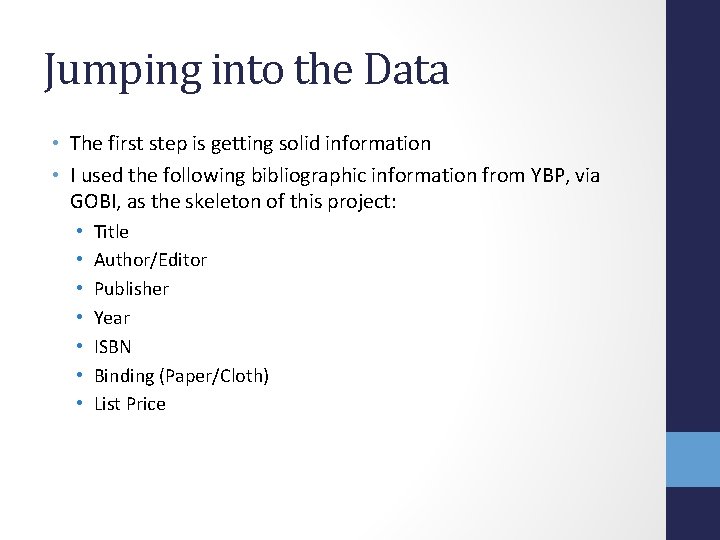
Jumping into the Data • The first step is getting solid information • I used the following bibliographic information from YBP, via GOBI, as the skeleton of this project: • • Title Author/Editor Publisher Year ISBN Binding (Paper/Cloth) List Price
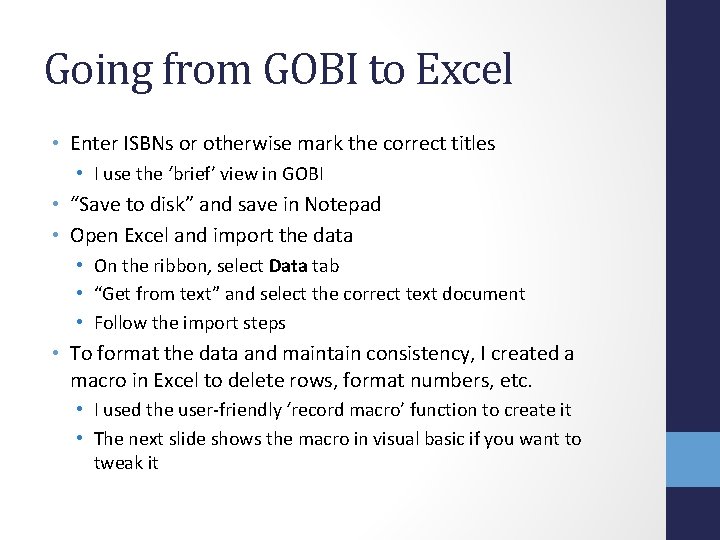
Going from GOBI to Excel • Enter ISBNs or otherwise mark the correct titles • I use the ‘brief’ view in GOBI • “Save to disk” and save in Notepad • Open Excel and import the data • On the ribbon, select Data tab • “Get from text” and select the correct text document • Follow the import steps • To format the data and maintain consistency, I created a macro in Excel to delete rows, format numbers, etc. • I used the user-friendly ‘record macro’ function to create it • The next slide shows the macro in visual basic if you want to tweak it
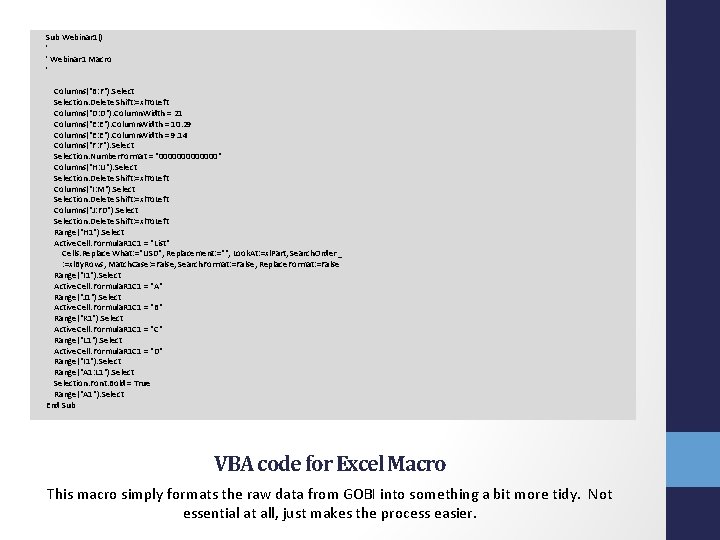
Sub Webinar 1() ' ' Webinar 1 Macro ' Columns("B: F"). Selection. Delete Shift: =xl. To. Left Columns("D: D"). Column. Width = 21 Columns("E: E"). Column. Width = 10. 29 Columns("E: E"). Column. Width = 9. 14 Columns("F: F"). Selection. Number. Format = "0000000" Columns("H: U"). Selection. Delete Shift: =xl. To. Left Columns("I: M"). Selection. Delete Shift: =xl. To. Left Columns("J: FD"). Selection. Delete Shift: =xl. To. Left Range("H 1"). Select Active. Cell. Formula. R 1 C 1 = "List" Cells. Replace What: ="USD", Replacement: ="", Look. At: =xl. Part, Search. Order _ : =xl. By. Rows, Match. Case: =False, Search. Format: =False, Replace. Format: =False Range("I 1"). Select Active. Cell. Formula. R 1 C 1 = "A" Range("J 1"). Select Active. Cell. Formula. R 1 C 1 = "B" Range("K 1"). Select Active. Cell. Formula. R 1 C 1 = "C" Range("L 1"). Select Active. Cell. Formula. R 1 C 1 = "D" Range("I 1"). Select Range("A 1: L 1"). Selection. Font. Bold = True Range("A 1"). Select End Sub VBA code for Excel Macro This macro simply formats the raw data from GOBI into something a bit more tidy. Not essential at all, just makes the process easier.
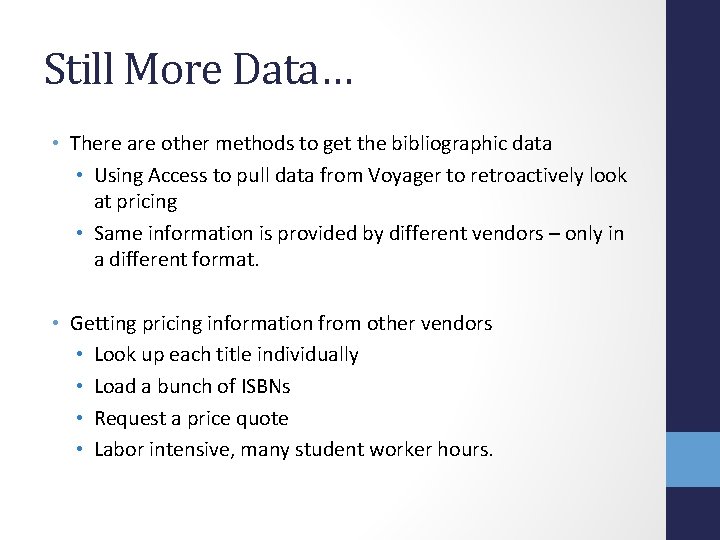
Still More Data… • There are other methods to get the bibliographic data • Using Access to pull data from Voyager to retroactively look at pricing • Same information is provided by different vendors – only in a different format. • Getting pricing information from other vendors • Look up each title individually • Load a bunch of ISBNs • Request a price quote • Labor intensive, many student worker hours.
If I had to do it again… • I would have kept all the titles • For consistency, I limited inclusion to books that were available through all three vendors • Keeping a record of which vendor had which book might have been very helpful • I would have kept fund codes • Different levels of ordering for the undergraduate and graduate programs • Keeping the data might have revealed other trends • Think about what you would like to see in your data!

Enough with the methodology, let’s get to… The Data!
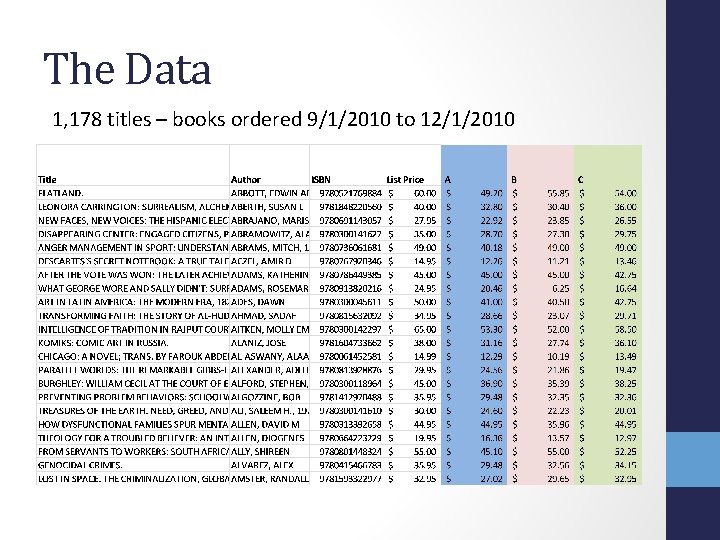
The Data 1, 178 titles – books ordered 9/1/2010 to 12/1/2010
Quick Observations • Prices vary quite a bit between vendors! • • • A total of 1, 178 books Only 13 books (1. 1%) had the exact price from all three vendors For 11 books, the price difference was over $50 Biggest difference was $87. 77 Average difference was $8. 16 Variation in Prices =MAX(I 2: K 2)-MIN(I 2: K 2) =COUNTIF(? , ”<=50”) =MAX(? ) =AVERAGE(? )
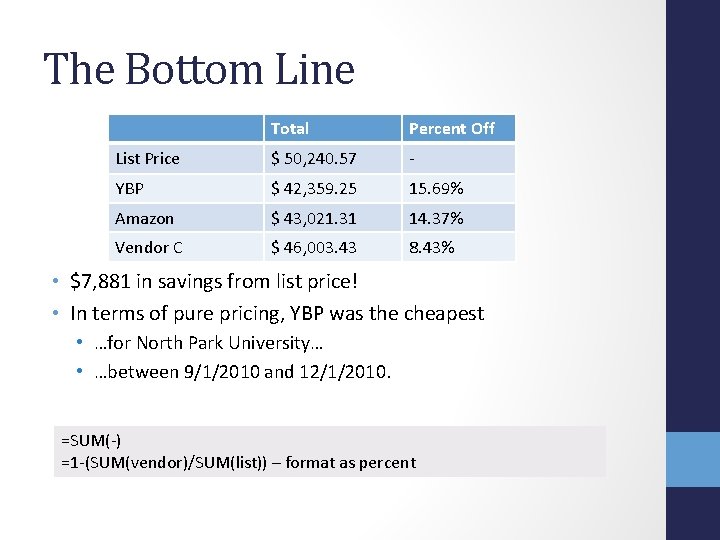
The Bottom Line Total Percent Off List Price $ 50, 240. 57 - YBP $ 42, 359. 25 15. 69% Amazon $ 43, 021. 31 14. 37% Vendor C $ 46, 003. 43 8. 43% • $7, 881 in savings from list price! • In terms of pure pricing, YBP was the cheapest • …for North Park University… • …between 9/1/2010 and 12/1/2010. =SUM(-) =1 -(SUM(vendor)/SUM(list)) – format as percent
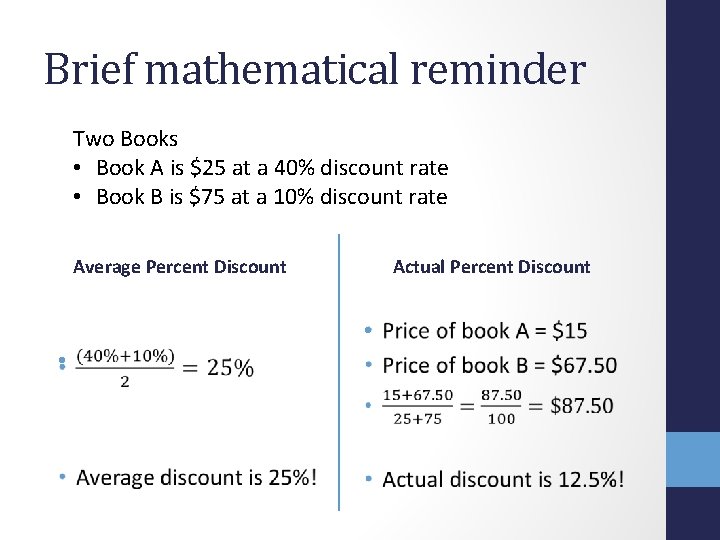
Brief mathematical reminder Two Books • Book A is $25 at a 40% discount rate • Book B is $75 at a 10% discount rate Average Percent Discount Actual Percent Discount • •
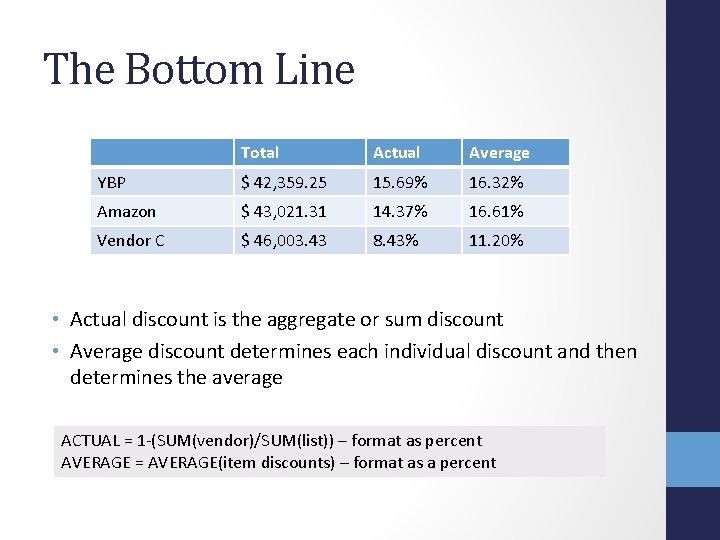
The Bottom Line Total Actual Average YBP $ 42, 359. 25 15. 69% 16. 32% Amazon $ 43, 021. 31 14. 37% 16. 61% Vendor C $ 46, 003. 43 8. 43% 11. 20% • Actual discount is the aggregate or sum discount • Average discount determines each individual discount and then determines the average ACTUAL = 1 -(SUM(vendor)/SUM(list)) – format as percent AVERAGE = AVERAGE(item discounts) – format as a percent

So far, we’ve been assuming that we’ve placed all the orders with only one vendor. You’ve got to shop around
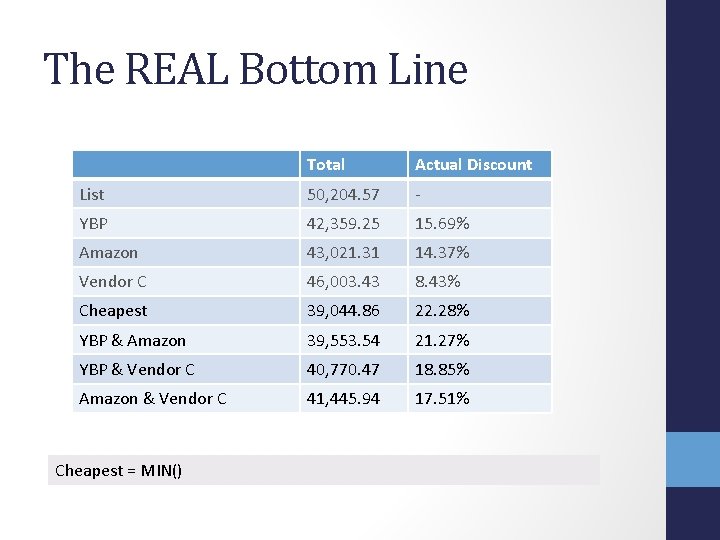
The REAL Bottom Line Total Actual Discount List 50, 204. 57 - YBP 42, 359. 25 15. 69% Amazon 43, 021. 31 14. 37% Vendor C 46, 003. 43 8. 43% Cheapest 39, 044. 86 22. 28% YBP & Amazon 39, 553. 54 21. 27% YBP & Vendor C 40, 770. 47 18. 85% Amazon & Vendor C 41, 445. 94 17. 51% Cheapest = MIN()
The REAL Bottom Line …in the REAL World • So far, this project discovered that buying books from the cheapest vendor saves money.
The REAL Bottom Line …in the REAL World • So far, this project discovered that buying books from the cheapest vendor saves money. • Duh.
The REAL Bottom Line …in the REAL World • So far, this project discovered that buying books from the cheapest vendor saves money. • Duh. • In the real world, it is not always possible or practical to compare prices from 3 (or more) vendors: • Discount might not be reckoned at point of order • Simple time constraints • So…
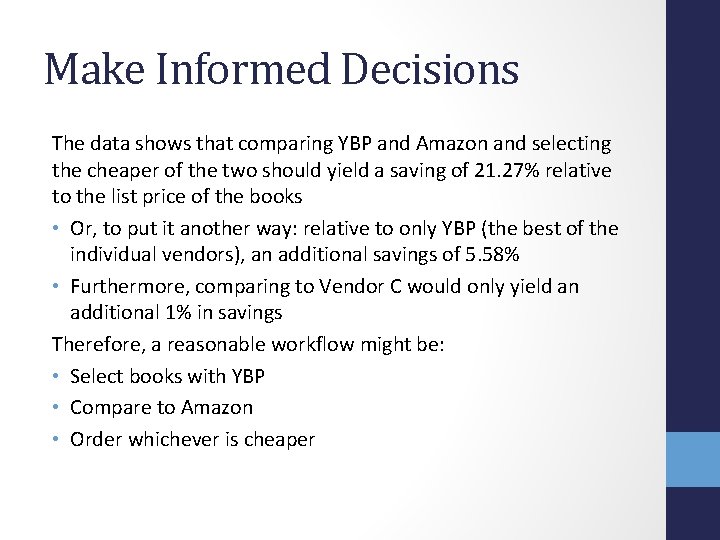
Make Informed Decisions The data shows that comparing YBP and Amazon and selecting the cheaper of the two should yield a saving of 21. 27% relative to the list price of the books • Or, to put it another way: relative to only YBP (the best of the individual vendors), an additional savings of 5. 58% • Furthermore, comparing to Vendor C would only yield an additional 1% in savings Therefore, a reasonable workflow might be: • Select books with YBP • Compare to Amazon • Order whichever is cheaper
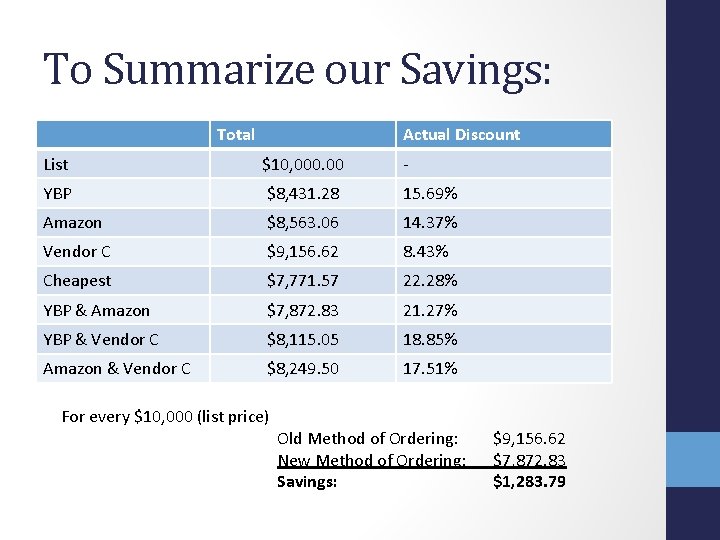
To Summarize our Savings: Total Actual Discount List $10, 000. 00 - YBP $8, 431. 28 15. 69% Amazon $8, 563. 06 14. 37% Vendor C $9, 156. 62 8. 43% Cheapest $7, 771. 57 22. 28% YBP & Amazon $7, 872. 83 21. 27% YBP & Vendor C $8, 115. 05 18. 85% Amazon & Vendor C $8, 249. 50 17. 51% For every $10, 000 (list price) Old Method of Ordering: New Method of Ordering: Savings: $9, 156. 62 $7, 872. 83 $1, 283. 79
• Are there clear correlations between vendors and formats? Between vendors, pricing, and publishers? • Which vendor is cheaper more of the time? Trends within the data
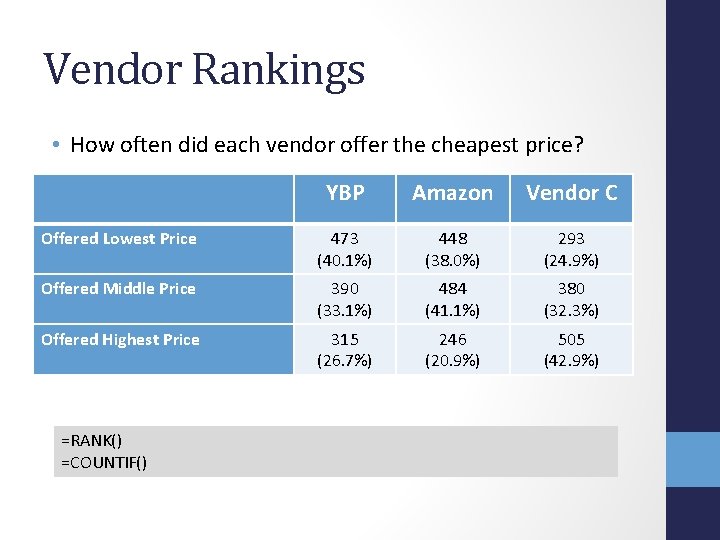
Vendor Rankings • How often did each vendor offer the cheapest price? YBP Amazon Vendor C Offered Lowest Price 473 (40. 1%) 448 (38. 0%) 293 (24. 9%) Offered Middle Price 390 (33. 1%) 484 (41. 1%) 380 (32. 3%) Offered Highest Price 315 (26. 7%) 246 (20. 9%) 505 (42. 9%) =RANK() =COUNTIF()
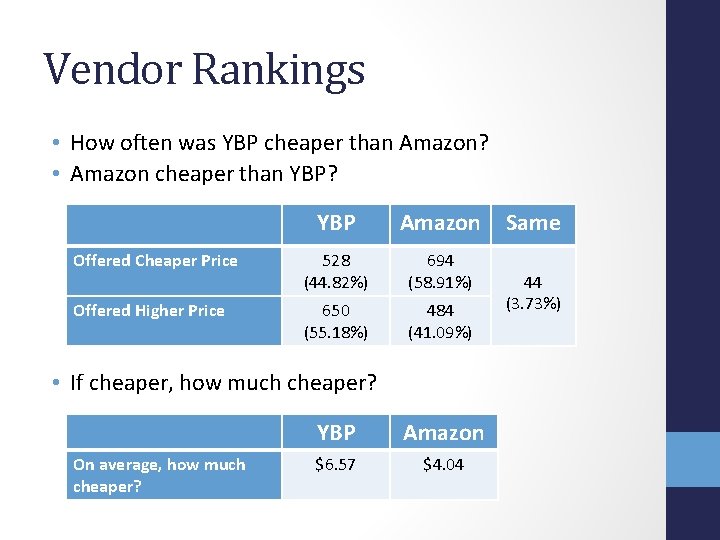
Vendor Rankings • How often was YBP cheaper than Amazon? • Amazon cheaper than YBP? YBP Amazon Offered Cheaper Price 528 (44. 82%) 694 (58. 91%) Offered Higher Price 650 (55. 18%) 484 (41. 09%) • If cheaper, how much cheaper? On average, how much cheaper? YBP Amazon $6. 57 $4. 04 Same 44 (3. 73%)
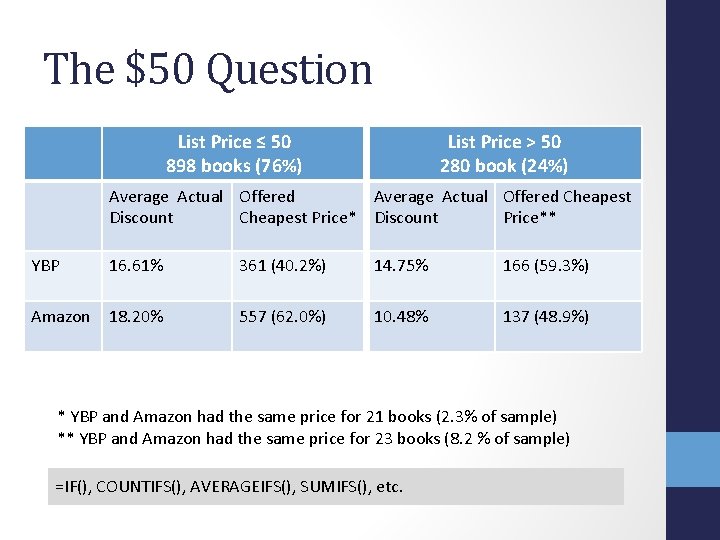
The $50 Question List Price ≤ 50 898 books (76%) List Price > 50 280 book (24%) Average Actual Offered Cheapest Discount Cheapest Price* Discount Price** YBP 16. 61% 361 (40. 2%) 14. 75% 166 (59. 3%) Amazon 18. 20% 557 (62. 0%) 10. 48% 137 (48. 9%) * YBP and Amazon had the same price for 21 books (2. 3% of sample) ** YBP and Amazon had the same price for 23 books (8. 2 % of sample) =IF(), COUNTIFS(), AVERAGEIFS(), SUMIFS(), etc.
Summary Even though YBP is cheaper overall, Amazon usually has the lower price! • For nearly 59% of the books, Amazon had the cheaper price (when compared to YBP and including the 44 times that YBP and Amazon had the same price) YBP’s static discount rate of 18%: • Hurt YBP’s performance for the cheaper books when other vendors could offer a higher discount rate, • But, for the more expensive books, made YBP the most economical vendor because the other vendors offered these books at a much lower rate. Still, you’ve got to compare each time…

Okay. We are done with mathematics and done with price comparison. On to other things:
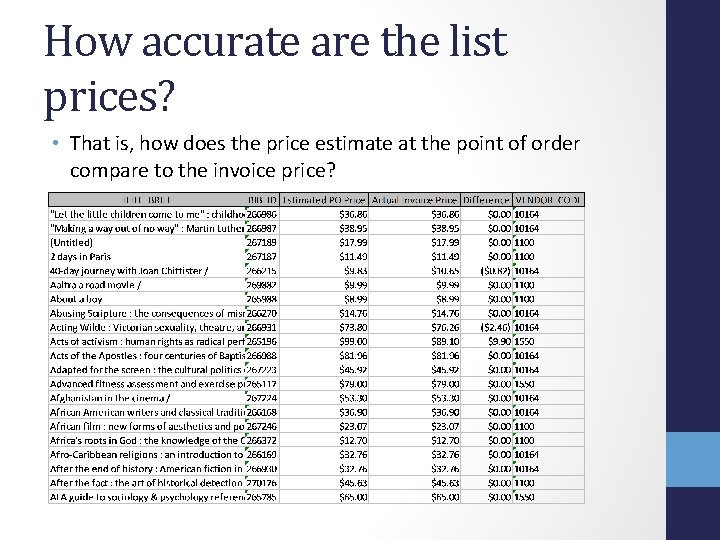
How accurate are the list prices? • That is, how does the price estimate at the point of order compare to the invoice price?
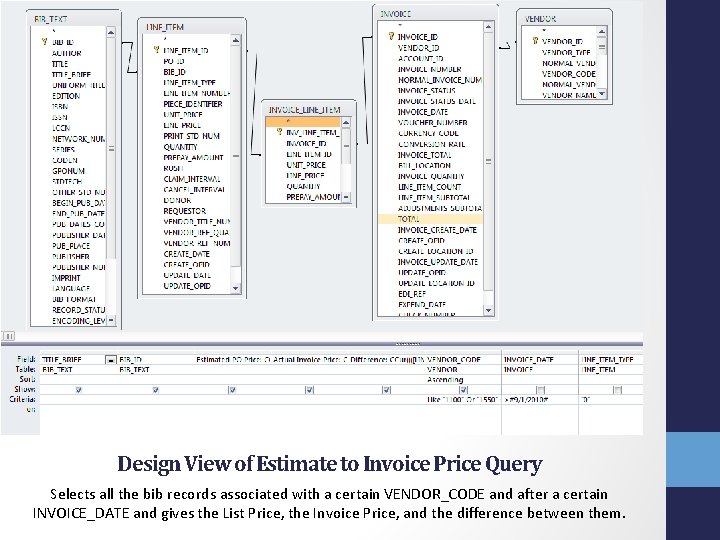
Design View of Estimate to Invoice Price Query Selects all the bib records associated with a certain VENDOR_CODE and after a certain INVOICE_DATE and gives the List Price, the Invoice Price, and the difference between them.
![SELECT BIB_TEXT. TITLE_BRIEF, BIB_TEXT. BIB_ID, CCur([LINE_ITEM]. [UNIT_PRICE]/100) AS [Estimated PO Price], CCur([INVOICE_LINE_ITEM]. [UNIT_PRICE]/100) AS](http://slidetodoc.com/presentation_image_h/a40ed59c2cfc1094475e9c10193bee4a/image-32.jpg "SELECT BIB_TEXT. TITLE_BRIEF, BIB_TEXT. BIB_ID, CCur([LINE_ITEM]. [UNIT_PRICE]/100) AS [Estimated PO Price], CCur([INVOICE_LINE_ITEM]. [UNIT_PRICE]/100) AS")
SELECT BIB_TEXT. TITLE_BRIEF, BIB_TEXT. BIB_ID, CCur([LINE_ITEM]. [UNIT_PRICE]/100) AS [Estimated PO Price], CCur([INVOICE_LINE_ITEM]. [UNIT_PRICE]/100) AS [Actual Invoice Price], CCur((([LINE_ITEM]. [UNIT_PRICE])([INVOICE_LINE_ITEM]. [UNIT_PRICE]))/100) AS Difference, VENDOR_CODE FROM ((BIB_TEXT INNER JOIN (INVOICE_LINE_ITEM INNER JOIN LINE_ITEM ON INVOICE_LINE_ITEM_ID = LINE_ITEM_ID) ON BIB_TEXT. BIB_ID = LINE_ITEM. BIB_ID) INNER JOIN INVOICE ON INVOICE_LINE_ITEM. INVOICE_ID = INVOICE_ID) INNER JOIN VENDOR ON INVOICE. VENDOR_ID = VENDOR_ID WHERE (((VENDOR_CODE) Like "1100" Or (VENDOR_CODE)="1550" Or (VENDOR_CODE)="10164") AND ((INVOICE_DATE)>#9/1/2010#) AND ((LINE_ITEM_TYPE)="0")) ORDER BY VENDOR_CODE; SQL view of Estimate to Invoice Price Query Text in red should be changed for your institution.
How accurate are the list prices? If vendors provide real price estimates, they tend to be quite accurate • For YBP: the average invoice price was $0. 15 above the estimated price • For Amazon: the average invoice price was about $0. 02 less than the estimated price Caveats and asides: • Not a huge sample – repeating query in a few months might have different results • Use this information for workflow details when invoicing. • Vendor C, for example, does not provide the discount price at the point of order, only at the invoice. For vendors like that, this query provides the rough data to figure the actual discount rate. • My data was within 0. 1% - pretty good!
Shipping Costs… • …are a nightmare to consider! • They are complicated, ever-changing, and unpredictable.
Pop Quiz! • You need to order a book that is $40; which option is cheaper? How much cheaper? A. Ordering it direct from the publisher that offers a 40% discount and $8 shipping and handling. B. Ordering it normally with YBP’s standard 18% discount and getting free shipping and handling.
Pop Quiz! • You need to order a book that is $40; which option is cheaper? How much cheaper? A. Ordering it direct from the publisher that offers a 40% discount and $8 shipping and handling. B. Ordering it normally with the standard 18% discount and getting free shipping and handling. • Answer: A! But only by $0. 80. • For me, it is very helpful to convert everything to like terms: • Express the $8 as a percent of the book (20%) • A: 40% - 20% (shipping expressed as percent) = 20% savings
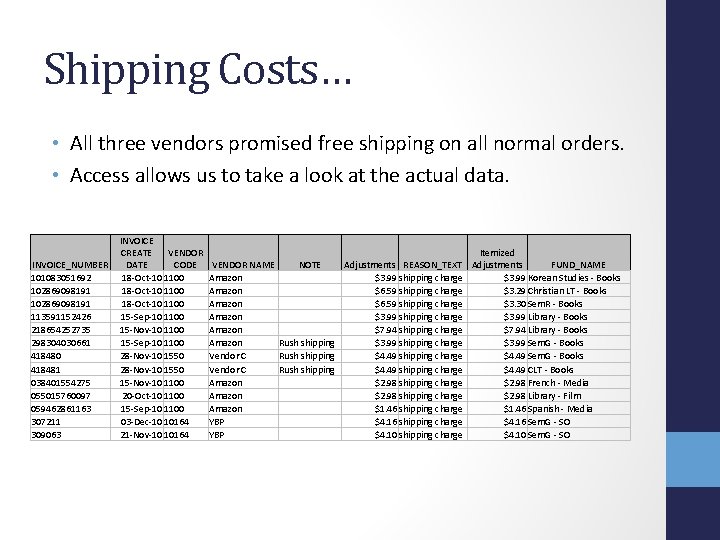
Shipping Costs… • All three vendors promised free shipping on all normal orders. • Access allows us to take a look at the actual data. INVOICE_NUMBER 101083051692 102869098191 113591152426 218654252735 298304030661 418480 418481 038401554275 055015760097 059462861163 307211 309063 INVOICE CREATE VENDOR DATE CODE 18 -Oct-10 1100 15 -Sep-10 1100 15 -Nov-10 1100 15 -Sep-10 1100 28 -Nov-10 1550 15 -Nov-10 1100 20 -Oct-10 1100 15 -Sep-10 1100 03 -Dec-10 10164 21 -Nov-10 10164 VENDOR NAME Amazon Amazon Vendor C Amazon YBP Itemized Adjustments REASON_TEXT Adjustments FUND_NAME $3. 99 shipping charge $3. 99 Korean Studies - Books $6. 59 shipping charge $3. 29 Christian LT - Books $6. 59 shipping charge $3. 30 Sem. R - Books $3. 99 shipping charge $3. 99 Library - Books $7. 94 shipping charge $7. 94 Library - Books Rush shipping $3. 99 shipping charge $3. 99 Sem. G - Books Rush shipping $4. 49 shipping charge $4. 49 CLT - Books $2. 98 shipping charge $2. 98 French - Media $2. 98 shipping charge $2. 98 Library - Film $1. 46 shipping charge $1. 46 Spanish - Media $4. 16 shipping charge $4. 16 Sem. G - SO $4. 10 shipping charge $4. 10 Sem. G - SO NOTE
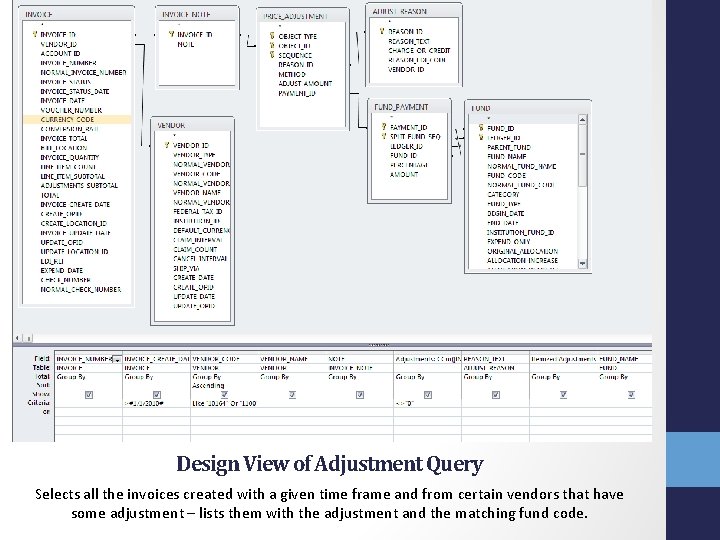
Design View of Adjustment Query Selects all the invoices created with a given time frame and from certain vendors that have some adjustment – lists them with the adjustment and the matching fund code.
![SELECT INVOICE_NUMBER, INVOICE_CREATE_DATE, VENDOR_CODE, VENDOR_NAME, INVOICE_NOTE, CCur([INVOICE]. [ADJUSTMENTS_SUBTOTAL]/100) AS Adjustments, ADJUST_REASON_TEXT, CCur([PRICE_ADJUSTMENT]. [ADJUST_AMOUNT]/100) AS](http://slidetodoc.com/presentation_image_h/a40ed59c2cfc1094475e9c10193bee4a/image-39.jpg "SELECT INVOICE_NUMBER, INVOICE_CREATE_DATE, VENDOR_CODE, VENDOR_NAME, INVOICE_NOTE, CCur([INVOICE]. [ADJUSTMENTS_SUBTOTAL]/100) AS Adjustments, ADJUST_REASON_TEXT, CCur([PRICE_ADJUSTMENT]. [ADJUST_AMOUNT]/100) AS")
SELECT INVOICE_NUMBER, INVOICE_CREATE_DATE, VENDOR_CODE, VENDOR_NAME, INVOICE_NOTE, CCur([INVOICE]. [ADJUSTMENTS_SUBTOTAL]/100) AS Adjustments, ADJUST_REASON_TEXT, CCur([PRICE_ADJUSTMENT]. [ADJUST_AMOUNT]/100) AS [Itemized Adjustments], FUND_NAME FROM ((((INVOICE INNER JOIN VENDOR ON INVOICE. VENDOR_ID = VENDOR_ID) INNER JOIN INVOICE_NOTE ON INVOICE_ID = INVOICE_NOTE. INVOICE_ID) INNER JOIN PRICE_ADJUSTMENT ON INVOICE_NOTE. INVOICE_ID = PRICE_ADJUSTMENT. OBJECT_ID) INNER JOIN ADJUST_REASON ON PRICE_ADJUSTMENT. REASON_ID = ADJUST_REASON_ID) INNER JOIN (FUND_PAYMENT INNER JOIN FUND ON (FUND_PAYMENT. FUND_ID = FUND_ID) AND (FUND_PAYMENT. LEDGER_ID = FUND. LEDGER_ID)) ON PRICE_ADJUSTMENT. PAYMENT_ID = FUND_PAYMENT_ID GROUP BY INVOICE_NUMBER, INVOICE_CREATE_DATE, VENDOR_CODE, VENDOR_NAME, INVOICE_NOTE, CCur([INVOICE]. [ADJUSTMENTS_SUBTOTAL]/100), ADJUST_REASON_TEXT, CCur([PRICE_ADJUSTMENT]. [ADJUST_AMOUNT]/100), FUND_NAME HAVING (((INVOICE_CREATE_DATE)>#1/1/2010#) AND ((VENDOR_CODE) Like "10164" Or (VENDOR_CODE)="1100" Or (VENDOR_CODE)="1550") AND ((CCur([INVOICE]. [ADJUSTMENTS_SUBTOTAL]/100))<>"0")) ORDER BY VENDOR_CODE; SQL of Adjustment Query Text in red should be changed for your institution
Shipping Costs At some point, each vendor charged a bit for shipping: • YBP: charged $8. 26 • Amazon: charged $198. 52 • Vendor C: charged $17. 96 However, it’s really hard to fairly compare. Conclusion: shipping costs are a factor for Amazon, but… • They affect the bottom line by about 0. 4% • Are always clear and predictable • Are the only ‘overhead’ cost – compare with YBP’s fees. • Worth it for the broad range of items available
Shipping Times • Question: “How many days is it on order? ” • Two CARLI queries provide the data to answer this question: • Vendor Copy Order/Receipt Dates • This query gives the date an item was ordered, the date it was received, and calculates the difference between those two dates. • Vendor Performance - Days to Receipt • This query takes that data and gives the statistical analysis of it for a given date range. • Because the best ideas are always ‘stolen’, I used the first query and tweaked the parameters. • Limit to the three vendors and limit by PO create date
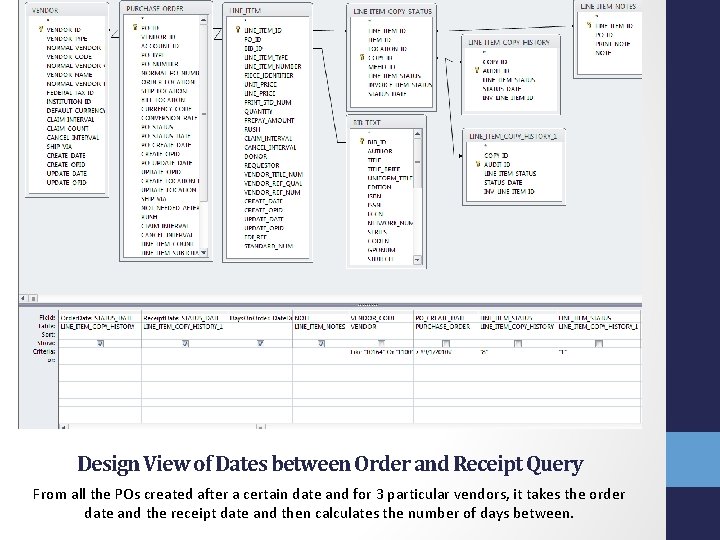
Design View of Dates between Order and Receipt Query From all the POs created after a certain date and for 3 particular vendors, it takes the order date and the receipt date and then calculates the number of days between.
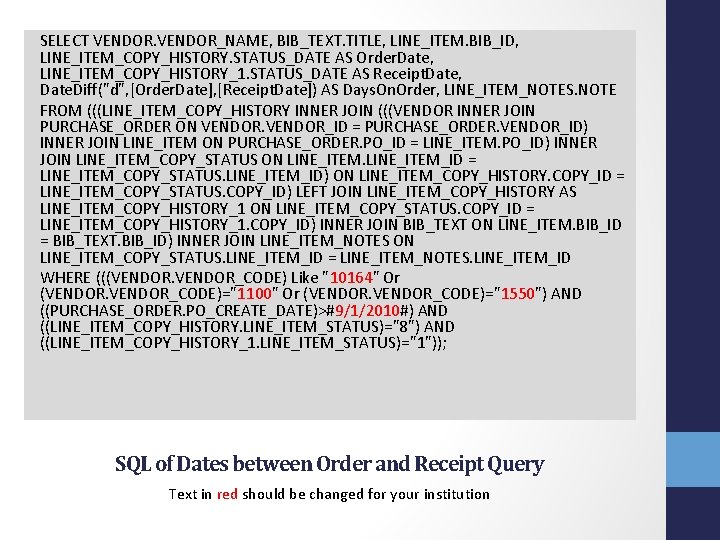
SELECT VENDOR_NAME, BIB_TEXT. TITLE, LINE_ITEM. BIB_ID, LINE_ITEM_COPY_HISTORY. STATUS_DATE AS Order. Date, LINE_ITEM_COPY_HISTORY_1. STATUS_DATE AS Receipt. Date, Date. Diff("d", [Order. Date], [Receipt. Date]) AS Days. On. Order, LINE_ITEM_NOTES. NOTE FROM (((LINE_ITEM_COPY_HISTORY INNER JOIN (((VENDOR INNER JOIN PURCHASE_ORDER ON VENDOR_ID = PURCHASE_ORDER. VENDOR_ID) INNER JOIN LINE_ITEM ON PURCHASE_ORDER. PO_ID = LINE_ITEM. PO_ID) INNER JOIN LINE_ITEM_COPY_STATUS ON LINE_ITEM_ID = LINE_ITEM_COPY_STATUS. LINE_ITEM_ID) ON LINE_ITEM_COPY_HISTORY. COPY_ID = LINE_ITEM_COPY_STATUS. COPY_ID) LEFT JOIN LINE_ITEM_COPY_HISTORY AS LINE_ITEM_COPY_HISTORY_1 ON LINE_ITEM_COPY_STATUS. COPY_ID = LINE_ITEM_COPY_HISTORY_1. COPY_ID) INNER JOIN BIB_TEXT ON LINE_ITEM. BIB_ID = BIB_TEXT. BIB_ID) INNER JOIN LINE_ITEM_NOTES ON LINE_ITEM_COPY_STATUS. LINE_ITEM_ID = LINE_ITEM_NOTES. LINE_ITEM_ID WHERE (((VENDOR_CODE) Like "10164" Or (VENDOR_CODE)="1100" Or (VENDOR_CODE)="1550") AND ((PURCHASE_ORDER. PO_CREATE_DATE)>#9/1/2010#) AND ((LINE_ITEM_COPY_HISTORY. LINE_ITEM_STATUS)="8") AND ((LINE_ITEM_COPY_HISTORY_1. LINE_ITEM_STATUS)="1")); SQL of Dates between Order and Receipt Query Text in red should be changed for your institution
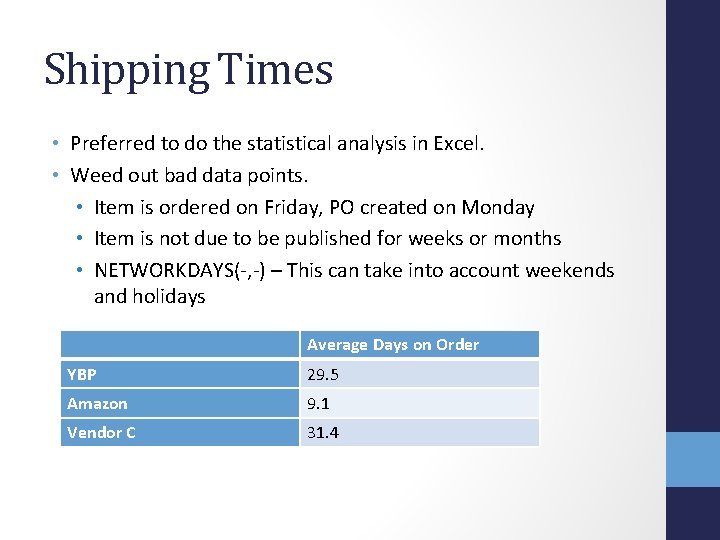
Shipping Times • Preferred to do the statistical analysis in Excel. • Weed out bad data points. • Item is ordered on Friday, PO created on Monday • Item is not due to be published for weeks or months • NETWORKDAYS(-, -) – This can take into account weekends and holidays Average Days on Order YBP 29. 5 Amazon 9. 1 Vendor C 31. 4
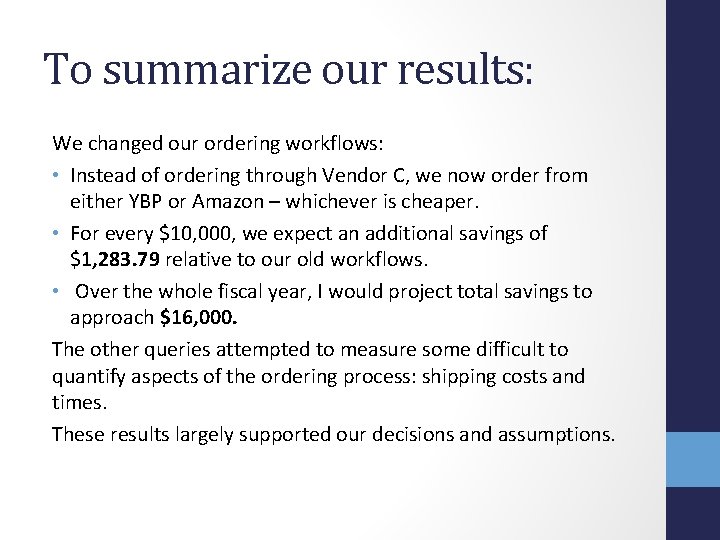
To summarize our results: We changed our ordering workflows: • Instead of ordering through Vendor C, we now order from either YBP or Amazon – whichever is cheaper. • For every $10, 000, we expect an additional savings of $1, 283. 79 relative to our old workflows. • Over the whole fiscal year, I would project total savings to approach $16, 000. The other queries attempted to measure some difficult to quantify aspects of the ordering process: shipping costs and times. These results largely supported our decisions and assumptions.
In conclusion: • It is a really complicated institutional decision! • Different schools will almost certainly have different results • There are so many other factors to consider: • • • Return policy Ease of ordering Ease of invoicing Full and correct bibliographic information etc…
The End • Feel free to use and/or change any formulas or queries found in this presentation. • Questions? Comments? • Thanks! Cost Analysis and Vendor Comparison On behalf of the I-Share Acquisitions and Serials Team Andy Meyer Acquisitions Coordinator North Park University ameyer@northpark. edu
- Slides: 47