
COSC 4506ITEC 3506 Software Engineering Design Principle Classical
- Slides: 25
COSC 4506/ITEC 3506 Software Engineering Design Principle & Classical Design
Outline 4 Overview of design phase 4 Design Principle 4 Classical Design 4 Action-oriented design 2
The Process of Design 4 Definition: 4 Design is a problem-solving process whose objective is to find and describe a way: To implement the system’s functional requirements. . . While respecting the constraints imposed by the non -functional requirements. . . – including the budget 3
Design as a series of decisions 4 A designer is faced with a series of design issues 4 These are sub-problems of the overall design problem. 4 Each issue normally has several alternative solutions: design options. 4 The designer makes a design decision to resolve each issue. This process involves choosing the best option from among the alternatives. 4
Top-down and bottom-up design 4 Top-down design 4 First design the very high level structure of the system. 4 Then gradually work down to detailed decisions about low-level constructs. 4 Finally arrive at detailed decisions such as: the format of particular data items; the individual algorithms that will be used. 5
Top-down and bottom-up design 4 Bottom-up design 4 Make decisions about reusable low-level utilities. 4 Then decide how these will be put together to create high-level constructs. 6
Principles Leading to Good Design 4 Overall goals of good design: 4 Increasing profit by reducing cost and increasing revenue 4 Ensuring to conform with the requirement and specifications 4 Accelerating development 4 Increasing qualities 7
Design Principle 1: Divide and conquer 4 Separate people can work on each part. 4 An individual software engineer can specialize. 4 Each individual component is smaller, and therefore easier to understand. 4 Parts can be replaced or changed without having to replace or extensively change other parts. 8
Design Principle 2: Increase cohesion where possible 4 A subsystem or module has high cohesion if it keeps together things that are related to each other, and keeps out other things 4 This makes the system as a whole easier to understand change 9
Design Principle 3: Reduce coupling where possible 4 Coupling occurs when there are interdependencies between one module and another 4 When interdependencies exist, changes in one place will require changes somewhere else. 4 A network of interdependencies makes it hard to see at a glance how some component works. 10
Design Principle 4: Keep the level of abstraction as high as possible 4 Ensure that your designs allow you to hide or defer consideration of details, thus reducing complexity 4 A good abstraction is said to provide information hiding 4 Abstractions allow you to understand the essence of a subsystem without having to know unnecessary details 11
Design Principle 5: Increase reusability where possible 4 Design the various aspects of your system so that they can be used again in other contexts 4 Generalize your design as much as possible 4 Follow the preceding three design principles 4 Simplify your design as much as possible 12
Design Principle 6: Reuse existing designs and code where possible 4 Design with reuse is complementary to design for reusability 4 Actively reusing designs or code allows you to take advantage of the investment you or others have made in reusable components 13
Design Principle 7: Design for flexibility 4 Actively anticipate changes that a design may have to undergo in the future, and prepare for them 4 Reduce coupling and increase cohesion 4 Create abstractions 4 Do not hard-code anything 4 Leave all options open Do not restrict the options of people who have to modify the system later 4 Use reusable code and make code reusable 14
Design Principle 8: Anticipate obsolescence 4 Plan for changes in the technology or environment so the software will continue to run or can be easily changed 4 Avoid using early releases of technology 4 Avoid using software libraries that are specific to particular environments 4 Avoid using software or special hardware from companies that are less likely to provide long-term support 4 Use standard languages and technologies that are supported by multiple vendors 15
Design Principle 9: Design for Portability 4 Have the software run on as many platforms as possible 4 Avoid the use of facilities that are specific to one particular environment 4 e. g. a library only available in Microsoft Windows 16
Design Principle 10: Design for Testability 4 Take steps to make testing easier 4 Design a program to automatically test the software Ensure that all the functionality of the code can by driven by an external program, bypassing a graphical user interface 17
Design Phase 4 Input ? 4 specification – description of what the product is to do 4 Output ? 4 design document – how the product is to achieve this 4 Two key aspects of product to base design ? 4 actions & data -> action-oriented, data-oriented, or hybrid (OO) 18
Action-Oriented Design 4 Goal is to decompose into modules with 4 high cohesion & low coupling 4 Two main techniques 4 data flow analysis works well w/ piped components, compilers, or other transformational processes doesn’t work well for rule-based systems, databases, & transaction processing systems 4 transaction analysis works well for transaction processing systems – actions that are atomic to the system & user 19
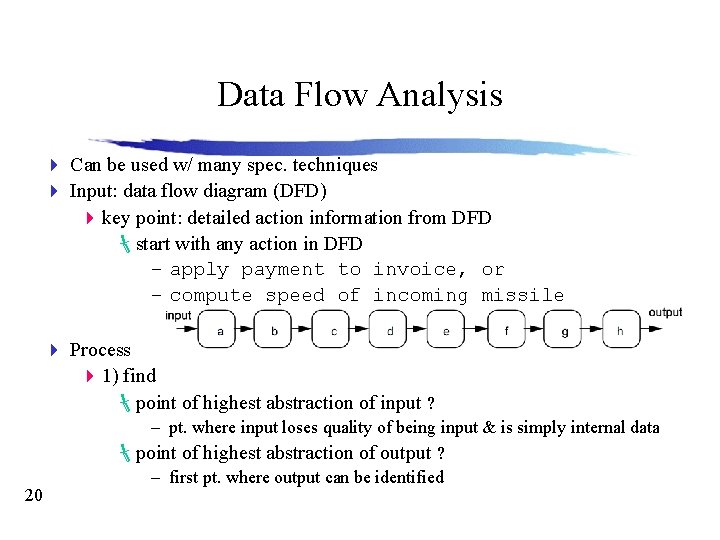
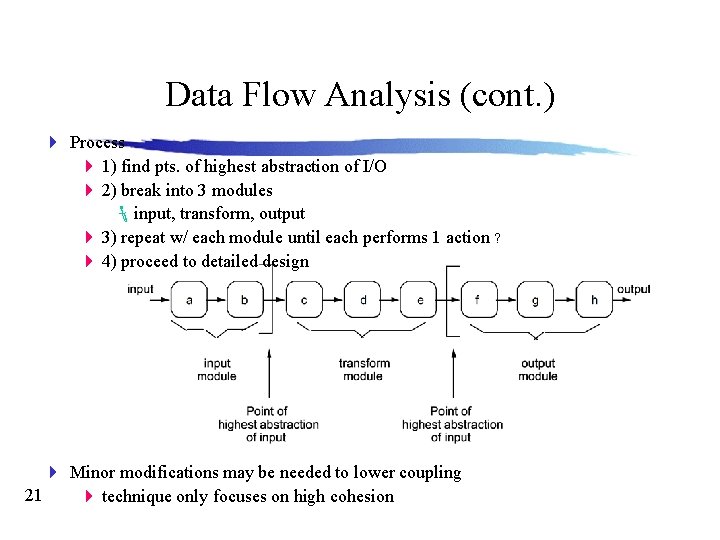
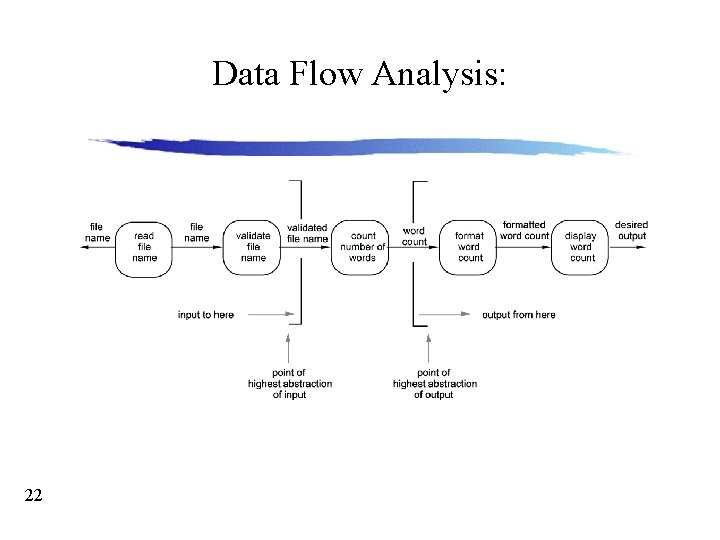
Data Flow Analysis 4 Can be used w/ many spec. techniques 4 Input: data flow diagram (DFD) 4 key point: detailed action information from DFD start with any action in DFD – apply payment to invoice, or – compute speed of incoming missile 4 Process 4 1) find point of highest abstraction of input ? 20 – pt. where input loses quality of being input & is simply internal data point of highest abstraction of output ? – first pt. where output can be identified
Data Flow Analysis (cont. ) 4 Process 4 1) find pts. of highest abstraction of I/O 4 2) break into 3 modules input, transform, output 4 3) repeat w/ each module until each performs 1 action ? 4 4) proceed to detailed design 4 Minor modifications may be needed to lower coupling 21 4 technique only focuses on high cohesion
Data Flow Analysis: 22
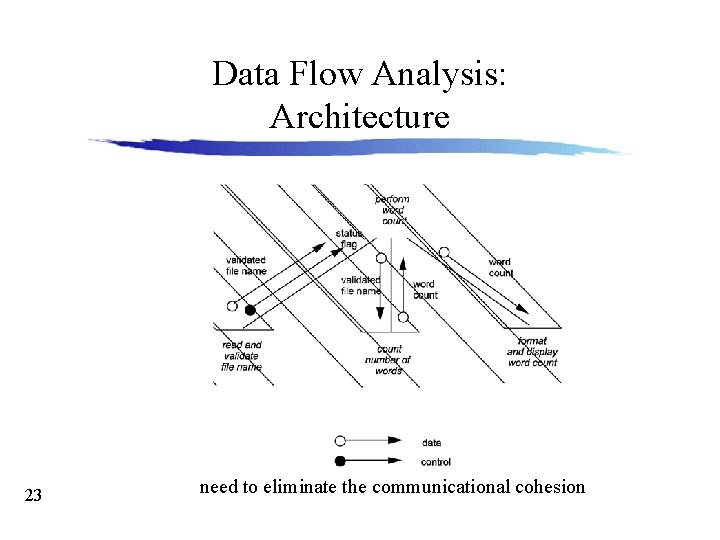
Data Flow Analysis: Architecture 23 need to eliminate the communicational cohesion
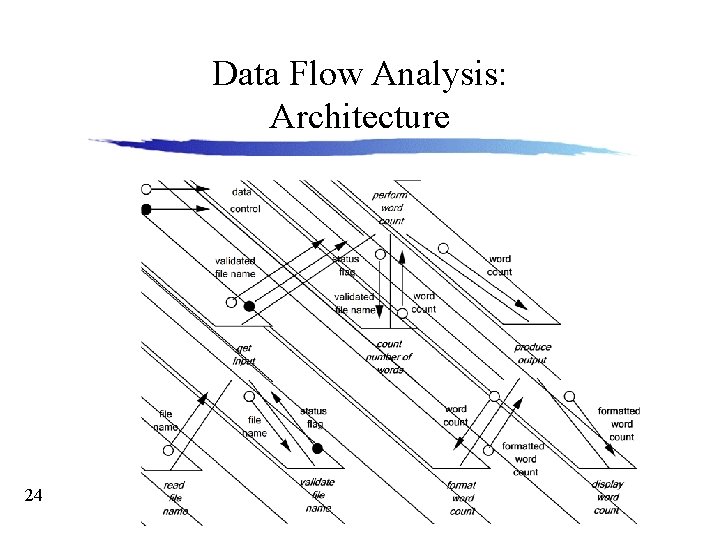
Data Flow Analysis: Architecture 24
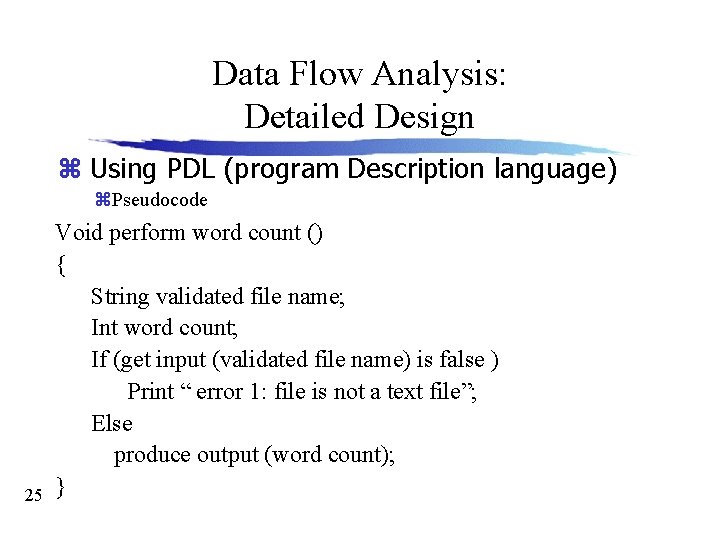
Data Flow Analysis: Detailed Design z Using PDL (program Description language) z. Pseudocode 25 Void perform word count () { String validated file name; Int word count; If (get input (validated file name) is false ) Print “ error 1: file is not a text file”; Else produce output (word count); }