
COSC 121 Computer Systems Jeremy Bolton Ph D
COSC 121: Computer Systems Jeremy Bolton, Ph. D Assistant Teaching Professor Constructed using materials: - Patt and Patel Introduction to Computing Systems (2 nd) - Patterson and Hennessy Computer Organization and Design (4 th) **A special thanks to Rich Squier
Notes • Programming in LC-3 and the Assembler – Read PP. 6 -PP. 7 – Complete HW #2 and HW#3 • Check out the SVN repos • Read Penn. Sim docs found in tools/LC 3 Assem Simulation …
Outline • Programming using LC-3 – Decomposing procedures into steps contained in ISA • Assembly Language • • Assembly for LC-3 Debugging 2 -pass assembly Linking and Loading
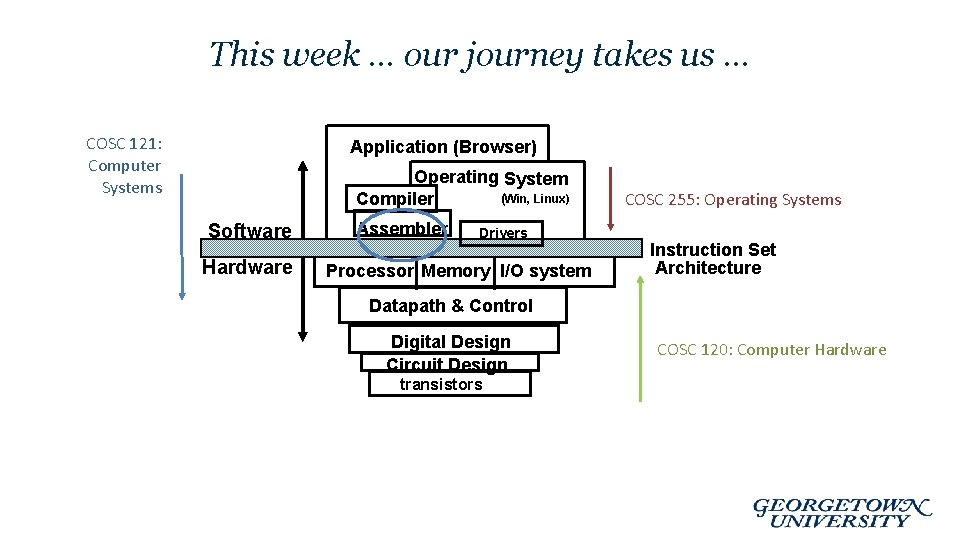
This week … our journey takes us … COSC 121: Computer Systems Application (Browser) Operating System (Win, Linux) Compiler Software Hardware Assembler Drivers Processor Memory I/O system COSC 255: Operating Systems Instruction Set Architecture Datapath & Control Digital Design Circuit Design transistors COSC 120: Computer Hardware
Solving Problems using a Computer • Methodologies for creating computer programs that perform a desired function. • Problem Solving – How do we figure out what to tell the computer to do? • Try starting with activity diagrams / state diagrams / flow diagrams – Convert problem statement into algorithm, using stepwise refinement. • Decomposition of steps – Convert algorithm into LC-3 machine instructions. • Debugging – How do we figure out why it didn’t work? – Examining registers and memory, setting breakpoints, etc. Time spent on the first can reduce time spent on the second! 6 -5

Stepwise Refinement • Also known as systematic decomposition. • Start with problem statement: “We wish to count the number of occurrences of a character in a file. The character in question is to be input from the keyboard; the result is to be displayed on the monitor. ” • Decompose task into a few simpler subtasks. • Decompose each subtask into smaller subtasks, and these into even smaller subtasks, etc. . until you get to the machine instruction level. 6 -6
Problem Statement • Because problem statements are written in English, they are sometimes ambiguous and/or incomplete. – Where is “file” located? How big is it, or how do I know when I’ve reached the end? – How should final count be printed? A decimal number? – If the character is a letter, should I count both upper-case and lower-case occurrences? • How do you resolve these issues? – Ask the person who wants the problem solved, or – Make a decision and document it. 6 -7
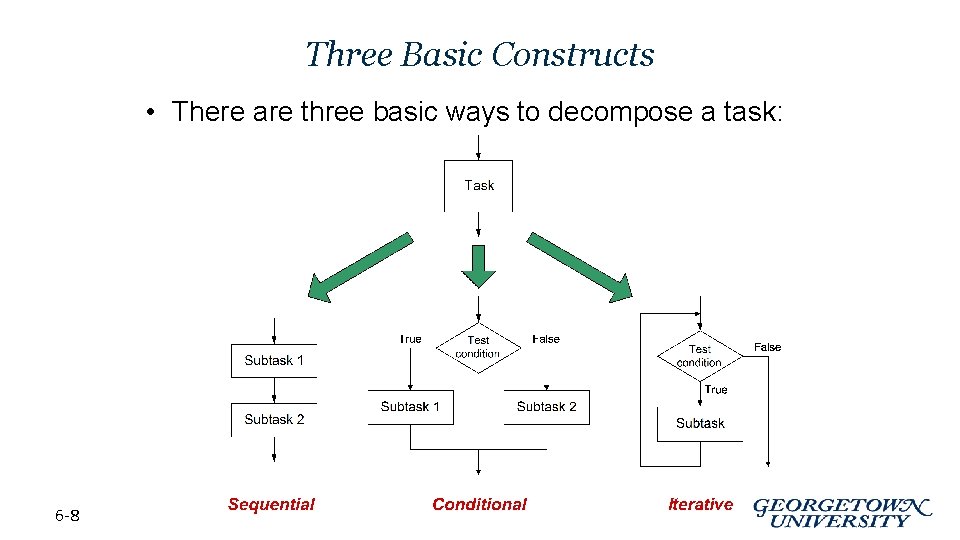
Three Basic Constructs • There are three basic ways to decompose a task: 6 -8
Problem Solving Skills • Learn to convert problem statement into step-by-step description of subtasks. – Like a puzzle, or a “word problem” from grammar school math. • What is the starting state of the system? • What is the desired ending state? • How do we move from one state to another? – Recognize English words that correlate to three basic constructs: • • 6 -9 “do A then do B” sequential “if G, then do H” conditional “for each X, do Y” iterative “do Z until W” iterative
LC-3 Control Instructions • How do we use LC-3 instructions to encode three basic constructs? • Sequential – Instructions naturally flow from one to the next, so no special instruction needed to go from one sequential subtask to the next. • Conditional and Iterative – Create code that converts condition into N, Z, or P. Example: Condition: “Is R 0 = R 1? ” Code: Subtract R 1 from R 0; if equal, Z bit will be set. – Then use BR instruction to transfer control to the proper subtask. 6 -10
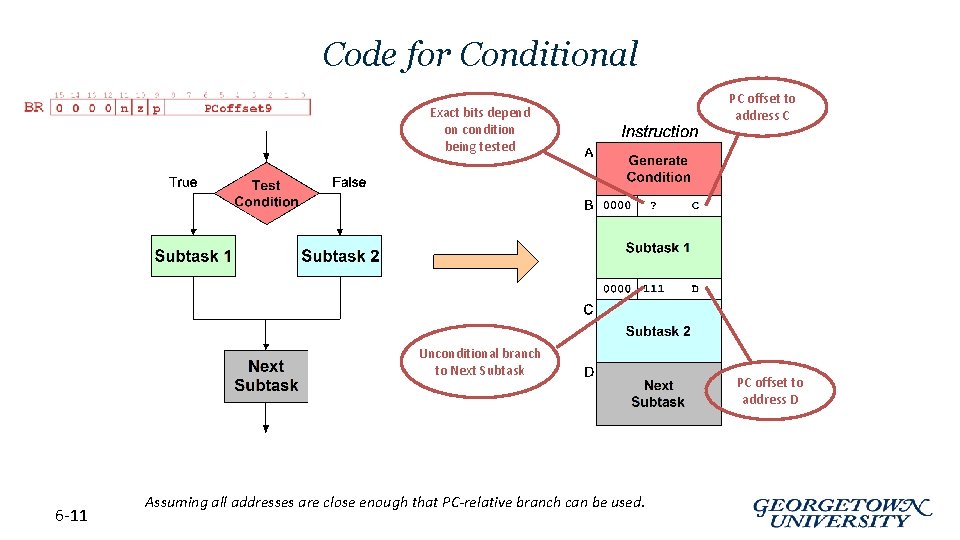
Code for Conditional Exact bits depend on condition being tested Unconditional branch to Next Subtask 6 -11 Assuming all addresses are close enough that PC-relative branch can be used. PC offset to address C PC offset to address D
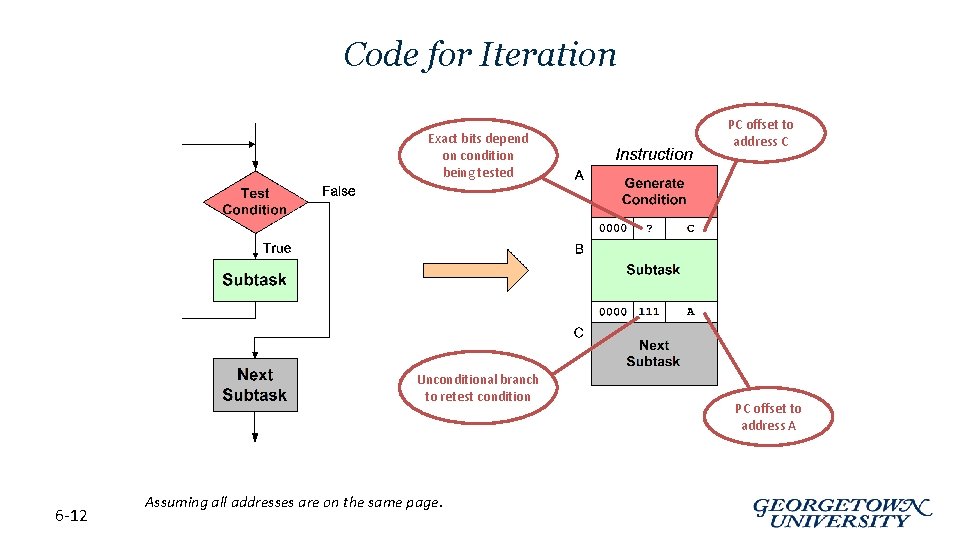
Code for Iteration Exact bits depend on condition being tested Unconditional branch to retest condition 6 -12 Assuming all addresses are on the same page. PC offset to address C PC offset to address A
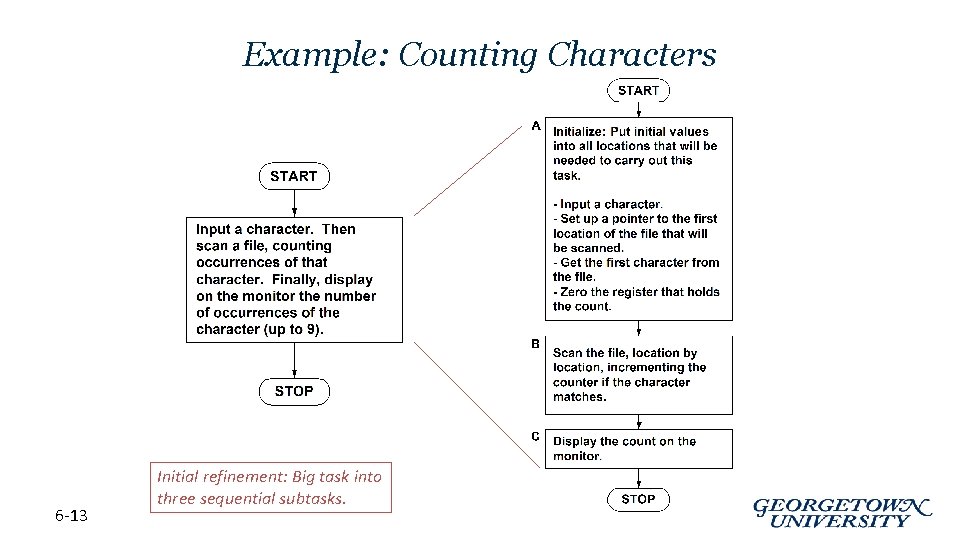
Example: Counting Characters 6 -13 Initial refinement: Big task into three sequential subtasks.
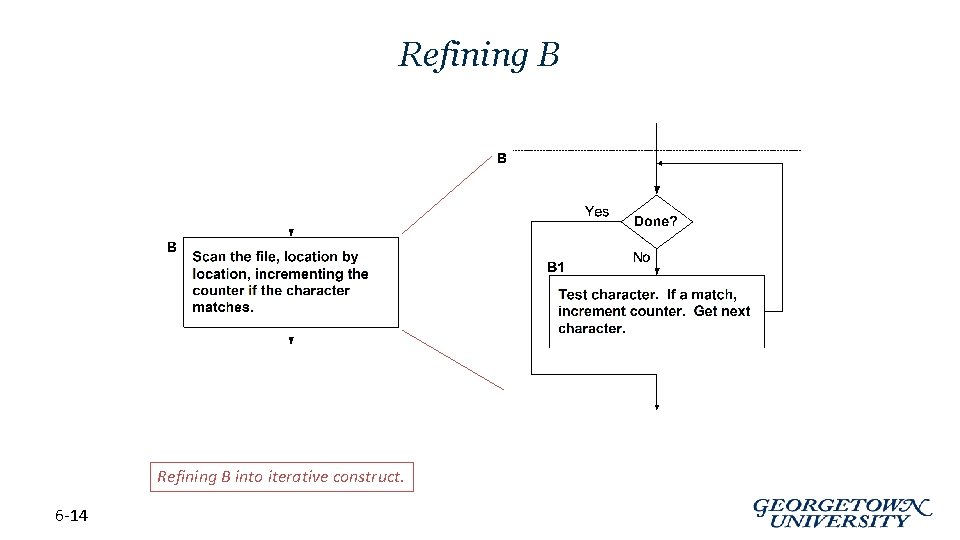
Refining B into iterative construct. 6 -14
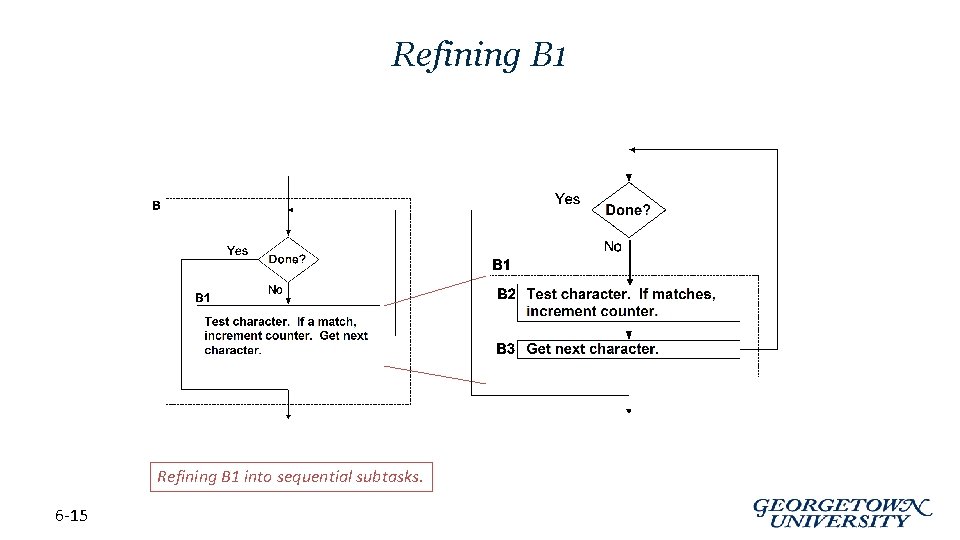
Refining B 1 into sequential subtasks. 6 -15
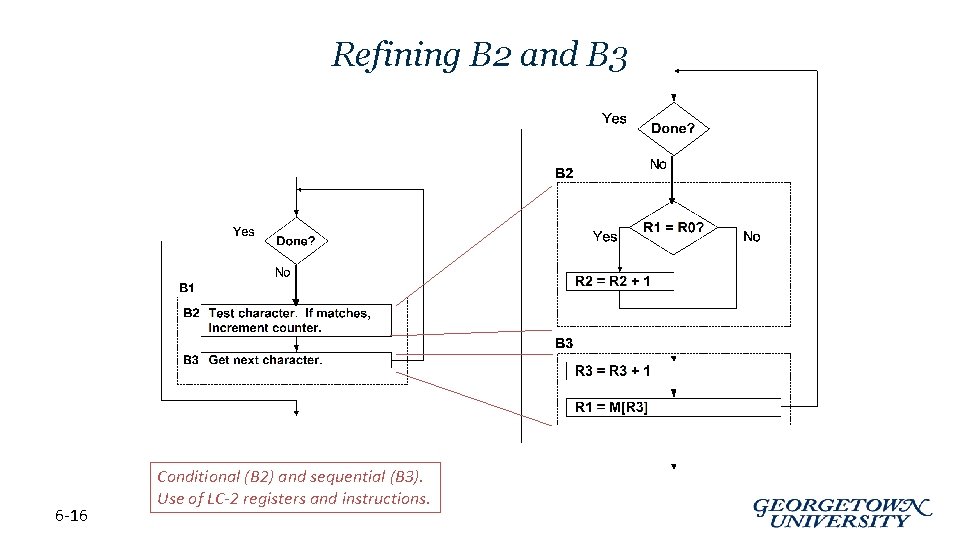
Refining B 2 and B 3 6 -16 Conditional (B 2) and sequential (B 3). Use of LC-2 registers and instructions.
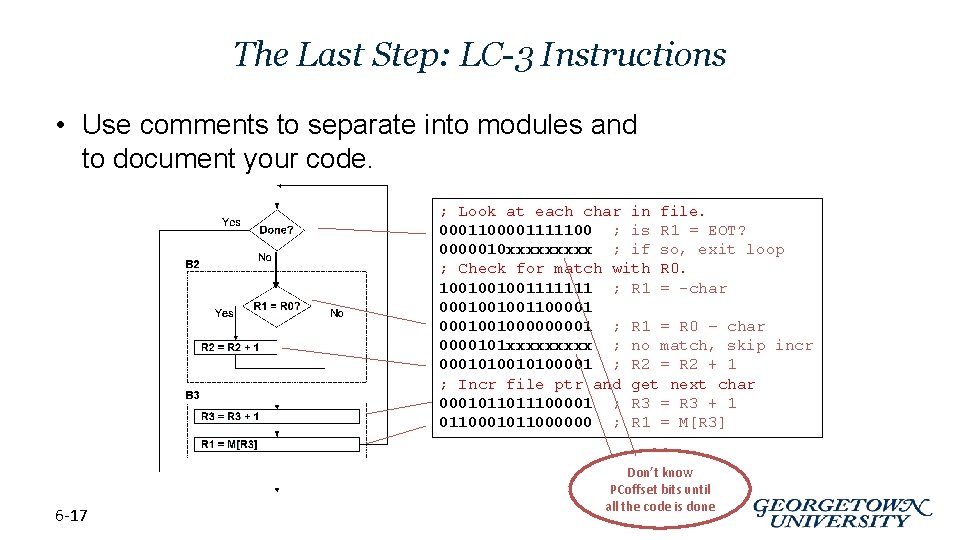
The Last Step: LC-3 Instructions • Use comments to separate into modules and to document your code. ; Look at each char in file. 0001100001111100 ; is R 1 = EOT? 0000010 xxxxx ; if so, exit loop ; Check for match with R 0. 1001001001111111 ; R 1 = -char 000100100110000100100001 ; R 1 = R 0 – char 0000101 xxxxx ; no match, skip incr 00010100001 ; R 2 = R 2 + 1 ; Incr file ptr and get next char 0001011011100001 ; R 3 = R 3 + 1 0110001011000000 ; R 1 = M[R 3] 6 -17 Don’t know PCoffset bits until all the code is done
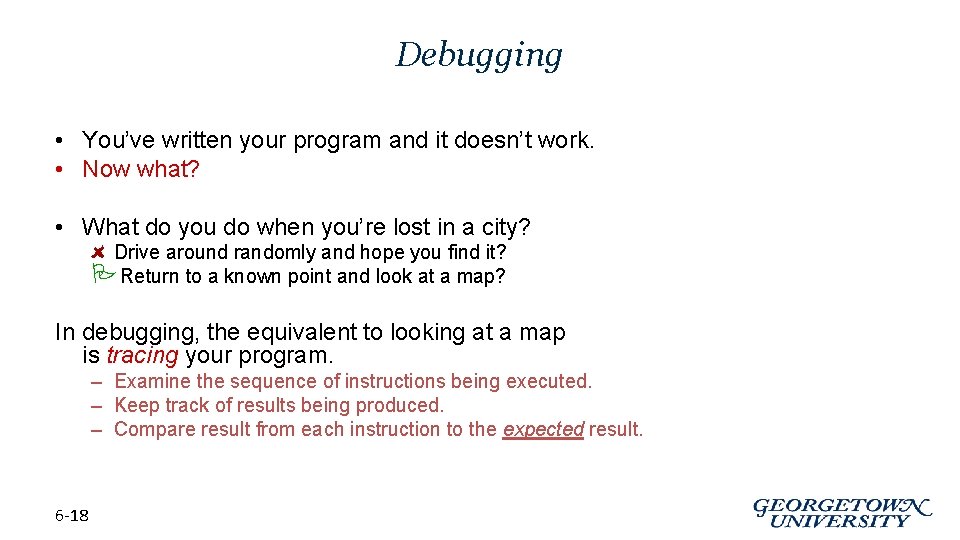
Debugging • You’ve written your program and it doesn’t work. • Now what? • What do you do when you’re lost in a city? Drive around randomly and hope you find it? PReturn to a known point and look at a map? In debugging, the equivalent to looking at a map is tracing your program. – Examine the sequence of instructions being executed. – Keep track of results being produced. – Compare result from each instruction to the expected result. 6 -18
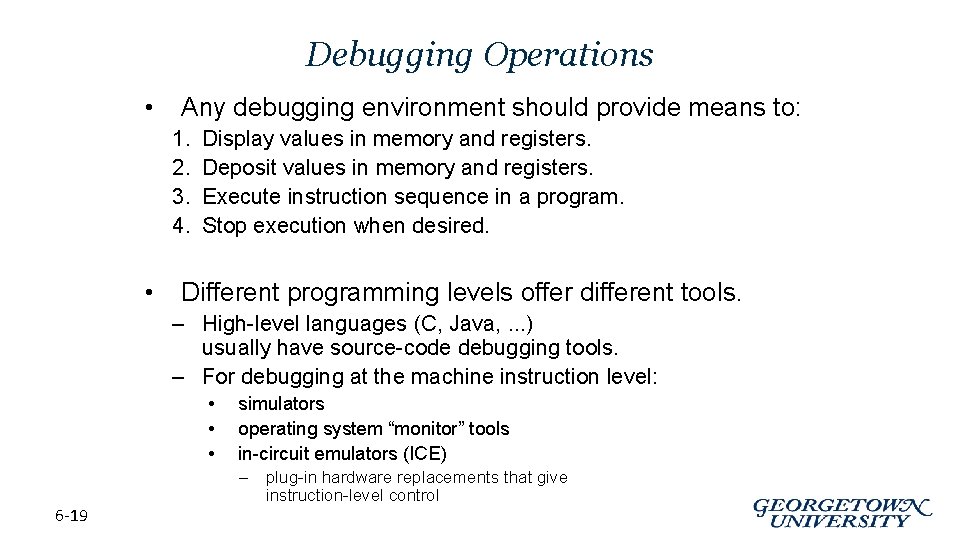
Debugging Operations • Any debugging environment should provide means to: 1. 2. 3. 4. • Display values in memory and registers. Deposit values in memory and registers. Execute instruction sequence in a program. Stop execution when desired. Different programming levels offer different tools. – High-level languages (C, Java, . . . ) usually have source-code debugging tools. – For debugging at the machine instruction level: • • • 6 -19 simulators operating system “monitor” tools in-circuit emulators (ICE) – plug-in hardware replacements that give instruction-level control
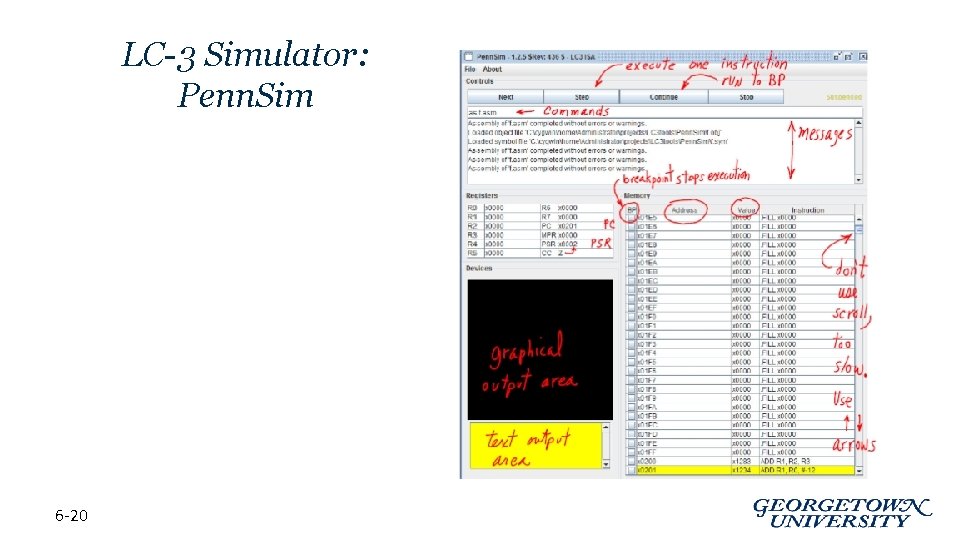
LC-3 Simulator: Penn. Sim 6 -20
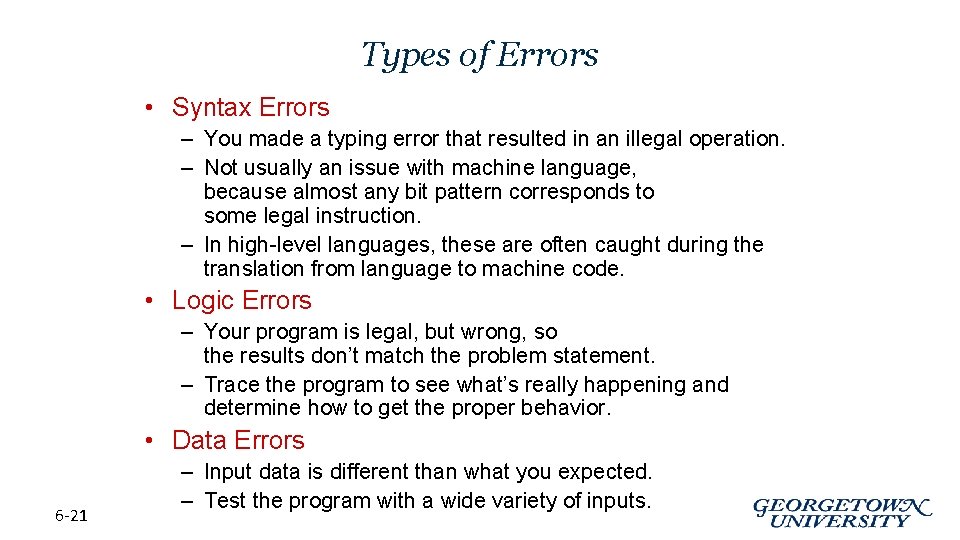
Types of Errors • Syntax Errors – You made a typing error that resulted in an illegal operation. – Not usually an issue with machine language, because almost any bit pattern corresponds to some legal instruction. – In high-level languages, these are often caught during the translation from language to machine code. • Logic Errors – Your program is legal, but wrong, so the results don’t match the problem statement. – Trace the program to see what’s really happening and determine how to get the proper behavior. • Data Errors 6 -21 – Input data is different than what you expected. – Test the program with a wide variety of inputs.
Tracing the Program • Execute the program one piece at a time, examining register and memory to see results at each step. • Single-Stepping – Execute one instruction at a time. – Tedious, but useful to help you verify each step of your program. • Breakpoints – Tell the simulator to stop executing when it reaches a specific instruction. – Check overall results at specific points in the program. • Lets you quickly execute sequences to get a high-level overview of the execution behavior. • Quickly execute sequences that your believe are correct. • Watchpoints – Tell the simulator to stop when a register or memory location changes or when it equals a specific value. – Useful when you don’t know where or when a value is changed. 6 -22
Example 1: Multiply • This program is supposed to multiply the two unsigned integers in R 4 and R 5. 1. Identify the main steps of the procedure: create activity or state diagram 1. 2. 3. 6 -23 Decompose these steps into steps performable by the target ISA Write the Assembly Test / Debug: Step through code using simulator
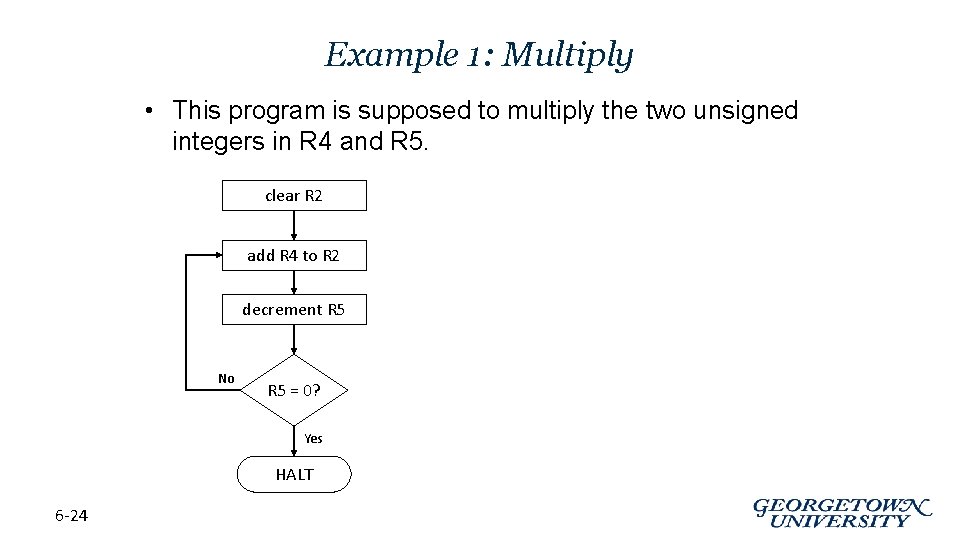
Example 1: Multiply • This program is supposed to multiply the two unsigned integers in R 4 and R 5. clear R 2 add R 4 to R 2 decrement R 5 No R 5 = 0? Yes HALT 6 -24
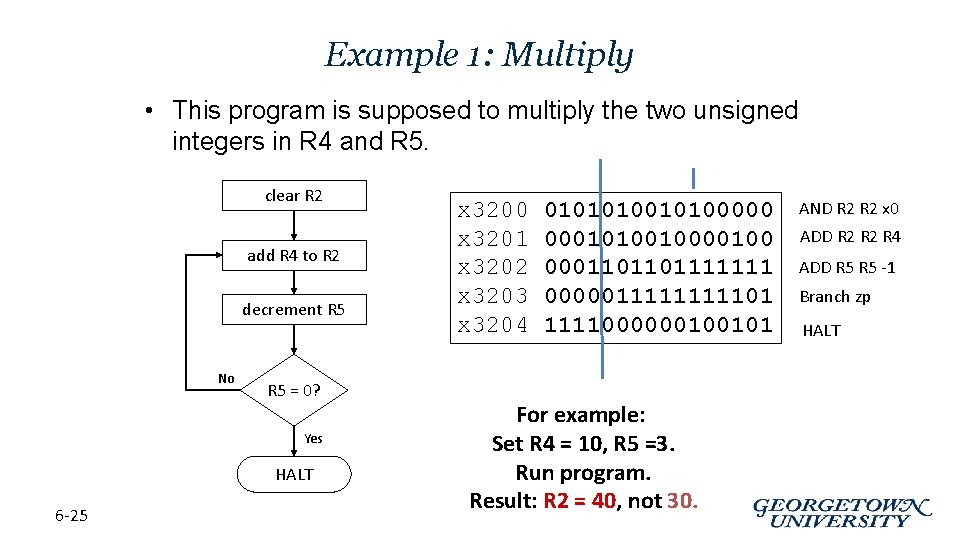
Example 1: Multiply • This program is supposed to multiply the two unsigned integers in R 4 and R 5. clear R 2 add R 4 to R 2 decrement R 5 No R 5 = 0? Yes HALT 6 -25 x 3200 x 3201 x 3202 x 3203 x 3204 01010100000 00010100100 0001101101111111 000001111101 1111000000100101 For example: Set R 4 = 10, R 5 =3. Run program. Result: R 2 = 40, not 30. AND R 2 x 0 ADD R 2 R 4 ADD R 5 -1 Branch zp HALT
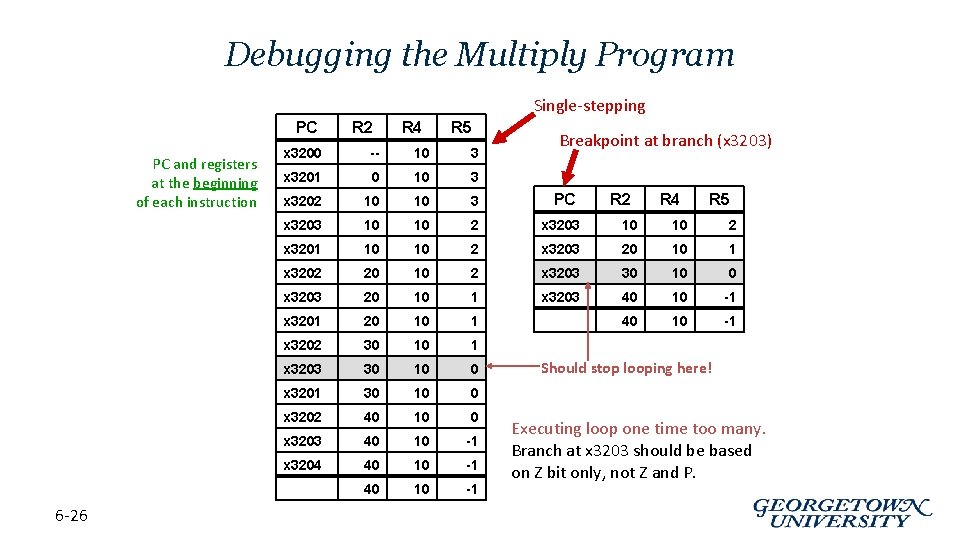
Debugging the Multiply Program Single-stepping PC PC and registers at the beginning of each instruction 6 -26 R 2 R 4 R 5 Breakpoint at branch (x 3203) x 3200 -- 10 3 x 3201 0 10 3 x 3202 10 10 3 PC x 3203 10 10 2 x 3201 10 10 2 x 3203 20 10 1 x 3202 20 10 2 x 3203 30 10 0 x 3203 20 10 1 x 3203 40 10 -1 x 3201 20 10 1 40 10 -1 x 3202 30 10 1 x 3203 30 10 0 x 3201 30 10 0 x 3202 40 10 0 x 3203 40 10 -1 x 3204 40 10 -1 R 2 R 4 R 5 Should stop looping here! Executing loop one time too many. Branch at x 3203 should be based on Z bit only, not Z and P.
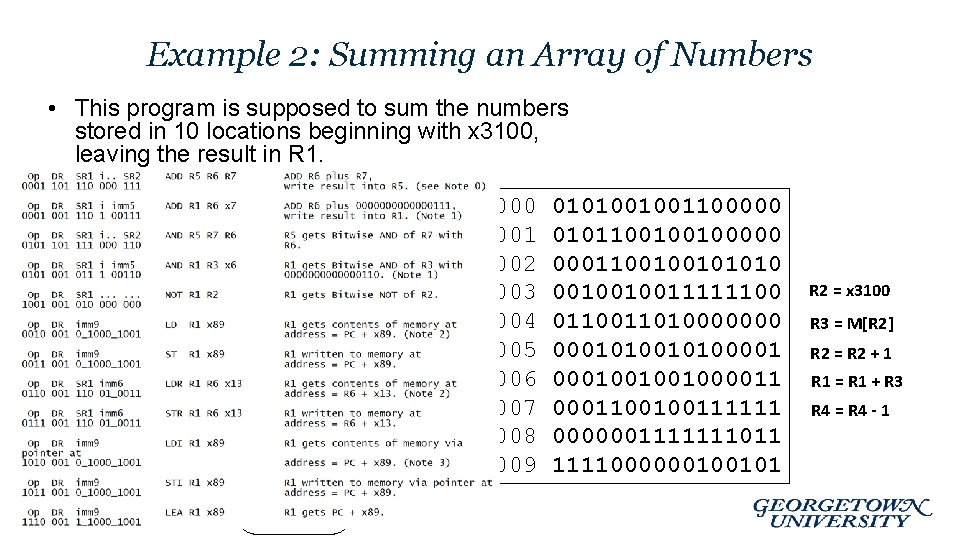
Example 2: Summing an Array of Numbers • This program is supposed to sum the numbers stored in 10 locations beginning with x 3100, leaving the result in R 1 = 0 R 4 = 10 R 2 = x 3100 R 1 = R 1 + M[R 2] R 2 = R 2 + 1 R 4 = R 4 - 1 No R 4 = 0? Yes 6 -27 HALT x 3000 x 3001 x 3002 x 3003 x 3004 x 3005 x 3006 x 3007 x 3008 x 3009 0101001001100000 0101100100100000 0001100100101010 0010010011111100 011010000000 0001010000100100100001100100111111 0000001111111011 1111000000100101 R 2 = x 3100 R 3 = M[R 2] R 2 = R 2 + 1 R 1 = R 1 + R 3 R 4 = R 4 - 1
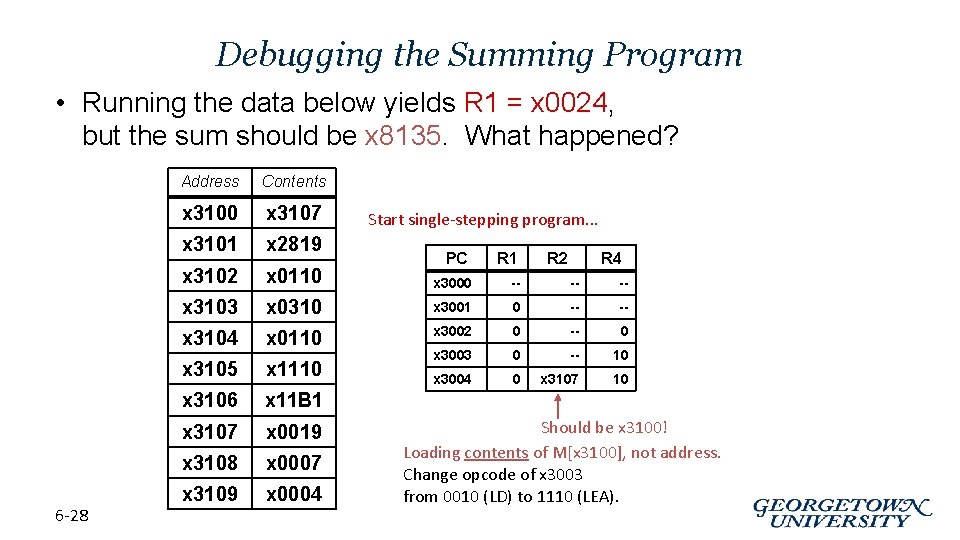
Debugging the Summing Program • Running the data below yields R 1 = x 0024, but the sum should be x 8135. What happened? 6 -28 Address Contents x 3100 x 3107 x 3101 x 2819 x 3102 x 0110 x 3000 -- -- -- x 3103 x 0310 x 3001 0 -- -- x 3104 x 0110 x 3002 0 -- 0 x 3105 x 1110 x 3003 0 -- 10 x 3004 0 x 3107 10 x 3106 x 11 B 1 x 3107 x 0019 x 3108 x 0007 x 3109 x 0004 Start single-stepping program. . . PC R 1 R 2 R 4 Should be x 3100! Loading contents of M[x 3100], not address. Change opcode of x 3003 from 0010 (LD) to 1110 (LEA).
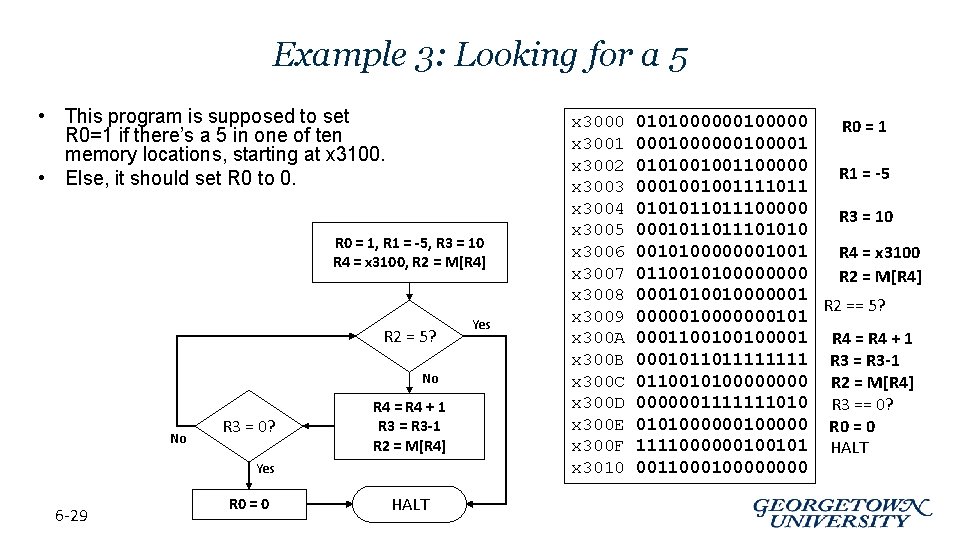
Example 3: Looking for a 5 • This program is supposed to set R 0=1 if there’s a 5 in one of ten memory locations, starting at x 3100. • Else, it should set R 0 to 0. R 0 = 1, R 1 = -5, R 3 = 10 R 4 = x 3100, R 2 = M[R 4] R 2 = 5? No No R 3 = 0? R 4 = R 4 + 1 R 3 = R 3 -1 R 2 = M[R 4] Yes 6 -29 R 0 = 0 HALT Yes x 3000 x 3001 x 3002 x 3003 x 3004 x 3005 x 3006 x 3007 x 3008 x 3009 x 300 A x 300 B x 300 C x 300 D x 300 E x 300 F x 3010 010100000 R 0 = 1 000100001 0101001001100000 R 1 = -5 0001001001111011 0101011011100000 R 3 = 10 000101101010 0010100000001001 R 4 = x 3100 011001010000 R 2 = M[R 4] 0001010010000001 R 2 == 5? 0000010000000101 0001100100100001 R 4 = R 4 + 1 000101101111 R 3 = R 3 -1 011001010000 R 2 = M[R 4] 0000001111111010 R 3 == 0? 010100000 R 0 = 0 1111000000100101 HALT 001100000000
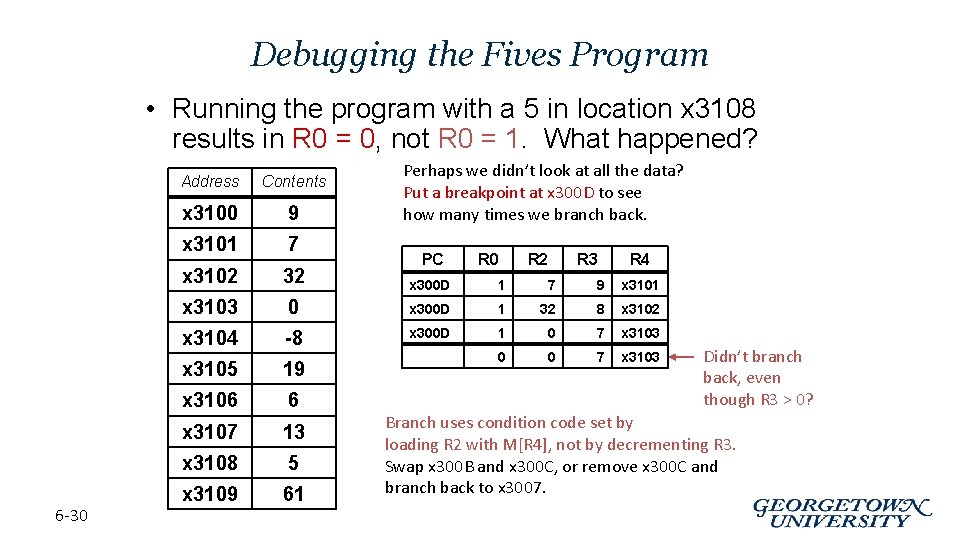
Debugging the Fives Program • Running the program with a 5 in location x 3108 results in R 0 = 0, not R 0 = 1. What happened? 6 -30 Perhaps we didn’t look at all the data? Put a breakpoint at x 300 D to see how many times we branch back. Address Contents x 3100 9 x 3101 7 x 3102 32 x 300 D 1 7 9 x 3101 x 3103 0 x 300 D 1 32 8 x 3102 x 3104 -8 x 300 D 1 0 7 x 3103 x 3105 19 0 0 7 x 3103 x 3106 6 x 3107 13 x 3108 5 x 3109 61 PC R 0 R 2 R 3 R 4 Didn’t branch back, even though R 3 > 0? Branch uses condition code set by loading R 2 with M[R 4], not by decrementing R 3. Swap x 300 B and x 300 C, or remove x 300 C and branch back to x 3007.
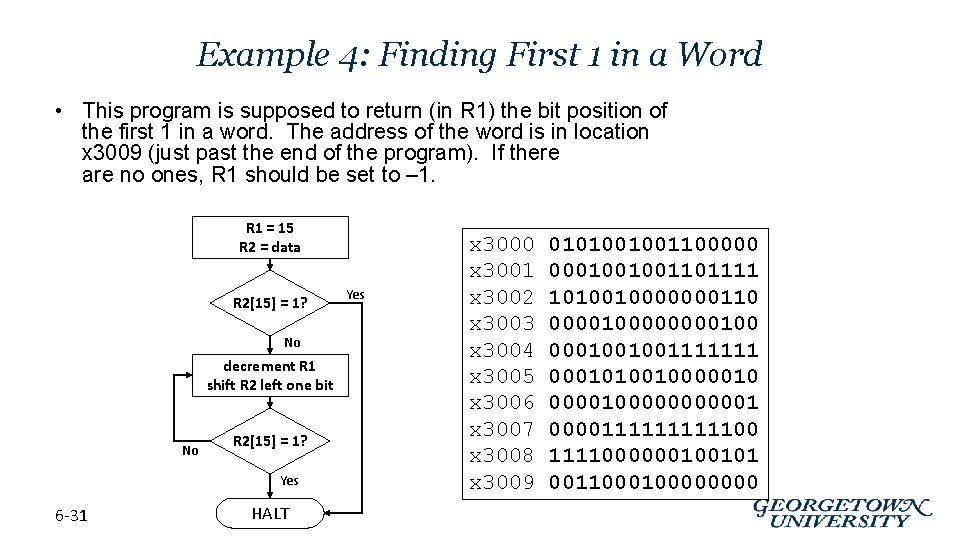
Example 4: Finding First 1 in a Word • This program is supposed to return (in R 1) the bit position of the first 1 in a word. The address of the word is in location x 3009 (just past the end of the program). If there are no ones, R 1 should be set to – 1. R 1 = 15 R 2 = data R 2[15] = 1? No decrement R 1 shift R 2 left one bit No R 2[15] = 1? Yes 6 -31 HALT Yes x 3000 x 3001 x 3002 x 3003 x 3004 x 3005 x 3006 x 3007 x 3008 x 3009 0101001001100000 0001001001101111 1010010000000110 0000100001001001111111 0001010010000010000011111000000100101 001100000000
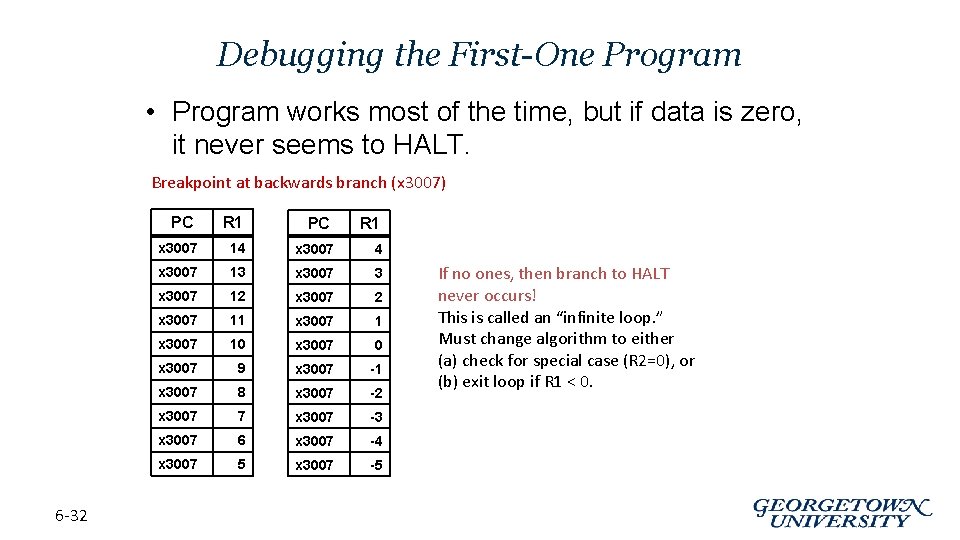
Debugging the First-One Program • Program works most of the time, but if data is zero, it never seems to HALT. Breakpoint at backwards branch (x 3007) PC 6 -32 R 1 PC R 1 x 3007 14 x 3007 13 x 3007 12 x 3007 11 x 3007 10 x 3007 9 x 3007 -1 x 3007 8 x 3007 -2 x 3007 7 x 3007 -3 x 3007 6 x 3007 -4 x 3007 5 x 3007 -5 If no ones, then branch to HALT never occurs! This is called an “infinite loop. ” Must change algorithm to either (a) check for special case (R 2=0), or (b) exit loop if R 1 < 0.
Debugging: Lessons Learned • Trace program to see what’s going on. – Breakpoints, single-stepping • When tracing, make sure to notice what’s really happening, not what you think should happen. – In summing program, it would be easy to notice that address x 3107 was loaded instead of x 3100. • Test your program using a variety of input data. – In Examples 3 and 4, the program works for many data sets. – Be sure to test extreme cases (all ones, no ones, . . . ). 6 -33
- Slides: 33