
Core System Services INIT Daemon The init process

- Slides: 14
Core System Services
INIT Daemon • The init process is the patron of all processes. • first process that gets started in any Linux/ UNIX -based system.
INIT • Start up system run level. • Specify processes to be executed during system boot. • Specify processes to be run when the specified run level is entered. • Specify certain actions or processes to be run if certain signals or user actions are indicated.
upstart • upstart is an event-based replacement for the init daemon which handles starting of tasks and services during boot, stopping them during shutdown, and supervising them while the system is running
Run level • A runlevel is a preset operating state on a Unix -like operating system. • A system can be booted into any of several runlevels, each of which is represented by a single digit integer. Each runlevel designates a different system configuration and allows access to a different combination of processes
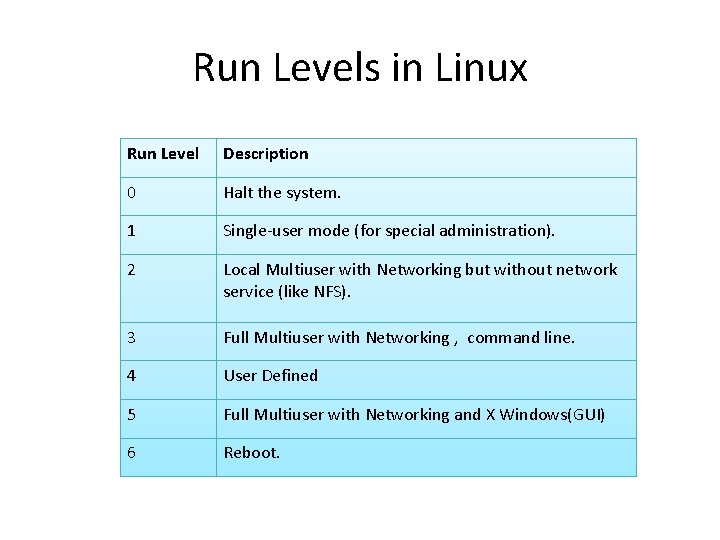
Run Levels in Linux Run Level Description 0 Halt the system. 1 Single-user mode (for special administration). 2 Local Multiuser with Networking but without network service (like NFS). 3 Full Multiuser with Networking , command line. 4 User Defined 5 Full Multiuser with Networking and X Windows(GUI) 6 Reboot.
The /etc/inittab File • The /etc/inittab file contains all the information init needs for starting runlevels.
INETD • The role of inetd is to function as a “super-server” to other network server–related processes, such as telnet, ftp, tftp, etc. • So instead of constantly maintaining potentially dozens of services loaded in memory waiting to be used, they are all listed in inetd’s configuration file, /etc/inetd. conf. On their behalf, inetd listens for incoming connections. Thus, only a single process needs to be in memory.
INETD • low-volume services (such as tftp) are usually best run through the inetd, whereas highervolume services (such as web servers) are better run as a stand-alone process that is always in memory, ready to handle requests
XINETD • xinetd, the e. Xtended Inter. NET Daemon, is an open-source daemon which runs on many Linux and Unix systems and manages Internetbased connectivity. It offers a more secure extension to or version of inetd, the Internet daemon.
syslogd Daemon • Syslogd provides two system utilities which provide support for system logging and kernel message trapping. Support of both internet and unix domain sockets enables this utility package to support both local and remote logging.
• The syslog daemon processing is controlled by a configuration file called /etc/syslog. conf in which you define logging rules and output destinations for error messages, authorization violation messages, and trace data.
THE CRON PROGRAM • The cron program allows any user in the system to schedule a program to run on any date, at any time, or on a particular day of week, down to the minute. • Using cron is an extremely efficient way to automate your system, generate reports on a regular basis
CRON • The tool that allows you to edit entries to be executed is crontab.