
Core LIMS Training Velocity Templates Course Topics What
- Slides: 52
Core LIMS Training: Velocity Templates
Course Topics • • • What are Velocity Templates? Custom Instrument Files Custom Experiment Reports Custom Inventory Reports Custom E-mails Note: This training assumes that you have reviewed and understand Basic Administration Training 11/30/2020 Confidential 2
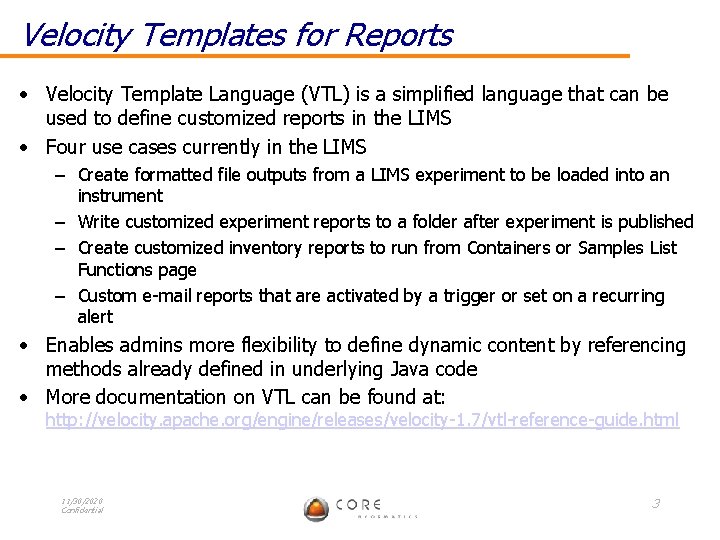
Velocity Templates for Reports • Velocity Template Language (VTL) is a simplified language that can be used to define customized reports in the LIMS • Four use cases currently in the LIMS – Create formatted file outputs from a LIMS experiment to be loaded into an instrument – Write customized experiment reports to a folder after experiment is published – Create customized inventory reports to run from Containers or Samples List Functions page – Custom e-mail reports that are activated by a trigger or set on a recurring alert • Enables admins more flexibility to define dynamic content by referencing methods already defined in underlying Java code • More documentation on VTL can be found at: http: //velocity. apache. org/engine/releases/velocity-1. 7/vtl-reference-guide. html 11/30/2020 Confidential 3
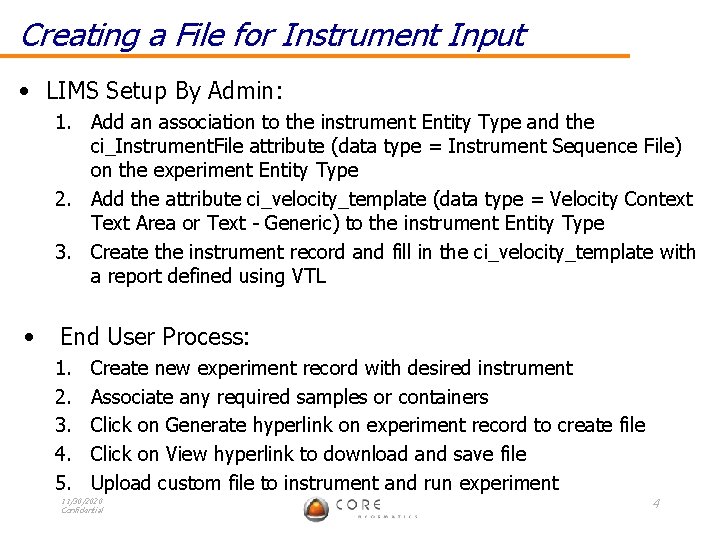
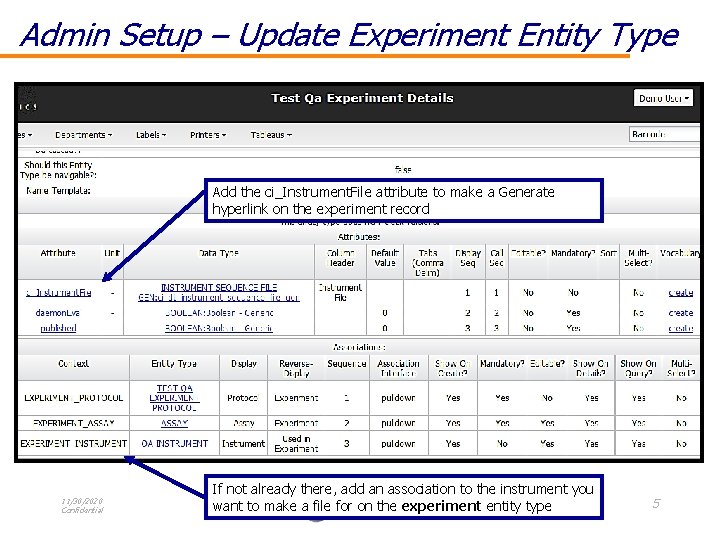
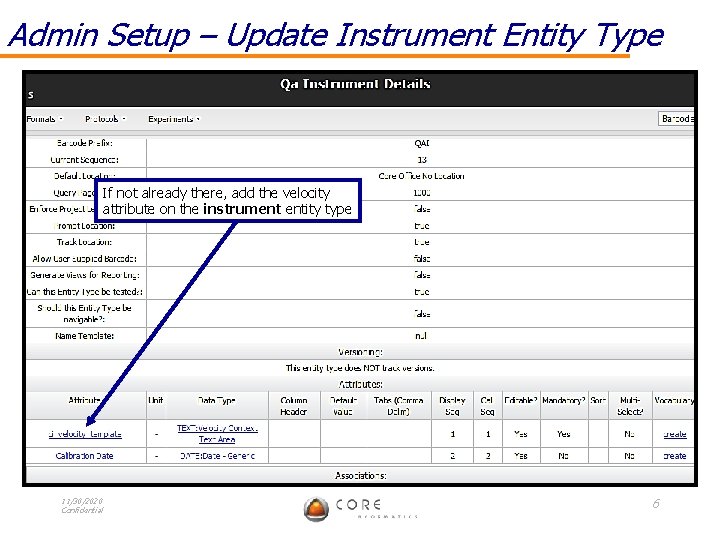
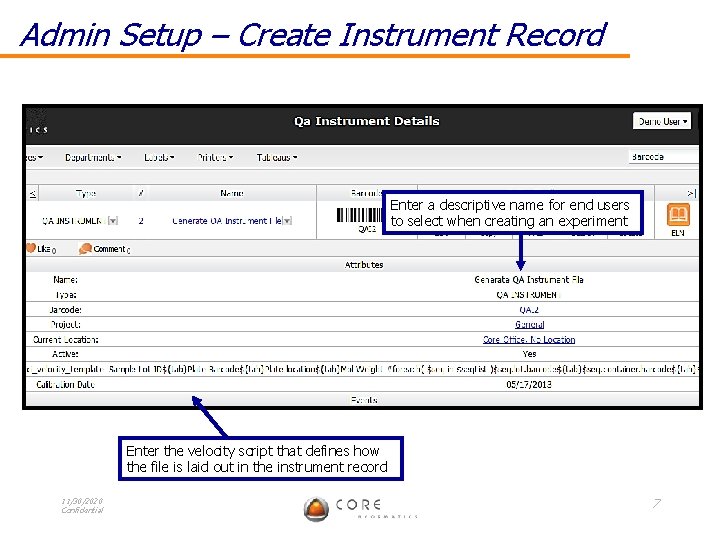
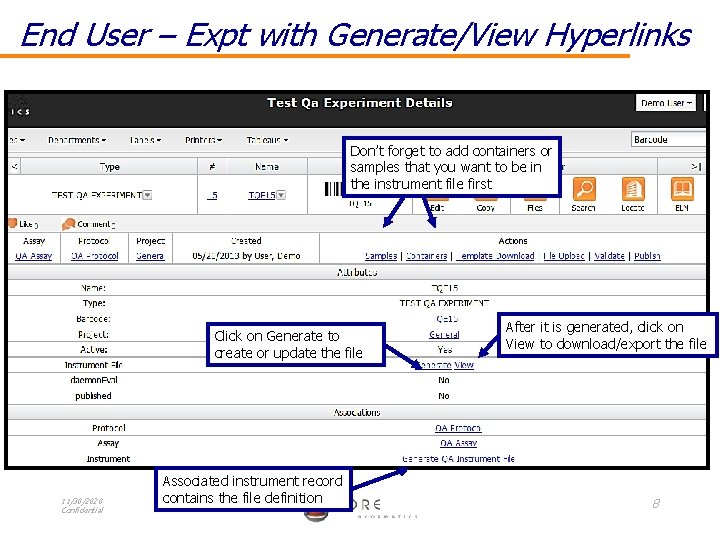
Creating a File for Instrument Input • LIMS Setup By Admin: 1. Add an association to the instrument Entity Type and the ci_Instrument. File attribute (data type = Instrument Sequence File) on the experiment Entity Type 2. Add the attribute ci_velocity_template (data type = Velocity Context Text Area or Text - Generic) to the instrument Entity Type 3. Create the instrument record and fill in the ci_velocity_template with a report defined using VTL • End User Process: 1. 2. 3. 4. 5. Create new experiment record with desired instrument Associate any required samples or containers Click on Generate hyperlink on experiment record to create file Click on View hyperlink to download and save file Upload custom file to instrument and run experiment 11/30/2020 Confidential 4
Admin Setup – Update Experiment Entity Type Add the ci_Instrument. File attribute to make a Generate hyperlink on the experiment record 11/30/2020 Confidential If not already there, add an association to the instrument you want to make a file for on the experiment entity type 5
Admin Setup – Update Instrument Entity Type If not already there, add the velocity attribute on the instrument entity type 11/30/2020 Confidential 6
Admin Setup – Create Instrument Record Enter a descriptive name for end users to select when creating an experiment Enter the velocity script that defines how the file is laid out in the instrument record 11/30/2020 Confidential 7
End User – Expt with Generate/View Hyperlinks Don’t forget to add containers or samples that you want to be in the instrument file first Click on Generate to create or update the file 11/30/2020 Confidential Associated instrument record contains the file definition After it is generated, click on View to download/export the file 8
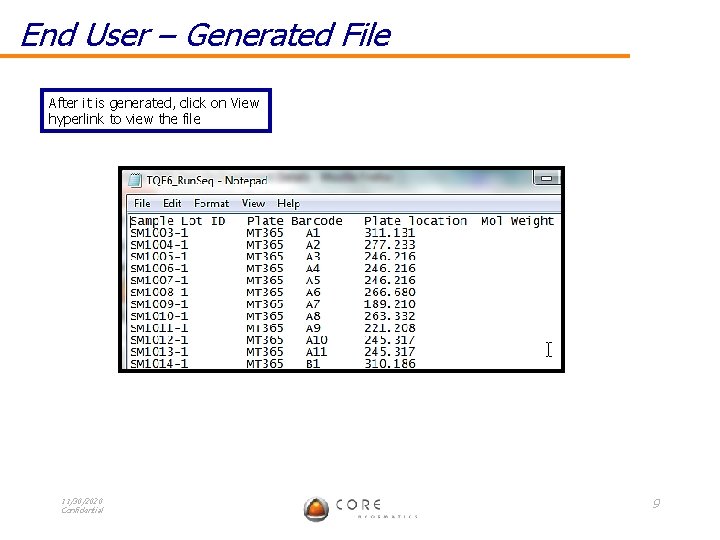
End User – Generated File After it is generated, click on View hyperlink to view the file 11/30/2020 Confidential 9
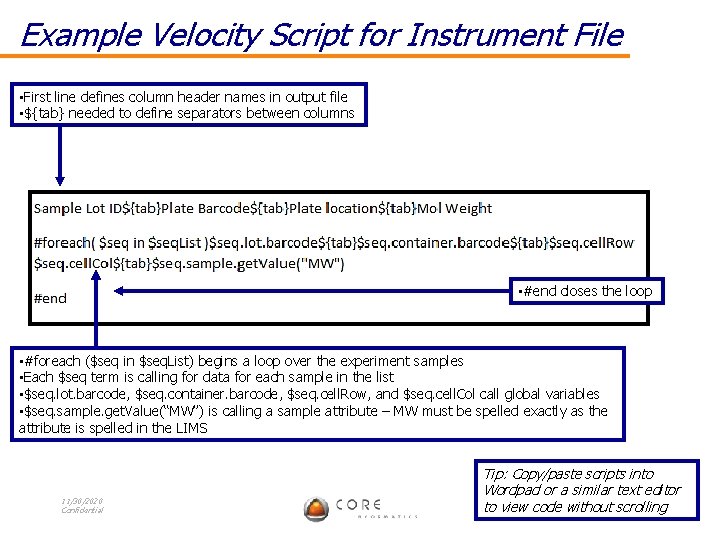
Example Velocity Script for Instrument File • First line defines column header names in output file • ${tab} needed to define separators between columns • #end closes the loop • #foreach ($seq in $seq. List) begins a loop over the experiment samples • Each $seq term is calling for data for each sample in the list • $seq. lot. barcode, $seq. container. barcode, $seq. cell. Row, and $seq. cell. Col call global variables • $seq. sample. get. Value(“MW”) is calling a sample attribute – MW must be spelled exactly as the attribute is spelled in the LIMS 11/30/2020 Confidential Tip: Copy/paste scripts into Wordpad or a similar text editor 10 to view code without scrolling
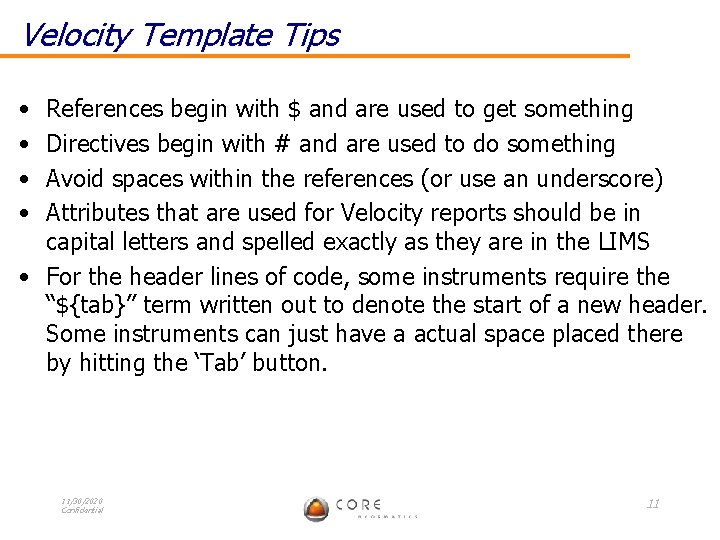
Velocity Template Tips • • References begin with $ and are used to get something Directives begin with # and are used to do something Avoid spaces within the references (or use an underscore) Attributes that are used for Velocity reports should be in capital letters and spelled exactly as they are in the LIMS • For the header lines of code, some instruments require the “${tab}” term written out to denote the start of a new header. Some instruments can just have a actual space placed there by hitting the ‘Tab’ button. 11/30/2020 Confidential 11
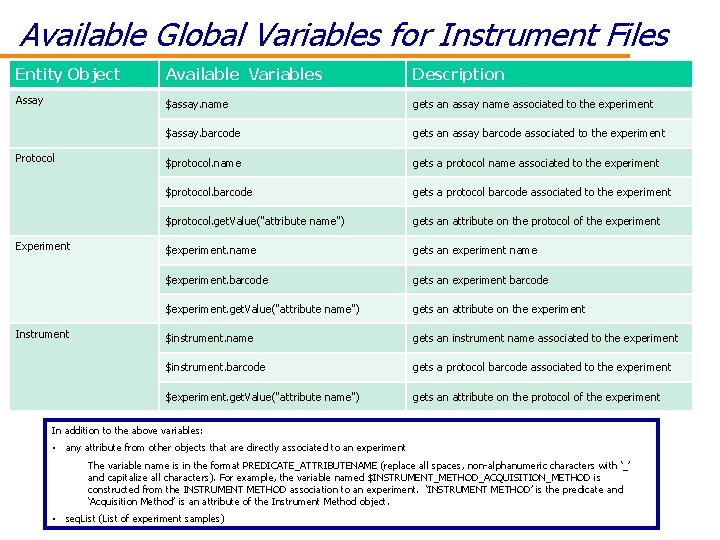
Available Global Variables for Instrument Files Entity Object Available Variables Description Assay $assay. name gets an assay name associated to the experiment $assay. barcode gets an assay barcode associated to the experiment $protocol. name gets a protocol name associated to the experiment $protocol. barcode gets a protocol barcode associated to the experiment $protocol. get. Value("attribute name") gets an attribute on the protocol of the experiment $experiment. name gets an experiment name $experiment. barcode gets an experiment barcode $experiment. get. Value("attribute name") gets an attribute on the experiment $instrument. name gets an instrument name associated to the experiment $instrument. barcode gets a protocol barcode associated to the experiment $experiment. get. Value("attribute name") gets an attribute on the protocol of the experiment Protocol Experiment Instrument In addition to the above variables: • any attribute from other objects that are directly associated to an experiment The variable name is in the format PREDICATE_ATTRIBUTENAME (replace all spaces, non-alphanumeric characters with ‘_’ and capitalize all characters). For example, the variable named $INSTRUMENT_METHOD_ACQUISITION_METHOD is constructed from the INSTRUMENT METHOD association to an experiment. ‘INSTRUMENT METHOD’ is the predicate and 11/30/2020 ‘Acquisition Method’ is an attribute of the Instrument Method object. Confidential • seq. List (List of experiment samples) 12
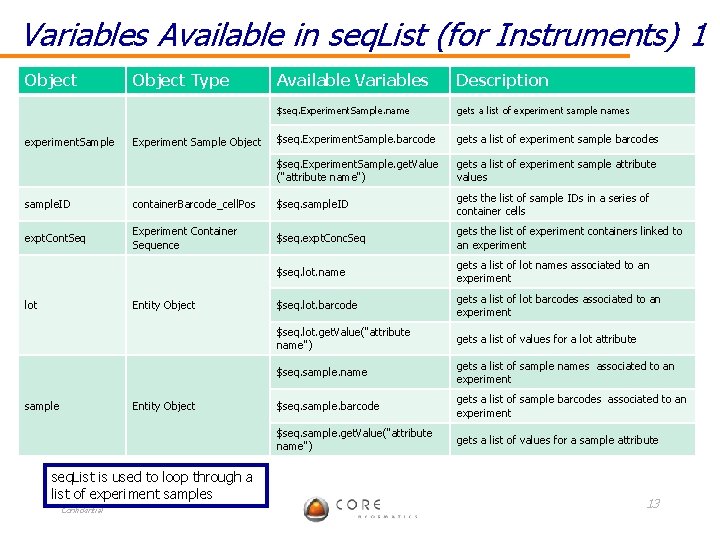
Variables Available in seq. List (for Instruments) 1 Object experiment. Sample Object Type Experiment Sample Object Available Variables Description $seq. Experiment. Sample. name gets a list of experiment sample names $seq. Experiment. Sample. barcode gets a list of experiment sample barcodes $seq. Experiment. Sample. get. Value ("attribute name") gets a list of experiment sample attribute values sample. ID container. Barcode_cell. Pos $seq. sample. ID gets the list of sample IDs in a series of container cells expt. Cont. Seq Experiment Container Sequence $seq. expt. Conc. Seq gets the list of experiment containers linked to an experiment $seq. lot. name gets a list of lot names associated to an experiment $seq. lot. barcode gets a list of lot barcodes associated to an experiment $seq. lot. get. Value("attribute name") gets a list of values for a lot attribute $seq. sample. name gets a list of sample names associated to an experiment $seq. sample. barcode gets a list of sample barcodes associated to an experiment $seq. sample. get. Value("attribute name") gets a list of values for a sample attribute lot Entity Object sample Entity Object seq. List is used to loop through a list of experiment samples 11/30/2020 Confidential 13
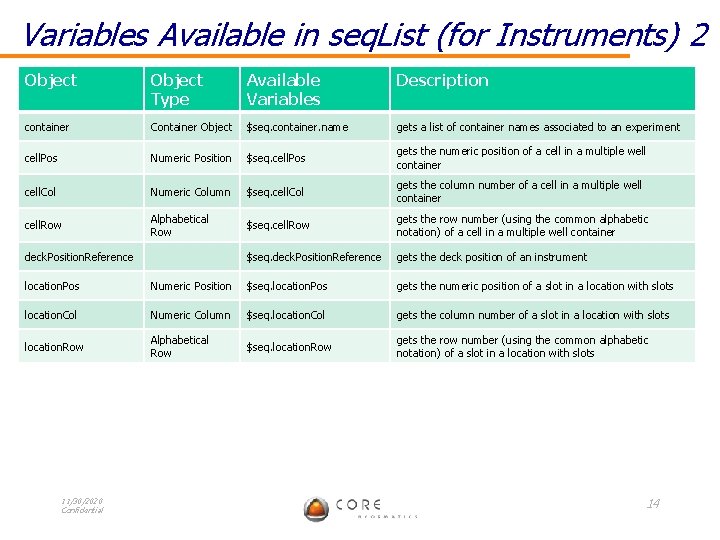
Variables Available in seq. List (for Instruments) 2 Object Type Available Variables Description container Container Object $seq. container. name gets a list of container names associated to an experiment cell. Pos Numeric Position $seq. cell. Pos gets the numeric position of a cell in a multiple well container cell. Col Numeric Column $seq. cell. Col gets the column number of a cell in a multiple well container cell. Row Alphabetical Row $seq. cell. Row gets the row number (using the common alphabetic notation) of a cell in a multiple well container deck. Position. Reference $seq. deck. Position. Reference gets the deck position of an instrument location. Pos Numeric Position $seq. location. Pos gets the numeric position of a slot in a location with slots location. Col Numeric Column $seq. location. Col gets the column number of a slot in a location with slots location. Row Alphabetical Row $seq. location. Row gets the row number (using the common alphabetic notation) of a slot in a location with slots 11/30/2020 Confidential 14
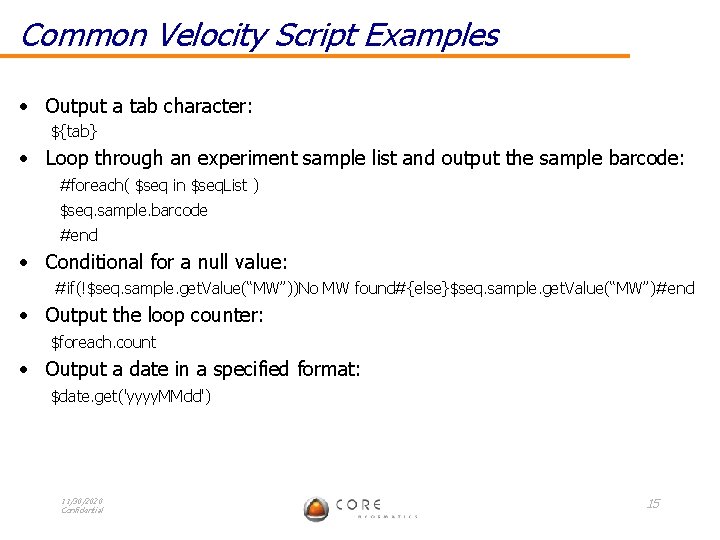
Common Velocity Script Examples • Output a tab character: ${tab} • Loop through an experiment sample list and output the sample barcode: #foreach( $seq in $seq. List ) $seq. sample. barcode #end • Conditional for a null value: #if(!$seq. sample. get. Value(“MW”))No MW found#{else}$seq. sample. get. Value(“MW”)#end • Output the loop counter: $foreach. count • Output a date in a specified format: $date. get('yyyy. MMdd') 11/30/2020 Confidential 15
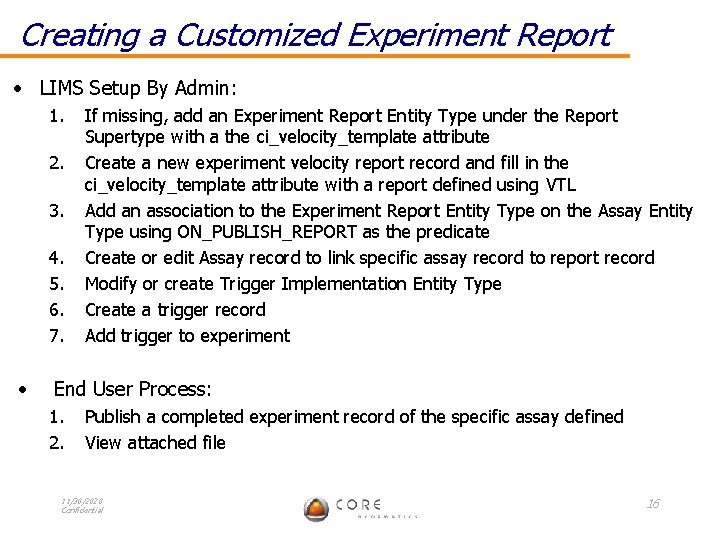
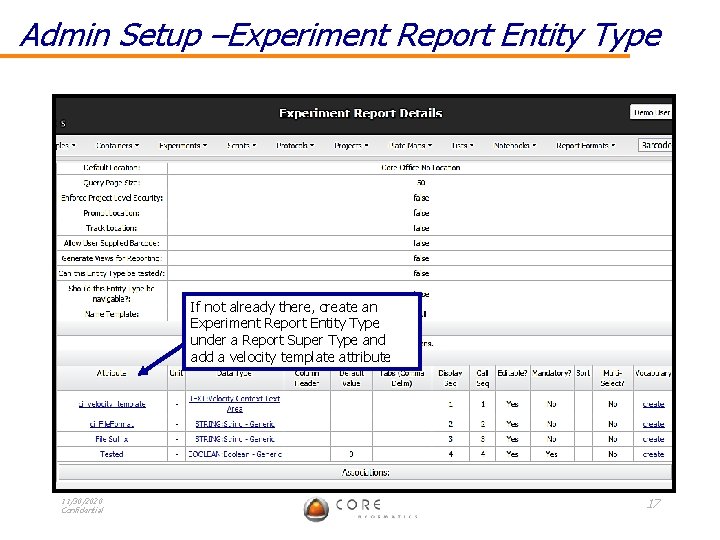
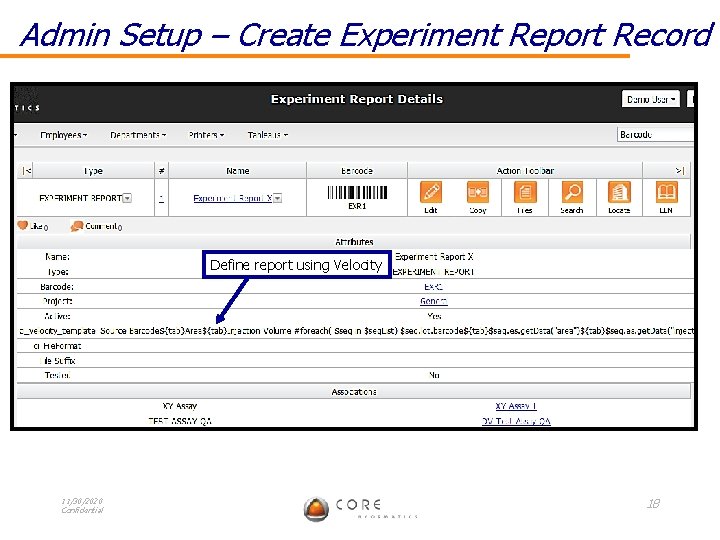
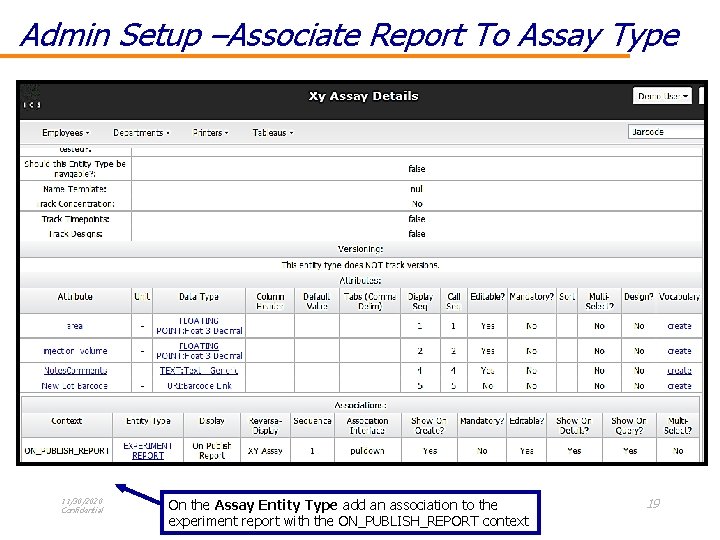
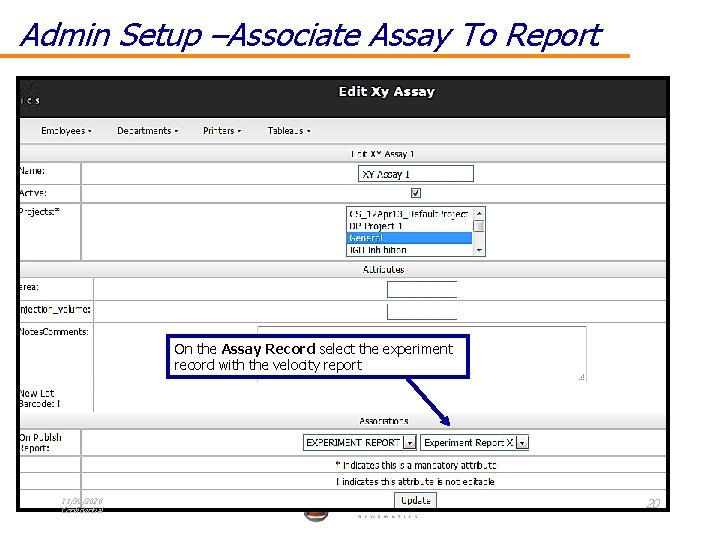
Creating a Customized Experiment Report • LIMS Setup By Admin: 1. 2. 3. 4. 5. 6. 7. • If missing, add an Experiment Report Entity Type under the Report Supertype with a the ci_velocity_template attribute Create a new experiment velocity report record and fill in the ci_velocity_template attribute with a report defined using VTL Add an association to the Experiment Report Entity Type on the Assay Entity Type using ON_PUBLISH_REPORT as the predicate Create or edit Assay record to link specific assay record to report record Modify or create Trigger Implementation Entity Type Create a trigger record Add trigger to experiment End User Process: 1. 2. Publish a completed experiment record of the specific assay defined View attached file 11/30/2020 Confidential 16
Admin Setup –Experiment Report Entity Type If not already there, create an Experiment Report Entity Type under a Report Super Type and add a velocity template attribute 11/30/2020 Confidential 17
Admin Setup – Create Experiment Report Record Define report using Velocity 11/30/2020 Confidential 18
Admin Setup –Associate Report To Assay Type 11/30/2020 Confidential On the Assay Entity Type add an association to the experiment report with the ON_PUBLISH_REPORT context 19
Admin Setup –Associate Assay To Report On the Assay Record select the experiment record with the velocity report 11/30/2020 Confidential 20
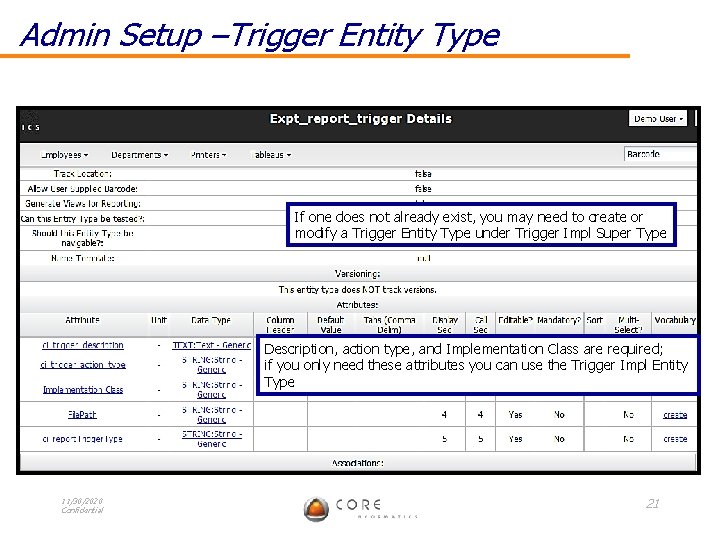
Admin Setup –Trigger Entity Type If one does not already exist, you may need to create or modify a Trigger Entity Type under Trigger Impl Super Type Description, action type, and Implementation Class are required; if you only need these attributes you can use the Trigger Impl Entity Type 11/30/2020 Confidential 21
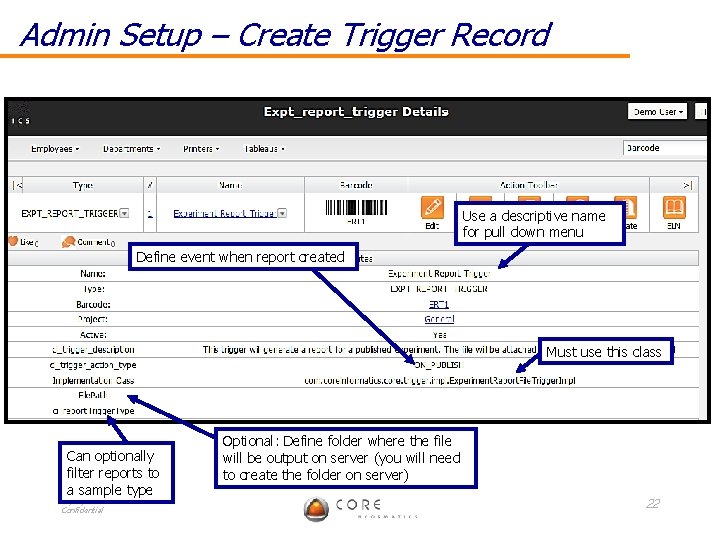
Admin Setup – Create Trigger Record Use a descriptive name for pull down menu Define event when report created Must use this class Can optionally filter reports to a sample type 11/30/2020 Confidential Optional: Define folder where the file will be output on server (you will need to create the folder on server) 22
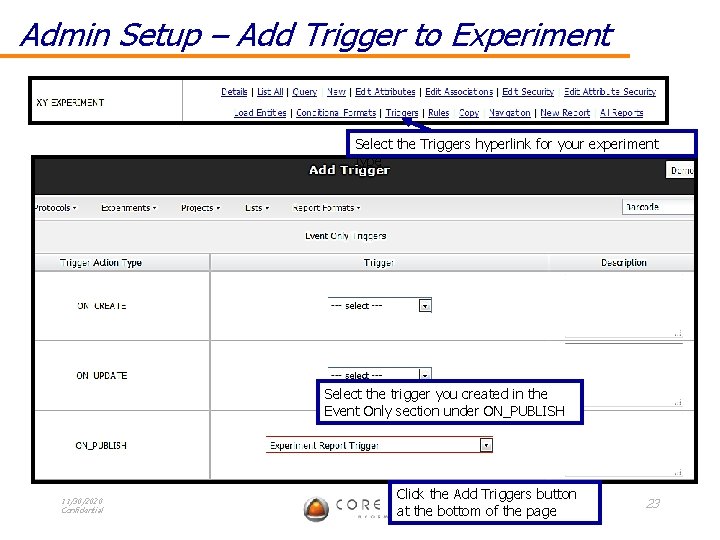
Admin Setup – Add Trigger to Experiment Select the Triggers hyperlink for your experiment type Select the trigger you created in the Event Only section under ON_PUBLISH 11/30/2020 Confidential Click the Add Triggers button at the bottom of the page 23
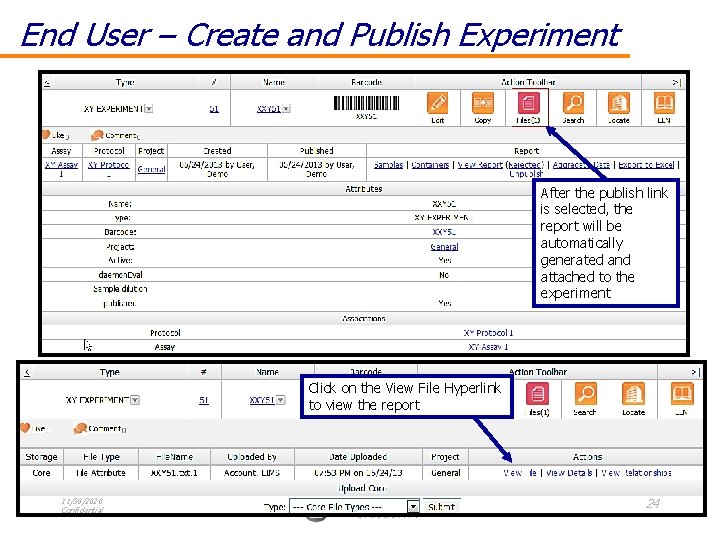
End User – Create and Publish Experiment After the publish link is selected, the report will be automatically generated and attached to the experiment Click on the View File Hyperlink to view the report 11/30/2020 Confidential 24
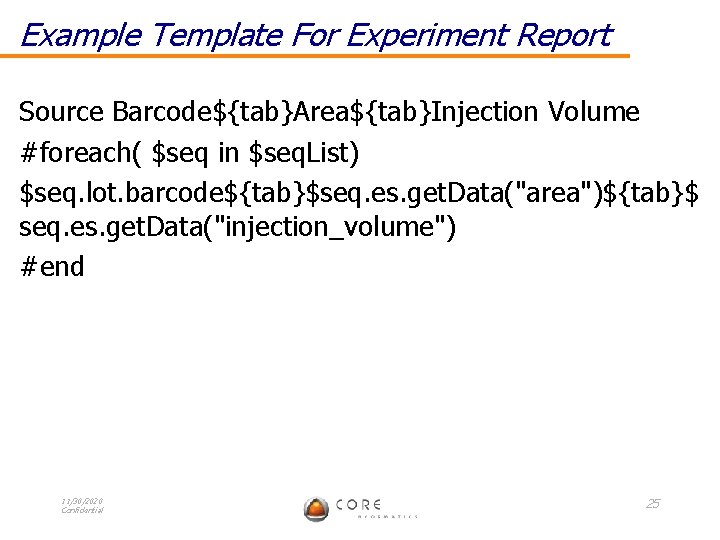
Example Template For Experiment Report Source Barcode${tab}Area${tab}Injection Volume #foreach( $seq in $seq. List) $seq. lot. barcode${tab}$seq. es. get. Data("area")${tab}$ seq. es. get. Data("injection_volume") #end 11/30/2020 Confidential 25
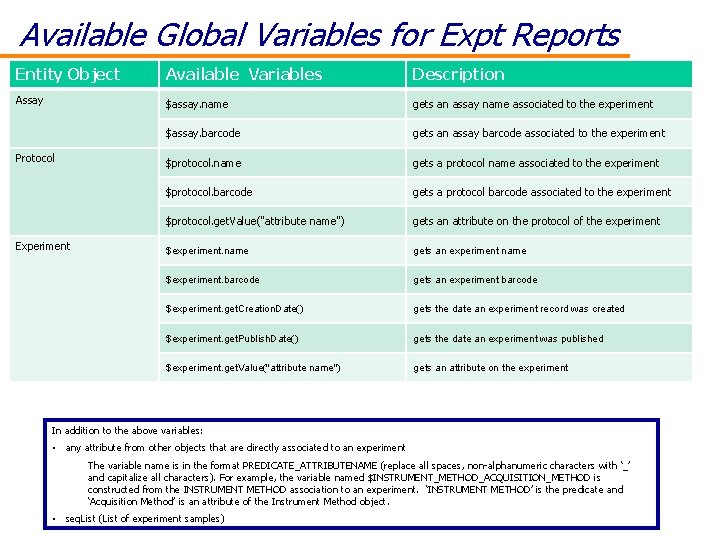
Available Global Variables for Expt Reports Entity Object Available Variables Description Assay $assay. name gets an assay name associated to the experiment $assay. barcode gets an assay barcode associated to the experiment $protocol. name gets a protocol name associated to the experiment $protocol. barcode gets a protocol barcode associated to the experiment $protocol. get. Value("attribute name") gets an attribute on the protocol of the experiment $experiment. name gets an experiment name $experiment. barcode gets an experiment barcode $experiment. get. Creation. Date() gets the date an experiment record was created $experiment. get. Publish. Date() gets the date an experiment was published $experiment. get. Value("attribute name") gets an attribute on the experiment Protocol Experiment In addition to the above variables: • any attribute from other objects that are directly associated to an experiment The variable name is in the format PREDICATE_ATTRIBUTENAME (replace all spaces, non-alphanumeric characters with ‘_’ and capitalize all characters). For example, the variable named $INSTRUMENT_METHOD_ACQUISITION_METHOD is constructed from the INSTRUMENT METHOD association to an experiment. ‘INSTRUMENT METHOD’ is the predicate and 11/30/2020 ‘Acquisition Method’ is an attribute of the Instrument Method object. Confidential • seq. List (List of experiment samples) 26
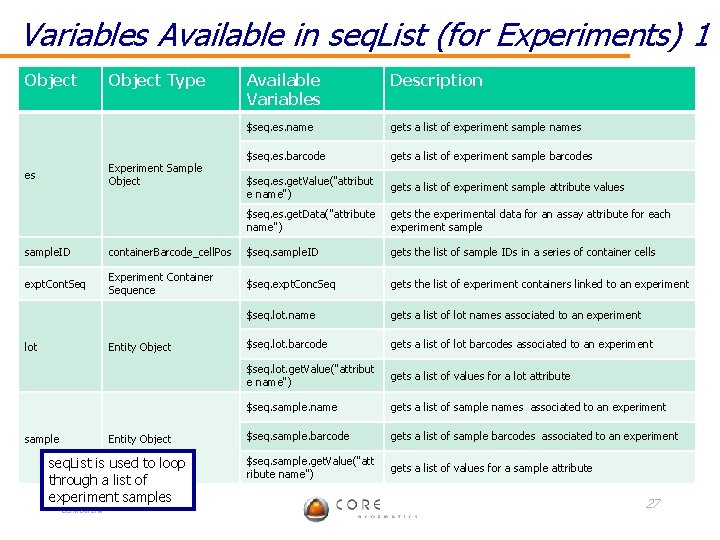
Variables Available in seq. List (for Experiments) 1 Object Type Experiment Sample Object es Available Variables Description $seq. es. name gets a list of experiment sample names $seq. es. barcode gets a list of experiment sample barcodes $seq. es. get. Value("attribut e name") gets a list of experiment sample attribute values $seq. es. get. Data("attribute name") gets the experimental data for an assay attribute for each experiment sample. ID container. Barcode_cell. Pos $seq. sample. ID gets the list of sample IDs in a series of container cells expt. Cont. Seq Experiment Container Sequence $seq. expt. Conc. Seq gets the list of experiment containers linked to an experiment $seq. lot. name gets a list of lot names associated to an experiment $seq. lot. barcode gets a list of lot barcodes associated to an experiment $seq. lot. get. Value("attribut e name") gets a list of values for a lot attribute $seq. sample. name gets a list of sample names associated to an experiment $seq. sample. barcode gets a list of sample barcodes associated to an experiment $seq. sample. get. Value("att ribute name") gets a list of values for a sample attribute lot Entity Object sample Entity Object seq. List is used to loop through a list of experiment samples 11/30/2020 Confidential 27
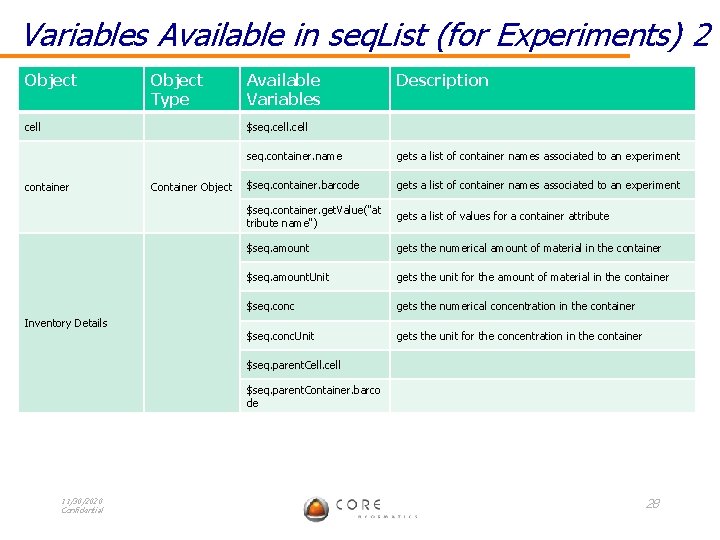
Variables Available in seq. List (for Experiments) 2 Object Type Available Variables Description cell $seq. cell seq. container. name gets a list of container names associated to an experiment $seq. container. barcode gets a list of container names associated to an experiment $seq. container. get. Value("at tribute name") gets a list of values for a container attribute $seq. amount gets the numerical amount of material in the container $seq. amount. Unit gets the unit for the amount of material in the container $seq. conc gets the numerical concentration in the container $seq. conc. Unit gets the unit for the concentration in the container $seq. parent. Cell. cell $seq. parent. Container. barco de container Inventory Details 11/30/2020 Confidential Container Object 28
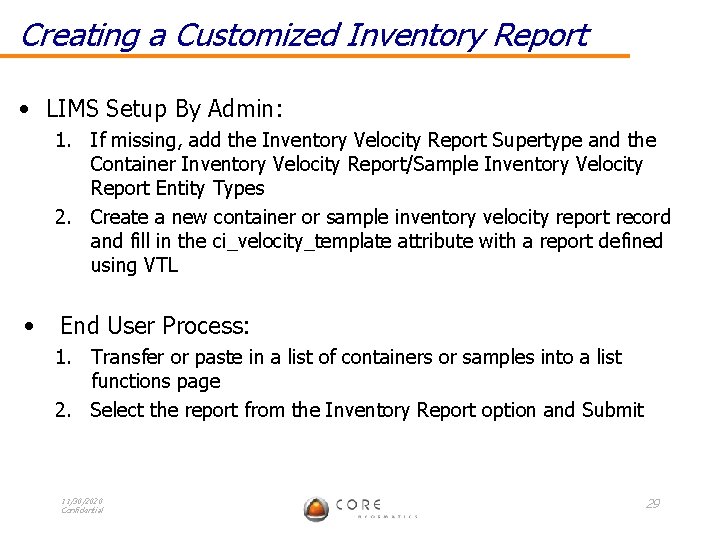
Creating a Customized Inventory Report • LIMS Setup By Admin: 1. If missing, add the Inventory Velocity Report Supertype and the Container Inventory Velocity Report/Sample Inventory Velocity Report Entity Types 2. Create a new container or sample inventory velocity report record and fill in the ci_velocity_template attribute with a report defined using VTL • End User Process: 1. Transfer or paste in a list of containers or samples into a list functions page 2. Select the report from the Inventory Report option and Submit 11/30/2020 Confidential 29
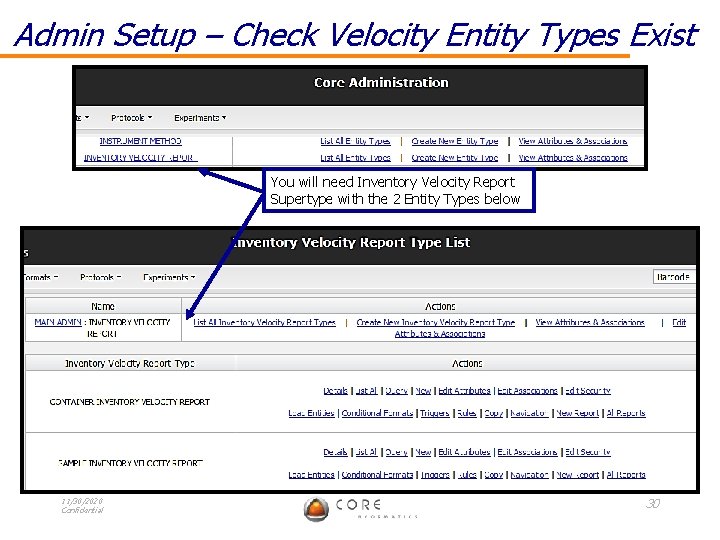
Admin Setup – Check Velocity Entity Types Exist You will need Inventory Velocity Report Supertype with the 2 Entity Types below 11/30/2020 Confidential 30
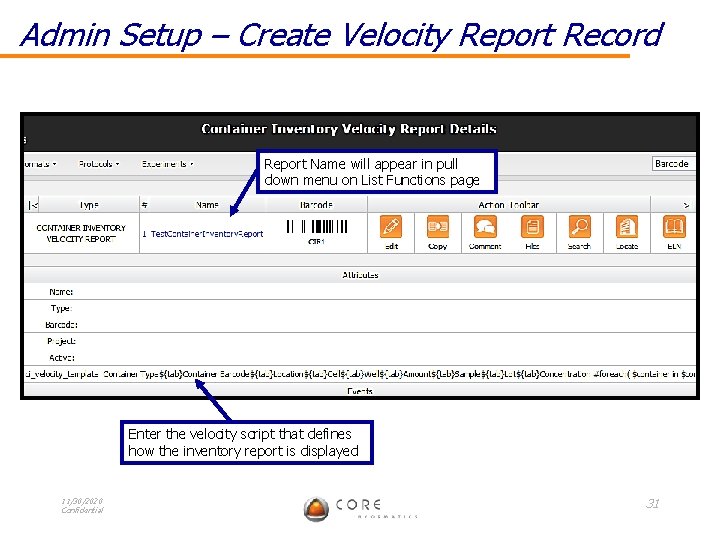
Admin Setup – Create Velocity Report Record Report Name will appear in pull down menu on List Functions page Enter the velocity script that defines how the inventory report is displayed 11/30/2020 Confidential 31
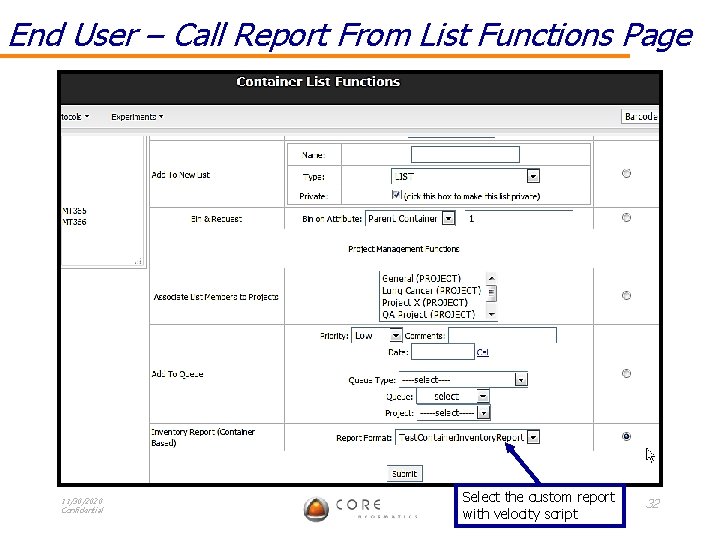
End User – Call Report From List Functions Page 11/30/2020 Confidential Select the custom report with velocity script 32
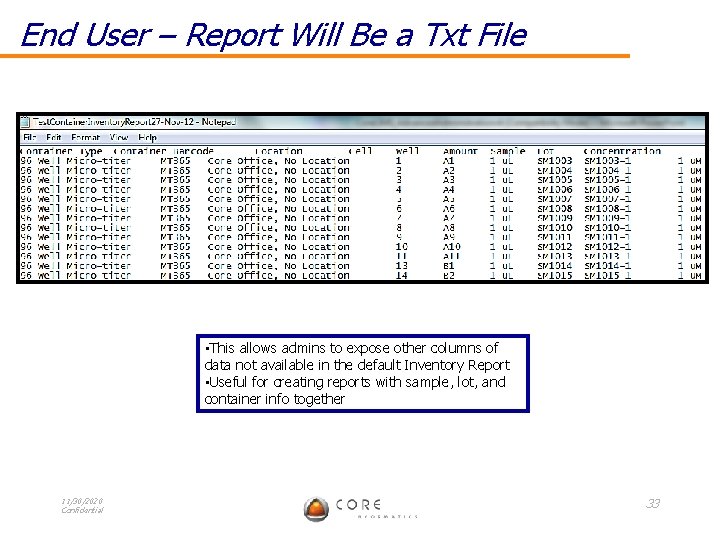
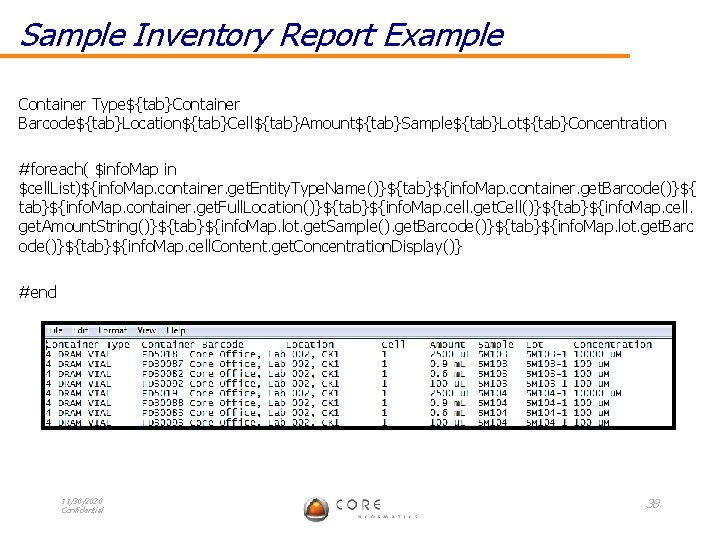
End User – Report Will Be a Txt File • This allows admins to expose other columns of data not available in the default Inventory Report • Useful for creating reports with sample, lot, and container info together 11/30/2020 Confidential 33
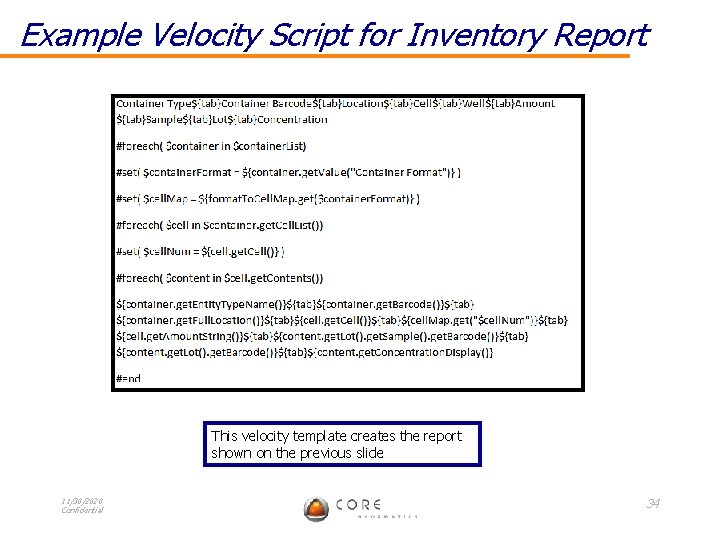
Example Velocity Script for Inventory Report This velocity template creates the report shown on the previous slide 11/30/2020 Confidential 34
Available Global Variables for Inventory Reports • cell. List (List of container cells /wells) 11/30/2020 Confidential 35
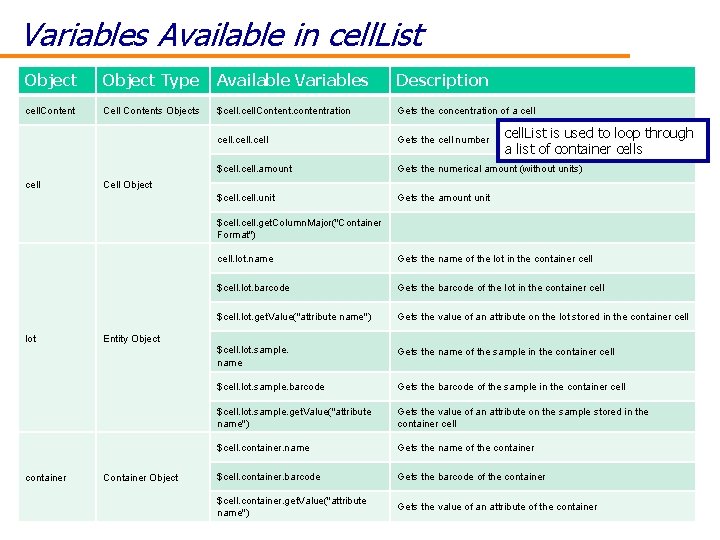
Variables Available in cell. List Object Type Available Variables Description cell. Content Cell Contents Objects $cell. Content. contentration Gets the concentration of a cell Gets the cell number $cell. amount Gets the numerical amount (without units) $cell. unit Gets the amount unit $cell. get. Column. Major("Container Format") cell. lot. name Gets the name of the lot in the container cell $cell. lot. barcode Gets the barcode of the lot in the container cell $cell. lot. get. Value("attribute name") Gets the value of an attribute on the lot stored in the container cell. List is used to loop through a list of container cells Cell Object lot Entity Object container 11/30/2020 Confidential Container Object $cell. lot. sample. name Gets the name of the sample in the container cell $cell. lot. sample. barcode Gets the barcode of the sample in the container cell $cell. lot. sample. get. Value("attribute name") Gets the value of an attribute on the sample stored in the container cell $cell. container. name Gets the name of the container $cell. container. barcode Gets the barcode of the container $cell. container. get. Value("attribute name") Gets the value of an attribute of the container 36
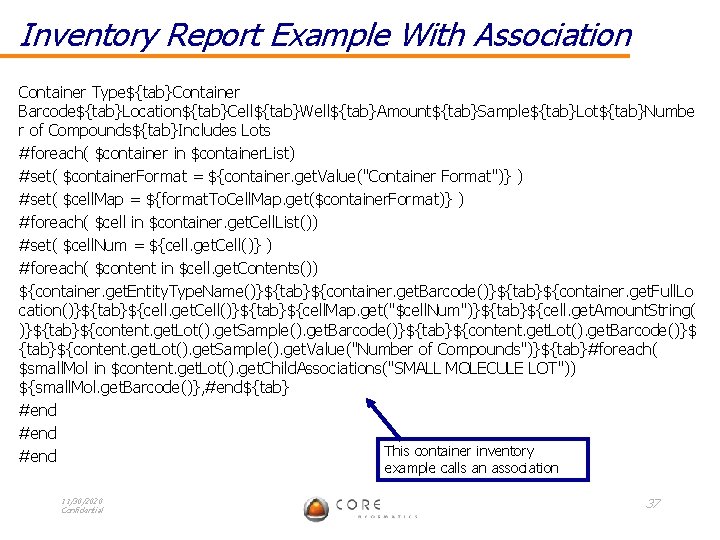
Inventory Report Example With Association Container Type${tab}Container Barcode${tab}Location${tab}Cell${tab}Well${tab}Amount${tab}Sample${tab}Lot${tab}Numbe r of Compounds${tab}Includes Lots #foreach( $container in $container. List) #set( $container. Format = ${container. get. Value("Container Format")} ) #set( $cell. Map = ${format. To. Cell. Map. get($container. Format)} ) #foreach( $cell in $container. get. Cell. List()) #set( $cell. Num = ${cell. get. Cell()} ) #foreach( $content in $cell. get. Contents()) ${container. get. Entity. Type. Name()}${tab}${container. get. Barcode()}${tab}${container. get. Full. Lo cation()}${tab}${cell. get. Cell()}${tab}${cell. Map. get("$cell. Num")}${tab}${cell. get. Amount. String( )}${tab}${content. get. Lot(). get. Sample(). get. Barcode()}${tab}${content. get. Lot(). get. Barcode()}$ {tab}${content. get. Lot(). get. Sample(). get. Value("Number of Compounds")}${tab}#foreach( $small. Mol in $content. get. Lot(). get. Child. Associations("SMALL MOLECULE LOT")) ${small. Mol. get. Barcode()}, #end${tab} #end This container inventory #end example calls an association 11/30/2020 Confidential 37
Sample Inventory Report Example Container Type${tab}Container Barcode${tab}Location${tab}Cell${tab}Amount${tab}Sample${tab}Lot${tab}Concentration #foreach( $info. Map in $cell. List)${info. Map. container. get. Entity. Type. Name()}${tab}${info. Map. container. get. Barcode()}${ tab}${info. Map. container. get. Full. Location()}${tab}${info. Map. cell. get. Cell()}${tab}${info. Map. cell. get. Amount. String()}${tab}${info. Map. lot. get. Sample(). get. Barcode()}${tab}${info. Map. lot. get. Barc ode()}${tab}${info. Map. cell. Content. get. Concentration. Display()} #end 11/30/2020 Confidential 38
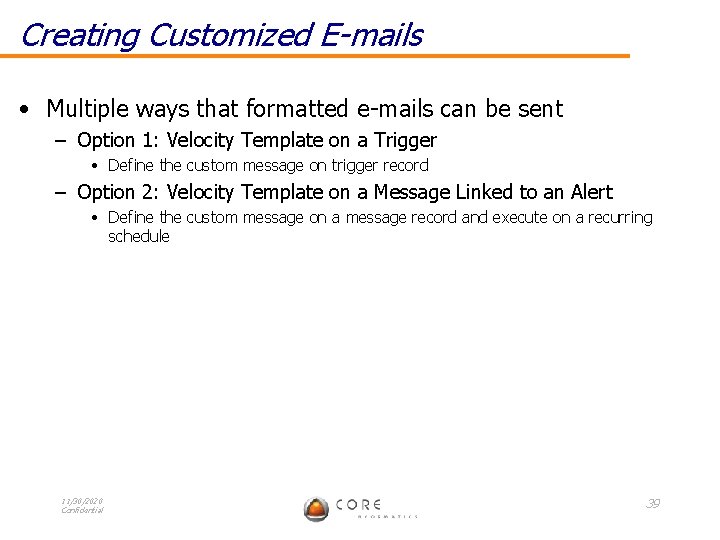
Creating Customized E-mails • Multiple ways that formatted e-mails can be sent – Option 1: Velocity Template on a Trigger • Define the custom message on trigger record – Option 2: Velocity Template on a Message Linked to an Alert • Define the custom message on a message record and execute on a recurring schedule 11/30/2020 Confidential 39
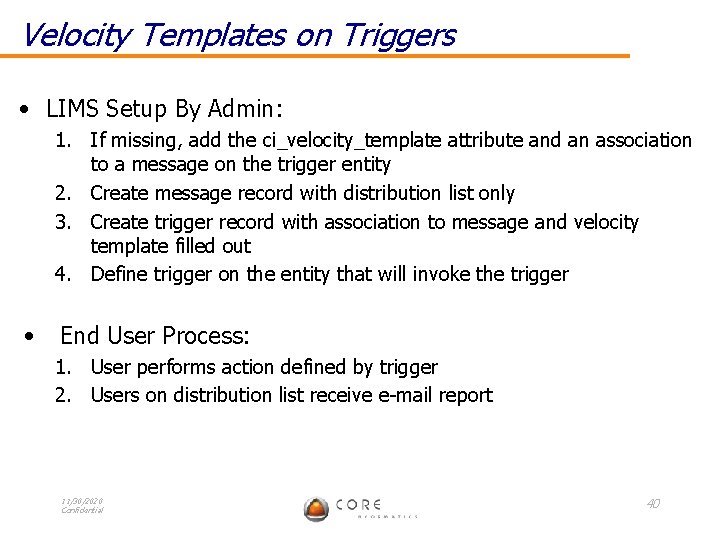
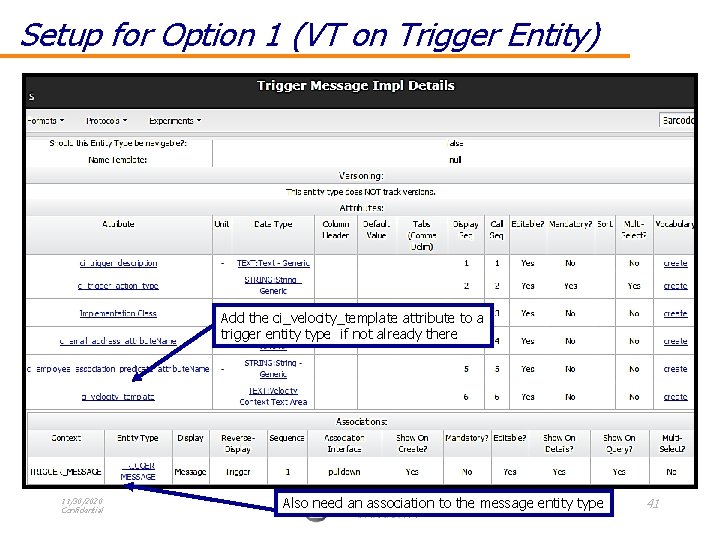
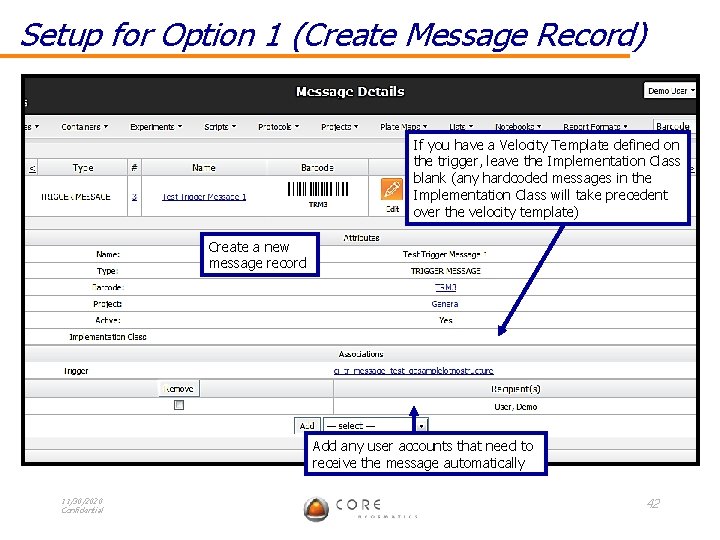
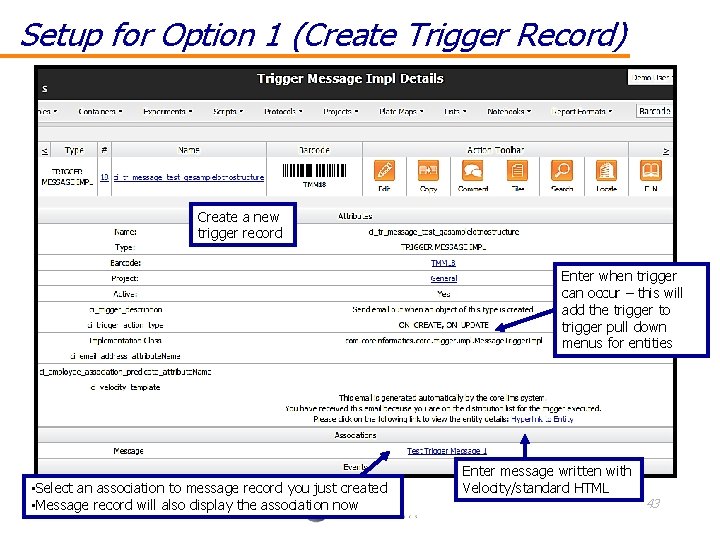
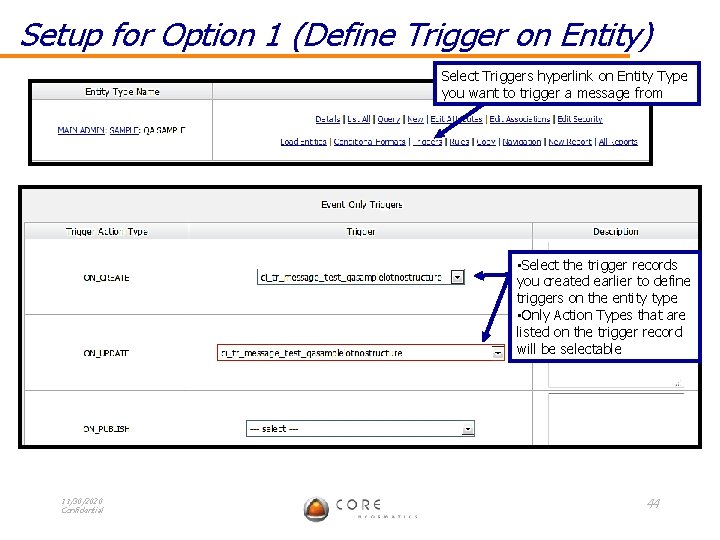
Velocity Templates on Triggers • LIMS Setup By Admin: 1. If missing, add the ci_velocity_template attribute and an association to a message on the trigger entity 2. Create message record with distribution list only 3. Create trigger record with association to message and velocity template filled out 4. Define trigger on the entity that will invoke the trigger • End User Process: 1. User performs action defined by trigger 2. Users on distribution list receive e-mail report 11/30/2020 Confidential 40
Setup for Option 1 (VT on Trigger Entity) Add the ci_velocity_template attribute to a trigger entity type if not already there 11/30/2020 Confidential Also need an association to the message entity type 41
Setup for Option 1 (Create Message Record) If you have a Velocity Template defined on the trigger, leave the Implementation Class blank (any hardcoded messages in the Implementation Class will take precedent over the velocity template) Create a new message record Add any user accounts that need to receive the message automatically 11/30/2020 Confidential 42
Setup for Option 1 (Create Trigger Record) Create a new trigger record Enter when trigger can occur – this will add the trigger to trigger pull down menus for entities • Select an association to message record you just created 11/30/2020 • Message record will also display the association now Confidential Enter message written with Velocity/standard HTML 43
Setup for Option 1 (Define Trigger on Entity) Select Triggers hyperlink on Entity Type you want to trigger a message from • Select the trigger records you created earlier to define triggers on the entity type • Only Action Types that are listed on the trigger record will be selectable 11/30/2020 Confidential 44
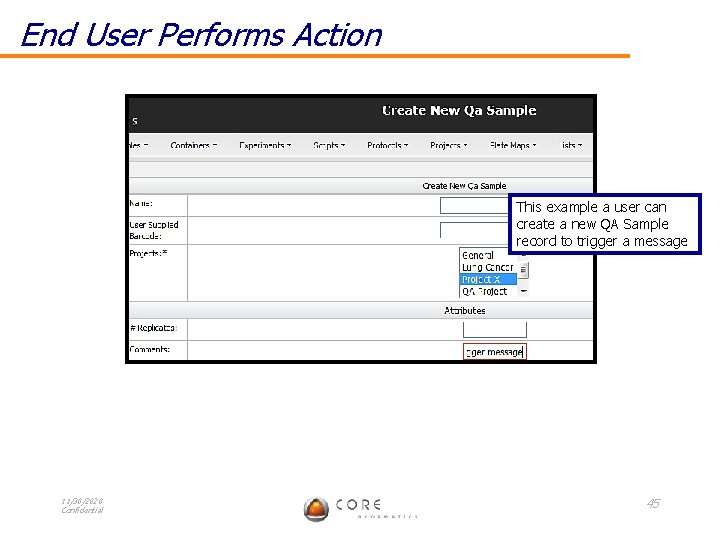
End User Performs Action This example a user can create a new QA Sample record to trigger a message 11/30/2020 Confidential 45
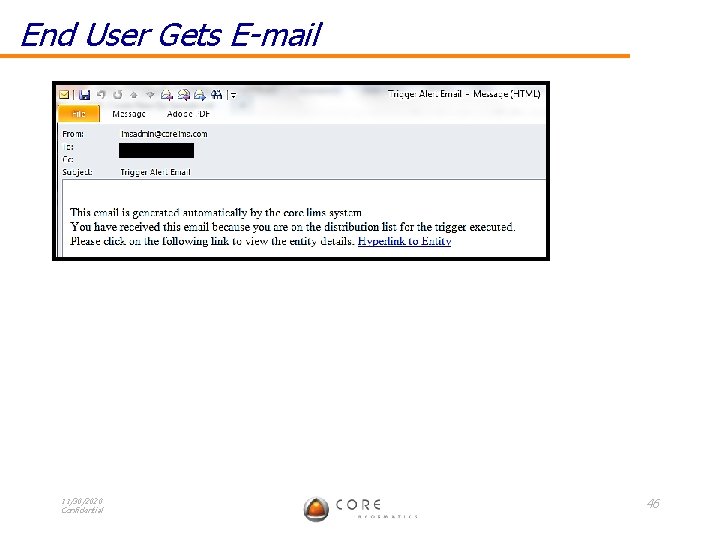
End User Gets E-mail 11/30/2020 Confidential 46
Velocity Templates on Messages With Alerts • LIMS Setup By Admin: 1. Add the ci_velocity_template attribute to a message 2. Create message record with distribution list and velocity template filled out 3. Create alert record and associate to message 4. Set the alert time • End User Process: 1. Users on distribution list receive e-mail report 11/30/2020 Confidential 47
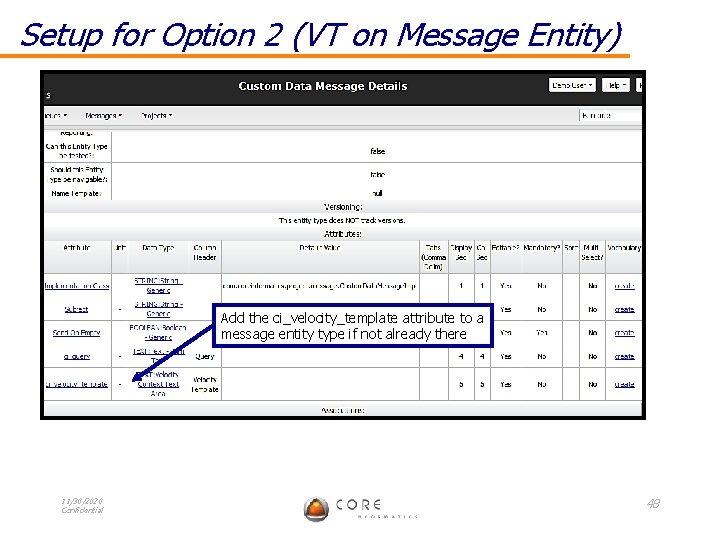
Setup for Option 2 (VT on Message Entity) Add the ci_velocity_template attribute to a message entity type if not already there 11/30/2020 Confidential 48
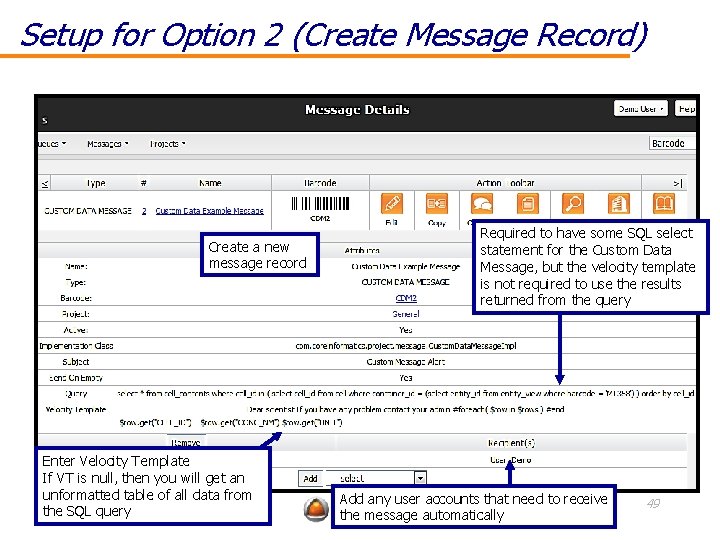
Setup for Option 2 (Create Message Record) Create a new message record Enter Velocity Template If VT is null, then you will get an unformatted table of all data from 11/30/2020 Confidential the SQL query Required to have some SQL select statement for the Custom Data Message, but the velocity template is not required to use the results returned from the query Add any user accounts that need to receive the message automatically 49
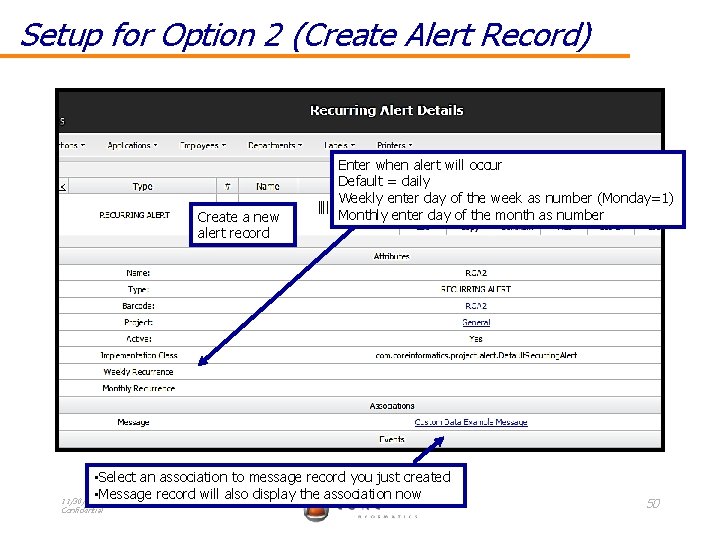
Setup for Option 2 (Create Alert Record) Create a new alert record Enter when alert will occur Default = daily Weekly enter day of the week as number (Monday=1) Monthly enter day of the month as number • Select an association to message record you just created • Message record will also display the association now 11/30/2020 Confidential 50
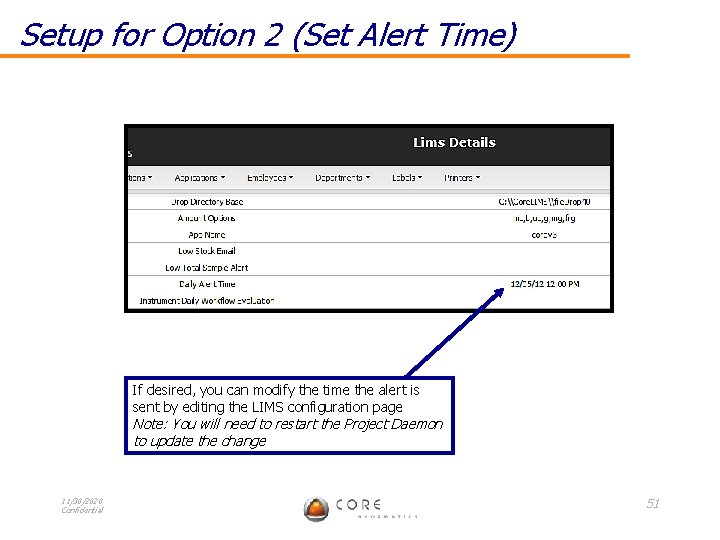
Setup for Option 2 (Set Alert Time) If desired, you can modify the time the alert is sent by editing the LIMS configuration page Note: You will need to restart the Project Daemon to update the change 11/30/2020 Confidential 51
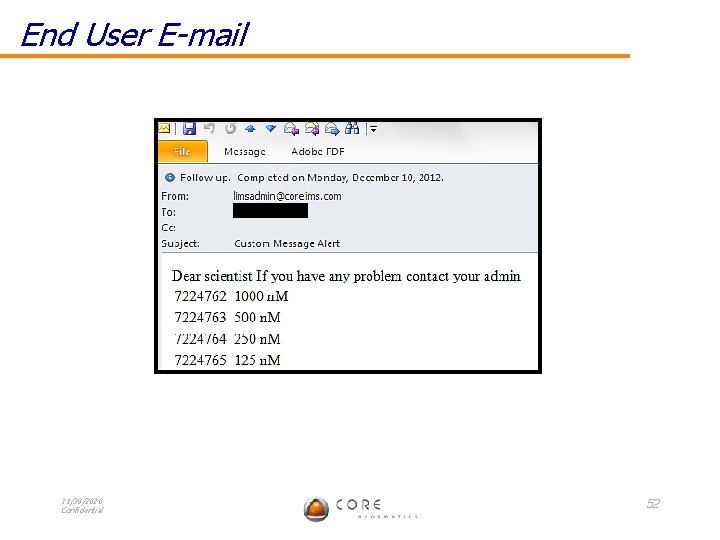
End User E-mail 11/30/2020 Confidential 52