
Core Components and eb XML Registry Joseph M
Core Components and eb. XML Registry Joseph M. Chiusano Booz | Allen | Hamilton Federal CIO Council XML Registry Working Group Washington, DC July 23, 2003
Outline 4 eb. XML Background 4 Core Components Specification ØCore Components ØBusiness Information Entities (BIEs) 4 Additional CCTS Features 4 Related Initiatives 4 OASIS/eb. XML Registry TC and Core Components 4 OASIS/eb. XML Registry Version 3. 0 Features
eb. XML Background 2
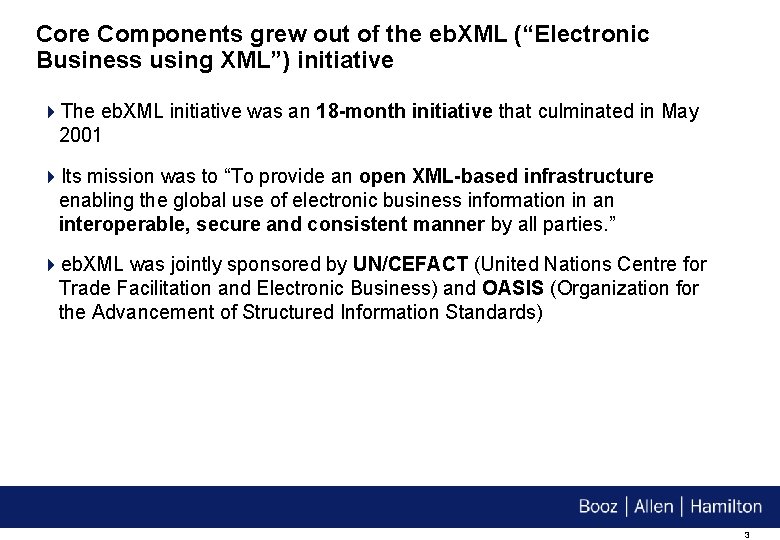
Core Components grew out of the eb. XML (“Electronic Business using XML”) initiative 4 The eb. XML initiative was an 18 -month initiative that culminated in May 2001 4 Its mission was to “To provide an open XML-based infrastructure enabling the global use of electronic business information in an interoperable, secure and consistent manner by all parties. ” 4 eb. XML was jointly sponsored by UN/CEFACT (United Nations Centre for Trade Facilitation and Electronic Business) and OASIS (Organization for the Advancement of Structured Information Standards) 3
eb. XML produced a modular suite of specifications in multiple areas 4 Business Process: Business Process Specification Schema (BPSS) provides a standard framework by which business systems may be configured to support execution of business collaborations consisting of business transactions 4 Core Components: Core Components prescribe the use of a common set of semantic building blocks that represent the general types of business data in use today 4 Collaboration Protocol: Collaboration-Protocol Profile and Agreement (CPP/A) specification defines the structure and contents of eb. XML Collaboration Protocol Profiles (CPPs) and Collaboration Protocol Agreements (CPAs), both of which are used for business integration and trading partner discovery purposes 4
eb. XML produced a modular suite of specifications in multiple areas (cont’d) 4 Messaging: eb. XML Messaging Service (eb. MS) Specification defines a communications protocol-neutral method for exchanging electronic business messages 4 Registry/Repository: Defines an information model and services for the registration, storage, and maintenance of information utilized for an electronic business exchange 5
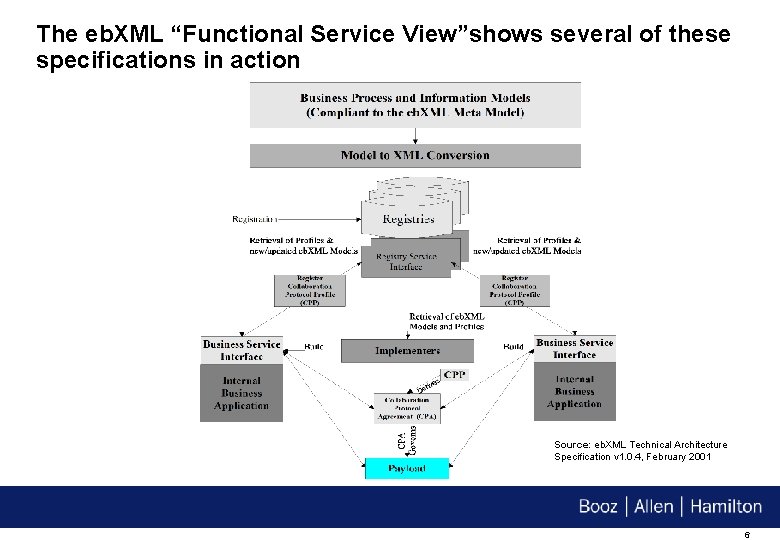
The eb. XML “Functional Service View”shows several of these specifications in action Source: eb. XML Technical Architecture Specification v 1. 0. 4, February 2001 6
After May 2001, the continuation of eb. XML was “split” between UN/CEFACT and OASIS 4 The following specifications were transitioned into OASIS: – Collaboration Protocol – Messaging – Registry/Repository 4 The following specifications were transitioned into UN/CEFACT: – Business Process – Core Components 4 Work is continuing today in each of these areas 7
Core Components Specification 8
The UN/CEFACT Core Components Specification v 1. 9 (“CCTS”) is currently in the final stages of approval under the UN/CEFACT Open Development Process 4 It is in the “Implementation Verification” stage Ø Equivalent to W 3 C Candidate Recommendation status 4 The Core Components methodology is already being used by multiple standards organizations and committees including: – OASIS Universal Business Language (UBL) TC – Open Applications Group (OAG) – EAN-UCC – SWIFT – ANSI ASC X 12 4 CCTS URL: http: //xml. coverpages. org/CCTSv 190 -2002. pdf 9
CCTS specifies a new approach to the well-understood problem of the lack of information interoperability between applications in the e-business arena 4 Traditionally, standards for the exchange of business data have been focused on static message definitions that have not enabled a sufficient degree of interoperability or flexibility Ø A more flexible and interoperable way of standardizing Business Semantics is required 4 The Core Components methodology provides a way to identify, capture and maximize the re-use of business information to support and enhance information interoperability across multiple business situations 4 All semantic standardization is done in a syntax-neutral fashion 10
Core Components 11
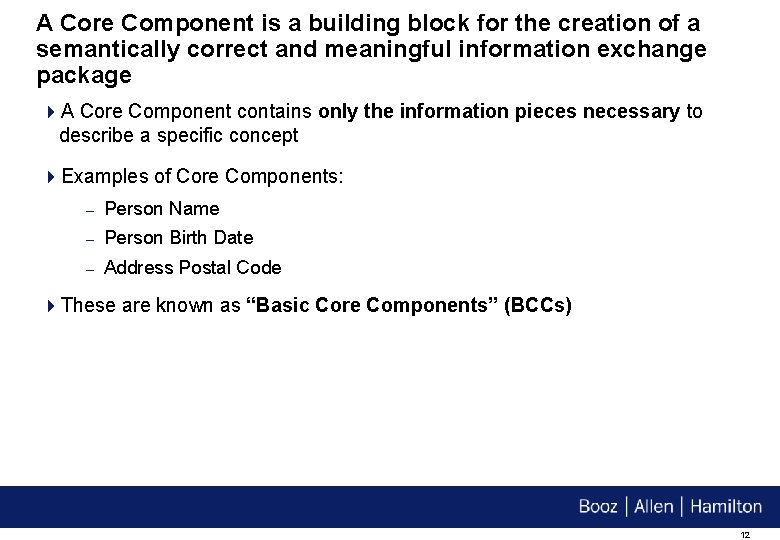
A Core Component is a building block for the creation of a semantically correct and meaningful information exchange package 4 A Core Component contains only the information pieces necessary to describe a specific concept 4 Examples of Core Components: – Person Name – Person Birth Date – Address Postal Code 4 These are known as “Basic Core Components” (BCCs) 12
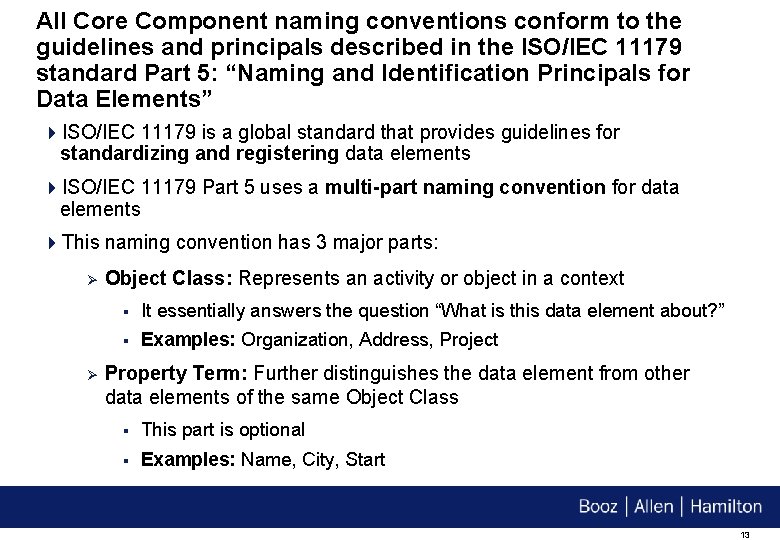
All Core Component naming conventions conform to the guidelines and principals described in the ISO/IEC 11179 standard Part 5: “Naming and Identification Principals for Data Elements” 4 ISO/IEC 11179 is a global standard that provides guidelines for standardizing and registering data elements 4 ISO/IEC 11179 Part 5 uses a multi-part naming convention for data elements 4 This naming convention has 3 major parts: Ø Ø Object Class: Represents an activity or object in a context § It essentially answers the question “What is this data element about? ” § Examples: Organization, Address, Project Property Term: Further distinguishes the data element from other data elements of the same Object Class § This part is optional § Examples: Name, City, Start 13
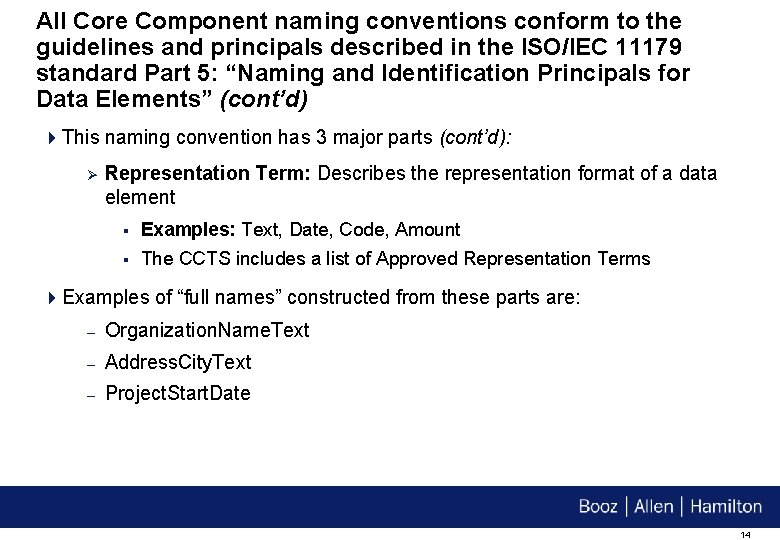
All Core Component naming conventions conform to the guidelines and principals described in the ISO/IEC 11179 standard Part 5: “Naming and Identification Principals for Data Elements” (cont’d) 4 This naming convention has 3 major parts (cont’d): Ø Representation Term: Describes the representation format of a data element § Examples: Text, Date, Code, Amount § The CCTS includes a list of Approved Representation Terms 4 Examples of “full names” constructed from these parts are: – Organization. Name. Text – Address. City. Text – Project. Start. Date 14
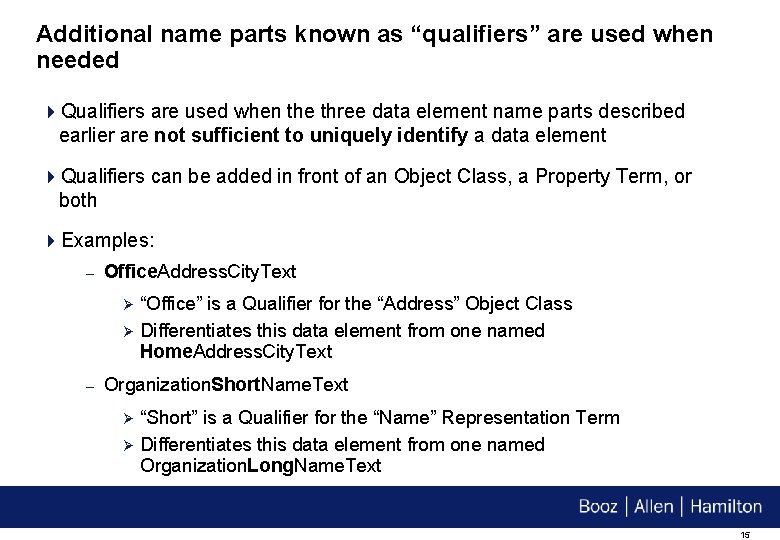
Additional name parts known as “qualifiers” are used when needed 4 Qualifiers are used when the three data element name parts described earlier are not sufficient to uniquely identify a data element 4 Qualifiers can be added in front of an Object Class, a Property Term, or both 4 Examples: – Office. Address. City. Text Ø Ø – “Office” is a Qualifier for the “Address” Object Class Differentiates this data element from one named Home. Address. City. Text Organization. Short. Name. Text Ø Ø “Short” is a Qualifier for the “Name” Representation Term Differentiates this data element from one named Organization. Long. Name. Text 15
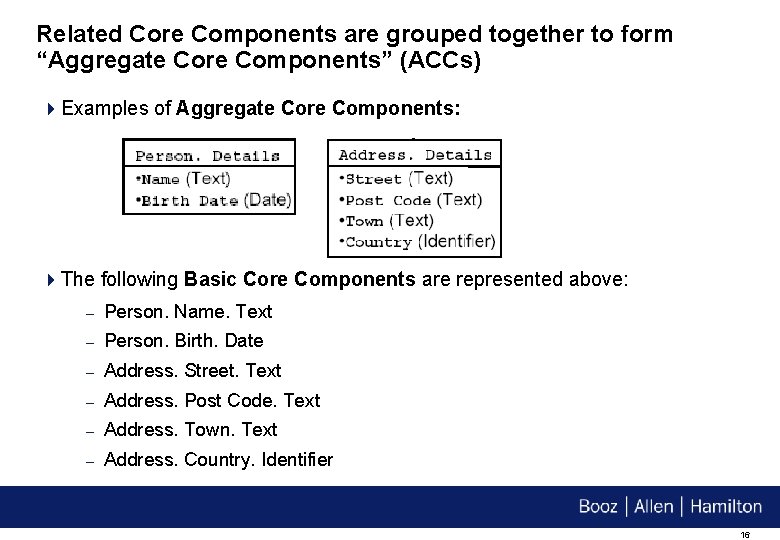
Related Core Components are grouped together to form “Aggregate Core Components” (ACCs) 4 Examples of Aggregate Core Components: 4 The following Basic Core Components are represented above: – Person. Name. Text – Person. Birth. Date – Address. Street. Text – Address. Post Code. Text – Address. Town. Text – Address. Country. Identifier 16
A “Core Component Type” (CCT) is another category of Core Component 4 A Core Component Type signifies the “type” of information represented by a Core Component 4 Unlike Basic Core Components and Aggregate Core Components, Core Component Types do not contain business semantics – they are “semantic-neutral” 4 The CCTS includes a list of Approved Core Component Types 4 Examples: – Amount. Type Ø Ø A number of monetary units specified in a currency where the unit of currency is explicit or implied Example: Dollar Amount 17
A “Core Component Type” (CCT) is another category of Core Component (cont’d) 4 Examples (cont’d): – Code. Type Ø Ø – A character string (letters, figures or symbols) that for brevity and/or language independence may be used to represent or replace a definitive value or text of an Attribute together with relevant supplementary information Example: Country Code Indicator. Type Ø Ø A list of two mutually exclusive Boolean values that express the only possible states of a Property Example: A True/False value 4 The first part of the Core Component Type name acts as the Representation Term in a Data Element name – Example: Invoice. Tax. Amount 18
Each Core Component Type contains one “Content Component” and one or more “Supplementary Components” 4 The Content Component carries the actual content value Ø The Content Component also defines the “Primitive Type” for the value 4 Example: Amount. Type Ø Contains an “Amount. Content” Content Component, and two Supplementary Components: § Amount. Currency. Identifier: Identifies the currency type § Amount. Currency. Code List. Version: Identifies the version of the code list that the currency type is a member of 1. The Primitive Type of an “Amount. Content” Content Component is decimal 19
Each Core Component Type contains one “Content Component” and one or more “Supplementary Components” (cont’d) 4 Example: Amount. Type (cont’d) Ø Example of these concepts: 1. For a Core Component Type of Amount. Type, the Content Component carries the value of 12. This value has no semantic meaning on its own. But 12 Euro, where Euro is the Supplementary Component that gives essential extra definition to the Content Component, does have meaning. 20
Core Component Types may be restricted – this is the function of a “Data Type” 4 A Data Type defines the set of valid values for a Basic Core Component 4 A Data Type is based on one of the Core Component Types, but further restricts it 4 Examples using earlier Basic Core Components: – Person. Name. Text Ø – Person. Birth. Date Ø – Data Type: Text Data Type: Date Address. Street. Text Ø Data Type: Text 21
A Data Type may restrict of the set of values of a Core Component Type’s Content Component and/or Supplementary Component(s) 4 Using the previous “Amount. Type” example: Ø A Data Type could restrict the “Amount. Content” Content Component by specifying that an amount can be no greater than $1000 Ø A Data Type could restrict the “Amount Currency. Identifier” Supplementary Component by specifying that an amount must be in U. S. Dollars 22
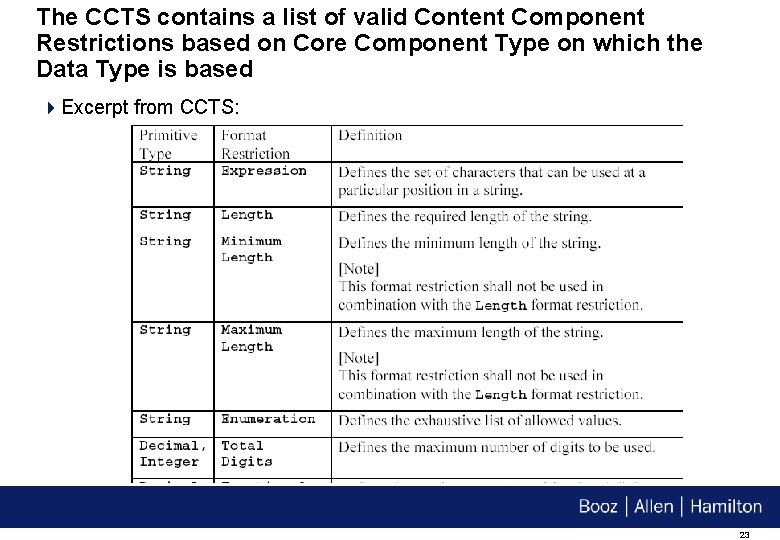
The CCTS contains a list of valid Content Component Restrictions based on Core Component Type on which the Data Type is based 4 Excerpt from CCTS: 23
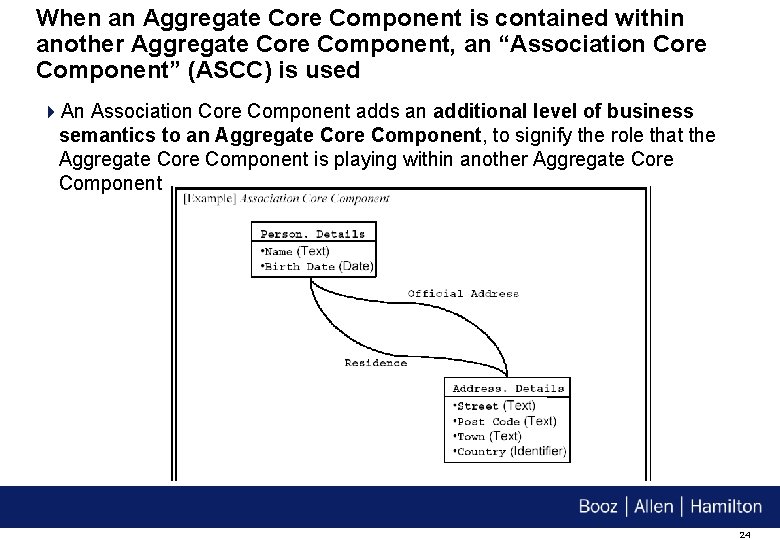
When an Aggregate Core Component is contained within another Aggregate Core Component, an “Association Core Component” (ASCC) is used 4 An Association Core Component adds an additional level of business semantics to an Aggregate Core Component, to signify the role that the Aggregate Core Component is playing within another Aggregate Core Component 24
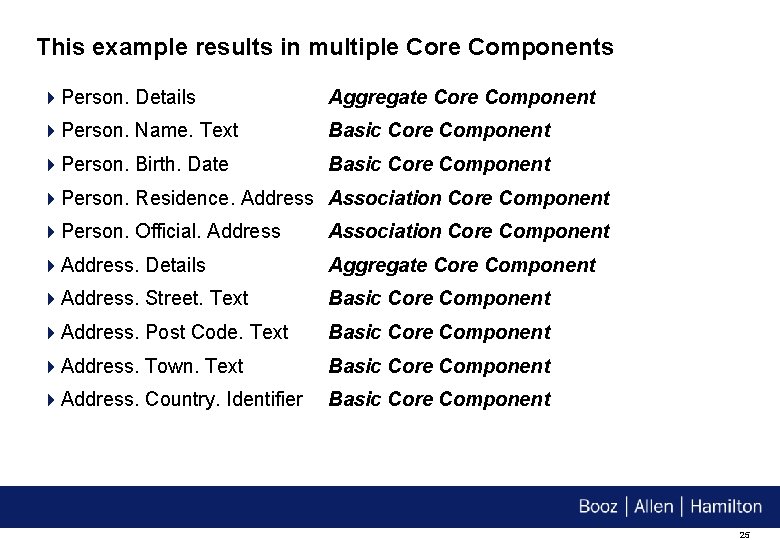
This example results in multiple Core Components 4 Person. Details Aggregate Core Component 4 Person. Name. Text Basic Core Component 4 Person. Birth. Date Basic Core Component 4 Person. Residence. Address Association Core Component 4 Person. Official. Address Association Core Component 4 Address. Details Aggregate Core Component 4 Address. Street. Text Basic Core Component 4 Address. Post Code. Text Basic Core Component 4 Address. Town. Text Basic Core Component 4 Address. Country. Identifier Basic Core Component 25
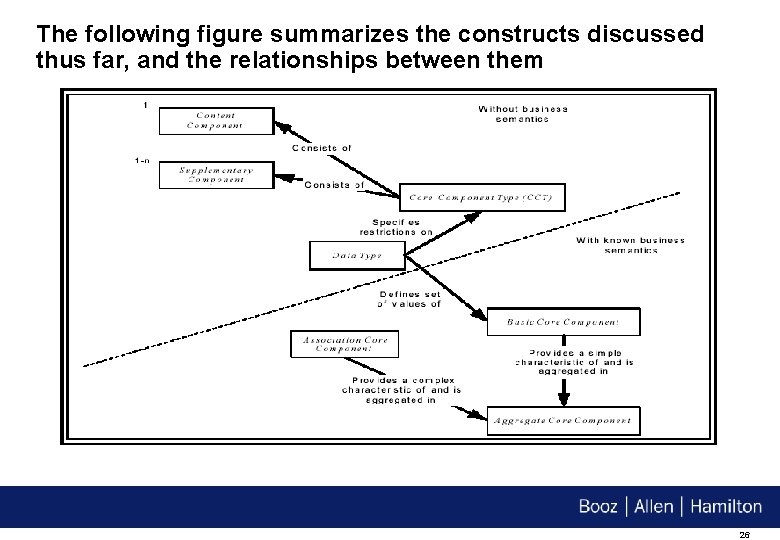
The following figure summarizes the constructs discussed thus far, and the relationships between them 26
Business Information Entities (BIEs) 27
When a Core Component is used in a real business circumstance, it serves as the basis for a “Business Information Entity” (BIE) 4 A Business Information Entity is a Core Component used in a specific business context 4 The CCTS defines 8 “context categories” – several are listed below: Ø Business Process Context: Classification of the business process, business collaboration or business transaction as described in the UN/CEFACT Catalogue of Common Business Processes Ø Product Classification Context: Information specific to products or services being traded or referred to in a Business Process Ø Industry Classification Context: Specifies a particular industry vertical 28
When a Core Component is used in a real business circumstance, it serves as the basis for a “Business Information Entity” (BIE) (cont’d) 4 The CCTS defines 8 “context categories” – several are listed below (cont’d): Ø Geopolitical Context: Specifies the semantic and structural variation that often results from regional or cultural factors Ø System Capabilities Context: Involves a particular semantic or structure resulting from system constraints or compliance with a standard 4 The Data Type for a Business Information Entity may be the same as the Data Type for the Basic Core Component on which it is based, or it may be further restricted 29
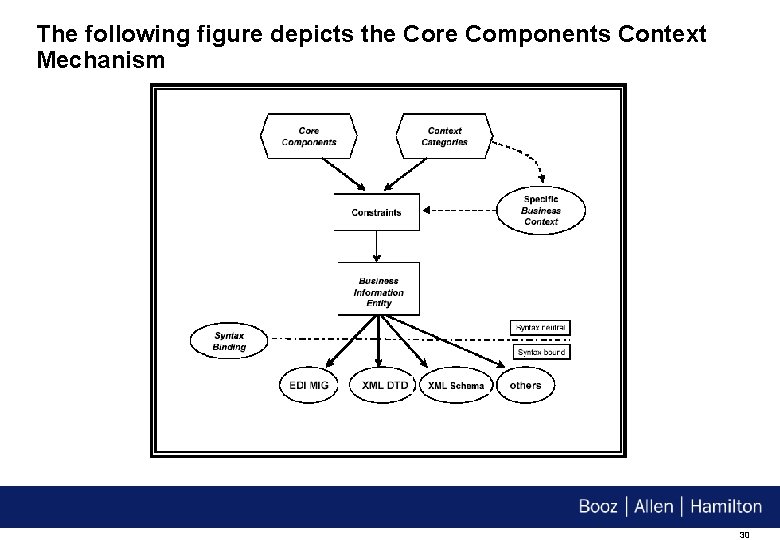
The following figure depicts the Core Components Context Mechanism 30
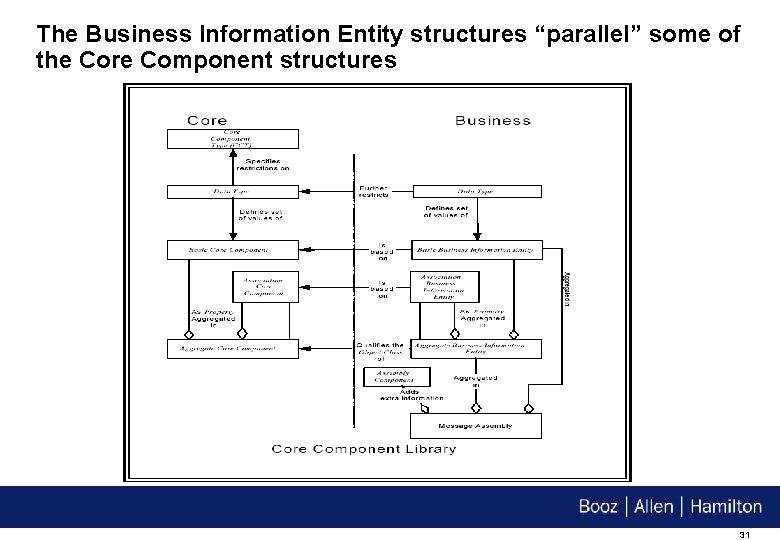
The Business Information Entity structures “parallel” some of the Core Component structures 31
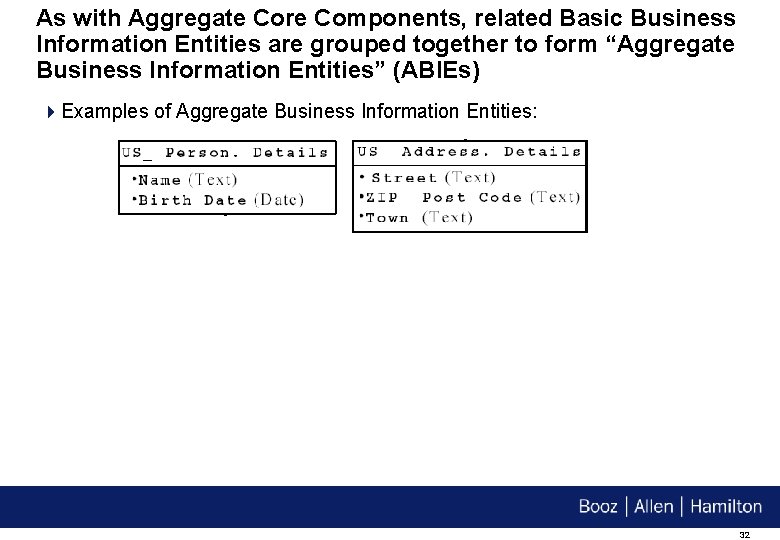
As with Aggregate Core Components, related Basic Business Information Entities are grouped together to form “Aggregate Business Information Entities” (ABIEs) 4 Examples of Aggregate Business Information Entities: 32
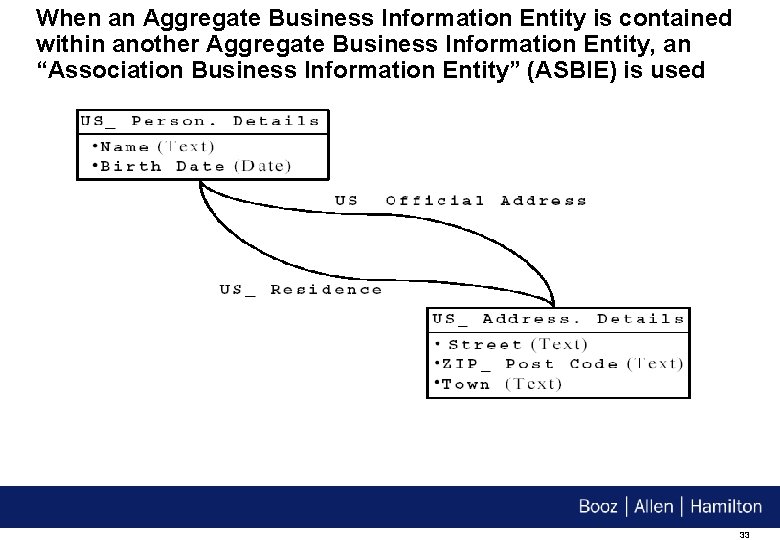
When an Aggregate Business Information Entity is contained within another Aggregate Business Information Entity, an “Association Business Information Entity” (ASBIE) is used 33
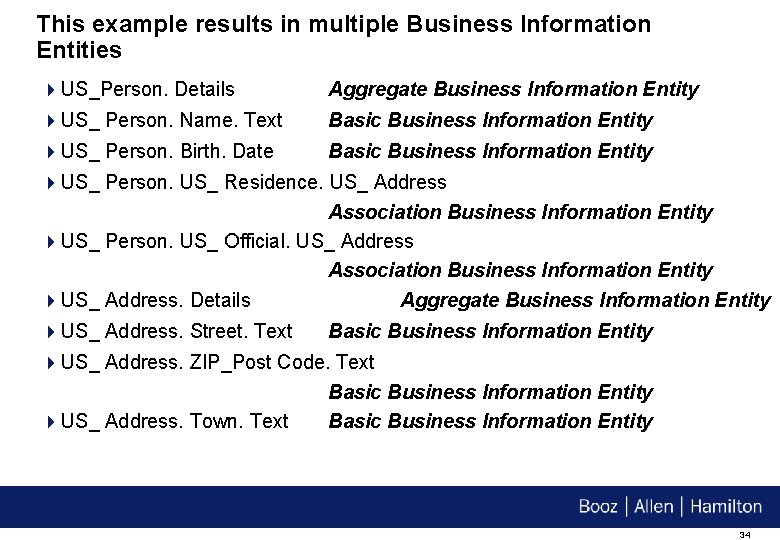
This example results in multiple Business Information Entities 4 US_Person. Details Aggregate Business Information Entity 4 US_ Person. Name. Text Basic Business Information Entity 4 US_ Person. Birth. Date Basic Business Information Entity 4 US_ Person. US_ Residence. US_ Address Association Business Information Entity 4 US_ Person. US_ Official. US_ Address Association Business Information Entity 4 US_ Address. Details Aggregate Business Information Entity 4 US_ Address. Street. Text Basic Business Information Entity 4 US_ Address. ZIP_Post Code. Text Basic Business Information Entity 4 US_ Address. Town. Text Basic Business Information Entity 34
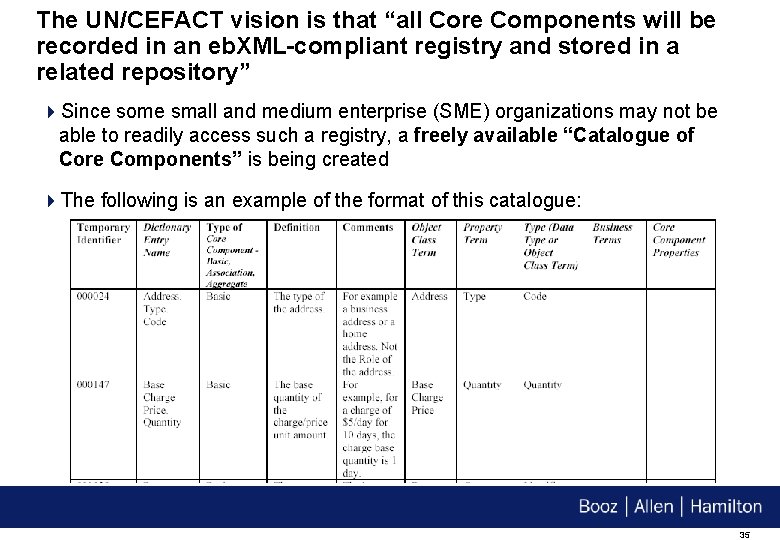
The UN/CEFACT vision is that “all Core Components will be recorded in an eb. XML-compliant registry and stored in a related repository” 4 Since some small and medium enterprise (SME) organizations may not be able to readily access such a registry, a freely available “Catalogue of Core Components” is being created 4 The following is an example of the format of this catalogue: 35
Additional CCTS Features 36
The CCTS also includes other features that are not discussed today 4 Business Process Analysis and Modeling: CCTS describes the use of the UN/CEFACT Modeling Methodology (UMM) as the approach for modeling business processes Ø Describes how Business Information Entities are identified during this process 4 Constraint Language: Consists of a set of constructs that allow users to express the relationships between specific business situations and the specific structure and meaning of business data used in that situation Ø The constraints applied to Core Components in specific Business Contexts to generate Business Information Entities are expressed using the Constraints Language 37
Related Initiatives 38
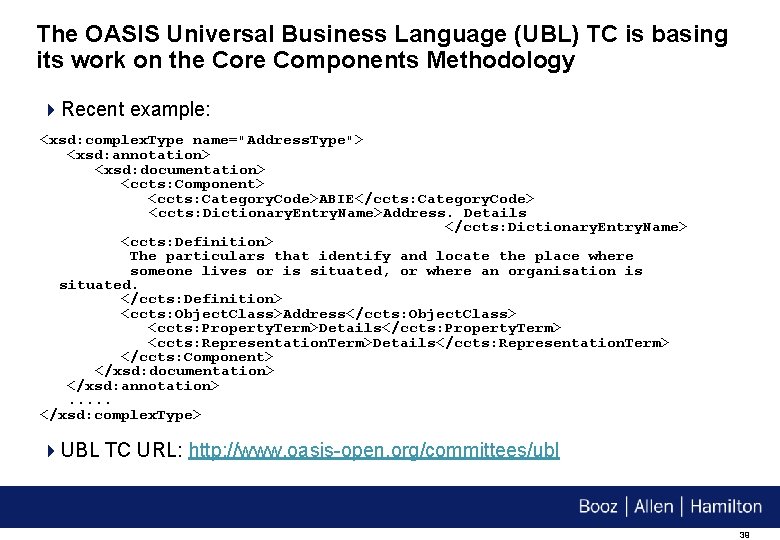
The OASIS Universal Business Language (UBL) TC is basing its work on the Core Components Methodology 4 Recent example: <xsd: complex. Type name="Address. Type"> <xsd: annotation> <xsd: documentation> <ccts: Component> <ccts: Category. Code>ABIE</ccts: Category. Code> <ccts: Dictionary. Entry. Name>Address. Details </ccts: Dictionary. Entry. Name> <ccts: Definition> The particulars that identify and locate the place where someone lives or is situated, or where an organisation is situated. </ccts: Definition> <ccts: Object. Class>Address</ccts: Object. Class> <ccts: Property. Term>Details</ccts: Property. Term> <ccts: Representation. Term>Details</ccts: Representation. Term> </ccts: Component> </xsd: documentation> </xsd: annotation>. . . </xsd: complex. Type> 4 UBL TC URL: http: //www. oasis-open. org/committees/ubl 39
The UN/CEFACT Applied Technology Group 2 (ATG 2) group is defining an XML serialization for Core Components 4 This group is called “ATG 2 XML Assembly Documents/Production Rules Working Group” 4 ATG 2’s work is based on work done within the OASIS UBL TC 40
The OASIS Content Assembly Mechanism (CAM) TC is working to provide a generic standalone “content assembly mechanism” 4 This mechanism extends beyond the basic structural definition features in XML and schema to provide a comprehensive system with which to define dynamic e-business interoperability 4 CAM will enable Registry systems to implement library dictionaries of pre -built assembly components (aggregate components) and publish these for discovery and re-use 4 Part of the CAM TC’s work is roughly akin to the Constraint Language described in the CCTS 4 CAM TC URL: http: //www. oasis-open. org/committees/cam 41
OASIS/eb. XML Registry TC and Core Components 42
The “Core Components Review” Subcommittee of the OASIS/eb. XML Registry TC is responsible for “Core Component-enabling” the OASIS/eb. XML Registry architecture 4 Chair: Joseph Chiusano 4 The Subcommittee began its work in January 2002, but was placed on hold in August 2002 due to updates that were about to be made to the CCTS 4 The Subcommittee resumed its work in June 2003 4 The Subcommittee is performing a Verification Test of the “Technical Details – Core Component Registry/Repository Storage” section of the CCTS 4 The Subcommittee aims to complete the test in late September 4 The Subcommittee will also publish a Technical Note in late September for a “Core Components Registry Information Model” (CCRIM) binding for Core Components 43
The following are some “early glimpses” of how Core Components will be implemented in the OASIS/eb. XML Registry architecture 4 Core Components/Business Information Entities (and their various types) will be represented as Registry. Objects 4 Core Component Types and Data Types will also be represented as Registry. Objects 4 Aggregate Core Components/Aggregate Business Information Entities will be created using Registry Associations 4 Context Categories will be represented using Registry Classifications 4 Business Information Entities will be created from Core Components using Registry Classifications 44
OASIS/eb. XML Registry Version 3. 0 Features 45
The OASIS/eb. XML Registry Version 2. 5 Specifications just became OASIS TC-Approved Specifications 4 Once approved by OASIS, these specifications will become the OASIS/eb. XML Registry Version 3. 0 specifications 4 Version 2. 5 contains major new features such as: – Cooperating Registries – Event Notification – HTTP Binding – Content Management Services – e. Xtensible Access Control Markup Language (XACML) Support 4 Each of these features is discussed 46
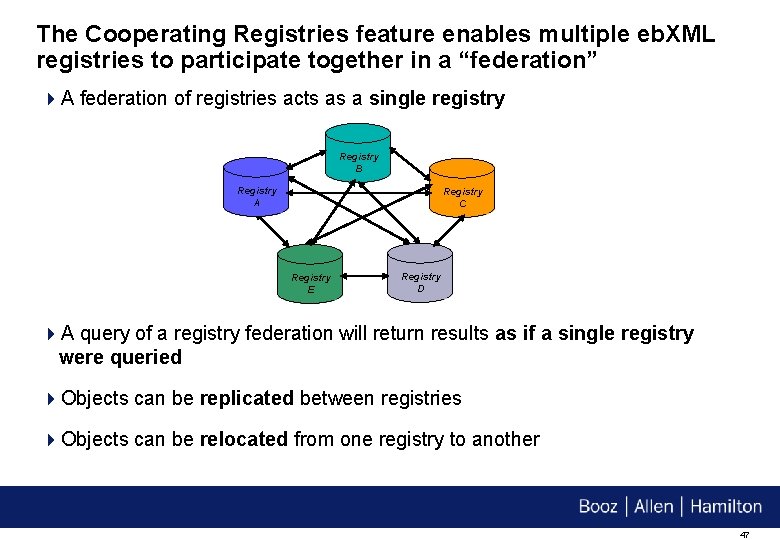
The Cooperating Registries feature enables multiple eb. XML registries to participate together in a “federation” 4 A federation of registries acts as a single registry Registry B Registry A Registry C Registry E Registry D 4 A query of a registry federation will return results as if a single registry were queried 4 Objects can be replicated between registries 4 Objects can be relocated from one registry to another 47
The Event Notification feature provides “publish/subscribe” capabilities to eb. XML Registry 4 This feature allows an eb. XML registry to notify users and/or other registries of “events of interest” 4 Examples: Ø A Collaboration Protocol Profile (CPP) has been updated § Ø User may wish to create a new Collaboration Protocol Agreement (CPA) based on the new CPP The “source Registry. Object” for the replica of a Registry. Object in a registry federation has been updated 1. User may wish to synchronize its copy with the latest version 48
The HTTP Binding feature provides a “SOAP-less” Web interface to eb. XML Registry 4 This feature is based on the “Representational State Transfer” (REST) architectural style for Distributed Hypermedia Interaction 4 Sample “get. Registry. Object” request: GET http? interface=Query. Manager&method=get. Registry. Object¶mid=urn: uuid: a 1137 d 00 -091 a-471 e-8680 -eb 75 b 27 b 84 b 6 HTTP/1. 1 § Uses an HTTP “GET” to invoke the “get. Registry. Object” method of the “Query. Manager” interface to retrieve the Registry. Object whose UUID is the specified UUID 49
The Content Management Services feature provides content validation and cataloging capabilities to eb. XML Registry 4 The Content Validation capability enables submitted content to be validated according to a custom “Invocation Control File” 4 The Cataloging capability enables the conversion of submitted non. Registry Information Model (RIM)-compliant content into RIM-compliant metadata Ø The content can then be registered in an eb. XML registry Ø This enables “Content-Based Discovery” of registry content 4 Examples: Ø Registration of a Collaboration Protocol Profile (CPP) § Ø Discovery by Buyer Name Cataloging of the target. Namespace in a submitted XML Schema 50
The e. Xtensible Access Control Markup Language (XACML) Support feature allows fine-grained access control policies to be defined for eb. XML Registry 4 OASIS XACML provides a common XML-based language for representing security policies 4 Access to Registry. Objects and Registry. Entry(s) within an eb. XML registry are controlled by Policy Decision Points (PDPs) Ø This enhances the already-existing security mechanisms of eb. XML Registry – i. e. it does not replace them 4 An eb. XML registry can also serve as an XACML “Policy Store” Ø The registry can manage policies for protecting resources that reside outside the registry 51
Questions? 52
Contact Information Joseph M. Chiusano Booz | Allen | Hamilton Mc. Lean, VA (703) 902 -6923 chiusano_joseph@bah. com 53
- Slides: 54