
COP 3330 ObjectOriented Programming Summer 2008 Methods In
COP 3330: Object-Oriented Programming Summer 2008 Methods In Java – Part 1 Instructor : Dr. Mark Llewellyn markl@cs. ucf. edu HEC 236, 407 -823 -2790 http: //www. cs. ucf. edu/courses/cop 3330/sum 2008 School of Electrical Engineering and Computer Science University of Central Florida COP 3330: Methods In Java – Part 1 Page 1 © Mark Llewellyn
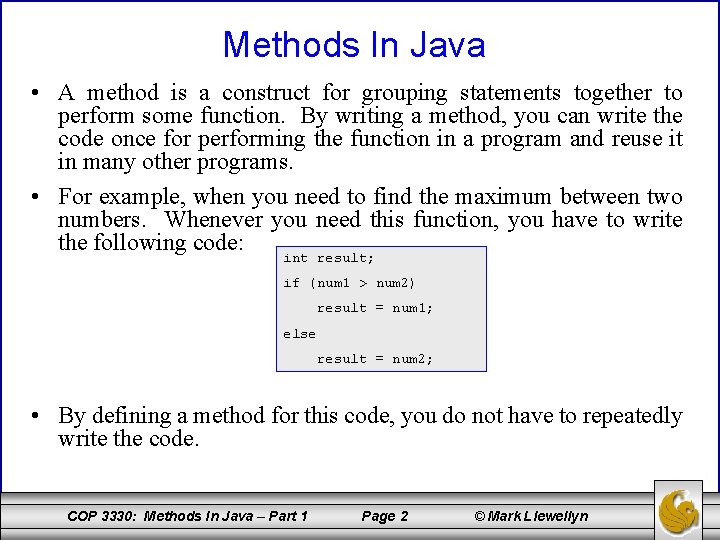
Methods In Java • A method is a construct for grouping statements together to perform some function. By writing a method, you can write the code once for performing the function in a program and reuse it in many other programs. • For example, when you need to find the maximum between two numbers. Whenever you need this function, you have to write the following code: int result; if (num 1 > num 2) result = num 1; else result = num 2; • By defining a method for this code, you do not have to repeatedly write the code. COP 3330: Methods In Java – Part 1 Page 2 © Mark Llewellyn
Methods In Java • We’ve already been using several methods in some of the sample programs we’ve seen. For example, we’ve used System. out. print, JOption. Pane. show. Input. Dialog, System. out. println, Math. pow, JOption. Pane. show. Message. Dialog, Double. parse. Double, and so on. • All of these methods are defined in the Java library. Now though, we want to be able to create our own methods to perform functions for the classes that we will construct. • Furthermore, we’ll learn how to apply method abstraction to solve more complex problems. COP 3330: Methods In Java – Part 1 Page 3 © Mark Llewellyn
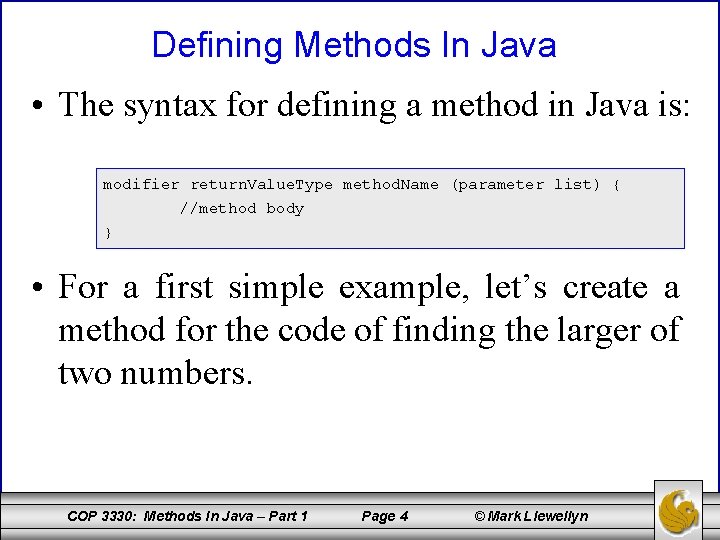
Defining Methods In Java • The syntax for defining a method in Java is: modifier return. Value. Type method. Name (parameter list) { //method body } • For a first simple example, let’s create a method for the code of finding the larger of two numbers. COP 3330: Methods In Java – Part 1 Page 4 © Mark Llewellyn
Defining Methods In Java • The method header specifies the modifiers, return value, method name, and parameters of the method. • A method may return a value. The return. Value. Type is the data type of the value the method returns. • Some methods may perform their desired operations without returning a value. In this case, the return. Value. Type is the keyword void. • A method that returns a value is called a value-returning method, and a method that does not return a value is called a void method. COP 3330: Methods In Java – Part 1 Page 5 © Mark Llewellyn
Defining Methods In Java • The variables defined in method header are known as formal parameters or simply parameters. A parameter is like a placeholder. When a method is invoked, a value is passed to the parameter. This value is referred to as an actual parameter or argument. • The parameter list refers to the type, order, and number of the parameters of a method. • The method name and the parameter list together constitute the method signature. • It is possible for a method to have no parameters. COP 3330: Methods In Java – Part 1 Page 6 © Mark Llewellyn
Defining Methods In Java • The method body contains a collection of statements that define what the method does, i. e. , its functionality. • A return statement, using the keyword return, is required for a value-returning methods to return a result. • A method terminates when a return statement is executed. NOTE: 1. In other languages, methods are referred to as procedures and functions. A valuereturning method is called a function, a void method is called a procedure. 2. You need to declare a separate data type for each parameter. For instance, int num 1, num 2 should be replaced by int num 1, int num 2. 3. A return statement can be included in a void method and is used for terminating method and returning control to the caller, the syntax is simply return; . COP 3330: Methods In Java – Part 1 Page 7 © Mark Llewellyn
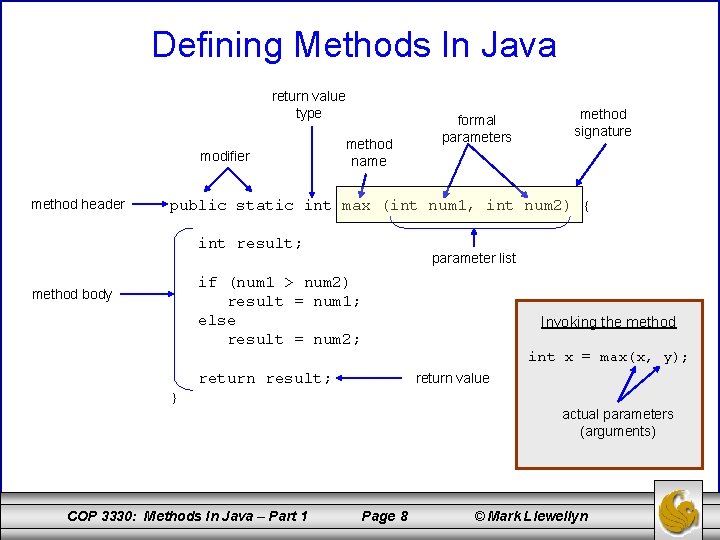
Defining Methods In Java return value type modifier method header method name formal parameters method signature public static int max (int num 1, int num 2) { int result; parameter list if (num 1 > num 2) result = num 1; else result = num 2; method body Invoking the method int x = max(x, y); return result; return value } actual parameters (arguments) COP 3330: Methods In Java – Part 1 Page 8 © Mark Llewellyn
Invoking (Calling) Methods In Java • By creating a method, you give a definition of what the method is to do. To use a method, you have to call or invoke it. • There are two ways to invoke a method; the choice is based on whether the method returns a value or not. • If the method returns a value, a call is usually treated as a value. – For example: int larger = max(3, 4); calls max(3, 4) and assigns the result of the method to the variable larger. – Another example is: System. out. println(max(3, 4)); which prints the return value of the method call max(3, 4). • If the method returns void, a call to the method must be a statement. – For example, the method println returns void and the following call is a statement: System. out. println(“Hello!”); COP 3330: Methods In Java – Part 1 Page 9 © Mark Llewellyn
Invoking (Calling) Methods In Java • It is also possible, although rare, that a value -returning method can be invoked as a statement in Java. In such a case, the caller simply ignores the return value. • When a program invokes a method, program control is transferred to the called method. A called method returns control to the caller when its return statement is executed or when its method ending closing brace is reached. COP 3330: Methods In Java – Part 1 Page 10 © Mark Llewellyn
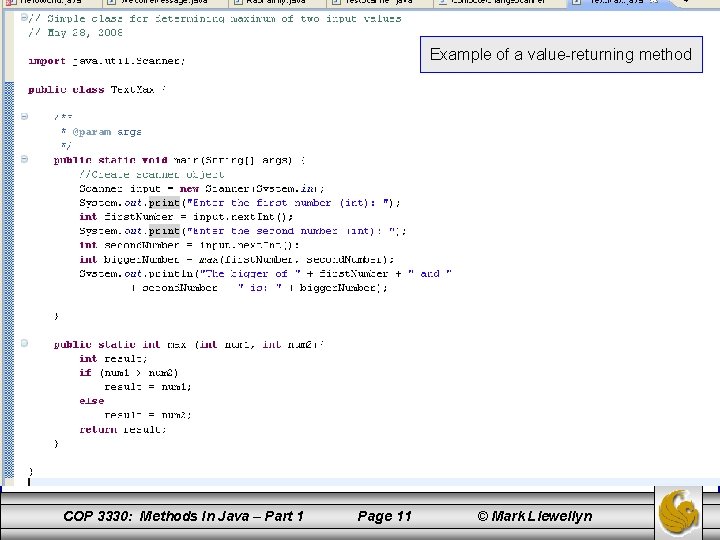
Example of a value-returning method COP 3330: Methods In Java – Part 1 Page 11 © Mark Llewellyn
![public static void main(String[] args) { //Create scanner object Scanner input = new Scanner(System.](http://slidetodoc.com/presentation_image_h2/77ad3f0406257570202df73afedec2a7/image-12.jpg "public static void main(String[] args) { //Create scanner object Scanner input = new Scanner(System.")
public static void main(String[] args) { //Create scanner object Scanner input = new Scanner(System. in); System. out. print("Enter the first number (int): "); int first. Number = input. next. Int(); System. out. print("Enter the second number (int): "); int second. Number = input. next. Int(); int bigger. Number = max(first. Number, second. Number); System. out. println("The bigger of " + first. Number + " and " + second. Number + " is: " + bigger. Number); } pass the value second. Number pass the value first. Number invoke method max return result COP 3330: Methods In Java – Part 1 public static int max (int num 1, int num 2){ int result; if (num 1 > num 2) result = num 1; else result = num 2; return result; } Page 12 © Mark Llewellyn
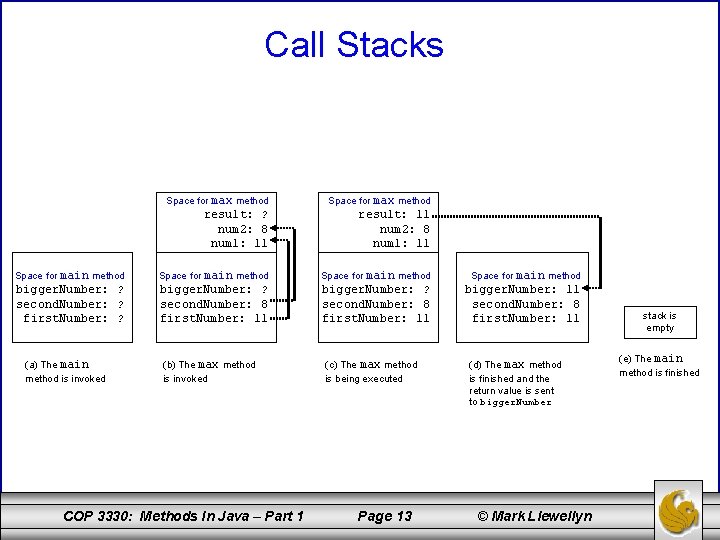
Call Stacks Space for max method result: ? num 2: 8 num 1: 11 result: 11 num 2: 8 num 1: 11 Space for main method bigger. Number: ? second. Number: ? first. Number: ? bigger. Number: ? second. Number: 8 first. Number: 11 bigger. Number: 11 second. Number: 8 first. Number: 11 (a) The main method is invoked (b) The max method is invoked COP 3330: Methods In Java – Part 1 (c) The max method is being executed Page 13 (d) The max method is finished and the return value is sent to bigger. Number © Mark Llewellyn stack is empty (e) The main method is finished
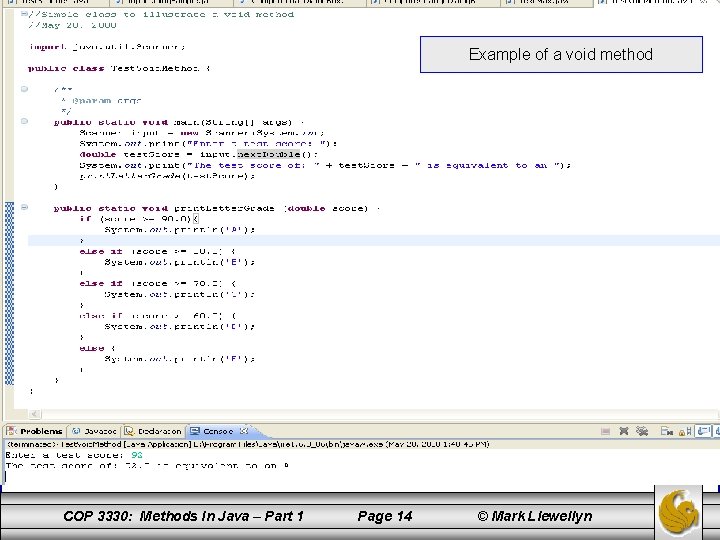
Example of a void method COP 3330: Methods In Java – Part 1 Page 14 © Mark Llewellyn
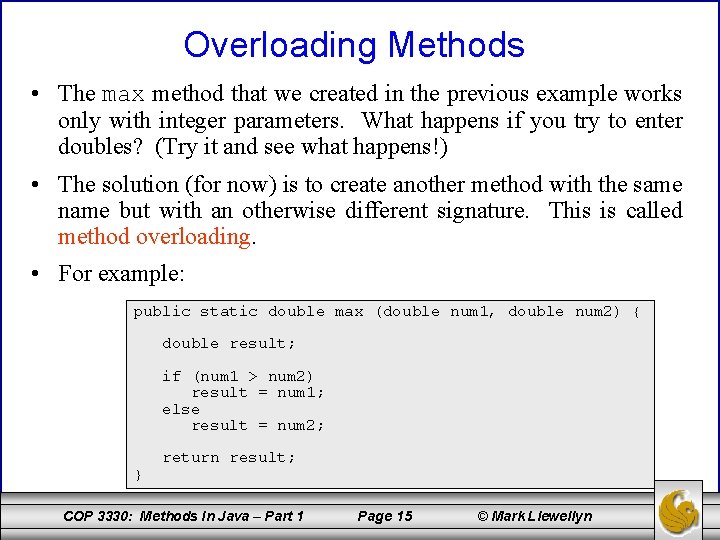
Overloading Methods • The max method that we created in the previous example works only with integer parameters. What happens if you try to enter doubles? (Try it and see what happens!) • The solution (for now) is to create another method with the same name but with an otherwise different signature. This is called method overloading. • For example: public static double max (double num 1, double num 2) { double result; if (num 1 > num 2) result = num 1; else result = num 2; } return result; COP 3330: Methods In Java – Part 1 Page 15 © Mark Llewellyn
Method Abstraction And Stepwise Refinement • The key to developing good software is to apply the concept of abstraction. You’ll learn many different levels of abstraction as we work our way though the semester. • Method abstraction is achieved by separating the use of a method from its implementation. The client can use a method without knowing how it is implemented. The details of the implementation are encapsulated in the method and hidden from the client who invokes the method. This is known as encapsulation or information hiding. • If you (the developer) decide to change the implementation, the client program will not be affected provided that you do not change the method signature. COP 3330: Methods In Java – Part 1 Page 16 © Mark Llewellyn
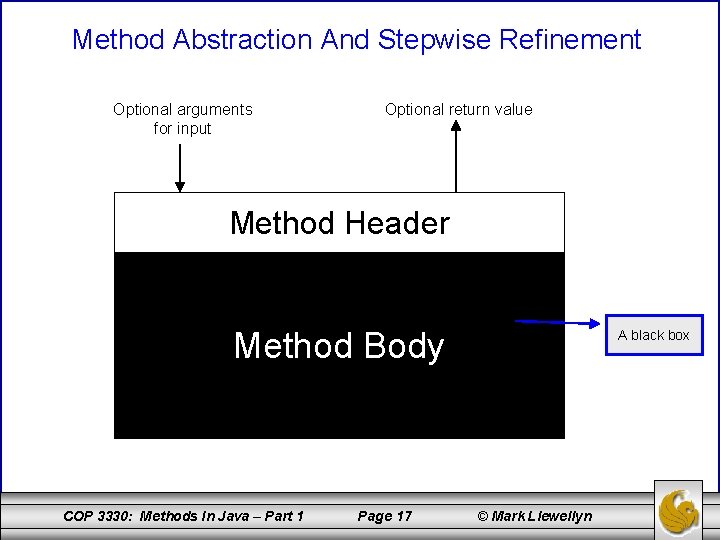
Method Abstraction And Stepwise Refinement Optional arguments for input Optional return value Method Header Method Body COP 3330: Methods In Java – Part 1 Page 17 A black box © Mark Llewellyn
Method Abstraction And Stepwise Refinement • We’ve already used the System. out. print method to display a string on the terminal and we’ve used the JOption. Pane. show. Input. Dialog method to read a string from a dialog box, we knew how to invoke these methods from our program, but we did not know, nor do we really care to know, how these methods are implemented. • Thus, we have treated the implementation of these methods as a “black box”, in that we know what kind of service is provided by the black box, but we don’t need to know how they are implemented in order for us to take advantage of the service they provide. COP 3330: Methods In Java – Part 1 Page 18 © Mark Llewellyn
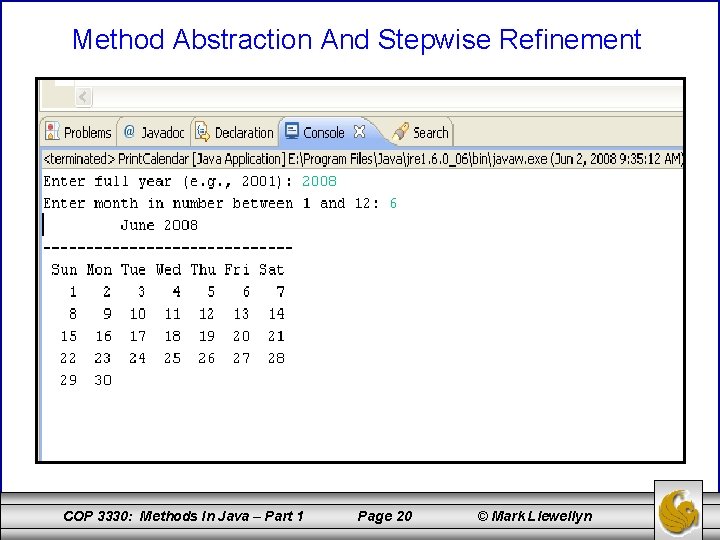
Method Abstraction And Stepwise Refinement • The concept of method abstraction can also be applied to the process of developing programs. • When developing a large program, you can use the divide and conquer strategy, also known as stepwise refinement, to decompose it into sub-problems. The sub -problems can be further decomposed into smaller, more manageable problems. • To illustrate this process, we’ll develop a program that will display the calendar for a given month of the year. The program will ask the user to enter the year and the month for the calendar they would like to see and then build and display that calendar on the screen. COP 3330: Methods In Java – Part 1 Page 19 © Mark Llewellyn
Method Abstraction And Stepwise Refinement COP 3330: Methods In Java – Part 1 Page 20 © Mark Llewellyn
Method Abstraction And Stepwise Refinement • How would you approach solving this problem? (Don’t say that you would immediately head to the computer and start hammering out a Java program. ) • By trying to work out a solution to every detail of the problem initially, you may actually block or obscure the problem solving process. Solving the problem should be a smooth systematic process and not a hap-hazard detailoriented approach in which it is actually more likely to overlook a detail than is the case with a more systematic approach. • The correct approach is to use method abstraction to isolate the details from design and only later implement the details. COP 3330: Methods In Java – Part 1 Page 21 © Mark Llewellyn
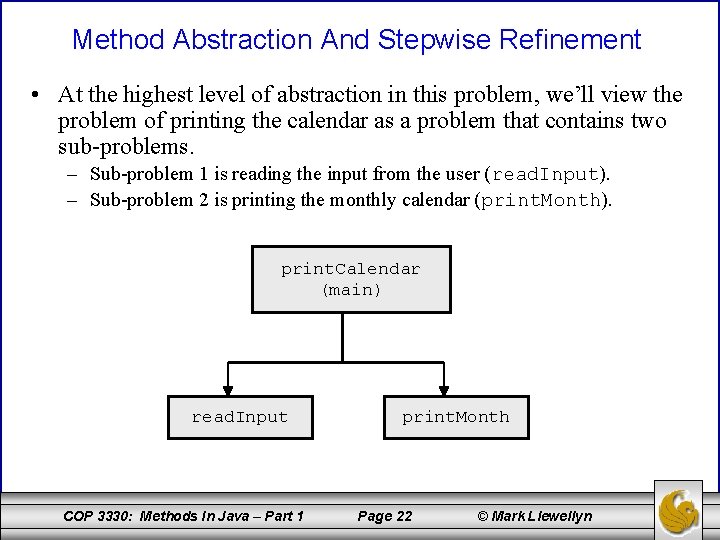
Method Abstraction And Stepwise Refinement • At the highest level of abstraction in this problem, we’ll view the problem of printing the calendar as a problem that contains two sub-problems. – Sub-problem 1 is reading the input from the user (read. Input). – Sub-problem 2 is printing the monthly calendar (print. Month). print. Calendar (main) read. Input COP 3330: Methods In Java – Part 1 print. Month Page 22 © Mark Llewellyn
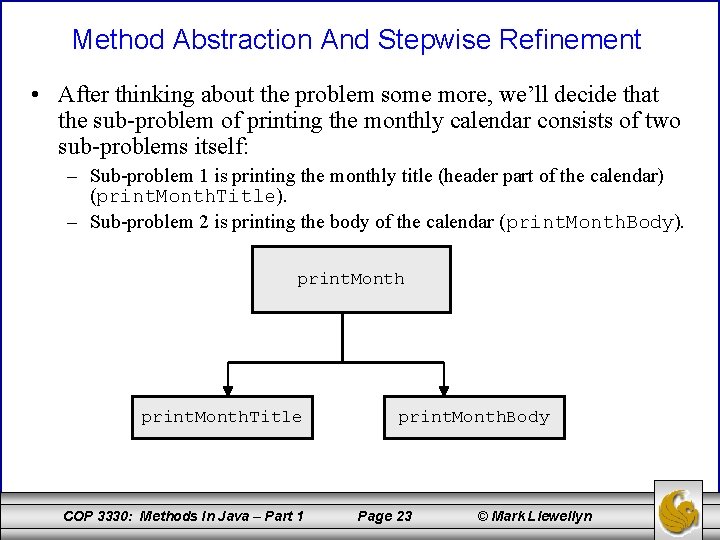
Method Abstraction And Stepwise Refinement • After thinking about the problem some more, we’ll decide that the sub-problem of printing the monthly calendar consists of two sub-problems itself: – Sub-problem 1 is printing the monthly title (header part of the calendar) (print. Month. Title). – Sub-problem 2 is printing the body of the calendar (print. Month. Body). print. Month. Title COP 3330: Methods In Java – Part 1 print. Month. Body Page 23 © Mark Llewellyn
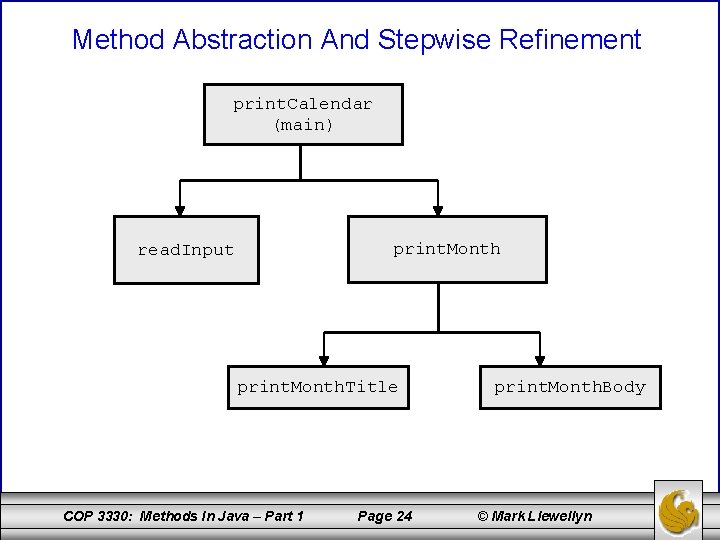
Method Abstraction And Stepwise Refinement print. Calendar (main) print. Month read. Input print. Month. Title COP 3330: Methods In Java – Part 1 Page 24 print. Month. Body © Mark Llewellyn
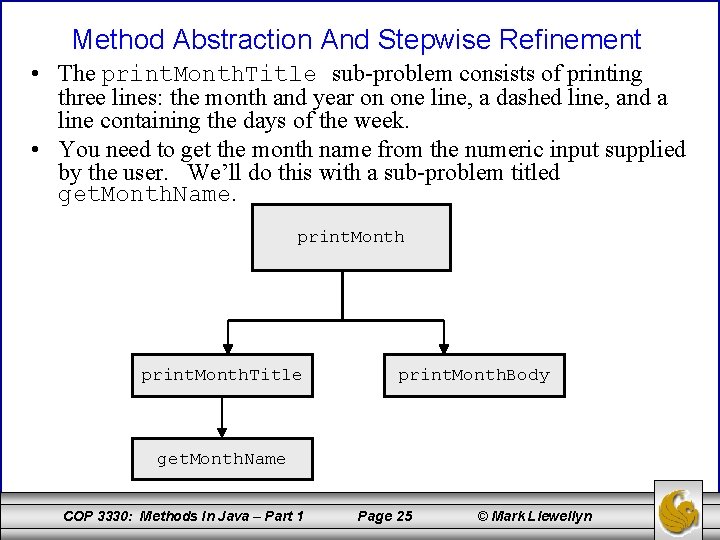
Method Abstraction And Stepwise Refinement • The print. Month. Title sub-problem consists of printing three lines: the month and year on one line, a dashed line, and a line containing the days of the week. • You need to get the month name from the numeric input supplied by the user. We’ll do this with a sub-problem titled get. Month. Name. print. Month. Title print. Month. Body get. Month. Name COP 3330: Methods In Java – Part 1 Page 25 © Mark Llewellyn
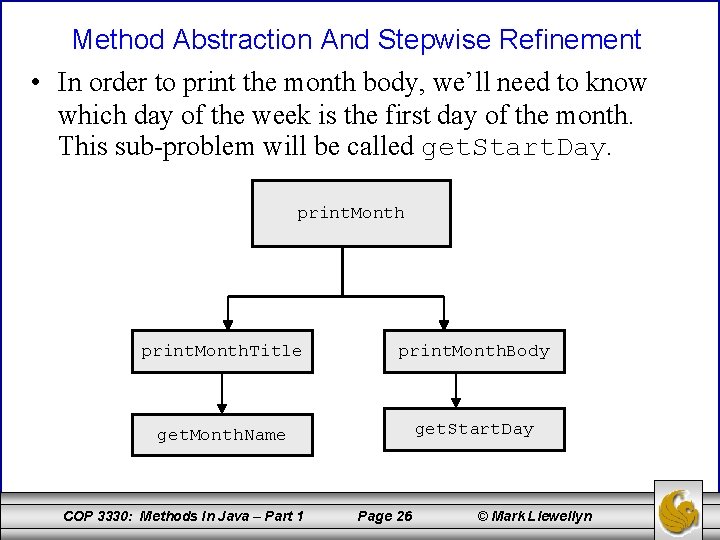
Method Abstraction And Stepwise Refinement • In order to print the month body, we’ll need to know which day of the week is the first day of the month. This sub-problem will be called get. Start. Day. print. Month. Title print. Month. Body get. Month. Name get. Start. Day COP 3330: Methods In Java – Part 1 Page 26 © Mark Llewellyn
Method Abstraction And Stepwise Refinement • How do we get the day of the week that begins the month? • There are several ways to do this. One of the simplest is to use the Calendar class built-in to Java. However, we’re going to take a different approach for this problem. Suppose that we know that the day January 1, 1800 was a Wednesday (start. Day 1800 = 3). We can compute the total number of days that have elapsed between January 1, 1800 and the first date of the calendar month in question. • The start day for our calendar would be (total. Number. Of. Days + start. Day 1800) % 7. • Further, we need to figure in leap years (is. Leap. Year). • So we need to refine our sub-problem structure a bit more. COP 3330: Methods In Java – Part 1 Page 27 © Mark Llewellyn
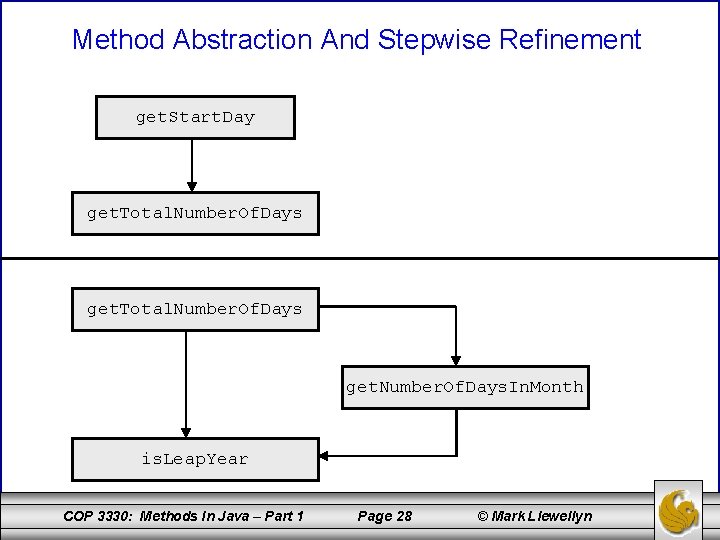
Method Abstraction And Stepwise Refinement get. Start. Day get. Total. Number. Of. Days get. Number. Of. Days. In. Month is. Leap. Year COP 3330: Methods In Java – Part 1 Page 28 © Mark Llewellyn
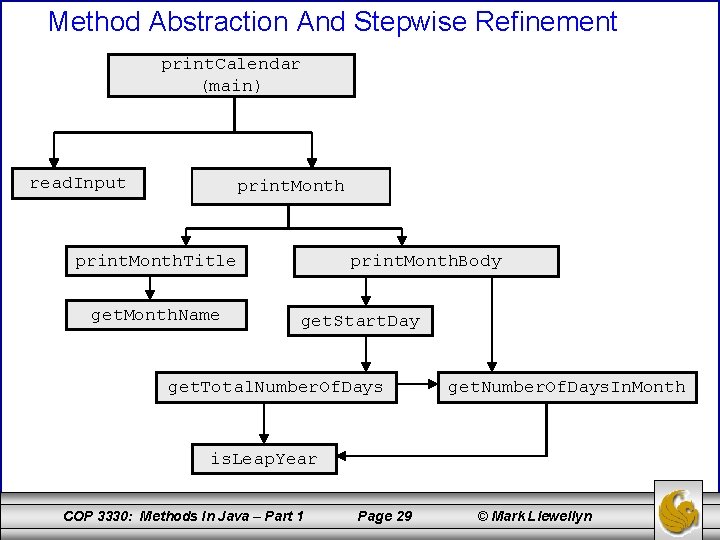
Method Abstraction And Stepwise Refinement print. Calendar (main) read. Input print. Month. Title get. Month. Name print. Month. Body get. Start. Day get. Total. Number. Of. Days get. Number. Of. Days. In. Month is. Leap. Year COP 3330: Methods In Java – Part 1 Page 29 © Mark Llewellyn
Top-Down or Bottom-Up Implementation • Now that we have designed our solution to the problem, its time to begin implementation. • In general, a sub-problem in our design will correspond to a method in the implementation. Although, some subproblems may be so simple that a separate method is not warranted and it may be combined in another method. – Decisions of this sort should be based on whether the overall program will be easier to read if the sub-problem remains as a separate method or is incorporated into another sub-problem’s method implementation. – For example, in this problem, we might justifiably implement the read. Input sub-problem in main rather than create a separate method. COP 3330: Methods In Java – Part 1 Page 30 © Mark Llewellyn
Top-Down or Bottom-Up Implementation • We can use either a top-down or bottom-up approach to implementation. • A top-down approach implements one method in the structure diagram at a time from the top to the bottom of the diagram. – Working from more general sub-problems toward more specific sub-problems. • A bottom-up approach implements one method in the structure diagram at a time from the bottom of the diagram to the top. – Working from more specific sub-problems toward more general sub -problems. COP 3330: Methods In Java – Part 1 Page 31 © Mark Llewellyn
Top-Down or Bottom-Up Implementation • With either approach, a common technique for implementation is to create stubs for each subproblem in the structure diagram. • A stub (or stub method) is a simple but incomplete version of a method. • The use of stubs allows you to quickly build the framework of the program, which is filled in as you complete either a top-down or bottom-up approach. • In our example, using a top-down approach, we would implement main first, followed by a stub for print. Month. COP 3330: Methods In Java – Part 1 Page 32 © Mark Llewellyn
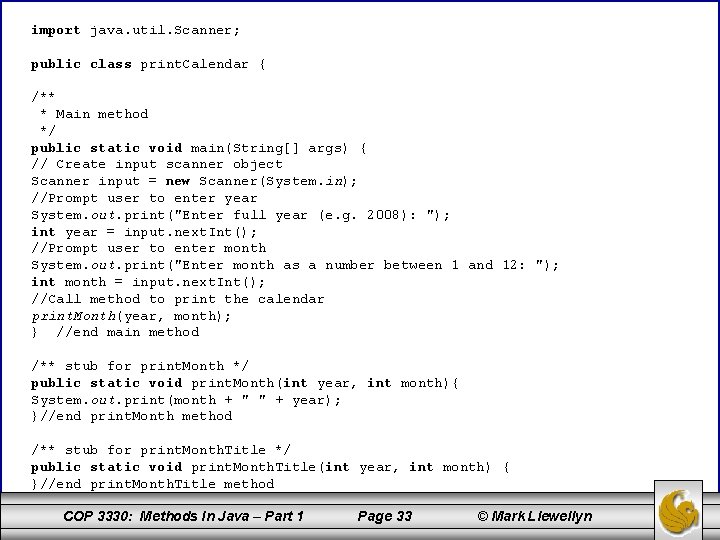
import java. util. Scanner; public class print. Calendar { /** * Main method */ public static void main(String[] args) { // Create input scanner object Scanner input = new Scanner(System. in); //Prompt user to enter year System. out. print("Enter full year (e. g. 2008): "); int year = input. next. Int(); //Prompt user to enter month System. out. print("Enter month as a number between 1 and 12: "); int month = input. next. Int(); //Call method to print the calendar print. Month(year, month); } //end main method /** stub for print. Month */ public static void print. Month(int year, int month){ System. out. print(month + " " + year); }//end print. Month method /** stub for print. Month. Title */ public static void print. Month. Title(int year, int month) { }//end print. Month. Title method COP 3330: Methods In Java – Part 1 Page 33 © Mark Llewellyn
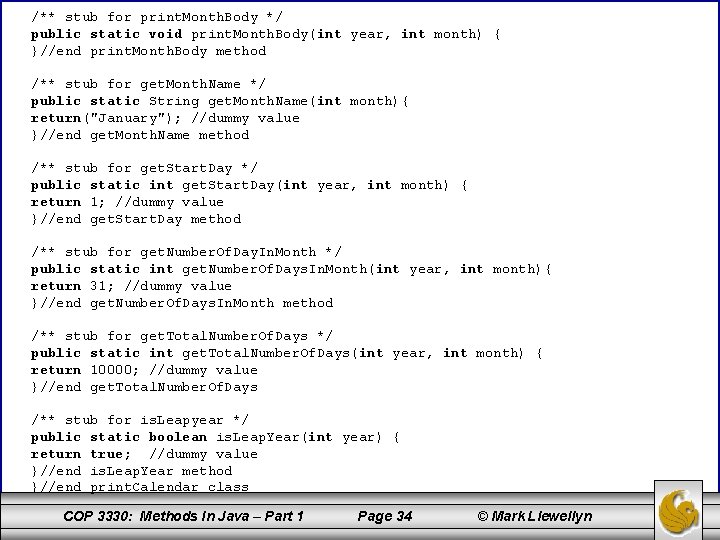
/** stub for print. Month. Body */ public static void print. Month. Body(int year, int month) { }//end print. Month. Body method /** stub for get. Month. Name */ public static String get. Month. Name(int month){ return("January"); //dummy value }//end get. Month. Name method /** stub for get. Start. Day */ public static int get. Start. Day(int year, int month) { return 1; //dummy value }//end get. Start. Day method /** stub for get. Number. Of. Day. In. Month */ public static int get. Number. Of. Days. In. Month(int year, int month){ return 31; //dummy value }//end get. Number. Of. Days. In. Month method /** stub for get. Total. Number. Of. Days */ public static int get. Total. Number. Of. Days(int year, int month) { return 10000; //dummy value }//end get. Total. Number. Of. Days /** stub for is. Leapyear */ public static boolean is. Leap. Year(int year) { return true; //dummy value }//end is. Leap. Year method }//end print. Calendar class COP 3330: Methods In Java – Part 1 Page 34 © Mark Llewellyn
- Slides: 34