
Cookies Client Session Identification Cookies Stateless Protocol Remember
Cookies Client / Session Identification Cookies
Stateless Protocol • Remember that: • HTTP is a stateless protocol • No information needed or kept • Each command is executed independently • No knowledge of commands that came before application. • Information easily retransmitted • Website kept simple and light -2
Client / Session Identification • HTTP does not maintain state (state less). • State Information can be passed using: • HTTP Headers • Client IP Address • HTTP User Login • FAT URLs • URLs modified to include user state information are called fat URLs • Some web sites keep track of user identity by generating special versions of each URL for each user. • Cookies
Cookies Maintaining State • Most major commercial Web sites use cookies today • Cookies, defined in [RFC 6265] standard • Allow sites (web servers) to keep track of users • Reflects personal settings and configurations • Each website has its own cookie that is site-specific • Using a combination of cookies and user-supplied account information, • A Web site can learn a lot about a user and potentially sell this information to a third party • Cookies can have several attributes that control their scope including: • expiration date, path, domain, port, version, and security options.
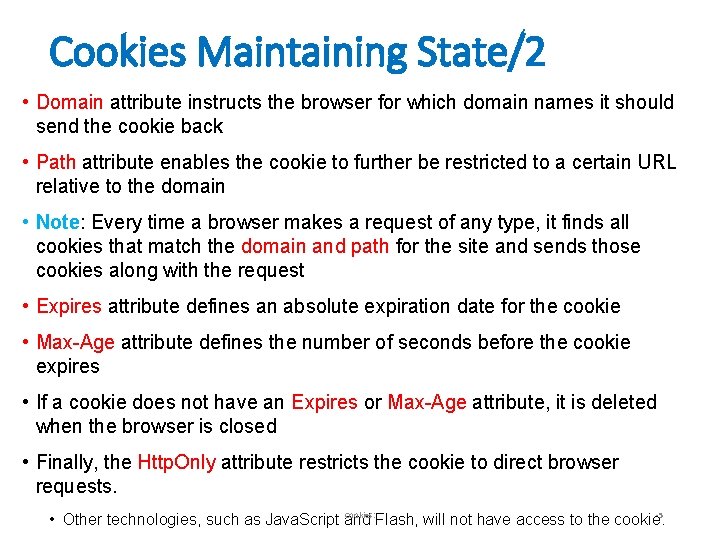
Cookies Maintaining State/2 • Domain attribute instructs the browser for which domain names it should send the cookie back • Path attribute enables the cookie to further be restricted to a certain URL relative to the domain • Note: Every time a browser makes a request of any type, it finds all cookies that match the domain and path for the site and sends those cookies along with the request • Expires attribute defines an absolute expiration date for the cookie • Max-Age attribute defines the number of seconds before the cookie expires • If a cookie does not have an Expires or Max-Age attribute, it is deleted when the browser is closed • Finally, the Http. Only attribute restricts the cookie to direct browser requests. Cookies: -5 • Other technologies, such as Java. Script and Flash, will not have access to the cookie.

Examples • Set-Cookie: user=abc; Path=/restricted; Domain=. foo. example. com • Set-Cookie: user=abc; expires=Wed, 21 -Dec-2017 15: 23: 00 GMT • Set-Cookie: user=abc; Max-Age=3600 • Set-Cookie: key=etrogl 7*; Domain=. foo. example. com; secure
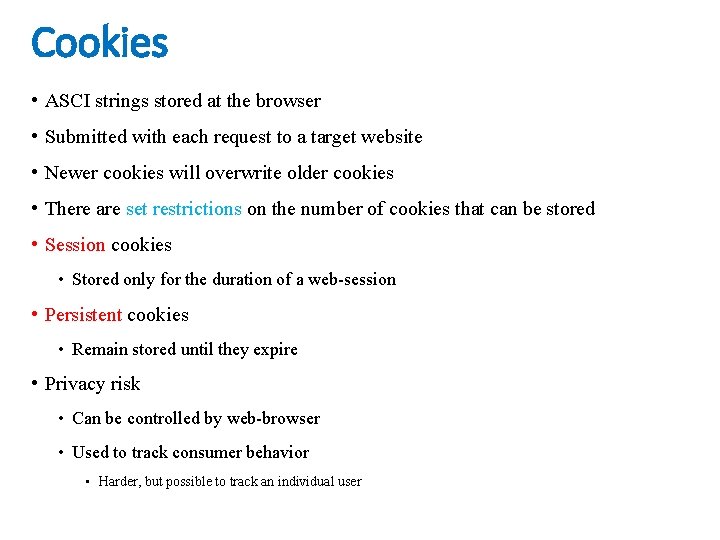
Cookies • ASCI strings stored at the browser • Submitted with each request to a target website • Newer cookies will overwrite older cookies • There are set restrictions on the number of cookies that can be stored • Session cookies • Stored only for the duration of a web-session • Persistent cookies • Remain stored until they expire • Privacy risk • Can be controlled by web-browser • Used to track consumer behavior • Harder, but possible to track an individual user

User-server state: cookies Many Web sites use cookies • four components: 1) cookie header line of HTTP response message 2) cookie header line in next HTTP request message 3) cookie file kept on user’s host, managed by user’s browser 4) back-end database at Web site example: • Ali always access Internet from PC • visits specific e-commerce site for first time • when initial HTTP requests arrives at site, site creates: • unique ID • entry in backend database for ID
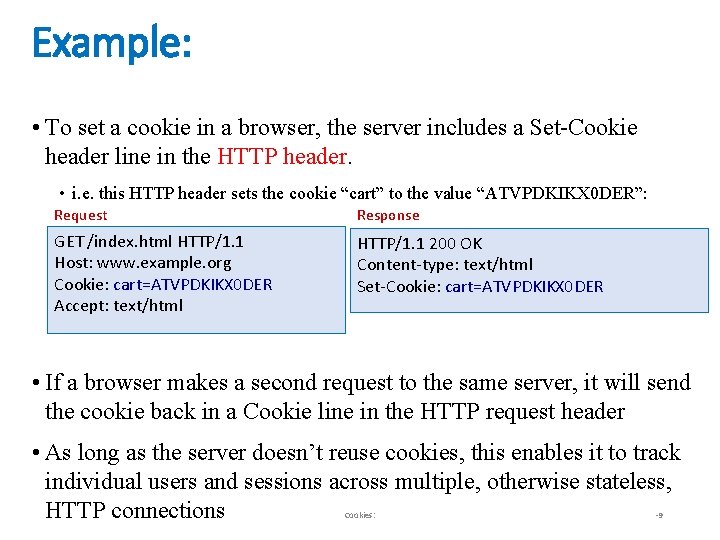
Example: • To set a cookie in a browser, the server includes a Set-Cookie header line in the HTTP header. • i. e. this HTTP header sets the cookie “cart” to the value “ATVPDKIKX 0 DER”: Request Response GET /index. html HTTP/1. 1 Host: www. example. org Cookie: cart=ATVPDKIKX 0 DER Accept: text/html HTTP/1. 1 200 OK Content-type: text/html Set-Cookie: cart=ATVPDKIKX 0 DER • If a browser makes a second request to the same server, it will send the cookie back in a Cookie line in the HTTP request header • As long as the server doesn’t reuse cookies, this enables it to track individual users and sessions across multiple, otherwise stateless, HTTP connections Cookies: -9
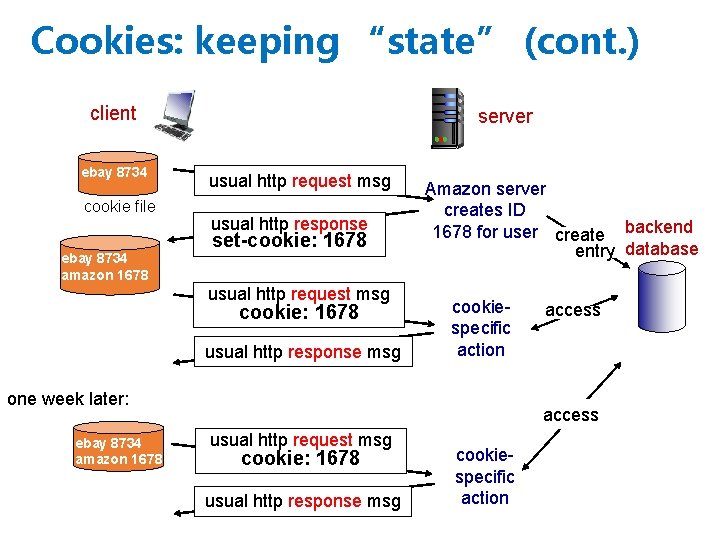
Cookies: keeping “state” (cont. ) client ebay 8734 cookie file ebay 8734 amazon 1678 server usual http request msg usual http response set-cookie: 1678 usual http request msg cookie: 1678 usual http response msg Amazon server creates ID 1678 for user create backend entry database cookiespecific action one week later: ebay 8734 amazon 1678 access usual http request msg cookie: 1678 usual http response msg cookiespecific action
Cookies (continued) • what cookies can be used for: • authorization • shopping carts • recommendations • user session state (Web e-mail), your student account • how to keep “state”: • protocol endpoints: maintain state at sender/receiver over multiple transactions • cookies: http messages carry state • cookies and privacy: • cookies permit sites/servers to learn a lot about you • you may supply name and e-mail to sites
Using Session Cookies/1 • In general, a session is some file, memory segment, object, or container managed by the server or web application that contains various data elements assigned to it. • Examples: username, a shopping cart, workflow details, etc. • The user’s browser does not hold or maintain any of this data • It is managed solely by the server or web application code • The missing piece is a link between this container and the user’s browser • Thus, sessions are assigned a randomly generated string called a session ID • First time a session is created (as a result of a request being received), the session ID for that session is conveyed back to the user’s browser as part of the response • Every subsequent request from that user’s browser includes the session ID in some fashion • When the application receives the request with the session ID, it can then-12 link Cookies: the existing session to that request.
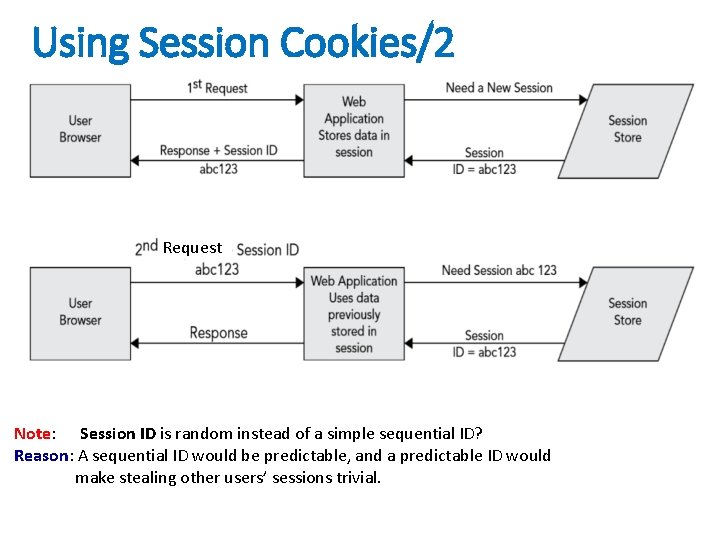
Using Session Cookies/2 Request Note: Session ID is random instead of a simple sequential ID? Reason: A sequential ID would be predictable, and a predictable ID would make stealing other users’ sessions trivial.
Using Session Cookies/3 • The remaining problem to be solved is how the session ID is passed from server to browser and back. • There are two techniques used to accomplish this: 1. session cookies (HTTP cookies. ) 1. Set-Cookie response header: from the server to the browser 2. Cookie request header: from the browser to the server 2. URL rewriting. • The web or application server knows to look for a particular pattern containing the session ID in the URL • if found, the application server retrieves the session from the URL. Cookies: -14
Example: Understanding the Session Cookie • Web servers and application servers use cookies: • to store session IDs on the client side • Thus, in subsequent requests, these IDs can be transmitted back to the server (with each request). • By default, in Java EE application servers, the name of this session cookie is JSESSIONID • The following example shows the headers from a series of requests and responses between a client browser and a Java EE web application deployed at http: //www. example. com/support. Cookies: -15
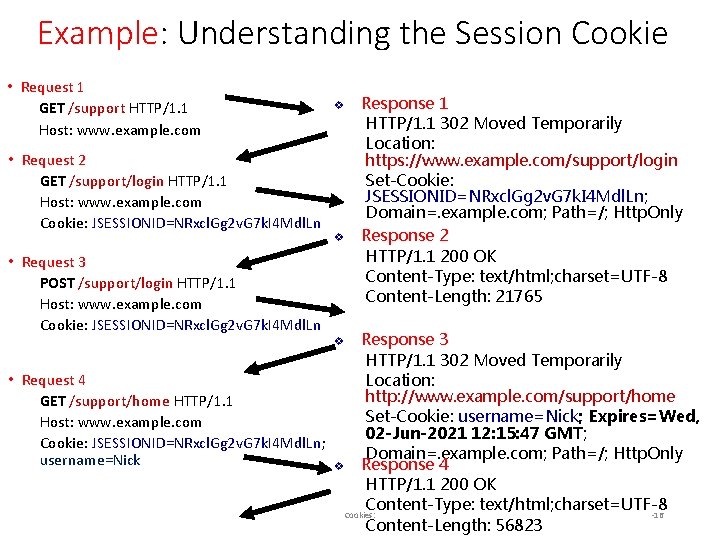
Example: Understanding the Session Cookie • Request 1 GET /support HTTP/1. 1 Host: www. example. com • Request 2 GET /support/login HTTP/1. 1 Host: www. example. com Cookie: JSESSIONID=NRxcl. Gg 2 v. G 7 k. I 4 Mdl. Ln v v • Request 3 POST /support/login HTTP/1. 1 Host: www. example. com Cookie: JSESSIONID=NRxcl. Gg 2 v. G 7 k. I 4 Mdl. Ln Response 1 HTTP/1. 1 302 Moved Temporarily Location: https: //www. example. com/support/login Set-Cookie: JSESSIONID=NRxcl. Gg 2 v. G 7 k. I 4 Mdl. Ln; Domain=. example. com; Path=/; Http. Only Response 2 HTTP/1. 1 200 OK Content-Type: text/html; charset=UTF-8 Content-Length: 21765 Response 3 HTTP/1. 1 302 Moved Temporarily • Request 4 Location: http: //www. example. com/support/home GET /support/home HTTP/1. 1 Set-Cookie: username=Nick; Expires=Wed, Host: www. example. com 02 -Jun-2021 12: 15: 47 GMT; Cookie: JSESSIONID=NRxcl. Gg 2 v. G 7 k. I 4 Mdl. Ln; Domain=. example. com; Path=/; Http. Only username=Nick v Response 4 HTTP/1. 1 200 OK Content-Type: text/html; charset=UTF-8 Cookies: -16 Content-Length: 56823 v
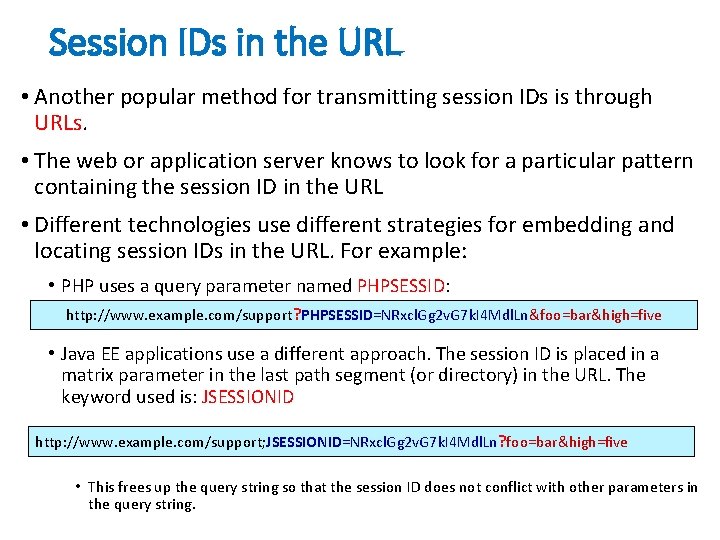
Session IDs in the URL • Another popular method for transmitting session IDs is through URLs. • The web or application server knows to look for a particular pattern containing the session ID in the URL • Different technologies use different strategies for embedding and locating session IDs in the URL. For example: • PHP uses a query parameter named PHPSESSID: http: //www. example. com/support? PHPSESSID=NRxcl. Gg 2 v. G 7 k. I 4 Mdl. Ln&foo=bar&high=five • Java EE applications use a different approach. The session ID is placed in a matrix parameter in the last path segment (or directory) in the URL. The keyword used is: JSESSIONID http: //www. example. com/support; JSESSIONID=NRxcl. Gg 2 v. G 7 k. I 4 Mdl. Ln? foo=bar&high=five • This frees up the query string so that the session ID does not conflict with other parameters in the query string.
Cookies • A cookie is a name/value pair in the Set-Cookie header field of an HTTP response • Most (not all) clients will: • Store each cookie received in its file system • Send each cookie back to the server that sent it as part of the Cookie header field of subsequent HTTP requests
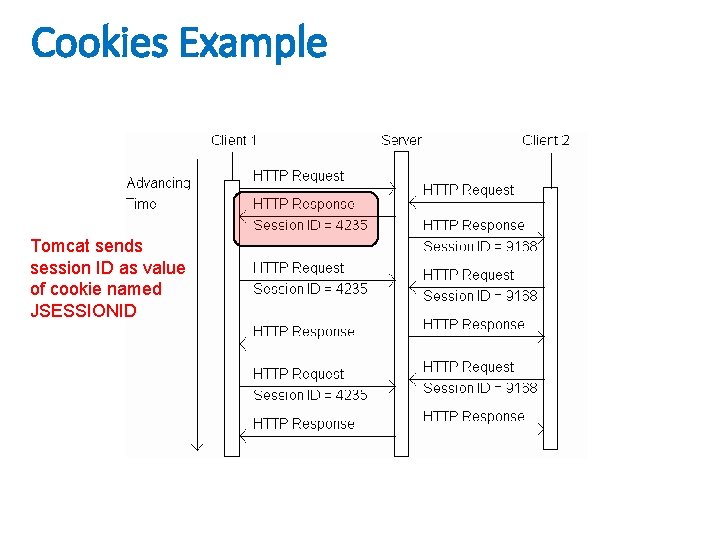
Cookies Example Tomcat sends session ID as value of cookie named JSESSIONID
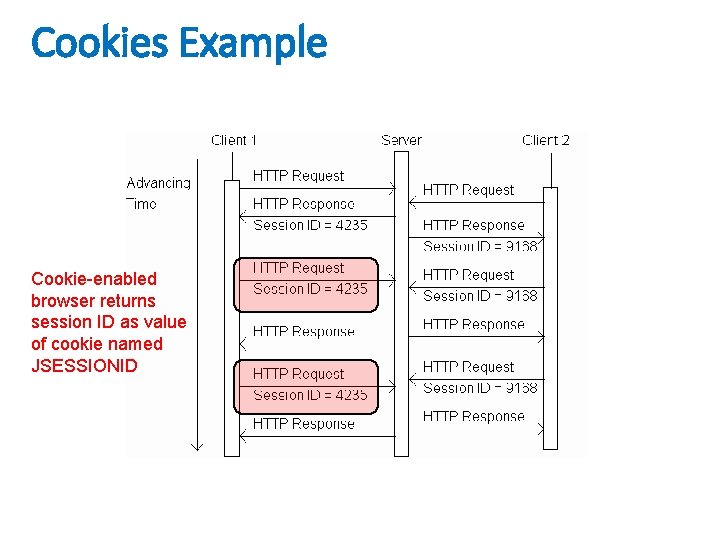
Cookies Example Cookie-enabled browser returns session ID as value of cookie named JSESSIONID

Cookies API • Servlets can set cookies explicitly • Cookie class used to represent cookies • request. get. Cookies() returns an array of Cookie instances representing cookie data in HTTP request • response. add. Cookie(Cookie) adds a cookie to the HTTP response Cookies are expired by client (server can request expiration date)
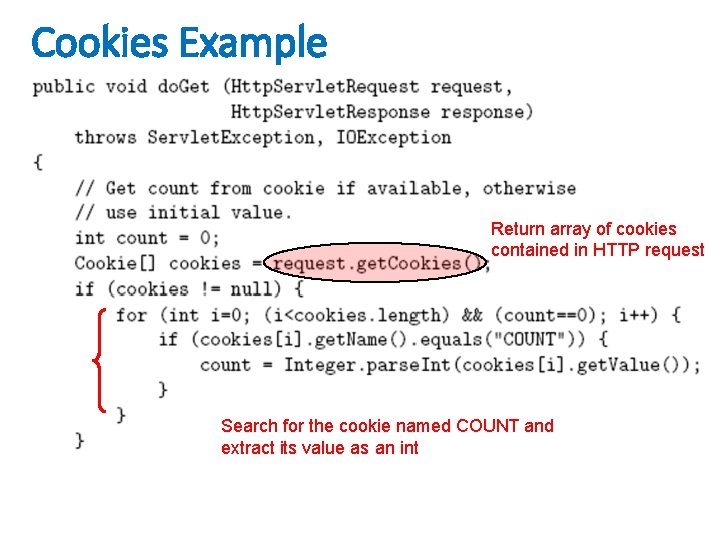
Cookies Example Return array of cookies contained in HTTP request Search for the cookie named COUNT and extract its value as an int
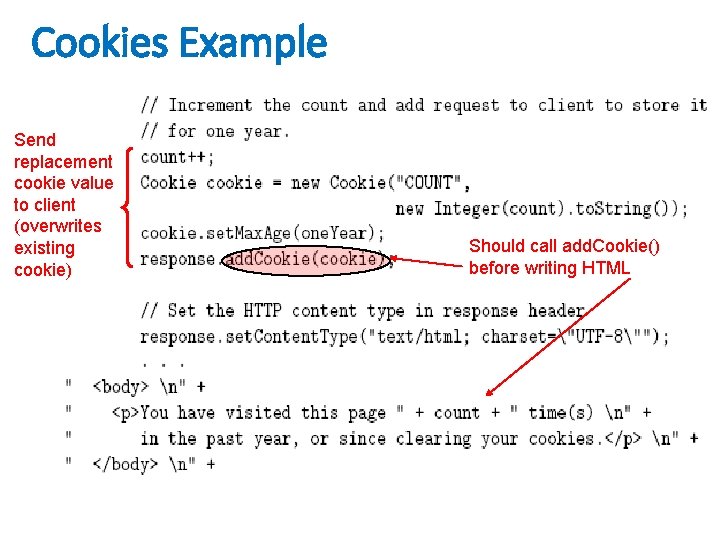
Cookies Example Send replacement cookie value to client (overwrites existing cookie) Should call add. Cookie() before writing HTML

Summary • Many websites use small strings of text known as cookies to store persistent client-side state between connections. • Cookies are passed from server to client and back again in the HTTP headers of requests and responses. • Cookies are limited to non-whitespace ASCII text, and may not contain commas or semicolons. • Cookies can be used by a server to indicate: • session ID, shopping cart contents, login credentials, user preferences, and more. • Servers can set more than one cookie in the same response
- Slides: 24