
Control Structure Siti Nurbaya Ismail Senior Lecturer Faculty

Control Structure Siti Nurbaya Ismail Senior Lecturer Faculty of Computer & Mathematical Sciences Universiti Teknologi MARA Kedah (e): sitinurbaya@kedah. uitm. edu. my (b): https: //sitinur 151. wordpress. com 1
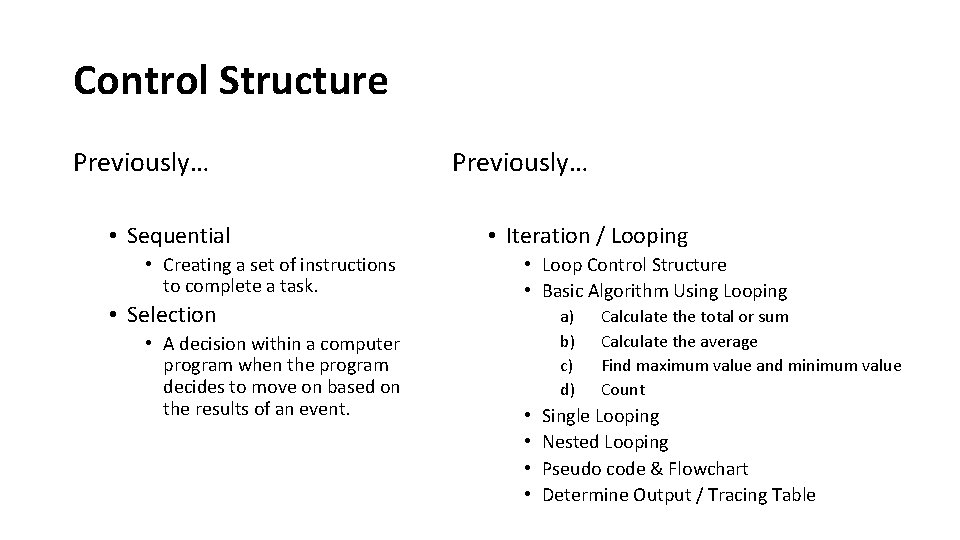
Control Structure Previously… • Sequential • Creating a set of instructions to complete a task. • Selection • A decision within a computer program when the program decides to move on based on the results of an event. Previously… • Iteration / Looping • Loop Control Structure • Basic Algorithm Using Looping a) b) c) d) • • Calculate the total or sum Calculate the average Find maximum value and minimum value Count Single Looping Nested Looping Pseudo code & Flowchart Determine Output / Tracing Table
Control Structure Today… • • • Manipulate a series Sentinel Loop Infinite Loop Nested Loop Quick Revision Draw Diagram Using Nested Loop

Iteration Control Structure Manipulate a series
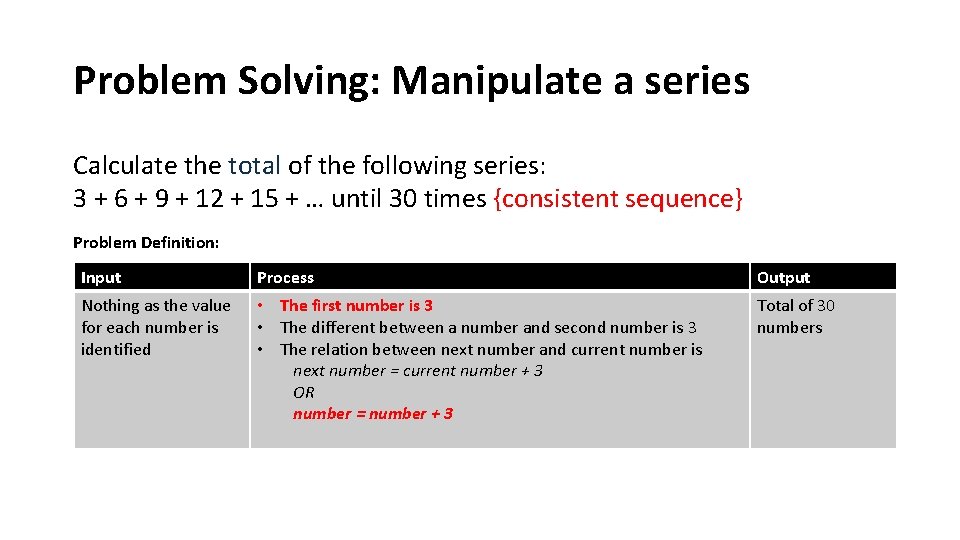
Problem Solving: Manipulate a series Calculate the total of the following series: 3 + 6 + 9 + 12 + 15 + … until 30 times {consistent sequence} Problem Definition: =Input Nothing as the value for each number is identified Process Output • The first number is 3 • The different between a number and second number is 3 • The relation between next number and current number is next number = current number + 3 OR number = number + 3 Total of 30 numbers
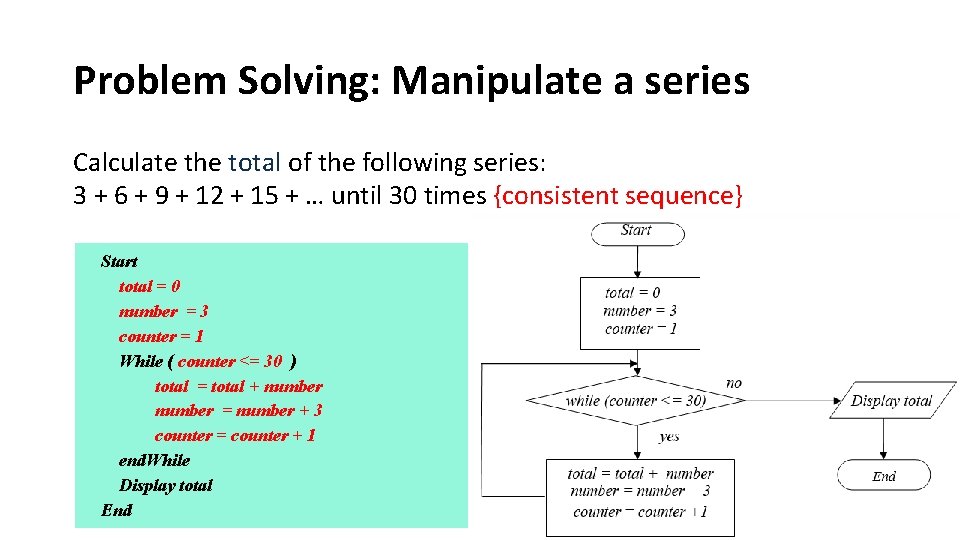
Problem Solving: Manipulate a series Calculate the total of the following series: 3 + 6 + 9 + 12 + 15 + … until 30 times {consistent sequence} Start total = 0 number = 3 counter = 1 While ( counter <= 30 ) total = total + number = number + 3 counter = counter + 1 end. While Display total End
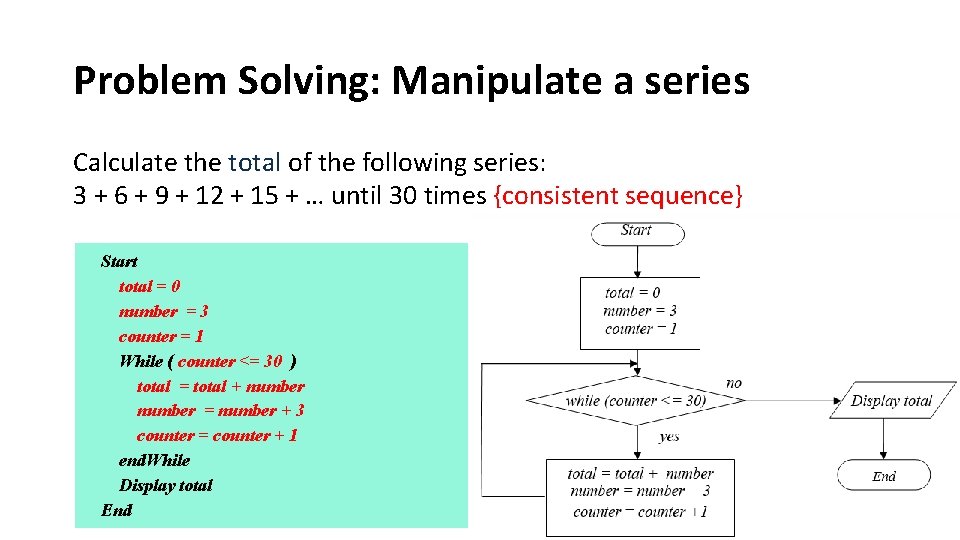
Problem Solving: Manipulate a series Calculate the total of the following series: 3 + 6 + 9 + 12 + 15 + … until 30 times {consistent sequence} Start total = 0 number = 3 counter = 1 While ( counter <= 30 ) total = total + number = number + 3 counter = counter + 1 end. While Display total End
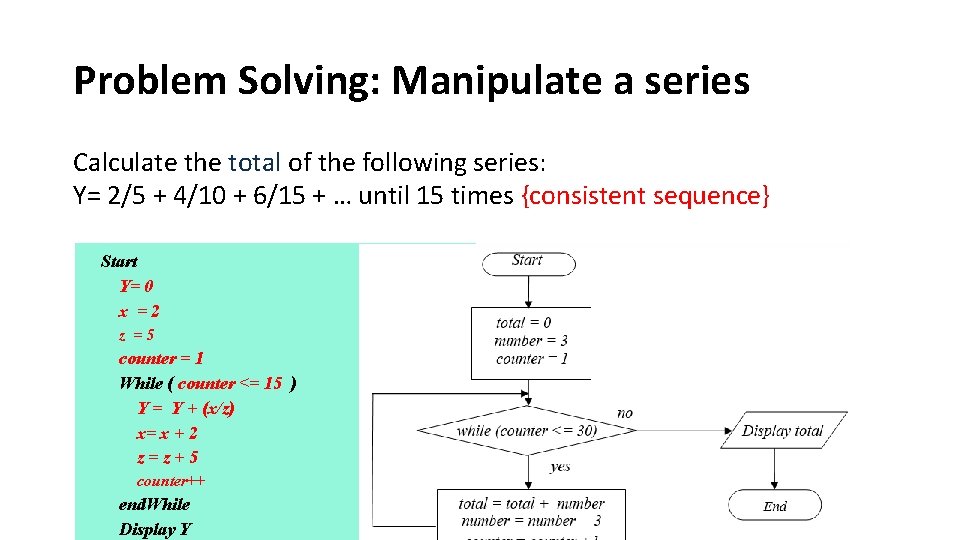
Problem Solving: Manipulate a series Calculate the total of the following series: Y= 2/5 + 4/10 + 6/15 + … until 15 times {consistent sequence} Start Y= 0 x =2 z =5 counter = 1 While ( counter <= 15 ) Y = Y + (x/z) x= x + 2 z=z+5 counter++ end. While Display Y
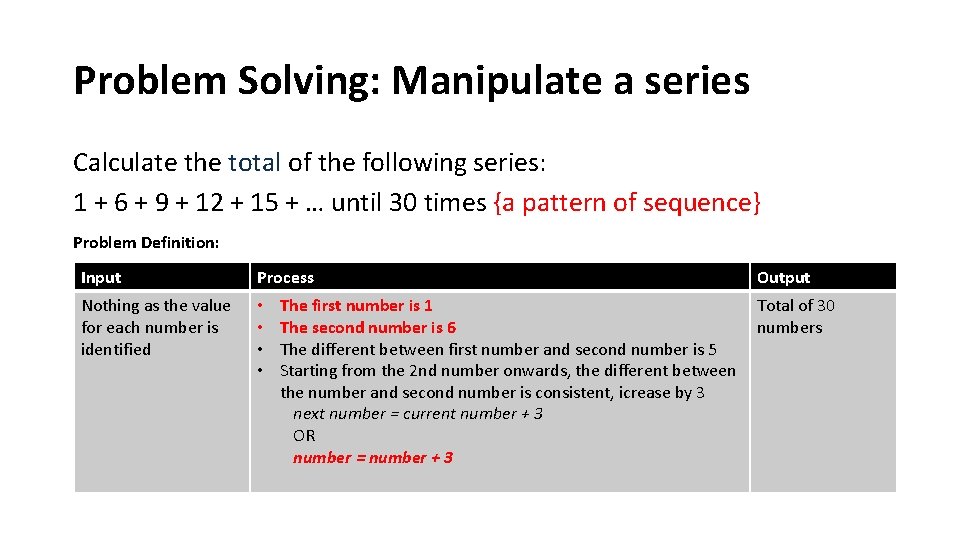
Problem Solving: Manipulate a series Calculate the total of the following series: 1 + 6 + 9 + 12 + 15 + … until 30 times {a pattern of sequence} Problem Definition: Input Process Nothing as the value for each number is identified • • Output The first number is 1 Total of 30 The second number is 6 numbers The different between first number and second number is 5 Starting from the 2 nd number onwards, the different between the number and second number is consistent, icrease by 3 next number = current number + 3 OR number = number + 3
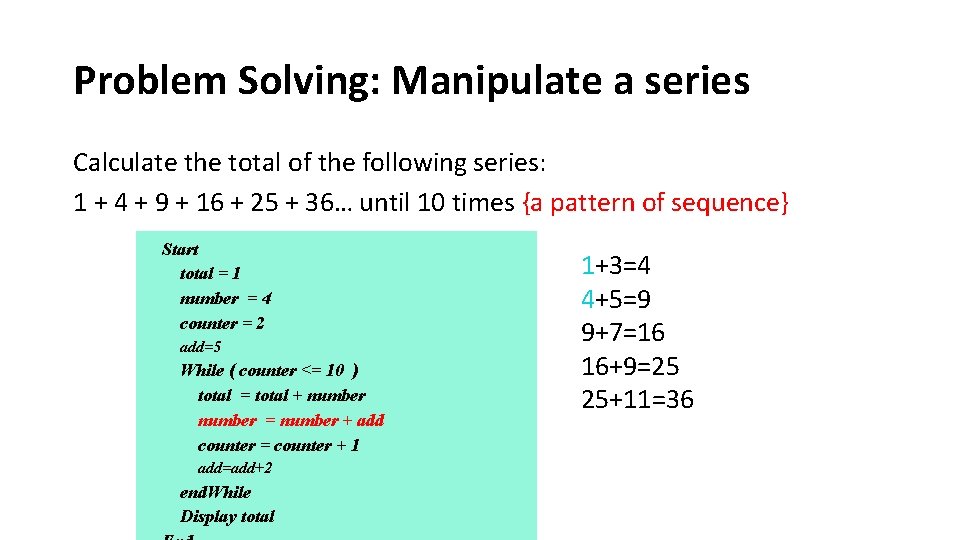
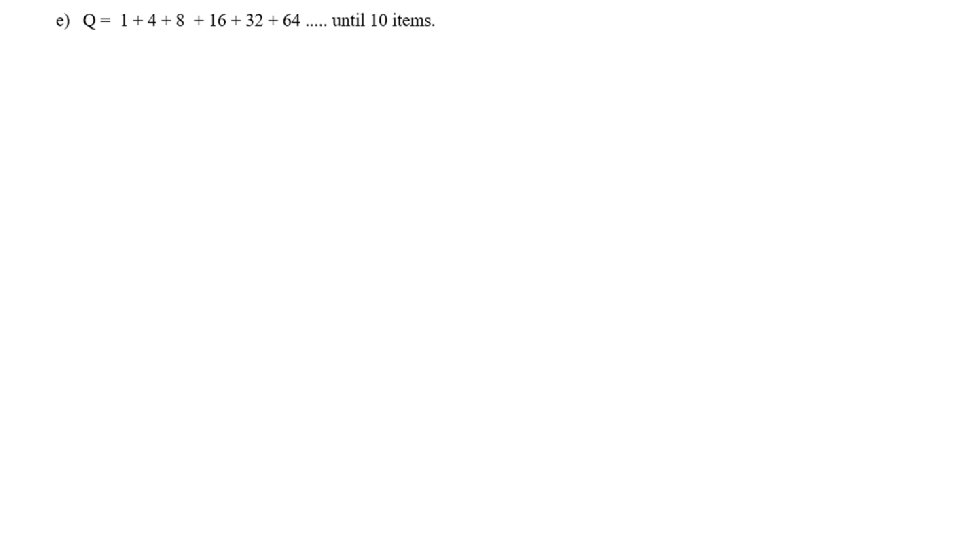
Problem Solving: Manipulate a series Calculate the total of the following series: 1 + 4 + 9 + 16 + 25 + 36… until 10 times {a pattern of sequence} Start total = 1 number = 4 counter = 2 add=5 While ( counter <= 10 ) total = total + number = number + add counter = counter + 1 add=add+2 end. While Display total 1+3=4 4+5=9 9+7=16 16+9=25 25+11=36
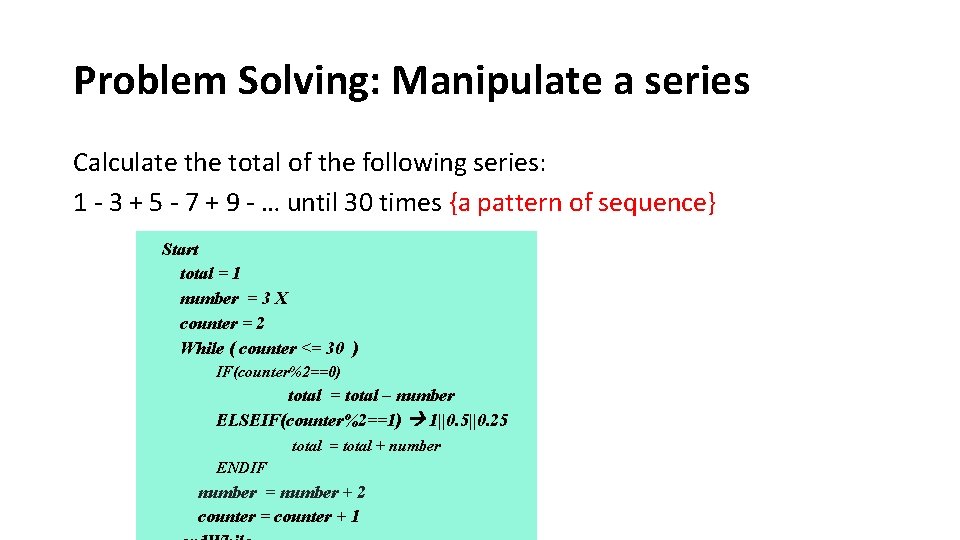
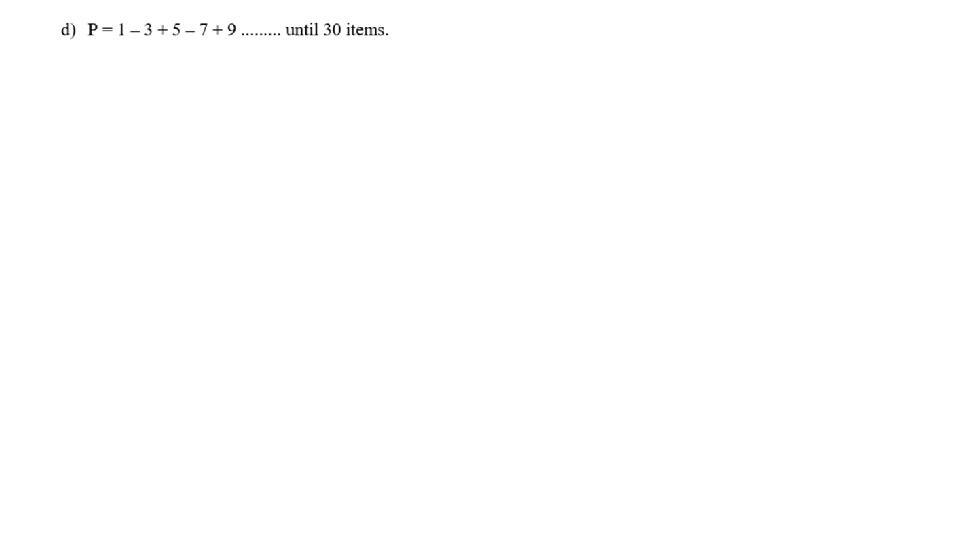
Problem Solving: Manipulate a series Calculate the total of the following series: 1 - 3 + 5 - 7 + 9 - … until 30 times {a pattern of sequence} Start total = 1 number = 3 X counter = 2 While ( counter <= 30 ) IF(counter%2==0) total = total – number ELSEIF(counter%2==1) 1||0. 5||0. 25 total = total + number ENDIF number = number + 2 counter = counter + 1
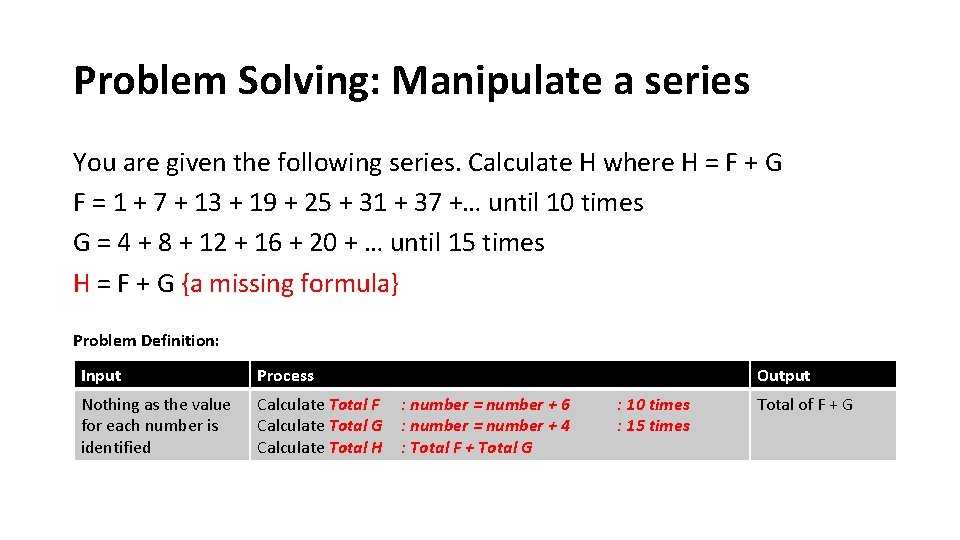
Problem Solving: Manipulate a series You are given the following series. Calculate H where H = F + G F = 1 + 7 + 13 + 19 + 25 + 31 + 37 +… until 10 times G = 4 + 8 + 12 + 16 + 20 + … until 15 times H = F + G {a missing formula} Problem Definition: Input Process Nothing as the value for each number is identified Calculate Total F Calculate Total G Calculate Total H Output : number = number + 6 : number = number + 4 : Total F + Total G : 10 times : 15 times Total of F + G
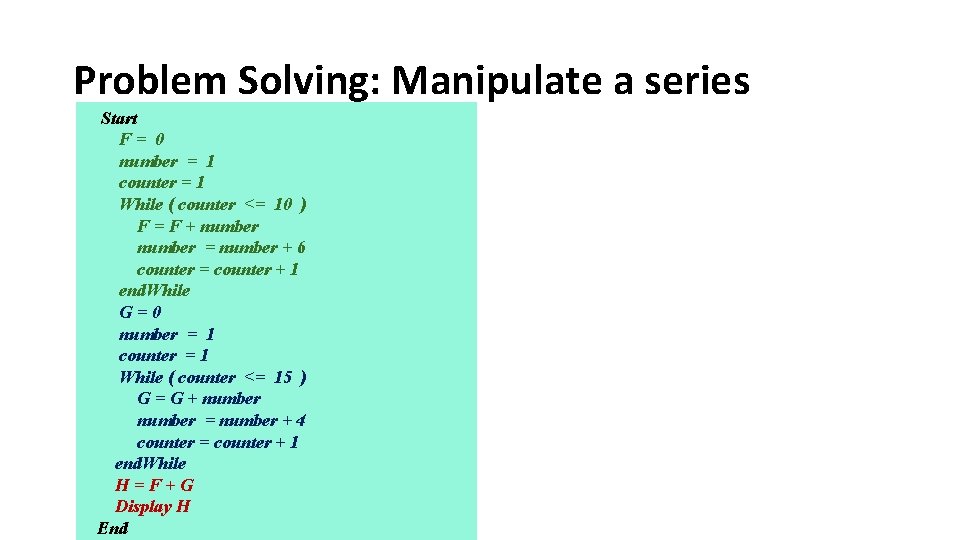
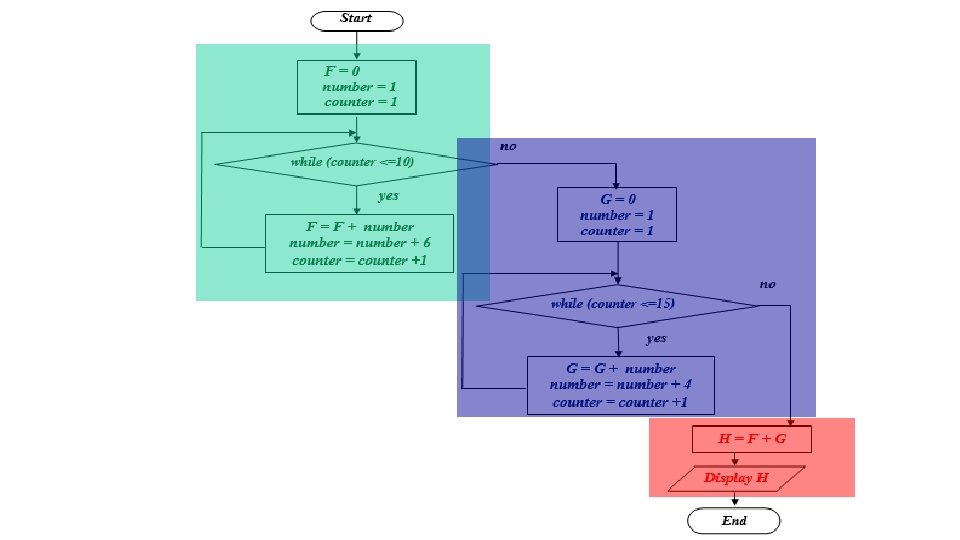
Problem Solving: Manipulate a series Start F= 0 number = 1 counter = 1 While ( counter <= 10 ) F = F + number = number + 6 counter = counter + 1 end. While G=0 number = 1 counter = 1 While ( counter <= 15 ) G = G + number = number + 4 counter = counter + 1 end. While H=F+G Display H End
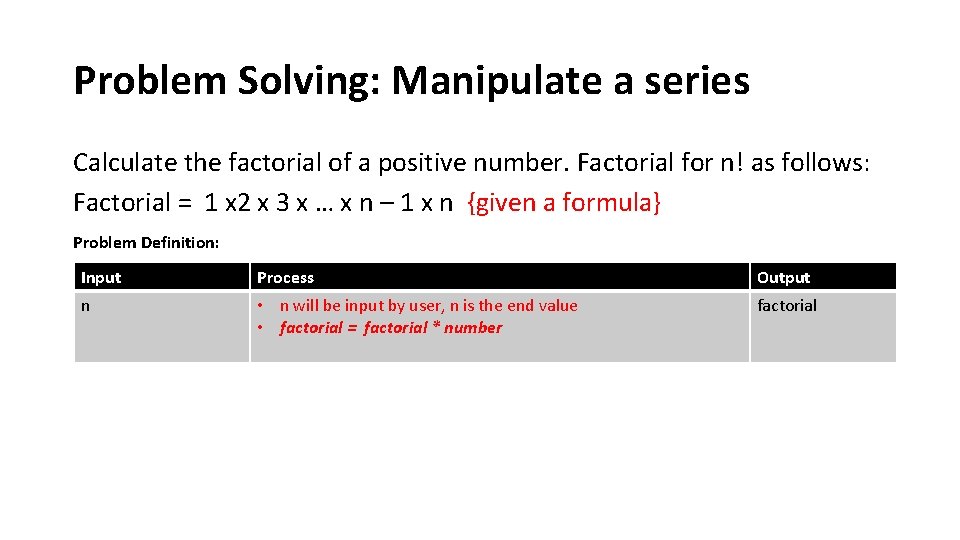
Problem Solving: Manipulate a series Calculate the factorial of a positive number. Factorial for n! as follows: Factorial = 1 x 2 x 3 x … x n – 1 x n {given a formula} Problem Definition: Input Process Output n • n will be input by user, n is the end value • factorial = factorial * number factorial
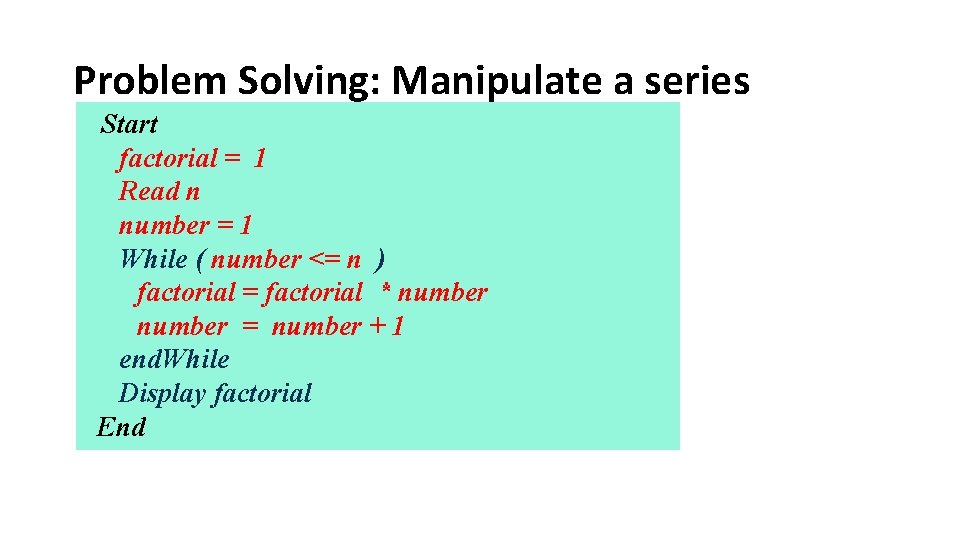
Problem Solving: Manipulate a series Start factorial = 1 Read n number = 1 While ( number <= n ) factorial = factorial * number = number + 1 end. While Display factorial End
Problem Solving: Manipulate a series Flow Chart ?
Problem Solving: Manipulate a series
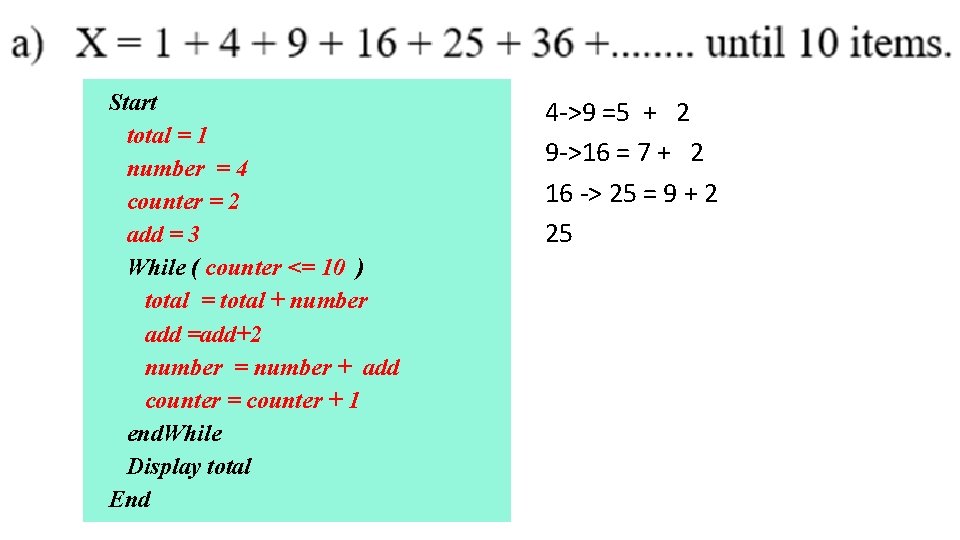
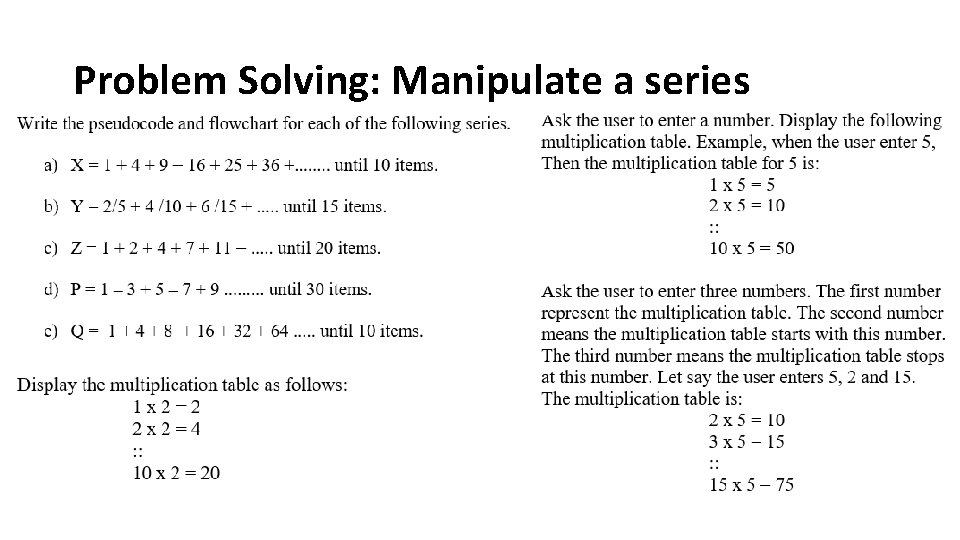
Start total = 1 number = 4 counter = 2 add = 3 While ( counter <= 10 ) total = total + number add =add+2 number = number + add counter = counter + 1 end. While Display total End 4 ->9 =5 + 2 9 ->16 = 7 + 2 16 -> 25 = 9 + 2 25
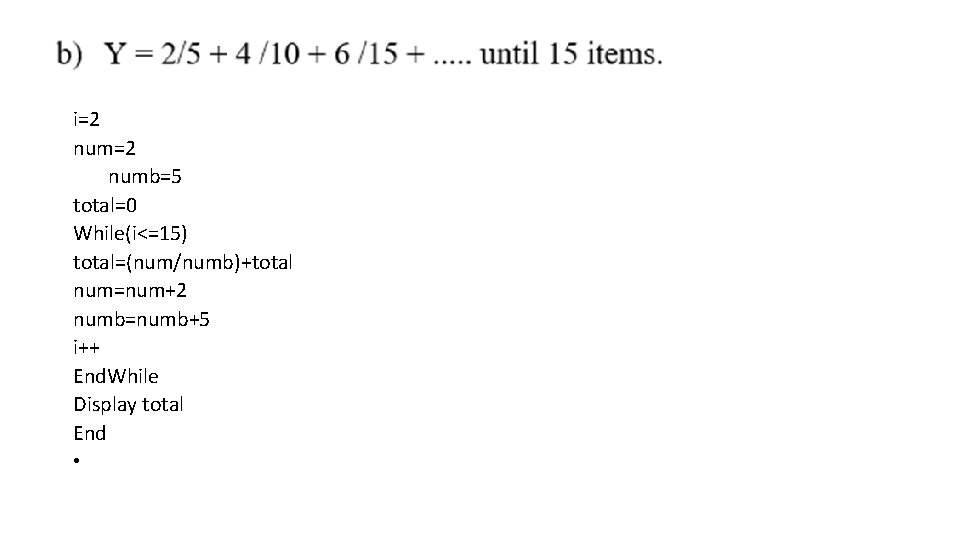
• tart i=2 num=2 numb=5 total=0 While(i<=15) total=(num/numb)+total num=num+2 numb=numb+5 i++ End. While Display total End •
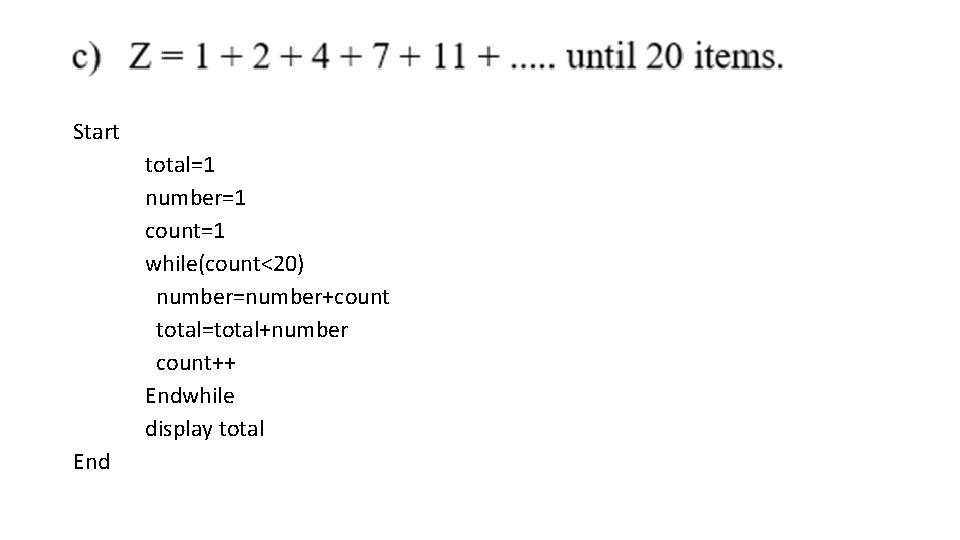
Start total=1 number=1 count=1 while(count<20) number=number+count total=total+number count++ Endwhile display total End
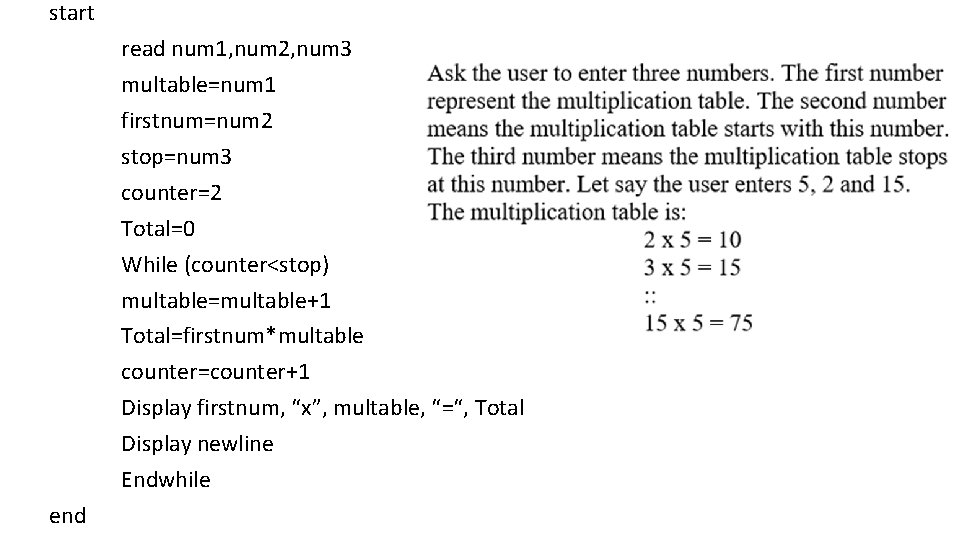
start read num 1, num 2, num 3 multable=num 1 firstnum=num 2 stop=num 3 counter=2 Total=0 While (counter<stop) multable=multable+1 Total=firstnum*multable counter=counter+1 Display firstnum, “x”, multable, “=“, Total Display newline Endwhile end

Iteration Control Structure Sentinel Loop
Iteration: Sentinel Loop • scenario where the exact number of repetition is unknown but there must be a condition to stop the repetition • the syntax is: Start initial value of a loop while ( condition ) statement(s) to be repeated statement to update the condition end. While End • all statements in between while. . end. While will be executed when the condition is TRUE • the repetition is stop when the condition is FALSE.
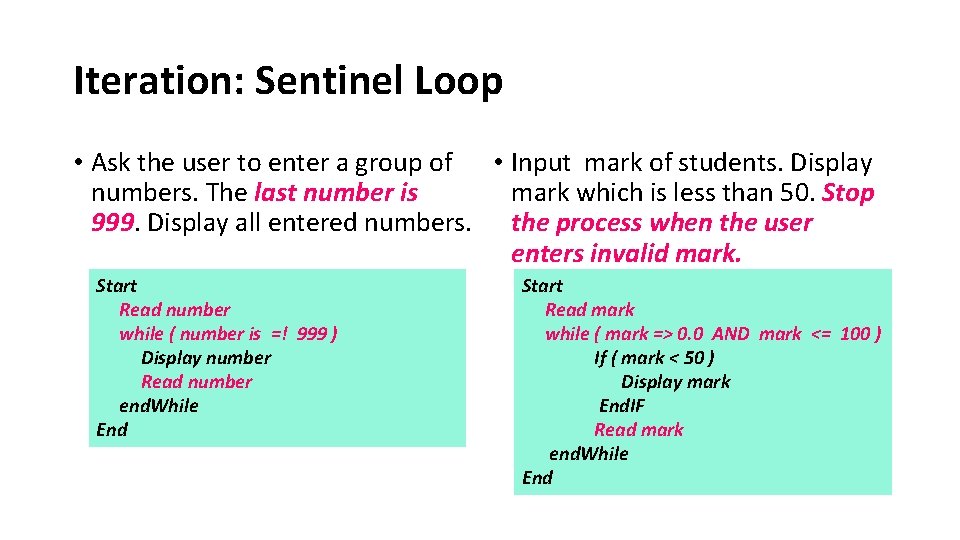
Iteration: Sentinel Loop • Ask the user to enter a group of • Input mark of students. Display numbers. The last number is mark which is less than 50. Stop 999. Display all entered numbers. the process when the user enters invalid mark. Start Read number while ( number is =! 999 ) Display number Read number end. While End Start Read mark while ( mark => 0. 0 AND mark <= 100 ) If ( mark < 50 ) Display mark End. IF Read mark end. While End
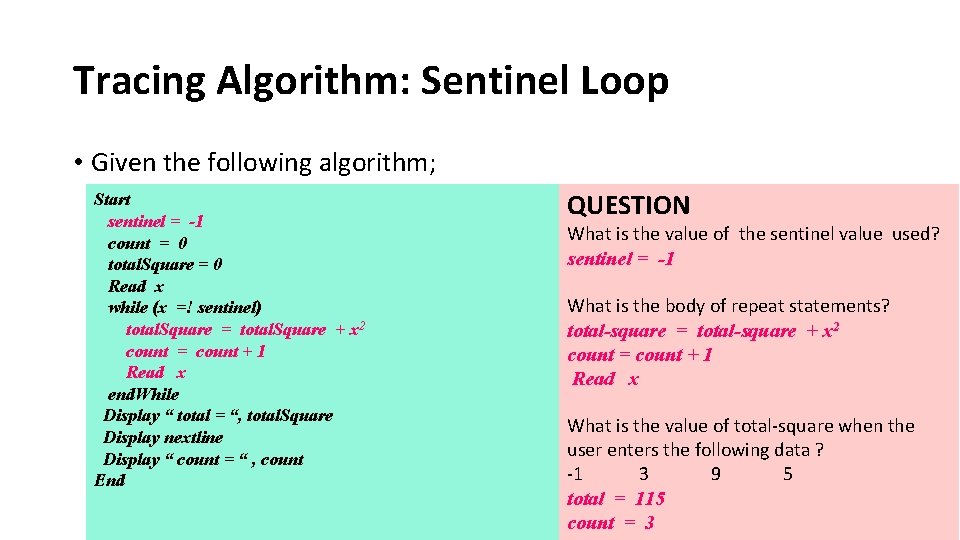
Tracing Algorithm: Sentinel Loop • Given the following algorithm; Start sentinel = -1 count = 0 total. Square = 0 Read x while (x =! sentinel) total. Square = total. Square + x 2 count = count + 1 Read x end. While Display “ total = “, total. Square Display nextline Display “ count = “ , count End QUESTION What is the value of the sentinel value used? sentinel = -1 What is the body of repeat statements? total-square = total-square + x 2 count = count + 1 Read x What is the value of total-square when the user enters the following data ? -1 3 9 5 total = 115 count = 3
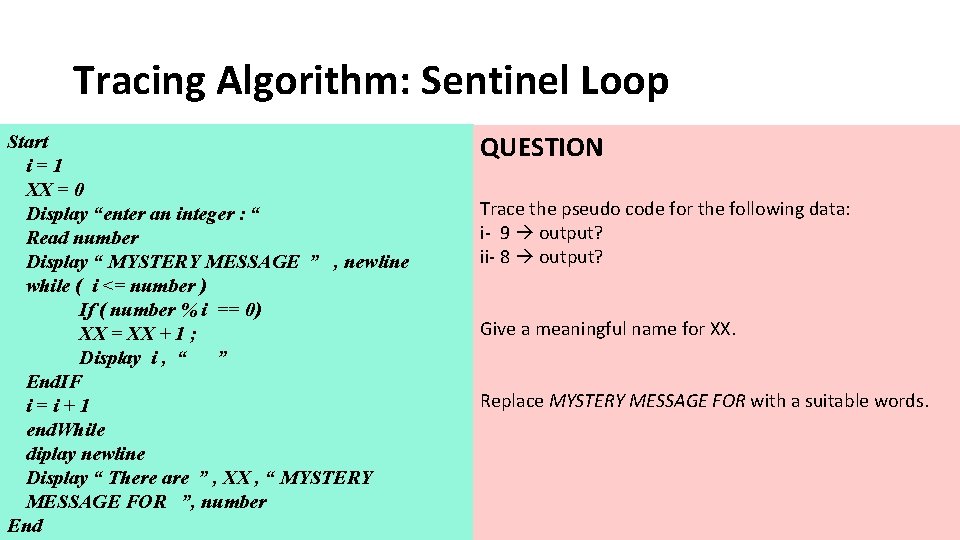
Tracing Algorithm: Sentinel Loop Start i = 1 • Given the following algorithm; XX = 0 Display “enter an integer : “ Read number Display “ MYSTERY MESSAGE ” , newline while ( i <= number ) If ( number % i == 0) XX = XX + 1 ; Display i , “ ” End. IF i=i+1 end. While diplay newline Display “ There are ” , XX , “ MYSTERY MESSAGE FOR ”, number End QUESTION Trace the pseudo code for the following data: i- 9 output? ii- 8 output? Give a meaningful name for XX. Replace MYSTERY MESSAGE FOR with a suitable words.
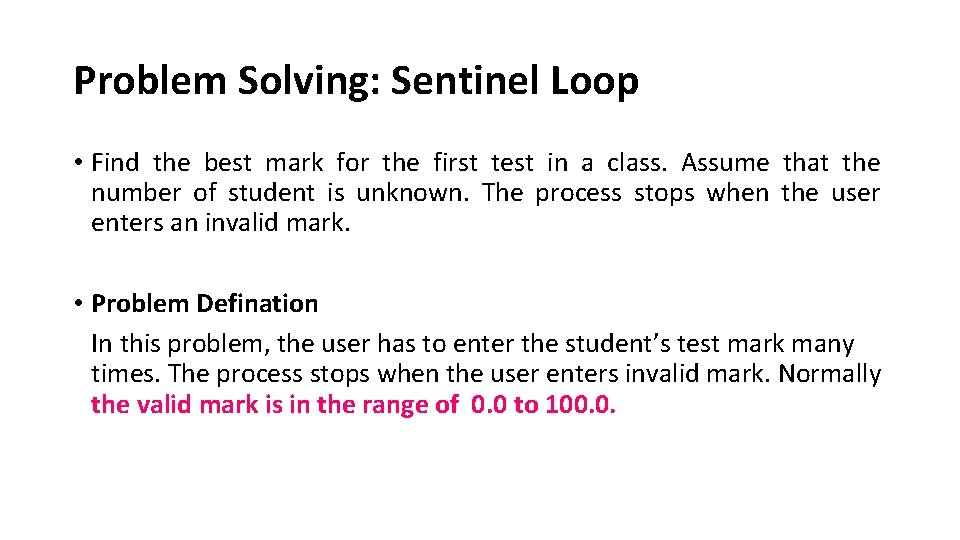
Problem Solving: Sentinel Loop • Find the best mark for the first test in a class. Assume that the number of student is unknown. The process stops when the user enters an invalid mark. • Problem Defination In this problem, the user has to enter the student’s test mark many times. The process stops when the user enters invalid mark. Normally the valid mark is in the range of 0. 0 to 100. 0.
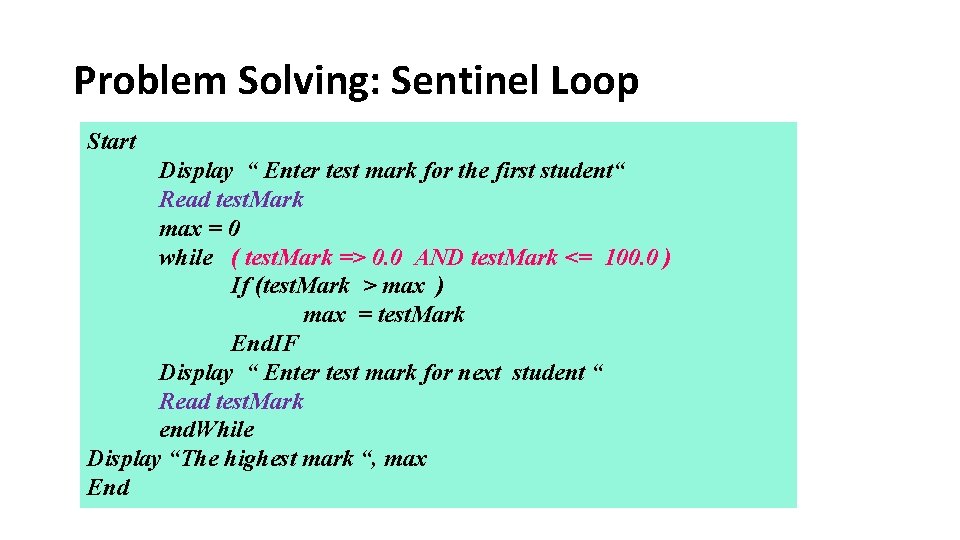
Problem Solving: Sentinel Loop Start Display “ Enter test mark for the first student“ Read test. Mark max = 0 while ( test. Mark => 0. 0 AND test. Mark <= 100. 0 ) If (test. Mark > max ) max = test. Mark End. IF Display “ Enter test mark for next student “ Read test. Mark end. While Display “The highest mark “, max End
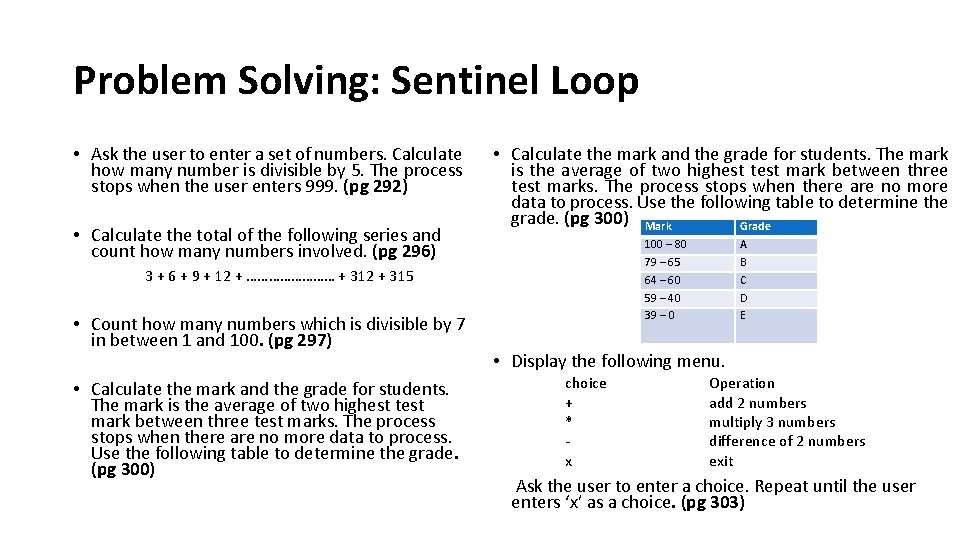
Problem Solving: Sentinel Loop • Ask the user to enter a set of numbers. Calculate how many number is divisible by 5. The process stops when the user enters 999. (pg 292) • Calculate the total of the following series and count how many numbers involved. (pg 296) • Calculate the mark and the grade for students. The mark is the average of two highest test mark between three test marks. The process stops when there are no more data to process. Use the following table to determine the grade. (pg 300) Mark Grade 100 – 80 79 – 65 64 – 60 59 – 40 39 – 0 3 + 6 + 9 + 12 + ………… + 312 + 315 • Count how many numbers which is divisible by 7 in between 1 and 100. (pg 297) • Calculate the mark and the grade for students. The mark is the average of two highest test mark between three test marks. The process stops when there are no more data to process. Use the following table to determine the grade. (pg 300) A B C D E • Display the following menu. choice + * x Operation add 2 numbers multiply 3 numbers difference of 2 numbers exit Ask the user to enter a choice. Repeat until the user enters ‘x’ as a choice. (pg 303)

Iteration Control Structure Infinite Loop
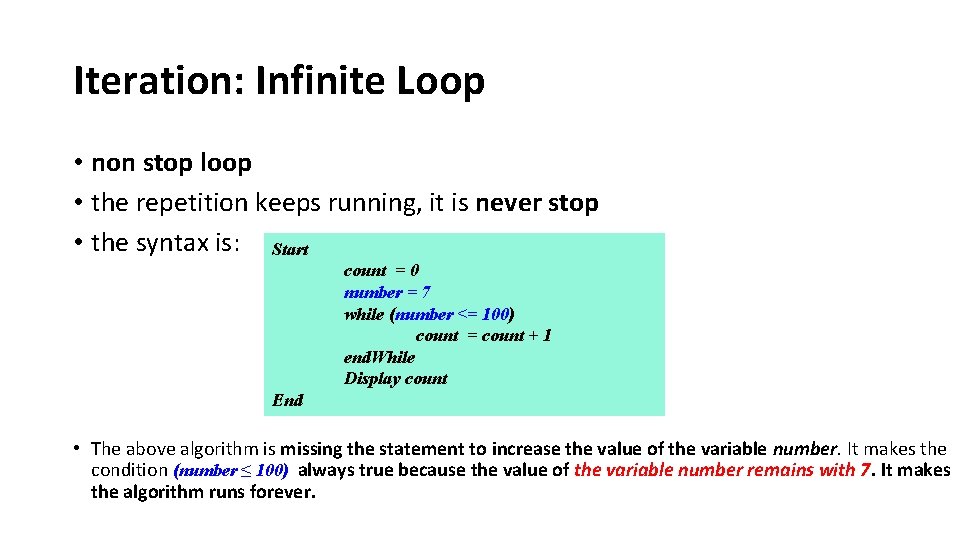
Iteration: Infinite Loop • non stop loop • the repetition keeps running, it is never stop • the syntax is: Start count = 0 number = 7 while (number <= 100) count = count + 1 end. While Display count End • The above algorithm is missing the statement to increase the value of the variable number. It makes the condition (number ≤ 100) always true because the value of the variable number remains with 7. It makes the algorithm runs forever.

Iteration Control Structure Nested Loop
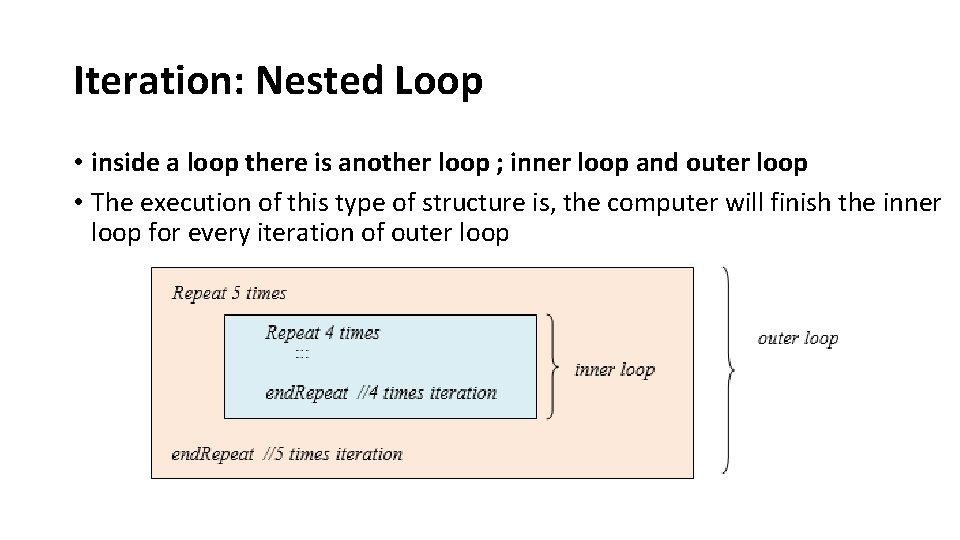
Iteration: Nested Loop • inside a loop there is another loop ; inner loop and outer loop • The execution of this type of structure is, the computer will finish the inner loop for every iteration of outer loop Start End count 0 number 7 while (number ≤ 100) count + 1 end. While Display count

Iteration Control Structure Draw a Diagram Using Nested Loop
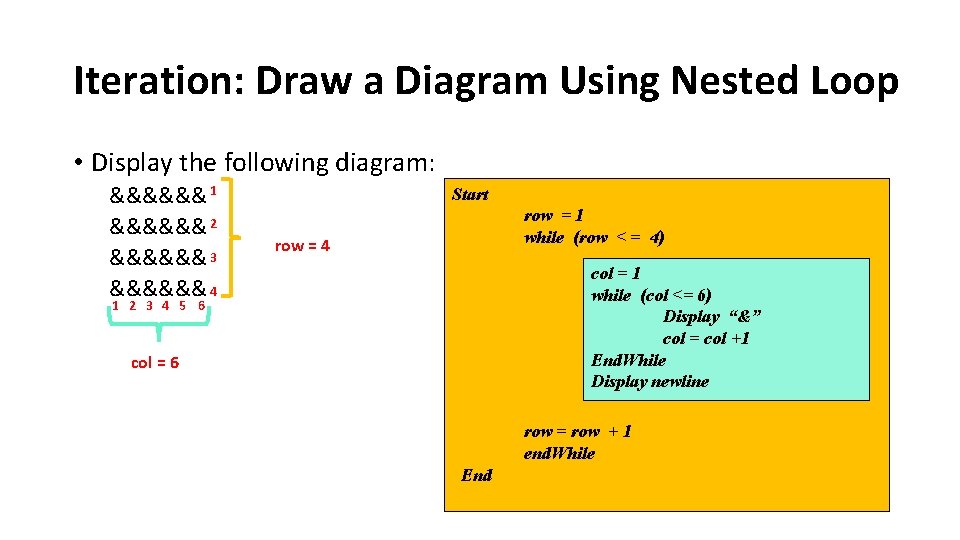
Iteration: Draw a Diagram Using Nested Loop • Display the following diagram: &&&&&& 1 &&&&&& 2 &&&&&& 3 &&&&&& 4 Start row = 1 while (row < = 4) row = 4 col = 1 while (col <= 6) Display “&” col = col +1 End. While Display newline 1 2 3 4 5 6 col = 6 row = row + 1 end. While End
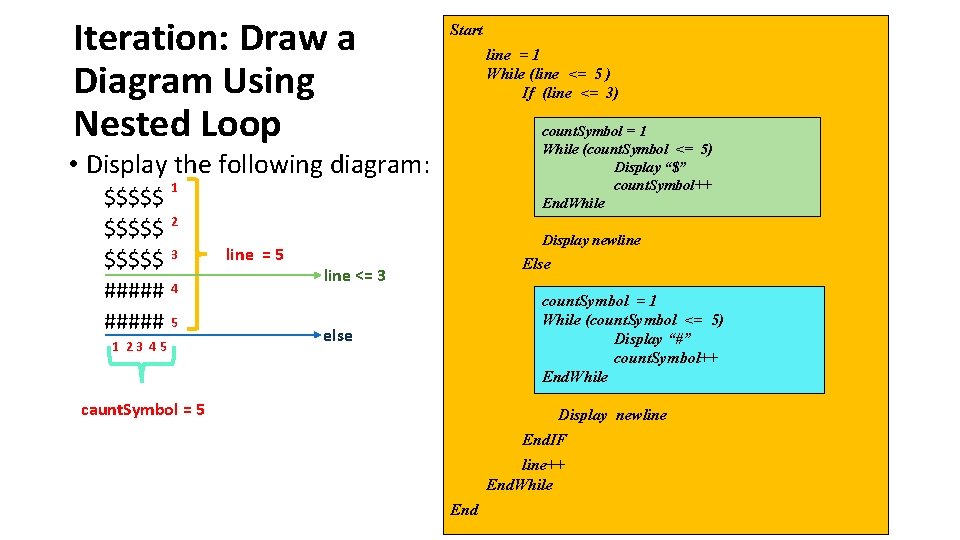
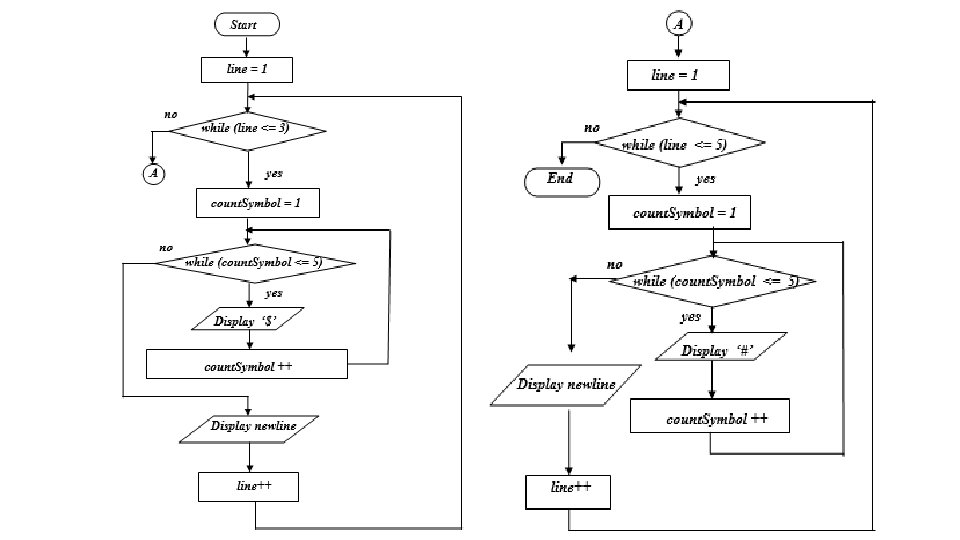
Iteration: Draw a Diagram Using Nested Loop Start line = 1 While (line <= 5 ) If (line <= 3) count. Symbol = 1 While (count. Symbol <= 5) Display “$” count. Symbol++ End. While • Display the following diagram: 1 $$$$$ 2 $$$$$ 3 ##### 4 ##### 5 1 23 45 line = 5 Display newline Else line <= 3 count. Symbol = 1 While (count. Symbol <= 5) Display “#” count. Symbol++ End. While else caunt. Symbol = 5 Display newline End. IF line++ End. While End
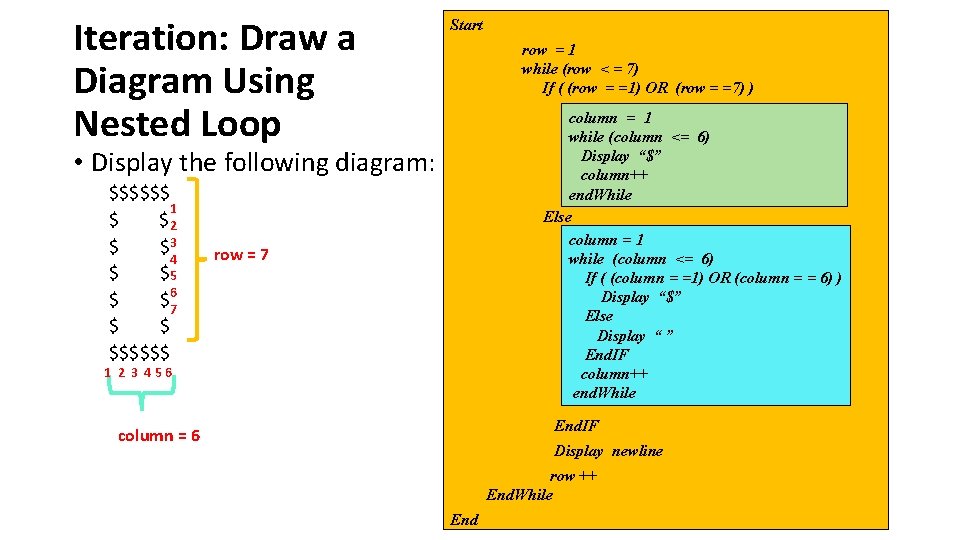
Iteration: Draw a Diagram Using Nested Loop Start row = 1 while (row < = 7) If ( (row = =1) OR (row = =7) ) column = 1 while (column <= 6) Display “$” column++ end. While Else column = 1 while (column <= 6) If ( (column = =1) OR (column = = 6) ) Display “$” Else Display “ ” End. IF column++ end. While • Display the following diagram: $$$$$$ 1 $ $ 2 $ $3 4 $ $5 $ $67 $ $ $$$$$$ row = 7 1 2 3 456 End. IF column = 6 Display newline row ++ End. While End
Iteration: Draw a Diagram Using Nested Loop Flow Chart ?
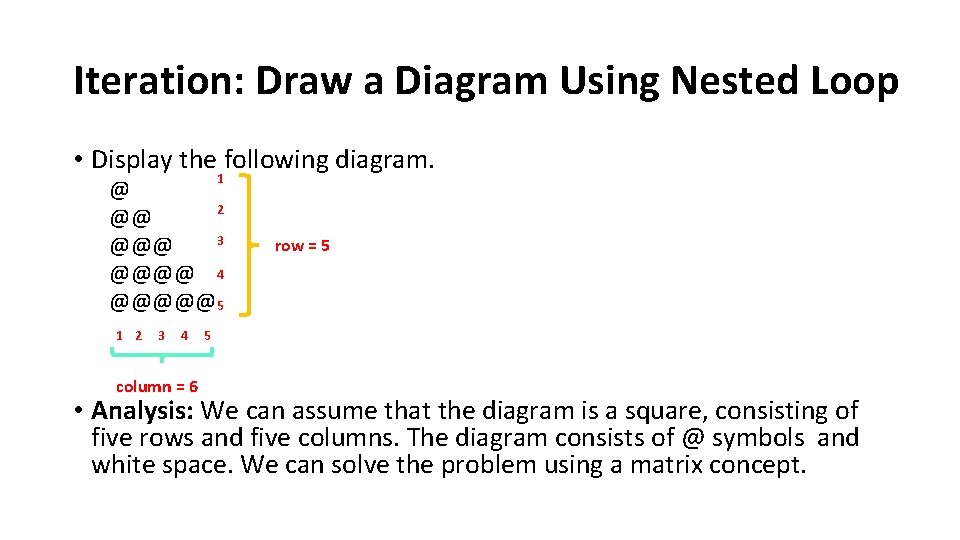
Iteration: Draw a Diagram Using Nested Loop • Display the following diagram. 1 @ 2 @@ 3 @@@@ 4 @@@@@5 1 2 3 4 column = 6 row = 5 5 • Analysis: We can assume that the diagram is a square, consisting of five rows and five columns. The diagram consists of @ symbols and white space. We can solve the problem using a matrix concept.
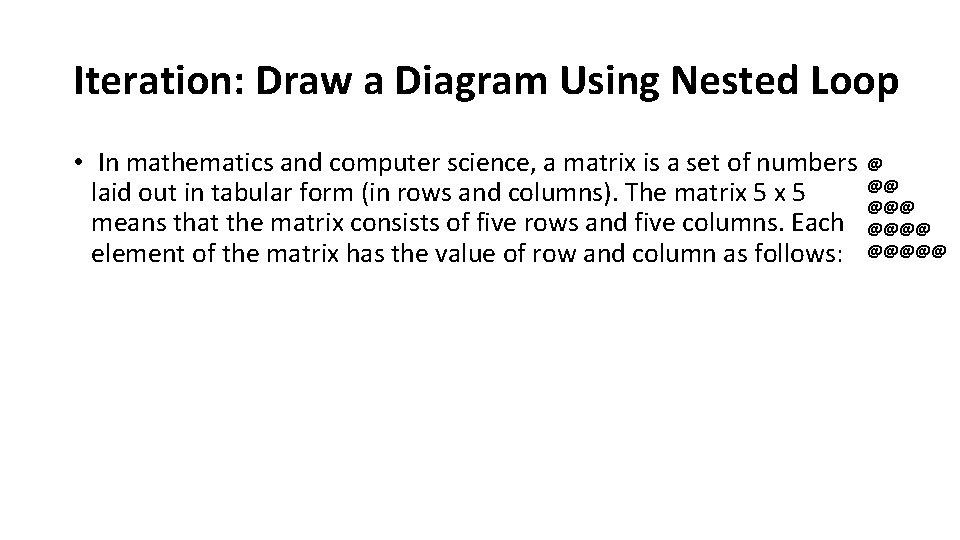
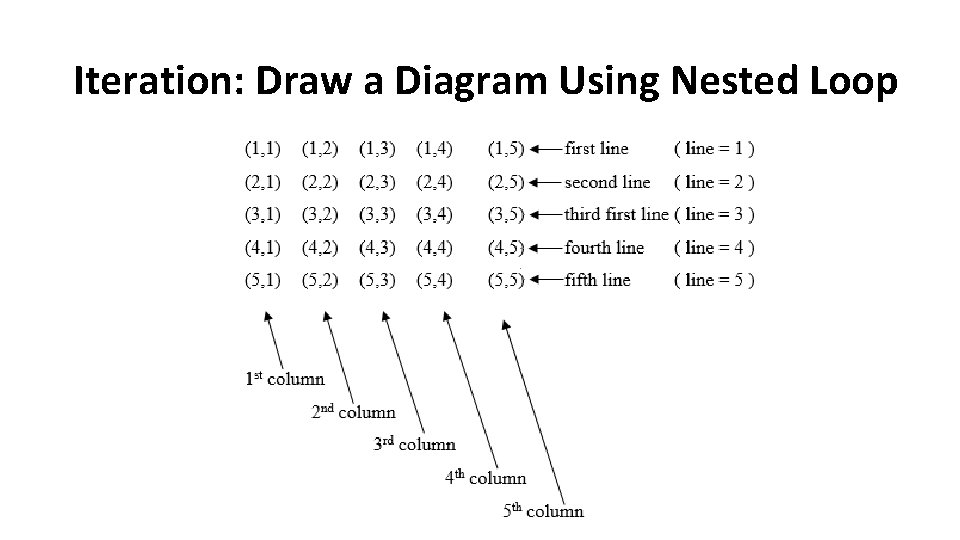
Iteration: Draw a Diagram Using Nested Loop • In mathematics and computer science, a matrix is a set of numbers @ @@ laid out in tabular form (in rows and columns). The matrix 5 @@@ means that the matrix consists of five rows and five columns. Each @@@@ element of the matrix has the value of row and column as follows: @@@@@
Iteration: Draw a Diagram Using Nested Loop
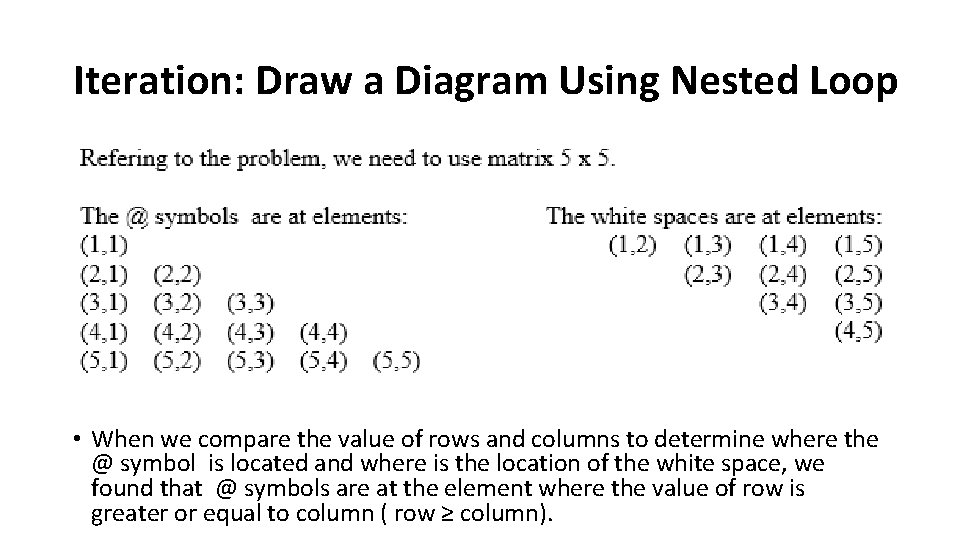
Iteration: Draw a Diagram Using Nested Loop • When we compare the value of rows and columns to determine where the @ symbol is located and where is the location of the white space, we found that @ symbols are at the element where the value of row is greater or equal to column ( row ≥ column).
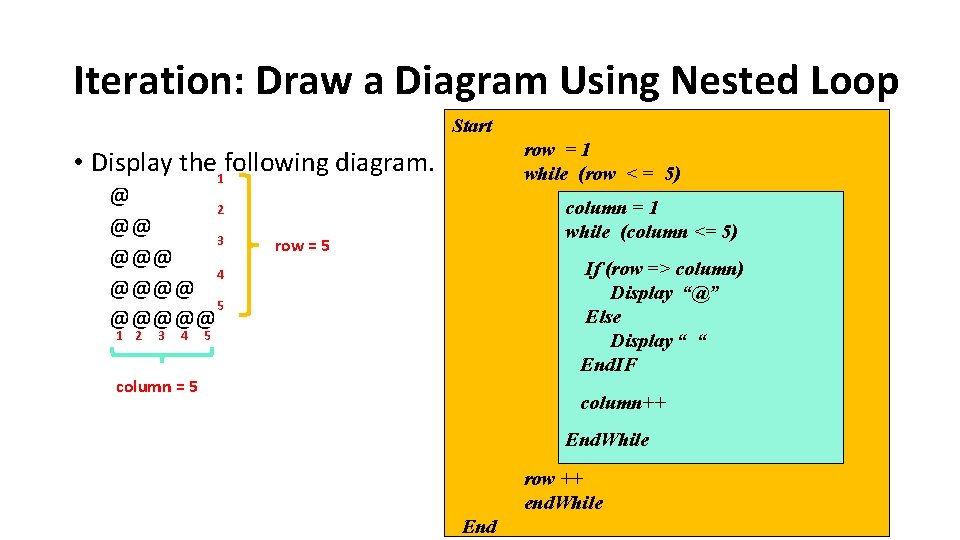
Iteration: Draw a Diagram Using Nested Loop Start row = 1 while (row < = 5) • Display the following diagram. 1 @ 2 @@ 3 @@@ 4 @@@@ 5 @@@@@ 1 2 3 4 column = 1 while (column <= 5) row = 5 If (row => column) Display “@” Else Display “ “ End. IF 5 column = 5 column++ End. While row ++ end. While End
Iteration: Draw a Diagram Using Nested Loop Flow Chart ?
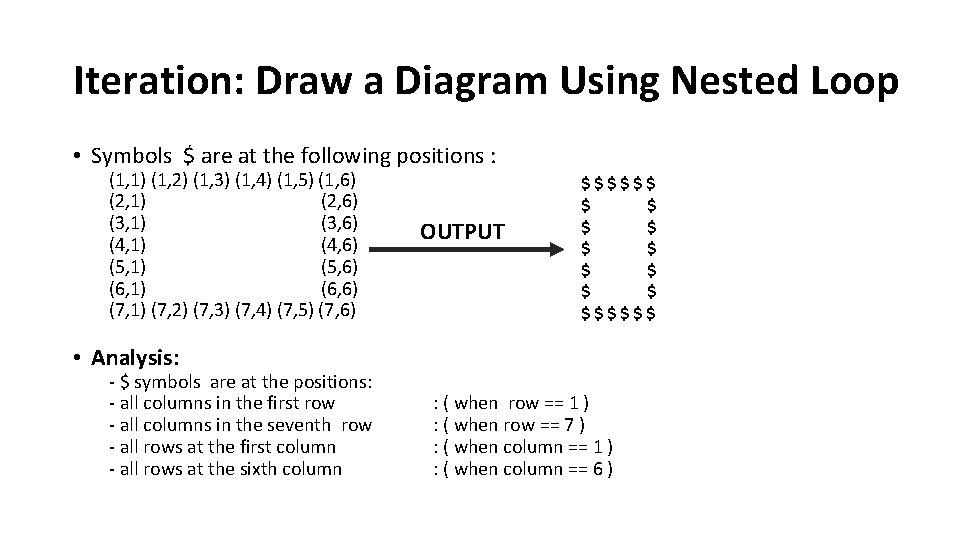
Iteration: Draw a Diagram Using Nested Loop • Symbols $ are at the following positions : (1, 1) (1, 2) (1, 3) (1, 4) (1, 5) (1, 6) (2, 1) (2, 6) (3, 1) (3, 6) (4, 1) (4, 6) (5, 1) (5, 6) (6, 1) (6, 6) (7, 1) (7, 2) (7, 3) (7, 4) (7, 5) (7, 6) OUTPUT $$$$$$ $ $ $$$$$$ • Analysis: - $ symbols are at the positions: - all columns in the first row - all columns in the seventh row - all rows at the first column - all rows at the sixth column : ( when row == 1 ) : ( when row == 7 ) : ( when column == 1 ) : ( when column == 6 )
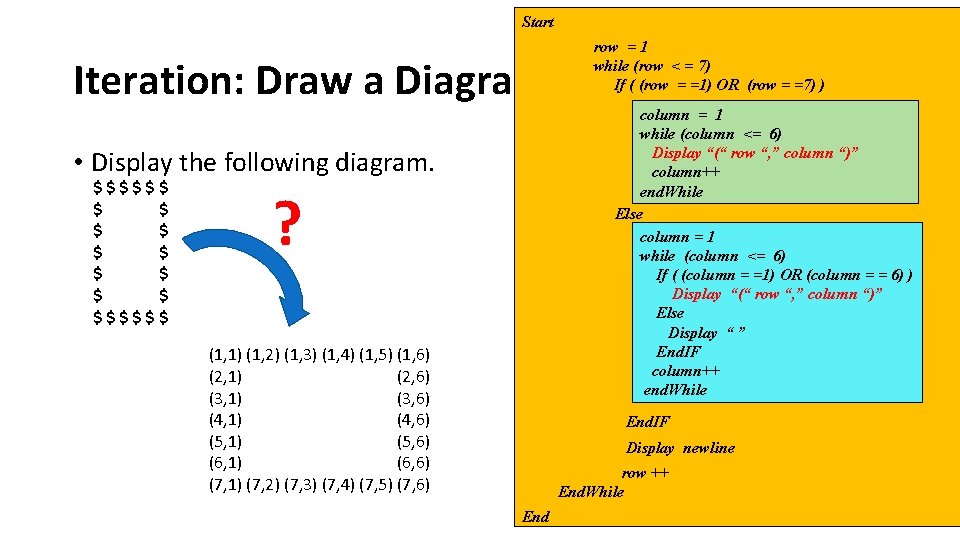
Start row = 1 while (row < = 7) If ( (row = =1) OR (row = =7) ) Iteration: Draw a Diagram Using Nested Loop column = 1 while (column <= 6) Display “(“ row “, ” column “)” column++ end. While Else column = 1 while (column <= 6) If ( (column = =1) OR (column = = 6) ) Display “(“ row “, ” column “)” Else Display “ ” End. IF column++ end. While • Display the following diagram. $$$$$$ $ $ $$$$$$ ? (1, 1) (1, 2) (1, 3) (1, 4) (1, 5) (1, 6) (2, 1) (2, 6) (3, 1) (3, 6) (4, 1) (4, 6) (5, 1) (5, 6) (6, 1) (6, 6) (7, 1) (7, 2) (7, 3) (7, 4) (7, 5) (7, 6) End. IF Display newline row ++ End. While End
Iteration: Draw a Diagram Using Nested Loop Flow Chart ?
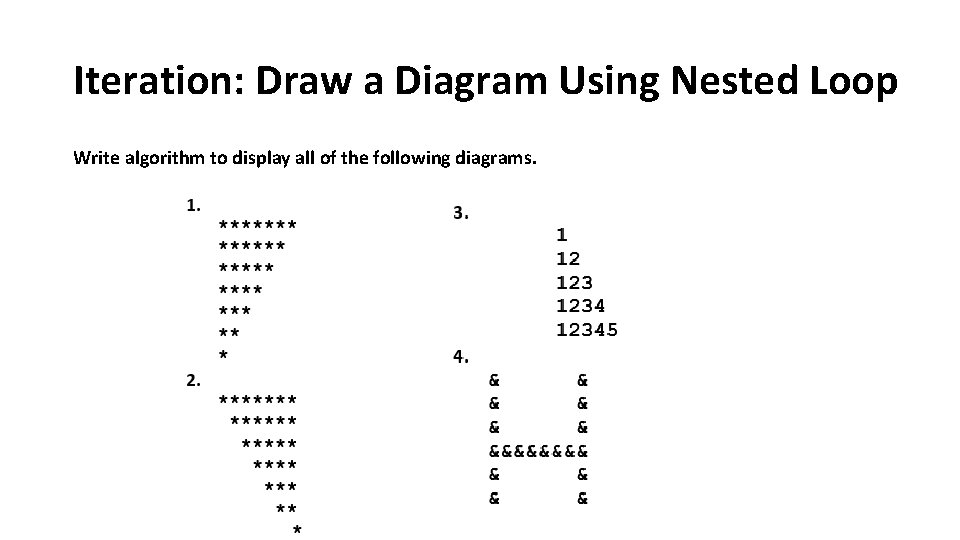
Iteration: Draw a Diagram Using Nested Loop Write algorithm to display all of the following diagrams.
- Slides: 52