
Control structure Repetition Part 2 01204111 Computers and






- Slides: 56
Control structure: Repetition - Part 2 01204111 Computers and Programming Chalermsak Chatdokmaiprai Department of Computer Engineering Kasetsart University Cliparts are taken from http: //openclipart. org Revised 2018 -07 -16
Outline ØDefinite Loops : A Quick Review ØConditional Loops : The while Statement ØA Logical Bug : Infinite Loops ØA Common Loop Pattern : Counting Loops ØA Common Loop Pattern : Interactive Loops ØA Common Loop Pattern : Sentinel Loops ØOne More Example : Finding the Maximum 2
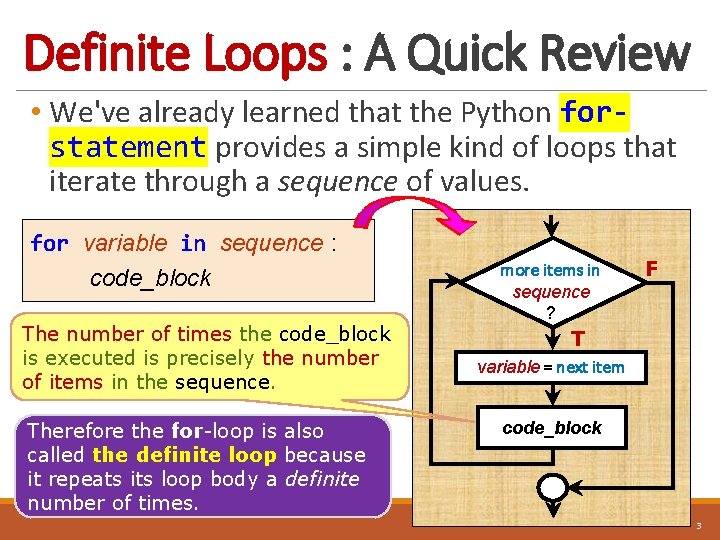
Definite Loops : A Quick Review • We've already learned that the Python forstatement provides a simple kind of loops that iterate through a sequence of values. for variable in sequence : code_block The number of times the code_block is executed is precisely the number of items in the sequence. Therefore the for-loop is also called the definite loop because it repeats its loop body a definite number of times. more items in sequence ? F T variable = next item code_block 3
Does for-statemen t work for all kinds o f repetitive algorithms? 4
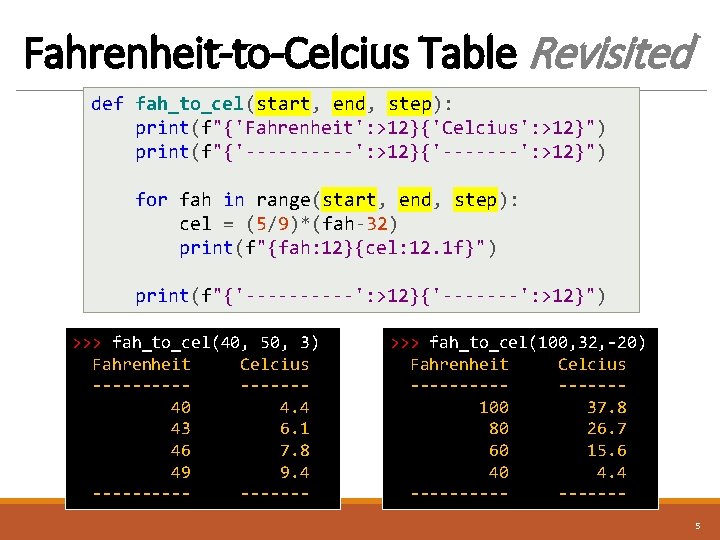
Fahrenheit-to-Celcius Table Revisited def fah_to_cel(start, end, step): print(f"{'Fahrenheit': >12}{'Celcius': >12}") print(f"{'-----': >12}{'-------': >12}") for fah in range(start, end, step): cel = (5/9)*(fah-32) print(f"{fah: 12}{cel: 12. 1 f}") print(f"{'-----': >12}{'-------': >12}") >>> fah_to_cel(40, 50, 3) Fahrenheit Celcius --------40 4. 4 43 6. 1 46 7. 8 49 9. 4 -------- >>> fah_to_cel(100, 32, -20) Fahrenheit Celcius --------100 37. 8 80 26. 7 60 15. 6 40 4. 4 --------5
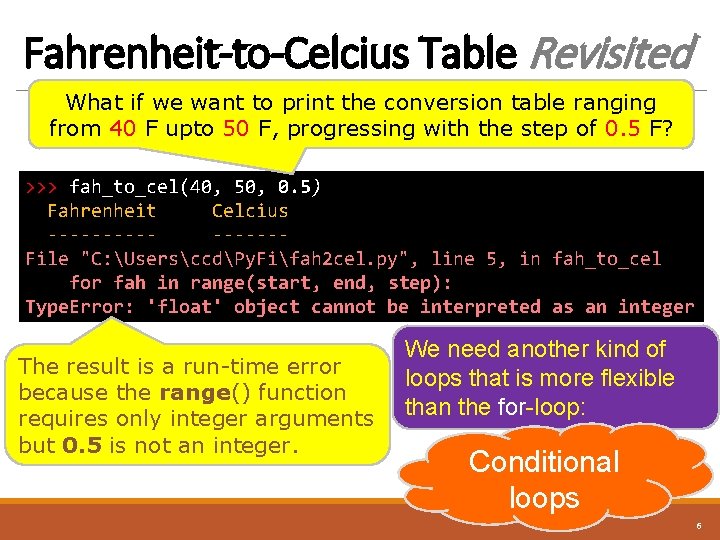
Fahrenheit-to-Celcius Table Revisited What if we want to print the conversion table ranging from 40 F upto 50 F, progressing with the step of 0. 5 F? >>> fah_to_cel(40, 50, 0. 5) Fahrenheit Celcius --------File "C: UsersccdPy. Fifah 2 cel. py", line 5, in fah_to_cel for fah in range(start, end, step): Type. Error: 'float' object cannot be interpreted as an integer The result is a run-time error because the range() function requires only integer arguments but 0. 5 is not an integer. We need another kind of loops that is more flexible than the for-loop: Conditional loops 6
Conditional Loops : The while Stateme nt 7
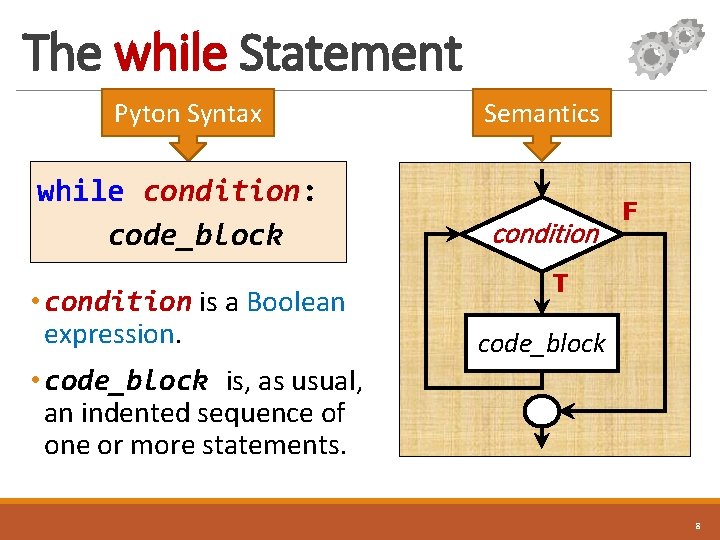
The while Statement Pyton Syntax while condition: code_block • condition is a Boolean expression. Semantics condition F T code_block • code_block is, as usual, an indented sequence of one or more statements. 8
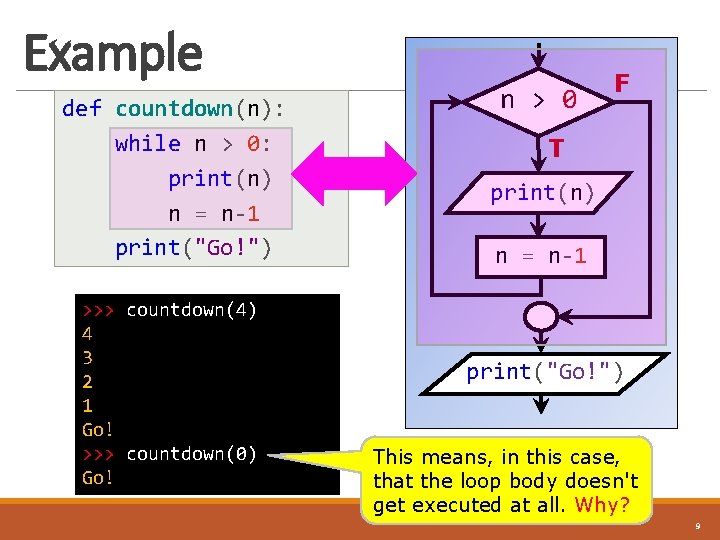
Example def countdown(n): while n > 0: print(n) n = n-1 print("Go!") >>> countdown(4) 4 3 2 1 Go! >>> countdown(0) Go! n > 0 F T print(n) n = n-1 print("Go!") This means, in this case, that the loop body doesn't get executed at all. Why? 9
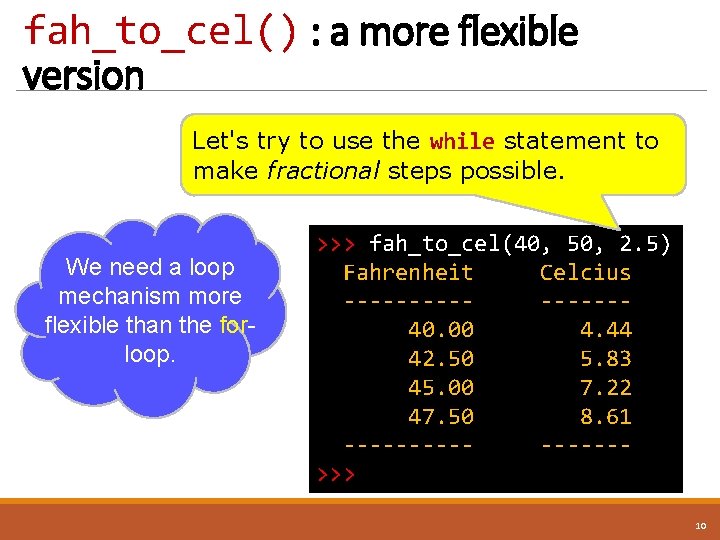
fah_to_cel() : a more flexible version Let's try to use the while statement to make fractional steps possible. We need a loop mechanism more flexible than the forloop. >>> fah_to_cel(40, 50, 2. 5) Fahrenheit Celcius --------40. 00 4. 44 42. 50 5. 83 45. 00 7. 22 47. 50 8. 61 -------->>> 10
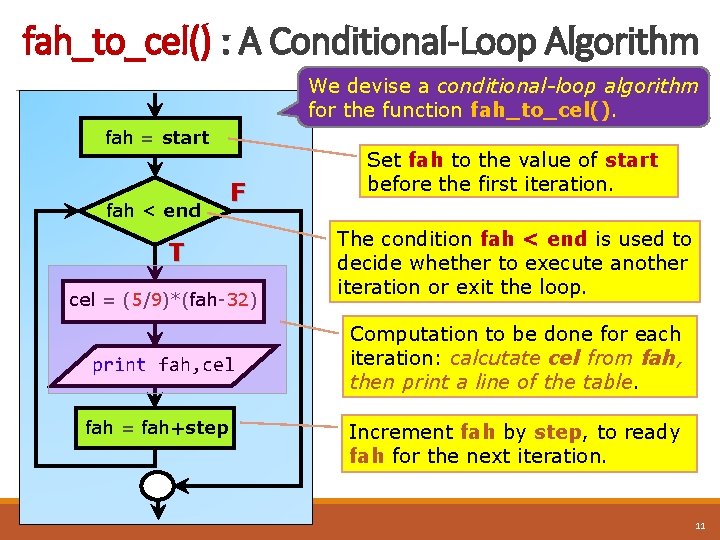
fah_to_cel() : A Conditional-Loop Algorithm We devise a conditional-loop algorithm for the function fah_to_cel(). fah = start fah < end F T cel = (5/9)*(fah-32) print fah, cel fah = fah+step Set fah to the value of start before the first iteration. The condition fah < end is used to decide whether to execute another iteration or exit the loop. Computation to be done for each iteration: calcutate cel from fah, then print a line of the table. Increment fah by step, to ready fah for the next iteration. 11
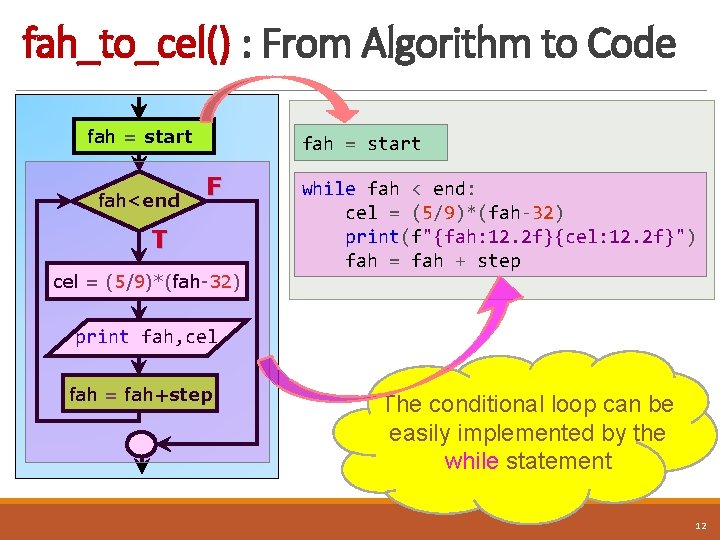
fah_to_cel() : From Algorithm to Code fah = start fah<end fah = start F T cel = (5/9)*(fah-32) while fah < end: cel = (5/9)*(fah-32) print(f"{fah: 12. 2 f}{cel: 12. 2 f}") fah = fah + step print fah, cel fah = fah+step The conditional loop can be easily implemented by the while statement 12
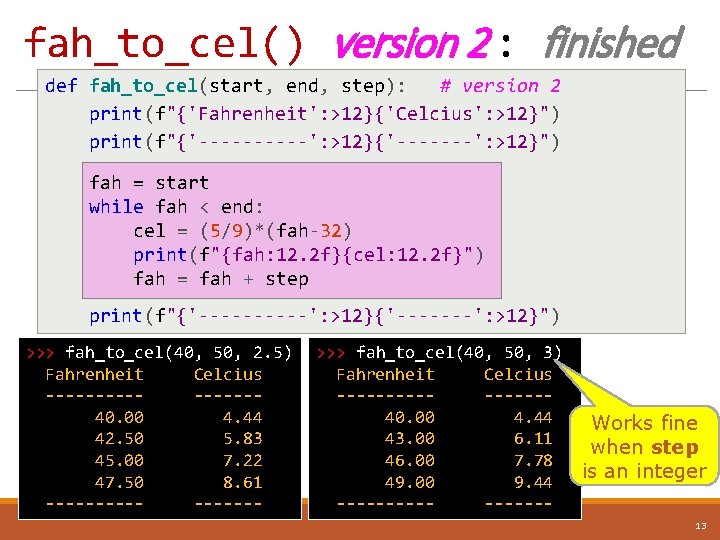
fah_to_cel() version 2 : finished def fah_to_cel(start, end, step): # version 2 print(f"{'Fahrenheit': >12}{'Celcius': >12}") print(f"{'-----': >12}{'-------': >12}") fah = start while fah < end: cel = (5/9)*(fah-32) print(f"{fah: 12. 2 f}{cel: 12. 2 f}") fah = fah + step print(f"{'-----': >12}{'-------': >12}") >>> fah_to_cel(40, 50, 2. 5) Fahrenheit Celcius --------40. 00 4. 44 42. 50 5. 83 45. 00 7. 22 47. 50 8. 61 -------- >>> fah_to_cel(40, 50, 3) Fahrenheit Celcius --------40. 00 4. 44 43. 00 6. 11 46. 00 7. 78 49. 00 9. 44 -------- Works fine when step is an integer 13
A Logical Bug : Infinite Loops 14
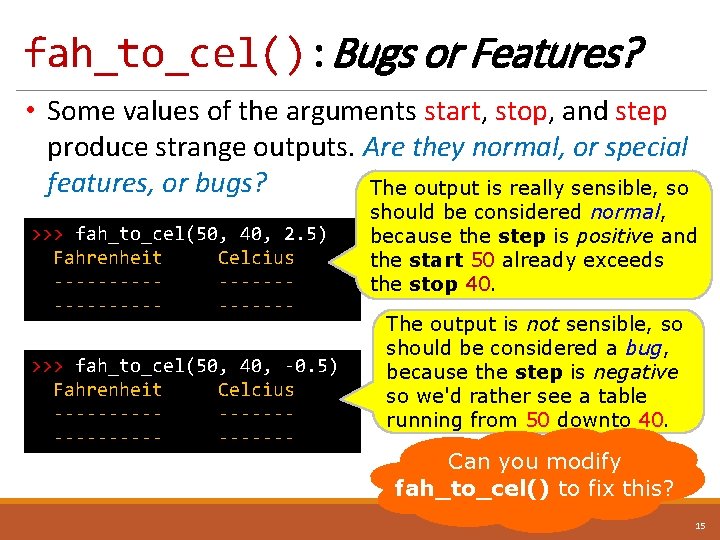
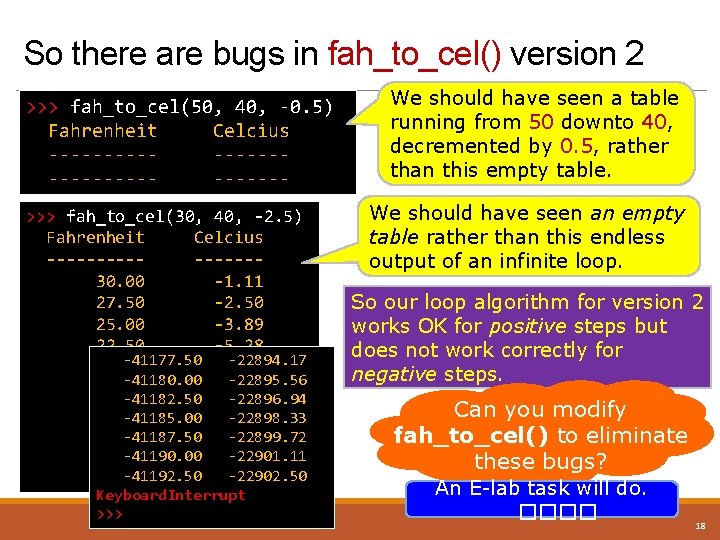
fah_to_cel(): Bugs or Features? • Some values of the arguments start, stop, and step produce strange outputs. Are they normal, or special features, or bugs? The output is really sensible, so >>> fah_to_cel(50, 40, 2. 5) Fahrenheit Celcius --------------->>> fah_to_cel(50, 40, -0. 5) Fahrenheit Celcius ---------------- should be considered normal, because the step is positive and the start 50 already exceeds the stop 40. The output is not sensible, so should be considered a bug, because the step is negative so we'd rather see a table running from 50 downto 40. Can you modify fah_to_cel() to fix this? 15
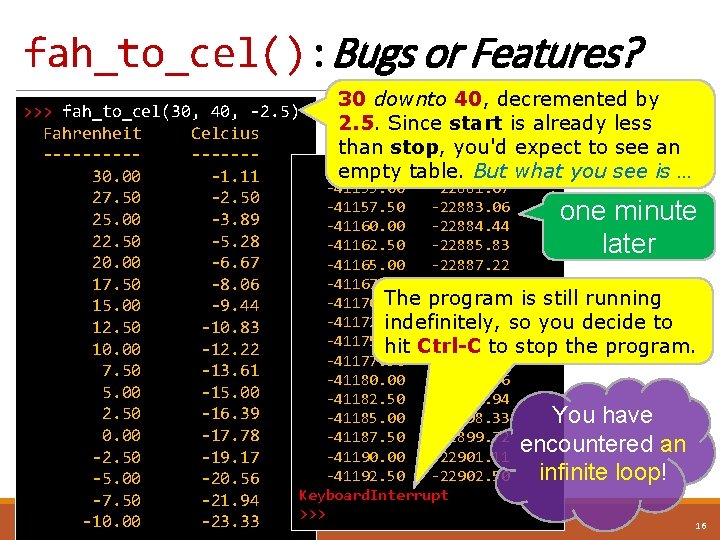
fah_to_cel(): Bugs or Features? 30 downto 40, decremented by >>> fah_to_cel(30, 40, -2. 5) 2. 5. Since start is already less Fahrenheit Celcius than stop, you'd expect to see an --------41152. 50 -22880. 28 empty table. But what you see is … 30. 00 -1. 11 -41155. 00 -22881. 67 27. 50 -2. 50 -41157. 50 -22883. 06 one minute 25. 00 -3. 89 -41160. 00 -22884. 44 22. 50 -5. 28 -41162. 50 -22885. 83 later 20. 00 -6. 67 -41165. 00 -22887. 22 -41167. 50 -22888. 61 17. 50 -8. 06 The program -41170. 00 -22890. 00 is still running 15. 00 -9. 44 -41172. 50 -22891. 39 so you decide to indefinitely, 12. 50 -10. 83 -41175. 00 -22892. 78 hit Ctrl-C to stop the program. 10. 00 -12. 22 -41177. 50 -22894. 17 7. 50 -13. 61 -41180. 00 -22895. 56 5. 00 -15. 00 -41182. 50 -22896. 94 2. 50 -16. 39 You have -41185. 00 -22898. 33 0. 00 -17. 78 -41187. 50 -22899. 72 encountered an -41190. 00 -22901. 11 -2. 50 -19. 17 infinite loop! -41192. 50 -22902. 50 -5. 00 -20. 56 Keyboard. Interrupt -7. 50 -21. 94 >>> -10. 00 -23. 33 16
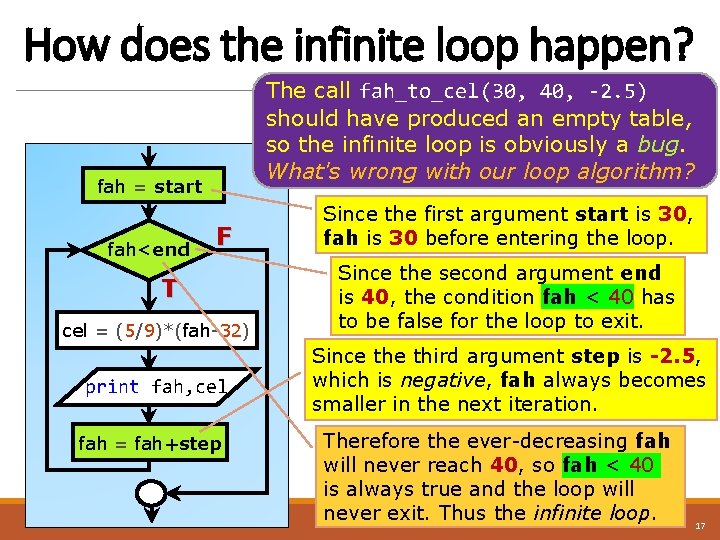
How does the infinite loop happen? The call fah_to_cel(30, 40, -2. 5) should have produced an empty table, so the infinite loop is obviously a bug. What's wrong with our loop algorithm? fah = start fah<end F T cel = (5/9)*(fah-32) print fah, cel fah = fah+step Since the first argument start is 30, fah is 30 before entering the loop. Since the second argument end is 40, the condition fah < 40 has to be false for the loop to exit. Since third argument step is -2. 5, which is negative, fah always becomes smaller in the next iteration. Therefore the ever-decreasing fah will never reach 40, so fah < 40 is always true and the loop will never exit. Thus the infinite loop. 17
So there are bugs in fah_to_cel() version 2 >>> fah_to_cel(50, 40, -0. 5) Fahrenheit Celcius --------------->>> fah_to_cel(30, 40, -2. 5) Fahrenheit Celcius --------30. 00 -1. 11 27. 50 -2. 50 25. 00 -3. 89 22. 50 -5. 28 -41177. 50 -6. 67 -22894. 17 20. 00 -41180. 00 -22895. 56 17. 50 -8. 06 -41182. 50 -22896. 94 15. 00 -41185. 00 -9. 44 -22898. 33 12. 50 -41187. 50 -10. 83 -22899. 72 10. 00 -41190. 00 -12. 22 -22901. 11 -41192. 50 -13. 61 -22902. 50 7. 50 Keyboard. Interrupt >>> We should have seen a table running from 50 downto 40, decremented by 0. 5, rather than this empty table. We should have seen an empty table rather than this endless output of an infinite loop. So our loop algorithm for version 2 works OK for positive steps but does not work correctly for negative steps. Can you modify fah_to_cel() to eliminate these bugs? An E-lab task will do. ���� 18
A Common Loop Pattern : Counting Loops 19
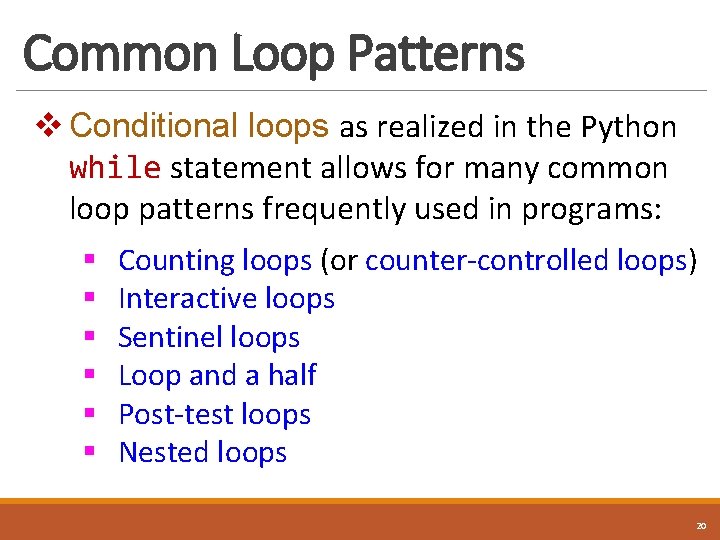
Common Loop Patterns v Conditional loops as realized in the Python while statement allows for many common loop patterns frequently used in programs: § § § Counting loops (or counter-controlled loops) Interactive loops Sentinel loops Loop and a half Post-test loops Nested loops 20
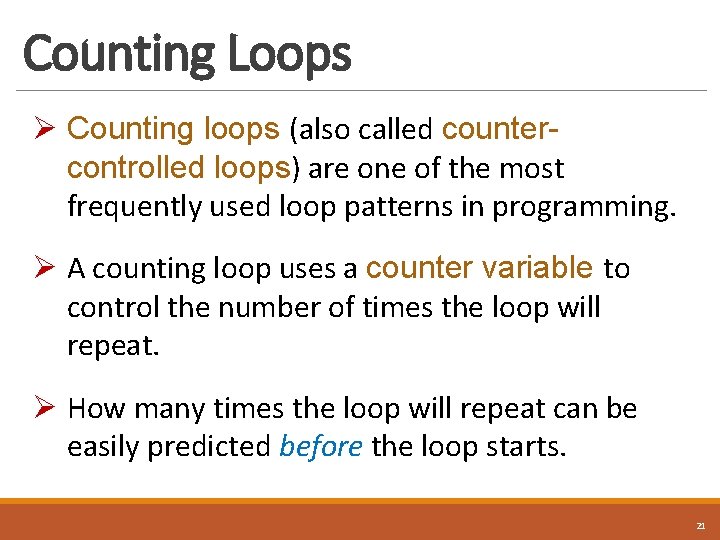
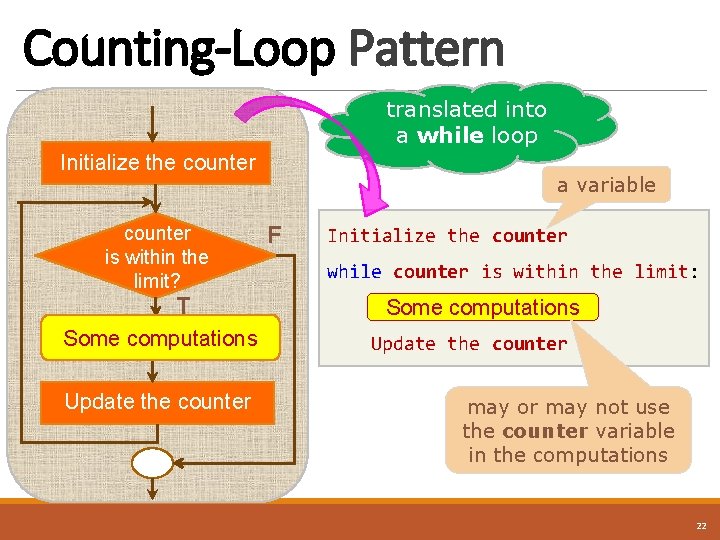
Counting Loops Ø Counting loops (also called countercontrolled loops) are one of the most frequently used loop patterns in programming. Ø A counting loop uses a counter variable to control the number of times the loop will repeat. Ø How many times the loop will repeat can be easily predicted before the loop starts. 21
Counting-Loop Pattern translated into a while loop Initialize the counter is within the limit? T Some computations Update the counter a variable F Initialize the counter while counter is within the limit: Some computations Update the counter may or may not use the counter variable in the computations 22
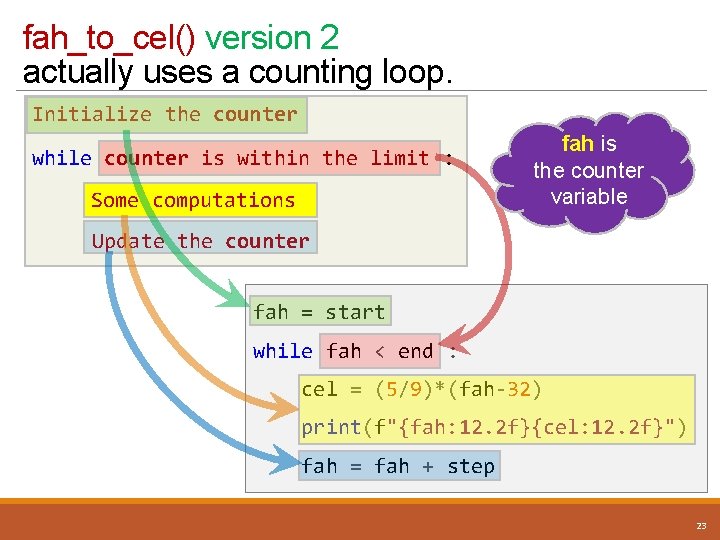
fah_to_cel() version 2 actually uses a counting loop. Initialize the counter while counter is within the limit : Some computations fah is the counter variable Update the counter fah = start while fah < end : cel = (5/9)*(fah-32) print(f"{fah: 12. 2 f}{cel: 12. 2 f}") fah = fah + step 23
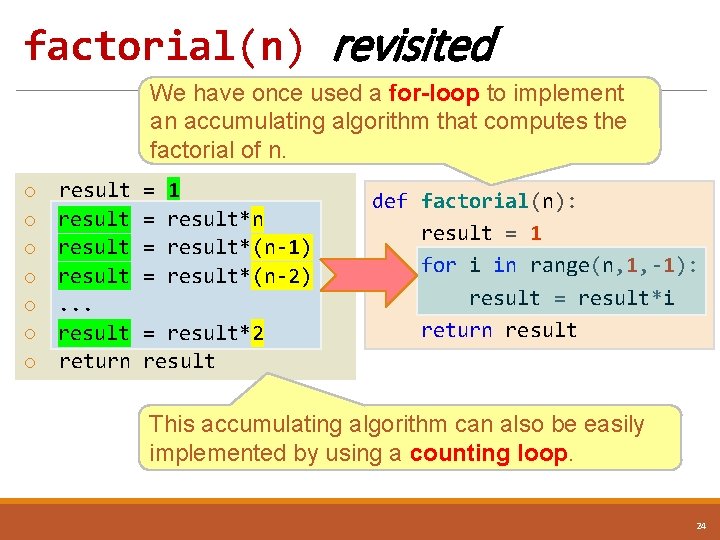
factorial(n) revisited We have once used a for-loop to implement an accumulating algorithm that computes the factorial of n. o o o o result. . . result return = = 1 result*n result*(n-1) result*(n-2) = result*2 result def factorial(n): result = 1 for i in range(n, 1, -1): result = result*i return result This accumulating algorithm can also be easily implemented by using a counting loop. 24
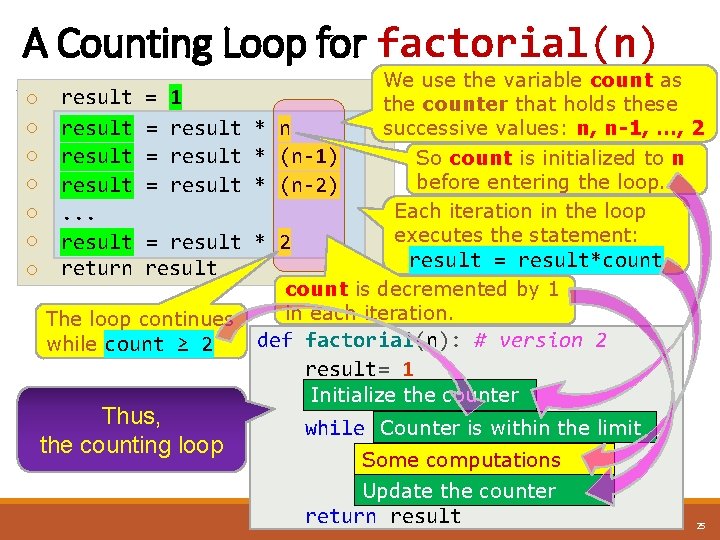
A Counting Loop for factorial(n) o o o o result. . . result return = = 1 result*n result * n result*(n-1) result * (n-1) result*(n-2) result * (n-2) = result*2 result * 2 result The loop continues while count ≥ 2 Thus, the counting loop We use the variable count as the counter that holds these successive values: n, n-1, …, 2 So count is initialized to n before entering the loop. Each iteration in the loop executes the statement: result = result*count is decremented by 1 in each iteration. def factorial(n): # version 2 result= 1 Initialize count = nthe counter Counter>=is 2: within the limit while count result = result*count Some computations count-1 Update= the counter return result 25
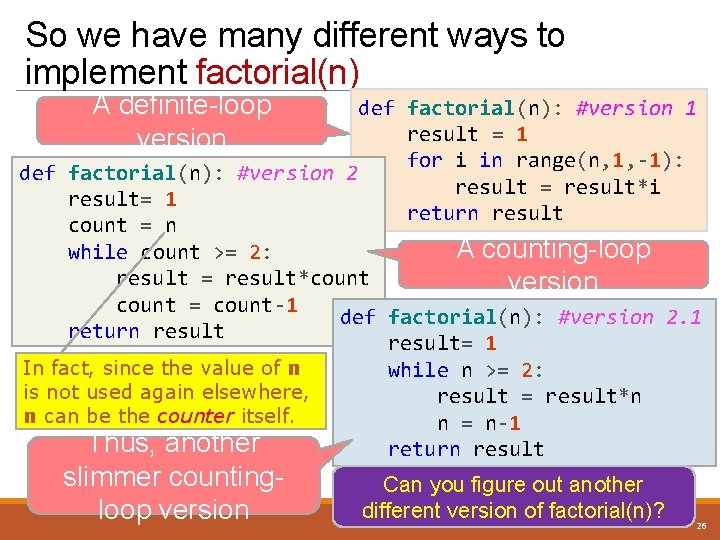
So we have many different ways to implement factorial(n) A definite-loop version def factorial(n): #version 1 result = 1 for i in range(n, 1, -1): def factorial(n): #version 2 result = result*i result= 1 return result count = n A counting-loop while count >= 2: result = result*count version count = count-1 def factorial(n): #version 2. 1 return result= 1 In fact, since the value of n while n >= 2: is not used again elsewhere, result = result*n n can be the counter itself. n = n-1 Thus, another return result slimmer countingloop version Can you figure out another different version of factorial(n)? 26
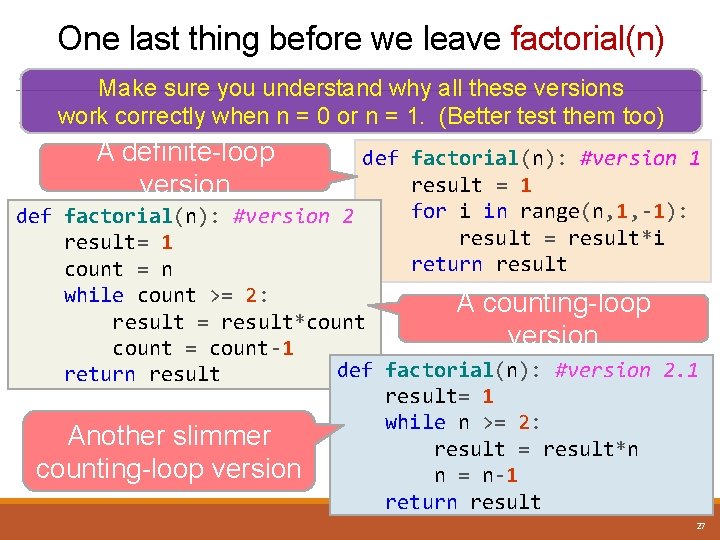
One last thing before we leave factorial(n) Make sure you understand why all these versions work correctly when n = 0 or n = 1. (Better test them too) A definite-loop version def factorial(n): #version 1 result = 1 for i in range(n, 1, -1): def factorial(n): #version 2 result = result*i result= 1 return result count = n while count >= 2: A counting-loop result = result*count version count = count-1 def factorial(n): #version 2. 1 return result= 1 while n >= 2: Another slimmer result = result*n counting-loop version n = n-1 return result 27
A Common Loop Pattern : Interactive Loops 28
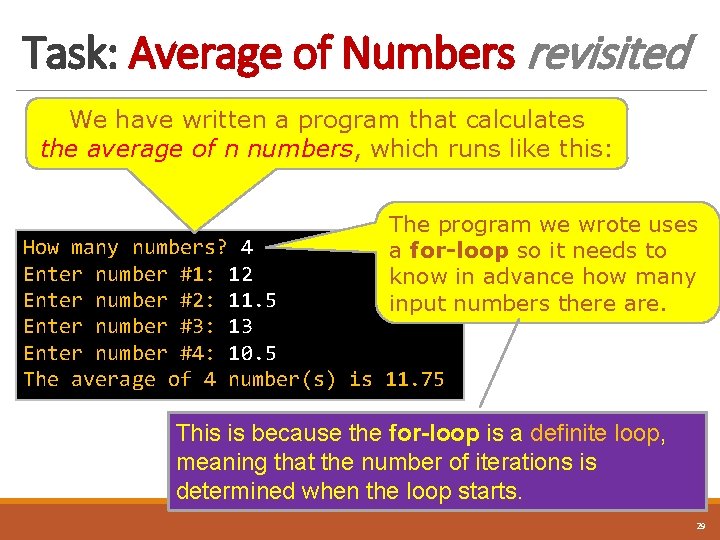
Task: Average of Numbers revisited We have written a program that calculates the average of n numbers, which runs like this: The program we wrote uses a for-loop so it needs to know in advance how many input numbers there are. How many numbers? 4 Enter number #1: 12 Enter number #2: 11. 5 Enter number #3: 13 Enter number #4: 10. 5 The average of 4 number(s) is 11. 75 This is because the for-loop is a definite loop, meaning that the number of iterations is determined when the loop starts. 29
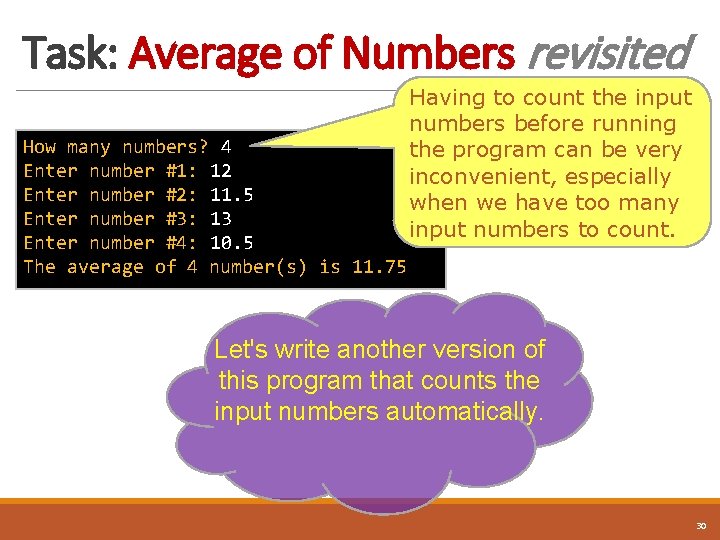
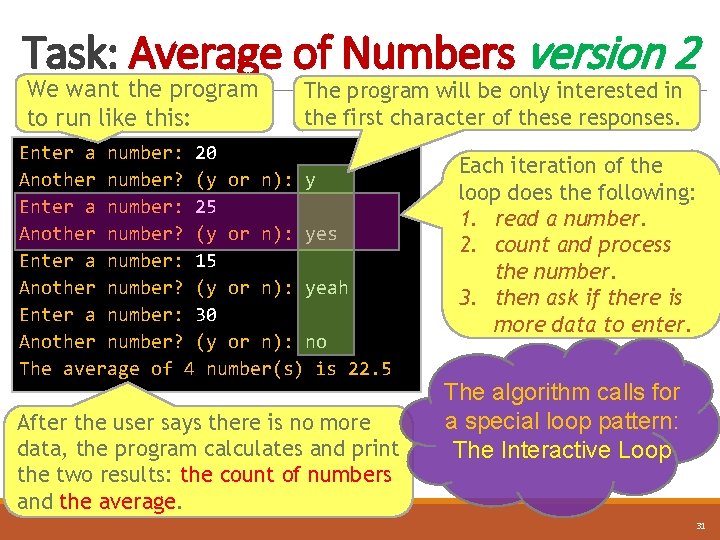
Task: Average of Numbers revisited How many numbers? 4 Enter number #1: 12 Enter number #2: 11. 5 Enter number #3: 13 Enter number #4: 10. 5 The average of 4 number(s) is 11. 75 Having to count the input numbers before running the program can be very inconvenient, especially when we have too many input numbers to count. Let's write another version of this program that counts the input numbers automatically. 30
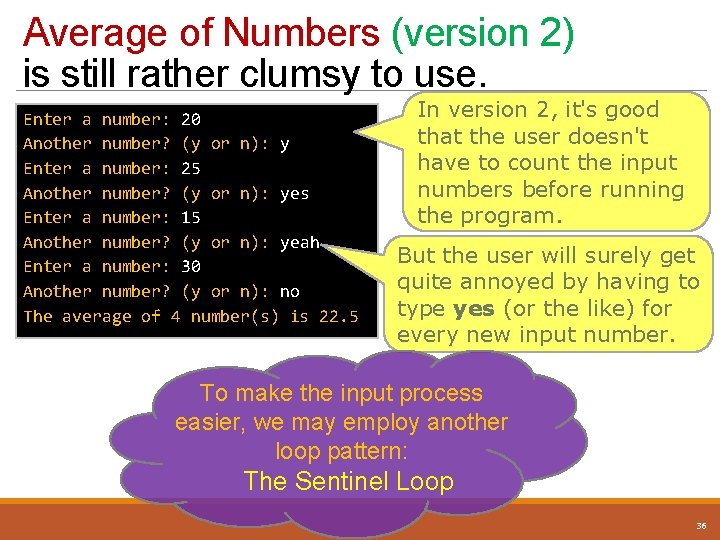
Task: Average of Numbers version 2 We want the program to run like this: The program will be only interested in the first character of these responses. Enter a number: 20 Another number? (y or n): y Enter a number: 25 Another number? (y or n): yes Enter a number: 15 Another number? (y or n): yeah Enter a number: 30 Another number? (y or n): no The average of 4 number(s) is 22. 5 After the user says there is no more data, the program calculates and print the two results: the count of numbers and the average. Each iteration of the loop does the following: 1. read a number. 2. count and process the number. 3. then ask if there is more data to enter. The algorithm calls for a special loop pattern: The Interactive Loop 31
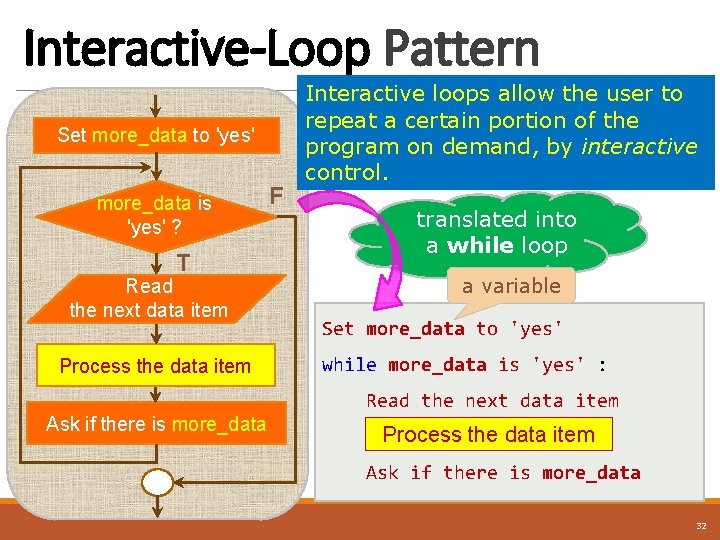
Interactive-Loop Pattern Set more_data to 'yes' more_data is 'yes' ? T Read the next data item Process the data item F Interactive loops allow the user to repeat a certain portion of the program on demand, by interactive control. translated into a while loop a variable Set more_data to 'yes' while more_data is 'yes' : Read the next data item Ask if there is more_data Process the data item Ask if there is more_data 32
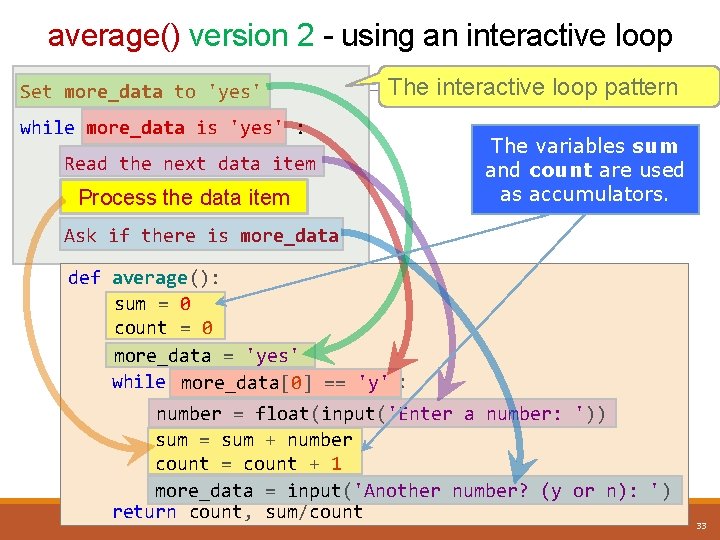
average() version 2 - using an interactive loop Set more_data to 'yes' The interactive loop pattern while more_data is 'yes' : Read the next data item Process the data item The variables sum and count are used as accumulators. Ask if there is more_data def average(): sum = 0 count = 0 more_data = 'yes' while more_data[0] == 'y' : number = float(input('Enter a number: ')) sum = sum + number count = count + 1 more_data = input('Another number? (y or n): ') return count, sum/count 33
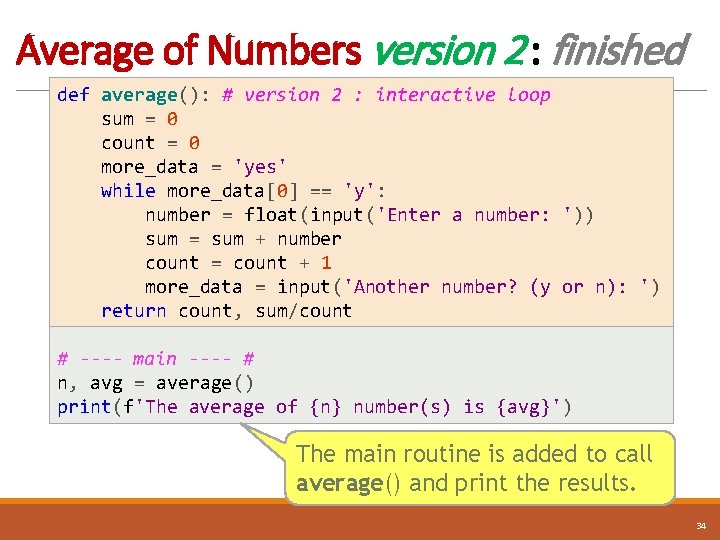
Average of Numbers version 2 : finished def average(): # version 2 : interactive loop sum = 0 count = 0 more_data = 'yes' while more_data[0] == 'y': number = float(input('Enter a number: ')) sum = sum + number count = count + 1 more_data = input('Another number? (y or n): ') return count, sum/count # ---- main ---- # n, avg = average() print(f'The average of {n} number(s) is {avg}') The main routine is added to call average() and print the results. 34
A Common Loop Pattern : Sentinel Loops 35
Average of Numbers (version 2) is still rather clumsy to use. Enter a number: 20 Another number? (y or n): y Enter a number: 25 Another number? (y or n): yes Enter a number: 15 Another number? (y or n): yeah Enter a number: 30 Another number? (y or n): no The average of 4 number(s) is 22. 5 In version 2, it's good that the user doesn't have to count the input numbers before running the program. But the user will surely get quite annoyed by having to type yes (or the like) for every new input number. To make the input process easier, we may employ another loop pattern: The Sentinel Loop 36
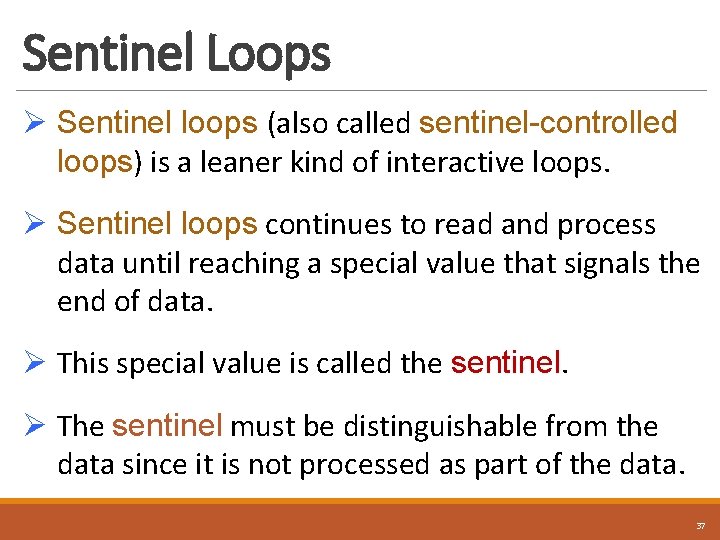
Sentinel Loops Ø Sentinel loops (also called sentinel-controlled loops) is a leaner kind of interactive loops. Ø Sentinel loops continues to read and process data until reaching a special value that signals the end of data. Ø This special value is called the sentinel. Ø The sentinel must be distinguishable from the data since it is not processed as part of the data. 37
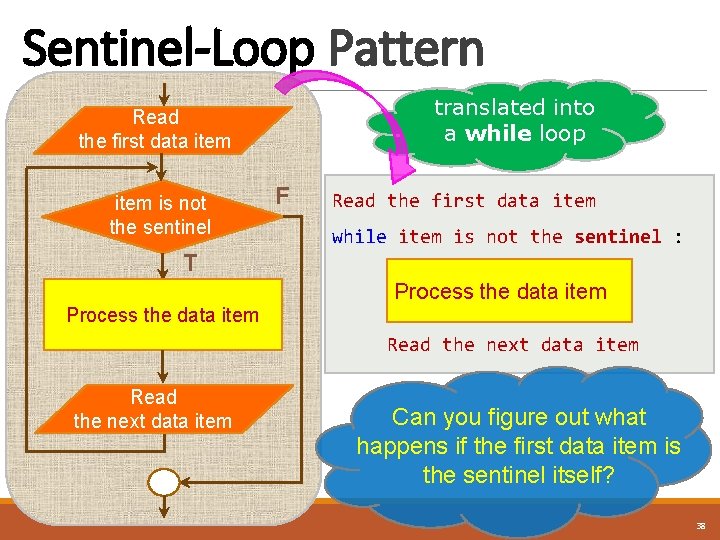
Sentinel-Loop Pattern translated into a while loop Read the first data item is not the sentinel F Read the first data item while item is not the sentinel : T Process the data item Read the next data item Can you figure out what happens if the first data item is the sentinel itself? 38
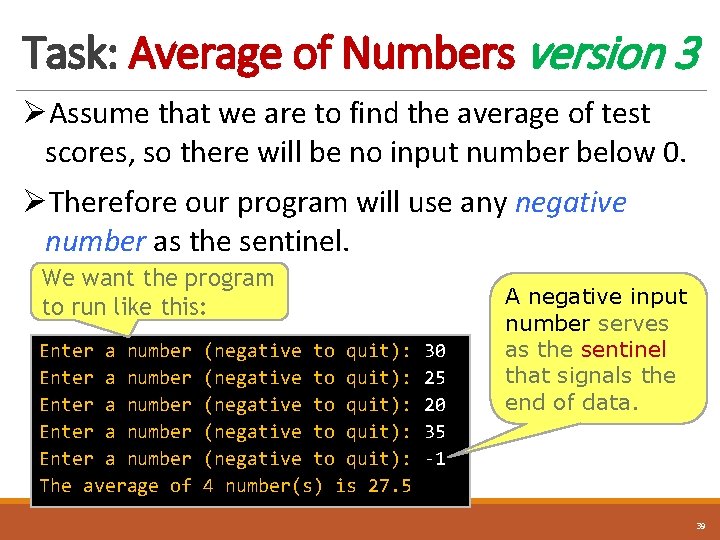
Task: Average of Numbers version 3 ØAssume that we are to find the average of test scores, so there will be no input number below 0. ØTherefore our program will use any negative number as the sentinel. We want the program to run like this: Enter a number Enter a number The average of (negative to quit): (negative to quit): 4 number(s) is 27. 5 30 25 20 35 -1 A negative input number serves as the sentinel that signals the end of data. 39
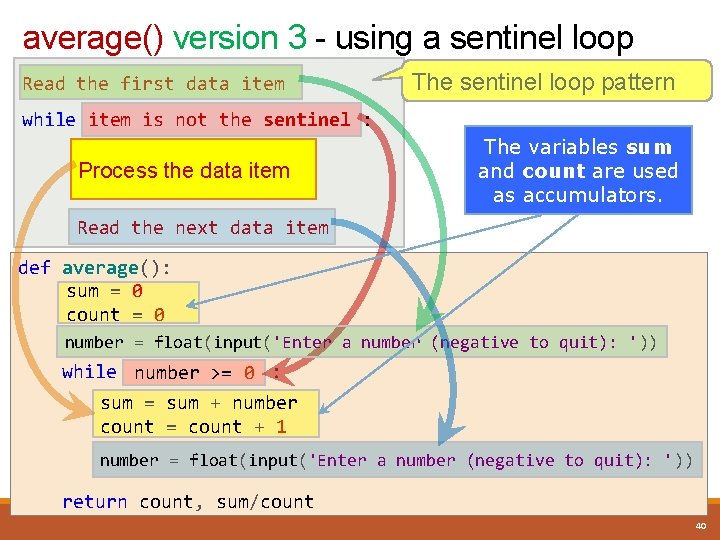
average() version 3 - using a sentinel loop Read the first data item The sentinel loop pattern while item is not the sentinel : Process the data item The variables sum and count are used as accumulators. Read the next data item def average(): sum = 0 count = 0 number = float(input('Enter a number (negative to quit): ')) while number >= 0 : sum = sum + number count = count + 1 number = float(input('Enter a number (negative to quit): ')) return count, sum/count 40
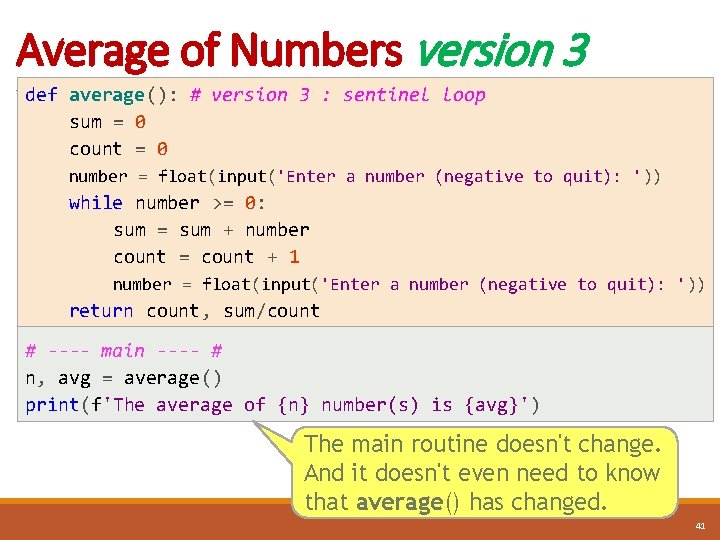
Average of Numbers version 3 def average(): # version 3 : sentinel loop sum = 0 count = 0 number = float(input('Enter a number (negative to quit): ')) while number >= 0: sum = sum + number count = count + 1 number = float(input('Enter a number (negative to quit): ')) return count, sum/count # ---- main ---- # n, avg = average() print(f'The average of {n} number(s) is {avg}') The main routine doesn't change. And it doesn't even need to know that average() has changed. 41
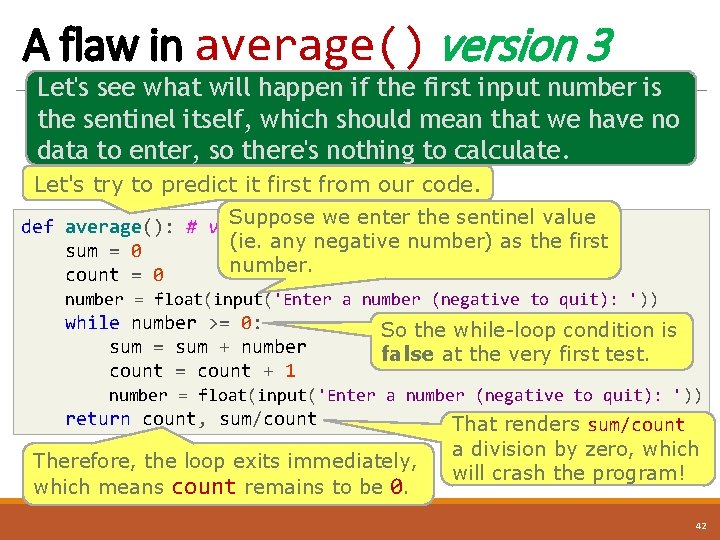
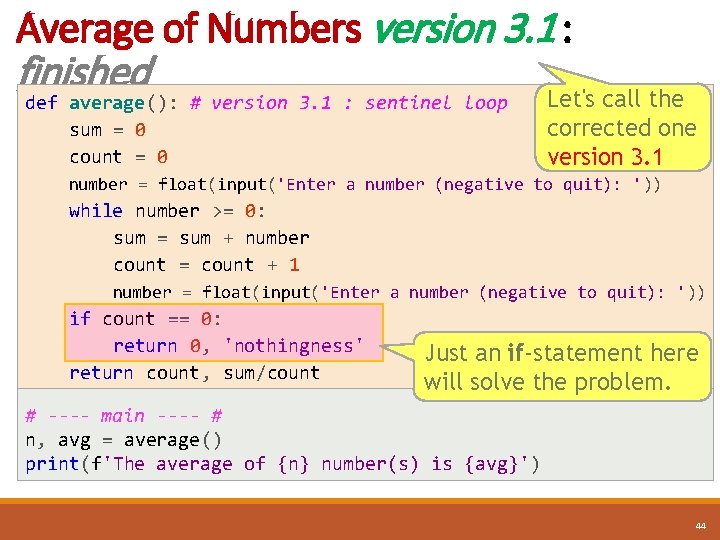
A flaw in average() version 3 Let's see what will happen if the first input number is the sentinel itself, which should mean that we have no data to enter, so there's nothing to calculate. Let's try to predict it first from our code. Suppose enter the sentinel value def average(): # version 3 : we sentinel loop (ie. any negative number) as the first sum = 0 number. count = 0 number = float(input('Enter a number (negative to quit): ')) while number >= 0: sum = sum + number count = count + 1 So the while-loop condition is false at the very first test. number = float(input('Enter a number (negative to quit): ')) return count, sum/count Therefore, the loop exits immediately, which means count remains to be 0. That renders sum/count a division by zero, which will crash the program! 42
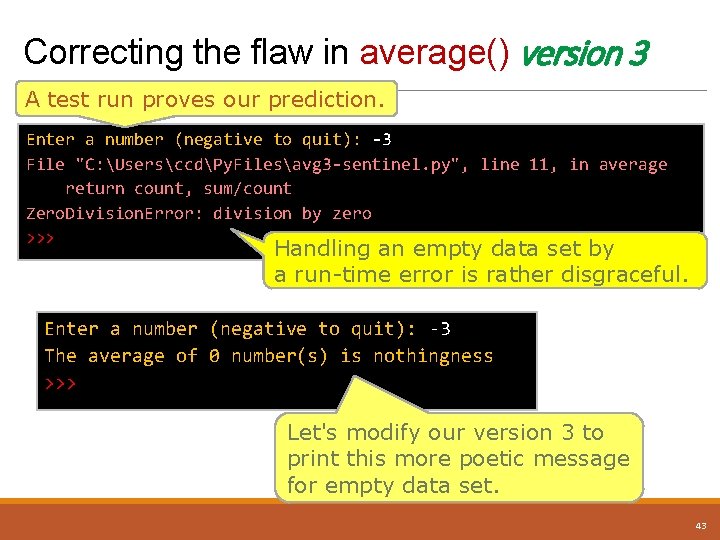
Correcting the flaw in average() version 3 A test run proves our prediction. Enter a number (negative to quit): -3 File "C: UsersccdPy. Filesavg 3 -sentinel. py", line 11, in average return count, sum/count Zero. Division. Error: division by zero >>> Handling an empty data set by a run-time error is rather disgraceful. Enter a number (negative to quit): -3 The average of 0 number(s) is nothingness >>> Let's modify our version 3 to print this more poetic message for empty data set. 43
Average of Numbers version 3. 1 : finished def average(): # version 3. 1 : sentinel loop sum = 0 count = 0 Let's call the corrected one version 3. 1 number = float(input('Enter a number (negative to quit): ')) while number >= 0: sum = sum + number count = count + 1 number = float(input('Enter a number (negative to quit): ')) if count == 0: return 0, 'nothingness' return count, sum/count Just an if-statement here will solve the problem. # ---- main ---- # n, avg = average() print(f'The average of {n} number(s) is {avg}') 44
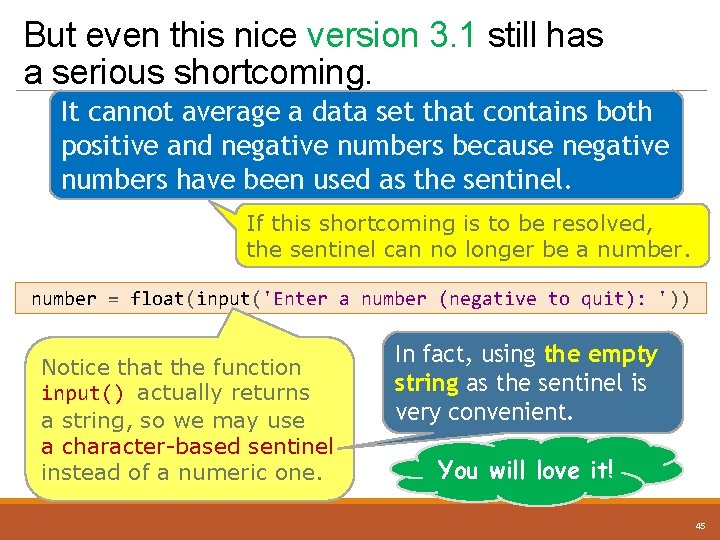
But even this nice version 3. 1 still has a serious shortcoming. It cannot average a data set that contains both positive and negative numbers because negative numbers have been used as the sentinel. If this shortcoming is to be resolved, the sentinel can no longer be a number = float(input('Enter a number (negative to quit): ')) Notice that the function input() actually returns a string, so we may use a character-based sentinel instead of a numeric one. In fact, using the empty string as the sentinel is very convenient. You will love it! 45
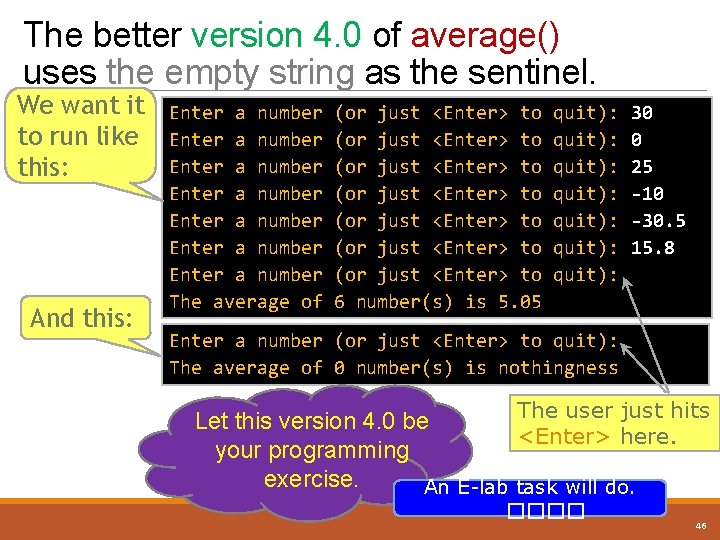
The better version 4. 0 of average() uses the empty string as the sentinel. We want it to run like this: And this: Enter a number Enter a number The average of (or just <Enter> to (or just <Enter> to 6 number(s) is 5. 05 quit): quit): 30 0 25 -10 -30. 5 15. 8 Enter a number (or just <Enter> to quit): The average of 0 number(s) is nothingness The user just hits Let this version 4. 0 be <Enter> here. your programming exercise. An E-lab task will do. ���� 46
One More Example : Finding the Maximum 47
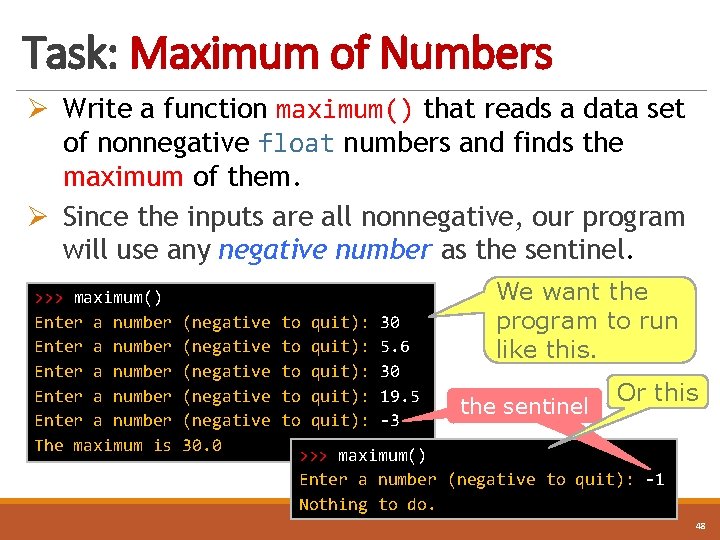
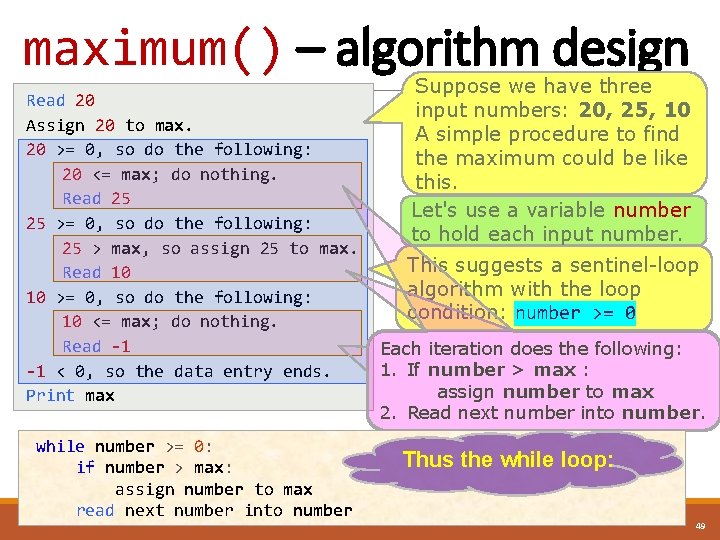
Task: Maximum of Numbers Ø Write a function maximum() that reads a data set of nonnegative float numbers and finds the maximum of them. Ø Since the inputs are all nonnegative, our program will use any negative number as the sentinel. >>> maximum() Enter a number Enter a number The maximum is (negative (negative 30. 0 to to to quit): quit): 30 5. 6 30 19. 5 -3 We want the program to run like this. the sentinel Or this >>> maximum() Enter a number (negative to quit): -1 Nothing to do. 48
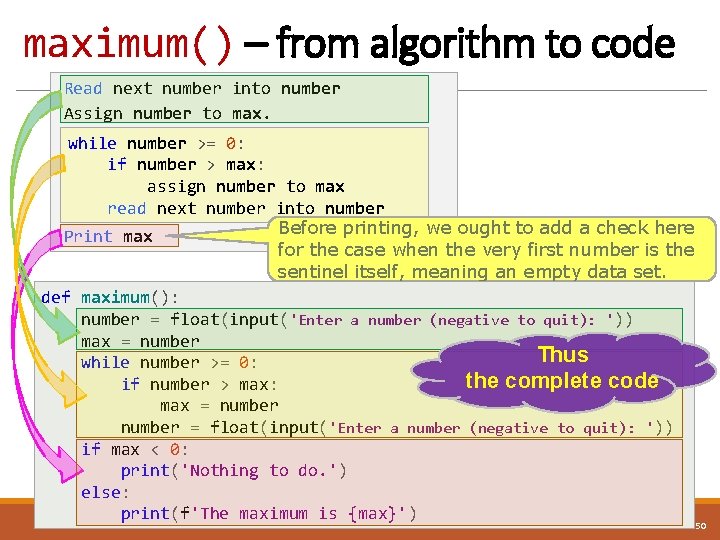
maximum() – algorithm design Read 20 Assign 20 to max. 20 >= 0, so do the following: 20 <= max; do nothing. Read 25 25 >= 0, so do the following: 25 > max, so assign 25 to max. Read 10 10 >= 0, so do the following: 10 <= max; do nothing. Read -1 -1 < 0, so the data entry ends. Print max while number >= 0: if number > max: assign number to max read next number into number Suppose we have three input numbers: 20, 25, 10 A simple procedure to find the maximum could be like this. Let's use a variable number to hold each input number. This suggests a sentinel-loop algorithm with the loop condition: number >= 0 Each iteration does the following: 1. If number > max : assign number to max 2. Read next number into number. Thus the while loop: 49
maximum() – from algorithm to code Read next number into number Assign number to max. while number >= 0: if number > max: assign number to max read next number into number Before printing, we ought to add a check here Print max for the case when the very first number is the sentinel itself, meaning an empty data set. def maximum(): number = float(input('Enter a number (negative to quit): ')) max = number Thus while number >= 0: the complete code if number > max: max = number = float(input('Enter a number (negative to quit): ')) if max < 0: print('Nothing to do. ') else: print(f'The maximum is {max}') 50
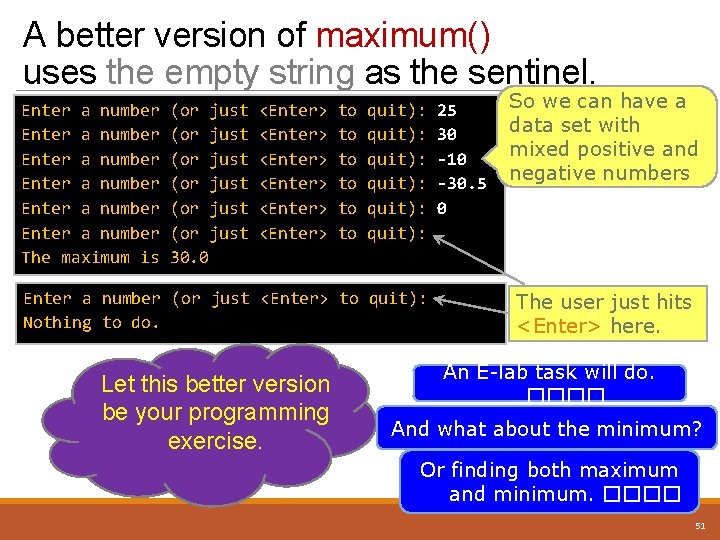
A better version of maximum() uses the empty string as the sentinel. Enter a number Enter a number The maximum is (or just (or just 30. 0 <Enter> <Enter> to to to quit): quit): Enter a number (or just <Enter> to quit): Nothing to do. Let this better version be your programming exercise. 25 30 -10 -30. 5 0 So we can have a data set with mixed positive and negative numbers The user just hits <Enter> here. An E-lab task will do. ���� And what about the minimum? Or finding both maximum and minimum. ���� 51
The End 52
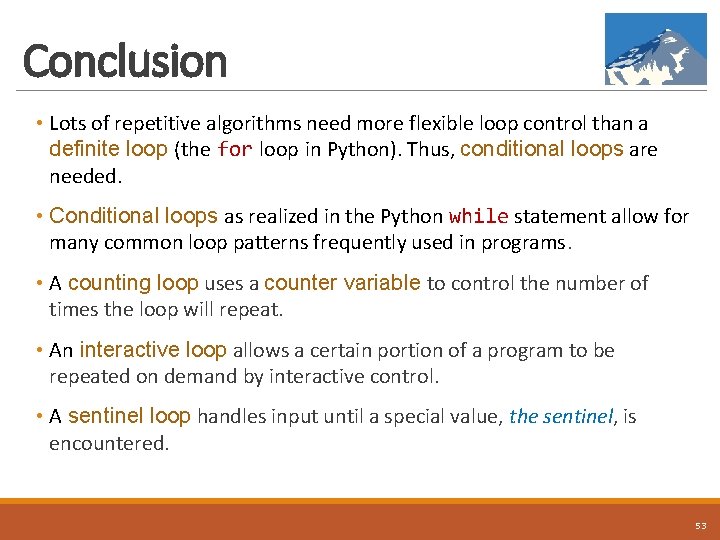
Conclusion • Lots of repetitive algorithms need more flexible loop control than a definite loop (the for loop in Python). Thus, conditional loops are needed. • Conditional loops as realized in the Python while statement allow for many common loop patterns frequently used in programs. • A counting loop uses a counter variable to control the number of times the loop will repeat. • An interactive loop allows a certain portion of a program to be repeated on demand by interactive control. • A sentinel loop handles input until a special value, the sentinel, is encountered. 53
References • Think Python ◦ http: //greenteapress. com/thinkpython 2. pdf • Official reference on the while statement: ◦ https: //docs. python. org/3/reference/compound_stmts. html#thewhile-statement • Good tutorials for while loops: ◦ http: //interactivepython. org/runestone/static/thinkcspy/More. Abo ut. Iteration/Thewhile. Statement. html ◦ https: //www. tutorialspoint. com/python_while_loop. htm ◦ https: //www. python-course. eu/python 3_loops. php 54
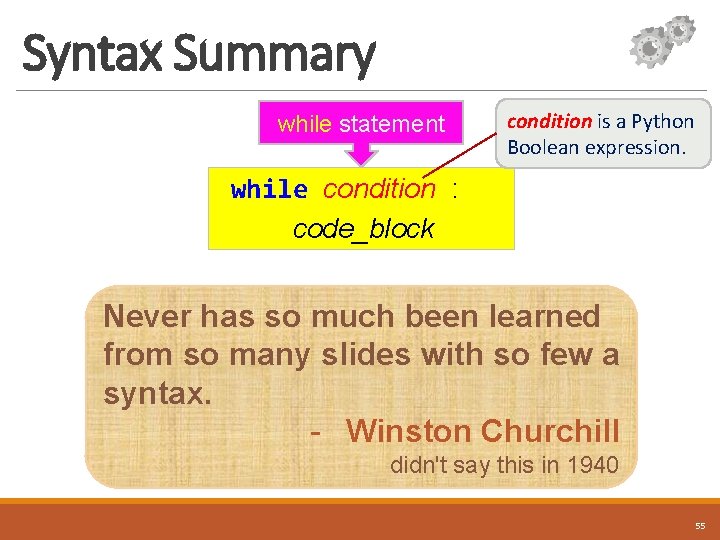
Syntax Summary while statement condition is a Python Boolean expression. while condition : code_block Never has so much been learned from so many slides with so few a syntax. - Winston Churchill didn't say this in 1940 55
Major Revision History • September, 2017 – Chalermsak Chatdokmaiprai ◦ First release Constructive comments or error reports on this set of slides would be welcome and highly appreciated. Please contact Chalermsak. c@ku. ac. th 56