
ContextAware Interaction Techniques in a Small Device Reading

- Slides: 24
Context-Aware Interaction Techniques in a Small Device
Reading Ken Hinckley, Jeff Pierce, Mike Sinclair, and Eric Horvitz, "Sensing techniques for mobile interaction", Proceedings of UIST '00, November 2000, pp. 91 -100 http: //doi. acm. org/10. 1145/354401. 354417 UIST ’ 00 Best paper award
Sensing for Interaction Techniques • Simple sensors that tell about the context of interaction – In particular, aspects of how the device is being held • Used to improve interaction techniques – Holding the device in certain ways indicates what action is being performed – Or small set of possible / likely actions – In some cases can “just do it” • Very natural if done well – Other cases limited possibilities allow implicit mode switch, enabling of specific sensor / button / display alternatives, and/or other speedups or improvements
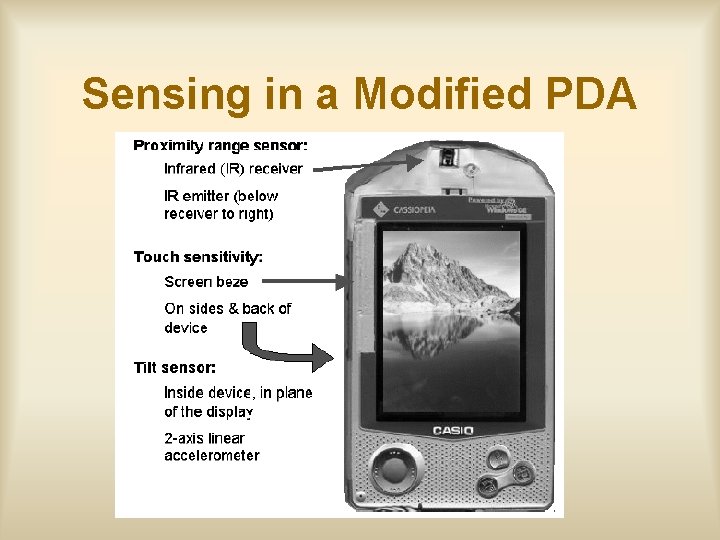
Sensing in a Modified PDA
Sensor Specifics: IR Proximity Sensor • Estimate of distance to an object – 5 to 40 cm range • Has IR emitter (IR light modulated at 40 Khz) – Similar to TV remote • And IR receiver (tuned to sense 40 Khz only) • Works by measuring amount of reflection – Different readings for different surface types and sizes of object – But actually pretty consistent • Here we are mostly looking at the same thing (skin) anyway
Sensor Specifics: Touch Sensors • Two separate sensors – “Holding” sensor on back and sides – “Bevel” sensor at edge of screen • Works by sensing capacitance at a pad or plate (any flat conductive area) – Key point is that this changes when you are touching it vs. not and can be sensed • Sensor “plate” is done via conductive paint
Sensor Specifics: Tilt Sensor • 2 D Accelerometer (in plane of device) – Gravity provides constant acceleration (1 G) – Direction of acceleration vector x, y tilt – Note can’t tell direction of vector • Screen up vs. screen down is ambiguous • Could add sensor to provide this but they didn’t – Also can detect patterns of movement • Done with single chip – Cheap and relatively easy – Implemented with MEMS • Lots of new sensors soon using this technology
Sensor Architecture • PIC micro-controller constantly reads sensors (~400 samples / sec) • Reports values to PDA via serial port • “Broker” application on PDA receives and processes values • Then makes information available to other applications via API (see below) – Polled values or events
Processed Values From Sensors • Things taken directly from processed sensor data without recognition / inference • Tilt. Angle. LR, Tilt. Angle. FB • Hz. LR, Magnitude. LR, Hz. FB, Magnitude. FB – Dominant frequency and magnitude of movements (separate x, y measures) – Obtained via FFT over short window
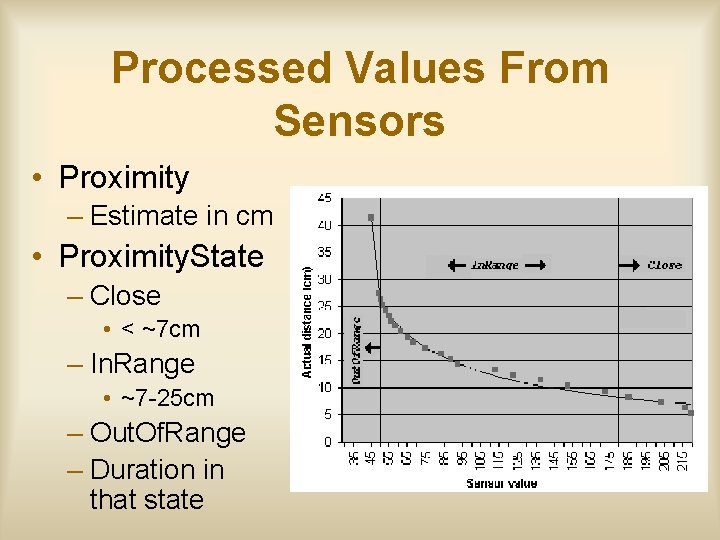
Processed Values From Sensors • Proximity – Estimate in cm • Proximity. State – Close • < ~7 cm – In. Range • ~7 -25 cm – Out. Of. Range – Duration in that state
Contexts Inferred From Touch Sensors • Holding (duration) – From back / side sensor – Is user holding the device and if so how long have they been holding it • Touching. Bezel(duration) – Similar for bezel touch sensor – Not considered to be touching it until duration > 0. 2 sec • They use dwell times like this in a number of places
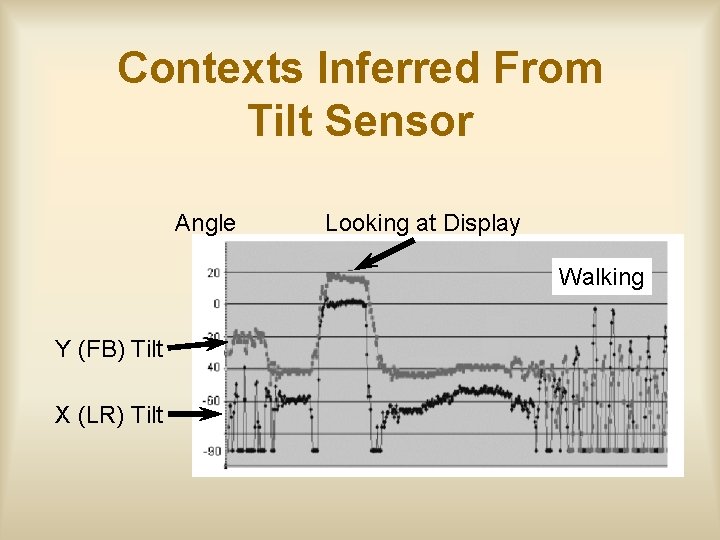
Contexts Inferred From Tilt Sensor • Looking. At(duration) – Small range of angles appropriate for typical viewing and how long there – Touch requirements added to this in later iteration • Moving(duration) – Any movement and how long since last still period • Shaking – Device is being shaken vigorously • Walking(duration) – Detected by repetitive motion in 1. 4 -3 Hz range
Contexts Inferred From Tilt Sensor Angle Looking at Display Walking Y (FB) Tilt X (LR) Tilt
Interaction Techniques • • Power on Voice memo recording Portrait / Landscape display mode selection Scrolling – LCD contrast compensation • Display changes for viewing while walking
Power On • PIC processor is on even when PDA is off • PDA is powered up when you pick it up to use it – Holding in orientation for use – Specifically • Holding + Looking. At • In portrait orientation (but not Flat) • For 0. 5 seconds Ø Extremely natural interaction – Pick it up and its ready to use – Avoids most false positives
Voice Memo Recording • Interaction: “Pick it up like a cell phone and talk into it” Ø Holding + Proximity + proper orientation (tilt) • Has audio feedback (critical) – Click when pickup gesture recognized – Beep to start recording – Double beep at stop • Stop via loss of preconditions Ø Again, very natural interaction: pick it up as necessary to do a particular thing and it does it
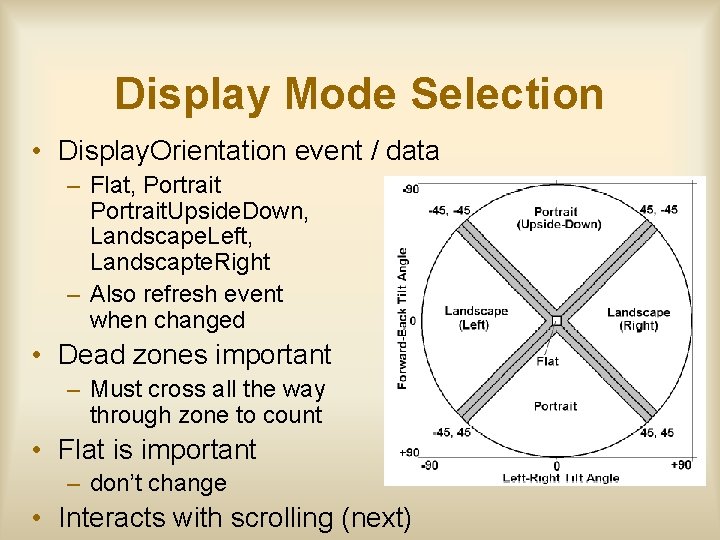
Display Mode Selection • Display. Orientation event / data – Flat, Portrait. Upside. Down, Landscape. Left, Landscapte. Right – Also refresh event when changed • Dead zones important – Must cross all the way through zone to count • Flat is important – don’t change • Interacts with scrolling (next)
Tilt Scrolling • Must explicitly touch bezel touch area to enable – Not quite as nice, but still pretty easy • Then tilt up, down, left, right to scroll – Rate controlled (exponential) with a dead band • Extra touch: LCD contrast compensation
Technique Interference • Tilt for scrolling interferes with display orientation selection – Hence explicit clutch – Also “I’m scrolling now” event for explicit disabling across applications – BUT… what about when you let go • Can’t tilt back prior to releasing clutch • Not scrolling anymore once released – Handled by basically disallowing display change in direction of scroll tilt immediately after a scroll • Also suggest a timeout for this effect
Display Changes for Viewing While Walking • Future work in the paper – but I got a demo • If you hold the device in reading orientation – Hold + Looking. At and walk, it will increase font size, etc. – Again, detected by repetitive motion in 1. 4 -3 Hz range
Lessons and Issues • Sensor fusion – Typically need multiple points of evidence for a situation in order to avoid false positives • E. g. , “looking at” via both angle and touching instead of just angle • Need designs that are tolerant of recognition errors – False positive or negative is not a catastrophe – In general recognition errors can easily ruin a good interaction • Recovery costs can easily destroy benefits
Lessons and Issues • Cross talk between techniques – Handled by explicit disabling • Event saying “We’re using that now” • Used to disable other effect • Pretty ad hoc – This is a general issue that needs work • Probably needs some sort of general conflict resolution mechanism • But not clear what that is, or how to do it
Lessons and Issues • Big take away point – Knowing context of operation (e. g. how held) allows space of possible current interactions to be constrained • Less explicit actions required to invoke an action or provide a input – E. g. , typically avoid button presses or other mode entry • Can result in simpler and more natural interaction • Best case: Picking it up to do something causes the something to “just happen”