
CONSTRUCTION CHANGE MANAGEMENT AND PROCESS DEVELOPMENT Procore Implementation
![CONSTRUCTION CHANGE MANAGEMENT AND PROCESS DEVELOPMENT Procore Implementation & Training Rollout Plan [Company Name]](https://slidetodoc.com/presentation_image_h2/4880850089b47f1175edab4c13a64c11/image-1.jpg "CONSTRUCTION CHANGE MANAGEMENT AND PROCESS DEVELOPMENT Procore Implementation & Training Rollout Plan [Company Name]")
![This deck is provided for the benefit of: ● ● ● [Company Name] Executive](https://slidetodoc.com/presentation_image_h2/4880850089b47f1175edab4c13a64c11/image-4.jpg "This deck is provided for the benefit of: ● ● ● [Company Name] Executive")
![Background [Company Name] has set out to adopt company-wide cloud-based, collaborative project management software.](https://slidetodoc.com/presentation_image_h2/4880850089b47f1175edab4c13a64c11/image-5.jpg "Background [Company Name] has set out to adopt company-wide cloud-based, collaborative project management software.")
![Business Problem Current practices around many aspects of managing non-financial tasks on [COMPANY NAME]](https://slidetodoc.com/presentation_image_h2/4880850089b47f1175edab4c13a64c11/image-6.jpg "Business Problem Current practices around many aspects of managing non-financial tasks on [COMPANY NAME]")
![Procore Committee The rollout of Procore across [Company Name] will be managed by the](https://slidetodoc.com/presentation_image_h2/4880850089b47f1175edab4c13a64c11/image-8.jpg "Procore Committee The rollout of Procore across [Company Name] will be managed by the")
![[COMPANY NAME] Governance Info EXECUTIVE SPONSORS Info IMPLEMENTATION MANAGERS (INTERNAL) Info SMES Info 9](https://slidetodoc.com/presentation_image_h2/4880850089b47f1175edab4c13a64c11/image-9.jpg "[COMPANY NAME] Governance Info EXECUTIVE SPONSORS Info IMPLEMENTATION MANAGERS (INTERNAL) Info SMES Info 9")

![[COMPANY NAME] New Project SOPs NEW JOB SETUP Plan is to manually set up](https://slidetodoc.com/presentation_image_h2/4880850089b47f1175edab4c13a64c11/image-12.jpg "[COMPANY NAME] New Project SOPs NEW JOB SETUP Plan is to manually set up")
- Slides: 18
CONSTRUCTION CHANGE MANAGEMENT AND PROCESS DEVELOPMENT Procore Implementation & Training Rollout Plan [Company Name] Insert Date Here
TABLE OF CONTENTS 1. Guidelines 1. Governance (Procore Implementation Team) 1. Implementation Plan 2. Communication Plan 1. Training 1. Rollout 2
Instructions from Procore Welcome to Procore! We’re thrilled to be working with you and are looking forward to helping you and your team get up and running in Procore. This document is intended to serve as an informational resource that you can personalize for your company and distribute to your team members company-wide. It can be used as a “Procore Playbook” of sorts to help communicate and establish an implementation and rollout strategy for all stages of the on-boarding process. A Note about Format: Any italicized text like you’re reading now is instructional (found in the speaker notes), and is intended to be deleted once you’ve finished editing this document. Any orange text is intended to be replaced with company-specific text. Any grey highlighted text is for you to review and make changes to (if necessary) to fall in line with your rollout strategy. In general, feel free to make any modifications to this document to best suit your company. Good luck as you prepare your team for success. Please reach out to your Procore Implementation Manager if you need assistance during this process.
This deck is provided for the benefit of: ● ● ● [Company Name] Executive Sponsors [Company Name] SMEs [Company Name] Procore Committee This deck is. . . A tool for documenting tasks, decisions, open questions, etc. ; Organizing information for management discussion; and communicating the project structure to Procore. A living document; it is not a complete description of the implementation and rollout, or of all activities in the project. It does not replace support. procore. com. It should be used in conjunction with your Procore Implementation Plan in Mavenlink.
Background [Company Name] has set out to adopt company-wide cloud-based, collaborative project management software. An evaluation committee was formed to review and select software, and after evaluating several different software options, the committee ultimately selected Procore. As such, a contract has been executed with Procore and the implementation is beginning.
Business Problem Current practices around many aspects of managing non-financial tasks on [COMPANY NAME] construction projects are done manually, without consistent business rules or practices across projects and across regions. In addition, even where professional tools are utilized, there is a lack of consistency in what tools are used and often a high degree of manual activity despite any tool. 6 The lack of common, consistent and well-defined business rules and processes, as well as the lack of a common tool, results in a high degree of inefficiency, increased project and company risk, a lack of transparency and difficulty in collaboration with partners and stakeholders. The company will address those business problems around five core processes: (1) Drawings Management; (2) Specifications and Submittal Management; (3) RFI Management; (4) Daily Logs; and (5) Punch Lists Business Opportunity To build consistent business rules and processes around the performance and management of select project administrative processes, utilizing a common tool, to realize the following benefits: • Reduced project and company risk • Reduced redundant work • Enhanced consistency, efficiency, and effectiveness • Increased competitiveness • More effective & efficient collaboration with partners • Higher recruitment success • Driving to become a standardized company
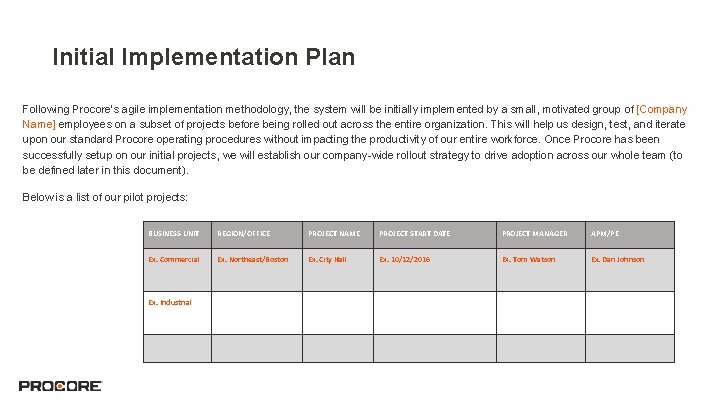
Initial Implementation Plan Following Procore’s agile implementation methodology, the system will be initially implemented by a small, motivated group of [Company Name] employees on a subset of projects before being rolled out across the entire organization. This will help us design, test, and iterate upon our standard Procore operating procedures without impacting the productivity of our entire workforce. Once Procore has been successfully setup on our initial projects, we will establish our company-wide rollout strategy to drive adoption across our whole team (to be defined later in this document). Below is a list of our pilot projects: BUSINESS UNIT REGION/OFFICE PROJECT NAME PROJECT START DATE PROJECT MANAGER APM/PE Ex. Commercial Ex. Northeast/Boston Ex. City Hall Ex. 10/12/2016 Ex. Tom Watson Ex. Dan Johnson Ex. Industrial
Procore Committee The rollout of Procore across [Company Name] will be managed by the Procore Committee. Executive Sponsor(s): This is an executive level team member who has a vested interest in seeing Procore successfully rolled out across our organization, but will not be involved in the day-to-day activities of the implementation. The executive sponsors will receive regular updates on the project status and milestones, and may become involved in escalated issues, if required. Implementation Project Managers (Ideally, at Least 2): Implementation Project Managers are the key stakeholders for the rollout of Procore to our company. This implementation will be one of their primary responsibilities during the initial rollout. They will be expected to commit a significant amount of time to the implementation during the initial months after purchase. The Implementation Project Managers will coordinate the implementation schedule with the Procore Implementation Manager (main point of contact at Procore). SMEs: Input from end users is critical to the overall success of the implementation. Team Representatives have been selected from eachoffice and/or market sector to fill this role. These individuals will provide the Implementation Team with valuable feedback to help us develop[Company Name] specific processes and ultimately use Procore in the most efficient and value-adding way.
[COMPANY NAME] Governance Info EXECUTIVE SPONSORS Info IMPLEMENTATION MANAGERS (INTERNAL) Info SMES Info 9
Retrospective of Pilot/Early Adopter Projects 1. Successes are seen when volunteers step up to the plate and guide others. 2. All new projects that are less than 20% complete qualify for new Procore Project setup. 3. Projects more than 20% complete can still use Procore for Dailys, Punch, and Drawings but no other info should be backlogged (unless viable use case). 4. Must be dedicated to learning and growing with [Company Name] as we grow with Procore.
Procore Implementation Roadmap - Application Setup +Cost codes will be imported via the Procore Imports Application prior to any Financial Data inputs. +Outlook Plugin to be installed in each user’s Outlook account steps listed here. +As a starting point, [COMPANY NAME] will create an import file of all appropriate personnel to import into Procore. +[COMPANY NAME] to consider a push-installation of the desktop Apps for Imports, Drive, and Exports + Users will be instructed in the process of installing Procore for Mobile in person or via email.
[COMPANY NAME] New Project SOPs NEW JOB SETUP Plan is to manually set up projects in Procore - the amount of data necessary for setup is minimal. COST CODES As noted in previous slide, cost codes will be imported via the imports app in a 2 tier format. COMPANIES AND CONTACTS Following an initial bulk load, we expect to integrate companies and contacts in Procore via [enter integration here] USERS LOCATIONS Users will be set up in Procore via manual addition on a project-by-project basis at the outset of a project. External users are to be set up manually in projects by the [insert roles here] Locations will be loaded up into each project after the project is created. 12
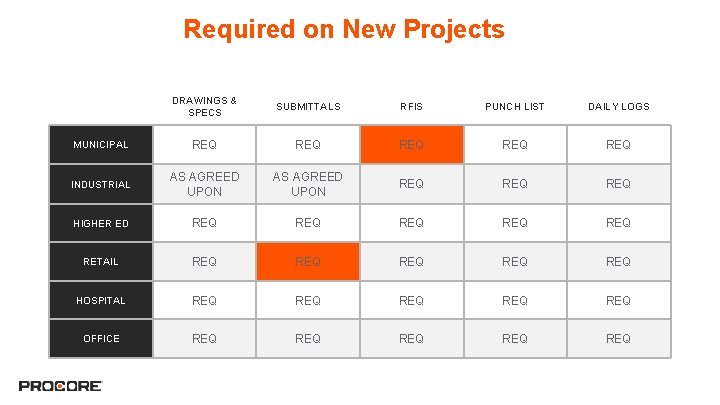
Required on New Projects DRAWINGS & SPECS SUBMITTALS RFIS PUNCH LIST DAILY LOGS REQ REQ MUNICIPAL REQ INDUSTRIAL AS AGREED UPON REQ REQ HIGHER ED REQ REQ REQ RETAIL REQ REQ REQ HOSPITAL REQ REQ REQ OFFICE REQ REQ REQ 13
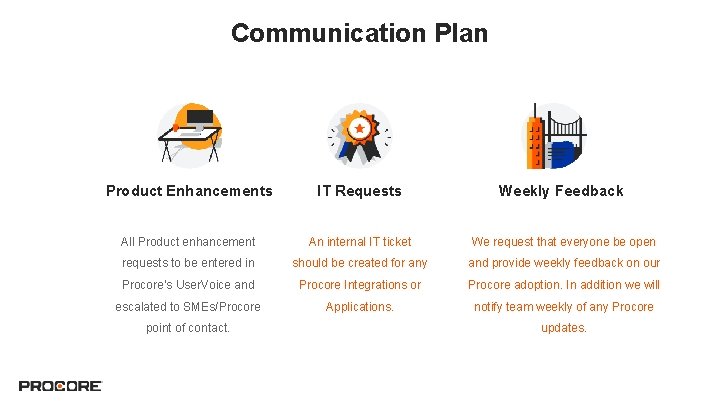
Communication Plan Product Enhancements IT Requests Weekly Feedback All Product enhancement An internal IT ticket We request that everyone be open requests to be entered in should be created for any and provide weekly feedback on our Procore’s User. Voice and Procore Integrations or Procore adoption. In addition we will escalated to SMEs/Procore Applications. notify team weekly of any Procore point of contact. updates.
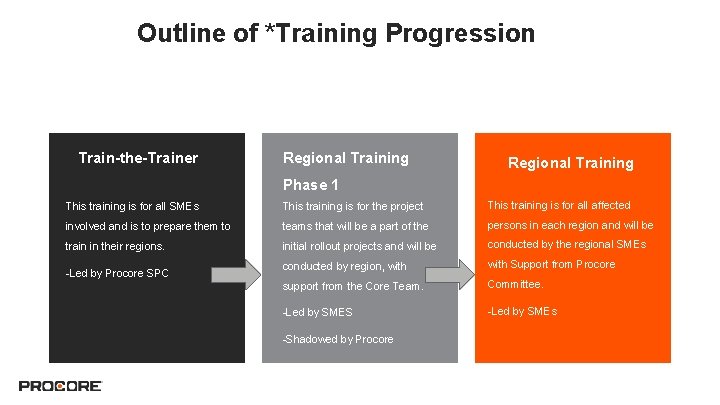
Outline of *Training Progression Train-the-Trainer Regional Training Phase 1 This training is for all SMEs This training is for the project This training is for all affected involved and is to prepare them to teams that will be a part of the persons in each region and will be train in their regions. initial rollout projects and will be conducted by the regional SMEs conducted by region, with Support from Procore support from the Core Team. Committee. -Led by SMES -Led by SMEs -Led by Procore SPC -Shadowed by Procore
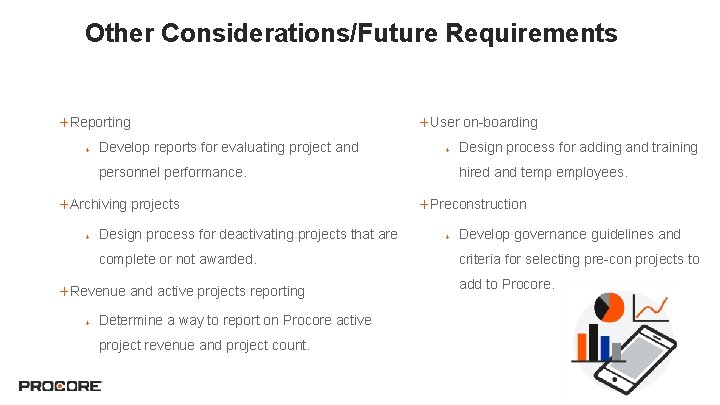
Other Considerations/Future Requirements +Reporting + Develop reports for evaluating project and +User on-boarding + personnel performance. +Archiving projects + Design process for deactivating projects that are complete or not awarded. +Revenue and active projects reporting + Determine a way to report on Procore active project revenue and project count. Design process for adding and training hired and temp employees. +Preconstruction + Develop governance guidelines and criteria for selecting pre-con projects to add to Procore.
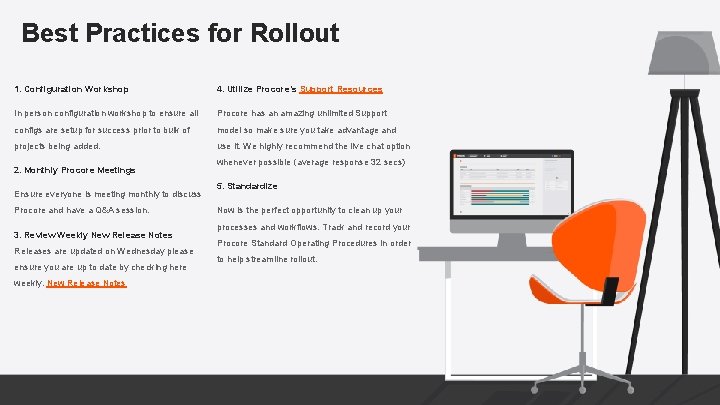
Best Practices for Rollout 1. Configuration Workshop 4. Utilize Procore’s Support Resources In person configuration workshop to ensure all Procore has an amazing unlimited Support configs are setup for success prior to bulk of model so make sure you take advantage and projects being added. use it. We highly recommend the live chat option 2. Monthly Procore Meetings Ensure everyone is meeting monthly to discuss Procore and have a Q&A session. 3. Review Weekly New Release Notes Releases are updated on Wednesday please ensure you are up to date by checking here weekly. New Release Notes whenever possible (average response 32 secs) 5. Standardize Now is the perfect opportunity to clean up your processes and workflows. Track and record your Procore Standard Operating Procedures in order to help streamline rollout.
Questions? ? 18