
CONNECTIONS web application Basharat Mahmood Department of Computer
CONNECTIONS: web application Basharat Mahmood, Department of Computer Science, CIIT, Islamabad, Pakistan. 1
Summary of the previous lecture • Deleting records in My. SQL using PHP • Updating records in My. SQL using PHP Basharat Mahmood, Department of Computer Science, CIIT, Islamabad, Pakistan. 2
Outline • • • User registration (already discussed) User login (already discussed) Send Message Inbox Out Box Sign-Out Basharat Mahmood, Department of Computer Science, CIIT, Islamabad, Pakistan. 3
1. User registration • User registration form: – Home page • Action page: – Retrieve user’s input – Validate input – Connection with DB – Insert record into users table Basharat Mahmood, Department of Computer Science, CIIT, Islamabad, Pakistan. 4
2. User login • User login form: – Home page • Action page: – Retrieve user’s input – Connection with DB – Select record from users table where user email and password are same as user’s input Basharat Mahmood, Department of Computer Science, CIIT, Islamabad, Pakistan. 5
2. User login… • If one row is selected then: – Session variables are registered • $_SESSION[‘name’]; • $_SESSION[‘email’]; • $_SESSION[‘password’]; – Redirect to user’s page • Redirect to index page with error message Basharat Mahmood, Department of Computer Science, CIIT, Islamabad, Pakistan. 6
3. Send message • Create a table in connections database as: – Table Name: messages – No. of fields: 4 • • message_Id int 5 s_Email varchar 50 r_Email varchar 50 message varchar 500 Basharat Mahmood, Department of Computer Science, CIIT, Islamabad, Pakistan. 7
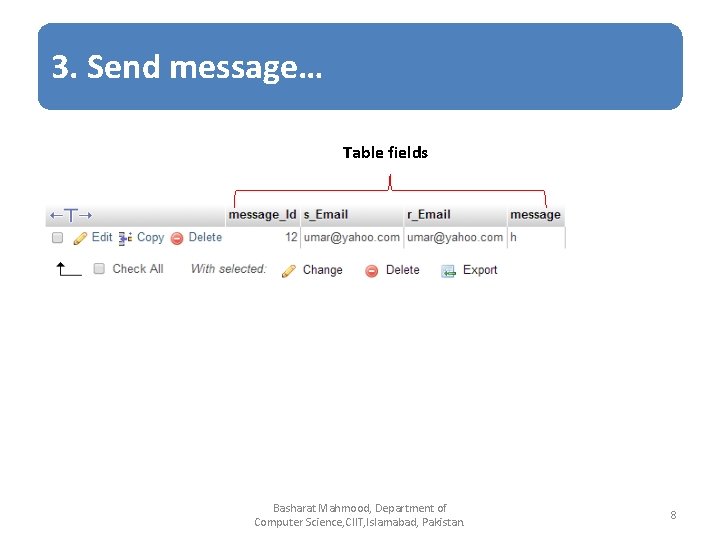
3. Send message… Table fields Basharat Mahmood, Department of Computer Science, CIIT, Islamabad, Pakistan. 8
3. Send message… • Form to send message: – Receiver email: data-list of users – Message: text-area – Submit button • Action page: – Retrieve receiver email and message from post array – Retrieve sender email from $_SEESION[‘email’] – Insert data into messages table Basharat Mahmood, Department of Computer Science, CIIT, Islamabad, Pakistan. 9
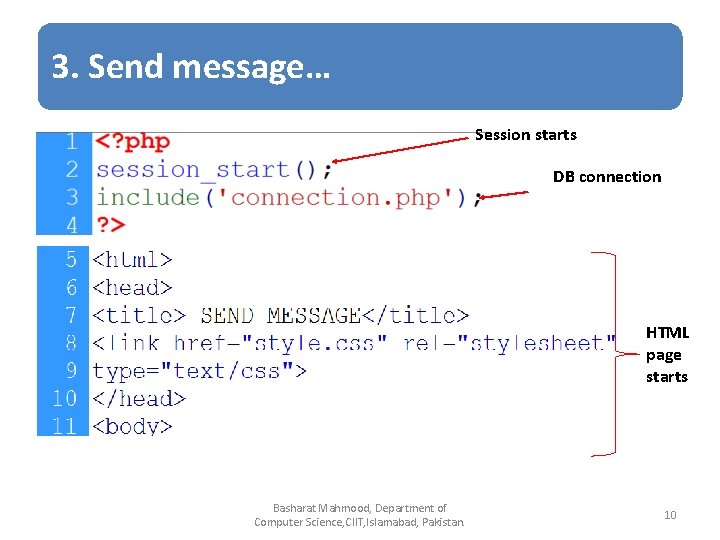
3. Send message… Session starts DB connection HTML page starts Basharat Mahmood, Department of Computer Science, CIIT, Islamabad, Pakistan. 10

3. Send message… header links Basharat Mahmood, Department of Computer Science, CIIT, Islamabad, Pakistan. 11
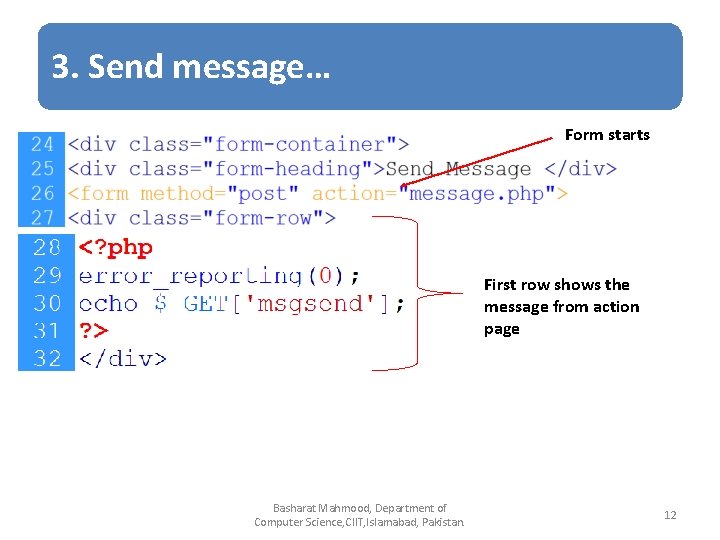
3. Send message… Form starts First row shows the message from action page Basharat Mahmood, Department of Computer Science, CIIT, Islamabad, Pakistan. 12
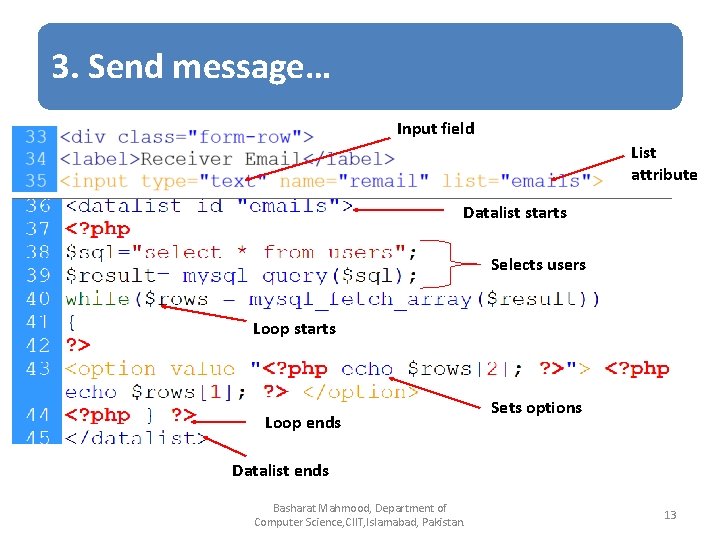
3. Send message… Input field List attribute Datalist starts Selects users Loop starts Loop ends Sets options Datalist ends Basharat Mahmood, Department of Computer Science, CIIT, Islamabad, Pakistan. 13
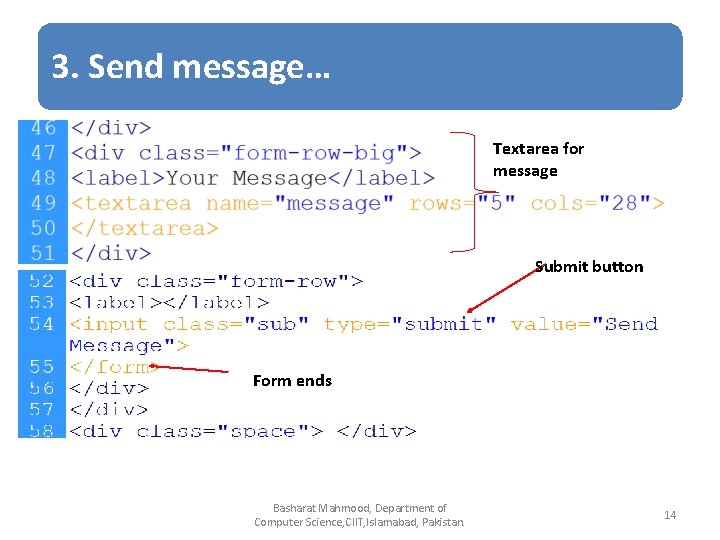
3. Send message… Textarea for message Submit button Form ends Basharat Mahmood, Department of Computer Science, CIIT, Islamabad, Pakistan. 14
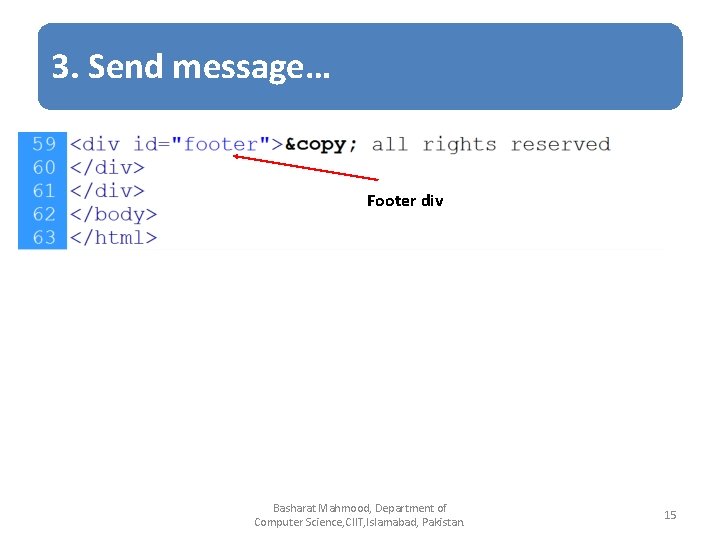
3. Send message… Footer div Basharat Mahmood, Department of Computer Science, CIIT, Islamabad, Pakistan. 15
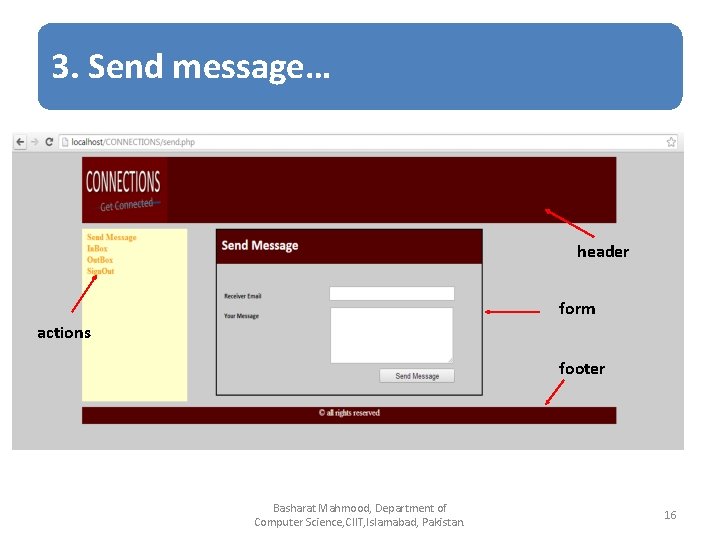
3. Send message… header form actions footer Basharat Mahmood, Department of Computer Science, CIIT, Islamabad, Pakistan. 16
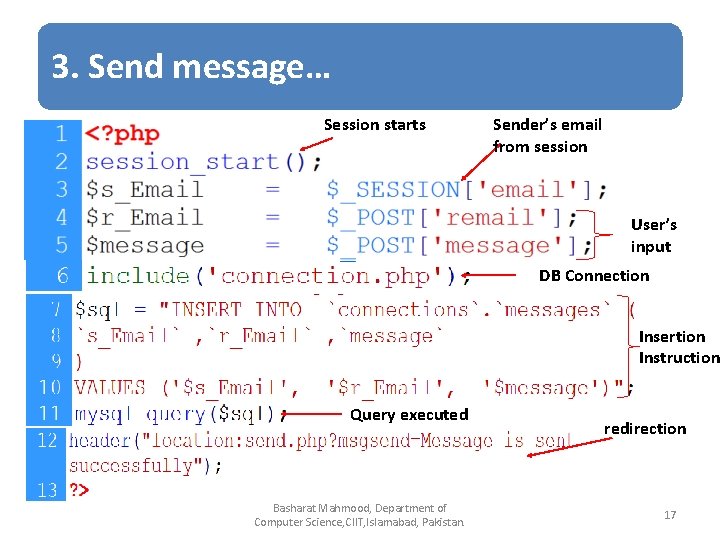
3. Send message… Session starts Sender’s email from session User’s input DB Connection Insertion Instruction Query executed Basharat Mahmood, Department of Computer Science, CIIT, Islamabad, Pakistan. redirection 17
4. Inbox page • • • Session starts DB connection Retrieve receiver id from session Select messages against user’s id Display structure Display all messages Basharat Mahmood, Department of Computer Science, CIIT, Islamabad, Pakistan. 18
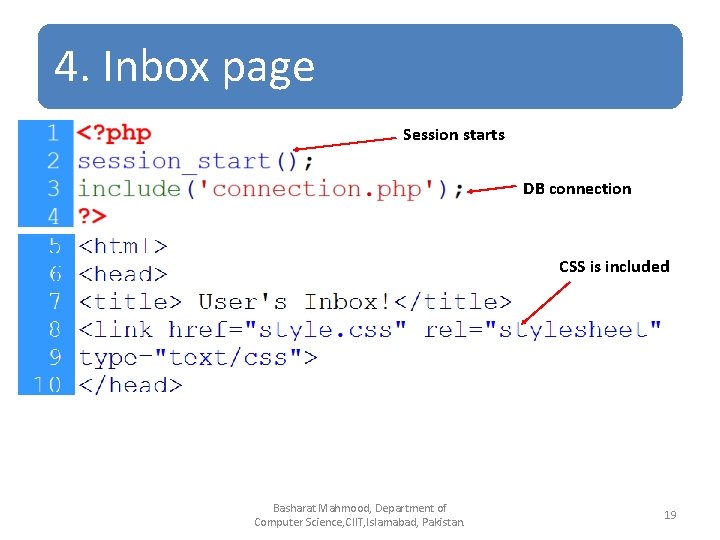
4. Inbox page Session starts DB connection CSS is included Basharat Mahmood, Department of Computer Science, CIIT, Islamabad, Pakistan. 19
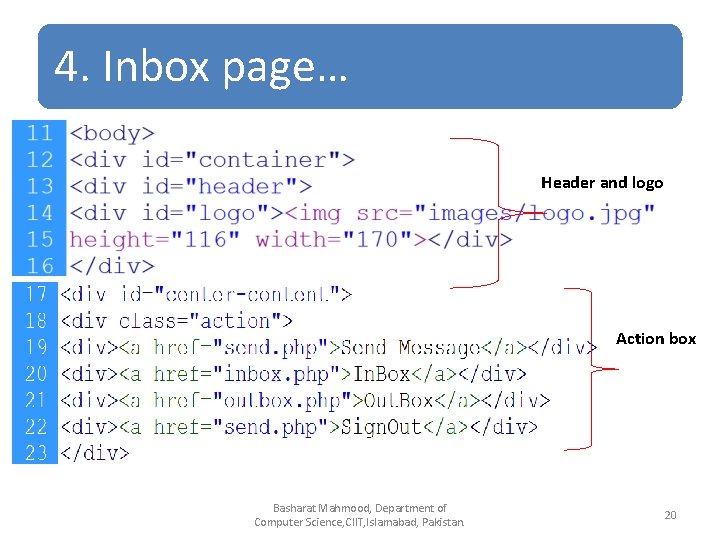
4. Inbox page… Header and logo Action box Basharat Mahmood, Department of Computer Science, CIIT, Islamabad, Pakistan. 20
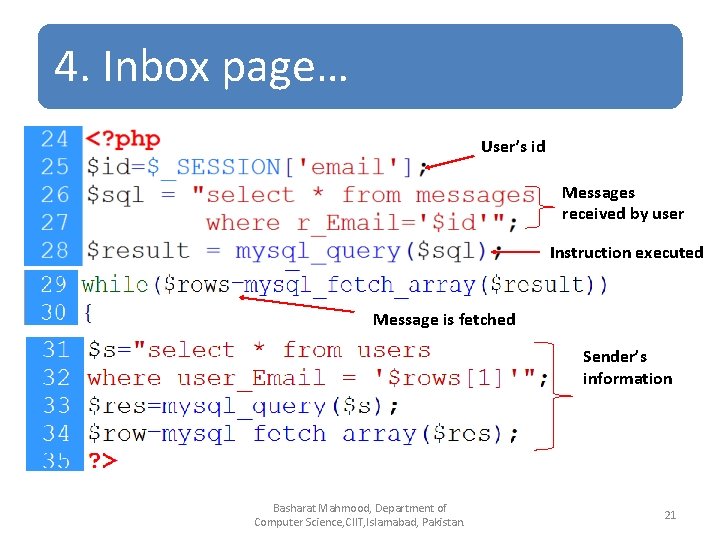
4. Inbox page… User’s id Messages received by user Instruction executed Message is fetched Sender’s information Basharat Mahmood, Department of Computer Science, CIIT, Islamabad, Pakistan. 21
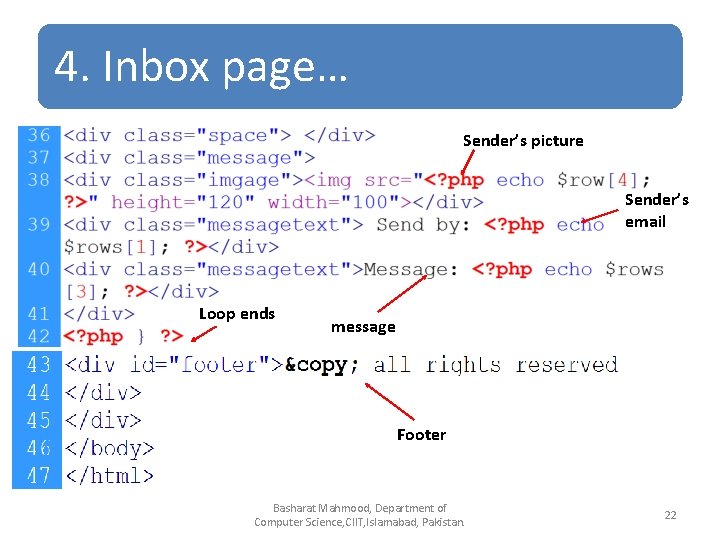
4. Inbox page… Sender’s picture Sender’s email Loop ends message Footer Basharat Mahmood, Department of Computer Science, CIIT, Islamabad, Pakistan. 22
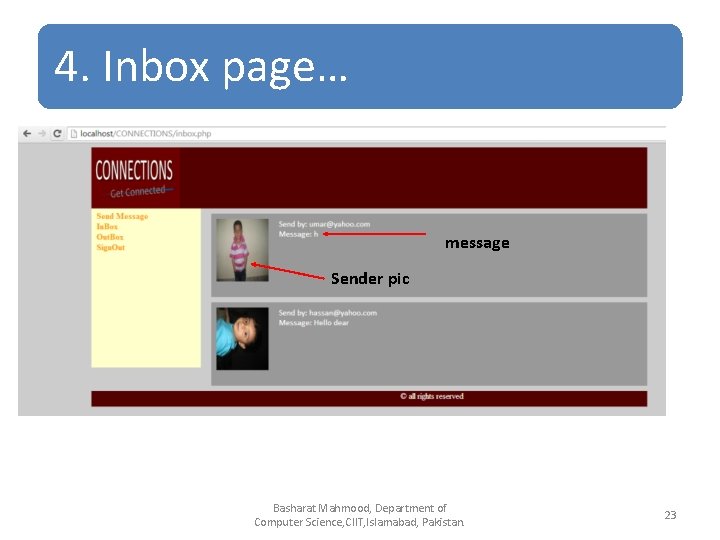
4. Inbox page… message Sender pic Basharat Mahmood, Department of Computer Science, CIIT, Islamabad, Pakistan. 23
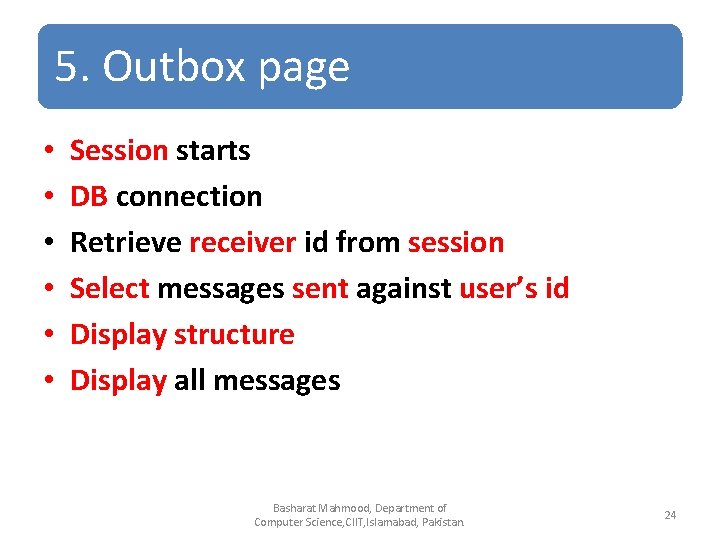
5. Outbox page • • • Session starts DB connection Retrieve receiver id from session Select messages sent against user’s id Display structure Display all messages Basharat Mahmood, Department of Computer Science, CIIT, Islamabad, Pakistan. 24
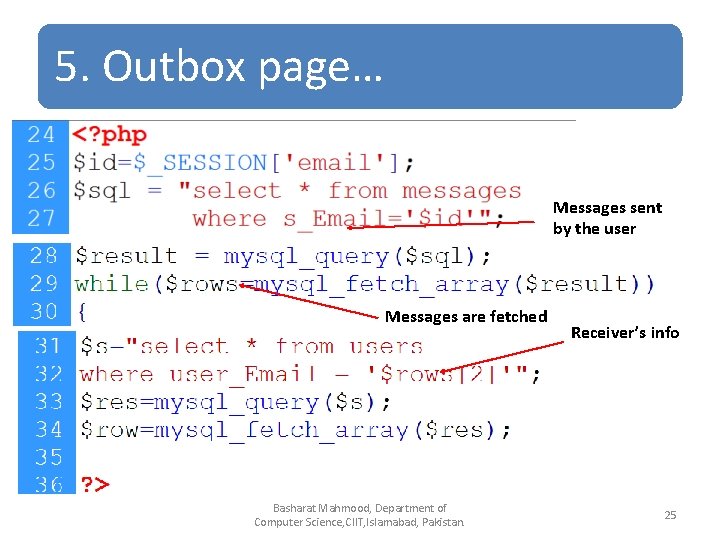
5. Outbox page… Messages sent by the user Messages are fetched Basharat Mahmood, Department of Computer Science, CIIT, Islamabad, Pakistan. Receiver’s info 25
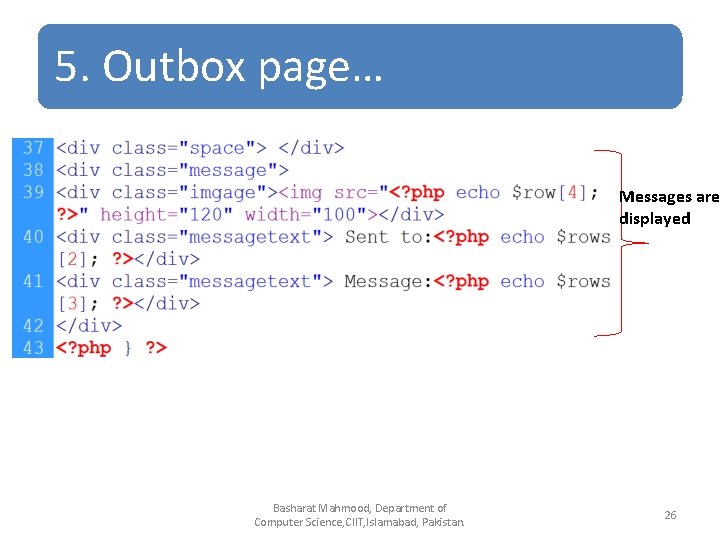
5. Outbox page… Messages are displayed Basharat Mahmood, Department of Computer Science, CIIT, Islamabad, Pakistan. 26
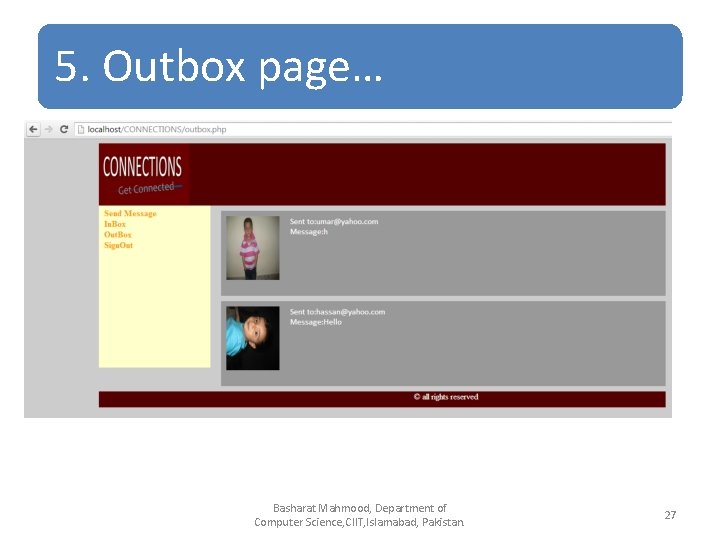
5. Outbox page… Basharat Mahmood, Department of Computer Science, CIIT, Islamabad, Pakistan. 27
6. Sign-Out • Starts session • Destroy session • Redirect Basharat Mahmood, Department of Computer Science, CIIT, Islamabad, Pakistan. 28
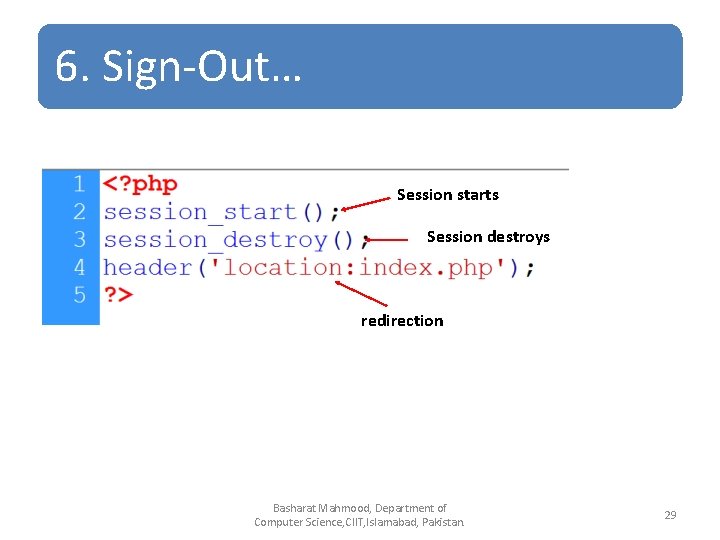
6. Sign-Out… Session starts Session destroys redirection Basharat Mahmood, Department of Computer Science, CIIT, Islamabad, Pakistan. 29
Summary • • • User registration (already discussed) User login (already discussed) Send Message Inbox Out Box Sign-Out Basharat Mahmood, Department of Computer Science, CIIT, Islamabad, Pakistan. 30
References • Chapter 30, “Beginning PHP and My. SQL” by W. Jason Gilmore, Apress publisher, 4 th edition; 2010, ISBN-13 (electronic): 978 -1 -4302 -3115 -8. Basharat Mahmood, Department of Computer Science, CIIT, Islamabad, Pakistan. 31
- Slides: 31