
Connecting with Computer Science Objectives Learn what a
Connecting with Computer Science
Objectives • Learn what a data structure is and how it is used • Learn about single and multidimensional arrays and how they work • Learn what a pointer is and how it is used in data structures • Learn that a linked list allows you to work with dynamic information Connecting with Computer Science 2
Objectives (continued) • Understand that a stack is a linked list and how it is used • Learn that a queue is another form of a linked list and how it is used • Learn that a binary tree is a data structure that stores information in a hierarchical order • Be introduced to several sorting routines Connecting with Computer Science 3

Why You Need to Know About…Data Structures • Data structures organize the data in a computer – Efficiently access and process data • All programs use some form of data structure • Many occasions for using data structures Connecting with Computer Science 4
Data Structures • Data structure: way of organizing data • Types of Data structures – Arrays, lists, stacks, queues, trees for main memory – Other file structures for secondary storage • Computer’s memory is organized into cells – Memory cell has a memory address and content – Memory addresses organized consecutively – Data structures hide physical implementation Connecting with Computer Science 5
Arrays • Array – – Simplest memory data structure Consists of a set of contiguous memory cells Memory cells store homogeneous data Data stored may be sorted or left as entered • Usefulness – Student grades, book titles, college courses, etc. – One variable name for large number of similar items Connecting with Computer Science 6

Connecting with Computer Science 7
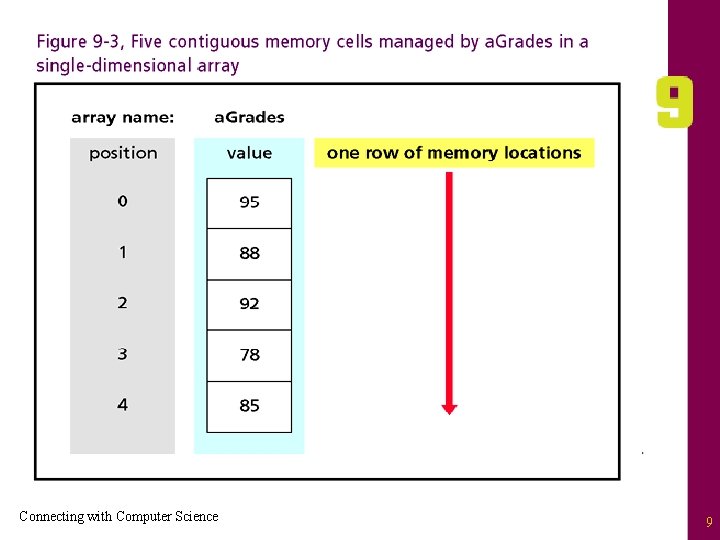
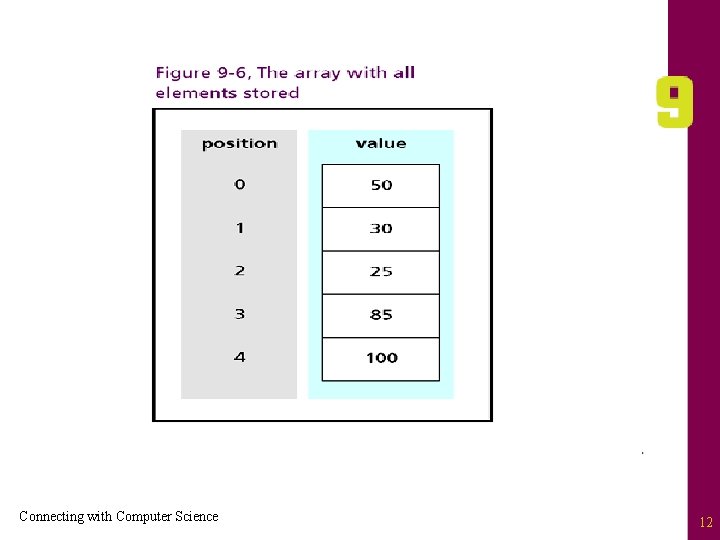
How An Array Works • Declaration (definition): provide data type and size • Java example: int[ ] a. Grades = new int[5]; – – – “int[ ]” tells the computer array will hold integers “a. Grades” is the name of the array “new” keyword specifies new array is being created “int[5]” reserves five memory locations “=” sign assigns a. Grades as “manager” of the array “; ” (semicolon) indicates end of statement reached • Hungarian notation: standard used to name “a. Grades” Connecting with Computer Science 8
Connecting with Computer Science 9
How An Array Works (continued) • Dimensionality – Dimensions: rows/columns of elements (memory cells) – a. Grades has one dimension (like a row of mailboxes) • Manipulating one-dimensional arrays – First address (position) is lower bound: zero (0) – Next element offset by one from starting address – Index (subscript): integer placed in “[ ]” for access • Example: a. Grades[0] = 50; – Upper bound “off by one” from size: four (4) Connecting with Computer Science 10

Connecting with Computer Science 11
Connecting with Computer Science 12
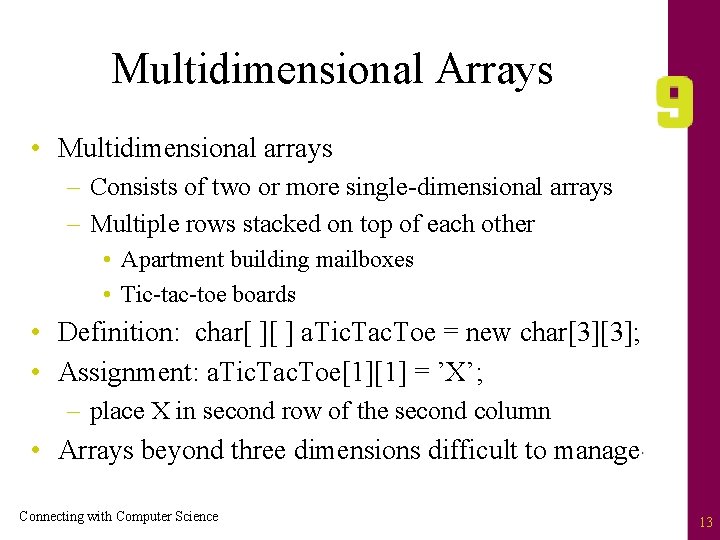
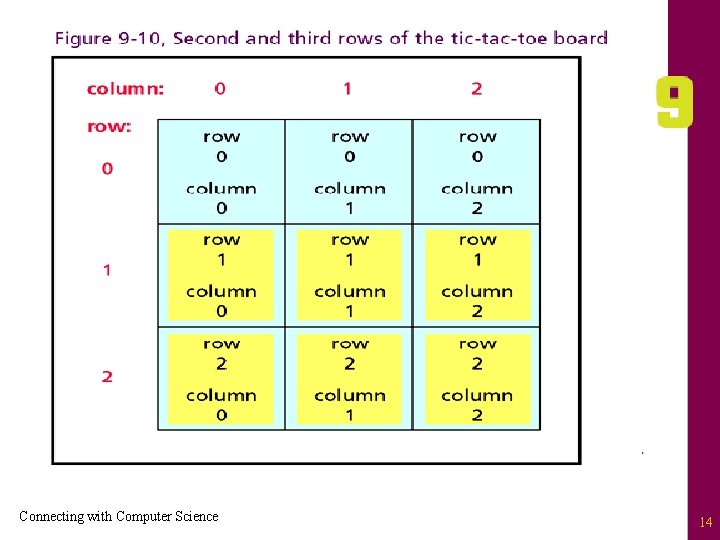
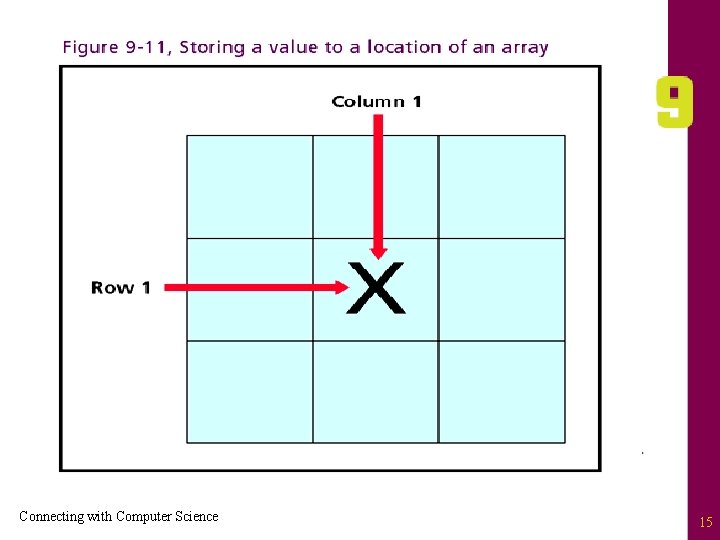
Multidimensional Arrays • Multidimensional arrays – Consists of two or more single-dimensional arrays – Multiple rows stacked on top of each other • Apartment building mailboxes • Tic-tac-toe boards • Definition: char[ ][ ] a. Tic. Tac. Toe = new char[3][3]; • Assignment: a. Tic. Tac. Toe[1][1] = ’X’; – place X in second row of the second column • Arrays beyond three dimensions difficult to manage Connecting with Computer Science 13
Connecting with Computer Science 14
Connecting with Computer Science 15
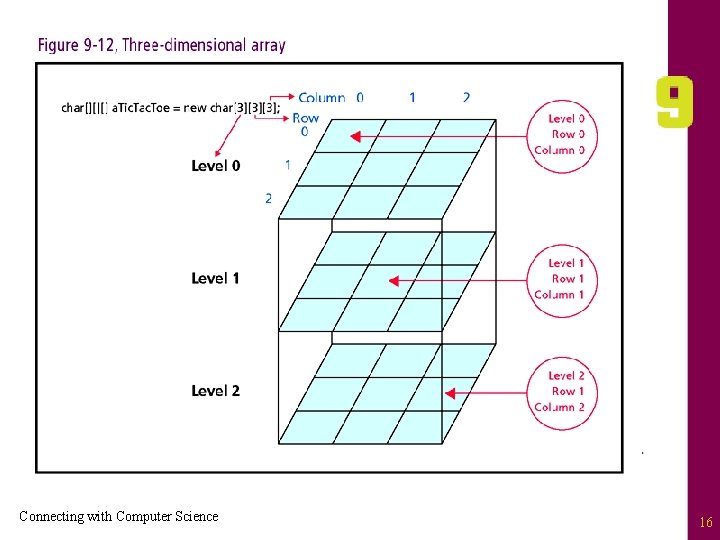
Connecting with Computer Science 16
Uses Of Arrays • Array advantages – – Allows sequential access of memory cells Retrieve/store data with name and data Easy to implement Simplifies program writing and reading • Limitations and disadvantages – Unlike classes, cannot store heterogeneous items – Lack ability to dynamically allocate memory – Searching unsorted arrays not efficient Connecting with Computer Science 17
Lists • List: dynamic data structure – Examples: class enrollment, cars being repaired, e-mail in-boxes – Appropriate whenever amount of data unknown or can change • Three basic list forms: – Linked lists – Queues – Stacks Connecting with Computer Science 18
Linked lists • Linked list – – Structure used for variable data set Unlike an array, stores data non-contiguously Maintains data and address of next linked cell Examples: names of students visiting a professor, points scored in a video game, list of spammers • Linked lists are basis of advanced data structures – Queues and stacks – Each of these constructs is pointer based Connecting with Computer Science 19
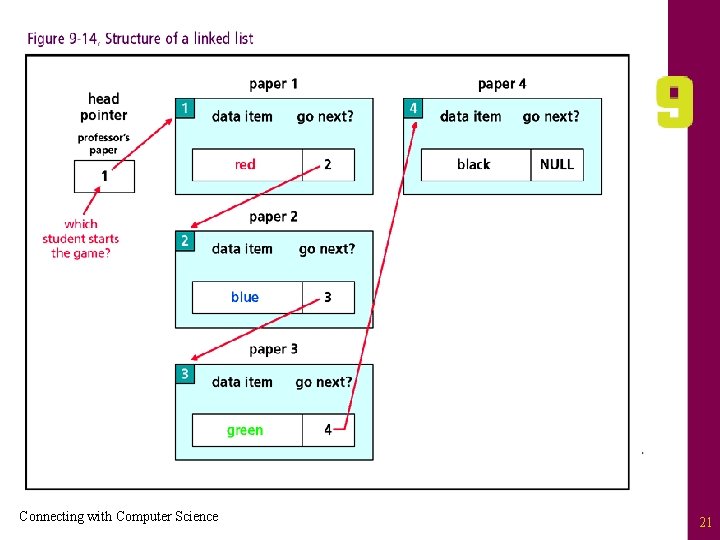
Linked Lists (continued) • Pointers: memory cells containing address as data – Address: location in memory • Illustration: Linked List game – – – Students sit in a circle with piece of paper Paper has box in the upper left corner and center Upper left box indicates a student number Center box divided into two parts Students indicate favorite color in left part of center Professor has a piece of paper with a number only Connecting with Computer Science 20
Connecting with Computer Science 21
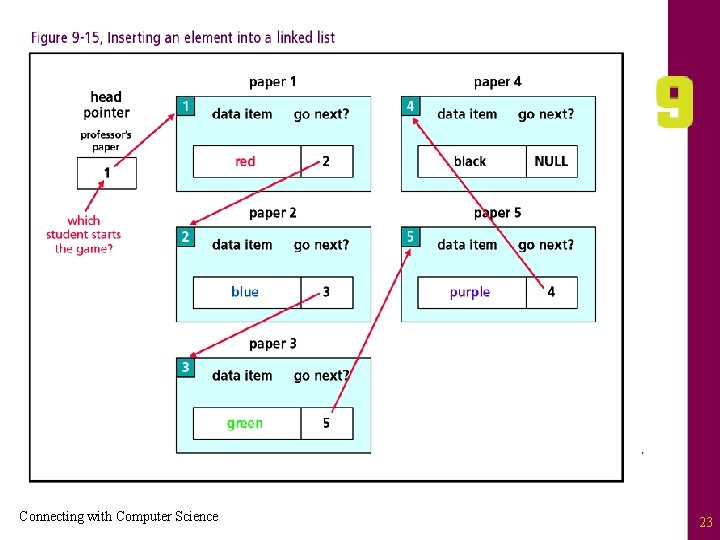
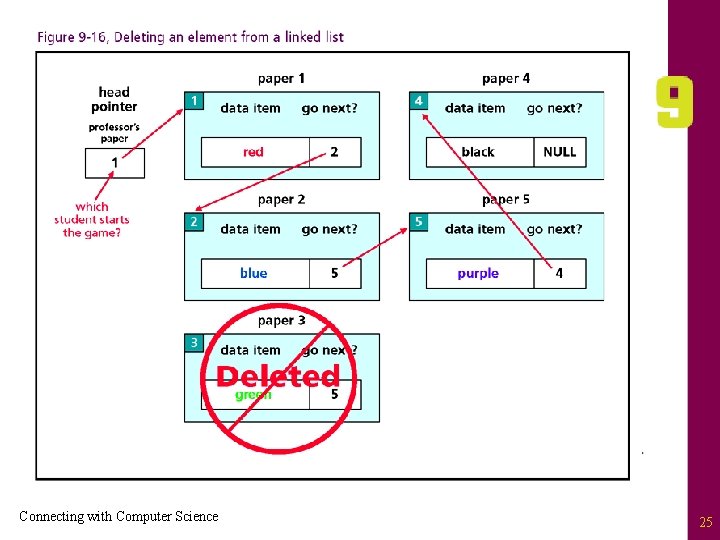
Linked Lists (continued) • Piece of paper represents a two-part node – Data (the first part, the color) – Pointer: where to go next (the student ID number) • Professor’s piece: head pointer with no data • Last student: pointer’s value is NULL • Inserting new elements – Unlike array, no resizing needed – Create new “piece of paper” with dual node structure – Realign pointers to accommodate new node (paper) Connecting with Computer Science 22
Connecting with Computer Science 23
Linked Lists (continued) • Similar procedure for deleting items – Modify pointer of element preceding target item – Students deleted from list without moving elements • Dynamic memory allocation – Linked lists more efficient than arrays – Memory cells need not be contiguous Connecting with Computer Science 24
Connecting with Computer Science 25
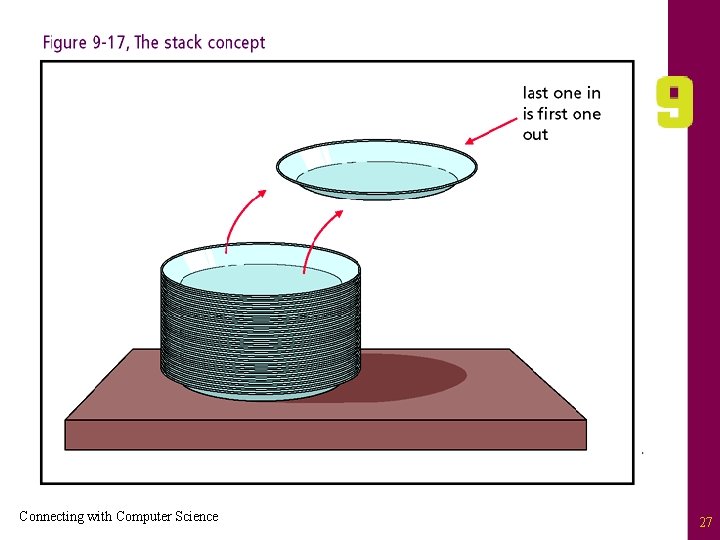
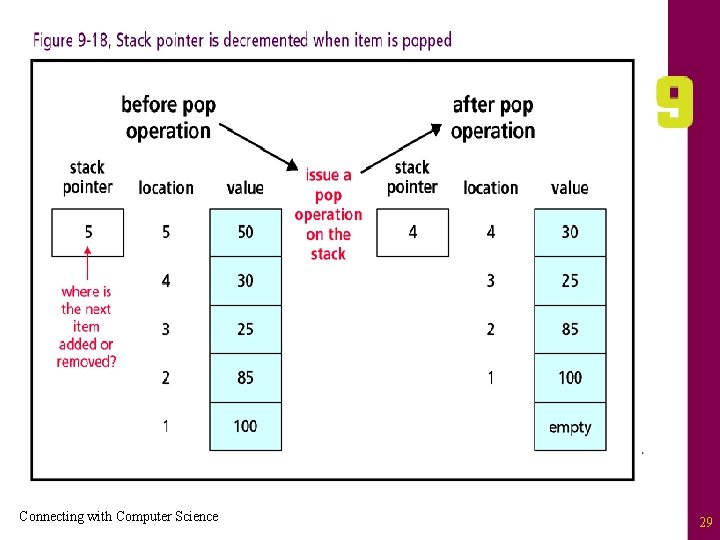
Stacks • Stack: Special form of a list – To store new items, “push” them onto the list – To retrieve current items, “pop” them off the list • Analogies – Spring loaded plate holder in a cafeteria – Character buffer for a text editor • LIFO data structure – First item pushed onto stack has waited longest – First item popped from stack is most recent addition Connecting with Computer Science 26
Connecting with Computer Science 27
Stacks (continued) • Uses Of A Stack: processing source code – Source code logically organized into procedures – Keep track of procedure calls with a stack – Address of procedure popped off stack • Back To Pointers: stack pointer monitors stack top • Check stack before applying pop or push operations • Stacks, like linked lists and arrays, are memory locations organized into logical structures Connecting with Computer Science 28
Connecting with Computer Science 29
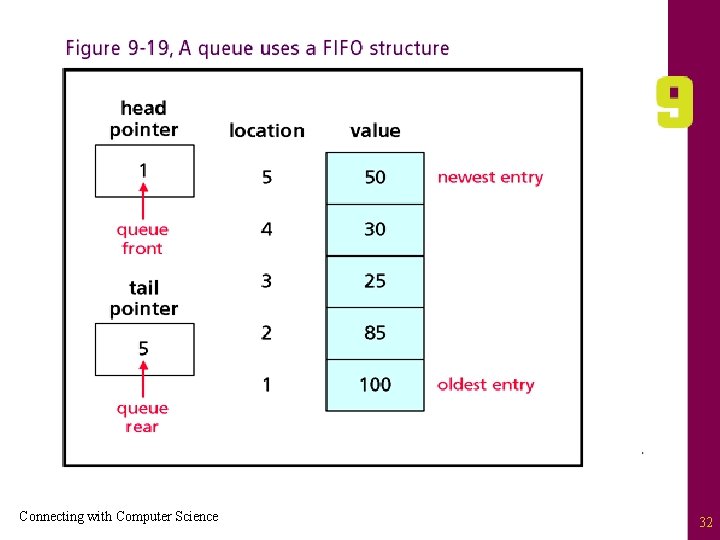
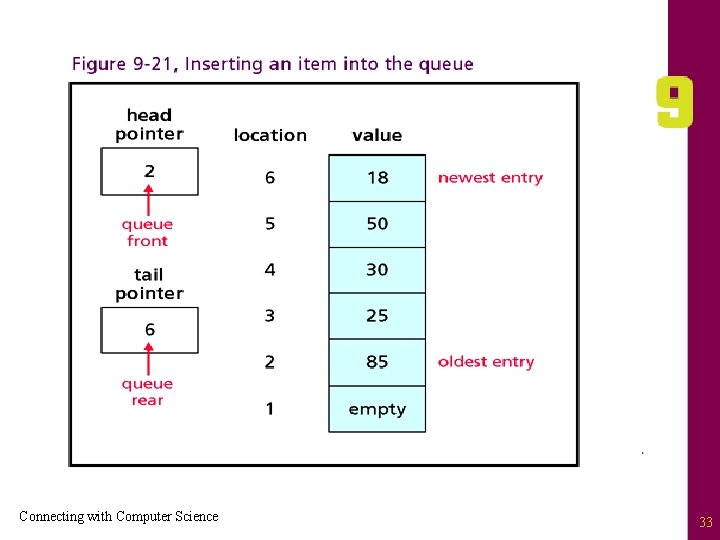
Queues • Queue: another type of linked list – – Implements first in, first out (FIFO) storage system Insertions made at the end of the queue Deletions made at the beginning Similar to that of a waiting line • Uses Of A Queue: printer example – First item printed is the document waiting longest – Current item deleted from queue, next item printed – New documents placed at the end of the queue Connecting with Computer Science 30
Queues (continued) • Pointers Again – Head pointer tracks beginning of queue – Tail pointer tracks end of the queue • Dequeue operation – Remove item (oldest entry) from the queue – Head pointer changed to point to the next item in list • Enqueue operation – Item placed at list end and the tail pointer is updated Connecting with Computer Science 31
Connecting with Computer Science 32
Connecting with Computer Science 33
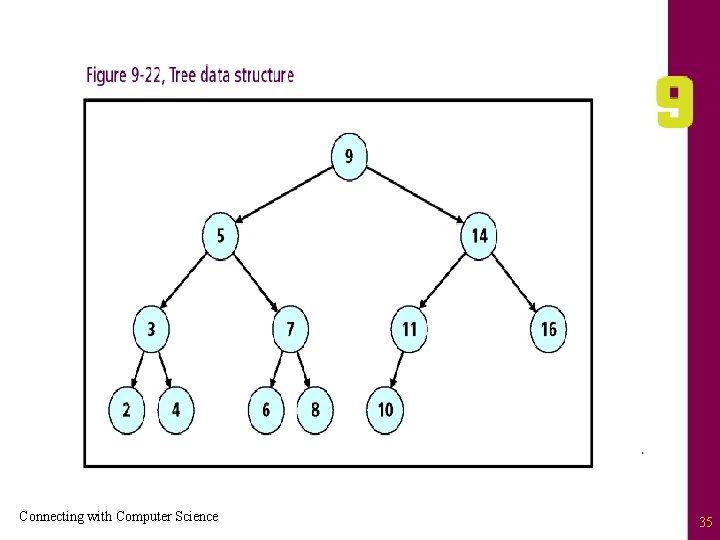
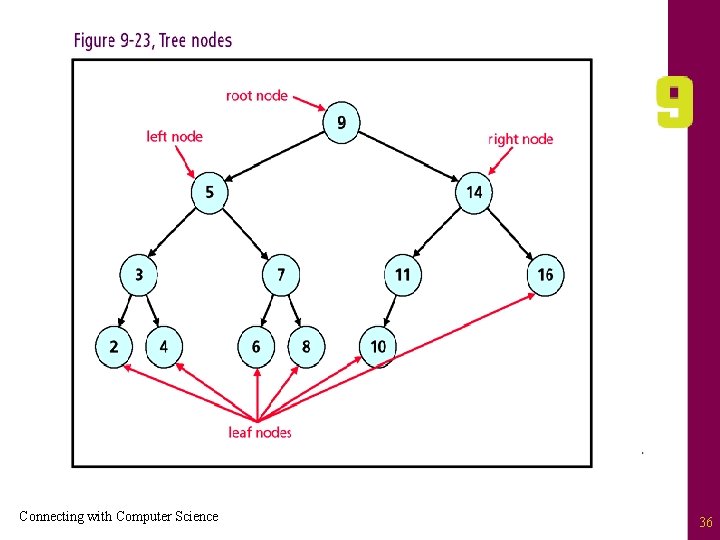
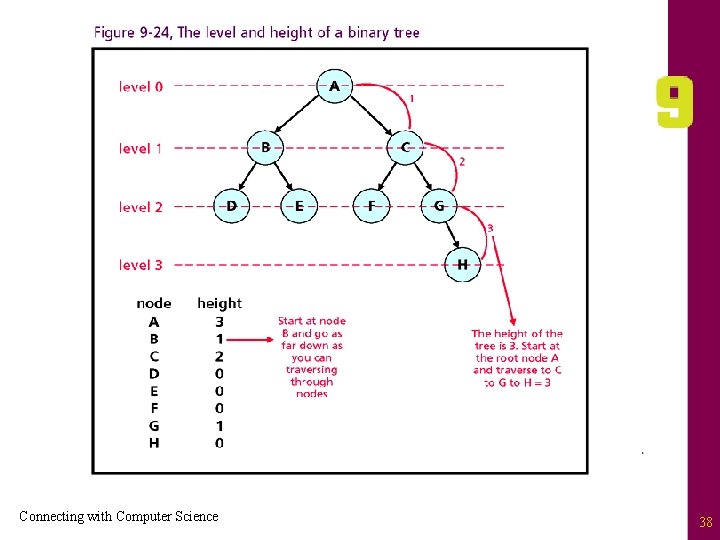
Trees • Tree: hierarchical data structure similar to organizational or genealogy charts – Each position in the tree is called a node or vertex – Node that begins the tree is called the root – Nodes exist in parent-child relationship – Node without children called a leaf node – Depth (level): refers to distance from root node – Height: maximum number of levels Connecting with Computer Science 34
Connecting with Computer Science 35
Connecting with Computer Science 36
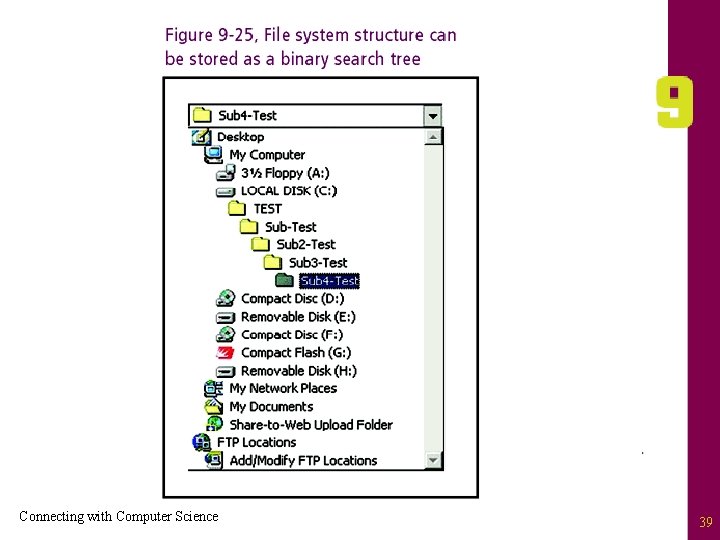
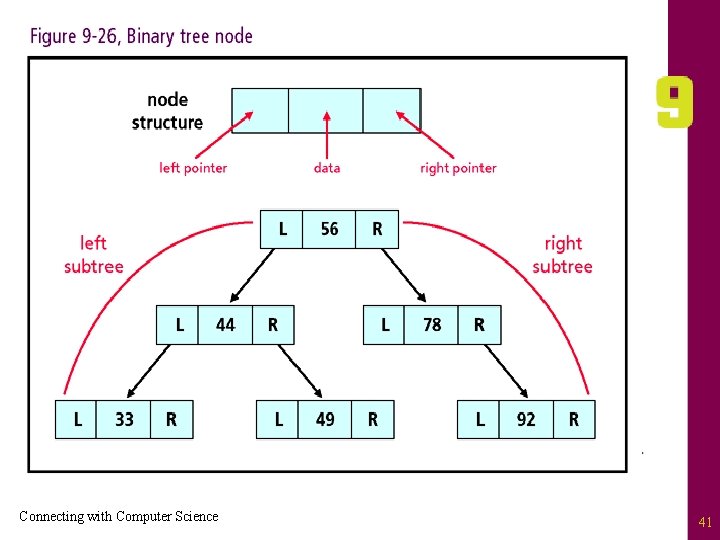
Trees (continued) • Binary tree: a type of tree – Parent node may have zero, one, or two child nodes – Child distinguished by positions “left” or “right” • Binary search tree: a type of binary tree – Data value of left child node < value of parent node – Data value of right child node > value of parent node • Binary search trees are useful search structures Connecting with Computer Science 37
Connecting with Computer Science 38
Connecting with Computer Science 39
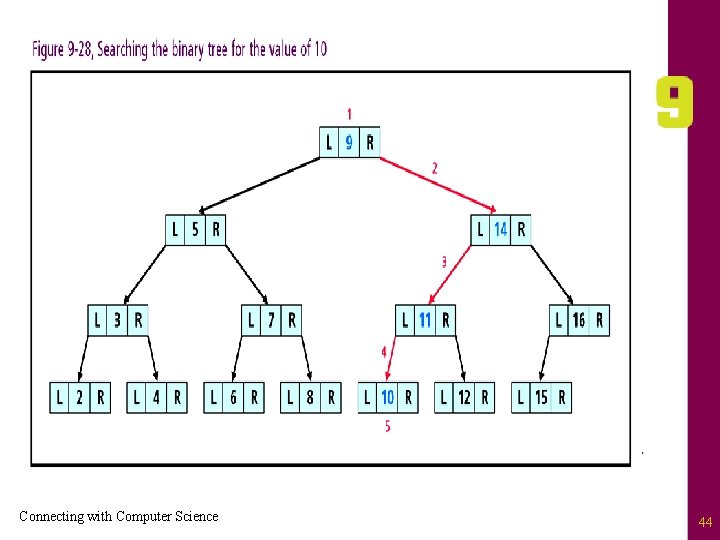
Searching a Binary Tree • A node in a binary search tree contains three components – Left child pointer – Right child pointer – Data • Root: provides the initial starting access to the tree • Prerequisite: binary search tree properly defined Connecting with Computer Science 40
Connecting with Computer Science 41
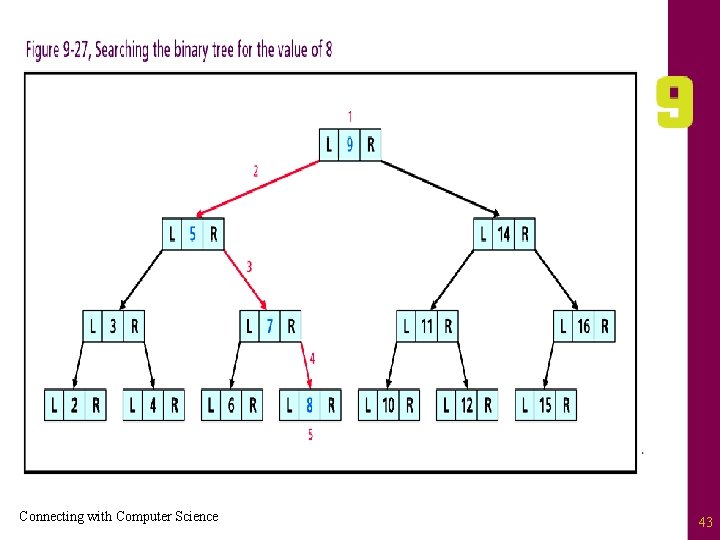
Searching a Binary Tree (continued) • Search routine – – – – Start at the root position Determine if path moves to left child or right Move in direction of data (left or right) If value found, stop at node and return to caller If value not found, repeat process with child node Child with NULL pointer blocks path While paths can be formed, continue search • Result: value is either found or not found Connecting with Computer Science 42
Connecting with Computer Science 43
Connecting with Computer Science 44
Sorting Algorithms • Sorting: leverages data structures to organize data • Some example of data being sorted: – – Words in a dictionary Files in a directory Index of a book Course offerings at the university • Algorithms define the process for sorting – No universal sorting routines – Focus: selection and bubble sorts Connecting with Computer Science 45
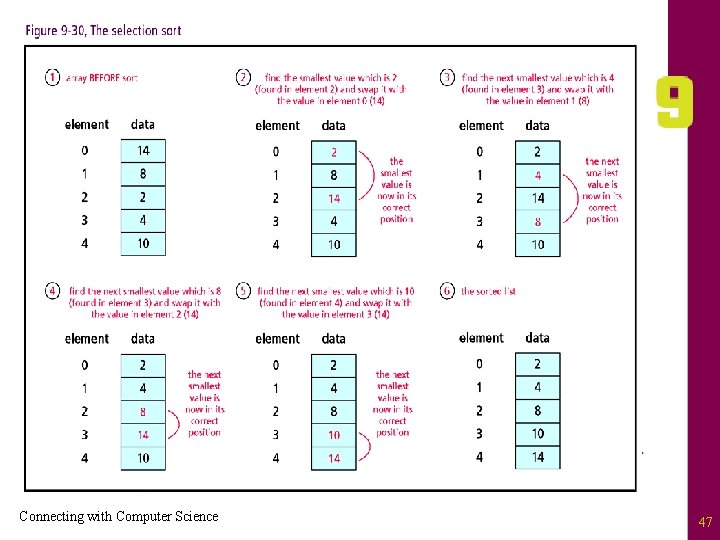
Selection Sort • Selection sort: mimics manual sorting – – – Find smallest value in a list Exchange with item in first position Move to second position Repeat process with reduced list (less first position) Continue process until second to last item • Selection sort is simple to use and implement • Selection sort inefficient for large lists Connecting with Computer Science 46
Connecting with Computer Science 47
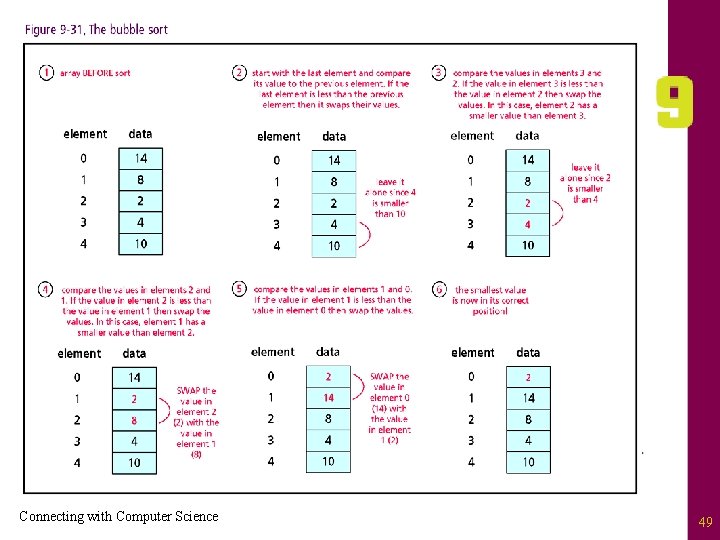
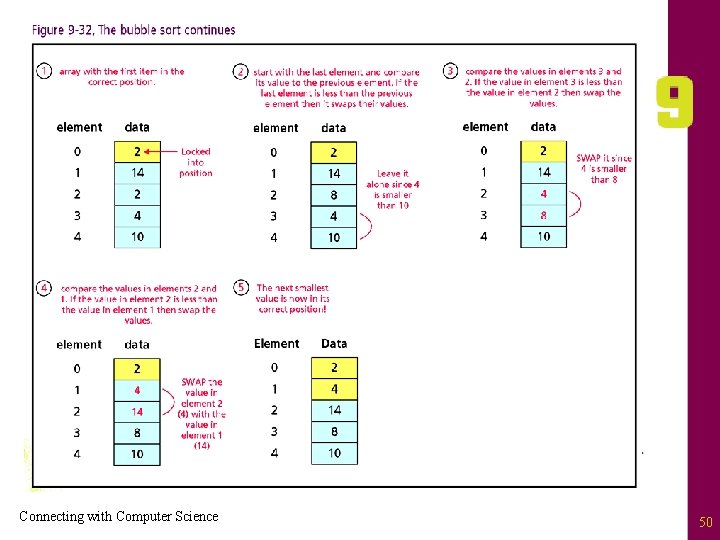
Bubble Sort • Bubble: one of the oldest sort methods – Start with the last element in the list – Compare its value to that of the item just above – If smaller, change positions and continue up list • Continue comparison until smaller item found – If not smaller, next item compared to item above – Check until smallest value “bubbles” to the top – Process repeated for list less first item • Bubble sort to simplement • Bubble Sort inefficient for large lists Connecting with Computer Science 48
Connecting with Computer Science 49
Connecting with Computer Science 50
Other Types Of Sorts • Other sorting routines – Quicksort, merge sort, insertion sort, shell sort – Process data with fewer comparisons – More time efficient than selection and bubble sorts • Quicksort – Incorporates “divide and conquer” logic • Two small lists easier to sort than one large list – Uses recursion, (self calls), to break down problem – All sorted sub-lists combined into single sorted list – Very fast and useful with large data set Connecting with Computer Science 51
Other Type of Sorts (continued) • Merge sort: similar to the quicksort – Continuously halves data sets using recursion – Sorted halves merged back into one list – Time efficient, but not as space efficient as quicksort • Insertion sort: simulates manual sorting of cards – Requires two lists – Not complex, but inefficient for list size > 1000 • Shell sort: uses insertion sort against expanding data set Connecting with Computer Science 52
One Last Thought • Essential foundations: data structures and sorting and searching algorithms • Acquaint yourself with publicly available routines • Do not waste time “reinventing the wheel” • Factors to consider when implementing sort routines – Complexity of programming code – Time and space efficiencies Connecting with Computer Science 53
Summary • Data structures organize data • Basic data structures: arrays, linked lists, queues, stacks, trees • Arrays store data contiguously • Arrays may have one or more dimensions • Linked lists store data in dynamic containers Connecting with Computer Science 54
Summary (continued) • Linked lists use pointers for non-contiguous storage • Pointer: variable’s datatype is memory address • Stack: linked list structured as LIFO container • Queue: linked list structured as FIFO container • Tree: hierarchical structure consisting of nodes Connecting with Computer Science 55
Summary (continued) • Binary tree: nodes have at most two children • Binary search tree: left child < parent < right child • Sorting Algorithms: organize data within structure • Names of sorting routines: selection sort, bubble sort, quicksort, merge sort, insertion sort, shell sort • Sorting routines analyzed by code, space, time complexities Connecting with Computer Science 56
- Slides: 56