
Connecting with Computer Science 2 e Chapter 3
- Slides: 57
Connecting with Computer Science, 2 e Chapter 3 Computer Architecture
Objectives • In this chapter you will: – Learn why you need to understand how computers work – Learn what a CPU is and what it’s made of – Learn how digital logic circuits are constructed – Learn the basic Boolean operators – Understand how basic logic gates operate and are used to build complex computer circuits – Learn the importance of Von Neumann architecture – Understand how a computer uses memory Connecting with Computer Science, 2 e 2
Objectives (cont’d. ) • In this chapter you will (cont’d. ): – Learn what a system bus is and what its purpose is – Understand the difference between memory and storage – Be able to describe basic input/output devices – Understand how a computer uses interrupts and polling Connecting with Computer Science, 2 e 3
Why You Need to Know About…Computer Architecture • Computer – Hardware designed to run software – Purpose is to accomplish desired tasks – Professionals need to understand logical connection between hardware and software • Computer architecture – Organization of hardware components into a computer system Connecting with Computer Science, 2 e 4
Inside the Box • Computer system external view – Monitor – Keyboard and mouse – Computer case • CPU (central processing unit) – Resides in case on main board, or motherboard – Computational center served by all other parts – Touch point for the study of computer architecture Connecting with Computer Science, 2 e 5
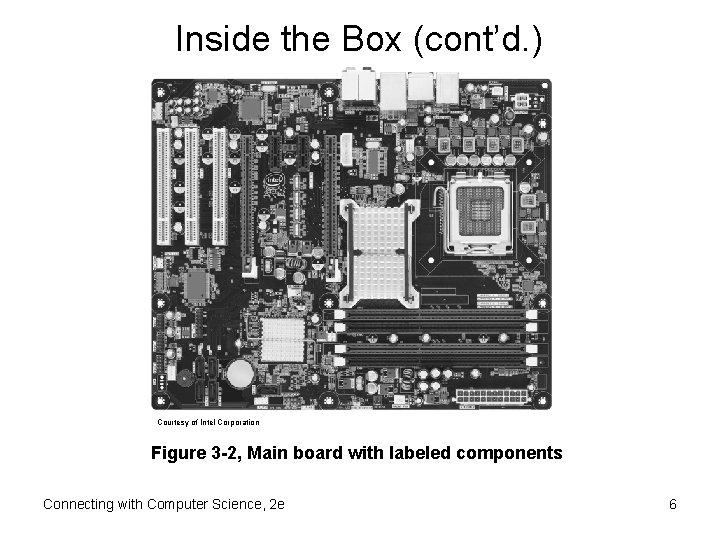
Inside the Box (cont’d. ) Courtesy of Intel Corporation Figure 3 -2, Main board with labeled components Connecting with Computer Science, 2 e 6
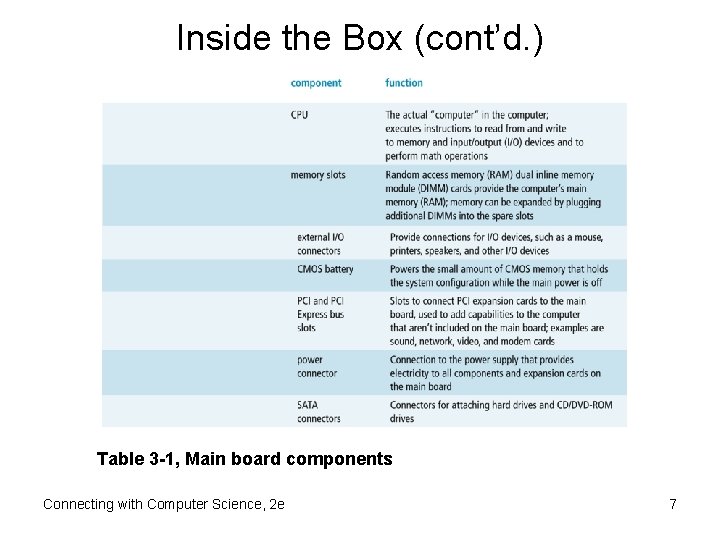
Inside the Box (cont’d. ) Table 3 -1, Main board components Connecting with Computer Science, 2 e 7
The CPU • CPU is the computer – Contains digital components that do processing • Transistor – Fundamental component • Electronic switch accommodates binary values • Millions of transistors per chip • Organized into a higher level called a circuit – Four basic functions • Adding, decoding, shifting, and storing Connecting with Computer Science, 2 e 8
The CPU (cont’d. ) • Four corresponding transistor circuits – – Adder: adds, subtracts, multiplies, divides Decoder: reacts to specific bit patterns Shifter: moves bits to right or left Flip-flop (latch): used to store memory bits Connecting with Computer Science, 2 e 9
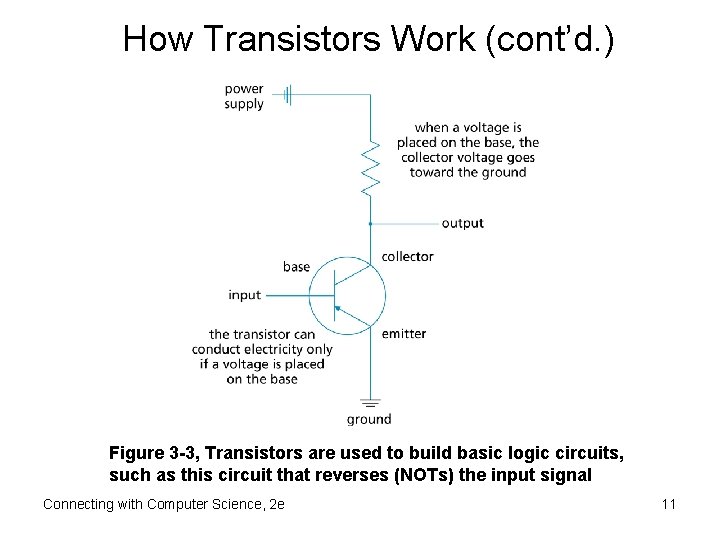
How Transistors Work • Material composition – Silicon or germanium • Logically organized into three parts – Emitter, collector, and base • Transistor as electronic switch – Base used to turn current on and off • Capacity to control current translates into capacity to manipulate binary values of 1 and 0 • Size considerations – Typical transistor 130 nanometers wide (Pentium IV) Connecting with Computer Science, 2 e 10
How Transistors Work (cont’d. ) Figure 3 -3, Transistors are used to build basic logic circuits, such as this circuit that reverses (NOTs) the input signal Connecting with Computer Science, 2 e 11
Digital Logic Circuits • Logic circuit – Next level of organization above transistor – Leverages switching function of transistor – Performs operations of Boolean algebra • Boolean algebra – – Functions relating binary input and output Chief operators: AND, OR, NOT Boolean variables: true (1) or false (0) Boolean expressions • Use Boolean operators and variables Connecting with Computer Science, 2 e 12
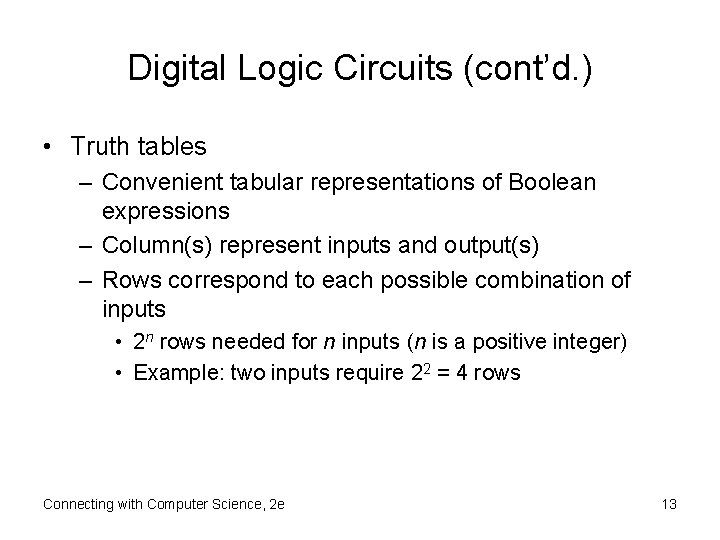
Digital Logic Circuits (cont’d. ) • Truth tables – Convenient tabular representations of Boolean expressions – Column(s) represent inputs and output(s) – Rows correspond to each possible combination of inputs • 2 n rows needed for n inputs (n is a positive integer) • Example: two inputs require 22 = 4 rows Connecting with Computer Science, 2 e 13
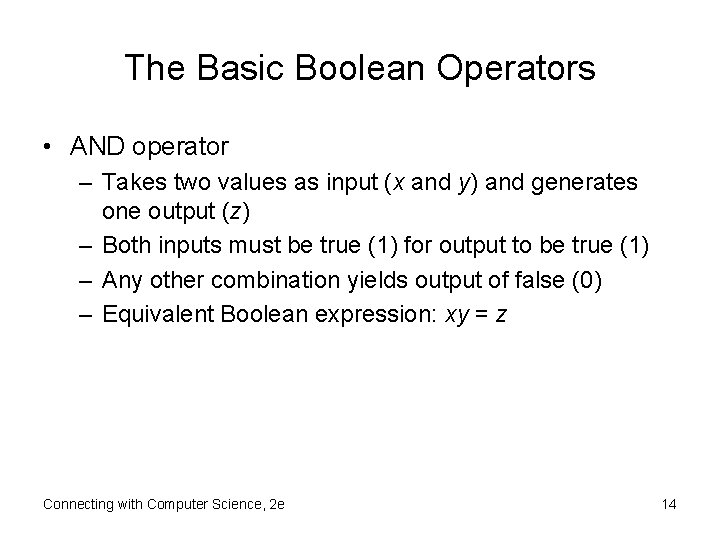
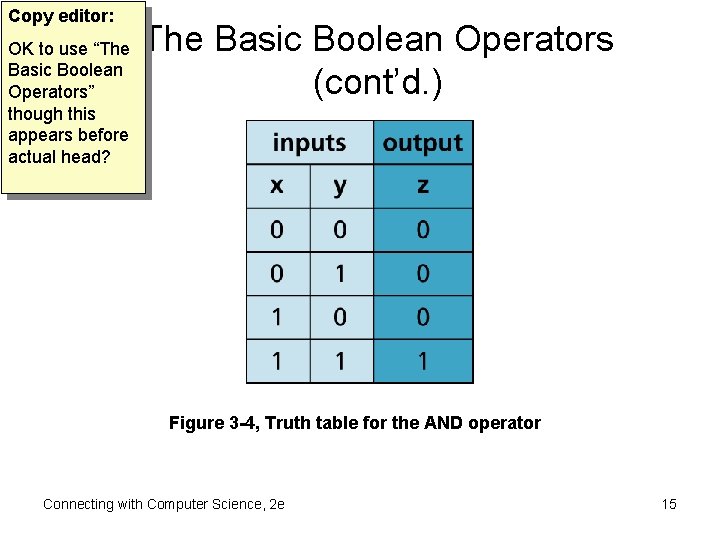
The Basic Boolean Operators • AND operator – Takes two values as input (x and y) and generates one output (z) – Both inputs must be true (1) for output to be true (1) – Any other combination yields output of false (0) – Equivalent Boolean expression: xy = z Connecting with Computer Science, 2 e 14
Copy editor: OK to use “The Basic Boolean Operators” though this appears before actual head? The Basic Boolean Operators (cont’d. ) Figure 3 -4, Truth table for the AND operator Connecting with Computer Science, 2 e 15
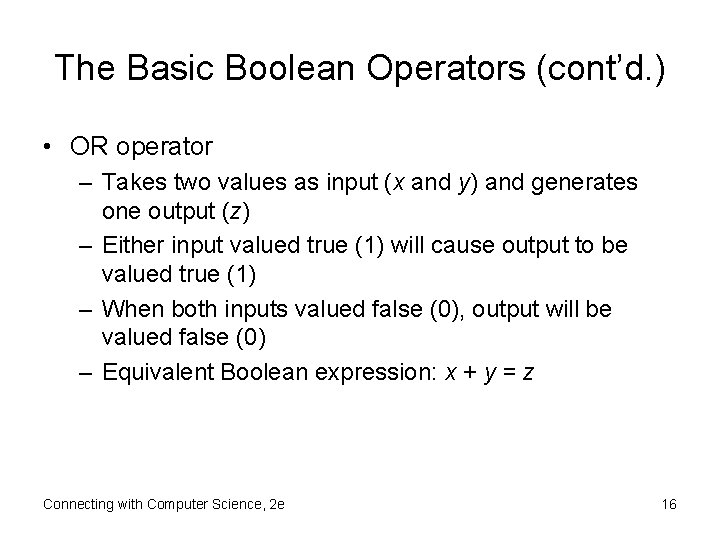
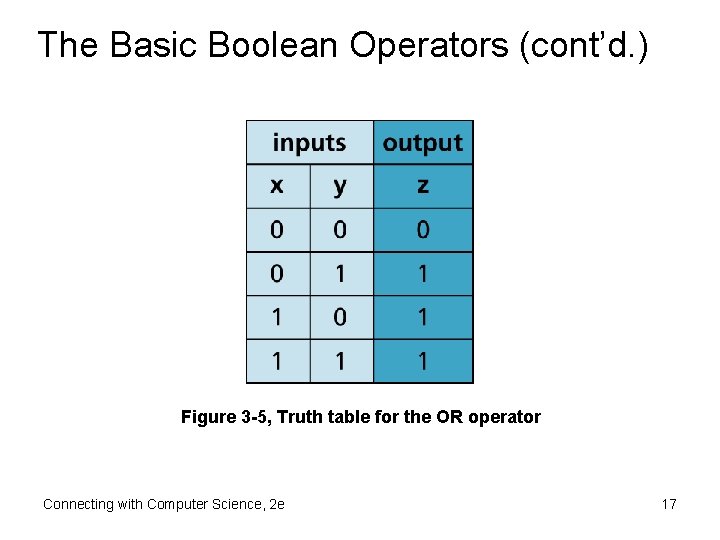
The Basic Boolean Operators (cont’d. ) • OR operator – Takes two values as input (x and y) and generates one output (z) – Either input valued true (1) will cause output to be valued true (1) – When both inputs valued false (0), output will be valued false (0) – Equivalent Boolean expression: x + y = z Connecting with Computer Science, 2 e 16
The Basic Boolean Operators (cont’d. ) Figure 3 -5, Truth table for the OR operator Connecting with Computer Science, 2 e 17
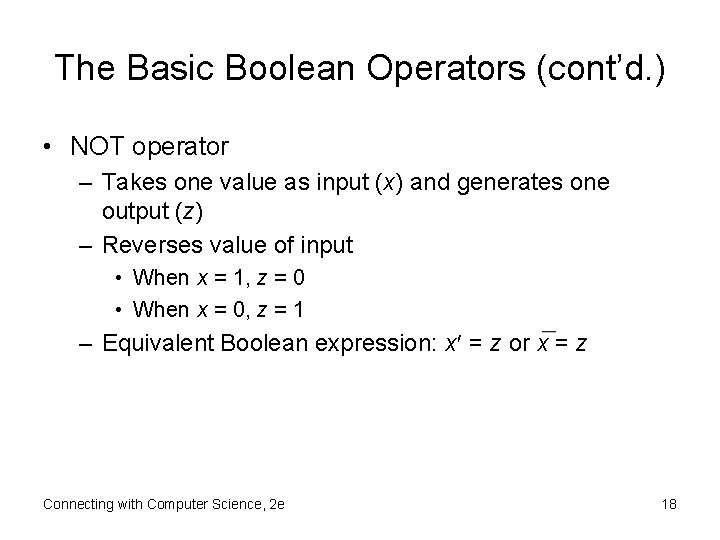
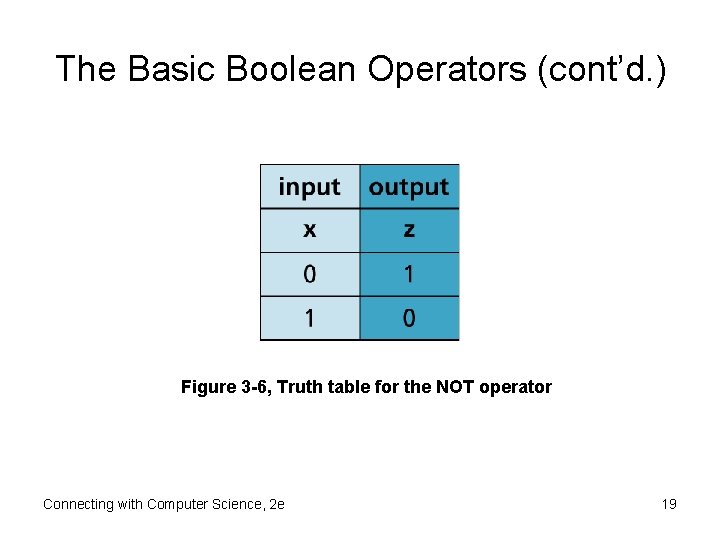
The Basic Boolean Operators (cont’d. ) • NOT operator – Takes one value as input (x) and generates one output (z) – Reverses value of input • When x = 1, z = 0 • When x = 0, z = 1 – Equivalent Boolean expression: x = z or x = z Connecting with Computer Science, 2 e 18
The Basic Boolean Operators (cont’d. ) Figure 3 -6, Truth table for the NOT operator Connecting with Computer Science, 2 e 19
Digital Building Blocks • Circuit hierarchy – Gates: transistor circuits that implement Boolean operators • Can be grouped into more complex circuits carrying out computer tasks • Reliability – Binary values are maintained with consistent voltage levels – Gate output is completely determined by input • Six fundamental gates – AND, OR, NOT, NAND, NOR, XOR Connecting with Computer Science, 2 e 20
Digital Building Blocks (cont’d. ) • AND gate – Allows for two inputs and has one output – Truth table identical to that of AND Boolean operator • OR gate – Allows for two inputs and has one output – Truth table identical to that of Boolean OR operator • NOT gate – Allows for one input and one output – Truth table identical to Boolean NOT operator Connecting with Computer Science, 2 e 21
Digital Building Blocks (cont’d. ) • NAND gate – Reverses output of AND gate with NOT gate – Truth table output opposite that of AND gate • NOR gate – Reverses output of OR gate with NOT gate – Truth table output opposite that of OR gate • XOR gate – Truth table indicates output is 1 only when the inputs are different Connecting with Computer Science, 2 e 22
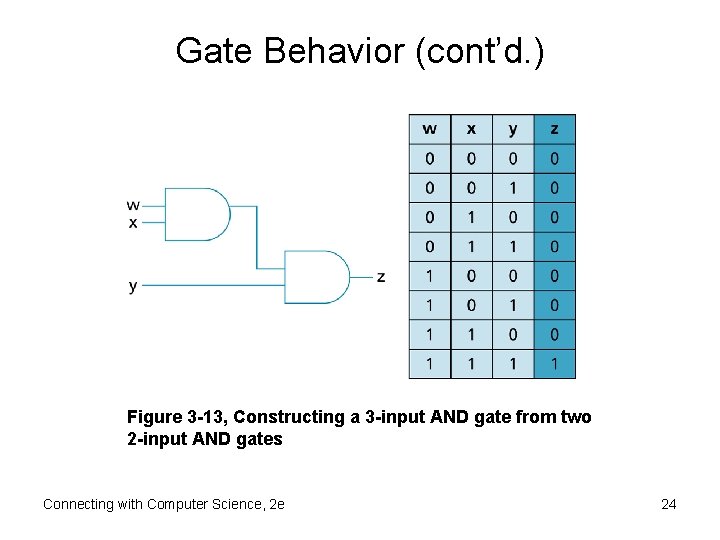
Gate Behavior • Predictability of gates – Output for given input derived from truth table • Gates can be chained together to form more complex specialized circuits – Output of one gate is connected as input to another • Example: 3 -input AND gate from two 2 -input AND gates Connecting with Computer Science, 2 e 23
Gate Behavior (cont’d. ) Figure 3 -13, Constructing a 3 -input AND gate from two 2 -input AND gates Connecting with Computer Science, 2 e 24
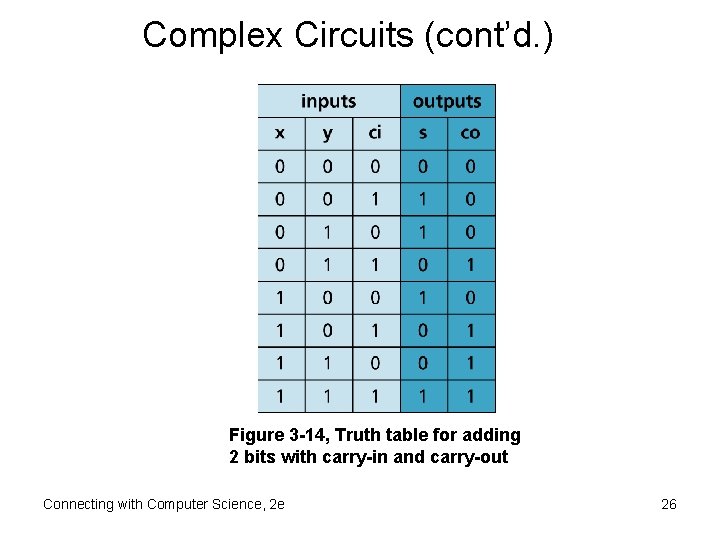
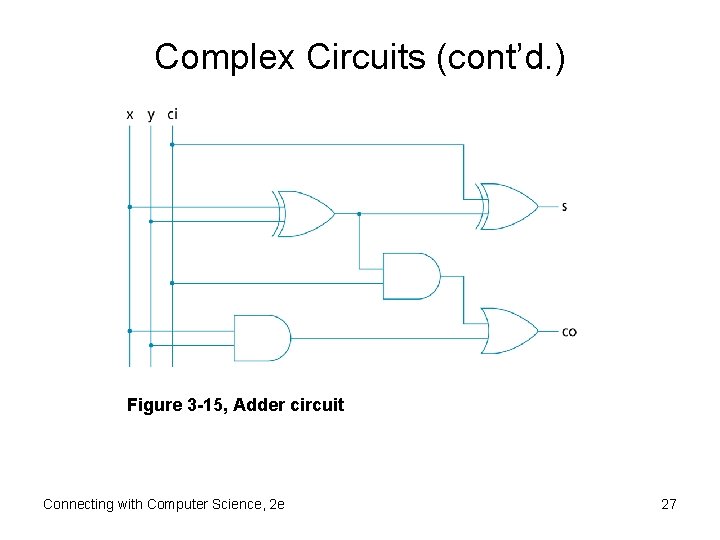
Complex Circuits • Four fundamental circuits of CPU – Adder, decoder, shifter, and flip-flop • Adder – Adds two binary numbers – Inputs: two bits (x, y) to add and one carry-in (ci) – Outputs: sum bit(s) and one carry-out bit (co) Connecting with Computer Science, 2 e 25
Complex Circuits (cont’d. ) Figure 3 -14, Truth table for adding 2 bits with carry-in and carry-out Connecting with Computer Science, 2 e 26
Complex Circuits (cont’d. ) Figure 3 -15, Adder circuit Connecting with Computer Science, 2 e 27
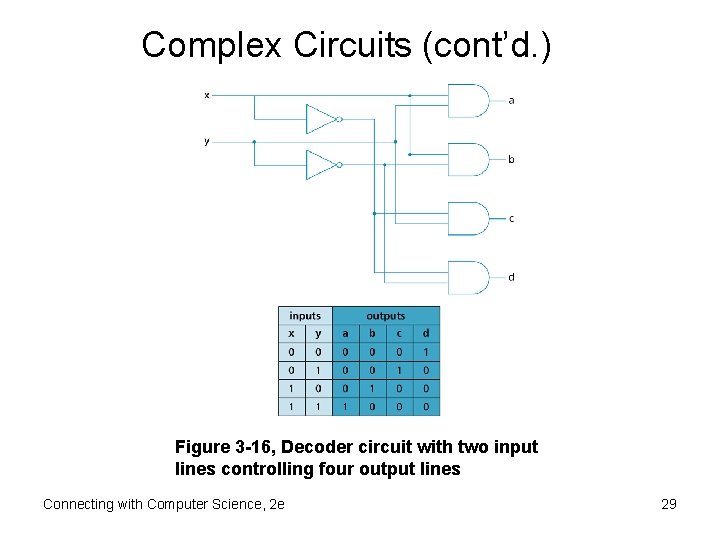
Complex Circuits (cont’d. ) • Decoder – Addresses memory and selects I/O devices – Given input pattern, output line is selected – Illustrate decoder with two inputs • Has four possible outputs • Truth table incorporates four basic truth tables Connecting with Computer Science, 2 e 28
Complex Circuits (cont’d. ) Figure 3 -16, Decoder circuit with two input lines controlling four output lines Connecting with Computer Science, 2 e 29
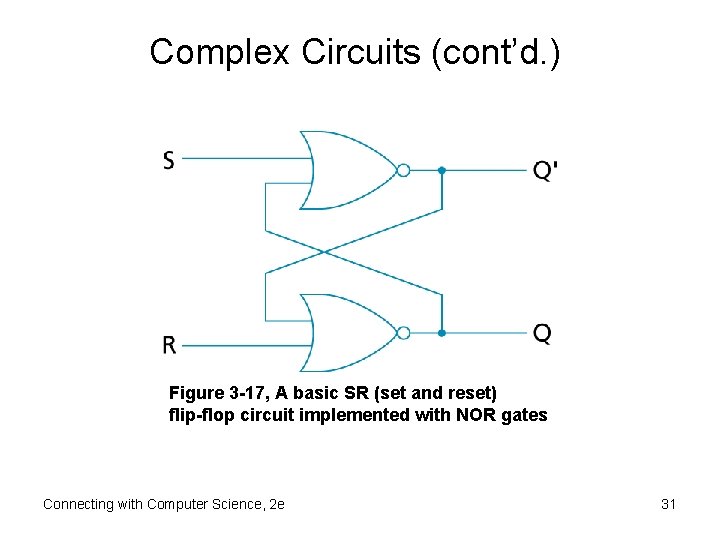
Complex Circuits (cont’d. ) • Flip-flop – – – Special form of latch circuit Holds value at output even if input changes Inputs: S (set) and R (reset) Outputs: Q and Q Ideal for bit storage • Used for high-speed memory in CPU • Static RAM (SRAM) Connecting with Computer Science, 2 e 30
Complex Circuits (cont’d. ) Figure 3 -17, A basic SR (set and reset) flip-flop circuit implemented with NOR gates Connecting with Computer Science, 2 e 31
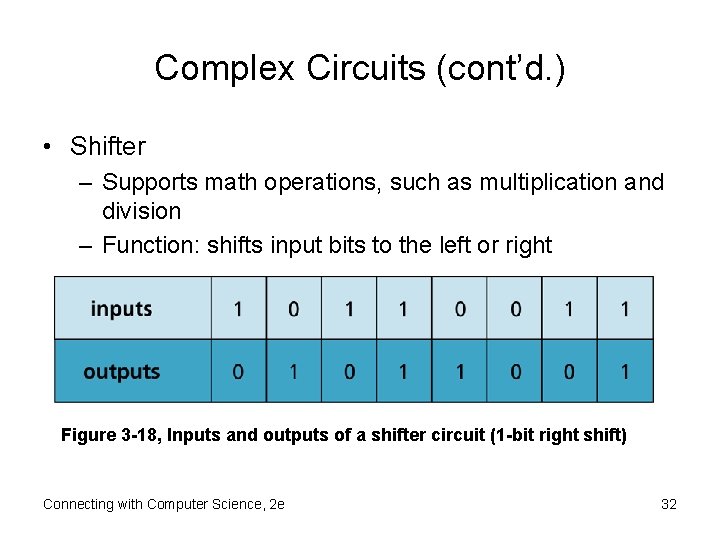
Complex Circuits (cont’d. ) • Shifter – Supports math operations, such as multiplication and division – Function: shifts input bits to the left or right Figure 3 -18, Inputs and outputs of a shifter circuit (1 -bit right shift) Connecting with Computer Science, 2 e 32
Complex Circuits (cont’d. ) • Other circuits: – Multiplexer – Parity generator – Counter • Three-part-design process: – Construct truth table relating inputs and outputs – Build Boolean expression equivalent to truth table – Represent Boolean expression in a circuit diagram Connecting with Computer Science, 2 e 33
Complex Circuits (cont’d. ) • Integrated circuits (ICs) – Whole logic circuits etched onto a single piece of semiconductor material – VLSI (Very Large-Scale Integration) chip • Contains millions of transistors making up CPU circuits • Can be etched onto a single piece of silicon not much bigger than a pencil eraser Connecting with Computer Science, 2 e 34
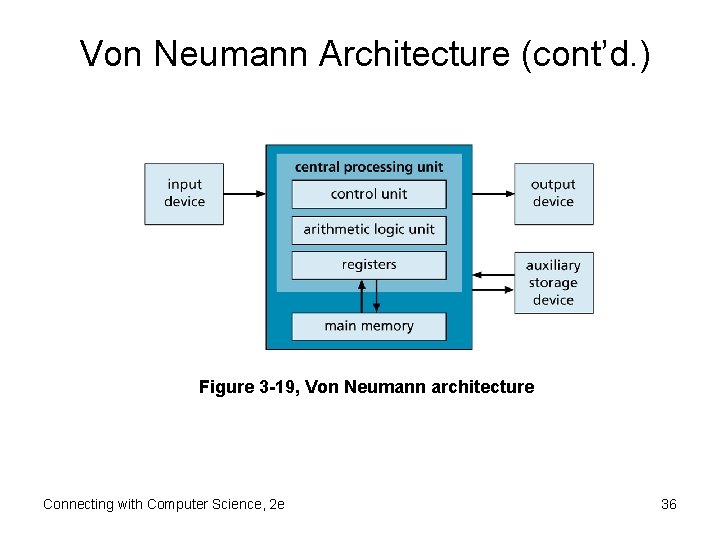
Von Neumann Architecture • Multipurpose machine with the following characteristics: – Binary instructions are processed sequentially by fetching an instruction and then executing – Instructions and data are stored in main memory system – Instruction execution carried out by CPU • Control unit (CU) • Arithmetic logic unit (ALU) • Registers (small storage areas) – CPU has the capability to accept input from and provide output to external devices Connecting with Computer Science, 2 e 35
Von Neumann Architecture (cont’d. ) Figure 3 -19, Von Neumann architecture Connecting with Computer Science, 2 e 36
Von Neumann Architecture (cont’d. ) • Breakdown of typical fetch-decode-execute cycle: – Control unit uses the address in program counter register to fetch an instruction from main memory – Instruction decoded – Any needed data is retrieved from memory and placed into other registers – ALU executes the instruction using data in registers, if necessary – Input or output operations required by the instruction are performed Connecting with Computer Science, 2 e 37
Von Neumann Architecture (cont’d. ) • Crystal (system) clock synchronizes steps in instruction sequence – Computers measured by clock speed • Example: Pentium IV speed = 3 GHz, processes 3 billion instruction cycles per second • Trends in clock speed – Rising for 60 years Connecting with Computer Science, 2 e 38
Buses • Set of wires and rules facilitating data transfer – Components connected via system bus • Bus wires divided into three separate signal groups – Control – Address – Data • Modern bus standard – Peripheral Component Interconnect (PCI) Connecting with Computer Science, 2 e 39
Peripheral Buses • SCSI (Small Computer System Interface) – Connects different types of I/O devices to computer – Allows CPU to pass control to other devices (bus mastering) Connecting with Computer Science, 2 e 40
Storage • Family of components used to store programs and data • Storage hierarchy – Primary memory – Secondary memory (mass storage) Connecting with Computer Science, 2 e 41
Memory • Two basic types: – ROM (read-only memory) • Memory etched into chip • Generally cannot be modified • BIOS (basic input/output system) – RAM (random access memory) • • Allows direct memory reference Allows reading and writing Volatile CPU fetches program instructions from RAM Connecting with Computer Science, 2 e 42
Memory (cont’d. ) • Types of RAM – DRAM (dynamic RAM) • Made of circuits using one transistor per bit • Needs to be constantly refreshed to maintain data – SRAM (static RAM) • Made of flip-flop circuits • Fastest memory type • Used chiefly in registers and cache memory Connecting with Computer Science, 2 e 43
Mass Storage • Characteristics – – Greater storage capacity than RAM or ROM Uses devices such as hard drives or DVDs Cheaper storage per megabyte Available after power is turned off Connecting with Computer Science, 2 e 44
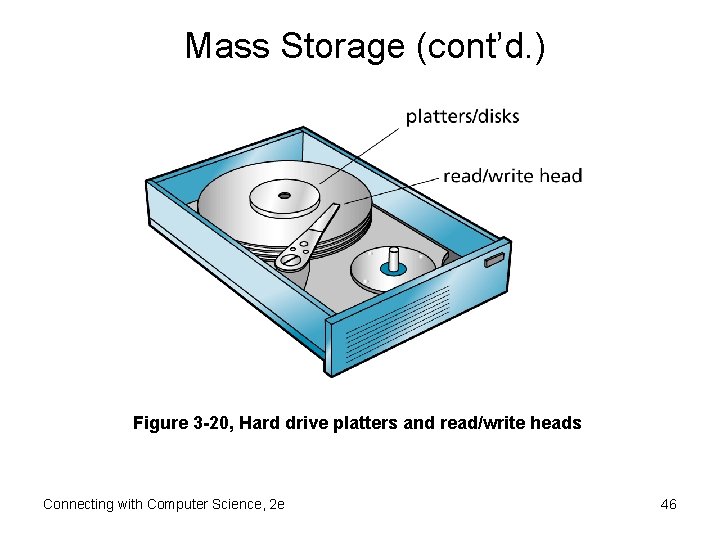
Mass Storage (cont’d. ) • Hard drives – Most common form of mass storage – Magnetic metal platters store information • • Coating consists of magnetic particles Made of tracks, divided into sectors Platters spin at about 7200 RPM Read/write head moves horizontally across disk’s surface – Low cost-unit storage ratio relative to RAM – RAID (redundant array of independent disks) Connecting with Computer Science, 2 e 45
Mass Storage (cont’d. ) Figure 3 -20, Hard drive platters and read/write heads Connecting with Computer Science, 2 e 46
Mass Storage (cont’d. ) • Optical storage – CDs (compact discs) and DVDs (digital video discs) – Store data using optical (laser) technologies • • Pits burned into discs interpreted as binary data Data written to discs in continuous spiral Like hard disks, optical discs spin Read/write heads interface with disc surface Connecting with Computer Science, 2 e 47
Mass Storage (cont’d. ) • Flash (thumb) drives – Portable storage that plugs into USB (universal serial bus) port – Replacing floppy drives – Use flash memory – Nonvolatile Connecting with Computer Science, 2 e 48
Input/Output Systems • Final component of Von Neumann architecture • I/O devices – CPU fetches instructions and data from memory, and then executes the instructions – Computer’s connection to user Connecting with Computer Science, 2 e 49
Input Devices • Keyboard – Primary input device for most users – Connects to CPU through keyboard controller circuit and system bus – Keystrokes are translated into binary signals • Mouse – Used in conjunction with keyboard – Senses movement and translates it into binary code • Other devices exist Connecting with Computer Science, 2 e 50
Output Devices • Communication to outside world • Monitors – Primary output device – CRTs (cathode ray tubes) • Uses faster scanning techniques • Quality based on resolution and refresh rate – LCD (liquid crystal display) • Thinner and cooler than CRTs • Uses transistors rather than electron beams • Quality based on resolution and refresh rate Connecting with Computer Science, 2 e 51
Output Devices (cont’d. ) • Printers – Important output device – Primary varieties: inkjet and laser printers – Quality measured by resolution (dots per inch) and speed (pages per minute) • Sound cards – Fit into PCI expansion slot on main board – Used to digitize sound for storage – Also converts binary sound files into analog sounds Connecting with Computer Science, 2 e 52
Interrupts and Polling • CPU execution cycle equals processor’s clock speed • Processing need determined by: – Polling: CPU interrogates I/O device – Interrupt handling: I/O device initiates request for service Connecting with Computer Science, 2 e 53
Choosing the Best Computer Hardware • No one size fits all – Circumstances drive selection process • Factors – – – Machine objectives Clock speed Memory type Bus speed Hard drive speed Connecting with Computer Science, 2 e 54
One Last Thought • Stay current on new technologies – See where they fit into your existing understanding of computers • To improve your skills, get a better understanding of how: – A computer works – The parts of a computer system interact Connecting with Computer Science, 2 e 55
Summary • CPU is the “real” computer • Von Neumann architecture – Design template for modern machines • Von Neumann machine components – Central processing unit – Memory (hierarchical organization) – Input/output devices • System components are connected via buses • Instruction cycle – Fetch-decode-execute Connecting with Computer Science, 2 e 56
Summary (cont’d. ) • Instructions are processed at clock speed • Basic circuits – Adder, decoder, flip-flop, shifter • Integrated circuits – Unite transistors and other components • Logical circuit scheme is based on Boolean algebra • Fundamental circuits (or gates) – AND, OR, NOT, NAND, NOR, XOR – Circuits are equivalently represented by truth tables and Boolean expressions Connecting with Computer Science, 2 e 57