
Configuring OSPF Authentication OSPF Authentication Types OSPF supports


- Slides: 17
Configuring OSPF Authentication
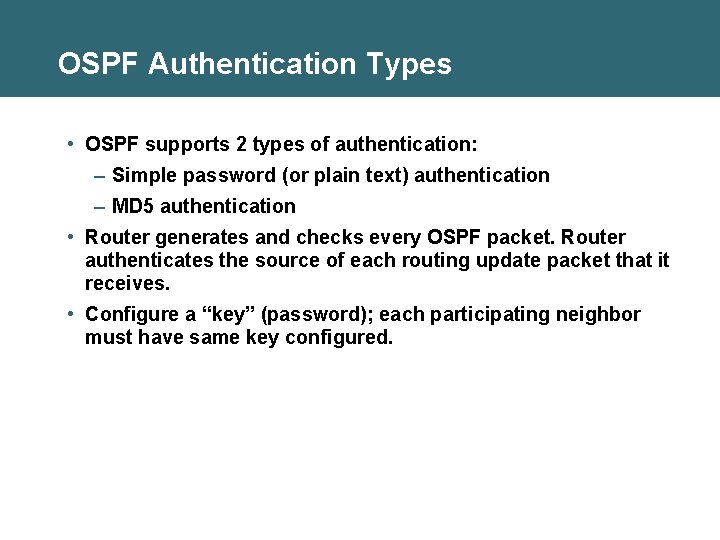
OSPF Authentication Types • OSPF supports 2 types of authentication: – Simple password (or plain text) authentication – MD 5 authentication • Router generates and checks every OSPF packet. Router authenticates the source of each routing update packet that it receives. • Configure a “key” (password); each participating neighbor must have same key configured.
Configuring OSPF Simple Password Authentication Router(config-if)# ip ospf authentication-key password • Assigns a password to be used with neighboring routers Router(config-if)# ip ospf authentication [message-digest | null] • Specifies the authentication type for an interface (since Cisco IOS software 12. 0) Router(config-router)# area-id authentication [message-digest] • Specifies the authentication type for an area (was in Cisco IOS software before 12. 0)
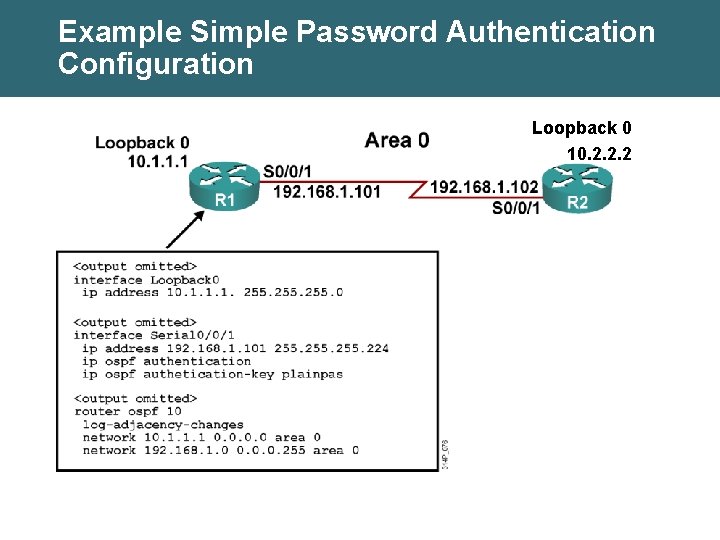
Example Simple Password Authentication Configuration Loopback 0 10. 2. 2. 2
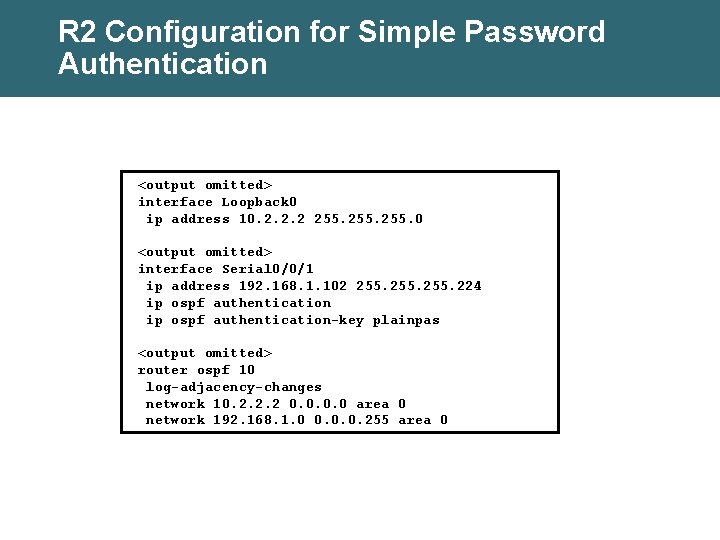
R 2 Configuration for Simple Password Authentication <output omitted> interface Loopback 0 ip address 10. 2. 2. 2 255. 0 <output omitted> interface Serial 0/0/1 ip address 192. 168. 1. 102 255. 224 ip ospf authentication-key plainpas <output omitted> router ospf 10 log-adjacency-changes network 10. 2. 2. 2 0. 0 area 0 network 192. 168. 1. 0 0. 0. 0. 255 area 0
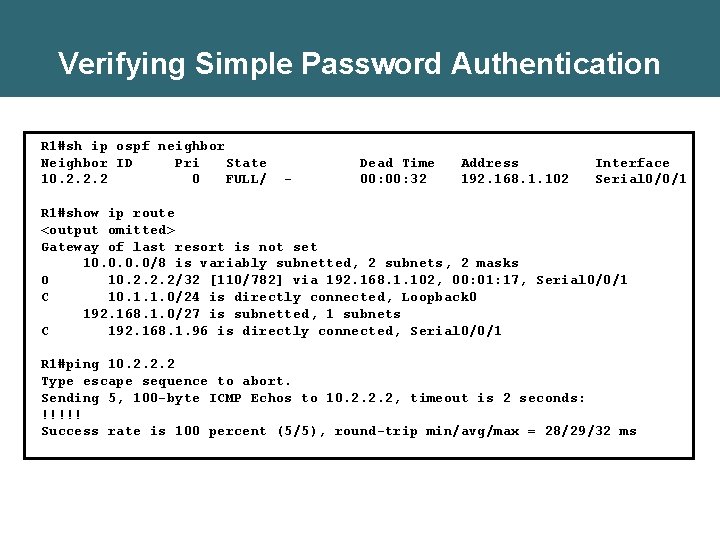
Verifying Simple Password Authentication R 1#sh ip ospf neighbor Neighbor ID Pri State 10. 2. 2. 2 0 FULL/ - Dead Time 00: 32 Address 192. 168. 1. 102 Interface Serial 0/0/1 R 1#show ip route <output omitted> Gateway of last resort is not set 10. 0/8 is variably subnetted, 2 subnets, 2 masks O 10. 2. 2. 2/32 [110/782] via 192. 168. 1. 102, 00: 01: 17, Serial 0/0/1 C 10. 1. 1. 0/24 is directly connected, Loopback 0 192. 168. 1. 0/27 is subnetted, 1 subnets C 192. 168. 1. 96 is directly connected, Serial 0/0/1 R 1#ping 10. 2. 2. 2 Type escape sequence to abort. Sending 5, 100 -byte ICMP Echos to 10. 2. 2. 2, timeout is 2 seconds: !!!!! Success rate is 100 percent (5/5), round-trip min/avg/max = 28/29/32 ms
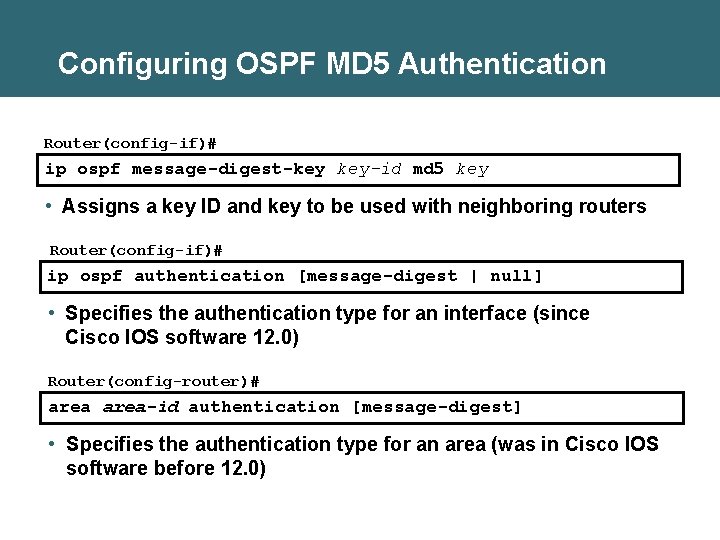
Configuring OSPF MD 5 Authentication Router(config-if)# ip ospf message-digest-key key-id md 5 key • Assigns a key ID and key to be used with neighboring routers Router(config-if)# ip ospf authentication [message-digest | null] • Specifies the authentication type for an interface (since Cisco IOS software 12. 0) Router(config-router)# area-id authentication [message-digest] • Specifies the authentication type for an area (was in Cisco IOS software before 12. 0)
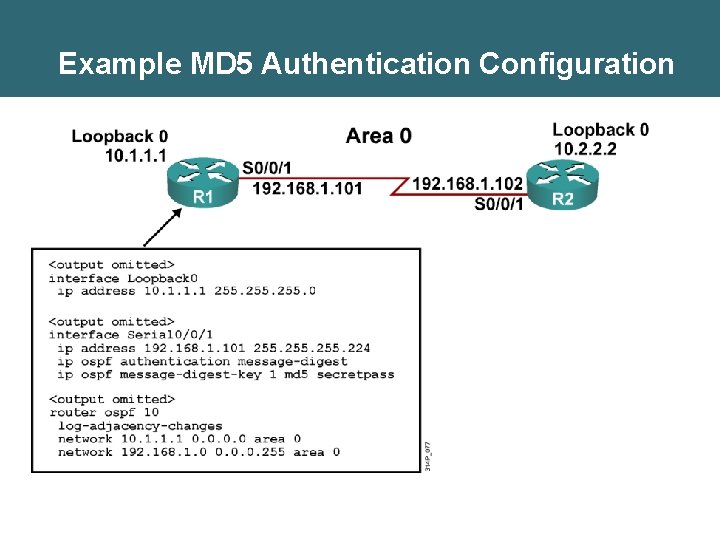
Example MD 5 Authentication Configuration
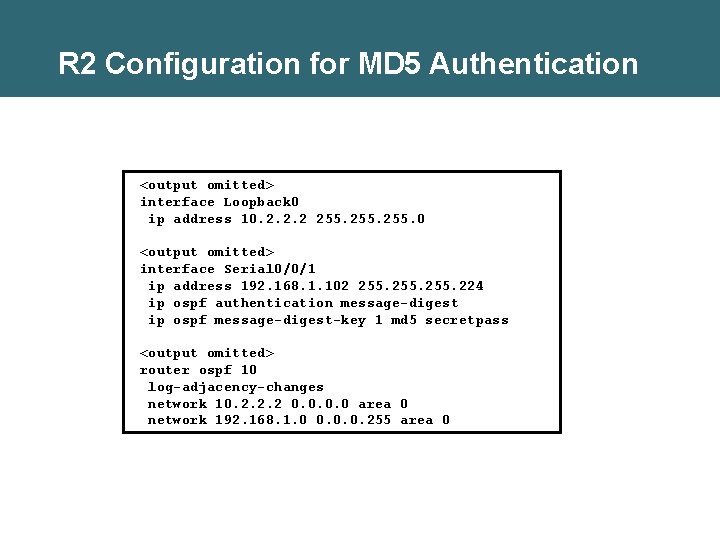
R 2 Configuration for MD 5 Authentication <output omitted> interface Loopback 0 ip address 10. 2. 2. 2 255. 0 <output omitted> interface Serial 0/0/1 ip address 192. 168. 1. 102 255. 224 ip ospf authentication message-digest ip ospf message-digest-key 1 md 5 secretpass <output omitted> router ospf 10 log-adjacency-changes network 10. 2. 2. 2 0. 0 area 0 network 192. 168. 1. 0 0. 0. 0. 255 area 0
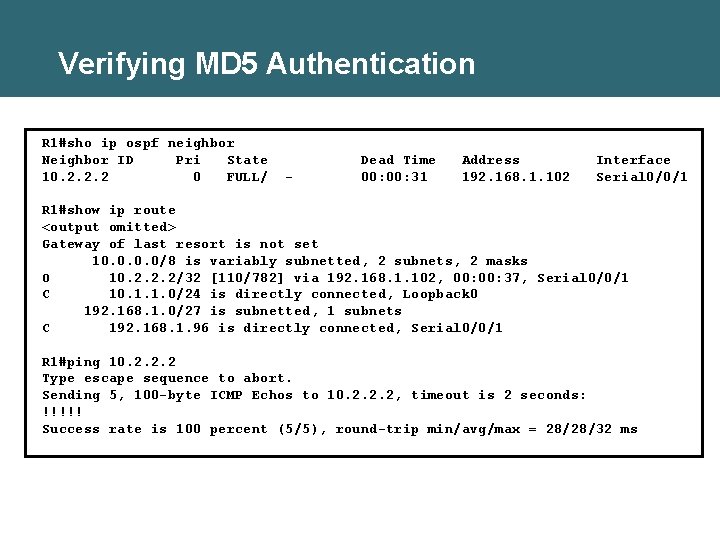
Verifying MD 5 Authentication R 1#sho ip ospf neighbor Neighbor ID Pri State 10. 2. 2. 2 0 FULL/ - Dead Time 00: 31 Address 192. 168. 1. 102 Interface Serial 0/0/1 R 1#show ip route <output omitted> Gateway of last resort is not set 10. 0/8 is variably subnetted, 2 subnets, 2 masks O 10. 2. 2. 2/32 [110/782] via 192. 168. 1. 102, 00: 37, Serial 0/0/1 C 10. 1. 1. 0/24 is directly connected, Loopback 0 192. 168. 1. 0/27 is subnetted, 1 subnets C 192. 168. 1. 96 is directly connected, Serial 0/0/1 R 1#ping 10. 2. 2. 2 Type escape sequence to abort. Sending 5, 100 -byte ICMP Echos to 10. 2. 2. 2, timeout is 2 seconds: !!!!! Success rate is 100 percent (5/5), round-trip min/avg/max = 28/28/32 ms
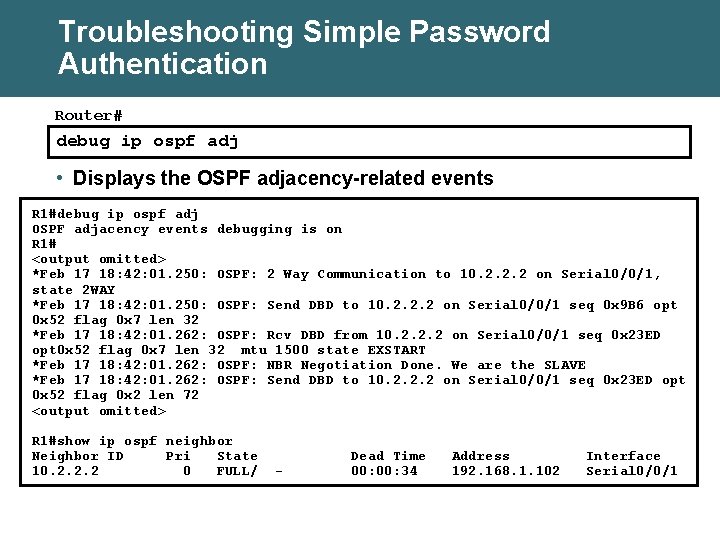
Troubleshooting Simple Password Authentication Router# debug ip ospf adj • Displays the OSPF adjacency-related events R 1#debug ip ospf adj OSPF adjacency events debugging is on R 1# <output omitted> *Feb 17 18: 42: 01. 250: OSPF: 2 Way Communication to 10. 2. 2. 2 on Serial 0/0/1, state 2 WAY *Feb 17 18: 42: 01. 250: OSPF: Send DBD to 10. 2. 2. 2 on Serial 0/0/1 seq 0 x 9 B 6 opt 0 x 52 flag 0 x 7 len 32 *Feb 17 18: 42: 01. 262: OSPF: Rcv DBD from 10. 2. 2. 2 on Serial 0/0/1 seq 0 x 23 ED opt 0 x 52 flag 0 x 7 len 32 mtu 1500 state EXSTART *Feb 17 18: 42: 01. 262: OSPF: NBR Negotiation Done. We are the SLAVE *Feb 17 18: 42: 01. 262: OSPF: Send DBD to 10. 2. 2. 2 on Serial 0/0/1 seq 0 x 23 ED opt 0 x 52 flag 0 x 2 len 72 <output omitted> R 1#show ip ospf neighbor Neighbor ID Pri State 10. 2. 2. 2 0 FULL/ - Dead Time 00: 34 Address 192. 168. 1. 102 Interface Serial 0/0/1
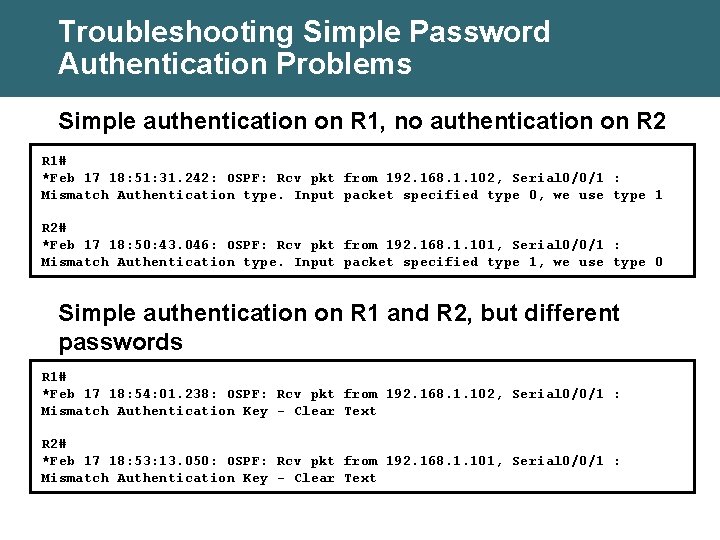
Troubleshooting Simple Password Authentication Problems Simple authentication on R 1, no authentication on R 2 R 1# *Feb 17 18: 51: 31. 242: OSPF: Rcv pkt from 192. 168. 1. 102, Serial 0/0/1 : Mismatch Authentication type. Input packet specified type 0, we use type 1 R 2# *Feb 17 18: 50: 43. 046: OSPF: Rcv pkt from 192. 168. 1. 101, Serial 0/0/1 : Mismatch Authentication type. Input packet specified type 1, we use type 0 Simple authentication on R 1 and R 2, but different passwords R 1# *Feb 17 18: 54: 01. 238: OSPF: Rcv pkt from 192. 168. 1. 102, Serial 0/0/1 : Mismatch Authentication Key - Clear Text R 2# *Feb 17 18: 53: 13. 050: OSPF: Rcv pkt from 192. 168. 1. 101, Serial 0/0/1 : Mismatch Authentication Key - Clear Text
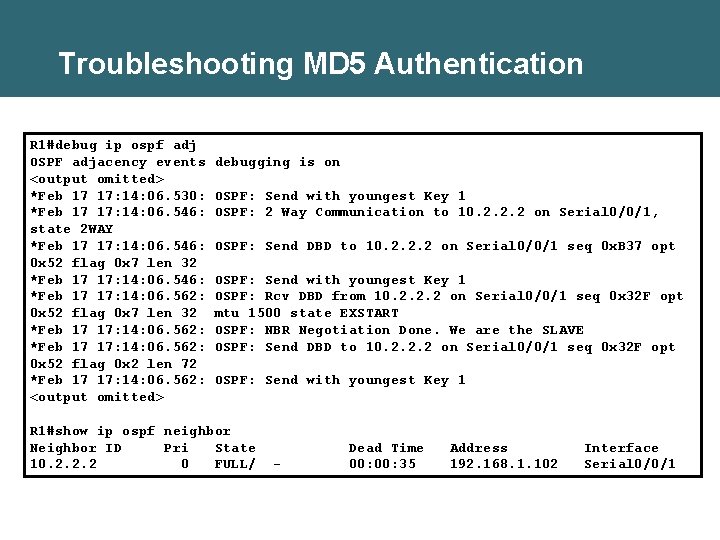
Troubleshooting MD 5 Authentication R 1#debug ip ospf adj OSPF adjacency events <output omitted> *Feb 17 17: 14: 06. 530: *Feb 17 17: 14: 06. 546: state 2 WAY *Feb 17 17: 14: 06. 546: 0 x 52 flag 0 x 7 len 32 *Feb 17 17: 14: 06. 546: *Feb 17 17: 14: 06. 562: 0 x 52 flag 0 x 7 len 32 *Feb 17 17: 14: 06. 562: 0 x 52 flag 0 x 2 len 72 *Feb 17 17: 14: 06. 562: <output omitted> debugging is on OSPF: Send with youngest Key 1 OSPF: 2 Way Communication to 10. 2. 2. 2 on Serial 0/0/1, OSPF: Send DBD to 10. 2. 2. 2 on Serial 0/0/1 seq 0 x. B 37 opt OSPF: Send with youngest Key 1 OSPF: Rcv DBD from 10. 2. 2. 2 on Serial 0/0/1 seq 0 x 32 F opt mtu 1500 state EXSTART OSPF: NBR Negotiation Done. We are the SLAVE OSPF: Send DBD to 10. 2. 2. 2 on Serial 0/0/1 seq 0 x 32 F opt OSPF: Send with youngest Key 1 R 1#show ip ospf neighbor Neighbor ID Pri State 10. 2. 2. 2 0 FULL/ - Dead Time 00: 35 Address 192. 168. 1. 102 Interface Serial 0/0/1
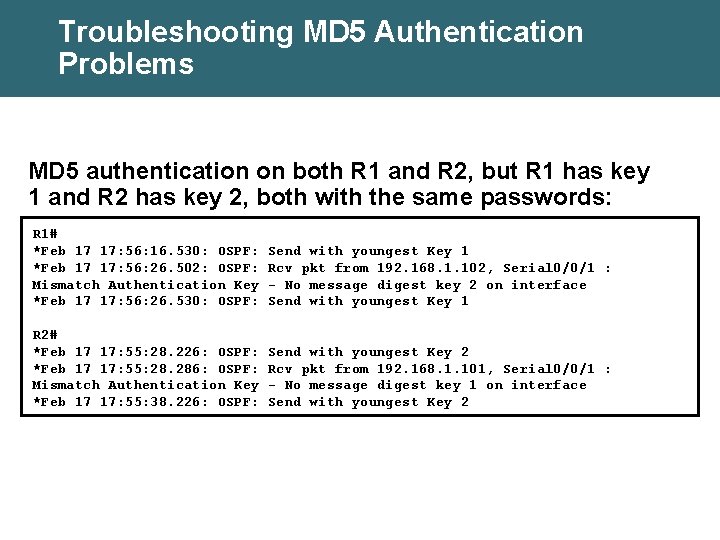
Troubleshooting MD 5 Authentication Problems MD 5 authentication on both R 1 and R 2, but R 1 has key 1 and R 2 has key 2, both with the same passwords: R 1# *Feb 17 17: 56: 16. 530: OSPF: *Feb 17 17: 56: 26. 502: OSPF: Mismatch Authentication Key *Feb 17 17: 56: 26. 530: OSPF: Send with youngest Key 1 Rcv pkt from 192. 168. 1. 102, Serial 0/0/1 : - No message digest key 2 on interface Send with youngest Key 1 R 2# *Feb 17 17: 55: 28. 226: OSPF: *Feb 17 17: 55: 28. 286: OSPF: Mismatch Authentication Key *Feb 17 17: 55: 38. 226: OSPF: Send with youngest Key 2 Rcv pkt from 192. 168. 1. 101, Serial 0/0/1 : - No message digest key 1 on interface Send with youngest Key 2
Summary • When authentication is configured, the router generates and checks every OSPF packet and authenticates the source of each routing update packet that it receives. OSPF supports two types of authentication: – Simple password (or plain text) authentication: The router sends an OSPF packet and key. – MD 5 authentication: The router generates a message digest, or hash, of the key, key ID, and message. The message digest is sent with the packet; the key is not sent. • To configure simple password authentication, use the ip ospf authentication-key password command the ip ospf authentication command.
Summary (Cont. ) • To configure MD 5 authentication, use the ip ospf messagedigest-key key-id md 5 key command the ip ospf authentication message-digest command. • Use show ip ospf neighbor, show ip route, and debug ip ospf adj to verify and troubleshoot both types of authentication. • With MD 5 authentication, the debug ip ospf adj command output indicates the key ID sent.