
Configuring and Verifying Basic BGP Operations Connecting an

Configuring and Verifying Basic BGP Operations Connecting an Enterprise Network to an ISP Network © 2009 Cisco Systems, Inc. All rights reserved. ROUTE v 1. 0— 6 -1
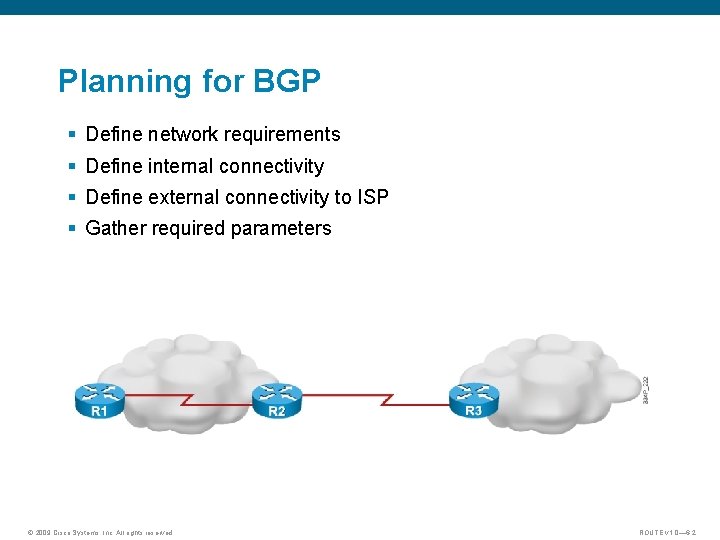
Planning for BGP § Define network requirements § Define internal connectivity § Define external connectivity to ISP § Gather required parameters © 2009 Cisco Systems, Inc. All rights reserved. ROUTE v 1. 0— 6 -2
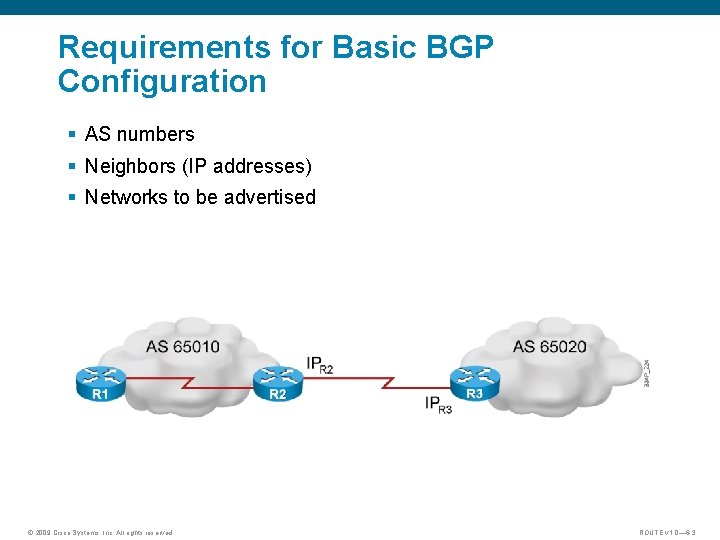
Requirements for Basic BGP Configuration § AS numbers § Neighbors (IP addresses) § Networks to be advertised © 2009 Cisco Systems, Inc. All rights reserved. ROUTE v 1. 0— 6 -3
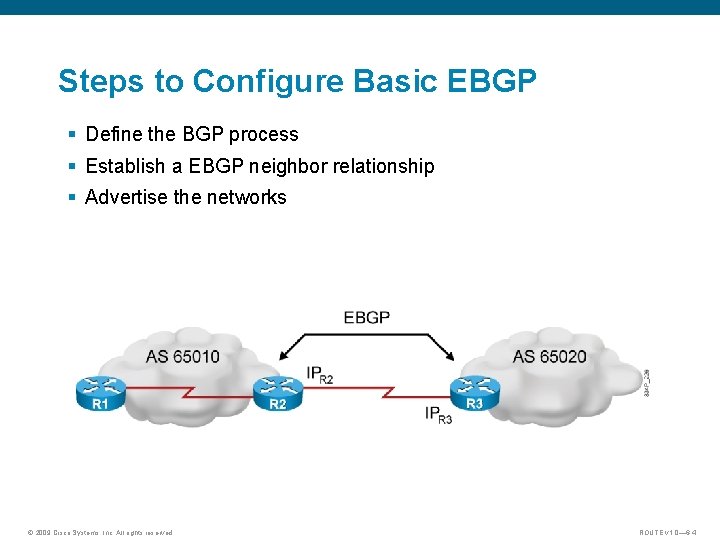
Steps to Configure Basic EBGP § Define the BGP process § Establish a EBGP neighbor relationship § Advertise the networks © 2009 Cisco Systems, Inc. All rights reserved. ROUTE v 1. 0— 6 -4

Define BGP Process and Activate EBGP Session R 2(config)# router bgp 65010 § Define the BGP process locally with a local AS number. R 2(config-router)# neighbor 10. 1. 1. 2 remote-as 65020 Activate EBGP session to the neighbor § Remote router IP Address and AS number © 2009 Cisco Systems, Inc. All rights reserved. ROUTE v 1. 0— 6 -5
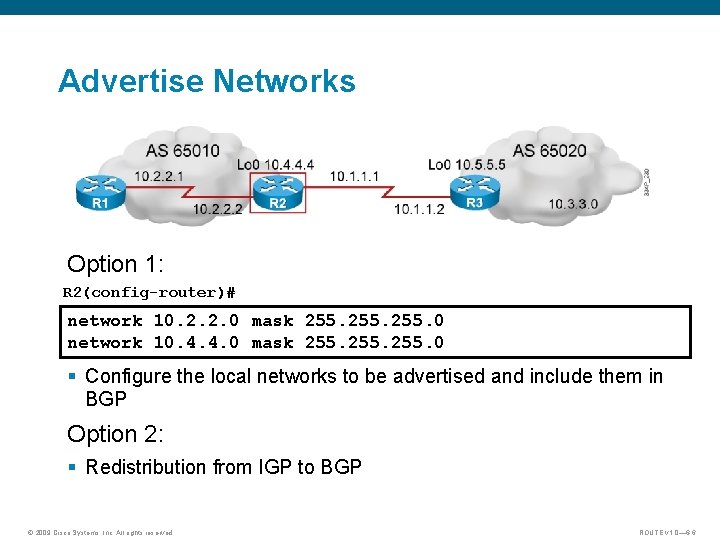
Advertise Networks Option 1: R 2(config-router)# network 10. 2. 2. 0 mask 255. 0 network 10. 4. 4. 0 mask 255. 0 § Configure the local networks to be advertised and include them in BGP Option 2: § Redistribution from IGP to BGP © 2009 Cisco Systems, Inc. All rights reserved. ROUTE v 1. 0— 6 -6
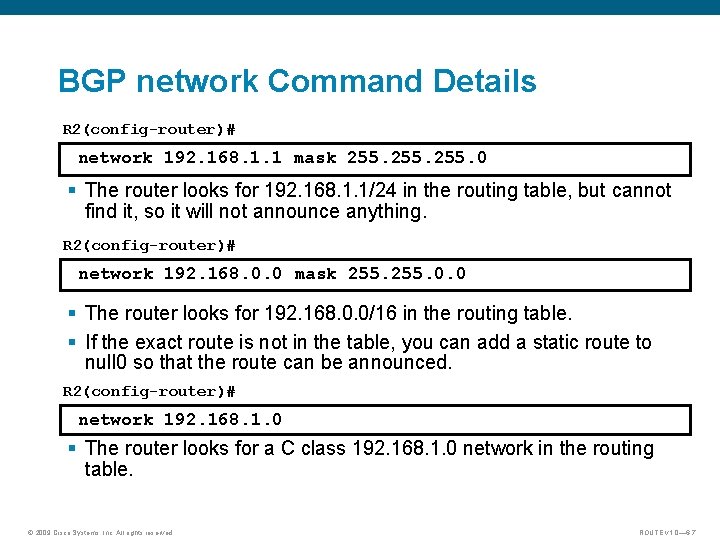
BGP network Command Details R 2(config-router)# network 192. 168. 1. 1 mask 255. 0 § The router looks for 192. 168. 1. 1/24 in the routing table, but cannot find it, so it will not announce anything. R 2(config-router)# network 192. 168. 0. 0 mask 255. 0. 0 § The router looks for 192. 168. 0. 0/16 in the routing table. § If the exact route is not in the table, you can add a static route to null 0 so that the route can be announced. R 2(config-router)# network 192. 168. 1. 0 § The router looks for a C class 192. 168. 1. 0 network in the routing table. © 2009 Cisco Systems, Inc. All rights reserved. ROUTE v 1. 0— 6 -7
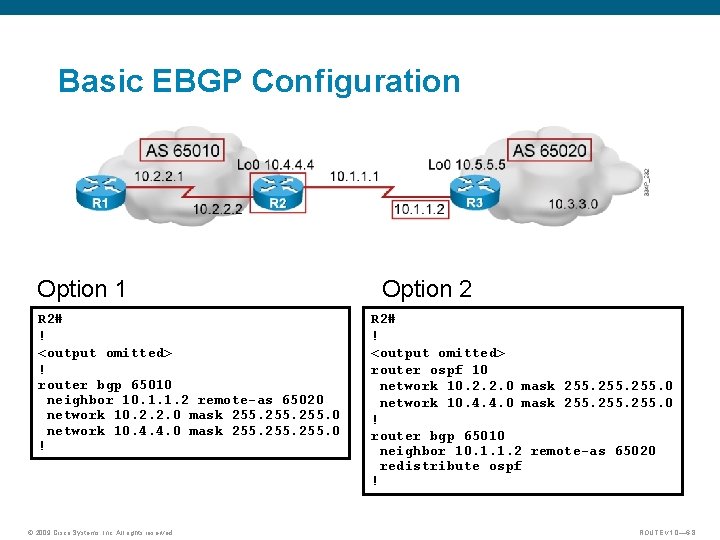
Basic EBGP Configuration Option 1 R 2# ! <output omitted> ! router bgp 65010 neighbor 10. 1. 1. 2 remote-as 65020 network 10. 2. 2. 0 mask 255. 0 network 10. 4. 4. 0 mask 255. 0 ! © 2009 Cisco Systems, Inc. All rights reserved. Option 2 R 2# ! <output omitted> router ospf 10 network 10. 2. 2. 0 mask 255. 0 network 10. 4. 4. 0 mask 255. 0 ! router bgp 65010 neighbor 10. 1. 1. 2 remote-as 65020 redistribute ospf ! ROUTE v 1. 0— 6 -8
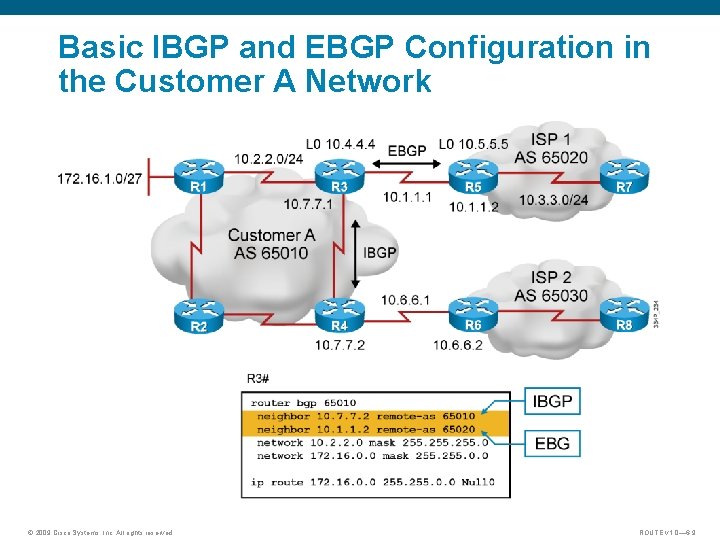
Basic IBGP and EBGP Configuration in the Customer A Network © 2009 Cisco Systems, Inc. All rights reserved. ROUTE v 1. 0— 6 -9
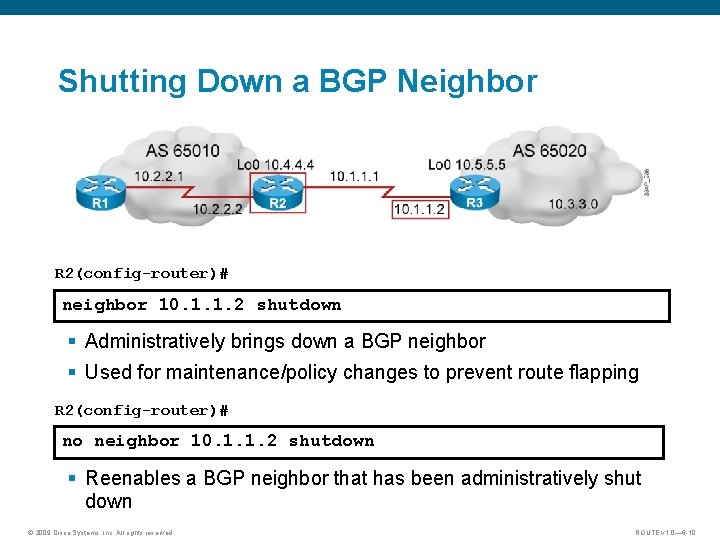
Shutting Down a BGP Neighbor R 2(config-router)# neighbor 10. 1. 1. 2 shutdown § Administratively brings down a BGP neighbor § Used for maintenance/policy changes to prevent route flapping R 2(config-router)# no neighbor 10. 1. 1. 2 shutdown § Reenables a BGP neighbor that has been administratively shut down © 2009 Cisco Systems, Inc. All rights reserved. ROUTE v 1. 0— 6 -10
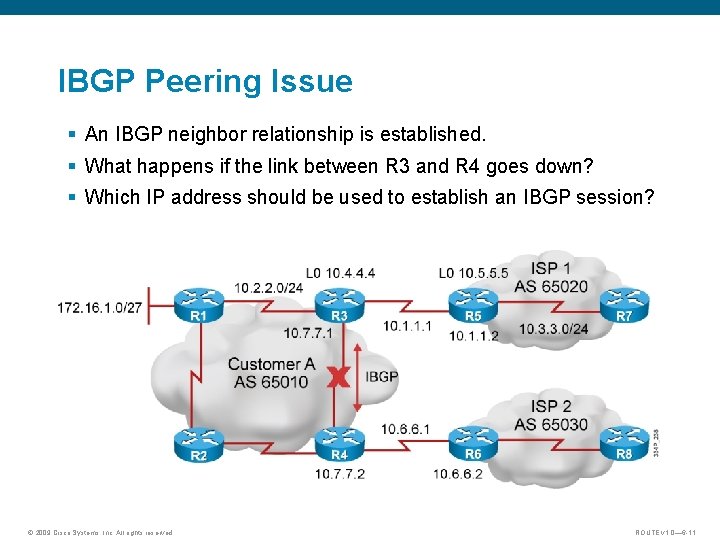
IBGP Peering Issue § An IBGP neighbor relationship is established. § What happens if the link between R 3 and R 4 goes down? § Which IP address should be used to establish an IBGP session? © 2009 Cisco Systems, Inc. All rights reserved. ROUTE v 1. 0— 6 -11
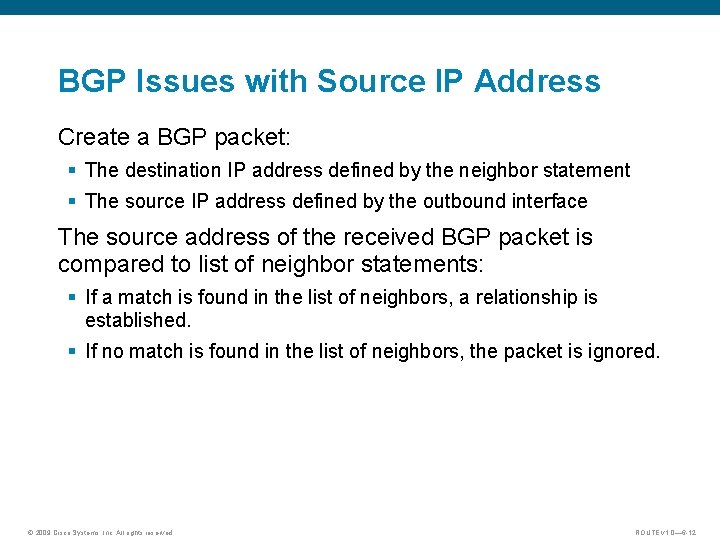
BGP Issues with Source IP Address Create a BGP packet: § The destination IP address defined by the neighbor statement § The source IP address defined by the outbound interface The source address of the received BGP packet is compared to list of neighbor statements: § If a match is found in the list of neighbors, a relationship is established. § If no match is found in the list of neighbors, the packet is ignored. © 2009 Cisco Systems, Inc. All rights reserved. ROUTE v 1. 0— 6 -12
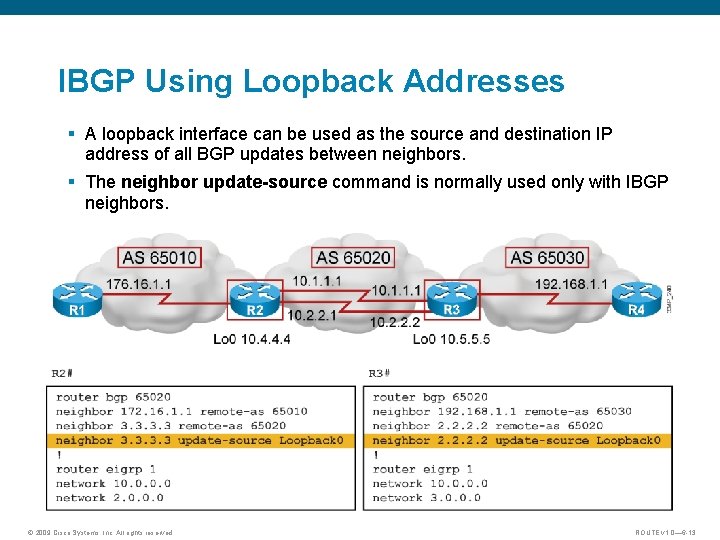
IBGP Using Loopback Addresses § A loopback interface can be used as the source and destination IP address of all BGP updates between neighbors. § The neighbor update-source command is normally used only with IBGP neighbors. © 2009 Cisco Systems, Inc. All rights reserved. ROUTE v 1. 0— 6 -13
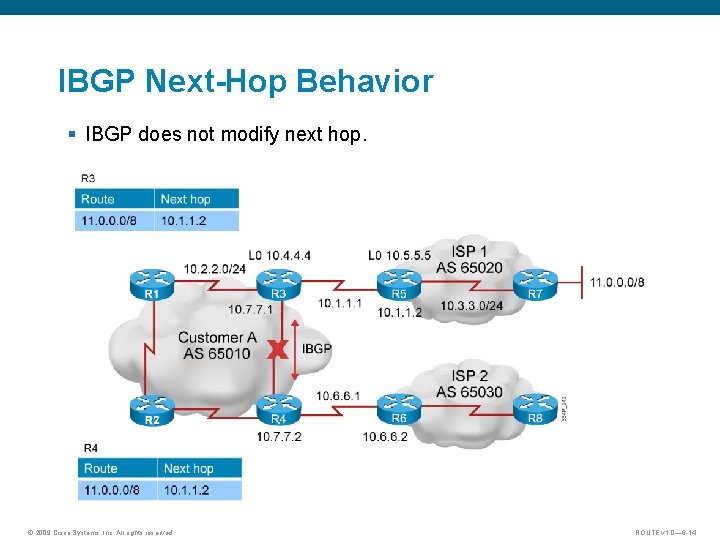
IBGP Next-Hop Behavior § IBGP does not modify next hop. © 2009 Cisco Systems, Inc. All rights reserved. ROUTE v 1. 0— 6 -14
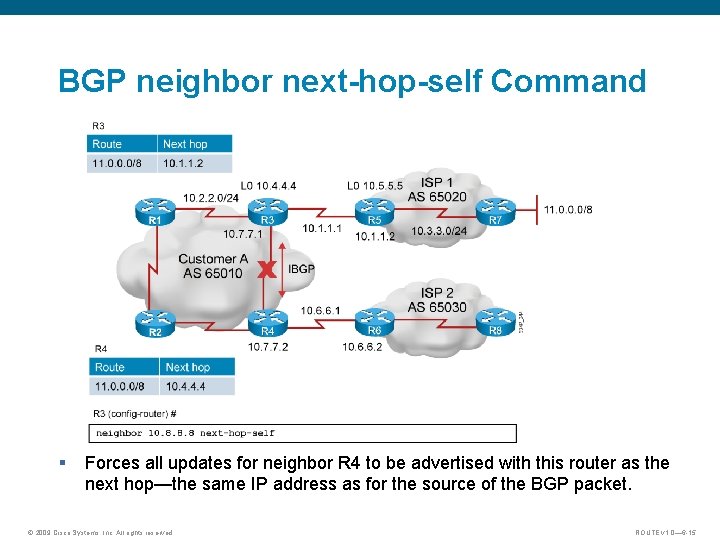
BGP neighbor next-hop-self Command § Forces all updates for neighbor R 4 to be advertised with this router as the next hop—the same IP address as for the source of the BGP packet. © 2009 Cisco Systems, Inc. All rights reserved. ROUTE v 1. 0— 6 -15
BGP States When establishing a BGP session, BGP goes through the following states: 1. Idle: Router is searching the routing table to see whether a route exists to reach the neighbor. 2. Connect: Router found a route to the neighbor and has completed the three-way TCP handshake. 3. Open sent: Open message sent, with the parameters for the BGP session. 4. Open confirm: Router received an agreement on the parameters for establishing a session. – Alternatively, the router goes into active state if no response to open message 5. Established: Peering is established; routing begins. © 2009 Cisco Systems, Inc. All rights reserved. ROUTE v 1. 0— 6 -16
BGP Established and Idle States § Idle: The router cannot find the address of the neighbor in the routing table. – Solution: Check for an IGP problem. Is the neighbor announcing the route? § Established: Proper state for BGP operations. – Output of the show ip bgp summary command has a number in the state column indicating the number of routes learned from this neighbor. © 2009 Cisco Systems, Inc. All rights reserved. ROUTE v 1. 0— 6 -17
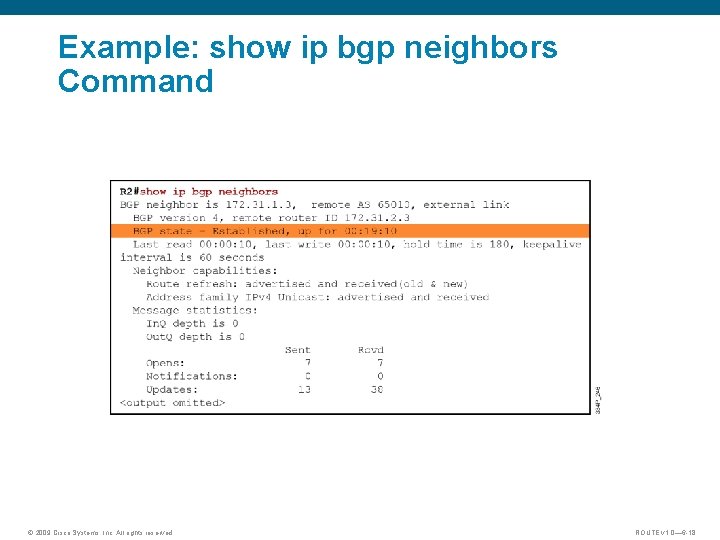
Example: show ip bgp neighbors Command © 2009 Cisco Systems, Inc. All rights reserved. ROUTE v 1. 0— 6 -18
BGP Active State Verification Active: The router has sent an open packet and is waiting for a response. § The state may cycle between active and idle. § The neighbor may not know how to get back to this router because of the following reasons: – No route to the source IP address of the BGP open packet – The neighbor is peering with the wrong address – No neighbor statement for this router – The AS number is misconfigured © 2009 Cisco Systems, Inc. All rights reserved. ROUTE v 1. 0— 6 -19
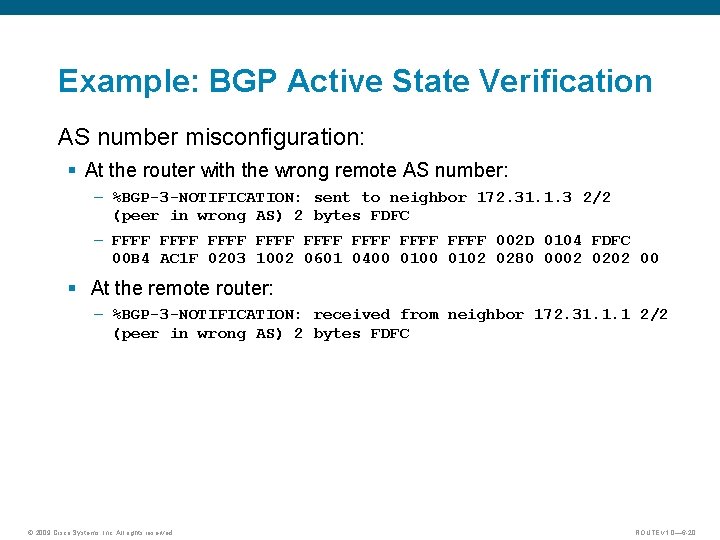
Example: BGP Active State Verification AS number misconfiguration: § At the router with the wrong remote AS number: – %BGP-3 -NOTIFICATION: sent to neighbor 172. 31. 1. 3 2/2 (peer in wrong AS) 2 bytes FDFC – FFFF FFFF 002 D 0104 FDFC 00 B 4 AC 1 F 0203 1002 0601 0400 0102 0280 0002 0202 00 § At the remote router: – %BGP-3 -NOTIFICATION: received from neighbor 172. 31. 1. 1 2/2 (peer in wrong AS) 2 bytes FDFC © 2009 Cisco Systems, Inc. All rights reserved. ROUTE v 1. 0— 6 -20
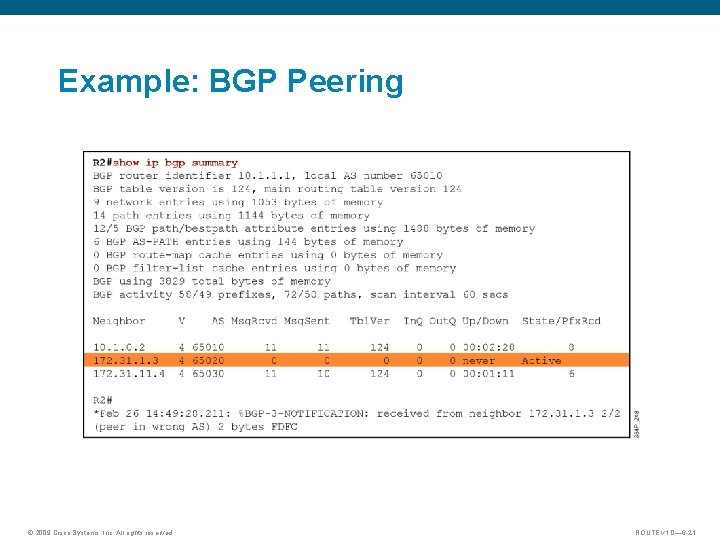
Example: BGP Peering © 2009 Cisco Systems, Inc. All rights reserved. ROUTE v 1. 0— 6 -21
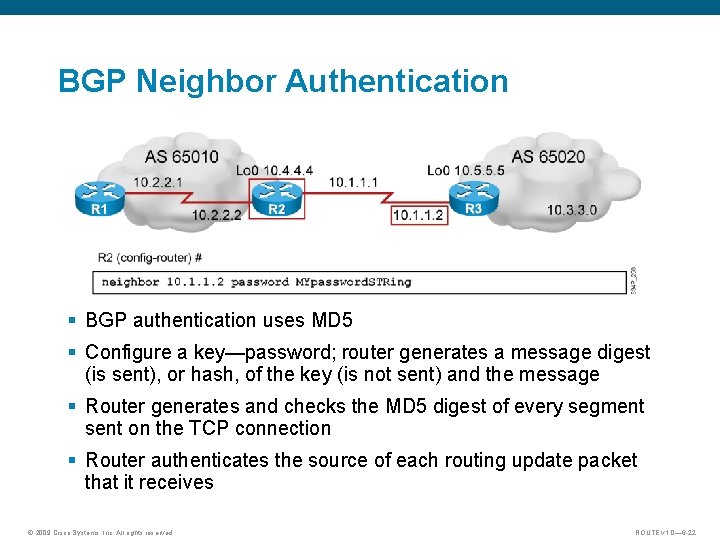
BGP Neighbor Authentication § BGP authentication uses MD 5 § Configure a key—password; router generates a message digest (is sent), or hash, of the key (is not sent) and the message § Router generates and checks the MD 5 digest of every segment sent on the TCP connection § Router authenticates the source of each routing update packet that it receives © 2009 Cisco Systems, Inc. All rights reserved. ROUTE v 1. 0— 6 -22
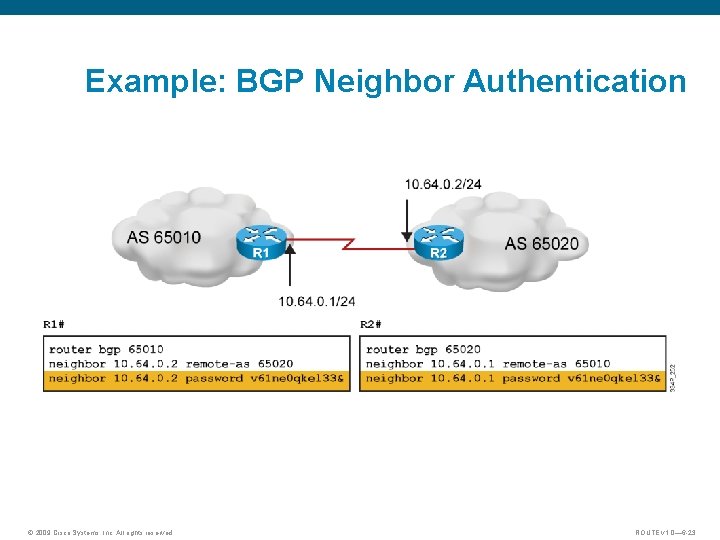
Example: BGP Neighbor Authentication © 2009 Cisco Systems, Inc. All rights reserved. ROUTE v 1. 0— 6 -23
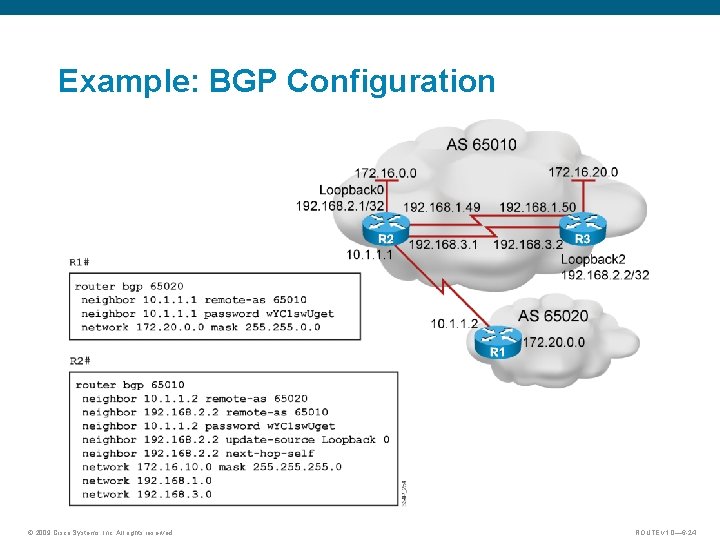
Example: BGP Configuration © 2009 Cisco Systems, Inc. All rights reserved. ROUTE v 1. 0— 6 -24
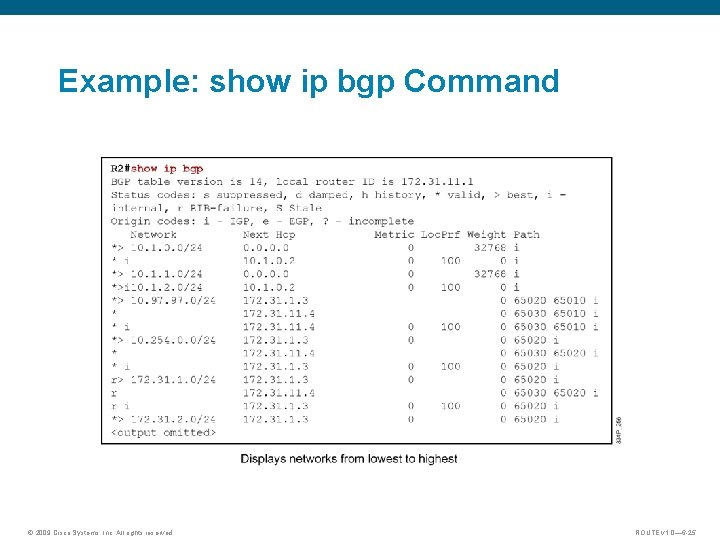
Example: show ip bgp Command © 2009 Cisco Systems, Inc. All rights reserved. ROUTE v 1. 0— 6 -25
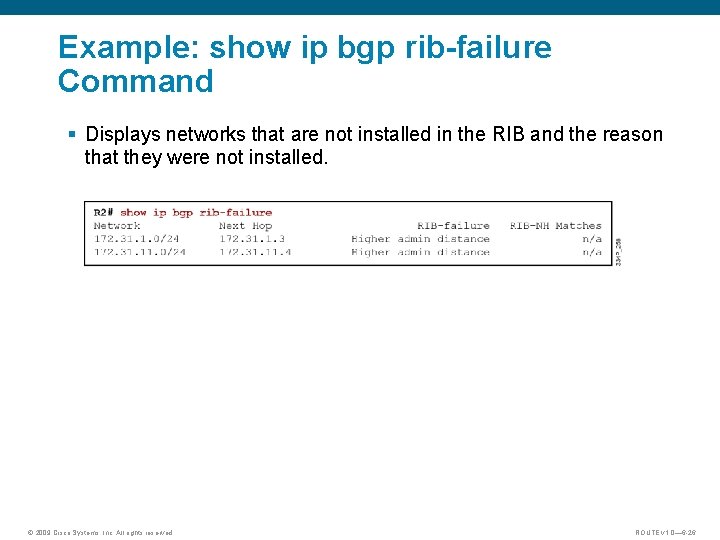
Example: show ip bgp rib-failure Command § Displays networks that are not installed in the RIB and the reason that they were not installed. © 2009 Cisco Systems, Inc. All rights reserved. ROUTE v 1. 0— 6 -26
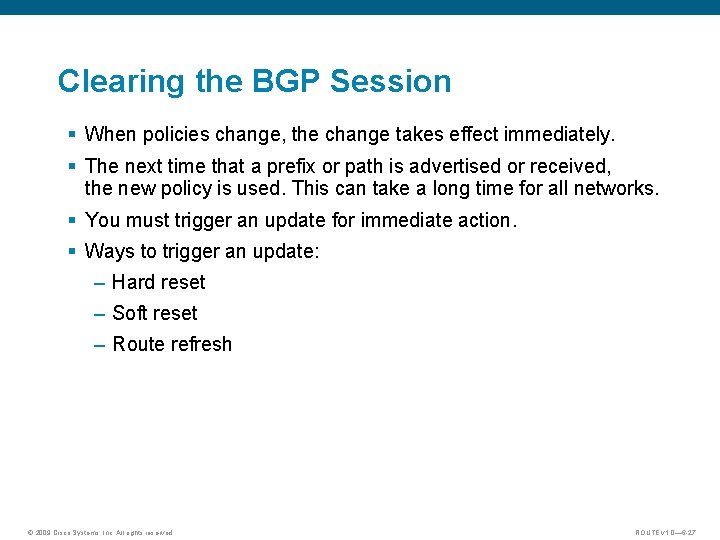
Clearing the BGP Session § When policies change, the change takes effect immediately. § The next time that a prefix or path is advertised or received, the new policy is used. This can take a long time for all networks. § You must trigger an update for immediate action. § Ways to trigger an update: – Hard reset – Soft reset – Route refresh © 2009 Cisco Systems, Inc. All rights reserved. ROUTE v 1. 0— 6 -27
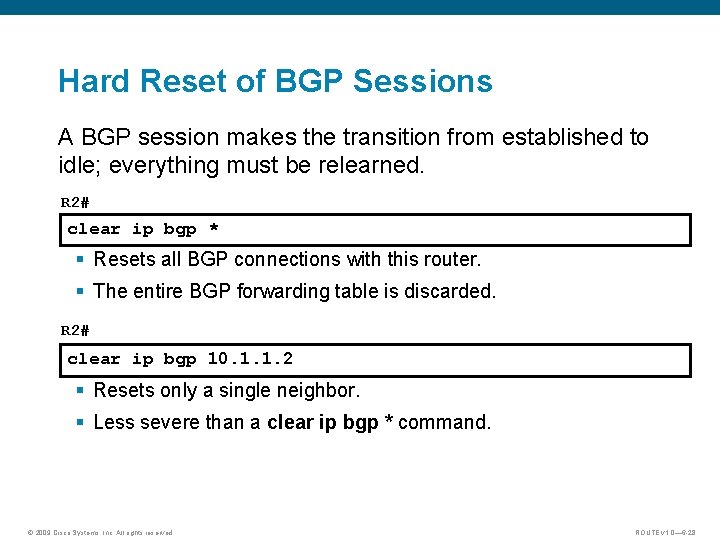
Hard Reset of BGP Sessions A BGP session makes the transition from established to idle; everything must be relearned. R 2# clear ip bgp * § Resets all BGP connections with this router. § The entire BGP forwarding table is discarded. R 2# clear ip bgp 10. 1. 1. 2 § Resets only a single neighbor. § Less severe than a clear ip bgp * command. © 2009 Cisco Systems, Inc. All rights reserved. ROUTE v 1. 0— 6 -28
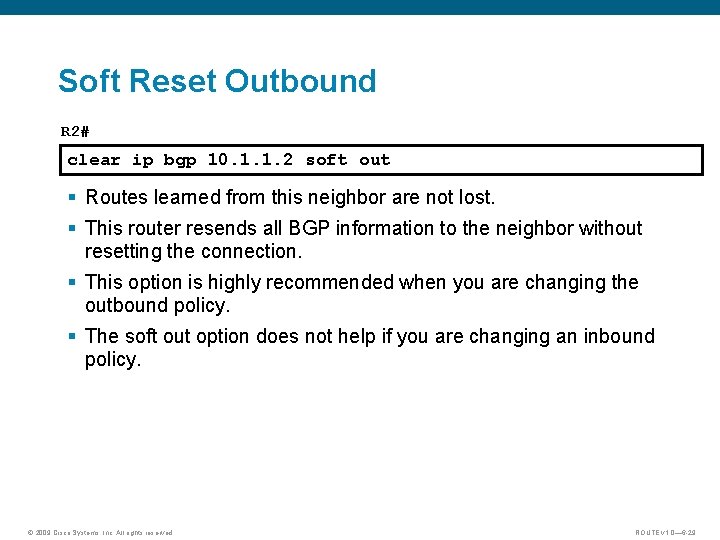
Soft Reset Outbound R 2# clear ip bgp 10. 1. 1. 2 soft out § Routes learned from this neighbor are not lost. § This router resends all BGP information to the neighbor without resetting the connection. § This option is highly recommended when you are changing the outbound policy. § The soft out option does not help if you are changing an inbound policy. © 2009 Cisco Systems, Inc. All rights reserved. ROUTE v 1. 0— 6 -29
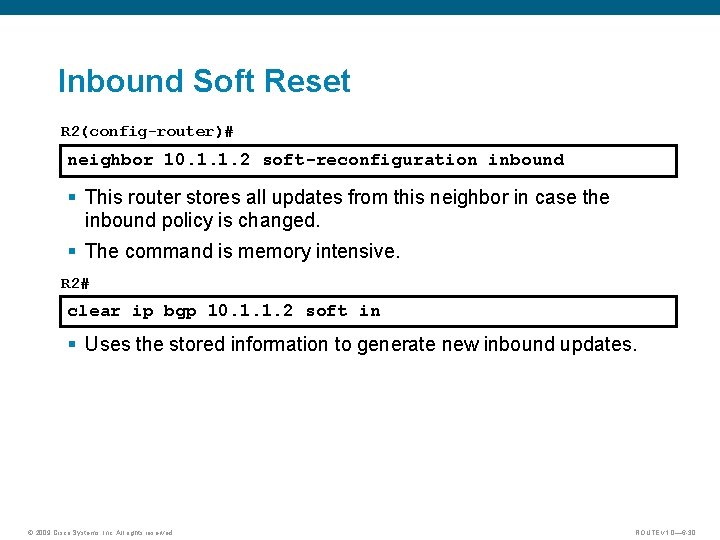
Inbound Soft Reset R 2(config-router)# neighbor 10. 1. 1. 2 soft-reconfiguration inbound § This router stores all updates from this neighbor in case the inbound policy is changed. § The command is memory intensive. R 2# clear ip bgp 10. 1. 1. 2 soft in § Uses the stored information to generate new inbound updates. © 2009 Cisco Systems, Inc. All rights reserved. ROUTE v 1. 0— 6 -30
Route Refresh: Dynamic Inbound Soft Reset R 2# clear ip bgp {*|10. 1. 1. 2} [soft in | in] § Routes advertised to this neighbor are not withdrawn § Does not store update information locally § The connection remains established § Introduced in Cisco IOS Software Release 12. 0(2)S and 12. 0(6)T © 2009 Cisco Systems, Inc. All rights reserved. ROUTE v 1. 0— 6 -31
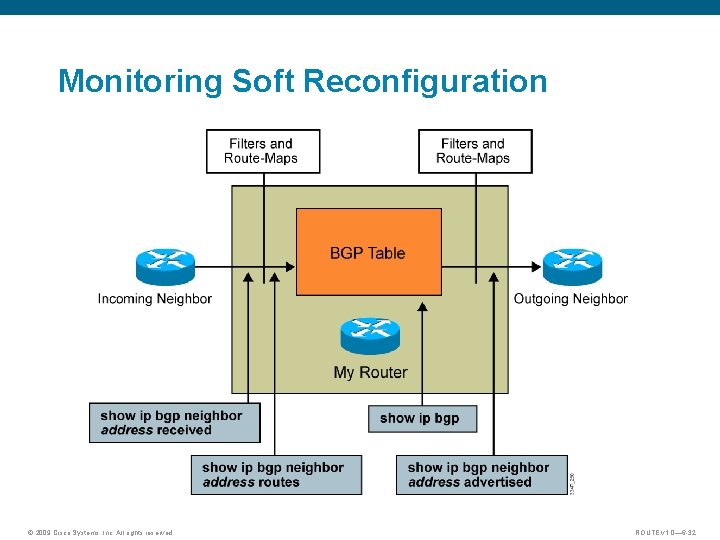
Monitoring Soft Reconfiguration © 2009 Cisco Systems, Inc. All rights reserved. ROUTE v 1. 0— 6 -32
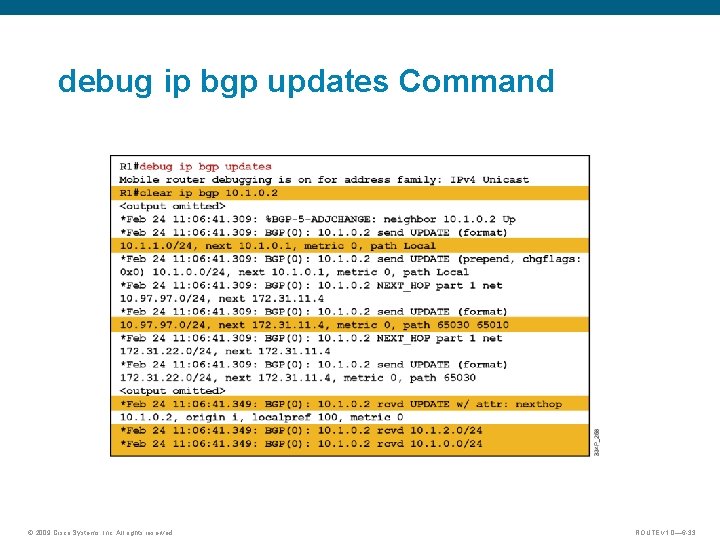
debug ip bgp updates Command © 2009 Cisco Systems, Inc. All rights reserved. ROUTE v 1. 0— 6 -33
Summary § For a BGP configuration, the following must be defined: BGP requirements, BGP parameters, and connectivity. § BGP is configured with the following basic BGP commands: router bgp autonomous-system, neighbor ip-address remoteas autonomous-system, network-number [mask network-mask] § The neighbor shutdown command administratively shuts down a BGP neighbor. § When creating a BGP packet, the neighbor statement defines the destination IP address and the outbound interface defines the source IP address. © 2009 Cisco Systems, Inc. All rights reserved. ROUTE v 1. 0— 6 -34
Summary (cont. ) § When establishing a BGP session, the BGP goes through the following states: idle, connect, open sent, open confirm, and established. § You can configure MD 5 authentication between two BGP peers, which means that each segment sent on the TCP connection between the peers is verified. § One EBGP neighbor exists in a single-homed environment. § The show and debug commands are used to troubleshoot the BGP session. © 2009 Cisco Systems, Inc. All rights reserved. ROUTE v 1. 0— 6 -35

© 2009 Cisco Systems, Inc. All rights reserved. ROUTE v 1. 0— 6 -36
- Slides: 36