
Computer Vision Pattern Recognition Lab Computer Graphics Chapter
Computer Vision & Pattern Recognition Lab. Computer Graphics Chapter 8 Two-Dimensional Viewing Computer Vision & Pattern Recognition Lab.
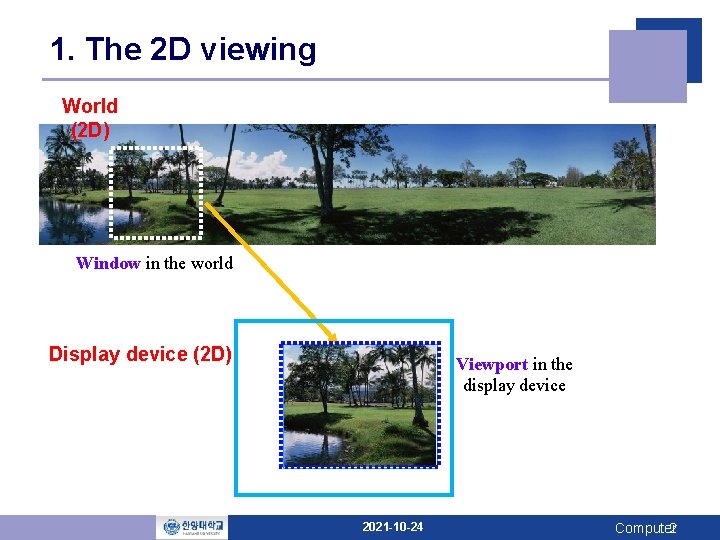
1. The 2 D viewing World (2 D) Window in the world Display device (2 D) Viewport in the display device 2021 -10 -24 Computer 2
1. The 2 D viewing q (Clipping) Window : What area in the world is to be viewed? § To define what we want to see § a world-coordinate area selected for display q Viewport: Which area on the display device is it to be displayed? § To define where it is to be displayed on the output device § a device-coordinate area on a display device q Windows & viewport § Rectangles in standard position, with the rectangle edges parallel to the coordinate axes § Other geometries : take longer to process 2021 -10 -24 Computer Vision & Pattern Recognition Lab. 3
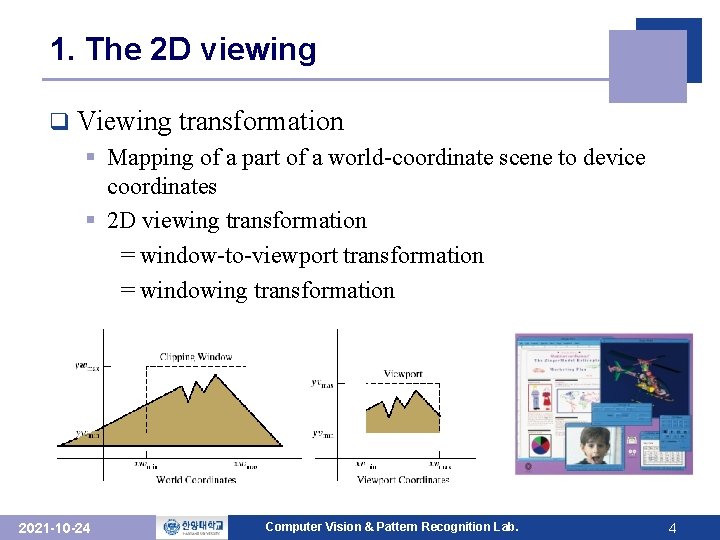
1. The 2 D viewing q Viewing transformation § Mapping of a part of a world-coordinate scene to device coordinates § 2 D viewing transformation = window-to-viewport transformation = windowing transformation 2021 -10 -24 Computer Vision & Pattern Recognition Lab. 4
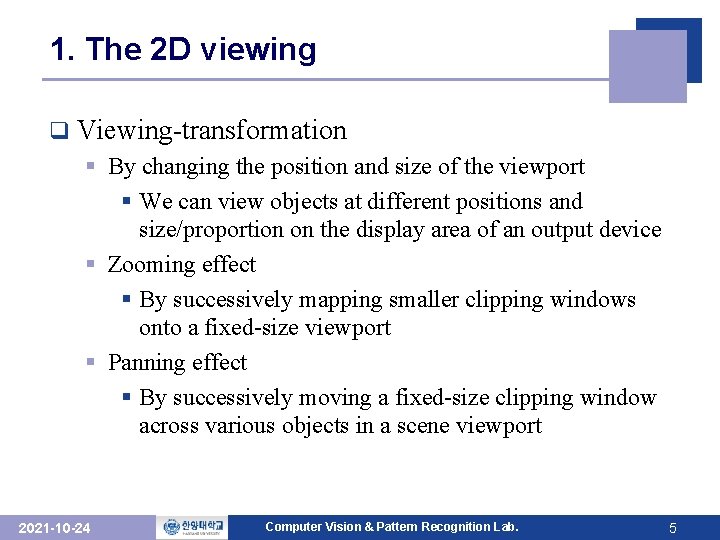
1. The 2 D viewing q Viewing-transformation § By changing the position and size of the viewport § We can view objects at different positions and size/proportion on the display area of an output device § Zooming effect § By successively mapping smaller clipping windows onto a fixed-size viewport § Panning effect § By successively moving a fixed-size clipping window across various objects in a scene viewport 2021 -10 -24 Computer Vision & Pattern Recognition Lab. 5
2. The Clipping Window (skip!) q Viewport § Defined within the unit square § Device-independent ⇒ Separating the viewing & other transformations from specific output-device requirements § The unit square is mapped to the display area for the particular output device in use at that time q Viewport clipping § Performed in normalized coordinates or in device coordinates § To reduce computations by concatenating the various transformation matrices 2021 -10 -24 Computer Vision & Pattern Recognition Lab. 6
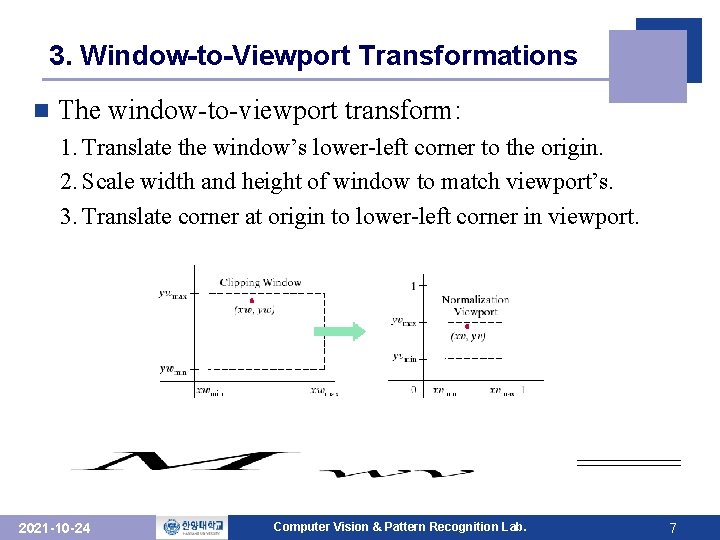
3. Window-to-Viewport Transformations n The window-to-viewport transform: 1. Translate the window’s lower-left corner to the origin. 2. Scale width and height of window to match viewport’s. 3. Translate corner at origin to lower-left corner in viewport. 2021 -10 -24 Computer Vision & Pattern Recognition Lab. 7
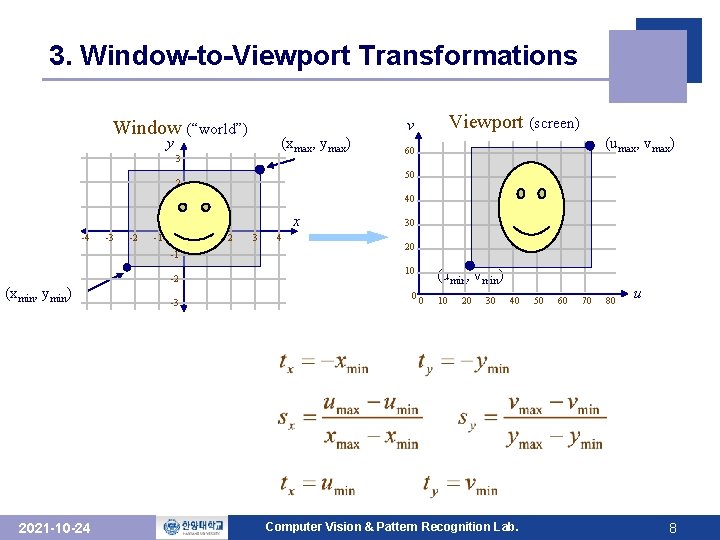
3. Window-to-Viewport Transformations y (xmax, ymax) 3 40 1 -3 -2 -1 0 -1 (xmin, ymin) 2021 -10 -24 -2 -3 (umax, vmax) 60 50 2 -4 Viewport (screen) v Window (“world”) x 1 2 3 4 30 20 10 0 (umin, vmin) 0 10 20 30 40 Computer Vision & Pattern Recognition Lab. 50 60 70 80 u 8
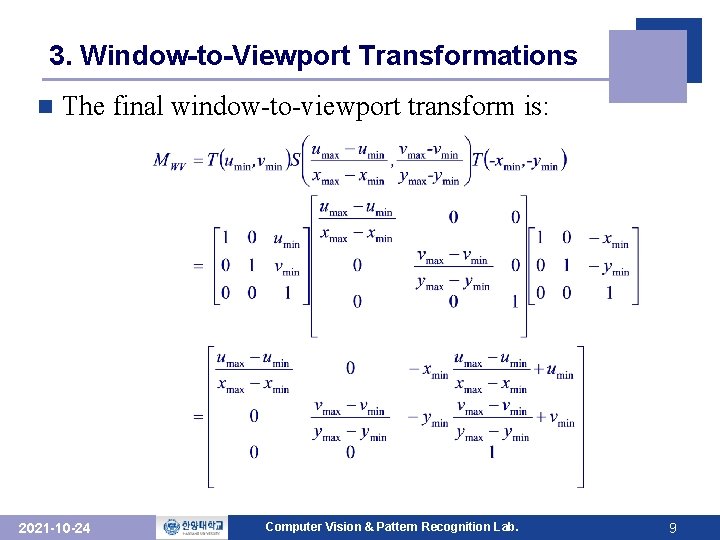
3. Window-to-Viewport Transformations n The final window-to-viewport transform is: 2021 -10 -24 Computer Vision & Pattern Recognition Lab. 9
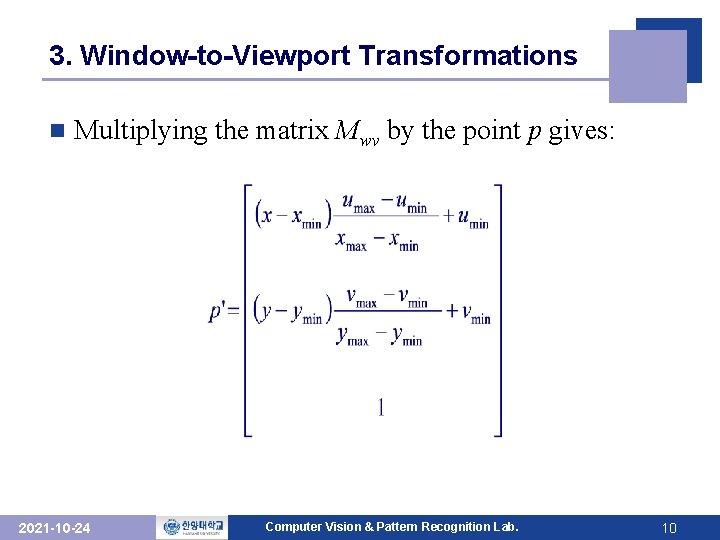
3. Window-to-Viewport Transformations n Multiplying the matrix Mwv by the point p gives: 2021 -10 -24 Computer Vision & Pattern Recognition Lab. 10
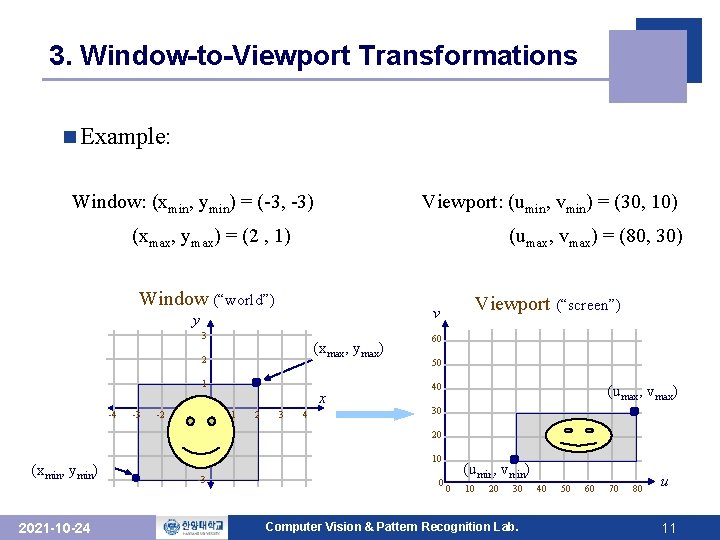
3. Window-to-Viewport Transformations n Example: Window: (xmin, ymin) = (-3, -3) Viewport: (umin, vmin) = (30, 10) (xmax, ymax) = (2 , 1) (umax, vmax) = (80, 30) Window (“world”) y 3 (xmax, ymax) 2 1 -4 (xmin, ymin) 2021 -10 -24 -3 -2 -1 0 x 1 2 Viewport (“screen”) v 3 4 60 50 40 (umax, vmax) 30 -1 20 -2 10 -3 0 (umin, vmin) 0 10 20 30 Computer Vision & Pattern Recognition Lab. 40 50 60 70 80 u 11
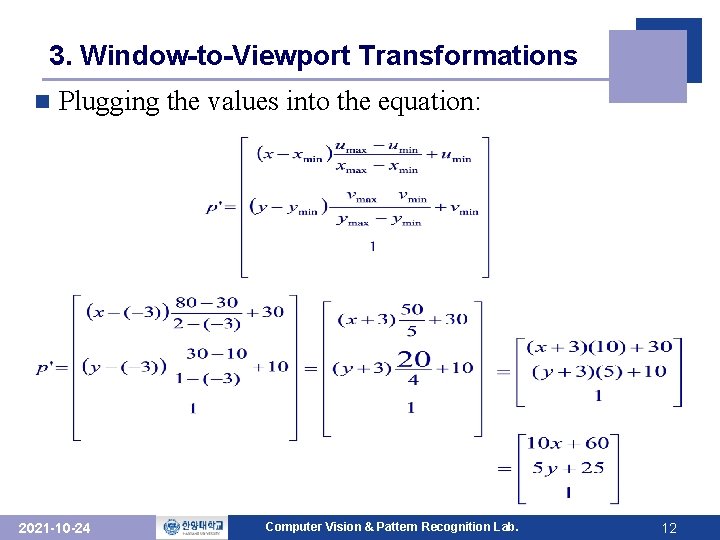
3. Window-to-Viewport Transformations n Plugging the values into the equation: 2021 -10 -24 Computer Vision & Pattern Recognition Lab. 12
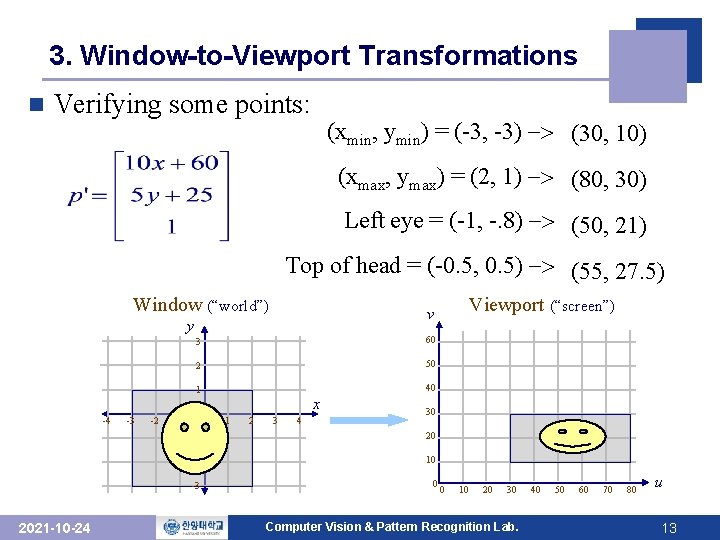
3. Window-to-Viewport Transformations n Verifying some points: (xmin, ymin) = (-3, -3) -> (30, 10) (xmax, ymax) = (2, 1) -> (80, 30) Left eye = (-1, -. 8) -> (50, 21) Top of head = (-0. 5, 0. 5) -> (55, 27. 5) Window (“world”) y -4 2021 -10 -24 -3 -2 -1 3 60 2 50 1 40 0 x 1 2 Viewport (“screen”) v 3 4 30 -1 20 -2 10 -3 0 0 10 20 30 Computer Vision & Pattern Recognition Lab. 40 50 60 70 80 u 13
5. Clipping Algorithms q Clipping algorithm § Identify those portions of picture that are either inside or outside of a specified region of space q Clip window § The region against which an object is to be clipped q Clipping application (skip!) § § § 2021 -10 -24 extracting part of a defined scene for viewing identifying visible surfaces in 3 D views antialiasing line segments or object boundaries creating objects using solid-modeling procedures displaying a multiwindow environment drawing & painting operations that allow parts of a picture to be selected for copying, moving, erasing, or duplicating Computer Vision & Pattern Recognition Lab. 14
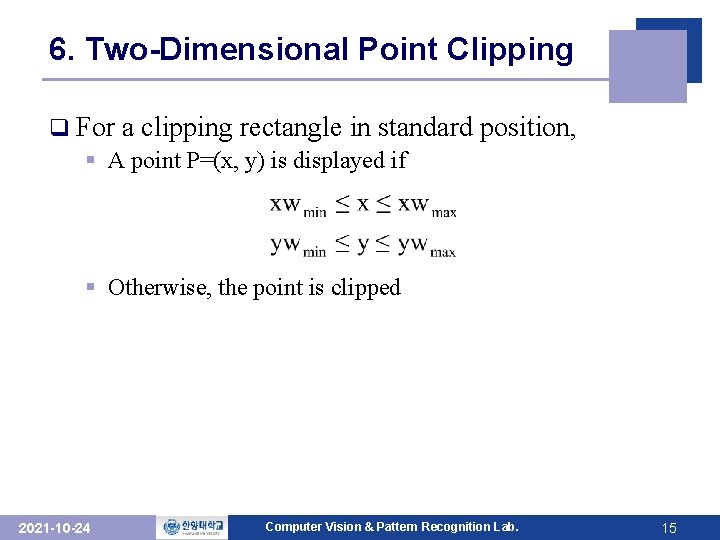
6. Two-Dimensional Point Clipping q For a clipping rectangle in standard § A point P=(x, y) is displayed if position, § Otherwise, the point is clipped 2021 -10 -24 Computer Vision & Pattern Recognition Lab. 15
7. Two-Dimensional Line Clipping n Line clipping procedure (1) Test a given line segment whether it lies completely inside the clipping window (2) If it doesn’t, we try to determine whether it lies completely outside the window (3) If we can’t identify a line as completely inside or completely outside, we must perform intersection calculations with one or more clipping boundaries 2021 -10 -24 Computer Vision & Pattern Recognition Lab. 16
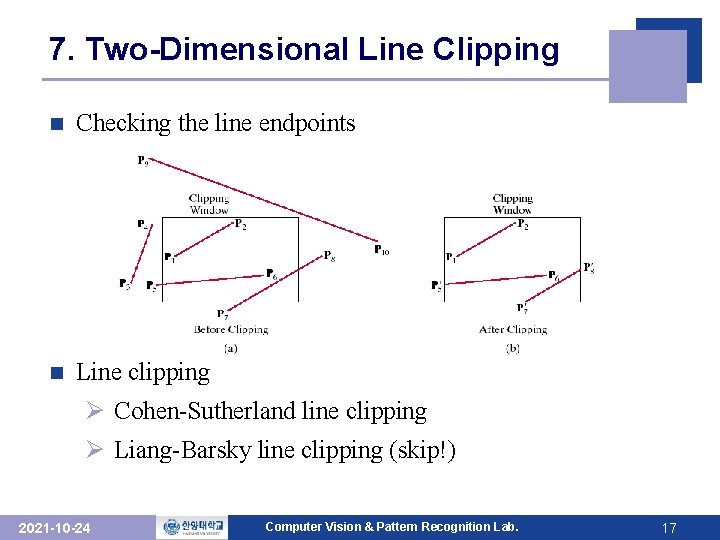
7. Two-Dimensional Line Clipping n Checking the line endpoints n Line clipping Ø Cohen-Sutherland line clipping Ø Liang-Barsky line clipping (skip!) 2021 -10 -24 Computer Vision & Pattern Recognition Lab. 17
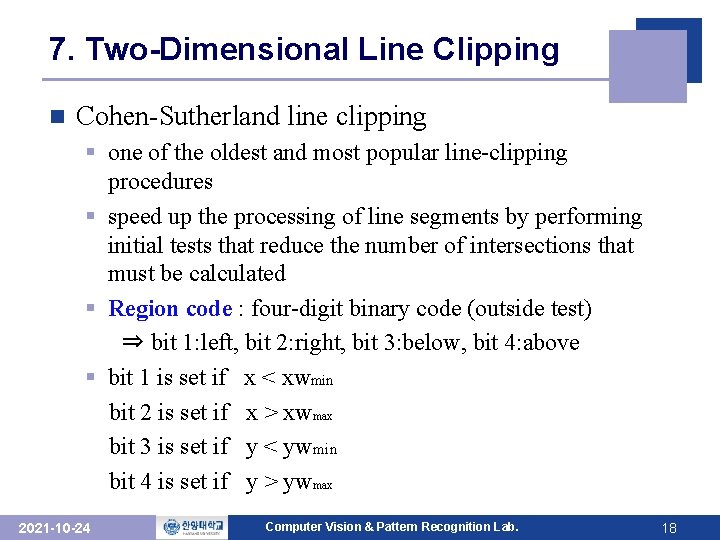
7. Two-Dimensional Line Clipping n Cohen-Sutherland line clipping § one of the oldest and most popular line-clipping procedures § speed up the processing of line segments by performing initial tests that reduce the number of intersections that must be calculated § Region code : four-digit binary code (outside test) ⇒ bit 1: left, bit 2: right, bit 3: below, bit 4: above § bit 1 is set if x < xwmin bit 2 is set if x > xwmax bit 3 is set if y < ywmin bit 4 is set if y > ywmax 2021 -10 -24 Computer Vision & Pattern Recognition Lab. 18
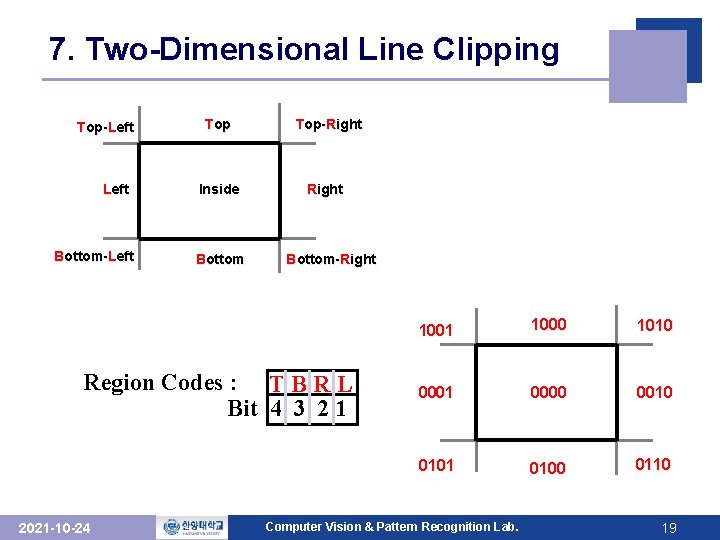
7. Two-Dimensional Line Clipping Top-Left Bottom-Left Top-Right Inside Right Bottom-Right Region Codes : T B R L Bit 4 3 2 1 2021 -10 -24 1001 1000 1010 0001 0000 0010 0101 0100 0110 Computer Vision & Pattern Recognition Lab. 19
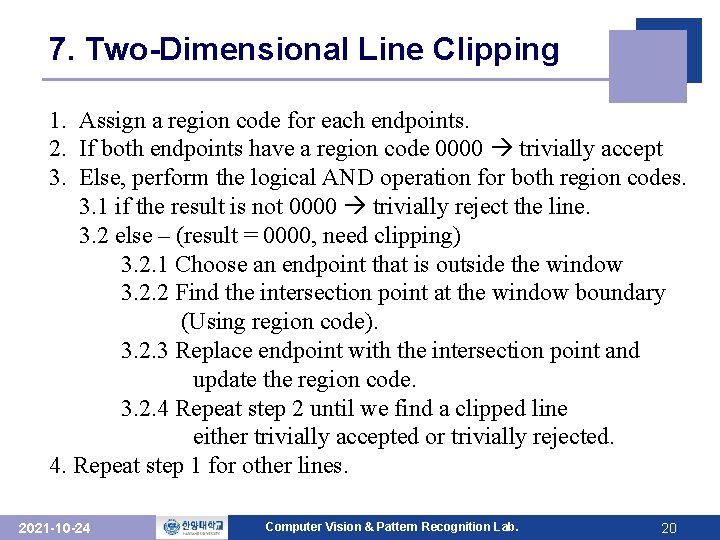
7. Two-Dimensional Line Clipping 1. Assign a region code for each endpoints. 2. If both endpoints have a region code 0000 trivially accept 3. Else, perform the logical AND operation for both region codes. 3. 1 if the result is not 0000 trivially reject the line. 3. 2 else – (result = 0000, need clipping) 3. 2. 1 Choose an endpoint that is outside the window 3. 2. 2 Find the intersection point at the window boundary (Using region code). 3. 2. 3 Replace endpoint with the intersection point and update the region code. 3. 2. 4 Repeat step 2 until we find a clipped line either trivially accepted or trivially rejected. 4. Repeat step 1 for other lines. 2021 -10 -24 Computer Vision & Pattern Recognition Lab. 20
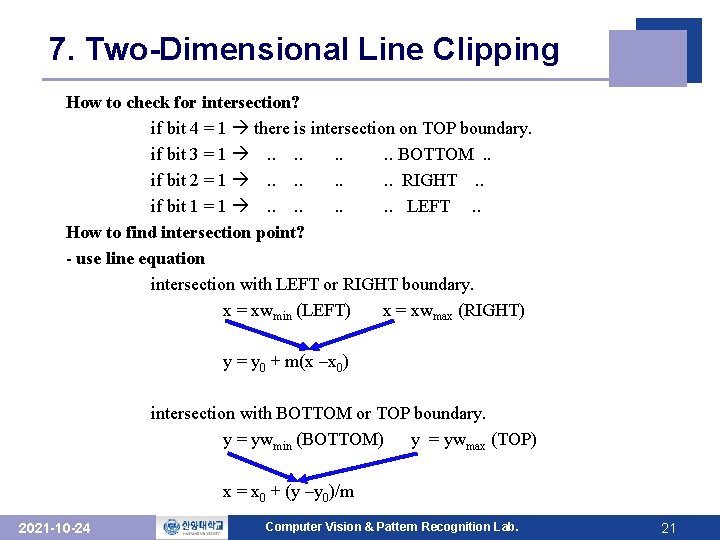
7. Two-Dimensional Line Clipping How to check for intersection? if bit 4 = 1 there is intersection on TOP boundary. if bit 3 = 1 . . . . BOTTOM. . if bit 2 = 1 . . . . RIGHT. . if bit 1 = 1 . . . . LEFT. . How to find intersection point? - use line equation intersection with LEFT or RIGHT boundary. x = xwmin (LEFT) x = xwmax (RIGHT) y = y 0 + m(x –x 0) intersection with BOTTOM or TOP boundary. y = ywmin (BOTTOM) y = ywmax (TOP) x = x 0 + (y –y 0)/m 2021 -10 -24 Computer Vision & Pattern Recognition Lab. 21
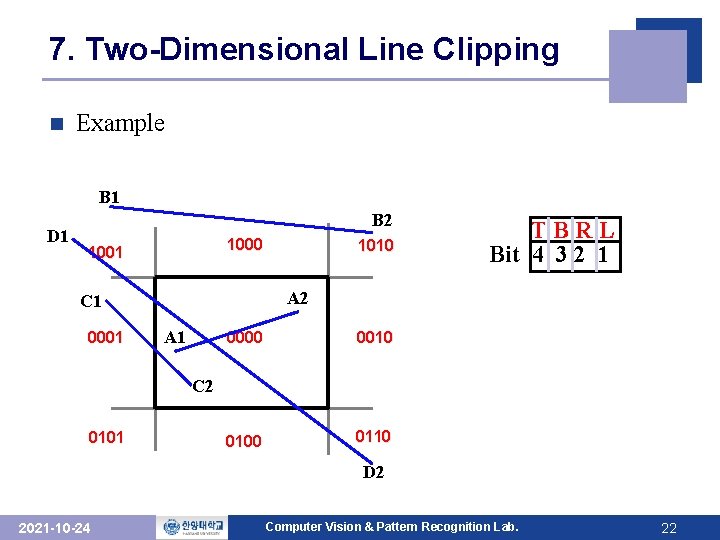
7. Two-Dimensional Line Clipping n Example B 1 D 1 B 2 1000 1001 TBRL Bit 4 3 2 1 A 2 C 1 0001 1010 A 1 0000 0010 0100 0110 C 2 0101 D 2 2021 -10 -24 Computer Vision & Pattern Recognition Lab. 22
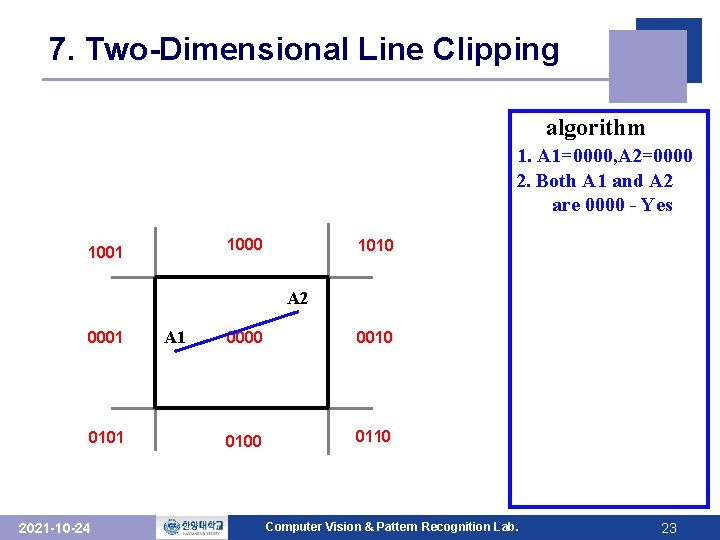
7. Two-Dimensional Line Clipping algorithm 1. A 1=0000, A 2=0000 2. Both A 1 and A 2 are 0000 - Yes 1000 1001 1010 A 2 0001 0101 2021 -10 -24 A 1 0000 0010 0100 0110 Computer Vision & Pattern Recognition Lab. 23
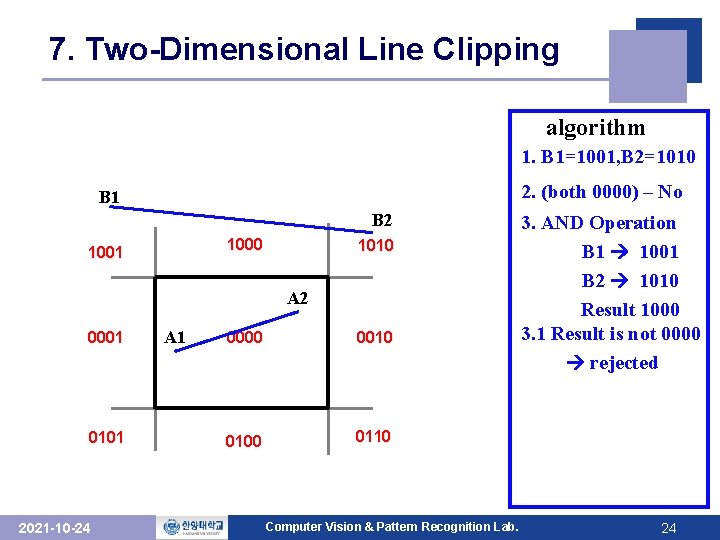
7. Two-Dimensional Line Clipping algorithm 1. B 1=1001, B 2=1010 2. (both 0000) – No B 1 B 2 1000 1001 1010 A 2 0001 0101 2021 -10 -24 A 1 0000 0010 0100 0110 Computer Vision & Pattern Recognition Lab. 3. AND Operation B 1 1001 B 2 1010 Result 1000 3. 1 Result is not 0000 rejected 24
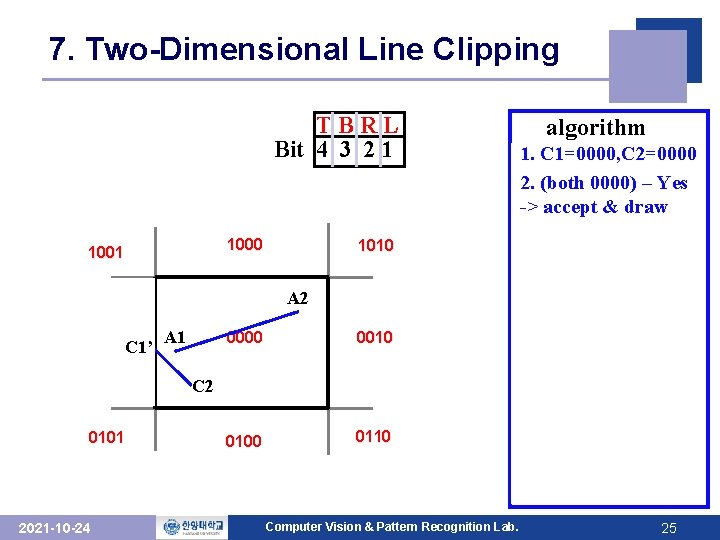
7. Two-Dimensional Line Clipping TBRL Bit 4 3 2 1 1000 1001 A 2 C 1 0001 1010 C 1’ A 1 0000 0010 0100 0110 C 2 0101 2021 -10 -24 algorithm 1. 1. C 1=0001, C 2=0000 C 1=0000, C 2=0000 2. 2. (both 0000)––No Yes 3. ->AND Operation accept & draw C 1 0001 C 2 0000 Result 0000 3. 2 Result is 0000 3. 2. 1. choose C 1 3. 2. 2. Intersection point, C 1’ at LEFT 3. 2. 3 C 1 <- C 1’ C 1 = 0000 3. 2. 4 repeat 2 Computer Vision & Pattern Recognition Lab. 25
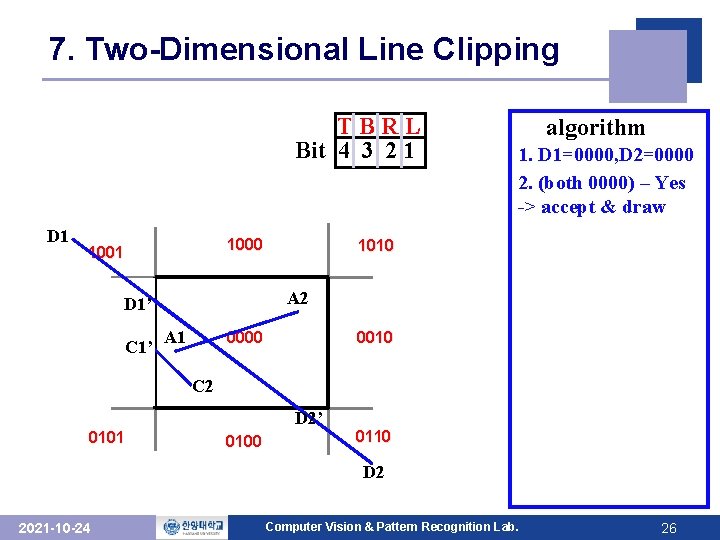
7. Two-Dimensional Line Clipping TBRL Bit 4 3 2 1 D 1 1000 1001 C 1 A 2 D 1’ 0001 C 1’ 1010 A 1 0010 0000 C 2 D 2’ 0101 0100 0110 D 2 2021 -10 -24 algorithm 1. 1. D 1=0000, D 2=0000 D 1=1001, D 2=0110 2. (both 0000) –– Yes No 2. 3. AND -> accept. Operation & draw D 1 1001 D 2 0110 Result 0000 3. 2 Result is 0000 3. 2. 1. choose D 1 3. 2. 2. Intersection point, D 1’ at LEFT 3. 2. 3 D 1 <- D 1’ D 1 = 0000 3. 2. 4 repeat 2 Computer Vision & Pattern Recognition Lab. 26
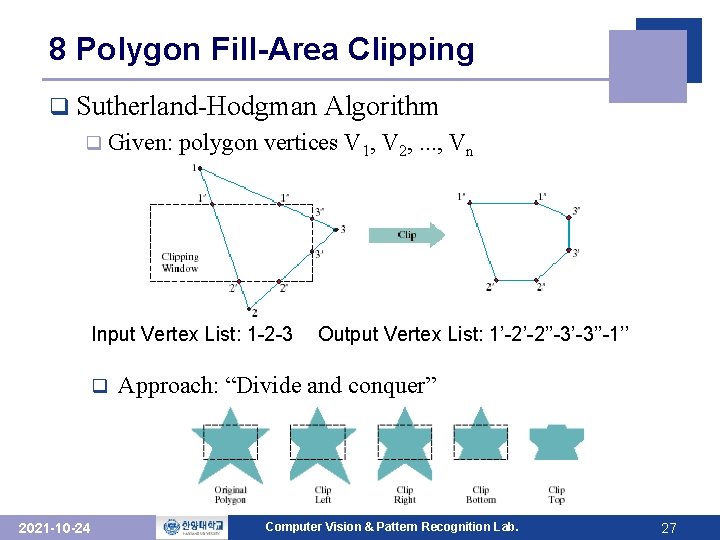
8 Polygon Fill-Area Clipping q Sutherland-Hodgman q Given: polygon vertices V 1, V 2, . . . , Vn Input Vertex List: 1 -2 -3 q 2021 -10 -24 Algorithm Output Vertex List: 1’-2’-2’’-3’-3’’-1’’ Approach: “Divide and conquer” Computer Vision & Pattern Recognition Lab. 27
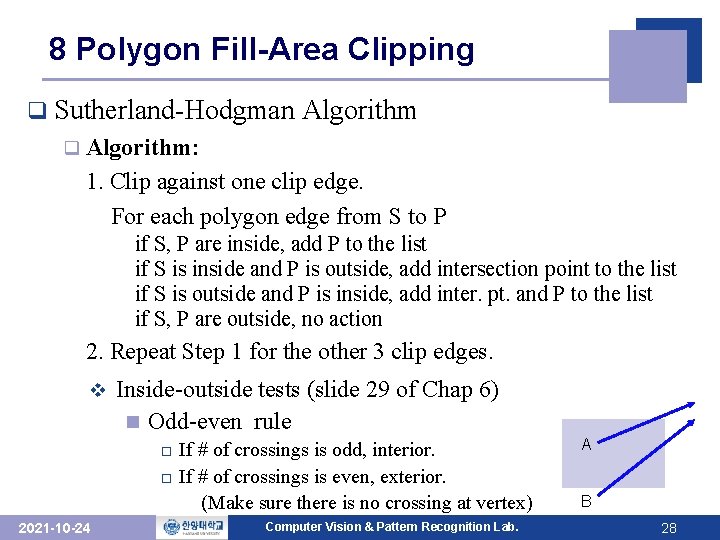
8 Polygon Fill-Area Clipping q Sutherland-Hodgman Algorithm q Algorithm: 1. Clip against one clip edge. For each polygon edge from S to P if S, P are inside, add P to the list if S is inside and P is outside, add intersection point to the list if S is outside and P is inside, add inter. pt. and P to the list if S, P are outside, no action 2. Repeat Step 1 for the other 3 clip edges. v Inside-outside tests (slide 29 of Chap 6) n Odd-even rule If # of crossings is odd, interior. o If # of crossings is even, exterior. (Make sure there is no crossing at vertex) o 2021 -10 -24 Computer Vision & Pattern Recognition Lab. A B 28
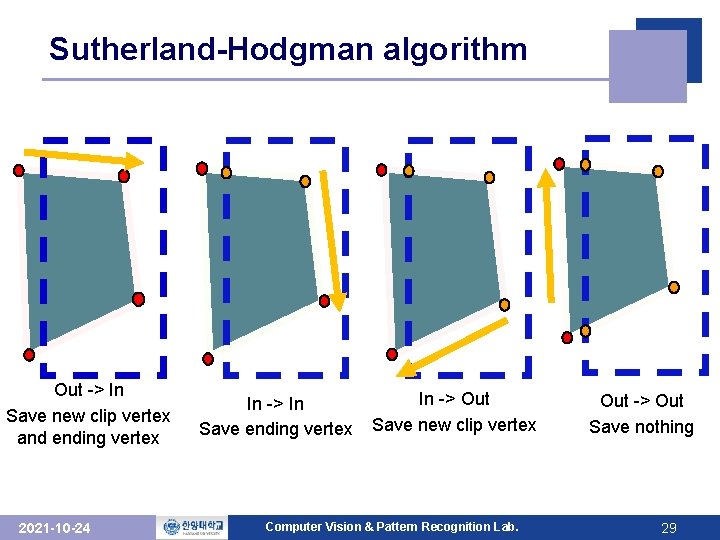
Sutherland-Hodgman algorithm Out -> In Save new clip vertex and ending vertex 2021 -10 -24 In -> In Save ending vertex In -> Out Save new clip vertex Computer Vision & Pattern Recognition Lab. Out -> Out Save nothing 29
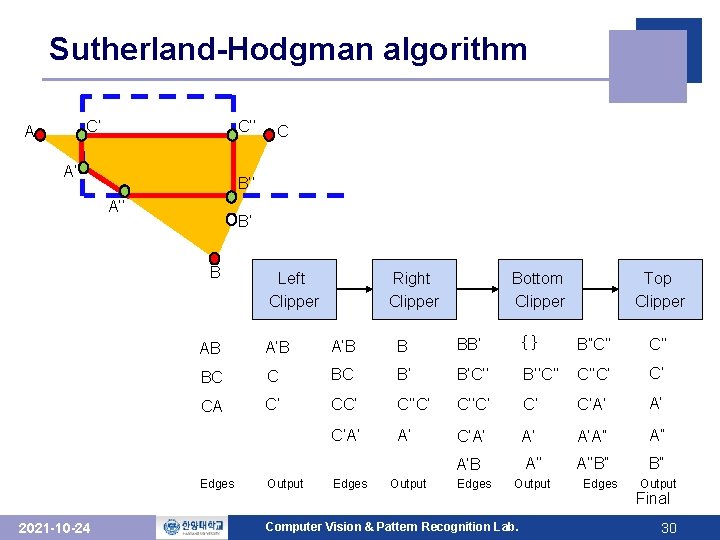
Sutherland-Hodgman algorithm C’ A C’’ A’ B’’ A’’ B’ B Left Clipper Right Clipper Bottom Clipper Top Clipper AB A’B B BB’ {} B”C’’ BC C BC B’ B’C’’ B’’C’’ C’’C’ C’ CA C’ C’’C’ C’ C’A’ A’ A’A” A” A’B A’’B” B” Edges 2021 -10 -24 C Output Edges Output Computer Vision & Pattern Recognition Lab. Edges Output Final 30
- Slides: 30