
Computer Viruses Robert Simon Chapter 60 The Life
Computer Viruses Robert Simon Chapter 60

The Life of a Virus • The Categories of viruses • The Creation of a virus – – The infection The replication The effect Viral code • The Cure – The identification – The purification – The prevention
CATEGORIES
The Categories of Viruses • • • Boot Sector/Resident Viruses Program Viruses Macro viruses Multipartite viruses Polymorphic viruses Other Viruses – Research Viruses – Encrypted Viruses – etc… • Others: (not technically viruses) – Worms – Trojan Horses
The Categories of Viruses Boot Sector Viruses Boot sector viruses are usually transmitted when an infected floppy disk is left in the drive and the system is rebooted. The virus is read from the infected boot sector of the floppy disk and written to the master boot record of the system's hard drive. The master boot sector is the first place your system reads when booting up from the hard drive. Then, whenever the computer is booted up, the virus will be loaded into the system's memory. Examples of this occur less frequently now that most people don’t boot with floppy disks.
The Categories of Viruses Boot Sector Viruses • transmitted when an infected floppy disk is left in the drive and the system is rebooted • virus is read from the infected boot sector of the floppy disk • written to the master boot record of the system's hard drive - the first place your system reads • virus will be loaded into the system's memory whenever the computer is booted up • Examples of this occur less frequently now that most people don’t boot with floppy disks.
The Categories of Viruses Resident Viruses A Boot Sector Virus is now part of a more general class of Resident Viruses. A Resident virus installs itself as part of the operating system upon execution of an infected host program. The virus will remain resident in the memory until the system is shut down. Once in the memory the virus is free to infect all suitable hosts that are accessed during the duration of computer activity.
The Categories of Viruses Resident Viruses * Part of a more general class of Resident Viruses - Resident virus installs itself as part of the operating system upon execution of an infected host program * Virus will remain in the memory until the system is shut down * Once in the memory: - free to infect all suitable hosts that are accessed during the duration of computer activity

The Categories of Viruses Stealth Viruses A stealth virus is a resident virus that attempts to evade detection by intercepting system calls that examine the contents of infected files. The virus results of these calls must be altered to correspond to the file’s original state.
The Categories of Viruses Stealth Viruses *Resident virus *attempts to evade detection: - by intercepting system calls that examine the contents of infected files * virus results of these calls must be altered to correspond to the file’s original state

The Categories of Viruses Program or file viruses are pieces of viral code that attach themselves to executable programs. Once the infected program is run, the virus runs also and is transferred to the system's memory and may replicate itself further.
The Categories of Viruses Macro viruses are currently the most commonly found viruses. They infect files run by applications that use macro languages, like Microsoft Word or Excel. The virus looks like a macro in the file; and when the file is opened, the virus can execute commands understood by the application's macro language.
The Categories of Viruses Multipartite viruses have characteristics of both boot sector viruses and file viruses. They may start out in the boot sector and spread to applications, or vice versa.
The Categories of Viruses Polymorphic Viruses A Polymorphic Virus creates copies during replication that are functionally equivalent but have distinctly different byte streams.
The Categories of Viruses Other (Near Viruses) • Worm A worm is a self-contained, selfreplicating program that does not require a host program. Worms usually utilize security holes in computer networks. Worms do not necessarily infect other programs when replicating. Most worms just create a copy. The original then causes the copy to execute, which scans the network for another machine that has a specific security hole; and then the process repeats itself.
The Categories of Viruses Other (Near Viruses) • Worms (continued) Examples of infamous worms are Melissa, Code Red, and the ILOVEYOU. These worms replicated themselves by email, making use of any Outlook address books. A more recent worm is the Slammer worm.
The Categories of Viruses Other (Near Viruses) • Trojan horses A Trojan horse is simply a computer program which claims to do one thing but instead does damage when you run it. Trojan horses have no way to replicate automatically. An example of this is a program that says it’s “Pong” but when it is run, it deletes everything on your computer.
CREATION
The Creation The Infection • There are two main ways a virus infects a host program 1. By either overwriting and destroying the code of the program 2. By appending the virus code to the physical end of the program or moving the original code to another location
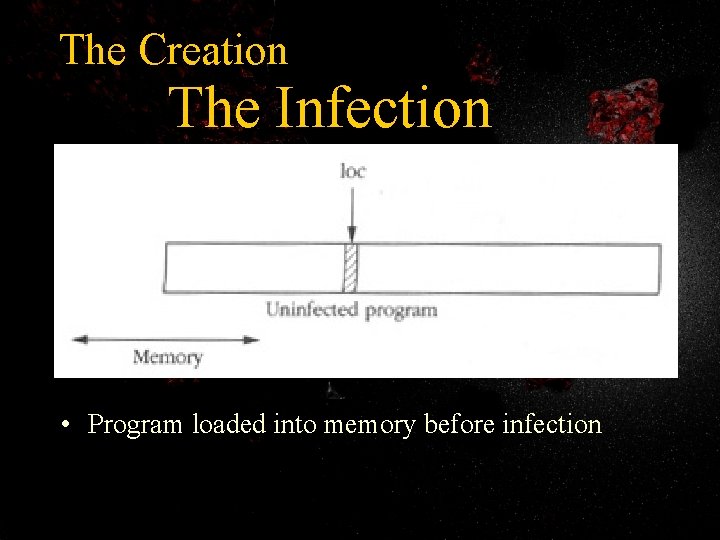
The Creation The Infection • Program loaded into memory before infection
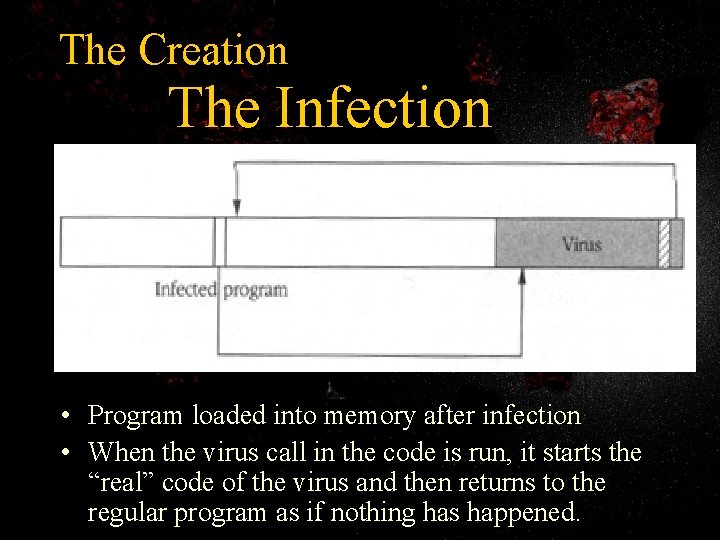
The Creation The Infection • Program loaded into memory after infection • When the virus call in the code is run, it starts the “real” code of the virus and then returns to the regular program as if nothing has happened.
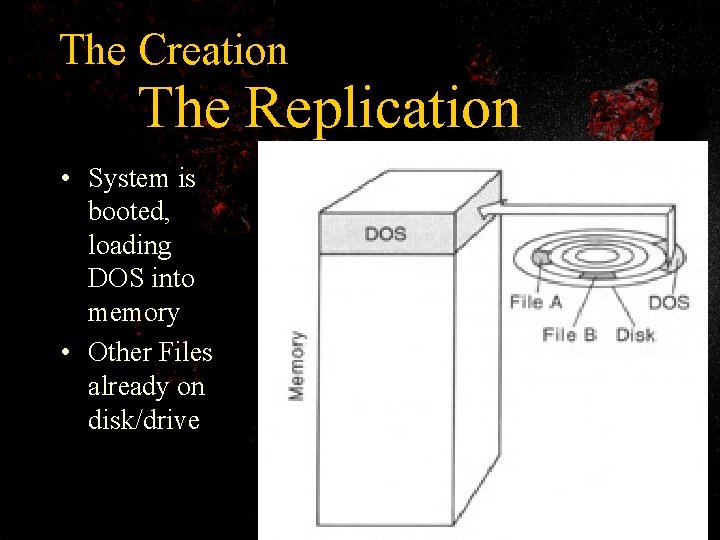
The Creation The Replication • System is booted, loading DOS into memory • Other Files already on disk/drive
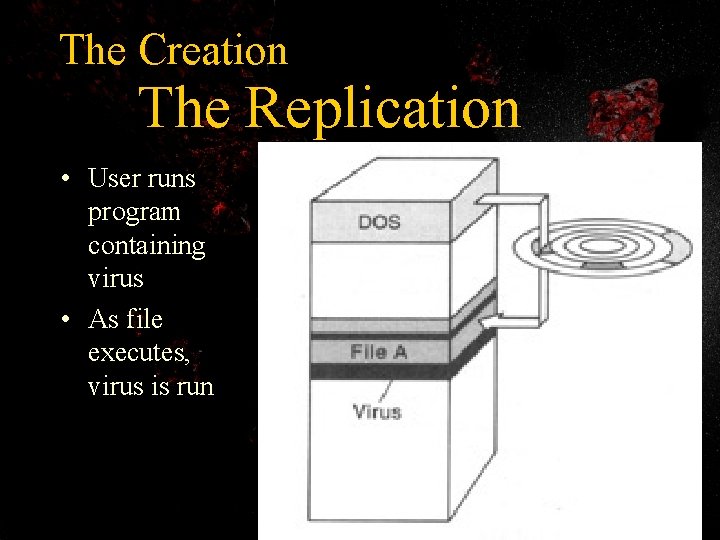
The Creation The Replication • User runs program containing virus • As file executes, virus is run
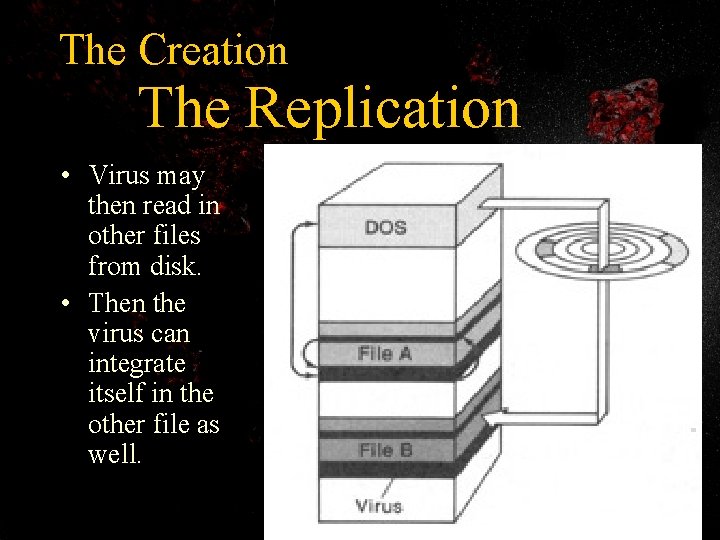
The Creation The Replication • Virus may then read in other files from disk. • Then the virus can integrate itself in the other file as well.
The Creation The Replication • The virus can then execute when either of the files is run and this process can continue until either all the files on the drive are infected or until the virus is programmed to terminate. • Viruses usually have some sort of selfrecognition procedure to determine whether or not an executable is already infected.
The Creation The Effect • Viruses can have many different effects, from simple annoyances to erasing entire drives. • Federal law has stated the maximum penalty for using a computer virus against a computer other than your own can mean up to 10 years of imprisonment or payment of a fine of $50, 000 or both.
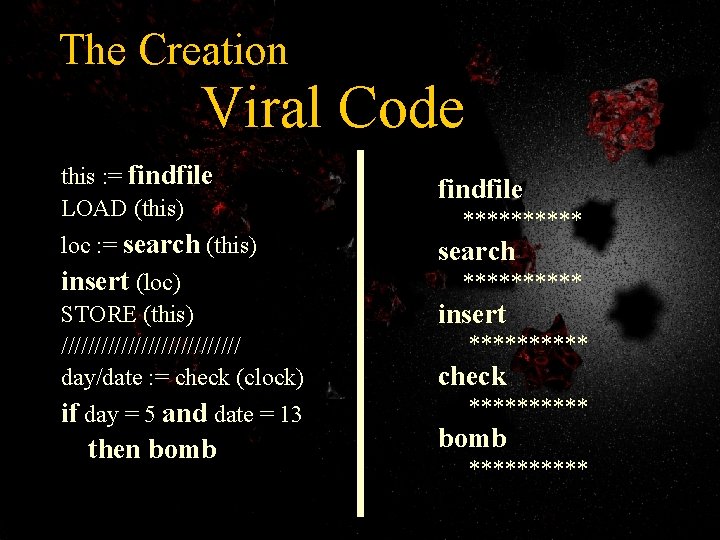
The Creation Viral Code this : = findfile LOAD (this) findfile loc : = search (this) search insert (loc) STORE (this) ////////////// day/date : = check (clock) if day = 5 and date = 13 then bomb ********** insert ***** check ***** bomb *****
CURE
The Cure Detection • Current detection tools identify viruses while the virus is either actively executing, residing in memory, or stored in executable code.
The Cure Detection • Detection by Static Analysis • Detection by Interception • Detection by Modification
The Cure • • • Detection Types of Detectors (preventors) Scanners General Purpose Monitors Access Control Shells Checksums for Change Detection Knowledge-Based Virus Removal Tools
The Cure Purification • Certain viruses (namely overwriting viruses) always cause irreparable damage to an executable. Other (nicer) viruses can be safely extracted with minimal damage to the host program. • Using a removal tool such as an Anti-Virus Program will result in one of three possible consequences.
The Cure Purification • The removal could result in a success, which would be the optimal case. • A Hard failure occurs if the disinfected program will no longer execute or the removal program terminates without removing the virus. • A Soft failure occurs if the process produces a file which is slightly modified from its original form but can still execute. The modified file may never have any problems, but the user cannot be certain of the integrity of the file.
The Cure Prevention • Run a secure operating system like UNIX or Windows NT • Buy virus protection software • Avoid programs from unknown sources (like the internet (yeah, right)) • Disable floppy disk booting • Make sure Macro Virus Protection is enabled in all Microsoft applications. – Also never run macros in a document unless you know what they do.
The Cure Prevention • The best prevention is personal discipline. – In the case of the ILOVEYOU e-mail virus, the only way to have it infect your computer was to run the VB script that accompanied the e-mail as an attachment – NEVER open attachments that come in. exe, . com or. vbs extensions unless you are ABSOLUTELY SURE they aren’t infected – And as long as you have Macro protection on data files, such as. doc and. xls, they and your picture files, such as. gif or. jpg, are safe to open. – In some rare cases there have been known to be embedded in the e-mail itself viruses that run as soon as you open it to view; in which case, the only prevention you have is your virus protection.
Homework 1. Name 3 types of viruses mentioned in the presentation. 2. Name 2 ways to protect yourself from common viruses.
- Slides: 36