
Computer software and Computer Security Students corner What
- Slides: 24
Computer software and Computer Security
Students corner • What is meant by software? • Categories of software with examples
Software Piracy • Software piracy is a term that is frequently used to describe the copying or use of computer software in violation of its license (commonly referred to as an end user licensing agreement or EULA).
Types of Software Piracy Softlifting – The most common type of piracy, softlifting, (also called softloading), means sharing a program with someone who is not authorized by the license agreement to use it. – A common form of softlifting involves purchasing a single licensed copy of software and then loading the software onto several computers, in violation of licensing terms.
Counterfeiting – Counterfeiting means producing fake copies of a software, making it look authentic. – This involves providing the box, CDs, and manuals, all designed to look as much like the original product as possible. Online piracy – The fastest-growing form of piracy is Internet piracy. – With the growing number of users online, and with the rapidly increasing connection speeds, the exchange of software on the Internet has attracted an extensive following
• Renting – Renting involves someone renting out a copy of software for temporary use, without the permission of the copyright holder. • Hard disk loading – form of piracy involves loading an unauthorized copy of software onto a computer being sold to the end user.
• Original Equipment Manufacturer(OEM) unbundling – Often just called "unbundling, " this form of piracy means selling stand-alone software originally meant to be included with a specific accompanying product. An example of this form of piracy is someone providing drivers to a specific printer without authorization. – OEM unbundling is a type of software piracy that occurs when OEM-packaged software is separated from the hardware it originally came bundled with, at the OEM or retail level of sale. The software is clearly marked, usually with the phrase "For Distribution with New PC Hardware Only", and the act of piracy occurs when the software is installed on another computer system.
Preventing software piracy • Read the End User License Agreement (EULA) for each software product you purchase. • Purchase CD software only from reputable resellers. • Purchase software downloads directly from the manufacturer's website. • Register your software to prevent others from attempting to install your software on their computers.
Software terminologies • • Public domain software Freeware Shareware Commercial software Open –source software Proprietary software Firmware
Computer Security
Identify the terms • Define : Computer Security • Define the terms: encryption, denial of service • Virus, Worms, Trojan Horses, Logic bombs
• In a certain code ‘MONARCHY’ is written as ‘NPOBSDIZ’. How will ‘STANDARD’ be written in that code? • In a certain code ‘CAMPHOR’ is written as ‘ 6$3#152’ and ‘SAKE’ is written as ‘@$98’. How is ‘MORSE’ written in that code language?
Cryptography • Cryptography is a method of storing and transmitting data in a particular form so that only those for whom it is intended can read and process it. • Cryptography involves creating written or generated codes that allow information to be kept secret. Cryptography converts data into a format that is unreadable for an unauthorized user, allowing it to be transmitted without unauthorized entities decoding it back into a readable format, thus compromising the data.
• In Simple, cryptography is the process of altering messages to hide their meaning from adversaries who might intercept them. • Cryptography relies upon two components: – Algorithm or methodology – Key • The initial unencrypted data are referred as plain text • The encrypted text is called cipher text
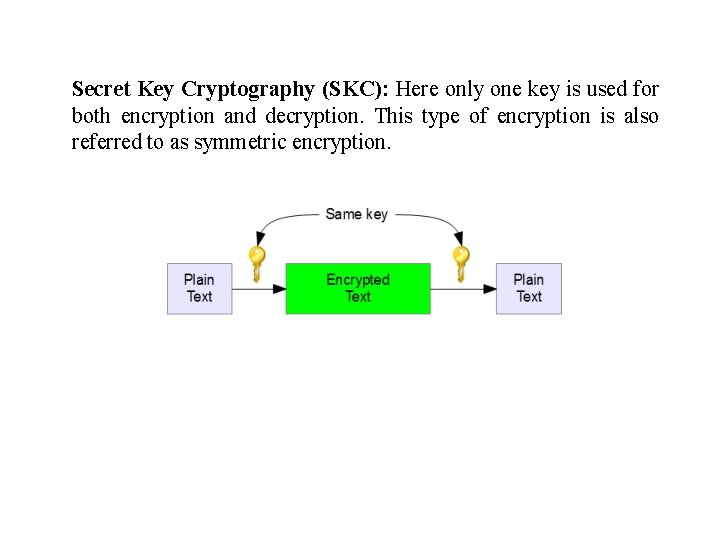
Secret Key Cryptography (SKC): Here only one key is used for both encryption and decryption. This type of encryption is also referred to as symmetric encryption.
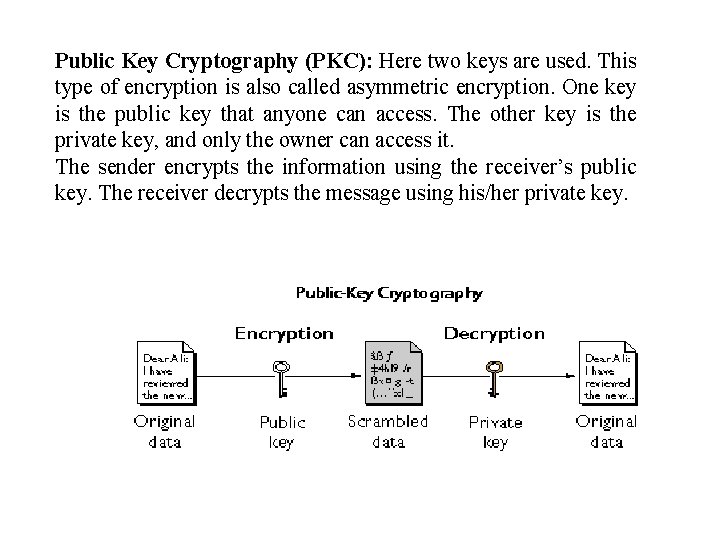
Public Key Cryptography (PKC): Here two keys are used. This type of encryption is also called asymmetric encryption. One key is the public key that anyone can access. The other key is the private key, and only the owner can access it. The sender encrypts the information using the receiver’s public key. The receiver decrypts the message using his/her private key.
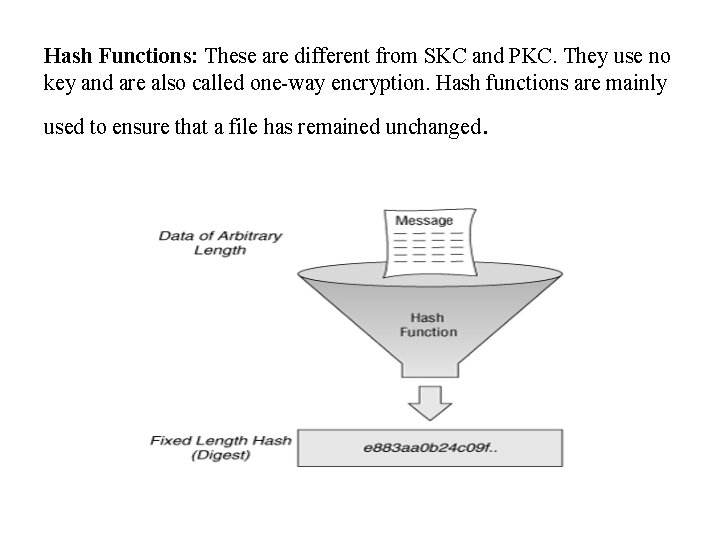
Hash Functions: These are different from SKC and PKC. They use no key and are also called one-way encryption. Hash functions are mainly used to ensure that a file has remained unchanged .
Digital Signature • A digital signature is a mathematical scheme for demonstrating the authenticity of digital messages or documents. • A valid digital signature gives a recipient reason to believe that the message was created by a known sender (authentication), that the sender cannot deny having sent the message (non-repudiation), and that the message was not altered in transit (integrity). • Digital signatures are a standard element of most cryptographic protocol suites, and are commonly used for software distribution, financial transactions, contract management software, and in other cases where it is important to detect forgery or tampering.
• A digital signature follows asymmetric scheme and typically consists of 3 algorithms; • A key generation algorithm that selects a private key uniformly at random from a set of possible private keys. The algorithm outputs the private key and a corresponding public key. • A signing algorithm that, given a message and a private key, produces a signature. • A signature verifying algorithm that, given the message, public key and signature, either accepts or rejects the message's claim to authenticity.
• Mr. A wants to send his signed message to Mr. B through internet • Mr. A creates the digital signature using his private key • This process makes the message in encrypted form and result as signed message • Then the signed message is sent through the internet to Mr. B • Mr. B receives the message along with the digital signature. Also he receives Mr. A’s public key to decrypt the message. • If the decrypted result is same as that of transmitted message, Mr. B can believe that the message is not tampered or modified bcoz only Mr. A holds his private key to the corresponding decrypted message.
Firewall • In computing, a firewall is a network security system that monitors and controls incoming and outgoing network traffic based on predetermined security rules. A firewall typically establishes a barrier between a trusted internal network and untrusted external network, such as the Internet. • In terms of computer security, a firewall is a piece of software. This software monitors the network traffic. A firewall has a set of rules which are applied to each packet. The rules decide if a packet can pass, or whether it is discarded. Usually a firewall is placed between a network that is trusted, and one that is less trusted
• Packet filtering – Data travels on the internet in small pieces; these are called packets. Each packet has certain metadata attached, like where it is coming from, and where it should be sent to. The easiest thing to do is to look at the metadata. Based on rules, certain packets are then dropped or rejected. All firewalls can do this. It is done at the network layer. • Stateful packet inspection – In addition to the simple packet filtering (above) this kind of firewall also keeps track of connections. A packet can be the start of a new connection, or it can be part of an existing connection. If it is neither of the two, it is probably useless and can be dropped
• Application-layer firewalls – Application-layer firewalls do not just look at the metadata; they also look at the actual data transported. They know how certain protocols work, for example FTP or HTTP. They can then look if the data that is in the packet is valid (for that protocol). If it is not, it can be dropped
Students corner • User identification and authentication