
Computer Security Principles and Practice Chapter 9 Firewalls
- Slides: 27
Computer Security: Principles and Practice Chapter 9: Firewalls and Intrusion Prevention Systems EECS 710: Information Security Professor Hossein Saiedian Fall 2014
Firewalls and Intrusion Prevention Systems Effective means of protecting LANs • Internet connectivity essential • For organization and individuals – But creates a threat – Could secure workstations and servers • Also use firewall as perimeter defence • – Single choke point to impose security 2
Firewall Access Policy • A critical component in the planning and implementation of a firewall is specifying a suitable access policy Types of traffic authorized to pass through the firewall – Includes address ranges, protocols, applications and content types – The policy should be developed from the organization’s security risk assessment and policy • Should be developed from a broad specification of which traffic types the organization needs to support • – Then refined to detail the filter elements which can then be implemented within an appropriate firewall topology 3
Firewall Capabilities & Limits • Capabilities Defines a single choke point – Provides a location for monitoring security events – Convenient platform for some Internet functions such as NAT, usage monitoring, IPSEC, VPNs – • Limitations Cannot protect against attacks bypassing firewall – May not protect fully against internal threats – Improperly secure wireless LAN – Laptop, PDA, portable storage device infected outside then used inside – 4
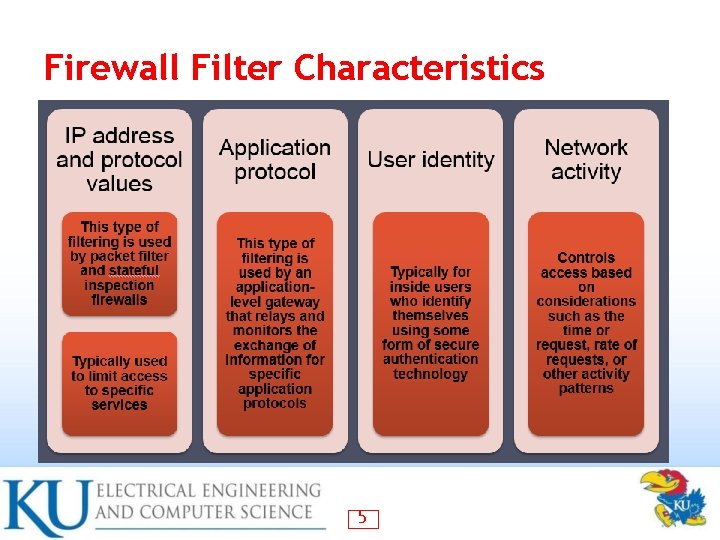
Firewall Filter Characteristics 5
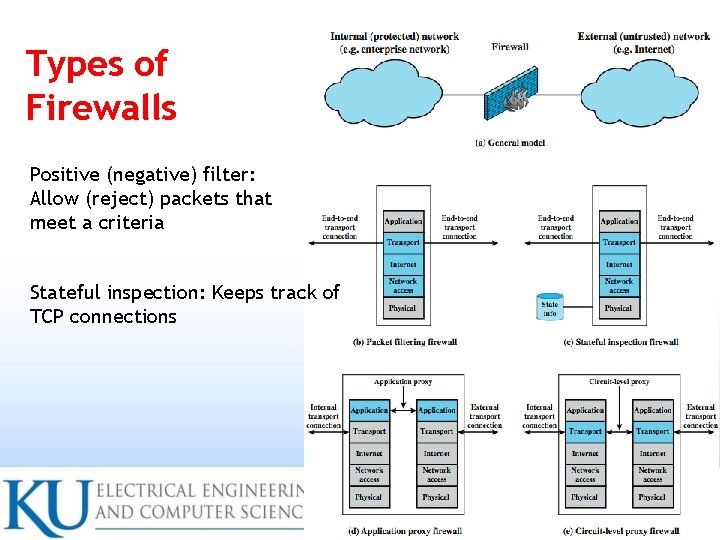
Types of Firewalls Positive (negative) filter: Allow (reject) packets that meet a criteria Stateful inspection: Keeps track of TCP connections 6
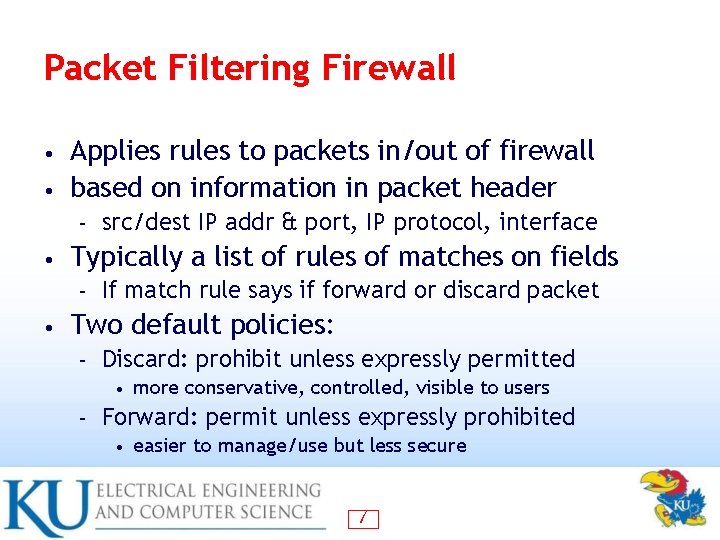
Packet Filtering Firewall Applies rules to packets in/out of firewall • based on information in packet header • – • Typically a list of rules of matches on fields – • src/dest IP addr & port, IP protocol, interface If match rule says if forward or discard packet Two default policies: – Discard: prohibit unless expressly permitted • – more conservative, controlled, visible to users Forward: permit unless expressly prohibited • easier to manage/use but less secure 7
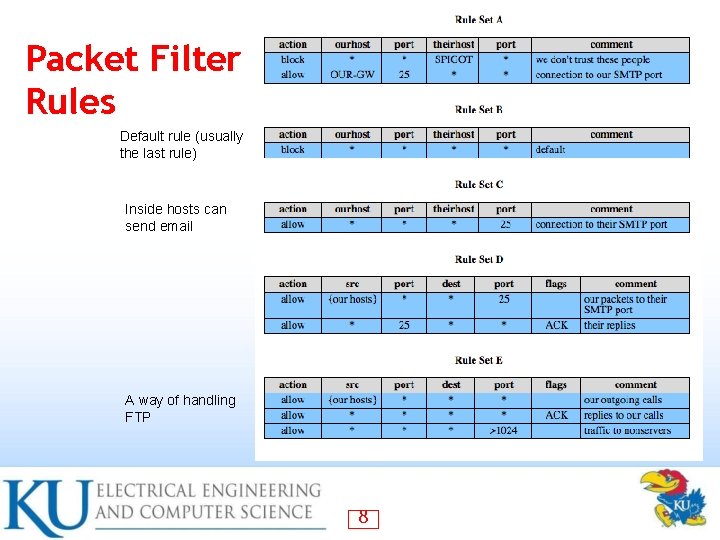
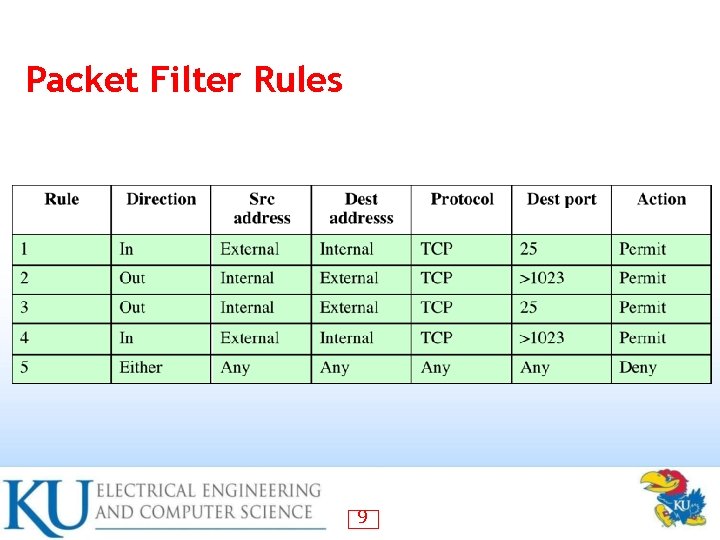
Packet Filter Rules Default rule (usually the last rule) Inside hosts can send email A way of handling FTP 8
Packet Filter Rules 9
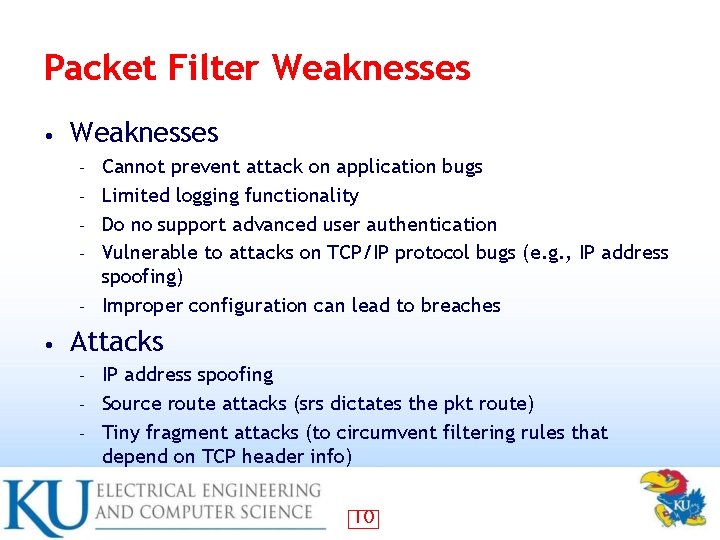
Packet Filter Weaknesses • Weaknesses – – – • Cannot prevent attack on application bugs Limited logging functionality Do no support advanced user authentication Vulnerable to attacks on TCP/IP protocol bugs (e. g. , IP address spoofing) Improper configuration can lead to breaches Attacks IP address spoofing – Source route attacks (srs dictates the pkt route) – Tiny fragment attacks (to circumvent filtering rules that depend on TCP header info) – 10
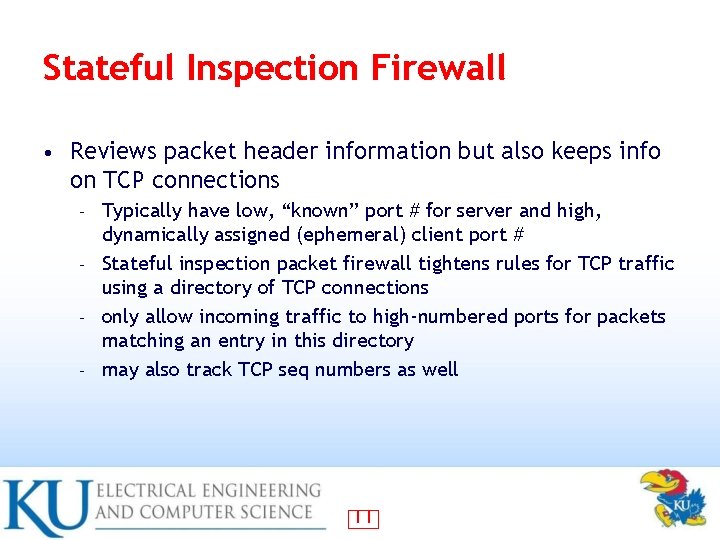
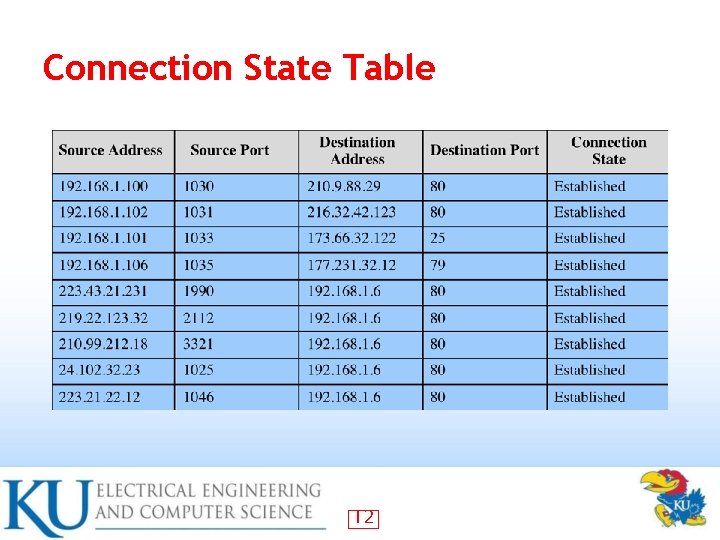
Stateful Inspection Firewall • Reviews packet header information but also keeps info on TCP connections Typically have low, “known” port # for server and high, dynamically assigned (ephemeral) client port # – Stateful inspection packet firewall tightens rules for TCP traffic using a directory of TCP connections – only allow incoming traffic to high-numbered ports for packets matching an entry in this directory – may also track TCP seq numbers as well – 11
Connection State Table 12
Application-Level (Proxy) Gateway • Acts as a relay of application-level traffic User contacts gateway with remote host name – Authenticates themselves – Gateway contacts application on remote host and relays TCP segments between server and user – • Must have proxy code for each application May restrict application features supported – Some services may not be available – More secure than packet filters • But have higher overheads • 13
Circuit-Level Gateway Sets up two TCP connections, to an inside user and to an outside host • Once connection is established, relays TCP segments from one connection to the other without examining contents • Hence independent of application logic – Just determines whether relay is permitted – • Typically used when inside users trusted May use application-level gateway inbound and circuit-level gateway outbound – Hence lower overheads – 14
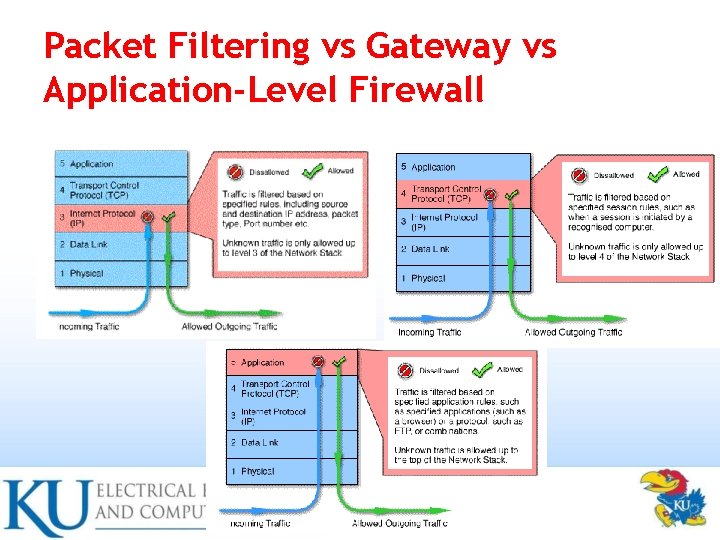
Packet Filtering vs Gateway vs Application-Level Firewall 15
Firewall Basing Several options for locating firewall: • Bastion host • Individual host-based firewall • Personal firewall • 17
Bastion Hosts Critical strongpoint in network • Hosts application/circuit-level gateways • Common characteristics: • – – – Runs secure O/S, only essential services May require user auth to access proxy or host There may be many proxy services Each proxy can restrict features, hosts accessed Each proxy small, simple, checked for security Each proxy is independent, can be uninstalled 18
Host-Based Firewalls • • • Used to secure individual host Available in/add-on for many O/S Filter packet flows Often used on servers Advantages: Tailored filter rules for specific host needs – Protection from both internal/external attacks – Additional layer of protection to org firewall when used with a standalone firewall – 19
Personal Firewall • • Controls traffic flow to/from PC/workstation For both home or corporate use May be software module on PC Or in home cable/DSL router/gateway Typically much less complex Primary role to deny unauthorized access May also monitor outgoing traffic to detect/block worm/malware activity 20
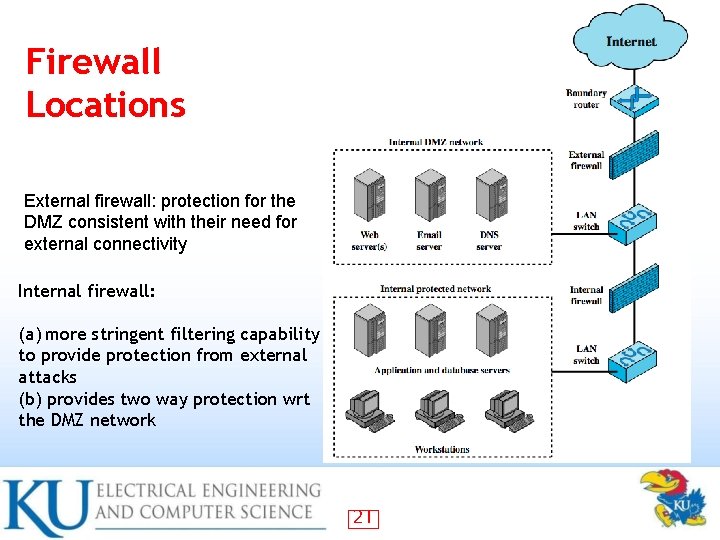
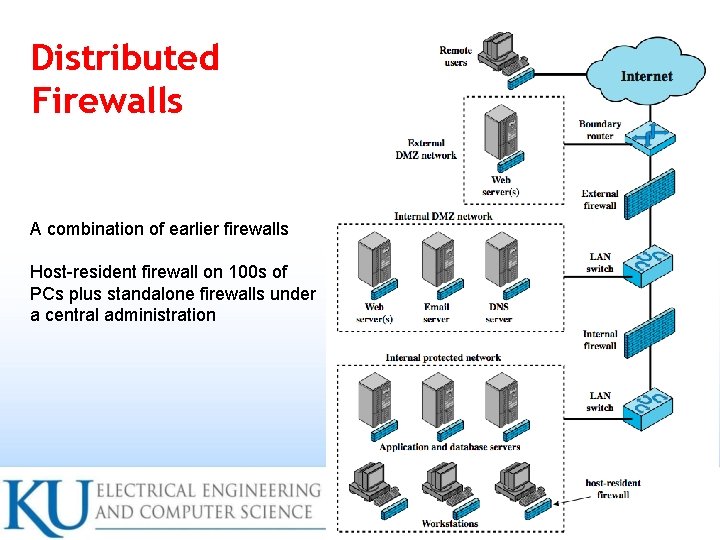
Firewall Locations External firewall: protection for the DMZ consistent with their need for external connectivity Internal firewall: (a) more stringent filtering capability to provide protection from external attacks (b) provides two way protection wrt the DMZ network 21
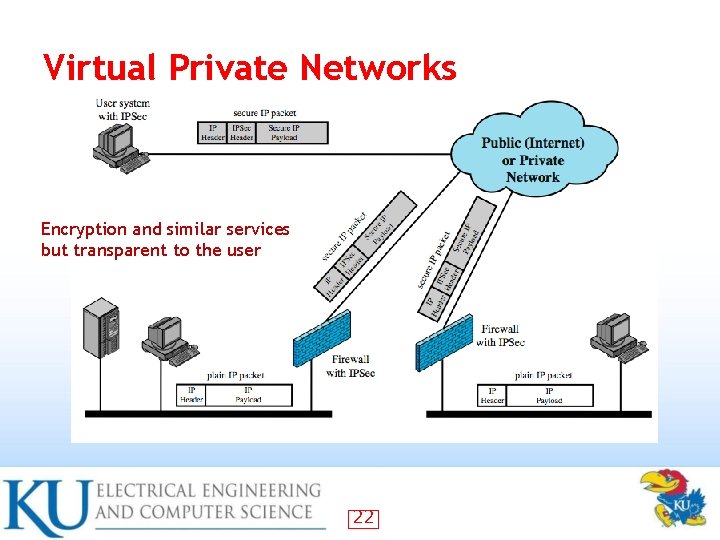
Virtual Private Networks Encryption and similar services but transparent to the user 22
Distributed Firewalls A combination of earlier firewalls Host-resident firewall on 100 s of PCs plus standalone firewalls under a central administration 23
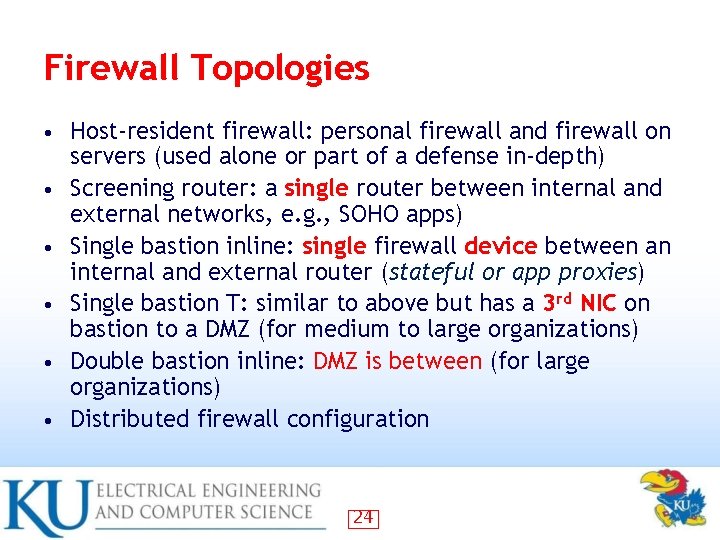
Firewall Topologies • • • Host-resident firewall: personal firewall and firewall on servers (used alone or part of a defense in-depth) Screening router: a single router between internal and external networks, e. g. , SOHO apps) Single bastion inline: single firewall device between an internal and external router (stateful or app proxies) Single bastion T: similar to above but has a 3 rd NIC on bastion to a DMZ (for medium to large organizations) Double bastion inline: DMZ is between (for large organizations) Distributed firewall configuration 24
Intrusion Prevention Systems (IPS) • Recent addition to security products which Inline network-/host-based IDS that can block traffic – Functional addition to firewall that adds IDS capabilities – Using IDS algorithms but can block or reject packets like a firewall • May be network or host based • 25
Host-Based IPS • Identifies attacks using both: – Signature techniques • – Anomaly detection techniques • – • malicious application packets behavior patterns that indicate malware Example of malicious behavior: buffer overflow, access to email contacts, directory traversal Can be tailored to the specific platform – e. g. general purpose, web/database server specific Can also sandbox applets to monitor behavior • May give desktop file, registry, I/O protection • 26
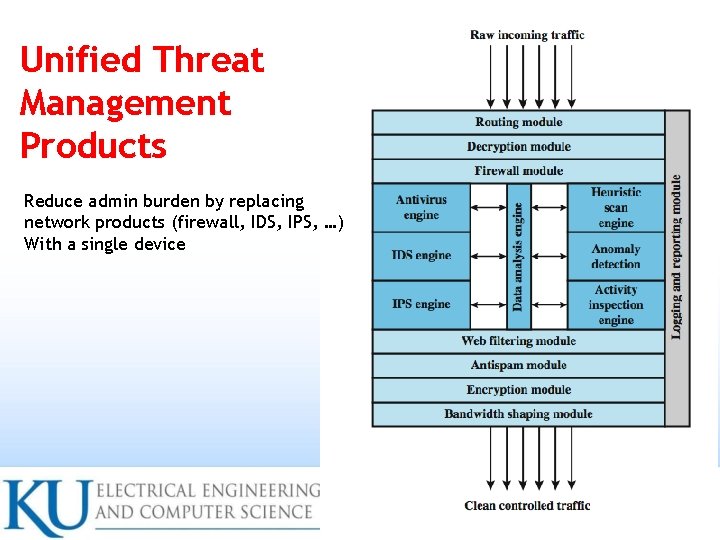
Unified Threat Management Products Reduce admin burden by replacing network products (firewall, IDS, IPS, …) With a single device 28
Summary Introduced need for & purpose of firewalls • Types of firewalls • – packet filter, stateful inspection, application and circuit gateways Firewall hosting, locations, topologies • Intrusion prevention systems • 29