
COMPUTER ORGANIZATION Term 2008 2009 II B Tech
COMPUTER ORGANIZATION Term: 2008 -2009 II B. Tech II semester Unit-I PPT Slides Text Books: (1) Computer Systems Architecture by M. Morris Mano (Chapter Three) (2) Computer Organization by Carl Hamacher (Chapter One)
INDEX UNIT-I PPT SLIDES Srl. No. Module as per Session planner 1. Computer types 2. Functional unit 3. Basic Operational concepts 4. Bus Structure 5. Software 6. Performance 7. Multi processors and Multi Computers 8. Data Representation 9. Fixed Point Representation 10. Floating-Point Representation 11. Error detection codes Lecture No. PPT Slide No.
Computer Types • • Digital Computer is a fast electronic calculating machine that – accepts digitized input information, – processes it according to a list of internally stored instructions, – and produces the resulting output information. Many types of computers exist that differ widely in Size, Cost, Computational Power and intended Use 1. Personal Computer/ Desktop computers 2. Portable Notebook Computers 3. Work Stations 4. Enterprise System Servers 5. Super Computers

Functional Units Figure 1. 1 Block diagram of a digital computer.

Functional Units • A digital computer consists of five functionally independent parts. – Input – Output – Memory Unit – Arithmetic and Logic Unit – Control Unit

• INPUT UNIT: computers accept coded information through input units, which reads the data. Ex: Keyboard, Mouse, joy sticks. • Output Units:
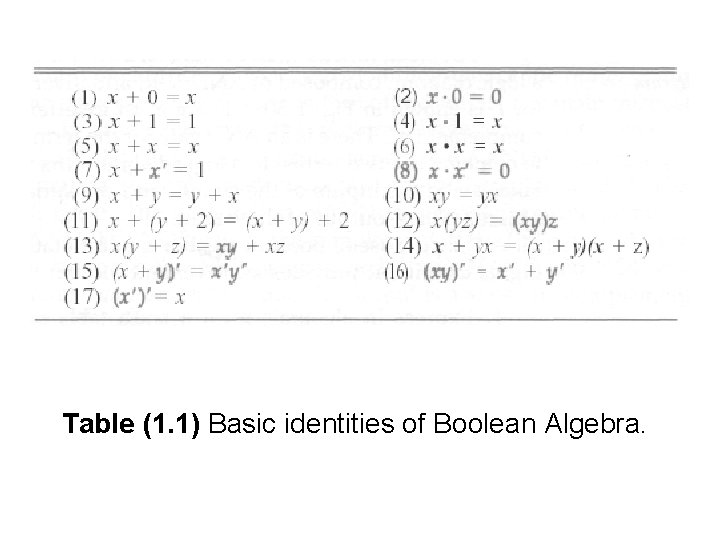
Table (1. 1) Basic identities of Boolean Algebra.
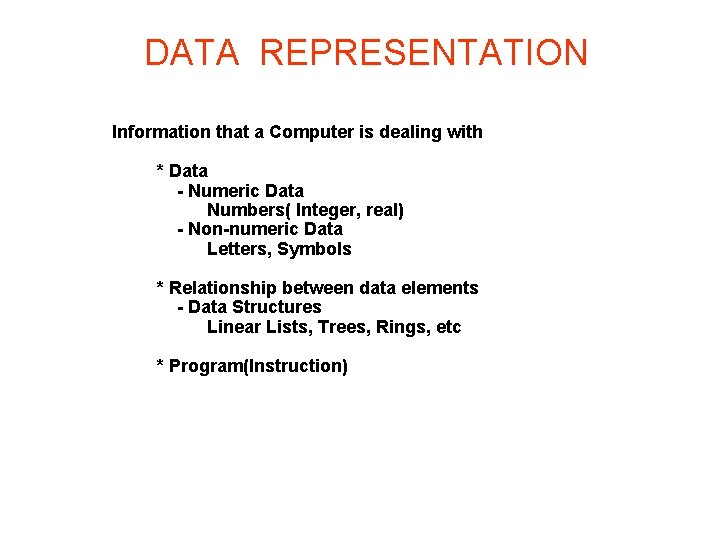
DATA REPRESENTATION Information that a Computer is dealing with * Data - Numeric Data Numbers( Integer, real) - Non-numeric Data Letters, Symbols * Relationship between data elements - Data Structures Linear Lists, Trees, Rings, etc * Program(Instruction)
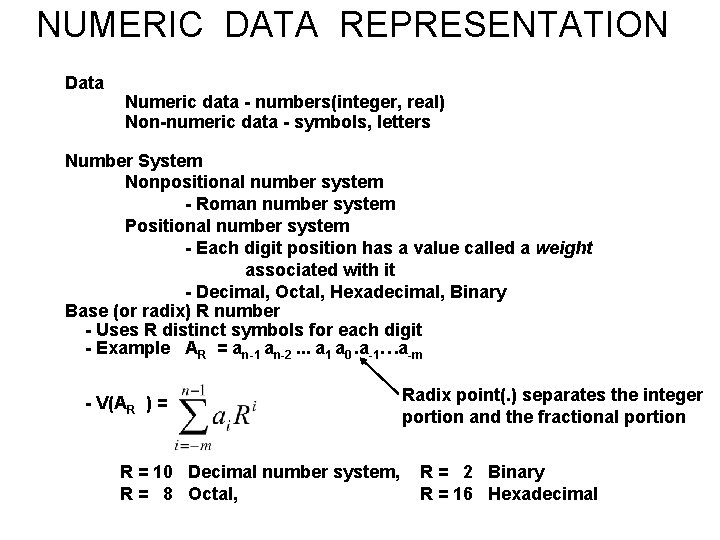
NUMERIC DATA REPRESENTATION Data Numeric data - numbers(integer, real) Non-numeric data - symbols, letters Number System Nonpositional number system - Roman number system Positional number system - Each digit position has a value called a weight associated with it - Decimal, Octal, Hexadecimal, Binary Base (or radix) R number - Uses R distinct symbols for each digit - Example AR = an-1 an-2. . . a 1 a 0. a-1…a-m - V(AR ) = R = 10 Decimal number system, R = 8 Octal, Radix point(. ) separates the integer portion and the fractional portion R = 2 Binary R = 16 Hexadecimal
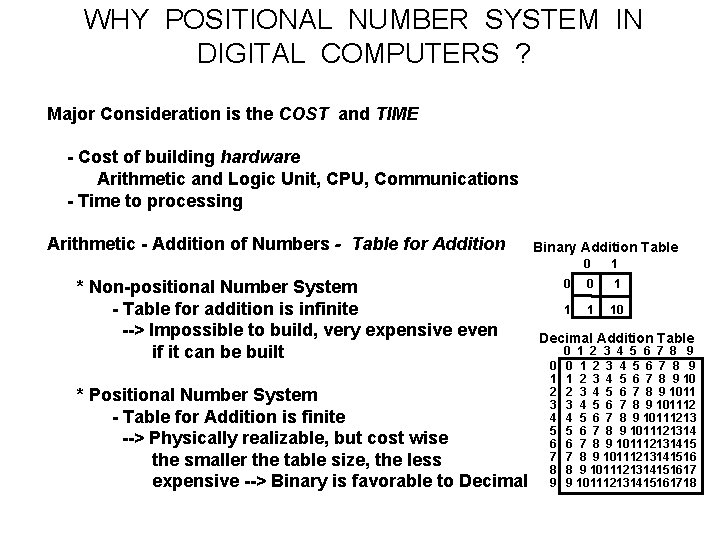
WHY POSITIONAL NUMBER SYSTEM IN DIGITAL COMPUTERS ? Major Consideration is the COST and TIME - Cost of building hardware Arithmetic and Logic Unit, CPU, Communications - Time to processing Arithmetic - Addition of Numbers - Table for Addition * Non-positional Number System - Table for addition is infinite --> Impossible to build, very expensive even if it can be built * Positional Number System - Table for Addition is finite --> Physically realizable, but cost wise the smaller the table size, the less expensive --> Binary is favorable to Decimal Binary Addition Table 0 1 0 0 1 10 Decimal Addition Table 0 1 2 3 4 5 6 7 8 9 10 2 3 4 5 6 7 8 9 1011121314 6 7 8 9 101112131415161718
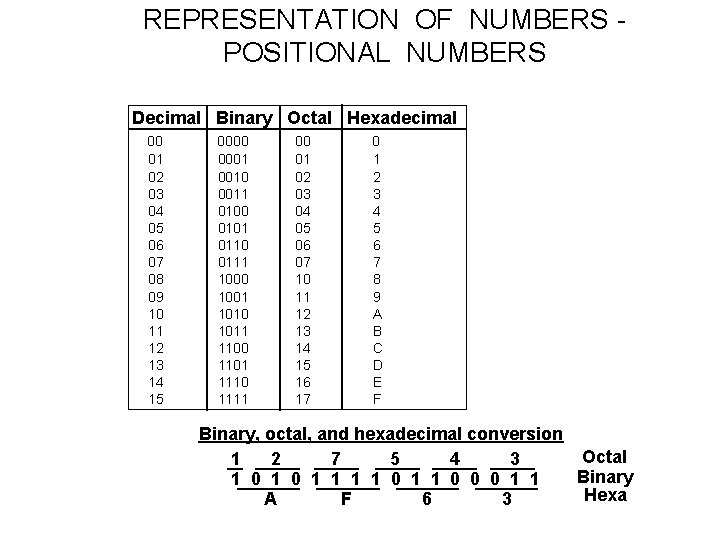
REPRESENTATION OF NUMBERS POSITIONAL NUMBERS Decimal Binary Octal Hexadecimal 00 01 02 03 04 05 06 07 08 09 10 11 12 13 14 15 0000 0001 0010 0011 0100 0101 0110 0111 1000 1001 1010 1011 1100 1101 1110 1111 00 01 02 03 04 05 06 07 10 11 12 13 14 15 16 17 0 1 2 3 4 5 6 7 8 9 A B C D E F Binary, octal, and hexadecimal conversion Octal 1 2 7 5 4 3 Binary 1 0 1 1 0 0 0 1 1 Hexa A F 6 3
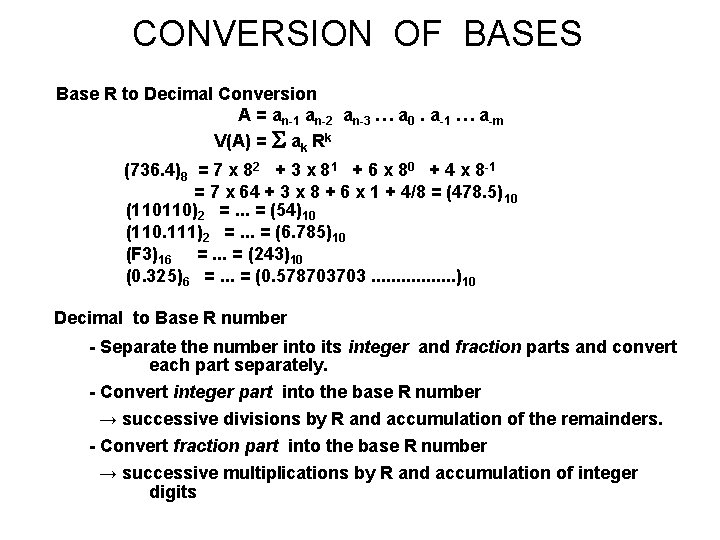
CONVERSION OF BASES Base R to Decimal Conversion A = an-1 an-2 an-3 … a 0. a-1 … a-m V(A) = ak Rk (736. 4)8 = 7 x 82 + 3 x 81 + 6 x 80 + 4 x 8 -1 = 7 x 64 + 3 x 8 + 6 x 1 + 4/8 = (478. 5) 10 (110110)2 =. . . = (54)10 (110. 111)2 =. . . = (6. 785)10 (F 3)16 =. . . = (243)10 (0. 325)6 =. . . = (0. 578703703. . . . )10 Decimal to Base R number - Separate the number into its integer and fraction parts and convert each part separately. - Convert integer part into the base R number → successive divisions by R and accumulation of the remainders. - Convert fraction part into the base R number → successive multiplications by R and accumulation of integer digits
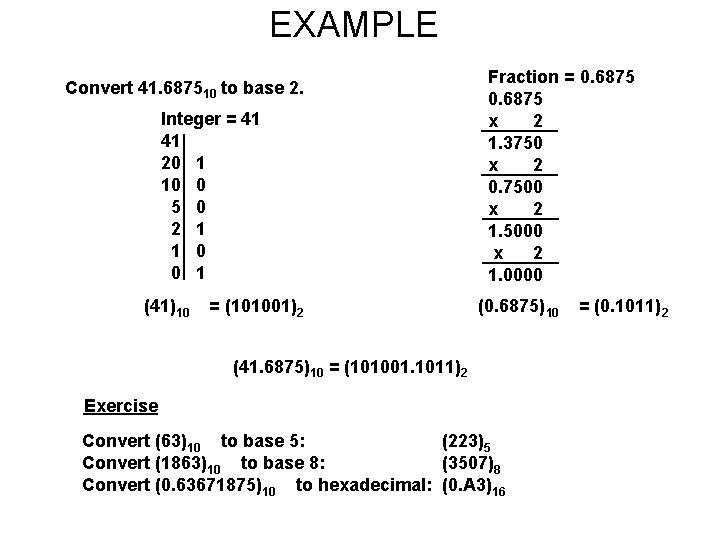
EXAMPLE Convert 41. 687510 to base 2. Integer = 41 41 20 1 10 0 5 0 2 1 1 0 0 1 (41)10 = (101001)2 Fraction = 0. 6875 x 2 1. 3750 x 2 0. 7500 x 2 1. 5000 x 2 1. 0000 (0. 6875) 10 (41. 6875)10 = (101001. 1011)2 Exercise Convert (63)10 to base 5: (223)5 Convert (1863)10 to base 8: (3507)8 Convert (0. 63671875)10 to hexadecimal: (0. A 3)16 = (0. 1011)2
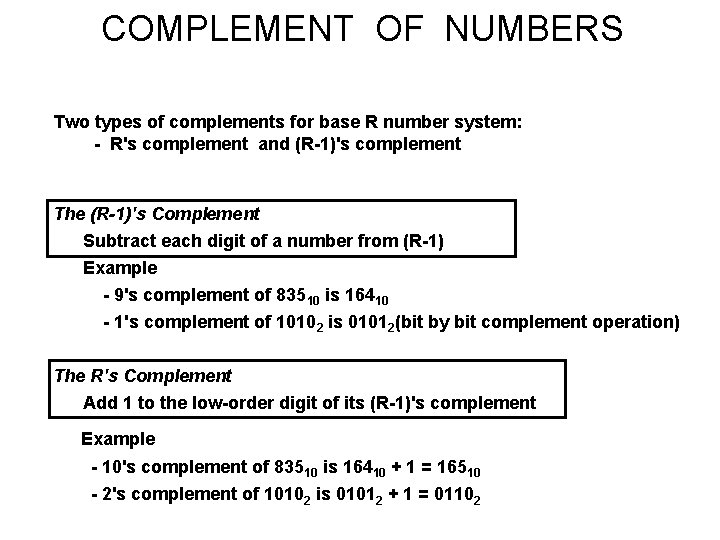
COMPLEMENT OF NUMBERS Two types of complements for base R number system: - R's complement and (R-1)'s complement The (R-1)'s Complement Subtract each digit of a number from (R-1) Example - 9's complement of 83510 is 16410 - 1's complement of 10102 is 01012(bit by bit complement operation) The R's Complement Add 1 to the low-order digit of its (R-1)'s complement Example - 10's complement of 83510 is 16410 + 1 = 16510 - 2's complement of 10102 is 01012 + 1 = 01102
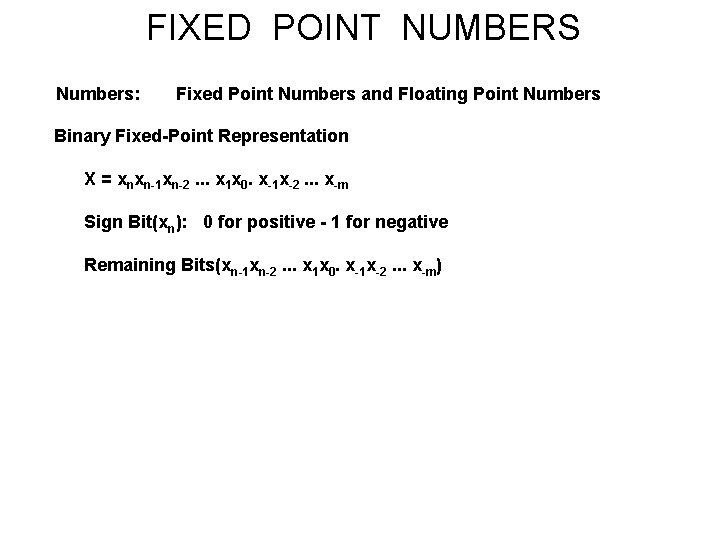
FIXED POINT NUMBERS Numbers: Fixed Point Numbers and Floating Point Numbers Binary Fixed-Point Representation X = xnxn-1 xn-2. . . x 1 x 0. x-1 x-2. . . x-m Sign Bit(xn): 0 for positive - 1 for negative Remaining Bits(xn-1 xn-2. . . x 1 x 0. x-1 x-2. . . x-m)
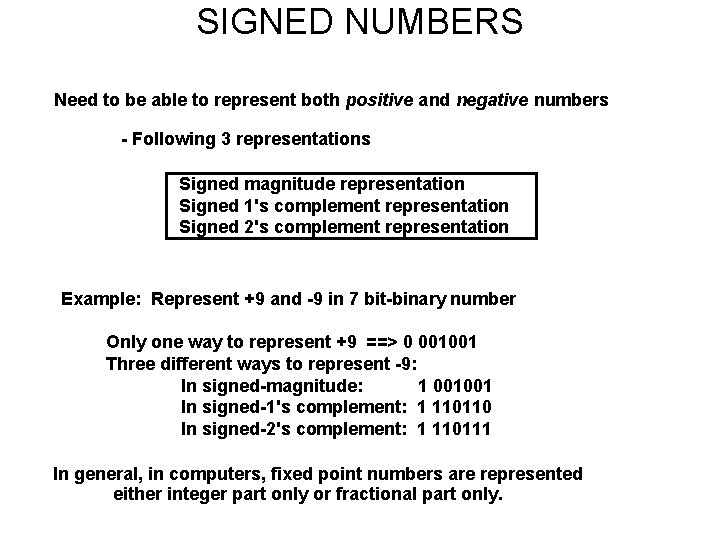
SIGNED NUMBERS Need to be able to represent both positive and negative numbers - Following 3 representations Signed magnitude representation Signed 1's complement representation Signed 2's complement representation Example: Represent +9 and -9 in 7 bit-binary number Only one way to represent +9 ==> 0 001001 Three different ways to represent -9: In signed-magnitude: 1 001001 In signed-1's complement: 1 110110 In signed-2's complement: 1 110111 In general, in computers, fixed point numbers are represented either integer part only or fractional part only.
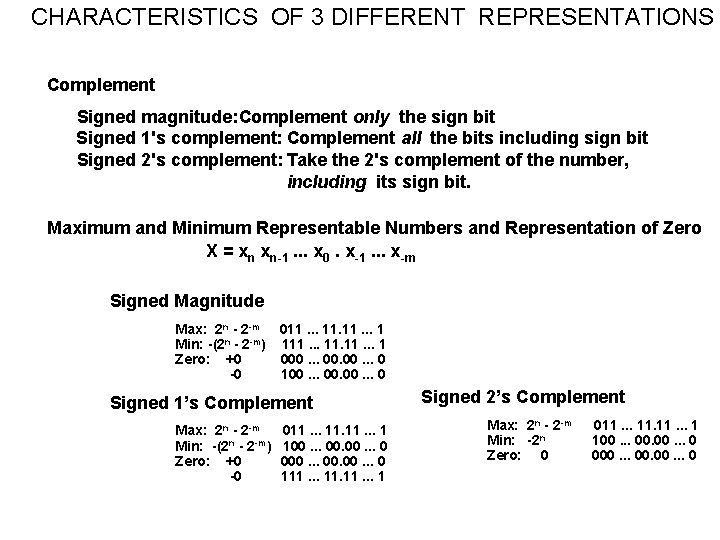
CHARACTERISTICS OF 3 DIFFERENT REPRESENTATIONS Complement Signed magnitude: Complement only the sign bit Signed 1's complement: Complement all the bits including sign bit Signed 2's complement: Take the 2's complement of the number, including its sign bit. Maximum and Minimum Representable Numbers and Representation of Zero X = xn xn-1. . . x 0. x-1. . . x-m Signed Magnitude Max: 2 n - 2 -m 011. . . 1 Min: -(2 n - 2 -m) 111. . . 1 Zero: +0 000. . . 0 -0 100. . . 0 Signed 1’s Complement Max: 2 n - 2 -m Min: -(2 n - 2 -m) Zero: +0 -0 011. . . 1 100. . . 0 000. . . 0 111. . . 1 Signed 2’s Complement Max: 2 n - 2 -m Min: -2 n Zero: 0 011. . . 1 100. . . 0 000. . . 0
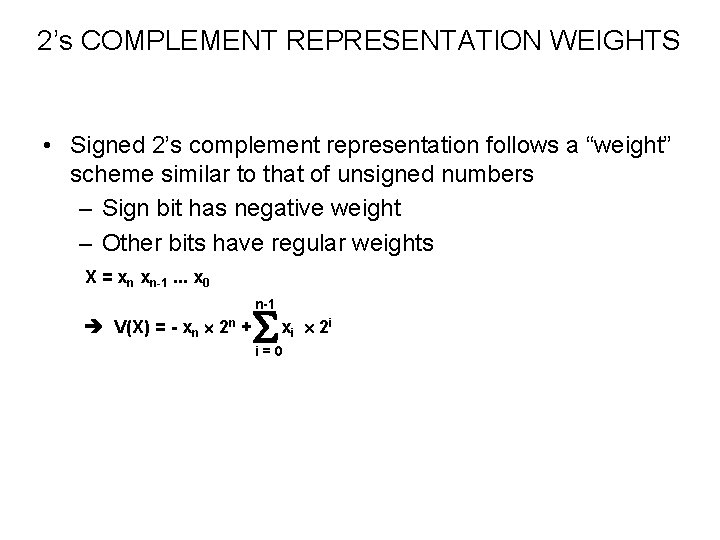
2’s COMPLEMENT REPRESENTATION WEIGHTS • Signed 2’s complement representation follows a “weight” scheme similar to that of unsigned numbers – Sign bit has negative weight – Other bits have regular weights X = xn xn-1. . . x 0 n-1 V(X) = - xn 2 n + x i 2 i i=0
![Fixed Point Representations ARITHMETIC ADDITION: SIGNED MAGNITUDE [1] Compare their signs [2] If two](http://slidetodoc.com/presentation_image_h2/b1cd12d9660b1d2a2fee4f1dcf369d50/image-19.jpg "Fixed Point Representations ARITHMETIC ADDITION: SIGNED MAGNITUDE [1] Compare their signs [2] If two")
Fixed Point Representations ARITHMETIC ADDITION: SIGNED MAGNITUDE [1] Compare their signs [2] If two signs are the same , ADD the two magnitudes - Look out for an overflow [3] If not the same , compare the relative magnitudes of the numbers and then SUBTRACT the smaller from the larger --> need a subtractor to add [4] Determine the sign of the result 6+9 6 +) 9 15 0110 1001 1111 -> 01111 6 + (- 9) 9 1001 -) 6 0110 - 3 0011 -> 10011 Overflow 9 + 9 or (-9) + (-9) 9 1001 +) 9 1001 overflow (1)0010 -6 + 9 9 1001 - ) 6 0110 3 0011 -> 00011 -6 + (-9) 6 0110 +) 9 1001 -15 1111 -> 11111
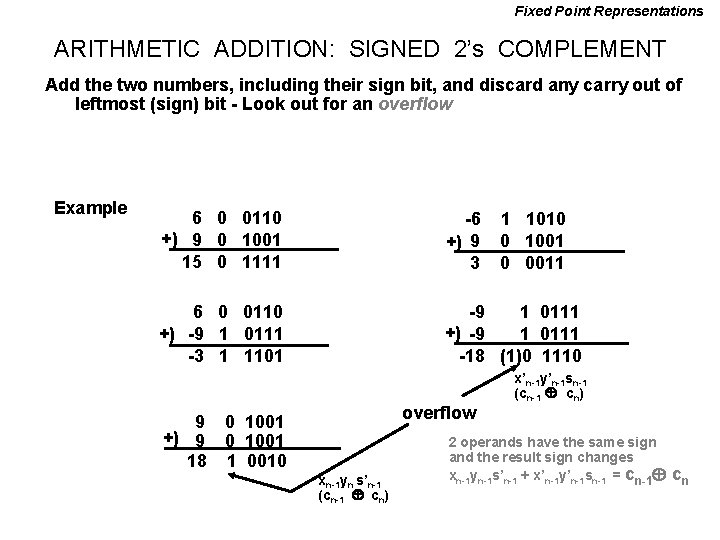
Fixed Point Representations ARITHMETIC ADDITION: SIGNED 2’s COMPLEMENT Add the two numbers, including their sign bit, and discard any carry out of leftmost (sign) bit - Look out for an overflow Example 6 0 0110 +) 9 0 1001 15 0 1111 -6 +) 9 3 6 0 0110 +) -9 1 0111 -3 1 1101 -9 1 0111 +) -9 1 0111 -18 (1)0 1110 overflow 9 0 1001 +) 9 0 1001 18 1 0010 xn-1 yn s’n-1 (cn-1 cn) 1 1010 0 1001 0 0011 x’n-1 y’n-1 sn-1 (cn-1 cn) 2 operands have the same sign and the result sign changes xn-1 yn-1 s’n-1 + x’n-1 y’n-1 sn-1 = cn-1 cn
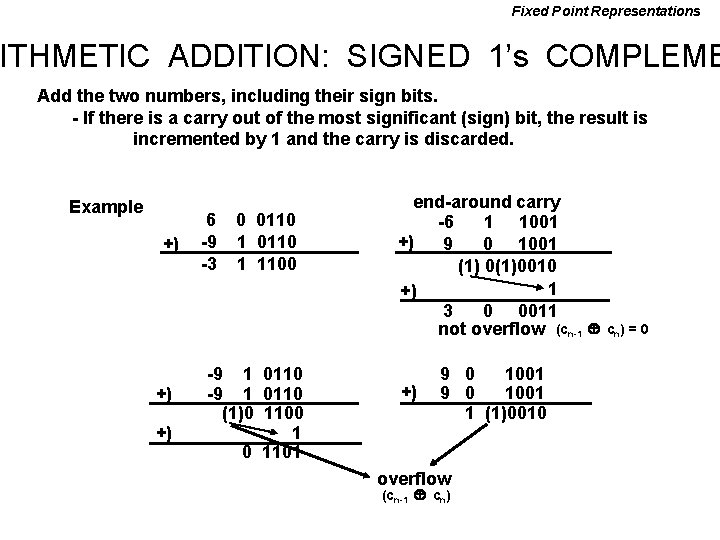
Fixed Point Representations ITHMETIC ADDITION: SIGNED 1’s COMPLEME Add the two numbers, including their sign bits. - If there is a carry out of the most significant (sign) bit, the result is incremented by 1 and the carry is discarded. Example +) +) +) 6 -9 -3 0 0110 1 1100 -9 1 0110 (1)0 1100 1 0 1101 end-around carry -6 1 1001 +) 9 0 1001 (1) 0(1)0010 1 +) 3 0 0011 not overflow (cn-1 +) 9 0 1001 1 (1)0010 overflow (cn-1 cn) = 0
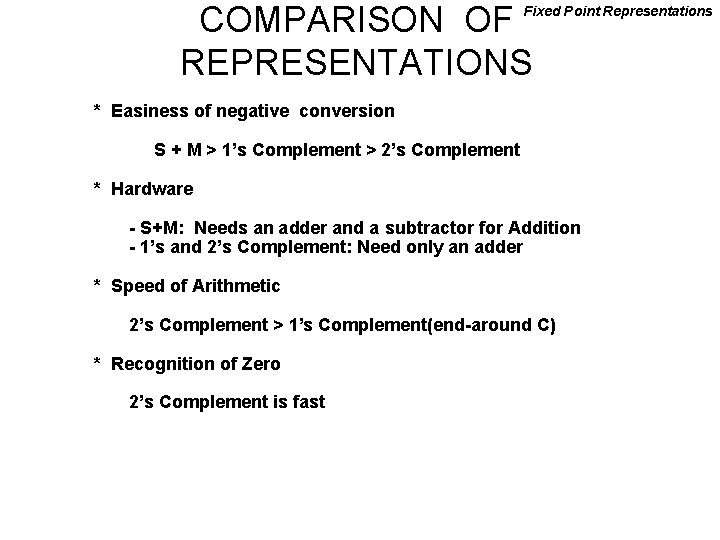
COMPARISON OF REPRESENTATIONS Fixed Point Representations * Easiness of negative conversion S + M > 1’s Complement > 2’s Complement * Hardware - S+M: Needs an adder and a subtractor for Addition - 1’s and 2’s Complement: Need only an adder * Speed of Arithmetic 2’s Complement > 1’s Complement(end-around C) * Recognition of Zero 2’s Complement is fast
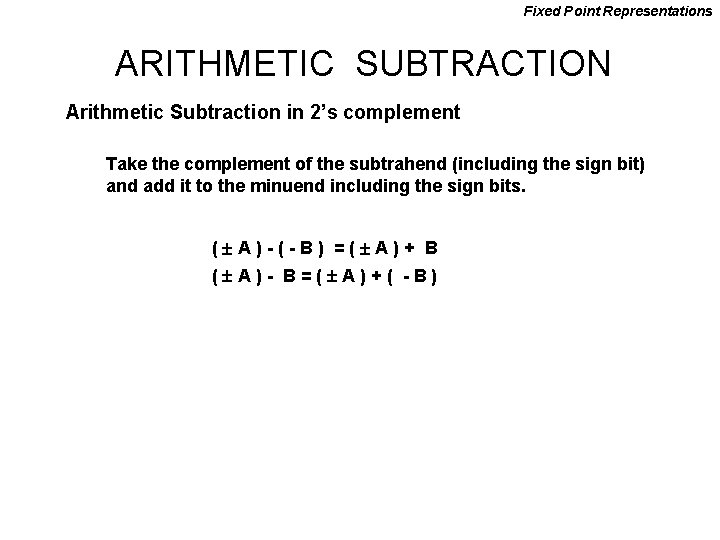
Fixed Point Representations ARITHMETIC SUBTRACTION Arithmetic Subtraction in 2’s complement Take the complement of the subtrahend (including the sign bit) and add it to the minuend including the sign bits. ( A)-(-B) =( A)+ B ( A)- B=( A)+( -B)
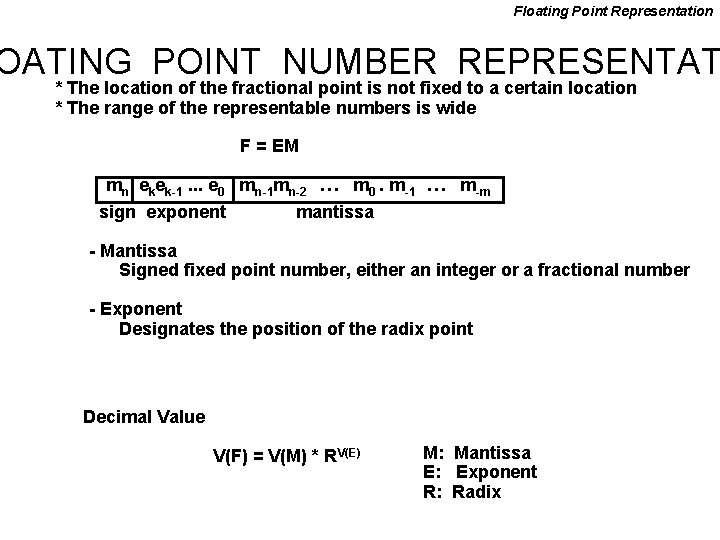
Floating Point Representation OATING POINT NUMBER REPRESENTAT * The location of the fractional point is not fixed to a certain location * The range of the representable numbers is wide F = EM mn ekek-1. . . e 0 mn-1 mn-2 … m 0. m-1 … m-m sign exponent mantissa - Mantissa Signed fixed point number, either an integer or a fractional number - Exponent Designates the position of the radix point Decimal Value V(F) = V(M) * RV(E) M: Mantissa E: Exponent R: Radix
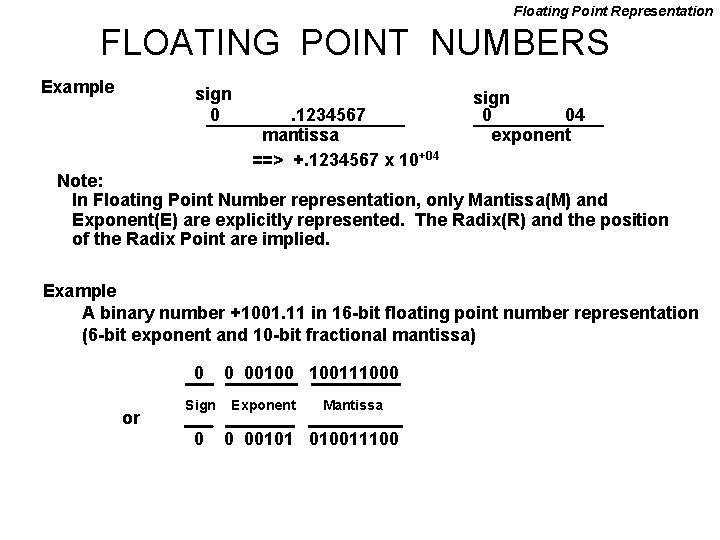
Floating Point Representation FLOATING POINT NUMBERS Example sign 0 . 1234567 mantissa ==> +. 1234567 x 10+04 sign 0 04 exponent Note: In Floating Point Number representation, only Mantissa(M) and Exponent(E) are explicitly represented. The Radix(R) and the position of the Radix Point are implied. Example A binary number +1001. 11 in 16 -bit floating point number representation (6 -bit exponent and 10 -bit fractional mantissa) 0 or Sign 0 0 00100 100111000 Exponent Mantissa 0 00101 010011100
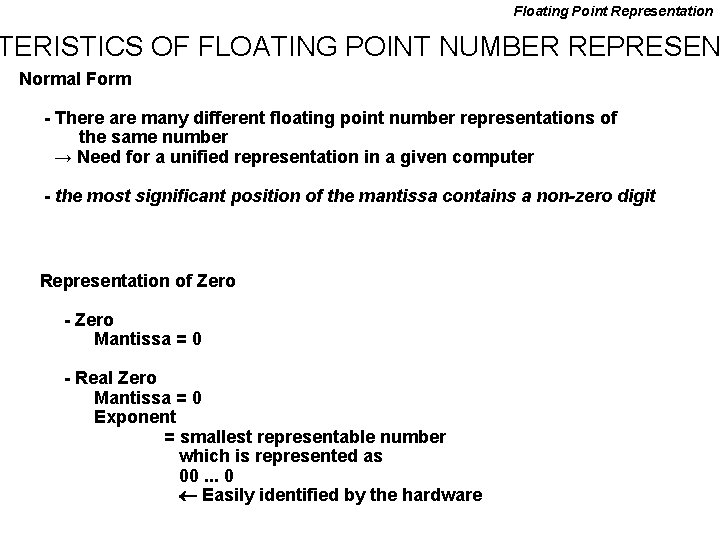
Floating Point Representation TERISTICS OF FLOATING POINT NUMBER REPRESEN Normal Form - There are many different floating point number representations of the same number → Need for a unified representation in a given computer - the most significant position of the mantissa contains a non-zero digit Representation of Zero - Zero Mantissa = 0 - Real Zero Mantissa = 0 Exponent = smallest representable number which is represented as 00. . . 0 Easily identified by the hardware
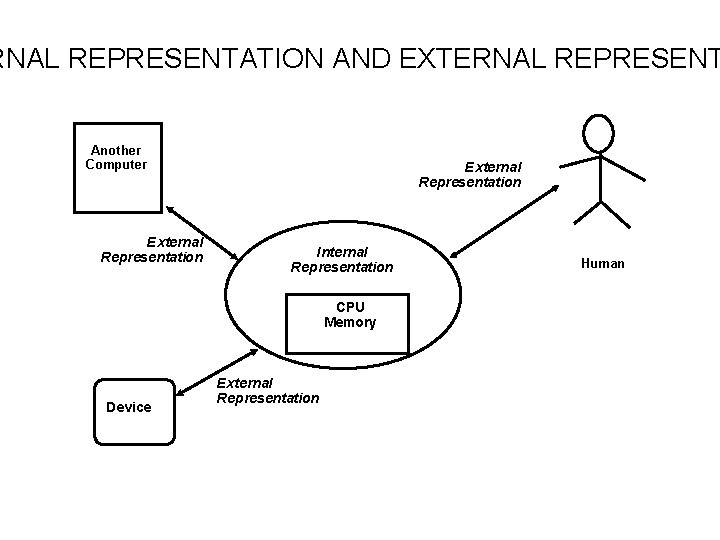
RNAL REPRESENTATION AND EXTERNAL REPRESENT Another Computer External Representation Internal Representation CPU Memory Device External Representation Human
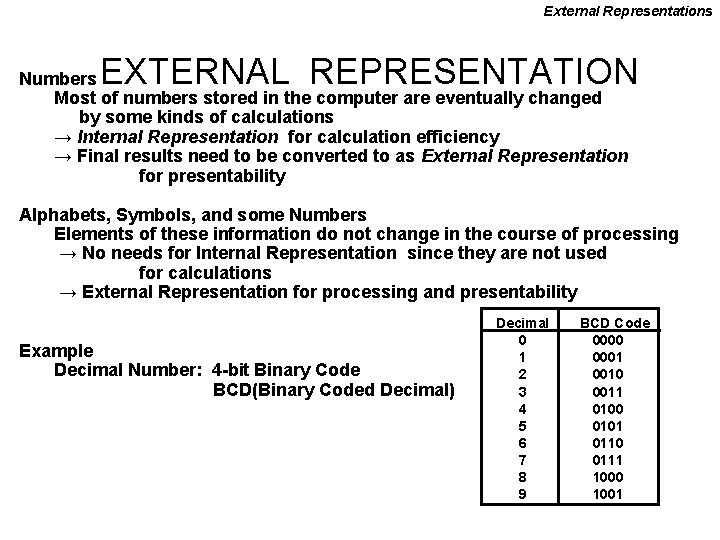
External Representations EXTERNAL REPRESENTATION Numbers Most of numbers stored in the computer are eventually changed by some kinds of calculations → Internal Representation for calculation efficiency → Final results need to be converted to as External Representation for presentability Alphabets, Symbols, and some Numbers Elements of these information do not change in the course of processing → No needs for Internal Representation since they are not used for calculations → External Representation for processing and presentability Example Decimal Number: 4 -bit Binary Code BCD(Binary Coded Decimal) Decimal 0 1 2 3 4 5 6 7 8 9 BCD Code 0000 0001 0010 0011 0100 0101 0110 0111 1000 1001
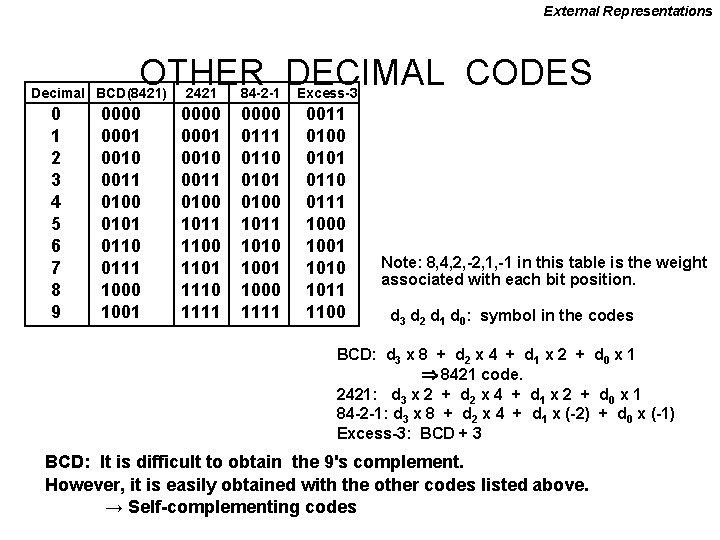
External Representations OTHER DECIMAL CODES Decimal BCD(8421) 0 1 2 3 4 5 6 7 8 9 0000 0001 0010 0011 0100 0101 0110 0111 1000 1001 2421 84 -2 -1 Excess-3 0000 0001 0010 0011 0100 1011 1100 1101 1110 1111 0000 0111 0110 0101 0100 1011 1010 1001 1000 1111 0011 0100 0101 0110 0111 1000 1001 1010 1011 1100 Note: 8, 4, 2, -2, 1, -1 in this table is the weight associated with each bit position. d 3 d 2 d 1 d 0: symbol in the codes BCD: d 3 x 8 + d 2 x 4 + d 1 x 2 + d 0 x 1 8421 code. 2421: d 3 x 2 + d 2 x 4 + d 1 x 2 + d 0 x 1 84 -2 -1: d 3 x 8 + d 2 x 4 + d 1 x (-2) + d 0 x (-1) Excess-3: BCD + 3 BCD: It is difficult to obtain the 9's complement. However, it is easily obtained with the other codes listed above. → Self-complementing codes
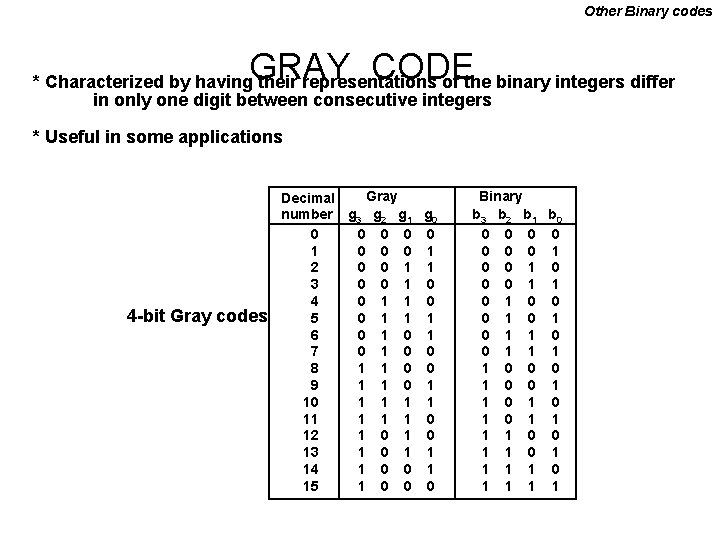
Other Binary codes GRAY CODE * Characterized by having their representations of the binary integers differ in only one digit between consecutive integers * Useful in some applications 4 -bit Gray codes Gray Decimal number g 3 g 2 g 1 g 0 0 0 1 2 0 0 1 1 3 0 0 1 0 4 0 1 1 0 5 0 1 1 1 6 0 1 7 0 1 0 0 8 1 1 0 0 9 1 1 0 1 1 1 0 12 1 0 13 1 0 1 1 14 1 0 0 1 15 1 0 0 0 Binary b 3 b 2 b 1 b 0 0 0 0 1 1 0 0 0 1 0 1 1 0 0 0 1 1 0 1 0 1 1 0 0 1 1 1 1 0 1 1
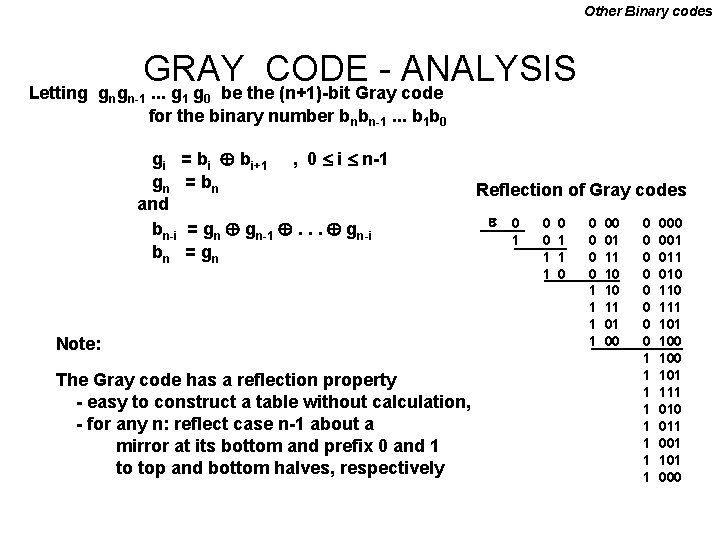
Other Binary codes GRAY CODE ANALYSIS. . . g g be the (n+1)-bit Gray code Letting gngn-1 1 0 for the binary number bnbn-1. . . b 1 b 0 gi = bi bi+1 , 0 i n-1 gn = bn and bn-i = gn gn-1 . . . gn-i bn = gn Note: The Gray code has a reflection property - easy to construct a table without calculation, - for any n: reflect case n-1 about a mirror at its bottom and prefix 0 and 1 to top and bottom halves, respectively Reflection of Gray codes 0 1 0 0 1 1 00 01 11 10 10 11 01 00 0 0 0 0 1 1 1 1 000 001 010 111 100 101 111 010 011 001 101 000
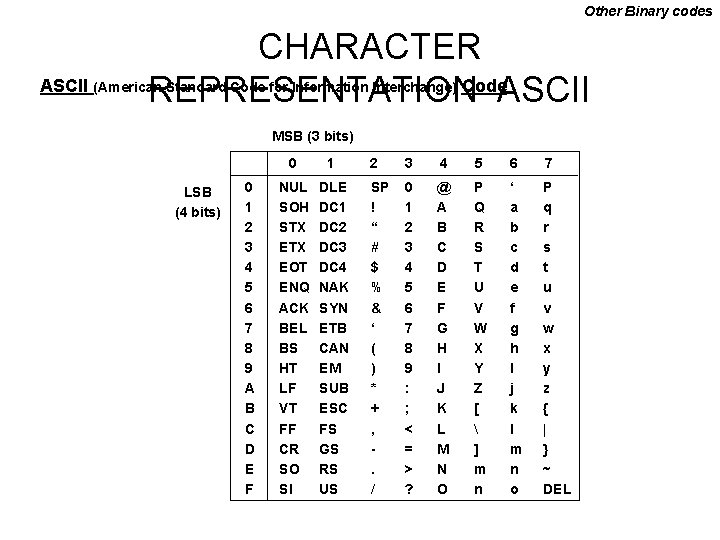
Other Binary codes CHARACTER REPRESENTATIONCode. ASCII (American Standard Code for Information Interchange) MSB (3 bits) LSB (4 bits) 0 1 2 3 4 5 6 7 8 9 A B C D E F 0 1 NUL SOH STX EOT ENQ ACK BEL BS HT LF VT FF CR SO SI DLE DC 1 DC 2 DC 3 DC 4 NAK SYN ETB CAN EM SUB ESC FS GS RS US 2 3 4 5 6 7 SP ! “ # $ % & ‘ ( ) * + , . / 0 1 2 3 4 5 6 7 8 9 : ; < = > ? @ A B C D E F G H I J K L M N O P Q R S T U V W X Y Z [ ] m n ‘ a b c d e f g h I j k l m n o P q r s t u v w x y z { | } ~ DEL
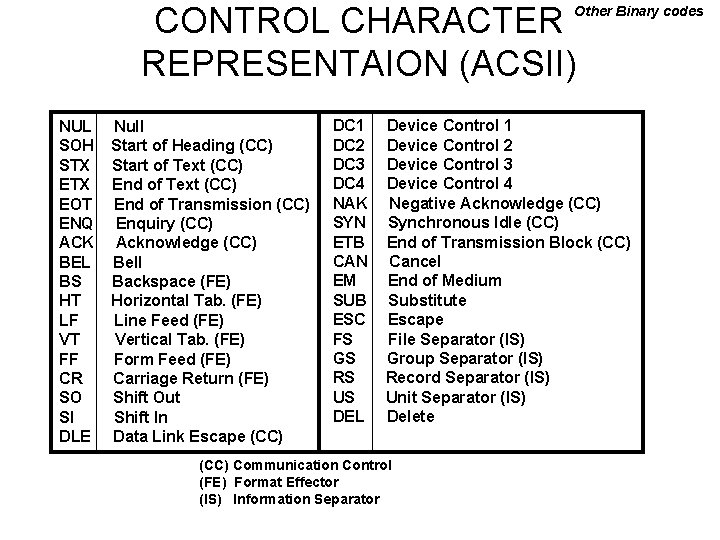
CONTROL CHARACTER REPRESENTAION (ACSII) Other Binary codes NUL SOH STX EOT ENQ ACK BEL BS HT LF VT FF CR SO SI DLE Null Start of Heading (CC) Start of Text (CC) End of Transmission (CC) Enquiry (CC) Acknowledge (CC) Bell Backspace (FE) Horizontal Tab. (FE) Line Feed (FE) Vertical Tab. (FE) Form Feed (FE) Carriage Return (FE) Shift Out Shift In Data Link Escape (CC) DC 1 DC 2 DC 3 DC 4 NAK SYN ETB CAN EM SUB ESC FS GS RS US DEL Device Control 1 Device Control 2 Device Control 3 Device Control 4 Negative Acknowledge (CC) Synchronous Idle (CC) End of Transmission Block (CC) Cancel End of Medium Substitute Escape File Separator (IS) Group Separator (IS) Record Separator (IS) Unit Separator (IS) Delete (CC) Communication Control (FE) Format Effector (IS) Information Separator
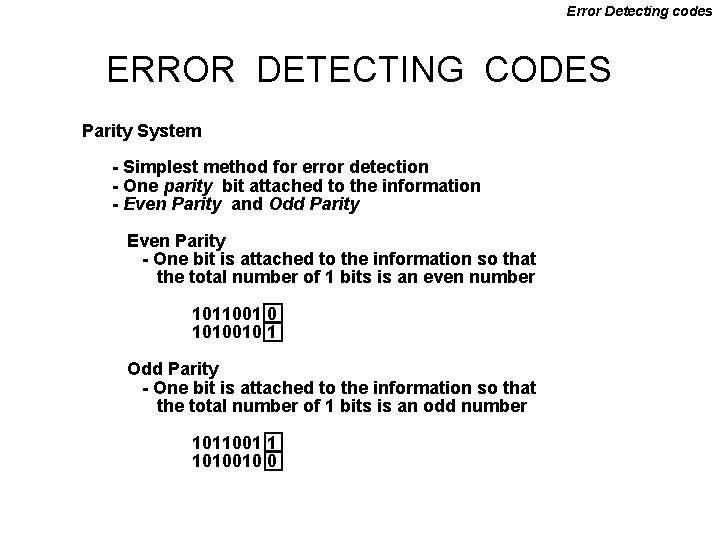
Error Detecting codes ERROR DETECTING CODES Parity System - Simplest method for error detection - One parity bit attached to the information - Even Parity and Odd Parity Even Parity - One bit is attached to the information so that the total number of 1 bits is an even number 1011001 0 1010010 1 Odd Parity - One bit is attached to the information so that the total number of 1 bits is an odd number 1011001 1 1010010 0
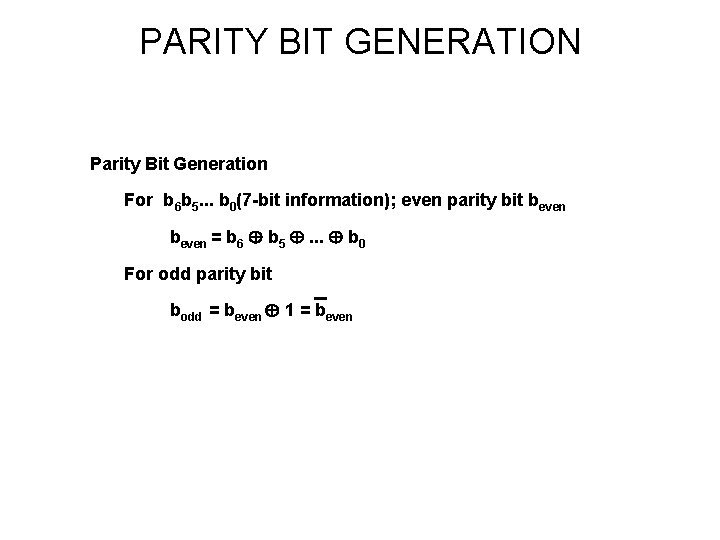
PARITY BIT GENERATION Parity Bit Generation For b 6 b 5. . . b 0(7 -bit information); even parity bit beven = b 6 b 5 . . . b 0 For odd parity bit bodd = beven 1 = beven
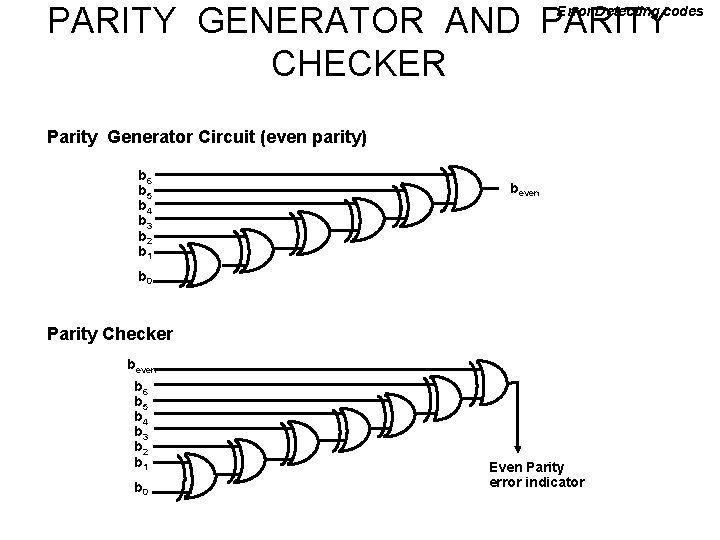
PARITY GENERATOR AND PARITY CHECKER Error Detecting codes Parity Generator Circuit (even parity) b 6 b 5 b 4 b 3 b 2 b 1 beven b 0 Parity Checker beven b 6 b 5 b 4 b 3 b 2 b 1 b 0 Even Parity error indicator
- Slides: 36