
Computer Organization and Design More Arithmetic Multiplication Division



- Slides: 31
Computer Organization and Design More Arithmetic: Multiplication, Division & Floating-Point Montek Singh Wed, Oct 30, 2013 Lecture 12
Topics ã Brief overview of: l integer multiplication l integer division l floating-point numbers and operations
Binary Multipliers The key trick of multiplication is memorizing a digit-to-digit table… Everything else is just adding × 0 1 2 3 4 5 6 7 8 9 0 0 0 1 2 3 4 5 6 7 8 9 2 0 2 4 6 8 10 12 14 16 18 3 0 3 6 9 12 15 18 21 24 27 4 0 4 8 12 16 20 24 28 32 36 5 0 5 10 15 20 25 30 35 40 45 6 0 6 12 18 24 30 36 42 48 54 7 0 7 14 21 28 35 42 49 56 63 8 0 8 16 24 32 40 48 56 64 72 9 0 9 18 27 36 45 54 63 72 81 × 0 1 0 0 0 1 You’ve got to be kidding… It can’t be that easy! Reading: Study Chapter 3. 1 -3. 4
Binary Multiplication The “Binary” Multiplication Table Hey, that looks like an AND gate Binary multiplication is implemented using the same basic longhand algorithm that you learned in grade school. X 0 1 0 0 0 A 3 x B 3 1 0 1 Aj. Bi is a “partial product” A 3 B 1 + A 3 B 3 A 2 B 2 A 1 B 1 A 0 B 0 A 3 B 0 A 2 B 0 A 1 B 0 A 0 B 0 A 2 B 1 A 1 B 1 A 0 B 1 A 3 B 2 A 2 B 2 A 1 B 2 A 0 B 2 A 2 B 3 A 1 B 3 A 0 B 3 Multiplying N-digit number by M-digit number gives (N+M)-digit result Easy part: forming partial products (just an AND gate since B I is either 0 or 1) Hard part: adding M, N-bit partial products
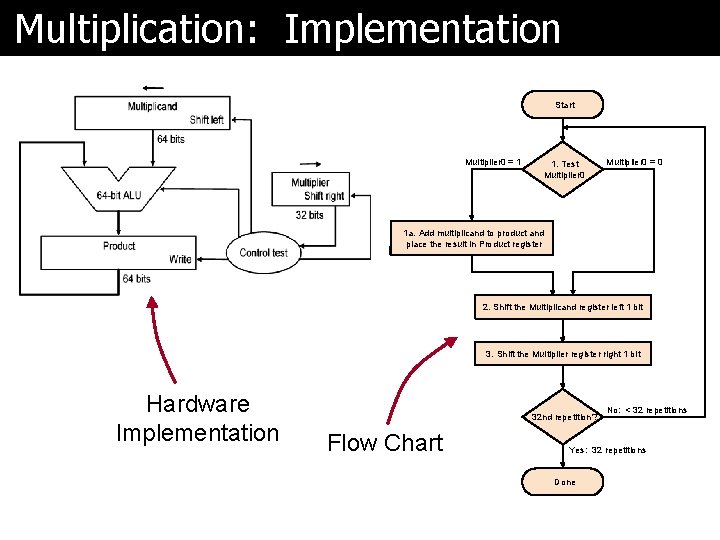
Multiplication: Implementation Start Multiplier 0 = 1 1. Test Multiplier 0 = 0 1 a. Add multiplicand to product and place the result in Product register 2. Shift the Multiplicand register left 1 bit 3. Shift the Multiplier register right 1 bit Hardware Implementation 32 nd repetition? Flow Chart No: < 32 repetitions Yes: 32 repetitions Done
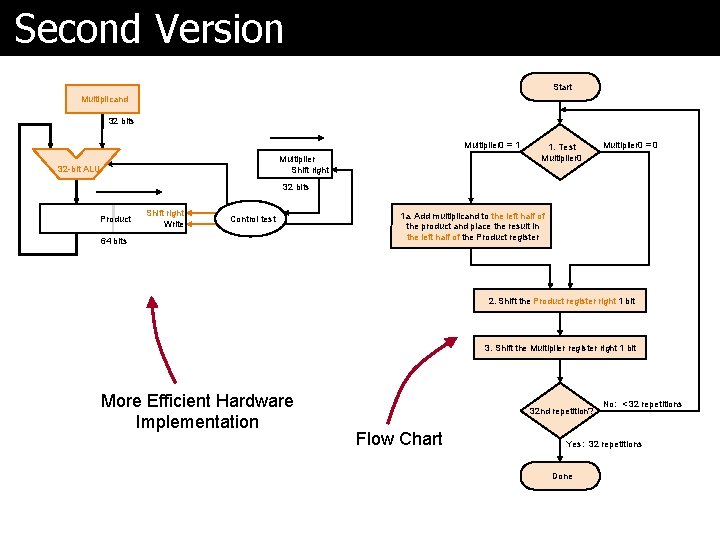
Second Version Start Multiplicand 32 bits Multiplier 0 = 1 Multiplier Shift right 32 -bit ALU 1. Test Multiplier 0 = 0 32 bits Product Shift right Write Control test 64 bits 1 a. Add multiplicand to the left half of the product and place the result in the left half of the Product register 2. Shift the Product register right 1 bit 3. Shift the Multiplier register right 1 bit More Efficient Hardware Implementation 32 nd repetition? Flow Chart No: < 32 repetitions Yes: 32 repetitions Done
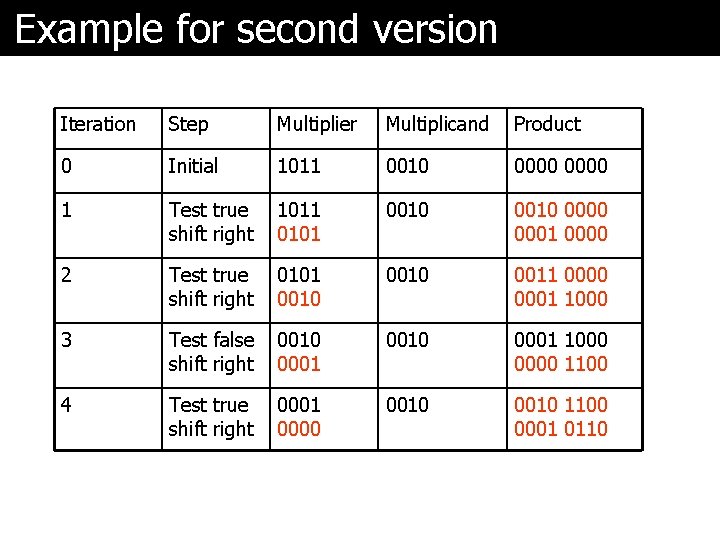
Example for second version Iteration Step Multiplier Multiplicand Product 0 Initial 1011 0010 0000 1 Test true shift right 1011 0101 0010 0000 0001 0000 2 Test true shift right 0101 0010 0011 0000 0001 1000 3 Test false shift right 0010 0001 1000 0000 1100 4 Test true shift right 0001 0000 0010 1100 0001 0110
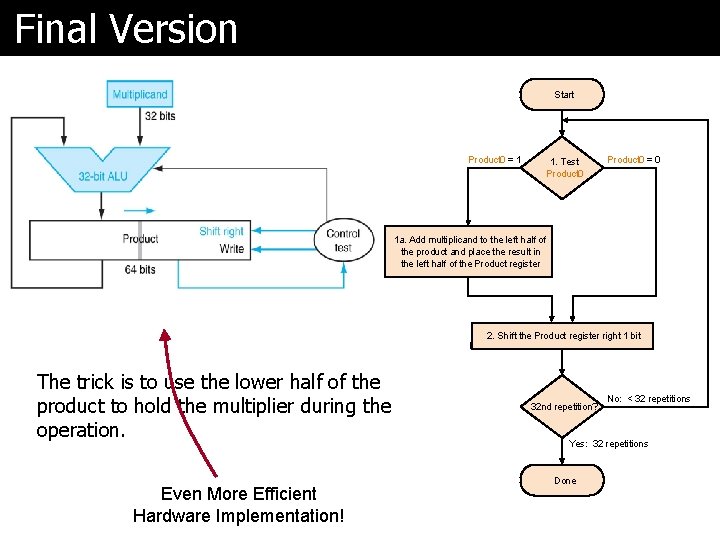
Final Version Start Product 0 = 1 1. Test Product 0 = 0 1 a. Add multiplicand to the left half of the product and place the result in the left half of the Product register 2. Shift the Product register right 1 bit The trick is to use the lower half of the product to hold the multiplier during the operation. Even More Efficient Hardware Implementation! 32 nd repetition? No: < 32 repetitions Yes: 32 repetitions Done
What about the sign? ã Positive numbers are easy ã How about negative numbers? l Please read signed multiplication in textbook (Ch 3. 3)
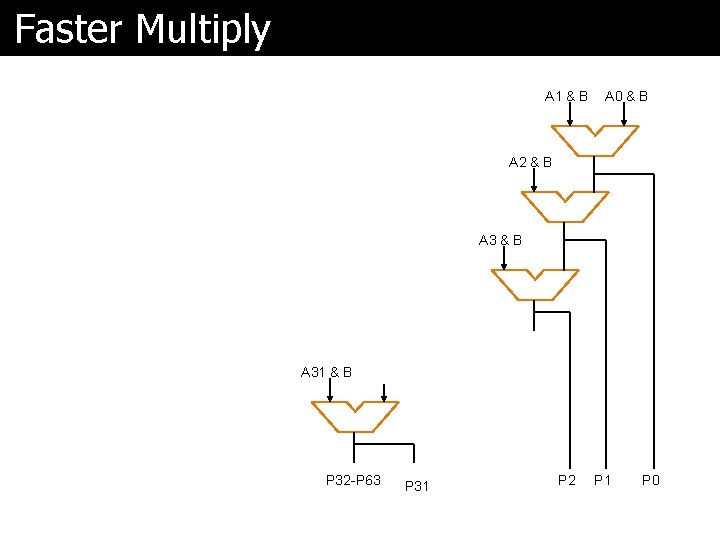
Faster Multiply A 1 & B A 0 & B A 2 & B A 31 & B P 32 -P 63 P 31 P 2 P 1 P 0
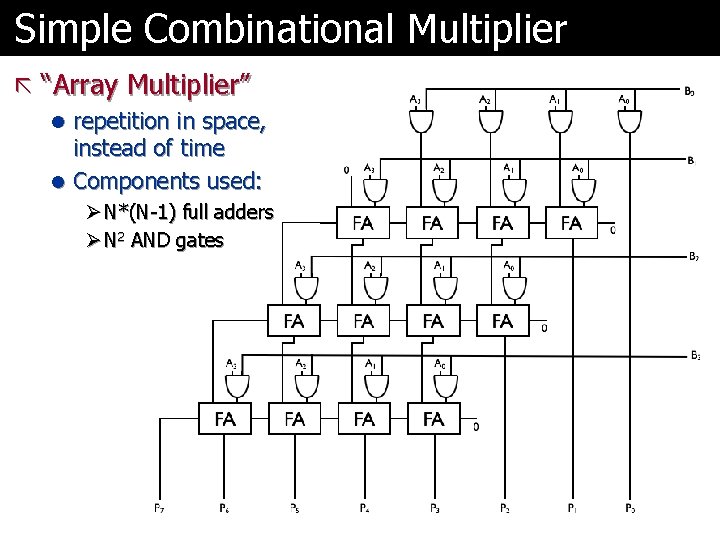
Simple Combinational Multiplier ã “Array Multiplier” l repetition in space, instead of time l Components used: Ø N*(N-1) full adders Ø N 2 AND gates
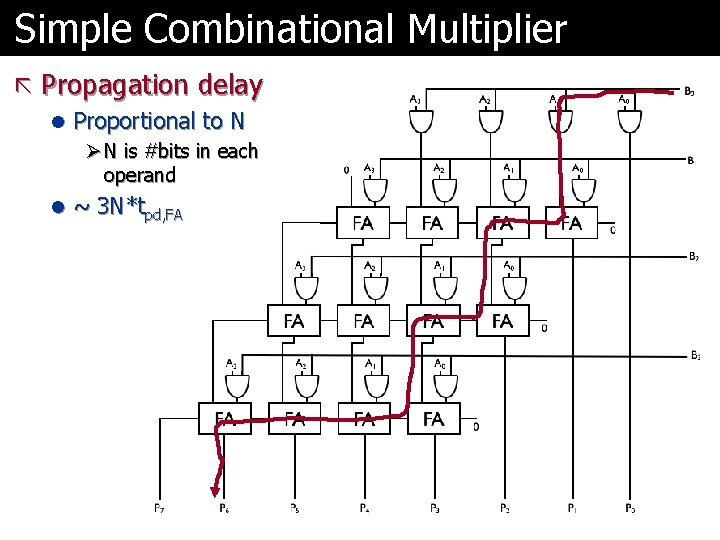
Simple Combinational Multiplier ã Propagation delay l Proportional to N Ø N is #bits in each operand l ~ 3 N*tpd, FA
Even Faster Multiply ã Even faster designs for multiplication l e. g. , “Carry-Save Multiplier” Ø covered in advanced courses
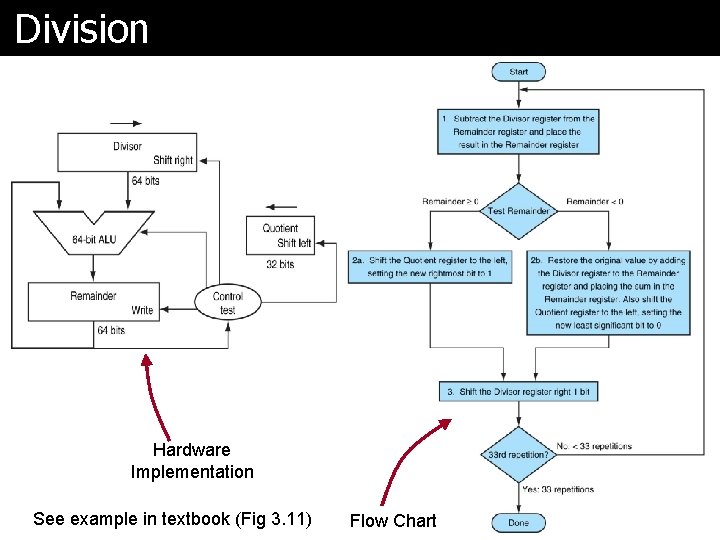
Division Hardware Implementation See example in textbook (Fig 3. 11) Flow Chart
Floating-Point Numbers & Arithmetic
Floating-Point Arithmetic if ((A + A) - A == A) { Self. Destruct() } Reading: Study Chapter 3. 5 Skim 3. 6 and 3. 8
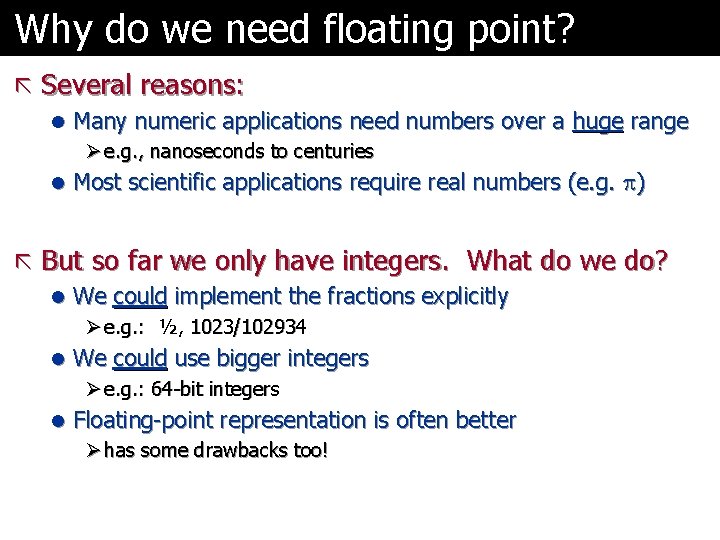
Why do we need floating point? ã Several reasons: l Many numeric applications need numbers over a huge range Ø e. g. , nanoseconds to centuries l Most scientific applications require real numbers (e. g. ) ã But so far we only have integers. What do we do? l We could implement the fractions explicitly Ø e. g. : ½, 1023/102934 l We could use bigger integers Ø e. g. : 64 -bit integers l Floating-point representation is often better Ø has some drawbacks too!
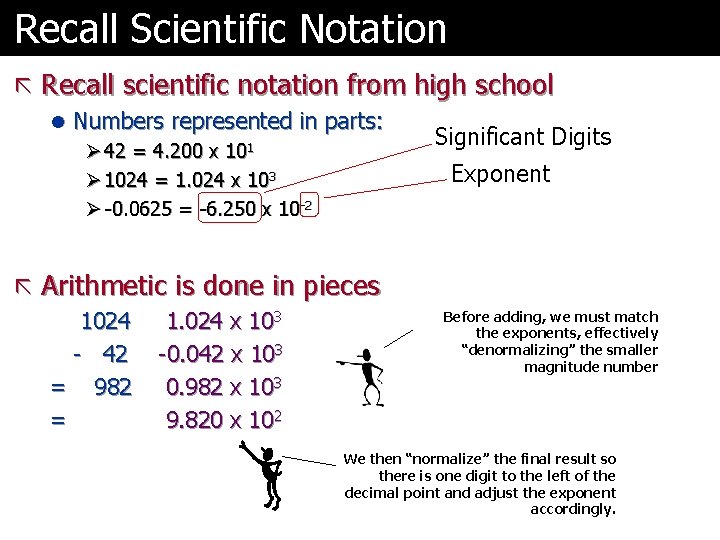
Recall Scientific Notation ã Recall scientific notation from high school l Numbers represented in parts: Ø 42 = 4. 200 x 101 Ø 1024 = 1. 024 x 103 Ø -0. 0625 = -6. 250 x 10 -2 Significant Digits Exponent ã Arithmetic is done in pieces 1024 - 42 = 982 = 1. 024 x 103 -0. 042 x 103 0. 982 x 103 9. 820 x 102 Before adding, we must match the exponents, effectively “denormalizing” the smaller magnitude number We then “normalize” the final result so there is one digit to the left of the decimal point and adjust the exponent accordingly.
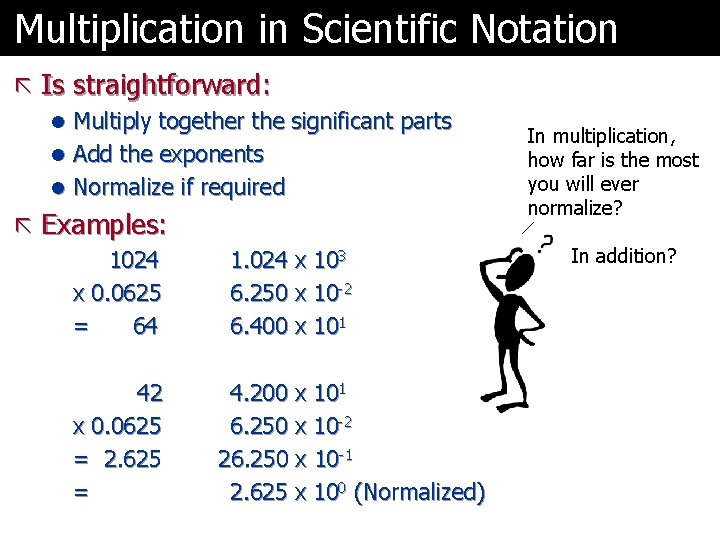
Multiplication in Scientific Notation ã Is straightforward: l Multiply together the significant parts l Add the exponents l Normalize if required ã Examples: 1024 x 0. 0625 = 64 42 x 0. 0625 = 2. 625 = 1. 024 x 103 6. 250 x 10 -2 6. 400 x 101 4. 200 x 101 6. 250 x 10 -2 26. 250 x 10 -1 2. 625 x 100 (Normalized) In multiplication, how far is the most you will ever normalize? In addition?
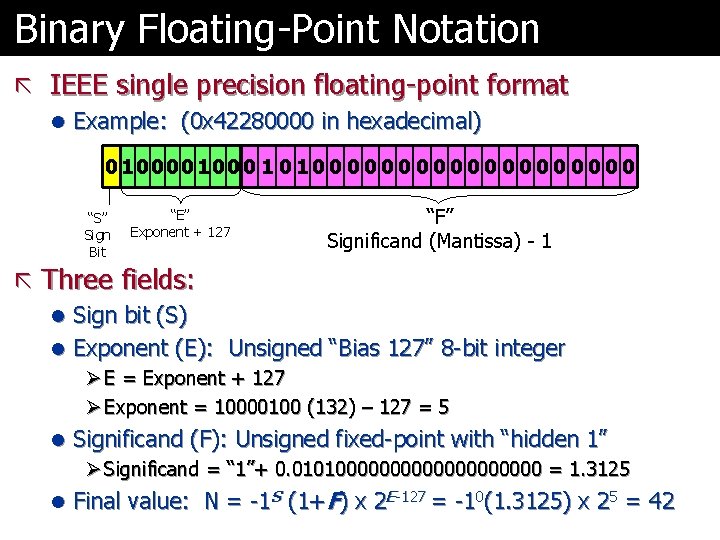
Binary Floating-Point Notation ã IEEE single precision floating-point format l Example: (0 x 42280000 in hexadecimal) 0 10000100 0 1 0 0 0 0 0 “S” Sign Bit “E” Exponent + 127 “F” Significand (Mantissa) - 1 ã Three fields: l Sign bit (S) l Exponent (E): Unsigned “Bias 127” 8 -bit integer Ø E = Exponent + 127 Ø Exponent = 10000100 (132) – 127 = 5 l Significand (F): Unsigned fixed-point with “hidden 1” Ø Significand = “ 1”+ 0. 01010000000000 = 1. 3125 l Final value: N = -1 S (1+F) x 2 E-127 = -10(1. 3125) x 25 = 42
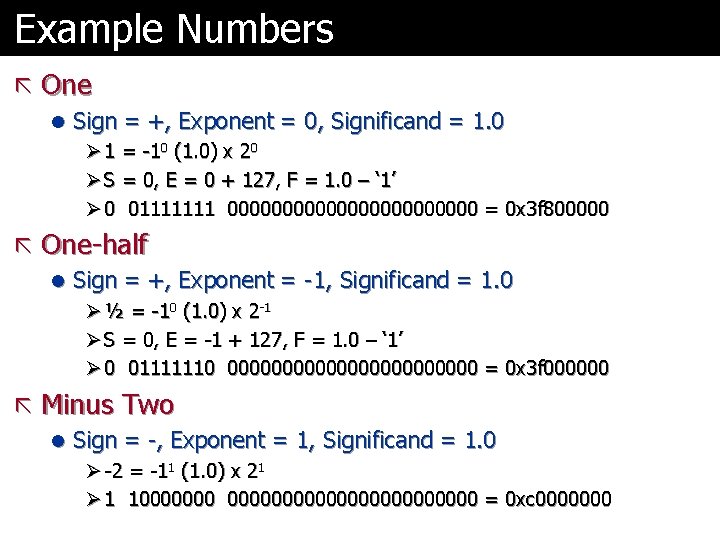
Example Numbers ã One l Sign = +, Exponent = 0, Significand = 1. 0 Ø 1 = -10 (1. 0) x 20 Ø S = 0, E = 0 + 127, F = 1. 0 – ‘ 1’ Ø 0 01111111 000000000000 = 0 x 3 f 800000 ã One-half l Sign = +, Exponent = -1, Significand = 1. 0 Ø ½ = -10 (1. 0) x 2 -1 Ø S = 0, E = -1 + 127, F = 1. 0 – ‘ 1’ Ø 0 01111110 000000000000 = 0 x 3 f 000000 ã Minus Two l Sign = -, Exponent = 1, Significand = 1. 0 Ø -2 = -11 (1. 0) x 21 Ø 1 1000000000000 = 0 xc 0000000
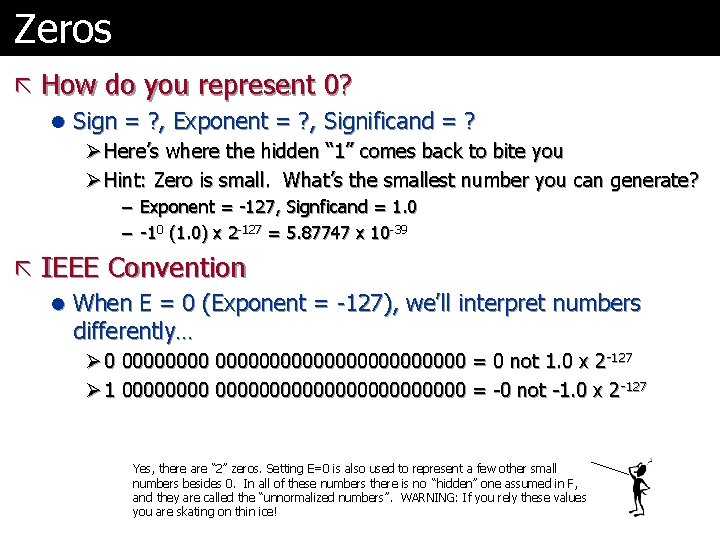
Zeros ã How do you represent 0? l Sign = ? , Exponent = ? , Significand = ? Ø Here’s where the hidden “ 1” comes back to bite you Ø Hint: Zero is small. What’s the smallest number you can generate? – Exponent = -127, Signficand = 1. 0 – -10 (1. 0) x 2 -127 = 5. 87747 x 10 -39 ã IEEE Convention l When E = 0 (Exponent = -127), we’ll interpret numbers differently… Ø 0 000000000000000 = 0 not 1. 0 x 2 -127 Ø 1 0000000000000000 = -0 not -1. 0 x 2 -127 Yes, there are “ 2” zeros. Setting E=0 is also used to represent a few other small numbers besides 0. In all of these numbers there is no “hidden” one assumed in F, and they are called the “unnormalized numbers”. WARNING: If you rely these values you are skating on thin ice!
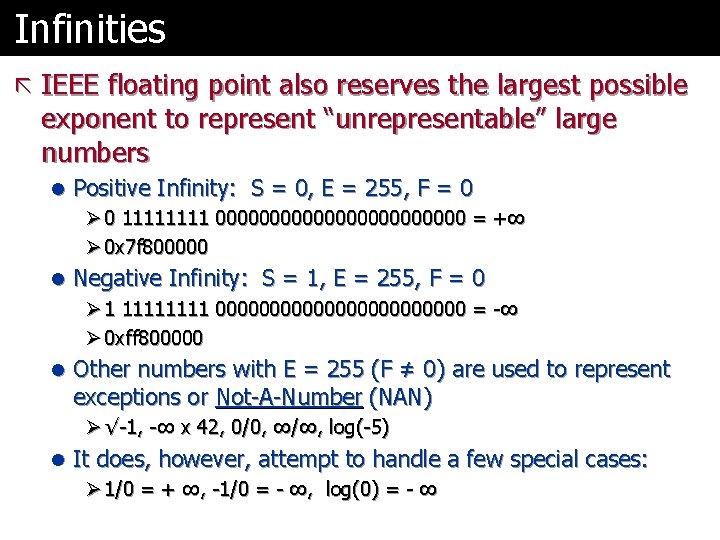
Infinities ã IEEE floating point also reserves the largest possible exponent to represent “unrepresentable” large numbers l Positive Infinity: S = 0, E = 255, F = 0 Ø 0 1111 000000000000 = +∞ Ø 0 x 7 f 800000 l Negative Infinity: S = 1, E = 255, F = 0 Ø 1 1111 000000000000 = -∞ Ø 0 xff 800000 l Other numbers with E = 255 (F ≠ 0) are used to represent exceptions or Not-A-Number (NAN) Ø √-1, -∞ x 42, 0/0, ∞/∞, log(-5) l It does, however, attempt to handle a few special cases: Ø 1/0 = + ∞, -1/0 = - ∞, log(0) = - ∞
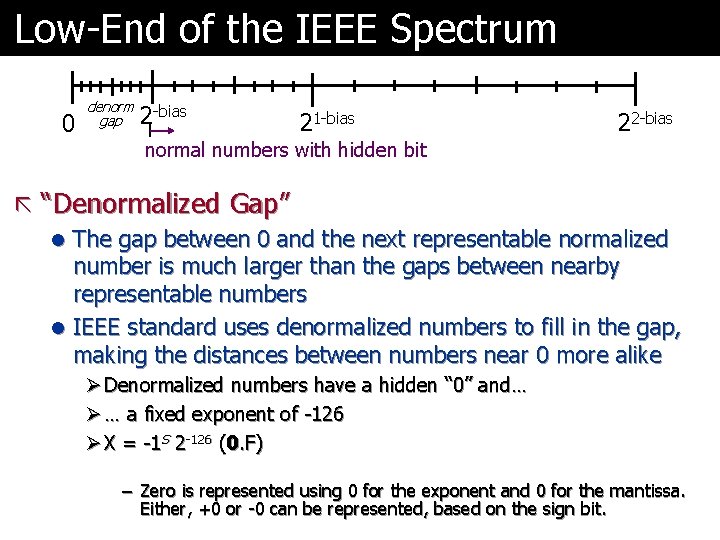
Low-End of the IEEE Spectrum 0 denorm gap 2 -bias 21 -bias 22 -bias normal numbers with hidden bit ã “Denormalized Gap” l The gap between 0 and the next representable normalized number is much larger than the gaps between nearby representable numbers l IEEE standard uses denormalized numbers to fill in the gap, making the distances between numbers near 0 more alike Ø Denormalized numbers have a hidden “ 0” and… Ø … a fixed exponent of -126 Ø X = -1 S 2 -126 (0. F) – Zero is represented using 0 for the exponent and 0 for the mantissa. Either, +0 or -0 can be represented, based on the sign bit.
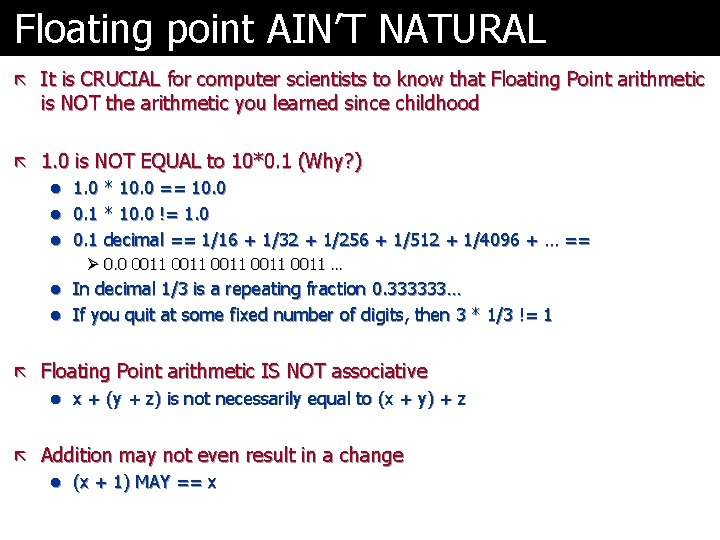
Floating point AIN’T NATURAL ã It is CRUCIAL for computer scientists to know that Floating Point arithmetic is NOT the arithmetic you learned since childhood ã 1. 0 is NOT EQUAL to 10*0. 1 (Why? ) l 1. 0 * 10. 0 == 10. 0 l 0. 1 * 10. 0 != 1. 0 l 0. 1 decimal == 1/16 + 1/32 + 1/256 + 1/512 + 1/4096 + … == Ø 0. 0 0011 0011 … l In decimal 1/3 is a repeating fraction 0. 333333… l If you quit at some fixed number of digits, then 3 * 1/3 != 1 ã Floating Point arithmetic IS NOT associative l x + (y + z) is not necessarily equal to (x + y) + z ã Addition may not even result in a change l (x + 1) MAY == x
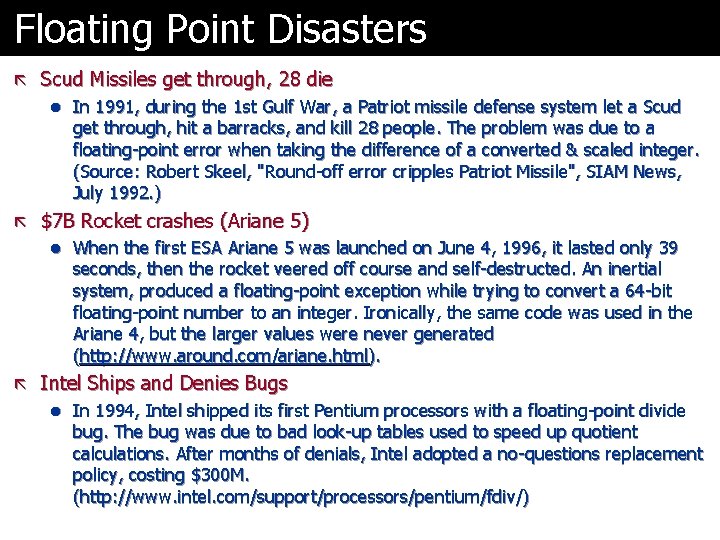
Floating Point Disasters ã Scud Missiles get through, 28 die l In 1991, during the 1 st Gulf War, a Patriot missile defense system let a Scud get through, hit a barracks, and kill 28 people. The problem was due to a floating-point error when taking the difference of a converted & scaled integer. (Source: Robert Skeel, "Round-off error cripples Patriot Missile", SIAM News, July 1992. ) ã $7 B Rocket crashes (Ariane 5) l When the first ESA Ariane 5 was launched on June 4, 1996, it lasted only 39 seconds, then the rocket veered off course and self-destructed. An inertial system, produced a floating-point exception while trying to convert a 64 -bit floating-point number to an integer. Ironically, the same code was used in the Ariane 4, but the larger values were never generated (http: //www. around. com/ariane. html). ã Intel Ships and Denies Bugs l In 1994, Intel shipped its first Pentium processors with a floating-point divide bug. The bug was due to bad look-up tables used to speed up quotient calculations. After months of denials, Intel adopted a no-questions replacement policy, costing $300 M. (http: //www. intel. com/support/processors/pentium/fdiv/)
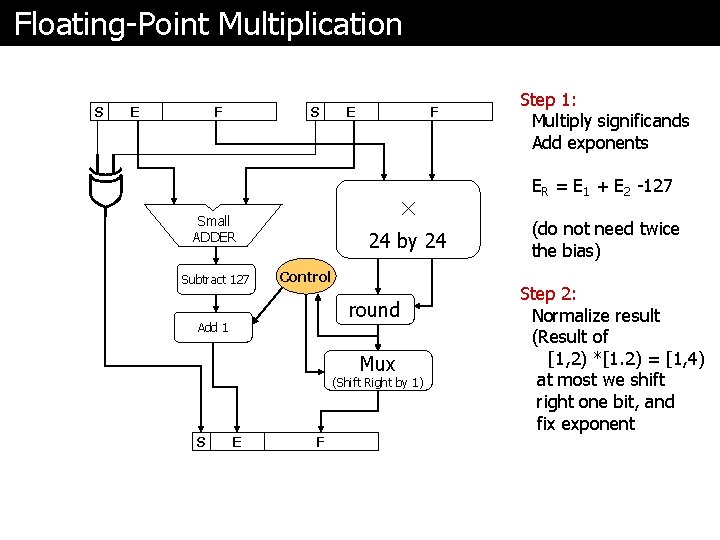
Floating-Point Multiplication S E F S F × Small ADDER Subtract 127 E 24 by 24 Control round Add 1 Mux (Shift Right by 1) S E F Step 1: Multiply significands Add exponents ER = E 1 + E 2 -127 (do not need twice the bias) Step 2: Normalize result (Result of [1, 2) *[1. 2) = [1, 4) at most we shift right one bit, and fix exponent
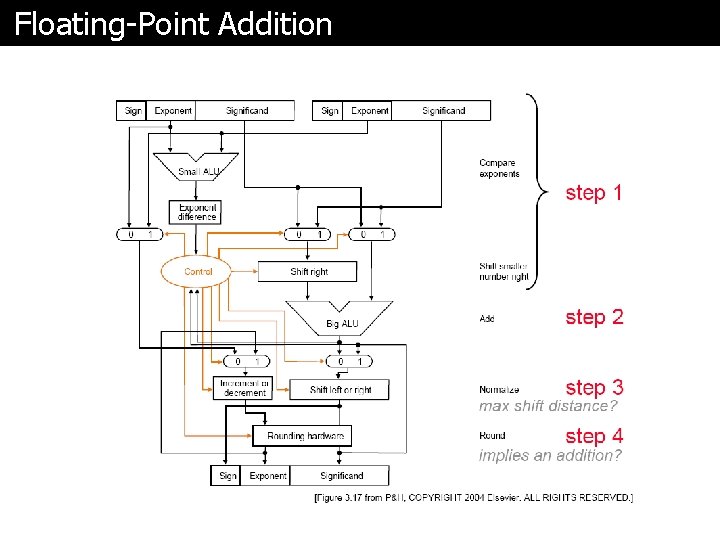
Floating-Point Addition
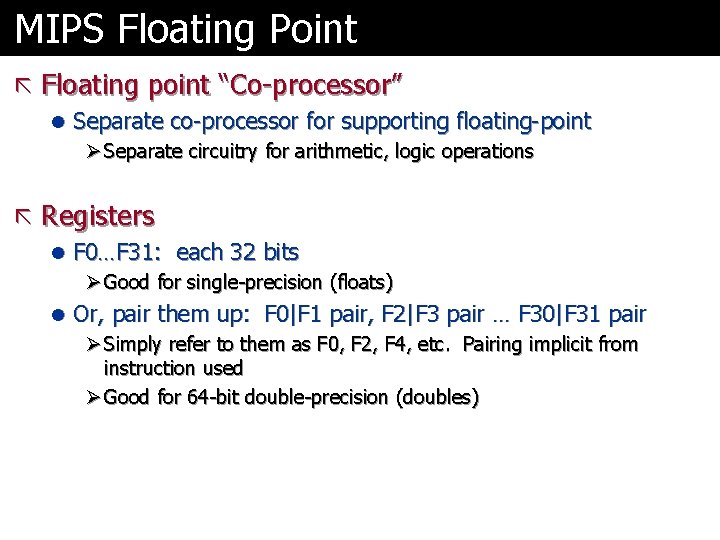
MIPS Floating Point ã Floating point “Co-processor” l Separate co-processor for supporting floating-point Ø Separate circuitry for arithmetic, logic operations ã Registers l F 0…F 31: each 32 bits Ø Good for single-precision (floats) l Or, pair them up: F 0|F 1 pair, F 2|F 3 pair … F 30|F 31 pair Ø Simply refer to them as F 0, F 2, F 4, etc. Pairing implicit from instruction used Ø Good for 64 -bit double-precision (doubles)
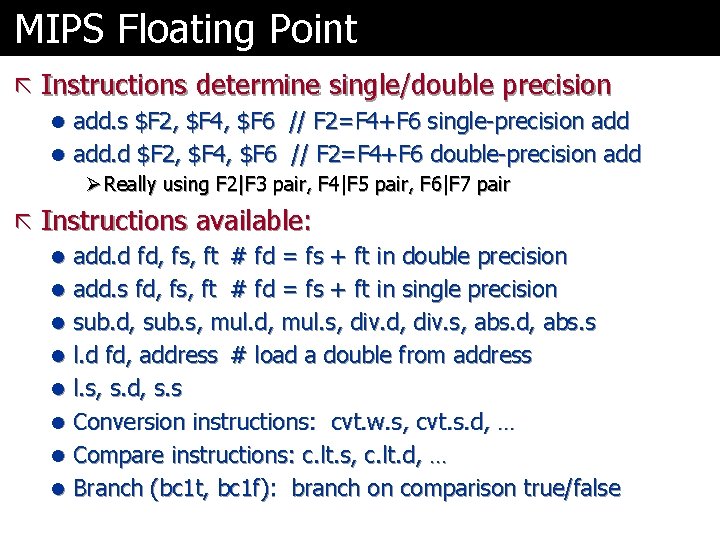
MIPS Floating Point ã Instructions determine single/double precision l add. s $F 2, $F 4, $F 6 // F 2=F 4+F 6 single-precision add l add. d $F 2, $F 4, $F 6 // F 2=F 4+F 6 double-precision add Ø Really using F 2|F 3 pair, F 4|F 5 pair, F 6|F 7 pair ã Instructions available: l add. d fd, fs, ft # fd = fs + ft in double precision l add. s fd, fs, ft # fd = fs + ft in single precision l sub. d, sub. s, mul. d, mul. s, div. d, div. s, abs. d, abs. s l l. d fd, address # load a double from address l l. s, s. d, s. s l Conversion instructions: cvt. w. s, cvt. s. d, … l Compare instructions: c. lt. s, c. lt. d, … l Branch (bc 1 t, bc 1 f): branch on comparison true/false
Next ã Sequential circuits l Those with memory l Useful for registers, state machines ã Let’s put it all together l … and build a CPU