
Computer Organization and Design Instruction Sets 2 Montek
- Slides: 29
Computer Organization and Design Instruction Sets - 2 Montek Singh Sep 20, 2017 Lecture 5
Today ã More MIPS instructions l signed vs. unsigned instructions l larger constants l accessing memory l branches and jumps l multiply, divide l comparisons l logical instructions ã Reading l Book Chapter 2. 1 -2. 7 l Study the inside green flap (“Green Card”) 2
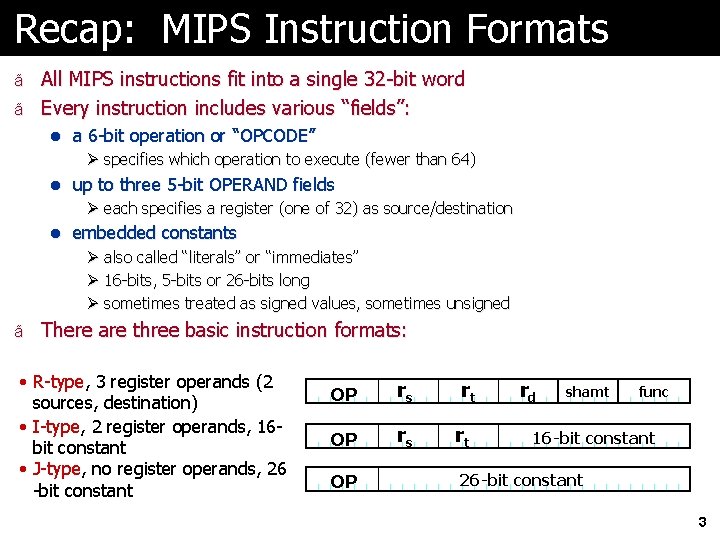
Recap: MIPS Instruction Formats ã All MIPS instructions fit into a single 32 -bit word ã Every instruction includes various “fields”: l a 6 -bit operation or “OPCODE” Ø specifies which operation to execute (fewer than 64) l up to three 5 -bit OPERAND fields Ø each specifies a register (one of 32) as source/destination l embedded constants Ø also called “literals” or “immediates” Ø 16 -bits, 5 -bits or 26 -bits long Ø sometimes treated as signed values, sometimes unsigned ã There are three basic instruction formats: • R-type, 3 register operands (2 sources, destination) • I-type, 2 register operands, 16 bit constant • J-type, no register operands, 26 -bit constant OP rs rt OP rd shamt func 16 -bit constant 26 -bit constant 3
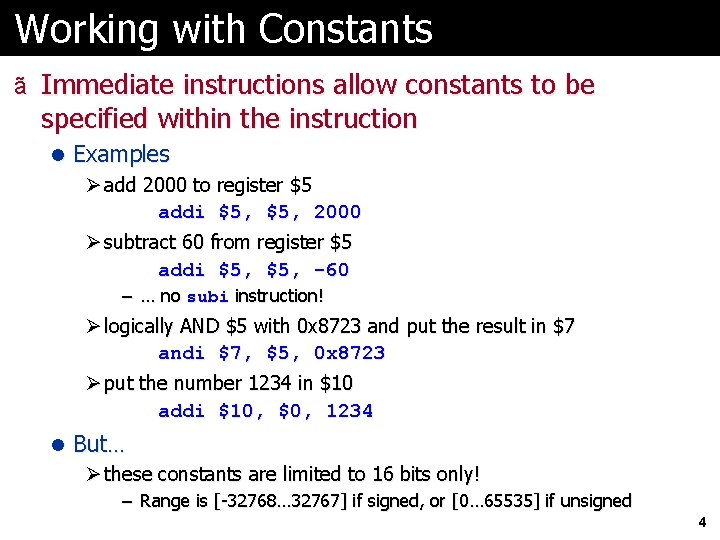
Working with Constants ã Immediate instructions allow constants to be specified within the instruction l Examples Ø add 2000 to register $5 addi $5, 2000 Ø subtract 60 from register $5 addi $5, -60 – … no subi instruction! Ø logically AND $5 with 0 x 8723 and put the result in $7 andi $7, $5, 0 x 8723 Ø put the number 1234 in $10 addi $10, $0, 1234 l But… Ø these constants are limited to 16 bits only! – Range is [-32768… 32767] if signed, or [0… 65535] if unsigned 4
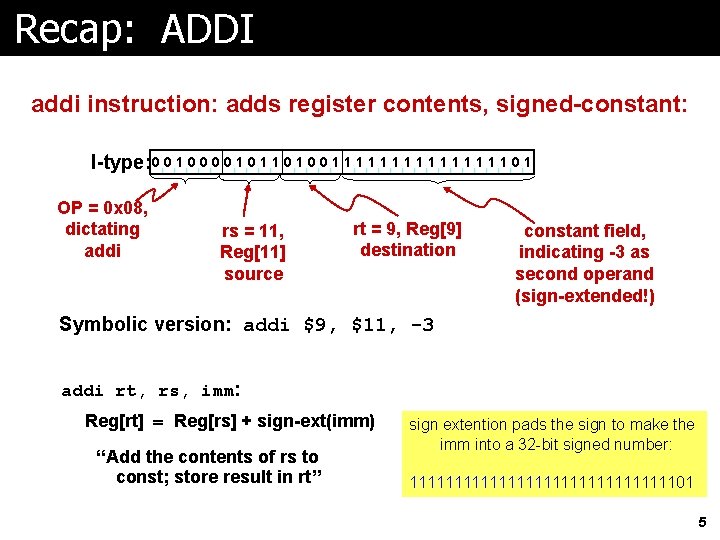
Recap: ADDI addi instruction: adds register contents, signed-constant: I-type: 0 0 1 0 1 0 0 1 1 1 1 0 1 OP = 0 x 08, dictating addi rs = 11, Reg[11] source rt = 9, Reg[9] destination constant field, indicating -3 as second operand (sign-extended!) Symbolic version: addi $9, $11, -3 addi rt, rs, imm: Reg[rt] = Reg[rs] + sign-ext(imm) “Add the contents of rs to const; store result in rt” sign extention pads the sign to make the imm into a 32 -bit signed number: 11111111111111101 5
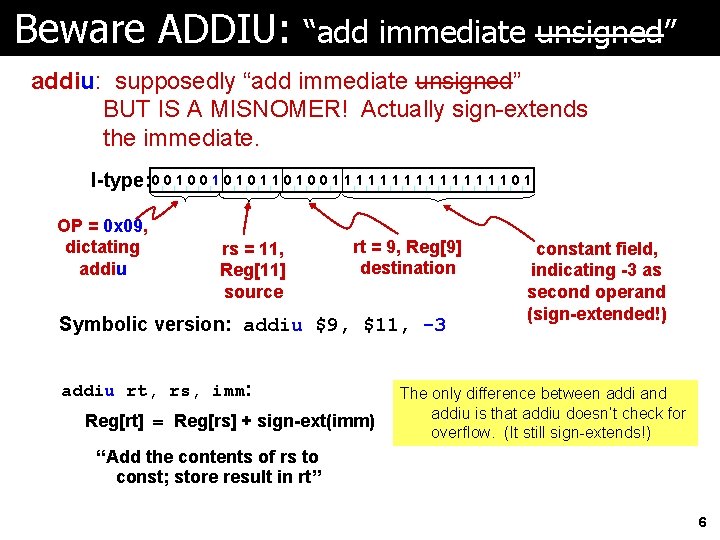
Beware ADDIU: “add immediate unsigned” addiu: supposedly “add immediate unsigned” BUT IS A MISNOMER! Actually sign-extends the immediate. I-type: 0 0 1 0 1 1 0 0 1 1 1 1 0 1 OP = 0 x 09, dictating addiu rs = 11, Reg[11] source rt = 9, Reg[9] destination Symbolic version: addiu $9, $11, -3 addiu rt, rs, imm: Reg[rt] = Reg[rs] + sign-ext(imm) constant field, indicating -3 as second operand (sign-extended!) The only difference between addi and addiu is that addiu doesn’t check for overflow. (It still sign-extends!) “Add the contents of rs to const; store result in rt” 6
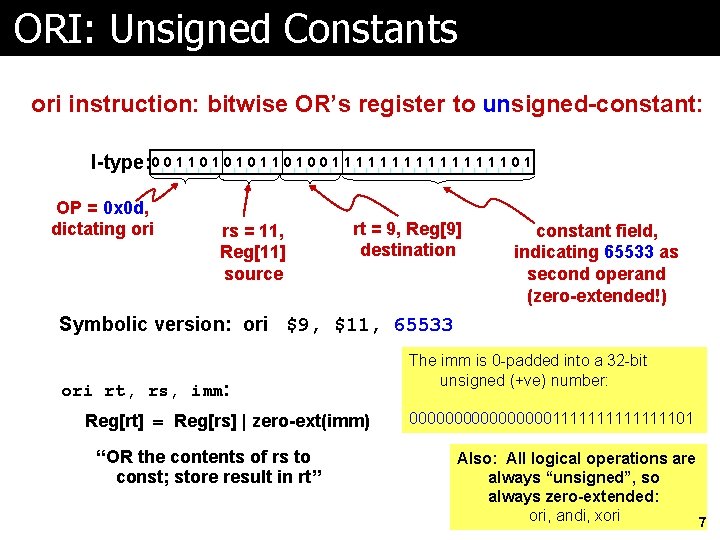
ORI: Unsigned Constants ori instruction: bitwise OR’s register to unsigned-constant: I-type: 0 0 1 1 0 1 0 1 0 0 1 1 1 1 0 1 OP = 0 x 0 d, dictating ori rs = 11, Reg[11] source rt = 9, Reg[9] destination constant field, indicating 65533 as second operand (zero-extended!) Symbolic version: ori $9, $11, 65533 ori rt, rs, imm: Reg[rt] = Reg[rs] | zero-ext(imm) “OR the contents of rs to const; store result in rt” The imm is 0 -padded into a 32 -bit unsigned (+ve) number: 00000000111111101 Also: All logical operations are always “unsigned”, so always zero-extended: ori, andi, xori 7
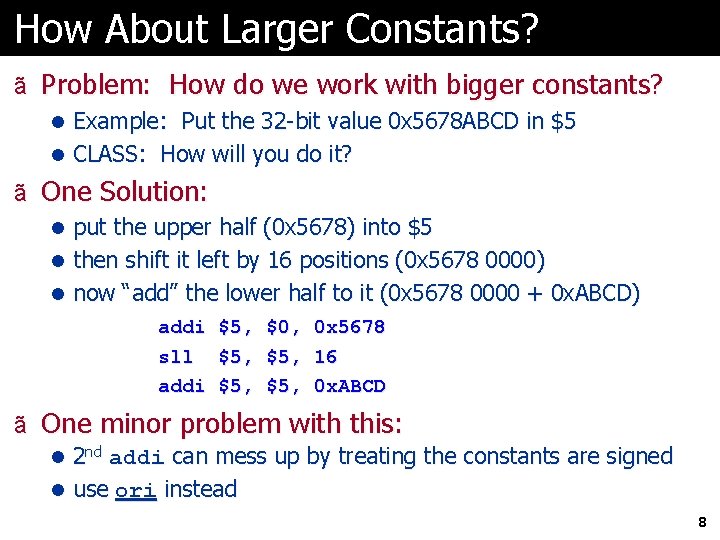
How About Larger Constants? ã Problem: How do we work with bigger constants? l Example: Put the 32 -bit value 0 x 5678 ABCD in $5 l CLASS: How will you do it? ã One Solution: l put the upper half (0 x 5678) into $5 l then shift it left by 16 positions (0 x 5678 0000) l now “add” the lower half to it (0 x 5678 0000 + 0 x. ABCD) addi sll addi $5, $5, $0, $5, 0 x 5678 16 0 x. ABCD ã One minor problem with this: l 2 nd addi can mess up by treating the constants are signed l use ori instead 8
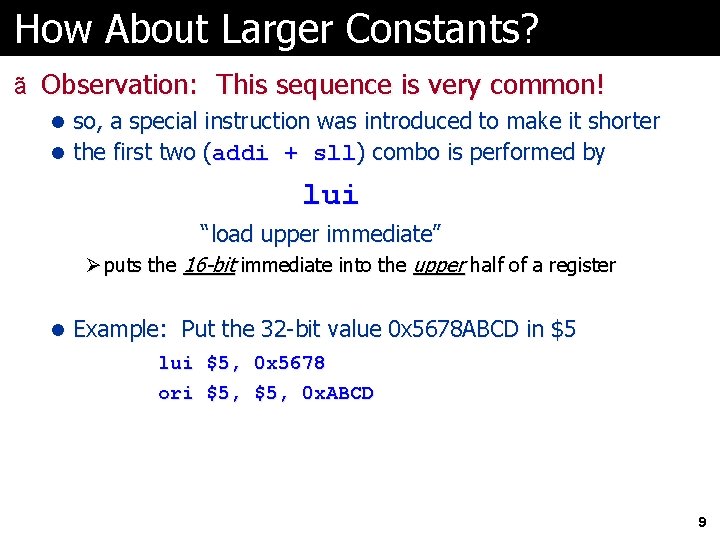
How About Larger Constants? ã Observation: This sequence is very common! l so, a special instruction was introduced to make it shorter l the first two (addi + sll) combo is performed by lui “load upper immediate” Ø puts the 16 -bit immediate into the upper half of a register l Example: Put the 32 -bit value 0 x 5678 ABCD in $5 lui $5, 0 x 5678 ori $5, 0 x. ABCD 9
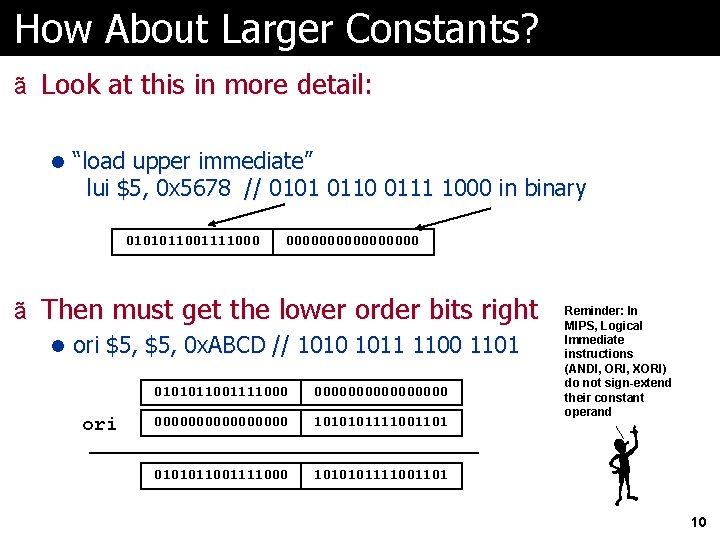
How About Larger Constants? ã Look at this in more detail: l “load upper immediate” lui $5, 0 x 5678 // 0101 0110 0111 1000 in binary 0101011001111000 00000000 ã Then must get the lower order bits right l ori $5, 0 x. ABCD // 1010 1011 1100 1101 ori 0101011001111000 0000000000000000 1010101111001101 0101011001111000 1010101111001101 Reminder: In MIPS, Logical Immediate instructions (ANDI, ORI, XORI) do not sign-extend their constant operand 10
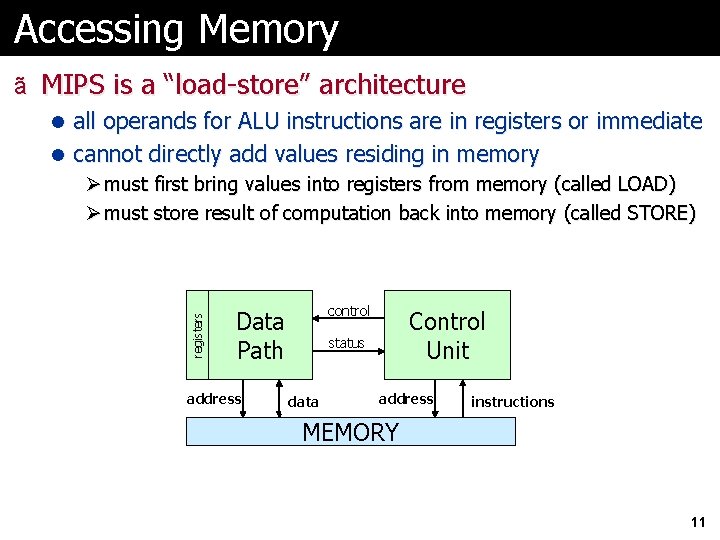
Accessing Memory ã MIPS is a “load-store” architecture l all operands for ALU instructions are in registers or immediate registers l cannot directly add values residing in memory Ø must first bring values into registers from memory (called LOAD) Ø must store result of computation back into memory (called STORE) control Data Path address Control Unit status data address instructions MEMORY 11
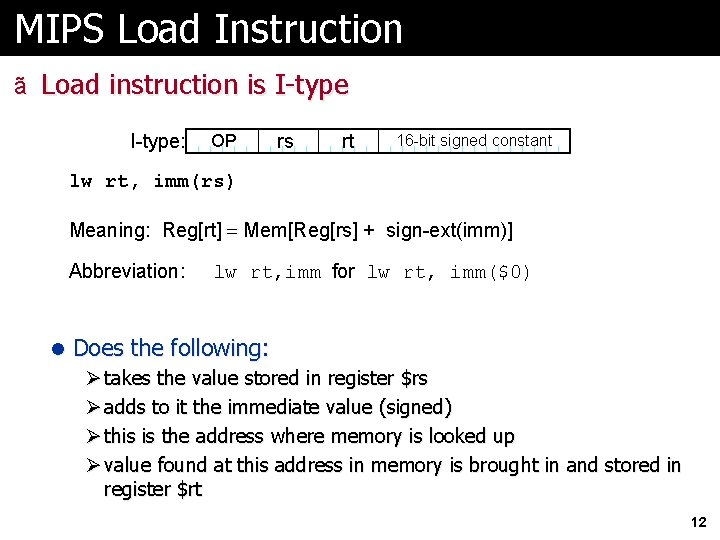
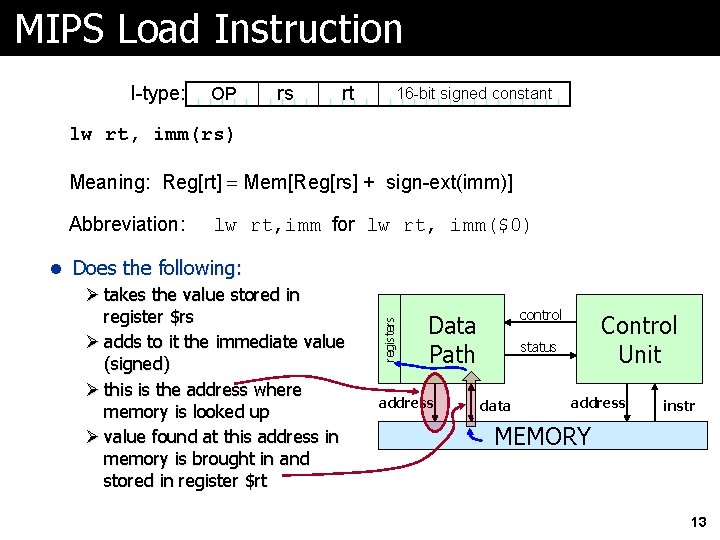
MIPS Load Instruction ã Load instruction is I-type: OP rs rt 16 -bit signed constant lw rt, imm(rs) Meaning: Reg[rt] = Mem[Reg[rs] + sign-ext(imm)] Abbreviation: lw rt, imm for lw rt, imm($0) l Does the following: Ø takes the value stored in register $rs Ø adds to it the immediate value (signed) Ø this is the address where memory is looked up Ø value found at this address in memory is brought in and stored in register $rt 12
MIPS Load Instruction I-type: OP rs rt 16 -bit signed constant lw rt, imm(rs) Meaning: Reg[rt] = Mem[Reg[rs] + sign-ext(imm)] lw rt, imm for lw rt, imm($0) l Does the following: Ø takes the value stored in register $rs Ø adds to it the immediate value (signed) Ø this is the address where memory is looked up Ø value found at this address in memory is brought in and stored in register $rt registers Abbreviation: control Data Path address Control Unit status data address instr MEMORY 13
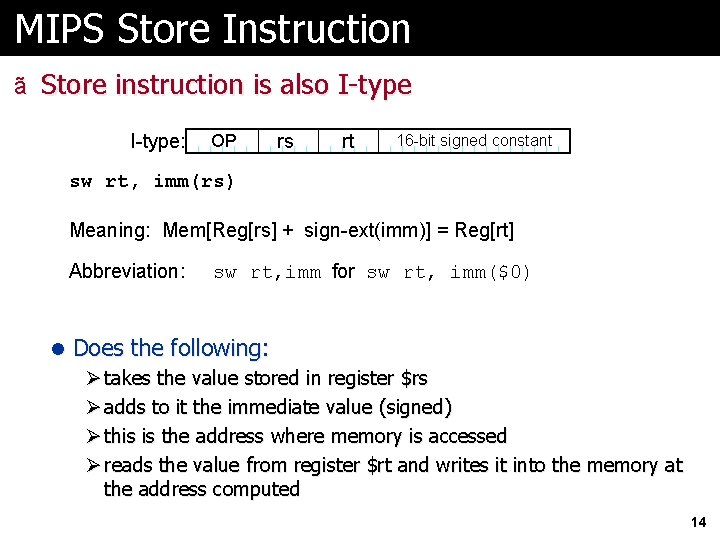
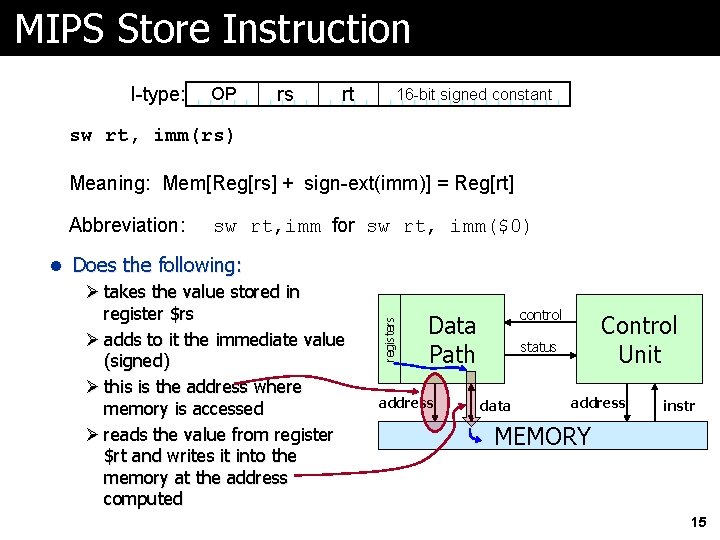
MIPS Store Instruction ã Store instruction is also I-type: OP rs rt 16 -bit signed constant sw rt, imm(rs) Meaning: Mem[Reg[rs] + sign-ext(imm)] = Reg[rt] Abbreviation: sw rt, imm for sw rt, imm($0) l Does the following: Ø takes the value stored in register $rs Ø adds to it the immediate value (signed) Ø this is the address where memory is accessed Ø reads the value from register $rt and writes it into the memory at the address computed 14
MIPS Store Instruction I-type: OP rs rt 16 -bit signed constant sw rt, imm(rs) Meaning: Mem[Reg[rs] + sign-ext(imm)] = Reg[rt] sw rt, imm for sw rt, imm($0) l Does the following: Ø takes the value stored in register $rs Ø adds to it the immediate value (signed) Ø this is the address where memory is accessed Ø reads the value from register $rt and writes it into the memory at the address computed registers Abbreviation: control Data Path address Control Unit status data address instr MEMORY 15
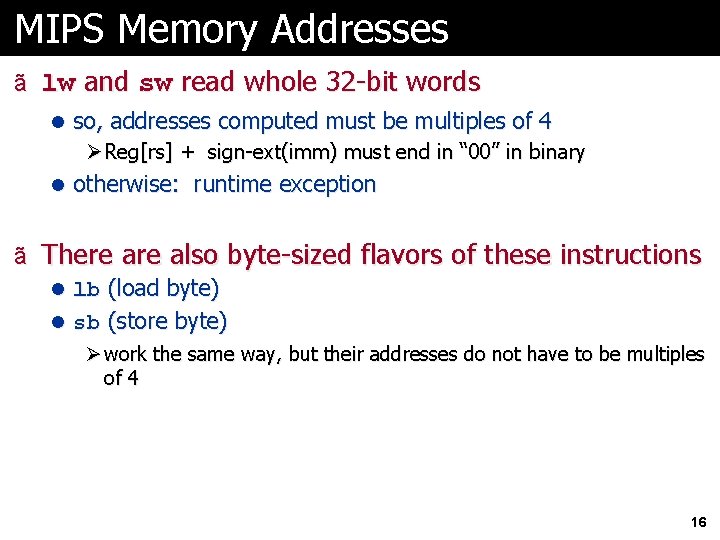
MIPS Memory Addresses ã lw and sw read whole 32 -bit words l so, addresses computed must be multiples of 4 Ø Reg[rs] + sign-ext(imm) must end in “ 00” in binary l otherwise: runtime exception ã There also byte-sized flavors of these instructions l lb (load byte) l sb (store byte) Ø work the same way, but their addresses do not have to be multiples of 4 16
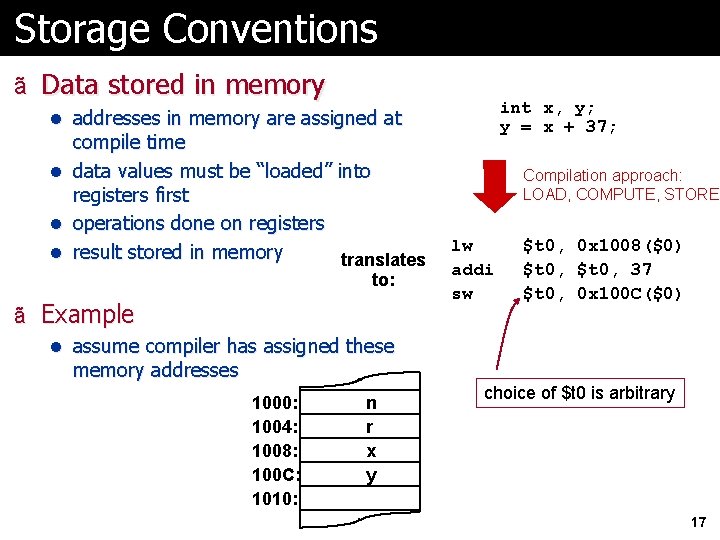
Storage Conventions ã Data stored in memory int x, y; y = x + 37; l addresses in memory are assigned at compile time l data values must be “loaded” into registers first l operations done on registers l result stored in memory translates to: ã Example Compilation approach: LOAD, COMPUTE, STORE lw addi sw $t 0, 0 x 1008($0) $t 0, 37 $t 0, 0 x 100 C($0) l assume compiler has assigned these memory addresses 1000: 1004: 1008: 100 C: 1010: n r x y choice of $t 0 is arbitrary 17
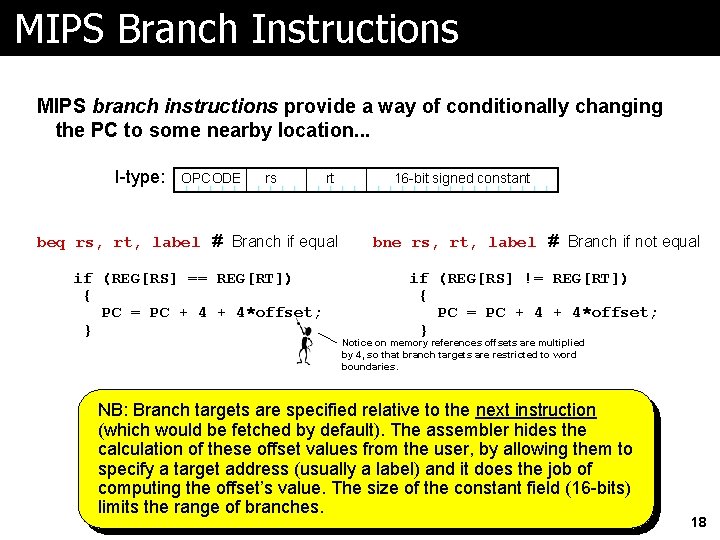
MIPS Branch Instructions MIPS branch instructions provide a way of conditionally changing the PC to some nearby location. . . I-type: OPCODE rs rt beq rs, rt, label # Branch if equal if (REG[RS] == REG[RT]) { PC = PC + 4*offset; } 16 -bit signed constant bne rs, rt, label # Branch if not equal if (REG[RS] != REG[RT]) { PC = PC + 4*offset; } Notice on memory references offsets are multiplied by 4, so that branch targets are restricted to word boundaries. NB: Branch targets are specified relative to the next instruction (which would be fetched by default). The assembler hides the calculation of these offset values from the user, by allowing them to specify a target address (usually a label) and it does the job of computing the offset’s value. The size of the constant field (16 -bits) limits the range of branches. 18
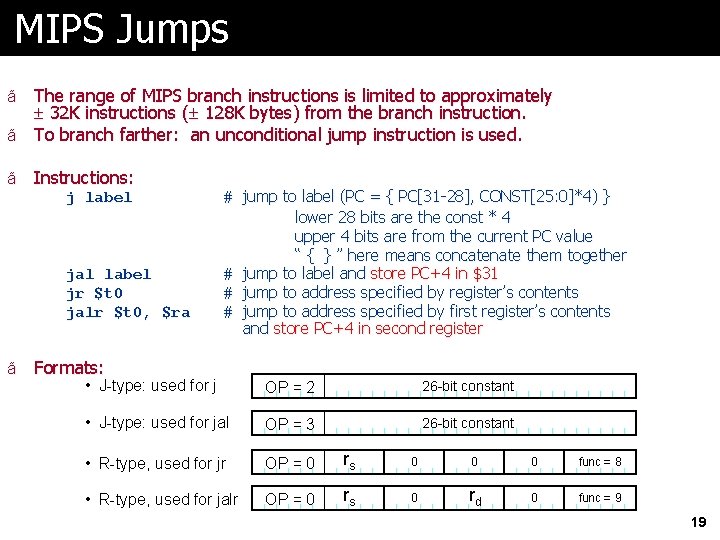
MIPS Jumps The range of MIPS branch instructions is limited to approximately 32 K instructions ( 128 K bytes) from the branch instruction. ã To branch farther: an unconditional jump instruction is used. ã ã Instructions: j label jal label jr $t 0 jalr $t 0, $ra ã # jump to label (PC = { PC[31 -28], CONST[25: 0]*4) } lower 28 bits are the const * 4 upper 4 bits are from the current PC value “ { } ” here means concatenate them together # jump to label and store PC+4 in $31 # jump to address specified by register’s contents # jump to address specified by first register’s contents and store PC+4 in second register Formats: • J-type: used for j OP = 2 26 -bit constant • J-type: used for jal OP = 3 26 -bit constant • R-type, used for jr OP = 0 rs 0 0 0 func = 8 • R-type, used for jalr OP = 0 rs 0 rd 0 func = 9 19
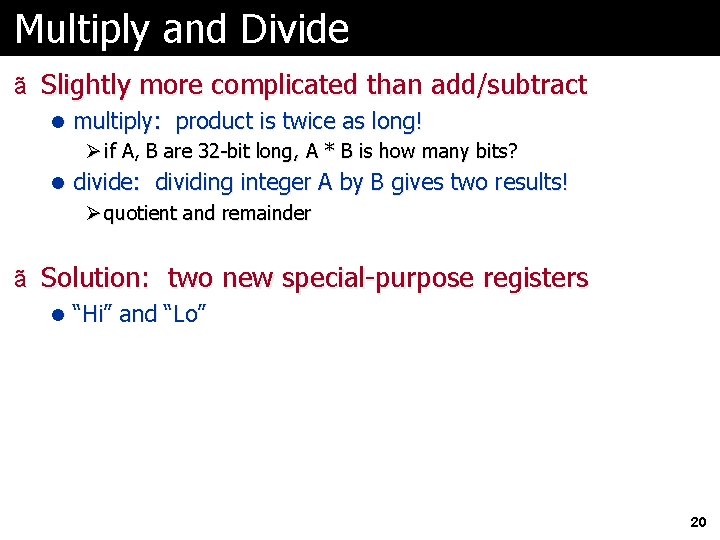
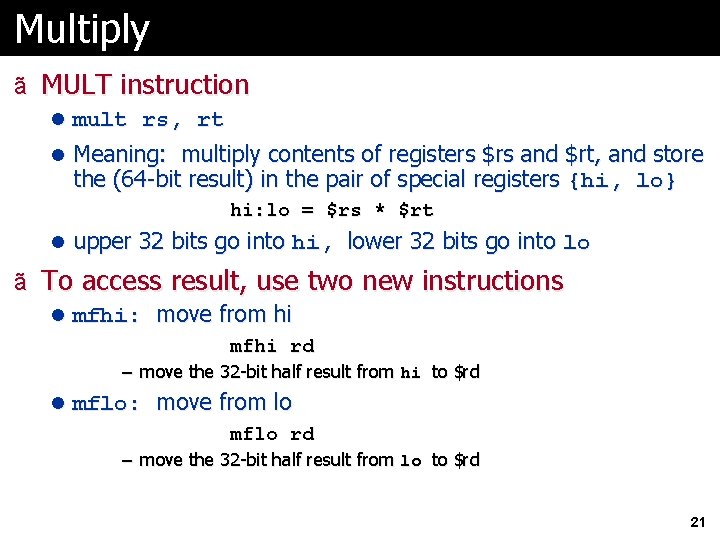
Multiply and Divide ã Slightly more complicated than add/subtract l multiply: product is twice as long! Ø if A, B are 32 -bit long, A * B is how many bits? l divide: dividing integer A by B gives two results! Ø quotient and remainder ã Solution: two new special-purpose registers l “Hi” and “Lo” 20
Multiply ã MULT instruction l mult rs, rt l Meaning: multiply contents of registers $rs and $rt, and store the (64 -bit result) in the pair of special registers {hi, lo} hi: lo = $rs * $rt l upper 32 bits go into hi, lower 32 bits go into lo ã To access result, use two new instructions l mfhi: move from hi mfhi rd – move the 32 -bit half result from hi to $rd l mflo: move from lo mflo rd – move the 32 -bit half result from lo to $rd 21
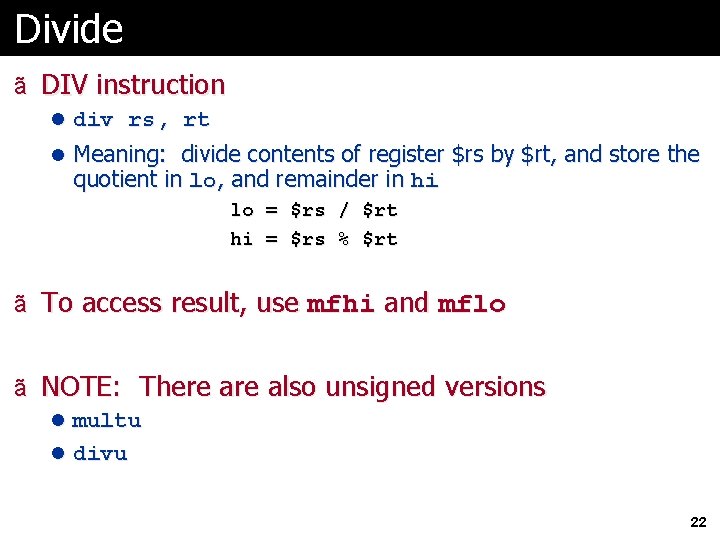
Divide ã DIV instruction l div rs, rt l Meaning: divide contents of register $rs by $rt, and store the quotient in lo, and remainder in hi lo = $rs / $rt hi = $rs % $rt ã To access result, use mfhi and mflo ã NOTE: There also unsigned versions l multu l divu 22
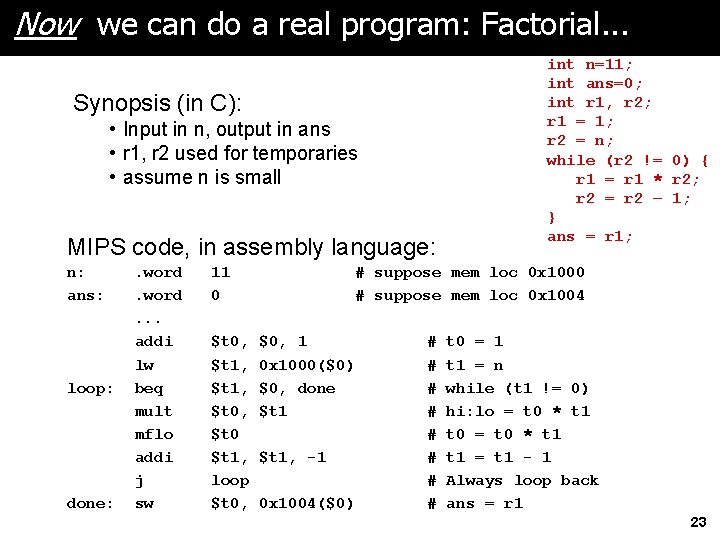
Now we can do a real program: Factorial. . . Synopsis (in C): • Input in n, output in ans • r 1, r 2 used for temporaries • assume n is small MIPS code, in assembly language: n: ans: loop: done: . word. . . addi lw beq mult mflo addi j sw 11 0 $t 0, $t 1, $t 0 $t 1, loop $t 0, int n=11; int ans=0; int r 1, r 2; r 1 = 1; r 2 = n; while (r 2 != 0) { r 1 = r 1 * r 2; r 2 = r 2 – 1; } ans = r 1; # suppose mem loc 0 x 1000 # suppose mem loc 0 x 1004 $0, 1 0 x 1000($0) $0, done $t 1, -1 0 x 1004($0) # # # # t 0 = 1 t 1 = n while (t 1 != 0) hi: lo = t 0 * t 1 t 0 = t 0 * t 1 = t 1 - 1 Always loop back ans = r 1 23
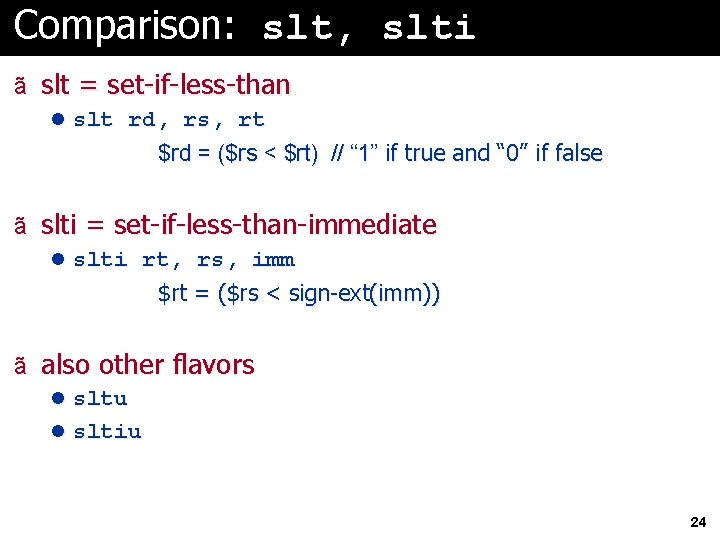
Comparison: slt, slti ã slt = set-if-less-than l slt rd, rs, rt $rd = ($rs < $rt) // “ 1” if true and “ 0” if false ã slti = set-if-less-than-immediate l slti rt, rs, imm $rt = ($rs < sign-ext(imm)) ã also other flavors l sltu l sltiu 24
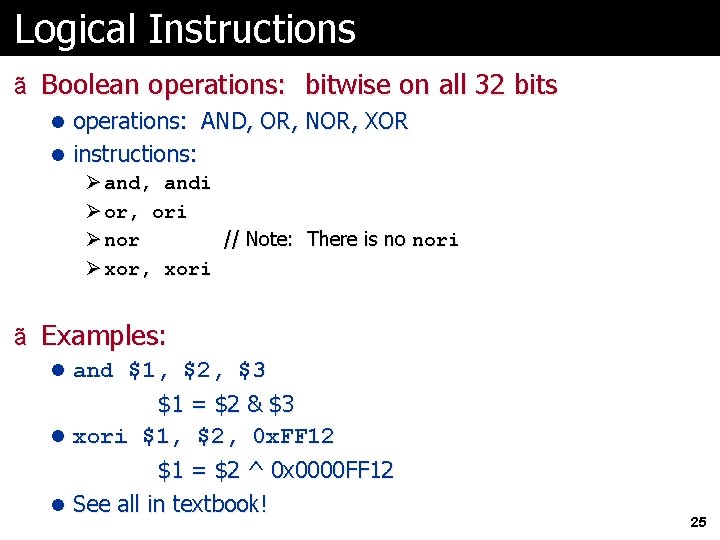
Logical Instructions ã Boolean operations: bitwise on all 32 bits l operations: AND, OR, NOR, XOR l instructions: Ø and, andi Ø or, ori Ø nor // Note: There is no nori Ø xor, xori ã Examples: l and $1, $2, $3 $1 = $2 & $3 l xori $1, $2, 0 x. FF 12 $1 = $2 ^ 0 x 0000 FF 12 l See all in textbook! 25
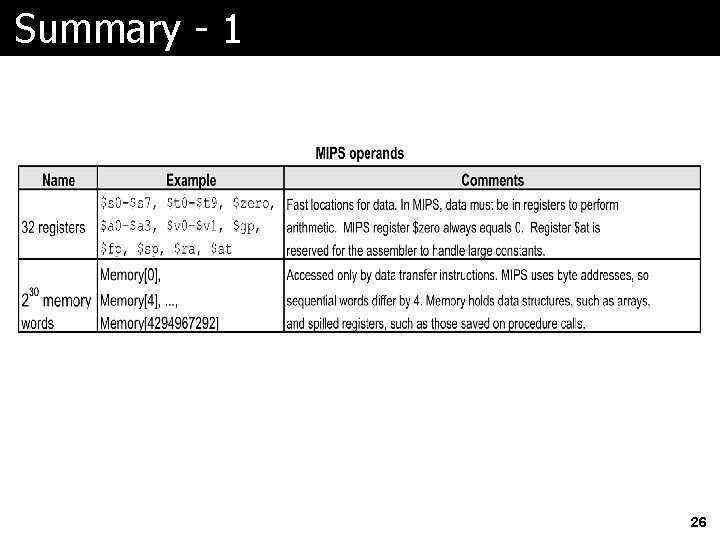
Summary - 1 26
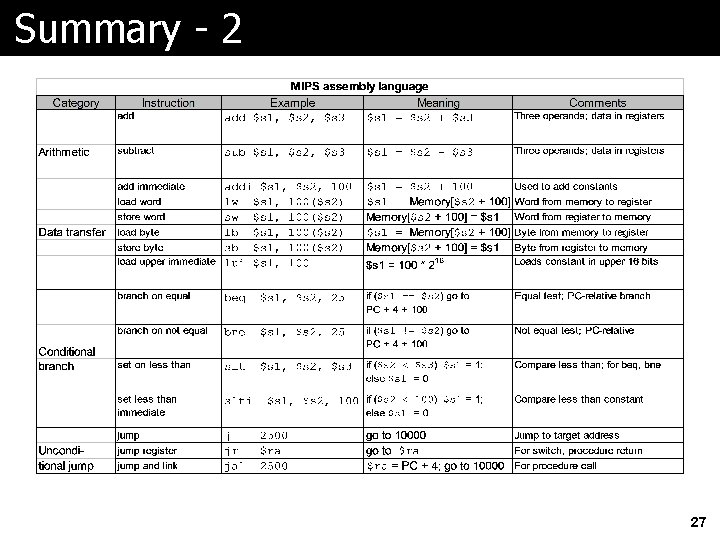
Summary - 2 27
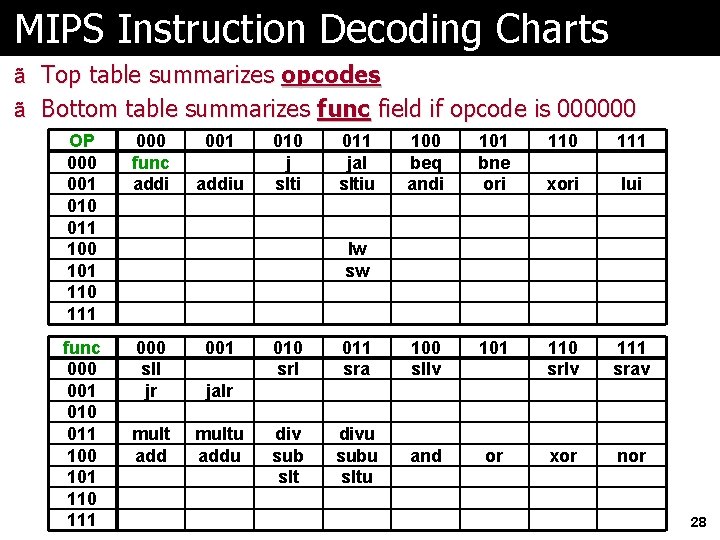
MIPS Instruction Decoding Charts ã Top table summarizes opcodes ã Bottom table summarizes func field if opcode is 000000 OP 000 001 010 011 100 101 110 111 000 func addi 001 func 000 001 010 011 100 101 110 111 000 sll jr 001 mult add multu addiu 010 j slti 011 jal sltiu 100 beq andi 101 bne ori 110 111 xori lui lw sw 010 srl 011 sra 100 sllv 101 110 srlv 111 srav div sub slt divu subu sltu and or xor nor jalr 28
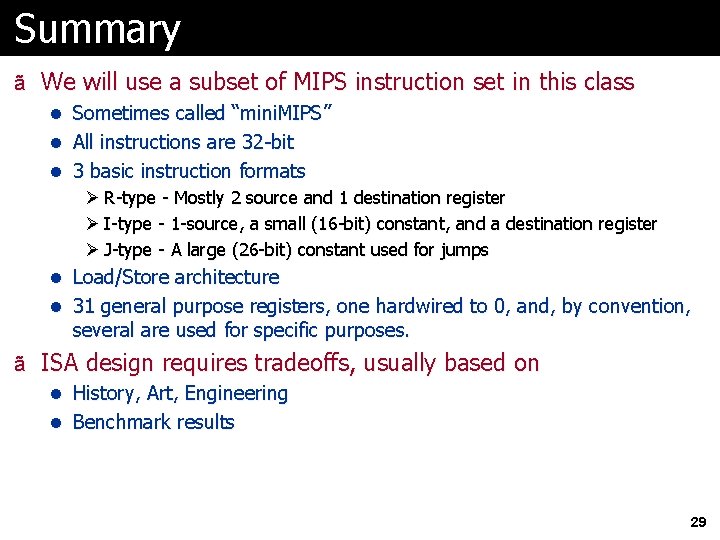
Summary ã We will use a subset of MIPS instruction set in this class l Sometimes called “mini. MIPS” l All instructions are 32 -bit l 3 basic instruction formats Ø R-type - Mostly 2 source and 1 destination register Ø I-type - 1 -source, a small (16 -bit) constant, and a destination register Ø J-type - A large (26 -bit) constant used for jumps l Load/Store architecture l 31 general purpose registers, one hardwired to 0, and, by convention, several are used for specific purposes. ã ISA design requires tradeoffs, usually based on l History, Art, Engineering l Benchmark results 29