
Computer Organization and Architecture Designing for Performance 11
- Slides: 45
Computer Organization and Architecture Designing for Performance 11 th Edition Chapter 1 Basic Concepts and Computer Evolution Copyright © 2019, 2016, 2013 Pearson Education, Inc. All Rights Reserved
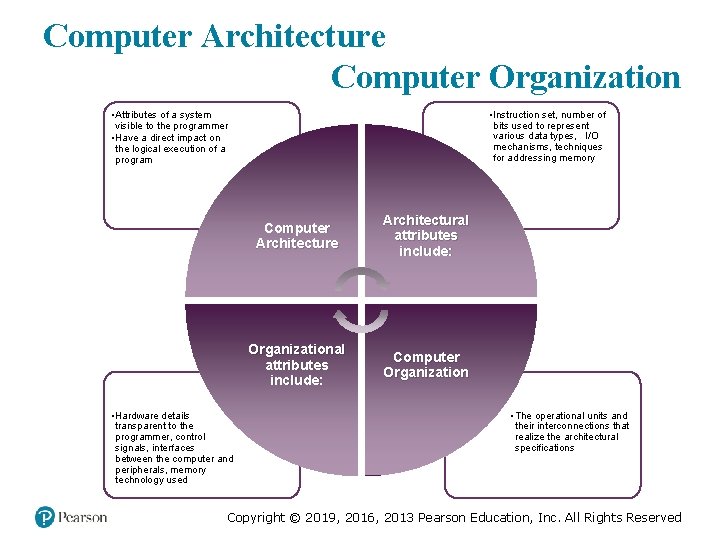
Computer Architecture Computer Organization • Attributes of a system visible to the programmer • Have a direct impact on the logical execution of a program • Hardware details transparent to the programmer, control signals, interfaces between the computer and peripherals, memory technology used • Instruction set, number of bits used to represent various data types, I/O mechanisms, techniques for addressing memory Computer Architecture Architectural attributes include: Organizational attributes include: Computer Organization • The operational units and their interconnections that realize the architectural specifications Copyright © 2019, 2016, 2013 Pearson Education, Inc. All Rights Reserved
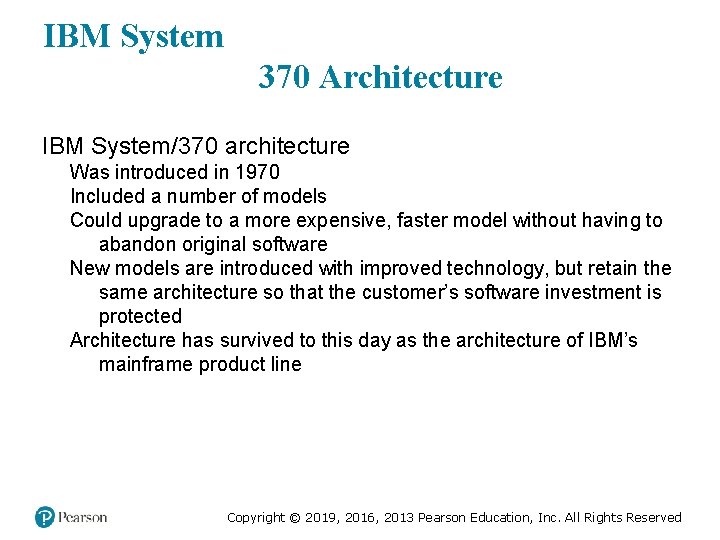
IBM System 370 Architecture IBM System/370 architecture Was introduced in 1970 Included a number of models Could upgrade to a more expensive, faster model without having to abandon original software New models are introduced with improved technology, but retain the same architecture so that the customer’s software investment is protected Architecture has survived to this day as the architecture of IBM’s mainframe product line Copyright © 2019, 2016, 2013 Pearson Education, Inc. All Rights Reserved
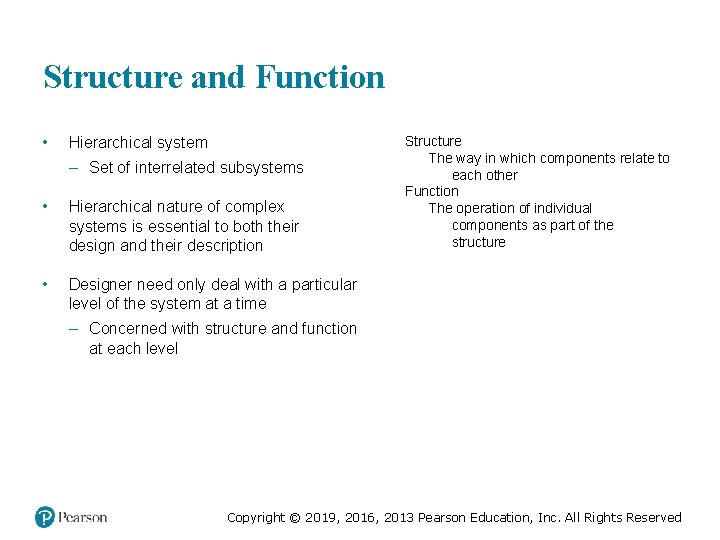
Structure and Function • Hierarchical system – Set of interrelated subsystems • Hierarchical nature of complex systems is essential to both their design and their description • Designer need only deal with a particular level of the system at a time Structure The way in which components relate to each other Function The operation of individual components as part of the structure – Concerned with structure and function at each level Copyright © 2019, 2016, 2013 Pearson Education, Inc. All Rights Reserved
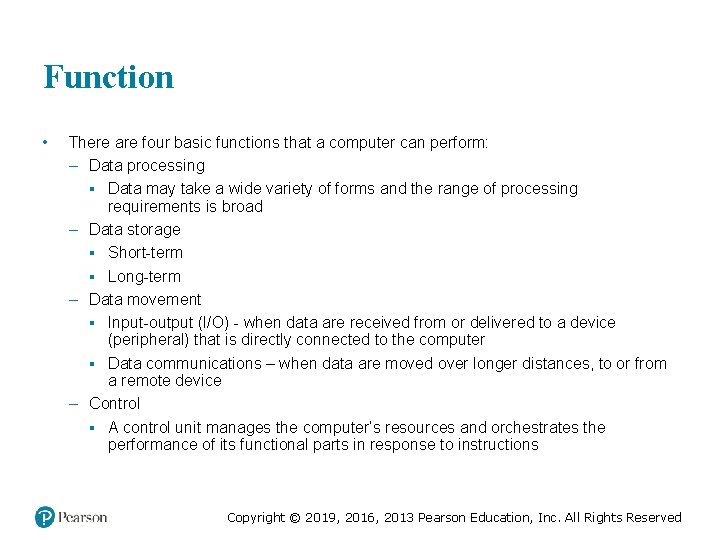
Function • There are four basic functions that a computer can perform: – Data processing ▪ Data may take a wide variety of forms and the range of processing requirements is broad – Data storage ▪ Short-term ▪ Long-term – Data movement ▪ Input-output (I/O) - when data are received from or delivered to a device (peripheral) that is directly connected to the computer ▪ Data communications – when data are moved over longer distances, to or from a remote device – Control ▪ A control unit manages the computer’s resources and orchestrates the performance of its functional parts in response to instructions Copyright © 2019, 2016, 2013 Pearson Education, Inc. All Rights Reserved
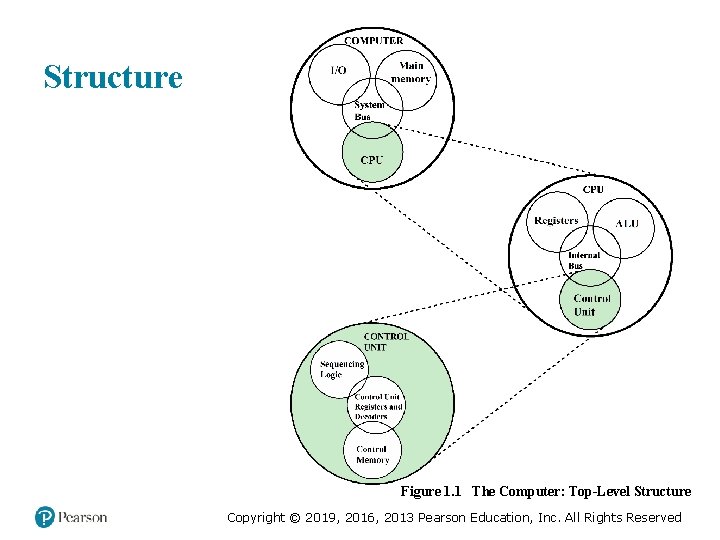
Structure Figure 1. 1 The Computer: Top-Level Structure Copyright © 2019, 2016, 2013 Pearson Education, Inc. All Rights Reserved
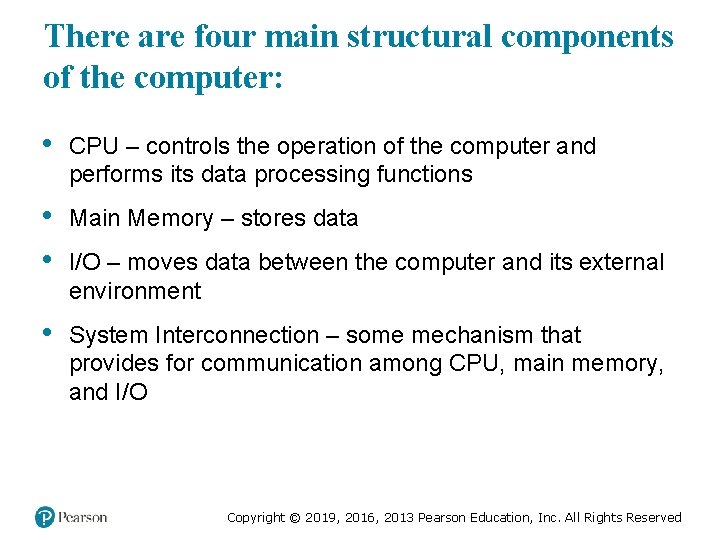
There are four main structural components of the computer: • CPU – controls the operation of the computer and performs its data processing functions • • Main Memory – stores data • System Interconnection – some mechanism that provides for communication among CPU, main memory, and I/O – moves data between the computer and its external environment Copyright © 2019, 2016, 2013 Pearson Education, Inc. All Rights Reserved
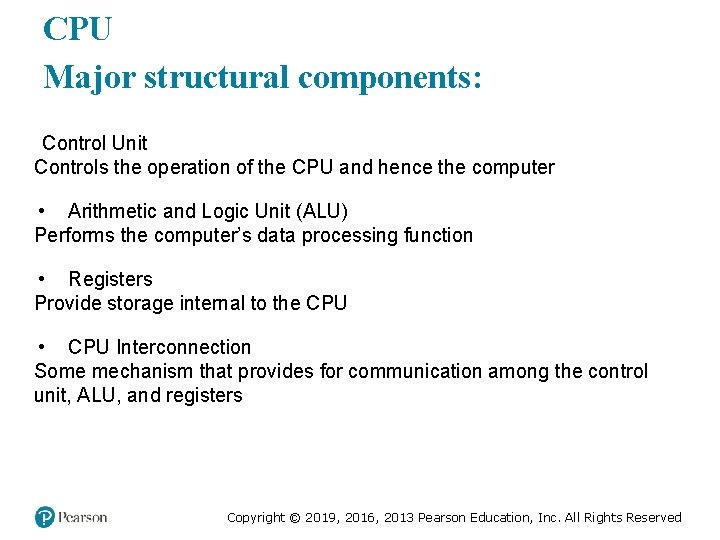
CPU Major structural components: Control Unit Controls the operation of the CPU and hence the computer • Arithmetic and Logic Unit (ALU) Performs the computer’s data processing function • Registers Provide storage internal to the CPU • CPU Interconnection Some mechanism that provides for communication among the control unit, ALU, and registers Copyright © 2019, 2016, 2013 Pearson Education, Inc. All Rights Reserved
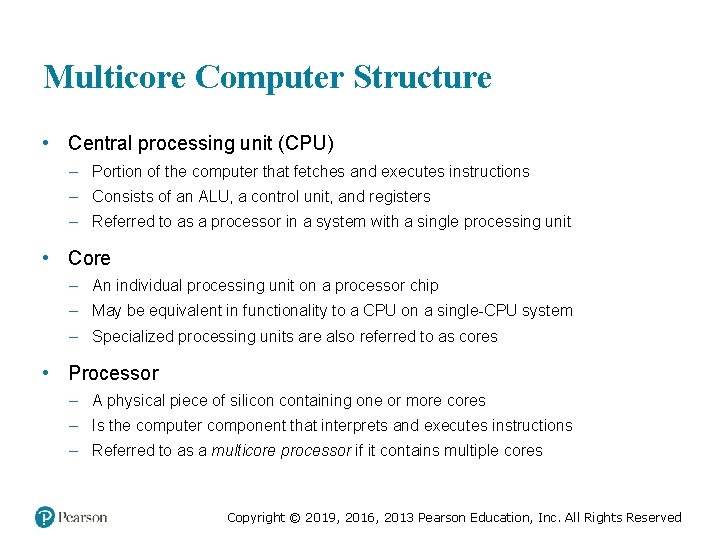
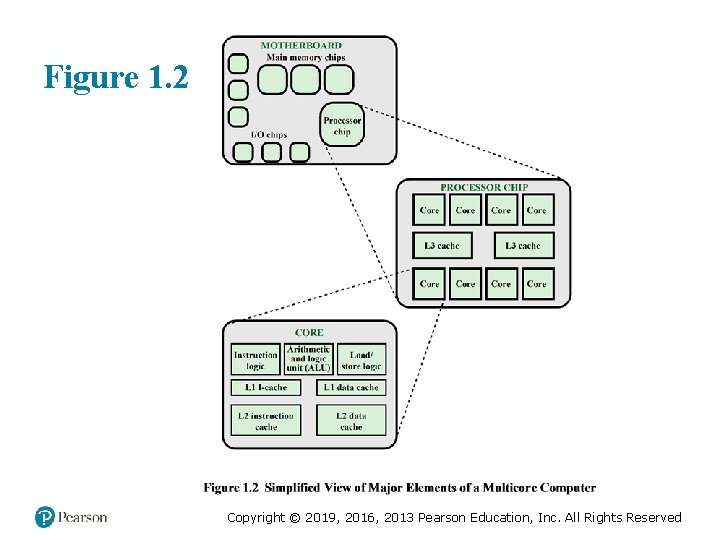
Multicore Computer Structure • Central processing unit (CPU) – Portion of the computer that fetches and executes instructions – Consists of an ALU, a control unit, and registers – Referred to as a processor in a system with a single processing unit • Core – An individual processing unit on a processor chip – May be equivalent in functionality to a CPU on a single-CPU system – Specialized processing units are also referred to as cores • Processor – A physical piece of silicon containing one or more cores – Is the computer component that interprets and executes instructions – Referred to as a multicore processor if it contains multiple cores Copyright © 2019, 2016, 2013 Pearson Education, Inc. All Rights Reserved
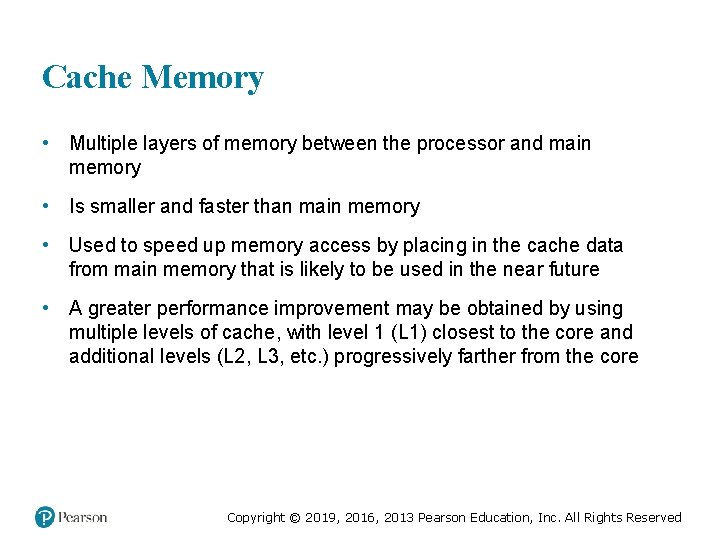
Cache Memory • Multiple layers of memory between the processor and main memory • Is smaller and faster than main memory • Used to speed up memory access by placing in the cache data from main memory that is likely to be used in the near future • A greater performance improvement may be obtained by using multiple levels of cache, with level 1 (L 1) closest to the core and additional levels (L 2, L 3, etc. ) progressively farther from the core Copyright © 2019, 2016, 2013 Pearson Education, Inc. All Rights Reserved
Figure 1. 2 Copyright © 2019, 2016, 2013 Pearson Education, Inc. All Rights Reserved
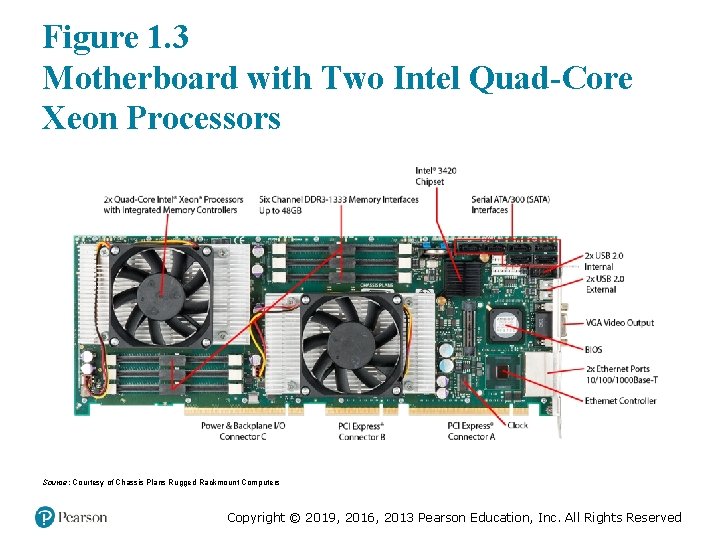
Figure 1. 3 Motherboard with Two Intel Quad-Core Xeon Processors Source: Courtesy of Chassis Plans Rugged Rackmount Computers Copyright © 2019, 2016, 2013 Pearson Education, Inc. All Rights Reserved
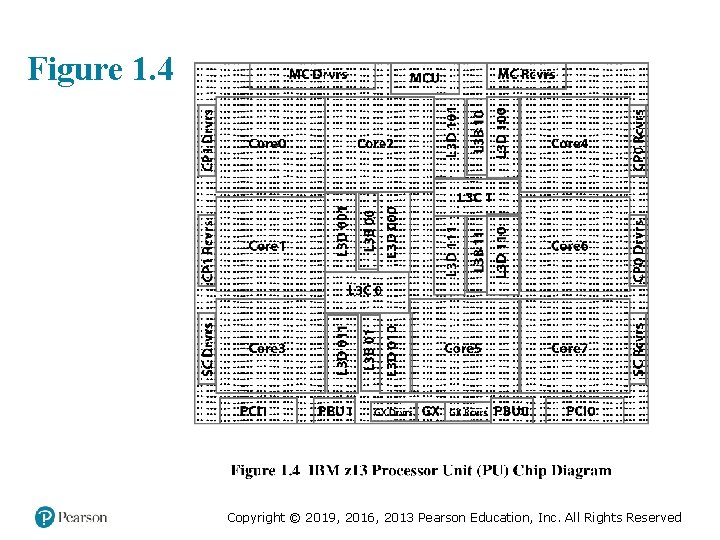
Figure 1. 4 Copyright © 2019, 2016, 2013 Pearson Education, Inc. All Rights Reserved
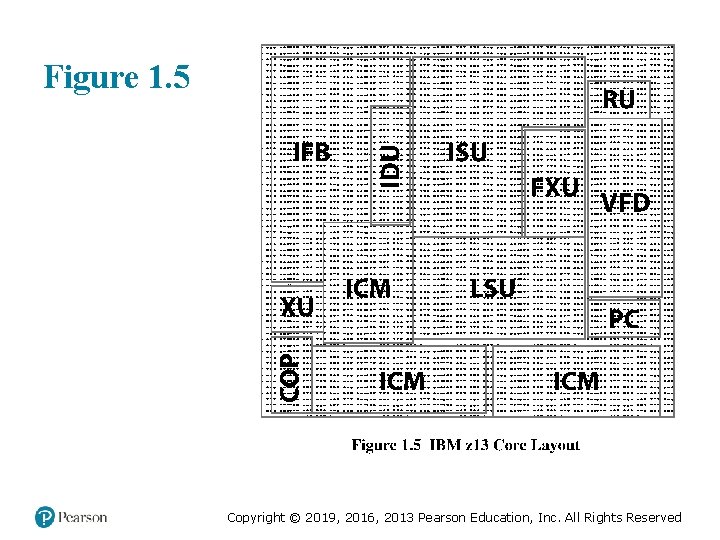
Figure 1. 5 Copyright © 2019, 2016, 2013 Pearson Education, Inc. All Rights Reserved
History of Computers First Generation: Vacuum Tubes Vacuum tubes were used for digital logic elements and memory IAS computer Fundamental design approach was the stored program concept Attributed to the mathematician John von Neumann First publication of the idea was in 1945 for the EDVAC Design began at the Princeton Institute for Advanced Studies Completed in 1952 Prototype of all subsequent general-purpose computers Copyright © 2019, 2016, 2013 Pearson Education, Inc. All Rights Reserved
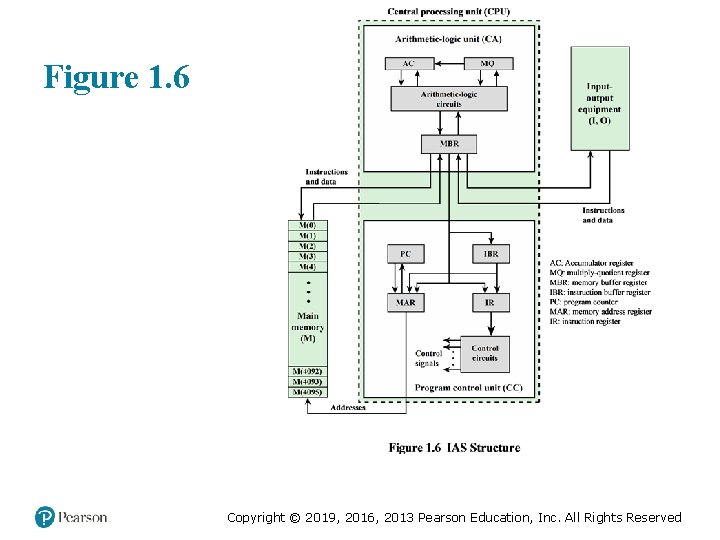
Figure 1. 6 Copyright © 2019, 2016, 2013 Pearson Education, Inc. All Rights Reserved
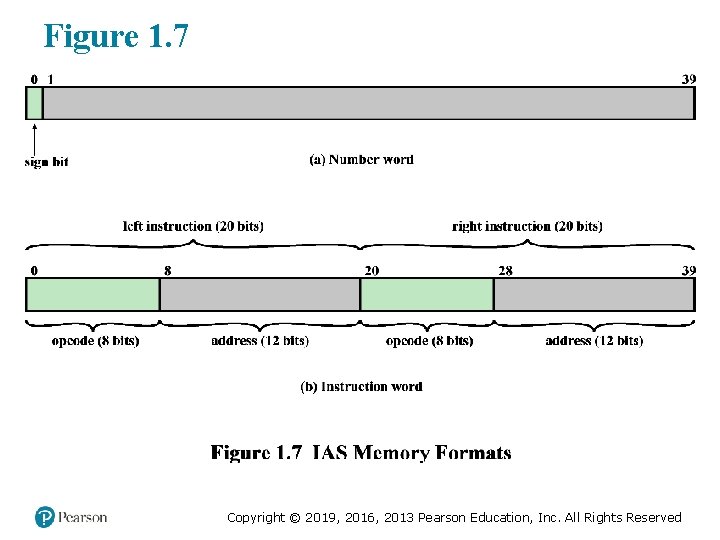
Figure 1. 7 Copyright © 2019, 2016, 2013 Pearson Education, Inc. All Rights Reserved
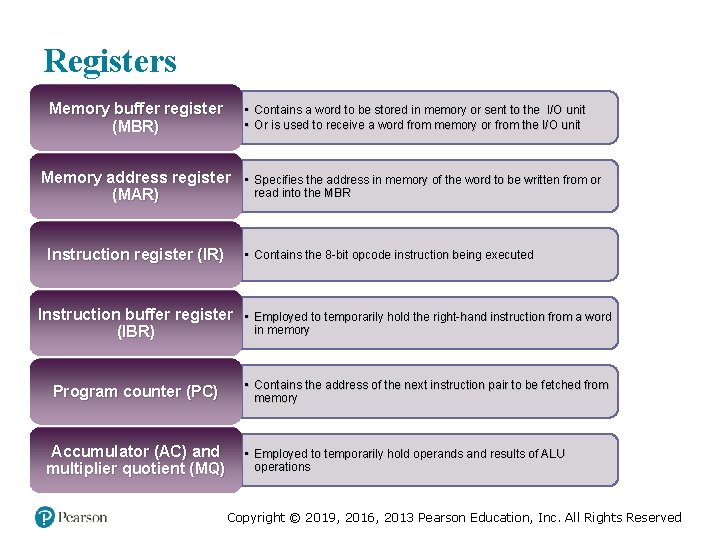
Registers Memory buffer register (MBR) • Contains a word to be stored in memory or sent to the I/O unit • Or is used to receive a word from memory or from the I/O unit Memory address register (MAR) Instruction register (IR) • Specifies the address in memory of the word to be written from or read into the MBR • Contains the 8 -bit opcode instruction being executed Instruction buffer register (IBR) • Employed to temporarily hold the right-hand instruction from a word in memory Program counter (PC) • Contains the address of the next instruction pair to be fetched from memory Accumulator (AC) and multiplier quotient (MQ) • Employed to temporarily hold operands and results of ALU operations Copyright © 2019, 2016, 2013 Pearson Education, Inc. All Rights Reserved
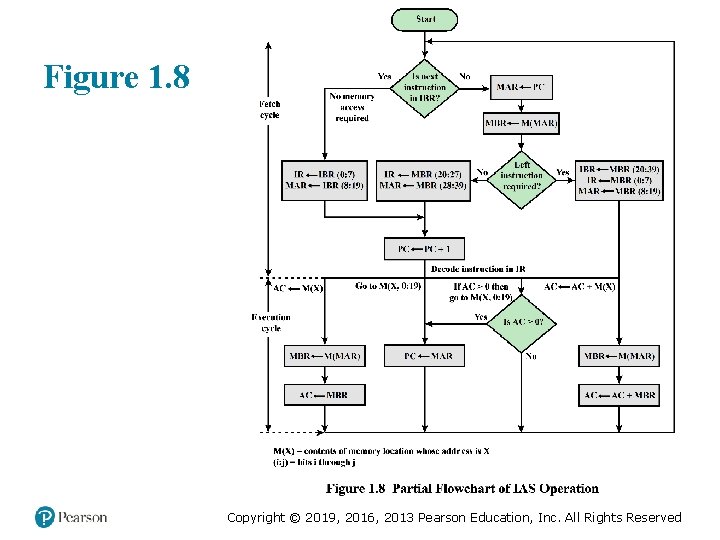
Figure 1. 8 Copyright © 2019, 2016, 2013 Pearson Education, Inc. All Rights Reserved
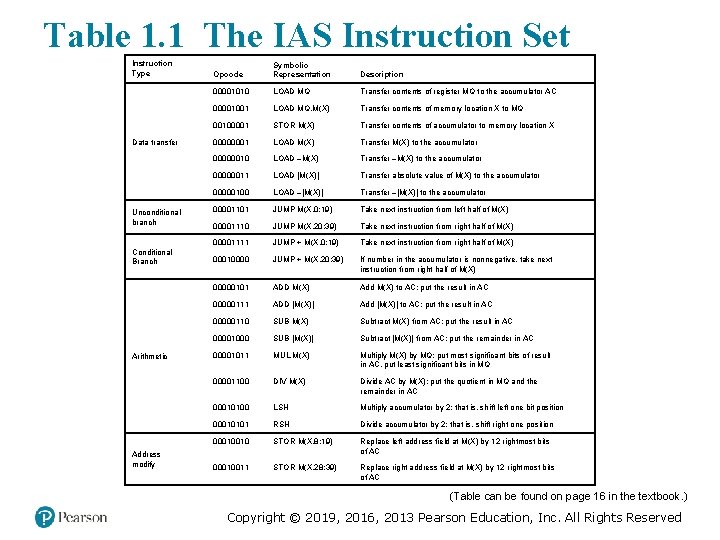
Table 1. 1 The IAS Instruction Set Instruction Type Data transfer Unconditional branch Conditional Branch Arithmetic Address modify Opcode Symbolic Representation Description 00001010 LOAD MQ Transfer contents of register MQ to the accumulator AC 00001001 LOAD MQ, M(X) Transfer contents of memory location X to MQ 00100001 STOR M(X) Transfer contents of accumulator to memory location X 00000001 LOAD M(X) Transfer M(X) to the accumulator 00000010 LOAD –M(X) Transfer –M(X) to the accumulator 00000011 LOAD |M(X)| Transfer absolute value of M(X) to the accumulator 00000100 LOAD –|M(X)| Transfer –|M(X)| to the accumulator 00001101 JUMP M(X, 0: 19) Take next instruction from left half of M(X) 00001110 JUMP M(X, 20: 39) Take next instruction from right half of M(X) 00001111 JUMP + M(X, 0: 19) Take next instruction from right half of M(X) 00010000 JUMP + M(X, 20: 39) If number in the accumulator is nonnegative, take next instruction from right half of M(X) 00000101 ADD M(X) Add M(X) to AC; put the result in AC 00000111 ADD |M(X)| Add |M(X)| to AC; put the result in AC 00000110 SUB M(X) Subtract M(X) from AC; put the result in AC 00001000 SUB |M(X)| Subtract |M(X)| from AC; put the remainder in AC 00001011 MUL M(X) Multiply M(X) by MQ; put most significant bits of result in AC, put least significant bits in MQ 00001100 DIV M(X) Divide AC by M(X); put the quotient in MQ and the remainder in AC 00010100 LSH Multiply accumulator by 2; that is, shift left one bit position 00010101 RSH Divide accumulator by 2; that is, shift right one position 00010010 STOR M(X, 8: 19) Replace left address field at M(X) by 12 rightmost bits of AC 00010011 STOR M(X, 28: 39) Replace right address field at M(X) by 12 rightmost bits of AC (Table can be found on page 16 in the textbook. ) Copyright © 2019, 2016, 2013 Pearson Education, Inc. All Rights Reserved
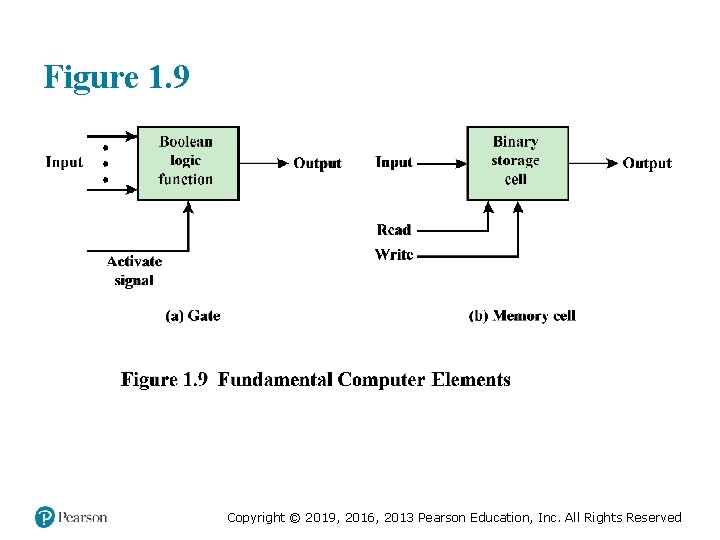
Figure 1. 9 Copyright © 2019, 2016, 2013 Pearson Education, Inc. All Rights Reserved
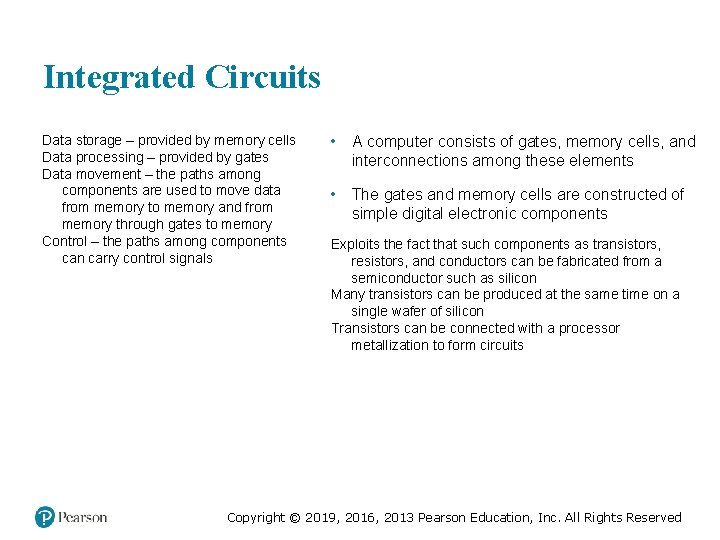
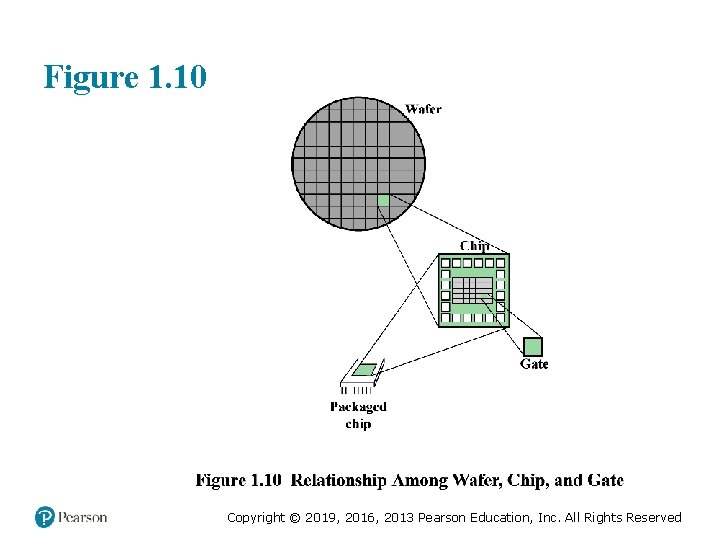
Integrated Circuits Data storage – provided by memory cells Data processing – provided by gates Data movement – the paths among components are used to move data from memory to memory and from memory through gates to memory Control – the paths among components can carry control signals • A computer consists of gates, memory cells, and interconnections among these elements • The gates and memory cells are constructed of simple digital electronic components Exploits the fact that such components as transistors, resistors, and conductors can be fabricated from a semiconductor such as silicon Many transistors can be produced at the same time on a single wafer of silicon Transistors can be connected with a processor metallization to form circuits Copyright © 2019, 2016, 2013 Pearson Education, Inc. All Rights Reserved
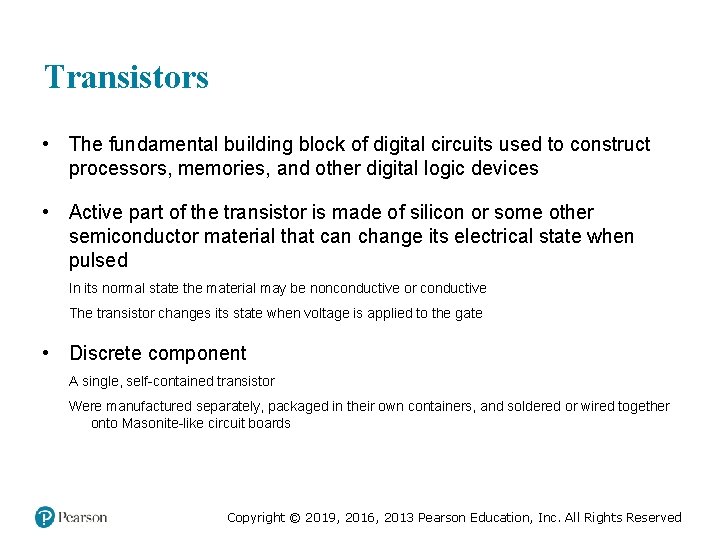
Transistors • The fundamental building block of digital circuits used to construct processors, memories, and other digital logic devices • Active part of the transistor is made of silicon or some other semiconductor material that can change its electrical state when pulsed In its normal state the material may be nonconductive or conductive The transistor changes its state when voltage is applied to the gate • Discrete component A single, self-contained transistor Were manufactured separately, packaged in their own containers, and soldered or wired together onto Masonite-like circuit boards Copyright © 2019, 2016, 2013 Pearson Education, Inc. All Rights Reserved
Figure 1. 10 Copyright © 2019, 2016, 2013 Pearson Education, Inc. All Rights Reserved
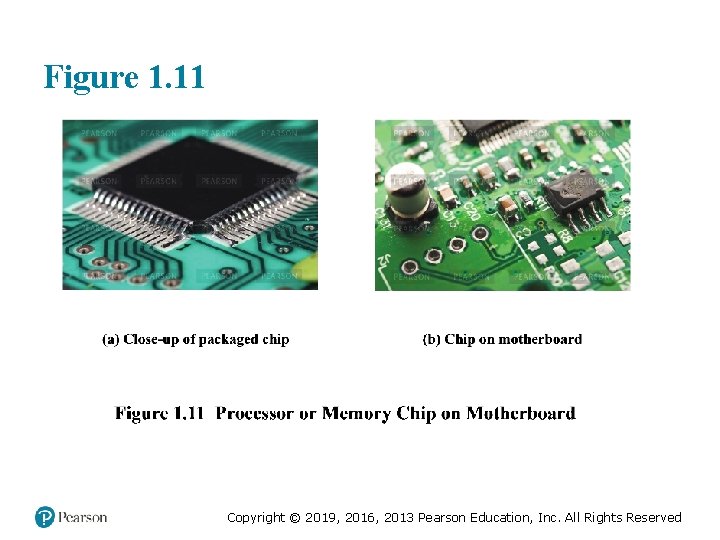
Figure 1. 11 Copyright © 2019, 2016, 2013 Pearson Education, Inc. All Rights Reserved
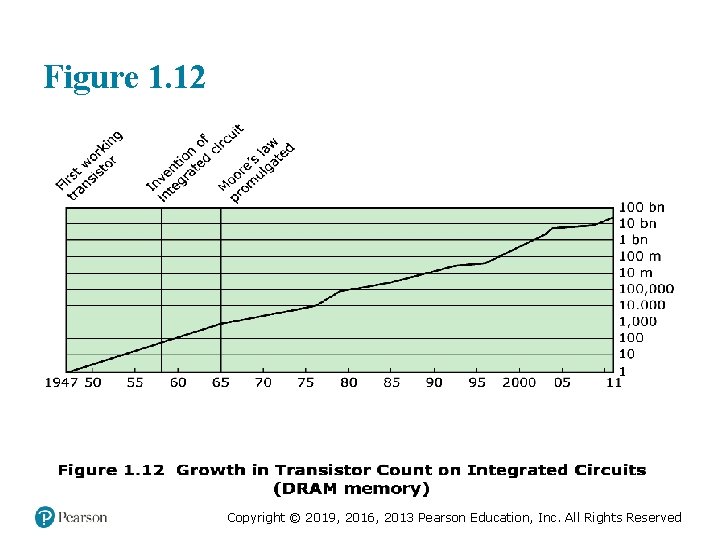
Figure 1. 12 Copyright © 2019, 2016, 2013 Pearson Education, Inc. All Rights Reserved
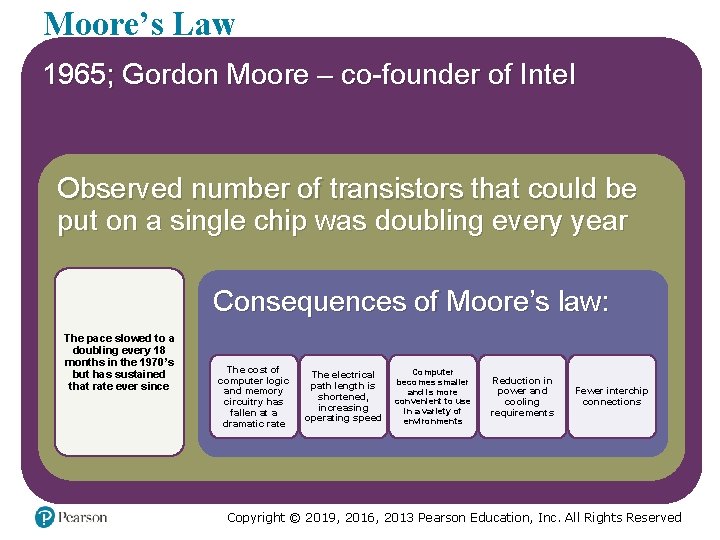
Moore’s Law 1965; Gordon Moore – co-founder of Intel Observed number of transistors that could be put on a single chip was doubling every year Consequences of Moore’s law: The pace slowed to a doubling every 18 months in the 1970’s but has sustained that rate ever since The cost of computer logic and memory circuitry has fallen at a dramatic rate The electrical path length is shortened, increasing operating speed Computer becomes smaller and is more convenient to use in a variety of environments Reduction in power and cooling requirements Fewer interchip connections Copyright © 2019, 2016, 2013 Pearson Education, Inc. All Rights Reserved
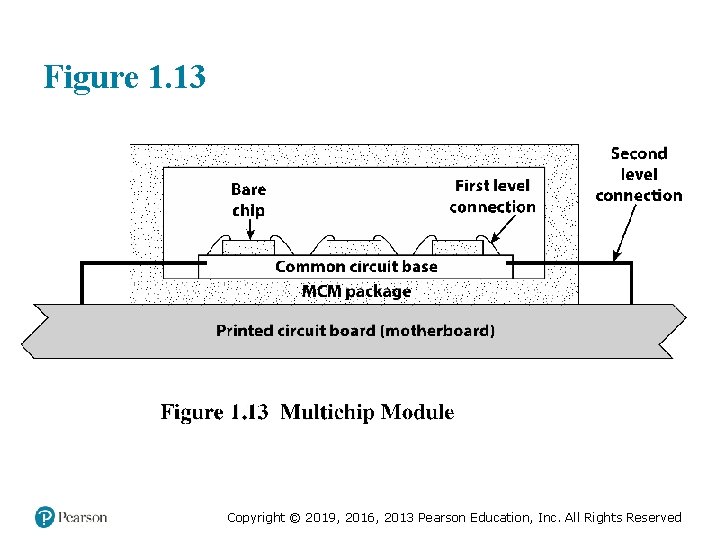
Figure 1. 13 Copyright © 2019, 2016, 2013 Pearson Education, Inc. All Rights Reserved
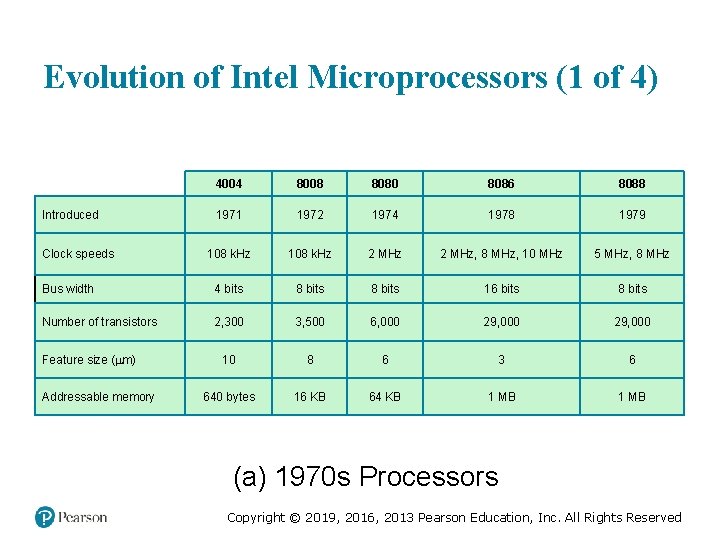
Evolution of Intel Microprocessors (1 of 4) 4004 8008 8080 8086 8088 1971 1972 1974 1978 1979 108 k. Hz 2 MHz, 8 MHz, 10 MHz 5 MHz, 8 MHz Bus width 4 bits 8 bits 16 bits 8 bits Number of transistors 2, 300 3, 500 6, 000 29, 000 10 8 6 3 6 640 bytes 16 KB 64 KB 1 MB Introduced Clock speeds Feature size ( m) Addressable memory (a) 1970 s Processors Copyright © 2019, 2016, 2013 Pearson Education, Inc. All Rights Reserved
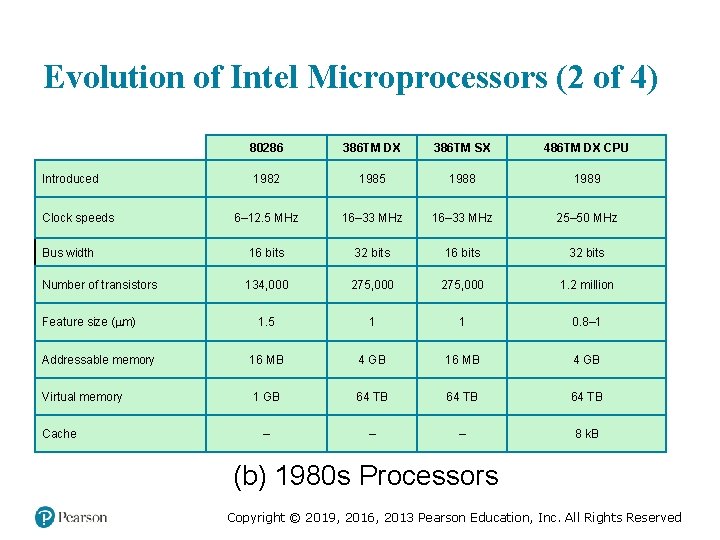
Evolution of Intel Microprocessors (2 of 4) Introduced Clock speeds Bus width Number of transistors Feature size ( m) Addressable memory Virtual memory Cache 80286 386 TM DX 386 TM SX 486 TM DX CPU 1982 1985 1988 1989 6– 12. 5 MHz 16– 33 MHz 25– 50 MHz 16 bits 32 bits 134, 000 275, 000 1. 2 million 1. 5 1 1 0. 8– 1 16 MB 4 GB 1 GB 64 TB – – – 8 k. B (b) 1980 s Processors Copyright © 2019, 2016, 2013 Pearson Education, Inc. All Rights Reserved
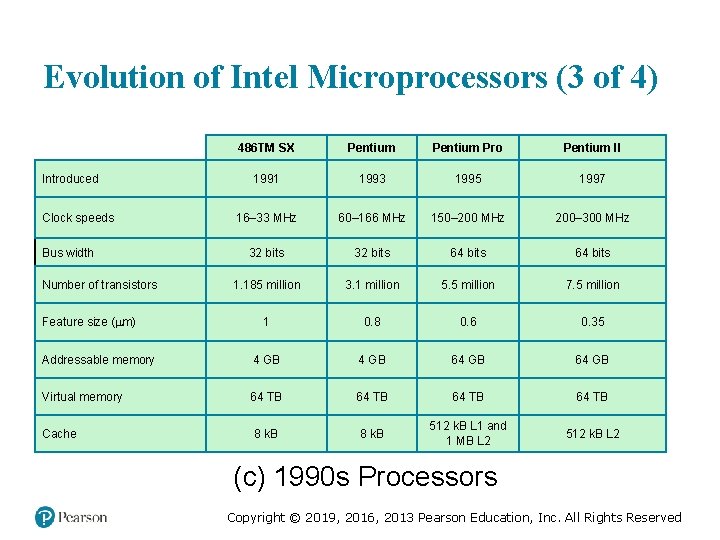
Evolution of Intel Microprocessors (3 of 4) 486 TM SX Pentium Pro Pentium II 1991 1993 1995 1997 16– 33 MHz 60– 166 MHz 150– 200 MHz 200– 300 MHz 32 bits 64 bits 1. 185 million 3. 1 million 5. 5 million 7. 5 million 1 0. 8 0. 6 0. 35 Addressable memory 4 GB 64 GB Virtual memory 64 TB 8 k. B 512 k. B L 1 and 1 MB L 2 512 k. B L 2 Introduced Clock speeds Bus width Number of transistors Feature size ( m) Cache (c) 1990 s Processors Copyright © 2019, 2016, 2013 Pearson Education, Inc. All Rights Reserved
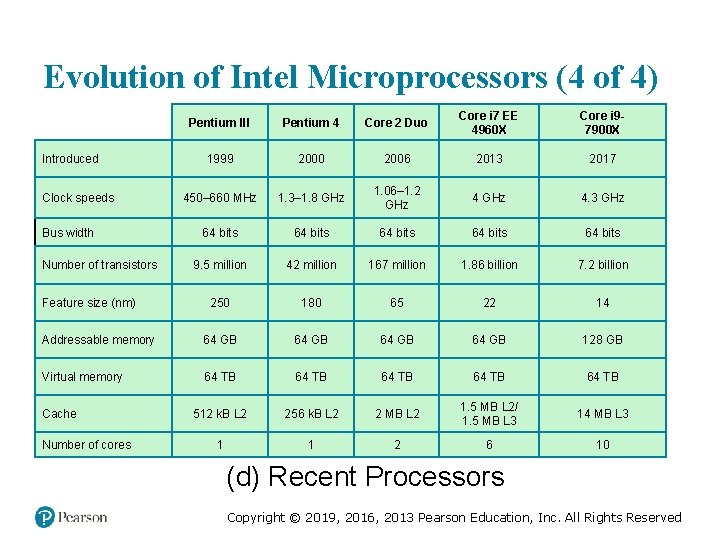
Evolution of Intel Microprocessors (4 of 4) Pentium III Pentium 4 Core 2 Duo Core i 7 EE 4960 X Core i 97900 X 1999 2000 2006 2013 2017 450– 660 MHz 1. 3– 1. 8 GHz 1. 06– 1. 2 GHz 4. 3 GHz 64 bits 64 bits 9. 5 million 42 million 167 million 1. 86 billion 7. 2 billion 250 180 65 22 14 Addressable memory 64 GB 128 GB Virtual memory 64 TB 64 TB 512 k. B L 2 256 k. B L 2 2 MB L 2 1. 5 MB L 2/ 1. 5 MB L 3 14 MB L 3 1 1 2 6 10 Introduced Clock speeds Bus width Number of transistors Feature size (nm) Cache Number of cores (d) Recent Processors Copyright © 2019, 2016, 2013 Pearson Education, Inc. All Rights Reserved
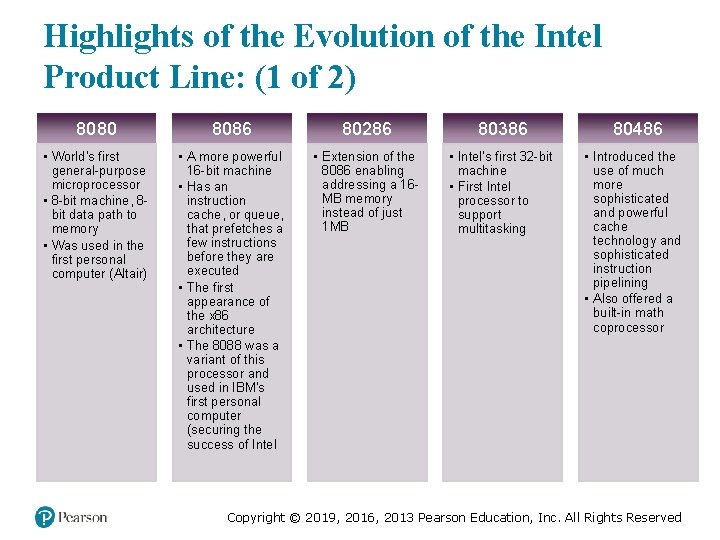
Highlights of the Evolution of the Intel Product Line: (1 of 2) 8080 8086 80286 80386 • World’s first general-purpose microprocessor • 8 -bit machine, 8 bit data path to memory • Was used in the first personal computer (Altair) • A more powerful 16 -bit machine • Has an instruction cache, or queue, that prefetches a few instructions before they are executed • The first appearance of the x 86 architecture • The 8088 was a variant of this processor and used in IBM’s first personal computer (securing the success of Intel • Extension of the 8086 enabling addressing a 16 MB memory instead of just 1 MB • Intel’s first 32 -bit machine • First Intel processor to support multitasking 80486 • Introduced the use of much more sophisticated and powerful cache technology and sophisticated instruction pipelining • Also offered a built-in math coprocessor Copyright © 2019, 2016, 2013 Pearson Education, Inc. All Rights Reserved
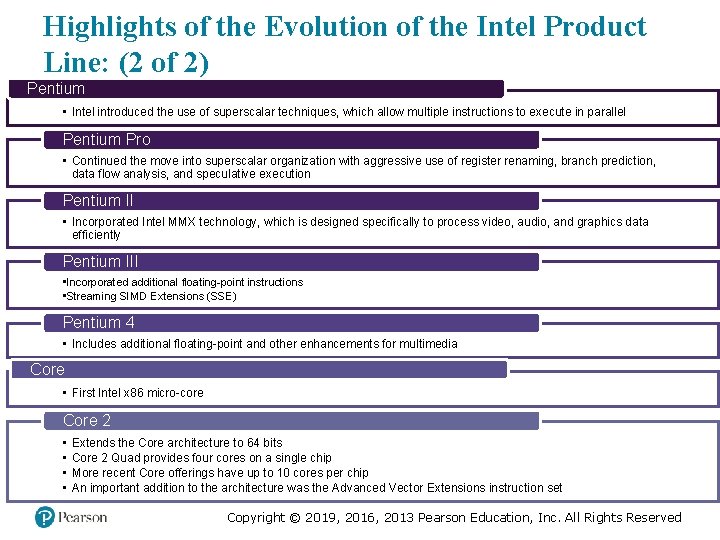
Highlights of the Evolution of the Intel Product Line: (2 of 2) Pentium • Intel introduced the use of superscalar techniques, which allow multiple instructions to execute in parallel Pentium Pro • Continued the move into superscalar organization with aggressive use of register renaming, branch prediction, data flow analysis, and speculative execution Pentium II • Incorporated Intel MMX technology, which is designed specifically to process video, audio, and graphics data efficiently Pentium III • Incorporated additional floating-point instructions • Streaming SIMD Extensions (SSE) Pentium 4 • Includes additional floating-point and other enhancements for multimedia Core • First Intel x 86 micro-core Core 2 • • Extends the Core architecture to 64 bits Core 2 Quad provides four cores on a single chip More recent Core offerings have up to 10 cores per chip An important addition to the architecture was the Advanced Vector Extensions instruction set Copyright © 2019, 2016, 2013 Pearson Education, Inc. All Rights Reserved
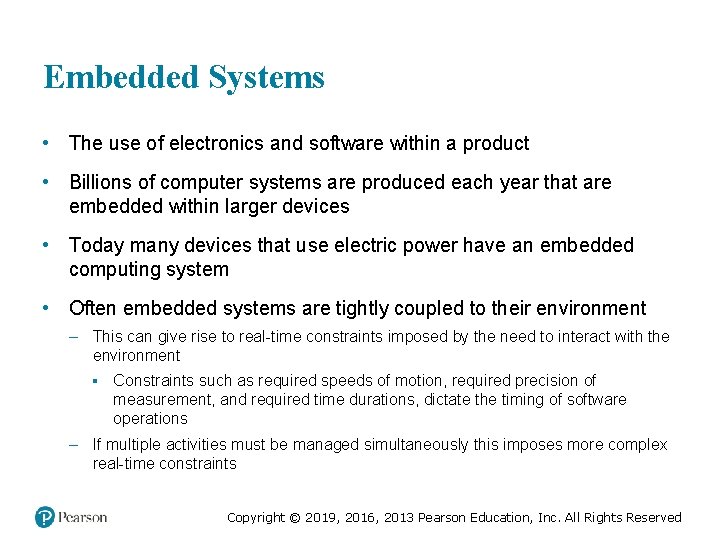
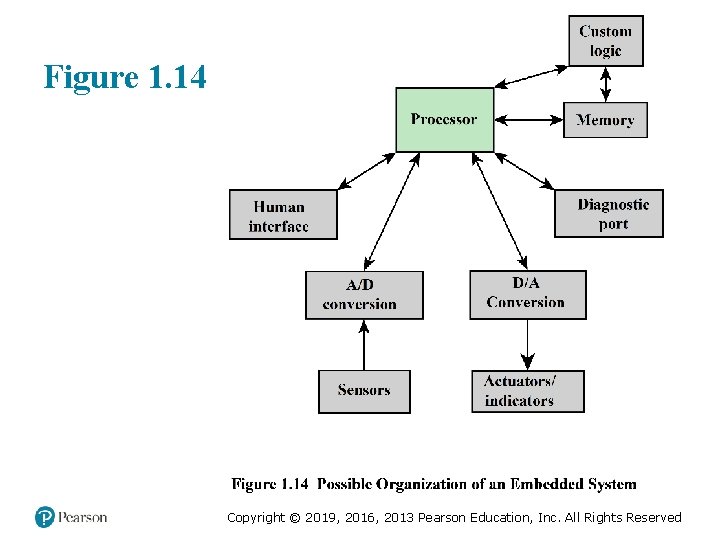
Embedded Systems • The use of electronics and software within a product • Billions of computer systems are produced each year that are embedded within larger devices • Today many devices that use electric power have an embedded computing system • Often embedded systems are tightly coupled to their environment – This can give rise to real-time constraints imposed by the need to interact with the environment ▪ Constraints such as required speeds of motion, required precision of measurement, and required time durations, dictate the timing of software operations – If multiple activities must be managed simultaneously this imposes more complex real-time constraints Copyright © 2019, 2016, 2013 Pearson Education, Inc. All Rights Reserved
Figure 1. 14 Copyright © 2019, 2016, 2013 Pearson Education, Inc. All Rights Reserved
The Internet of Things (Io. T) • • • Term that refers to the expanding interconnection of smart devices, ranging from appliances to tiny sensors Is primarily driven by deeply embedded devices Generations of deployment culminating in the Io. T: – Information technology (IT) ▪ PCs, servers, routers, firewalls, and so on, bought as IT devices by enterprise IT people and primarily using wired connectivity – Operational technology (OT) ▪ Machines/appliances with embedded IT built by non-IT companies, such as medical machinery, SCADA, process control, and kiosks, bought as appliances by enterprise OT people and primarily using wired connectivity – Personal technology ▪ Smartphones, tablets, and e. Book readers bought as IT devices by consumers exclusively using wireless connectivity and often multiple forms of wireless connectivity – Sensor/actuator technology ▪ Single-purpose devices bought by consumers, IT, and OT people exclusively using wireless connectivity, generally of a single form, as part of larger systems • It is the fourth generation that is usually thought of as the Io. T and it is marked by the use of billions of embedded devices Copyright © 2019, 2016, 2013 Pearson Education, Inc. All Rights Reserved
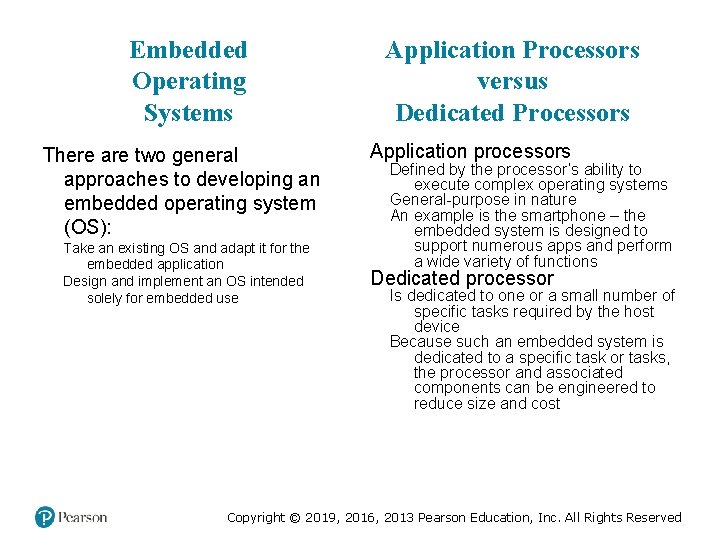
Embedded Operating Systems There are two general approaches to developing an embedded operating system (OS): Take an existing OS and adapt it for the embedded application Design and implement an OS intended solely for embedded use Application Processors versus Dedicated Processors Application processors Defined by the processor’s ability to execute complex operating systems General-purpose in nature An example is the smartphone – the embedded system is designed to support numerous apps and perform a wide variety of functions Dedicated processor Is dedicated to one or a small number of specific tasks required by the host device Because such an embedded system is dedicated to a specific task or tasks, the processor and associated components can be engineered to reduce size and cost Copyright © 2019, 2016, 2013 Pearson Education, Inc. All Rights Reserved
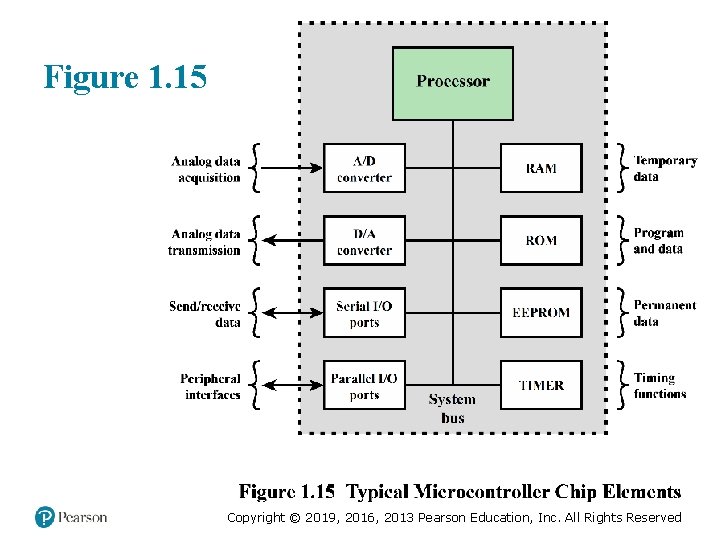
Figure 1. 15 Copyright © 2019, 2016, 2013 Pearson Education, Inc. All Rights Reserved
Deeply Embedded Systems • Subset of embedded systems • Has a processor whose behavior is difficult to observe both by the programmer and the user • Uses a microcontroller rather than a microprocessor • Is not programmable once the program logic for the device has been burned into ROM • Has no interaction with a user • Dedicated, single-purpose devices that detect something in the environment, perform a basic level of processing, and then do something with the results • Often have wireless capability and appear in networked configurations, such as networks of sensors deployed over a large area • Typically have extreme resource constraints in terms of memory, processor size, time, and power consumption Copyright © 2019, 2016, 2013 Pearson Education, Inc. All Rights Reserved
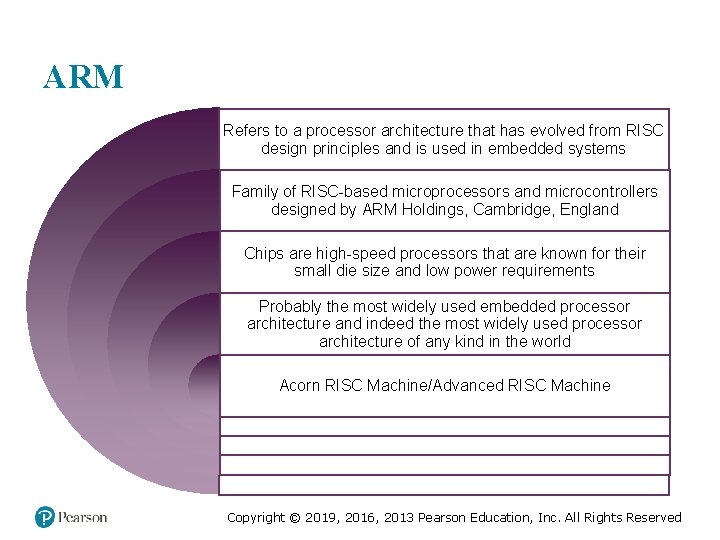
ARM Refers to a processor architecture that has evolved from RISC design principles and is used in embedded systems Family of RISC-based microprocessors and microcontrollers designed by ARM Holdings, Cambridge, England Chips are high-speed processors that are known for their small die size and low power requirements Probably the most widely used embedded processor architecture and indeed the most widely used processor architecture of any kind in the world Acorn RISC Machine/Advanced RISC Machine Copyright © 2019, 2016, 2013 Pearson Education, Inc. All Rights Reserved
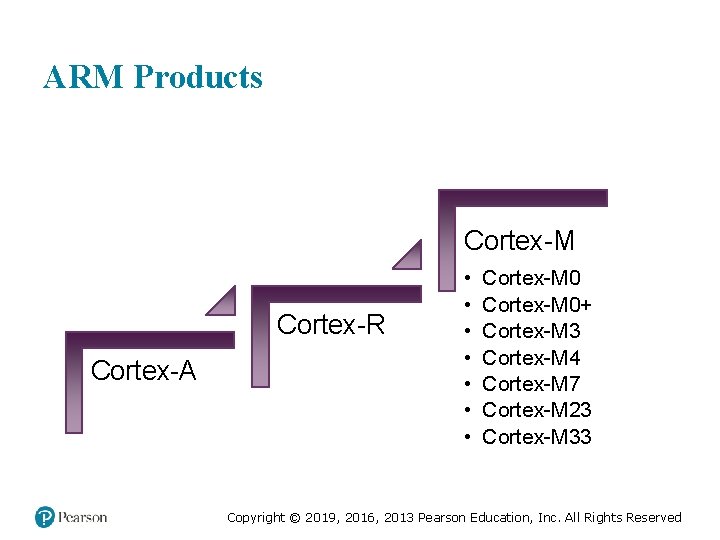
ARM Products Cortex-M Cortex-R Cortex-A • • Cortex-M 0+ Cortex-M 3 Cortex-M 4 Cortex-M 7 Cortex-M 23 Cortex-M 33 Copyright © 2019, 2016, 2013 Pearson Education, Inc. All Rights Reserved
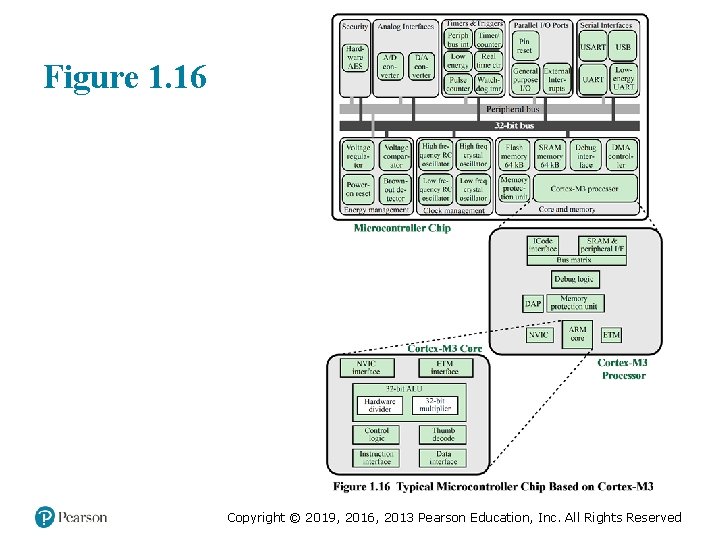
Figure 1. 16 Copyright © 2019, 2016, 2013 Pearson Education, Inc. All Rights Reserved
Summary Basic Concepts and Computer Evolution Chapter 1 Organization and architecture Structure and function The IAS computer Gates, memory cells, chips, and multichip modules Gates and memory cells Transistors Microelectronic chips Multichip module The evolution of the Intel x 86 architecture Embedded systems The Internet of things Embedded operating systems Application processors versus dedicated processors Microprocessors versus microcontrollers Embedded versus deeply embedded systems ARM architecture ARM evolution Instruction set architecture ARM products Copyright © 2019, 2016, 2013 Pearson Education, Inc. All Rights Reserved
Copyright This work is protected by United States copyright laws and is provided solely for the use of instructions in teaching their courses and assessing student learning. dissemination or sale of any part of this work (including on the World Wide Web) will destroy the integrity of the work and is not permitted. The work and materials from it should never be made available to students except by instructors using the accompanying text in their classes. All recipients of this work are expected to abide by these restrictions and to honor the intended pedagogical purposes and the needs of other instructors who rely on these materials. Copyright © 2019, 2016, 2013 Pearson Education, Inc. All Rights Reserved