
COMPUTER NETWORKS What is a Computer Network A
- Slides: 57
COMPUTER NETWORKS
What is a Computer Network ? • A network consists of two or more computers that are linked together in order to share resources e. g printers, memory , exchange files and folders, allow electronic communication e. g Email etc. It is a system for communication among two or more computers.
Requirements for a computer network. • Network Interface Card (NIC) • Network Operating System • Communication channel(Media)
The communication channel. • Communicating data from one location(computer) to another requires some form of pathway or medium. These pathways, called communication channels use two types of media: • (i)Cable e. g Twisted-pair cable and fiber-optic cable. Cable or wireline media use physical wires to transmit data and information.
• Twisted-pair wire and coaxial cables are made of copper, and fiber-optic cable is made of glass. • (ii) Broadcast(wireless) e. g This media uses radio waves , microwaves and infrared
TYPES OF COMPUTER NETWORKS Computer networks are categorized into four major types. 1. Personal area network (PAN): A personal area network (PAN) is a computer network used for communication among computer devices (including telephones and Personal Digital Assistants (PDAs) close to one person. The devices may or may not belong to the person in question.
TYPES OF COMPUTER NETWORKS(…. ) 2. Local Area Network (LAN): Is a computer network covering a local area, like a home, office or small group of buildings such as a college. The topology (physical lay out)of a network dictates its physical structure. The generally accepted maximum size for a LAN is 1000 m 2.
TYPES OF COMPUTER NETWORKS(…. ) 3. Metropolitan Area Network (MAN). • Is a large computer network usually spanning a campus or a city. It typically uses optical fiber connections to link its sites.
Wide Area Network (WAN) • Is a computer network covering a wide geographical area, involving vast array of computers. This is different from personal area networks (PANs), metropolitan area networks (MANs) or local area networks (LANs) that are usually limited to a room, building or campus. The best example of a WAN is the Internet. Using a WAN, schools in Uganda can communicate with places like Tokyo in a matter of minutes, without paying enormous phone bills.
NETWORK MODELS • In any given form of network, computers communicate to each other depending on the relationship that exists. The following shows the relationship therein. (i) Client / Server - Is a network application architecture, which separates the client from the server. Each instance of the client software connects to a server or application server.
• A client is a computer that accesses a service made available by a server. • A server is computer that shares its resources with other computers called clients on a net work. • Server software generally but not always runs on powerful computers dedicated for exclusive use to running the business application.
• Client software on the other hand generally runs on common PCs or workstations. Clients get all or most of their information and rely on the application server for things such as configuration files, business application programs or to offload computer intensive application tasks back the server to keep the client computer free to perform other tasks.
Advantages of a client/server network: • Centralization - In a client/server network there is centralized control. Servers help in administering the whole set-up. Access rights and resource allocation is done by Servers. • Security : Rules defining security and access rights can be defined at the time of set-up of server • Proper management- All the files are stored at the same place. In this way, management of files becomes easy. Also it becomes easier to find files.
• Back-up and Recovery possible : As all the data is stored on server its easy to make a back-up of it. Also, in case of a break-down if data is lost, it can be recovered easily and efficiently. While in peer computing we have to take backup at every workstation. • Flexibility - New technology can be easily integrated into system without having to work on individual machines. • Accessibility - Server can be accessed remotely and across multiple platforms.
• Easy upgrade and scalability - Changes can be made easily by just upgrading the server. Also new resources and systems can be added by making necessary changes in server. • Speed - The network will runs far better as data and resources are handled by a dedicated machine.
Disadvantages of a client/server network: • Cost - It is very expensive to install and manage this type of network. • Maintenance - Large networks will require professional IT staff to maintain the servers and ensure efficient operation of other technical details of network. • Dependence - When server goes down all operations will cease across the network.
Disadvantages of a client/server network: • Congestion in Network : Too many requests from the clients may lead to congestion and this overload can lead to breaking-down of servers. In peer-to-peer, the total bandwidth of the network increases as the number of peers increase. • It can the summarized that client-server model is not used in small scale networks and networks where security is not a big issue.
A peer-to-peer (or P 2 P) • Refers to the network, where any node(e. g computer) is able to initiate or complete any supported transaction with any other node. It is a network in which resources and files are shared without a centralized management source.
Advantages of a peer-to-peer network: • The over-all cost of building and maintaining this type of network is comparatively very small. • It is easy to setup e. g an operating system (such as Windows XP) already in place may only need to be reconfigured for peer-to-peer operations. • In peer-to-peer, the total bandwidth of the network increases as the number of peers increase.
Advantages of a peer-to-peer network: • P 2 P is more reliable as central dependency is eliminated. Failure of one peer doesn’t affect the functioning of other peers. • There is no need for full-time System Administrator. Every user is the administrator of his/ her machine. Users can control their shared resources.
Disadvantages of a peer-to-peer network: • The network is decentralized thus it is difficult to administer. ie one person cannot determine the whole accessibility setting of whole network. • Security - Does not provide the security available on a client/server network. • Data recovery or backup is very difficult. Each computer should have its own back-up system.
• Security in P 2 P is very limited, viruses, spywares, trojans, etc malwares can easily transmitted between clients. • Note: Peer to peer networks are good to connect small number (around 10) of computer and places where high level of security is not required.
Networking Hardware • Networking hardware includes all computers, peripherals, interface cards and other equipment needed to perform data processing and communications within the network. • This section provides information on the following components:
Networking Hardware. . • 1. File Server A File server is a high capacity computer that provides various resources to computers and devices on the network. The server requires; (i) a very fast computer with a large amount of RAM and storage space, a fast network interface card, and a tape back-up device (ii) network operating system such as Novell Netware, Apple Share.
2. Workstations: These are computers to be used by one person at a time, they are commonly connected to a local area network and run multi-user operating systems.
Network Interface Cards (NICs) - NIC provides the link between your computer and your network. It provides the physical connection between the network and the workstation. Most NICS are internal, with the card fitting into an expansion slot inside the computer , others are build on the motherboard. The type of NIC affects the speed and performance of a network Three common network interface connections exist; Ethernet Cards, Local. Talk connectors, Token Ring cards.
Hubs/Concentrators A hub is a device whose primary function is to send and receive signals along the network between the nodes connected to it. • It connect s multiple devices to the network, • It serves as a central meeting place for cables from computers, servers and peripherals. • It is usually configured with 4, 8, 12, or 24 RJ-45 ports. • The entire network shuts down if there is a problem • on a hub
Repeaters. • A repeater is a device that regenerates and amplifies signals to create long-distance networks. • It simply receives, amplifies and rebroadcasts the signals. Some repeaters provide basic error-checking • A repeater can be a separate device or it can be incorporated into a concentrator. It is used to overcome distance limitations.
A bridge • A bridge is a device that links two homogenous packetbroadcast local networks. It accepts all packets from each network addressed to devices on the other, buffers them, and retransmits them to the other network. • It connects two or more networks using the same address method or protocol. • It can provide some addressing information. • Monitors and manages the traffic to maintain optimum performance on both sides of the network often used when LANs reach their capacity of nodes
Switches • A switch is a high-speed multi port bridge. Today, switches are replacing multi port repeaters or concentrators in a UTP environment. (Un shielded Twisted Pair) • It is an intelligent hub that maintains a bridging table, keeping track of which hardware addresses are located on which network segment. • more efficient than any other type of hub • It has ability to dedicate bandwidth to each port on its self.
Routers • Routers are similar to bridges in that they link two or more physically separate network segments. The network segments linked by a router, however, remain logically separate and can function as independent networks. Routers; • translate information from one network to another; similar to a super-intelligent bridge. i. e receive information from a cabled network and transmit it wirelessly. • maintain a map of the network, select the best route for data.
• have information on source addresses, destination addresses and path distances. • segment bandwidth and segment status are contained in the router's routing table • can translate messages with different addressing methods • can act as firewalls (many ISP's block traffic at the router level) • direct signal traffic efficiently
• can route messages between linear bus, star, and token ring topologies • can route messages across fibre optic, coaxial, and twisted-pair cabling
Network Media and cabling What is a Network C able? A Cable is the medium through which information usually moves from one network device to another. There are several types of cables which are commonly used with LANs. In some cases, a network will utilize only one type of cable, other networks will use a variety of cable types.
The type of cable chosen for a network is related to the network's topology, protocol, and size. Understanding the characteristics of different types of cables and how they relate to other aspects of a network is necessary for the development of a successful network.
Types of Network cables. • The following are some of the types of cables used in networks. 1. Unshielded Twisted Pair (UTP) Cable 2. Shielded Twisted Pair (STP) Cable 3. Coaxial Cable 4. Fiber Optic Cable
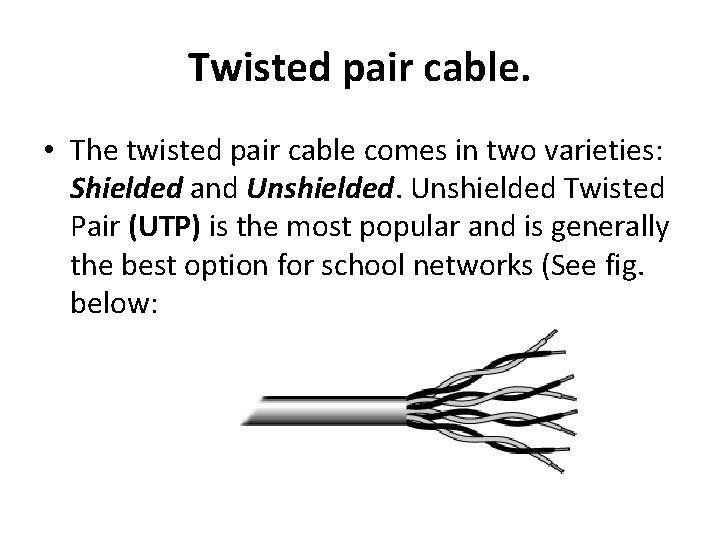
Twisted pair cable. • The twisted pair cable comes in two varieties: Shielded and Unshielded Twisted Pair (UTP) is the most popular and is generally the best option for school networks (See fig. below:
• The quality of UTP may vary from telephonegrade wire to extremely high-speed cable. The cable has four pairs of wires inside the jacket. Each pair is twisted with a different number of twists per inch to help eliminate interference from adjacent pairs and other electrical devices. The tighter the twisting, the higher the supported transmission rate and the greater the cost per foot
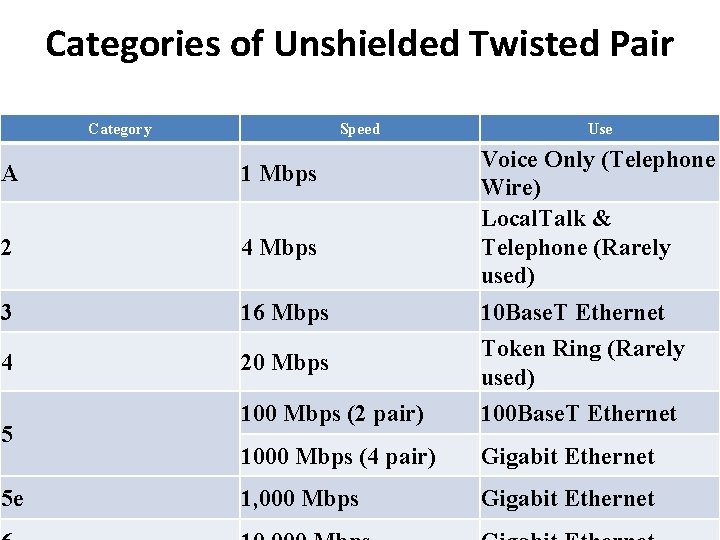
Categories of Unshielded Twisted Pair Category Speed Use Voice Only (Telephone Wire) Local. Talk & Telephone (Rarely used) A 1 Mbps 2 4 Mbps 3 16 Mbps 10 Base. T Ethernet 4 20 Mbps Token Ring (Rarely used) 100 Mbps (2 pair) 100 Base. T Ethernet 1000 Mbps (4 pair) Gigabit Ethernet 1, 000 Mbps Gigabit Ethernet 5 5 e
• Unshielded Twisted Pair Connector. • The standard connector for unshielded twisted pair cabling is an RJ-45 connector. This is a plastic connector that looks like a large telephone-style connector. A slot allows the RJ-45 to be inserted only one way. RJ stands for Registered Jack, implying that the connector follows a standard borrowed from the telephone industry. This standard designates which wire goes with which pin inside the connector.
• UTP cable is the least expensive cable, it may be susceptible to radio and electrical frequency interference (it should not be too close to electric motors, fluorescent lights, etc. ). If you must place cable in environments with lots of potential interference, or if you must place cable in extremely sensitive environments that may be susceptible to the electrical current , the Shielded twisted pair may be the solution.
• Shielded twisted pair cable is available in three different configurations: 1. Each pair of wires is individually shielded with foil. 2. There is a foil or braid shield inside the jacket covering all wires (as a group). 3. There is a shield around each individual pair, as well as around the entire group of wires (referred to as double shield twisted pair).
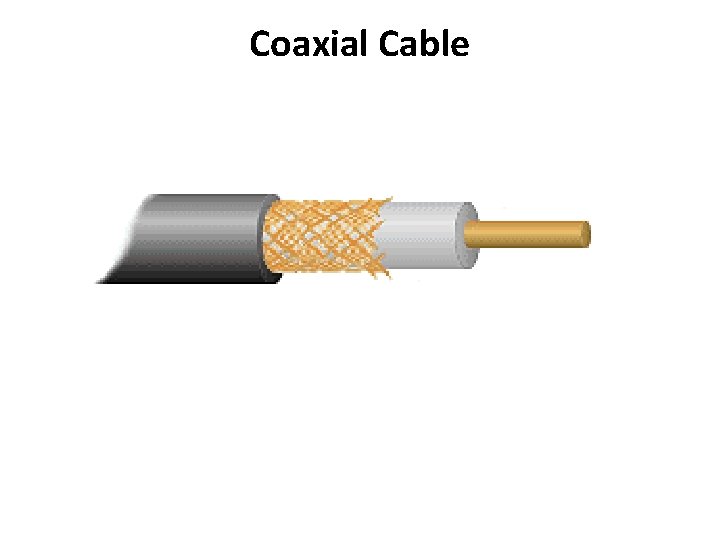
Coaxial Cable The Coaxial cable has a single copper conductor at its center. A plastic layer provides insulation between the center conductor and a braided metal shield. The metal shield helps to block any outside magnetic interference from fluorescent lights, motors, and other `Scomputers.
Coaxial Cable
Coaxial Cable • Although coaxial cabling is difficult to install, it is highly resistant to signal interference. In addition, it can support greater cable lengths between network devices than twisted pair cable. The two types of coaxial cabling are thick coaxial and thin coaxial.
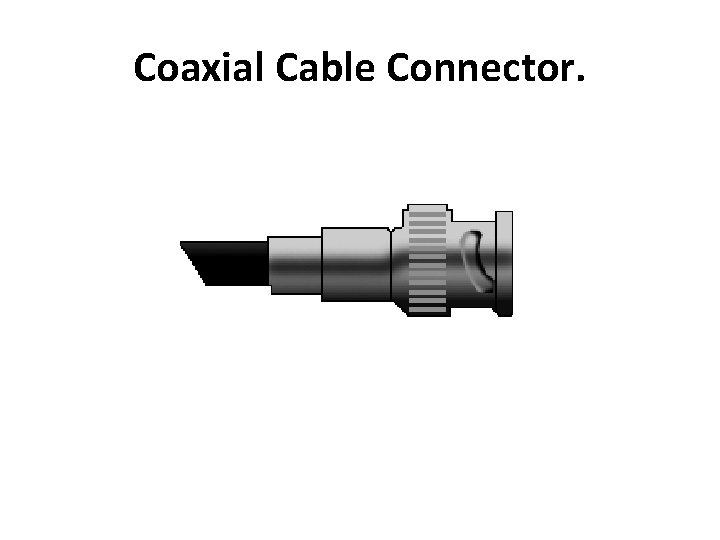
• Coaxial Cable Connectors The most common type of connector used with coaxial cables is the Bayone-Neill-Concelman (BNC) connector.
Coaxial Cable Connector.
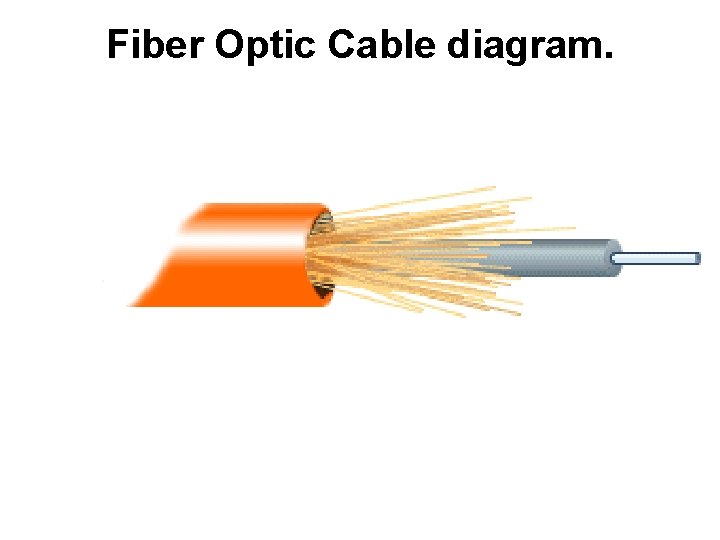
Fiber Optic Cable • The fiber optic cable consists of a center glass core surrounded by several layers of protective materials. It transmits light rather than electronic signals eliminating the problem of electrical interference. • This makes it ideal for certain environments that contain a large amount of electrical interference. • It has also made it the standard for connecting networks between buildings, due to its immunity to the effects of moisture and lighting.
Fiber Optic Cable • The fiber optic cable has the ability to transmit signals over much longer distances than coaxial and twisted pair. • It also has the capability to carry information at vastly greater speeds. This capacity broadens communication possibilities to include services such as video conferencing and interactive services.
Fiber Optic Cable diagram.
Wireless LANs • More and more networks are operating without cables, in the wireless mode. Wireless LANs use high frequency radio signals, infrared light beams, or lasers to communicate between the workstations, servers, or hubs. Each workstation and file server on a wireless network has some sort of transceiver/antenna to send and receive the data.
• Information is relayed between transceivers as if they were physically connected. For longer distance, wireless communications can also take place through cellular telephone technology, microwave transmission, or by satellite.
Advantages of wireless networks: • Mobility - With a laptop computer or mobile device, access can be available throughout a school, at the mall, on an airplane, etc. • Fast setup - If your computer has a wireless adapter, locating a wireless network can be as simple as clicking "Connect to a Network" -in some cases, you will connect automatically to networks within range. • Cost - Setting up a wireless network can be much more cost effective than buying and installing cables. • Expandability - Adding new computers to a wireless network is as easy as turning the computer on (as long as you do not exceed the maximum number of devices).
Disadvantages of wireless networks: • Security - Be careful. Be vigilant. Protect your sensitive data with backups, isolate private networks, provide strong encryption and passwords, and monitor network access traffic to and from your wireless network. • Interference - Because wireless networks use radio signals and similar techniques for transmission, they are susceptible to interference from lights and electronic devices. • Inconsistent connections - Wireless connections are not nearly as stable as those through a dedicated cable.
• Speed - The transmission speed of wireless networks is improving; however, faster options (such as gigabit Ethernet) are available via cables. If you are also moving large amounts of data around a private network, a cabled connection will enable that work to proceed much faster.
Installing Cable - Some Guidelines • When running cables, it is best to follow a few simple rules: • Always use more cable than you need. Leave plenty of slack. • Test every part of a network as you install it. Even if it is brand new, it may have problems that will be difficult to isolater.
• Stay at least 3 feet away from fluorescent light boxes and other sources of electrical interference. • If it is necessary to run cable across the floor, cover the cable with cable protectors. • Label both ends of each cable for easy identification. • Use cable ties (not tape) to keep cables in the same location together.