
Computer Networks Topic 4 Lecture 2 Common Network




- Slides: 42
Computer Networks Topic 4 – Lecture 2: Common Network Topologies
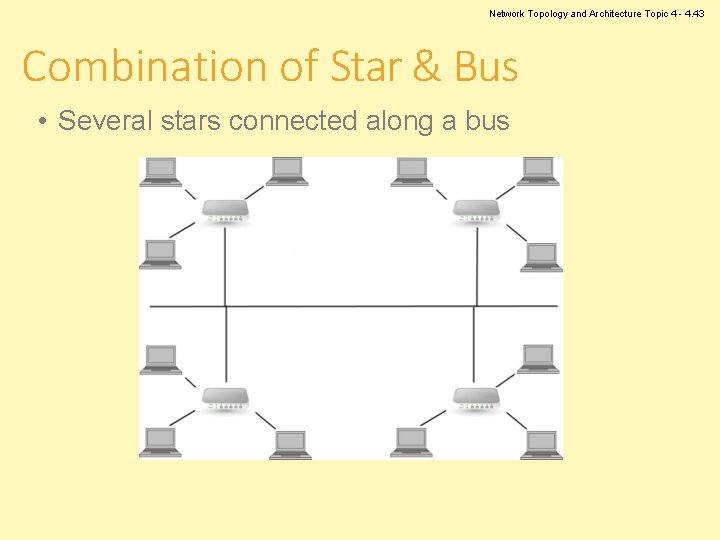
Network Topology and Architecture Topic 4 - 4. 19 Standard Topologies • There are three main network topologies in common use: – Bus is a series of computers connected along a single cable segment. – Star is a group of computers connected through a central point (hub). – Ring has computers connected to form a loop. • There are variations: – Extended star – Mesh – Star combined with bus
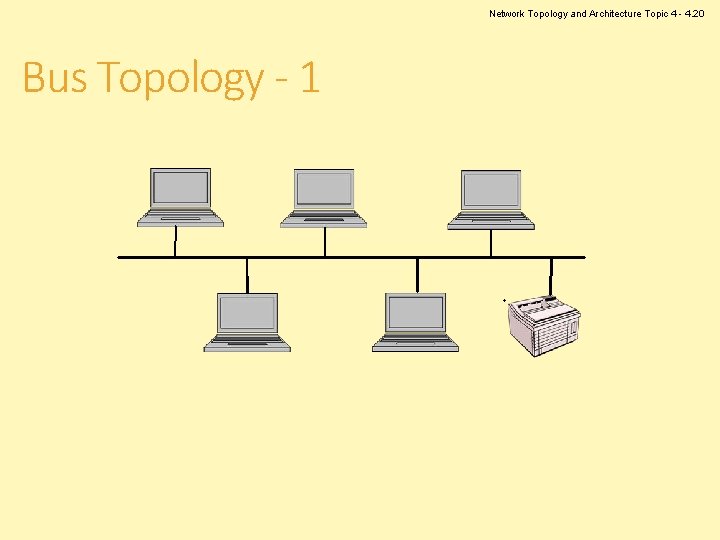
Network Topology and Architecture Topic 4 - 4. 20 Bus Topology - 1
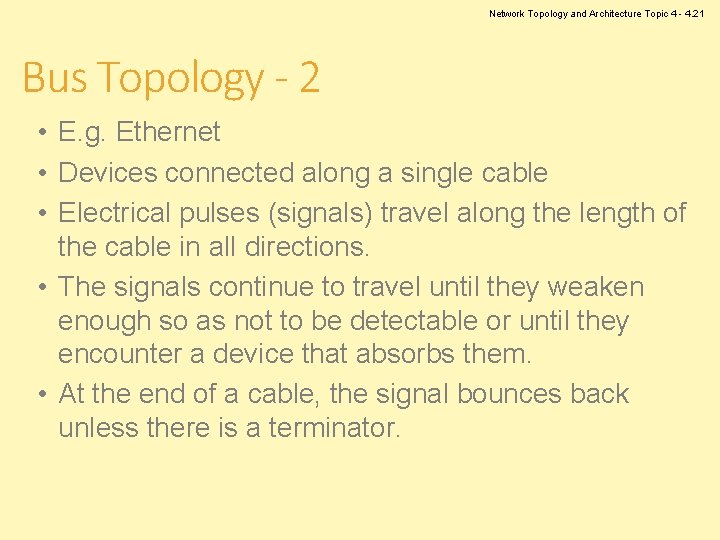
Network Topology and Architecture Topic 4 - 4. 21 Bus Topology - 2 • E. g. Ethernet • Devices connected along a single cable • Electrical pulses (signals) travel along the length of the cable in all directions. • The signals continue to travel until they weaken enough so as not to be detectable or until they encounter a device that absorbs them. • At the end of a cable, the signal bounces back unless there is a terminator.
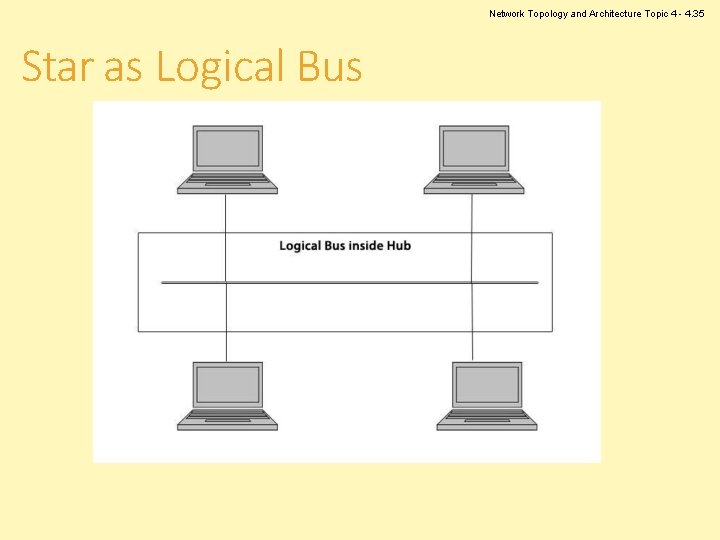
Network Topology and Architecture Logical Bus • Logical topologies describe the path that data travels from computer to computer. • A physical bus topology is usually also implemented as a logical bus. • The physical bus has fallen out of use due to technological advances. • Logical bus topology is used on some physical topologies, in particular a star topology. Topic 4 - 4. 22
Network Topology and Architecture Passive Topology • The bus topology is a passive topology. • Workstations on the bus are not responsible for regenerating the signal as it passes them. • The workstations are not required for the bus to function. • If a workstation fails, the bus does not fail. Topic 4 - 4. 23
Network Topology and Architecture Physical Bus Advantages • Cost – Less cable required than star or mesh – No additional devices such as hubs • Ease of installation – Simply connect device to cable segment • Resistant to workstation failure – Network functions if device fails – NOTE: problems if cable breaks Topic 4 - 4. 24
Network Topology and Architecture Topic 4 - 4. 25 Physical Bus Disadvantages • Difficult to troubleshoot – Faults are usually a break in the main cable and this is difficult to isolate on a large network • Scalability – Increasing network size and layout can be important for productivity – Bus topology is not easily scaled up.
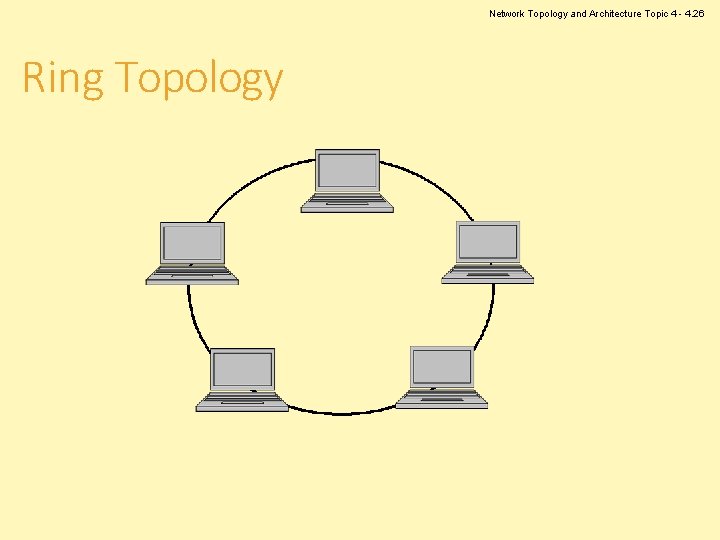
Network Topology and Architecture Topic 4 - 4. 26 Ring Topology
Network Topology and Architecture Topic 4 - 4. 27 Physical Ring Topology • All computers are connected in a ring. • The ring has no start and no end. – Does not need a terminator as there are no reflected signals • Signals travel in one direction. • Signals are regenerated by each computer in turn – Active topology.
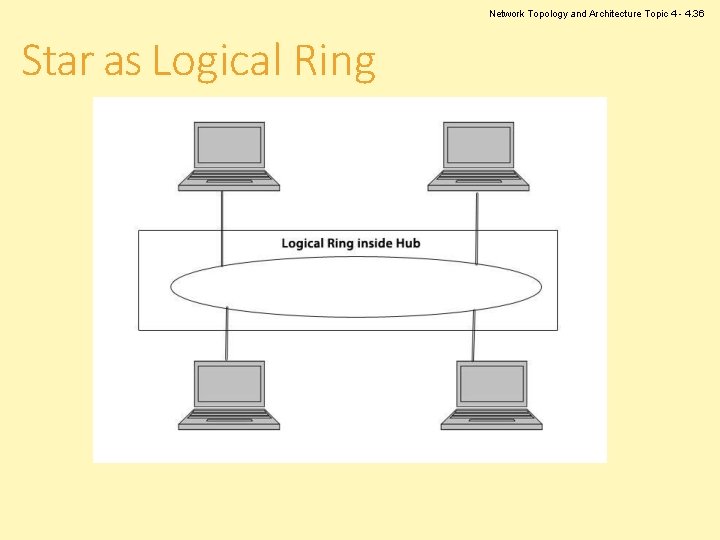
Network Topology and Architecture Topic 4 - 4. 28 Logical Ring Topology • Data travels from one node to the next device until it reaches its destination. • Modern ring topologies use “smart hubs” that recognise a computer failure and remove that computer from the ring automatically. • Shares network resources fairly
Network Topology and Architecture Topic 4 - 4. 29 Physical Ring Advantages • Low signal degeneration – Each workstation is responsible for boosting the signal – In passive systems, the signal is not boosted and weakens, which limits the size of the network – Strong signal means signal seldom needs retransmitting • Fair allocation of network access to nodes
Network Topology and Architecture Topic 4 - 4. 30 Physical Ring Disadvantages • Not resistant to workstation failure – Failure of workstation or cable causes network to fail – Note: modern systems and logical rings can isolate failed workstation and maintain network uptime • Network maintenance – Changes to cabling or moving a workstation cause network downtime.
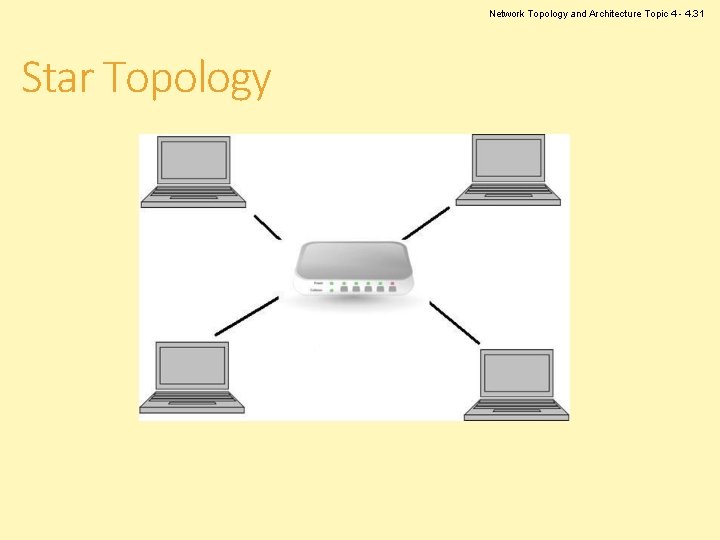
Network Topology and Architecture Topic 4 - 4. 31 Star Topology
Network Topology and Architecture Topic 4 - 4. 32 Physical Star Topology • All devices connected through a central hub or switch • Each workstation is connected directly to the hub. • Very popular topology for modern networks
Network Topology and Architecture Topic 4 - 4. 33 Star Topology Advantages • Easy to add new devices – just connect to hub • Cable break only affects one single node. • Ease of administration – Centralised management and monitoring of network traffic simplifies job of network administrator • Ease of changing configuration
Network Topology and Architecture Topic 4 - 4. 34 Star Topology Disadvantages • Hub Failure – If the hub fails, the whole system fails. – However, this is easy to troubleshoot. • Cost – Cost is higher as extra cabling and devices (hubs) are required. – However, this cost is no longer great and therefore not a real barrier to implementing a star topology.
Network Topology and Architecture Topic 4 - 4. 35 Star as Logical Bus
Network Topology and Architecture Topic 4 - 4. 36 Star as Logical Ring
Network Topology and Architecture Topic 4 - 4. 37 Switching as Star Topology • Switched networks are neither bus nor ring logically, but are implemented as a physical star. • A switch takes a signal coming from a network device and builds a link to the intended destination computer on the fly. • Superior to other logical topologies, because multiple computers can communicate simultaneously without affecting each other • Main method used in most LAN designs
Network Topology and Architecture Topic 4 - 4. 38 WLAN as Physical Star Topology • Uses a central device (access point) to control communications • Star physical topology because all the signals travel through one central device
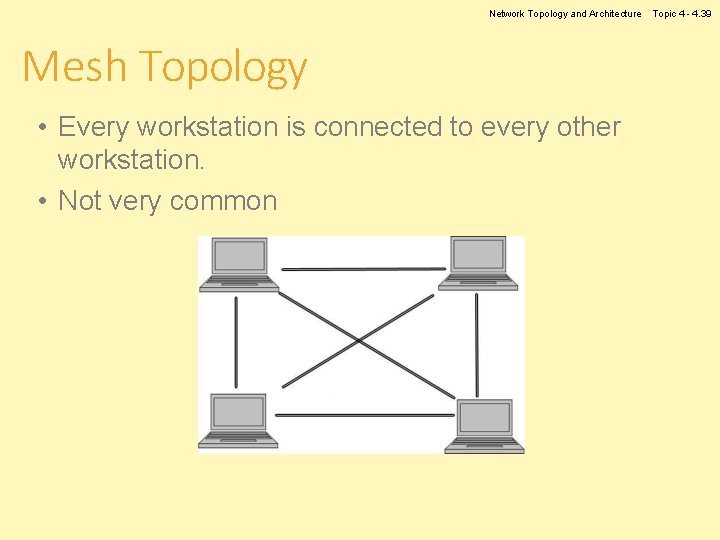
Network Topology and Architecture Mesh Topology • Every workstation is connected to every other workstation. • Not very common Topic 4 - 4. 39
Network Topology and Architecture Topic 4 - 4. 40 Mesh Topology Advantages • Resilience – Multiple pathways for sending data – Cable fault is not a problem as data can go via another path – Almost impossible for network to fail due to cable failure as there are so many routes available
Network Topology and Architecture Mesh Topology Disadvantages • Cost – Additional cabling – Additional interfaces • Difficult to administer – Due to the number of connections Topic 4 - 4. 41
Network Topology and Architecture Topic 4 - 4. 42 Extended Star • Several stars connected in a star from a switch
Network Topology and Architecture Topic 4 - 4. 43 Combination of Star & Bus • Several stars connected along a bus
Computer Networks Topic 4 – Lecture 3: Topologies & Protocols
Network Topology and Architecture Star Topology • The most common physical topology in modern LANs • Requires a device at the centre of the network that controls traffic • Both hubs and switches can act as the centre of a star topology. Topic 4 - 4. 45
Network Topology and Architecture Topic 4 - 4. 46 Hubs • Active hubs are the most common type of hub. • Regenerate or repeat the signals – – – – Needs electrical power Has many ports Also called multiport repeaters or repeating hubs Signal comes in on one port Cleans the signal (filters out noise) Strengthens the signal Sends the regenerated signal out to all other ports
Network Topology and Architecture Topic 4 - 4. 47 Switches • Central connecting point in a star topology network • Does more than regenerate signals • Has several ports for connecting workstations in a star topology • Determines which port the destination device connects to and forwards the message to that port • Handles several conversations at a time • Provides the full network bandwidth to each device rather than requiring bandwidth sharing
Network Topology and Architecture Topic 4 - 4. 48 Network Access • In any network, providing access for nodes to transmit messages is a key element. • It must be assumed that any node may require access at any time. • Controlling access to networks becomes more difficult for larger networks and faster data speeds. • Access is controlled by a combination of topology, wiring and protocols that combine into network standards.
Network Topology and Architecture Topic 4 - 4. 49 Non-contention Techniques • Designed to prevent conflict between nodes wishing to transmit • Does not allow two nodes to transmit at the same time • Each node is given exclusive access to the network. • This right to access is passed throughout the network. • Token passing is a common form.
Network Topology and Architecture Contention Techniques • • Allow conflicts and collisions to occur Dealing with collisions is part of the design No order of access to transmit Any node can transmit at any time. Topic 4 - 4. 50
Network Topology and Architecture Topic 4 - 4. 51 Common Contention Technique • CSMA/CD • As used in Ethernet • When a collision occurs, each node waits a random time before retransmitting, why?
Network Topology and Architecture Topic 4 - 4. 52 Designing a Network • The main steps are as follows: – Determine what the network will be used for – this will be a major factor in deciding the topology you use. – Choose the types of devices that will be used for interconnecting computers and sites. – Consider the type of devices the network will employ and the usage of network resources – this will determine how many servers are required and where servers should be placed.
Network Topology and Architecture Topic 4 - 4. 53 Selecting a Topology • Modern networks have one key factor in this choice - how fast should the network be? • Physical topology will almost certainly be a star • Logical topology is usually a switched network • Ethernet switches are used on most LANs • Other logical topologies can be the result of: – – Use of legacy equipment Network size Cost restrictions Difficulty of running cables
Network Topology and Architecture Topic 4 - 4. 54 Planning a Logical Topology - 1 • Can either start from scratch or upgrade an existing network? • You should have sufficient information about: – – Networking components Hardware Protocols Physical topologies
Network Topology and Architecture Topic 4 - 4. 55 Planning a Logical Topology - 2 • Analyse the following: – – – Security needs Traffic patterns Need for future expansion Server capabilities Internet access requirements • You should also make a plan for disaster recovery, data recovery and troubleshooting techniques.
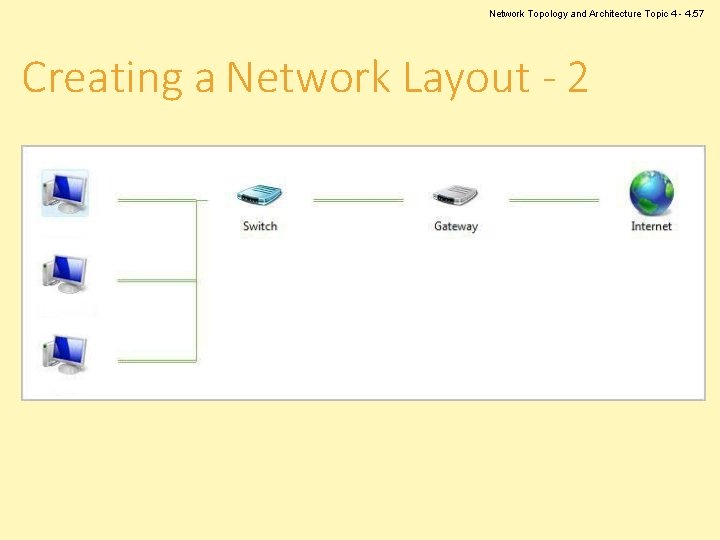
Network Topology and Architecture Topic 4 - 4. 56 Creating a Network Layout - 1 • A network layout must be documented in a diagram. • Factors to consider – – – Number of client computers Number of servers Will there be an Internet connection? The architecture of the building The best topology or topologies • Any diagram must be updated if the layout changes – Version control.
Network Topology and Architecture Topic 4 - 4. 57 Creating a Network Layout - 2
Network Topology and Architecture Topic 4 - 4. 58 References • Price, B. (ed) (2003). Networking Complete, 3 rd edition. Sybex. • Tomsho, G. (2006). Guide to Networking essential, 5 th edition. Course Technology.
Network Topology and Architecture Topic 4 – Network Topology and Architecture Any Questions? Topic 4 - 4. 59