
Computer Networks Introduction Ivan Marsic Rutgers University Chapter
![Learning Switches [ See the switching table in the next slide … ]](https://slidetodoc.com/presentation_image/540d50026027b2c4d86d6cacde0ea2ae/image-132.jpg "Learning Switches [ See the switching table in the next slide … ]")
![802. 11 Address Fields [Address-1] RA = Immediate recipient of the current frame (C)](https://slidetodoc.com/presentation_image/540d50026027b2c4d86d6cacde0ea2ae/image-144.jpg "802. 11 Address Fields [Address-1] RA = Immediate recipient of the current frame (C)")
- Slides: 159
Computer Networks: Introduction Ivan Marsic Rutgers University Chapter 1 – Introduction
Topic: Introduction to Data Networking Goals Communication Media Protocols Reliable Transmission
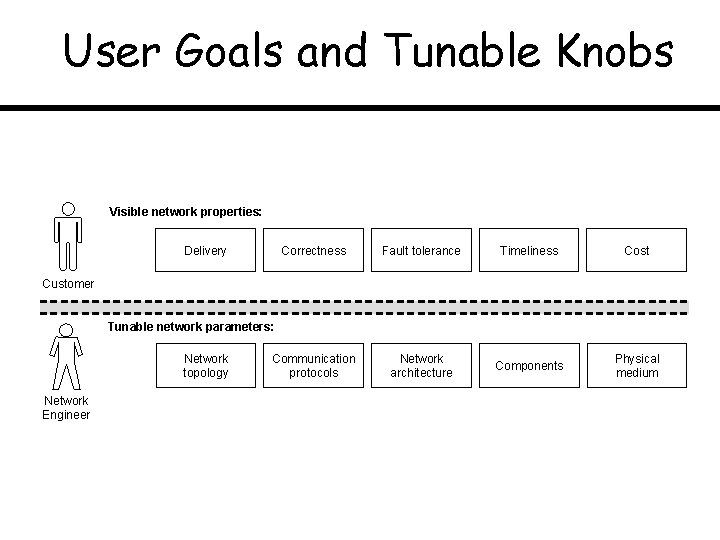
User Goals and Tunable Knobs Visible network properties: Delivery Correctness Fault tolerance Timeliness Cost Communication protocols Network architecture Components Physical medium Customer Tunable network parameters: Network topology Network Engineer
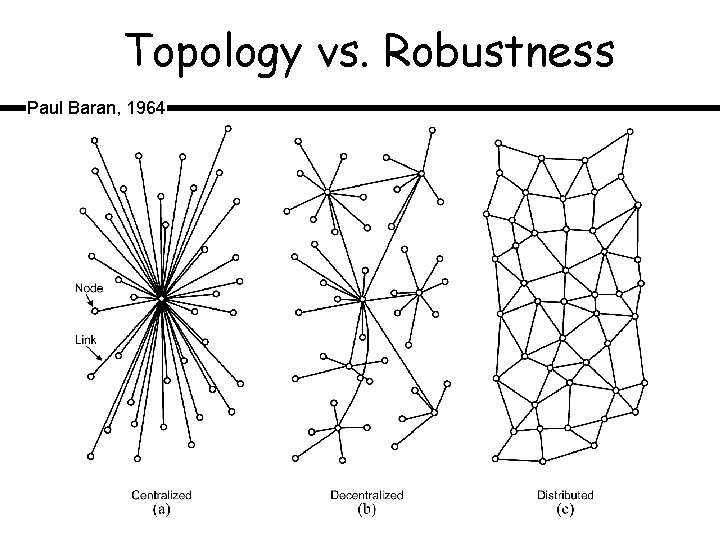
Topology vs. Robustness Paul Baran, 1964
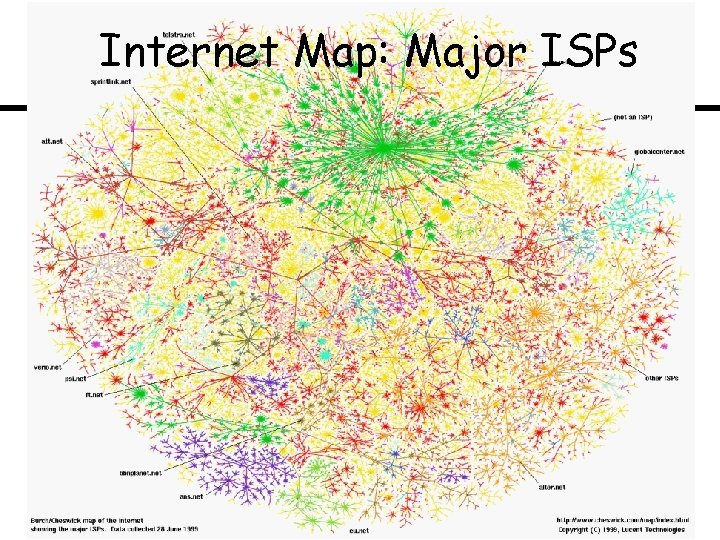
Internet Map: Major ISPs
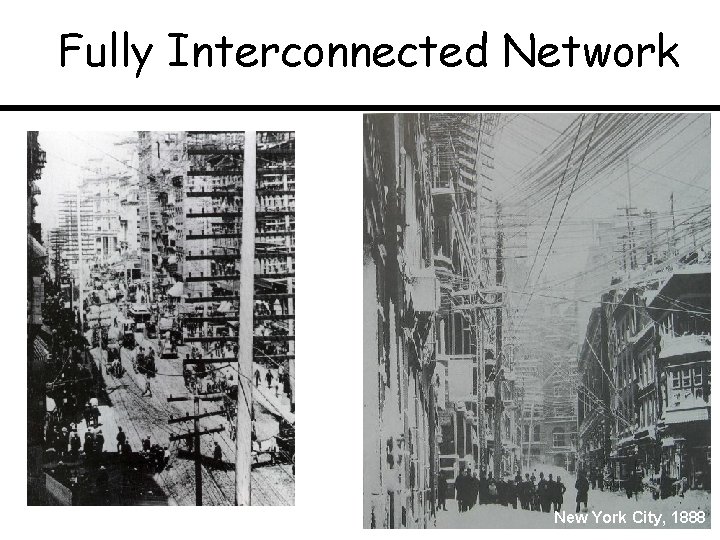
Fully Interconnected Network New York City, 1888
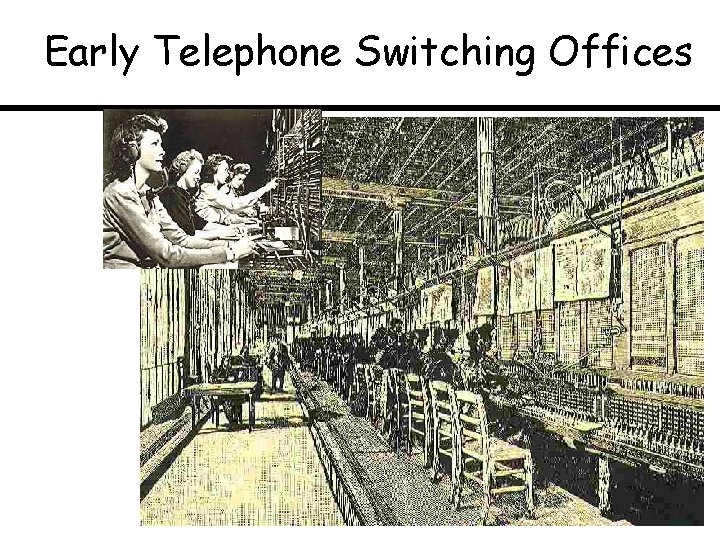
Early Telephone Switching Offices
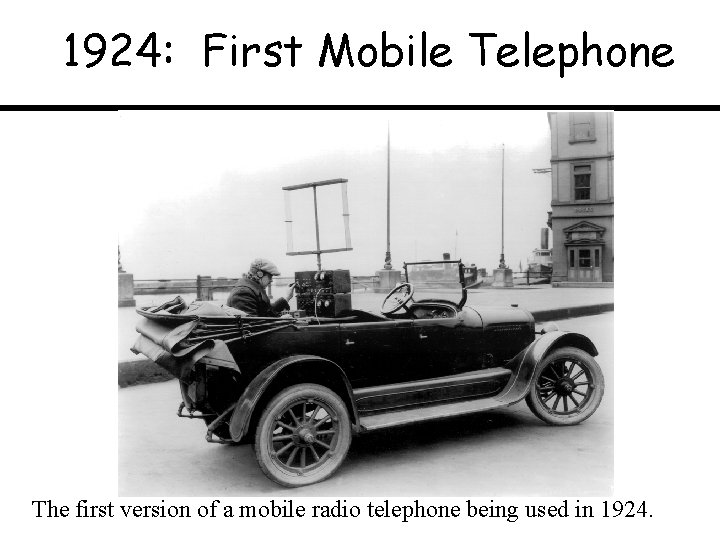
1924: First Mobile Telephone The first version of a mobile radio telephone being used in 1924.
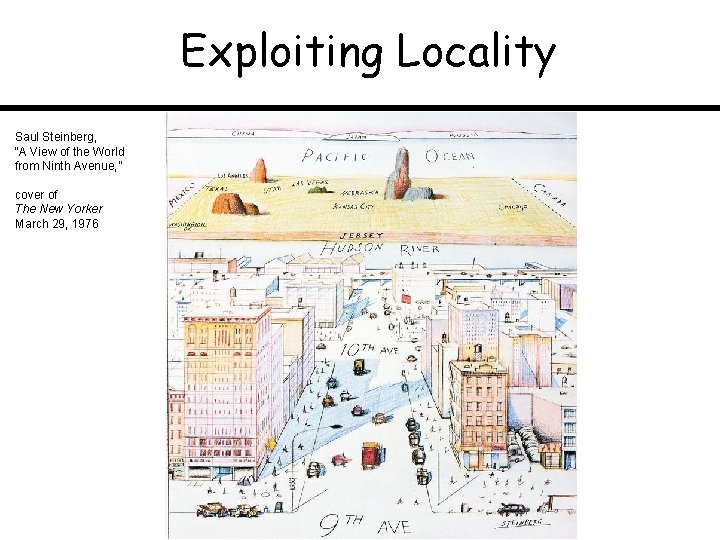
Exploiting Locality Saul Steinberg, “A View of the World from Ninth Avenue, ” cover of The New Yorker March 29, 1976
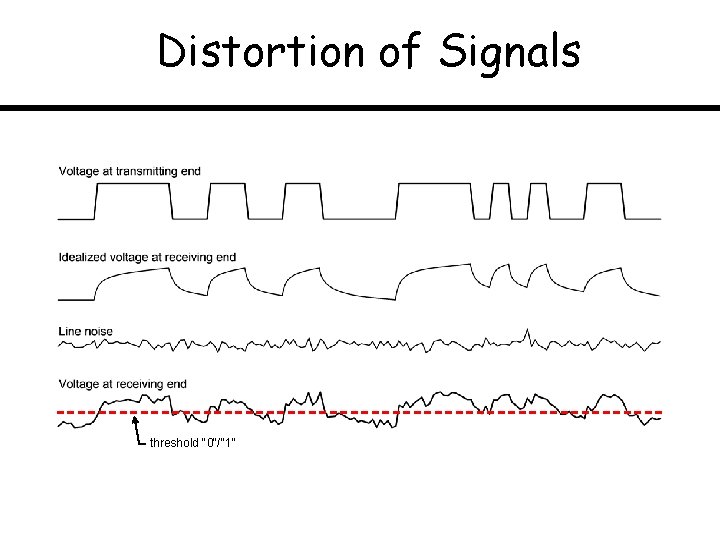
Distortion of Signals threshold "0"/"1"
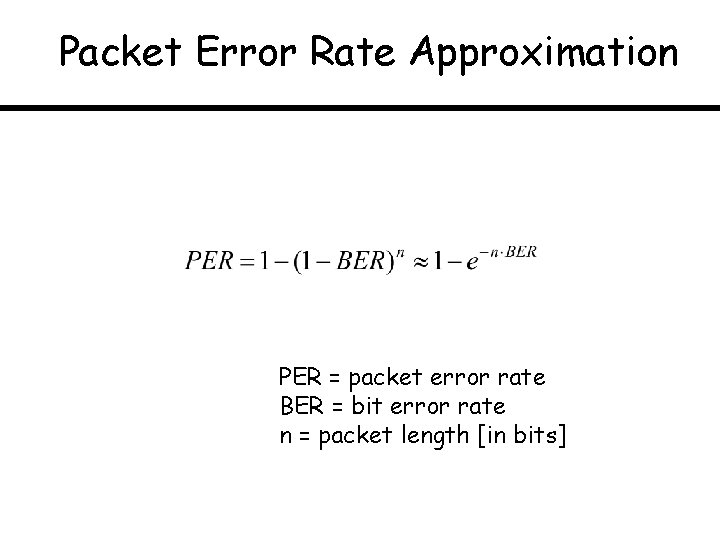
Packet Error Rate Approximation PER = packet error rate BER = bit error rate n = packet length [in bits]
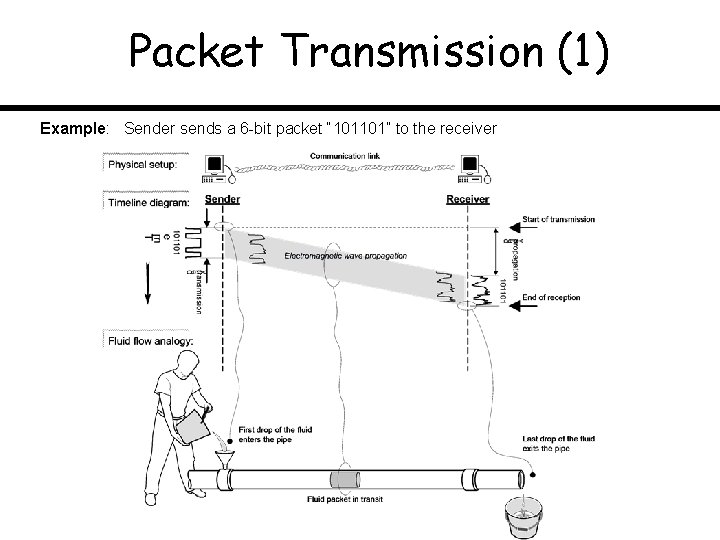
Packet Transmission (1) Example: Sender sends a 6 -bit packet “ 101101” to the receiver
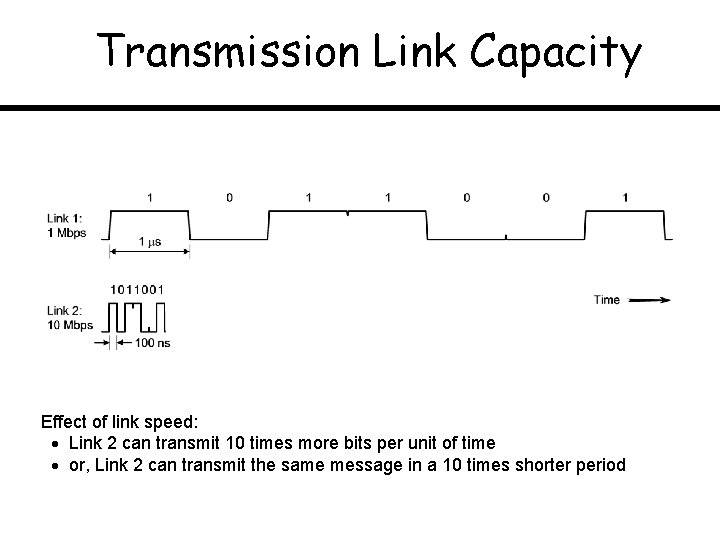
Transmission Link Capacity Effect of link speed: Link 2 can transmit 10 times more bits per unit of time or, Link 2 can transmit the same message in a 10 times shorter period
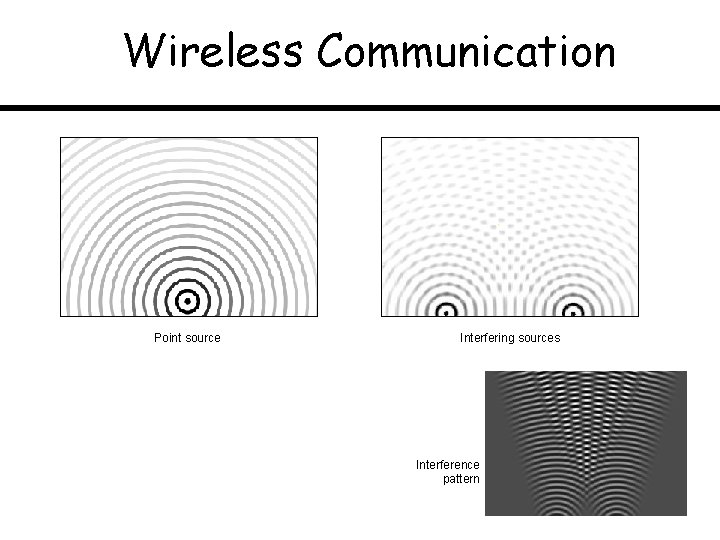
Wireless Communication Point source Interfering sources Interference pattern
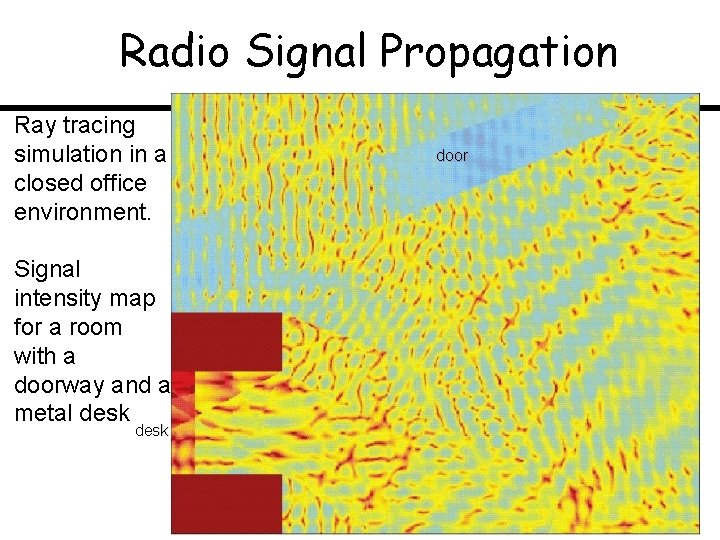
Radio Signal Propagation Ray tracing simulation in a closed office environment. Signal intensity map for a room with a doorway and a metal desk door
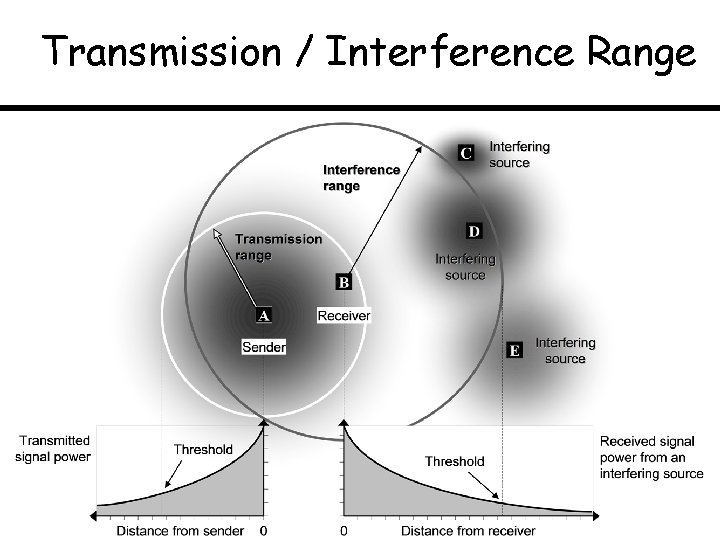
Transmission / Interference Range
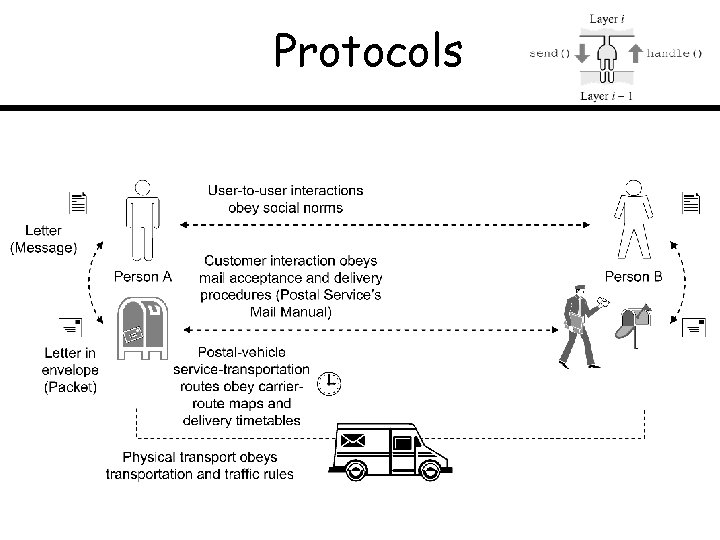
Protocols
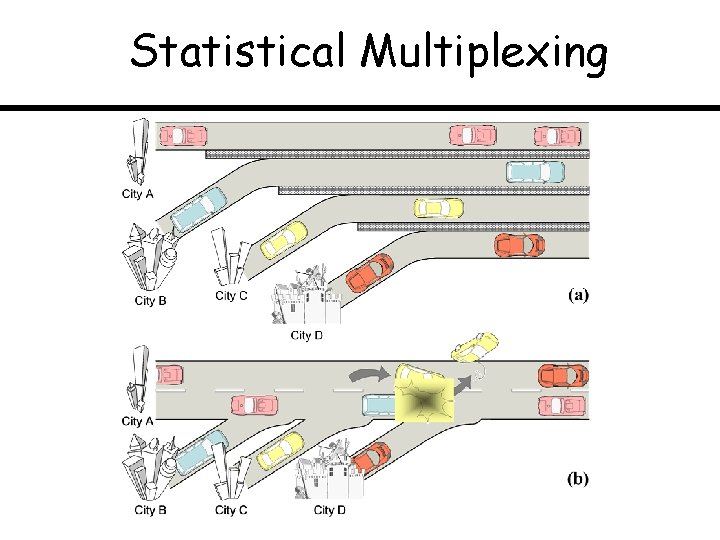
Statistical Multiplexing
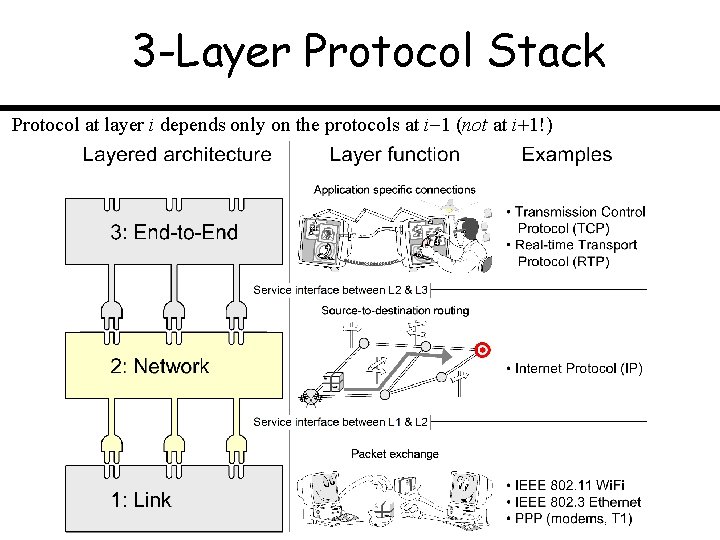
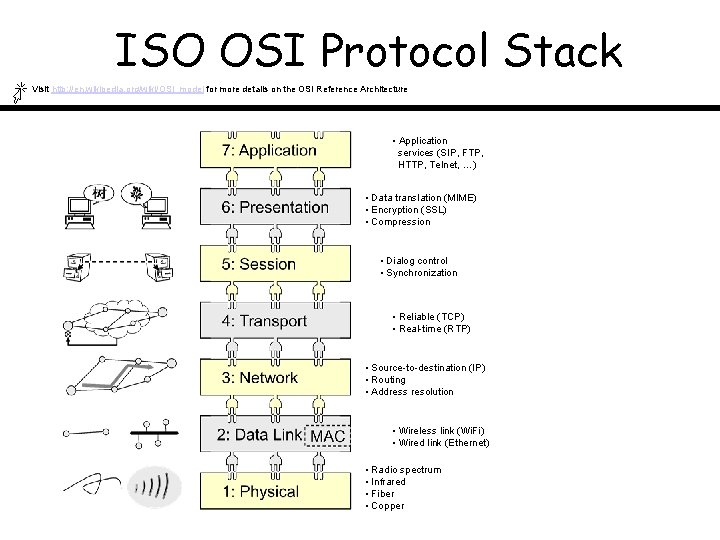
3 -Layer Protocol Stack Protocol at layer i depends only on the protocols at i 1 (not at i 1!)
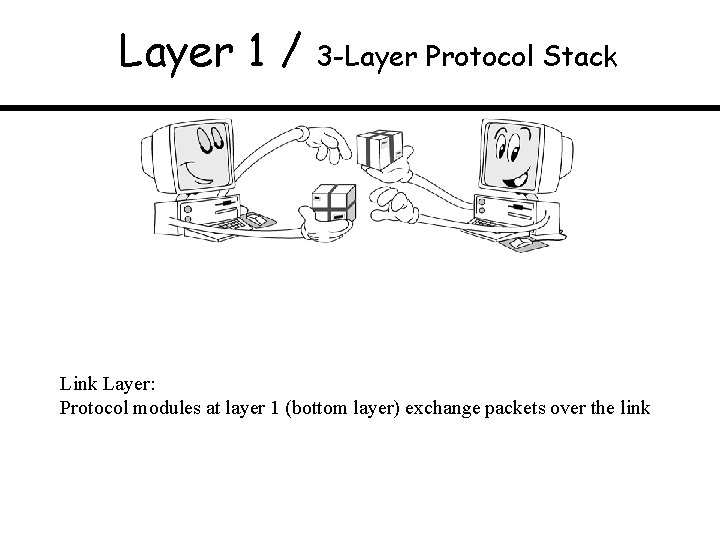
Layer 1 / 3 -Layer Protocol Stack Link Layer: Protocol modules at layer 1 (bottom layer) exchange packets over the link
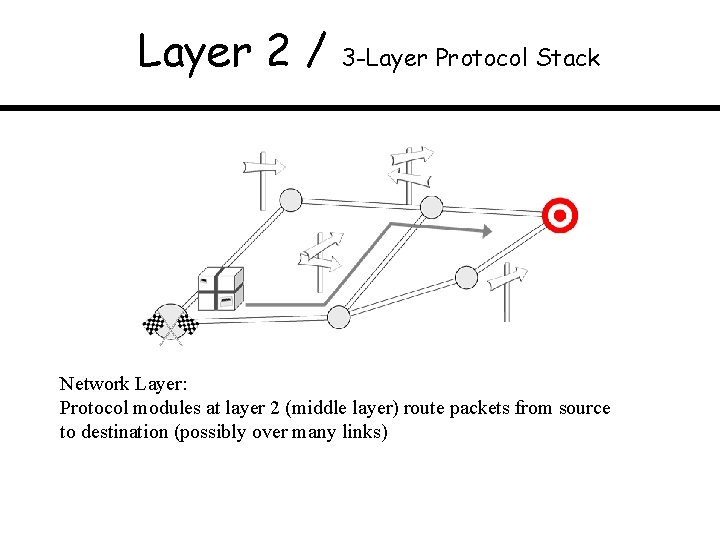
Layer 2 / 3 -Layer Protocol Stack Network Layer: Protocol modules at layer 2 (middle layer) route packets from source to destination (possibly over many links)
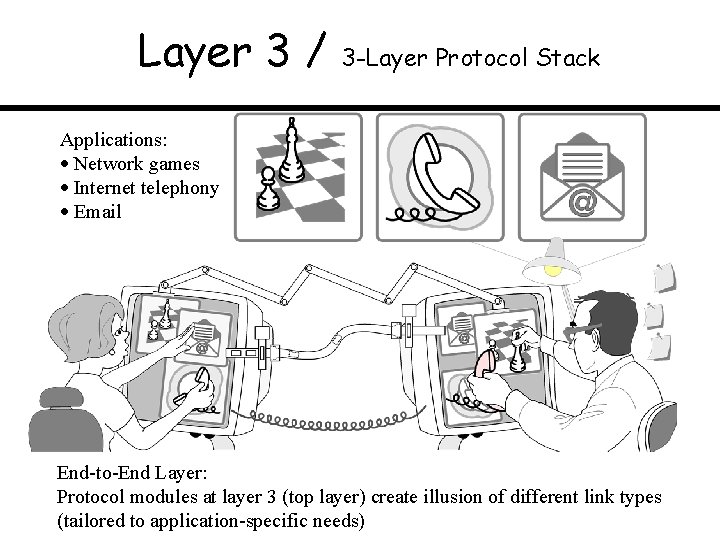
Layer 3 / 3 -Layer Protocol Stack Applications: Network games Internet telephony Email End-to-End Layer: Protocol modules at layer 3 (top layer) create illusion of different link types (tailored to application-specific needs)
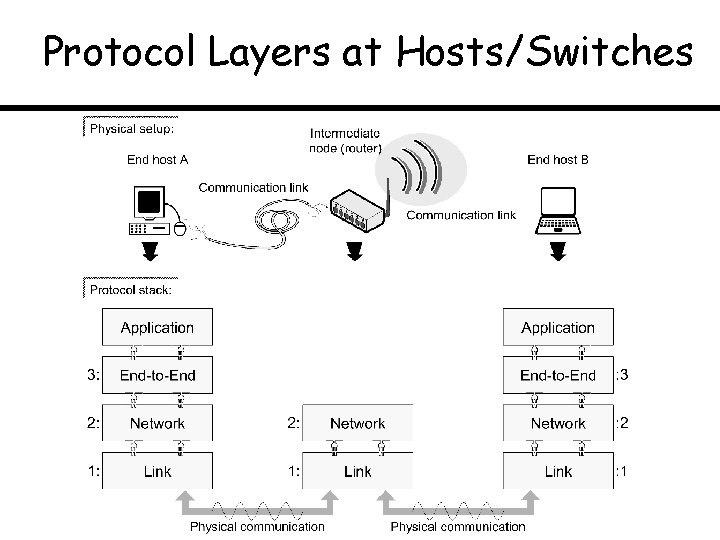
Protocol Layers at Hosts/Switches
Bit Stuffing for Transparency
ISO OSI Protocol Stack Visit http: //en. wikipedia. org/wiki/OSI_model for more details on the OSI Reference Architecture • Application services (SIP, FTP, HTTP, Telnet, …) • Data translation (MIME) • Encryption (SSL) • Compression • Dialog control • Synchronization • Reliable (TCP) • Real-time (RTP) • Source-to-destination (IP) • Routing • Address resolution • Wireless link (Wi. Fi) • Wired link (Ethernet) • Radio spectrum • Infrared • Fiber • Copper
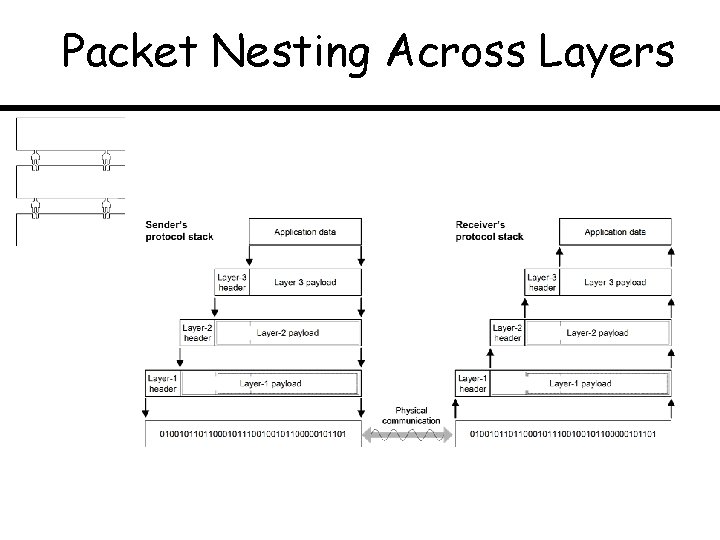
Packet Nesting Across Layers
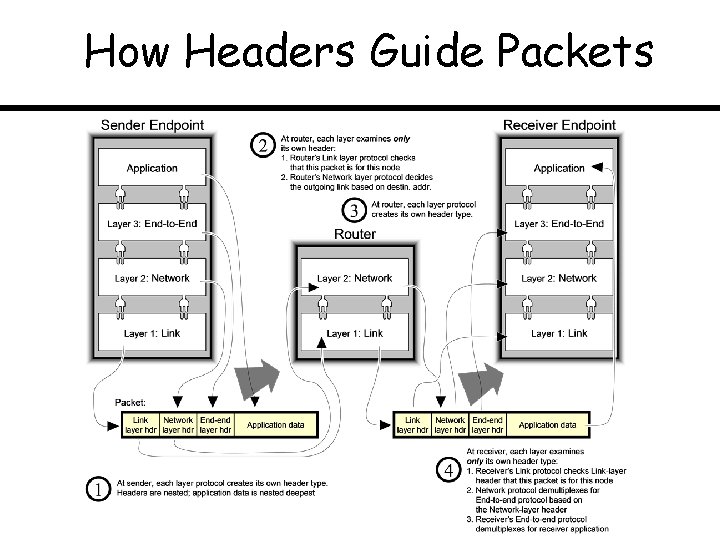
How Headers Guide Packets
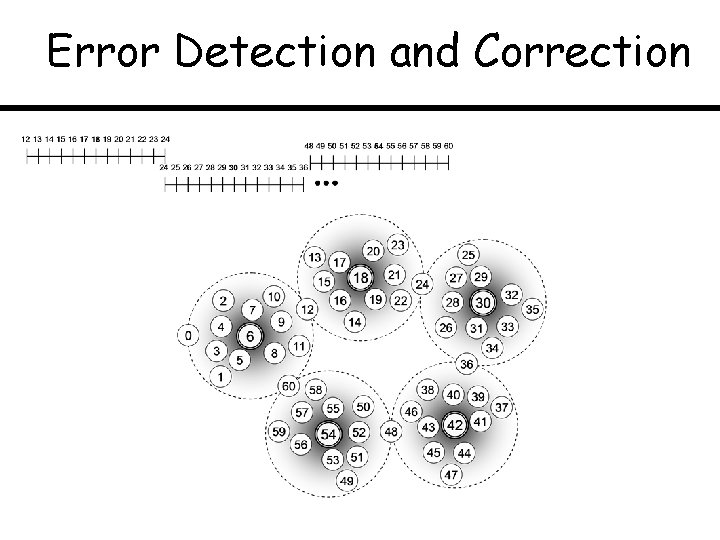
Error Detection and Correction
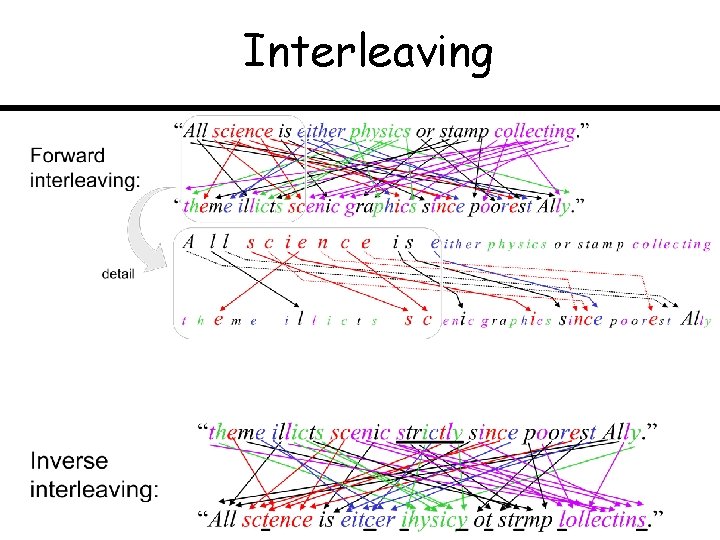
Interleaving
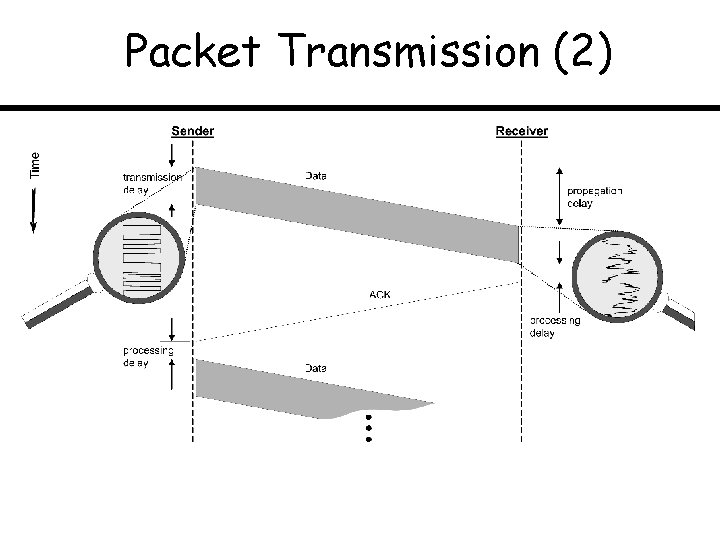
Packet Transmission (2)
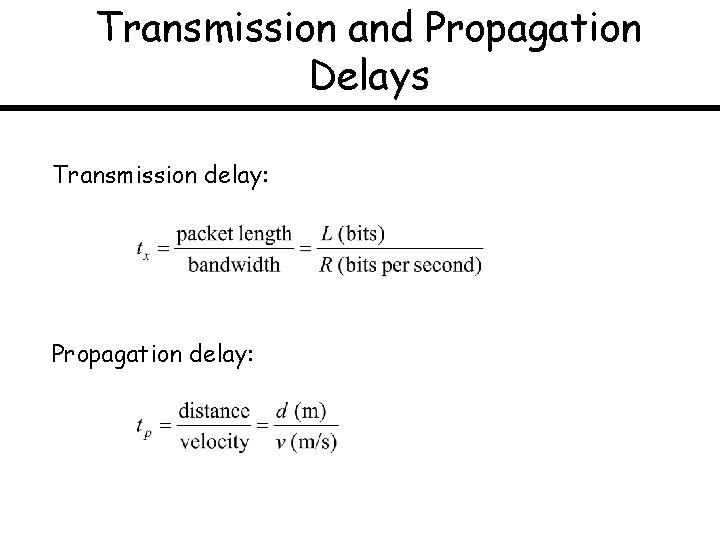
Transmission and Propagation Delays Transmission delay: Propagation delay:
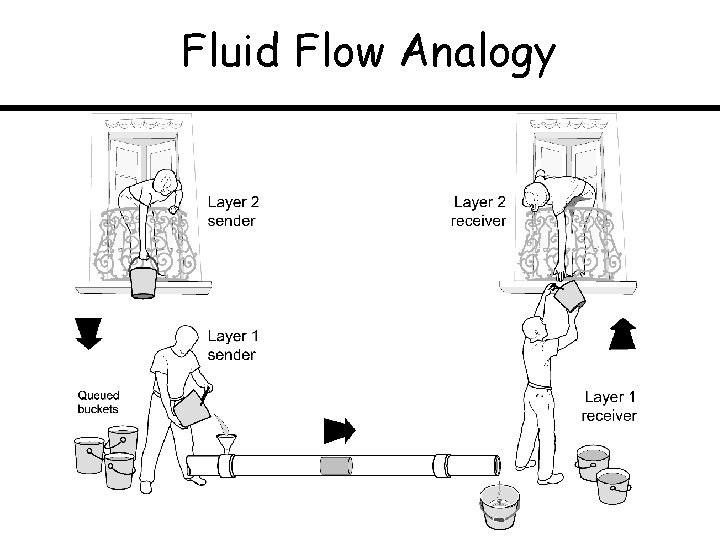
Fluid Flow Analogy
What Contributes to RTT
Topic: Reliable Transmission via Retransmission Stop-and-Wait Go-Back-N Selective Repeat
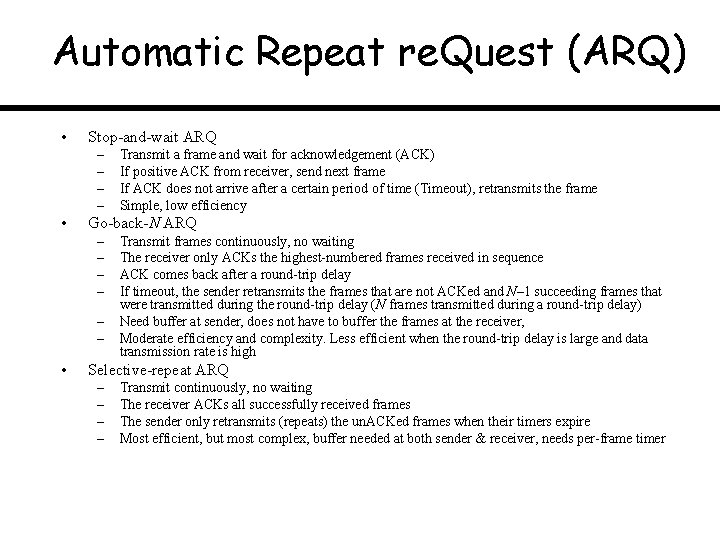
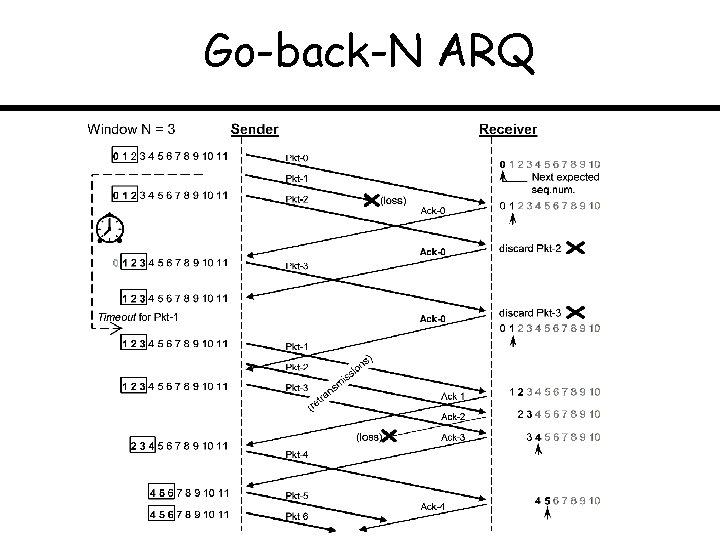
Automatic Repeat re. Quest (ARQ) • Stop-and-wait ARQ – – • Go-back-N ARQ – – – • Transmit a frame and wait for acknowledgement (ACK) If positive ACK from receiver, send next frame If ACK does not arrive after a certain period of time (Timeout), retransmits the frame Simple, low efficiency Transmit frames continuously, no waiting The receiver only ACKs the highest-numbered frames received in sequence ACK comes back after a round-trip delay If timeout, the sender retransmits the frames that are not ACKed and N– 1 succeeding frames that were transmitted during the round-trip delay (N frames transmitted during a round-trip delay) Need buffer at sender, does not have to buffer the frames at the receiver, Moderate efficiency and complexity. Less efficient when the round-trip delay is large and data transmission rate is high Selective-repeat ARQ – – Transmit continuously, no waiting The receiver ACKs all successfully received frames The sender only retransmits (repeats) the un. ACKed frames when their timers expire Most efficient, but most complex, buffer needed at both sender & receiver, needs per-frame timer
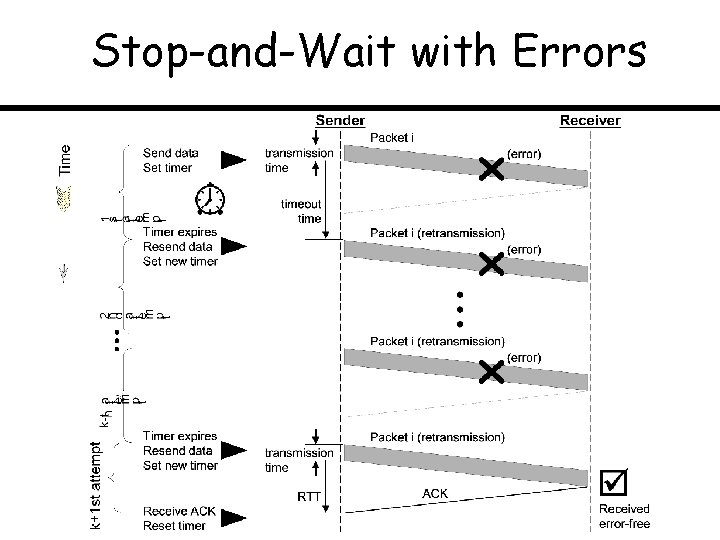
Stop-and-Wait with Errors
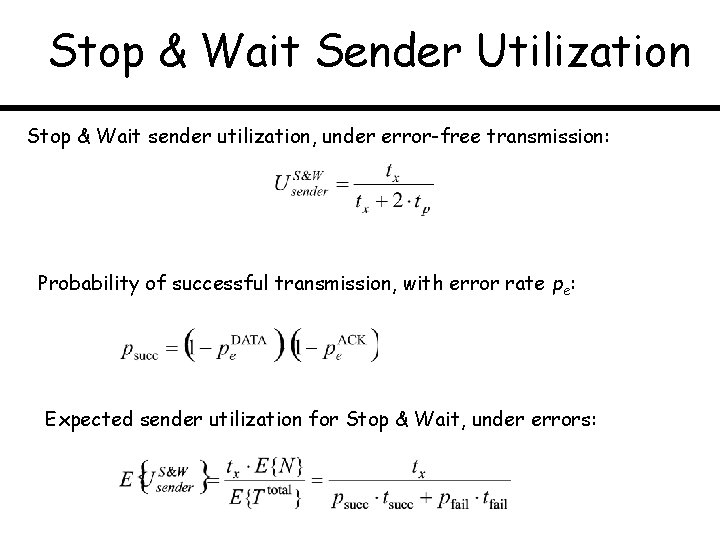
Stop & Wait Sender Utilization Stop & Wait sender utilization, under error-free transmission: Probability of successful transmission, with error rate pe: Expected sender utilization for Stop & Wait, under errors:
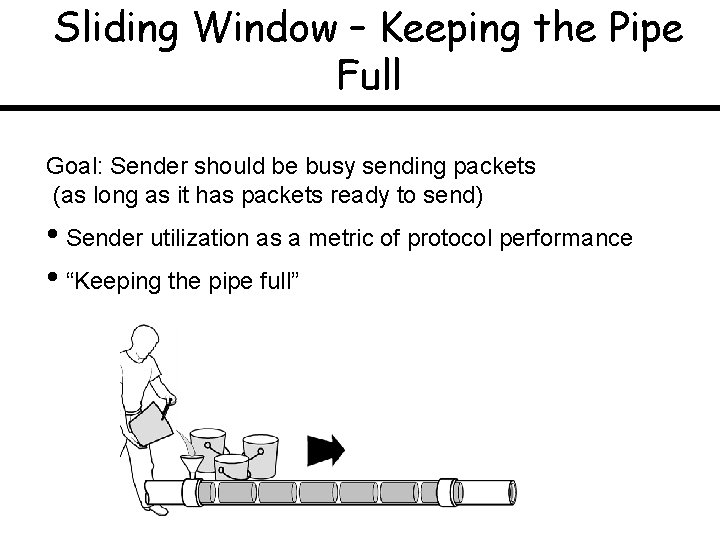
Sliding Window – Keeping the Pipe Full Goal: Sender should be busy sending packets (as long as it has packets ready to send) • Sender utilization as a metric of protocol performance • “Keeping the pipe full”
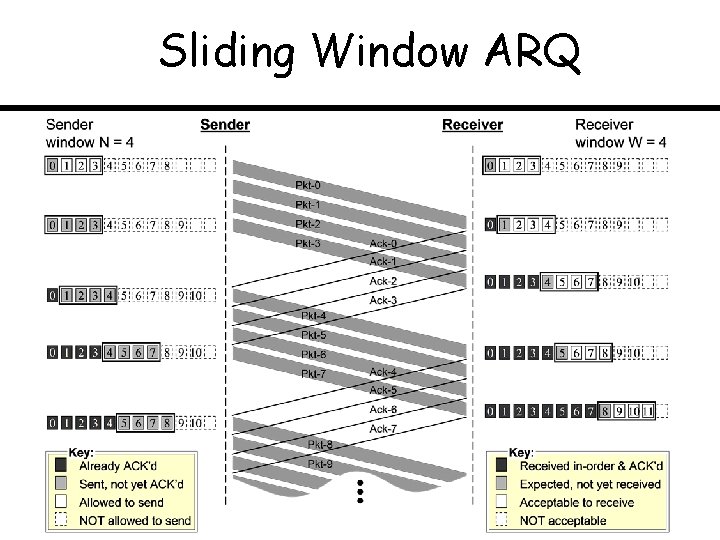
Sliding Window ARQ
Go-back-N ARQ
Selective Repeat ARQ
Acknowledgements: GBN vs. SR
Topic: Broadcast and Wireless Links ALOHA Hidden and Exposed Stations Carrier Sensing Multiple Access CSMA/CD, CSMA/CD
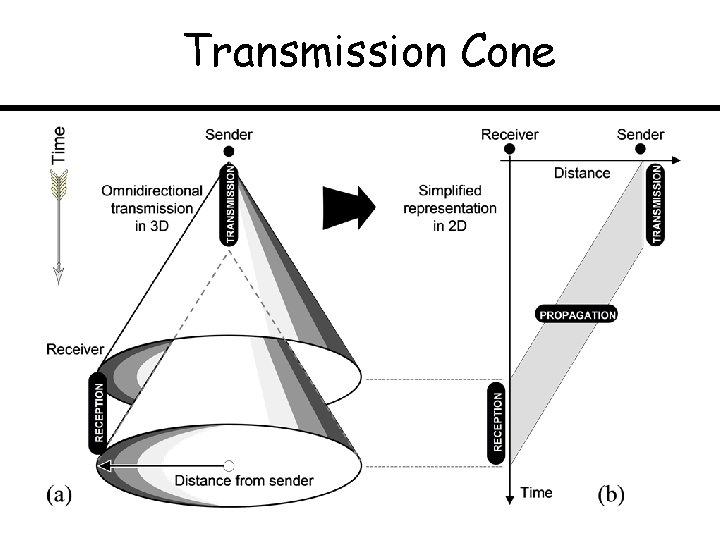
Transmission Cone
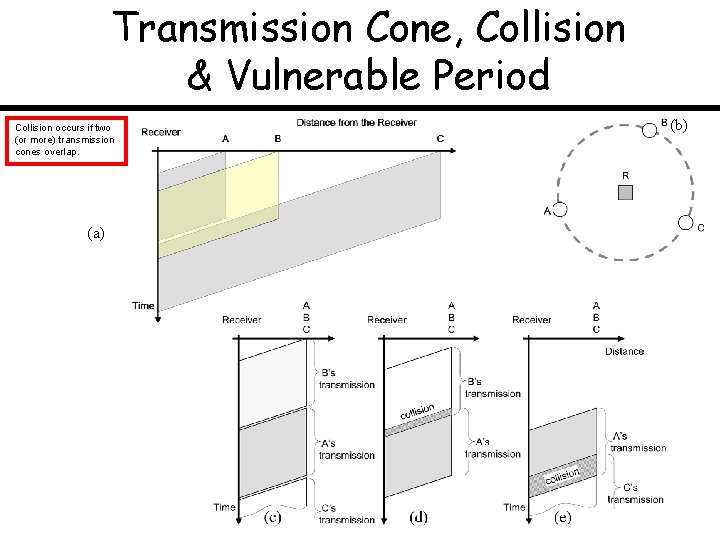
Transmission Cone, Collision & Vulnerable Period Collision occurs if two (or more) transmission cones overlap. (a) (b)
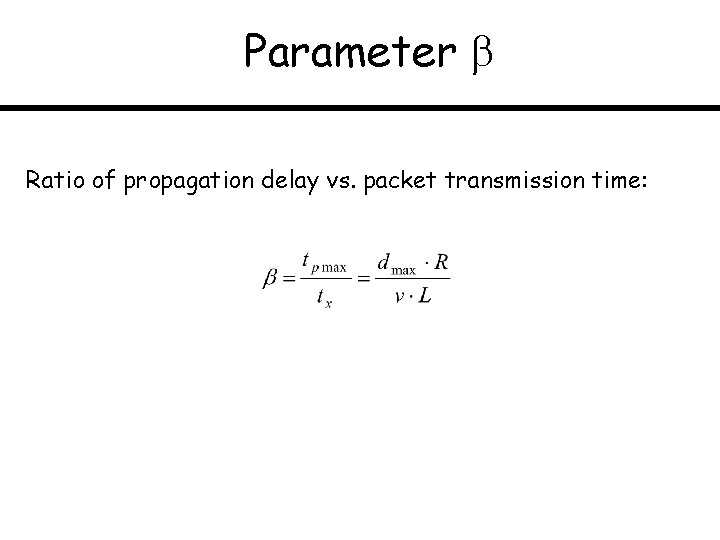
Parameter Ratio of propagation delay vs. packet transmission time:
Parameter Ratio of propagation delay vs. packet transmission time
ALOHA and Slotted ALOHA Sender’s State Diagram
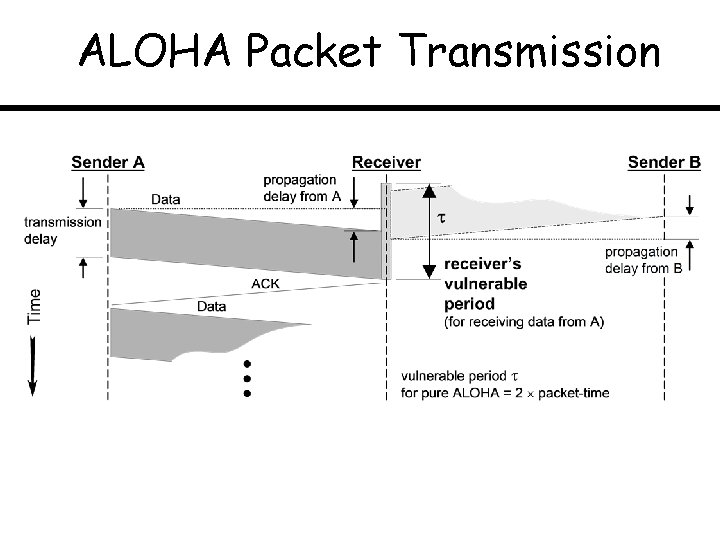
ALOHA Packet Transmission
When transmission cones of ALOHA stations overlap?
ALOHA Scenario
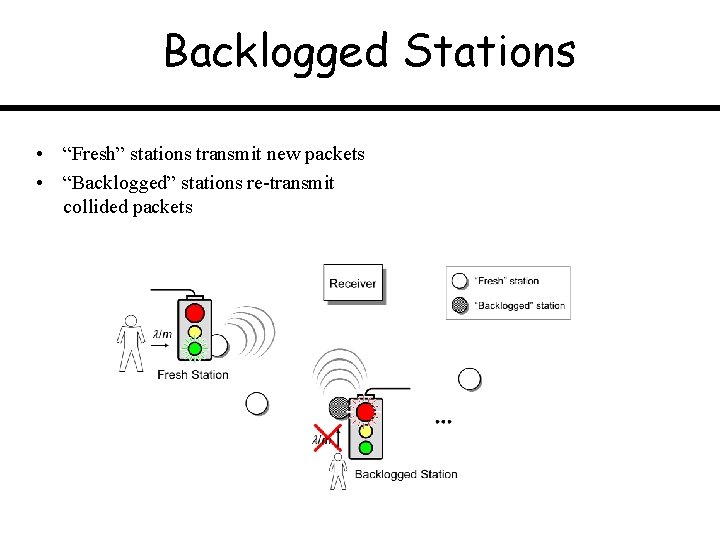
Backlogged Stations • “Fresh” stations transmit new packets • “Backlogged” stations re-transmit collided packets
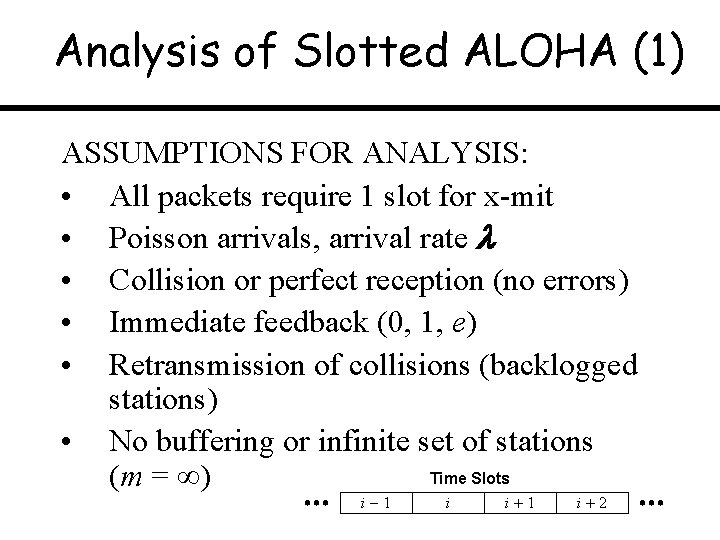
Analysis of Slotted ALOHA (1) ASSUMPTIONS FOR ANALYSIS: • All packets require 1 slot for x-mit • Poisson arrivals, arrival rate • Collision or perfect reception (no errors) • Immediate feedback (0, 1, e) • Retransmission of collisions (backlogged stations) • No buffering or infinite set of stations Time Slots (m = ) i 1 i 2
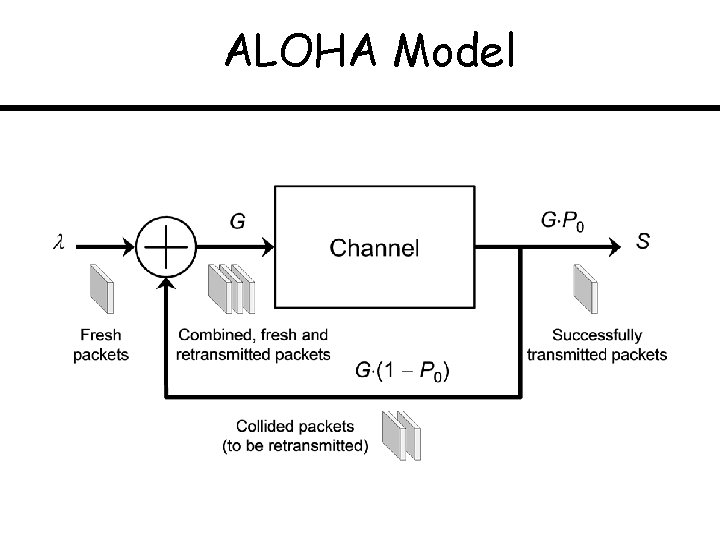
ALOHA Model
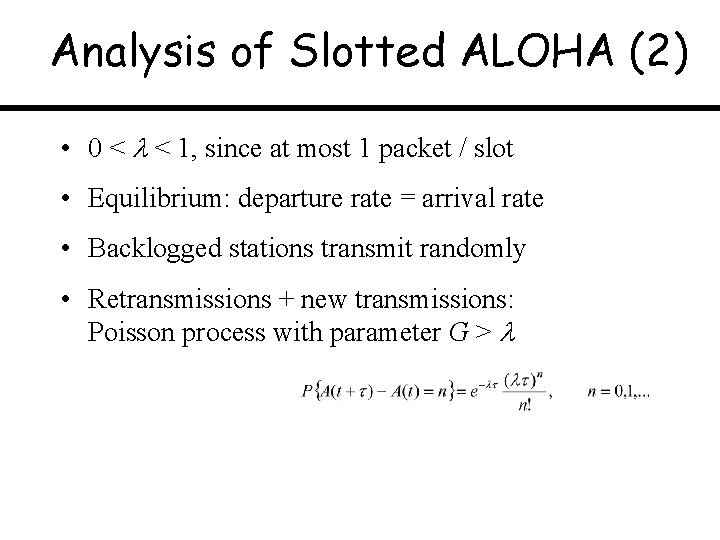
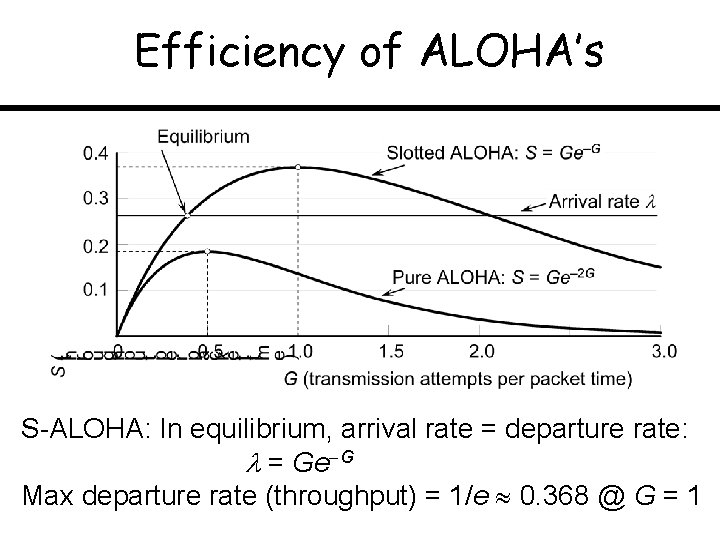
Analysis of Slotted ALOHA (2) • 0 < < 1, since at most 1 packet / slot • Equilibrium: departure rate = arrival rate • Backlogged stations transmit randomly • Retransmissions + new transmissions: Poisson process with parameter G >
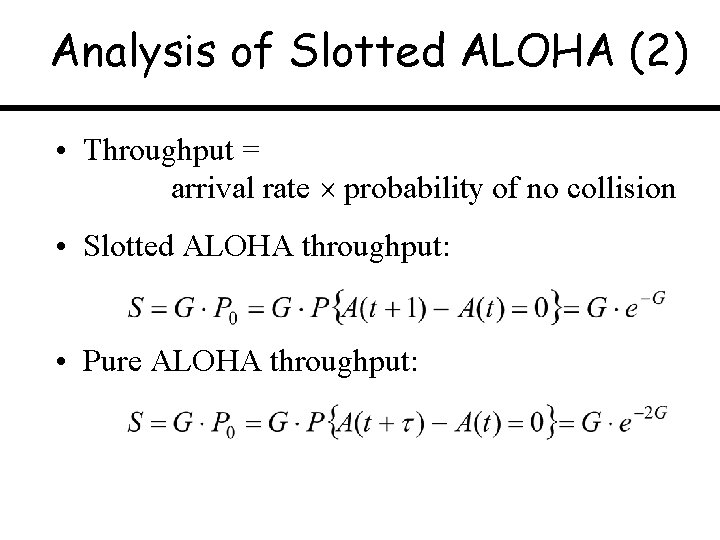
Analysis of Slotted ALOHA (2) • Throughput = arrival rate probability of no collision • Slotted ALOHA throughput: • Pure ALOHA throughput:
Efficiency of ALOHA’s S-ALOHA: In equilibrium, arrival rate = departure rate: = Ge G Max departure rate (throughput) = 1/e 0. 368 @ G = 1
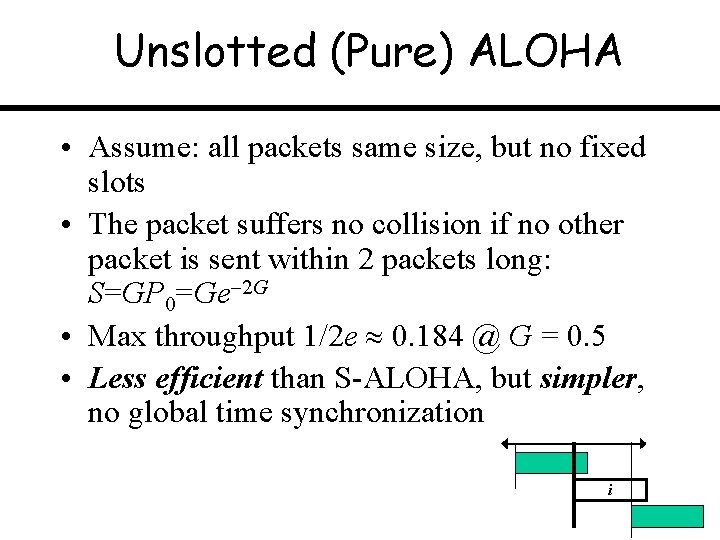
Unslotted (Pure) ALOHA • Assume: all packets same size, but no fixed slots • The packet suffers no collision if no other packet is sent within 2 packets long: S=GP 0=Ge 2 G • Max throughput 1/2 e 0. 184 @ G = 0. 5 • Less efficient than S-ALOHA, but simpler, no global time synchronization i
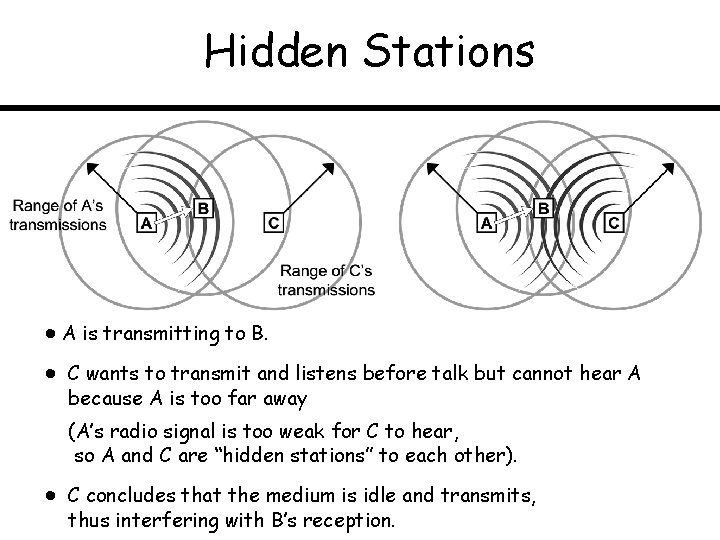
Hidden Stations A is transmitting to B. C wants to transmit and listens before talk but cannot hear A because A is too far away (A’s radio signal is too weak for C to hear, so A and C are “hidden stations” to each other). C concludes that the medium is idle and transmits, thus interfering with B’s reception.
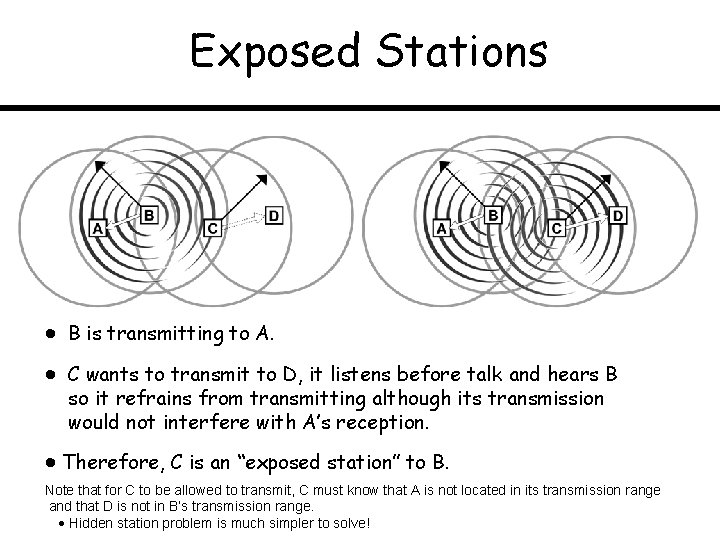
Exposed Stations B is transmitting to A. C wants to transmit to D, it listens before talk and hears B so it refrains from transmitting although its transmission would not interfere with A’s reception. Therefore, C is an “exposed station” to B. Note that for C to be allowed to transmit, C must know that A is not located in its transmission range and that D is not in B’s transmission range. Hidden station problem is much simpler to solve!
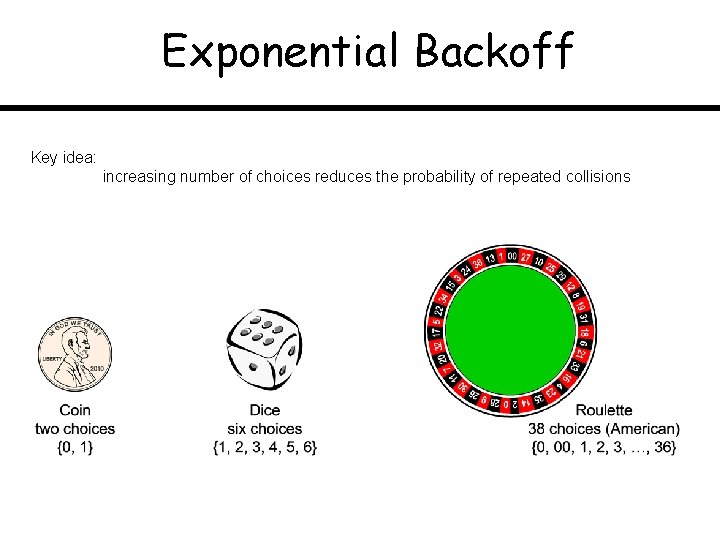
Exponential Backoff Key idea: increasing number of choices reduces the probability of repeated collisions
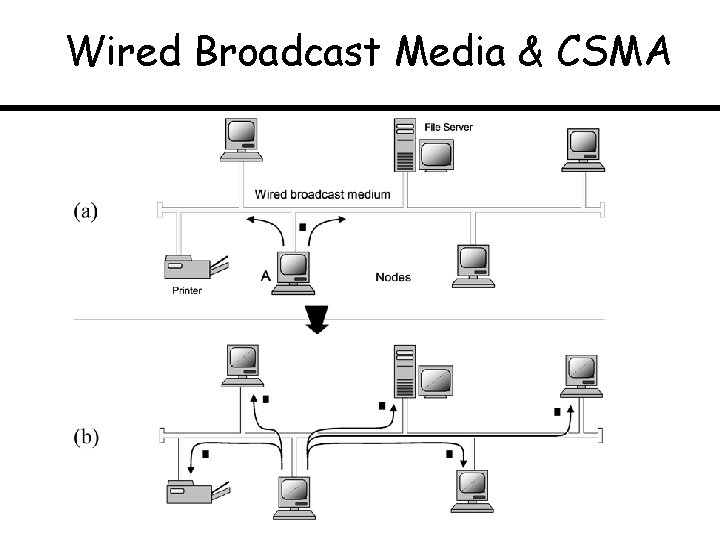
Wired Broadcast Media & CSMA
CSMA / CD Sender’s State Diag’m
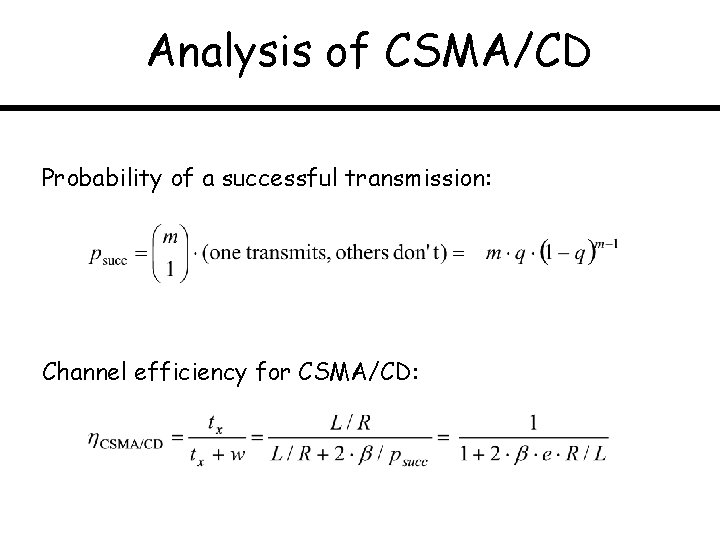
Analysis of CSMA/CD Probability of a successful transmission: Channel efficiency for CSMA/CD:
CSMA/CD Collision Detection
CSMA/CD Backoff Example
CSMA / CA Sender’s State Diag’m
Efficiency of CSMA protocols
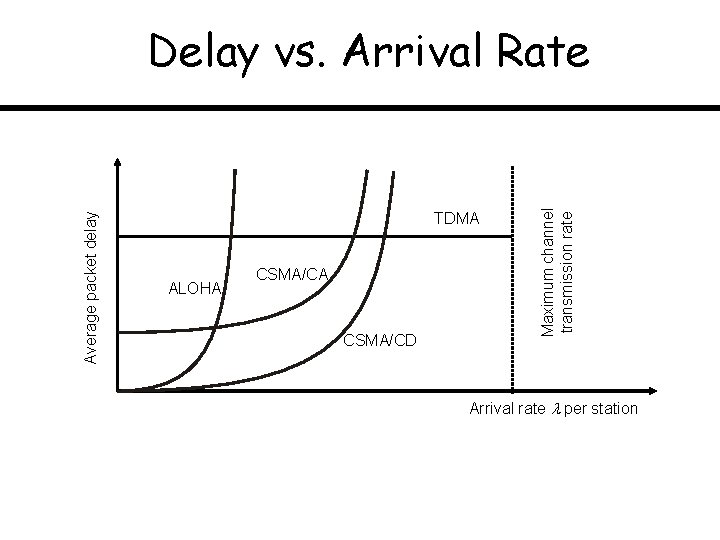
TDMA ALOHA CSMA/CD Maximum channel transmission rate Average packet delay Delay vs. Arrival Rate Arrival rate per station
Topic: Internetworking Routing & Forwarding Internet Protocol (IPv 4); Datagram Fragmentation Link State Routing; Distance Vector Routing Addressing; CIDR
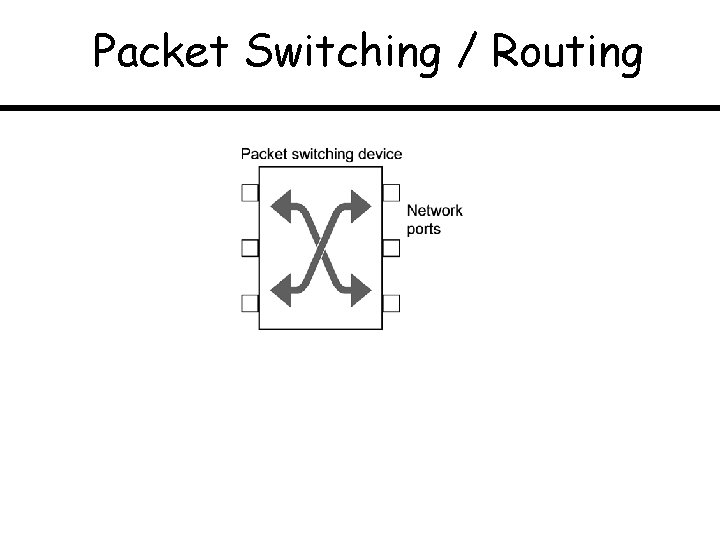
Packet Switching / Routing
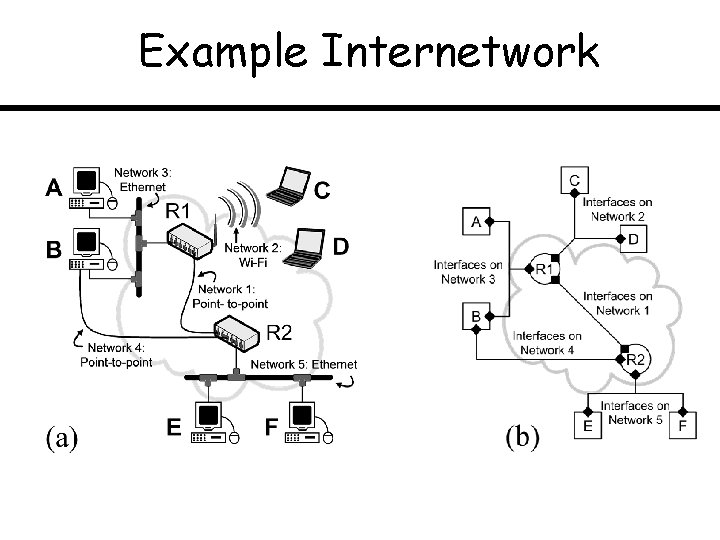
Example Internetwork
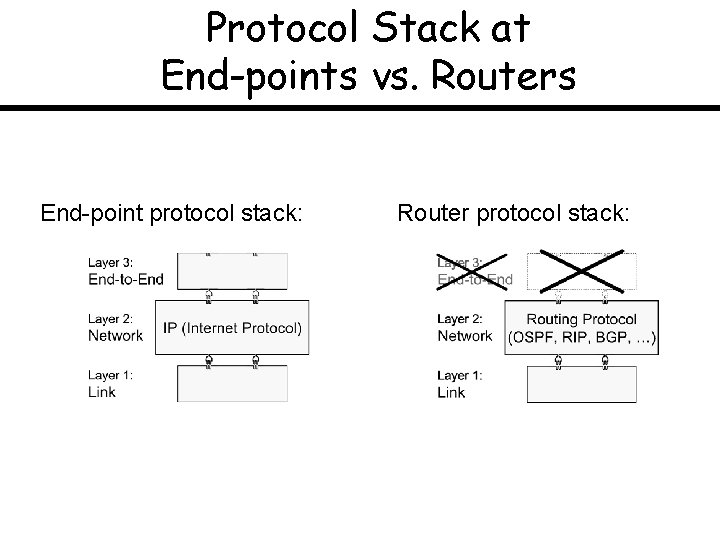
Protocol Stack at End-points vs. Routers End-point protocol stack: Router protocol stack:
Routing Problem
Network-layer Protocol: Internet Protocol (IP)
IPv 4 Header
Dotted Decimal Notation for IPv 4
Domain Name System (DNS)
IP Datagram Fragmentation (1) (a)
IP Datagram Fragmentation (2) NO FRAGMENTATION OCCURS HERE
Datagram Reassembly at Host D
Network Routing: Link State
Network Example for Routing Protocols
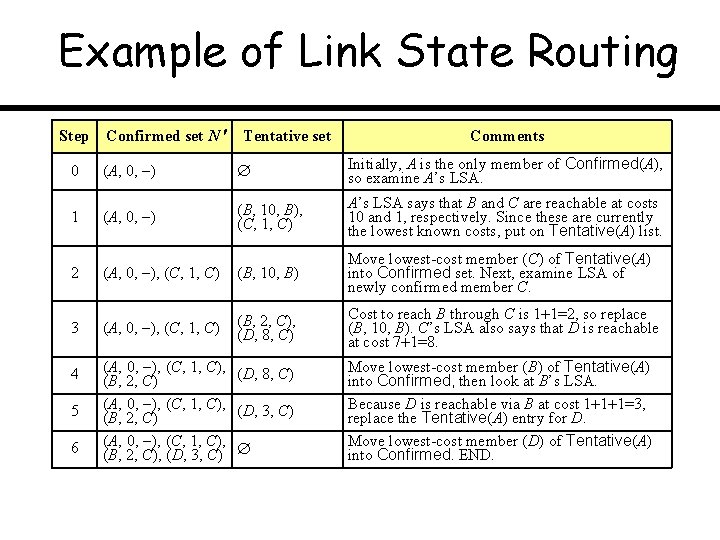
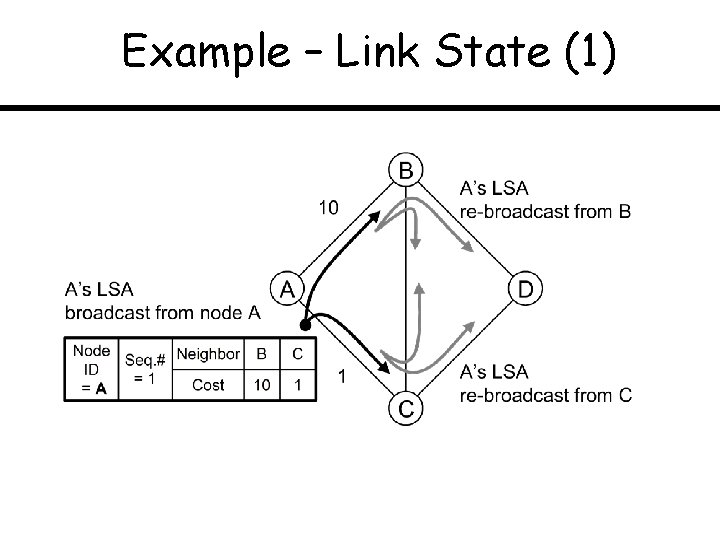
Example of Link State Routing Step Confirmed set N Tentative set Comments 0 (A, 0, ) Initially, A is the only member of Confirmed(A), so examine A’s LSA. 1 (A, 0, ) (B, 10, B), (C, 1, C) A’s LSA says that B and C are reachable at costs 10 and 1, respectively. Since these are currently the lowest known costs, put on Tentative(A) list. (A, 0, ), (C, 1, C) (B, 10, B) Move lowest-cost member (C) of Tentative(A) into Confirmed set. Next, examine LSA of newly confirmed member C. (A, 0, ), (C, 1, C) (B, 2, C), (D, 8, C) Cost to reach B through C is 1 1=2, so replace (B, 10, B). C’s LSA also says that D is reachable at cost 7 1=8. 2 3 4 5 6 (A, 0, ), (C, 1, C), (D, 8, C) (B, 2, C) (A, 0, ), (C, 1, C), (D, 3, C) (B, 2, C) (A, 0, ), (C, 1, C), (B, 2, C), (D, 3, C) Move lowest-cost member (B) of Tentative(A) into Confirmed, then look at B’s LSA. Because D is reachable via B at cost 1 1 1=3, replace the Tentative(A) entry for D. Move lowest-cost member (D) of Tentative(A) into Confirmed. END.
Example – Link State (1)
Example – Link State (2)
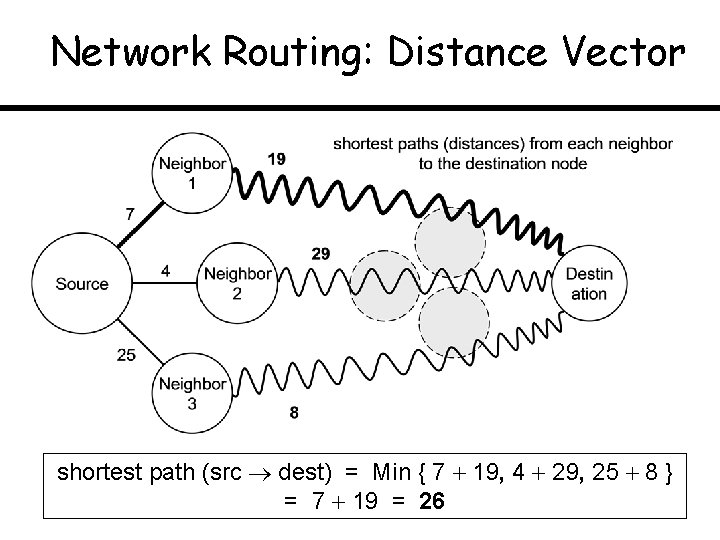
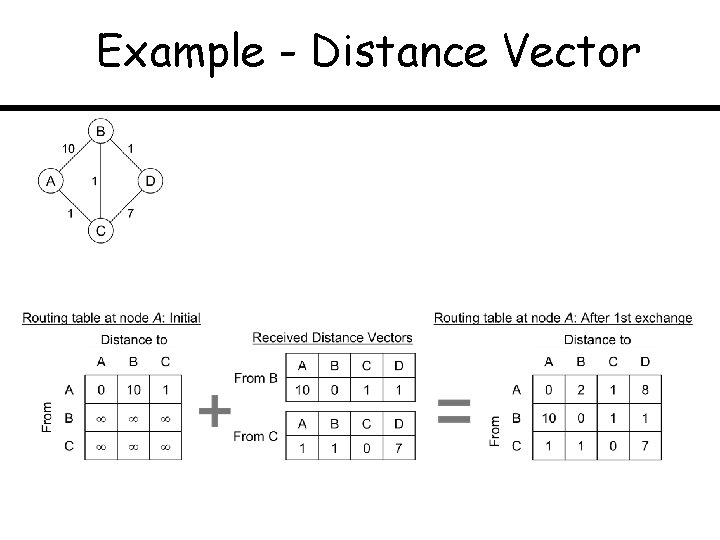
Network Routing: Distance Vector shortest path (src dest) = Min { 7 19, 4 29, 25 8 } = 7 19 = 26
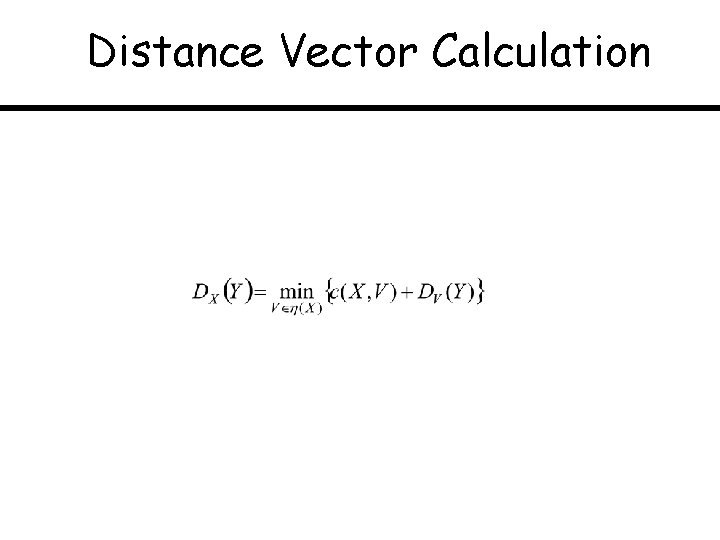
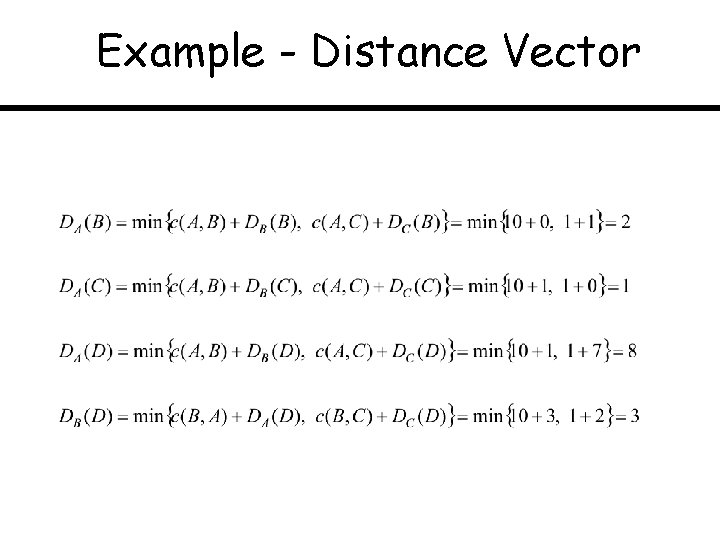
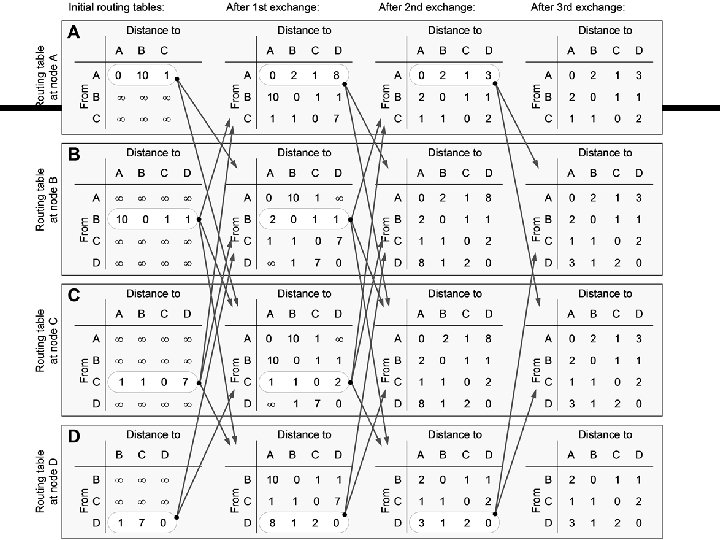
Distance Vector Calculation
Example - Distance Vector
Example - Distance Vector
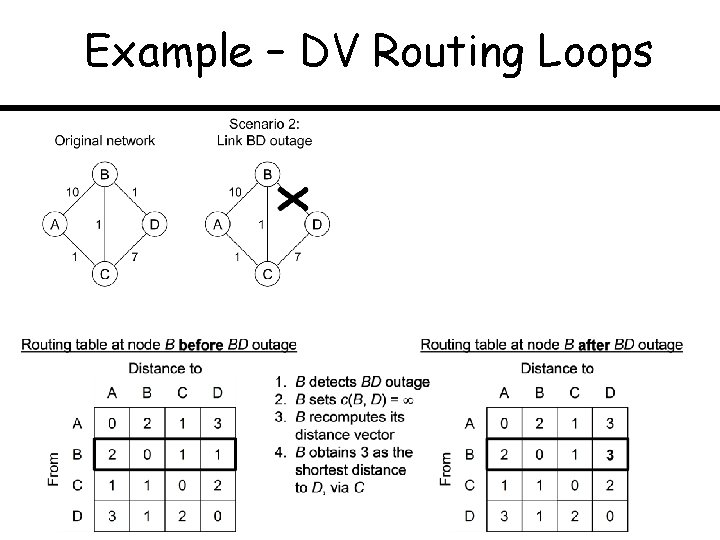
Example – DV Routing Loops
Topic: IP Addressing and CIDR Hierarchical Structure of IP Addresses CIDR (Classless Interdomain Routing)
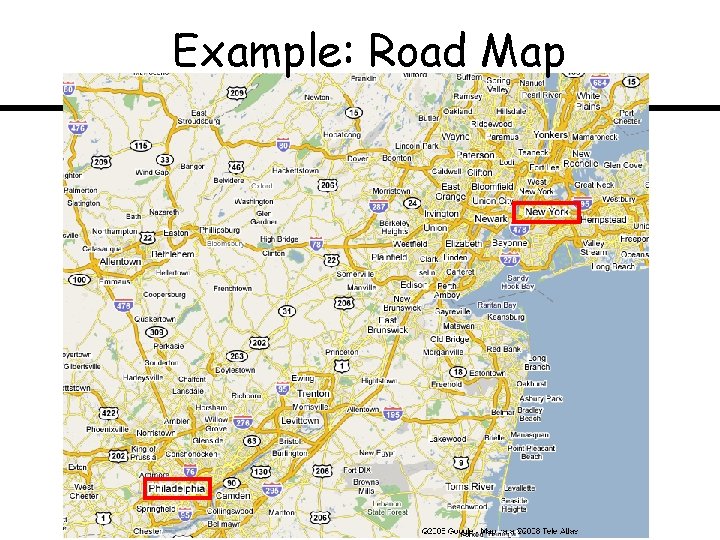
Example: Road Map
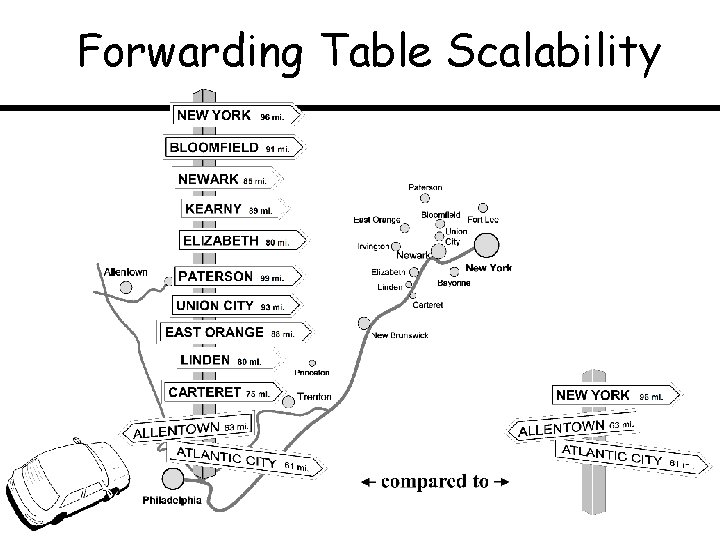
Forwarding Table Scalability
OLD IPv 4 Address Structure
Address Class Sizes
Special IPv 4 Addresses
CIDR Example (1) (a)
CIDR Example (2)
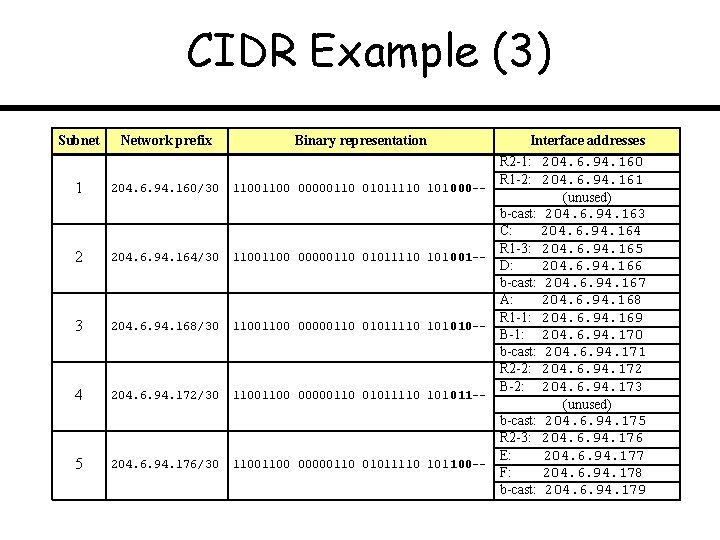
CIDR Example (3) Subnet Network prefix Binary representation 1 204. 6. 94. 160/30 1100 00000110 01011110 101 000 -- 2 204. 6. 94. 164/30 1100 00000110 01011110 101 001 -- 3 204. 6. 94. 168/30 1100 00000110 01011110 101 010 -- 4 204. 6. 94. 172/30 1100 00000110 01011110 101 011 -- 5 204. 6. 94. 176/30 1100 00000110 01011110 101 100 -- Interface addresses R 2 -1: 204. 6. 94. 160 R 1 -2: 204. 6. 94. 161 (unused) b-cast: 204. 6. 94. 163 C: 204. 6. 94. 164 R 1 -3: 204. 6. 94. 165 D: 204. 6. 94. 166 b-cast: 204. 6. 94. 167 A: 204. 6. 94. 168 R 1 -1: 204. 6. 94. 169 B-1: 204. 6. 94. 170 b-cast: 204. 6. 94. 171 R 2 -2: 204. 6. 94. 172 B-2: 204. 6. 94. 173 (unused) b-cast: 204. 6. 94. 175 R 2 -3: 204. 6. 94. 176 E: 204. 6. 94. 177 F: 204. 6. 94. 178 b-cast: 204. 6. 94. 179
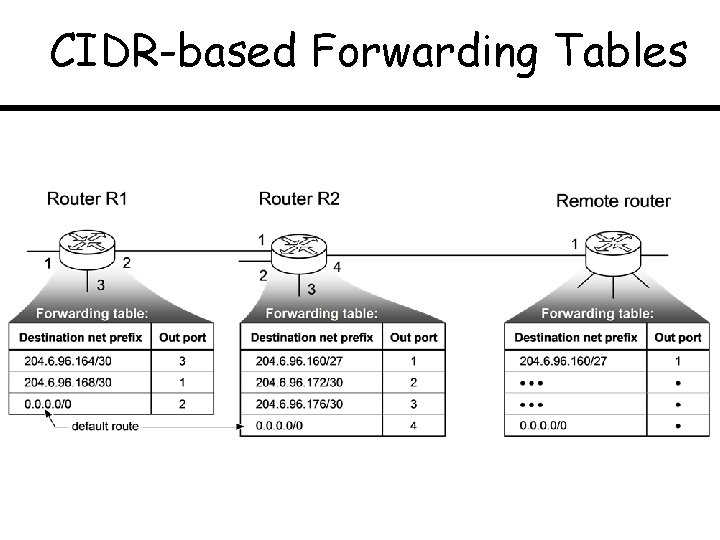
CIDR-based Forwarding Tables
Topic: Autonomous Systems Commercial Internet Peering and Transit Relationships Path Vector Routing
Autonomous Systems (ASs)
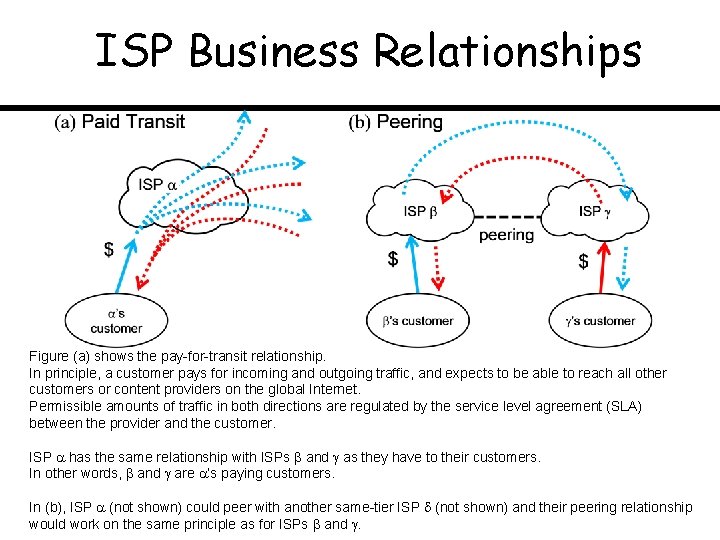
ISP Business Relationships Figure (a) shows the pay-for-transit relationship. In principle, a customer pays for incoming and outgoing traffic, and expects to be able to reach all other customers or content providers on the global Internet. Permissible amounts of traffic in both directions are regulated by the service level agreement (SLA) between the provider and the customer. ISP has the same relationship with ISPs and as they have to their customers. In other words, and are ’s paying customers. In (b), ISP (not shown) could peer with another same-tier ISP (not shown) and their peering relationship would work on the same principle as for ISPs and .
ISP Business Relationship Example
Providing Selective Transit (1)
Providing Selective Transit (1)
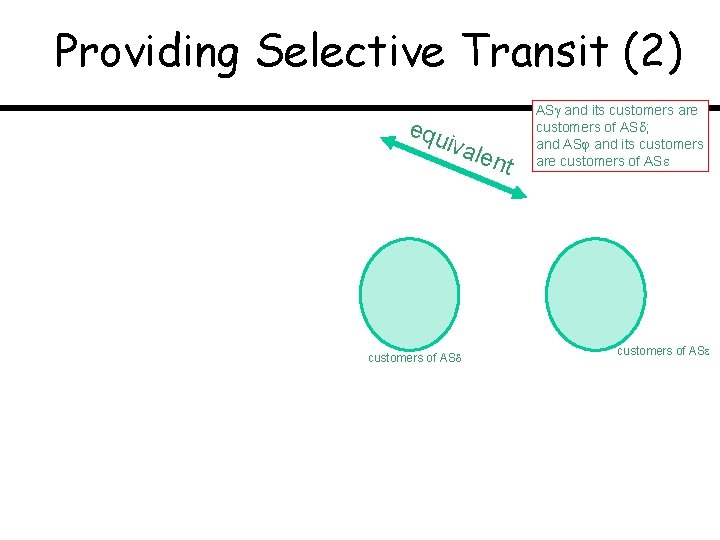
Providing Selective Transit (2) equ ival customers of AS ent AS and its customers are customers of AS ; and AS and its customers are customers of AS
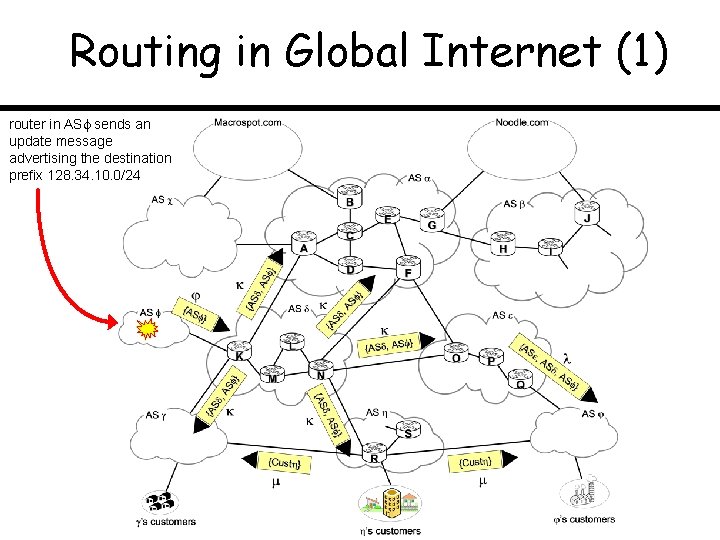
Routing in Global Internet (1) router in AS sends an update message advertising the destination prefix 128. 34. 10. 0/24
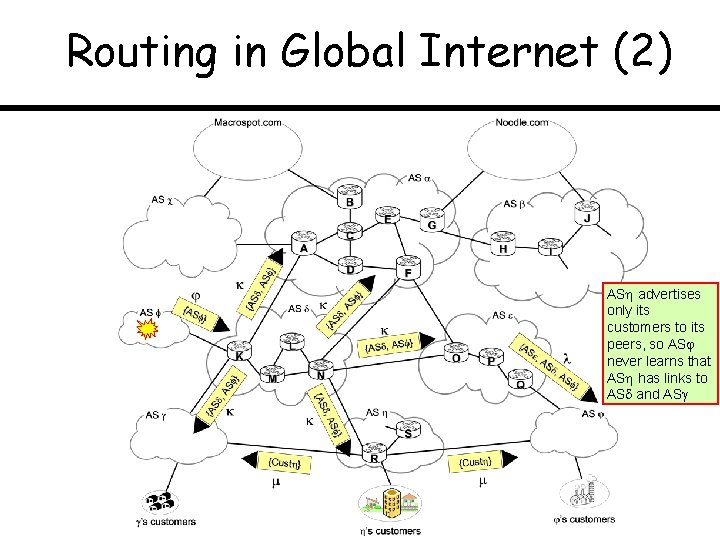
Routing in Global Internet (2) AS advertises only its customers to its peers, so AS never learns that AS has links to AS and AS
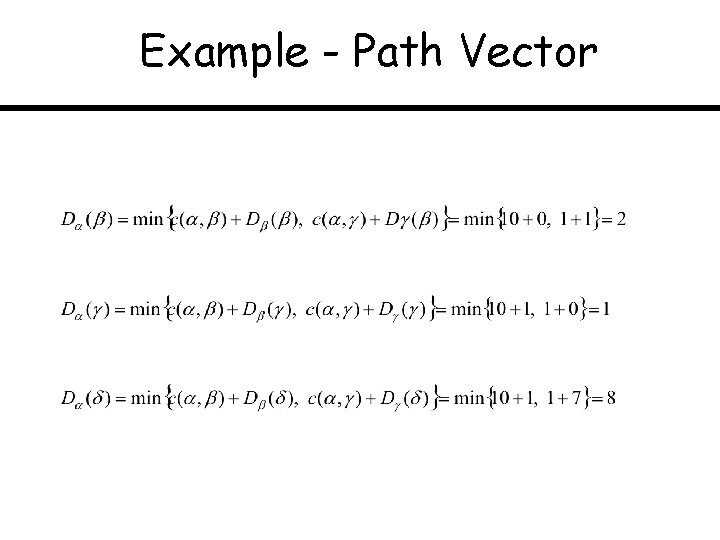
Example - Path Vector
Example - Path Vector
Integrating IGP & EGP Tables
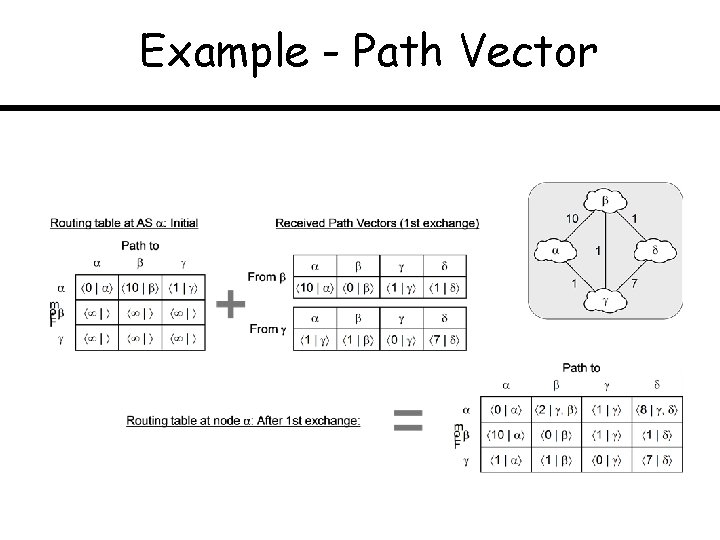
Example - Path Vector
Topic: Link-Layer Technologies Point-to-Point Protocol (PPP) IEEE 802. 3 a. k. a. Ethernet
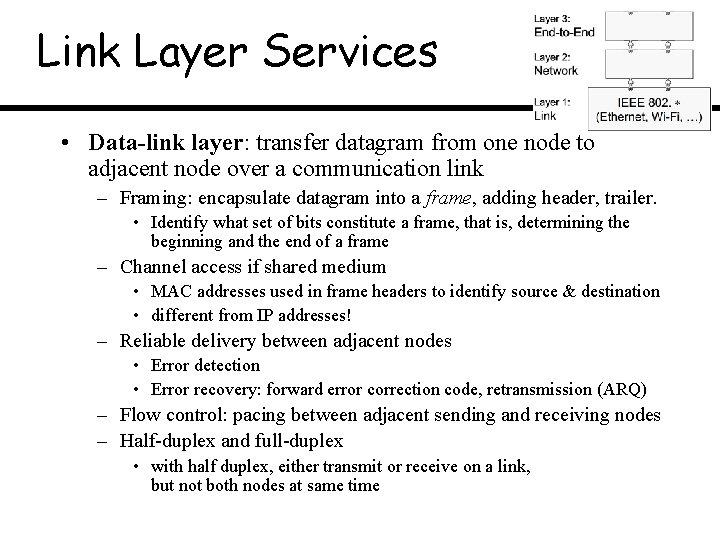
Link Layer Services • Data-link layer: transfer datagram from one node to adjacent node over a communication link – Framing: encapsulate datagram into a frame, adding header, trailer. • Identify what set of bits constitute a frame, that is, determining the beginning and the end of a frame – Channel access if shared medium • MAC addresses used in frame headers to identify source & destination • different from IP addresses! – Reliable delivery between adjacent nodes • Error detection • Error recovery: forward error correction code, retransmission (ARQ) – Flow control: pacing between adjacent sending and receiving nodes – Half-duplex and full-duplex • with half duplex, either transmit or receive on a link, but not both nodes at same time
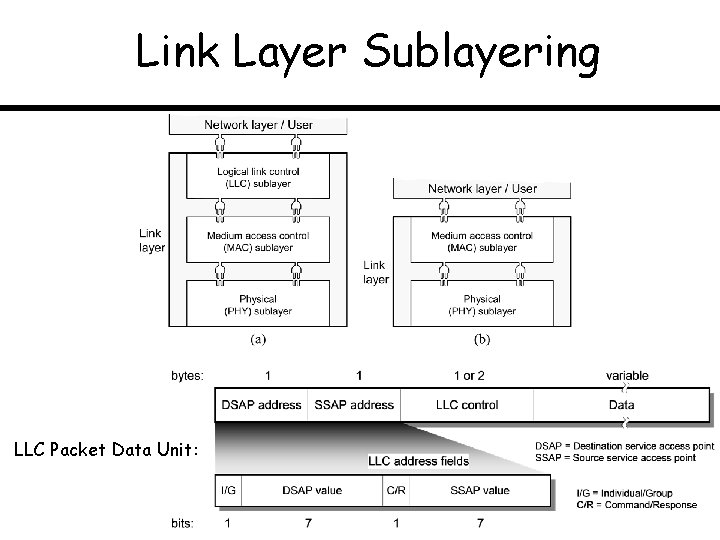
Link Layer Sublayering LLC Packet Data Unit:
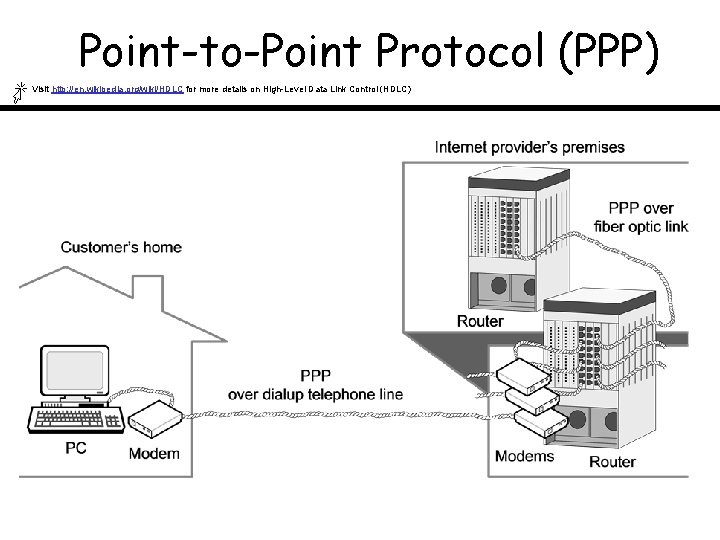
Point-to-Point Protocol (PPP) Visit http: //en. wikipedia. org/wiki/HDLC for more details on High-Level Data Link Control (HDLC)
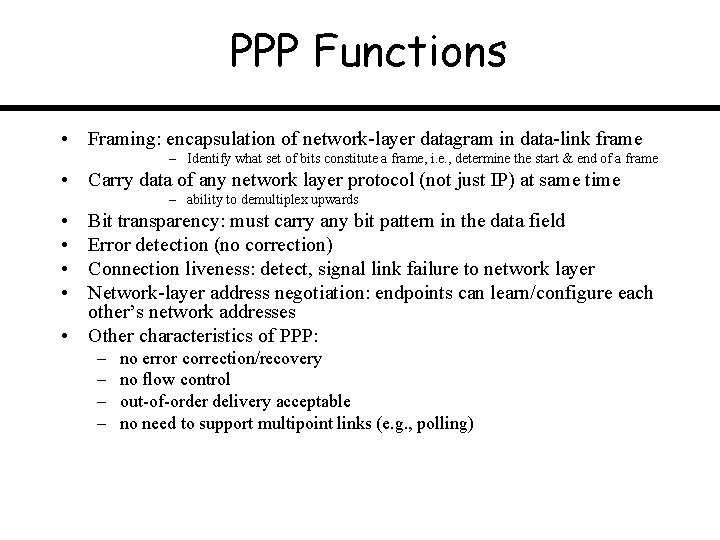
PPP Functions • Framing: encapsulation of network-layer datagram in data-link frame – Identify what set of bits constitute a frame, i. e. , determine the start & end of a frame • Carry data of any network layer protocol (not just IP) at same time – ability to demultiplex upwards • • Bit transparency: must carry any bit pattern in the data field Error detection (no correction) Connection liveness: detect, signal link failure to network layer Network-layer address negotiation: endpoints can learn/configure each other’s network addresses • Other characteristics of PPP: – – no error correction/recovery no flow control out-of-order delivery acceptable no need to support multipoint links (e. g. , polling)
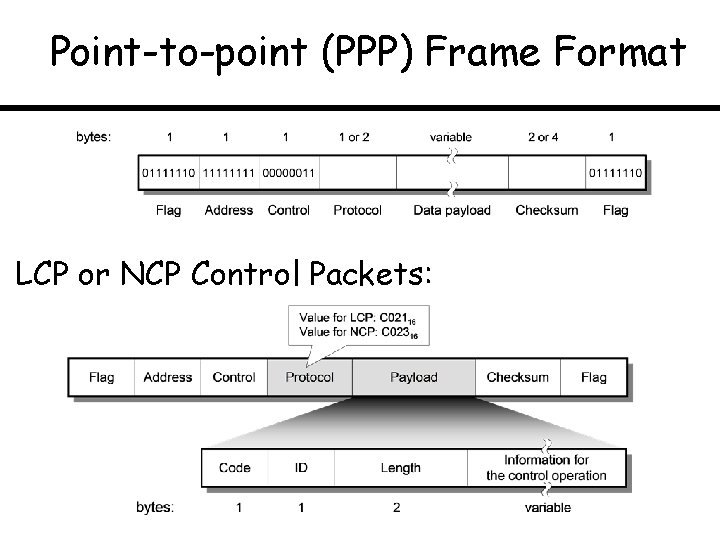
Point-to-point (PPP) Frame Format LCP or NCP Control Packets:
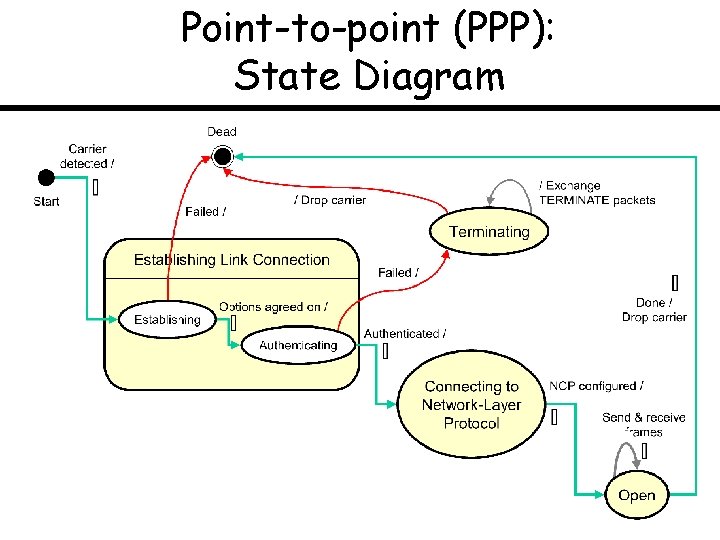
Point-to-point (PPP): State Diagram
Topic: IEEE 802. 3 a. k. a. Ethernet Medium Access Control (MAC) Protocol Ethernet Evolution Switched Ethernet
802. 3 Link-Layer Frame Format
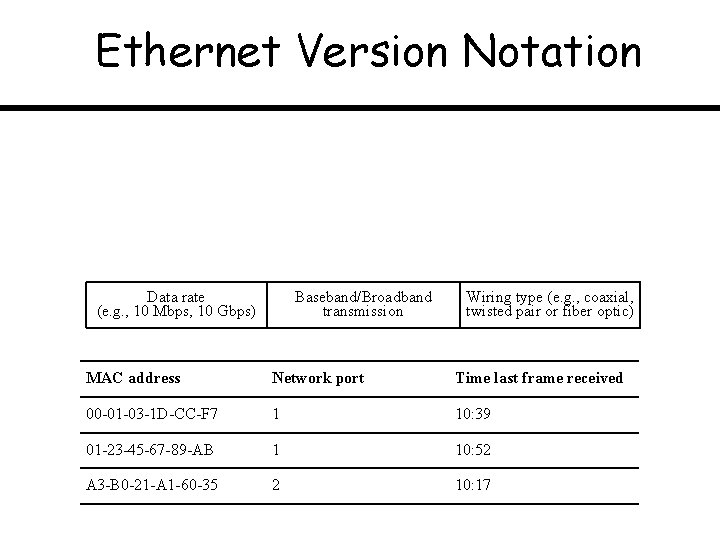
Ethernet Version Notation Data rate (e. g. , 10 Mbps, 10 Gbps) Baseband/Broadband transmission Wiring type (e. g. , coaxial, twisted pair or fiber optic) MAC address Network port Time last frame received 00 -01 -03 -1 D-CC-F 7 1 10: 39 01 -23 -45 -67 -89 -AB 1 10: 52 A 3 -B 0 -21 -A 1 -60 -35 2 10: 17
Thin-Cable Ethernet
Switched/Bridged Ethernet
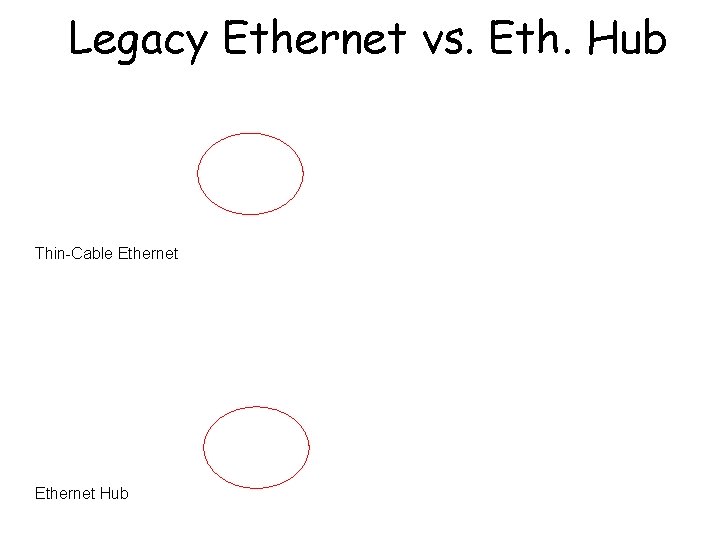
Legacy Ethernet vs. Eth. Hub Thin-Cable Ethernet Hub
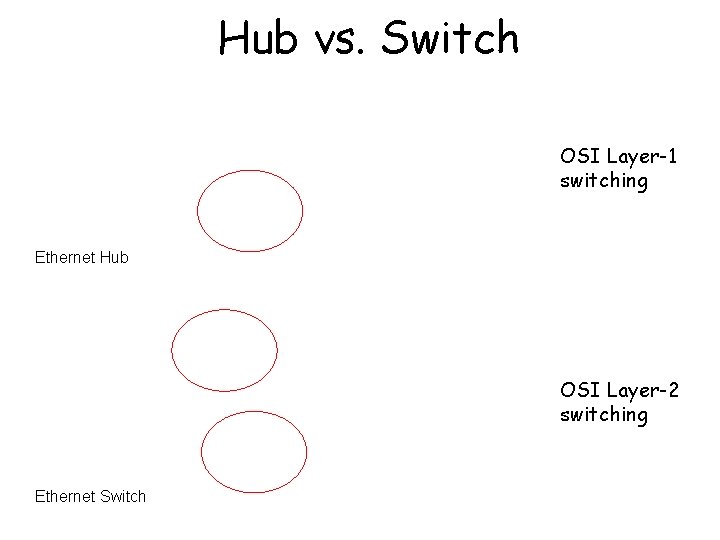
Hub vs. Switch OSI Layer-1 switching Ethernet Hub OSI Layer-2 switching Ethernet Switch
Ethernet MAC & Link Duplexity
Ethernet Switch
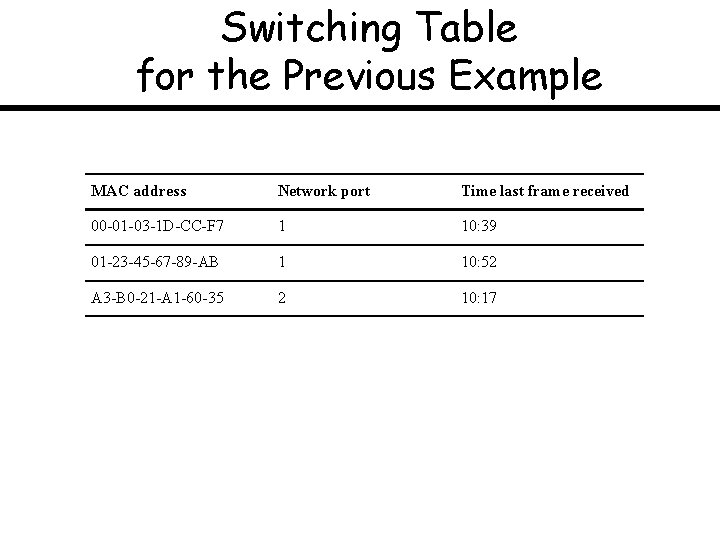
Learning Switches [ See the switching table in the next slide … ]
Switching Table for the Previous Example MAC address Network port Time last frame received 00 -01 -03 -1 D-CC-F 7 1 10: 39 01 -23 -45 -67 -89 -AB 1 10: 52 A 3 -B 0 -21 -A 1 -60 -35 2 10: 17
Loops in Switched LANs (1)
Loops in Switched LANs (2)
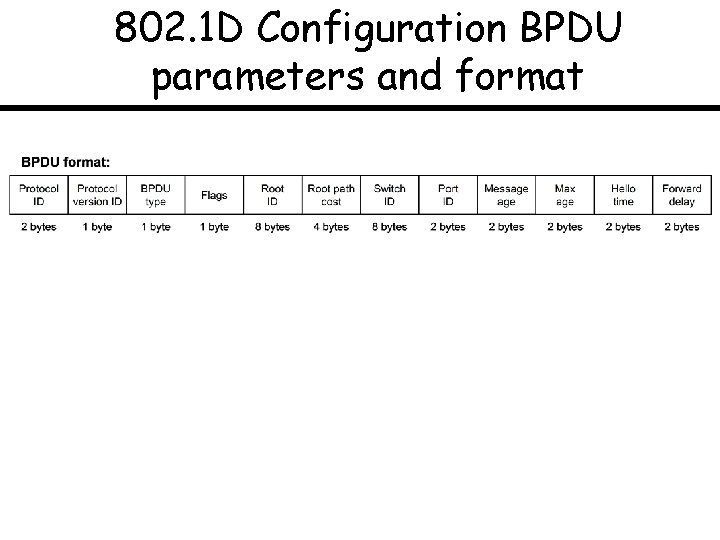
802. 1 D Configuration BPDU parameters and format
Topic: IEEE 802. 11 a. k. a. Wi-Fi 802. 11 Architecture 802. 11 Medium Access Control RTS/CTS Protocol for Hidden Stations
Components of 802. 11 LANs Ad hoc network does not have distribution system nor access point
IBSS and Infrastructure BSS
Extended Service Set (ESS)
802. 11 Link Layer Protocol Architecture
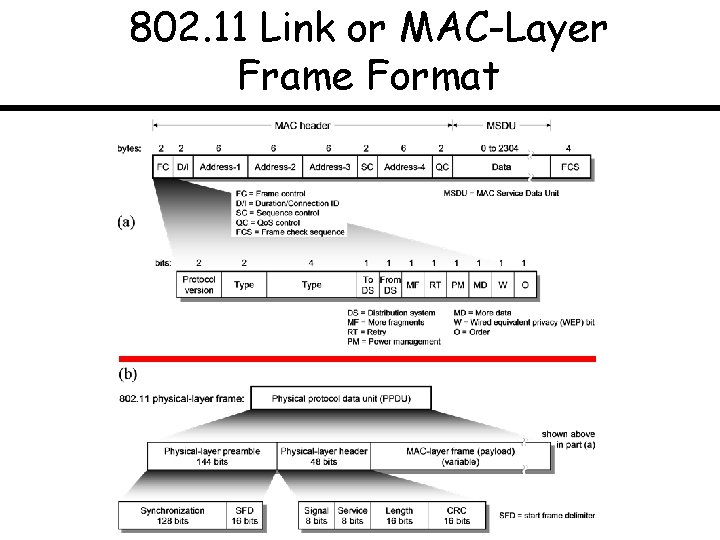
802. 11 Link or MAC-Layer Frame Format
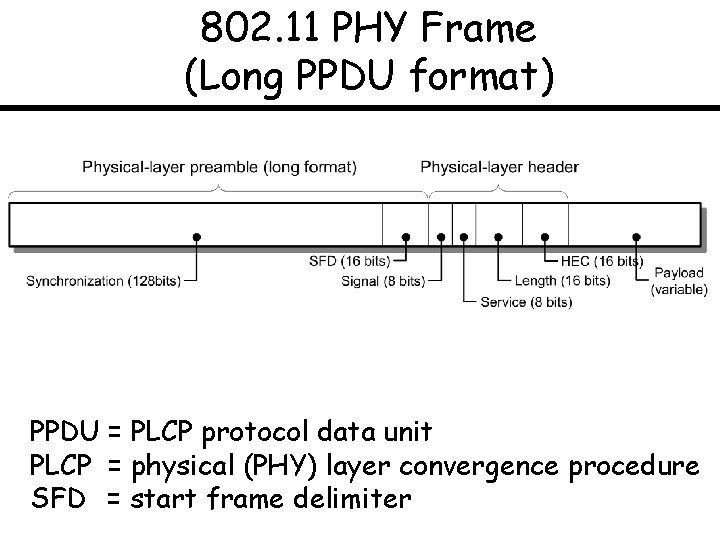
802. 11 PHY Frame (Long PPDU format) PPDU = PLCP protocol data unit PLCP = physical (PHY) layer convergence procedure SFD = start frame delimiter
802. 11 Address Fields [Address-1] RA = Immediate recipient of the current frame (C) [Address-2] TA = Transmitter which transmitted the current frame (B) [Address-3] SA = Original source (A) [Address-4] DA = Original destination (D)
802. 11 Protocol Architecture
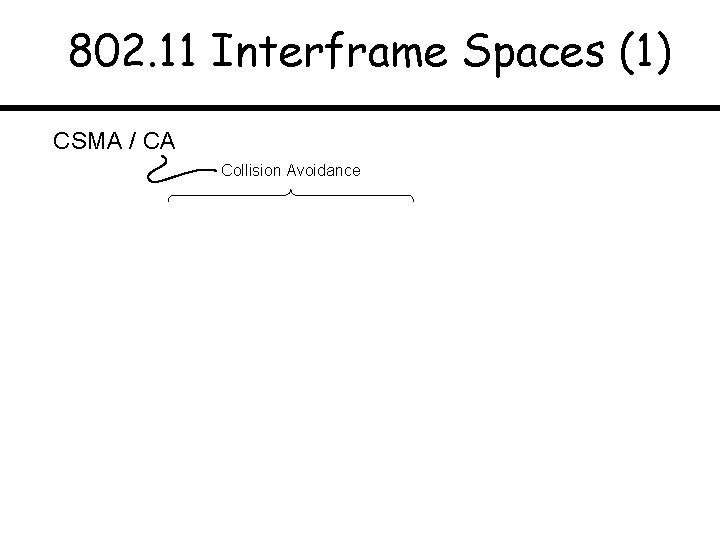
802. 11 Interframe Spaces (1) CSMA / CA Collision Avoidance
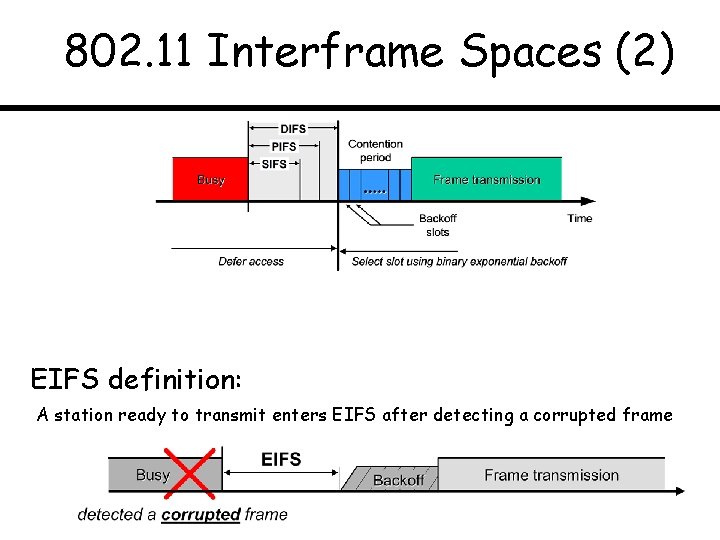
802. 11 Interframe Spaces (2) EIFS definition: A station ready to transmit enters EIFS after detecting a corrupted frame
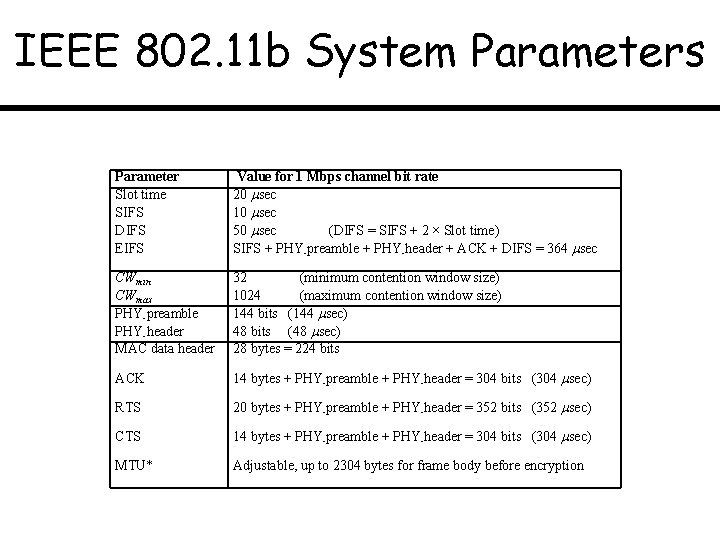
IEEE 802. 11 b System Parameters Parameter Slot time SIFS DIFS EIFS Value for 1 Mbps channel bit rate 20 sec 10 sec 50 sec (DIFS = SIFS + 2 × Slot time) SIFS + PHY-preamble + PHY-header + ACK + DIFS = 364 sec CWmin CWmax PHY-preamble PHY-header MAC data header 32 (minimum contention window size) 1024 (maximum contention window size) 144 bits (144 sec) 48 bits (48 sec) 28 bytes = 224 bits ACK 14 bytes + PHY-preamble + PHY-header = 304 bits (304 sec) RTS 20 bytes + PHY-preamble + PHY-header = 352 bits (352 sec) CTS 14 bytes + PHY-preamble + PHY-header = 304 bits (304 sec) MTU* Adjustable, up to 2304 bytes for frame body before encryption
802. 11 Basic Transmission Mode
802. 11 Protocol State Diagram – Sender
802. 11 Protocol State Diagram – Receiver (b)
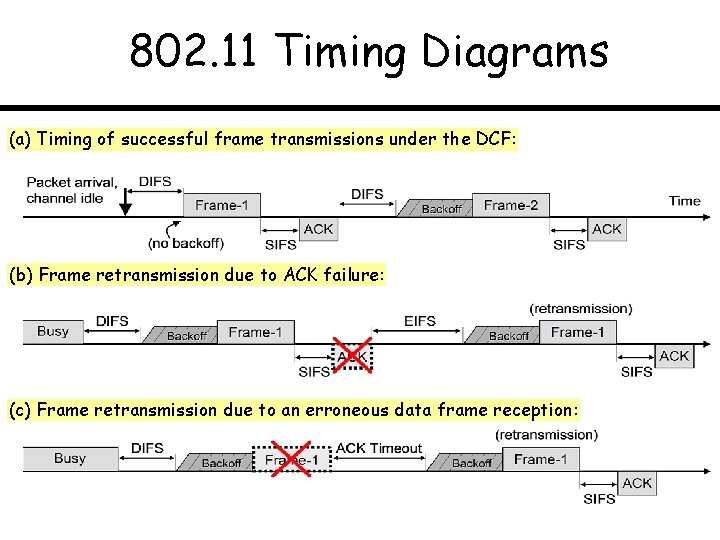
Examples of Timing Diagrams for IEEE 802. 11 1. A single station has two frames ready for transmission on an idle channel. 2. A single station has one frame ready for transmission on a busy channel. The acknowledgement for the frame is corrupted during the first transmission. 3. A single station has one frame ready for transmission on a busy channel. The data frame is corrupted during the first transmission.
802. 11 Timing Diagrams (a) Timing of successful frame transmissions under the DCF: (b) Frame retransmission due to ACK failure: (c) Frame retransmission due to an erroneous data frame reception:
RTS/CTS for Hidden Stations
RTS/CTS Transmission Mode
Topic: Quality of Service (Qo. S) Introduction & Prospects Network Neutrality Debate
Network Conceptual Model
Players and Parameters
Network Conceptual Model (2) We don’t know when sources will start/end their sessions; also for some types of data (video), datarate is variable