
Computer Networks Chapter 12 Topics Communication links LAN
- Slides: 25
Computer Networks Chapter 12 Topics: ØCommunication links ØLAN / WAN ØInternet / WWW CMPUT 101 Introduction to Computing (c) Yngvi Bjornsson 1
Computer Networks • A computer network is a set of independent computer systems interconnected by telecommunication links. CMPUT 101 Introduction to Computing (c) Yngvi Bjornsson 2
Telecommunication Links • The connection links: – Are used to transmit data between the computers on the network. – The links could be: • wires (cables, telephone-lines), or even • wireless (radio transmitters, satellites). • The transmission rate or bandwidth of a link: – Is the amount of data that can be transmitted over a connection in a given period of time. – Is. Introduction typically measure in. Bjornsson bps (bits-per-second). CMPUT 101 to Computing (c) Yngvi 3
Connecting • In a local network (office, building, campus), computers a usually connected via dedicated links, such as: – Twisted pair wire – Coaxial cable – Fiber-optic cable • But what if we want to connect from home? – Telephone-lines – Cable TV CMPUT 101 Introduction to Computing (c) Yngvi Bjornsson 4
Connecting via Telephone Lines • Problem: – Telephone systems were build to carry voice as analog data, but computers use digital (binary) data. • Solution: – At the sending end the data is converted to analog signal (modulate). – At the receiving end: the analog signal is converted back to digital data (demodulate). • The device that does this is called a modem. • Bandwidth: up to 56 Kbps CMPUT 101 Introduction to Computing (c) Yngvi Bjornsson 5
ISDN • Telephone companies are now also offering ISDN connections (Integrated Services Digital Network) – Communications links capable of handling digital signals. – Can also be used for normal telephone calls, a device called Terminal Adaptor (TA) converts the analog telephone signal to/from a digital signal. • Need: – ISDN adapter in your computer CMPUT 101 Introduction to Computing (c) Yngvi Bjornsson 6
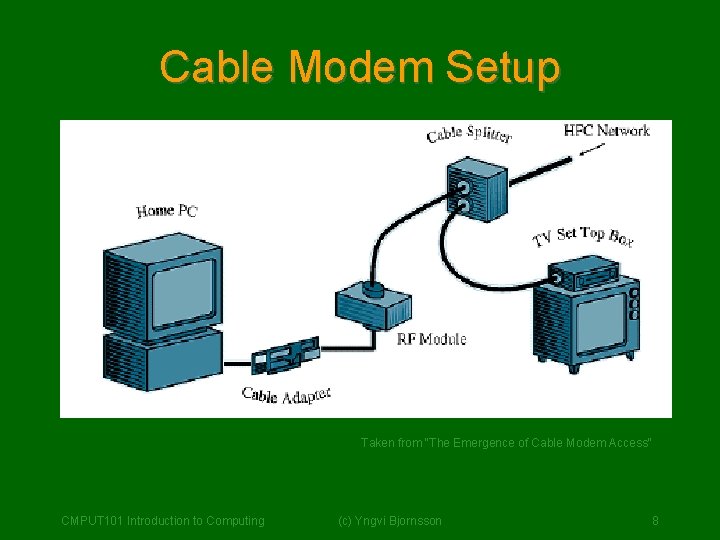
Cable Modem • A device called a cable modem allows to transmit data via a cable TV connection: – Does modulate the digital signals so can be transmitted (but without interfering with the TV picture). • Needs – – – Cable TV outlet A cable modem (rental included in monthly fee) A network card in your computer. • Advantages: – Dedicated connection (don't have to dial in). – Bandwidth: up to 45 Mbps (but shared by all users cable) CMPUT 101 on Introduction to Computing (c) Yngvi Bjornsson 7
Cable Modem Setup Taken from "The Emergence of Cable Modem Access" CMPUT 101 Introduction to Computing (c) Yngvi Bjornsson 8
Computer Networks • We distinguish between two different type of networks: • LAN (Local Area Networks) – Used to connect computers in close physical proximity (office, building, campus) • WAN (Wide Area Networks) – Used to connect computers across cities, countries, continents. • The two type of networks use totally different: – Network topology – Communication protocols CMPUT 101 Introduction to Computing (c) Yngvi Bjornsson 9
Local Area Networks (LANs) • Many different types of LANs, but (by far) the most widely used are Ethernets. – Bandwidth: 10 mbps-100 mbps – Each computer on the network has installed an Ethernet adapter. • Ethernet LAN's can be constructed in two different ways, either using – a shared cable – a HUB CMPUT 101 Introduction to Computing (c) Yngvi Bjornsson 10
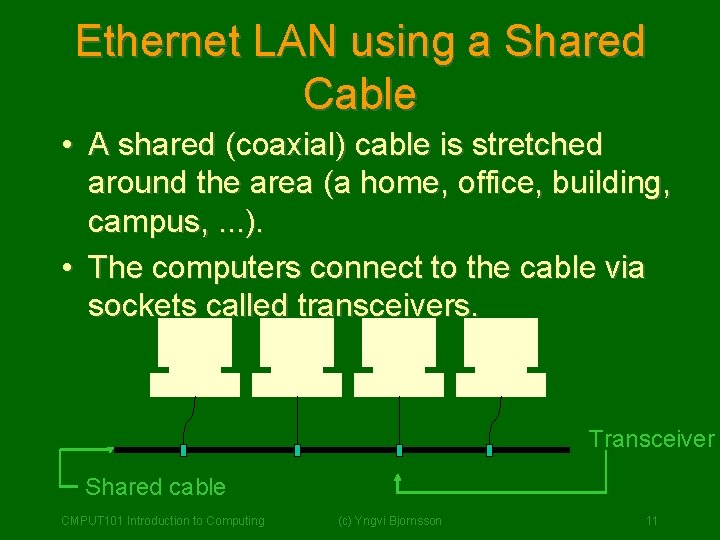
Ethernet LAN using a Shared Cable • A shared (coaxial) cable is stretched around the area (a home, office, building, campus, . . . ). • The computers connect to the cable via sockets called transceivers. Transceiver Shared cable CMPUT 101 Introduction to Computing (c) Yngvi Bjornsson 11
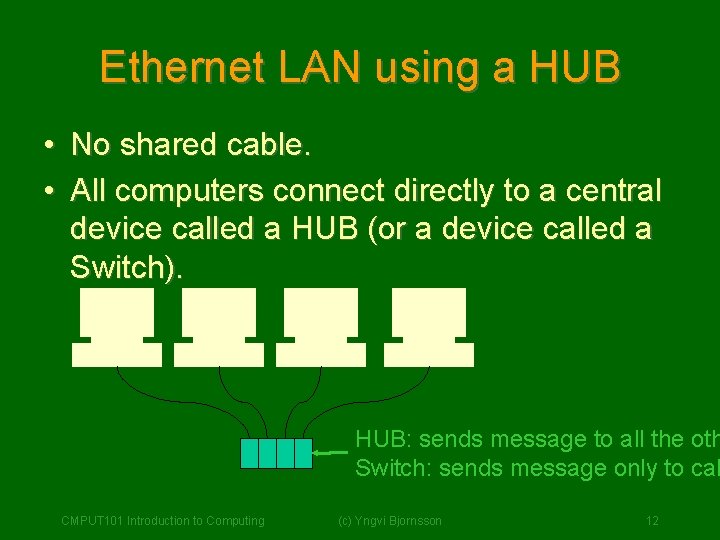
Ethernet LAN using a HUB • No shared cable. • All computers connect directly to a central device called a HUB (or a device called a Switch). HUB: sends message to all the oth Switch: sends message only to cal CMPUT 101 Introduction to Computing (c) Yngvi Bjornsson 12
Ethernet Communication Protocol • The rules of how data is transferred over the network is called: – a communication protocol (same protocol used regardless of how the network is constructed. • Communication technique (no central control): – Each computer on the network has an unique address. – A message to address is broadcasted over the network. Every computer receives the message, but only the computer with a matching address stores the message. – Contention-based transmission: • Listens to line and wait until free, then send. • If collision (two or more computers send at same time), wait a random retry. CMPUT 101 Introductionamount to Computingof time, then (c) Yngvi Bjornsson 13
Wide Area Networks (WANs) • Used to connect computer systems that are far apart, e. g. across a city, country, continent. • Network topology different from LAN's: – Point-to-Point communications links (one computer connects directly to another computer) • Communication protocols different from LAN's: – Send a fixed maximum size packages instead of whole messages. CMPUT 101 Introduction to Computing (c) Yngvi Bjornsson 14
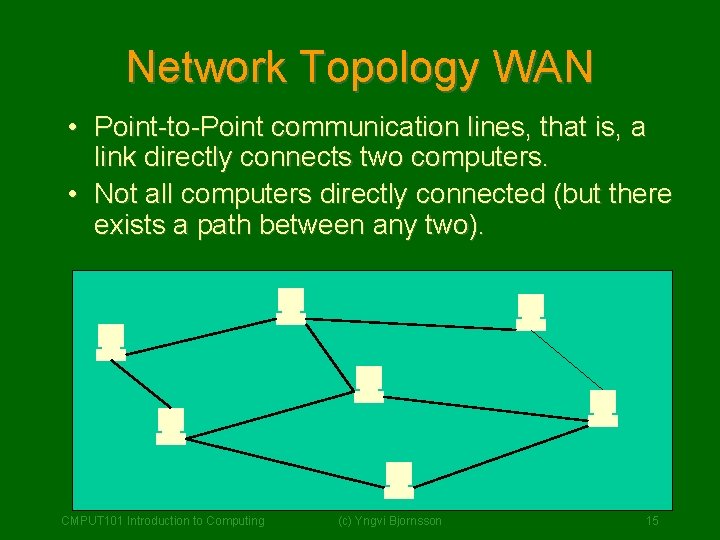
Network Topology WAN • Point-to-Point communication lines, that is, a link directly connects two computers. • Not all computers directly connected (but there exists a path between any two). CMPUT 101 Introduction to Computing (c) Yngvi Bjornsson 15
Communication Protocols WAN • Messages transmitted via store-andforward packet switching: – A message is split into packages (10001500 bytes). – A router determines best path to send the packages. – Packages are forwarded from a node-tonode • When receiving a package a node (computer) sends an acknowledge to sending node, which can then delete local copy of package. CMPUT 101 Introduction to Computing (c) Yngvi Bjornsson 16
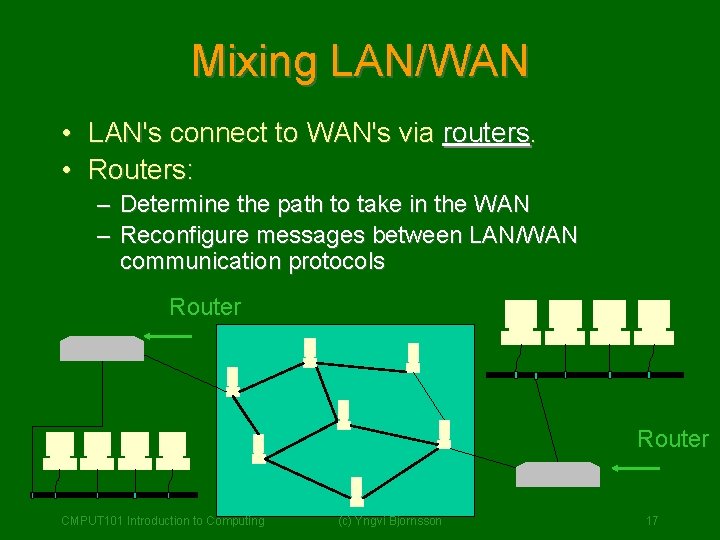
Mixing LAN/WAN • LAN's connect to WAN's via routers. • Routers: – – Determine the path to take in the WAN Reconfigure messages between LAN/WAN communication protocols Router CMPUT 101 Introduction to Computing (c) Yngvi Bjornsson 17
The Internet • The first computer-to-computer message was sent in 1969. • Today the Internet consists of estimated – 30 million interconnected computers – hundred of millions of users – in over 150 countries. • The World Wide Web is the most popular component of the internet. CMPUT 101 Introduction to Computing (c) Yngvi Bjornsson 18
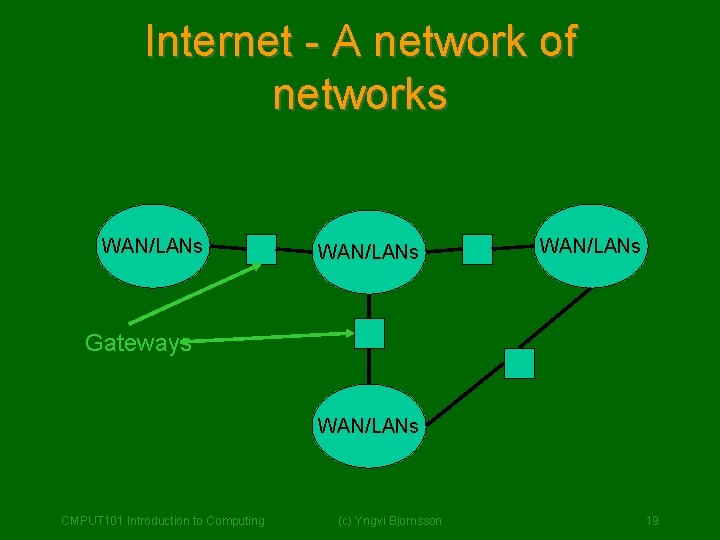
Internet - A network of networks WAN/LANs Gateways WAN/LANs CMPUT 101 Introduction to Computing (c) Yngvi Bjornsson 19
Internet Infrastructure • The Internet is a network of networks. • Is based on an internetworking concept: – each network can do whatever it wants internally, but – much speak a standard protocol externally, and – use a standard addressing scheme • A device called a gateway interconnects the networks – basically same as(c)a. Yngvirouter Bjornsson CMPUT 101 Introduction to Computing 20
Standard Addressing/Protocols • Addressing: – Each computer has a unique address • IP address • 128. 129. 4. 29 – Domain Name System • easier to remember names than numbers • Can refer to address as: www. cs. ualberta. ca • Protocols: – TCP/IP (Transmission Control Protocol/Internet Protocol) – More orto less language” spoken 21 CMPUT 101 Introduction Computingthe “common (c) Yngvi Bjornsson
Usage of internet • • Web-browsing (World Wide Web) E-mail Telnet (log onto and work on another computer) FTP (transfer files from one computer to another) Newsgroups / Chat rooms E-Commerce. . . CMPUT 101 Introduction to Computing (c) Yngvi Bjornsson 22
World Wide Web • The World Wide Web (WWW) is an information sharing system based on – inter-linked documents (web-pages) – that can be accessed over the internet and – viewed graphically (using a web-browser) • Located via a URL (Uniform Resource Locator): – <protocol>: //<internet address>/page • http: //www. cs. ualberta. ca/~yngvi/cmput 101 • ftp: //www. cs. ualberta. ca CMPUT 101 Introduction to Computing (c) Yngvi Bjornsson 23
Web pages • A web-page is a hypertext document – can have links to another web-pages – written in a language called HTML • The web-pages – are stored on a computer running a webserver – can be accessed from any computer on the internet via a web-browser (Netscape, Internet Explorer). • The HTTP protocol specifies (c) Yngvi Bjornsson 24 – how the Web-browser (client) gets the page CMPUT 101 Introduction to Computing
Summary • Computer networks – computers connected using telecommunication links – Local Area Networks (LAN) – Wide Area Networks (WAN) • Internet – Network of networks – Standard addressing scheme/inter network protocols • WWW CMPUT 101 Introduction to Computing (c) Yngvi Bjornsson 25