
Computer Networks Chapter 1 Introduction CN 5 E

- Slides: 70
Computer Networks Chapter 1 Introduction CN 5 E by Tanenbaum & Wetherall, © Pearson Education-Prentice Hall and D. Wetherall, 2011, modified by SJF 1
Introduction Chapter 1 • Uses of Computer Networks • Network Hardware • Network Software • Reference Models • Example Networks • Network Standardization • Metric Units CN 5 E by Tanenbaum & Wetherall, © Pearson Education-Prentice Hall and D. Wetherall, 2011, modified by SJF
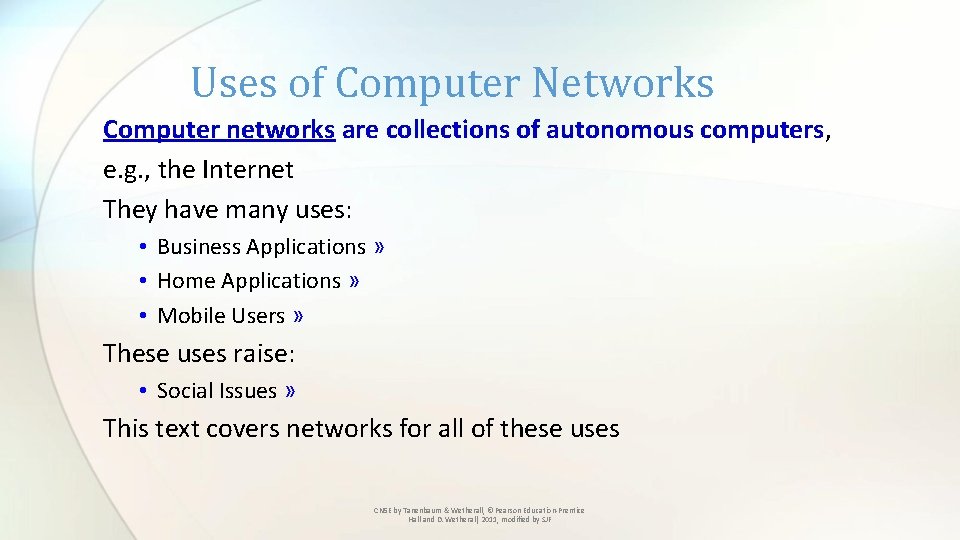
Uses of Computer Networks Computer networks are collections of autonomous computers, e. g. , the Internet They have many uses: • Business Applications » • Home Applications » • Mobile Users » These uses raise: • Social Issues » This text covers networks for all of these uses CN 5 E by Tanenbaum & Wetherall, © Pearson Education-Prentice Hall and D. Wetherall, 2011, modified by SJF
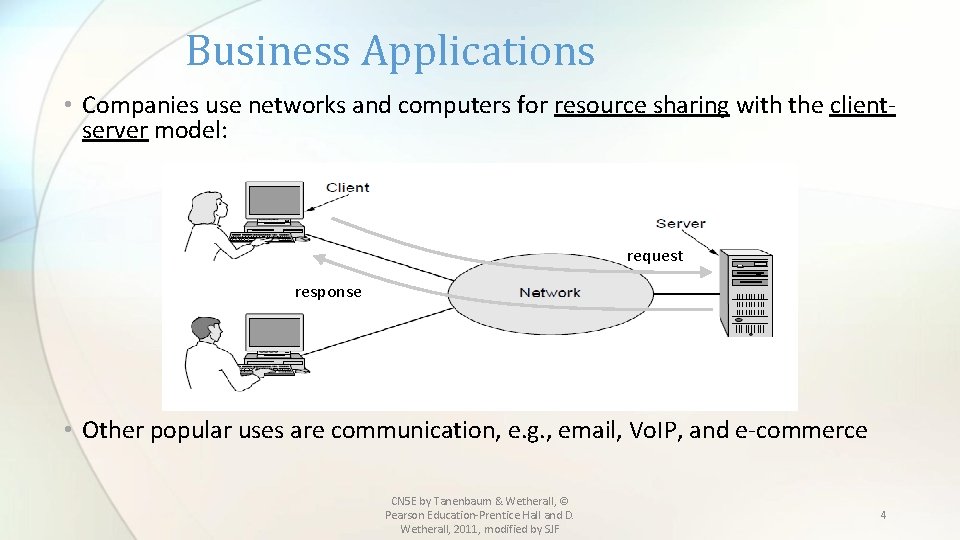
Business Applications • Companies use networks and computers for resource sharing with the clientserver model: request response • Other popular uses are communication, e. g. , email, Vo. IP, and e-commerce CN 5 E by Tanenbaum & Wetherall, © Pearson Education-Prentice Hall and D. Wetherall, 2011, modified by SJF 4
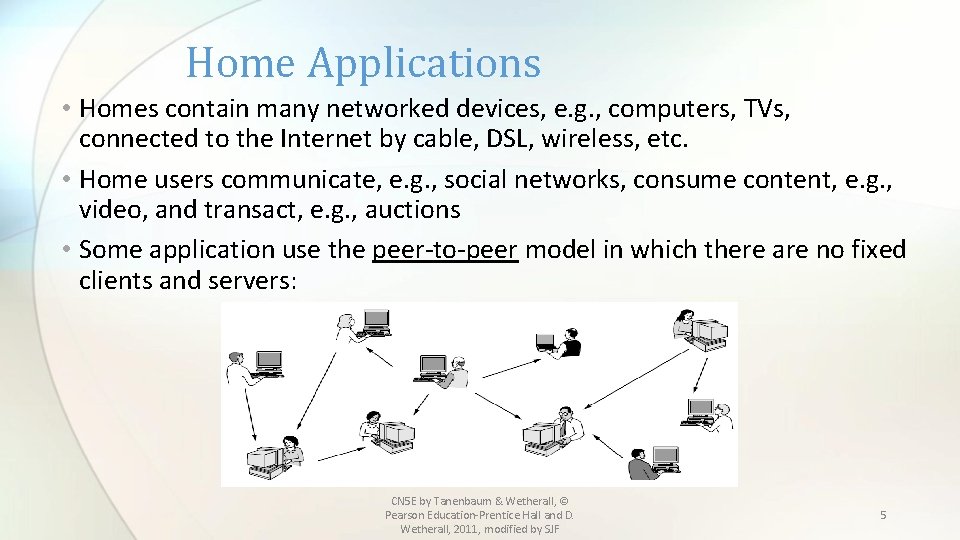
Home Applications • Homes contain many networked devices, e. g. , computers, TVs, connected to the Internet by cable, DSL, wireless, etc. • Home users communicate, e. g. , social networks, consume content, e. g. , video, and transact, e. g. , auctions • Some application use the peer-to-peer model in which there are no fixed clients and servers: CN 5 E by Tanenbaum & Wetherall, © Pearson Education-Prentice Hall and D. Wetherall, 2011, modified by SJF 5
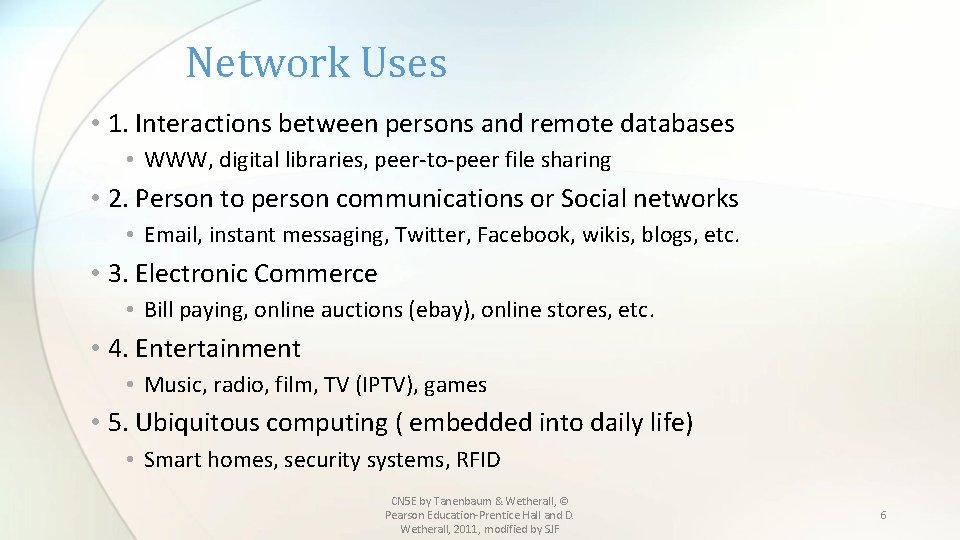
Network Uses • 1. Interactions between persons and remote databases • WWW, digital libraries, peer-to-peer file sharing • 2. Person to person communications or Social networks • Email, instant messaging, Twitter, Facebook, wikis, blogs, etc. • 3. Electronic Commerce • Bill paying, online auctions (ebay), online stores, etc. • 4. Entertainment • Music, radio, film, TV (IPTV), games • 5. Ubiquitous computing ( embedded into daily life) • Smart homes, security systems, RFID CN 5 E by Tanenbaum & Wetherall, © Pearson Education-Prentice Hall and D. Wetherall, 2011, modified by SJF 6
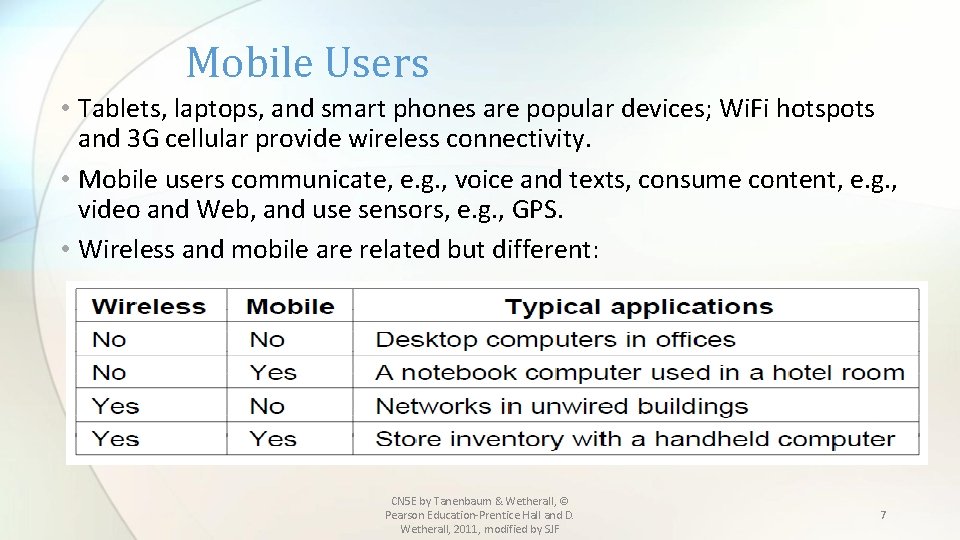
Mobile Users • Tablets, laptops, and smart phones are popular devices; Wi. Fi hotspots and 3 G cellular provide wireless connectivity. • Mobile users communicate, e. g. , voice and texts, consume content, e. g. , video and Web, and use sensors, e. g. , GPS. • Wireless and mobile are related but different: CN 5 E by Tanenbaum & Wetherall, © Pearson Education-Prentice Hall and D. Wetherall, 2011, modified by SJF 7
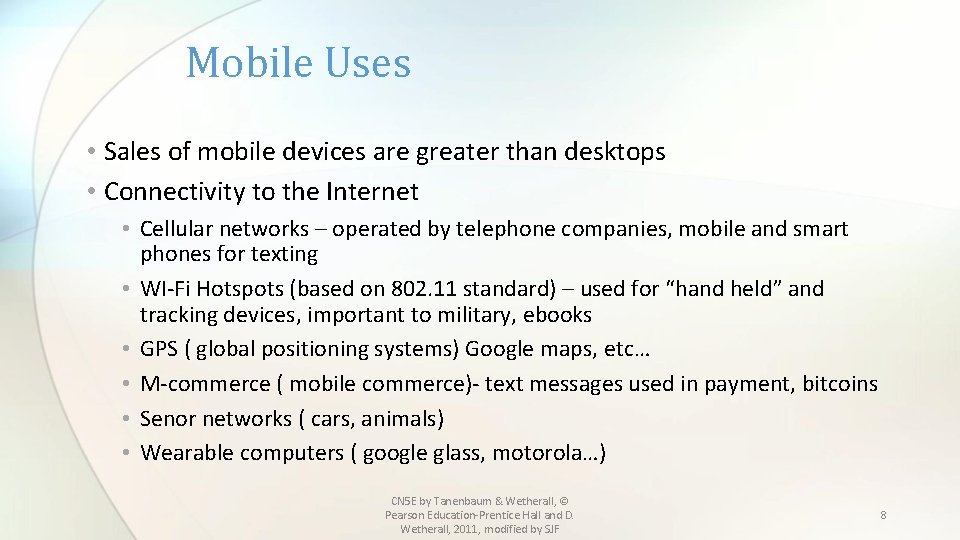
Mobile Uses • Sales of mobile devices are greater than desktops • Connectivity to the Internet • Cellular networks – operated by telephone companies, mobile and smart phones for texting • WI-Fi Hotspots (based on 802. 11 standard) – used for “hand held” and tracking devices, important to military, ebooks • GPS ( global positioning systems) Google maps, etc… • M-commerce ( mobile commerce)- text messages used in payment, bitcoins • Senor networks ( cars, animals) • Wearable computers ( google glass, motorola…) CN 5 E by Tanenbaum & Wetherall, © Pearson Education-Prentice Hall and D. Wetherall, 2011, modified by SJF 8
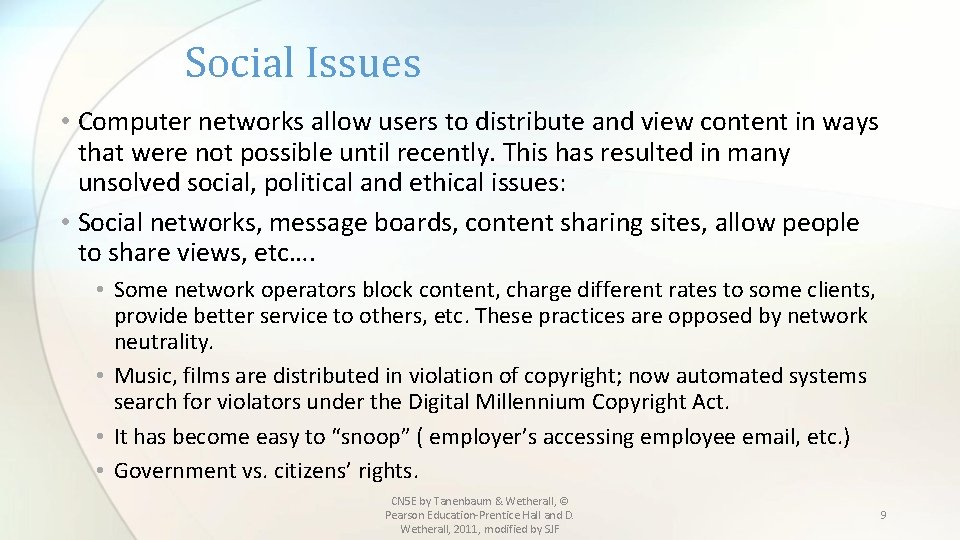
Social Issues • Computer networks allow users to distribute and view content in ways that were not possible until recently. This has resulted in many unsolved social, political and ethical issues: • Social networks, message boards, content sharing sites, allow people to share views, etc…. • Some network operators block content, charge different rates to some clients, provide better service to others, etc. These practices are opposed by network neutrality. • Music, films are distributed in violation of copyright; now automated systems search for violators under the Digital Millennium Copyright Act. • It has become easy to “snoop” ( employer’s accessing employee email, etc. ) • Government vs. citizens’ rights. CN 5 E by Tanenbaum & Wetherall, © Pearson Education-Prentice Hall and D. Wetherall, 2011, modified by SJF 9
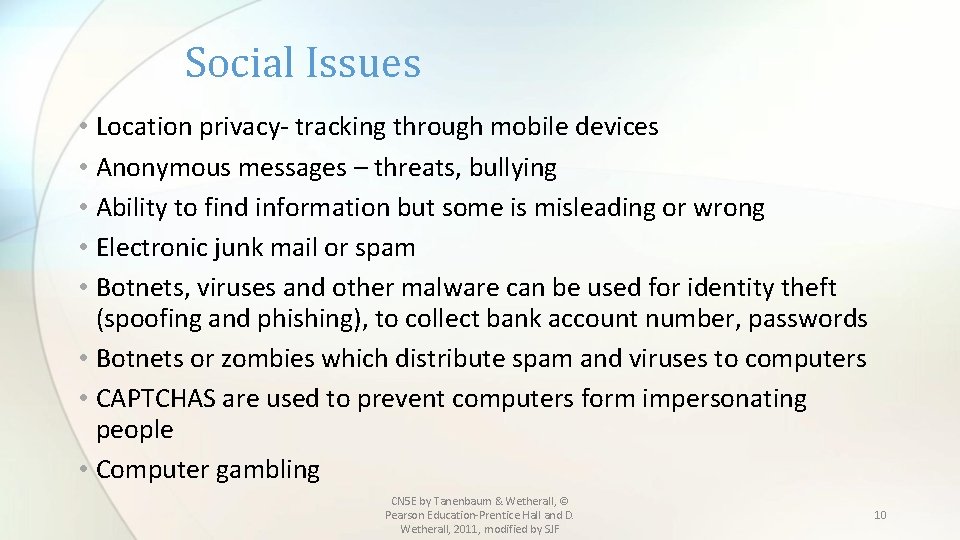
Social Issues • Location privacy- tracking through mobile devices • Anonymous messages – threats, bullying • Ability to find information but some is misleading or wrong • Electronic junk mail or spam • Botnets, viruses and other malware can be used for identity theft (spoofing and phishing), to collect bank account number, passwords • Botnets or zombies which distribute spam and viruses to computers • CAPTCHAS are used to prevent computers form impersonating people • Computer gambling CN 5 E by Tanenbaum & Wetherall, © Pearson Education-Prentice Hall and D. Wetherall, 2011, modified by SJF 10
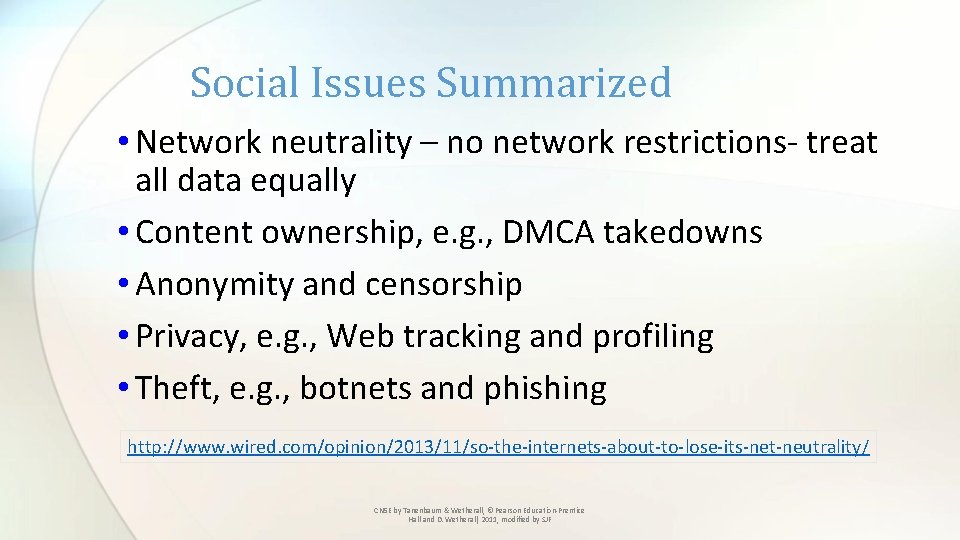
Social Issues Summarized • Network neutrality – no network restrictions- treat all data equally • Content ownership, e. g. , DMCA takedowns • Anonymity and censorship • Privacy, e. g. , Web tracking and profiling • Theft, e. g. , botnets and phishing http: //www. wired. com/opinion/2013/11/so-the-internets-about-to-lose-its-net-neutrality / CN 5 E by Tanenbaum & Wetherall, © Pearson Education-Prentice Hall and D. Wetherall, 2011, modified by SJF
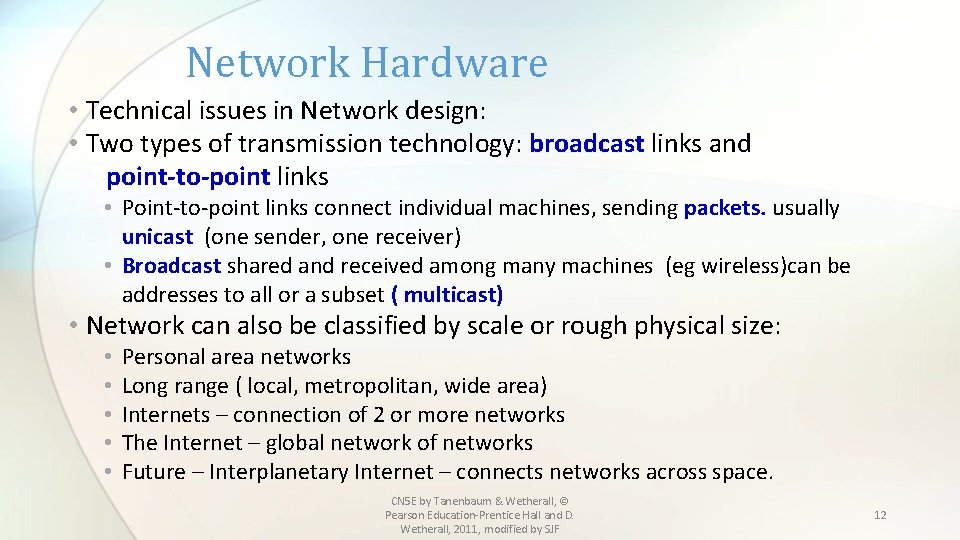
Network Hardware • Technical issues in Network design: • Two types of transmission technology: broadcast links and point-to-point links • Point-to-point links connect individual machines, sending packets. usually unicast (one sender, one receiver) • Broadcast shared and received among many machines (eg wireless)can be addresses to all or a subset ( multicast) • Network can also be classified by scale or rough physical size: • • • Personal area networks Long range ( local, metropolitan, wide area) Internets – connection of 2 or more networks The Internet – global network of networks Future – Interplanetary Internet – connects networks across space. CN 5 E by Tanenbaum & Wetherall, © Pearson Education-Prentice Hall and D. Wetherall, 2011, modified by SJF 12
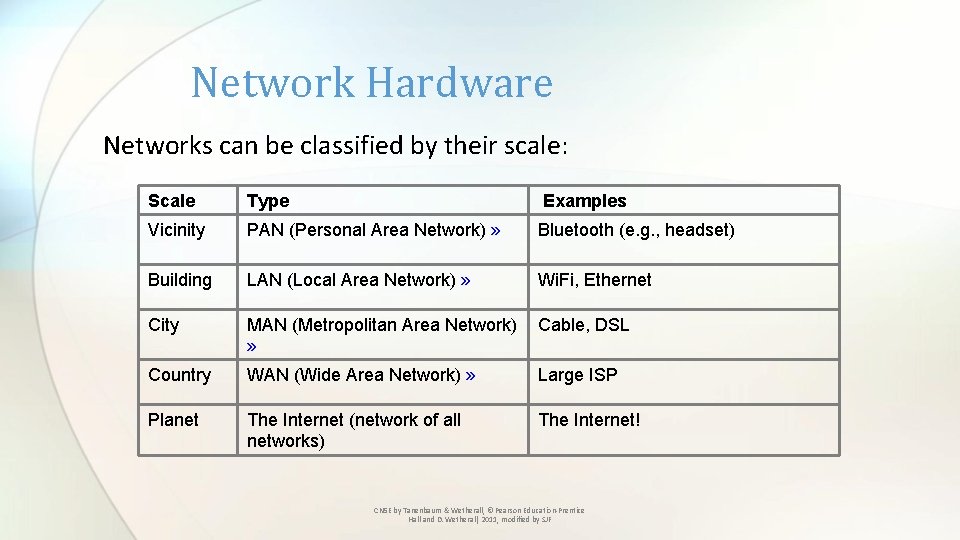
Network Hardware Networks can be classified by their scale: Scale Type Examples Vicinity PAN (Personal Area Network) » Bluetooth (e. g. , headset) Building LAN (Local Area Network) » Wi. Fi, Ethernet City MAN (Metropolitan Area Network) » Cable, DSL Country WAN (Wide Area Network) » Large ISP Planet The Internet (network of all networks) The Internet! CN 5 E by Tanenbaum & Wetherall, © Pearson Education-Prentice Hall and D. Wetherall, 2011, modified by SJF
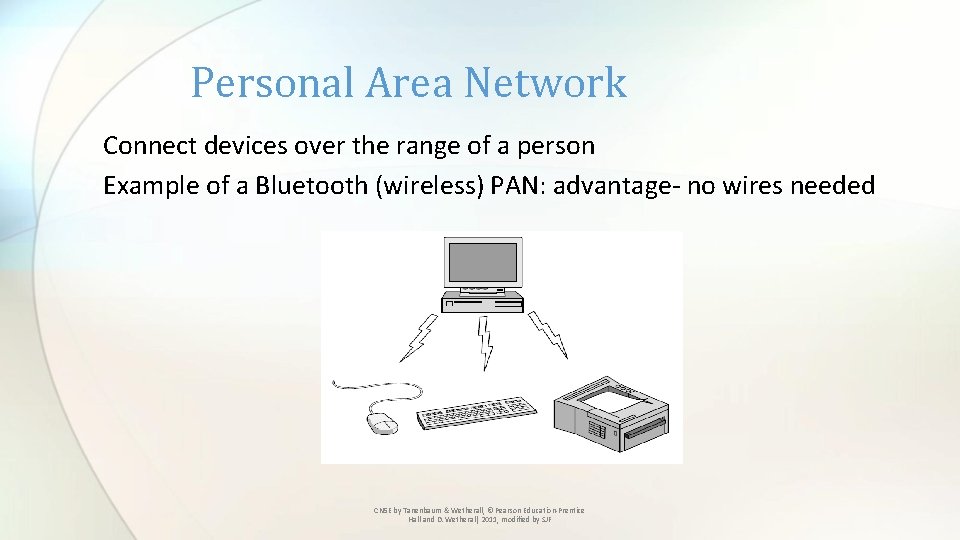
Personal Area Network Connect devices over the range of a person Example of a Bluetooth (wireless) PAN: advantage- no wires needed CN 5 E by Tanenbaum & Wetherall, © Pearson Education-Prentice Hall and D. Wetherall, 2011, modified by SJF
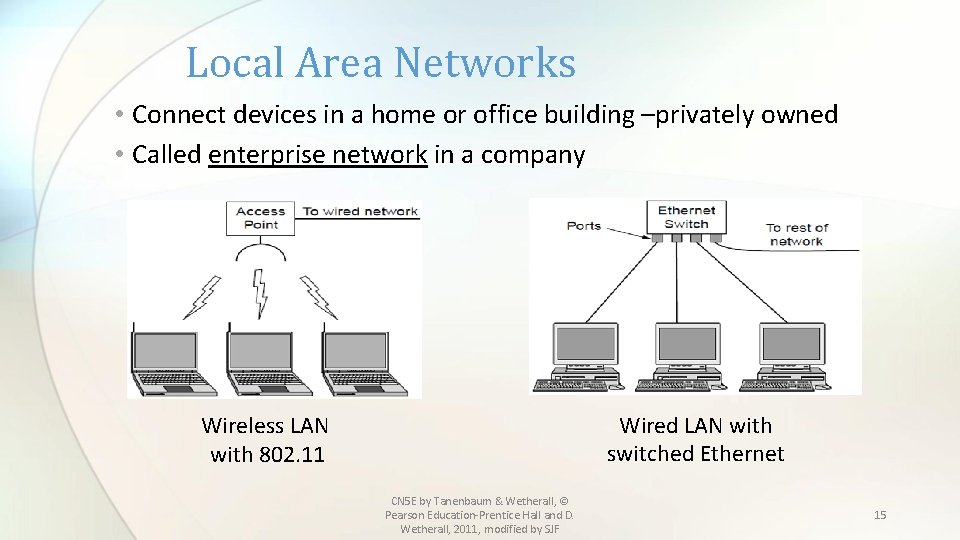
Local Area Networks • Connect devices in a home or office building –privately owned • Called enterprise network in a company Wired LAN with switched Ethernet Wireless LAN with 802. 11 CN 5 E by Tanenbaum & Wetherall, © Pearson Education-Prentice Hall and D. Wetherall, 2011, modified by SJF 15
Local Area Networks • Wi. Fi or IEEE 802. 11 is the standard for wireless LANs • Wireless LANs • Access point (AP), wireless routers, or base stations relay packets between computers and the Internet. • Wired LANs use different technologies, and media (copper wire, fiber, etc. ) • Ethernet or IEEE 802. 3 is the most common • Usually connected to a switch through a port • Switches can be connected together to form larger networks CN 5 E by Tanenbaum & Wetherall, © Pearson Education-Prentice Hall and D. Wetherall, 2011, modified by SJF 16
LANs in the Home • Many devices are capable of being networked: computers, DVDs, phones and other consumer electronics, such as cameras, appliances such as clocks and radios and infrastructures such as utility meters and thermostats. • Some unique properties of home networks: 1. Networked devices must be easy to install 2. Network and devices must be foolproof 3. Devices must be economical 4. Must allow for expansion 5. Must be secure and reliable Google is moving toward the “Internet of Things” with the purchase of NEST CN 5 E by Tanenbaum & Wetherall, © Pearson Education-Prentice Hall and D. Wetherall, 2011, modified by SJF 17
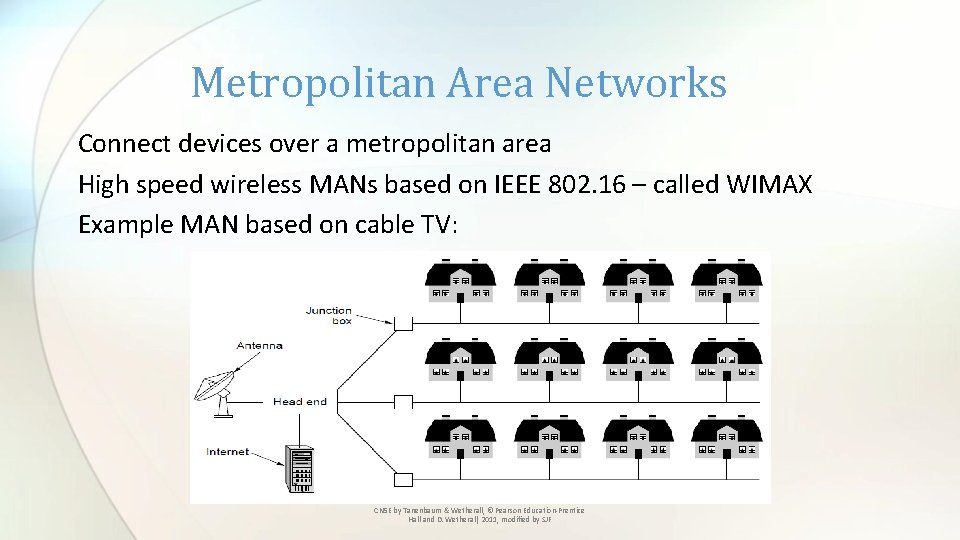
Metropolitan Area Networks Connect devices over a metropolitan area High speed wireless MANs based on IEEE 802. 16 – called WIMAX Example MAN based on cable TV: CN 5 E by Tanenbaum & Wetherall, © Pearson Education-Prentice Hall and D. Wetherall, 2011, modified by SJF
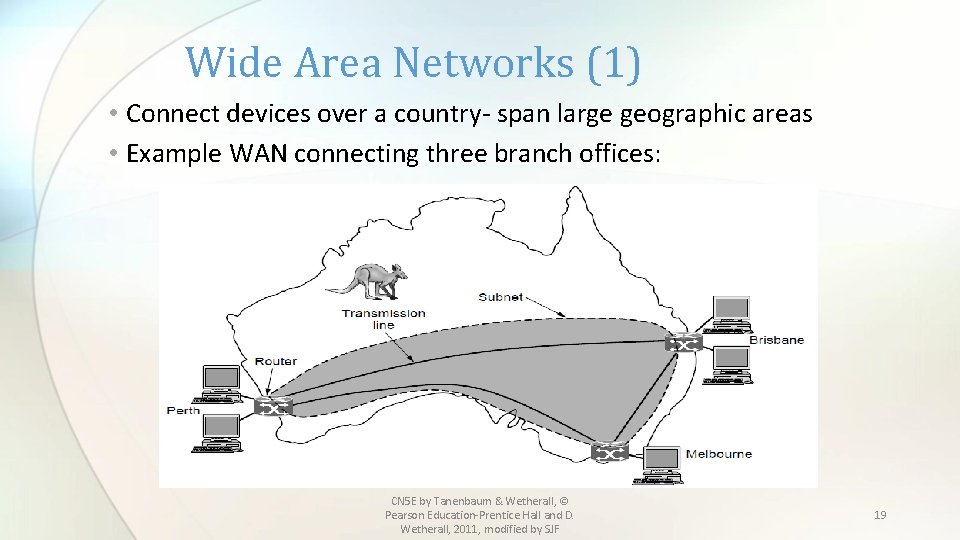
Wide Area Networks (1) • Connect devices over a country- span large geographic areas • Example WAN connecting three branch offices: CN 5 E by Tanenbaum & Wetherall, © Pearson Education-Prentice Hall and D. Wetherall, 2011, modified by SJF 19
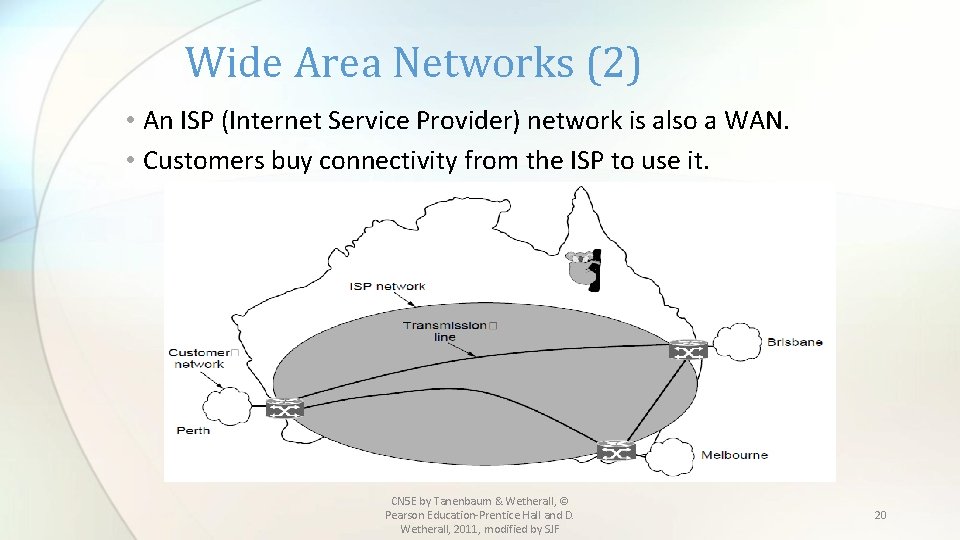
Wide Area Networks (2) • An ISP (Internet Service Provider) network is also a WAN. • Customers buy connectivity from the ISP to use it. CN 5 E by Tanenbaum & Wetherall, © Pearson Education-Prentice Hall and D. Wetherall, 2011, modified by SJF 20
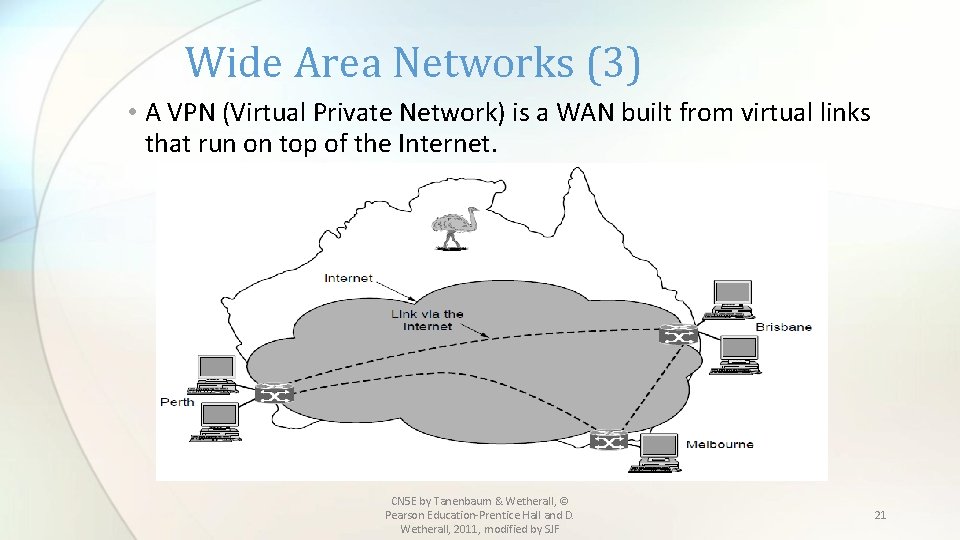
Wide Area Networks (3) • A VPN (Virtual Private Network) is a WAN built from virtual links that run on top of the Internet. CN 5 E by Tanenbaum & Wetherall, © Pearson Education-Prentice Hall and D. Wetherall, 2011, modified by SJF 21
Wide Area Networks • WANs connect devices, called hosts, through subnets • Subnets consist of: • Transmission lines that move bits between machines • Switches or routers – that connect two or more transmission lines • Some differences from a LAN: • Usually the components in a WAN are owned by different entities ( such as a phone company owning a leased line) and are not private • Routers usually connect different kinds of networking technologies (heterogeneous) instead of usually homogeneous equipment as in a LAN • Subnets can be made up of computers as in a LAN, but often connect larger LANs, forming internetworks. CN 5 E by Tanenbaum & Wetherall, © Pearson Education-Prentice Hall and D. Wetherall, 2011, modified by SJF 22
Network Software • Protocol layers » • Design issues for the layers » • Connection-oriented vs. connectionless service » • Service primitives » • Relationship of services to protocols » CN 5 E by Tanenbaum & Wetherall, © Pearson Education-Prentice Hall and D. Wetherall, 2011, modified by SJF
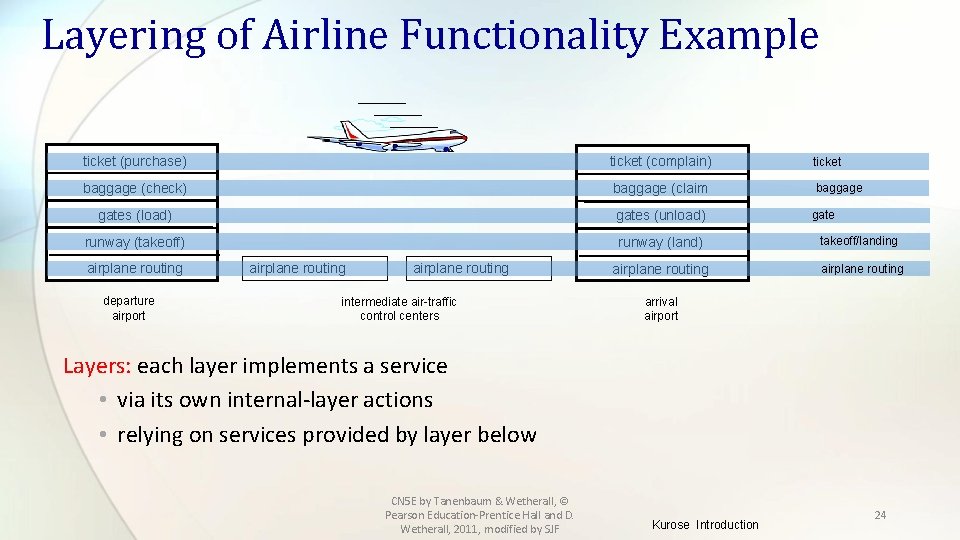
Layering of Airline Functionality Example ticket (purchase) ticket (complain) ticket baggage (check) baggage (claim baggage gates (load) gates (unload) runway (takeoff) runway (land) takeoff/landing airplane routing departure airport airplane routing intermediate air-traffic control centers gate arrival airport Layers: each layer implements a service • via its own internal-layer actions • relying on services provided by layer below CN 5 E by Tanenbaum & Wetherall, © Pearson Education-Prentice Hall and D. Wetherall, 2011, modified by SJF Kurose Introduction 24
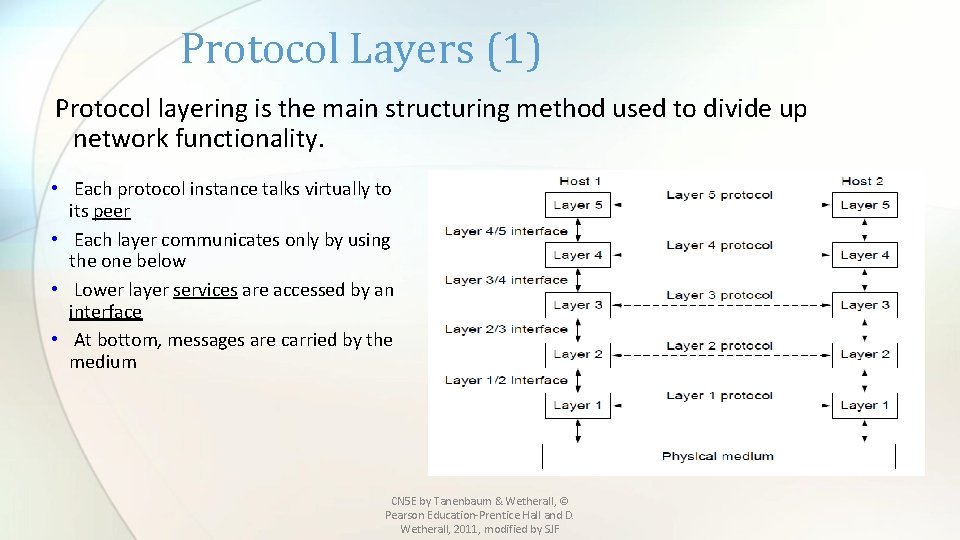
Protocol Layers • Most networks are organized as a stack of layers or levels, each one built upon and communicating with the one below it. • Each layer offers services to a higher layer, (like a virtual machine) providing information hiding and encapsulation. • A Protocol is an agreement between communicating parties on how communication is to proceed. • The entities which communicate are called peers ( software, hardware or humans). • There are 5 layer (Internet or TCP/IP) and 7 layer (OSI) models • Between each pair of adjacent layers is an interface CN 5 E by Tanenbaum & Wetherall, © Pearson Education-Prentice Hall and D. Wetherall, 2011, modified by SJF 25
Protocol Layers (1) Protocol layering is the main structuring method used to divide up network functionality. • Each protocol instance talks virtually to its peer • Each layer communicates only by using the one below • Lower layer services are accessed by an interface • At bottom, messages are carried by the medium CN 5 E by Tanenbaum & Wetherall, © Pearson Education-Prentice Hall and D. Wetherall, 2011, modified by SJF
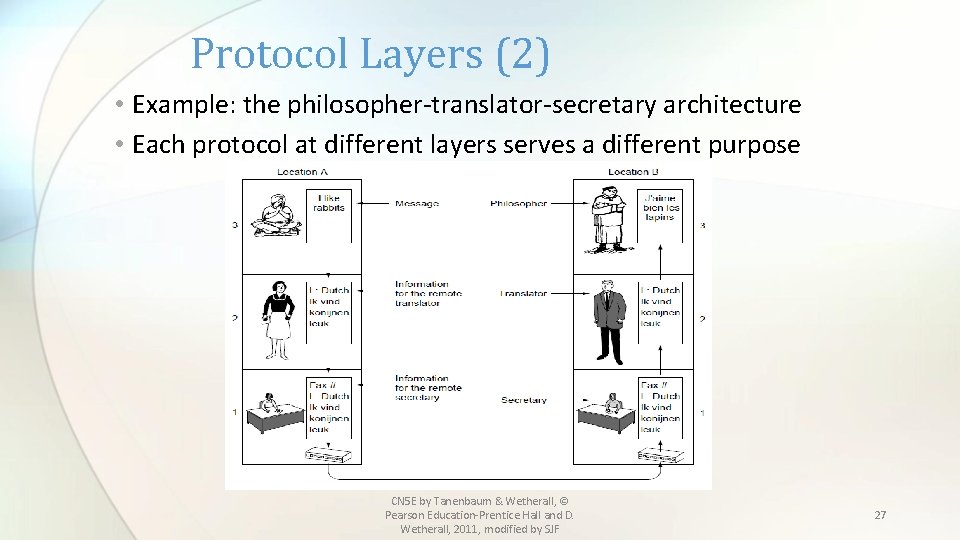
Protocol Layers (2) • Example: the philosopher-translator-secretary architecture • Each protocol at different layers serves a different purpose CN 5 E by Tanenbaum & Wetherall, © Pearson Education-Prentice Hall and D. Wetherall, 2011, modified by SJF 27
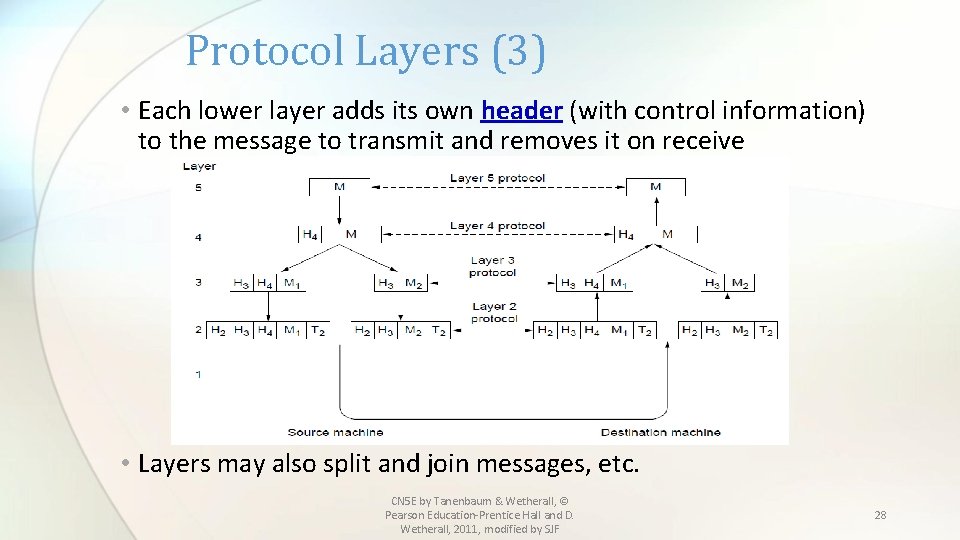
Protocol Layers (3) • Each lower layer adds its own header (with control information) to the message to transmit and removes it on receive • Layers may also split and join messages, etc. CN 5 E by Tanenbaum & Wetherall, © Pearson Education-Prentice Hall and D. Wetherall, 2011, modified by SJF 28
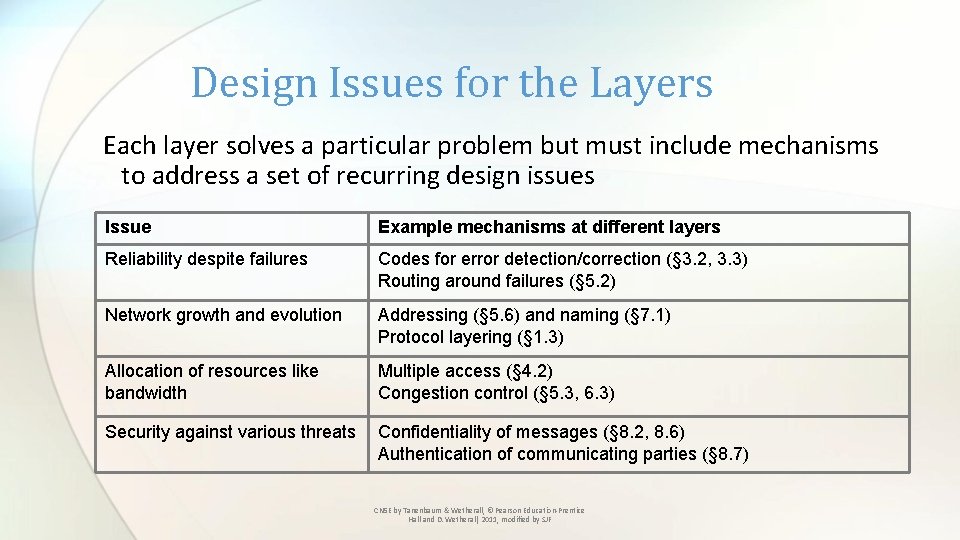
Design Issues for the Layers Each layer solves a particular problem but must include mechanisms to address a set of recurring design issues Issue Example mechanisms at different layers Reliability despite failures Codes for error detection/correction (§ 3. 2, 3. 3) Routing around failures (§ 5. 2) Network growth and evolution Addressing (§ 5. 6) and naming (§ 7. 1) Protocol layering (§ 1. 3) Allocation of resources like bandwidth Multiple access (§ 4. 2) Congestion control (§ 5. 3, 6. 3) Security against various threats Confidentiality of messages (§ 8. 2, 8. 6) Authentication of communicating parties (§ 8. 7) CN 5 E by Tanenbaum & Wetherall, © Pearson Education-Prentice Hall and D. Wetherall, 2011, modified by SJF
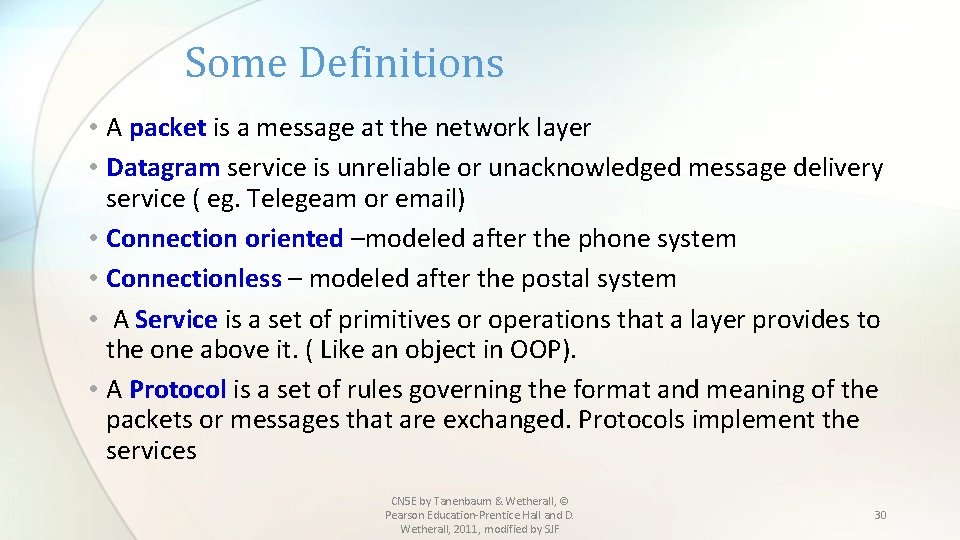
Some Definitions • A packet is a message at the network layer • Datagram service is unreliable or unacknowledged message delivery service ( eg. Telegeam or email) • Connection oriented –modeled after the phone system • Connectionless – modeled after the postal system • A Service is a set of primitives or operations that a layer provides to the one above it. ( Like an object in OOP). • A Protocol is a set of rules governing the format and meaning of the packets or messages that are exchanged. Protocols implement the services CN 5 E by Tanenbaum & Wetherall, © Pearson Education-Prentice Hall and D. Wetherall, 2011, modified by SJF 30
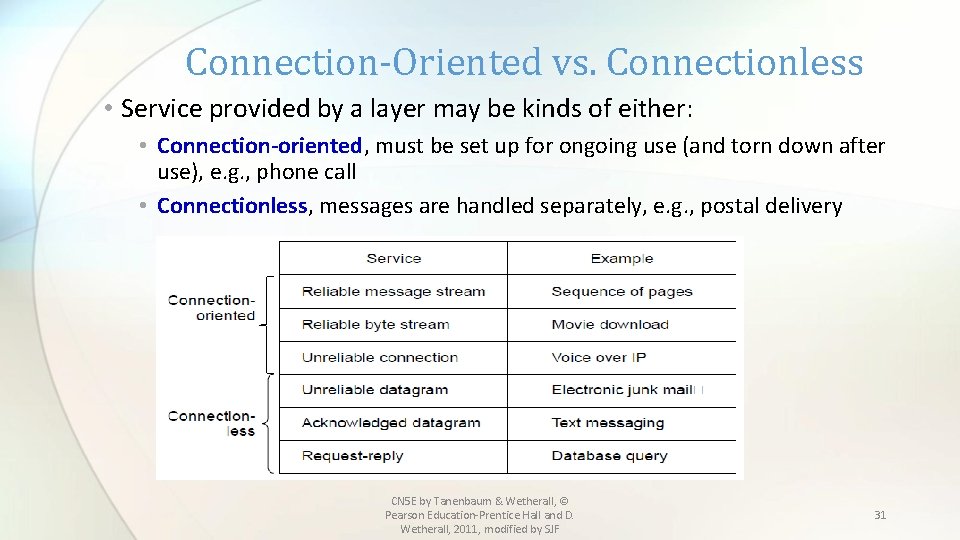
Connection-Oriented vs. Connectionless • Service provided by a layer may be kinds of either: • Connection-oriented, must be set up for ongoing use (and torn down after use), e. g. , phone call • Connectionless, messages are handled separately, e. g. , postal delivery CN 5 E by Tanenbaum & Wetherall, © Pearson Education-Prentice Hall and D. Wetherall, 2011, modified by SJF 31
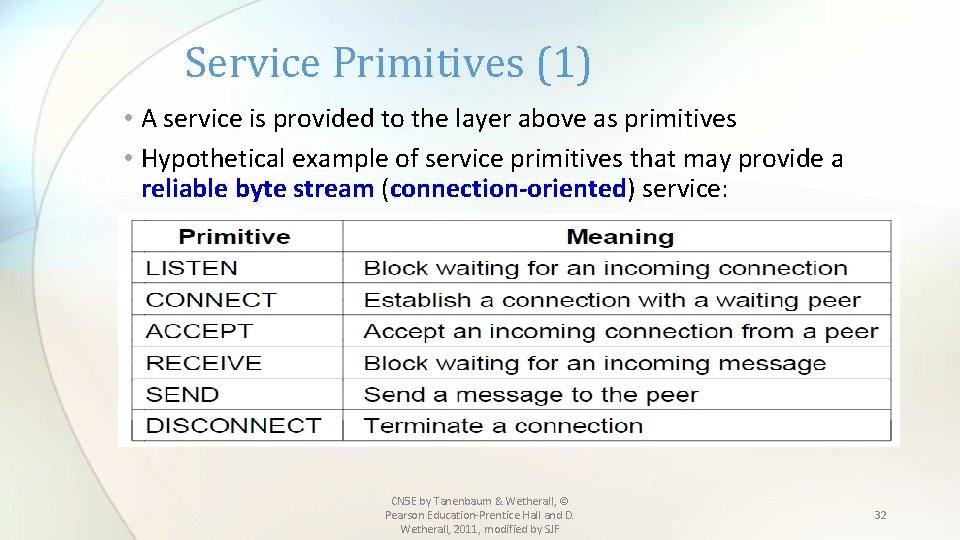
Service Primitives (1) • A service is provided to the layer above as primitives • Hypothetical example of service primitives that may provide a reliable byte stream (connection-oriented) service: CN 5 E by Tanenbaum & Wetherall, © Pearson Education-Prentice Hall and D. Wetherall, 2011, modified by SJF 32
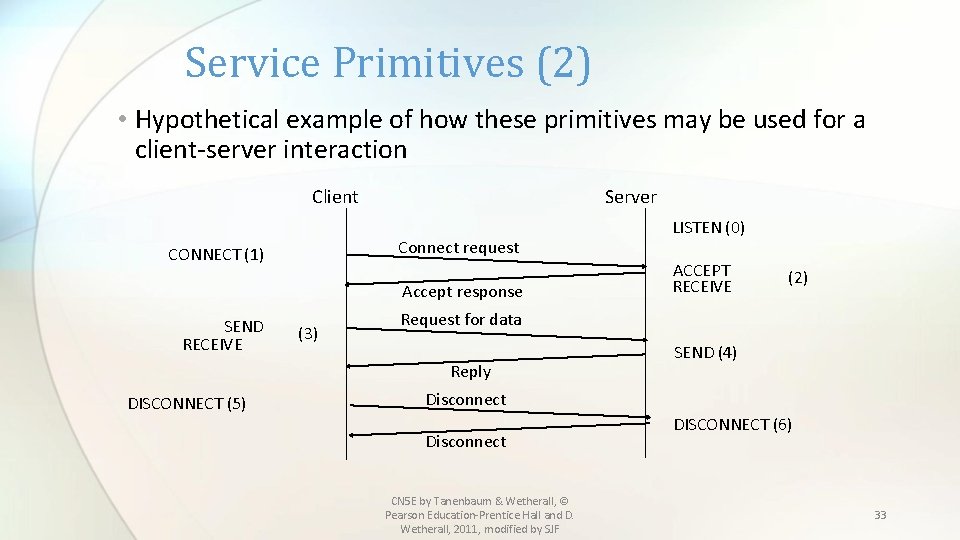
Service Primitives (2) • Hypothetical example of how these primitives may be used for a client-server interaction Server Client Connect request CONNECT (1) Accept response SEND RECEIVE (3) ACCEPT RECEIVE (2) Request for data Reply DISCONNECT (5) LISTEN (0) SEND (4) Disconnect CN 5 E by Tanenbaum & Wetherall, © Pearson Education-Prentice Hall and D. Wetherall, 2011, modified by SJF DISCONNECT (6) 33
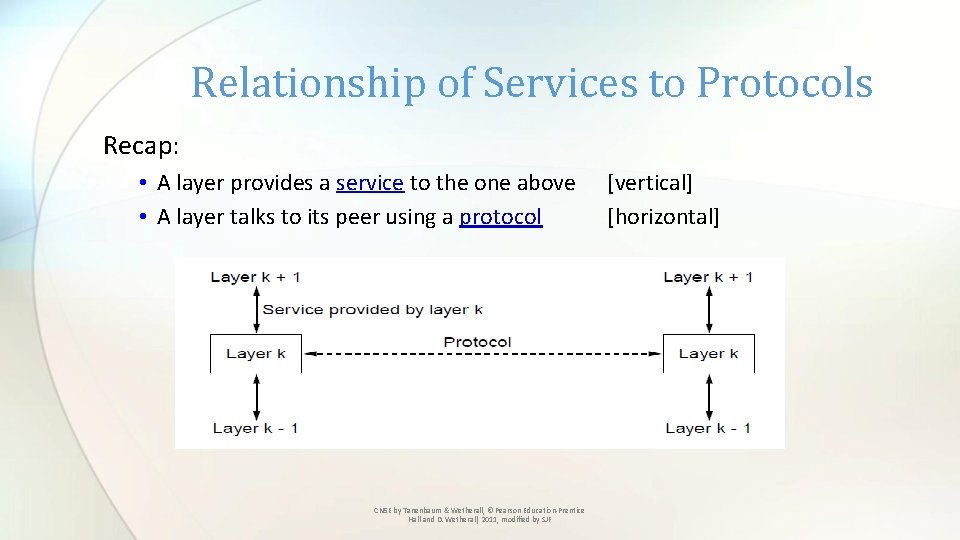
Relationship of Services to Protocols Recap: • A layer provides a service to the one above • A layer talks to its peer using a protocol CN 5 E by Tanenbaum & Wetherall, © Pearson Education-Prentice Hall and D. Wetherall, 2011, modified by SJF [vertical] [horizontal]
Reference Models Reference models describe the layers in a network architecture • OSI reference model » • TCP/IP reference model » • Model used for this text » • Critique of OSI and TCP/IP » CN 5 E by Tanenbaum & Wetherall, © Pearson Education-Prentice Hall and D. Wetherall, 2011, modified by SJF
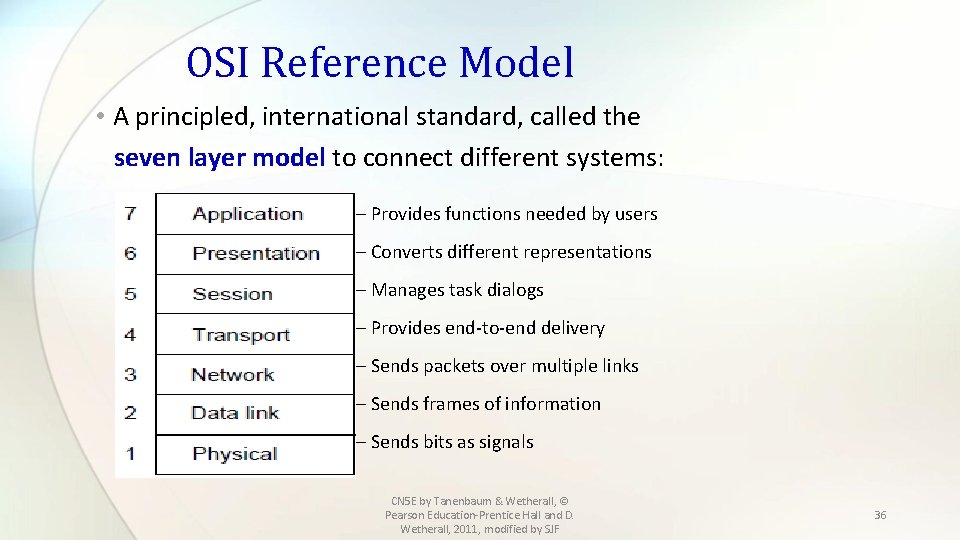
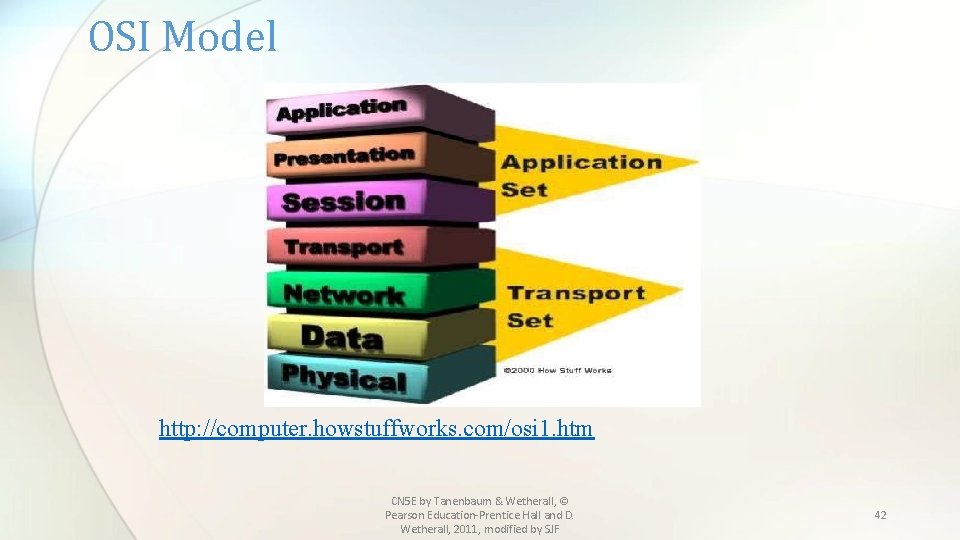
OSI Reference Model • A principled, international standard, called the seven layer model to connect different systems: – Provides functions needed by users – Converts different representations – Manages task dialogs – Provides end-to-end delivery – Sends packets over multiple links – Sends frames of information – Sends bits as signals CN 5 E by Tanenbaum & Wetherall, © Pearson Education-Prentice Hall and D. Wetherall, 2011, modified by SJF 36
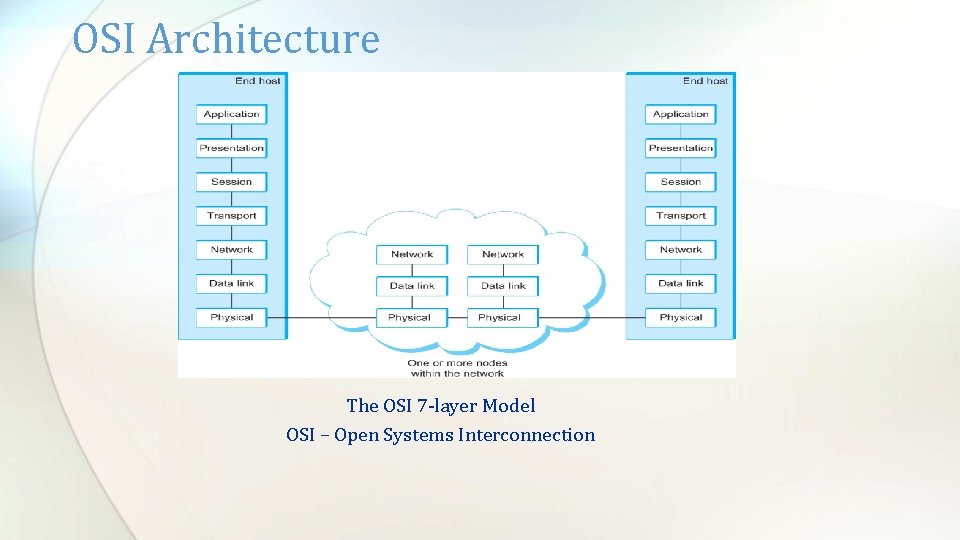
OSI Architecture The OSI 7 -layer Model OSI – Open Systems Interconnection
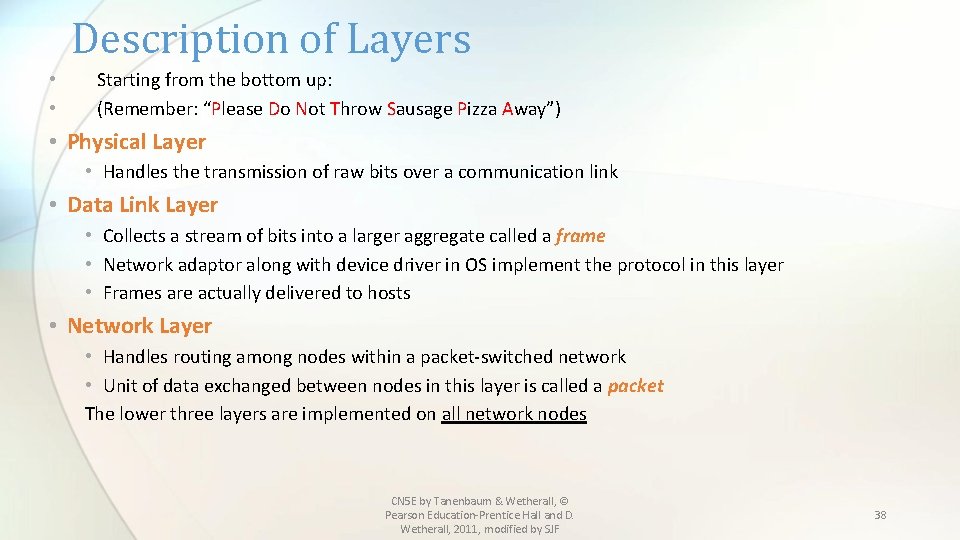
Description of Layers • • Starting from the bottom up: (Remember: “Please Do Not Throw Sausage Pizza Away”) • Physical Layer • Handles the transmission of raw bits over a communication link • Data Link Layer • Collects a stream of bits into a larger aggregate called a frame • Network adaptor along with device driver in OS implement the protocol in this layer • Frames are actually delivered to hosts • Network Layer • Handles routing among nodes within a packet-switched network • Unit of data exchanged between nodes in this layer is called a packet The lower three layers are implemented on all network nodes CN 5 E by Tanenbaum & Wetherall, © Pearson Education-Prentice Hall and D. Wetherall, 2011, modified by SJF 38
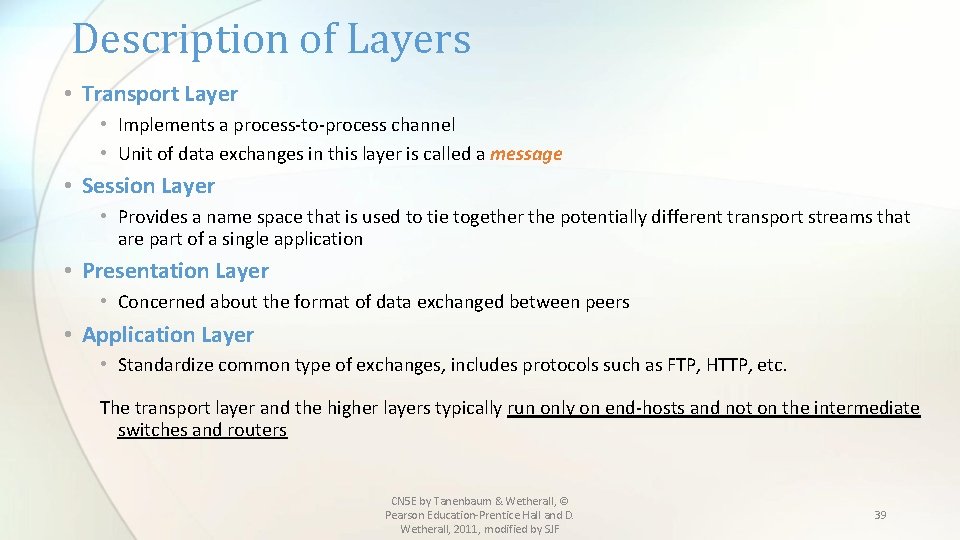
Description of Layers • Transport Layer • Implements a process-to-process channel • Unit of data exchanges in this layer is called a message • Session Layer • Provides a name space that is used to tie together the potentially different transport streams that are part of a single application • Presentation Layer • Concerned about the format of data exchanged between peers • Application Layer • Standardize common type of exchanges, includes protocols such as FTP, HTTP, etc. The transport layer and the higher layers typically run only on end-hosts and not on the intermediate switches and routers CN 5 E by Tanenbaum & Wetherall, © Pearson Education-Prentice Hall and D. Wetherall, 2011, modified by SJF 39
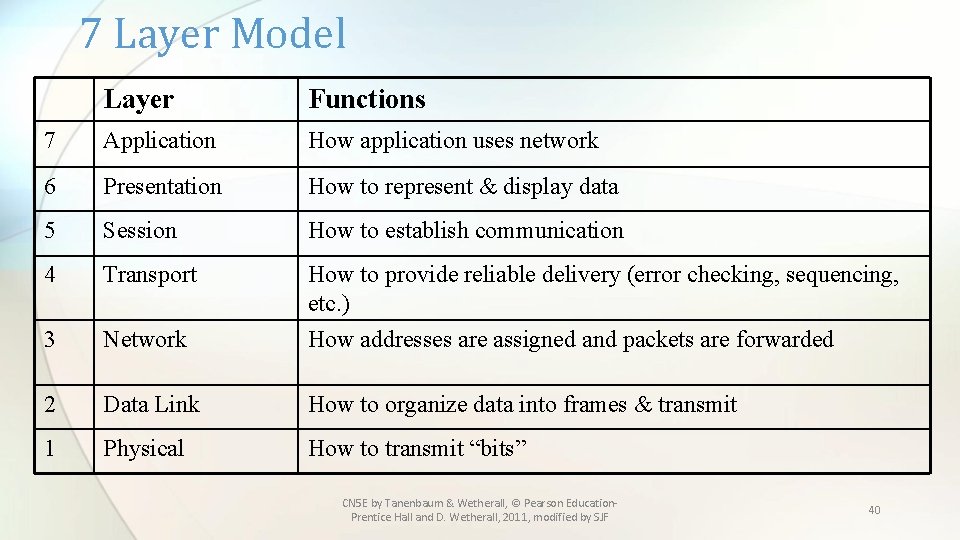
7 Layer Model Layer Functions 7 Application How application uses network 6 Presentation How to represent & display data 5 Session How to establish communication 4 Transport How to provide reliable delivery (error checking, sequencing, etc. ) 3 Network How addresses are assigned and packets are forwarded 2 Data Link How to organize data into frames & transmit 1 Physical How to transmit “bits” CN 5 E by Tanenbaum & Wetherall, © Pearson Education. Prentice Hall and D. Wetherall, 2011, modified by SJF 40
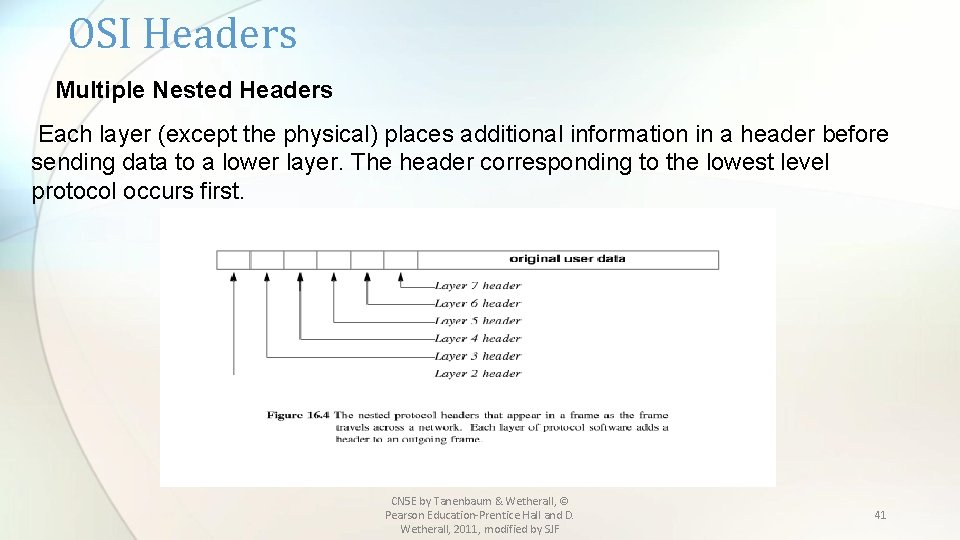
OSI Headers Multiple Nested Headers Each layer (except the physical) places additional information in a header before sending data to a lower layer. The header corresponding to the lowest level protocol occurs first. CN 5 E by Tanenbaum & Wetherall, © Pearson Education-Prentice Hall and D. Wetherall, 2011, modified by SJF 41
OSI Model http: //computer. howstuffworks. com/osi 1. htm CN 5 E by Tanenbaum & Wetherall, © Pearson Education-Prentice Hall and D. Wetherall, 2011, modified by SJF 42
OSI -7 Layer Model • The OSI (Open System Interconnection) model has 7 layers and can be summarized as follows: 1. A layer should be created where a different abstraction is needed. 2. Each layer should perform a well defined function 3. The function of each layer should be based on standard protocols. 4. The layer boundaries should minimize the information flow across the interfaces. 5. The number of layers should be large enough to accommodate the necessary functions and small enough not to be cumbersome. This model is widely used and specifies what each layer should do. CN 5 E by Tanenbaum & Wetherall, © Pearson Education-Prentice Hall and D. Wetherall, 2011, modified by SJF 43
OSI -7 Layer Model • Three concepts are central to this model: 1. Services 2. Interfaces 3. Protocols The main contribution of this model is that it makes the distinction among these 3 concepts explicit. • Each layer performs a service for the layer above it. • The layer’s interface tells the processes above it how to access it. • Peer protocols can be used or changed by the layers. CN 5 E by Tanenbaum & Wetherall, © Pearson Education-Prentice Hall and D. Wetherall, 2011, modified by SJF 44
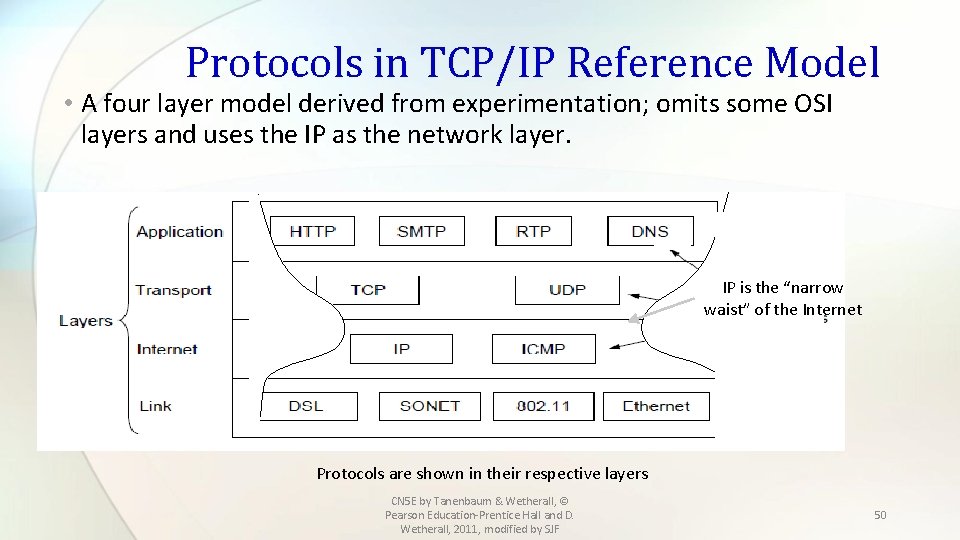
Internet Architecture • Also called the TCP/IP Architecture • Evolved from the packet switched ARPANET ( Advanced Research Projects Agency) of the Department of Defense. • Influenced the OSI model • Usually shown as a 4 or 5 layer model CN 5 E by Tanenbaum & Wetherall, © Pearson Education-Prentice Hall and D. Wetherall, 2011, modified by SJF 45
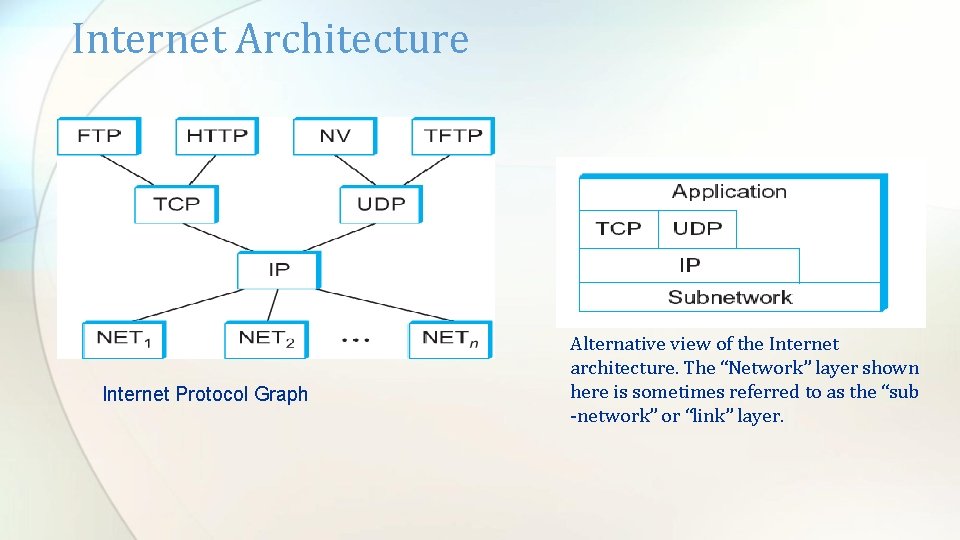
Internet Architecture Special Features 1. Does not imply strict layering 2. Has “hourglass shape” design philosophy- with IP as its central feature ( See protocol graph) 3. To propose a new protocol, both a protocol specification and at least one representative implementations must be provided. CN 5 E by Tanenbaum & Wetherall, © Pearson Education-Prentice Hall and D. Wetherall, 2011, modified by SJF 46
Internet Architecture Internet Protocol Graph Alternative view of the Internet architecture. The “Network” layer shown here is sometimes referred to as the “sub -network” or “link” layer.
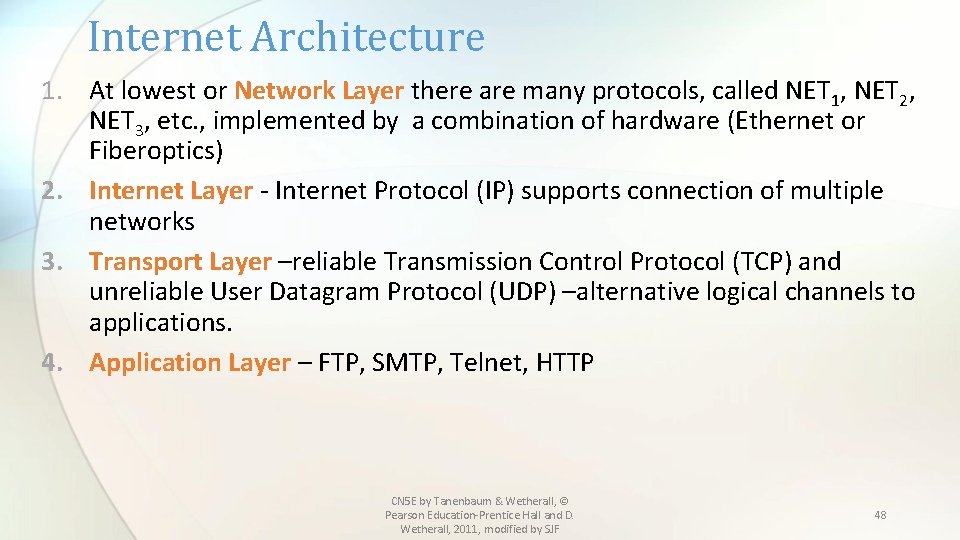
Internet Architecture 1. At lowest or Network Layer there are many protocols, called NET 1, NET 2, NET 3, etc. , implemented by a combination of hardware (Ethernet or Fiberoptics) 2. Internet Layer - Internet Protocol (IP) supports connection of multiple networks 3. Transport Layer –reliable Transmission Control Protocol (TCP) and unreliable User Datagram Protocol (UDP) –alternative logical channels to applications. 4. Application Layer – FTP, SMTP, Telnet, HTTP CN 5 E by Tanenbaum & Wetherall, © Pearson Education-Prentice Hall and D. Wetherall, 2011, modified by SJF 48
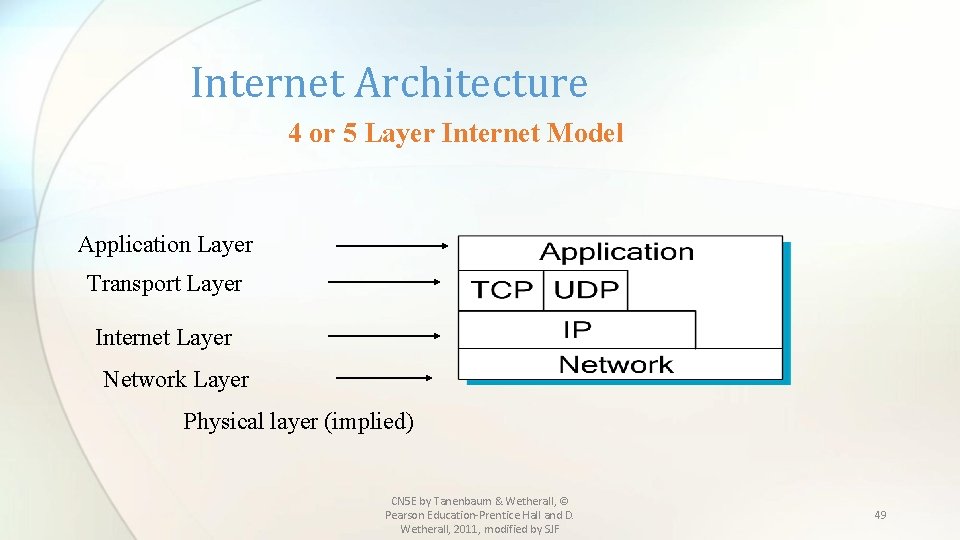
Internet Architecture 4 or 5 Layer Internet Model Application Layer Transport Layer Internet Layer Network Layer Physical layer (implied) CN 5 E by Tanenbaum & Wetherall, © Pearson Education-Prentice Hall and D. Wetherall, 2011, modified by SJF 49
Protocols in TCP/IP Reference Model • A four layer model derived from experimentation; omits some OSI layers and uses the IP as the network layer. IP is the “narrow waist” of the Internet Protocols are shown in their respective layers CN 5 E by Tanenbaum & Wetherall, © Pearson Education-Prentice Hall and D. Wetherall, 2011, modified by SJF 50
TCP/IP Reference Model • This model was defined by Cerf and Kahn and defined as a standard in the Internet community. • The protocols came first and the model was a description of the existing protocols • The original TCP/IP model did not distinguish between services, interfaces and protocols. CN 5 E by Tanenbaum & Wetherall, © Pearson Education-Prentice Hall and D. Wetherall, 2011, modified by SJF 51
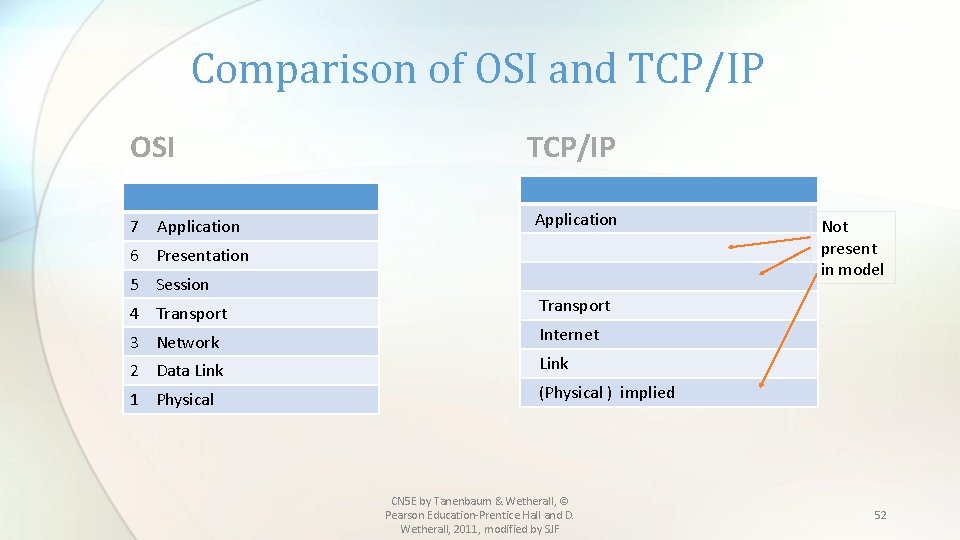
Comparison of OSI and TCP/IP OSI 7 Application TCP/IP Application 6 Presentation 5 Session 4 Transport 3 Network 2 Data Link 1 Physical Not present in model Transport Internet Link (Physical ) implied CN 5 E by Tanenbaum & Wetherall, © Pearson Education-Prentice Hall and D. Wetherall, 2011, modified by SJF 52
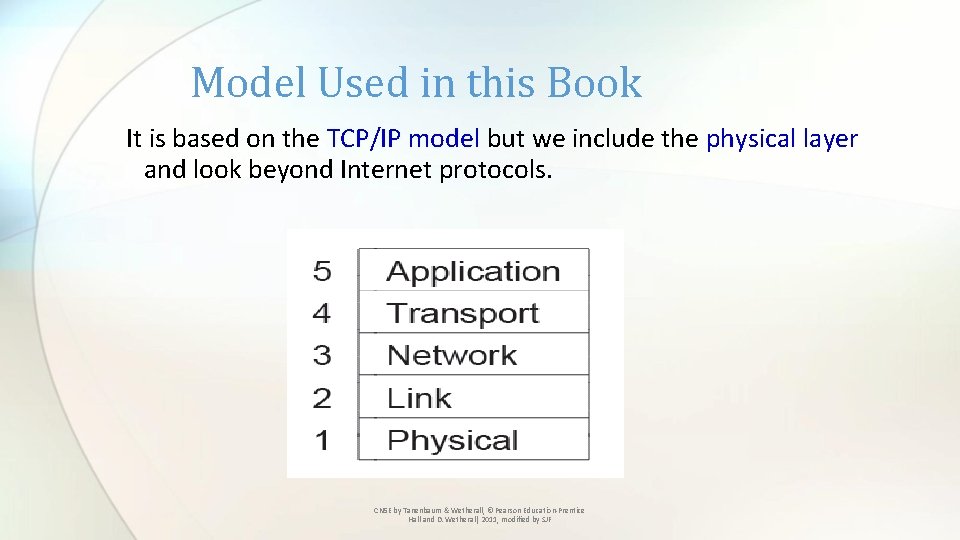
Model Used in this Book It is based on the TCP/IP model but we include the physical layer and look beyond Internet protocols. CN 5 E by Tanenbaum & Wetherall, © Pearson Education-Prentice Hall and D. Wetherall, 2011, modified by SJF
Critique of OSI & TCP/IP OSI: +Very influential model with clear concepts • Models, protocols and adoption all bogged down by politics and complexity TCP/IP: +Very successful protocols that worked well and thrived • Weak model derived after the fact from protocols CN 5 E by Tanenbaum & Wetherall, © Pearson Education-Prentice Hall and D. Wetherall, 2011, modified by SJF
Example Networks • The Internet » • 3 G mobile phone networks » • Wireless LANs » • RFID and sensor networks » CN 5 E by Tanenbaum & Wetherall, © Pearson Education-Prentice Hall and D. Wetherall, 2011, modified by SJF
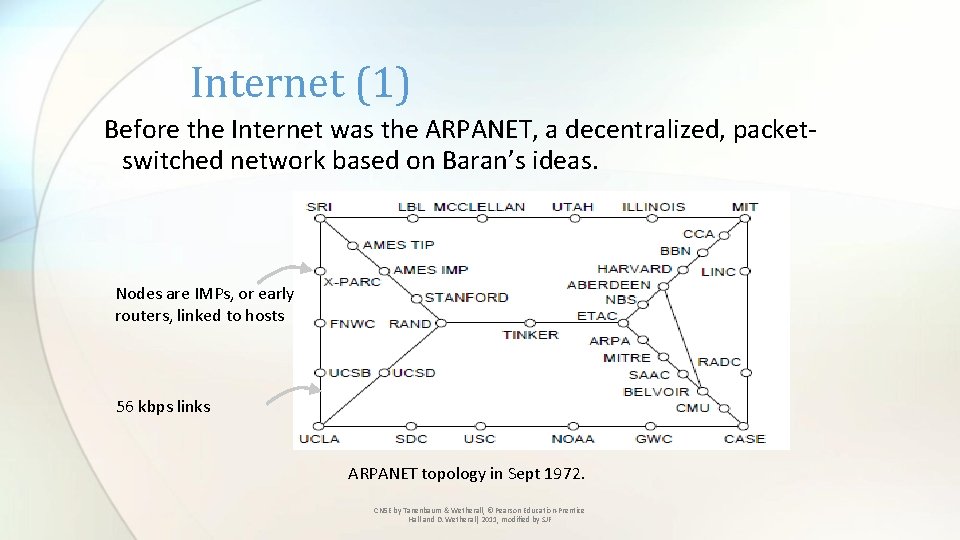
Internet (1) Before the Internet was the ARPANET, a decentralized, packetswitched network based on Baran’s ideas. Nodes are IMPs, or early routers, linked to hosts 56 kbps links ARPANET topology in Sept 1972. CN 5 E by Tanenbaum & Wetherall, © Pearson Education-Prentice Hall and D. Wetherall, 2011, modified by SJF
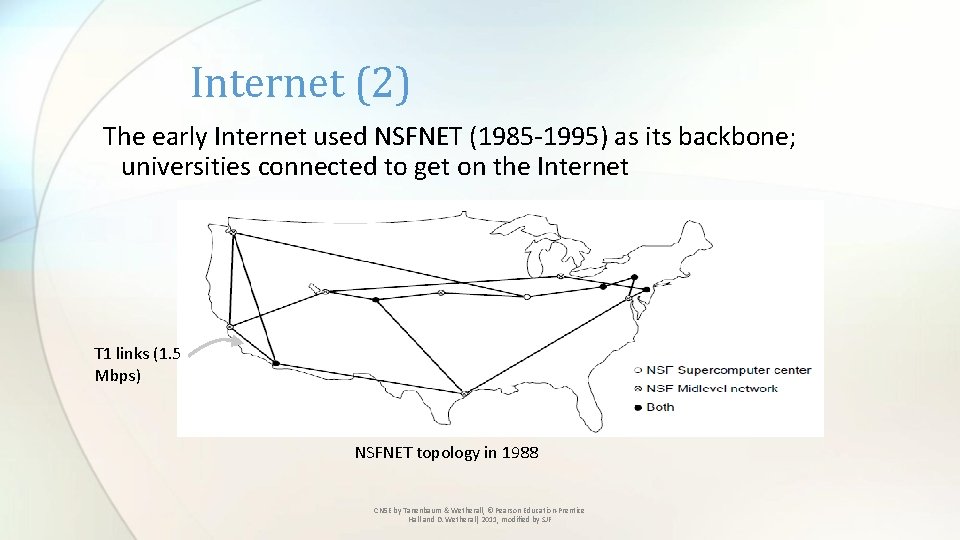
Internet (2) The early Internet used NSFNET (1985 -1995) as its backbone; universities connected to get on the Internet T 1 links (1. 5 Mbps) NSFNET topology in 1988 CN 5 E by Tanenbaum & Wetherall, © Pearson Education-Prentice Hall and D. Wetherall, 2011, modified by SJF
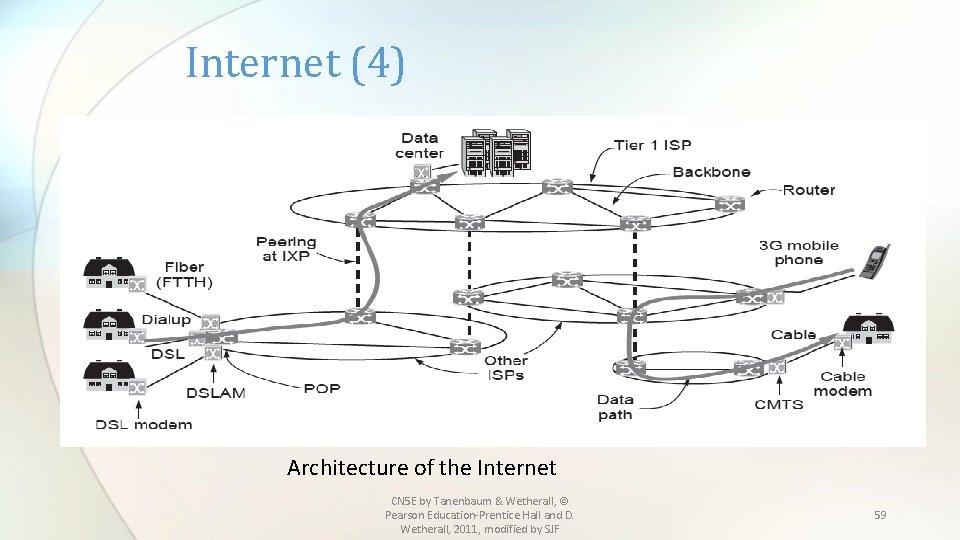
Internet (3) The modern Internet is more complex: • ISP networks serve as the Internet backbone • ISPs connect or peer to exchange traffic at IXPs • Within each network routers switch packets • Between networks, traffic exchange is set by business agreements • Customers connect at the edge by many means • Cable, DSL, Fiber-to-the-Home, 3 G/4 G wireless, dialup • Data centers concentrate many servers (“the cloud”) • Most traffic is content from data centers (esp. video) • The architecture continues to evolve CN 5 E by Tanenbaum & Wetherall, © Pearson Education-Prentice Hall and D. Wetherall, 2011, modified by SJF
Internet (4) Architecture of the Internet CN 5 E by Tanenbaum & Wetherall, © Pearson Education-Prentice Hall and D. Wetherall, 2011, modified by SJF 59
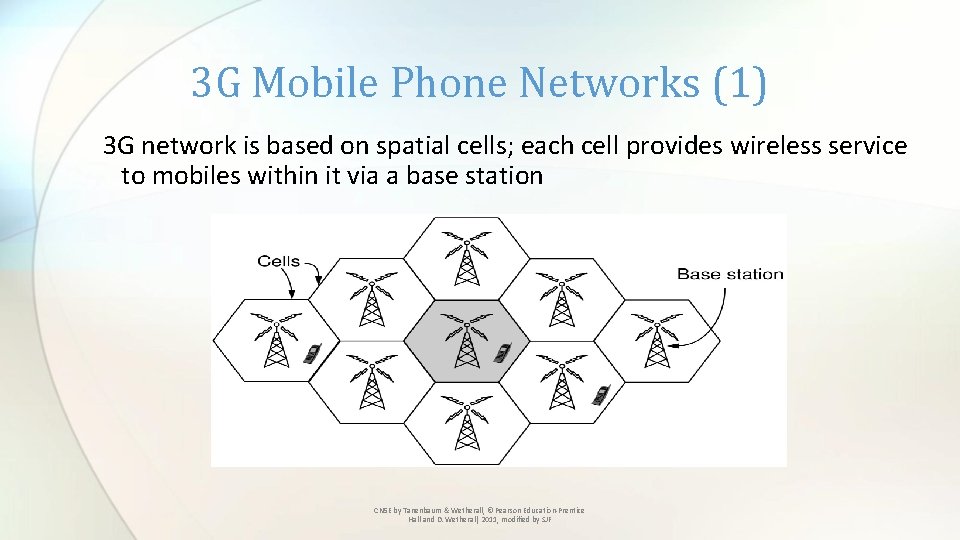
3 G Mobile Phone Networks (1) 3 G network is based on spatial cells; each cell provides wireless service to mobiles within it via a base station CN 5 E by Tanenbaum & Wetherall, © Pearson Education-Prentice Hall and D. Wetherall, 2011, modified by SJF
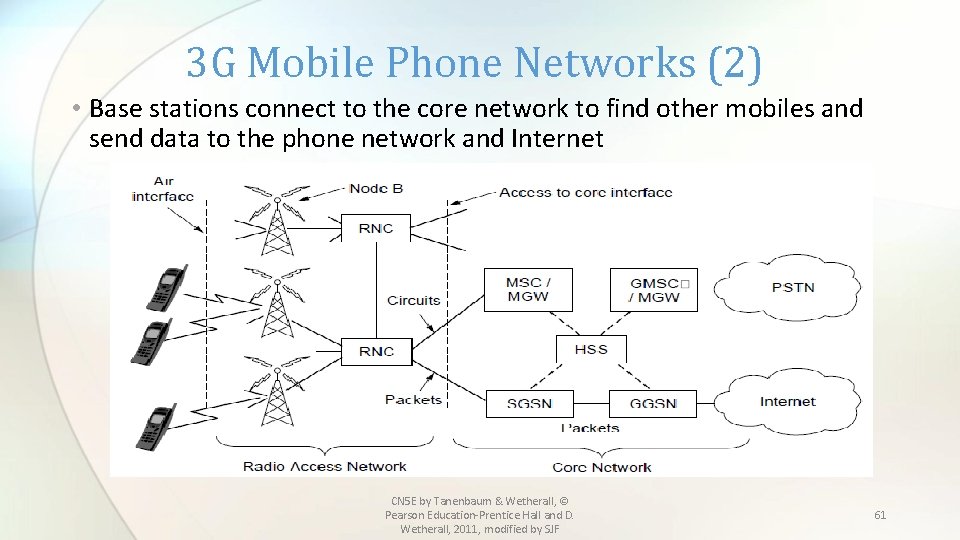
3 G Mobile Phone Networks (2) • Base stations connect to the core network to find other mobiles and send data to the phone network and Internet CN 5 E by Tanenbaum & Wetherall, © Pearson Education-Prentice Hall and D. Wetherall, 2011, modified by SJF 61
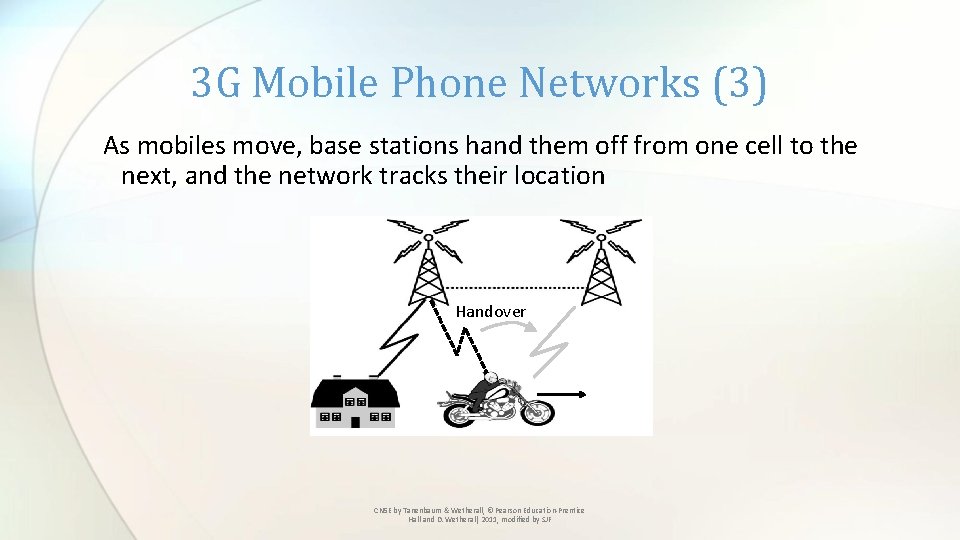
3 G Mobile Phone Networks (3) As mobiles move, base stations hand them off from one cell to the next, and the network tracks their location Handover CN 5 E by Tanenbaum & Wetherall, © Pearson Education-Prentice Hall and D. Wetherall, 2011, modified by SJF
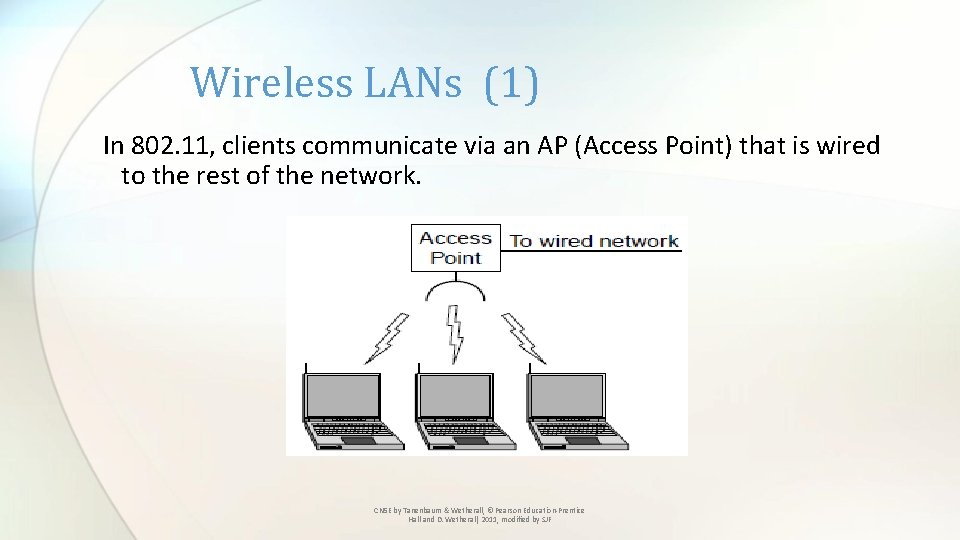
Wireless LANs (1) In 802. 11, clients communicate via an AP (Access Point) that is wired to the rest of the network. CN 5 E by Tanenbaum & Wetherall, © Pearson Education-Prentice Hall and D. Wetherall, 2011, modified by SJF
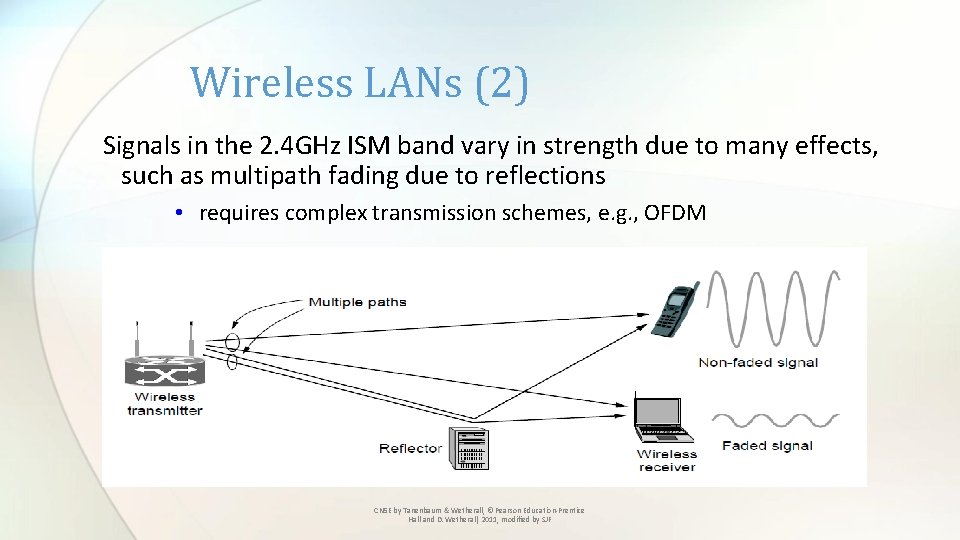
Wireless LANs (2) Signals in the 2. 4 GHz ISM band vary in strength due to many effects, such as multipath fading due to reflections • requires complex transmission schemes, e. g. , OFDM CN 5 E by Tanenbaum & Wetherall, © Pearson Education-Prentice Hall and D. Wetherall, 2011, modified by SJF
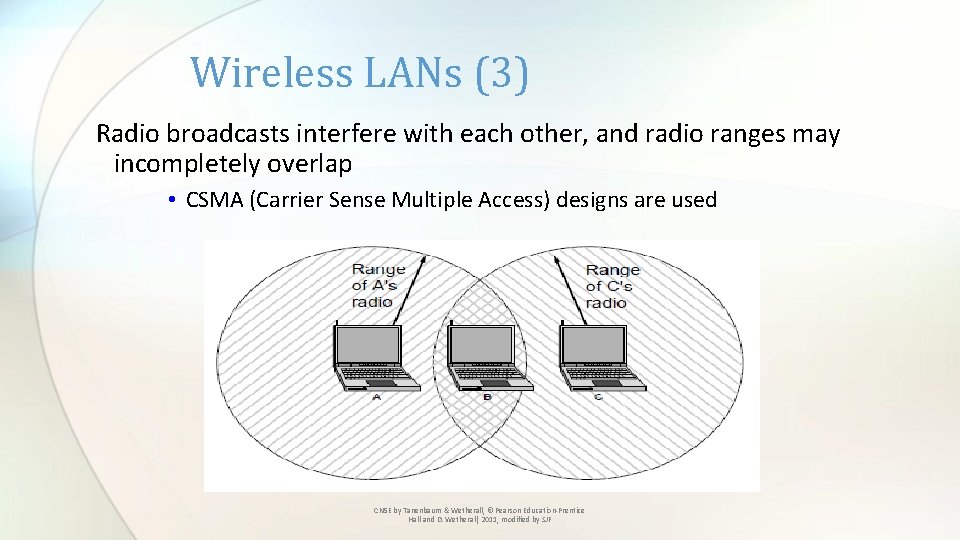
Wireless LANs (3) Radio broadcasts interfere with each other, and radio ranges may incompletely overlap • CSMA (Carrier Sense Multiple Access) designs are used CN 5 E by Tanenbaum & Wetherall, © Pearson Education-Prentice Hall and D. Wetherall, 2011, modified by SJF
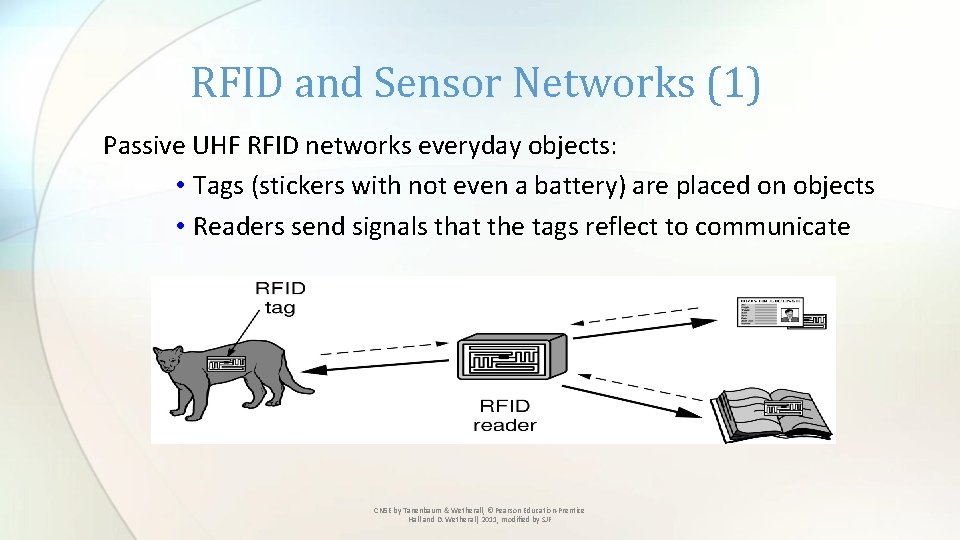
RFID and Sensor Networks (1) Passive UHF RFID networks everyday objects: • Tags (stickers with not even a battery) are placed on objects • Readers send signals that the tags reflect to communicate CN 5 E by Tanenbaum & Wetherall, © Pearson Education-Prentice Hall and D. Wetherall, 2011, modified by SJF
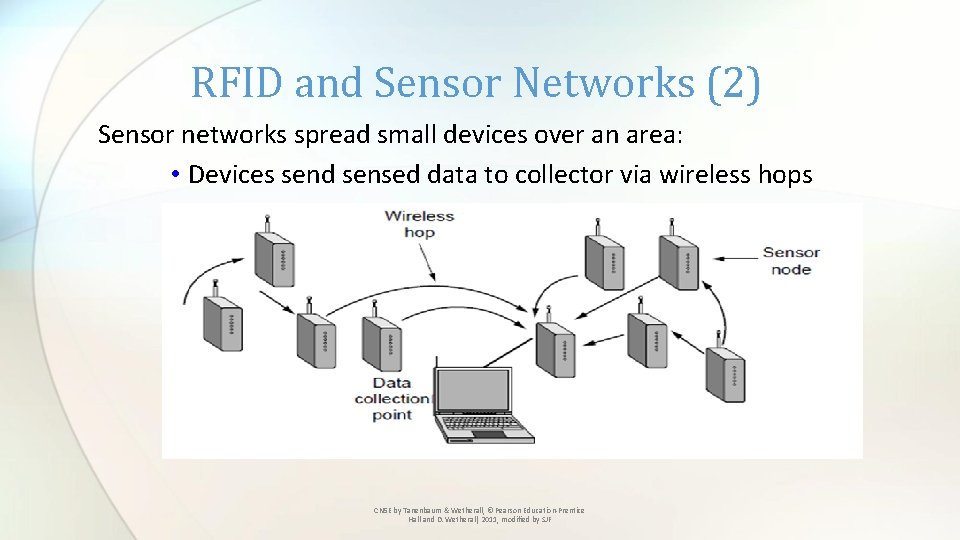
RFID and Sensor Networks (2) Sensor networks spread small devices over an area: • Devices send sensed data to collector via wireless hops CN 5 E by Tanenbaum & Wetherall, © Pearson Education-Prentice Hall and D. Wetherall, 2011, modified by SJF
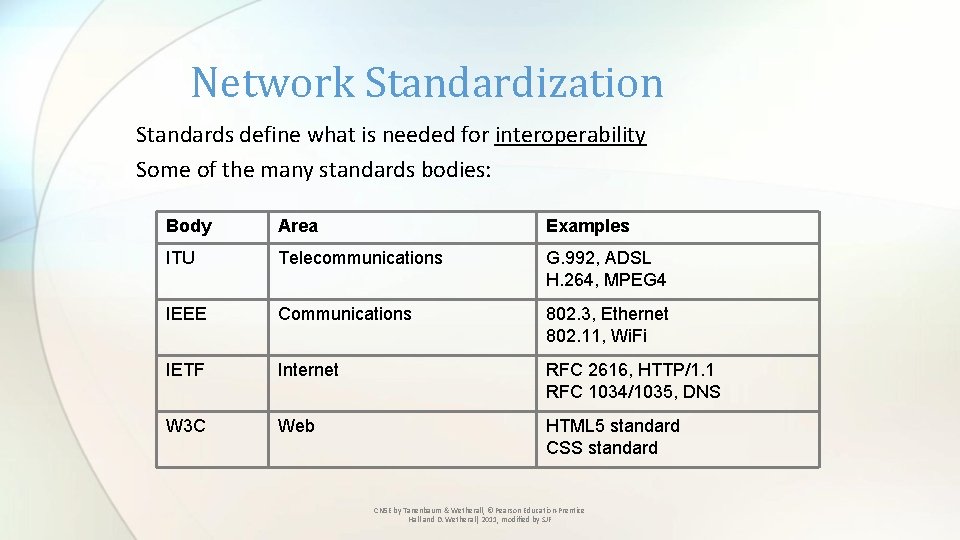
Network Standardization Standards define what is needed for interoperability Some of the many standards bodies: Body Area Examples ITU Telecommunications G. 992, ADSL H. 264, MPEG 4 IEEE Communications 802. 3, Ethernet 802. 11, Wi. Fi IETF Internet RFC 2616, HTTP/1. 1 RFC 1034/1035, DNS W 3 C Web HTML 5 standard CSS standard CN 5 E by Tanenbaum & Wetherall, © Pearson Education-Prentice Hall and D. Wetherall, 2011, modified by SJF
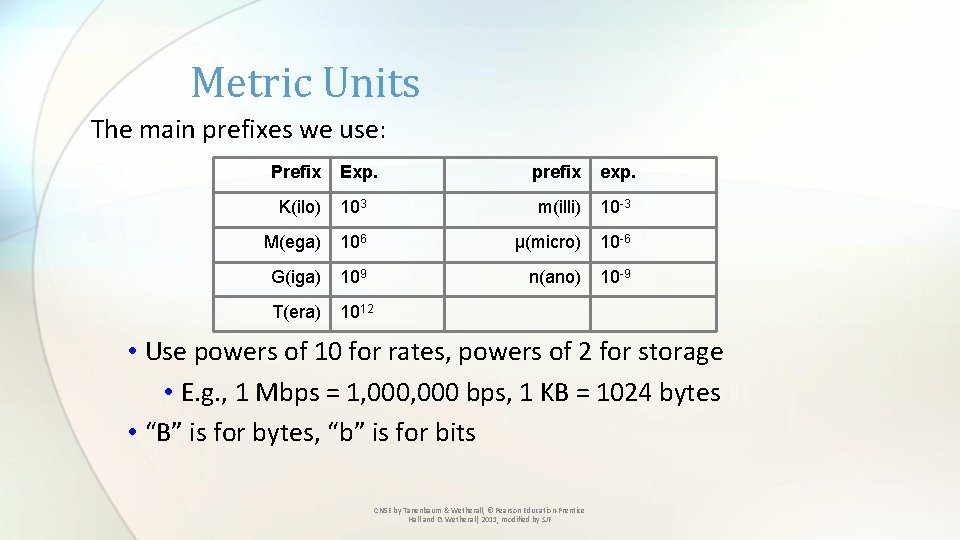
Metric Units The main prefixes we use: Prefix Exp. prefix exp. K(ilo) 103 m(illi) 10 -3 M(ega) 106 μ(micro) 10 -6 G(iga) 109 n(ano) 10 -9 T(era) 1012 • Use powers of 10 for rates, powers of 2 for storage • E. g. , 1 Mbps = 1, 000 bps, 1 KB = 1024 bytes • “B” is for bytes, “b” is for bits CN 5 E by Tanenbaum & Wetherall, © Pearson Education-Prentice Hall and D. Wetherall, 2011, modified by SJF
End Chapter 1 CN 5 E by Tanenbaum & Wetherall, © Pearson Education-Prentice Hall and D. Wetherall, 2011, modified by SJF 70