
Computer Networks and Internets 5 e By Douglas
Computer Networks and Internets, 5 e By Douglas E. Comer Lecture Power. Points Adapted from the notes By Lami Kaya, LKaya@ieee. org © 2009 Pearson Education Inc. , Upper Saddle River, NJ. All rights reserved. 1
Chapter 3 Internet Applications And Network Programming 2
Topics Covered • • • • 3. 1 Introduction 3. 2 Two Basic Internet Communication Paradigms 3. 3 Connection-oriented Communication 3. 4 The Client-Server Model Of Interaction 3. 5 Characteristics Of Clients And Servers 3. 6 Server Programs And Server-Class Computers 3. 7 Requests, Responses, And Direction Of Data Flow 3. 8 Multiple Clients And Multiple Servers 3. 9 Server Identification And Demultiplexing 3. 10 Concurrent Servers 3. 11 Circular Dependencies Among Servers 3. 12 Peer-To-Peer Interactions 3. 13 Network Programming And The Socket API 3
Topics Covered • • • 3. 14 3. 15 3. 16 3. 17 3. 18 3. 19 3. 20 3. 21 3. 22 Sockets, Descriptors, And Network I/O Parameters And The Socket API Socket Calls In A Client And Server Socket Functions Used By Both Client And Server The Connection Function Used Only By A Client Socket Functions Used Only By A Server Socket Functions Used With The Message Paradigm Other Socket Functions Sockets, Threads, And Inheritance 4
3. 1 Introduction • The Internet offers users a rich diversity of services – none of the services is part of the underlying communication infrastructure • Internet provides a general purpose mechanism on which – all services are built – and individual services are supplied by application programs that run on computers attached to the Internet • It is possible to devise new services without changing the Internet • Chapter covers two key concepts of Internet applications: – describes the conceptual paradigm that applications follow when they communicate over the Internet – presents the details of the socket Application Programming Interface (socket API) that Internet applications use 5
3. 1 Introduction • Internet application programmers can get started easily • It is possible to create Internet applications without knowing how networks operate – However, understanding network protocols and technologies allows them to write efficient and reliable code that enables applications to scale across many sites • Later parts of the text provide the necessary information by explaining data communications and protocols used to form the Internet 6
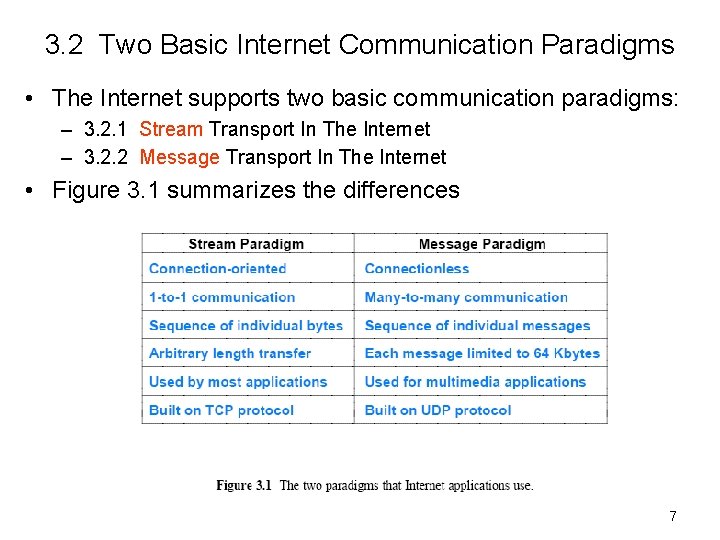
3. 2 Two Basic Internet Communication Paradigms • The Internet supports two basic communication paradigms: – 3. 2. 1 Stream Transport In The Internet – 3. 2. 2 Message Transport In The Internet • Figure 3. 1 summarizes the differences 7
3. 2. 1 Stream Transport In The Internet • • • Stream denotes a paradigm in which a sequence of bytes flows from one application program to another Internet's mechanism arranges two streams between a pair of communicating applications, one in each direction The network accepts input from either application, and delivers the data to the other application The stream mechanism transfers a sequence of bytes without attaching meaning to the bytes and without inserting boundaries A sending application can choose to generate one byte at a time, or can generate blocks of bytes The network chooses the number of bytes to deliver at any time – the network can choose to combine smaller blocks into one large block or can divide a large block into smaller blocks • Example: Most Internet applications—http, ftp, telnet, …
3. 2. 2 Message Transport In The Internet • In a message paradigm, the network accepts and delivers messages • Each message delivered to a receiver corresponds to a message that was transmitted by a sender – the network never delivers part of a message, nor does it join multiple messages together – if a sender places exactly n bytes in an outgoing message, the receiver will find exactly n bytes in the incoming message • The message paradigm allows delivery in different forms: – Unicast • a message can be sent from an application on one computer directly to an application on another, 1 -to-1 – Multicast • a message can be multicast to some of the computers on a network, 1 -tomany – broadcast • a message can be broadcast to all computers on a given network, 1 -to-all
3. 2. 2 Message Transport In The Internet • Message service does not make any guarantees • So messages may be – Lost (i. e. , never delivered) – Duplicated (more than one copy arrives) – Delivered out-of-order • A programmer who uses the message paradigm must insure that the application operates correctly – even if packets are lost or reordered • Most applications require delivery guarantees • Programmers tend to use the stream service except in special situations – such as video, where multicast is needed and the application provides support to handle packet reordering and loss • Examples: Internet radio • Thus, we will focus on the stream paradigm
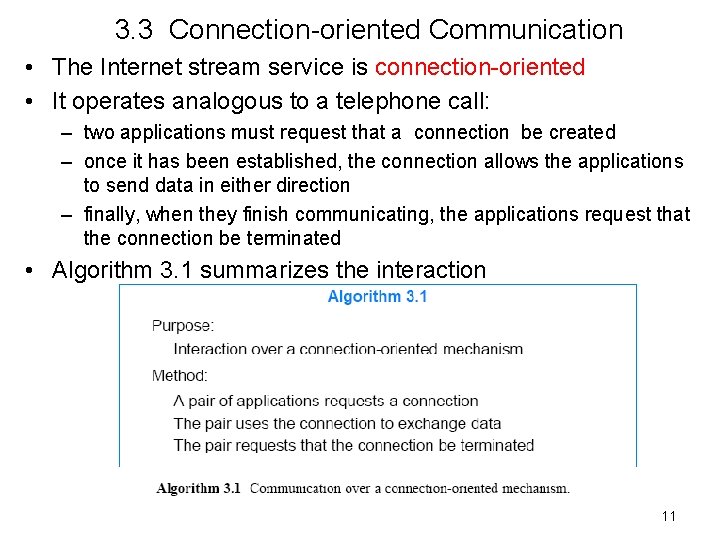
3. 3 Connection-oriented Communication • The Internet stream service is connection-oriented • It operates analogous to a telephone call: – two applications must request that a connection be created – once it has been established, the connection allows the applications to send data in either direction – finally, when they finish communicating, the applications request that the connection be terminated • Algorithm 3. 1 summarizes the interaction 11
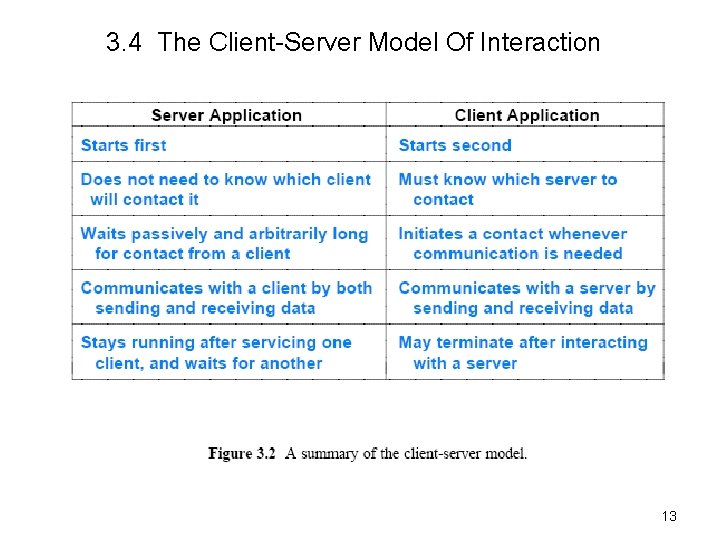
3. 4 The Client-Server Model Of Interaction • The first step in Algorithm 3. 1 raises a question: – how can a pair of applications that run on two independent computers coordinate to guarantee that they request a connection at the same time? • The answer lies in a form of interaction known as the clientserver model – A server, starts first and awaits contact – A client, start second and initiates the connection • Figure 3. 2 summarizes the interaction • Subsequent sections describe how specific services use the client-server model • Application programs known as a clients and servers handle all services in the Internet—Web browser=http client Web server=http server 12
3. 4 The Client-Server Model Of Interaction 13
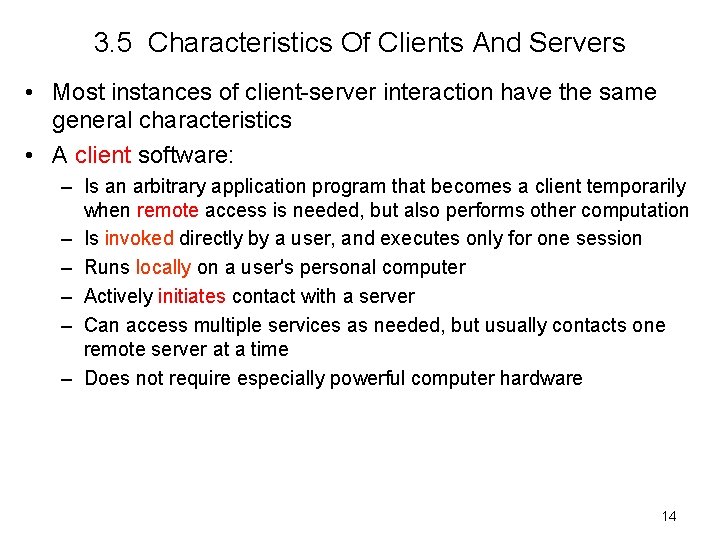
3. 5 Characteristics Of Clients And Servers • Most instances of client-server interaction have the same general characteristics • A client software: – Is an arbitrary application program that becomes a client temporarily when remote access is needed, but also performs other computation – Is invoked directly by a user, and executes only for one session – Runs locally on a user's personal computer – Actively initiates contact with a server – Can access multiple services as needed, but usually contacts one remote server at a time – Does not require especially powerful computer hardware 14
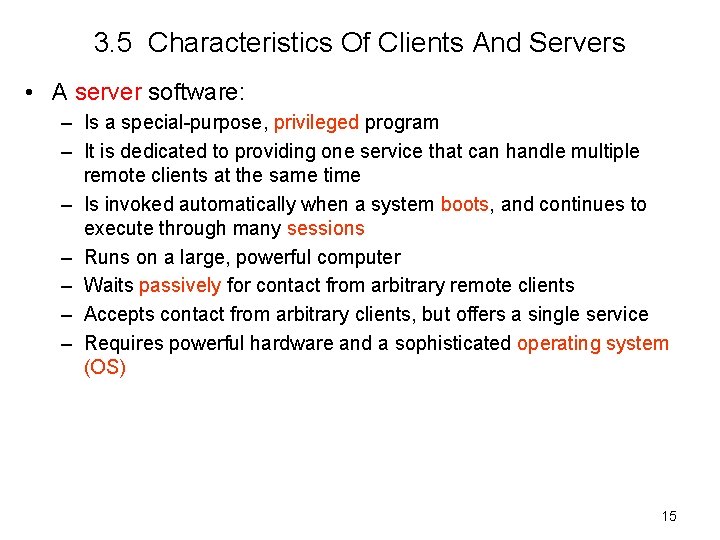
3. 5 Characteristics Of Clients And Servers • A server software: – Is a special-purpose, privileged program – It is dedicated to providing one service that can handle multiple remote clients at the same time – Is invoked automatically when a system boots, and continues to execute through many sessions – Runs on a large, powerful computer – Waits passively for contact from arbitrary remote clients – Accepts contact from arbitrary clients, but offers a single service – Requires powerful hardware and a sophisticated operating system (OS) 15
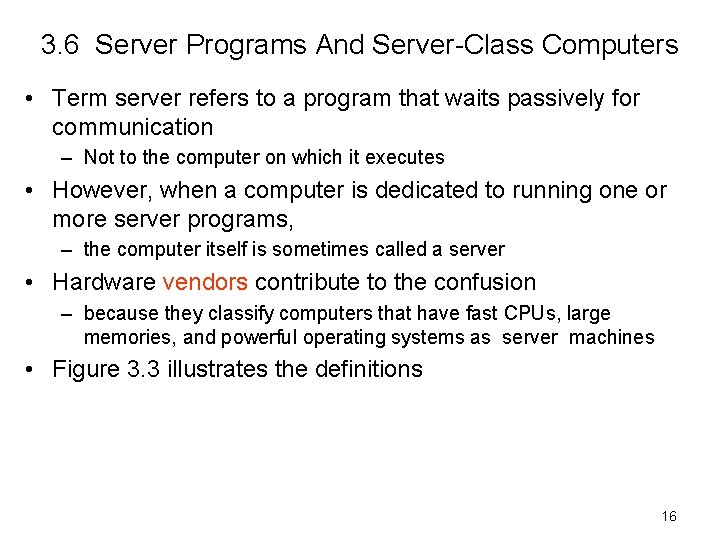
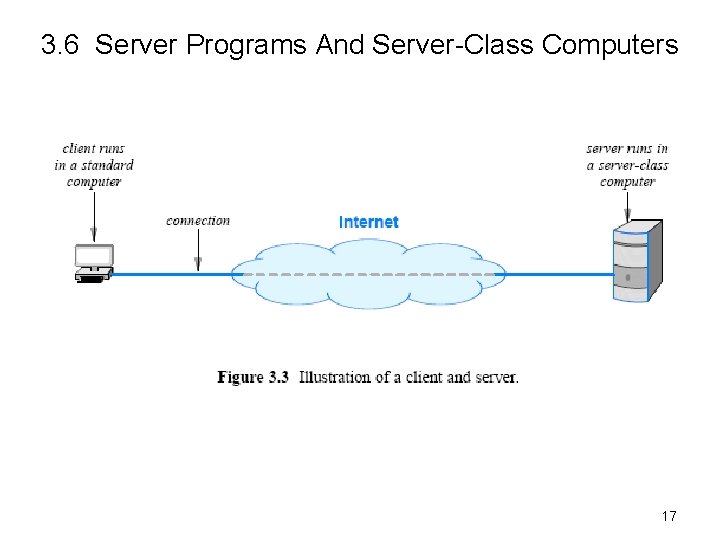
3. 6 Server Programs And Server-Class Computers • Term server refers to a program that waits passively for communication – Not to the computer on which it executes • However, when a computer is dedicated to running one or more server programs, – the computer itself is sometimes called a server • Hardware vendors contribute to the confusion – because they classify computers that have fast CPUs, large memories, and powerful operating systems as server machines • Figure 3. 3 illustrates the definitions 16
3. 6 Server Programs And Server-Class Computers 17
3. 7 Requests, Responses, And Direction Of Data Flow • Client and server? • Which side initiates contact? • Once contact has been established, two-way communication is possible (i. e. , data can flow from a client to a server or from a server to a client) • In some cases, a client sends a series of requests and the server issues a series of responses (e. g. , a database client might allow a user to look up more than one item at a time). 18
3. 8 Multiple Clients And Multiple Servers • Allowing a given computer to operate multiple servers is useful because – the hardware can be shared – a single computer has lower system administration overhead than multiple computer systems – experience has shown that the demand for a server is often sporadic • a server can remain idle for long periods of time • an idle server does not use the CPU while waiting for a request to arrive • If demand for services is low, consolidating servers on a single computer can dramatically reduce cost – without significantly reducing performance • Examples? 19
3. 8 Multiple Clients And Multiple Servers • A computer can run: – – – A single client A single server Multiple copies of a client that contact a given server Multiple clients that each contact a particular server Multiple servers, each for a particular service • Allowing a computer to operate multiple clients is useful – because services can be accessed simultaneously • For example, a user can have three (3) windows open simultaneously running three (3) applications: – one that retrieves and displays email – another that connects to a chat service – and a third running a web browser 20
3. 9 Server Identification And Demultiplexing • How does a client identify a server? • The Internet protocols divide identification into two pieces: – An identifier for the computer on which a server runs—IP – An identifier for a service on the computer—Port# • Identifying a computer? – Each computer in the Internet is assigned a unique 32 -bit identifier known as an Internet Protocol address (IP address) – A client must specify the server’s IP address – IP addresses are hard to remember, so, to make server identification easy for humans, each computer is also assigned a name, and the Domain Name System (DNS) translates between IP and domain name • DNS described in Chapter 4 is used to translate a name into an address – Thus, a user specifies a name such as www. csuchico. edu rather than an integer address 21
3. 9 Server Identification And Demultiplexing • Identifying a service on Internet? – Each service available on the Internet is assigned a unique 16 -bit identifier known as a protocol port number (or port number) • Examples, email(smtp) port number 25, and the web(http) port number 80—They are called “well-known” port numbers – When a server begins execution • it registers with its local OS by specifying the port number for its service – When a client contacts a remote server to request service • the request contains a port number—so, the client must know the port number for the service—well-known ! – When a request arrives at a server • software on the server uses the port number in the request to determine which application on the server computer should handle the request • Figure 3. 4 summarizes the basic steps 22
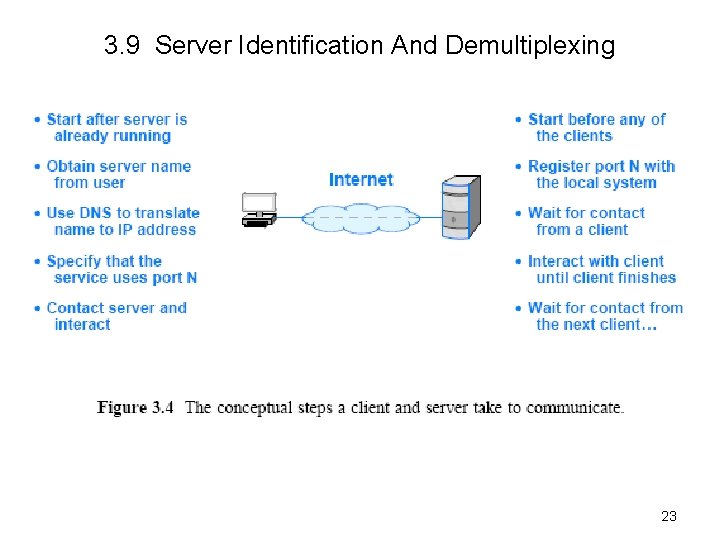
3. 9 Server Identification And Demultiplexing 23
3. 10 Concurrent Servers • The steps in Figure 3. 4 imply that a server handles one client at a time • Although a serial approach works in a few trivial cases, most servers work as concurrent server – That is, a server uses more than one client at a time – Concurrent execution depend on the OS being used • Concurrent server code is divided into two pieces – a main program (thread) – a handler • The main thread accepts contact from a client and creates a thread of control for the client • Each thread of control interacts with a single client and runs the handler code 24
3. 10 Concurrent Servers • After handling one client the thread terminates • The main thread keeps the server alive after creating a thread to handle a request – the main thread waits for another request to arrive • If N clients are simultaneously using a concurrent server, N+1 threads will be running: – the main thread (1) is waiting for additional requests – and N threads are each interacting with a single client 25
3. 11 Circular Dependencies Among Servers • In practice, the distinction blurs because a server for one service can act as a client for another – For example, before it can fill in a web page, a web server may need to become a client of a database – A server may also become the client of a security service (e. g. , to verify that a client is allowed to access the service). • Programmers must be careful to avoid circular dependencies among servers – For example, consider what can happen if a server for service X becomes a client of service X , which becomes a client of X – The chain of requests can continue indefinitely until all three servers exhaust resources • The potential for circularity is especially high when services are designed independently – because no single programmer controls all servers 26
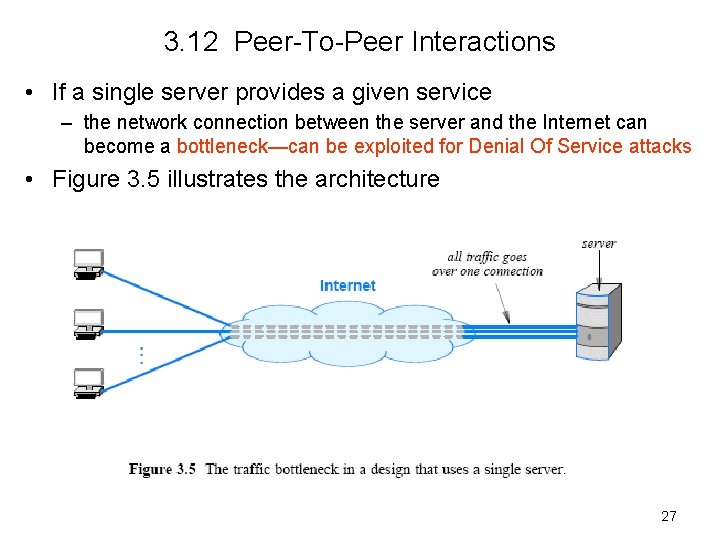
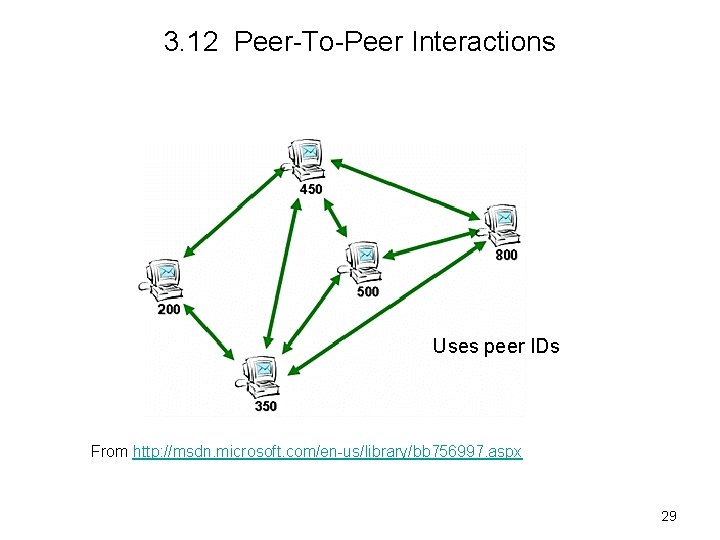
3. 12 Peer-To-Peer Interactions • If a single server provides a given service – the network connection between the server and the Internet can become a bottleneck—can be exploited for Denial Of Service attacks • Figure 3. 5 illustrates the architecture 27
3. 12 Peer-To-Peer Interactions • Can Internet services be provided without creating a central bottleneck? – One way to avoid a bottleneck forms the basis of file sharing known as a peer-to-peer ( P 2 P ) architecture • The scheme avoids placing data on a central server – data is distributed equally among a set of N servers – and each client request is sent to the appropriate server – a given server only provides 1/N of the data • the amount of traffic between a server and the Internet is 1/N as much as in the single-server architecture • Server software can run on the same computers as clients • Figure 3. 6 illustrates the architecture 28
3. 12 Peer-To-Peer Interactions Uses peer IDs From http: //msdn. microsoft. com/en-us/library/bb 756997. aspx 29
3. 13 Network Programming and the Socket API • The interface an application uses to specify communication is known as an Application Program Interface (API) – Appendix 1 contains a simplified API (with only seven functions) • example code that demonstrates how such an API can be used to create Internet applications, including a working web server • Details of an API depend on the OS • One particular API has emerged as the de facto standard for software that communicates over the Internet – known as the socket API, and commonly abbreviated sockets • The socket API is available for many OS – such as Microsoft's Windows systems—Microsoft’s version is called “winsock” – as well as various UNIX systems, including Linux—Unix/Linux versions are developed from Berkley socket API 30
3. 14 Sockets, Descriptors, And Network I/O • Because it was originally developed as part of the UNIX OS, the socket API is integrated with I/O • When an application creates a socket to use for Internet – OS returns a small integer descriptor that identifies the socket • The application then passes the descriptor as an argument – when it calls functions to perform an operation on the socket (e. g. , to transfer data across the network or to receive data) • In many OS, socket descriptors are integrated with other I/O descriptors – as a result, an application can use the read and write operations for socket I/O or I/O to a file 31
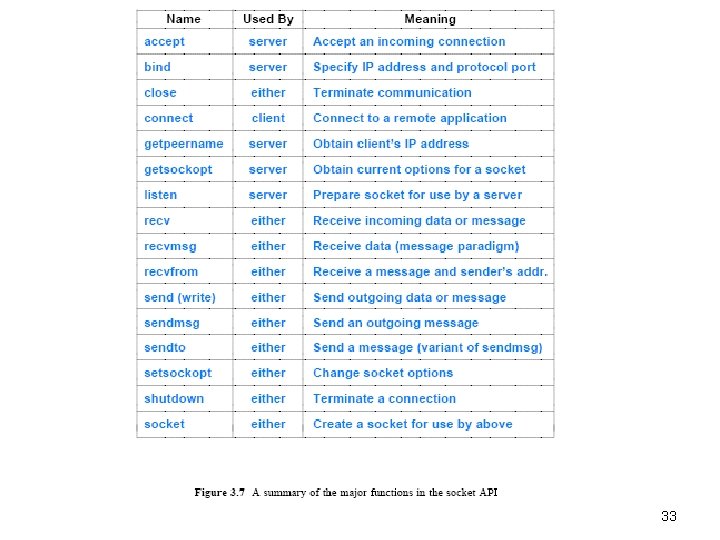
3. 15 Parameters And The Socket API • Socket programming differs from conventional I/O • An application must specify many details, such as – the address of a remote computer – the protocol port number – and whether the application will act as a client or as a server • To avoid having a single socket function with many parameters, designers of the socket API chose to define many functions • An application creates a socket, and then invokes functions for details • The advantage of the socket approach is that most functions have three or fewer parameters • The disadvantage is that a programmer must remember to call multiple functions when using sockets • Figure 3. 7 summarizes key functions in the socket API 32
33
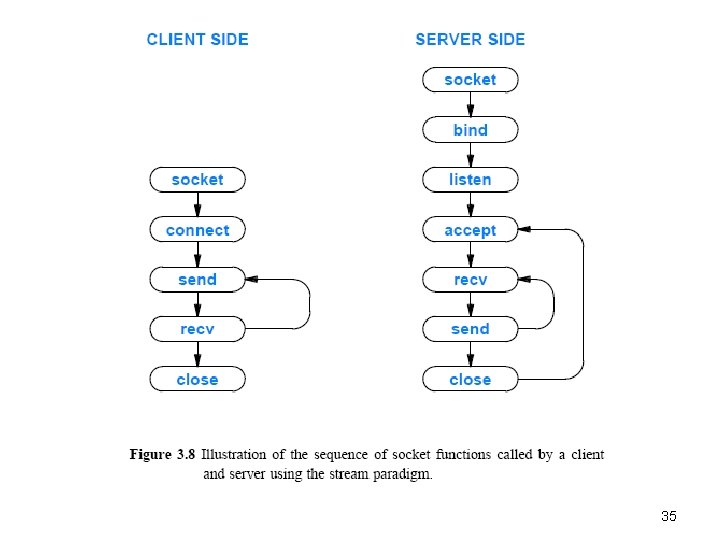
3. 16 Socket Calls In A Client And Server • Figure 3. 8 illustrates the sequence of socket calls made by a typical client and server that use a stream connection – The client sends data first and the server waits to receive data • In practice, some applications arrange for the server to send first (i. e. , send and recv are called in the reverse order) 34
35
3. 17 Socket Functions Used By Both Client And Server • Readers are encouraged to check the book for the details of these functions – – – 3. 17. 1 3. 17. 2 3. 17. 3 3. 17. 4 3. 17. 5 The Socket Function The Send Function The Recv Function Read And Write With Sockets The Close Function 36
3. 18 The Connection Function Used Only By A Client • Clients call connect to establish a connection with a specific server. The form is: connect (socket, saddresslen) • Argument socket is the descriptor of a socket to use for the connection • Readers are encouraged to check the book for the details 37
3. 19 Socket Functions Used Only By A Server • Readers are encouraged to check the book for the details of these functions – 3. 19. 1 The Bind Function – 3. 19. 2 The Listen Function – 3. 19. 3 The Accept Function 38
3. 20 Socket Functions Used With The Message Paradigm • The socket functions used to send and receive messages are more complicated than those used with the stream paradigm because many options are available – For example, a sender can choose whether to store the recipient’s address in the socket and merely send data or to specify the recipient’s address each time a message is transmitted – Furthermore, one function allows a sender to place the address and message in a structure and pass the address of the structure as an argument, and another function allows a sender to pass the address and message as separate arguments • Readers are encouraged to check the book for the details – 3. 20. 1 Sendto and Sendmsg Socket Functions – 3. 20. 2 Recvfrom And Recvmsg Functions 39
3. 21 Other Socket Functions • The socket API contains a variety of support functions – – – getpeername gethostname setsockopt g gethostbyname gethostbyaddr • Readers are encouraged to check the book for the details • For an example program, see here 40
3. 22 Sockets, Threads, And Inheritance • The socket API works well with concurrent servers • Implementations of the socket API adhere to the following inheritance principle: – Each new thread that is created inherits a copy of all open sockets from the thread that created it – The socket implementation uses a reference count mechanism to control each socket – When a socket is first created • the system sets the socket’s reference count to 1 • and the socket exists as long as the reference count remains positive. – When a program creates an additional thread • the thread inherits a pointer to each open socket the program owns • and the system increments the reference count of each socket by 1 – When a thread calls close • the system decrements the reference count for the socket • if the reference count has reached zero, the socket is removed 41
- Slides: 41